Fair value gap tmt

FVG DGT Panel [TMT] — Fair Value Gap and Inverse FVG Indicator with Live "% Left" Fill Tracking for MetaTrader 4

Version for MT4 | Non-repainting zone logic | BUY / SELL / NEUTRAL bias panel | FVG + IFVG | Optional second timeframe

1. Overview

FVG DGT Panel [TMT] is a chart-window indicator for MetaTrader 4 that finds, draws and tracks Fair Value Gaps (FVG) and Inverse Fair Value Gaps (IFVG) directly on your price chart. It is a MetaTrader 4 port of the popular "Fair Value Gaps by DGT" concept originally written for TradingView in Pine Script, rebuilt for MT4 with a compact information panel and several additions that are not part of the original script.

The idea behind a Fair Value Gap is simple. When price moves very fast in one direction, it can leave behind a small price range that was never traded back and forth properly, a pocket of imbalance between buyers and sellers. Many discretionary traders who work with price action, Smart Money Concepts (SMC), Inner Circle Trader (ICT) style concepts or plain supply and demand treat these pockets as areas where price may later return, react, or fail. This indicator automates the tedious part of that workflow: it scans the chart for those gaps, draws them as colored zones, extends them to the right while they remain valid, and removes them once they are filled.

On top of the classic FVG logic, this version adds four things that make the zones easier to read and to act on:

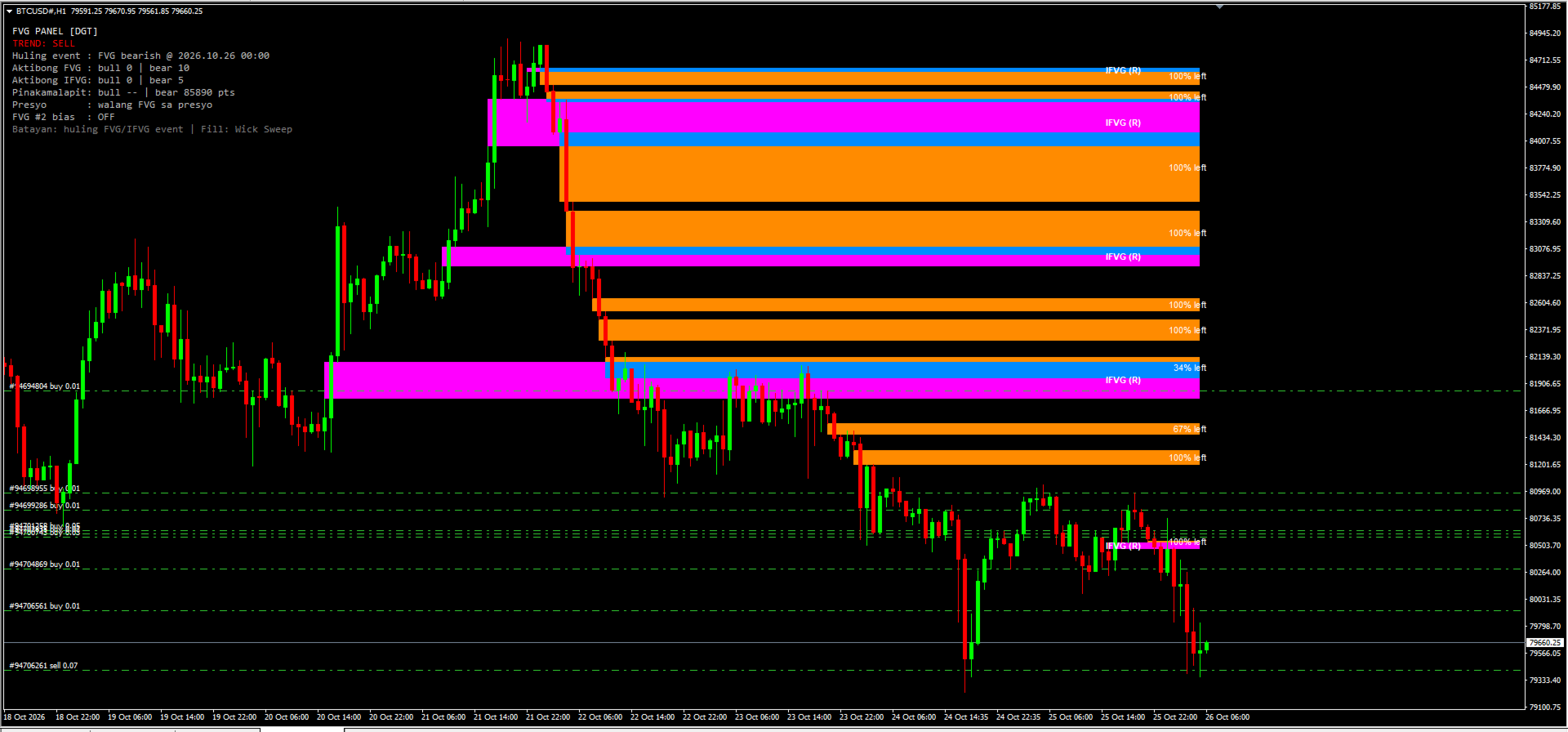
  1. A live "% left" label on every active FVG. Each zone tells you how much distance is still left before the zone counts as filled. A fresh, untouched zone shows 100% left. As price pushes into the zone, the number counts down. When it reaches 0% the zone is filled and disappears.
  2. Inverse FVG (IFVG) tracking with its own colors and its own text label. When a filled zone is broken by a candle close on the far side, the indicator turns it into an IFVG that is drawn in a separate color and tagged on the chart, so you can tell at a glance what is a fresh FVG and what is an inverted one.
  3. A compact panel in the corner of the chart that shows the current bias (BUY, SELL or NEUTRAL), the last FVG or IFVG event, how many zones are active, how far the nearest bullish and bearish zones are from price, and whether price is currently sitting inside a zone.
  4. Two independent FVG sources. You can run FVG #1 on the chart timeframe and FVG #2 on a different timeframe (for example M15 zones displayed on an M5 chart), each with its own colors.

2. What is a Fair Value Gap (FVG)?

A Fair Value Gap is a three-candle pattern. Take three consecutive candles and call them candle 1 (the oldest), candle 2 (the middle one) and candle 3 (the newest).

Bullish FVG. Candle 2 is a strong upward candle. The low of candle 3 is higher than the high of candle 1. The range between the high of candle 1 and the low of candle 3 is the gap. Price moved up so quickly that this range was not covered by overlapping wicks.

Bearish FVG. Candle 2 is a strong downward candle. The high of candle 3 is lower than the low of candle 1. The range between the low of candle 1 and the high of candle 3 is the gap.

Traders usually interpret these gaps in one of three ways:

  • As a magnet. Price often returns to a gap later, to "rebalance" the area, before continuing in its original direction or reversing.
  • As support or resistance. A bullish FVG below the current price is watched as a possible support area; a bearish FVG above price is watched as possible resistance.
  • As a footprint of aggressive participation. A cluster of unfilled gaps in one direction can reflect a sustained, one-sided move.

3. What is an Inverse FVG (IFVG)?

An Inverse FVG is a Fair Value Gap that has failed and flipped its role.

A bullish FVG is normally expected to hold as support. If price trades down through the zone and then a candle closes below the bottom of that zone, the zone has not held. In the inverse-FVG view, that failed bullish gap now becomes a bearish IFVG, an area that may act as resistance if price comes back up into it.

The same works in the opposite direction. A bearish FVG that is filled and then broken by a candle closing above its top becomes a bullish IFVG, an area that may act as support.

In short:

  • Bullish FVG: filled, then a candle closes below the zone, result: Bearish IFVG (resistance).
  • Bearish FVG: filled, then a candle closes above the zone, result: Bullish IFVG (support).

4. Feature Summary

  • Automatic bullish and bearish FVG detection with a strict three-candle rule, drawn as zones that extend to the right until filled.
  • Four fill methods: Any Touch, Midpoint, Wick Sweep and Body Beyond, used consistently for zone removal, IFVG creation and the "% left" value.
  • Live "% left" label on every active FVG, with adjustable font size and colors.
  • Inverse FVG tracking with its own colors and an "IFVG (S)" or "IFVG (R)" text label.
  • Information panel with BUY / SELL / NEUTRAL bias, last event, zone counts, nearest-zone distance and price location.
  • Optional second FVG timeframe with separate colors.
  • Zones are built from closed candles. A replay of past bars on load shows recent zones immediately, and all objects are removed cleanly with the indicator.

5. How the Indicator Detects an FVG (Exact Rules)

The detection follows the logic of the original Pine Script. For the source timeframe in use, the indicator looks at the three most recently closed candles of that timeframe: the newest one (candle 3), the middle one (candle 2) and the oldest one (candle 1).

Bullish FVG is created when all of these are true: - The low of the newest candle is above the high of the oldest candle. - The close of the middle candle is above the high of the oldest candle. - There is no earlier gap that already "prevents" this one, meaning the newest candle's low is not simply above the middle candle's high, and the middle candle's low is not simply above the oldest candle's high. This condition keeps the detection aligned with the Pine logic and avoids stacking an extra zone on top of a larger move that already left its own gap.

The zone is drawn from the high of the oldest candle (bottom) up to the low of the newest candle (top). It begins at the time of the oldest candle.

Bearish FVG is created when all of these are true: - The high of the newest candle is below the low of the oldest candle. - The close of the middle candle is below the low of the oldest candle. - The same "no earlier gap" condition holds in the downward direction.

The zone is drawn from the high of the newest candle (bottom) up to the low of the oldest candle (top).

When is it checked? Detection runs when a bar of the source timeframe closes. On the chart timeframe this means once per new bar. For a higher source timeframe, a zone is added only after a bar of that timeframe has actually closed. Because the zones are built from closed candles only, a zone that has been drawn will not vanish simply because the forming candle changed. The "% left" text and the panel are the only elements that update on every tick.

What if I choose a source timeframe lower than the chart? The indicator never uses a timeframe lower than the chart's own. If the value you enter is smaller than the chart timeframe, the chart timeframe is used instead.

6. The Four Fill Methods

A zone is considered "filled" when price reaches a specific level inside or at the far edge of the zone. Different traders define "filled" differently, so the indicator lets you choose. The setting is called Fill and takes a number from 0 to 3. The default is 2, Wick Sweep.

  • 0 – Any Touch: Bullish – the low of a candle reaches the top edge of the zone. Bearish – the high of a candle reaches the bottom edge of the zone.
  • 1 – Midpoint: Bullish – the low of a candle reaches the middle of the zone. Bearish – the high of a candle reaches the middle of the zone.
  • 2 – Wick Sweep (default): Bullish – the low of a candle reaches the bottom edge of the zone. Bearish – the high of a candle reaches the top edge of the zone.
  • 3 – Body Beyond: Bullish – a candle closes at or below the bottom edge of the zone. Bearish – a candle closes at or above the top edge of the zone.

Any Touch (0). The most sensitive setting. The zone disappears the first time price touches it. Use this if you only care about untouched zones and want any contact to count as mitigation. With this method the "% left" label is not very informative, because the zone is removed on the first touch, so it will normally read 100% until it vanishes.

Midpoint (1). The zone is filled when price reaches its 50% level, which many traders call the consequent encroachment. A zone at 0% left under this method has been entered by half of its height.

Wick Sweep (2). The zone is considered filled only when a wick reaches the far edge, so the entire zone has been traded through. This is the default and gives the "% left" label its widest, most gradual range, from 100% down to 0% across the full height of the zone.

Body Beyond (3). The strictest setting. Wicks are ignored. The zone is filled only when a candle closes beyond the far edge. This is useful if you consider wick penetration to be noise and only accept a real close.

7. The "% Left" Label

7.1 What it shows

Every active FVG carries a small text label such as "72% left". It answers one question: how much of the distance to the fill level is still left?

  • 100% left means price has not entered the zone yet.
  • 50% left means price has gone halfway toward the fill level.
  • 1% left means price is almost at the fill level.
  • At 0%, the zone is filled and is removed from the chart together with its label.

The label is placed at the vertical middle of the zone, anchored at the right side near the current candle, and it uses the font size and font color you choose.

7.2 How it is calculated

The calculation depends on the fill method, because the "finish line" is different for each method.

  1. The indicator takes the entry edge of the zone. For a bullish FVG this is the top edge, because price enters from above. For a bearish FVG it is the bottom edge, because price enters from below.
  2. It takes the fill level from the selected method (top, middle or bottom edge, as described above).
  3. The distance between the entry edge and the fill level is the span that has to be covered.
  4. The indicator tracks the deepest point that price has reached inside the zone since the zone formed: the lowest low for a bullish FVG, the highest high for a bearish FVG. With Body Beyond, closes are used instead of wicks. The currently forming candle is included, so the label reacts in real time.
  5. The percentage left is: 100 × (1 − depth covered ÷ span). It is clamped between 0 and 100 and rounded up, so a zone that is not yet filled never shows 0%.

7.3 Why it uses the deepest point

The label is a measure of mitigation progress, not of where price happens to be right now. If price dips into a zone to 60% of its height and then moves away, the zone is still 60% mitigated. For that reason the percentage does not go back up when price leaves the zone. It only goes down as the maximum depth increases.

7.4 Examples

Wick Sweep, bullish FVG from 100.00 (bottom) to 102.00 (top). The entry edge is 102.00 and the fill level is 100.00, so the span is 2.00. If the lowest price since formation is 101.50, then 0.50 of 2.00 has been covered, which is 25%, and the label shows "75% left". If price later falls to 100.40, 1.60 of 2.00 is covered and the label shows "20% left". The zone is removed when price reaches 100.00.

8. Inverse FVG Lifecycle in Detail

  1. An FVG gets filled according to the selected fill method. It is removed from the list of active FVGs and its rectangle and "% left" label are removed from the chart.
  2. If IFVG tracking is enabled, the filled zone is moved to a watch list instead of being forgotten.
  3. The watch list is checked on every closed bar:
  4. If a candle closes beyond the far side of the original zone (below the bottom of a bullish zone or above the top of a bearish zone), an IFVG is created in the opposite direction.
  5. If a candle closes back on the original side of the zone (above the top of a bullish zone or below the bottom of a bearish zone), the zone is simply dropped. It held, so no IFVG is created.
  6. If the candle closes inside the zone, the indicator waits for the next closed bar.
  7. An active IFVG is drawn from the original start of the zone and extended to the right. It uses its own colors and carries a label: "IFVG (S)" if it is bullish and acts as support, "IFVG (R)" if it is bearish and acts as resistance.
  8. The IFVG is removed when a candle closes beyond it in the opposite direction: below the bottom of a bullish IFVG, or above the top of a bearish IFVG.

Creating an IFVG also counts as an event for the panel. The bias becomes BUY if a bullish IFVG was just created, and SELL if a bearish IFVG was just created.

The IFVG feature can be switched off completely. When it is off, filled zones are simply removed and no IFVG logic runs.

9. The Information Panel

The panel sits in the upper-left area of the chart by default and gives a compact summary of what the indicator currently sees. Please note that the panel text is written in Filipino (Tagalog) mixed with English technical terms, because the indicator was built for a Filipino trader. The meaning of every line is explained below, so you can use it without knowing the language.

  • Title – FVG PANEL [DGT] – Name of the panel
  • Trend – TREND: SELL – Current bias: BUY, SELL or NEUTRAL
  • Last event – Huling event : FVG bearish @ 2026.10.25 23:00 – "Huling event" means "last event": the most recent FVG or IFVG that was created, with its date and time
  • Active FVG – Aktibong FVG : bull 1 | bear 4 – "Aktibong" means "active": number of bullish and bearish FVG zones currently on the chart
  • Active IFVG – Aktibong IFVG: bull 3 | bear 7 – Number of bullish and bearish IFVG zones currently on the chart
  • Nearest – Pinakamalapit: bull 0 pts | bear 750 pts – "Pinakamalapit" means "nearest": distance in points from the current price to the closest bullish and the closest bearish FVG. 0 pts means price is inside or touching a zone. "--" means there is none
  • Price location – Presyo : walang FVG sa presyo – "Presyo" means "price". Tells you whether price is inside a bullish FVG ("IN BULL FVG (support)"), inside a bearish FVG ("IN BEAR FVG (resistance)"), or in neither ("walang FVG sa presyo" means "no FVG at the price")
  • FVG #2 bias – FVG #2 bias : OFF – The bias of the second source: BUY, SELL, "--" if it has not produced an event yet, or OFF if the second source is disabled
  • Basis – Batayan: huling FVG/IFVG event | Fill: Wick Sweep – "Batayan" means "basis": a reminder that the trend line is based on the last FVG or IFVG event, and which fill method is active

9.1 How the trend verdict works

The TREND line is intentionally simple and transparent:

  • BUY if the most recent FVG or IFVG event was bullish.
  • SELL if the most recent FVG or IFVG event was bearish.
  • NEUTRAL if no event has been recorded yet.

This is a state of the last event, not a prediction and not a measure of trend strength. It will flip each time a new event of the opposite direction appears, and a market that alternates between bullish and bearish gaps will make the verdict flip as well. Treat it as a quick summary of the most recent order-flow imbalance, and combine it with your own analysis, higher-timeframe context and risk management before you act on it.

10. Using a Second Timeframe (FVG #2)

The indicator contains two independent FVG sources.

  • FVG #1 always runs. Its timeframe is set in minutes. A value of 0 means "use the chart timeframe".
  • FVG #2 is optional. A value of 0 means it is turned off. Any other value is the timeframe in minutes whose gaps you want to see.

Typical timeframe values in minutes: 1 (M1), 5 (M5), 15 (M15), 30 (M30), 60 (H1), 240 (H4), 1440 (D1), 10080 (W1).

Example. You trade on an M5 chart. You leave FVG #1 at 0 so it shows M5 gaps, and set FVG #2 to 60 so the H1 gaps are drawn on the same chart in a different color. The M5 zones show you precise short-term levels, and the H1 zones show you the larger areas that may matter more.

Each source has its own pair of colors, one for bullish and one for bearish zones, so you can always see where a zone came from. The last event of FVG #2 is also shown on the panel as "FVG #2 bias". The overall TREND line still follows the most recent event from any source.

11. Input Reference

The input descriptions inside MT4 are written in short Filipino and English phrases. This table explains each one in English.

  • FVG #1 TF (minutes) (default: 0) – Timeframe of the main FVG source in minutes. 0 = chart timeframe. A value lower than the chart timeframe falls back to the chart timeframe
  • FVG #2 TF (minutes) (default: 0) – Timeframe of the second FVG source in minutes. 0 = off
  • Fill method (default: 2) – 0 = Any Touch, 1 = Midpoint, 2 = Wick Sweep, 3 = Body Beyond
  • Show IFVG (default: true) – Turns Inverse FVG tracking on or off
  • Max zones (default: 40) – Maximum number of active FVG zones kept on the chart. When the limit is reached, the oldest zone is removed first
  • Replay bars (default: 360) – Number of past bars processed when the indicator is loaded, so recent zones appear immediately. More bars means a longer look-back and slightly longer loading time
  • Draw zones (default: true) – Draws rectangles and labels on the chart. When off, the indicator only updates the panel
  • Show % left (default: true) – Shows the "% left" label on each active FVG
  • % label font size (default: 8) – Font size of the "% left" label (also used for the IFVG label)
  • % label color (bullish) (default: White) – Font color of the "% left" label on bullish zones
  • % label color (bearish) (default: White) – Font color of the "% left" label on bearish zones
  • FVG #1 bullish color (default: Teal (0,184,217)) – Fill color of bullish zones from source 1
  • FVG #1 bearish color (default: Orange (255,139,0)) – Fill color of bearish zones from source 1
  • FVG #2 bullish color (default: Mint (110,231,183)) – Fill color of bullish zones from source 2
  • FVG #2 bearish color (default: Coral (255,107,107)) – Fill color of bearish zones from source 2
  • IFVG bullish color (default: Dodger Blue) – Fill color of bullish IFVG zones
  • IFVG bearish color (default: Magenta) – Fill color of bearish IFVG zones
  • Show IFVG label (default: true) – Shows the "IFVG (S)" or "IFVG (R)" text on each IFVG
  • IFVG label color (default: White) – Font color of the IFVG label
  • Show panel (default: true) – Shows or hides the information panel
  • Panel X (default: 10) – Panel distance from the left edge, in pixels
  • Panel Y (default: 25) – Panel distance from the top edge, in pixels

12. Installation

  1. In MetaTrader 4, open File → Open Data Folder.
  2. Go to MQL4 → Indicators and copy the indicator file (the .mq4 source file or the compiled .ex4 file, depending on what you received) into that folder.
  3. If you have the .mq4 source, open it in MetaEditor and press Compile (F7). Check that there are no errors.
  4. Back in the terminal, right-click Navigator → Indicators and choose Refresh.
  5. Drag FVG DGT Panel [TMT] from the Navigator onto the chart you want, or double-click it.
  6. In the Inputs tab, adjust the settings you want and press OK.

13. Limitations

  • The indicator does not issue alerts or notifications in this version.
  • The third lower-timeframe FVG source and the "color on detection" candle coloring of the original Pine script are not included.
  • The trend verdict follows the last event only. It is not a trend-strength measure and can change often in choppy markets.
  • Results depend on your broker's price data. Brokers differ in gaps, spreads and history, so zones can look slightly different from one broker to another.
  • A zone or an IFVG is an area of interest. Price may ignore it, react at its edge or trade straight through it.

14. Frequently Asked Questions

Does the indicator repaint? Zones are built from closed candles and do not change after they are drawn. Only the "% left" label and the panel move with the live candle.

Why does a zone disappear? Because it was filled according to the selected fill method, or because the maximum number of zones was exceeded and it was the oldest one.

Why do I see 100% on every label? With the Any Touch method, a zone is removed at first contact, so labels stay at 100% until the zone is gone. Use Midpoint, Wick Sweep or Body Beyond to see the percentage move.

Why can't I see IFVGs? Check that Show IFVG is on. IFVGs only appear after a filled zone is broken by a candle close on the far side. They have their own colors, so make sure those colors differ from your chart background.

Can I use it on any symbol and timeframe? Yes. It works on forex, metals, indices and crypto symbols that your MT4 broker offers, on any timeframe.

Does it trade for me? No. It only draws on the chart and never sends orders. You place and manage every trade yourself, so position size, stop loss and take profit always stay under your control. Always review each setup carefully before you act on it.

Is the panel text in English? Part of it is in Filipino, and each line is explained in section 9 of this description.

15. Credits and Risk Disclaimer

This indicator is a MetaTrader 4 port inspired by the "Fair Value Gaps by DGT" concept for TradingView. The additions described in this document, such as the "% left" label, the IFVG colors and labels, and the panel, were built for this MT4 version. All trademarks belong to their respective owners.

Risk warning. Trading foreign exchange, CFDs, metals, indices and cryptocurrencies involves a high level of risk and may not be suitable for everyone. You can lose some or all of your capital. This indicator is an analytical tool that displays information based on past price data. It does not predict the future, it does not guarantee profits and it is not financial advice. Past behavior of any pattern does not guarantee future results. Test any approach on a demo account first, use proper risk management, and never risk money you cannot afford to lose.

Recommended products
PZ Harmonacci Patterns
PZ TRADING SLU
3.17 (6)
Trade smarter, not harder: Empower your trading with Harmonacci Patterns This is arguably the most complete harmonic price formation auto-recognition indicator you can find for the MetaTrader Platform. It detects 19 different patterns, takes fibonacci projections as seriously as you do, displays the Potential Reversal Zone (PRZ) and finds suitable stop-loss and take-profit levels. [ Installation Guide | Update Guide | Troubleshooting | FAQ | All Products  ] It detects 19 different harmonic pric
Noize Absorption Index MT4
Ekaterina Saltykova
5 (1)
Noize Absorption Index - is the manual trading system that measures the difference of pressure between bears forces and bulls forces. Green line - is a noize free index that showing curent situation. Zero value of index shows totally choppy/flat market.Values above zero level shows how powerfull bullish wave is and values below zero measures bearish forces.Up arrow appears on bearish market when it's ready to reverse, dn arrow appears on weak bullish market, as a result of reverse expectation. S
Overview Harmonic Patterns MT4 is a technical analysis indicator designed for the MetaTrader 5 platform. It identifies and displays harmonic price patterns, such as Butterfly, Cypher, Crab, Bat, Shark, and Gartley, in both bullish and bearish directions. The indicator calculates key price levels, including entry, stop loss, and three take-profit levels, to assist traders in analyzing market movements. Visual elements and customizable alerts enhance usability on the chart. Features Detects six ha
Monster Harmonic Indicator
Paul Geirnaerdt
4.59 (29)
Monster Harmonics Indicator is a harmonic pattern indicator. It recognizes Gartley, Bat, Crab, Butterfly, Cypher, White Swan, Black Swan, Shark and several other patterns. Projected patterns that are not yet completed are recognized, too. Monster even shows the PRZ (Potential Reversal Zone). Users can add their own user defined patterns to Monster. Besides the current pattern, Monster also shows all patterns in the symbols history. Monster will provide alerts for developing patterns. Introduced
TWO PAIRS SQUARE HEDGE METER INDICATOR Try this brilliant 2 pairs square indicator It draws a square wave of the relation between your two inputs symbols when square wave indicates -1 then it is very great opportunity to SELL pair1 and BUY Pair2 when square wave indicates +1 then it is very great opportunity to BUY pair1 and SELL Pair2 the inputs are : 2 pairs of symbols         then index value : i use 20 for M30 charts ( you can try other values : 40/50 for M15 , : 30 for M30 , : 10 for H1 ,
Trade with Gann on your side!! MASTER CIRCLE 360 CIRCLE CHART, originally created by Gann admitted that this is “The Mother of all charts”. It is one of the last studies that this great trader left for us. The numeric tab le is apparently quite simple like all the tables and is based on square numbers, the SQUARE OF 12 and is by evolution, one of the most important square numbers. Here we can find CYCLE, PRICE AND TIME thanks to angles and grades, to show past and future support and resistance.
Daily Candle Predictor is an indicator that predicts the closing price of a candle. The indicator is primarily intended for use on D1 charts. This indicator is suitable for both traditional forex trading and binary options trading. The indicator can be used as a standalone trading system, or it can act as an addition to your existing trading system. This indicator analyzes the current candle, calculating certain strength factors inside the body of the candle itself, as well as the parameters of
Blahtech Market Profile
Blahtech Limited
4.53 (15)
Was: $249  Now: $99   Market Profile defines a number of day types that can help the trader to determine market behaviour. A key feature is the Value Area, representing the range of price action where 70% of trading took place. Understanding the Value Area can give traders valuable insight into market direction and establish the higher odds trade. It is an excellent addition to any system you may be using. Blahtech Limited presents their Market Profile indicator for the MetaTrader community. Ins
All Symbols   AND  All Time frames Scan                                                                                                                 Document Introduction   The ABCD is a basic harmonic pattern. The ABCD pattern is a visual, geometric chart pattern comprised of three consecutive price swings. It looks like a diagonal lightning bolt and can indicate an upcoming trading opportu
The Best One Scalping Trade Panel functional manual trade panel with risk reward, auto SL by candle ( original solution), lot size calculation, one-click trading, scale in and out of trades (partial close),  Works with all symbols not just currency pairs, perfect works on DAX, NASDAQ, GOLD, ...... I earn every day during live stream on ZakopiecFX - join Me Risk by lot Risk by percent SL by points SL by Candle, Renko, RangeBar ( original solution) TP by point TP by Risk/Reward Auto Trailing by P
URGENCY “Limited launch pricing” “Price increases after version 2.0” Currencies Gold Momentum Flow Dashboard  — See Market Strength Instantly A powerful all-in-one dashboard that shows real-time momentum across multiple timeframes (M5–D1) for forex and gold. Multi-timeframe ROC analysis Built-in trade signals (alignment & momentum shifts) Currency strength meter Heatmap for instant trend recognition Alerts + one-click pair switching Stop switching charts — see the entire market in
Volume Profile Sniper v11.1 is a comprehensive market analysis tool A professional approach to trading Volume Profile Sniper v11.1 combines more than 15 key filters in one indicator, providing clear signals based on a comprehensive assessment of the market situation. Main features Volume imbalance analysis – the algorithm calculates the share of buyers and sellers in each candle, signaling the predominance of one of the parties (configurable threshold from 50% to 90%). Multilevel signal filte
Money Flow Profile MT5 HERE   Here   our more valuable tools SMC Trend Trading   ,  Easy SMC Trading  ,  Institutional SMC Architect Volume Analysis Tools  ,  Volume flow Profile  ,  Market volume profile  , FVG with Volume  , Liquidity Heatmap Profile  ,  Volume Spread Analysis This Master Edition is engineered for clarity and speed, featuring a unique Auto-Theme Sync system that instantly beautifies your chart layout upon loading. Key Features: True Money Flow Calculation: Goes beyond stand
Daily FIBO Pro
Mark Thimoty Evangelista
Unlock Your Trading Potential with BERG Daily FIBO Pro BERG Daily FIBO Pro   is a powerful and customizable Fibonacci retracement indicator designed exclusively for the MetaTrader 4 (MT4) platform. Whether you're a seasoned trader or just starting, this indicator is your go-to tool for identifying key support and resistance levels, enhancing your market analysis, and optimizing your trading strategy. New Telegram Channel for updates:  https://t.me/berg_traders Why Choose BERG Daily FIBO Pro?
RTrends
Nikolay Likhovid
The RTrends indicator does two things: first, it automatically draws the layout of the price chart by plotting trend lines and, secondly, it produces bearish and bullish signals. The layout reflects the fractal nature of the market. Trends from different time horizons are applied simultaneously on the chart. Thus, from a single chart a trader can see trend lines of higher timeframes. The lines, depending on the horizon, differ in color and width: the older the horizon, the thicker the line is. T
VR Cub
Vladimir Pastushak
VR Cub is an indicator for getting high-quality entry points. The indicator was developed to facilitate mathematical calculations and simplify the search for entry points into a position. The trading strategy for which the indicator was written has been proving its effectiveness for many years. The simplicity of the trading strategy is its great advantage, which allows even novice traders to successfully trade with it. VR Cub calculates position opening points and Take Profit and Stop Loss targe
## Smart Reversal Oscillator Pro Smart Reversal Oscillator Pro is an advanced hybrid trading utility designed for MetaTrader 4 that reinvents volatility and momentum analysis. Instead of analyzing raw price action, this indicator applies mathematical Bollinger Bands directly onto the Relative Strength Index (RSI) array data within a separate sub-window. Standard fixed oversold and overbought levels (like 30 and 70) often fail during strong market expansions. This professional oscillator solve
Daily Open Mirror Engine — Wick & Body Mirror Levels for MT4 Daily Open Mirror Engine   is a professional MetaTrader 4 indicator designed to project mirrored price levels from the current daily open. Many intraday moves react strongly around the daily open. This indicator uses the daily open as the central reference point and automatically projects mirrored levels from important wick and body extremes, helping traders identify possible reaction zones, liquidity targets, support, resistance, an
Delta Fusion Pro
Francesco Secchi
5 (2)
DELTA FUSION PRO 10. 0 is a professional MetaTrader indicator dedicated to real-time order flow analysis and institutional pressure (Ask/Bid difference). Main Features Smart Auto-Tuning: Automatically calibrates based on the market (Forex, Crypto, Indices, Commodities, Stocks, Futures), timeframe, and volatility (ATR). Operational Functionality: NetDelta & Cumulative Delta: Tracking directional pressure with EMA smoothing. Price/Volume Divergences: Detects regular/hidden divergences (classified
Meta Sniper
Samir Tabarcia
Requirements Optimized to work with   EURUSD-EURCHF-USDJPY, AUDUSD-CADJPY-AUDNZD, CHFJPY-NZDJPY-NZDUSD For timeframe 4H. *(Minimum recommended deposit is $300 for each Pair) for initial lot set to 0.10, My favorite Pair are (CHFJPY-NZDJPY-EURUSD-AUDNZD-USDJPY) Warning it will be SALE only 5 Copys at 60$ Then it will be update up to 200$  You can use it the way it is, For new Set Files will be add on (Comments) ECN broker with low spread is recommended to get better results. Setup is very e
The indicator builds current quotes, which can be compared with historical ones and on this basis make a price movement forecast. The indicator has a text field for quick navigation to the desired date. Options: Symbol - selection of the symbol that the indicator will display; SymbolPeriod - selection of the period from which the indicator will take data; IndicatorColor - indicator color; Inverse - true reverses quotes, false - original view; Next are the settings of the text field, in w
We present you the indicator "Candle closing counter", which will become your indispensable assistant in the world of trading. That’s why knowing when the candle will close can help: If you like to trade using candle patterns, you will know when the candle will be closed. This indicator will allow you to check if a known pattern has formed and if there is a possibility of trading. The indicator will help you to prepare for market opening and market closure. You can set a timer to create a pre
TigerRbot
Tizie Henri Jean Daniel Baha Bi
TIGERRBOT TigerRbot UserGuide ENG TigerRbot UserGuide FR Available for MT4, TigerRbot uses the Tick Volume to access trading information on order flow, Cumulative Volume Delta, as well as buying and selling pressure, based on the selected time frame. It scans the market to analyse the pressure differential (Volume Delta) and determine the CVD (Cumulative Volume Delta), which are essentially Level 2 trading data available only after execution of the order book. It leverages underlying market cond
A technical indicator that calculates its readings on trading volumes. In the form of a histogram, it shows the accumulation of the strength of the movement of the trading instrument. It has independent calculation systems for bullish and bearish directions. Works on any trading instruments and time frames. Can complement any trading system. The indicator does not redraw its values, the signals appear on the current candle. It is easy to use and does not load the chart, does not require addition
Risk Management and Limit Monitoring Indicator for Professional Traders and Evaluation Accounts (Prop) This tool only displays precise risk management and limit information on the chart to help you make more focused decisions. The indicator does not open/close/modify trades and does not interfere with Expert Advisors (EAs). Features Monitoring daily and total drawdown Calculates and displays daily and total drawdown based on Balance or Equity (configurable). Shows the remaining percentage to th
"Impulses and Corrections 4" is created to help traders navigate the market situation. The indicator shows multi-time frame upward and downward "Impulses" of price movements. These impulses are the basis for determining the "Base" , which is composed of zones of corrections of price movements, as well as "Potential" zones for possible scenarios of price movement. Up and down impulses are determined based on a modified formula of Bill Williams' "Fractals" indicator. The last impulse is always "U
Professional Opening Range Breakout (ORB) indicator designed for precision session trading with automatic time handling, breakout alerts, and advanced target levels. This indicator automatically identifies the Opening Range for any configurable session, plots the High, Low, and Midpoint levels, and extends them across the trading day. Built-in breakout detection and alerts, range measurements, and extension targets provide traders with clear structure and actionable levels. Ideal for traders usi
Color Stochastic Enhanced Stochastic Oscillator with Cross Detection and Visual Signal Support Overview Color Stochastic is a customized version of the classic Stochastic Oscillator designed for momentum analysis and crossover visualization. The indicator provides color-based signal marking and configurable crossover detection at user-defined overbought and oversold levels. It can be used as part of: Momentum analysis Mean reversion workflows DCA-based strategies Multi-indicator confirmation sys
Infinity Trend Pro
Yaroslav Varankin
1 (1)
This is a trend indicator without redrawing Developed instead of the binary options strategy (by the color of the Martingale candlestick) Also works well in forex trading When to open trades (binary options) A signal will appear in the place with a candle signaling the current candle It is recommended to open a deal for one candle of the current timeframe M1 and M5 When a blue dot appears, open a deal up When a red dot appears, open a trade down. How to open trades on Forex. When a signal is rec
EZZ Zig Zag MT4
Paulo Rocha
5 (1)
EZZ Elite Zig Zag is an indicator for the MetaTrader 4 terminal. This indicator traces the peak of the trend based on the market reversal, thus showing various opportunities in the financial market. EZZ Elite Zig Zag is a visual tool, intuitive, and easy to understand and use.  Test it Yourself by Downloading it for Free. Author Paulo Rocha all rights reserved
Buyers of this product also purchase
Trend SniperX MT4
Sarvarbek Abduvoxobov
5 (5)
Trend Sniper X is a multi-timeframe trend-following indicator for MetaTrader 5 that helps traders identify trend direction and potential reversal points with clarity and precision. For MT5: https://www.mql5.com/en/market/product/181101 Price Information: The current price is promotional and is subject to change as upcoming updates and new features are released. Code2Profit Channel Master the Market with Multi-Timeframe Analysis! How to Maximize Your Win Rate with Trend Sniper X: Key Rules & Sess
AW Prime Oscillator
AW Trading Software Limited
5 (1)
A combination of two oscillators. The first one displays the entry points, the second shows the current trend . The indicator can display oscillator signals by arrows in two modes, all fast oscillator signals or signals only in the direction of the current trend. It has a multi-timeframe panel and three types of signal notifications. Benefits: Suitable for day and scalping trading Trend filtering Simple and sensitive setup Multi-timeframe panel Suitable for integration into an advisor. Works on
Zoryk Gold mt4
Reda El Koutbane
5 (3)
discount ends soon original price 69 $ ZORYK — Advanced XAUUSD Signal System for MetaTrader 4 You know the feeling. You spend time analyzing gold. You wait for the entry. You finally open the trade, and price immediately moves against you. You close too early, move the Stop Loss, or hesitate for a few seconds. Then the market reaches the exact destination you originally expected without you. The direction was not always the problem. The real problem was uncertainty. You did not know exactl
Super Signal – Skyblade Edition Professional No-Repaint / No-Lag Trend Signal System with Exceptional Win Rate | For MT4 / MT5 It works best on lower timeframes, such as 1-minute, 5-minute, and 15-minute charts. Core Features: Super Signal – Skyblade Edition is a smart signal system designed specifically for trend trading. It applies a multi-layered confirmation mechanism to detect only strong, directional moves supported by real momentum. This system does not attempt to predict tops or bottoms
Tokyo mt4 Indicator
Vasiliy Strukov
5 (9)
Tokyo Indicator provides a clear visual overview of trend direction, potential trading signals, and market conditions. Its colour-coded, stepped trend line distinguishes bullish phases in blue from bearish phases in magenta. Matching directional arrows highlight potential buying and selling opportunities when the displayed trend changes. An integrated dashboard brings together the current signal, market bias, momentum, volatility, and signal quality in one convenient view. This allows traders t
Atomic Analyst
Issam Kassas
5 (14)
Atomic Analyst — MetaTrader 4 For product questions, setup guidance, or technical support, message me directly here on MQL5. The indicator turns complex market calculations into simple visual signals, color-coded candles, trend readings, stop-loss levels, and multiple take-profit zones that traders can understand quickly and use in real market conditions. Main Trading Uses: Scalping and intraday trading: Designed for fast decision-making, clear arrows, alerts, candle colors, and structured entry
Trading Special – 30% OFF Best Solution for any Newbie or Expert Trader! This dashboard software is working on 28 currency pairs plus one. It is based on 2 of our main indicators (Advanced Currency Strength 28 and Advanced Currency Impulse). It gives a great overview of the entire Forex market plus Gold or 1 indices. It shows Advanced Currency Strength values, currency speed of movement and signals for 28 Forex pairs in all (9) timeframes. Imagine how your trading will improve when you can watch
SR Liquidity
Oleg Rodin
5 (2)
SR Liquidity is a trading indicator designed to reveal the hidden zones where market liquidity concentrates and price reacts most strongly. These special liquidity areas act as powerful support and resistance levels, giving you a clear map of where the market is most likely to reverse. Instead of drawing ordinary Support/Resistance lines, SR Liquidity analyzes real price behavior to detect the zones where buying and selling pressure accumulate. These are actually the pools of liquidity that driv
M1 Sniper
Oleg Rodin
4.97 (30)
M1 SNIPER  is an easy to use trading indicator system. It is an arrow indicator which is designed for M1 time frame. The indicator can be used as a standalone system for scalping on M1 time frame and it can be used as a part of your existing trading system. Though this trading system was designed specifically for short-term trading, it still can be helpful for all traders. This trading system can be used with any forex pair and time frame, though lower time frames are recommended from M1 up to M
Liquidity Scalper System: a liquidity-based trading system in indicator form. Most indicators only show an arrow, and the trader then has to decide where the stop goes, where the target is and whether the signal can be trusted at all. Liquidity Scalper System covers the full trade cycle: it finds liquidity pools, gives a signal when they are broken, immediately calculates Entry, Stop Loss and three targets, and shows statistics and out-of-sample test results on the panel. The system picks its o
Smart Trend Trading System is a chart indicator for MetaTrader 4 that brings trend information, entry and exit signals, and price levels into one workspace. It combines 10+ trading tools into one system, including trend detection, reversal zones, smart cloud, trailing stop logic, support and resistance, candle coloring, alerts, and multi-timeframe analysis. The system is designed to help you trade different market conditions: Trending markets: Identify the main trend, detect pullbacks, follow mo
Advanced Supply Demand
Bernhard Schweigert
4.91 (302)
Trading Special – 30% OFF Best Solution for any Newbie or Expert Trader! This indicator is a unique, high quality and affordable trading tool because we have incorporated a number of proprietary features and a new formula. With this update, you will be able to show double timeframe zones. You will not only be able to show a higher TF but to show both, the chart TF, PLUS the higher TF: SHOWING NESTED ZONES. All Supply Demand traders will love it. :) Important Information Revealed Maximize the pot
This is a professional chart indicator designed for traders focused on stability and clear price action. It helps filter market noise and provides clear visual entry and exit zones for your trading decisions. Core Features: Strictly Non-Repainting: The system is built with strict non-repaint logic. What you see on the chart is the true historical performance. Confirmed Signals: Signals are triggered and confirmed only after the candle closes . Once a trading arrow appears on a closed candle, it
PRO Renko System
Oleg Rodin
5 (31)
PRO Renko System is a highly accurate trading system specially designed for trading RENKO charts. The ARROWS and Trend Indicators DO NOT REPAINT! The system effectively neutralizes so called market noise giving you access to accurate reversal signals. The indicator is very easy to use and has only one parameter responsible for signal generation. You can easily adapt the tool to any trading instrument of your choice and the size of the renko bar. I am always ready to provide extra support to help
Currency Strength Wizard is a very powerful indicator that provides you with all-in-one solution for successful trading. The indicator calculates the power of this or that forex pair using the data of all currencies on multiple time frames. This data is represented in a form of easy to use currency index and currency power lines which you can use to see the power of this or that currency. All you need is attach the indicator to the chart you want to trade and the indicator will show you real str
CRT Multi-Timeframe Market Structure & Liquidity Sweep Indicator Non-Repainting | Multi-Asset | MT5 Version Available MT5 Version:   https://www.mql5.com/en/market/product/162075 Full User Guide — explains what each feature does and why:   https://www.mql5.com/en/blogs/post/767525 Quick Start User Guide  — explains how to configure and in what order:  https://www.mql5.com/en/blogs/post/767540 Indicator Overview CRT Ghost Candle HTF Fractal is a complete institutional-grade market structure too
Day Trader Master is a complete trading system for traders who prefer intraday trading. The system consists of two indicators. The main indicator is the one which is represented by arrows of two colors for BUY and SELL signals. This is the indicator which you actually pay for. I provide the second indicator to my clients absolutely for free. This second indicator is actually a good trend filter indicator which works with any time frame. THE INDICATORS DO NOT REPAINT AND DO NOT LAG! The system is
Gann Made Easy
Oleg Rodin
4.82 (174)
Gann Made Easy is a professional and easy to use Forex trading system which is based on the best principles of trading using the theory of W.D. Gann. The indicator provides accurate BUY and SELL signals including Stop Loss and Take Profit levels. You can trade even on the go using PUSH notifications. PLEASE CONTACT ME AFTER PURCHASE TO GET TRADING  INSTRUCTIONS   AND GREAT EXTRA INDICATORS  FOR FREE! Probably you already heard about the Gann trading methods before. Usually the Gann theory is a
Pips Generator
Oleg Rodin
4.6 (10)
Apollo Pips Generator  is a channel based indicator which provides entry signals in the direction of the trend. The indicator provides multiple entry points so you can always find a trading opportunity to profit on. The tool also provides you with clear exit signals in a form of stars. ALL SIGNALS DO NOT REPAINT! The indicator can be used with any forex pair and time frame. The indicator provides all types of alerts including PUSH notifications. PLEASE CONTACT ME AFTER PURCHASE TO GET TRADING IN
All in One package includes the  Oscillator Predictor ,  MACD Predictor ,  Thrust Scanner  and  Advanced Fibonacci  indicators which are mandatory for applying  Dinapoli  trade plans.  Please visit below links for detailed explanations of indicators. Advanced Fibonacci Indicator =>  https://www.mql5.com/en/market/product/52834 Thrust Scanner Indicator => https://www.mql5.com/en/market/product/52830 Overbought /Oversold Predictor indicator => https://www.mql5.com/en/market/product/52621 Macd P
Trading Special –40% OFF Best Solution for any Newbie or Expert Trader! This Indicator is a unique, high quality and affordable trading tool because we have incorporated a number of proprietary features and a new formula. With only ONE chart you can read Currency Strength for 28 Forex pairs! Imagine how your trading will improve because you are able to pinpoint the exact trigger point of a new trend or scalping opportunity? User manual: click here That's the first one, the original! Don't buy a
An arrow tells you to buy. Obsidian Scalper Pro tells you where to buy, where the stop goes, where the three targets are, how big the position should be for your risk, and how good the setup is out of 100. Every signal arrives as a finished trade plan drawn on the chart, and a built in statistics window shows the honest result of the last hundred of them, win rate with a confidence interval and all. Every decision is made on a closed bar, so the history you are looking at is the history you woul
GoldRush Trend Arrow Signal V1.6 The GoldRush Trend Arrow Signal indicator V1.6 continues to provide precise, real-time trend analysis tailored for high-speed, short-term scalpers in XAU/USD , but it now has additional features and improved efficiency and reliability. Built specifically for the 1-minute time frame, this tool displays directional arrows for clear entry points, allowing scalpers to navigate volatile market conditions with confidence. The indicator consists of PRIMARY and SECONDARY
UR TrendExhaustion
Krzysztof Jan Debski
UR TrendExhaustion   UR   TrendExhaustion is the best solution for traders who don't want to deal with parameter values nor other set-ups - it is both easy and visually-understandable for everyone. Advantages of using UR TrendExhaustion: No parameters You have 3 lines that describe best what's going on on the chart:   Trend Exhaustion Line ,   Whale Money Line   and   Retail Money Line . The interface showcases the exhaustion of either line on both extremes (red areas) The best advantage: Easy a
Alright. This indicator works on MT4 and is very easy to use. When you receive a signal from it, you wait for that candle with the signal to close and you enter your trade at the beginning of the next new candle. A red arrow means sell and a green arrow means buy. All arrows comes with a long dotted like for easy identification of trade signal. Are you okay with that?   100% non repaint Work All Major currency  Pair,  1 minute time frame 1 minute expire
Neuro Poseidon MT4
Daria Rezueva
4.74 (46)
Neuro Poseidon is a new indicator by Daria Rezueva. It combines precise trading signals with adaptive TP/SL levels - creating best possible trades as a result! Message me and get  Neuro Poseidon Assistant  as a gift to automize your trading process! What makes it stand out? 1. Proven profitability on all assets and timeframes 2. Only confirmed BUY and SELL signals present on the chart 3. Adaptive TP & SL levels generated by the software for each trade 4. Easy to understand - suitable for all
This indicator works on MT4 and is very easy to use. When you receive a signal from it, you wait for that candle with the signal to close and you enter your trade at the beginning of the next new candle . A red arrow means sell and a green arrow means buy. All arrows comes with Alert  like for easy identification of trade signal. Are you okay with that? 1 minute candle 1 minute expire
Scalper Vault
Oleg Rodin
5 (40)
Scalper Vault is a powerful, fully-equipped trading system designed for traders who want to achieve consistency in intraday trading . This high-precision indicator serves as a complete, standalone trading system that delivers institutional-grade analysis for both Forex and Binary Options traders. PLEASE CONTACT ME AFTER PURCHASE TO GET MY TRADING TIPS PLUS A GREAT BONUS! By eliminating the guesswork and complex manual analysis, Scalper Vault allows you to focus purely on execution using easy t
Trend Lines PRO
Roman Podpora
5 (1)
TREND LINES PRO    helps understand where the market is truly changing direction. The indicator shows real trend reversals and points where major players re-enter. You see   BOS lines   Trend changes and key levels on higher timeframes — without complex settings or unnecessary noise. Signals don't repaint and remain on the chart after the bar closes. VERSION MT 5     -     Reveals its maximum potential when paired with the   RFI LEVELS PRO  indicator What the indicator shows: Real shifts   tren
Extreme Value Sniper is a detrended price indicator  Indicator finds the potential reversal levels by checking value ranges and price cycles. MT5 Version of the product :  https://www.mql5.com/en/market/product/114550 It shows the overbought and oversold levels using the average range. Overbought Levels are between 4 and 10 Oversold levels are bewtween -4 and -10 Those levels can be used as a reversal levels. Extreme Value Sniper look for some special divergence and convergence patterns to c
More from author
Zero Lag Real Trend Signals (MTF) — Zero-Lag Trend Line, Volatility Bands, Entry Arrows, Alerts and a 9-Timeframe Trend Panel for MetaTrader 4 Zero-lag basis | ATR deviation bands | Trend flip arrows | Pullback entry arrows | Popup alerts | Multi-timeframe panel 1. Overview Zero Lag Real Trend Signals (MTF) is a chart-window indicator for MetaTrader 4. It draws a zero-lag moving average (the "basis") surrounded by volatility bands, colors the chart according to the current trend, marks trend cha
TMT Squeeze Momentum - Volatility Squeeze Dots, Momentum Histogram, Strength Panel and Alerts for MetaTrader 4 Squeeze ON / OFF dots | Linear-regression momentum histogram | Buyers vs Sellers strength % | Popup, sound, push and email alerts 1. Overview TMT Squeeze Momentum is an indicator for MetaTrader 4 that runs in its own sub-window below the price chart. It answers two questions at the same time: Is volatility compressing?   Dots on the zero line show whether the market is in a "squeeze", w
Filter:
No reviews
Reply to review