Fair value gap tmt

FVG DGT Panel [TMT] — Fair Value Gap and Inverse FVG Indicator with Live "% Left" Fill Tracking for MetaTrader 4

Version for MT4 | Non-repainting zone logic | BUY / SELL / NEUTRAL bias panel | FVG + IFVG | Optional second timeframe

1. Overview

FVG DGT Panel [TMT] is a chart-window indicator for MetaTrader 4 that finds, draws and tracks Fair Value Gaps (FVG) and Inverse Fair Value Gaps (IFVG) directly on your price chart. It is a MetaTrader 4 port of the popular "Fair Value Gaps by DGT" concept originally written for TradingView in Pine Script, rebuilt for MT4 with a compact information panel and several additions that are not part of the original script.

The idea behind a Fair Value Gap is simple. When price moves very fast in one direction, it can leave behind a small price range that was never traded back and forth properly, a pocket of imbalance between buyers and sellers. Many discretionary traders who work with price action, Smart Money Concepts (SMC), Inner Circle Trader (ICT) style concepts or plain supply and demand treat these pockets as areas where price may later return, react, or fail. This indicator automates the tedious part of that workflow: it scans the chart for those gaps, draws them as colored zones, extends them to the right while they remain valid, and removes them once they are filled.

On top of the classic FVG logic, this version adds four things that make the zones easier to read and to act on:

  1. A live "% left" label on every active FVG. Each zone tells you how much distance is still left before the zone counts as filled. A fresh, untouched zone shows 100% left. As price pushes into the zone, the number counts down. When it reaches 0% the zone is filled and disappears.
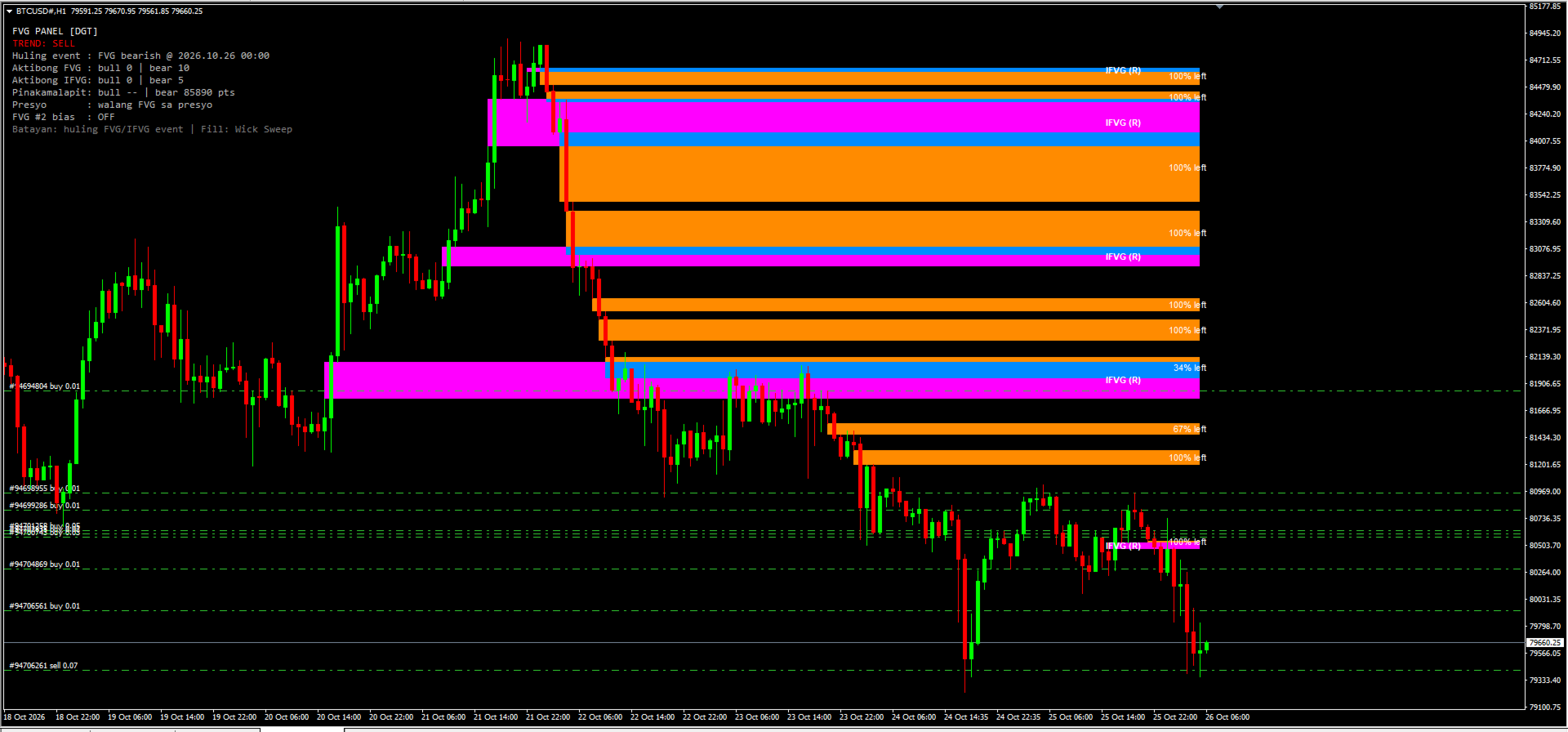
  2. Inverse FVG (IFVG) tracking with its own colors and its own text label. When a filled zone is broken by a candle close on the far side, the indicator turns it into an IFVG that is drawn in a separate color and tagged on the chart, so you can tell at a glance what is a fresh FVG and what is an inverted one.
  3. A compact panel in the corner of the chart that shows the current bias (BUY, SELL or NEUTRAL), the last FVG or IFVG event, how many zones are active, how far the nearest bullish and bearish zones are from price, and whether price is currently sitting inside a zone.
  4. Two independent FVG sources. You can run FVG #1 on the chart timeframe and FVG #2 on a different timeframe (for example M15 zones displayed on an M5 chart), each with its own colors.

2. What is a Fair Value Gap (FVG)?

A Fair Value Gap is a three-candle pattern. Take three consecutive candles and call them candle 1 (the oldest), candle 2 (the middle one) and candle 3 (the newest).

Bullish FVG. Candle 2 is a strong upward candle. The low of candle 3 is higher than the high of candle 1. The range between the high of candle 1 and the low of candle 3 is the gap. Price moved up so quickly that this range was not covered by overlapping wicks.

Bearish FVG. Candle 2 is a strong downward candle. The high of candle 3 is lower than the low of candle 1. The range between the low of candle 1 and the high of candle 3 is the gap.

Traders usually interpret these gaps in one of three ways:

  • As a magnet. Price often returns to a gap later, to "rebalance" the area, before continuing in its original direction or reversing.
  • As support or resistance. A bullish FVG below the current price is watched as a possible support area; a bearish FVG above price is watched as possible resistance.
  • As a footprint of aggressive participation. A cluster of unfilled gaps in one direction can reflect a sustained, one-sided move.

3. What is an Inverse FVG (IFVG)?

An Inverse FVG is a Fair Value Gap that has failed and flipped its role.

A bullish FVG is normally expected to hold as support. If price trades down through the zone and then a candle closes below the bottom of that zone, the zone has not held. In the inverse-FVG view, that failed bullish gap now becomes a bearish IFVG, an area that may act as resistance if price comes back up into it.

The same works in the opposite direction. A bearish FVG that is filled and then broken by a candle closing above its top becomes a bullish IFVG, an area that may act as support.

In short:

  • Bullish FVG: filled, then a candle closes below the zone, result: Bearish IFVG (resistance).
  • Bearish FVG: filled, then a candle closes above the zone, result: Bullish IFVG (support).

4. Feature Summary

  • Automatic bullish and bearish FVG detection with a strict three-candle rule, drawn as zones that extend to the right until filled.
  • Four fill methods: Any Touch, Midpoint, Wick Sweep and Body Beyond, used consistently for zone removal, IFVG creation and the "% left" value.
  • Live "% left" label on every active FVG, with adjustable font size and colors.
  • Inverse FVG tracking with its own colors and an "IFVG (S)" or "IFVG (R)" text label.
  • Information panel with BUY / SELL / NEUTRAL bias, last event, zone counts, nearest-zone distance and price location.
  • Optional second FVG timeframe with separate colors.
  • Zones are built from closed candles. A replay of past bars on load shows recent zones immediately, and all objects are removed cleanly with the indicator.

5. How the Indicator Detects an FVG (Exact Rules)

The detection follows the logic of the original Pine Script. For the source timeframe in use, the indicator looks at the three most recently closed candles of that timeframe: the newest one (candle 3), the middle one (candle 2) and the oldest one (candle 1).

Bullish FVG is created when all of these are true: - The low of the newest candle is above the high of the oldest candle. - The close of the middle candle is above the high of the oldest candle. - There is no earlier gap that already "prevents" this one, meaning the newest candle's low is not simply above the middle candle's high, and the middle candle's low is not simply above the oldest candle's high. This condition keeps the detection aligned with the Pine logic and avoids stacking an extra zone on top of a larger move that already left its own gap.

The zone is drawn from the high of the oldest candle (bottom) up to the low of the newest candle (top). It begins at the time of the oldest candle.

Bearish FVG is created when all of these are true: - The high of the newest candle is below the low of the oldest candle. - The close of the middle candle is below the low of the oldest candle. - The same "no earlier gap" condition holds in the downward direction.

The zone is drawn from the high of the newest candle (bottom) up to the low of the oldest candle (top).

When is it checked? Detection runs when a bar of the source timeframe closes. On the chart timeframe this means once per new bar. For a higher source timeframe, a zone is added only after a bar of that timeframe has actually closed. Because the zones are built from closed candles only, a zone that has been drawn will not vanish simply because the forming candle changed. The "% left" text and the panel are the only elements that update on every tick.

What if I choose a source timeframe lower than the chart? The indicator never uses a timeframe lower than the chart's own. If the value you enter is smaller than the chart timeframe, the chart timeframe is used instead.

6. The Four Fill Methods

A zone is considered "filled" when price reaches a specific level inside or at the far edge of the zone. Different traders define "filled" differently, so the indicator lets you choose. The setting is called Fill and takes a number from 0 to 3. The default is 2, Wick Sweep.

  • 0 – Any Touch: Bullish – the low of a candle reaches the top edge of the zone. Bearish – the high of a candle reaches the bottom edge of the zone.
  • 1 – Midpoint: Bullish – the low of a candle reaches the middle of the zone. Bearish – the high of a candle reaches the middle of the zone.
  • 2 – Wick Sweep (default): Bullish – the low of a candle reaches the bottom edge of the zone. Bearish – the high of a candle reaches the top edge of the zone.
  • 3 – Body Beyond: Bullish – a candle closes at or below the bottom edge of the zone. Bearish – a candle closes at or above the top edge of the zone.

Any Touch (0). The most sensitive setting. The zone disappears the first time price touches it. Use this if you only care about untouched zones and want any contact to count as mitigation. With this method the "% left" label is not very informative, because the zone is removed on the first touch, so it will normally read 100% until it vanishes.

Midpoint (1). The zone is filled when price reaches its 50% level, which many traders call the consequent encroachment. A zone at 0% left under this method has been entered by half of its height.

Wick Sweep (2). The zone is considered filled only when a wick reaches the far edge, so the entire zone has been traded through. This is the default and gives the "% left" label its widest, most gradual range, from 100% down to 0% across the full height of the zone.

Body Beyond (3). The strictest setting. Wicks are ignored. The zone is filled only when a candle closes beyond the far edge. This is useful if you consider wick penetration to be noise and only accept a real close.

7. The "% Left" Label

7.1 What it shows

Every active FVG carries a small text label such as "72% left". It answers one question: how much of the distance to the fill level is still left?

  • 100% left means price has not entered the zone yet.
  • 50% left means price has gone halfway toward the fill level.
  • 1% left means price is almost at the fill level.
  • At 0%, the zone is filled and is removed from the chart together with its label.

The label is placed at the vertical middle of the zone, anchored at the right side near the current candle, and it uses the font size and font color you choose.

7.2 How it is calculated

The calculation depends on the fill method, because the "finish line" is different for each method.

  1. The indicator takes the entry edge of the zone. For a bullish FVG this is the top edge, because price enters from above. For a bearish FVG it is the bottom edge, because price enters from below.
  2. It takes the fill level from the selected method (top, middle or bottom edge, as described above).
  3. The distance between the entry edge and the fill level is the span that has to be covered.
  4. The indicator tracks the deepest point that price has reached inside the zone since the zone formed: the lowest low for a bullish FVG, the highest high for a bearish FVG. With Body Beyond, closes are used instead of wicks. The currently forming candle is included, so the label reacts in real time.
  5. The percentage left is: 100 × (1 − depth covered ÷ span). It is clamped between 0 and 100 and rounded up, so a zone that is not yet filled never shows 0%.

7.3 Why it uses the deepest point

The label is a measure of mitigation progress, not of where price happens to be right now. If price dips into a zone to 60% of its height and then moves away, the zone is still 60% mitigated. For that reason the percentage does not go back up when price leaves the zone. It only goes down as the maximum depth increases.

7.4 Examples

Wick Sweep, bullish FVG from 100.00 (bottom) to 102.00 (top). The entry edge is 102.00 and the fill level is 100.00, so the span is 2.00. If the lowest price since formation is 101.50, then 0.50 of 2.00 has been covered, which is 25%, and the label shows "75% left". If price later falls to 100.40, 1.60 of 2.00 is covered and the label shows "20% left". The zone is removed when price reaches 100.00.

8. Inverse FVG Lifecycle in Detail

  1. An FVG gets filled according to the selected fill method. It is removed from the list of active FVGs and its rectangle and "% left" label are removed from the chart.
  2. If IFVG tracking is enabled, the filled zone is moved to a watch list instead of being forgotten.
  3. The watch list is checked on every closed bar:
  4. If a candle closes beyond the far side of the original zone (below the bottom of a bullish zone or above the top of a bearish zone), an IFVG is created in the opposite direction.
  5. If a candle closes back on the original side of the zone (above the top of a bullish zone or below the bottom of a bearish zone), the zone is simply dropped. It held, so no IFVG is created.
  6. If the candle closes inside the zone, the indicator waits for the next closed bar.
  7. An active IFVG is drawn from the original start of the zone and extended to the right. It uses its own colors and carries a label: "IFVG (S)" if it is bullish and acts as support, "IFVG (R)" if it is bearish and acts as resistance.
  8. The IFVG is removed when a candle closes beyond it in the opposite direction: below the bottom of a bullish IFVG, or above the top of a bearish IFVG.

Creating an IFVG also counts as an event for the panel. The bias becomes BUY if a bullish IFVG was just created, and SELL if a bearish IFVG was just created.

The IFVG feature can be switched off completely. When it is off, filled zones are simply removed and no IFVG logic runs.

9. The Information Panel

The panel sits in the upper-left area of the chart by default and gives a compact summary of what the indicator currently sees. Please note that the panel text is written in Filipino (Tagalog) mixed with English technical terms, because the indicator was built for a Filipino trader. The meaning of every line is explained below, so you can use it without knowing the language.

  • Title – FVG PANEL [DGT] – Name of the panel
  • Trend – TREND: SELL – Current bias: BUY, SELL or NEUTRAL
  • Last event – Huling event : FVG bearish @ 2026.10.25 23:00 – "Huling event" means "last event": the most recent FVG or IFVG that was created, with its date and time
  • Active FVG – Aktibong FVG : bull 1 | bear 4 – "Aktibong" means "active": number of bullish and bearish FVG zones currently on the chart
  • Active IFVG – Aktibong IFVG: bull 3 | bear 7 – Number of bullish and bearish IFVG zones currently on the chart
  • Nearest – Pinakamalapit: bull 0 pts | bear 750 pts – "Pinakamalapit" means "nearest": distance in points from the current price to the closest bullish and the closest bearish FVG. 0 pts means price is inside or touching a zone. "--" means there is none
  • Price location – Presyo : walang FVG sa presyo – "Presyo" means "price". Tells you whether price is inside a bullish FVG ("IN BULL FVG (support)"), inside a bearish FVG ("IN BEAR FVG (resistance)"), or in neither ("walang FVG sa presyo" means "no FVG at the price")
  • FVG #2 bias – FVG #2 bias : OFF – The bias of the second source: BUY, SELL, "--" if it has not produced an event yet, or OFF if the second source is disabled
  • Basis – Batayan: huling FVG/IFVG event | Fill: Wick Sweep – "Batayan" means "basis": a reminder that the trend line is based on the last FVG or IFVG event, and which fill method is active

9.1 How the trend verdict works

The TREND line is intentionally simple and transparent:

  • BUY if the most recent FVG or IFVG event was bullish.
  • SELL if the most recent FVG or IFVG event was bearish.
  • NEUTRAL if no event has been recorded yet.

This is a state of the last event, not a prediction and not a measure of trend strength. It will flip each time a new event of the opposite direction appears, and a market that alternates between bullish and bearish gaps will make the verdict flip as well. Treat it as a quick summary of the most recent order-flow imbalance, and combine it with your own analysis, higher-timeframe context and risk management before you act on it.

10. Using a Second Timeframe (FVG #2)

The indicator contains two independent FVG sources.

  • FVG #1 always runs. Its timeframe is set in minutes. A value of 0 means "use the chart timeframe".
  • FVG #2 is optional. A value of 0 means it is turned off. Any other value is the timeframe in minutes whose gaps you want to see.

Typical timeframe values in minutes: 1 (M1), 5 (M5), 15 (M15), 30 (M30), 60 (H1), 240 (H4), 1440 (D1), 10080 (W1).

Example. You trade on an M5 chart. You leave FVG #1 at 0 so it shows M5 gaps, and set FVG #2 to 60 so the H1 gaps are drawn on the same chart in a different color. The M5 zones show you precise short-term levels, and the H1 zones show you the larger areas that may matter more.

Each source has its own pair of colors, one for bullish and one for bearish zones, so you can always see where a zone came from. The last event of FVG #2 is also shown on the panel as "FVG #2 bias". The overall TREND line still follows the most recent event from any source.

11. Input Reference

The input descriptions inside MT4 are written in short Filipino and English phrases. This table explains each one in English.

  • FVG #1 TF (minutes) (default: 0) – Timeframe of the main FVG source in minutes. 0 = chart timeframe. A value lower than the chart timeframe falls back to the chart timeframe
  • FVG #2 TF (minutes) (default: 0) – Timeframe of the second FVG source in minutes. 0 = off
  • Fill method (default: 2) – 0 = Any Touch, 1 = Midpoint, 2 = Wick Sweep, 3 = Body Beyond
  • Show IFVG (default: true) – Turns Inverse FVG tracking on or off
  • Max zones (default: 40) – Maximum number of active FVG zones kept on the chart. When the limit is reached, the oldest zone is removed first
  • Replay bars (default: 360) – Number of past bars processed when the indicator is loaded, so recent zones appear immediately. More bars means a longer look-back and slightly longer loading time
  • Draw zones (default: true) – Draws rectangles and labels on the chart. When off, the indicator only updates the panel
  • Show % left (default: true) – Shows the "% left" label on each active FVG
  • % label font size (default: 8) – Font size of the "% left" label (also used for the IFVG label)
  • % label color (bullish) (default: White) – Font color of the "% left" label on bullish zones
  • % label color (bearish) (default: White) – Font color of the "% left" label on bearish zones
  • FVG #1 bullish color (default: Teal (0,184,217)) – Fill color of bullish zones from source 1
  • FVG #1 bearish color (default: Orange (255,139,0)) – Fill color of bearish zones from source 1
  • FVG #2 bullish color (default: Mint (110,231,183)) – Fill color of bullish zones from source 2
  • FVG #2 bearish color (default: Coral (255,107,107)) – Fill color of bearish zones from source 2
  • IFVG bullish color (default: Dodger Blue) – Fill color of bullish IFVG zones
  • IFVG bearish color (default: Magenta) – Fill color of bearish IFVG zones
  • Show IFVG label (default: true) – Shows the "IFVG (S)" or "IFVG (R)" text on each IFVG
  • IFVG label color (default: White) – Font color of the IFVG label
  • Show panel (default: true) – Shows or hides the information panel
  • Panel X (default: 10) – Panel distance from the left edge, in pixels
  • Panel Y (default: 25) – Panel distance from the top edge, in pixels

12. Installation

  1. In MetaTrader 4, open File → Open Data Folder.
  2. Go to MQL4 → Indicators and copy the indicator file (the .mq4 source file or the compiled .ex4 file, depending on what you received) into that folder.
  3. If you have the .mq4 source, open it in MetaEditor and press Compile (F7). Check that there are no errors.
  4. Back in the terminal, right-click Navigator → Indicators and choose Refresh.
  5. Drag FVG DGT Panel [TMT] from the Navigator onto the chart you want, or double-click it.
  6. In the Inputs tab, adjust the settings you want and press OK.

13. Limitations

  • The indicator does not issue alerts or notifications in this version.
  • The third lower-timeframe FVG source and the "color on detection" candle coloring of the original Pine script are not included.
  • The trend verdict follows the last event only. It is not a trend-strength measure and can change often in choppy markets.
  • Results depend on your broker's price data. Brokers differ in gaps, spreads and history, so zones can look slightly different from one broker to another.
  • A zone or an IFVG is an area of interest. Price may ignore it, react at its edge or trade straight through it.

14. Frequently Asked Questions

Does the indicator repaint? Zones are built from closed candles and do not change after they are drawn. Only the "% left" label and the panel move with the live candle.

Why does a zone disappear? Because it was filled according to the selected fill method, or because the maximum number of zones was exceeded and it was the oldest one.

Why do I see 100% on every label? With the Any Touch method, a zone is removed at first contact, so labels stay at 100% until the zone is gone. Use Midpoint, Wick Sweep or Body Beyond to see the percentage move.

Why can't I see IFVGs? Check that Show IFVG is on. IFVGs only appear after a filled zone is broken by a candle close on the far side. They have their own colors, so make sure those colors differ from your chart background.

Can I use it on any symbol and timeframe? Yes. It works on forex, metals, indices and crypto symbols that your MT4 broker offers, on any timeframe.

Does it trade for me? No. It only draws on the chart and never sends orders. You place and manage every trade yourself, so position size, stop loss and take profit always stay under your control. Always review each setup carefully before you act on it.

Is the panel text in English? Part of it is in Filipino, and each line is explained in section 9 of this description.

15. Credits and Risk Disclaimer

This indicator is a MetaTrader 4 port inspired by the "Fair Value Gaps by DGT" concept for TradingView. The additions described in this document, such as the "% left" label, the IFVG colors and labels, and the panel, were built for this MT4 version. All trademarks belong to their respective owners.

Risk warning. Trading foreign exchange, CFDs, metals, indices and cryptocurrencies involves a high level of risk and may not be suitable for everyone. You can lose some or all of your capital. This indicator is an analytical tool that displays information based on past price data. It does not predict the future, it does not guarantee profits and it is not financial advice. Past behavior of any pattern does not guarantee future results. Test any approach on a demo account first, use proper risk management, and never risk money you cannot afford to lose.

おすすめのプロダクト
これはほぼ間違いなく、MetaTraderプラットフォームで見つけることができる最も完全な調和価格形成自動認識インジケーターです。 19種類のパターンを検出し、フィボナッチプロジェクションをあなたと同じように真剣に受け止め、潜在的逆転ゾーン(PRZ)を表示し、適切なストップロスとテイクプロフィットレベルを見つけます。 [ インストールガイド | 更新ガイド | トラブルシューティング | よくある質問 | すべての製品 ] 19の異なる調和価格形成を検出します プライマリ、派生および補完フィボナッチ投影(PRZ)をプロットします 過去の価格行動を評価し、過去のすべてのパターンを表示します この指標は、独自の品質とパフォーマンスを分析します 適切なストップロスとテイクプロフィットのレベルを表示します ブレイクアウトを使用して適切な取引を通知します すべてのパターン比をグラフにプロットします 電子メール/音声/視覚アラートを実装します スコット・M・カーニーの本に着想を得て、この指標は最も純粋で急を要するトレーダーのニーズを満たすように設計されています。ただし、トレードを容易にする
Noize Absorption Index - is the manual trading system that measures the difference of pressure between bears forces and bulls forces. Green line - is a noize free index that showing curent situation. Zero value of index shows totally choppy/flat market.Values above zero level shows how powerfull bullish wave is and values below zero measures bearish forces.Up arrow appears on bearish market when it's ready to reverse, dn arrow appears on weak bullish market, as a result of reverse expectation. S
Overview Harmonic Patterns MT4 is a technical analysis indicator designed for the MetaTrader 5 platform. It identifies and displays harmonic price patterns, such as Butterfly, Cypher, Crab, Bat, Shark, and Gartley, in both bullish and bearish directions. The indicator calculates key price levels, including entry, stop loss, and three take-profit levels, to assist traders in analyzing market movements. Visual elements and customizable alerts enhance usability on the chart. Features Detects six ha
Monster Harmonics Indicator is a harmonic pattern indicator. It recognizes Gartley, Bat, Crab, Butterfly, Cypher, White Swan, Black Swan, Shark and several other patterns. Projected patterns that are not yet completed are recognized, too. Monster even shows the PRZ (Potential Reversal Zone). Users can add their own user defined patterns to Monster. Besides the current pattern, Monster also shows all patterns in the symbols history. Monster will provide alerts for developing patterns. Introduced
TWO PAIRS SQUARE HEDGE METER INDICATOR Try this brilliant 2 pairs square indicator It draws a square wave of the relation between your two inputs symbols when square wave indicates -1 then it is very great opportunity to SELL pair1 and BUY Pair2 when square wave indicates +1 then it is very great opportunity to BUY pair1 and SELL Pair2 the inputs are : 2 pairs of symbols         then index value : i use 20 for M30 charts ( you can try other values : 40/50 for M15 , : 30 for M30 , : 10 for H1 ,
Trade with Gann on your side!! MASTER CIRCLE 360 CIRCLE CHART, originally created by Gann admitted that this is “The Mother of all charts”. It is one of the last studies that this great trader left for us. The numeric tab le is apparently quite simple like all the tables and is based on square numbers, the SQUARE OF 12 and is by evolution, one of the most important square numbers. Here we can find CYCLE, PRICE AND TIME thanks to angles and grades, to show past and future support and resistance.
これは、キャンドルの終値を予測する指標です。 このインジケータは、主にD1チャートでの使用を目的としていますが. この指標は、従来の外国為替取引とバイナリオプション取引の両方に適しています。 インジケーターは、スタンドアロンのトレーディングシステムとして使用することも、既存のトレーディングシステムへの追加として機能させることもできます。 このインジケーターは、現在のキャンドルを分析し、キャンドル自体の内部の特定の強度係数と、前のキャンドルのパラメーターを計算します。 したがって、この指標は、市場の動きのさらなる方向性と現在のキャンドルの終値を予測します。 この方法のおかげで、この指標は、短期の日中取引だけでなく、中期および長期の取引にも適しています。 インジケーターを使用すると、市場の状況の分析中にインジケーターが生成する潜在的な信号の数を設定できます。 インジケーターの設定には、このための特別なパラメーターがあります。 また、インジケーターは、チャート上のメッセージの形式で、電子メールで、およびPUSH通知の形式で、新しい信号について通知することができます。 購入後は必ず私に書いて
Was: $249  Now: $99   Market Profile defines a number of day types that can help the trader to determine market behaviour. A key feature is the Value Area, representing the range of price action where 70% of trading took place. Understanding the Value Area can give traders valuable insight into market direction and establish the higher odds trade. It is an excellent addition to any system you may be using. Blahtech Limited presents their Market Profile indicator for the MetaTrader community. Ins
All Symbols   AND  All Time frames Scan                                                                                                                 Document Introduction   The ABCD is a basic harmonic pattern. The ABCD pattern is a visual, geometric chart pattern comprised of three consecutive price swings. It looks like a diagonal lightning bolt and can indicate an upcoming trading opportu
The Best One Scalping Trade Panel functional manual trade panel with risk reward, auto SL by candle ( original solution), lot size calculation, one-click trading, scale in and out of trades (partial close),  Works with all symbols not just currency pairs, perfect works on DAX, NASDAQ, GOLD, ...... I earn every day during live stream on ZakopiecFX - join Me Risk by lot Risk by percent SL by points SL by Candle, Renko, RangeBar ( original solution) TP by point TP by Risk/Reward Auto Trailing by P
期間限定オファー 「限定ローンチ価格」 「バージョン2.0後に値上げ予定」 Currencies Gold Momentum Flow Dashboard — 市場の強さを瞬時に把握 複数時間足(M5〜D1)で、為替とゴールドのモメンタムをリアルタイムで表示する高性能ダッシュボード。 マルチタイムフレームROC分析 トレードシグナル搭載 通貨強弱分析 ヒートマップ表示 アラート+ワンクリック切替 市場が見えるようにトレードする 多くのトレーダーは“見えていない”。 他の人が見逃すものを見抜く これは単なるインジケーターではありません。 精度重視のトレーダー向け 優位性を内蔵 すべてが変わる ️ 多くの人が遅れて気づく真実 インジケーターでは稼げない。 「理解」が利益を生む。 今すぐ優位性を手に入れる ダウンロード Currencies Gold Momentum Flow Dashboard
Volume Profile Sniper v11.1は、包括的な市場分析ツールです 取引への専門的なアプローチ ボリュームプロファイルスナイパー v11.1は、市場状況の包括的な評価に基づいて明確な信号を提供し、一つの指標に15以上の主要なフィルタを組み合わせ 主な特長 ボリューム不均衡分析-アルゴリズムは、各キャンドルの買い手と売り手のシェアを計算し、当事者の1つの優位性を通知します(50%から90%までの設定可能なしきい値)。 マルチレベル信号フィルタリング-インジケータは考慮されます: トレンド指標(9/21) 買われ過ぎ/売られ過ぎゾーンを除くRSI キャンドルパターン(ピンバー、吸収、ハンマー) サポート/抵抗レベル(自動検出) 主要なプレーヤーの活動を識別するためのボリュームスパイク クラシックと増幅されたRSIの相違 ボラティリティ評価のためのATR 傾向の強さを決定するためのADX 価格アクション(内部バーと外部バー) 複数の時間枠の確認 市場構造(高値/安値) セッションフィルタ(アジア、ロンドン、ニューヨークセッション) ニュースの
Money Flow Profile MT5 HERE   Here   our more valuable tools SMC Trend Trading   ,  Easy SMC Trading  ,  Institutional SMC Architect Volume Analysis Tools  ,  Volume flow Profile  ,  Market volume profile  , FVG with Volume  , Liquidity Heatmap Profile  ,  Volume Spread Analysis This Master Edition is engineered for clarity and speed, featuring a unique Auto-Theme Sync system that instantly beautifies your chart layout upon loading. Key Features: True Money Flow Calculation: Goes beyond stand
Daily FIBO Pro
Mark Thimoty Evangelista
BERG Daily FIBO Proであなたのトレーディングの可能性を解き放とう BERG Daily FIBO Pro   は、MetaTrader 4 (MT4) プラットフォーム専用に設計された強力でカスタマイズ可能なフィボナッチ・リトレースメント指標です。経験豊富なトレーダーであれ、初心者であれ、このインジケーターは重要なサポートとレジスタンスレベルを識別し、市場分析を向上させ、トレーディング戦略を最適化するための理想的なツールです。 BERG Daily FIBO Proを選ぶ理由   フィボナッチ分析の精度:   前日の高値と安値に基づいて自動的に計算されたフィボナッチ・リトレースメントレベルで、市場での優位性を手に入れましょう。 BERG Daily FIBO Pro   は、0%、23.6%、38.2%、50%、61.8%、78.6%、100% の各レベルを描画し、潜在的な市場の転換点を簡単に特定できるようにします。   インテリジェントアラートシステム:   カスタマイズ可能なアラートで、価格がフィボナッチレベルに触れた時に通知されるため、チャンスを逃し
The RTrends indicator does two things: first, it automatically draws the layout of the price chart by plotting trend lines and, secondly, it produces bearish and bullish signals. The layout reflects the fractal nature of the market. Trends from different time horizons are applied simultaneously on the chart. Thus, from a single chart a trader can see trend lines of higher timeframes. The lines, depending on the horizon, differ in color and width: the older the horizon, the thicker the line is. T
VR Cub
Vladimir Pastushak
VR Cub は、質の高いエントリーポイントを獲得するためのインジケーターです。このインジケーターは、数学的計算を容易にし、ポジションへのエントリーポイントの検索を簡素化するために開発されました。このインジケーターが作成されたトレーディング戦略は、長年にわたってその有効性が証明されてきました。取引戦略のシンプルさはその大きな利点であり、初心者のトレーダーでもうまく取引することができます。 VR Cub はポジション開始ポイントとテイクプロフィットとストップロスのターゲットレベルを計算し、効率と使いやすさを大幅に向上させます。取引の簡単なルールを理解するには、以下の戦略を使用した取引のスクリーンショットを見てください。 設定、設定ファイル、デモ版、説明書、問題解決方法は、以下から入手できます。 [ブログ] レビューを読んだり書いたりすることができます。 [リンク] のバージョン [MetaTrader 5] エントリーポイントの計算ルール ポジションをオープンする エントリーポイントを計算するには、VR Cub ツールを最後の高値から最後の安値までストレッチする必要があります。 最初
## Smart Reversal Oscillator Pro Smart Reversal Oscillator Pro is an advanced hybrid trading utility designed for MetaTrader 4 that reinvents volatility and momentum analysis. Instead of analyzing raw price action, this indicator applies mathematical Bollinger Bands directly onto the Relative Strength Index (RSI) array data within a separate sub-window. Standard fixed oversold and overbought levels (like 30 and 70) often fail during strong market expansions. This professional oscillator solve
Daily Open Mirror Engine — Wick & Body Mirror Levels for MT4 Daily Open Mirror Engine   is a professional MetaTrader 4 indicator designed to project mirrored price levels from the current daily open. Many intraday moves react strongly around the daily open. This indicator uses the daily open as the central reference point and automatically projects mirrored levels from important wick and body extremes, helping traders identify possible reaction zones, liquidity targets, support, resistance, an
DELTA FUSION PRO 10.0は、オーダーフロー(Order Flow)と機関投資家の圧力(Ask/Bidの差)をリアルタイムで分析するためのMetaTrader専用プロフェッショナル指標です。 主な特徴 スマートオートチューニング:市場(FX、暗号資産、株価指数、商品、株式、先物)、時間足、ボラティリティ(ATR)に基づいて自動調整されます。 運用機能: NetDelta & 累積Delta:EMA平滑化による方向性圧力のトラッキング。 価格/出来高のダイバージェンス:リペイントなし(No-Repaint)のシグナルで、レギュラー/ヒドゥン・ダイバージェンス(Strong/Medium/Weakに分類)を検出。 インバランス & インフュージョン・ボリューム:出来高の不均衡や異常なスパイク(機関投資家のクライマックス)を特定。 POC & Deltaプロファイル:アグレッシブな出来高が最も集中している価格水準を特定。 VWAP Delta:アグレッシブな出来高に基づいて計算された出来高加重平均価格。 インタラクティブ・パネル: UCP:チャート上で直接ドラッグ&ドロップ
Requirements Optimized to work with   EURUSD-EURCHF-USDJPY, AUDUSD-CADJPY-AUDNZD, CHFJPY-NZDJPY-NZDUSD For timeframe 4H. *(Minimum recommended deposit is $300 for each Pair) for initial lot set to 0.10, My favorite Pair are (CHFJPY-NZDJPY-EURUSD-AUDNZD-USDJPY) Warning it will be SALE only 5 Copys at 60$ Then it will be update up to 200$  You can use it the way it is, For new Set Files will be add on (Comments) ECN broker with low spread is recommended to get better results. Setup is very e
インディケータは現在のクオートを作成し、これを過去のものと比較して、これに基づいて価格変動予測を行います。インジケータには、目的の日付にすばやく移動するためのテキスト フィールドがあります。 オプション: シンボル - インジケーターが表示するシンボルの選択; SymbolPeriod - 指標がデータを取る期間の選択; IndicatorColor - インジケータの色; HorisontalShift - 指定されたバー数だけインディケータによって描画されたクオートのシフト; Inverse - true は引用符を逆にします。false - 元のビュー。 ChartVerticalShiftStep - チャートを垂直方向にシフトします (キーボードの上下矢印)。 次は日付を入力できるテキストフィールドの設定で、「Enter」を押すとすぐにジャンプできます。
We present you the indicator "Candle closing counter", which will become your indispensable assistant in the world of trading. That’s why knowing when the candle will close can help: If you like to trade using candle patterns, you will know when the candle will be closed. This indicator will allow you to check if a known pattern has formed and if there is a possibility of trading. The indicator will help you to prepare for market opening and market closure. You can set a timer to create a pre
TigerRbot
Tizie Henri Jean Daniel Baha Bi
TIGERRBOT TigerRbot UserGuide ENG TigerRbot UserGuide FR Available for MT4, TigerRbot uses the Tick Volume to access trading information on order flow, Cumulative Volume Delta, as well as buying and selling pressure, based on the selected time frame. It scans the market to analyse the pressure differential (Volume Delta) and determine the CVD (Cumulative Volume Delta), which are essentially Level 2 trading data available only after execution of the order book. It leverages underlying market cond
A technical indicator that calculates its readings on trading volumes. In the form of a histogram, it shows the accumulation of the strength of the movement of the trading instrument. It has independent calculation systems for bullish and bearish directions. Works on any trading instruments and time frames. Can complement any trading system. The indicator does not redraw its values, the signals appear on the current candle. It is easy to use and does not load the chart, does not require addition
プロトレーダーおよび評価型アカウント(Prop)向けリスク管理・制限監視インジケーター 本ツールは、リスク管理と各種リミットに関する情報をチャート上に表示するのみで、より集中した意思決定をサポートします。インジケーターはポジションの新規/決済/変更を行わず、エキスパートアドバイザー(EA)と干渉しません. 機能 日次および累計ドローダウンの監視 残高(Balance)または有効証拠金(Equity)を基準に日次/累計DDを計算・表示(設定可能)。 設定したリミットまでの残り割合を表示。 チャート上のクリーンでプロフェッショナルなパネル サマリー表:Balance、Equity、現在のP/L、日次/累計DD、アラート閾値。 判断に集中できる読みやすいUI。 リスクに基づくポジションサイズ パーセンテージ/固定金額のリスクと設定したストップロスに基づき概算ロットを算出。 R:R(リスクリワード)比とエントリー、SL、TPをチャートに表示。 アラートと通知 日次/累計DDの閾値に近づいた際にアラート(閾値は設定可能)。 価格がSL/TPに到達、またはその他の定義済みイベント発生時に通知。
"Impulses and Corrections 4" is created to help traders navigate the market situation. The indicator shows multi-time frame upward and downward "Impulses" of price movements. These impulses are the basis for determining the "Base" , which is composed of zones of corrections of price movements, as well as "Potential" zones for possible scenarios of price movement. Up and down impulses are determined based on a modified formula of Bill Williams' "Fractals" indicator. The last impulse is always "U
Professional Opening Range Breakout (ORB) indicator designed for precision session trading with automatic time handling, breakout alerts, and advanced target levels. This indicator automatically identifies the Opening Range for any configurable session, plots the High, Low, and Midpoint levels, and extends them across the trading day. Built-in breakout detection and alerts, range measurements, and extension targets provide traders with clear structure and actionable levels. Ideal for traders usi
Color Stochastic Enhanced Stochastic Oscillator with Cross Detection and Visual Signal Support Overview Color Stochastic is a customized version of the classic Stochastic Oscillator designed for momentum analysis and crossover visualization. The indicator provides color-based signal marking and configurable crossover detection at user-defined overbought and oversold levels. It can be used as part of: Momentum analysis Mean reversion workflows DCA-based strategies Multi-indicator confirmation sys
This is a trend indicator without redrawing Developed instead of the binary options strategy (by the color of the Martingale candlestick) Also works well in forex trading When to open trades (binary options) A signal will appear in the place with a candle signaling the current candle It is recommended to open a deal for one candle of the current timeframe M1 and M5 When a blue dot appears, open a deal up When a red dot appears, open a trade down. How to open trades on Forex. When a signal is rec
EZZ Elite Zig Zag is an indicator for the MetaTrader 4 terminal. This indicator traces the peak of the trend based on the market reversal, thus showing various opportunities in the financial market. EZZ Elite Zig Zag is a visual tool, intuitive, and easy to understand and use.  Test it Yourself by Downloading it for Free. Author Paulo Rocha all rights reserved
このプロダクトを購入した人は以下も購入しています
Trend SniperX MT4
Sarvarbek Abduvoxobov
5 (5)
Trend Sniper X は、トレーダーがトレンドの方向性と潜在的な反転ポイントを明確かつ正確に特定できるように設計された、MetaTrader 5 用のマルチタイムフレーム・トレンドフォロー指標です。 MT5版はこちら: https://www.mql5.com/en/market/product/181101 価格情報: 現在の価格はプロモーション価格であり、今後のアップデートや新機能の追加に伴い変更される場合があります。 Code2Profit チャンネル マルチタイムフレーム分析で市場をマスターしよう! Trend Sniper Xで勝率を最大化する方法:ルールとセッションのコツ 技術仕様 プラットフォーム MetaTrader 5 インジケータータイプ マルチタイムフレーム・トレンドインジケーター 動作タイムフレーム すべてのチャート時間足(上位足M1~MN1を独立して選択可能) 主要対象銘柄 為替(Forex)、ゴールド(XAUUSD)、その他のCFD 推奨口座 すべての口座タイプ ビジュアル表示 トレンドカラーローソク足(買い/売り/弱い/変化)+ 買い/売りシグナル
AW Prime Oscillator
AW Trading Software Limited
5 (1)
2つのオシレーターを組み合わせたもの。 1 つ目はエントリーポイントを表示し、2 つ目は現在のトレンドを表示します。このインジケーターは、すべての高速オシレーター信号または現在のトレンドの方向のみの信号の 2 つのモードで、オシレーター信号を矢印で表示できます。マルチタイムフレームパネルと 3 種類のシグナル通知があります。 利点: デイトレードやスキャルピング取引に適しています トレンドフィルタリング シンプルかつ高感度なセットアップ マルチタイムフレームパネル アドバイザーへの統合に適しています。 あらゆるシンボルとあらゆるタイムフレームに対応 3種類の通知 MT5 version ->  HERE  / Problem solving ->  HERE 指標戦略 このインジケーターは 2 つの異なるオシレーターで構成されます。 遅いトレンド ライン (太い) - インジケーターの高レベルが上から下に交差する場合、それは下降トレンドのインジケーターであり、下側の水平レベル (インジケーターの低レベル) が下から上に交差する場合、それは下降トレンドのインジケーターです。上昇傾向。さら
Super Signal – Skyblade Edition プロ仕様のノンリペイント / ノーラグ・トレンドシグナルシステム。卓越した勝率を実現 | MT4 / MT5 対応 1分足、5分足、15分足などの低い時間足で最も効果を発揮します。 主な特徴: Super Signal – Skyblade Edition は、トレンド取引に特化したスマートなシグナルシステムです。マルチレイヤーのフィルターロジックを用いて、明確な方向性と実際のモメンタムに支えられた強力なトレンドのみを検出します。 このシステムは 天井や底を予測するものではありません 。次の3つの条件がすべて満たされた場合にのみシグナルを発生させます: 明確なトレンド方向 モメンタムの増加 健全なボラティリティ構造 市場セッションに基づく流動性分析と組み合わせることで、シグナルの精度とタイミングがさらに向上します。 シグナルの特性: すべての矢印シグナルは 100% 非リペイント / 遅延なし 一度出現したシグナルは固定され、点滅・消失しません チャート上の矢印、情報パネル、ポップアップ通知、音声アラート、プッシュ通知
SR Liquidity は、市場の流動性が集中し、価格が最も強く反応する「隠れたゾーン」を可視化するために設計されたトレーディング指標です。こうした流動性の高いエリアは強力なサポート(支持)およびレジスタンス(抵抗)レベルとして機能し、市場が反転する可能性が最も高いポイントを明確に示してくれます。 単なる一般的なサポートラインやレジスタンスラインを描画するのではなく、「SR Liquidity」は実際の価格変動を分析し、売りと買いの圧力が集中するゾーンを特定します。これらは、市場の真の動きを牽引する「流動性のプール(溜まり場)」そのものです。それらをチャート上に直接可視化することで、価格が実際に反応する前に、その動きを予測することが可能になります。つまり、このインジケーターは価格の方向性が変わる可能性を予測するのです。生のプライスアクションを、市場の重要な水準(転換点となり得るポイント)を示す、明確で実用的なロードマップへと変換してくれます。 このインジケーターは、FX、株価指数、貴金属、仮想通貨など、あらゆる銘柄や時間足で使用可能です。 ご購入後、取引手順や無料の優れた追加インジケ
割引は 24 時間後に終了します — 次の価格は$ 69 ZORYK — MetaTrader 4専用 XAUUSDシグナル・トレードプランニングシステム このような経験はありませんか。 ゴールドを分析し、エントリーを待ち、ようやくポジションを持った直後に価格が逆方向へ動く。 早すぎる決済をしてしまったり、Stop Lossを動かしたり、数秒迷っている間にチャンスを逃したりする。 その後、相場は自分が最初に予想していた方向へ進み、目標へ到達する。 問題は常に方向判断ではありません。 本当の問題は、明確な計画がなかったことです。 どこでエントリーすべきか。 どこでトレードの前提が無効になるのか。 近い利益を確保すべきか、より大きな値動きを待つべきか。 現在のsetupが本当に強いのか、それとも無理にトレードを探しているだけなのか。 ゴールドは非常に速く動きます。 正しい分析でも、明確なプランがなければ数秒で悪い判断に変わることがあります。 ZORYKは、その問題を解決するために開発されました。 ZORYKとは ZORYKは、MetaTrader 4とXAU
M1 Sniper
Oleg Rodin
4.97 (30)
M1 SNIPER は使いやすいトレーディングインジケーターシステムです。M1時間足向けに設計された矢印インジケーターです。M1時間足でのスキャルピングのためのスタンドアロンシステムとして、また既存のトレーディングシステムの一部としても使用できます。このトレーディングシステムはM1時間足での取引に特化して設計されていますが、他の時間足でも使用できます。元々、この手法はXAUUSDとBTCUSDの取引用に設計しましたが、他の市場においても役立つと考えています。 インジケーターのシグナルは、トレンドの方向と逆方向に取引できます。インジケーターのシグナルを利用して両方向に取引するのに役立つ特別な取引テクニックをご紹介します。この手法は、特別な動的なサポートとレジスタンスの価格帯を利用することに基づいています。 ご購入後、M1 SNIPER矢印インジケーターをすぐにダウンロードできます。さらに、M1 SNIPERツールのすべてのユーザーに、以下のスクリーンショットに表示されているApollo Dynamic SRインジケーターを無料で提供しています。この2つのインジケーターを組み合わせることで
Atomic Analyst — MetaTrader 4 製品に関するご質問、設定方法、技術サポートについては、MQL5で直接メッセージをお送りください。 このインジケーターは、複雑な市場計算をシンプルな視覚シグナル、色分けされたローソク足、トレンド表示、ストップロスレベル、複数のテイクプロフィットゾーンに変換し、トレーダーが素早く理解して実際の市場環境で使用できるようにします。 主な取引用途: スキャルピングとイントラデイトレード: 素早い判断、明確な矢印、アラート、ローソク足カラー、構造化されたエントリー/エグジットゾーンのために設計されています。 デイトレードとスイングトレード: トレンド方向、強さ、モメンタム、マルチタイムフレーム分析を使って、より大きな市場の動きを追うのに役立ちます。 主な機能: • Price Action、強さ、モメンタム分析 • マルチタイムフレームトレンドスキャナー • 全体トレンド率の計算 • 買いと売りの矢印 • ストップロスと複数のテイクプロフィットレベル • 最大5つのフィボナッチベースのテイクプロフィットレベル • トレーリングストップ
Smart Trend Trading System は、トレンド情報、エントリー・決済シグナル、価格水準をひとつのチャートにまとめて表示する MetaTrader 4 用インジケーターです。 このシステムは、トレンド検出、反転ゾーン、Smart Cloud、トレーリングストップロジック、サポートとレジスタンス、ローソク足の色分け、アラート、マルチタイムフレーム分析など、 10 種類以上のトレーディングツール を 1 つに統合しています。 このシステムは、さまざまな市場環境での取引をサポートするように設計されています。 トレンド相場: 主要トレンドを特定し、押し目を検出し、モメンタムに従い、ストップロスガイドとトレーリングストップオプションを使って、より明確なエントリーを見つけます。 レンジ相場: レンジ状態を検出し、反応ゾーンを特定し、価格が重要なレベルから反応したときに、より明確なシグナルを受け取ります。 スキャルピングとデイトレード: 短期売買の判断をサポートするために、高速シグナル、ローソク足の色、アラート、マルチタイムフレーム確認を使用します。 主な機能: • 10 種
Tokyo Indicatorは、トレンドの方向性、潜在的な取引シグナル、および市場状況を視覚的に分かりやすく表示します。 色分けされた階段状のトレンドラインにより、強気局面(青色)と弱気局面(マゼンタ色)が明確に区別されます。トレンドの変化に合わせて表示される方向矢印は、売買の好機を強調します。 統合されたダッシュボードには、現在のシグナル、市場のバイアス(傾向)、モメンタム、ボラティリティ、シグナルの品質がひと目で分かるようにまとめられています。これにより、トレーダーはパネルを切り替えることなく、価格変動(プライスアクション)とインジケーターの数値を照らし合わせて分析を行うことができます。 すっきりとしたチャート表示と簡潔な市場概要により、Tokyo Indicatorはトレンド分析や取引判断における体系的なアプローチをサポートします。 あらゆる時間足や銘柄に対応しており、特に金(ゴールド)の取引に適しています。 トレンド スキャナーの強力なサポートを利用して、無料のインジケーターを入手し、プライバシーを守ります。あーみー!     設定 ShowHUD - チャート上のパネ
通貨強さウィザードは、取引を成功させるためのオールインワン ソリューションを提供する非常に強力な指標です。このインジケーターは、複数の時間枠のすべての通貨のデータを使用して、このまたはその外国為替ペアのパワーを計算します。このデータは、使いやすい通貨インデックスと通貨パワーラインの形式で表され、特定の通貨のパワーを確認するために使用できます。 必要なのは、取引したいチャートにインジケーターを接続することだけです。インジケーターは、取引する通貨の実際の強さを示します。このインジケーターは、トレンドに合わせて取引するときに有利に利用できる売買高の圧力の極値も示します。このインジケーターには、フィボナッチに基づく可能なターゲットも表示されます。 このインジケーターは、PUSH 通知を含むあらゆるタイプのアラートを提供します。 購入後ご連絡下さい。私の取引のヒントをあなたと共有し、素晴らしいボーナスインジケーターを無料で提供します! 幸せで有益な取引をお祈りします。
現在30%OFF! 初心者やエキスパートトレーダーのためのベストソリューション! このダッシュボードソフトウェアは、28の通貨ペアで動作しています。それは私達の主要な指標(高度な通貨の強さ28と高度な通貨インパルス)の2に基づいています。それは全体の外国為替市場の大きい概観を与えます。それは、すべての(9)時間枠で28の外国為替ペアのための高度な通貨の強さの値、通貨の動きの速度と信号を示しています。チャート上で1つのインディケータを使用して市場全体を観察し、トレンドやスキャルピングの機会をピンポイントで見つけることができたら、あなたのトレードがどのように改善されるか想像してみてください。 このインディケータには、強い通貨と弱い通貨の識別、潜在的な取引の識別と確認がより簡単になるような機能が搭載されています。このインディケータは、通貨の強さや弱さが増加しているか減少しているか、また、すべての時間枠でどのように機能しているかをグラフィカルに表示します。 新機能として、現在の市場環境の変化に適応するダイナミックなマーケットフィボナッチレベルが追加され、すでに当社のAdvanced
トレンドラインプロ   市場の真の方向転換点を理解するのに役立ちます。この指標は、真のトレンド反転と主要プレーヤーが再び参入するポイントを示します。 分かりますか     BOSライン   複雑な設定や不要なノイズなしに、より長い時間足でのトレンドの変化と重要なレベルを把握できます。シグナルは再描画されず、バーが閉じた後もチャート上に残ります。 VERSION MT 5     -     RFI LEVELS PRO インジケーター と組み合わせることで、その潜在能力を最大限に発揮します。 インジケーターが示す内容: 本当の変化   トレンド(BOSライン) 一度シグナルが現れたら、それは有効です!これは、リペイント機能を持つインジケーターとの重要な違いです。リペイント機能を持つインジケーターは、シグナルを発した後、それを変更し、資金の損失につながる可能性があります。これにより、より高い確率と精度で市場に参入できます。また、矢印が現れた後、目標値(利益確定)に達するか、反転シグナルが現れるまで、ローソク足の色を変更する機能もあります。 繰り返しエントリ       主要プレーヤーの
Liquidity Scalper System: インジケーター形式の流動性ベースのトレーディングシステムです。 多くのインジケーターは矢印を表示するだけで、ストップをどこに置くか、目標はどこか、そのシグナルを信頼してよいかはトレーダー自身が判断しなければなりません。Liquidity Scalper System はトレードの全サイクルをカバーします。流動性プールを見つけ、そのブレイク時にシグナルを出し、Entry、Stop Loss、3つのターゲットを即座に計算し、パネルに統計と新しいデータでの検証結果を表示します。設定はシステムが自動で選び、毎日更新します。 仕組み 1. システムが流動性プールを見つけます。市場参加者のストップ注文が集まっている価格水準です。 2. 価格がプールをブレイクし、そのブレイクが値動きの強さ(必要に応じて出来高)で確認されると、チャートに BUY または SELL の矢印が表示されます。 3. Entry、Stop Loss、TP1、TP2、TP3 の水準がゾーンの塗りつぶしとともに即座に描画されます。 4. 右側に流動性プロファイルが表示され、価
現在40%オフ 初心者やエキスパートトレーダーに最適なソリューション! このインジケーターは、独自の機能と新しい計算式を取り入れた、ユニークで高品質、かつ手頃な価格のトレーディングツールです。たった1枚のチャートで28の為替ペアの通貨強度を読み取ることができます。新しいトレンドやスキャルピングチャンスの引き金となるポイントを正確に特定することができるので、あなたのトレードがどのように改善されるか想像してみてください。 ユーザーマニュアルはこちら  https://www.mql5.com/en/blogs/post/697384 これが最初の1本、オリジナルだ! 価値のないクローンを買わないでください。 特別な サブウィンドウの矢印で強い通貨の勢いを表示 GAPがあなたのトレードを導く! 基準通貨や気配値が売られすぎ・買われすぎのゾーン(外相フィボナッチレベル)にあるとき、個別チャートのメインウィンドウに警告表示。 通貨がレンジの外側から反落した場合、プルバック/リバーサルのアラート。 クロスパターンの特別なアラート 複数の時間枠を選択可能で、トレンドを素早く確認できます
Advanced Supply Demand
Bernhard Schweigert
4.91 (302)
現在30%オフ 初心者にもエキスパートトレーダーにも最適なソリューション このインジケーターは独自の機能と新しい公式を多数内蔵しており、ユニークで高品質かつ手頃な取引ツールです。このアップデートでは、2つの時間枠ゾーンを表示できるようになります。より長いTFだけでなく、チャートTFとより長いTF(ネストゾーンを表示)の両方を表示できます。すべてのSupply Demandトレーダーの皆さんのお気に召すはずです。:) 重要情報の公開 Advanced Supply Demandの可能性を最大化するには、 https://www.mql5.com/ja/blogs/post/720245 にアクセスしてください。   エントリーまたはターゲットの正確なトリガーポイントを正確に特定できれば取引がどのように改善されるか想像してみてください。新しい基盤となるアルゴリズムに基づいて構築されているため、買い手と売り手の間の潜在的な不均衡をさらに簡単に特定できます。これは、最も強い需要と供給のゾーンと、過去のパフォーマンス(古いゾーンを表示)がグラフィカルに表現されるためです。これらの機能は、最適な
Scalper Inside PRO は日中トレンドの分析を助け、エントリー前にトレードを組み立てられるインジケーターです。中核となるのは、相場をより正確に読むための3つの専用ストラテジー。シグナルが出た瞬間に方向を自動で判断し、主要な価格帯を計算するので、想定エントリーポイント、予想ストップロス、複数の利確レベルを前もって確認できます。詳細なパフォーマンス統計が、各銘柄とストラテジーが過去にどう機能したかを示し、今の相場に合った資産選びを助けます。単体のスキャルピングツールとしても、あなたのシステムの一部としても、自作 EA のベースとしても使えます。MetaTrader 4 プラットフォームで動作します。 インジケーターはエントリー、3つの利確レベル - TP1、TP2、TP3、そして任意のストップロスをチャート上に直接表示します。自作の矢印インジケーターを接続し、その統計と収益性を検証することも可能です。 ご購入後は直接ご連絡ください。専用のボーナス add-ons、実トレードでの活用に関する追加情報、そしてご自身のトレードシステムや EA への正しい接続のサポートをお渡しします
This is a professional chart indicator designed for traders focused on stability and clear price action. It helps filter market noise and provides clear visual entry and exit zones for your trading decisions. Core Features: Strictly Non-Repainting: The system is built with strict non-repaint logic. What you see on the chart is the true historical performance. Confirmed Signals: Signals are triggered and confirmed only after the candle closes . Once a trading arrow appears on a closed candle, it
PRO Renko Systemは、特別にRENKOチャートを取引するために設計された高精度の取引システムです。 これは、様々な取引商品に適用することができる普遍的なシステムです。 システムは効果的に正確な逆転信号へのアクセスを与えるいわゆる市場の騒音を中和する。 表示器は非常に使いやすく、信号の生成に責任がある1つの変数だけがあります。 あなたは簡単にお好みの任意の取引ツールとレンコバーのサイズにツールを適応させることができます。 私はいつもあなたが私のソフトウェアで収益性の高い取引を支援するために余分なサポートを提供する準備ができています! 私はあなたに幸せで収益性の高い取引をしたいです! ご購入後にご連絡ください! 私はあなたに私のレンコチャートジェネレータを送信します。 私はまた、私の個人的な推奨事項やシステムの他のモジュールを無料で共有します!
デイトレーダーマスターは、デイトレーダーのための完全なトレーディングシステムです。システムは2つのインジケーターで構成されています。 1つの指標は売買する矢印信号です。それはあなたが得る矢印インジケーターです。 2つ目のインジケーターを無料で提供します。 2番目のインジケーターは、これらの矢印と組み合わせて使用​​するために特別に設計されたトレンドインジケーターです。 インジケーターは繰り返さず、遅れないでください! このシステムの使用は非常に簡単です。 2色の線で表示されている現在のトレンドの方向に矢印信号をたどる必要があります。青は買いの傾向です。赤い色は売りの傾向です。青い矢印は買いシグナルです。赤い矢印は売りの合図です。トレンドラインの色と一致するように、矢印の色と信号の方向が必要です。 矢印インジケーターは、主に時間間隔M5とM15での日中取引のために作成されました。ただし、技術的には、システムは他の時間間隔で使用できます。 インジケータには、PUSHメッセージ機能を備えたポップアップアラートが装備されています。 購入後、必ず私に書いてください!私はあなたにシステムとの取引の
Gann Made Easy は、ミスター・ギャンの理論を使用した取引の最良の原則に基づいた、プロフェッショナルで使いやすい外国為替取引システムです。 W・D・ガン。このインジケーターは、ストップロスとテイクプロフィットレベルを含む正確な買いと売りのシグナルを提供します。 PUSH通知を利用して外出先でも取引可能です。 ご購入後、取引方法の説明と優れた追加インジケーターを無料で入手するには、私にご連絡ください! おそらく、ギャンの取引手法についてはすでに何度も聞いたことがあるでしょう。通常、ギャンの理論は初心者のトレーダーだけでなく、すでにある程度の取引経験がある人にとっても非常に複雑なものです。なぜなら、ギャンの取引手法は理論的にはそれほど簡単に適用できるものではないからです。私はその知識を磨き、最良の原則を私の外国為替インジケーターに組み込むために数年を費やしました。 このインジケーターは非常に簡単に適用できます。必要なのは、それをチャートに添付し、簡単な取引推奨事項に従うだけです。このインジケーターは常に市場分析の仕事を行い、取引の機会を探します。適切なエントリーポイントを検出す
Apollo Pips Generator は、トレンドの方向にシグナルを提供するインジケーターです。インジケーターは複数のエントリーポイントを提供するため、常に利益を得る取引機会を見つけることができます。スクリーンショットに注意してください。 スクリーンショットは、上部と下部を示す星の信号が付いたチャネルで表される他のツールと組み合わせたPipsGeneratorツールを示しています。この組み合わせにより、システムを適用する方法が複数提供されます。 購入後、無料で私の2番目のインジケーターを取得するために私に連絡してください。スクリーンショットで示したものとまったく同じシステムになります。 また、このシステムを使用して最良の結果を得る方法についても説明します。 どちらのツールも、プッシュ通知を含むすべてのタイプのアラートを提供します。 私はあなたに幸せな取引を望みます!
All in One package includes the  Oscillator Predictor ,  MACD Predictor ,  Thrust Scanner  and  Advanced Fibonacci  indicators which are mandatory for applying  Dinapoli  trade plans.  Please visit below links for detailed explanations of indicators. Advanced Fibonacci Indicator =>  https://www.mql5.com/en/market/product/52834 Thrust Scanner Indicator => https://www.mql5.com/en/market/product/52830 Overbought /Oversold Predictor indicator => https://www.mql5.com/en/market/product/52621 Macd P
矢印は買えと言うだけです。Obsidian Scalper Pro は、どこで買うのか、ストップをどこに置くのか、三つの目標がどこにあるのか、あなたのリスクに対して建玉をどれだけの大きさにすべきか、そしてそのセットアップが100点満点で何点なのかまで伝えます。すべてのシグナルは、チャート上に描かれた完成した売買プランとして届き、内蔵の統計ウィンドウが直近百件の正直な結果を、信頼区間付きの勝率まで含めて示します。すべての判断は確定足で下されるので、あなたが見ている履歴は、あなたが実際に取れたはずの履歴そのものです。 本インジケーターはゴールド(XAUUSD)のM30で最も力を発揮しますが、他のどの銘柄と時間足でもご利用いただけます。 このインジケーターに合わせた戦略をご希望ですか? ご購入後にMQL5でメッセージをお送りください。こちらからお送りします。 できること Obsidian Scalper Pro は確立したトレンドの中のプルバックエントリーを見つけ、その一つ一つに完成したプランを渡します。Entry、SL、TP1、TP2、そして任意の TP3 が、価格ラベルと R:R 比を伴
ゴールドラッシュ・トレンド・アロー・シグナル ゴールドラッシュ・トレンド・アロー・シグナル 指標は、XAU/USDにおける高速・短期スキャルパー向けに最適化された、正確でリアルタイムのトレンド分析を提供します。 1分足専用に設計されたこのツールは、明確なエントリーポイントを示す方向矢印を表示し、スキャルパーが変動の激しい市場状況でも自信を持って取引できるよう支援します。 この指標は、PRIMARY(主要)とSECONDARY(補助)のアラート矢印で構成されています。PRIMARYシグナルは、トレンドの方向転換を示す白と黒の方向矢印であり、SECONDARYシグナルは、PRIMARY矢印が示す方向を確認し、潜在的なエントリーポイントを示す青と赤の矢印です。 注意:トレンド方向の変化後にPRIMARYアラート矢印が1つだけ表示される場合、複数のSECONDARY青/赤矢印が表示される点に注意が必要です。SECONDARYシグナルは、シグナル基準を満たす任意のローソク足後に表示されます。したがって、長期的なトレンド移動の場合、画面に多くのSECONDARY矢印が表示されます(添付の
URトレンド枯渇   UR TrendExhaustion は、パラメータ値やその他の設定を扱いたくないトレーダーにとって最適なソリューションです。誰にとっても簡単で視覚的に理解できるものです。 UR TrendExhaustion を使用する利点: パラメータなし チャートで何が起こっているかを最もよく表す 3 つの線があります: トレンド枯渇線、クジラ マネー ライン、リテール マネー ラインです。 インターフェイスは、両極端 (赤い領域) のいずれかのラインの枯渇を示しています。 最大の利点: 簡単で、すべてのアセットに合わせて調整できます。 ツールの最新情報を入手できる特別な電報チャットがあり、何か不足していると感じた場合はリクエストを送信することもできます! なぜ UR TrendExhaustion なのか? 私はキャリアを通じて多くの種類のインジケーターをコーディングしてきましたが、チャート上の他のツールを必要とせずに取引するためのこのシンプルでありながら最高の (imo) ツールをコーディングするためにすべての知識を集めました。 分かりやすく、設定も簡単。
Alright. This indicator works on MT4 and is very easy to use. When you receive a signal from it, you wait for that candle with the signal to close and you enter your trade at the beginning of the next new candle. A red arrow means sell and a green arrow means buy. All arrows comes with a long dotted like for easy identification of trade signal. Are you okay with that?   100% non repaint Work All Major currency  Pair,  1 minute time frame 1 minute expire
Neuro Poseidon is a new indicator by Daria Rezueva. It combines precise trading signals with adaptive TP/SL levels - creating best possible trades as a result! Message me and get  Neuro Poseidon Assistant  as a gift to automize your trading process! What makes it stand out? 1. Proven profitability on all assets and timeframes 2. Only confirmed BUY and SELL signals present on the chart 3. Adaptive TP & SL levels generated by the software for each trade 4. Easy to understand - suitable for all
This indicator works on MT4 and is very easy to use. When you receive a signal from it, you wait for that candle with the signal to close and you enter your trade at the beginning of the next new candle . A red arrow means sell and a green arrow means buy. All arrows comes with Alert  like for easy identification of trade signal. Are you okay with that? 1 minute candle 1 minute expire
「Scalper Vault」は、デイトレードで安定した成果を目指すトレーダーのために設計された、強力かつ充実した機能を備えたトレーディングシステムです。 この高精度なインジケーターは、それ単体で完結するトレーディングシステムとして機能し、FXやバイナリーオプションのトレーダーに、機関投資家レベルの分析を提供します。 ご購入後、ぜひご連絡ください。 トレードのヒントに加え、豪華なボーナスをプレゼントいたします! 「Scalper Vault」を活用すれば、勘に頼った判断や複雑な手動分析は不要です。使いやすいトレード手法に集中し、純粋に「エントリー・決済」という実行フェーズに専念できます。 高精度なトレンドフォロー・シグナル:中核となるアルゴリズムが市場構造を分析し、主要なトレンド方向に沿った高確率なシグナルを提示します。これにより、誤ったエントリーを大幅に削減できます。 精度の高い天井・底の検知:市場の勢いが尽きたポイントをスキャンし、反転の可能性が高いゾーンを特定します。 ギャン(Gann)理論に基づく売買ゾーン:数学的な「ギャン・レベル」を自動的にチャート上に描画します。機関投資家
Extreme Value Sniper is a detrended price indicator  Indicator finds the potential reversal levels by checking value ranges and price cycles. MT5 Version of the product :  https://www.mql5.com/en/market/product/114550 It shows the overbought and oversold levels using the average range. Overbought Levels are between 4 and 10 Oversold levels are bewtween -4 and -10 Those levels can be used as a reversal levels. Extreme Value Sniper look for some special divergence and convergence patterns to c
作者のその他のプロダクト
Zero Lag Real Trend Signals (MTF) — Zero-Lag Trend Line, Volatility Bands, Entry Arrows, Alerts and a 9-Timeframe Trend Panel for MetaTrader 4 Zero-lag basis | ATR deviation bands | Trend flip arrows | Pullback entry arrows | Popup alerts | Multi-timeframe panel 1. Overview Zero Lag Real Trend Signals (MTF) is a chart-window indicator for MetaTrader 4. It draws a zero-lag moving average (the "basis") surrounded by volatility bands, colors the chart according to the current trend, marks trend cha
フィルタ:
レビューなし
レビューに返信