Fair value gap tmt

FVG DGT Panel [TMT] — Fair Value Gap and Inverse FVG Indicator with Live "% Left" Fill Tracking for MetaTrader 4

Version for MT4 | Non-repainting zone logic | BUY / SELL / NEUTRAL bias panel | FVG + IFVG | Optional second timeframe

1. Overview

FVG DGT Panel [TMT] is a chart-window indicator for MetaTrader 4 that finds, draws and tracks Fair Value Gaps (FVG) and Inverse Fair Value Gaps (IFVG) directly on your price chart. It is a MetaTrader 4 port of the popular "Fair Value Gaps by DGT" concept originally written for TradingView in Pine Script, rebuilt for MT4 with a compact information panel and several additions that are not part of the original script.

The idea behind a Fair Value Gap is simple. When price moves very fast in one direction, it can leave behind a small price range that was never traded back and forth properly, a pocket of imbalance between buyers and sellers. Many discretionary traders who work with price action, Smart Money Concepts (SMC), Inner Circle Trader (ICT) style concepts or plain supply and demand treat these pockets as areas where price may later return, react, or fail. This indicator automates the tedious part of that workflow: it scans the chart for those gaps, draws them as colored zones, extends them to the right while they remain valid, and removes them once they are filled.

On top of the classic FVG logic, this version adds four things that make the zones easier to read and to act on:

  1. A live "% left" label on every active FVG. Each zone tells you how much distance is still left before the zone counts as filled. A fresh, untouched zone shows 100% left. As price pushes into the zone, the number counts down. When it reaches 0% the zone is filled and disappears.
  2. Inverse FVG (IFVG) tracking with its own colors and its own text label. When a filled zone is broken by a candle close on the far side, the indicator turns it into an IFVG that is drawn in a separate color and tagged on the chart, so you can tell at a glance what is a fresh FVG and what is an inverted one.
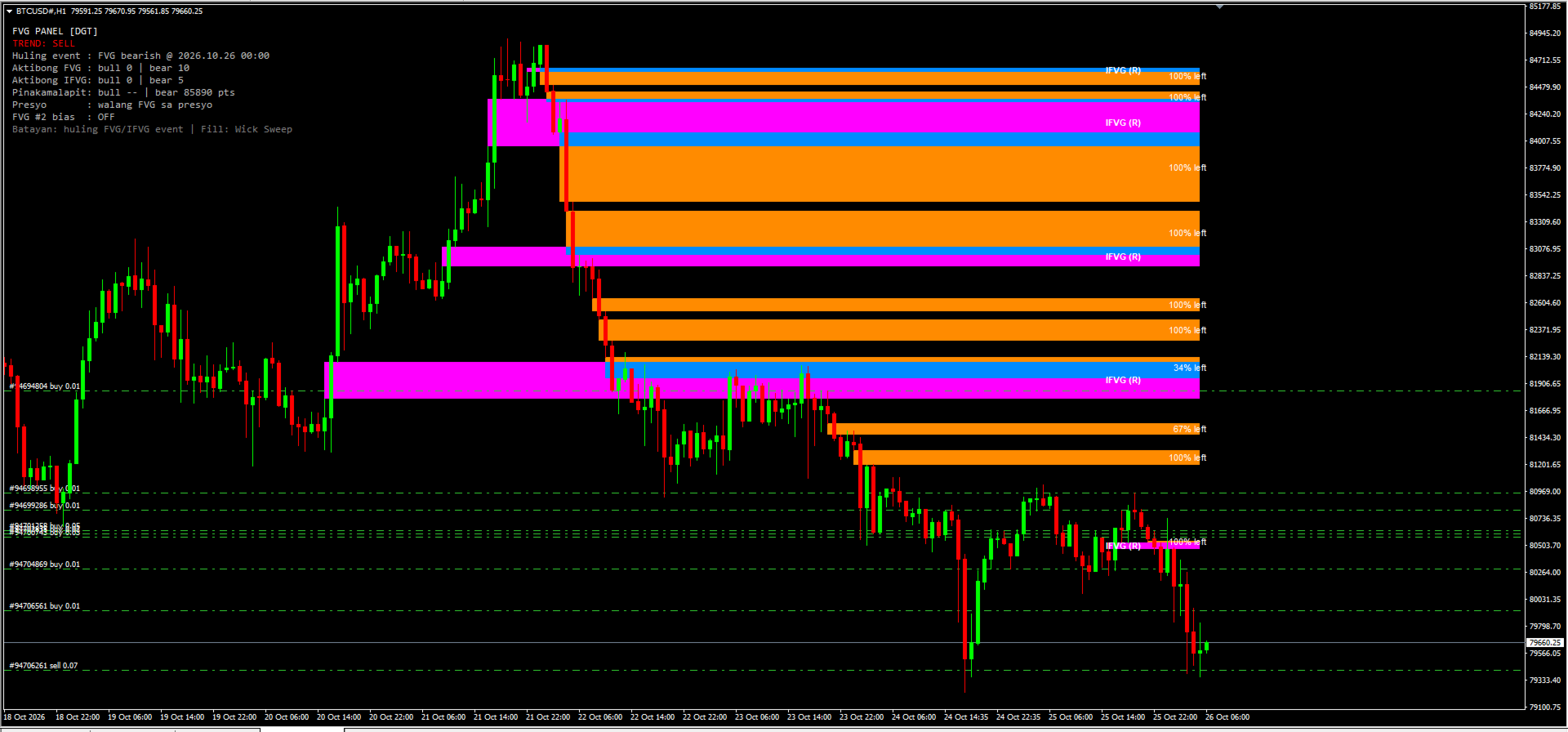
  3. A compact panel in the corner of the chart that shows the current bias (BUY, SELL or NEUTRAL), the last FVG or IFVG event, how many zones are active, how far the nearest bullish and bearish zones are from price, and whether price is currently sitting inside a zone.
  4. Two independent FVG sources. You can run FVG #1 on the chart timeframe and FVG #2 on a different timeframe (for example M15 zones displayed on an M5 chart), each with its own colors.

2. What is a Fair Value Gap (FVG)?

A Fair Value Gap is a three-candle pattern. Take three consecutive candles and call them candle 1 (the oldest), candle 2 (the middle one) and candle 3 (the newest).

Bullish FVG. Candle 2 is a strong upward candle. The low of candle 3 is higher than the high of candle 1. The range between the high of candle 1 and the low of candle 3 is the gap. Price moved up so quickly that this range was not covered by overlapping wicks.

Bearish FVG. Candle 2 is a strong downward candle. The high of candle 3 is lower than the low of candle 1. The range between the low of candle 1 and the high of candle 3 is the gap.

Traders usually interpret these gaps in one of three ways:

  • As a magnet. Price often returns to a gap later, to "rebalance" the area, before continuing in its original direction or reversing.
  • As support or resistance. A bullish FVG below the current price is watched as a possible support area; a bearish FVG above price is watched as possible resistance.
  • As a footprint of aggressive participation. A cluster of unfilled gaps in one direction can reflect a sustained, one-sided move.

3. What is an Inverse FVG (IFVG)?

An Inverse FVG is a Fair Value Gap that has failed and flipped its role.

A bullish FVG is normally expected to hold as support. If price trades down through the zone and then a candle closes below the bottom of that zone, the zone has not held. In the inverse-FVG view, that failed bullish gap now becomes a bearish IFVG, an area that may act as resistance if price comes back up into it.

The same works in the opposite direction. A bearish FVG that is filled and then broken by a candle closing above its top becomes a bullish IFVG, an area that may act as support.

In short:

  • Bullish FVG: filled, then a candle closes below the zone, result: Bearish IFVG (resistance).
  • Bearish FVG: filled, then a candle closes above the zone, result: Bullish IFVG (support).

4. Feature Summary

  • Automatic bullish and bearish FVG detection with a strict three-candle rule, drawn as zones that extend to the right until filled.
  • Four fill methods: Any Touch, Midpoint, Wick Sweep and Body Beyond, used consistently for zone removal, IFVG creation and the "% left" value.
  • Live "% left" label on every active FVG, with adjustable font size and colors.
  • Inverse FVG tracking with its own colors and an "IFVG (S)" or "IFVG (R)" text label.
  • Information panel with BUY / SELL / NEUTRAL bias, last event, zone counts, nearest-zone distance and price location.
  • Optional second FVG timeframe with separate colors.
  • Zones are built from closed candles. A replay of past bars on load shows recent zones immediately, and all objects are removed cleanly with the indicator.

5. How the Indicator Detects an FVG (Exact Rules)

The detection follows the logic of the original Pine Script. For the source timeframe in use, the indicator looks at the three most recently closed candles of that timeframe: the newest one (candle 3), the middle one (candle 2) and the oldest one (candle 1).

Bullish FVG is created when all of these are true: - The low of the newest candle is above the high of the oldest candle. - The close of the middle candle is above the high of the oldest candle. - There is no earlier gap that already "prevents" this one, meaning the newest candle's low is not simply above the middle candle's high, and the middle candle's low is not simply above the oldest candle's high. This condition keeps the detection aligned with the Pine logic and avoids stacking an extra zone on top of a larger move that already left its own gap.

The zone is drawn from the high of the oldest candle (bottom) up to the low of the newest candle (top). It begins at the time of the oldest candle.

Bearish FVG is created when all of these are true: - The high of the newest candle is below the low of the oldest candle. - The close of the middle candle is below the low of the oldest candle. - The same "no earlier gap" condition holds in the downward direction.

The zone is drawn from the high of the newest candle (bottom) up to the low of the oldest candle (top).

When is it checked? Detection runs when a bar of the source timeframe closes. On the chart timeframe this means once per new bar. For a higher source timeframe, a zone is added only after a bar of that timeframe has actually closed. Because the zones are built from closed candles only, a zone that has been drawn will not vanish simply because the forming candle changed. The "% left" text and the panel are the only elements that update on every tick.

What if I choose a source timeframe lower than the chart? The indicator never uses a timeframe lower than the chart's own. If the value you enter is smaller than the chart timeframe, the chart timeframe is used instead.

6. The Four Fill Methods

A zone is considered "filled" when price reaches a specific level inside or at the far edge of the zone. Different traders define "filled" differently, so the indicator lets you choose. The setting is called Fill and takes a number from 0 to 3. The default is 2, Wick Sweep.

  • 0 – Any Touch: Bullish – the low of a candle reaches the top edge of the zone. Bearish – the high of a candle reaches the bottom edge of the zone.
  • 1 – Midpoint: Bullish – the low of a candle reaches the middle of the zone. Bearish – the high of a candle reaches the middle of the zone.
  • 2 – Wick Sweep (default): Bullish – the low of a candle reaches the bottom edge of the zone. Bearish – the high of a candle reaches the top edge of the zone.
  • 3 – Body Beyond: Bullish – a candle closes at or below the bottom edge of the zone. Bearish – a candle closes at or above the top edge of the zone.

Any Touch (0). The most sensitive setting. The zone disappears the first time price touches it. Use this if you only care about untouched zones and want any contact to count as mitigation. With this method the "% left" label is not very informative, because the zone is removed on the first touch, so it will normally read 100% until it vanishes.

Midpoint (1). The zone is filled when price reaches its 50% level, which many traders call the consequent encroachment. A zone at 0% left under this method has been entered by half of its height.

Wick Sweep (2). The zone is considered filled only when a wick reaches the far edge, so the entire zone has been traded through. This is the default and gives the "% left" label its widest, most gradual range, from 100% down to 0% across the full height of the zone.

Body Beyond (3). The strictest setting. Wicks are ignored. The zone is filled only when a candle closes beyond the far edge. This is useful if you consider wick penetration to be noise and only accept a real close.

7. The "% Left" Label

7.1 What it shows

Every active FVG carries a small text label such as "72% left". It answers one question: how much of the distance to the fill level is still left?

  • 100% left means price has not entered the zone yet.
  • 50% left means price has gone halfway toward the fill level.
  • 1% left means price is almost at the fill level.
  • At 0%, the zone is filled and is removed from the chart together with its label.

The label is placed at the vertical middle of the zone, anchored at the right side near the current candle, and it uses the font size and font color you choose.

7.2 How it is calculated

The calculation depends on the fill method, because the "finish line" is different for each method.

  1. The indicator takes the entry edge of the zone. For a bullish FVG this is the top edge, because price enters from above. For a bearish FVG it is the bottom edge, because price enters from below.
  2. It takes the fill level from the selected method (top, middle or bottom edge, as described above).
  3. The distance between the entry edge and the fill level is the span that has to be covered.
  4. The indicator tracks the deepest point that price has reached inside the zone since the zone formed: the lowest low for a bullish FVG, the highest high for a bearish FVG. With Body Beyond, closes are used instead of wicks. The currently forming candle is included, so the label reacts in real time.
  5. The percentage left is: 100 × (1 − depth covered ÷ span). It is clamped between 0 and 100 and rounded up, so a zone that is not yet filled never shows 0%.

7.3 Why it uses the deepest point

The label is a measure of mitigation progress, not of where price happens to be right now. If price dips into a zone to 60% of its height and then moves away, the zone is still 60% mitigated. For that reason the percentage does not go back up when price leaves the zone. It only goes down as the maximum depth increases.

7.4 Examples

Wick Sweep, bullish FVG from 100.00 (bottom) to 102.00 (top). The entry edge is 102.00 and the fill level is 100.00, so the span is 2.00. If the lowest price since formation is 101.50, then 0.50 of 2.00 has been covered, which is 25%, and the label shows "75% left". If price later falls to 100.40, 1.60 of 2.00 is covered and the label shows "20% left". The zone is removed when price reaches 100.00.

8. Inverse FVG Lifecycle in Detail

  1. An FVG gets filled according to the selected fill method. It is removed from the list of active FVGs and its rectangle and "% left" label are removed from the chart.
  2. If IFVG tracking is enabled, the filled zone is moved to a watch list instead of being forgotten.
  3. The watch list is checked on every closed bar:
  4. If a candle closes beyond the far side of the original zone (below the bottom of a bullish zone or above the top of a bearish zone), an IFVG is created in the opposite direction.
  5. If a candle closes back on the original side of the zone (above the top of a bullish zone or below the bottom of a bearish zone), the zone is simply dropped. It held, so no IFVG is created.
  6. If the candle closes inside the zone, the indicator waits for the next closed bar.
  7. An active IFVG is drawn from the original start of the zone and extended to the right. It uses its own colors and carries a label: "IFVG (S)" if it is bullish and acts as support, "IFVG (R)" if it is bearish and acts as resistance.
  8. The IFVG is removed when a candle closes beyond it in the opposite direction: below the bottom of a bullish IFVG, or above the top of a bearish IFVG.

Creating an IFVG also counts as an event for the panel. The bias becomes BUY if a bullish IFVG was just created, and SELL if a bearish IFVG was just created.

The IFVG feature can be switched off completely. When it is off, filled zones are simply removed and no IFVG logic runs.

9. The Information Panel

The panel sits in the upper-left area of the chart by default and gives a compact summary of what the indicator currently sees. Please note that the panel text is written in Filipino (Tagalog) mixed with English technical terms, because the indicator was built for a Filipino trader. The meaning of every line is explained below, so you can use it without knowing the language.

  • Title – FVG PANEL [DGT] – Name of the panel
  • Trend – TREND: SELL – Current bias: BUY, SELL or NEUTRAL
  • Last event – Huling event : FVG bearish @ 2026.10.25 23:00 – "Huling event" means "last event": the most recent FVG or IFVG that was created, with its date and time
  • Active FVG – Aktibong FVG : bull 1 | bear 4 – "Aktibong" means "active": number of bullish and bearish FVG zones currently on the chart
  • Active IFVG – Aktibong IFVG: bull 3 | bear 7 – Number of bullish and bearish IFVG zones currently on the chart
  • Nearest – Pinakamalapit: bull 0 pts | bear 750 pts – "Pinakamalapit" means "nearest": distance in points from the current price to the closest bullish and the closest bearish FVG. 0 pts means price is inside or touching a zone. "--" means there is none
  • Price location – Presyo : walang FVG sa presyo – "Presyo" means "price". Tells you whether price is inside a bullish FVG ("IN BULL FVG (support)"), inside a bearish FVG ("IN BEAR FVG (resistance)"), or in neither ("walang FVG sa presyo" means "no FVG at the price")
  • FVG #2 bias – FVG #2 bias : OFF – The bias of the second source: BUY, SELL, "--" if it has not produced an event yet, or OFF if the second source is disabled
  • Basis – Batayan: huling FVG/IFVG event | Fill: Wick Sweep – "Batayan" means "basis": a reminder that the trend line is based on the last FVG or IFVG event, and which fill method is active

9.1 How the trend verdict works

The TREND line is intentionally simple and transparent:

  • BUY if the most recent FVG or IFVG event was bullish.
  • SELL if the most recent FVG or IFVG event was bearish.
  • NEUTRAL if no event has been recorded yet.

This is a state of the last event, not a prediction and not a measure of trend strength. It will flip each time a new event of the opposite direction appears, and a market that alternates between bullish and bearish gaps will make the verdict flip as well. Treat it as a quick summary of the most recent order-flow imbalance, and combine it with your own analysis, higher-timeframe context and risk management before you act on it.

10. Using a Second Timeframe (FVG #2)

The indicator contains two independent FVG sources.

  • FVG #1 always runs. Its timeframe is set in minutes. A value of 0 means "use the chart timeframe".
  • FVG #2 is optional. A value of 0 means it is turned off. Any other value is the timeframe in minutes whose gaps you want to see.

Typical timeframe values in minutes: 1 (M1), 5 (M5), 15 (M15), 30 (M30), 60 (H1), 240 (H4), 1440 (D1), 10080 (W1).

Example. You trade on an M5 chart. You leave FVG #1 at 0 so it shows M5 gaps, and set FVG #2 to 60 so the H1 gaps are drawn on the same chart in a different color. The M5 zones show you precise short-term levels, and the H1 zones show you the larger areas that may matter more.

Each source has its own pair of colors, one for bullish and one for bearish zones, so you can always see where a zone came from. The last event of FVG #2 is also shown on the panel as "FVG #2 bias". The overall TREND line still follows the most recent event from any source.

11. Input Reference

The input descriptions inside MT4 are written in short Filipino and English phrases. This table explains each one in English.

  • FVG #1 TF (minutes) (default: 0) – Timeframe of the main FVG source in minutes. 0 = chart timeframe. A value lower than the chart timeframe falls back to the chart timeframe
  • FVG #2 TF (minutes) (default: 0) – Timeframe of the second FVG source in minutes. 0 = off
  • Fill method (default: 2) – 0 = Any Touch, 1 = Midpoint, 2 = Wick Sweep, 3 = Body Beyond
  • Show IFVG (default: true) – Turns Inverse FVG tracking on or off
  • Max zones (default: 40) – Maximum number of active FVG zones kept on the chart. When the limit is reached, the oldest zone is removed first
  • Replay bars (default: 360) – Number of past bars processed when the indicator is loaded, so recent zones appear immediately. More bars means a longer look-back and slightly longer loading time
  • Draw zones (default: true) – Draws rectangles and labels on the chart. When off, the indicator only updates the panel
  • Show % left (default: true) – Shows the "% left" label on each active FVG
  • % label font size (default: 8) – Font size of the "% left" label (also used for the IFVG label)
  • % label color (bullish) (default: White) – Font color of the "% left" label on bullish zones
  • % label color (bearish) (default: White) – Font color of the "% left" label on bearish zones
  • FVG #1 bullish color (default: Teal (0,184,217)) – Fill color of bullish zones from source 1
  • FVG #1 bearish color (default: Orange (255,139,0)) – Fill color of bearish zones from source 1
  • FVG #2 bullish color (default: Mint (110,231,183)) – Fill color of bullish zones from source 2
  • FVG #2 bearish color (default: Coral (255,107,107)) – Fill color of bearish zones from source 2
  • IFVG bullish color (default: Dodger Blue) – Fill color of bullish IFVG zones
  • IFVG bearish color (default: Magenta) – Fill color of bearish IFVG zones
  • Show IFVG label (default: true) – Shows the "IFVG (S)" or "IFVG (R)" text on each IFVG
  • IFVG label color (default: White) – Font color of the IFVG label
  • Show panel (default: true) – Shows or hides the information panel
  • Panel X (default: 10) – Panel distance from the left edge, in pixels
  • Panel Y (default: 25) – Panel distance from the top edge, in pixels

12. Installation

  1. In MetaTrader 4, open File → Open Data Folder.
  2. Go to MQL4 → Indicators and copy the indicator file (the .mq4 source file or the compiled .ex4 file, depending on what you received) into that folder.
  3. If you have the .mq4 source, open it in MetaEditor and press Compile (F7). Check that there are no errors.
  4. Back in the terminal, right-click Navigator → Indicators and choose Refresh.
  5. Drag FVG DGT Panel [TMT] from the Navigator onto the chart you want, or double-click it.
  6. In the Inputs tab, adjust the settings you want and press OK.

13. Limitations

  • The indicator does not issue alerts or notifications in this version.
  • The third lower-timeframe FVG source and the "color on detection" candle coloring of the original Pine script are not included.
  • The trend verdict follows the last event only. It is not a trend-strength measure and can change often in choppy markets.
  • Results depend on your broker's price data. Brokers differ in gaps, spreads and history, so zones can look slightly different from one broker to another.
  • A zone or an IFVG is an area of interest. Price may ignore it, react at its edge or trade straight through it.

14. Frequently Asked Questions

Does the indicator repaint? Zones are built from closed candles and do not change after they are drawn. Only the "% left" label and the panel move with the live candle.

Why does a zone disappear? Because it was filled according to the selected fill method, or because the maximum number of zones was exceeded and it was the oldest one.

Why do I see 100% on every label? With the Any Touch method, a zone is removed at first contact, so labels stay at 100% until the zone is gone. Use Midpoint, Wick Sweep or Body Beyond to see the percentage move.

Why can't I see IFVGs? Check that Show IFVG is on. IFVGs only appear after a filled zone is broken by a candle close on the far side. They have their own colors, so make sure those colors differ from your chart background.

Can I use it on any symbol and timeframe? Yes. It works on forex, metals, indices and crypto symbols that your MT4 broker offers, on any timeframe.

Does it trade for me? No. It only draws on the chart and never sends orders. You place and manage every trade yourself, so position size, stop loss and take profit always stay under your control. Always review each setup carefully before you act on it.

Is the panel text in English? Part of it is in Filipino, and each line is explained in section 9 of this description.

15. Credits and Risk Disclaimer

This indicator is a MetaTrader 4 port inspired by the "Fair Value Gaps by DGT" concept for TradingView. The additions described in this document, such as the "% left" label, the IFVG colors and labels, and the panel, were built for this MT4 version. All trademarks belong to their respective owners.

Risk warning. Trading foreign exchange, CFDs, metals, indices and cryptocurrencies involves a high level of risk and may not be suitable for everyone. You can lose some or all of your capital. This indicator is an analytical tool that displays information based on past price data. It does not predict the future, it does not guarantee profits and it is not financial advice. Past behavior of any pattern does not guarantee future results. Test any approach on a demo account first, use proper risk management, and never risk money you cannot afford to lose.

推荐产品
PZ Harmonacci Patterns
PZ TRADING SLU
3.17 (6)
可以说,这是您可以为MetaTrader平台找到的最完整的谐波价格形成自动识别指标。它检测19种不同的模式,像您一样认真对待斐波那契投影,显示潜在的反转区域(PRZ),并找到合适的止损和获利水平。 [ 安装指南 | 更新指南 | 故障排除 | 常见问题 | 所有产品 ] 它检测19种不同的谐波价格形态 它绘制了主要,衍生和互补的斐波那契投影(PRZ) 它评估过去的价格走势并显示每个过去的形态 该指标分析其自身的质量和性能 它显示合适的止损和获利水平 它使用突破来表明合适的交易 它在图表上绘制所有样式比率 它实现了电子邮件/声音/视觉警报 受斯科特·M·卡尼(Scott M. Carney)的书的启发,该指标旨在满足最纯粹和最熟练的交易者的需求。但是,它采取了一种使交易更容易的方式:在向交易发出信号之前,它会等待Donchian朝正确方向突破,从而使交易信号非常可靠。 斐波那契投影与向量无关 它实现了电子邮件/声音/推送警报 它绘制了ABCD投影 重要提示: 为了符合 Scott M. Carney先生 的商标申诉,某些图案名称已重命名为不言自明的替代方式, Scott M.
Noize Absorption Index MT4
Ekaterina Saltykova
5 (1)
Noize Absorption Index - is the manual trading system that measures the difference of pressure between bears forces and bulls forces. Green line - is a noize free index that showing curent situation. Zero value of index shows totally choppy/flat market.Values above zero level shows how powerfull bullish wave is and values below zero measures bearish forces.Up arrow appears on bearish market when it's ready to reverse, dn arrow appears on weak bullish market, as a result of reverse expectation. S
Overview Harmonic Patterns MT4 is a technical analysis indicator designed for the MetaTrader 5 platform. It identifies and displays harmonic price patterns, such as Butterfly, Cypher, Crab, Bat, Shark, and Gartley, in both bullish and bearish directions. The indicator calculates key price levels, including entry, stop loss, and three take-profit levels, to assist traders in analyzing market movements. Visual elements and customizable alerts enhance usability on the chart. Features Detects six ha
Monster Harmonic Indicator
Paul Geirnaerdt
4.59 (29)
Monster Harmonics Indicator is a harmonic pattern indicator. It recognizes Gartley, Bat, Crab, Butterfly, Cypher, White Swan, Black Swan, Shark and several other patterns. Projected patterns that are not yet completed are recognized, too. Monster even shows the PRZ (Potential Reversal Zone). Users can add their own user defined patterns to Monster. Besides the current pattern, Monster also shows all patterns in the symbols history. Monster will provide alerts for developing patterns. Introduced
TWO PAIRS SQUARE HEDGE METER INDICATOR Try this brilliant 2 pairs square indicator It draws a square wave of the relation between your two inputs symbols when square wave indicates -1 then it is very great opportunity to SELL pair1 and BUY Pair2 when square wave indicates +1 then it is very great opportunity to BUY pair1 and SELL Pair2 the inputs are : 2 pairs of symbols         then index value : i use 20 for M30 charts ( you can try other values : 40/50 for M15 , : 30 for M30 , : 10 for H1 ,
Trade with Gann on your side!! MASTER CIRCLE 360 CIRCLE CHART, originally created by Gann admitted that this is “The Mother of all charts”. It is one of the last studies that this great trader left for us. The numeric tab le is apparently quite simple like all the tables and is based on square numbers, the SQUARE OF 12 and is by evolution, one of the most important square numbers. Here we can find CYCLE, PRICE AND TIME thanks to angles and grades, to show past and future support and resistance.
这是一个预测蜡烛收盘价的指标。 该指标主要用于 D1 图表。 该指标适用于传统外汇交易和二元期权交易。 该指标可以用作独立的交易系统,也可以作为您现有交易系统的补充。 该指标分析当前蜡烛,计算蜡烛本身内部的某些强度因素,以及前一根蜡烛的参数。 因此,该指标预测市场走势的进一步方向和当前蜡烛的收盘价。 由于这种方法,该指标既适用于短期盘中交易,也适用于中长期交易。 该指标允许您设置指标在分析市场情况期间将产生的潜在信号的数量。 在指标设置中有一个特殊的参数。 此外,该指标可以通过图表上的消息、电子邮件以及推送通知的形式通知新信号。感谢您的关注!交易愉快! 购买后一定要写信给我! 我会给你我的交易指标的建议! 还可以获得奖金!
Blahtech Market Profile
Blahtech Limited
4.53 (15)
Was: $249  Now: $99   Market Profile defines a number of day types that can help the trader to determine market behaviour. A key feature is the Value Area, representing the range of price action where 70% of trading took place. Understanding the Value Area can give traders valuable insight into market direction and establish the higher odds trade. It is an excellent addition to any system you may be using. Blahtech Limited presents their Market Profile indicator for the MetaTrader community. Ins
All Symbols   AND  All Time frames Scan                                                                                                                 Document Introduction   The ABCD is a basic harmonic pattern. The ABCD pattern is a visual, geometric chart pattern comprised of three consecutive price swings. It looks like a diagonal lightning bolt and can indicate an upcoming trading opportu
The Best One Scalping Trade Panel functional manual trade panel with risk reward, auto SL by candle ( original solution), lot size calculation, one-click trading, scale in and out of trades (partial close),  Works with all symbols not just currency pairs, perfect works on DAX, NASDAQ, GOLD, ...... I earn every day during live stream on ZakopiecFX - join Me Risk by lot Risk by percent SL by points SL by Candle, Renko, RangeBar ( original solution) TP by point TP by Risk/Reward Auto Trailing by P
限时优惠 “限时发布价格” “2.0版本后将涨价” Currencies Gold Momentum Flow Dashboard — 即刻洞察市场强弱 一款强大的多合一交易面板,实时显示外汇与黄金在多个时间周期(M5–D1)的动量。 多时间周期ROC分析 内置交易信号(趋势一致与动量变化) 货币强弱指标 热力图快速识别趋势 实时提醒 + 一键切换交易品种 无需来回切换图表 — 一个界面掌握整个市场。 像真正看懂市场一样交易 大多数交易者是“盲目的”。 他们不断切换图表… 追逐信号… 入场太晚…离场困惑。 这一切,到此为止。 看到别人看不到的机会 这不仅仅是一个指标。 这是一个“市场透视系统”,帮助你看到: 哪些交易对正在爆发 哪些货币正在主导市场 哪些高概率机会正在形成 为精准交易者打造 提前捕捉动量变化 确认多周期趋势一致 避免震荡行情 专注高质量机会 内置优势 智能信号系统 货币强弱分析 热力图分析 实时提醒 一键执行 彻底改变你的交易方式 交易什么 何时交易 哪个方向概率最高 ️ 大多
Volume Profile Sniper v11.1是一款全面的市场分析工具 专业的交易方法 Volume Profile Sniper v11.1在一个指标中结合了超过15个关键过滤器,根据对市场情况的全面评估提供清晰的信号。 主要特点 成交量不平衡分析-该算法计算每个蜡烛中买家和卖家的份额,表明其中一方的优势(可配置阈值从50%到90%)。 多级信号滤波-指标考虑到: 趋势指标(EMA9/21) Rsi不包括超买/超卖区域 蜡烛图案(针杆,吸收,锤子) 支持/阻力水平(自动检测) 音量峰值,以确定主要参与者的活动 经典和放大的RSI分歧 波动率评估的ATR 用于确定趋势强度的ADX 价格行动(内部和外部酒吧) 多时间帧确认 市场结构(高点/低点) 会话过滤器(亚洲,伦敦,纽约会话) 防止新闻排放 灵活的配置系统-MinFiltersRequired参数允许您设置生成信号所需的最小数量的滤波器。 这使得可以使指标适应任何交易策略,从激进到保守。 可视化设置-您可以通过将指示器集成到图形样式中来更改箭头的大小和颜色(ArrowSize,BuyArr
Master Volume profile
Israr Hussain Shah
Money Flow Profile MT5 HERE   Here   our more valuable tools SMC Trend Trading   ,  Easy SMC Trading  ,  Institutional SMC Architect Volume Analysis Tools  ,  Volume flow Profile  ,  Market volume profile  , FVG with Volume  , Liquidity Heatmap Profile  ,  Volume Spread Analysis This Master Edition is engineered for clarity and speed, featuring a unique Auto-Theme Sync system that instantly beautifies your chart layout upon loading. Key Features: True Money Flow Calculation: Goes beyond stand
Daily FIBO Pro
Mark Thimoty Evangelista
使用 BERG Daily FIBO Pro 释放您的交易潜力 BERG Daily FIBO Pro   是专为 MetaTrader 4 (MT4) 平台设计的强大且可定制的斐波那契回撤指标。无论您是经验丰富的交易者,还是刚刚起步,这个指标都是您识别关键支撑位和阻力位、提升市场分析并优化交易策略的理想工具。 为什么选择 BERG Daily FIBO Pro?   斐波那契分析的精确性:   借助基于前一天高点和低点自动计算的斐波那契回撤水平,在市场上获得优势。 BERG Daily FIBO Pro   绘制了各个水平(0%、23.6%、38.2%、50%、61.8%、78.6%、100%),帮助您轻松识别潜在的市场转折点。   智能报警系统:   使用可定制的警报系统,确保您不会错过任何机会,当价格触及任何斐波那契水平时,系统将通知您。您可以选择视觉弹出警报或声音信号,随时掌握您的交易动态。   完全可定制的视觉效果:   根据您的交易风格调整指标的外观。调整颜色、线条样式、标签文字、字体大小和位置,创建既信息丰富又赏心悦目的图表。   动态更新:  
RTrends
Nikolay Likhovid
The RTrends indicator does two things: first, it automatically draws the layout of the price chart by plotting trend lines and, secondly, it produces bearish and bullish signals. The layout reflects the fractal nature of the market. Trends from different time horizons are applied simultaneously on the chart. Thus, from a single chart a trader can see trend lines of higher timeframes. The lines, depending on the horizon, differ in color and width: the older the horizon, the thicker the line is. T
VR Cub
Vladimir Pastushak
VR Cub 这是获得高质量切入点的指标。该指标的开发是为了促进数学计算并简化对仓位入场点的搜索。多年来,该指标所针对的交易策略已被证明其有效性。交易策略的简单性是其巨大的优势,即使是新手交易者也能成功进行交易。 VR Cub 计算开仓点以及获利和止损目标水平,这显着提高了效率和易用性。查看使用以下策略进行交易的屏幕截图,了解简单的交易规则。 设置、设置文件、演示版本、说明、问题解决,可以从以下位置获取 [博客] 您可以在以下位置阅读或撰写评论 [关联] 版本为 [MetaTrader 5] 计算入场点的规则 开仓 要计算入场点,您需要将 VR Cub 工具从最后一个高点拉伸到最后一个低点。 如果第一个点在时间上早于第二个点,交易者等待柱线收于中线上方。 如果第一个点在时间上晚于第二个点,交易者等待柱线收于中线下方。 根据上述条件,严格在 柱线收盘 后建仓。 换句话说,如果我们在小时图上进行交易,那么从最高点到最低点的时间距离必须超过24小时,最高点和最低点之间的点数必须大于或等于平均价格变动每天。 维持和改变市场地位 可以有多个未平仓头寸;每个头寸都可以单独修改。 VR Cub
Smart Reversal Oscillator Pro
Atventius Bayu Riswanto
## Smart Reversal Oscillator Pro Smart Reversal Oscillator Pro is an advanced hybrid trading utility designed for MetaTrader 4 that reinvents volatility and momentum analysis. Instead of analyzing raw price action, this indicator applies mathematical Bollinger Bands directly onto the Relative Strength Index (RSI) array data within a separate sub-window. Standard fixed oversold and overbought levels (like 30 and 70) often fail during strong market expansions. This professional oscillator solve
Daily Open Mirror Engine — Wick & Body Mirror Levels for MT4 Daily Open Mirror Engine   is a professional MetaTrader 4 indicator designed to project mirrored price levels from the current daily open. Many intraday moves react strongly around the daily open. This indicator uses the daily open as the central reference point and automatically projects mirrored levels from important wick and body extremes, helping traders identify possible reaction zones, liquidity targets, support, resistance, an
Delta Fusion Pro
Francesco Secchi
5 (2)
DELTA FUSION PRO 10.0 是一款专为 MetaTrader 设计的专业指标,旨在实时分析订单流 (Order Flow) 和机构压力(Ask/Bid 价差)。 主要特点 智能自动调校:根据市场(外汇、加密货币、股指、大宗商品、股票、期货)、时间框架和波动率 (ATR) 自动进行校准。 核心功能: NetDelta 与累积 Delta:通过 EMA 平滑跟踪方向性压力。 价格/成交量背离:检测常规/隐藏背离(分为 Strong/Medium/Weak 级别),并提供无重绘 (No-Repaint) 信号。 矢量不平衡与注入成交量 (Imbalance & Infusion Volume):识别成交量失衡和异常高压 spike(机构高潮)。 POC 与 Delta 分析图 (Delta Profile):精准定位具有最高激进成交量集中的价格水平。 VWAP Delta:基于激进成交量计算的成交量加权平均价。 交互式面板: UCP:可在图表上直接通过拖放 (drag-and-drop) 方式控制所有功能的开启/关闭。 情绪与多时间框架 (Sentiment & MTF):
Meta Sniper
Samir Tabarcia
Requirements Optimized to work with   EURUSD-EURCHF-USDJPY, AUDUSD-CADJPY-AUDNZD, CHFJPY-NZDJPY-NZDUSD For timeframe 4H. *(Minimum recommended deposit is $300 for each Pair) for initial lot set to 0.10, My favorite Pair are (CHFJPY-NZDJPY-EURUSD-AUDNZD-USDJPY) Warning it will be SALE only 5 Copys at 60$ Then it will be update up to 200$  You can use it the way it is, For new Set Files will be add on (Comments) ECN broker with low spread is recommended to get better results. Setup is very e
History Pattern Search
Yevhenii Levchenko
该指标建立当前报价,可以与历史报价进行比较,并在此基础上进行价格走势预测。指示器有一个文本字段,用于快速导航到所需日期。 选项: 符号 - 选择指标将显示的符号; SymbolPeriod - 选择指标从中获取数据的时段; IndicatorColor - 指示器颜色; HorisontalShift - 由指标绘制的报价移动指定的柱数; Inverse - true 反转引号,false - 原始视图; ChartVerticalShiftStep - 图表垂直移动(键盘上的向上/向下箭头); 接下来是文本字段的设置,您可以在其中输入日期,您可以通过按“回车”立即跳转到该日期。 接下来是文本字段的设置,您可以在其中输入日期,您可以通过按“回车”立即跳转到该日期。
我们为您提供一个指标"蜡烛收盘台",它将成为您在贸易领域不可或缺的助手。 这就是为什么知道蜡烛何时关闭会有所帮助的原因: 如果你喜欢使用蜡烛花纹进行交易,你就会知道蜡烛何时关闭。 此指标将允许您检查是否形成了已知模式以及是否存在交易的可能性。 该指标将帮助您做好市场开放和市场关闭的准备。 可以设置一个计时器来创建计划新闻的预览,这样就可以检查市场对此的反应。 您可以设置指示灯,以便在蜡烛关闭前几秒钟发送警报/警告。 通知/警报/警报可以发送到: 屏幕警报 电子邮件 移动应用 MT4烛台计时器指示器为什么有用 那么烛台计时器什么时候有用呢?如果你长期交易,你可能不需要蜡烛计时器指示器,因为你的参赛不会受到一分钟或一小时的太大影响。但是,如果你在短时间内是黄牛或交易员,那么你知道时机非常重要。 外汇市场24小时开放,只在周末关门,有些策略可能会受到您入仓时出现错误时机的严重影响。 MT4蜡烛计时器指示器可以显示当前蜡烛中的剩余时间,以便为下一次蜡烛打开做好准备。 可以从这一指标中受益的一些情况例子有: 预定消息传出 地理市场开闭 预定发生的事件,通常是金融、经济或政治事件
TigerRbot
Tizie Henri Jean Daniel Baha Bi
TIGERRBOT TigerRbot UserGuide ENG TigerRbot UserGuide FR Available for MT4, TigerRbot uses the Tick Volume to access trading information on order flow, Cumulative Volume Delta, as well as buying and selling pressure, based on the selected time frame. It scans the market to analyse the pressure differential (Volume Delta) and determine the CVD (Cumulative Volume Delta), which are essentially Level 2 trading data available only after execution of the order book. It leverages underlying market cond
A technical indicator that calculates its readings on trading volumes. In the form of a histogram, it shows the accumulation of the strength of the movement of the trading instrument. It has independent calculation systems for bullish and bearish directions. Works on any trading instruments and time frames. Can complement any trading system. The indicator does not redraw its values, the signals appear on the current candle. It is easy to use and does not load the chart, does not require addition
Nirvana prop controler MT4
Aiireza Arjmandi Nezhad
面向专业交易者与评估账户(Prop)的风险管理与限制监控指标 本工具仅在图表上展示风险管理与限制相关的精确信息,帮助你更专注地做出决策。该指标不执行开仓/平仓/修改操作,也不会与智能交易系统(EA)产生干扰。 功能 监控日内与总回撤 基于余额(Balance)或净值(Equity)计算并显示日内/总回撤(可配置)。 显示距离预设限制的剩余百分比。 清晰专业的图表面板 摘要表:余额、净值、当前盈亏、日内/总回撤、预警阈值。 简洁易读的界面,便于专注决策。 基于风险的仓位大小 根据百分比/固定金额风险和所选止损距离计算大致手数。 在图表上显示风险回报比(R:R)以及入场、止损(SL)、止盈(TP)水平。 警报与通知 接近日内/总回撤阈值时触发警报(阈值百分比可设置)。 价格触及 SL/TP 或其他自定义事件时发送通知。 支持向桌面和移动端推送通知。 兼容性与非干预 指标仅用于信息展示,不执行或管理订单。 可同时用于多个图表与品种。 即使在不允许 EA 的环境中也可使用。 使用方法 将指标加载到所需品种与时间周期上。 设置日内/总限制、计算基准(Balance/Equity)以及时区或每日
"Impulses and Corrections 4" is created to help traders navigate the market situation. The indicator shows multi-time frame upward and downward "Impulses" of price movements. These impulses are the basis for determining the "Base" , which is composed of zones of corrections of price movements, as well as "Potential" zones for possible scenarios of price movement. Up and down impulses are determined based on a modified formula of Bill Williams' "Fractals" indicator. The last impulse is always "U
Professional Opening Range Breakout (ORB) indicator designed for precision session trading with automatic time handling, breakout alerts, and advanced target levels. This indicator automatically identifies the Opening Range for any configurable session, plots the High, Low, and Midpoint levels, and extends them across the trading day. Built-in breakout detection and alerts, range measurements, and extension targets provide traders with clear structure and actionable levels. Ideal for traders usi
Color Stochastic Enhanced Stochastic Oscillator with Cross Detection and Visual Signal Support Overview Color Stochastic is a customized version of the classic Stochastic Oscillator designed for momentum analysis and crossover visualization. The indicator provides color-based signal marking and configurable crossover detection at user-defined overbought and oversold levels. It can be used as part of: Momentum analysis Mean reversion workflows DCA-based strategies Multi-indicator confirmation sys
Infinity Trend Pro
Yaroslav Varankin
1 (1)
This is a trend indicator without redrawing Developed instead of the binary options strategy (by the color of the Martingale candlestick) Also works well in forex trading When to open trades (binary options) A signal will appear in the place with a candle signaling the current candle It is recommended to open a deal for one candle of the current timeframe M1 and M5 When a blue dot appears, open a deal up When a red dot appears, open a trade down. How to open trades on Forex. When a signal is rec
EZZ Zig Zag MT4
Paulo Rocha
5 (1)
EZZ Elite Zig Zag is an indicator for the MetaTrader 4 terminal. This indicator traces the peak of the trend based on the market reversal, thus showing various opportunities in the financial market. EZZ Elite Zig Zag is a visual tool, intuitive, and easy to understand and use.  Test it Yourself by Downloading it for Free. Author Paulo Rocha all rights reserved
该产品的买家也购买
Trend SniperX MT4
Sarvarbek Abduvoxobov
5 (5)
Trend Sniper X 是一款用于 MetaTrader 5 的多周期趋势追踪指标,旨在帮助交易者清晰、精准地识别趋势方向及潜在的反转点。 适用于 MT5: https://www.mql5.com/en/market/product/181101 价格信息: 当前价格为促销价,随着后续更新和新功能的推出,价格可能会发生变动。 Code2Profit 频道 通过多周期分析掌控市场! 如何使用 Trend Sniper X 最大化胜率:关键规则与交易时段技巧 技术规格 交易平台 MetaTrader 5 指标类型 多周期趋势指标 运行时间周期 任意图表周期,支持独立选择更高周期(M1–MN1) 主要交易品种 外汇、黄金 (XAUUSD) 及其他 CFD 差价合约 推荐账户 任何账户类型 可视化呈现 彩色趋势 K 线(买入/卖出/弱势/转变)+ 买入/卖出信号箭头 附加模块 市场交易时段框(悉尼、东京、伦敦、纽约) 核心功能 多周期趋势分析: 将更高周期的趋势方向直接投影到当前图表上,提供清晰的宏观视角。 弱势/不确定 K 线检测: 高亮显示趋势状况不明确的 K 线,帮助交易者远离震
AW Prime Oscillator
AW Trading Software Limited
5 (1)
两个振荡器的组合。第一个显示入场点,第二个显示当前趋势。该指标可以通过两种模式的箭头显示振荡信号,所有快速振荡信号或仅在当前趋势方向的信号。它具有多时间范围面板和三种类型的信号通知。 好处: 适合当日交易和倒卖交易 趋势过滤 简单而灵敏的设置 多时间框架面板 适合融入顾问。 适用于任何交易品种和任何时间范围 三种类型的通知 MT5 version ->  HERE  / Problem solving ->  HERE 指标策略 该指标由两个不同的振荡器组成: 慢趋势线(粗) - 当指标的最高水平从上到下交叉时,它是下降趋势的指标,当较低的水平水平(指标的低水平)从下到上交叉时,它是下降趋势的指标上升趋势。此外,在较低区域找到一条慢线表明当前趋势是下降趋势,反之亦然,在上方区域找到一条慢线表明当前趋势是上升趋势。这就是该指标确定当前市场趋势的方式。 快速入场线(细):识别从下到上与下线相交处的入场点,这是买入信号,在从上到下穿越上线时,这是卖出信号。除了振荡线之外,调整指标线也很重要,因为这会影响信号的数量和准确性。 本产品使用不同的振荡器来显示慢线和快线,每个振荡器必须单独调整。 为
Zoryk Gold mt4
Reda El Koutbane
5 (3)
折扣将在 24 小时后结束——下一价格为 69 美元 联系我获取推荐设置 首发名额有限 ZORYK — MetaTrader 4 专业 XAUUSD 黄金信号与交易计划系统 你一定经历过这种感觉。 你花时间分析黄金,等待入场,终于打开交易后,价格却立即向相反方向移动。你过早平仓,移动止损,或者因为犹豫几秒而错过机会。随后市场在没有你的情况下,准确到达你最初预期的目标。 问题并不总是方向错误。 真正的问题是不确定性。 你不知道真正的入场位置在哪里,不知道交易逻辑在什么位置失效,也不知道应该先保护较小的利润,还是继续等待更大的行情。你甚至不知道当前信号是否足够强,还是自己只是在勉强寻找一笔交易。 黄金移动速度非常快。没有明确计划的正确判断,也可能在几秒钟内变成错误决定。 ZORYK 正是为了解决这个问题而开发。 什么是 ZORYK ZORYK 是一套专门为 MetaTrader 4 和 XAUUSD M5 周期开发的完整黄金信号与交易计划系统。 它不是一个只显示 BUY 或 SELL 箭头,然后让你独自处理所有后续决定的普通指标。 每个确认信号都可以在图表上显示
Super Signal – Skyblade Edition 專業級無重繪 / 無延遲趨勢信號系統,擁有卓越勝率 | 適用於 MT4 / MT5 在較低的時間週期上效果最佳,例如 1 分鐘、5 分鐘與 15 分鐘圖表。 核心特色: Super Signal – Skyblade Edition 是一套專為趨勢交易設計的智能信號系統。 其採用多重濾波邏輯,僅篩選出具有明確方向性、動能強勁且波動結構健康的走勢進場點。 本系統 不預測高點或低點 ,只有在同時滿足以下三項條件時才會觸發交易信號: 趨勢方向明確 動能持續增強 波動率結構穩定 此外,系統還結合市場流動性分析,以進一步提升信號的準確性與觸發時機。 信號特性: 所有箭頭信號皆為 100% 無重繪,無延遲 信號一旦出現即固定於圖表,不會閃爍或消失 提供圖表箭頭、資訊面板、彈出通知、聲音提示及推播訊息 支援 EA 呼叫(Buffer 輸出),可整合至自動化交易或信號跟單系統 提供預設參數模板,免調整即可使用,適合新手快速上手 總結: Super Signal – Skyblade Edition 是一款邏輯清晰、穩定高效的專業趨勢型
Tokyo mt4 Indicator
Vasiliy Strukov
5 (9)
Tokyo Indicator(东京指标)直观地展示了趋势方向、潜在交易信号及市场状况。 其采用颜色编码的阶梯式趋势线,以蓝色标识看涨阶段,以洋红色标识看跌阶段。配套的方向箭头会在趋势发生变化时,标示出潜在的买入与卖出机会。 内置的综合仪表盘将当前信号、市场倾向、动能、波动率及信号质量整合于同一视图中,方便交易者在观察价格走势的同时评估指标数据,无需在不同面板间切换。 凭借清晰的图表显示和简洁的市场概览,Tokyo Indicator 支持以系统化的方式进行趋势分析与交易确认。 适用于任何时间周期及各类交易品种,尤其适合黄金交易。 购买后请立即联系我,以获取专属赠品!您可以免费获得我们的“强力支撑与趋势扫描”(Strong Support and Trend Scanner)指标,请私信我! 设置说明与使用手册请见此处。 请注意:我不会在 Telegram 上出售我的 EA 或特殊参数设置(set files);我的 EA 仅在 Mql5 平台上提供,而参数设置文件仅在我的博客(此处链接)上发布。请务必警惕诈骗,切勿从他人处购买任何参数设置! 设置 ShowHUD —— 在图表上显示
Atomic Analyst
Issam Kassas
5 (14)
Atomic Analyst — MetaTrader 4 如有产品、设置或技术支持方面的问题,请直接在 MQL5 上给我发消息。 该指标将复杂的市场计算转换为简单的视觉信号、彩色K线、趋势读数、止损水平和多个止盈区域,使交易者能够快速理解并应用于真实市场环境。 主要交易用途: 剥头皮和日内交易: 专为快速决策、清晰箭头、提醒、K线颜色和结构化进出场区域而设计。 日内交易和波段交易: 帮助交易者利用趋势方向、强度、动能和多周期分析跟随更大的市场波动。 主要功能: • 价格行为、强度和动能分析 • 多周期趋势扫描器 • 总体趋势百分比计算 • 买入和卖出箭头 • 止损和多个止盈水平 • 最多 5 个基于斐波那契的止盈水平 • 移动止损逻辑 • 用于趋势和动能的彩色K线 • 实时提醒到终端、手机和电子邮件 • 现代化用户友好面板 • 实时交易监控 • 买入和卖出潜力显示 • 总交易数量显示 • 每日、每周和总利润显示 • 每日佣金计算 • Bid、Ask 和点差显示 • K线计时器、本地时间和服务器时间 • 终端连接状态 • 账户货币显示 • 可直接从面板控制时间周期 • 可手动使用,
目前八折优惠! 对任何新手或专家交易者来说都是最好的解决方案! 这个仪表板软件适用于28种货币对。它基于我们的两个主要指标(高级货币强度28和高级货币冲动)。它对整个外汇市场提供了一个伟大的概述。它显示高级货币强度值,货币运动速度和28个外汇对在所有(9)时间段的信号。想象一下,当你可以使用图表上的单一指标观察整个市场,以确定趋势和或剥头皮的机会时,你的交易将得到改善 我们已经在这个指标中建立了一些功能,使你更容易识别强势和弱势货币,同时识别和确认潜在的交易。该指标以图形方式显示货币的强势或弱势是增加还是减少,以及它在所有时间段的表现。 增加的新功能是动态市场斐波那契水平,它适应当前的市场条件变化,这是一个已经在我们的高级货币强度28和高级货币冲动指标中使用的成熟的加分项。 在交易时,总是将弱势货币和强势货币配对,这个新指标将帮助你做到这一点。 用户手册:点击这里  https://www.mql5.com/en/blogs/post/708783 特点  显示每个时间段的ACS28和GAP-speed(冲动)的货币强度值。 列:颜色代码以7种颜色显示货币强度:强势
SR Liquidity
Oleg Rodin
5 (2)
SR Liquidity 是一款旨在揭示市场流动性高度集中且价格反应最剧烈的隐蔽区域的交易指标。这些特殊的流动性区域充当着强有力的支撑位与阻力位,为您清晰呈现市场最可能发生反转的位置。 SR Liquidity 指标并非简单地绘制常规的支撑/阻力线,而是通过分析实际的价格行为,识别买卖压力积聚的区域。这些区域实际上是推动市场真实波动的流动性池。通过在图表上直观呈现这些区域,该指标能助您在价格反应发生前预判走势——这意味着它实际上能够预测价格方向可能发生的变化。它将原始的价格行为转化为清晰且具实操价值的市场蓝图,标示出那些可能成为市场转折点的关键价位。 该指标适用于任何交易品种和时间周期——包括外汇、指数、金属、加密货币等。支持任意时间周期。 购买后请联系我,以获取交易指南及免费赠送的优质附加指标!
M1 Sniper
Oleg Rodin
4.97 (30)
M1 SNIPER 是一款易于使用的交易指标系统。它是一个专为 M1 时间框架设计的箭头指标。该指标可以作为独立的系统在 M1 时间框架下进行剥头皮交易,也可以作为您现有交易系统的一部分使用。虽然该交易系统专为 M1 时间框架交易而设计,但它也可以用于其他时间框架。我最初设计此方法是为了交易 XAUUSD 和 BTCUSD。但我发现这种方法在其他市场交易中也同样有用。 指标信号既可以顺势交易,也可以逆势交易。我教授一种特殊的交易技巧,帮助您利用指标信号进行双向交易。该方法基于使用特殊的动态支撑位和阻力位区域。 购买后,您可以立即下载 M1 SNIPER 箭头指标。此外,我还为所有 M1 SNIPER 工具用户免费提供下方屏幕截图所示的 Apollo Dynamic SR 指标!这两个指标的组合可以帮助您更轻松、更准确地利用 M1 时间框架进行交易。 购买后请联系我,免费获取交易提示和奖励指标! 祝您交易成功!
Liquidity Scalper System
Stanislav Konin
5 (1)
Liquidity Scalper System: 基于流动性的指标形式交易系统。 大多数指标只显示一个箭头,止损放在哪里、目标在哪里、信号是否可信,都要交易者自己判断。Liquidity Scalper System 覆盖完整的交易周期:寻找流动性池,在其被突破时给出信号,立即计算 Entry、Stop Loss 和三个目标,并在面板上显示统计数据以及新数据上的验证结果。系统自行选择设置,并每天更新。 工作原理 1. 系统寻找流动性池:市场参与者止损单聚集的价位。 2. 当价格突破流动性池,且突破经由动能(必要时还经由成交量)确认后,图表上出现 BUY 或 SELL 箭头。 3. 立即绘制 Entry、Stop Loss、TP1、TP2 和 TP3 水平,并填充区域。 4. 右侧构建流动性分布图:可以看到价格上方和下方大成交量集中的位置。 与众不同之处 • 自动优化取代手动调参。 系统在历史数据上测试 32 种设置组合,为当前品种和周期选出最佳组合。优化目标可选:Win Rate、净利润或盈利因子。 • 新数据验证。 设置在一部分历史上训练,并在优化器未见过的更新数据上检验(out
Smart Trend Trading System
Issam Kassas
4.8 (10)
Smart Trend Trading System 是适用于 MetaTrader 4 的图表指标,将趋势信息、入场和出场信号以及价格水平集中呈现在同一图表上。 它将 10 多种交易工具 整合到一个系统中,包括趋势检测、反转区域、Smart Cloud、移动止损逻辑、支撑与阻力、K线着色、提醒以及多周期分析。 该系统旨在帮助您应对不同的市场环境: 趋势市场: 识别主要趋势,发现回调,跟随动能,并通过止损指导和移动止损选项寻找更清晰的入场机会。 震荡市场: 识别区间震荡状态,寻找价格反应区域,并在价格触及重要水平时获得更清晰的信号。 剥头皮和日内交易: 使用快速信号、K线颜色、提醒和多周期确认,辅助短线交易决策。 主要功能: • 10 多个指标整合为一个交易系统 • 7 多种策略和信号组合 • 趋势跟随、反转、剥头皮、日内交易和波段交易模式 • 入场和出场箭头 • Smart Cloud • Smart Reversal Zones • 支撑和阻力水平 • Smart Trailing Stop • 多周期趋势分析 • 成交量、趋势和反转K线着色 • 手机、电子邮件和终端提醒 •
Advanced Supply Demand
Bernhard Schweigert
4.91 (302)
现在优惠 30%! 任何新手或专业交易者的最佳解决方案! 该指标是一款独特、高质量、且价格合理的交易工具,因为我们已经整合了许多专有功能和新公式。 依据此更新,您将能够显示双重时间帧区域。 您不仅可以显示一个较高的时间帧,还可以同时显示图表时间帧,加上更高的时间帧:显示嵌套时区。 供需双方所有交易者都会喜欢它。 :) 重要信息披露 高级供需的最大潜力,请访问 https://www.mql5.com/zh/blogs/post/720245   想象您的交易如何得以改善,是因为您能够精准定位入场或目标位吗? 构建于新的底层算法,它可以更轻松地识别出买卖双方之间的潜在失衡。 这是因为它以图形方式展示供需最强劲区域,及其过去的表现(显示旧区域)。 这些功能旨在帮助您更轻松地发现最佳入场区域和价位。 现在您可以针对您的交易品种和时间帧来优化和编辑区域强度! 高级供需指标适用于所有产品和时间帧。 它是一个新的公式,非常新的功能是两个区域强度函数可由用户输入进行调整! 这在交易中是一大优势。 当您学习如何使用专有功能,例如带有价格游离最小 X 因子的区域强度时,您能够判断该区域强劲与否。 供需
This is a professional chart indicator designed for traders focused on stability and clear price action. It helps filter market noise and provides clear visual entry and exit zones for your trading decisions. Core Features: Strictly Non-Repainting: The system is built with strict non-repaint logic. What you see on the chart is the true historical performance. Confirmed Signals: Signals are triggered and confirmed only after the candle closes . Once a trading arrow appears on a closed candle, it
PRO Renko System
Oleg Rodin
5 (31)
PRO Renko Arrow Based System for trading renko charts.  准确的信号交易任何外汇工具. 另外,我将免费提供系统的附加模块! PRO Renko系统是RENKO图表上高度准确的交易系统。该系统是通用的。 该交易系统可应用于各种交易工具。 该系统有效地中和了所谓的市场噪音,打开了获得准确反转信号的通道。 该指标易于使用,只有一个参数负责产生信号。 您可以很容易地使算法适应您感兴趣的交易工具和renko酒吧的大小。 我很乐意通过提供任何咨询支持来帮助所有客户有效地使用该指标。 祝您交易成功!购买后,立即写信给我! 我将与您分享我的建议和我的renko发电机。 另外,我将免费提供系统的附加模块!
Currency Strength Wizard
Oleg Rodin
4.85 (61)
货币强度向导是一个非常强大的指标,为您提供成功交易的一体化解决方案。该指标使用多个时间范围内所有货币的数据来计算这个或那个外汇对的力量。此数据以易于使用的货币指数和货币电力线的形式表示,您可以使用它们来查看这种或那种货币的力量。 您所需要的只是将指标附加到您要交易的图表上,该指标将向您显示您交易的货币的真实强度。该指标还向您显示买卖量压力的极值,您可以在顺势交易时利用这些压力。该指标还显示了基于斐波那契的可能目标。该指标可用于各种交易时间范围。该指标支持各种货币对的交易。 该指标为您提供所有类型的警报,包括推送通知。 购买后请联系我。我将与您分享我的交易技巧,并免费为您提供丰厚的红利指标! 祝您交易愉快,获利丰厚!
CRT Multi-Timeframe Market Structure & Liquidity Sweep Indicator Non-Repainting | Multi-Asset | MT5 Version Available MT5 Version:   https://www.mql5.com/en/market/product/162075 Full User Guide — explains what each feature does and why:   https://www.mql5.com/en/blogs/post/767525 Quick Start User Guide  — explains how to configure and in what order:  https://www.mql5.com/en/blogs/post/767540 Indicator Overview CRT Ghost Candle HTF Fractal is a complete institutional-grade market structure too
Day Trader Master
Oleg Rodin
5 (16)
Day Trader Master 是一个完整的日间交易者交易系统。该系统由两个指标组成。一个指标是买入和卖出的箭头信号。这是你得到的箭头指示器。我将免费为您提供第二个指标。第二个指标是专门设计用于与这些箭头结合使用的趋势指标。 指标不重复也不迟到! 使用这个系统非常简单。您只需按照当前趋势方向的箭头信号,显示为双色线。蓝色是买入趋势。红色是一种销售趋势。蓝色箭头是买入信号。红色箭头是卖出信号。您需要箭头的颜色和信号的方向来匹配趋势线的颜色。 箭头指标主要是为 M5 和 M15 时间间隔的日内交易而创建的。但从技术上讲,该系统可以用于其他时间间隔。 指示器配备带有推送消息功能的弹出警报。 购买后一定要写信给我!我将为您提供与系统交易的个人建议,以及我的趋势指标。此外,还有丰厚的奖励等着您!
Gann Made Easy
Oleg Rodin
4.82 (174)
Gann Made Easy 是一个专业且易于使用的外汇交易系统,它基于使用先生理论的最佳交易原则。 W.D.江恩。该指标提供准确的买入和卖出信号,包括止损和获利水平。您甚至可以使用推送通知在旅途中进行交易。 购买后请联系我,即可免费获得交易指导和超棒的额外指标! 您可能已经多次听说过江恩交易方法。通常 Gann 的理论不仅对于新手交易者而且对于那些已经有一定交易经验的人来说都是非常复杂的东西。这是因为江恩的交易方法在理论上并不那么容易应用。我花了几年时间来完善这些知识,并将最好的原则应用到我的外汇指标中。 该指标非常易于应用。您所需要的只是将其附加到您的图表并遵循简单的交易建议。该指标不断进行市场分析工作并寻找交易机会。当它检测到一个好的入口点时,它会为您提供一个箭头信号。该指标还显示止损和获利水平。 换句话说,当您像先生一样进行交易时,该指标会为您提供最佳江恩建议。江恩亲自告诉你此时此刻该做什么。但最好的部分是您不需要了解任何有关江恩交易原则的知识,因为该指标会为您完成整个市场分析工作。
Pips Generator
Oleg Rodin
4.6 (10)
Apollo Pips Generator 是提供趨勢方向信號的指標。該指標提供多個入口點,因此您總能找到獲利的交易機會。注意截圖。 屏幕截圖顯示了點數生成器工具與我的其他工具的組合,該工具由帶有指示頂部和底部的星形信號的通道表示。這種組合為您提供了多種應用系統的方式。 購買後請聯繫我免費獲得我的第二個指標。您將擁有與我在屏幕截圖中顯示的完全相同的系統。 我還將為您提供有關如何使用該系統以獲得最佳結果的說明。 這兩種工具都提供所有類型的警報,包括推送通知。 該指標可用於任何貨幣對、商品、指數、金屬或任何其他資產。它也可以用於任何時間範圍。 無論您擁有何種級別的交易經驗,您一定會發現此工具對您的交易需求和目標很有幫助。 祝您交易愉快!
Dinapoli Package MT4
Samil Bozuyuk
5 (1)
All in One package includes the  Oscillator Predictor ,  MACD Predictor ,  Thrust Scanner  and  Advanced Fibonacci  indicators which are mandatory for applying  Dinapoli  trade plans.  Please visit below links for detailed explanations of indicators. Advanced Fibonacci Indicator =>  https://www.mql5.com/en/market/product/52834 Thrust Scanner Indicator => https://www.mql5.com/en/market/product/52830 Overbought /Oversold Predictor indicator => https://www.mql5.com/en/market/product/52621 Macd P
Advanced Currency Strength28 Indicator
Bernhard Schweigert
4.91 (659)
目前40%的折扣 任何新手或专家交易者的最佳解决方案! 这个指标是一个独特的、高质量的、可负担得起的交易工具,因为我们纳入了一些专有的功能和一个新的公式。只需一个图表,你就可以读出28个外汇对的货币强度!想象一下,你的交易将如何得到改善,因为你的交易是在你的手中进行的。想象一下,你的交易将如何改善,因为你能够准确地确定新趋势或剥头皮机会的触发点? 用户手册:点击这里  https://www.mql5.com/en/blogs/post/697384 这是第一本,原版的! 不要买一个毫无价值的崇拜者的克隆品。 特别的 子窗口中的箭头显示强劲的货币势头GAP将指导你的交易! 当基础货币或报价货币处于超卖/超买区域(外盘斐波那契水平)时,在个人图表的主窗口中出现警告信号。 当货币力量从外围区间回落时,回撤/反转警报。 十字星模式的特别警报 可选择多个时间框架,以快速查看趋势! 货币强度线在所有的时间框架中都非常平稳,当使用较高的时间框架来识别总体趋势,然后使用较短的时间框架来确定精确的入口时,效果非常好。你可以根据自己的意愿选择任何时间框架。每个时间框架都由其自身进行了优化。
箭头只告诉您买入。Obsidian Scalper Pro 告诉您在哪里买、止损放在哪里、三个目标在哪里、按照您的风险仓位该有多大,以及这个形态在 100 分里值多少分。每个信号都以一份画在图表上的完整交易计划的形式到来,内置的统计窗口展示最近一百个信号的诚实结果,连带置信区间的胜率一并给出。每个决定都在收盘K线上做出,所以您看到的历史,就是您本可以交易的那段历史。 该指标在黄金(XAUUSD)M30 上表现最佳,也可用于任何其他品种和周期。 需要与之配套的策略吗? 购买后请在 MQL5 上给我发消息,我会发送给您。 它做什么 Obsidian Scalper Pro 在既有趋势中寻找回调入场,并为每一个入场交出一份现成的计划。Entry、SL、TP1 和 TP2,以及可选的 TP3,作为水平线和阴影区域直接画在图表上,带着价格标签和 R:R 比例。手数由您的风险百分比和这个信号实际的止损距离算出,使用亏损方向的跳动点价值,因此在 CFD 和交叉货币账户上都保持正确。每个信号还有一个 0 到 100 的 Score,面板上另有一个实时的就绪度数值,说明此刻的形态会有多好。 三层结构,一
GoldRush Trend Arrow Signal
Kirk Lee Holloway
5 (2)
GoldRush 趨勢箭頭信號 GoldRush 趨勢箭頭信號 指標為 XAU/USD 中的高速、短期短線交易者提供精確、實時的趨勢分析。 專為1分鐘時間框架設計,此工具顯示方向箭頭以明確顯示入場點,使短線交易者能在波動市場中自信操作。 該指標包含主要和次要警示箭頭。主要信號為白色和黑色方向箭頭,用於指示趨勢方向的轉變;次要信號為藍色和紅色箭頭,用於確認主要箭頭指示的方向並提示潛在交易入場點。 注意:當趨勢方向發生變化後僅出現一個主要警報箭頭時,請注意可能會出現多個次要藍/紅箭頭。次要信號將在滿足信號標準的任何蠟燭圖後出現,因此在長期趨勢移動中,螢幕上將顯示大量次要箭頭(如附帶的截圖所示)。您可在設置中開啟或關閉任一箭頭類型。 以下是我使用此指標進行交易的方式: - 對於買入入場,我會耐心等待白箭頭在蠟燭收盤時出現,並在下一根可用蠟燭收盤時出現藍箭頭時進行買入交易。 - 對於賣出入場,我會耐心等待黑箭頭在蠟燭收盤時出現,並在下一根可用蠟燭收盤時出現紅箭頭時進行賣出交易。 - 獲利了結/止損設置由使用者自行負責,但我個人使用最低R:R為1:2,並發現這在倫敦/紐約開盤等
UR TrendExhaustion
Krzysztof Jan Debski
UR 趨勢疲憊   UR TrendExhaustion 是不想處理參數值或其他設置的交易者的最佳解決方案 - 它對每個人來說既簡單又直觀易懂。 使用 UR TrendExhaustion 的優勢: 無參數 您有 3 條線最能描述圖表上的情況:趨勢耗盡線、鯨魚資金線和零售資金線。 該界面展示了兩個極端(紅色區域)上任何一條線的耗盡 最大優勢:簡單且可適應所有資產。 有一個特殊的電報聊天,您可以在其中了解最新的工具更新,如果您覺得缺少什麼,也可以發送請求! 為什麼是 UR TrendExhaustion? 在我的整個職業生涯中,我一直在編寫多種指標,並達到了這樣一個地步,即我收集了我所有的知識來編寫這個簡單但最好的 (imo) 工具來進行交易,而不需要圖表上的任何其他工具。 易於理解,易於設置。 該策略的執行方式使做市商很難與它進行交易 - 將死 MM! 您與 UR TrendExhaustion 一起使用的任何其他工具都會增加您的交易,但我一直單獨使用它並取得了很好的效果。 祝你好運! 如何使用 UR TrendExhaustion ? YT 上有一段視頻展示瞭如何使
Bull Reversal Mt4
Md Meraz Mahmud
Alright. This indicator works on MT4 and is very easy to use. When you receive a signal from it, you wait for that candle with the signal to close and you enter your trade at the beginning of the next new candle. A red arrow means sell and a green arrow means buy. All arrows comes with a long dotted like for easy identification of trade signal. Are you okay with that?   100% non repaint Work All Major currency  Pair,  1 minute time frame 1 minute expire
Neuro Poseidon MT4
Daria Rezueva
4.74 (46)
Neuro Poseidon is a new indicator by Daria Rezueva. It combines precise trading signals with adaptive TP/SL levels - creating best possible trades as a result! Message me and get  Neuro Poseidon Assistant  as a gift to automize your trading process! What makes it stand out? 1. Proven profitability on all assets and timeframes 2. Only confirmed BUY and SELL signals present on the chart 3. Adaptive TP & SL levels generated by the software for each trade 4. Easy to understand - suitable for all
This indicator works on MT4 and is very easy to use. When you receive a signal from it, you wait for that candle with the signal to close and you enter your trade at the beginning of the next new candle . A red arrow means sell and a green arrow means buy. All arrows comes with Alert  like for easy identification of trade signal. Are you okay with that? 1 minute candle 1 minute expire
Scalper Vault
Oleg Rodin
5 (40)
Scalper Vault 是一套功能强大且配置完善的交易系统,专为追求日内交易稳定性的交易者而设计。 作为一套完整且独立的交易系统,该高精度指标能够为外汇和二元期权交易者提供机构级的市场分析。 购买后请联系我,获取我的独家交易技巧以及一份超值赠品! Scalper Vault 能够消除凭感觉交易和复杂的各种手动分析,让您只需专注于执行交易,并运用简单易行的交易技巧进行操作。 精准的顺势交易信号:其核心算法通过分析市场结构,仅在市场主导趋势的方向上提供高胜率信号,从而大幅减少错误的入场操作。 精确的顶部与底部探测:系统能够识别市场动能耗尽的状态,从而锁定潜在的反转区域。 基于江恩(Gann)理论的买卖区域:系统会自动绘制江恩数学市场点位,让您能清晰洞察大型机构交易者在何处寻求买入或卖出。 100% 不会重绘(Non-Repainting):一旦K线收盘,生成的信号便会永久固定在图表上。绝无动态偏移,绝无虚假信号——您在历史数据中所见,即为该指标的真实表现。 广泛的市场适用性:适用于各类货币对、黄金、指数以及加密货币交易。
Trend Lines PRO
Roman Podpora
5 (1)
TREND LINES PRO 帮助您了解市场真正的方向转变点。该指标显示真实的趋势反转点以及主要参与者重新入场的时机。 您可以看到 BOS线、 趋势变化和更高时间框架的关键水平——无需复杂的设置或不必要的干扰。信号不会重绘,并在K线收盘后仍然保留在图表上。 VERSION MT 5    -   与……搭配使用时,可发挥其最大潜力   RFI LEVELS PRO 指示器 该指标显示的内容: 实际变化 趋势(BOS 线) 一旦信号出现,它就始终有效!这与会重绘的指标有着重要的区别,后者可能会发出信号后又改变信号,从而导致资金损失。现在,您可以更精准、更准确地进入市场。此外,还有一个功能,会在箭头出现后为K线着色,直到达到目标价位(止盈)或出现反转信号为止。 重复条目   以及主要玩家的充值 为了提高寻找入场点时的视觉清晰度,我们创建了一个模块,该模块首先显示买入/卖出区域,并在该区域内寻找最佳入场点。此外,我们还加入了智能逻辑来管理止损位,该逻辑会随着时间的推移逐步降低止损位的大小,从而降低入场交易时的初始风险(移动止损位)。 信号强度水平(BOS) 该指标采用三个显著性等级来衡量
Extreme Value Sniper is a detrended price indicator  Indicator finds the potential reversal levels by checking value ranges and price cycles. MT5 Version of the product :  https://www.mql5.com/en/market/product/114550 It shows the overbought and oversold levels using the average range. Overbought Levels are between 4 and 10 Oversold levels are bewtween -4 and -10 Those levels can be used as a reversal levels. Extreme Value Sniper look for some special divergence and convergence patterns to c
作者的更多信息
Zero Lag Real Trend Signals (MTF) — Zero-Lag Trend Line, Volatility Bands, Entry Arrows, Alerts and a 9-Timeframe Trend Panel for MetaTrader 4 Zero-lag basis | ATR deviation bands | Trend flip arrows | Pullback entry arrows | Popup alerts | Multi-timeframe panel 1. Overview Zero Lag Real Trend Signals (MTF) is a chart-window indicator for MetaTrader 4. It draws a zero-lag moving average (the "basis") surrounded by volatility bands, colors the chart according to the current trend, marks trend cha
TMT Squeeze Momentum - Volatility Squeeze Dots, Momentum Histogram, Strength Panel and Alerts for MetaTrader 4 Squeeze ON / OFF dots | Linear-regression momentum histogram | Buyers vs Sellers strength % | Popup, sound, push and email alerts 1. Overview TMT Squeeze Momentum is an indicator for MetaTrader 4 that runs in its own sub-window below the price chart. It answers two questions at the same time: Is volatility compressing?   Dots on the zero line show whether the market is in a "squeeze", w
筛选:
无评论
回复评论