Fair value gap tmt

FVG DGT Panel [TMT] — Fair Value Gap and Inverse FVG Indicator with Live "% Left" Fill Tracking for MetaTrader 4

Version for MT4 | Non-repainting zone logic | BUY / SELL / NEUTRAL bias panel | FVG + IFVG | Optional second timeframe

1. Overview

FVG DGT Panel [TMT] is a chart-window indicator for MetaTrader 4 that finds, draws and tracks Fair Value Gaps (FVG) and Inverse Fair Value Gaps (IFVG) directly on your price chart. It is a MetaTrader 4 port of the popular "Fair Value Gaps by DGT" concept originally written for TradingView in Pine Script, rebuilt for MT4 with a compact information panel and several additions that are not part of the original script.

The idea behind a Fair Value Gap is simple. When price moves very fast in one direction, it can leave behind a small price range that was never traded back and forth properly, a pocket of imbalance between buyers and sellers. Many discretionary traders who work with price action, Smart Money Concepts (SMC), Inner Circle Trader (ICT) style concepts or plain supply and demand treat these pockets as areas where price may later return, react, or fail. This indicator automates the tedious part of that workflow: it scans the chart for those gaps, draws them as colored zones, extends them to the right while they remain valid, and removes them once they are filled.

On top of the classic FVG logic, this version adds four things that make the zones easier to read and to act on:

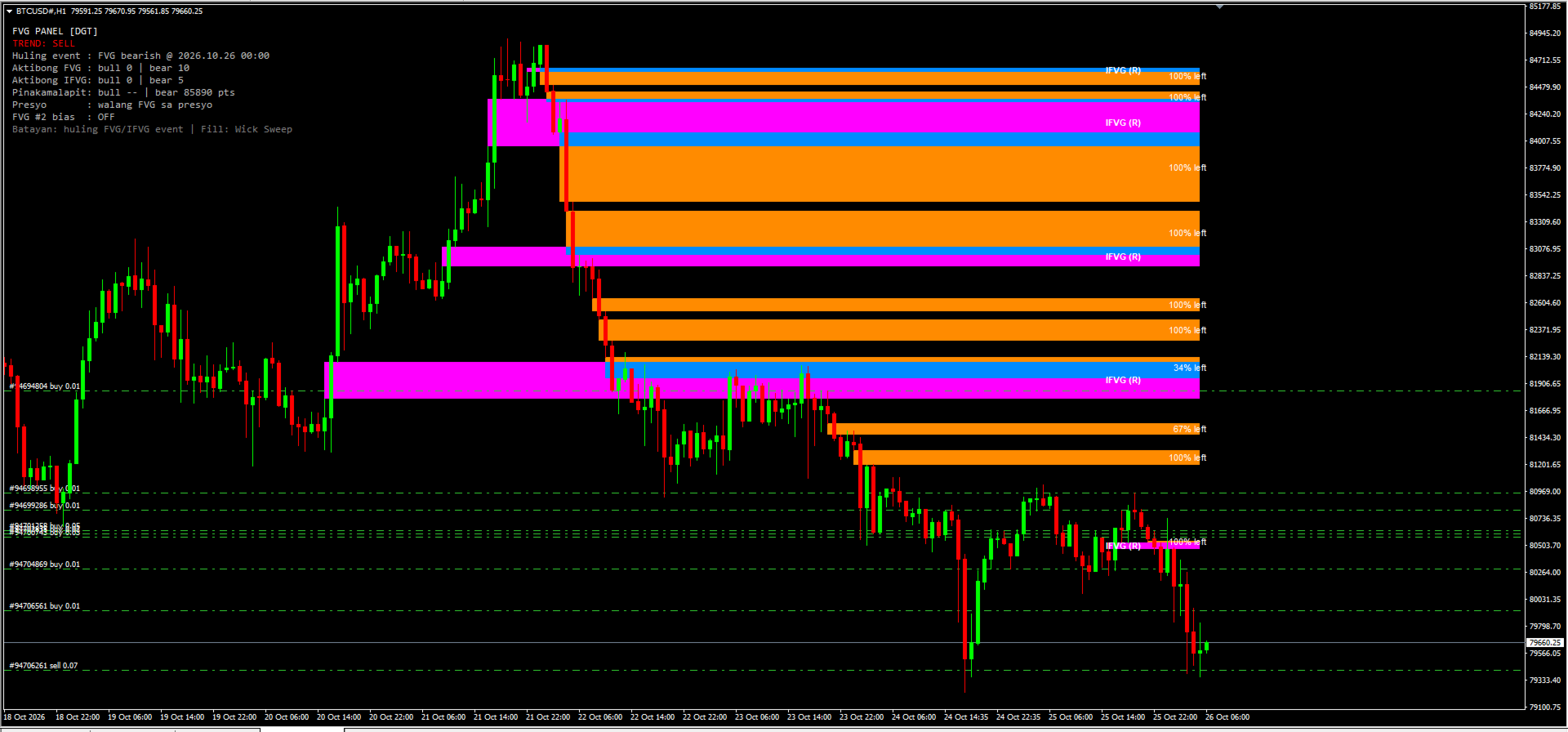
  1. A live "% left" label on every active FVG. Each zone tells you how much distance is still left before the zone counts as filled. A fresh, untouched zone shows 100% left. As price pushes into the zone, the number counts down. When it reaches 0% the zone is filled and disappears.
  2. Inverse FVG (IFVG) tracking with its own colors and its own text label. When a filled zone is broken by a candle close on the far side, the indicator turns it into an IFVG that is drawn in a separate color and tagged on the chart, so you can tell at a glance what is a fresh FVG and what is an inverted one.
  3. A compact panel in the corner of the chart that shows the current bias (BUY, SELL or NEUTRAL), the last FVG or IFVG event, how many zones are active, how far the nearest bullish and bearish zones are from price, and whether price is currently sitting inside a zone.
  4. Two independent FVG sources. You can run FVG #1 on the chart timeframe and FVG #2 on a different timeframe (for example M15 zones displayed on an M5 chart), each with its own colors.

2. What is a Fair Value Gap (FVG)?

A Fair Value Gap is a three-candle pattern. Take three consecutive candles and call them candle 1 (the oldest), candle 2 (the middle one) and candle 3 (the newest).

Bullish FVG. Candle 2 is a strong upward candle. The low of candle 3 is higher than the high of candle 1. The range between the high of candle 1 and the low of candle 3 is the gap. Price moved up so quickly that this range was not covered by overlapping wicks.

Bearish FVG. Candle 2 is a strong downward candle. The high of candle 3 is lower than the low of candle 1. The range between the low of candle 1 and the high of candle 3 is the gap.

Traders usually interpret these gaps in one of three ways:

  • As a magnet. Price often returns to a gap later, to "rebalance" the area, before continuing in its original direction or reversing.
  • As support or resistance. A bullish FVG below the current price is watched as a possible support area; a bearish FVG above price is watched as possible resistance.
  • As a footprint of aggressive participation. A cluster of unfilled gaps in one direction can reflect a sustained, one-sided move.

3. What is an Inverse FVG (IFVG)?

An Inverse FVG is a Fair Value Gap that has failed and flipped its role.

A bullish FVG is normally expected to hold as support. If price trades down through the zone and then a candle closes below the bottom of that zone, the zone has not held. In the inverse-FVG view, that failed bullish gap now becomes a bearish IFVG, an area that may act as resistance if price comes back up into it.

The same works in the opposite direction. A bearish FVG that is filled and then broken by a candle closing above its top becomes a bullish IFVG, an area that may act as support.

In short:

  • Bullish FVG: filled, then a candle closes below the zone, result: Bearish IFVG (resistance).
  • Bearish FVG: filled, then a candle closes above the zone, result: Bullish IFVG (support).

4. Feature Summary

  • Automatic bullish and bearish FVG detection with a strict three-candle rule, drawn as zones that extend to the right until filled.
  • Four fill methods: Any Touch, Midpoint, Wick Sweep and Body Beyond, used consistently for zone removal, IFVG creation and the "% left" value.
  • Live "% left" label on every active FVG, with adjustable font size and colors.
  • Inverse FVG tracking with its own colors and an "IFVG (S)" or "IFVG (R)" text label.
  • Information panel with BUY / SELL / NEUTRAL bias, last event, zone counts, nearest-zone distance and price location.
  • Optional second FVG timeframe with separate colors.
  • Zones are built from closed candles. A replay of past bars on load shows recent zones immediately, and all objects are removed cleanly with the indicator.

5. How the Indicator Detects an FVG (Exact Rules)

The detection follows the logic of the original Pine Script. For the source timeframe in use, the indicator looks at the three most recently closed candles of that timeframe: the newest one (candle 3), the middle one (candle 2) and the oldest one (candle 1).

Bullish FVG is created when all of these are true: - The low of the newest candle is above the high of the oldest candle. - The close of the middle candle is above the high of the oldest candle. - There is no earlier gap that already "prevents" this one, meaning the newest candle's low is not simply above the middle candle's high, and the middle candle's low is not simply above the oldest candle's high. This condition keeps the detection aligned with the Pine logic and avoids stacking an extra zone on top of a larger move that already left its own gap.

The zone is drawn from the high of the oldest candle (bottom) up to the low of the newest candle (top). It begins at the time of the oldest candle.

Bearish FVG is created when all of these are true: - The high of the newest candle is below the low of the oldest candle. - The close of the middle candle is below the low of the oldest candle. - The same "no earlier gap" condition holds in the downward direction.

The zone is drawn from the high of the newest candle (bottom) up to the low of the oldest candle (top).

When is it checked? Detection runs when a bar of the source timeframe closes. On the chart timeframe this means once per new bar. For a higher source timeframe, a zone is added only after a bar of that timeframe has actually closed. Because the zones are built from closed candles only, a zone that has been drawn will not vanish simply because the forming candle changed. The "% left" text and the panel are the only elements that update on every tick.

What if I choose a source timeframe lower than the chart? The indicator never uses a timeframe lower than the chart's own. If the value you enter is smaller than the chart timeframe, the chart timeframe is used instead.

6. The Four Fill Methods

A zone is considered "filled" when price reaches a specific level inside or at the far edge of the zone. Different traders define "filled" differently, so the indicator lets you choose. The setting is called Fill and takes a number from 0 to 3. The default is 2, Wick Sweep.

  • 0 – Any Touch: Bullish – the low of a candle reaches the top edge of the zone. Bearish – the high of a candle reaches the bottom edge of the zone.
  • 1 – Midpoint: Bullish – the low of a candle reaches the middle of the zone. Bearish – the high of a candle reaches the middle of the zone.
  • 2 – Wick Sweep (default): Bullish – the low of a candle reaches the bottom edge of the zone. Bearish – the high of a candle reaches the top edge of the zone.
  • 3 – Body Beyond: Bullish – a candle closes at or below the bottom edge of the zone. Bearish – a candle closes at or above the top edge of the zone.

Any Touch (0). The most sensitive setting. The zone disappears the first time price touches it. Use this if you only care about untouched zones and want any contact to count as mitigation. With this method the "% left" label is not very informative, because the zone is removed on the first touch, so it will normally read 100% until it vanishes.

Midpoint (1). The zone is filled when price reaches its 50% level, which many traders call the consequent encroachment. A zone at 0% left under this method has been entered by half of its height.

Wick Sweep (2). The zone is considered filled only when a wick reaches the far edge, so the entire zone has been traded through. This is the default and gives the "% left" label its widest, most gradual range, from 100% down to 0% across the full height of the zone.

Body Beyond (3). The strictest setting. Wicks are ignored. The zone is filled only when a candle closes beyond the far edge. This is useful if you consider wick penetration to be noise and only accept a real close.

7. The "% Left" Label

7.1 What it shows

Every active FVG carries a small text label such as "72% left". It answers one question: how much of the distance to the fill level is still left?

  • 100% left means price has not entered the zone yet.
  • 50% left means price has gone halfway toward the fill level.
  • 1% left means price is almost at the fill level.
  • At 0%, the zone is filled and is removed from the chart together with its label.

The label is placed at the vertical middle of the zone, anchored at the right side near the current candle, and it uses the font size and font color you choose.

7.2 How it is calculated

The calculation depends on the fill method, because the "finish line" is different for each method.

  1. The indicator takes the entry edge of the zone. For a bullish FVG this is the top edge, because price enters from above. For a bearish FVG it is the bottom edge, because price enters from below.
  2. It takes the fill level from the selected method (top, middle or bottom edge, as described above).
  3. The distance between the entry edge and the fill level is the span that has to be covered.
  4. The indicator tracks the deepest point that price has reached inside the zone since the zone formed: the lowest low for a bullish FVG, the highest high for a bearish FVG. With Body Beyond, closes are used instead of wicks. The currently forming candle is included, so the label reacts in real time.
  5. The percentage left is: 100 × (1 − depth covered ÷ span). It is clamped between 0 and 100 and rounded up, so a zone that is not yet filled never shows 0%.

7.3 Why it uses the deepest point

The label is a measure of mitigation progress, not of where price happens to be right now. If price dips into a zone to 60% of its height and then moves away, the zone is still 60% mitigated. For that reason the percentage does not go back up when price leaves the zone. It only goes down as the maximum depth increases.

7.4 Examples

Wick Sweep, bullish FVG from 100.00 (bottom) to 102.00 (top). The entry edge is 102.00 and the fill level is 100.00, so the span is 2.00. If the lowest price since formation is 101.50, then 0.50 of 2.00 has been covered, which is 25%, and the label shows "75% left". If price later falls to 100.40, 1.60 of 2.00 is covered and the label shows "20% left". The zone is removed when price reaches 100.00.

8. Inverse FVG Lifecycle in Detail

  1. An FVG gets filled according to the selected fill method. It is removed from the list of active FVGs and its rectangle and "% left" label are removed from the chart.
  2. If IFVG tracking is enabled, the filled zone is moved to a watch list instead of being forgotten.
  3. The watch list is checked on every closed bar:
  4. If a candle closes beyond the far side of the original zone (below the bottom of a bullish zone or above the top of a bearish zone), an IFVG is created in the opposite direction.
  5. If a candle closes back on the original side of the zone (above the top of a bullish zone or below the bottom of a bearish zone), the zone is simply dropped. It held, so no IFVG is created.
  6. If the candle closes inside the zone, the indicator waits for the next closed bar.
  7. An active IFVG is drawn from the original start of the zone and extended to the right. It uses its own colors and carries a label: "IFVG (S)" if it is bullish and acts as support, "IFVG (R)" if it is bearish and acts as resistance.
  8. The IFVG is removed when a candle closes beyond it in the opposite direction: below the bottom of a bullish IFVG, or above the top of a bearish IFVG.

Creating an IFVG also counts as an event for the panel. The bias becomes BUY if a bullish IFVG was just created, and SELL if a bearish IFVG was just created.

The IFVG feature can be switched off completely. When it is off, filled zones are simply removed and no IFVG logic runs.

9. The Information Panel

The panel sits in the upper-left area of the chart by default and gives a compact summary of what the indicator currently sees. Please note that the panel text is written in Filipino (Tagalog) mixed with English technical terms, because the indicator was built for a Filipino trader. The meaning of every line is explained below, so you can use it without knowing the language.

  • Title – FVG PANEL [DGT] – Name of the panel
  • Trend – TREND: SELL – Current bias: BUY, SELL or NEUTRAL
  • Last event – Huling event : FVG bearish @ 2026.10.25 23:00 – "Huling event" means "last event": the most recent FVG or IFVG that was created, with its date and time
  • Active FVG – Aktibong FVG : bull 1 | bear 4 – "Aktibong" means "active": number of bullish and bearish FVG zones currently on the chart
  • Active IFVG – Aktibong IFVG: bull 3 | bear 7 – Number of bullish and bearish IFVG zones currently on the chart
  • Nearest – Pinakamalapit: bull 0 pts | bear 750 pts – "Pinakamalapit" means "nearest": distance in points from the current price to the closest bullish and the closest bearish FVG. 0 pts means price is inside or touching a zone. "--" means there is none
  • Price location – Presyo : walang FVG sa presyo – "Presyo" means "price". Tells you whether price is inside a bullish FVG ("IN BULL FVG (support)"), inside a bearish FVG ("IN BEAR FVG (resistance)"), or in neither ("walang FVG sa presyo" means "no FVG at the price")
  • FVG #2 bias – FVG #2 bias : OFF – The bias of the second source: BUY, SELL, "--" if it has not produced an event yet, or OFF if the second source is disabled
  • Basis – Batayan: huling FVG/IFVG event | Fill: Wick Sweep – "Batayan" means "basis": a reminder that the trend line is based on the last FVG or IFVG event, and which fill method is active

9.1 How the trend verdict works

The TREND line is intentionally simple and transparent:

  • BUY if the most recent FVG or IFVG event was bullish.
  • SELL if the most recent FVG or IFVG event was bearish.
  • NEUTRAL if no event has been recorded yet.

This is a state of the last event, not a prediction and not a measure of trend strength. It will flip each time a new event of the opposite direction appears, and a market that alternates between bullish and bearish gaps will make the verdict flip as well. Treat it as a quick summary of the most recent order-flow imbalance, and combine it with your own analysis, higher-timeframe context and risk management before you act on it.

10. Using a Second Timeframe (FVG #2)

The indicator contains two independent FVG sources.

  • FVG #1 always runs. Its timeframe is set in minutes. A value of 0 means "use the chart timeframe".
  • FVG #2 is optional. A value of 0 means it is turned off. Any other value is the timeframe in minutes whose gaps you want to see.

Typical timeframe values in minutes: 1 (M1), 5 (M5), 15 (M15), 30 (M30), 60 (H1), 240 (H4), 1440 (D1), 10080 (W1).

Example. You trade on an M5 chart. You leave FVG #1 at 0 so it shows M5 gaps, and set FVG #2 to 60 so the H1 gaps are drawn on the same chart in a different color. The M5 zones show you precise short-term levels, and the H1 zones show you the larger areas that may matter more.

Each source has its own pair of colors, one for bullish and one for bearish zones, so you can always see where a zone came from. The last event of FVG #2 is also shown on the panel as "FVG #2 bias". The overall TREND line still follows the most recent event from any source.

11. Input Reference

The input descriptions inside MT4 are written in short Filipino and English phrases. This table explains each one in English.

  • FVG #1 TF (minutes) (default: 0) – Timeframe of the main FVG source in minutes. 0 = chart timeframe. A value lower than the chart timeframe falls back to the chart timeframe
  • FVG #2 TF (minutes) (default: 0) – Timeframe of the second FVG source in minutes. 0 = off
  • Fill method (default: 2) – 0 = Any Touch, 1 = Midpoint, 2 = Wick Sweep, 3 = Body Beyond
  • Show IFVG (default: true) – Turns Inverse FVG tracking on or off
  • Max zones (default: 40) – Maximum number of active FVG zones kept on the chart. When the limit is reached, the oldest zone is removed first
  • Replay bars (default: 360) – Number of past bars processed when the indicator is loaded, so recent zones appear immediately. More bars means a longer look-back and slightly longer loading time
  • Draw zones (default: true) – Draws rectangles and labels on the chart. When off, the indicator only updates the panel
  • Show % left (default: true) – Shows the "% left" label on each active FVG
  • % label font size (default: 8) – Font size of the "% left" label (also used for the IFVG label)
  • % label color (bullish) (default: White) – Font color of the "% left" label on bullish zones
  • % label color (bearish) (default: White) – Font color of the "% left" label on bearish zones
  • FVG #1 bullish color (default: Teal (0,184,217)) – Fill color of bullish zones from source 1
  • FVG #1 bearish color (default: Orange (255,139,0)) – Fill color of bearish zones from source 1
  • FVG #2 bullish color (default: Mint (110,231,183)) – Fill color of bullish zones from source 2
  • FVG #2 bearish color (default: Coral (255,107,107)) – Fill color of bearish zones from source 2
  • IFVG bullish color (default: Dodger Blue) – Fill color of bullish IFVG zones
  • IFVG bearish color (default: Magenta) – Fill color of bearish IFVG zones
  • Show IFVG label (default: true) – Shows the "IFVG (S)" or "IFVG (R)" text on each IFVG
  • IFVG label color (default: White) – Font color of the IFVG label
  • Show panel (default: true) – Shows or hides the information panel
  • Panel X (default: 10) – Panel distance from the left edge, in pixels
  • Panel Y (default: 25) – Panel distance from the top edge, in pixels

12. Installation

  1. In MetaTrader 4, open File → Open Data Folder.
  2. Go to MQL4 → Indicators and copy the indicator file (the .mq4 source file or the compiled .ex4 file, depending on what you received) into that folder.
  3. If you have the .mq4 source, open it in MetaEditor and press Compile (F7). Check that there are no errors.
  4. Back in the terminal, right-click Navigator → Indicators and choose Refresh.
  5. Drag FVG DGT Panel [TMT] from the Navigator onto the chart you want, or double-click it.
  6. In the Inputs tab, adjust the settings you want and press OK.

13. Limitations

  • The indicator does not issue alerts or notifications in this version.
  • The third lower-timeframe FVG source and the "color on detection" candle coloring of the original Pine script are not included.
  • The trend verdict follows the last event only. It is not a trend-strength measure and can change often in choppy markets.
  • Results depend on your broker's price data. Brokers differ in gaps, spreads and history, so zones can look slightly different from one broker to another.
  • A zone or an IFVG is an area of interest. Price may ignore it, react at its edge or trade straight through it.

14. Frequently Asked Questions

Does the indicator repaint? Zones are built from closed candles and do not change after they are drawn. Only the "% left" label and the panel move with the live candle.

Why does a zone disappear? Because it was filled according to the selected fill method, or because the maximum number of zones was exceeded and it was the oldest one.

Why do I see 100% on every label? With the Any Touch method, a zone is removed at first contact, so labels stay at 100% until the zone is gone. Use Midpoint, Wick Sweep or Body Beyond to see the percentage move.

Why can't I see IFVGs? Check that Show IFVG is on. IFVGs only appear after a filled zone is broken by a candle close on the far side. They have their own colors, so make sure those colors differ from your chart background.

Can I use it on any symbol and timeframe? Yes. It works on forex, metals, indices and crypto symbols that your MT4 broker offers, on any timeframe.

Does it trade for me? No. It only draws on the chart and never sends orders. You place and manage every trade yourself, so position size, stop loss and take profit always stay under your control. Always review each setup carefully before you act on it.

Is the panel text in English? Part of it is in Filipino, and each line is explained in section 9 of this description.

15. Credits and Risk Disclaimer

This indicator is a MetaTrader 4 port inspired by the "Fair Value Gaps by DGT" concept for TradingView. The additions described in this document, such as the "% left" label, the IFVG colors and labels, and the panel, were built for this MT4 version. All trademarks belong to their respective owners.

Risk warning. Trading foreign exchange, CFDs, metals, indices and cryptocurrencies involves a high level of risk and may not be suitable for everyone. You can lose some or all of your capital. This indicator is an analytical tool that displays information based on past price data. It does not predict the future, it does not guarantee profits and it is not financial advice. Past behavior of any pattern does not guarantee future results. Test any approach on a demo account first, use proper risk management, and never risk money you cannot afford to lose.

Рекомендуем также
Это, пожалуй, самый полный индикатор автоматического распознавания гармонического ценообразования, который вы можете найти для платформы MetaTrader. Он обнаруживает 19 различных паттернов, воспринимает проекции Фибоначчи так же серьезно, как и вы, отображает зону потенциального разворота (PRZ) и находит подходящие уровни стоп-лосс и тейк-профит. [ Руководство по установке | Руководство по обновлению | Устранение неполадок | FAQ | Все продукты ] Он обнаруживает 19 различных гармонических ценов
Noize Absorption Index - is the manual trading system that measures the difference of pressure between bears forces and bulls forces. Green line - is a noize free index that showing curent situation. Zero value of index shows totally choppy/flat market.Values above zero level shows how powerfull bullish wave is and values below zero measures bearish forces.Up arrow appears on bearish market when it's ready to reverse, dn arrow appears on weak bullish market, as a result of reverse expectation. S
Overview Harmonic Patterns MT4 is a technical analysis indicator designed for the MetaTrader 5 platform. It identifies and displays harmonic price patterns, such as Butterfly, Cypher, Crab, Bat, Shark, and Gartley, in both bullish and bearish directions. The indicator calculates key price levels, including entry, stop loss, and three take-profit levels, to assist traders in analyzing market movements. Visual elements and customizable alerts enhance usability on the chart. Features Detects six ha
Monster Harmonics - индикатор гармонических моделей (harmonic patterns). Он распознает следующие модели: Гартли (Gartley), Летучая мышь (Bat), Краб (Crab), Бабочка (Butterfly), Монограмма (Cypher), Черный лебедь (Black Swan), Белый лебедь (White Swan), Акула (Shark) и AB=CD. Незаконченные модели также распознаются. Monster даже показывает потенциальную зону разворота (Potential Reversal Zone, PRZ). Пользователи могут добавлять свои паттерны. Кроме текущей модели, Monster также показывает все мод
TWO PAIRS SQUARE HEDGE METER INDICATOR Try this brilliant 2 pairs square indicator It draws a square wave of the relation between your two inputs symbols when square wave indicates -1 then it is very great opportunity to SELL pair1 and BUY Pair2 when square wave indicates +1 then it is very great opportunity to BUY pair1 and SELL Pair2 the inputs are : 2 pairs of symbols         then index value : i use 20 for M30 charts ( you can try other values : 40/50 for M15 , : 30 for M30 , : 10 for H1 ,
Trade with Gann on your side!! MASTER CIRCLE 360 CIRCLE CHART, originally created by Gann admitted that this is “The Mother of all charts”. It is one of the last studies that this great trader left for us. The numeric tab le is apparently quite simple like all the tables and is based on square numbers, the SQUARE OF 12 and is by evolution, one of the most important square numbers. Here we can find CYCLE, PRICE AND TIME thanks to angles and grades, to show past and future support and resistance.
Daily Candle Predictor - это индикатор, который предсказывает цену закрытия свечи. Прежде всего индикатор предназначен для использования на графиках D1. Данный индикатор подходит как для традиционной форекс торговли, так и для торговли бинарными опционами. Индикатор может использоваться как самостоятельная торговая система, так может выступать в качестве дополнения к вашей уже имеющейся торговой системе. Данный индикатор производит анализ текущей свечи, рассчитывая определенные факторы силы внут
Профиль Рынка (Market Profile) определяет ряд типов дней, которые помогают трейдеру распознать поведение рынка. Ключевая особенность - это область значений (Value Area), представляющая диапазон ценового действия, в котором произошло 70% торговли. Понимание области значений может помочь трейдерам вникнуть в направление рынка и установить торговлю с более высокими шансами на успех. Это отличное дополнение к любой системе, которую вы возможно используете. Blahtech Limited представляет сообществу Me
All Symbols   AND  All Time frames Scan                                                                                                                 Document Introduction   The ABCD is a basic harmonic pattern. The ABCD pattern is a visual, geometric chart pattern comprised of three consecutive price swings. It looks like a diagonal lightning bolt and can indicate an upcoming trading opportu
The Best One Scalping Trade Panel functional manual trade panel with risk reward, auto SL by candle ( original solution), lot size calculation, one-click trading, scale in and out of trades (partial close),  Works with all symbols not just currency pairs, perfect works on DAX, NASDAQ, GOLD, ...... I earn every day during live stream on ZakopiecFX - join Me Risk by lot Risk by percent SL by points SL by Candle, Renko, RangeBar ( original solution) TP by point TP by Risk/Reward Auto Trailing by P
СРОЧНОСТЬ «Ограниченная цена на запуске» «Цена повысится после версии 2.0» Currencies Gold Momentum Flow Dashboard — Мгновенно видьте силу рынка Мощная универсальная панель, показывающая импульс в реальном времени на нескольких таймфреймах (M5–D1) для форекса и золота. Анализ ROC на нескольких таймфреймах Встроенные торговые сигналы (синхронизация и смена импульса) Индикатор силы валют Тепловая карта для мгновенного определения тренда Оповещения + переключение пар в один клик Пер
Volume Profile Sniper v11.1 -комплексный инструмент для анализа рынка и профессиональный подход к торговле Volume Profile Sniper v11.1 объединяет более 15 ключевых фильтров в одном индикаторе, предоставляя чёткие сигналы на основе комплексной оценки рыночной ситуации. Основные возможности Анализ объёмного дисбаланса   – алгоритм вычисляет долю покупателей и продавцов в каждой свече, сигнализируя о преобладании одной из сторон (настраиваемый порог от 50% до 90%). Многоуровневая фильтрация сигн
Money Flow Profile MT5 HERE   Here   our more valuable tools SMC Trend Trading   ,  Easy SMC Trading  ,  Institutional SMC Architect Volume Analysis Tools  ,  Volume flow Profile  ,  Market volume profile  , FVG with Volume  , Liquidity Heatmap Profile  ,  Volume Spread Analysis This Master Edition is engineered for clarity and speed, featuring a unique Auto-Theme Sync system that instantly beautifies your chart layout upon loading. Key Features: True Money Flow Calculation: Goes beyond stand
Daily FIBO Pro
Mark Thimoty Evangelista
Раскройте свой торговый потенциал с BERG Daily FIBO Pro BERG Daily FIBO Pro   — это мощный и настраиваемый индикатор уровней Фибоначчи, разработанный специально для торговой платформы MetaTrader 4 (MT4). Независимо от того, являетесь ли вы опытным трейдером или только начинаете, этот индикатор станет вашим незаменимым инструментом для определения ключевых уровней поддержки и сопротивления, улучшения рыночного анализа и оптимизации торговой стратегии. Почему выбирают BERG Daily FIBO Pro?   То
Индикатор RTrends делает две вещи: во-первых, производит автоматическую (на лету) разметку графика цены путем нанесения линий трендов и, во-вторых, дает медвежьи и бычьи сигналы. Разметка отражает фрактальную природу рынка. На график одновременно наносятся тренды с разных временных горизонтов. Таким образом, трейдер, имея перед глазами только один график, может видеть линии трендов со старших таймфреймов. Линии, в зависимости от горизонта, различаются по цвету и толщине: чем старше горизонт, тем
VR Cub
Vladimir Pastushak
VR Cub это индикатор что бы получать качественные точки входа. Индикатор разрабатывался с целью облегчить математические расчеты и упростить поиск точек входа в позицию. Торговая стратегия, для которой писался индикатор, уже много лет доказывает свою эффективность. Простота торговой стратегии является ее большим преимуществом, что позволяет успешно торговать по ней даже начинающим трейдерам. VR Cub рассчитывает точки открытия позиций и целевые уровни Take Profit и Stop Loss, что значительно повы
## Smart Reversal Oscillator Pro Smart Reversal Oscillator Pro is an advanced hybrid trading utility designed for MetaTrader 4 that reinvents volatility and momentum analysis. Instead of analyzing raw price action, this indicator applies mathematical Bollinger Bands directly onto the Relative Strength Index (RSI) array data within a separate sub-window. Standard fixed oversold and overbought levels (like 30 and 70) often fail during strong market expansions. This professional oscillator solve
Daily Open Mirror Engine — Wick & Body Mirror Levels for MT4 Daily Open Mirror Engine   is a professional MetaTrader 4 indicator designed to project mirrored price levels from the current daily open. Many intraday moves react strongly around the daily open. This indicator uses the daily open as the central reference point and automatically projects mirrored levels from important wick and body extremes, helping traders identify possible reaction zones, liquidity targets, support, resistance, an
DELTA FUSION PRO 10.0 — это профессиональный индикатор для MetaTrader, предназначенный для анализа потока ордеров (order flow) и институционального давления (разница Ask/Bid) в режиме реального времени. Основные характеристики Интеллектуальная автонастройка: Автоматически калибруется в зависимости от рынка (Forex, Crypto, Индексы, Сырьевые товары, Акции, Фьючерсы), таймфрейма и волатильности (ATR). Операционный функционал: NetDelta и Кумулятивная Дельта: Отслеживание направленного давления с EM
Requirements Optimized to work with   EURUSD-EURCHF-USDJPY, AUDUSD-CADJPY-AUDNZD, CHFJPY-NZDJPY-NZDUSD For timeframe 4H. *(Minimum recommended deposit is $300 for each Pair) for initial lot set to 0.10, My favorite Pair are (CHFJPY-NZDJPY-EURUSD-AUDNZD-USDJPY) Warning it will be SALE only 5 Copys at 60$ Then it will be update up to 200$  You can use it the way it is, For new Set Files will be add on (Comments) ECN broker with low spread is recommended to get better results. Setup is very e
Индикатор строит текущие котировки, которые можно сравнить с историческими и на этом основании сделать прогноз ценового движения. Индикатор имеет текстовое поле для быстрой навигации к нужной дате. Параметры : Symbol - выбор символа, который будет отображать индикатор; SymbolPeriod - выбор периода, с которого индикатор будет брать данные; IndicatorColor - цвет индикатора; Inverse - true переворачивает котировки, false - исходный вид; Далее идут настройки текстового поля, в которое можно ввес
Представляем вашему вниманию индикатор "Счётчик закрытия свечи", который станет вашим незаменимым помощником в мире трейдинга. Вот почему знание того, когда свеча закроется, может помочь: Если вы любите торговать, используя свечные паттерны, то вы будете знать, когда свеча будет закрыта. Этот индикатор позволит вам проверить, сформировался ли известный шаблон и есть ли возможность торговли. Индикатор поможет вам подготовиться к открытию рынка и закрытию рынка. Вы можете установить таймер, чтобы
TigerRbot
Tizie Henri Jean Daniel Baha Bi
TIGERRBOT TigerRbot UserGuide ENG TigerRbot UserGuide FR Available for MT4, TigerRbot uses the Tick Volume to access trading information on order flow, Cumulative Volume Delta, as well as buying and selling pressure, based on the selected time frame. It scans the market to analyse the pressure differential (Volume Delta) and determine the CVD (Cumulative Volume Delta), which are essentially Level 2 trading data available only after execution of the order book. It leverages underlying market cond
Технический индикатор рассчитывающий свои показания на объемах торгов. В виде гистограммы показывает накопление силы движения торгового инструмента. Имеет независимые системы расчета для бычьего и медвежьего направления. Работает на любых торговых инструментах и тайм-фреймах. Может дополнить любую торговую систему. Индикатор не перерисовывает своих значений, сигналы появляются на текущей свече. Прост в использовании и не загружает график, не  требует производить дополнительные расчеты параметров
Индикатор управления рисками и мониторинга лимитов для профессиональных трейдеров и счетов оценивания (Prop) Этот инструмент лишь отображает на графике точную информацию по управлению рисками и лимитам, помогая принимать решения более сосредоточенно. Индикатор не открывает/не закрывает/не изменяет сделки и не конфликтует с советниками (EA). Возможности Мониторинг дневной и общей просадки Рассчитывает и показывает дневную и суммарную просадку на базе баланса (Balance) или средств (Equity) (настр
"Impulses and Corrections 4" создан для того, чтобы помочь трейдерам ориентироваться в рыночной ситуации. Индикатор показывает мультитаймфреймовые восходящие и нисходящие импульсы ценовых движений. Эти импульсы служат основой для определения "Базы" , состоящей из зон "Коррекции" ценовых движений, а также имеет "Потенциальные" зоны для возможных сценариев движения цены. Восходящие и нисходящие импульсы определяются на основе модифицированной формулы индикатора "Фракталы" Билла Вильямса. Последни
Professional Opening Range Breakout (ORB) indicator designed for precision session trading with automatic time handling, breakout alerts, and advanced target levels. This indicator automatically identifies the Opening Range for any configurable session, plots the High, Low, and Midpoint levels, and extends them across the trading day. Built-in breakout detection and alerts, range measurements, and extension targets provide traders with clear structure and actionable levels. Ideal for traders usi
Color Stochastic Enhanced Stochastic Oscillator with Cross Detection and Visual Signal Support Overview Color Stochastic is a customized version of the classic Stochastic Oscillator designed for momentum analysis and crossover visualization. The indicator provides color-based signal marking and configurable crossover detection at user-defined overbought and oversold levels. It can be used as part of: Momentum analysis Mean reversion workflows DCA-based strategies Multi-indicator confirmation sys
Это трендовый индикатор без перерисовки Разработан вместо стратегии бля бинарках опционов (по цвету свечи мартингейл) Так же хорошо работает в торговле на рынке форекс Когда открывать сделки ( бинарные опционы ) Сигнал появится в месте с свечой сигналит на текущую свечу  Открывать сделку стоит на одну свечу текущего таймфрейма рекомендуется м1 и М5 При появлении синей точки открываем сделку вверх При появлении красной точки открываем сделку в низ. Как открывать сделки на Форекс. При получени
EZZ Elite Zig Zag is an indicator for the MetaTrader 4 terminal. This indicator traces the peak of the trend based on the market reversal, thus showing various opportunities in the financial market. EZZ Elite Zig Zag is a visual tool, intuitive, and easy to understand and use.  Test it Yourself by Downloading it for Free. Author Paulo Rocha all rights reserved

С этим продуктом покупают
Trend SniperX MT4
Sarvarbek Abduvoxobov
5 (5)
Trend Sniper X — это мультитаймфреймовый трендовый индикатор для MetaTrader 5, который помогает трейдерам точно и четко определять направление тренда и потенциальные точки разворота. Для MT5: https://www.mql5.com/en/market/product/181101 Информация о цене: Текущая цена является промо-ценой и может измениться по мере выхода новых обновлений и функций. Канал Code2Profit Освойте рынок с помощью мультитаймфреймового анализа! Как максимизировать процент побед с Trend Sniper X: ключевые правила и сове
SR Liquidity — это торговый индикатор, предназначенный для выявления скрытых зон, где концентрируется рыночная ликвидность и наблюдается наиболее сильная реакция цены. Эти особые зоны ликвидности выступают в качестве мощных уровней поддержки и сопротивления, предоставляя вам четкую картину того, где с наибольшей вероятностью произойдет разворот рынка. Вместо построения стандартных линий поддержки и сопротивления, индикатор SR Liquidity анализирует реальное поведение цены, выявляя зоны концентрац
Super Signal – Skyblade Edition Профессиональная система трендовых сигналов без перерисовки и без задержек с исключительным процентом выигрышей | Для MT4 / MT5 Лучше всего работает на младших таймфреймах, таких как 1 минута, 5 минут и 15 минут. Основные характеристики: Super Signal – Skyblade Edition — это интеллектуальная система сигналов, специально разработанная для трендовой торговли. Она использует многоуровневую фильтрацию, чтобы выявлять только сильные направленные движения, подкреплённ
M1 Sniper
Oleg Rodin
4.97 (30)
M1 SNIPER — это простая в использовании торговая система. Это стрелочный индикатор, разработанный для тайм фрейма M1. Индикатор можно использовать как отдельную систему для скальпинга на тайм фрейме M1, а также как часть вашей существующей торговой системы. Хотя эта торговая система была разработана специально для торговли на M1, ее можно использовать и с другими тайм фреймами. Первоначально я разработал этот метод для торговли XAUUSD и BTCUSD. Но я считаю этот метод полезным и для торговли на д
TREND LINES PRO помогает понять, где рынок действительно меняет направление. Индикатор показывает реальные развороты тренда и места, где крупные участники входят повторно. Вы видите BOS-линии смены тренда и ключевые уровни старших таймфреймов — без сложных настроек и лишнего шума. Сигналы не перерисовываются и остаются на графике после закрытия бара. VERSION MT 5     -     Раскрывает свой максимальный потенциал в связке с индикатором  RFI LEVELS PRO Что показывает индикатор: Реальные смены   тр
PRO Renko System - это высокоточная система торговли на графиках RENKO. Система универсальна. Данная торговая система может применяться к различным торговым инструментам. Система эффективно нейтрализует так называемый рыночный шум, открывая доступ к точным разворотным сигналам. Индикатор прост в использовании и имеет лишь один параметр, отвечающий за генерацию сигналов. Вы легко можете адаптировать алгоритм к интересующему вас торговому инструменту и размеру ренко бара. Всем покупателям с удовол
Currency Strength Wizard — очень мощный индикатор, предоставляющий вам комплексное решение для успешной торговли. Индикатор рассчитывает силу той или иной форекс-пары, используя данные всех валют на нескольких тайм фреймах. Эти данные представлены в виде простых в использовании индексов валют и линий силы валют, которые вы можете использовать, чтобы увидеть силу той или иной валюты. Все, что вам нужно, это прикрепить индикатор к графику, на котором вы хотите торговать, и индикатор покажет вам ре
В настоящее время скидка 30%! Лучшее решение для новичка или трейдера-эксперта! Эта приборная панель работает на 28 валютных парах. Он основан на 2 наших основных индикаторах (Advanced Currency Strength 28 и Advanced Currency Impulse). Он дает отличный обзор всего рынка Forex. Он показывает значения Advanced Currency Strength, скорость движения валюты и сигналы для 28 пар Forex на всех (9) таймфреймах. Представьте, как улучшится ваша торговля, когда вы сможете наблюдать за всем рынком с помощ
Scalper Vault — это мощная, полноценная торговая система, созданная для трейдеров, которые стремятся к стабильным результатам в внутридневной торговле. Этот высокоточный индикатор представляет собой комплексное, самостоятельное торговое решение, обеспечивающее аналитику профессионального (институционального) уровня как для торговли на рынке Forex, так и для работы с бинарными опционами. Пожалуйста, свяжитесь со мной после покупки, чтобы получить мои торговые советы, а также отличный бонус! Исклю
В НАСТОЯЩЕЕ ВРЕМЯ СКИДКА 20%! Лучшее решение для новичка или трейдера-эксперта! Этот индикатор специализирован для отображения силы валюты для любых символов, таких как экзотические пары, товары, индексы или фьючерсы. Впервые в своем роде, любой символ может быть добавлен в 9-ю строку, чтобы показать истинную силу валюты золота, серебра, нефти, DAX, US30, MXN, TRY, CNH и т.д. Это уникальный, высококачественный и доступный торговый инструмент, потому что мы включили в него ряд собственных функци
Scalper Inside PRO помогает анализировать внутридневной тренд и планировать сделку до входа в рынок. В основе - три эксклюзивные стратегии для более точного понимания рынка. В момент появления сигнала индикатор автоматически оценивает направление движения и рассчитывает ключевые уровни, поэтому вы заранее видите точку потенциального входа, ожидаемый стоп-лосс и несколько уровней фиксации прибыли. Подробная статистика результативности показывает, как разные инструменты и стратегии отрабатывали на
Miraculous Indicator Binary & Forex v3 StrategySafe Miraculous Indicator Binary & Forex v3 StrategySafe — это профессиональный индикатор для трейдеров, которые хотят получать понятные сигналы, мощные подтверждения и структурированный подход к торговле на Binary и Forex рынках. Версия v3 включает MIR Dashboard, Miraculous Confirmation Dashboard, GANN Law, уровни Square of 9, углы GANN и режим Forex для более глубокого анализа рынка. Ключевые особенности Поддержка Binary и Forex режимов. MIR Dashb
"Индикатор Squeeze пытается определить периоды консолидации на рынке. В целом рынок находится либо в периоде тихой консолидации, либо в вертикальном обнаружении цены. Выявляя эти спокойные периоды, мы имеем больше возможностей попасть в сделки с потенциалом для больших движений. После того, как рынок входит в состояние "сжатия", мы наблюдаем за общей динамикой рынка, чтобы получить помощь в прогнозировании направления рынка, и ожидаем высвобождения энергии рынка." Индикатор Modified TTM Squeeze
Gann Made Easy - это профессиональная, но при этом очень простая в применении Форекс система, основанная на лучших принципах торговли по методам господина У.Д. Ганна. Индикатор дает точные BUY/SELL сигналы, включающие в себя уровни Stop Loss и Take Profit. ПОЖАЛУЙСТА, СВЯЖИТЕСЬ СО МНОЙ ПОСЛЕ ПОКУПКИ, ЧТОБЫ ПОЛУЧИТЬ ТОРГОВЫЕ ИНСТРУКЦИИ И ОТЛИЧНЫЕ ДОПОЛНИТЕЛЬНЫЕ ИНДИКАТОРЫ БЕСПЛАТНО! Вероятно вы уже не раз слышали о торговли по методам Ганна. Как правило теория Ганна отпугивает от себя не только н
All in One package includes the  Oscillator Predictor ,  MACD Predictor ,  Thrust Scanner  and  Advanced Fibonacci  indicators which are mandatory for applying  Dinapoli  trade plans.  Please visit below links for detailed explanations of indicators. Advanced Fibonacci Indicator =>  https://www.mql5.com/en/market/product/52834 Thrust Scanner Indicator => https://www.mql5.com/en/market/product/52830 Overbought /Oversold Predictor indicator => https://www.mql5.com/en/market/product/52621 Macd P
Сигнал GoldRush Trend Arrow Индикатор GoldRush Trend Arrow Signal предоставляет точный анализ тренда в режиме реального времени, специально разработанный для высокоскоростных краткосрочных скальперов в XAU/USD. Этот инструмент, созданный специально для 1-минутного таймфрейма, отображает стрелки направления для четких точек входа, позволяя скальперам уверенно ориентироваться в волатильных рыночных условиях. Индикатор состоит из ПЕРВИЧНЫХ и ВТОРИЧНЫХ стрелок оповещения. ПЕРВИЧНЫЕ сигналы — это
Neuro Poseidon - новый индикатор от Дарьи Резуевой. Он сочетает точные торговые сигналы с адаптивными уровнями TP/SL , в результате создавая максимально выгодные сделки! TO SWITCH TO   ENG   PLEASE CHOOSE IT IN THE UPPER-RIGHT CORNER OF THE WEBSITE Напишите мне после покупки и получите Neuro Poseidon Assistant в подарок для автоматизации вашей торговли! Что отличает его от других индикаторов? 1. Доказанная прибыльность на всех активах и таймфреймах 2. На графике присутствуют только подтвержденн
Прецизионный индикатор осциллятора (Pi-Osc) от Роджера Медкалфа из Precision Trading Systems Версия 2 была тщательно перекодирована для быстрой загрузки на вашем графике, а также внесены некоторые другие технические улучшения для улучшения опыта. Pi-Osc был создан для предоставления точных сигналов времени для совершения сделок, предназначенных для поиска экстремальных точек истощения - точек, к которым рынок вынужден идти, чтобы сработать стоп-заказы всех остальных. Этот продукт решает вековую
KURAMA GOLD SIGNAL PRO (MT4) — 7-уровневый фильтр · Автоматический TP/SL · Оценка качества · Сохранение истории сигналов | Полная торговая система для XAUUSD Без перерисовки в реальном времени. В момент появления сигнала стрелка, вход, TP и SL фиксируются на месте и больше никогда не смещаются. Вы торгуете именно этот сигнал в реальном времени. А в версии 7.20 каждый фактически отправленный сигнал автоматически сохраняется и точно восстанавливается после перезапуска. БОНУС ДЛ
OrderFlow Absorption – Профессиональный индикатор дельты и сигналов абсорбции для MT4 Откройте для себя настоящую силу анализа потока ордеров с OrderFlow Absorption – лучшим индикатором дельты и сигналов абсорбции для MetaTrader 4. Этот инструмент создан для трейдеров, которые хотят видеть, что действительно происходит за каждым движением цены, выявляя скрытое давление покупателей/продавцов и события абсорбции, которые двигают рынок. Возможности Визуализация дельты:   Мгновенно определяйте давле
Quantum Naked SMC Prime is a streamlined Smart Money Concepts indicator designed for traders who prefer a clean chart, structured market analysis and clear visual trade setups without unnecessary complexity. The indicator combines market structure, liquidity behavior, institutional zones and confirmation logic into a compact analytical framework. Instead of flooding the chart with technical indicators, Quantum Naked SMC Prime focuses on the core elements of price action and Smart Money Concepts
Сложно найти и дефицит по частоте, дивергенции являются одним из самых надежных торговых сценариев. Этот индикатор автоматически находит и сканирует регулярные и скрытые расхождения, используя ваш любимый осциллятор. [ Руководство по установке | Руководство по обновлению | Устранение неполадок | FAQ | Все продукты ] Легко торговать Находит регулярные и скрытые расхождения Поддерживает много известных генераторов Реализует торговые сигналы на основе прорывов Отображает подходящие уровни стоп-
Индикатор Elliott Wave Trend был разработан для научного подсчета волн на основе шаблонов и паттернов, впервые разработанных Чжон Хо Сео. Индикатор нацелен на максимальное устранение нечеткости классического подсчета волн Эллиотта с использованием шаблонов и паттернов. Таким образом индикатор Elliott Wave Trend в первую очередь предоставляет шаблон для подсчета волн. Во-вторых, он предлагает структурный подсчет волн Wave Structural Score, которые помогает определить точное формирование волны. Он
Свинг-трейдинг - это первый индикатор, предназначенный для обнаружения колебаний в направлении тренда и возможных разворотов. Он использует базовый подход свинговой торговли, широко описанный в торговой литературе. Индикатор изучает несколько векторов цен и времени для отслеживания направления совокупного тренда и выявляет ситуации, когда рынок перепродан или перекуплен и готов к исправлению. [ Руководство по установке | Руководство по обновлению | Устранение неполадок | FAQ | Все продукты ] П
В настоящее время скидка 30%! Эта приборная панель - очень мощное программное обеспечение, работающее на нескольких символах и до 9 таймфреймов. Он основан на нашем основном индикаторе (Лучшие отзывы: Advanced Supply Demand ).   Приборная панель дает отличный обзор. Она показывает:  Отфильтрованные значения спроса и предложения, включая рейтинг силы зон, расстояния между пунктами в зонах и внутри зон, Выделяются вложенные зоны, Выдает 4 вида предупреждений для выбранных символов на всех (9) та
Introduction to Fractal Pattern Scanner Fractal Indicator refers to the technical indicator that makes use of the fractal geometry found in the financial market. Fractal Pattern Scanner is the advanced Fractal Indicator that brings the latest trading technology after the extensive research and development work in the fractal geometry in the financial market. The most important feature in Fractal Pattern Scanner is the ability to measure the turning point probability as well as the trend probabi
When it comes to trading in the financial markets, there's no question that the banks have a major advantage. They have access to vast amounts of resources, including high-powered trading algorithms, in-depth market research, and teams of experienced traders. But what if you could level the playing field and trade like the banks do? That's exactly what our Smart Money Indicator allows you to do. By providing you with critical insights into market structure and supply and demand zones, you can ma
Tick Volume Dots — Uptick/Downtick Confirmation Indicator A simple visual filter to confirm momentum, spot exhaustion, and add tick-level confluence to your existing strategy. Description: "Read Real Order Flow, Not Just Candle Color" — shows a run of red dots quietly warning of a reversal before the candles confirm it, then the flip to green dots at the exact turn. "Confirm Scalp Entries in Seconds" — pairs the on-chart dots with the histogram subwindow, showing how a burst of green dots + a
BTMM State Engine Pro by G-Labs — Beat The Market Maker indicator for MetaTrader 4. Asian session range, London and New York kill zones, level progression (L1/L2/L3), peak formation detection (PFH/PFL), entry signals, and a multi-pair scanner from one chart. Stop scanning charts one pair at a time. The State Engine tracks the BTMM daily cycle automatically — Asian box, room boundaries, level blocks, peak formations, and filtered entries — while the scanner dashboard shows level, peak status,
Excessive Momentum Indicator – один из немногих индикаторов, измеряющий чрезмерный импульс на финансовом рынке с использованием ценового поведения. Индикатор полностью разработан Янгом Хо Сео (Young Ho Seo). Этот показатель демонстрирует концепцию и практическое применение Равновесной фрактальной волны (Equilibrium Fractal Wave). Чрезмерный импульс на рынке может рассказать о психологии толпы и помочь спрогнозировать направление цены. Таким образом, вы можете основывать свои торговые решения на
Другие продукты этого автора
Zero Lag Real Trend Signals (MTF) — Zero-Lag Trend Line, Volatility Bands, Entry Arrows, Alerts and a 9-Timeframe Trend Panel for MetaTrader 4 Zero-lag basis | ATR deviation bands | Trend flip arrows | Pullback entry arrows | Popup alerts | Multi-timeframe panel 1. Overview Zero Lag Real Trend Signals (MTF) is a chart-window indicator for MetaTrader 4. It draws a zero-lag moving average (the "basis") surrounded by volatility bands, colors the chart according to the current trend, marks trend cha
Фильтр:
Нет отзывов
Ответ на отзыв