MiniBull Ticko

  • 지표
  • Yusuf Levent Aksun
    Yusuf Levent Aksun
    플랫폼 엔지니어 & AWS 공인 전문가. 소프트웨어 개발, 클라우드 아키텍처, DevOps 전환 분야에서
    20년 이상의 경험 보유.
    현재 런던 World Wide Technology에서 플랫폼 엔지니어링 이니셔티브를 주도하며,
    확장 가능한 인프라 솔루션을 구축하고 개발팀이 더 빠르고 안정적으로 제품을 출시할 수 있도록 지원.
    🔹 AWS Certified Solutions Architect – Professional
    🔹 AWS Certified DevOps Engineer – Professional
  • 버전: 13.22
  • 업데이트됨: 26 10월 2026
  • 활성화: 5

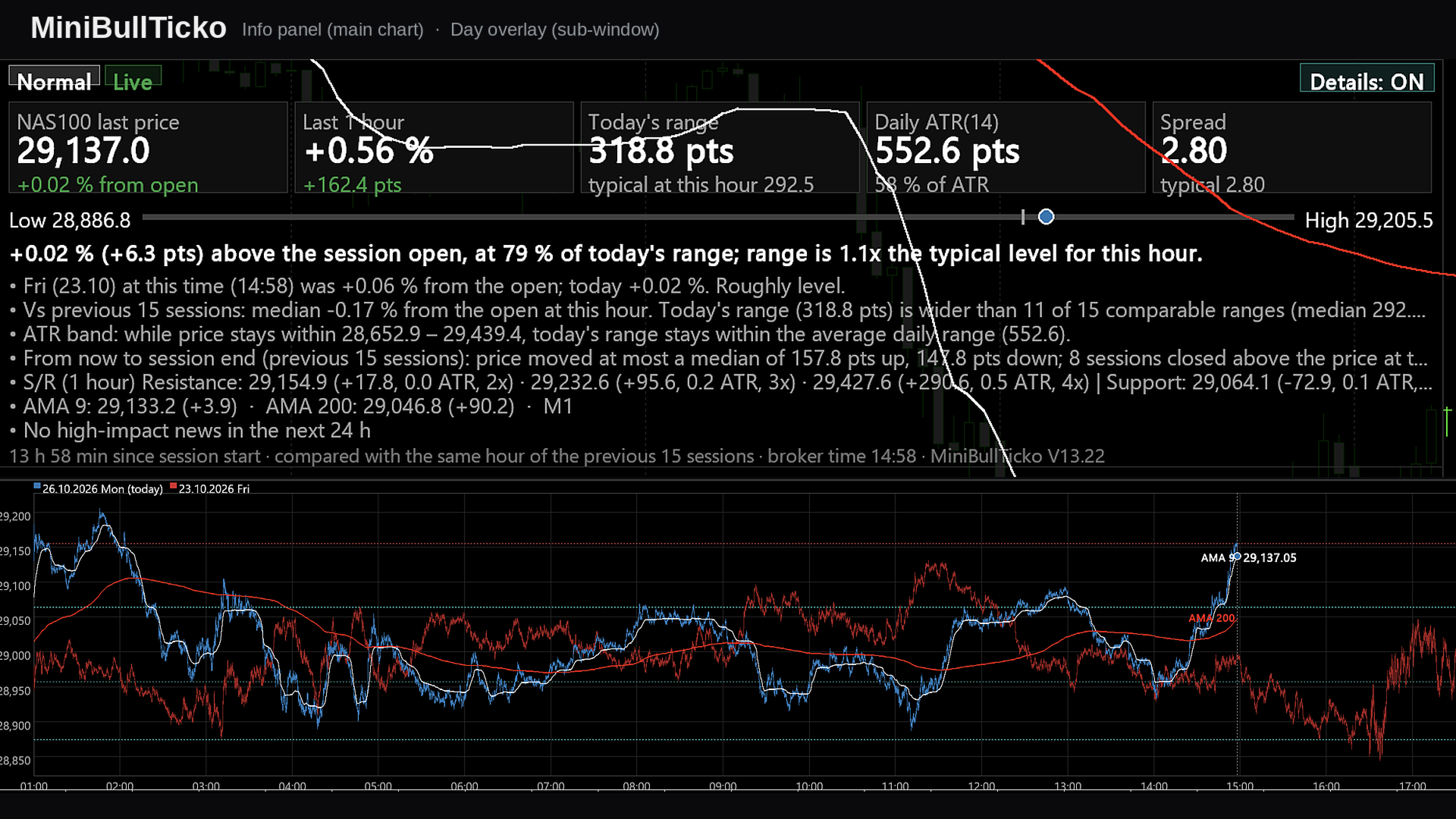
**Tick-level day overlay, live info panel and automatic Support/Resistance for MetaTrader 5 — built for scalpers.**

MiniBullTicko answers one question that matters to a short-term trader at any moment of the session:

> *"Is today behaving like a normal day **at this exact time of day**, or is something different — more volatile, more expensive to trade, or stretched against a known level?"*

It does this by laying every recent trading session on top of each other **at tick resolution** in an indicator sub-window, while a compact, semi-transparent panel on the main chart summarises the comparison in numbers and plain sentences.

---

## Contents

1. [Screenshots](#1-screenshots)
2. [Key features](#2-key-features)
3. [Requirements and installation](#3-requirements-and-installation)
4. [What you see on the screen](#4-what-you-see-on-the-screen)
5. [Input parameters](#5-input-parameters)
6. [How it works](#6-how-it-works)
7. [Metric and formula reference](#7-metric-and-formula-reference)
8. [A scalper's workflow](#8-a-scalpers-workflow)
9. [Performance notes](#9-performance-notes)
10. [Chart objects and global variables](#10-chart-objects-and-global-variables)
11. [Troubleshooting](#11-troubleshooting)
12. [Limitations and disclaimer](#12-limitations-and-disclaimer)

---

## 1. Screenshots

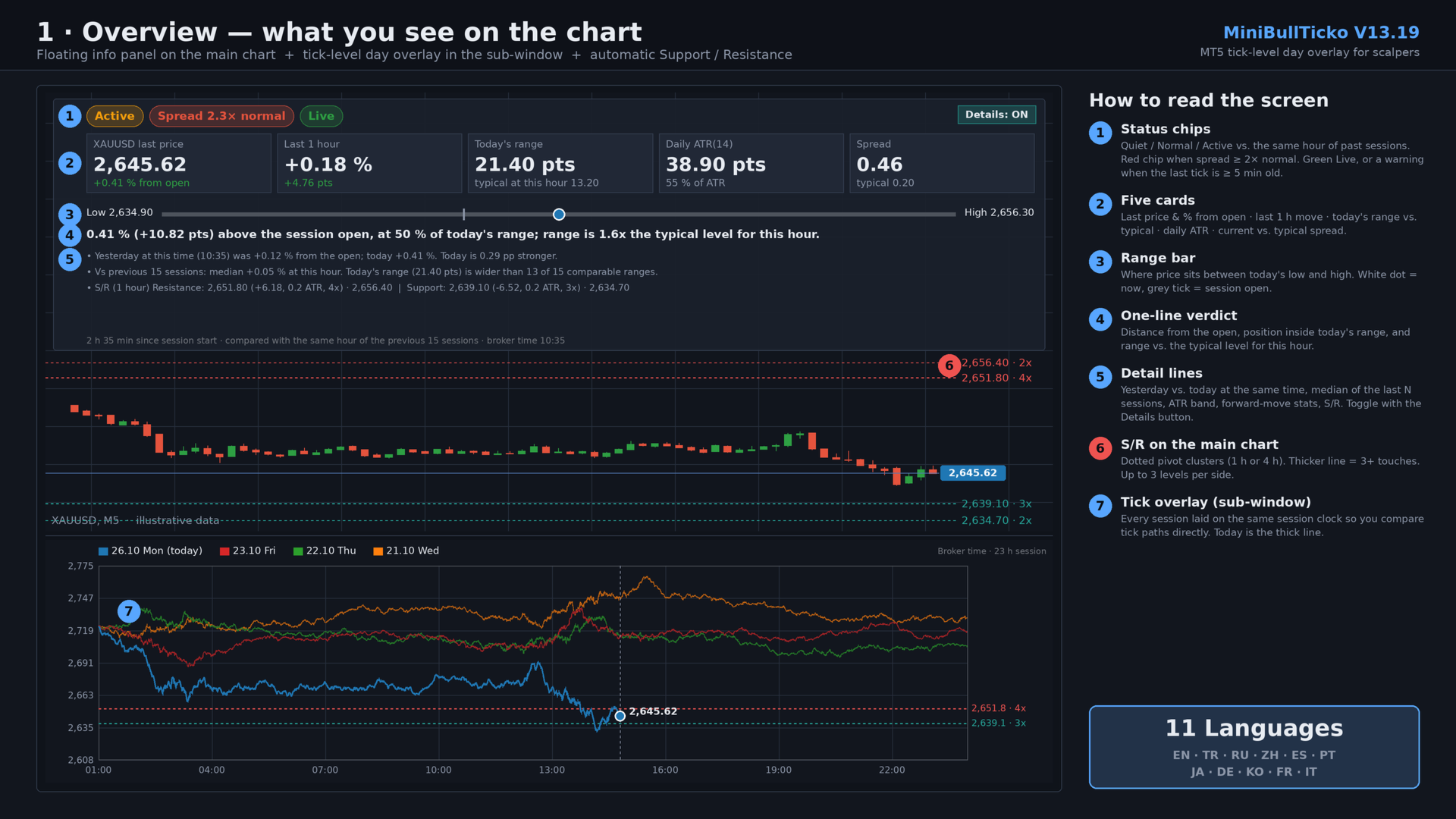
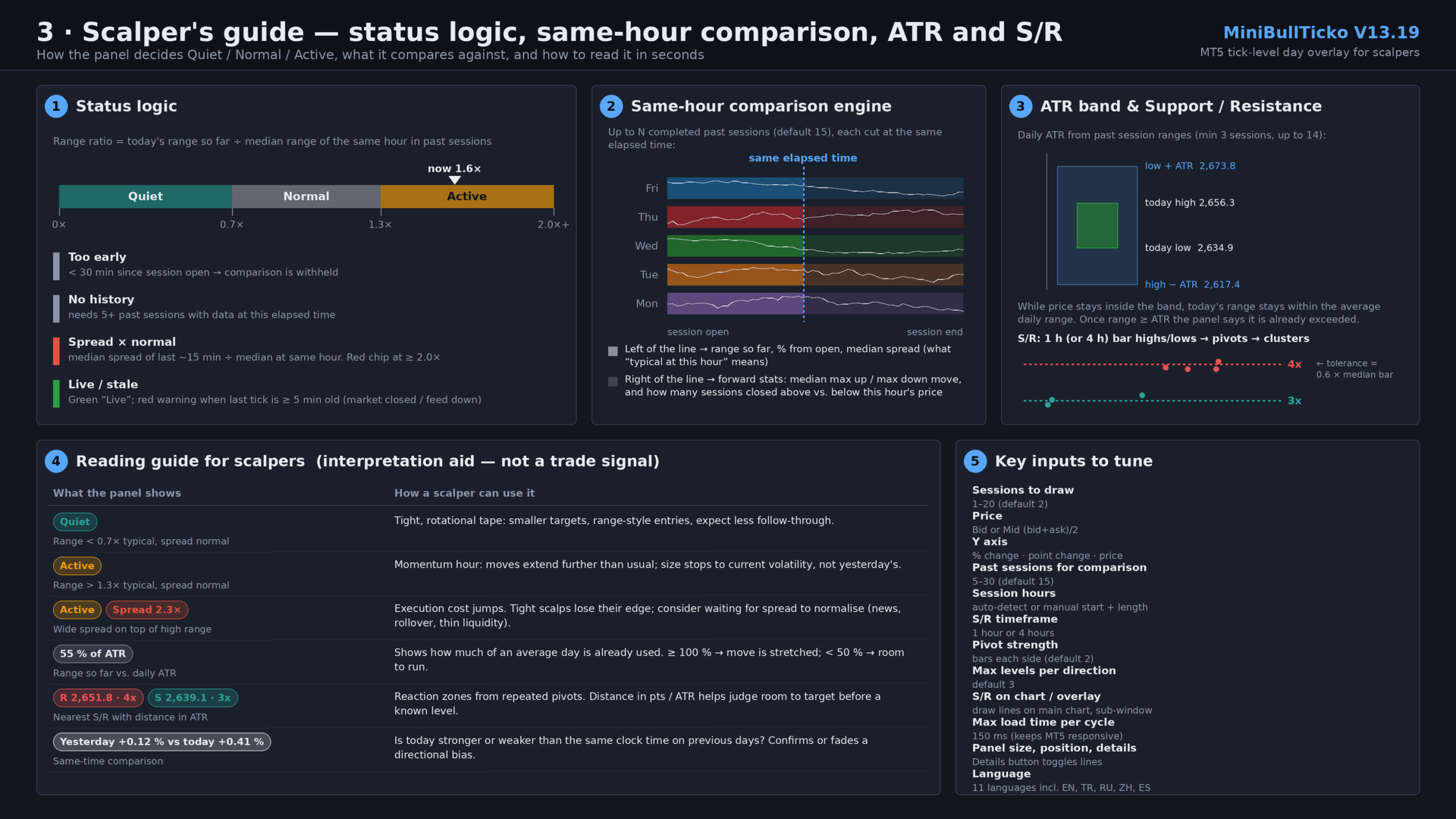
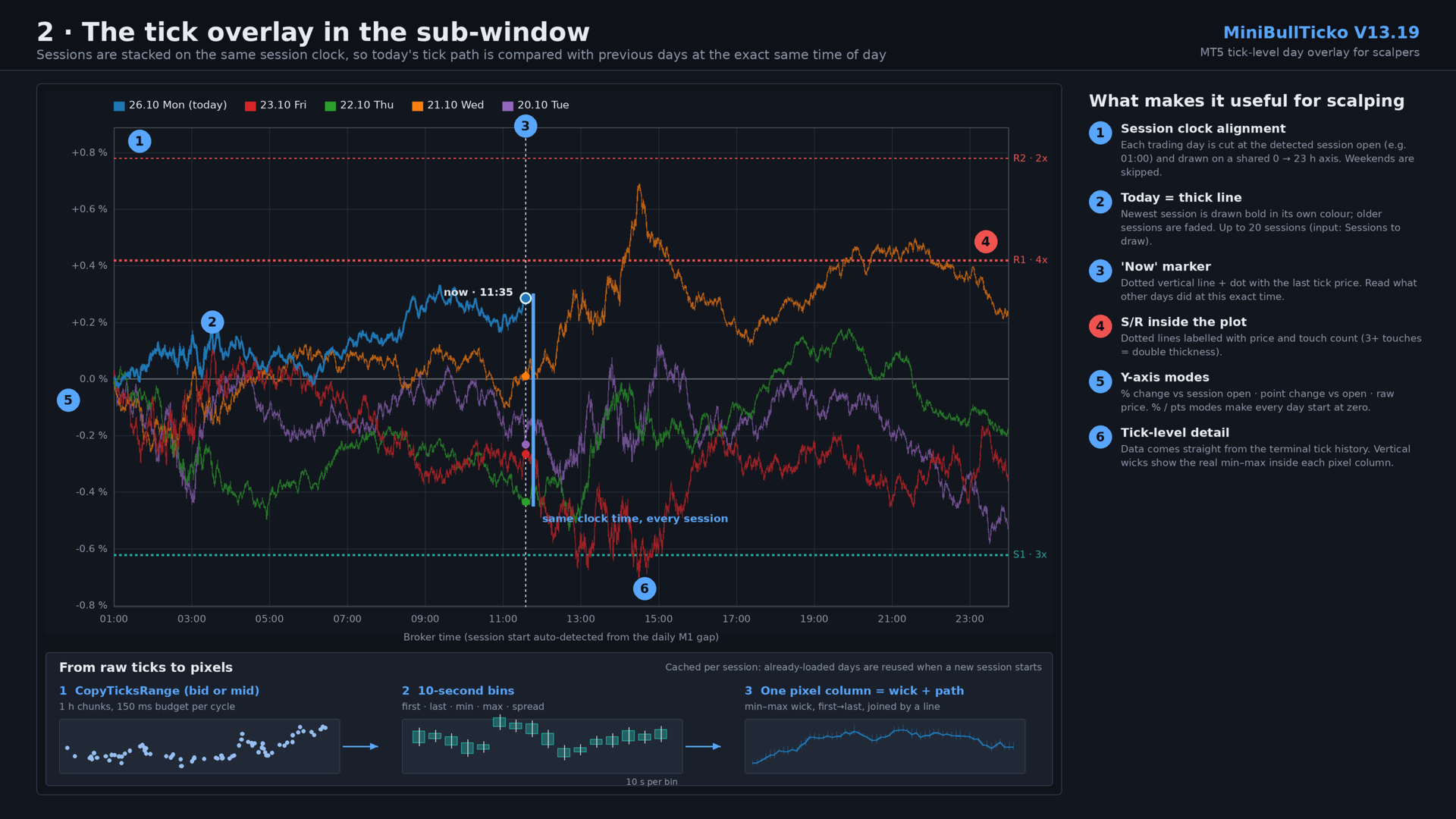
All images are 1920 × 1080 and use illustrative (synthetic) data.

| # | File | What it explains |
|---|------|------------------|
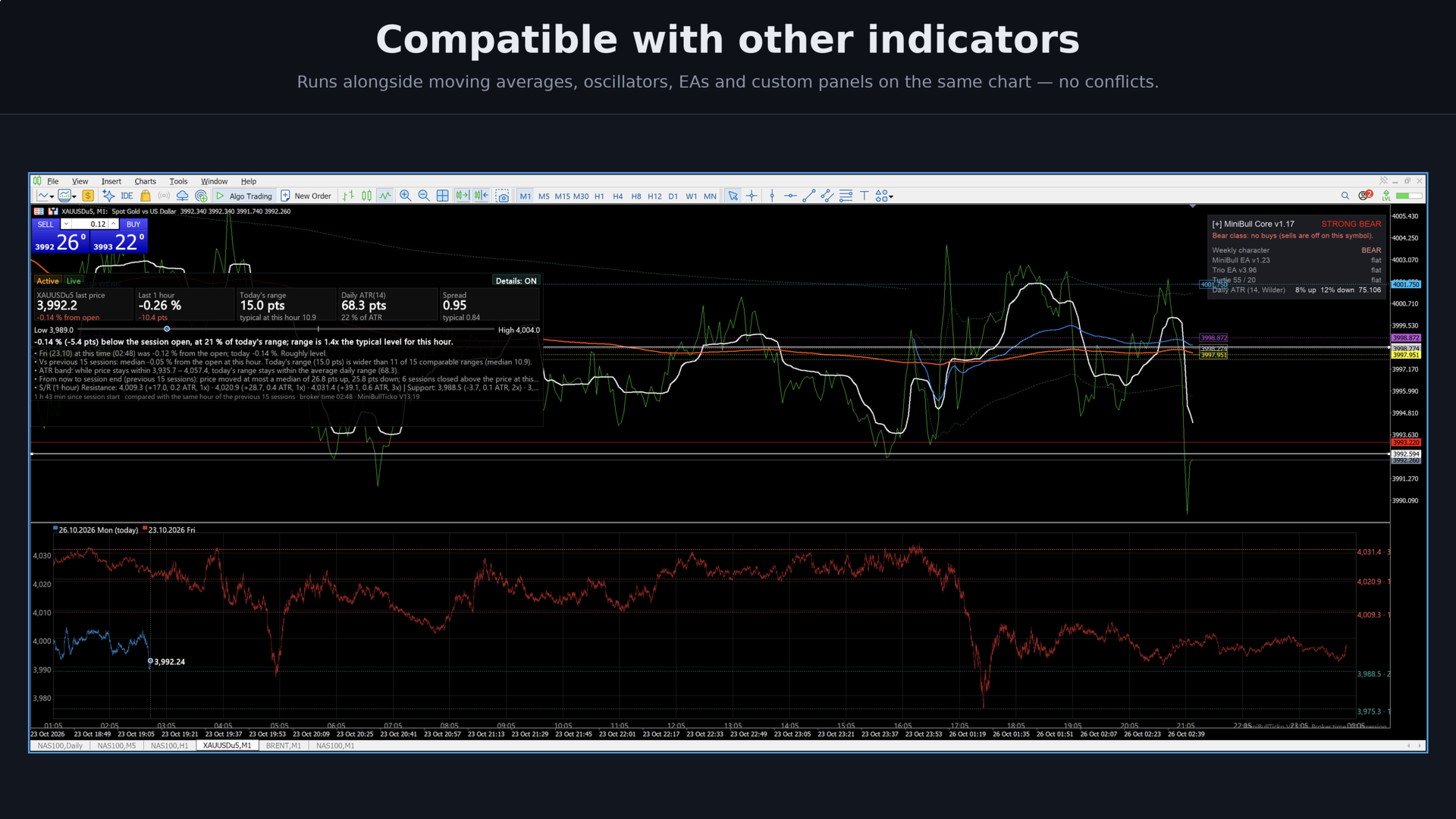
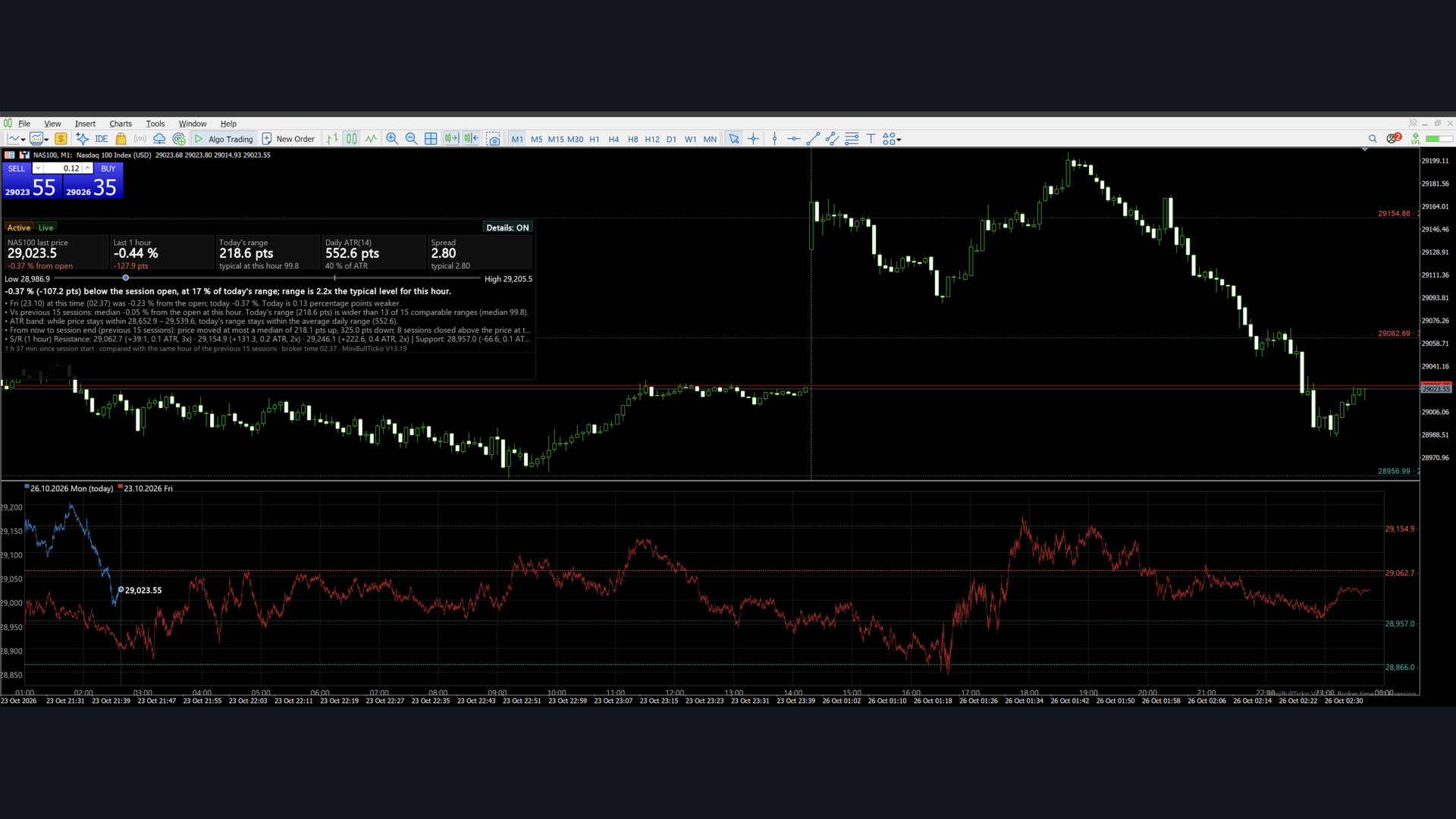
| 1 | `01_overview.png` | The whole screen: main-chart panel, S/R lines, tick overlay sub-window |
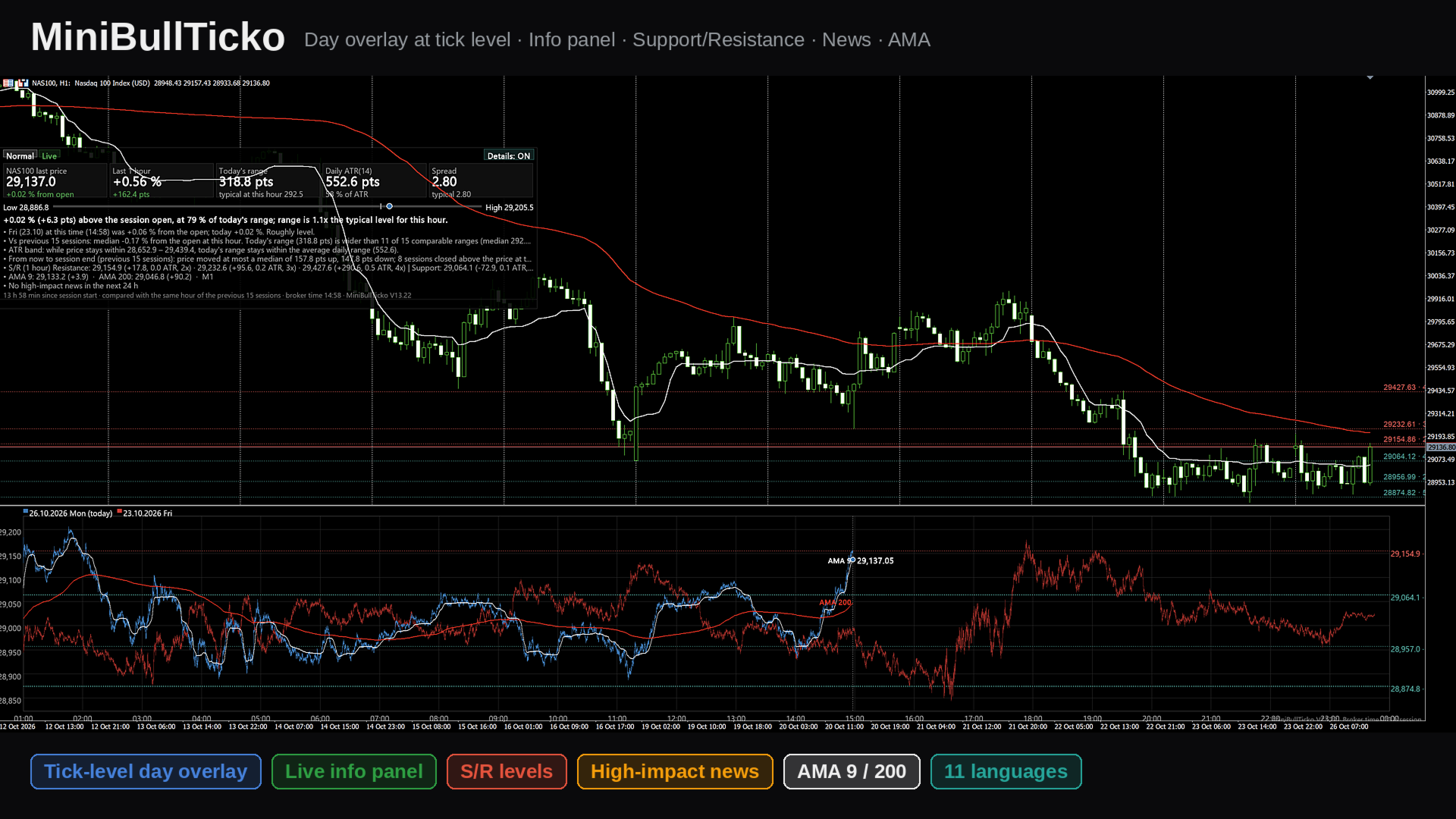
| 2 | `02_tick_overlay.png` | The sub-window in detail: session-clock alignment, "now" marker, tick → bin → pixel pipeline |
| 3 | `03_scalper_guide.png` | Status logic, same-hour comparison engine, ATR band, S/R clustering, reading guide, key inputs |

![Overview](01_overview.png)

![Tick overlay](02_tick_overlay.png)

![Scalper guide](03_scalper_guide.png)

---

## 2. Key features

- **Tick-level day overlay (sub-window).** Up to 20 sessions are drawn on one shared session clock. Today is a thick line; previous days are faded. Because each day is aligned to the *same time of day*, you compare like with like.
- **Real tick data, no external files.** Ticks are read straight from the terminal with `CopyTicksRange`. No tick-recorder EA and no CSV export/import are needed.
- **"Same hour" comparison panel (main chart).** Status chip (Quiet / Normal / Active), five metric cards, a range bar, a one-sentence verdict and optional detail lines — all computed against the same elapsed time in previous sessions.
- **Spread awareness.** Current spread (median of the last ~15 minutes) is compared with the typical spread at that hour. A red chip appears when it is 2× normal or worse.
- **Feed-health indicator.** "Live" in green, or a warning when the last tick is five minutes old or more.
- **Daily ATR in session terms.** ATR is built from the stored sessions' tick ranges, with an "ATR band" that shows where price must stay for today's range not to exceed the average.
- **Automatic Support / Resistance.** Pivot highs/lows from 1-hour or 4-hour bars (built from tick data) are clustered into levels with touch counts, drawn on the main chart and in the overlay, and listed in the panel with distance in points and in ATR.
- **Automatic session detection.** Session open and length are detected from gaps in M1 history, so it adapts to indices, metals, FX and futures-style CFDs. Manual override is available.
- **11 UI languages.** English, Türkçe, Русский, 中文, Español, Português, 日本語, Deutsch, 한국어, Français, Italiano.
- **Responsive loading.** Data loads in time-boxed slices so the terminal never freezes; already-loaded sessions are cached and reused.

---

## 3. Requirements and installation

**Requirements**

- MetaTrader 5 (build with `CCanvas` and `CopyTicksRange` support — any current build).
- Tick history for the symbol. The indicator needs ticks for roughly *N + 1* sessions (default: 16). If the terminal has not downloaded them yet, `CopyTicksRange` will trigger the download and the panel shows "Loading…" until it is done.
- M1 history for automatic session detection (about 9 days).

**Installation**

1. Save `MiniBullTicko_V13_19.mq5` to `MQL5\Indicators\` (File → Open Data Folder).
2. Open it in MetaEditor and compile (F7). The file is UTF-8 with BOM; if non-Latin characters look broken, re-save as *UTF-8 with BOM*.
3. In the terminal: **Insert → Indicators → Custom → MiniBullTicko_V13_19**. It opens in its own sub-window (`indicator_separate_window`, no plots).
4. The info panel appears on the **main chart** and S/R lines are placed on it automatically.

> Tip: use a chart timeframe you scalp on (M1–M5). The indicator itself is timeframe-independent — it works from ticks — but S/R lines are anchored to the chart and the panel sits on top of it.

---

## 4. What you see on the screen

### 4.1 Info panel (main chart)

A semi-transparent canvas (default 1500 × 450 px, 200 px from the top, 0 px from the left).

| Area | Content |
|------|---------|
| **Status chips** | Session state: *too early / not enough history / Quiet / Normal / Active*; a red *Spread N× normal* chip; *Live* or *Last tick N ago* warning (or *Not live · last tick …* when the session is over). |
| **Five cards** | 1) Last price and % from session open. 2) Last 1-hour change in % and points. 3) Today's range in points and the typical range at this hour. 4) Daily ATR(n) and today's range as % of ATR. 5) Current spread and typical spread. |
| **Range bar** | Today's low ↔ high. Grey tick = session open, white/blue dot = current price. |
| **Verdict sentence** | e.g. *"0.41 % (+10.82 pts) above the session open, at 50 % of today's range; range is 1.6x the typical level for this hour."* |
| **Detail lines** (toggle) | Previous session at the same time vs. today; median of the previous N sessions; ATR exceeded / ATR band; forward-looking stats; S/R list. |
| **Details button** | Top-right of the panel; click to turn the detail lines on/off. The choice is remembered. |
| **Caption** | Time since session start, number of sessions compared, broker time, version. |

### 4.2 Tick overlay (sub-window)

- **X axis:** the session clock in broker time (e.g. 01:00 → 00:00).
- **Y axis (selectable):** % change vs. session open, point change vs. session open, or raw price.
- **Lines:** every session is drawn per pixel column from its 10-second bins — a vertical min-max wick, plus a line joining first/last values — so the path keeps real intraday spikes.
- **Today:** thick line, full colour. **Older sessions:** faded.
- **"Now" marker:** dotted vertical line and a dot with the latest tick price.
- **S/R:** dotted horizontal lines with price and touch count on the right; double thickness at 3+ touches.
- **Legend:** date, weekday and "(today)" tag for each session; a "Loading… n/N" counter while data is still being fetched.

### 4.3 S/R on the main chart

Horizontal lines (`OBJ_HLINE`, dotted) with small text labels showing price and touch count. Resistance is red, support is teal. Tooltips show *Resistance/Support price · touches*.

---

## 5. Input parameters

### General

| Input | Default | Description |
|-------|---------|-------------|
| `InpLang` | English | UI language (11 options). |
| `InpFontName` | *(empty)* | Font name; empty = automatic per language. |
| `InpDays` | 2 | Sessions drawn in the overlay (1–20). |
| `InpPrice` | Bid | `Bid` or `Mid` = (bid + ask) / 2. |
| `InpYMode` | Price | Y axis: `% change`, `Point change`, or `Price`. |
| `InpWindowHeight` | 600 | Sub-window height in px (0 = leave unchanged). |
| `InpFont` | 13 | Base font size (px). |
| `InpFontScale` | 0.9 | Font multiplier — raise to 1.3 / 1.6 on high-DPI screens. |

### Session (broker time)

| Input | Default | Description |
|-------|---------|-------------|
| `InpAutoSession` | true | Detect session start/length automatically from M1 gaps. |
| `InpSessHour` / `InpSessMin` | 1 / 0 | Manual session start. |
| `InpSessLen` | 23 | Manual session length in hours. |

### Panel

| Input | Default | Description |
|-------|---------|-------------|
| `InpShowPanel` | true | Show the info panel on the main chart. |
| `InpPanelWidth` | 1500 | Panel width (px). |
| `InpPanelHeight` | 450 | Panel height (px); 0 = automatic, maximum 600. |
| `InpPanelX` / `InpPanelY` | 0 / 200 | Distance from the left / top of the chart. |
| `InpSpacing` | 1.3 | Line-spacing multiplier. |
| `InpShowDetails` | true | Initial state of the detail lines (the button overrides it afterwards). |
| `InpProfileDays` | 15 | Past sessions used for comparison (clamped to 5–30). |

### Support / Resistance

| Input | Default | Description |
|-------|---------|-------------|
| `InpShowSR` | true | Calculate S/R. |
| `InpSRTf` | 1 hour | Bar timeframe for pivots: 1 h or 4 h. |
| `InpSRPivotK` | 2 | Bars required on each side of a pivot. |
| `InpSRLevels` | 3 | Maximum levels per direction. |
| `InpSROnChart` | true | Draw S/R on the main chart. |
| `InpSROnOverlay` | true | Draw S/R inside the sub-window. |

### Performance

| Input | Default | Description |
|-------|---------|-------------|
| `InpBudgetMs` | 150 | Maximum tick-loading time per timer cycle (ms). |

---

## 6. How it works

### 6.1 Session detection

1. Reads about 9 days of M1 bar times.
2. Finds **gaps between consecutive M1 bars from 30 minutes to 10 hours** — the daily break.
3. Buckets the gap-end times into 5-minute slots over the clock and picks the most frequent slot as the **session start**.
4. Measures the time from that start to the last bar before the next break; the **median** (rounded up with a small tolerance) is the **session length** in hours (1–24).
5. If detection keeps failing (20 attempts), it falls back to the manual inputs.

Sessions are then built backwards day by day from the current session date. **Saturdays and Sundays are skipped.** A day with no ticks (holiday) is marked empty and ignored.

### 6.2 Tick loading

- A timer runs every **250 ms**.
- Each session is read in **1-hour chunks** with `CopyTicksRange(…, COPY_TICKS_ALL, …)`.
- Total loading time per cycle is capped by `InpBudgetMs`; the next cycle continues where it stopped.
- Up to 8 consecutive read failures are tolerated per session before it is treated as empty.
- The live session only reads up to the current server time and resumes from the last tick received.
- When a new session begins, existing session objects are **reused**, so the 15–20 previous days are not reloaded.

### 6.3 Binning

Each tick is reduced into a **10-second bin** of its session: first, last, min and max price (bid or mid) and the last observed spread (`ask − bid`). This keeps memory small (a 23-hour session = 8 280 bins) while preserving intrabar extremes.

### 6.4 Redrawing

- Redraw when new data arrived, at most every 300 ms; a forced refresh every 5 seconds.
- A new session start is checked every second.
- Two `CCanvas` layers are used: one in the sub-window (overlay) and one bitmap object on the main chart (panel, semi-transparent).

---

## 7. Metric and formula reference

All "typical at this hour" values compare today with **completed** previous sessions, each evaluated at the **same elapsed time since session open**.

| Metric | Definition |
|--------|------------|
| **% from open** | `last / first_tick_of_session − 1`, in %. |
| **Last 1 h** | `last / price_one_hour_ago − 1`; shown as "no full hour yet" before 1 h has elapsed. |
| **Today's range** | `session high − session low` so far. |
| **Typical range at this hour** | Median over past sessions of `(high − low)` from session open up to the same elapsed time. Requires ≥ 5 sessions with data at that time. |
| **Range ratio** | `today's range / typical range`. Shown only after the first 30 minutes. |
| **Status** | ratio < 0.7 → **Quiet**; 0.7 – 1.3 → **Normal**; > 1.3 → **Active**. |
| **Too early** | Fewer than 30 minutes since session open. |
| **Spread now** | Median of per-bin spreads over the last 90 bins (≈ 15 min). |
| **Typical spread** | Median over past sessions of the same ~15-minute median spread at that hour (needs ≥ 3 values). |
| **Spread × normal** | `spread now / typical spread`; the red chip appears at ≥ 2.0. |
| **Daily ATR(n)** | Average True Range of past sessions' (high, low, previous close); `n = min(14, sessions − 1)`; needs ≥ 3 past sessions. |
| **% of ATR** | `today's range / ATR × 100`. |
| **ATR band** | While price stays between `today_high − ATR` and `today_low + ATR`, today's range remains within the average daily range. If the range already exceeds ATR, the panel states so. |
| **Previous session line** | Previous session's % from open at this time vs. today's, with the difference in percentage points. |
| **Forward statistics** | From the same elapsed time to session end in past sessions: median maximum up-move, median maximum down-move, and how many closed above vs. below the price at that hour. Shown for the live session only (≥ 5 samples). |

### Support / Resistance algorithm

1. Build 1-hour (or 4-hour) high/low bars from the stored 10-second bins of the last `InpProfileDays + 1` sessions (at least 5 bars required).
2. A bar high/low is a **pivot** if it is the extreme within `InpSRPivotK` bars on each side.
3. Sort pivots and **cluster** neighbours whose distance from the running cluster mean is ≤ `0.6 × median bar range`.
4. Each cluster becomes a level at its **mean price**, with the **number of pivots** as its touch count.
5. Levels above the last price are **resistance** (nearest first), levels at or below are **support** (nearest first), up to `InpSRLevels` per side.
6. In the panel each level shows the distance in points and in ATR, and the touch count (e.g. `2,651.80 (+6.18, 0.2 ATR, 4x)`).

---

## 8. A scalper's workflow

> This is an interpretation aid, not a signal generator. Entries, exits and risk remain your decision.

1. **Glance at the chips.** *Quiet* means tight, rotational tape; *Active* means moves extend further than usual; a red *Spread N×* chip means execution is currently more expensive than normal.
2. **Check feed health.** Green *Live* — good. A "last tick N min ago" warning means the market is closed or the feed is down; ignore stale numbers.
3. **Compare with the same clock time.** In the sub-window, look where the thick line sits relative to the faded days at the dotted "now" line. In `% change` mode, every day starts at zero, so strength vs. weakness is immediate.
4. **Size your targets and stops to today's volatility.** Use the *typical range at this hour* and *% of ATR* cards: below ~50 % of ATR there is room to run; above 100 % the move is already stretched.
5. **Respect the levels.** The nearest resistance/support and their distance in ATR show how much room exists before a level that has been touched repeatedly.
6. **Watch spread before scalping tight.** If spread is ≥ 2× normal (news, rollover, thin liquidity), tight targets can lose their edge.
7. **Use the detail lines** (button on the panel) when you want the written comparison; switch them off to keep the chart clean.

Suggested starting configurations:

| Style | Suggestion |
|-------|-----------|
| Pure scalping, one chart | `InpDays` = 2–3, `InpYMode` = % change, `InpSRTf` = 1 h |
| Intraday context | `InpDays` = 5–8, `InpSRTf` = 4 h, `InpProfileDays` = 20 |
| Small screen | Smaller `InpPanelWidth` / `InpPanelHeight`, details OFF, `InpWindowHeight` ≈ 400 |
| High-DPI display | `InpFontScale` = 1.3–1.6 |

---

## 9. Performance notes

- The first start on a new symbol can take a while: the terminal may need to download tick history for ~16 sessions. The overlay appears first; the panel fills in as completed sessions arrive (counter "Loading… n/N").
- Loading is time-boxed (`InpBudgetMs`), so the terminal remains responsive. Lower it on slow machines; raise it to load faster on strong ones.
- Memory per session is small (≈ 8 k bins × 5 arrays); 20 sessions are comfortably handled.
- Canvas redraws are throttled (300 ms minimum interval).

---

## 10. Chart objects and global variables

| Name | Type | Purpose |
|------|------|---------|
| `GUA_Canvas_<n>` | Bitmap label (canvas) in the indicator sub-window | The tick overlay itself (`<n>` = sub-window index). |
| `GUA_Panel` | Bitmap label (canvas) | The info panel on the main chart; click handling for the Details button. |
| `GUA_SR_R0…` / `GUA_SR_S0…` | `OBJ_HLINE` | Resistance / support lines. |
| `GUA_SR_*_t` | `OBJ_TEXT` | Price and touch-count labels next to the lines. |
| `MBT_details` | Terminal global variable | Remembers the Details ON/OFF state across restarts. |

All `GUA_SR_*` objects are removed when the indicator is removed.

---

## 11. Troubleshooting

| Symptom | Likely cause / fix |
|---------|--------------------|
| "Loading tick data…" for a long time | Terminal is downloading tick history. Keep the chart open; check *Tools → Options → Charts* for the tick-history limits and make sure the symbol is in Market Watch. |
| "No tick data found (check symbol / session hours)" | Broker provides no tick history for this symbol, or session hours were detected incorrectly — set `InpAutoSession = false` and enter the session start/length manually. |
| "Window too small – increase its height" | Sub-window is too short; raise `InpWindowHeight` or drag the splitter. |
| Panel says "too early to compare" | Fewer than 30 minutes since session open — expected. |
| Panel says "Not enough history to compare" | Fewer than 5 past sessions have data at this elapsed time. Wait for loading or increase available tick history. |
| ATR shows "needs 3+ past sessions" | Same reason — ATR needs at least 3 completed past sessions. |
| Text too small / too large | Adjust `InpFont` and `InpFontScale`. |
| Non-Latin characters broken | Re-save the file as UTF-8 with BOM in MetaEditor. |
| No S/R lines | Needs ≥ 5 hourly (or 4-hour) bars of stored sessions; also check `InpShowSR` and `InpSROnChart`. |
| Last tick warning during the day | The market is closed for that symbol or the feed is interrupted. |

---

## 12. Limitations and disclaimer

- Works from **broker time** and the broker's tick history; different brokers may produce slightly different shapes and spreads.
- Weekend days are skipped; holidays without ticks are ignored automatically.
- Bid price is the default; the `Mid` option averages bid and ask when both are available.
- Statistics ("typical", ATR, forward moves) are descriptive summaries of recent sessions and do not predict future price.
- The indicator does not place orders and does not generate alerts.

**Disclaimer:** This tool is for information and analysis only and is not financial advice. Trading leveraged products carries a high risk of loss.

---

*MiniBullTicko V13.19 · © MiniBull*
추천 제품
VWAP Fibo Bands RSJ
JETINVEST
4.83 (12)
VWAP Fibo Bands RSJ is an indicator that traces the lines of the daily VWAP and from it creates bands using Fibonacci proportions. This spectacular indicator creates 10 band levels through the selected VWAP period using Fibonacci ratios. It is fantastic how the prices respect each level of the bands, where it is possible to realize that almost every time the price closes above / below a level of the bands he will seek the next one. If close above will seek to reach the level above and if close
FREE
Haven Stop Loss Hunter
Maksim Tarutin
4.5 (6)
Haven Stop Loss Hunter 2.0 - 유동성 분석의 새로운 관점 대규모 업데이트 — Haven Stop Loss Hunter 2.0 을 만나보세요! 이 도구는 유동성 영역 및 가짜 돌파(Sweeps)를 분석하기 위한 전문적인 도구로, 더욱 유연하고 기능적으로 개선되었습니다 [1]. 이번 버전에서는 다중 시간 프레임(MTF) 분석과 고급 알림 시스템을 구현하여 차트를 번거롭게 수시로 전환하지 않고도 스마트 머니 개념(SMC)에 기반한 기관 자금의 흐름을 효율적으로 추적할 수 있도록 설계되었습니다 [1]. 저의 다른 제품 보기 - > 여기 클릭 . 유동성 스윕(Liquidity Sweep)은 기관 등 대형 시장 참여자가 개인 트레이더들의 손절매(Stop-Loss) 물량을 노리는 움직임을 의미합니다. 버전 2.0을 사용하면 이러한 주요 가격 행동을 현재 작업 중인 차트뿐만 아니라 상위 시간 프레임(H1, H4, D1)에서도 동시에 관찰할 수 있어, 현재 시장 상황을 보다 깊
FREE
Watermark Centralized
Ronnie Ferreira Silva
4 (4)
Watermark Centralized Adds a watermark centered with the asset name and chosen period. It is possible to override the font type, font size, font color and separator character. The watermark is positioned behind the candles, not disturbing the visualization. It has automatic re-centering if the window is resized. Hope this indicator helps you, good trading ;)
FREE
Professional Renko Chart MT5 Professional Renko Chart MT5는 MetaTrader 5용 깔끔한 렌코 차트 지표로, 별도의 지표 창에 렌코 브릭을 표시하도록 설계되었습니다. 또한 선택적으로 메인 가격 차트 위에 렌코 박스를 직접 시각화할 수 있습니다. 이 지표는 MetaTrader 5 안에서 익숙한 렌코 차트 스타일을 사용하고 싶은 트레이더를 위해 제작되었습니다. TradingView와 같은 인기 있는 최신 차트 플랫폼에서 제공되는 렌코 차트 시각화와 유사한 방식으로, 일반적인 시간 기반 캔들을 렌코 브릭으로 변환하고 그 결과를 단순하고 명확하며 실용적인 형식으로 표시합니다. 여러 개의 일반 차트 캔들이 하나의 렌코 브릭을 만들 수 있습니다. Professional Renko Chart MT5는 메인 가격 차트 위에 렌코 박스를 표시할 수도 있으며, 각 렌코 브릭을 형성하는 데 사용된 일반 캔들의 개수도 보여줄 수 있습니다. 이 지표는 Exp
Stop guessing and start executing with precision. Learning complex trading methodologies takes years of screen time—until now. The Propfolio Strategy Mentor OS is an elite, on-chart analytical dashboard that acts as your live digital trading mentor. It doesn't just draw lines on your chart; it actively scans the market, identifies high-probability setups across 8 different institutional strategies, and tells you exactly what to look for in real-time via the Live Mentorship Terminal. Whether you
Ksm mt5
Andriy Sydoruk
3 (2)
Ksm: Smart Solution for Automated Forex Trading Ksm is a tool designed for automating Forex trading, using modern methods of time-series data analysis to work with multiple currency pairs across different timeframes. Key Features and Benefits Multi-currency support : Ksm enables trading across multiple currency pairs, helping traders adapt their strategies to various market conditions. New currency pairs can be easily added. Time-series data analysis : Utilizing advanced algorithms, Ksm analyze
Investopedia FIVE
Joseph Anthony Aya-ay Yutig
Investopedia FIVE EA는 다음 기사를 기반으로 합니다. https://www.investopedia.com/articles/forex/08/five-minute-momo.asp 거래 조건 - X 기간 EMA 및 MACD 아래에서 통화 쌍 거래가 음의 영역에 있는지 확인하십시오. - 가격이 X 기간 EMA 위로 교차할 때까지 기다린 다음 MACD가 음수에서 양수로 교차하는 과정에 있는지 또는 5개 막대 내에서 양수 영역으로 교차했는지 확인하십시오. - 20기간 EMA 위로 10핍 매수하세요. - 진입 시점의 포지션 X에 위험 금액을 더한 금액을 매도하십시오. 후반부에 스톱을 손익분기점으로 이동합니다. - 후행 정지 사용 위험 경고 ADX PRO를 구입하기 전에 관련된 위험을 인지하십시오. 과거 실적은 미래 수익성을 보장하지 않습니다(EA도 손실을 입을 수 있음). 표시된 백 테스트(예: 스크린샷)는 최상의 매개변수를 찾기 위해 고도로 최적화되어 있지만 결과
Viking Alpha DAX Ivar Edition
Valdeci Carlos Dos Passos Albuquerque
Viking Alpha DAX — Germany 40 Expert Advisor for MetaTrader 5 LAUNCH PROMO Only 10 copies at launch price. Price increases with each sale. Launch price: $297 Next price: $497 Final price: $997 Live Performance: FX Blue — Vikingtradingbots What Makes Viking Alpha DAX Different Most DAX robots fail for one simple reason: they treat the Germany 40 like a forex pair. It isn't. The DAX has a heartbeat — a specific rhythm tied to the Frankfurt Stock Exchange opening, the European session structure, an
BTC Master Pro
Farzad Saadatinia
4.62 (13)
BTC Master Pro — 규율 있는 비트코인 트레이딩을 위한 신뢰할 수 있는 파트너. 최신 버전은 OpenAI 인공지능 기술 이 통합되어, 높은 변동성을 가진 암호화폐 시장 환경에서 더욱 정교한 실행과 향상된 거래 필터링을 제공합니다. 이 전문 Expert Advisor는 MetaTrader 5 플랫폼에서 Bitcoin (BTCUSD) 거래를 위해 특별히 설계되었으며, 구조화된 실행, 노출 관리, 그리고 지능적인 리스크 관리에 중점을 두고 있습니다. 가격: $699  →  다음 단계: $999  →  최종 가격: $999 LIVE SIGNAL HERE OpenAI 기반 실행 필터 최신 버전은 OpenAI 기술을 활용하여 실시간 시장 상황을 분석하고, 품질이 낮거나 신뢰도가 부족한 거래 설정을 필터링합니다. AI 안전 레이어: 인공지능 모듈은 거래 실행 전에 작동하는 2단계 승인 시스템으로 설계되었습니다. 이는 예측 도구가 아닌 실행 필터로만 사용됩니다. 모든 거래는 구조화
Phantom Gold
Ignacio Agustin Mene Franco
Phantom GOLD MT5 v1.0 Phantom GOLD MT5: The algorithmic spectrum that hunts gold moves with surgical precision Phantom GOLD is a next-generation Expert Advisor designed exclusively for XAUUSD (gold), combining modern artificial intelligence with the most powerful Smart Money Concept (SMC) strategies, institutional price action, and advanced trend filters. It's not just a robot: it's an invisible hunter operating in the shadows of the market, detecting high-probability zones where large instit
DAILY OH/OL SDEV QUANT MODEL - STATISTICAL TRADING WITH PRECISION RISK MANAGEMENT TRADE WITH MATHEMATICAL CERTAINTY - KNOW YOUR EXACT STOP-LOSS AND TAKE-PROFIT BEFORE YOU ENTER This indicator analyzes 5,000+ days of price history to give you: Exact entry levels (sigma bands locked at daily open) Exact stop-loss distance (from M
ACRON Supply Demand EA
Georgios Kalomoiropoulos
4.5 (4)
ACRON Supply Demand EA는 수요와 공급 개념과 가격 변동 필터링 로직을 결합하여 구축된 완전 자동화된 거래 알고리즘입니다. 실제 거래 경험을 바탕으로 트레이더들이 개발했으며, 장기적으로 안정적이고 일관된 성장을 목표로 합니다. 통제된 위험과 다양한 분산 투자 전략을 활용하여 현실적인 거래를 할 수 있도록 설계되었습니다. [제품 매뉴얼] [FAQ]   구매 후 ACRON Supply Demand EA에 최적화된 모든 전략을 받으려면 메시지를 보내주세요. 실질적 이고 정직한 결과입니다 . 곡선 맞춤, 최적화 기법, 그리고 오해의 소지가 있는 백테스트는 없습니다. 성과는 브로커의 과거 시장 데이터만을 기반으로 하므로 실제 거래에 대한 현실적인 기대치를 제공합니다. 궁금한 점이 있으시면 언제든지 문의해 주세요. 저희는 고객님 곁에서 장기적인 포트폴리오를 구축하고 불필요한 손실을 피할 수 있도록 도와드립니다. 무엇이 그것을 강력하게 만드는가 100% 자동 거래: 수요와 공급
ProTrade EA
Jim Ariel Camarce Ignao
Key Features   Automated Candle Pattern Recognition 10 Professional Patterns : Detects Bullish/Bearish Engulfing, Hammer/Shooting Star, Morning/Evening Star, Piercing/Dark Cloud, and 6 additional professional candlestick patterns Smart Filtering : Combine multiple patterns with configurable confirmation logic Volume Confirmation : Optional volume filter to validate pattern strength Multi-Timeframe Analysis : Separate execution and bias timeframes for better timing   Trading Dashboard Int
" Blow It Up!" - The Trading Indicator That Questions Your Life Choices Tired of boring indicators? Meet your new market companion that delivers: "YOLO BUY!" arrows when you should probably panic Explosive rectangle confetti (because why not?) 200+ soul-crushing quotes like "Your stop loss is imaginary" and "This is n't trading, it's donating to whales" Random alerts that roast your strategy This Indicator is lik e Therapy - Because daytrading shouldn't fe el like watching paint dry! Highlights
X Sensors Pro
Igor Nagorniuk
X Sensors Pro는 선택된 기간 동안 가격 수준별 거래량 분포를 시각화하는 전문 볼륨 프로파일 지표입니다. 이 지표는 자동으로 로컬 극값(HH와 LL)을 식별하고, 최대 거래량 수준인 POC(Point of Control)를 계산하며, 식별된 범위를 기반으로 지지선과 저항선을 구축합니다. 주요 기능: 컬러 히스토그램 형태의 볼륨 프로파일 시각화 POC(Point of Control) 자동 감지 HH(더 높은 고가) 및 LL(더 낮은 저가) 수준 구축 피벗 수준 및 다중 지지/저항 수준 계산 강세(녹색) 및 약세(빨간색) 거래량의 색상 표시 모든 시간대에 적응하는 조정 기능 이 지표의 용도는 무엇인가요? 이 지표는 트레이더의 다음과 같은 과제를 해결합니다: 1. 축적 및 분배 영역 식별 거래량은 항상 큰 세력이 시장에 진입하거나 이탈하는 곳에 집중됩니다. POC는 최대 거래량이 발생한 가격을 보여줍니다. 이것은 심리적으로 중요한 수준입니다. 2. 공정 가치 탐색 PO
TrailingFusion
Christos Iakovou
FusionTrailing EA – Your Ultimate Weapon for Market Domination! Transform your trading and crush every market move with the most advanced trailing stop system available. FusionTrailing EA delivers unstoppable power with its dual-mode setup: • Fusion Mode: Automatically sets a bulletproof stop loss using a maximum loss threshold and activates smart trailing
Market Projection Pro — MT5 Want to visualize how the price cycles in your chosen chart section could extend? Market Projection Pro analyzes a historical window you select, extracts cycle components and draws a composite projection to its right. You control the source window and forward horizon to compare the scenario with price structure and potential turning zones. What you see on the chart Interactive boundaries let you select a historical analysis window directly on the chart. Cycle componen
Introducing Neural Bitcoin Impulse - an innovative trading bot created using neural network training technology on voluminous market data sets. The built-in mathematical model of artificial intelligence searches for the potential impulse of each next market bar and uses the resulting patterns of divergence and convergence between the predictive indicators and the price to form high-precision reversal points for opening trading positions. The trading robot is based on the Neural Bar Impulse ind
Acronix Acronix는 EURUSD와 GBPUSD를 중심으로 거래하는 MetaTrader 5용 역추세 스캘핑 자동매매 프로그램(EA)입니다. Blackore Finance  이 개발한 Acronix는 RSI 진입 신호, ADX 필터링, 적응형 진입 간격, 자동 포지션 관리를 결합합니다. 다중 통화를 지원하며, 종목별 설정을 통해 주요 외환 통화쌍과 금(XAUUSD)에서도 사용할 수 있습니다. 거래 전략 Acronix는 캔들 움직임과 RSI를 이용해 단기 가격 되돌림을 찾고, ADX 필터로 진입 조건을 선별합니다. 역추세 스캘핑 사이클이 진행되는 동안 가격이 최근 진입에 불리한 방향으로 움직이면 설정 가능한 간격과 랏 배수를 적용하여 포지션을 추가할 수 있습니다. ADX 기반 간격 조정은 지정한 포지션 수부터 적용되어 이후 진입 간 거리를 적응적으로 조절합니다. 모든 신규 거래에 Take Profit(이익 실현)과 Stop Loss(손절매)가 설정됩니다. 사이클의 공통 Take
V Wave EA
STANTON ROUX
5 (1)
V-Wave EA Unlock the power of automated trading with V-Wave EA ! This cutting-edge Expert Advisor integrates a robust set of indicators, including VWAP , Moving Averages ,  IBS , and FIBO Levels for precise entries. Key Features: 1. Powerful Indicators: VWAP (Volume-Weighted Average Price): The core of the strategy, ensuring optimal entries based on volume-driven market trends. Two Moving Averages: Customize crossover and trend strategies for added confirmation. IBS (Internal Bar Strength): Fin
Exclusive EA for FOREX HEDGE account The EA (FuzzyLogicTrendEA) is based on fuzzy logic strategies based on the analysis of a set of 5 indicators and filters. Each indicator and filter has a weight in the calculation and, when the fuzzy logic result reaches the value defined in the EA parameter, a negotiation is opened seeking a pre-defined gain. As additional functions it is possible to define maximum spread, stop loss and so on . Recommended Symbol: EURUSD, AUDUSD, GBPUSD, NZDUSD, USDCAD, AUD
Smart SuperTrend Scalping Signals Pro is a MetaTrader 5 indicator designed for traders who want a clean visual trend-following system directly on the chart. Instead of displaying the traditional SuperTrend as a line, the indicator colors the actual price candles based on the current market condition. Green candles indicate bullish SuperTrend conditions, red candles indicate bearish SuperTrend conditions, and gray candles indicate sideways or weak-trend conditions. The indicator also includes a s
Manyal trading system, CovEchoTrend Robot, focuses on reliability and flexibility. By employing statistical analysis methods to study the relationships between the base indicator and market patterns, the system enables a deeper understanding of market processes. Intelligent pattern analysis: The application of statistical data processing helps identify key trend reversal points more accurately, signaling significant market shifts. Informed decision-making is based on the intersection of indicato
Gold Quant Intelligence EA Advanced Multi-Market Quantitative Intelligence for XAUUSD Gold Quant Intelligence EA is a professional MetaTrader 5 Expert Advisor designed to analyze the gold market through a multi-market quantitative framework rather than relying on a single technical indicator. The EA continuously evaluates XAUUSD together with Silver, EURUSD, GBPUSD, USDJPY, DXY and US10Y to identify relationships that may provide additional context for the current gold market environment. Its q
Pattern Recognition EA
Claudiu-georgian Zavera
Pattern Recognition EA - From Learn to Earn. The market repeats itself. This EA finds every past repeat of the current candle sequence - and lets history vote the direction. ONE SHAPE. EVERY REPEAT IN HISTORY VOTES. The last N candles on your signal timeframe form a shape. The EA scans the history you choose - a fixed number of bars or everything your broker provides - for the SAME shape, and checks what happened next, every single time. Only when enough repeats exist AND a clear majority of t
Trend Sniper Matrix is an institutional-grade trend-riding quantitative trading terminal engineered strictly for Tier-1 multi-asset market environments. Meticulously optimized for advanced Prop Firm Evaluation Compliance and low-latency execution, this Expert Advisor integrates a high-performance bare-metal framework customized for XAUUSD (GOLD), EURUSD, GBPUSD, and USDJPY on low-latency hedging accounts. The core analytical framework leverages a dual-layered Multi-Timeframe Heiken Ashi Smooth
Day Direction Scanner
Efren Hernandez Partida
5 (3)
FREE
O Alpha B3 Renko Trader  é um robô especialista para negociação no Bovespa B3  (miniíndice e minidólar) que une a análise de candlesticks do gráfico Renko (calculado internamente, sem imagens gráficas) com a estratégia Alpha B3 . O robô permite configurar, para os sinais de entrada, o tamanho do brick do gráfico Renko, bem como um número de candlesticks para análise. Além disso, você deve configurar os stops fixos, em pontos. O robô permite também a configuração de funções, tais como número de c
Exclusive Imperium MT5 — 자동화 거래 시스템 Exclusive Imperium MT5 는 MetaTrader 5용 전문가 어드바이저(EA)로, 시장 분석 알고리즘과 리스크 관리에 기반합니다. EA는 완전히 자동으로 작동하며 트레이더의 개입은 최소화됩니다. 주의! 구매 후 즉시 저에게 연락하세요 — 설정 지침을 받으실 수 있습니다! 중요: 모든 예시, 스크린샷 및 테스트는 데모 목적일 뿐입니다. 특정 통화쌍이 한 브로커에서 좋은 결과를 보여도 다른 브로커에서도 동일하다는 의미는 아닙니다. 각 브로커는 고유한 시세, 스프레드 및 거래 조건을 가지고 있습니다. 따라서 각 통화쌍은 사용자가 개별적으로 최적화해야 합니다 그리고 실제 계좌에서는 단일 통화 모드 로만 실행해야 합니다 — 각 쌍을 별도로 실행하세요. 다중 통화 모드 스크린샷은 단순히 예시입니다. 시장 상황은 변하기 때문에 최적화는 최소 연 1회 반복하는 것이 좋습니다. 중요 정보: EA의 데모 버전은 평가용으로
This indicator uses a mathematical calculation algorithm . This algorithm calculates the remainder between the updated model and the actual values and produces the possible progress of the graph on the graph. It is not a super prophet in trading, but it is very good for the trader when entering the market and to analyze it before entering. Applicable for all currencies. Данный индикатор использует алгоритм математических вычислений . Данный алгоритм вычисляет остаток между обновленной моделью и
이 제품의 구매자들이 또한 구매함
Trend Sniper X
Sarvarbek Abduvoxobov
4.86 (42)
Trend Sniper X 는 트레이더가 추세 방향과 잠재적 반전 지점을 명확하고 정확하게 포착할 수 있도록 도와주는 MetaTrader 5용 멀티 타임프레임 추세 추종 지표입니다. MT4용: https://www.mql5.com/en/market/product/193245 가격 정보: 현재 가격은 프로모션 할인가이며, 향후 업데이트 및 새로운 기능이 출시됨에 따라 변동될 수 있습니다. 보너스 혜택: 본 지표 전용 무료 자동매매 Assistant EA를 받으시려면 구매 후 작성자에게 메시지를 보내주시기 바랍니다. Code2Profit 채널 멀티 타임프레임 분석으로 시장을 마스터하세요! Trend Sniper X로 승률을 극대화하는 방법: 핵심 규칙 및 세션 팁 기술 사양 플랫폼 MetaTrader 5 지표 유형 멀티 타임프레임 추세 지표 운용 타임프레임 모든 차트 타임프레임 지원, 독립적으로 선택 가능한 상위 타임프레임(M1–MN1) 주요 상품 외환, 금(XAUUSD) 및 기타 C
Smart Trend Trading System — MetaTrader 5 구매 후 MQL5에서 저에게 메시지를 보내시면 Smart Universal Expert Advisor를 무료로 받으실 수 있으며, 온라인 강좌, PDF 매뉴얼 및 비공개 그룹 이용 권한도 함께 제공됩니다. STTS는 추세 방향, 진입·청산 신호, 반전 구간, 주요 가격 수준을 차트에 모아 보여줍니다. 시스템을 참고해 수동으로 거래하거나, 별도의 호환 EA를 연결하여 선택한 설정에 따라 자동으로 거래를 실행할 수 있습니다. 하나의 시스템, 네 가지 트레이딩 접근법 STTS의 트레이딩 접근법은 크게 네 가지로 나뉩니다. • 스캘핑 — 단기 신호와 시장 움직임을 살펴봅니다. • 추세 매매 — 방향을 평가하고 추세 안에서 기회를 찾습니다. • 반전 매매 — 잠재적인 전환 구간과 방향 변화를 파악합니다. • 거래량 매매 — 거래량 기반 정보로 시장 활동을 평가합니다. 진입·청산 화살표, 추세 정보, 지지·저항 수
새로운 왕의 등장 - 인디케이터 + 주문 관리 표시(TP1 + TP2 + TP3) + 선택형 텔레그램 시그널 전송 기능 포함 (무료) (완전한 트레이딩 및 시그널 시스템) 골드를 위한 최고의 EA: Gold Slayer 이 인디케이터는 고급 전략, 사용자 지정 가능한 주문 관리 시스템, 그리고 엔벨로프 확장을 결합한 평균 회귀(mean reversion) 시스템을 포함하고 있습니다. 또한 RSI와 같은 여러 지능형 확인 필터를 통해 높은 확률의 반전 진입 구간을 포착하여 BUY 및 SELL 시그널을 제공합니다. 단순히 거래 방법만 배우는 것이 아니라, 여러 포지션을 효과적으로 관리하고 이전에 수익 중인 오픈 포지션으로 손실 거래를 커버하는 방법까지 익힐 수 있습니다. M5 전용으로 설계 및 최적화되었으며, 유동성이 풍부해 시그널이 더 깔끔하고 신뢰도 높은 BTCUSD와 XAUUSD에서 뛰어난 성능을 발휘합니다. 이 인디케이터는 ATR 기반으로 자동 계산된 진입가, 손절가, 익절가와
M5 Sniper
MeanFX
5 (3)
당신의 트레이딩 우위를 한눈에 확인하세요! M5 Sniper 는 MeanFX의 새로운 지표입니다. 정확한 트레이딩 신호 와 적응형 TP/SL 레벨 을 결합하여, 결과적으로 가능한 최고의 통계적 트레이딩을 만들어냅니다! 5회 구매마다 가격이 인상되며, 다음 가격은 69$입니다. 구매 후 저에게 메시지를 보내주시면 팁/가이드와 보너스 EA를 제공해 드립니다. 무엇이 이 지표를 특별하게 만들까요? Gold XAUUSD에서 검증된 통계적 성과 ( 거의 모든 자산에서 작동 하며, 일관된 결과 없이 모든 것을 다루려고 하기보다는 하나의 타임프레임을 완전히 익히는 데 집중합니다) 각 심볼당 하루 1~8회의 트레이드 와 높은 승률을 제공하며, 모든 통계적 우위를 우리의 편으로 가져갑니다. 차트에는 확인된 BUY 및 SELL 신호만 표시됩니다. 각 트레이드에 대해 지표가 생성하는 적응형 TP 및 SL 레벨 평균 승률 75%+ 평균 Signal Ratio 최소 1.1+ 알람 및 알림이 휴대폰 으로도
SuperScalp Pro
Van Minh Nguyen
4.54 (37)
SuperScalp Pro - Professional Multi-Layer Confluence Scalping System SuperScalp Pro는 기존 Supertrend에 여러 지능형 확인 필터를 추가하여 기능을 강화한 고급 스캘핑 지표입니다. 잘못된 신호를 크게 줄이면서 성공 가능성이 더 높은 Buy/Sell 거래 기회를 식별하는 데 도움을 줍니다. 명확한 Buy 및 Sell 화살표가 차트에 직접 표시되며, ATR 기반 Stop Loss 및 Take Profit 레벨도 실시간으로 자동 계산됩니다. 구매 후 MQL5 메시지로 저에게 연락하시면 SuperScalp Pro Auto Trader EA를 무료로 받으실 수 있으며, 사용자 가이드와 비공개 그룹 이용 권한도 제공됩니다. 권장 설정 파일 다운로드: [Set File] 전체 문서는 제품 블로그에서 확인할 수 있습니다: [User Guide] 업데이트를 받으려면 공식 채널에 참여하세요: [Official Channel]
Boba Analysis Suite
Trade Ready Solutions LLC
5 (2)
Boba Analysis Suite Boba Analysis Suite는 MetaTrader 5용 분석 지표입니다. 시장 구조, 주요 가격 영역, 전반적인 시장 상황을 하나의 차트 화면에 통합하여 표시합니다. 트레이더이자 트레이딩 코치로서의 실무 경험을 바탕으로 개발되었으며, 시장 방향 평가, 주요 가격 수준 식별, 여러 시간대의 종합적인 분석 등 체계적인 분석 과정을 지원합니다. 시장 맥락을 고려한 분석 개별 신호의 의미는 시장 상황에 따라 달라집니다. Boba Analysis Suite는 현재 차트 상황을 더 넓은 시장 구조와 연결하고, 사전에 정한 규칙에 따라 매매 아이디어를 검토할 수 있도록 돕습니다. 주요 분석 기능은 다음과 같습니다. 추세 및 시장 구조: 시장 방향과 관련 구조적 맥락을 평가합니다. 주요 가격 영역 및 수준: 추가 분석이 필요한 중요한 영역을 차트에 시각적으로 표시합니다. 여러 시간대: 서로 다른 시간대의 정보를 통합하여 전반적인 시장 상황을 평가합니다.
SMC Intraday Formula
VividMind Digital Solutions
5 (26)
먼저 솔직하게 말하겠습니다. 어떤 인디케이터도 단독으로 당신을 수익성 있게 만들어주지 않습니다. 누군가 그렇게 말한다면, 그는 당신에게 꿈을 파는 것입니다. 완벽한 매수/매도 화살표를 보여주는 모든 인디케이터는 완벽하게 보이도록 만들 수 있습니다 — 단지 올바른 과거 구간을 확대하고 승리한 거래만 캡처하면 됩니다. 우리는 그렇게 하지 않습니다.  SMC Intraday Formula는 도구입니다. 시장 구조를 읽고, 가장 높은 확률의 가격 구간을 표시하며, 현재 스마트 머니의 흐름이 어떻게 보이는지 아주 단순한 언어로 보여줍니다. 최종 결정은 여전히 당신이 합니다. 실행도 당신이 합니다. 하지만 이제는 희망이 아니라 정확성으로 거래하게 됩니다. 우리는 이 인디케이터를 지난 약 3년 동안 골드(XAUUSD) 및 주요 외환 통화쌍의 데이 트레이딩 스캘핑에 사용해 왔습니다. M1, M5, M15, M30에서 우리의 핵심 도구입니다. 이 도구는 미래를 예측하려 하지 않습니다 — 지금 형성
Entry Points Pro for MT5
Yury Orlov
4.52 (152)
전설이 돌아왔습니다: Entry Points Pro 10. MQL5 마켓 Top-3 자리를 3년간 지켜온 전설적인 지표의 재출시입니다. 두 버전 합산 600개 이상의 리뷰, 매일 이 지표로 거래하는 수천 명의 트레이더, 28,000회 이상의 데모 다운로드   MT4+MT5 . 지난 5년간 여러분이 남긴 리뷰를 하나도 빠짐없이 읽었고, 약속 대신 그 답을 버전 10에 담았습니다. 1999년부터 시장에서 활동하며 정직함과 자신의 평판, 그리고 고객을 소중히 여기는 개발자가 만들었습니다. Entry Points Pro의 진입 시그널은 절대 리페인팅되지 않습니다. 그리고 이번에는 개발자의 말뿐이 아니라 검증 가능한 사실입니다: 확정 시그널은 캔들 종가에서만 표시되며, 자동화 테스트에서 리페인팅 0건 이 확인되었습니다(EURUSD, XAUUSD, BTCUSD에서 2,486,568회의 불변조건 검사 — 위반 0건). 검증 방법은 공개되어 있으니 전략 테스터에서 직접 재현해 보실 수 있습니다.
Auto Optimized SpeedAngle 은 지속적인 워크포워드 최적화(Walk-Forward Optimization, WFO)를 통해 곡선 적합(curve-fitting)을 제거한 기관 수준의 모멘텀 벡터화 시스템입니다. 시장 체제가 바뀔 때 성능이 떨어지는 정적 입력에 의존하는 대신, 이 지표는 표본 외(Out-of-Sample, OOS) 검증을 사용하여 매개변수를 동적으로 재보정하며, 표시되는 신호가 과거의 우연이 아닌 진정한 통계적 우위를 나타내도록 보장합니다. 핵심 기관용 프레임워크 워크포워드 최적화 엔진: 핵심 알고리즘은 수천 가지의 룩백(lookback) 및 임계값 조합을 지속적으로 스캔하며, 데이터를 인샘플(in-sample)과 표본 외(out-of-sample) 세트로 엄격하게 분리합니다. 미지의 데이터 환경에서 수학적 우수성이 증명된 경우에만 새로운 매개변수 구성을 채택합니다. 정량적 목적 함수: 순수한 총이익을 쫓는 대신, 최적화 엔진은 기관 수준의 안정성
ARIPoint
Temirlan Kdyrkhan
1 (4)
ARIPoint is a powerful trading companion designed to generate high-probability entry signals with dynamic TP/SL/DP levels based on volatility. Built-in performance tracking shows win/loss stats, PP1/PP2 hits, and success rates all updated live. Key Features: Buy/Sell signals with adaptive volatility bands Real-time TP/SL/DP levels based on ATR Built-in MA Filter with optional ATR/StdDev volatility Performance stats panel (Success, Profit/Loss, PP1/PP2) Alerts via popup, sound, push, or email Cu
Adaptive Price Action Engine 지표를 구매하면 EA(자동매매 프로그램)가 무료 멀티 타임프레임 기반 자기 최적화 추세 & 캔들 패턴 분석 시스템 시장은 끊임없이 변화하며, 모든 Price Action 패턴이 모든 시장 환경에서 동일한 가치를 가지는 것은 아닙니다. Adaptive Price Action Engine 은 변화하는 시장 환경에 적응할 수 있도록 설계되었으며, 추세 구조, 멀티 타임프레임 분석, 캔들 패턴 및 통계적 최적화 를 하나의 분석 프레임워크로 결합합니다. 두 가지 적응형 모드 Dual Alpha Trend Mode 낮은 타임프레임과 높은 타임프레임에서 적합한 Alpha Trend 파라미터를 자동으로 탐색하여, 최근 시장 움직임에 맞춰 추세 분석을 조정합니다. Candlestick + Alpha Mode Alpha Trend를 통한 시장 국면 분석과 22개의 상승 및 하락 캔들 패턴 을 결합합니다. 모든 패턴을 동일하게 취급하는 대신, 다양
M1 Sniper MT5
Oleg Rodin
5 (7)
M1 SNIPER 는 사용하기 쉬운 거래 지표 시스템입니다. M1 시간대에 맞춰 설계된 화살표 지표입니다. 이 지표는 M1 시간대 스캘핑을 위한 단독 시스템으로 사용할 수 있으며, 기존 거래 시스템의 일부로도 사용할 수 있습니다. 이 거래 시스템은 M1 시간대 거래용으로 특별히 설계되었지만, 다른 시간대에도 사용할 수 있습니다. 원래는 XAUUSD와 BTCUSD 거래를 위해 이 방법을 설계했지만, 다른 시장 거래에도 유용하다는 것을 알게 되었습니다. 이 지표의 신호는 추세 방향과 반대로 거래될 수 있습니다. 저는 지표의 신호를 활용하여 양방향으로 거래할 수 있도록 돕는 특별한 거래 기법을 알려드립니다. 이 방법은 특별한 동적 지지선과 저항선 가격 영역을 활용하는 것을 기반으로 합니다. 구매하시면 M1 SNIPER 화살표 지표를 바로 다운로드하실 수 있습니다. 또한, 아래 스크린샷에 표시된 Apollo Dynamic SR 지표는 M1 SNIPER 도구를 사용하는 모든 사용자에게 무료로
Gann Made Easy MT5
Oleg Rodin
5 (12)
Gann Made Easy 는 mr.의 이론을 사용하여 최고의 거래 원칙을 기반으로 하는 전문적이고 사용하기 쉬운 Forex 거래 시스템입니다. W.D. 간. 이 표시기는 Stop Loss 및 Take Profit Levels를 포함하여 정확한 BUY 및 SELL 신호를 제공합니다. PUSH 알림을 사용하여 이동 중에도 거래할 수 있습니다. 구매 후 거래 방법 안내 및 유용한 추가 지표를 무료로 받으시려면 저에게 연락주세요! 아마도 Gann 거래 방법에 대해 이미 여러 번 들었을 것입니다. 일반적으로 Gann의 이론은 초보자 거래자뿐만 아니라 이미 거래 경험이 있는 사람들에게도 매우 복잡한 것입니다. Gann의 거래 방식은 이론적으로 적용하기 쉽지 않기 때문입니다. 나는 그 지식을 연마하고 Forex 지표에 최고의 원칙을 적용하기 위해 몇 년을 보냈습니다. 표시기는 적용하기가 매우 쉽습니다. 차트에 첨부하고 간단한 거래 권장 사항을 따르기만 하면 됩니다. 지표는 지속적으로 시장 분석
FiboSniper Pro
Van Minh Nguyen
5 (4)
FiboSniper Pro – Multi-Filter Fibonacci System with Auto SL/TP and Control Panel FiboSniper Pro는 동적 Fibonacci Envelopes와 여러 확인 필터를 결합하여 선별된 Buy 및 Sell 신호를 생성하는 기술적 지표입니다. Fibonacci 레벨은 Moving Average와 ATR을 기반으로 계산된 후 ADX, EMA, RSI, ATR, Volume, Time 및 Candle 구조를 통해 필터링됩니다. 이 지표는 ATR 기반의 자동 Stop Loss 및 Take Profit 레벨을 차트에 직접 표시하며, 빠른 설정 조정을 위한 인터랙티브 Control Panel을 제공합니다. 구매 후 MQL5 메시지로 저에게 연락하시면 Auto Trader X를 무료로 받으실 수 있으며, 이 지표의 거래 신호를 자동화하는 방법에 대한 안내도 제공됩니다. User Guide 및 Set Files: [Click here
Tokyo mt5 Indicator
Vasiliy Strukov
5 (12)
Tokyo Indicator는 추세 방향, 잠재적 거래 신호 및 시장 상황을 명확하고 시각적으로 보여줍니다. 색상으로 구분된 계단식 추세선은 강세 구간(파란색)과 약세 구간(자홍색)을 명확히 구별해 줍니다. 추세가 전환될 때 나타나는 방향성 화살표는 잠재적인 매수 및 매도 기회를 강조하여 보여줍니다. 통합 대시보드는 현재 신호, 시장 성향(bias), 모멘텀, 변동성, 신호 품질 등의 정보를 한눈에 파악할 수 있도록 구성되어 있습니다. 이를 통해 트레이더는 별도의 패널을 오갈 필요 없이 가격 움직임(price action)과 지표의 데이터를 동시에 분석할 수 있습니다. 깔끔한 차트 화면과 간결한 시장 개요를 제공하는 Tokyo Indicator는 체계적인 추세 분석과 거래 결정을 지원합니다. 모든 시간대와 다양한 자산(특히 금)에서 활용할 수 있습니다. 추세 방향, 잠재적 거래 신호 및 시장 상황을 명확하고 시각적으로 보여줍니다. 색상으로 구분된 계단식 추세선은 강세 구간(파란색)
다음 업데이트 — 버전 2.52 곧 출시! [신규] 시장 분석 및 트레이딩 워크플로를 향상시키기 위해 설계된 4가지 주요 신규 기능을 기대해 주세요. 트레이딩 요구 사항을 충족하도록 설계된 4가지 새로운 기능으로 시장 분석을 한 단계 더 발전시킵니다. 다음 기능을 소개합니다: 1. TRADE OVERVIEW DASHBOARD 2. CONFLUENCE AT ZONE 3. STRONG & WEAK HIGH/LOW 4. OTE 1. TRADE OVERVIEW DASHBOARD 시장 전체 상황을 더 쉽게 파악할 수 있도록 도와주는 대시보드입니다. 트레이딩 의사결정을 지원하는 가이드를 제공하며, 하나의 화면에서 시장을 분석하고 체계적으로 트레이딩을 계획할 수 있도록 도와줍니다. 멀티 타임프레임 시장 개요 (Multi-Timeframe Market Overview) 시장 방향과 가격 구조를 더욱 명확하게 파악 시장 상황을 빠르게 확인 체계적인 시장 분석 및 진입 계획을 위한 가이드 2. CO
Break and Retest Hunter
Mohamed Hassan
3.67 (3)
Break and Retest Hunter is a powerful MetaTrader 5 indicator designed to automatically identify support and resistance levels, breakout structures, and potential retest opportunities in real time. Bonus Indicator: After purchasing Break and Retest Hunter , contact me to receive Trade Indicator Assistant EA completely free as a bonus utility. $65 for the next 10 copies . Next price is $120.  Combining adaptive market analysis, clear BUY/SELL signals, Fibonacci-based profit targets, and a premiu
Neuro Poseidon MT5
Daria Rezueva
4.75 (52)
Neuro Poseidon is a new indicator by Daria Rezueva. It combines precise trading signals with adaptive TP/SL levels - creating best possible trades as a result! Message me and get  Neuro Poseidon Assistant  as a gift to automize your trading process! What makes it stand out? 1. Proven profitability on all assets and timeframes 2. Only confirmed BUY and SELL signals present on the chart 3. Adaptive TP & SL levels generated by the software for each trade 4. Easy to understand - suitable for al
Trend Catcher ind mt5
Ramil Minniakhmetov
5 (18)
트렌드 캐처 인디케이터 트렌드 캐처 인디케이터는 개발자가 자체 개발한 맞춤형 적응형 트렌드 분석 지표들을 조합하여 시장 가격 움직임을 분석합니다. 단기적인 노이즈를 제거하고 근본적인 모멘텀 강도, 변동성 확대, 가격 구조 움직임에 집중하여 진정한 시장 방향을 파악합니다. 또한 이동 평균, RSI, 변동성 필터와 같은 맞춤형 지표들을 활용하여 가격을 평활화하고 트렌드를 필터링합니다. 실제 운영 모니터링 및 기타 제품은 다음 링크에서 확인하실 수 있습니다:   https://www.mql5.com/en/users/mechanic/seller 텔레그램에서는 EA나 설정 파일을 판매하지 않습니다. 사기이니 주의하세요. 모든 설정 파일은 블로그에서 무료로 제공됩니다. 중요! 구매 후 즉시 연락 주시면 사용 방법 및 보너스를 드립니다!
FX Trend MT5 NG
Daniel Stein
5 (6)
FX Trend NG: 차세대 멀티 마켓 트렌드 인텔리전스 개요 FX Trend NG 는 다중 시간 프레임 기반의 전문 트렌드 분석 및 시장 모니터링 도구입니다. 몇 초 만에 전체 시장 구조를 파악할 수 있도록 설계되었습니다. 여러 차트를 일일이 전환할 필요 없이, 어떤 종목이 추세에 있는지, 어디에서 모멘텀이 약화되고 있는지, 그리고 어떤 시간 프레임이 서로 정렬되어 있는지 즉시 확인할 수 있습니다. 출시 기념 특별 혜택 – FX Trend NG 를 $30 (6개월) 또는 $80 평생 라이선스 로 이용할 수 있습니다. 이미 Stein Investments 고객이신가요? -> 메시지를 보내 전용 고객 그룹에 참여하세요. 설정이나 사용 방법이 필요하신가요? -> Stein Investments 공식 페이지 를 방문하세요. 1. FX Trend NG가 특별한 이유 3단계 추세 로직 – 단순한 Buy / Sell이 아닙니다 • 대부분의 지표는 Buy 또는 Sell 두 가지 상태만 제
Unix Scalper
Issam Kassas
4 (4)
Unix Scalper — MetaTrader 5 구매 후 MQL5에서 저에게 메시지를 보내시면 Smart Universal Expert Advisor를 무료로 받으실 수 있으며, 온라인 강좌, PDF 매뉴얼 및 비공개 그룹 이용 권한도 함께 제공됩니다. 매매 기회를 찾고, 거래 계획을 확인하고, 실행 방법을 선택하세요. UNIX Scalper는 시장 분석, BUY/SELL/WAIT 판단, Entry, Stop Loss, TP1 및 TP2 가격 수준을 하나의 정돈된 패널에 제공합니다. 신호와 거래 계획을 한눈에 • 명확한 판단: BUY, SELL 또는 WAIT. • 구체적인 가격 수준: Entry, Stop Loss, TP1 및 TP2. • 다중 시간대 개요: 패널의 여러 시간대 신호를 비교하세요. • 판단을 돕는 분석: 추세, 모멘텀, 거래량, 변동성, 지지와 저항, 시장 품질. • 다양한 레이아웃: Minimized, Compact, Standard 또는 Full. 신호와
소개       Quantum Breakout PRO   , 브레이크아웃 존 거래 방식을 변화시키는 획기적인 MQL5 지표! 13년 이상의 거래 경험을 가진 숙련된 트레이더 팀이 개발한       퀀텀 브레이크아웃 PRO       혁신적이고 역동적인 브레이크아웃 존 전략으로 거래 여정을 새로운 차원으로 끌어올리도록 설계되었습니다. Quantum Breakout Indicator는 5개의 이익 목표 영역이 있는 브레이크아웃 영역의 신호 화살표와 브레이크아웃 상자를 기반으로 한 손절 제안을 제공합니다. 초보자 거래자와 전문 거래자 모두에게 적합합니다. Quantum EA 채널:       여기를 클릭하세요 중요한! 구매 후 설치 매뉴얼을 받으려면 개인 메시지를 보내주십시오. 추천: 기간: M15 통화쌍: GBPJPY, EURJPY, USDJPY,NZDUSD, XAUUSD 계정 유형: 스프레드가 매우 낮은 ECN, Raw 또는 Razor 브로커 시간: GMT +3 중개인 :
Dynamic Forex28 Navigator MT5
Bernhard Schweigert
5 (1)
다중 통화 강도 및 모멘텀 지표 MT5 Dynamic Forex28 Navigator는 오랫동안 사랑받아 온 저희 지표의 진화 버전으로, 세 가지 기능을 하나로 결합했습니다: Advanced Currency Strength28 Indicator (리뷰 700개) Advanced Currency IMPULSE with ALERT (리뷰 530개) CS28 Combo Signals (최근 보너스) 두 이전 지표는 MQL5 Market에서 합계 1,200개가 넘는 리뷰를 받았으며 2016년부터 MT4 커뮤니티의 필수품이었습니다. Dynamic Forex28 Navigator MT5는 검증된 동일한 로직을 그대로 이어갑니다. MetaTrader 5를 위해 완전히 다시 제작 – MT5의 네이티브 다중 심볼 아키텍처를 최대한 활용하도록 설계되었습니다. 사용 설명서: https://www.mql5.com/en/blogs/post/758844 MT4 버전을 찾고 계신가요? 여기를 클릭하세요: ht
Scalper Vault MT5
Oleg Rodin
5 (1)
Scalper Vault는 당일 매매(intraday trading)에서 일관된 성과를 내고자 하는 트레이더를 위해 설계된, 강력하고 모든 기능을 갖춘 트레이딩 시스템입니다. 이 고정밀 지표는 외환(Forex) 및 바이너리 옵션 트레이더 모두에게 기관급 분석을 제공하는 독립적인 종합 트레이딩 시스템 역할을 합니다. 구매 후 저에게 연락해 주시면, 트레이딩 팁과 함께 특별한 보너스를 제공해 드립니다! Scalper Vault는 추측에 의존하거나 복잡한 수동 분석을 할 필요를 없애주며, 사용하기 쉬운 트레이딩 기법을 통해 오직 매매 실행에만 집중할 수 있도록 돕습니다. 정확한 추세 추종 신호: 핵심 알고리즘이 시장 구조를 분석하여, 지배적인 시장 추세 방향과 일치하는 고확률 신호만을 제공함으로써 잘못된 진입을 획기적으로 줄여줍니다. 정밀한 고점 및 저점 탐지: 시장의 움직임이 소진되는 지점을 스캔하여 잠재적인 반전 구간을 식별합니다. 간(Gann) 이론 기반의 매수/매도 구간: 수학적
Volatility Master for MetaTrader is a real-time dashboard tool that scans up to  50 symbols  to identify high-volatility , trending markets instantly. With bullish/bearish signals, customizable alerts, and a user-friendly interface, it helps you avoid range-bound conditions and focus on high-probability trades. Clarity leads to confidence. Trade confidently and protect your capital effectively with this powerful dashboard. We don't offer free or bonus indicators in exchange of reviews from you.
Power Candles MT5
Daniel Stein
4.58 (12)
Power Candles V3 - 자체 최적화 강도 지표 파워 캔들 V3는 적용된 모든 차트에서 통화 및 상품의 강세를 실행 가능한 거래 계획으로 전환합니다. 단순히 캔들에 색상을 입히는 대신, 백그라운드에서 실시간 자동 최적화를 수행하여 현재 보고 있는 종목에 대한 최적의 손절매, 익절 및 신호 임계값을 제공합니다. 한 번의 클릭으로 실시간 거래에 적용할 수 있으며, 진입점, 손절매 및 익절 선이 정확한 가격에 맞춰 차트에 표시되고, 방향과 함께 알림이 발령됩니다. 이 도구는 Stein Investments 에코시스템의 일부입니다. 18개 이상의 도구와 함께 당신의 1대1 AI 트레이딩 멘토 Max.  항상 대기 중, 모든 인디케이터를 깊이 있게 이해, 무언가를 차근차근 생각해보고 싶은 순간에 도움을 줍니다.  https://stein.investments 에서 만나보세요 매 종가 바마다 3,000회 이상의 트레이딩 시뮬레이션. 9가지 강도 상태. 2가지 전략을 병렬로 테스트.
Apex Patterns PRO 인디케이터 구매 시 - 기반 Expert Advisor 무료 제공. 자체 최적화 차트 패턴 및 브레이크아웃 분석 시스템 기존의 패턴 스캐너는 고정된 파라미터에 의존하므로 시장 변동성과 구조가 변화할 때 성능이 저하되는 경우가 많습니다. Apex Patterns PRO는 구조적 차트 패턴 인식, 모멘텀 필터링, 통계적 자체 최적화를 하나의 분석 프레임워크로 결합하여 변화하는 시장 환경에 적응하도록 설계되었습니다. 적응형 스캐닝 엔진 자체 최적화 패턴 모드 최근 과거 데이터를 바탕으로 적절한 패턴 파라미터를 자동으로 탐색하여, 정적인 설정 대신 현재 시장 행보에 맞춰 인디케이터의 구조 감지 방식을 적응시킵니다. 스마트 브레이크아웃 필터링 클래식 패턴 인식과 모멘텀, 거래량, 프라이스 액션 지표를 결합합니다. 모든 브레이크아웃을 동일하게 다루는 대신, 시장의 기저 구조를 평가하여 현재 통계적 환경에 부합하는 셋업을 식별합니다. 주요 기능 리페인트 없는 고
SR Liquidity MT5
Oleg Rodin
5 (2)
SR Liquidity 는 시장 유동성이 집중되고 가격이 가장 강력하게 반응하는 숨겨진 구간을 포착하도록 설계된 트레이딩 지표입니다. 이러한 특수 유동성 구간은 강력한 지지 및 저항선 역할을 하며, 시장 반전 가능성이 가장 높은 지점을 명확하게 보여주는 지도가 되어 줍니다. SR Liquidity는 일반적인 지지 및 저항선을 단순히 그리는 대신, 실제 가격 움직임을 분석하여 매수 및 매도 압력이 집중되는 구간을 포착합니다. 이러한 구간은 실질적인 시장의 흐름을 주도하는 유동성 풀(liquidity pools)에 해당합니다. 이 지표는 해당 구간을 차트에 직접 시각화하여, 가격 반응이 실제로 나타나기 전에 이를 미리 예측할 수 있도록 돕습니다. 즉, 가격 추세가 전환될 가능성을 사전에 파악하게 해주는 것입니다. 결과적으로 이 지표는 가공되지 않은 가격 움직임(price action)을 시장의 핵심 가격대, 다시 말해 추세 전환점이 될 수 있는 지점들을 보여주는 명확하고 실용적인 로드맵
Advanced Supply Demand MT5
Bernhard Schweigert
4.53 (15)
현재 33% 할인! 초보자나 전문 트레이더를 위한 최고의 솔루션! 이 보조지표는 우리가 다수의 독창적 기능과 새로운 공식을 통합한 독특하고 고품질이며 저렴한 거래 도구입니다. 이 업데이트를 통해 이중 시간대를 표시할 수 있습니다. 더 높은 TF를 표시할 수 있을 뿐만 아니라 차트 TF와 더 높은 TF 모두를 표시할 수 있습니다: 중첩 영역 표시. 모든 Supply Demand 트레이더들이 좋아할 것입니다. :) 중요한 정보 공개 Advanced Supply Demand의 잠재력을 극대화하려면 다음을 방문하십시오. https://www.mql5.com/ko/blogs/post/720245   진입 또는 목표의 명확한 트리거 포인트를 정확히 찾아냄으로 해서 거래가 어떻게 개선될지 상상해 보십시오. 새로운 알고리즘을 기반으로 매수자와 매도자 간의 잠재적인 불균형을 훨씬 더 쉽게 분간할 수 있습니다. 왜냐하면 가장 강한 공급영역과 가장 강한 수요 영역과 과거에 어떻게 진행 되었는지를(이전
Precision Spike Detector
Francisco Mandomo Simbine
5 (2)
Precision Spike Detector V3 – Institutional-Grade AI Trading System Attention: The price increases by US$50 for every 10 purchases.  Final price: US$599 Precision Spike Detector V3   is a   state-of-the-art, institutional-grade market analysis system   for   MetaTrader 5 , designed to detect   high-probability market movements   in synthetic indices such as   Boom, Crash, GainX, and PainX . After purchase, send me a private message to receive the optimized configuration files,  the installation
제작자의 제품 더 보기
# MiniBull Guard v1.30 ## Never trade without a stop again. **You open the trade. MiniBull Guard sets the stop, shows the risk and keeps your head clear.** - **No more naked positions.** Every new trade gets a stop loss within moments, even when you forget, hesitate or trade from your phone. - **A stop the market can breathe around.** Sized from real volatility (ATR) by default, or from a distance you choose. - **Know your loss before it happens.** In money and in percent of your equity, not
FREE
MiniBull Board
Yusuf Levent Aksun
# MiniBull Board **Version 1.14 — MetaTrader 5 indicator (separate window)** **11 languages: English, Turkish, Russian, Chinese, Spanish, Portuguese, Japanese, German, French, Italian, Korean** — automatically in the language of your MetaTrader terminal, or chosen with a single input. MiniBull Board is a compact watch-list dashboard for MetaTrader 5. For every symbol you choose it shows where the price stands today, this week and this month: the current price, the day / week / month opening
FREE
MiniBull Report
Yusuf Levent Aksun
# MiniBull Report (v1.06) — free **Your market briefing in a sub-window. MiniBull Report answers the questions an intraday trader asks before every decision — in plain language, in your own time zone, and with the same answers on every chart timeframe.** *Where is price against the monthly, weekly, daily and 4H trend? How far is it stretched? How much of today's typical range is used? Where are the nearest resistance and support? Is a high-impact event coming? What speaks for a long, what spe
FREE
MTF MA 분석기: 11개 타임프레임의 SMA/EMA/KAMA 가격 위치를 한 패널에서 확인. ### Full Description: ** 이제 여러 타임프레임 차트를 번갈아 볼 필요가 없습니다!** MiniBull Periscope - 다중 타임프레임 이동평균선 포지션 분석기 여러 차트를 열지 않고도 전체 그림을 파악하세요! MiniBull Periscope는 월봉(MN1)부터 1분봉(M1)까지 11개 타임프레임의 이동평균선 대비 현재 가격 위치를 동시에 표시합니다. **주요 기능:** • 11개 타임프레임 한눈에: MN1, W1, D1, H12, H8, H4, H1, M30, M15, M5, M1 • 3가지 MA 유형: SMA, EMA, 카우프만 AMA(KAMA) 원클릭 전환 • 차트 라인: 타임프레임별 고유 색상의 수평 MA 라인 • 거리 표시: 핍(Pips)과 백분율(%) 동시 표시 • 기울기 감지: 화살표로 자동 추세 방향 표시 ( →) • 신호 시스
FREE
MTF 복합 신호 분석기: 11개 타임프레임의 9개 지표, 점수 시스템(-9 ~ +9). ### Full Description: ** 이제 여러 타임프레임 차트를 번갈아 볼 필요가 없습니다!** MiniBull MTF Observer - 다중 타임프레임 복합 신호 분석기 궁극의 다중 지표 대시보드! 11개 타임프레임에서 9가지 기술적 지표를 동시에 분석하고 각 타임프레임에 -9에서 +9까지의 복합 점수를 제공합니다. **분석되는 9개 지표:** • RSI (상대강도지수) • MACD (이동평균수렴확산) • 스토캐스틱 오실레이터 • CCI (상품채널지수) • 모멘텀 • SMA 5 (단순이동평균) • SMA 20 • EMA 21 (지수이동평균) • EMA 50 **주요 기능:** • 11개 타임프레임: MN1, W1, D1, H12, H8, H4, H1, M30, M15, M5, M1 • 복합 점수: 각 타임프레임 -9 ~ +9 • 신호 강도: STRONG (±7-9
VAMA Signal Simulator는 7개 타임프레임(M1-D1, 가중치 5%~30%)을 스캔하고 각각을 4개의 이동평균선과 6개의 오실레이터로 점수화하여 가중 합산된 Strong Buy/Buy/Neutral/Sell/Strong Sell 신호로 결합합니다. 확인된 신호는 변동성에 따라 기간이 조정되는 H4 이동평균(고변동성 시 기간 단축, 안정장에서는 연장) 방향과 M15·H1 추세 방향 모두와 일치해야 합니다. 확인된 신호마다 방향별로 색상이 지정된 화살표와 BUY/SELL 라벨이 차트에 표시되며, 진입가·ATR·익절·손절 정보가 담긴 CSV 로그도 기록됩니다. SL/TP 거리, 랏 사이즈, 그리고 선택적 재진입 모드(반전을 기다리지 않고 이전 거래가 종료되는 즉시 같은 방향으로 신규 진입)는 모두 Inputs에서 조정 가능합니다 — 기본값은 원래의 1:1 손익비 전략을 그대로 재현하며, 변경 시 명시적인 선택적 이탈이 됩니다. 패널에는 실시간 Win/Loss/Pending
# MiniBull Session S/R · MTF VWAP · Auto **A MetaTrader 5 indicator for intraday index and CFD traders who read the market through session structure, volume-weighted price, and multi-timeframe support/resistance.** Version 4.51 · MT5 (MQL5) · Works on any chart timeframe --- ## What it is MiniBull Session S/R MTF VWAP Auto is an all-in-one context indicator built for people who trade indices (NAS100 and similar) intraday, around session opens, prior-day levels, and volume-weighted fair valu
MiniBull Price Action
Yusuf Levent Aksun
# MiniBull Price Action v49.14 **A complete top-down trading map on one chart: market direction, the zones worth trading, and the exact moment a reversal is confirmed — calculated on closed bars only, no repaint.** MiniBull Price Action answers three questions in order, the same way a disciplined discretionary trader does: 1. **Direction** – Is this a bull market, a bear market, or no market at all? 2. **Zone** – Where is the price worth trading? (In a bull market: pullbacks. In a bear market
MiniBull Core
Yusuf Levent Aksun
# MiniBull Core v1.07 **One chart tool built only from the parts that passed our tests: the MiniBull market class and weekly character, the signals of the MiniBull Price Action EA and the Algorithmic Trio EA, the key daily levels, a day-anchored VWAP and a minimum-lot risk calculator. No repaint, closed bars only.** MiniBull Core is an indicator. **It does not open, close or change any trade.** It shows on your chart where the two MiniBull Expert Advisors would enter and exit, explains in a s
# MiniBull Price Action EA v1.26 **A slow, rule-based trend follower for MetaTrader 5. It buys only when the whole market structure is bullish, holds for weeks, and steps aside when the structure turns.** MiniBull Price Action EA trades the **market class** of the MiniBull Price Action indicator (v49.19). The class combines the monthly, weekly and daily KAMA with a long and a short adaptive moving average into one number from −3 (Strong Bear) to +3 (Strong Bull). The EA enters when the class
# MiniBull Guard&Journal **Automatic ATR stop loss, live risk and margin panel, and a trade journal that grades your discipline from A to F.** Most accounts are not lost because of bad setups. They are lost because of size, missing stops, revenge trades and holding losers too long. MiniBull Guard&Journal watches all of that for you, live, and then shows you the truth in a report card. It never opens a trade. It never closes a trade. It does not use WebRequest or any internet access. Everythi
# Algorithmic Trio EA v3.96 A MetaTrader 5 Expert Advisor that trades US index CFDs (**SPX500, NAS100, US30**) with a multi-timeframe trend engine and a separate, pre-tuned profile for each instrument. It opens one market order at a time at the broker's **minimum lot**, attaches an ATR-based stop-loss and a 2.5 x ATR take-profit, and stops itself after a losing streak. > **Test it on a demo account first.** The EA places real orders. --- ## What it does The EA works only on **closed H4 bar
필터:
리뷰 없음
리뷰 답변