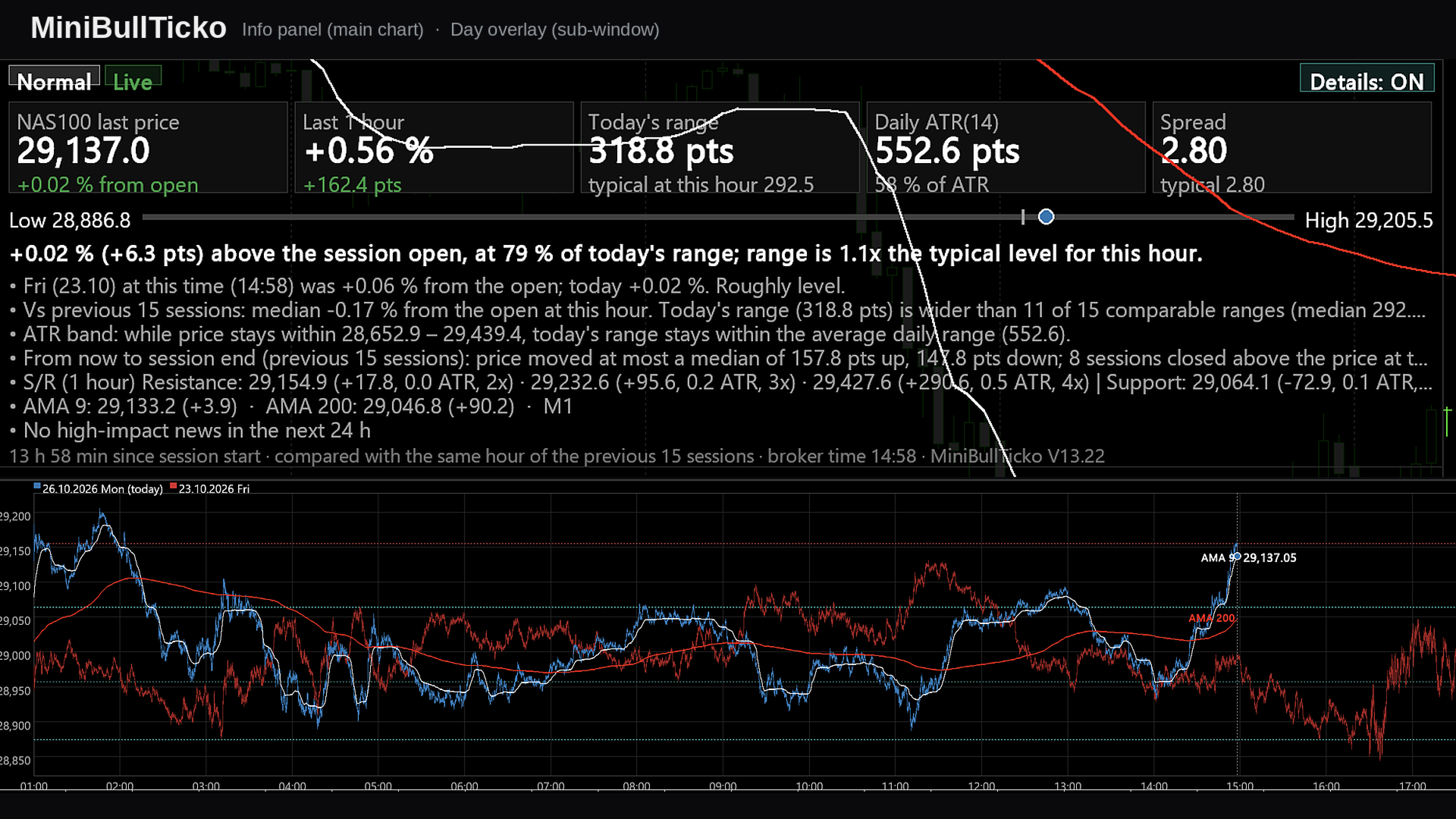
MiniBull Ticko

  • インディケータ
  • Yusuf Levent Aksun
    Yusuf Levent Aksun
    プラットフォームエンジニア & AWS認定プロフェッショナル。ソフトウェア開発、クラウドアーキテクチャ、
    DevOpsトランスフォーメーションにおいて20年以上の経験を持つ。
    現在、ロンドンのWorld Wide Technologyにてプラットフォームエンジニアリングを推進。
    スケーラブルなインフラソリューションを構築し、開発チームがより迅速かつ確実に
    デリバリーできる環境を実現。
    🔹 AWS Certified Solutions Architect – Professional
  • バージョン: 13.22
  • アップデート済み: 26 10月 2026
  • アクティベーション: 5

**Tick-level day overlay, live info panel and automatic Support/Resistance for MetaTrader 5 — built for scalpers.**

MiniBullTicko answers one question that matters to a short-term trader at any moment of the session:

> *"Is today behaving like a normal day **at this exact time of day**, or is something different — more volatile, more expensive to trade, or stretched against a known level?"*

It does this by laying every recent trading session on top of each other **at tick resolution** in an indicator sub-window, while a compact, semi-transparent panel on the main chart summarises the comparison in numbers and plain sentences.

---

## Contents

1. [Screenshots](#1-screenshots)
2. [Key features](#2-key-features)
3. [Requirements and installation](#3-requirements-and-installation)
4. [What you see on the screen](#4-what-you-see-on-the-screen)
5. [Input parameters](#5-input-parameters)
6. [How it works](#6-how-it-works)
7. [Metric and formula reference](#7-metric-and-formula-reference)
8. [A scalper's workflow](#8-a-scalpers-workflow)
9. [Performance notes](#9-performance-notes)
10. [Chart objects and global variables](#10-chart-objects-and-global-variables)
11. [Troubleshooting](#11-troubleshooting)
12. [Limitations and disclaimer](#12-limitations-and-disclaimer)

---

## 1. Screenshots

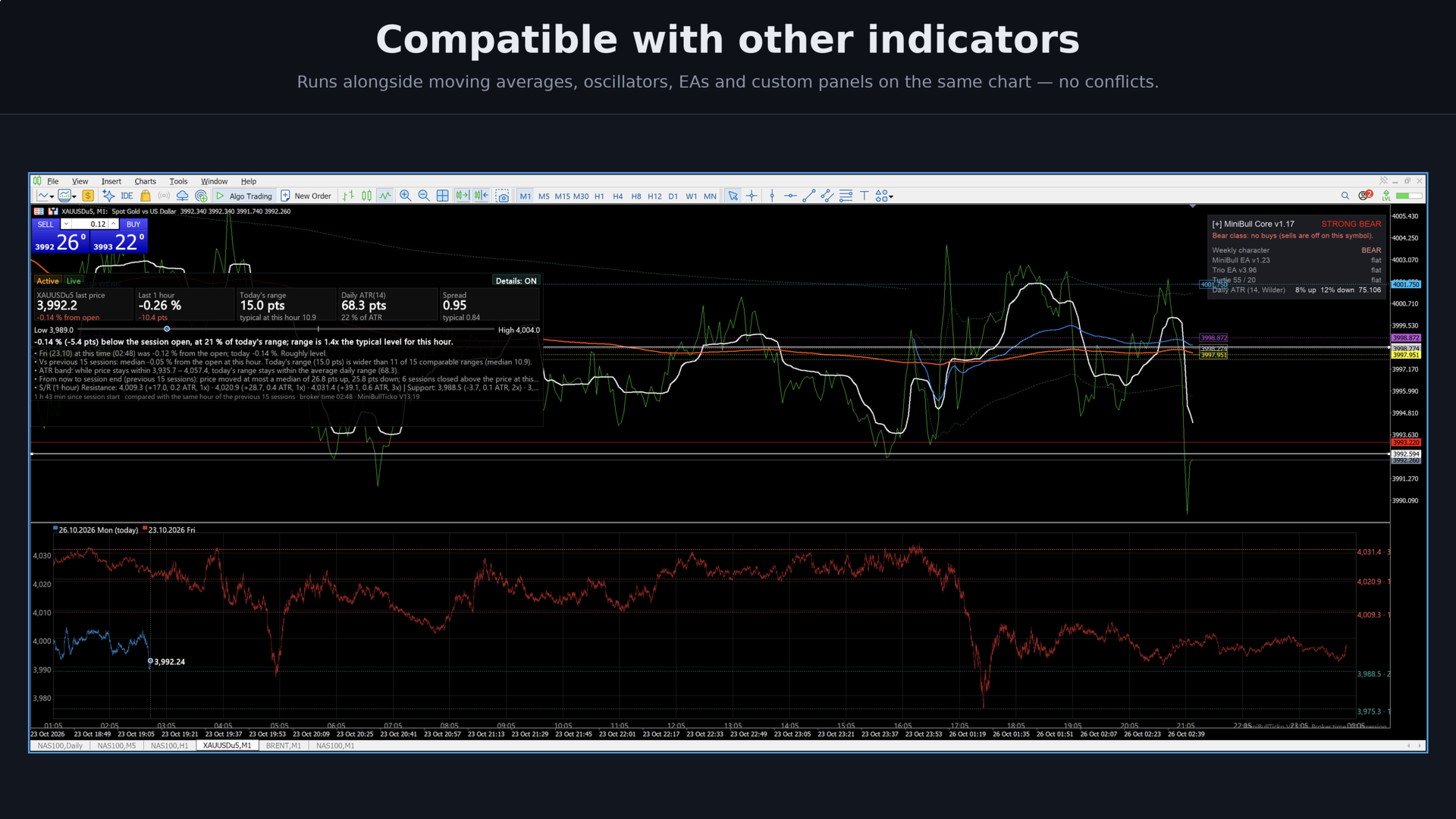
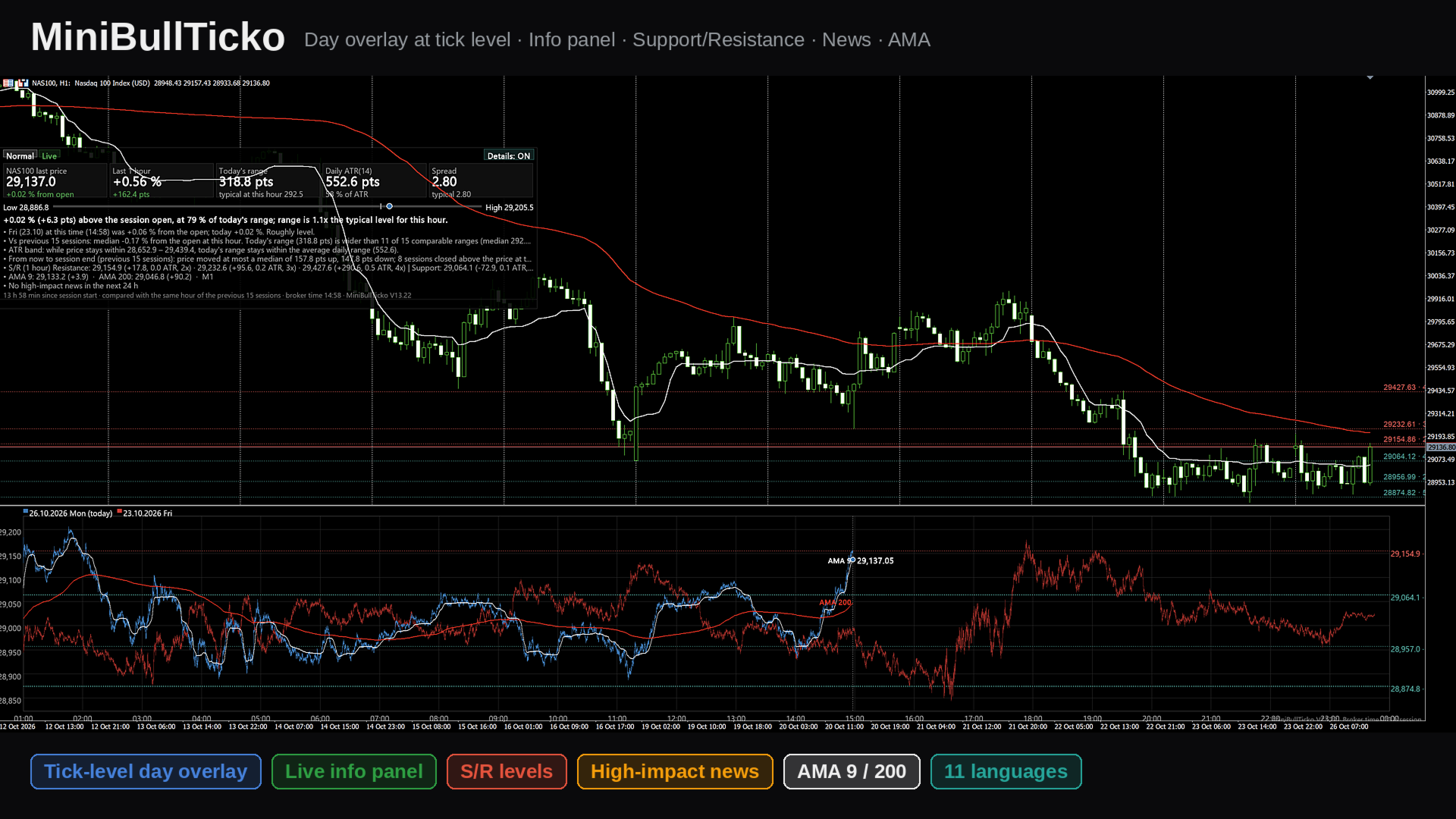
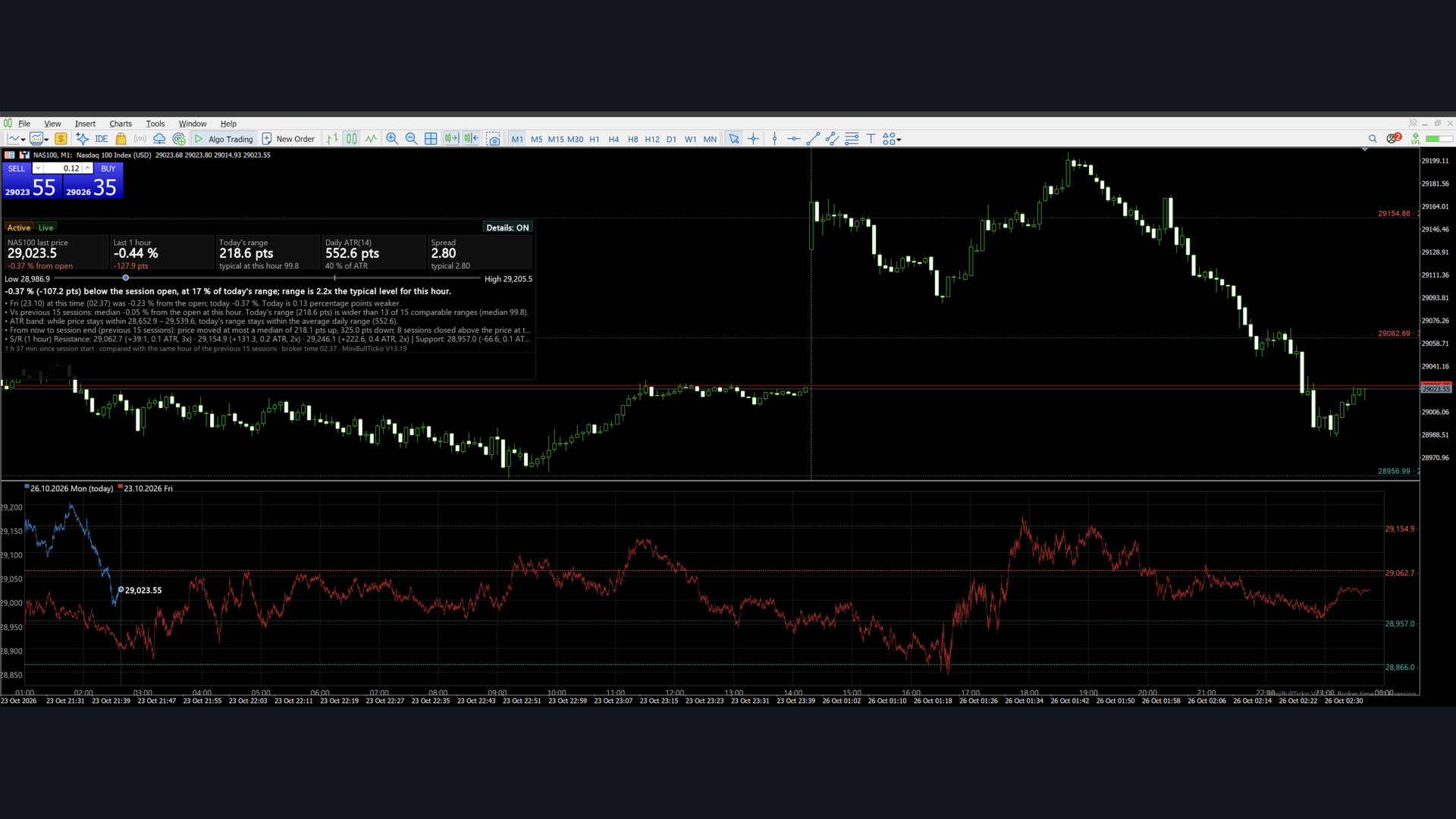
All images are 1920 × 1080 and use illustrative (synthetic) data.

| # | File | What it explains |
|---|------|------------------|
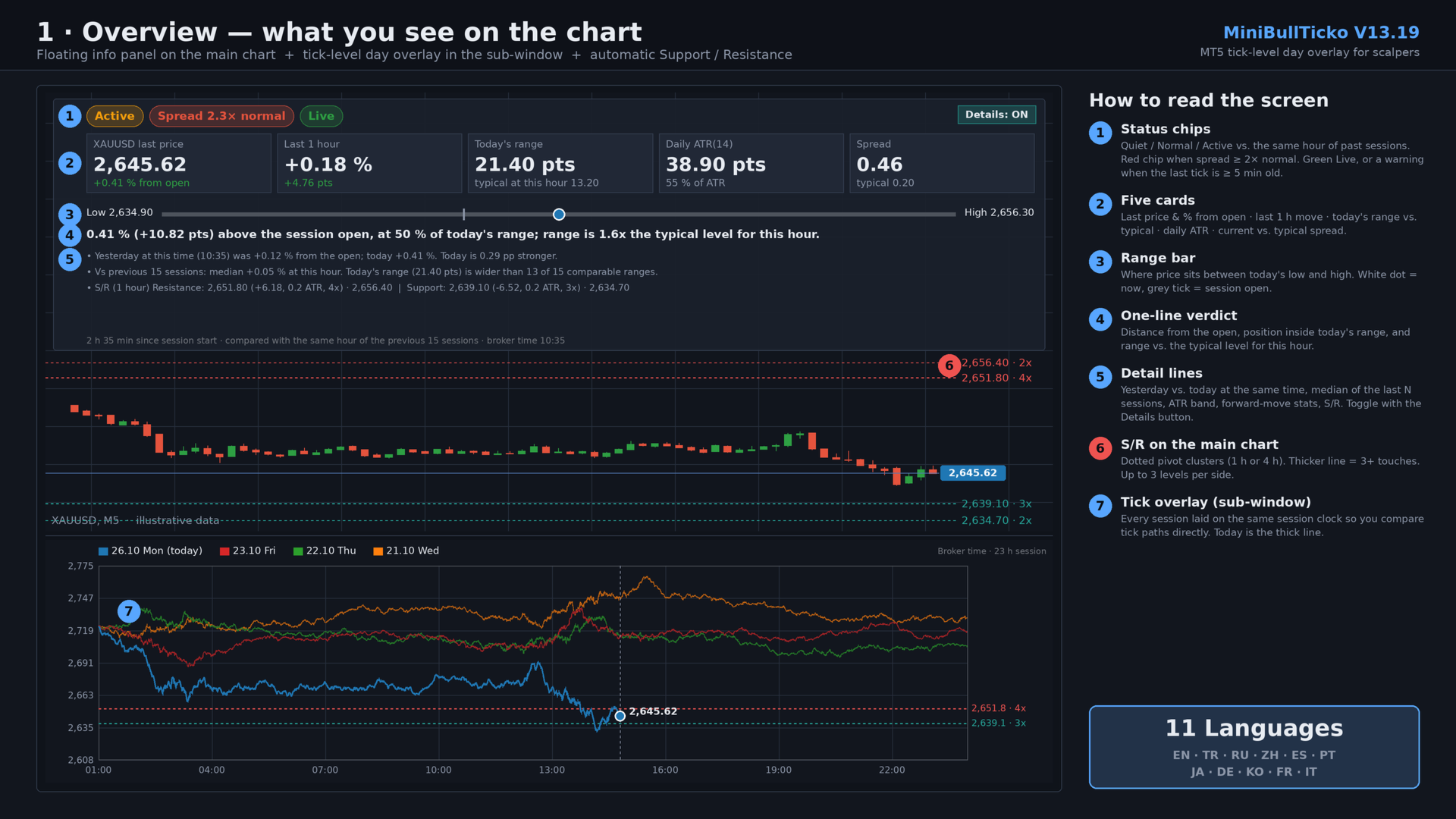
| 1 | `01_overview.png` | The whole screen: main-chart panel, S/R lines, tick overlay sub-window |
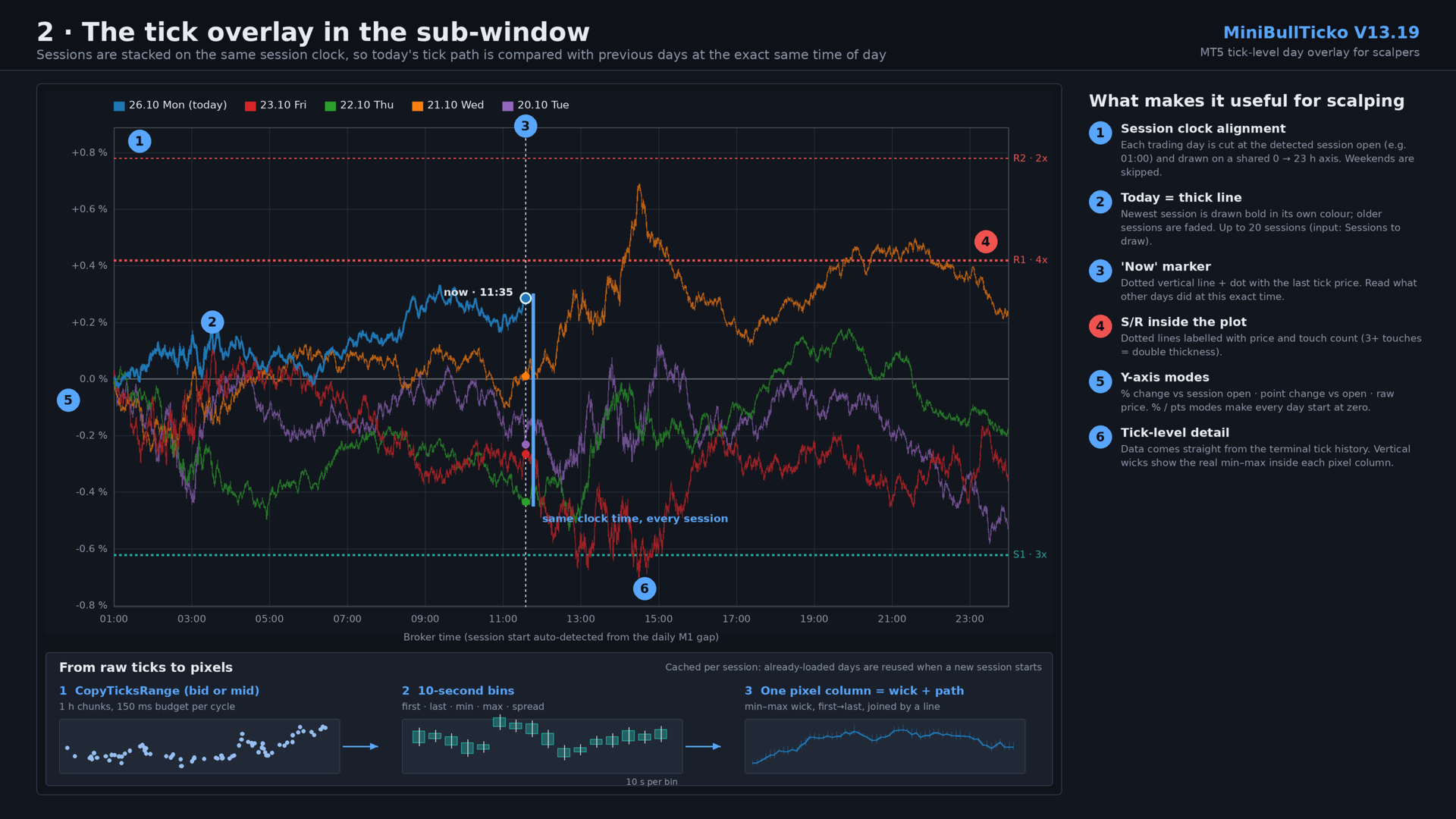
| 2 | `02_tick_overlay.png` | The sub-window in detail: session-clock alignment, "now" marker, tick → bin → pixel pipeline |
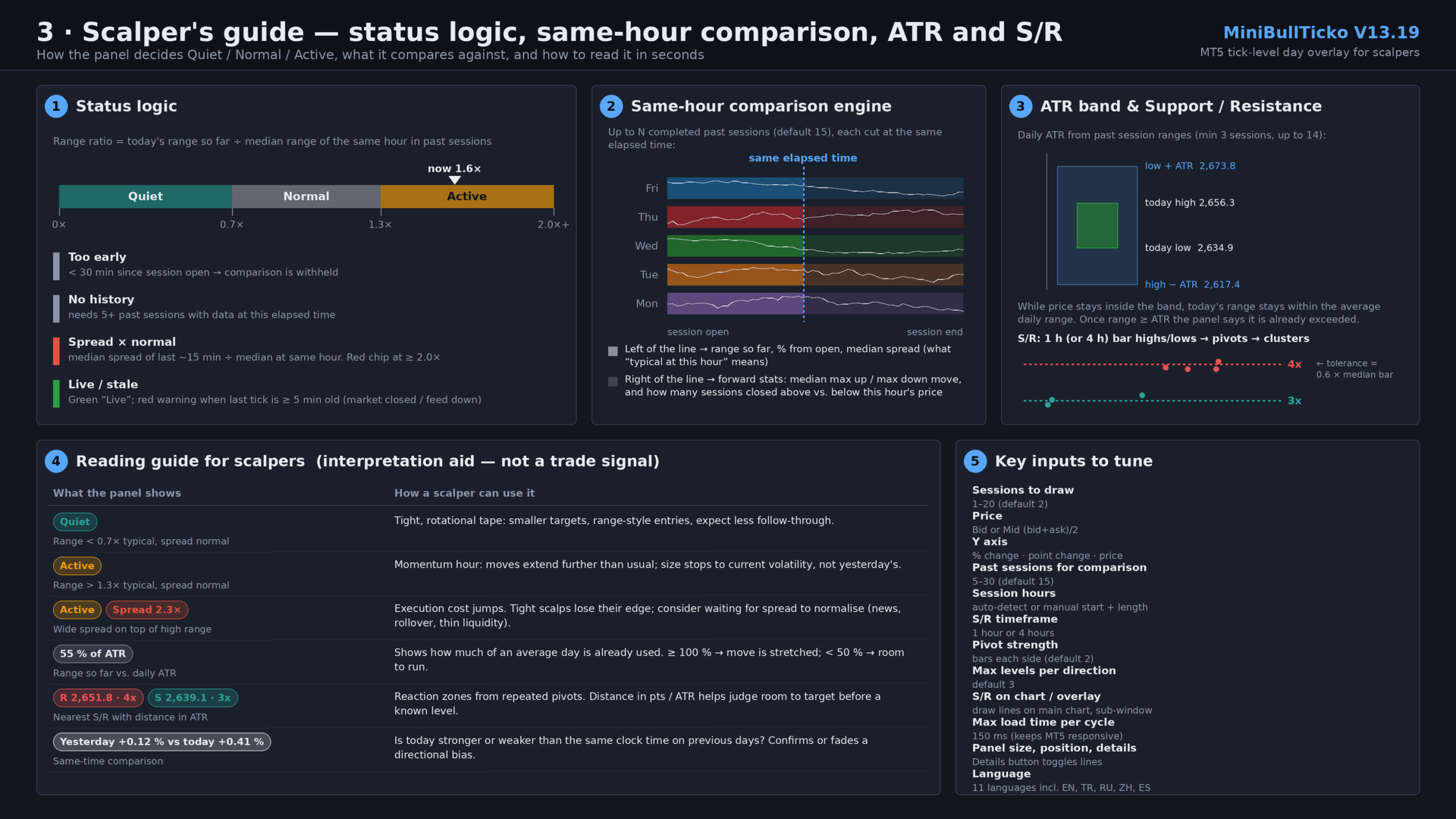
| 3 | `03_scalper_guide.png` | Status logic, same-hour comparison engine, ATR band, S/R clustering, reading guide, key inputs |

![Overview](01_overview.png)

![Tick overlay](02_tick_overlay.png)

![Scalper guide](03_scalper_guide.png)

---

## 2. Key features

- **Tick-level day overlay (sub-window).** Up to 20 sessions are drawn on one shared session clock. Today is a thick line; previous days are faded. Because each day is aligned to the *same time of day*, you compare like with like.
- **Real tick data, no external files.** Ticks are read straight from the terminal with `CopyTicksRange`. No tick-recorder EA and no CSV export/import are needed.
- **"Same hour" comparison panel (main chart).** Status chip (Quiet / Normal / Active), five metric cards, a range bar, a one-sentence verdict and optional detail lines — all computed against the same elapsed time in previous sessions.
- **Spread awareness.** Current spread (median of the last ~15 minutes) is compared with the typical spread at that hour. A red chip appears when it is 2× normal or worse.
- **Feed-health indicator.** "Live" in green, or a warning when the last tick is five minutes old or more.
- **Daily ATR in session terms.** ATR is built from the stored sessions' tick ranges, with an "ATR band" that shows where price must stay for today's range not to exceed the average.
- **Automatic Support / Resistance.** Pivot highs/lows from 1-hour or 4-hour bars (built from tick data) are clustered into levels with touch counts, drawn on the main chart and in the overlay, and listed in the panel with distance in points and in ATR.
- **Automatic session detection.** Session open and length are detected from gaps in M1 history, so it adapts to indices, metals, FX and futures-style CFDs. Manual override is available.
- **11 UI languages.** English, Türkçe, Русский, 中文, Español, Português, 日本語, Deutsch, 한국어, Français, Italiano.
- **Responsive loading.** Data loads in time-boxed slices so the terminal never freezes; already-loaded sessions are cached and reused.

---

## 3. Requirements and installation

**Requirements**

- MetaTrader 5 (build with `CCanvas` and `CopyTicksRange` support — any current build).
- Tick history for the symbol. The indicator needs ticks for roughly *N + 1* sessions (default: 16). If the terminal has not downloaded them yet, `CopyTicksRange` will trigger the download and the panel shows "Loading…" until it is done.
- M1 history for automatic session detection (about 9 days).

**Installation**

1. Save `MiniBullTicko_V13_19.mq5` to `MQL5\Indicators\` (File → Open Data Folder).
2. Open it in MetaEditor and compile (F7). The file is UTF-8 with BOM; if non-Latin characters look broken, re-save as *UTF-8 with BOM*.
3. In the terminal: **Insert → Indicators → Custom → MiniBullTicko_V13_19**. It opens in its own sub-window (`indicator_separate_window`, no plots).
4. The info panel appears on the **main chart** and S/R lines are placed on it automatically.

> Tip: use a chart timeframe you scalp on (M1–M5). The indicator itself is timeframe-independent — it works from ticks — but S/R lines are anchored to the chart and the panel sits on top of it.

---

## 4. What you see on the screen

### 4.1 Info panel (main chart)

A semi-transparent canvas (default 1500 × 450 px, 200 px from the top, 0 px from the left).

| Area | Content |
|------|---------|
| **Status chips** | Session state: *too early / not enough history / Quiet / Normal / Active*; a red *Spread N× normal* chip; *Live* or *Last tick N ago* warning (or *Not live · last tick …* when the session is over). |
| **Five cards** | 1) Last price and % from session open. 2) Last 1-hour change in % and points. 3) Today's range in points and the typical range at this hour. 4) Daily ATR(n) and today's range as % of ATR. 5) Current spread and typical spread. |
| **Range bar** | Today's low ↔ high. Grey tick = session open, white/blue dot = current price. |
| **Verdict sentence** | e.g. *"0.41 % (+10.82 pts) above the session open, at 50 % of today's range; range is 1.6x the typical level for this hour."* |
| **Detail lines** (toggle) | Previous session at the same time vs. today; median of the previous N sessions; ATR exceeded / ATR band; forward-looking stats; S/R list. |
| **Details button** | Top-right of the panel; click to turn the detail lines on/off. The choice is remembered. |
| **Caption** | Time since session start, number of sessions compared, broker time, version. |

### 4.2 Tick overlay (sub-window)

- **X axis:** the session clock in broker time (e.g. 01:00 → 00:00).
- **Y axis (selectable):** % change vs. session open, point change vs. session open, or raw price.
- **Lines:** every session is drawn per pixel column from its 10-second bins — a vertical min-max wick, plus a line joining first/last values — so the path keeps real intraday spikes.
- **Today:** thick line, full colour. **Older sessions:** faded.
- **"Now" marker:** dotted vertical line and a dot with the latest tick price.
- **S/R:** dotted horizontal lines with price and touch count on the right; double thickness at 3+ touches.
- **Legend:** date, weekday and "(today)" tag for each session; a "Loading… n/N" counter while data is still being fetched.

### 4.3 S/R on the main chart

Horizontal lines (`OBJ_HLINE`, dotted) with small text labels showing price and touch count. Resistance is red, support is teal. Tooltips show *Resistance/Support price · touches*.

---

## 5. Input parameters

### General

| Input | Default | Description |
|-------|---------|-------------|
| `InpLang` | English | UI language (11 options). |
| `InpFontName` | *(empty)* | Font name; empty = automatic per language. |
| `InpDays` | 2 | Sessions drawn in the overlay (1–20). |
| `InpPrice` | Bid | `Bid` or `Mid` = (bid + ask) / 2. |
| `InpYMode` | Price | Y axis: `% change`, `Point change`, or `Price`. |
| `InpWindowHeight` | 600 | Sub-window height in px (0 = leave unchanged). |
| `InpFont` | 13 | Base font size (px). |
| `InpFontScale` | 0.9 | Font multiplier — raise to 1.3 / 1.6 on high-DPI screens. |

### Session (broker time)

| Input | Default | Description |
|-------|---------|-------------|
| `InpAutoSession` | true | Detect session start/length automatically from M1 gaps. |
| `InpSessHour` / `InpSessMin` | 1 / 0 | Manual session start. |
| `InpSessLen` | 23 | Manual session length in hours. |

### Panel

| Input | Default | Description |
|-------|---------|-------------|
| `InpShowPanel` | true | Show the info panel on the main chart. |
| `InpPanelWidth` | 1500 | Panel width (px). |
| `InpPanelHeight` | 450 | Panel height (px); 0 = automatic, maximum 600. |
| `InpPanelX` / `InpPanelY` | 0 / 200 | Distance from the left / top of the chart. |
| `InpSpacing` | 1.3 | Line-spacing multiplier. |
| `InpShowDetails` | true | Initial state of the detail lines (the button overrides it afterwards). |
| `InpProfileDays` | 15 | Past sessions used for comparison (clamped to 5–30). |

### Support / Resistance

| Input | Default | Description |
|-------|---------|-------------|
| `InpShowSR` | true | Calculate S/R. |
| `InpSRTf` | 1 hour | Bar timeframe for pivots: 1 h or 4 h. |
| `InpSRPivotK` | 2 | Bars required on each side of a pivot. |
| `InpSRLevels` | 3 | Maximum levels per direction. |
| `InpSROnChart` | true | Draw S/R on the main chart. |
| `InpSROnOverlay` | true | Draw S/R inside the sub-window. |

### Performance

| Input | Default | Description |
|-------|---------|-------------|
| `InpBudgetMs` | 150 | Maximum tick-loading time per timer cycle (ms). |

---

## 6. How it works

### 6.1 Session detection

1. Reads about 9 days of M1 bar times.
2. Finds **gaps between consecutive M1 bars from 30 minutes to 10 hours** — the daily break.
3. Buckets the gap-end times into 5-minute slots over the clock and picks the most frequent slot as the **session start**.
4. Measures the time from that start to the last bar before the next break; the **median** (rounded up with a small tolerance) is the **session length** in hours (1–24).
5. If detection keeps failing (20 attempts), it falls back to the manual inputs.

Sessions are then built backwards day by day from the current session date. **Saturdays and Sundays are skipped.** A day with no ticks (holiday) is marked empty and ignored.

### 6.2 Tick loading

- A timer runs every **250 ms**.
- Each session is read in **1-hour chunks** with `CopyTicksRange(…, COPY_TICKS_ALL, …)`.
- Total loading time per cycle is capped by `InpBudgetMs`; the next cycle continues where it stopped.
- Up to 8 consecutive read failures are tolerated per session before it is treated as empty.
- The live session only reads up to the current server time and resumes from the last tick received.
- When a new session begins, existing session objects are **reused**, so the 15–20 previous days are not reloaded.

### 6.3 Binning

Each tick is reduced into a **10-second bin** of its session: first, last, min and max price (bid or mid) and the last observed spread (`ask − bid`). This keeps memory small (a 23-hour session = 8 280 bins) while preserving intrabar extremes.

### 6.4 Redrawing

- Redraw when new data arrived, at most every 300 ms; a forced refresh every 5 seconds.
- A new session start is checked every second.
- Two `CCanvas` layers are used: one in the sub-window (overlay) and one bitmap object on the main chart (panel, semi-transparent).

---

## 7. Metric and formula reference

All "typical at this hour" values compare today with **completed** previous sessions, each evaluated at the **same elapsed time since session open**.

| Metric | Definition |
|--------|------------|
| **% from open** | `last / first_tick_of_session − 1`, in %. |
| **Last 1 h** | `last / price_one_hour_ago − 1`; shown as "no full hour yet" before 1 h has elapsed. |
| **Today's range** | `session high − session low` so far. |
| **Typical range at this hour** | Median over past sessions of `(high − low)` from session open up to the same elapsed time. Requires ≥ 5 sessions with data at that time. |
| **Range ratio** | `today's range / typical range`. Shown only after the first 30 minutes. |
| **Status** | ratio < 0.7 → **Quiet**; 0.7 – 1.3 → **Normal**; > 1.3 → **Active**. |
| **Too early** | Fewer than 30 minutes since session open. |
| **Spread now** | Median of per-bin spreads over the last 90 bins (≈ 15 min). |
| **Typical spread** | Median over past sessions of the same ~15-minute median spread at that hour (needs ≥ 3 values). |
| **Spread × normal** | `spread now / typical spread`; the red chip appears at ≥ 2.0. |
| **Daily ATR(n)** | Average True Range of past sessions' (high, low, previous close); `n = min(14, sessions − 1)`; needs ≥ 3 past sessions. |
| **% of ATR** | `today's range / ATR × 100`. |
| **ATR band** | While price stays between `today_high − ATR` and `today_low + ATR`, today's range remains within the average daily range. If the range already exceeds ATR, the panel states so. |
| **Previous session line** | Previous session's % from open at this time vs. today's, with the difference in percentage points. |
| **Forward statistics** | From the same elapsed time to session end in past sessions: median maximum up-move, median maximum down-move, and how many closed above vs. below the price at that hour. Shown for the live session only (≥ 5 samples). |

### Support / Resistance algorithm

1. Build 1-hour (or 4-hour) high/low bars from the stored 10-second bins of the last `InpProfileDays + 1` sessions (at least 5 bars required).
2. A bar high/low is a **pivot** if it is the extreme within `InpSRPivotK` bars on each side.
3. Sort pivots and **cluster** neighbours whose distance from the running cluster mean is ≤ `0.6 × median bar range`.
4. Each cluster becomes a level at its **mean price**, with the **number of pivots** as its touch count.
5. Levels above the last price are **resistance** (nearest first), levels at or below are **support** (nearest first), up to `InpSRLevels` per side.
6. In the panel each level shows the distance in points and in ATR, and the touch count (e.g. `2,651.80 (+6.18, 0.2 ATR, 4x)`).

---

## 8. A scalper's workflow

> This is an interpretation aid, not a signal generator. Entries, exits and risk remain your decision.

1. **Glance at the chips.** *Quiet* means tight, rotational tape; *Active* means moves extend further than usual; a red *Spread N×* chip means execution is currently more expensive than normal.
2. **Check feed health.** Green *Live* — good. A "last tick N min ago" warning means the market is closed or the feed is down; ignore stale numbers.
3. **Compare with the same clock time.** In the sub-window, look where the thick line sits relative to the faded days at the dotted "now" line. In `% change` mode, every day starts at zero, so strength vs. weakness is immediate.
4. **Size your targets and stops to today's volatility.** Use the *typical range at this hour* and *% of ATR* cards: below ~50 % of ATR there is room to run; above 100 % the move is already stretched.
5. **Respect the levels.** The nearest resistance/support and their distance in ATR show how much room exists before a level that has been touched repeatedly.
6. **Watch spread before scalping tight.** If spread is ≥ 2× normal (news, rollover, thin liquidity), tight targets can lose their edge.
7. **Use the detail lines** (button on the panel) when you want the written comparison; switch them off to keep the chart clean.

Suggested starting configurations:

| Style | Suggestion |
|-------|-----------|
| Pure scalping, one chart | `InpDays` = 2–3, `InpYMode` = % change, `InpSRTf` = 1 h |
| Intraday context | `InpDays` = 5–8, `InpSRTf` = 4 h, `InpProfileDays` = 20 |
| Small screen | Smaller `InpPanelWidth` / `InpPanelHeight`, details OFF, `InpWindowHeight` ≈ 400 |
| High-DPI display | `InpFontScale` = 1.3–1.6 |

---

## 9. Performance notes

- The first start on a new symbol can take a while: the terminal may need to download tick history for ~16 sessions. The overlay appears first; the panel fills in as completed sessions arrive (counter "Loading… n/N").
- Loading is time-boxed (`InpBudgetMs`), so the terminal remains responsive. Lower it on slow machines; raise it to load faster on strong ones.
- Memory per session is small (≈ 8 k bins × 5 arrays); 20 sessions are comfortably handled.
- Canvas redraws are throttled (300 ms minimum interval).

---

## 10. Chart objects and global variables

| Name | Type | Purpose |
|------|------|---------|
| `GUA_Canvas_<n>` | Bitmap label (canvas) in the indicator sub-window | The tick overlay itself (`<n>` = sub-window index). |
| `GUA_Panel` | Bitmap label (canvas) | The info panel on the main chart; click handling for the Details button. |
| `GUA_SR_R0…` / `GUA_SR_S0…` | `OBJ_HLINE` | Resistance / support lines. |
| `GUA_SR_*_t` | `OBJ_TEXT` | Price and touch-count labels next to the lines. |
| `MBT_details` | Terminal global variable | Remembers the Details ON/OFF state across restarts. |

All `GUA_SR_*` objects are removed when the indicator is removed.

---

## 11. Troubleshooting

| Symptom | Likely cause / fix |
|---------|--------------------|
| "Loading tick data…" for a long time | Terminal is downloading tick history. Keep the chart open; check *Tools → Options → Charts* for the tick-history limits and make sure the symbol is in Market Watch. |
| "No tick data found (check symbol / session hours)" | Broker provides no tick history for this symbol, or session hours were detected incorrectly — set `InpAutoSession = false` and enter the session start/length manually. |
| "Window too small – increase its height" | Sub-window is too short; raise `InpWindowHeight` or drag the splitter. |
| Panel says "too early to compare" | Fewer than 30 minutes since session open — expected. |
| Panel says "Not enough history to compare" | Fewer than 5 past sessions have data at this elapsed time. Wait for loading or increase available tick history. |
| ATR shows "needs 3+ past sessions" | Same reason — ATR needs at least 3 completed past sessions. |
| Text too small / too large | Adjust `InpFont` and `InpFontScale`. |
| Non-Latin characters broken | Re-save the file as UTF-8 with BOM in MetaEditor. |
| No S/R lines | Needs ≥ 5 hourly (or 4-hour) bars of stored sessions; also check `InpShowSR` and `InpSROnChart`. |
| Last tick warning during the day | The market is closed for that symbol or the feed is interrupted. |

---

## 12. Limitations and disclaimer

- Works from **broker time** and the broker's tick history; different brokers may produce slightly different shapes and spreads.
- Weekend days are skipped; holidays without ticks are ignored automatically.
- Bid price is the default; the `Mid` option averages bid and ask when both are available.
- Statistics ("typical", ATR, forward moves) are descriptive summaries of recent sessions and do not predict future price.
- The indicator does not place orders and does not generate alerts.

**Disclaimer:** This tool is for information and analysis only and is not financial advice. Trading leveraged products carries a high risk of loss.

---

*MiniBullTicko V13.19 · © MiniBull*
おすすめのプロダクト
VWAP Fibo Bands RSJ is an indicator that traces the lines of the daily VWAP and from it creates bands using Fibonacci proportions. This spectacular indicator creates 10 band levels through the selected VWAP period using Fibonacci ratios. It is fantastic how the prices respect each level of the bands, where it is possible to realize that almost every time the price closes above / below a level of the bands he will seek the next one. If close above will seek to reach the level above and if close
FREE
Haven Stop Loss Hunter 2.0 - 流動性分析の新たな視点 大型アップデート — Haven Stop Loss Hunter 2.0 が登場しました!これは、流動性エリアやフェイクブレイクアウト(Sweeps)を分析するためのプロフェッショナル向けツールであり、より柔軟で機能的に進化しました [1]。今回のバージョンでは、マルチタイムフレーム(MTF)分析と高度なアラートシステムを搭載し、チャートを頻繁に切り替えることなく、スマートマネー・コンセプト(SMC)に基づく大口投資家の意図を効率的に追跡できるように設計されています [1]。 私の他の製品はこちら - > こちらをクリック 。 流動性の掃討(リクイディティ・スウィープ)とは、大口市場参加者が個人トレーダーのストップロスを狙う動き(ストップ狩り)を指します。バージョン2.0では、この重要な価格変動を現在の作業チャートだけでなく、上位足(H1、H4、D1)でも同時に監視できるため、市場環境をより深く理解することができます [1]。 バージョン2.0の主な新機能 マルチタイムフレーム(MTF)分析 — 上位時
FREE
Watermark Centralized Adds a watermark centered with the asset name and chosen period. It is possible to override the font type, font size, font color and separator character. The watermark is positioned behind the candles, not disturbing the visualization. It has automatic re-centering if the window is resized. Hope this indicator helps you, good trading ;)
FREE
プロフェッショナル Renko チャート MT5 プロフェッショナル Renko チャート MT5 は、MetaTrader 5 用のシンプルで見やすい Renko チャートインジケーターです。Renko ブロックをインジケーターの別ウィンドウに表示し、必要に応じてメインの価格チャート上にも Renko ボックスを表示できます。 このインジケーターは、MetaTrader 5 内で使い慣れた Renko チャートスタイルを利用したいトレーダー向けに作られています。TradingView などの現代的なチャートプラットフォームで利用できる Renko チャート表示に近い視覚スタイルを目指しています。通常の時間ベースのローソク足を Renko ブロックに変換し、シンプルで分かりやすく実用的な形式で表示します。 複数の通常ローソク足によって、1つの Renko ブロックが形成される場合があります。プロフェッショナル Renko チャート MT5 は、メインの価格チャート上にも Renko ボックスを表示でき、各 Renko ブロックを形成するために何本の通常ローソク足が使用されたかも表示でき
Stop guessing and start executing with precision. Learning complex trading methodologies takes years of screen time—until now. The Propfolio Strategy Mentor OS is an elite, on-chart analytical dashboard that acts as your live digital trading mentor. It doesn't just draw lines on your chart; it actively scans the market, identifies high-probability setups across 8 different institutional strategies, and tells you exactly what to look for in real-time via the Live Mentorship Terminal. Whether you
Ksm mt5
Andriy Sydoruk
3 (2)
Ksm: Smart Solution for Automated Forex Trading Ksm is a tool designed for automating Forex trading, using modern methods of time-series data analysis to work with multiple currency pairs across different timeframes. Key Features and Benefits Multi-currency support : Ksm enables trading across multiple currency pairs, helping traders adapt their strategies to various market conditions. New currency pairs can be easily added. Time-series data analysis : Utilizing advanced algorithms, Ksm analyze
Investopedia FIVE
Joseph Anthony Aya-ay Yutig
Investopedia FIVEEAはこの記事に基づいています: https://www.investopedia.com/articles/forex/08/five-minute-momo.asp 取引条件 -X期間のEMAとMACDの下で取引されている通貨ペアがマイナスの領域にあることを確認します。 -価格がX期間のEMAを超えるのを待ってから、MACDがネガティブからポジティブにクロスする過程にあるか、5バー以内でポジティブな領域にクロスしたことを確認します。 -X期間EMAの上に長いXピップを移動します。 -エントリー時のポジションのXとリスク額を売ります。後半のストップを損益分岐点に移動します。 -トレーリングストップを使用 -リスク警告 -ADX PROを購入する前に、関連するリスクに注意してください。 -過去のパフォーマンスは将来の収益性を保証するものではありません(EAも損失を出す可能性があります)。 -示されているバックテスト(スクリーンショットなど)は、最適なパラメーターを見つけるために高度に最適化されていますが、結果をライブ取引に転送すること
Viking Alpha DAX Ivar Edition
Valdeci Carlos Dos Passos Albuquerque
Viking Alpha DAX — Germany 40 Expert Advisor for MetaTrader 5 LAUNCH PROMO Only 10 copies at launch price. Price increases with each sale. Launch price: $297 Next price: $497 Final price: $997 Live Performance: FX Blue — Vikingtradingbots What Makes Viking Alpha DAX Different Most DAX robots fail for one simple reason: they treat the Germany 40 like a forex pair. It isn't. The DAX has a heartbeat — a specific rhythm tied to the Frankfurt Stock Exchange opening, the European session structure, an
BTC Master Pro
Farzad Saadatinia
4.62 (13)
BTC Master Pro — 規律あるビットコイントレードのための信頼できるパートナー。 最新バージョンでは OpenAI の人工知能 を統合し、高ボラティリティな暗号資産市場において、より高度な執行判断と取引フィルタリングを実現します。 本プロフェッショナル向けエキスパートアドバイザーは、 MetaTrader 5 上での Bitcoin(BTCUSD) 取引専用に設計されており、構造化された執行ロジック、エクスポージャー管理、そして高度なリスクマネジメントに重点を置いています。 価格: $699  →  次段階: $999  →  最終価格: $999 LIVE SIGNAL HERE OpenAI搭載・執行フィルター 最新バージョンでは OpenAI 技術を活用し、リアルタイムで市場環境を分析し、質の低いエントリーや不利なセットアップをフィルタリングします。 AIセーフティレイヤー: AIモジュールは取引実行前の第二承認レイヤーとして機能します。これは予測ツールではなく、あくまで執行フィルターとして設計されています。すべての取引は構造化ロジックとインテリジェントな検証プ
Phantom Gold
Ignacio Agustin Mene Franco
Phantom GOLD MT5 v1.0 Phantom GOLD MT5: The algorithmic spectrum that hunts gold moves with surgical precision Phantom GOLD is a next-generation Expert Advisor designed exclusively for XAUUSD (gold), combining modern artificial intelligence with the most powerful Smart Money Concept (SMC) strategies, institutional price action, and advanced trend filters. It's not just a robot: it's an invisible hunter operating in the shadows of the market, detecting high-probability zones where large instit
DAILY OH/OL SDEV QUANT MODEL - STATISTICAL TRADING WITH PRECISION RISK MANAGEMENT TRADE WITH MATHEMATICAL CERTAINTY - KNOW YOUR EXACT STOP-LOSS AND TAKE-PROFIT BEFORE YOU ENTER This indicator analyzes 5,000+ days of price history to give you: Exact entry levels (sigma bands locked at daily open) Exact stop-loss distance (from M
ACRON Supply Demand EA
Georgios Kalomoiropoulos
4.5 (4)
ACRON Supply Demand EAは 、需給の概念とプライスアクションフィルタリングロジックを組み合わせた完全自動取引アルゴリズムです。トレーダーが実際の取引経験に基づいて開発し、長期にわたる安定した成長を目指しています。リスクをコントロールし、様々な戦略を用いて分散投資を行うことで、現実的な取引を実現できるよう設計されています。 [製品マニュアル] [FAQ] ご購入後、 ACRON Supply Demand EAに最適化された すべての 戦略を取得するには、メッセージをお送りください。 何が強力なのか 100%自動取引: 需給原理に基づいて完全に自動で取引を行うように特別に設計されています。EAはバックテストも可能なので、トレーダーは過去のデータを用いてパフォーマンスを検証し、戦略を最適化することができます。 分散戦略アプローチ: 異なる銘柄と時間枠の複数の戦略を組み合わせます。これにより、全体的なリスクのバランスを取り、パフォーマンスを向上させ、長期的な安定した利益を達成できます。EAは無限の可能性を提供します。 事前構築済みおよびカスタム戦略: 様々なブローカーの
ProTrade EA
Jim Ariel Camarce Ignao
Key Features   Automated Candle Pattern Recognition 10 Professional Patterns : Detects Bullish/Bearish Engulfing, Hammer/Shooting Star, Morning/Evening Star, Piercing/Dark Cloud, and 6 additional professional candlestick patterns Smart Filtering : Combine multiple patterns with configurable confirmation logic Volume Confirmation : Optional volume filter to validate pattern strength Multi-Timeframe Analysis : Separate execution and bias timeframes for better timing   Trading Dashboard Int
" Blow It Up!" - The Trading Indicator That Questions Your Life Choices Tired of boring indicators? Meet your new market companion that delivers: "YOLO BUY!" arrows when you should probably panic Explosive rectangle confetti (because why not?) 200+ soul-crushing quotes like "Your stop loss is imaginary" and "This is n't trading, it's donating to whales" Random alerts that roast your strategy This Indicator is lik e Therapy - Because daytrading shouldn't fe el like watching paint dry! Highlights
X Sensors Proは、選択した期間における取引量の価格レベル別分布を可視化するプロフェッショナルな出来高プロファイル指標です。この指標は自動的にローカルな極値(HHとLL)を特定し、最大出来高のレベルであるPOC(Point of Control)を計算し、特定された範囲に基づいてサポートラインとレジスタンスラインを構築します。 主な機能: カラーヒストグラムによる出来高プロファイルの可視化 POC(Point of Control)の自動検出 HH(より高値)とLL(より安値)レベルの構築 ピボットレベルと複数のサポート/レジスタンスレベルの計算 強気(緑)と弱気(赤)の出来高の色別表示 あらゆる時間足に適応する調整機能 この指標の目的は? この指標はトレーダーの以下の課題を解決します: 1. 蓄積と分配ゾーンの特定 出来高は常に大口プレイヤーが市場に参入または退出する場所に集中します。POCは最大数の取引が発生した価格を示します。これは心理的に重要なレベルです。 2. 適正価格の探索 POCはしばしば「適正価格」と見なされます。これは市場が最も長く滞留するレベル
FusionTrailing EA – Your Ultimate Weapon for Market Domination! Transform your trading and crush every market move with the most advanced trailing stop system available. FusionTrailing EA delivers unstoppable power with its dual-mode setup: • Fusion Mode: Automatically sets a bulletproof stop loss using a maximum loss threshold and activates smart trailing
Market Projection Pro — MT5 Want to visualize how the price cycles in your chosen chart section could extend? Market Projection Pro analyzes a historical window you select, extracts cycle components and draws a composite projection to its right. You control the source window and forward horizon to compare the scenario with price structure and potential turning zones. What you see on the chart Interactive boundaries let you select a historical analysis window directly on the chart. Cycle componen
Introducing Neural Bitcoin Impulse - an innovative trading bot created using neural network training technology on voluminous market data sets. The built-in mathematical model of artificial intelligence searches for the potential impulse of each next market bar and uses the resulting patterns of divergence and convergence between the predictive indicators and the price to form high-precision reversal points for opening trading positions. The trading robot is based on the Neural Bar Impulse ind
Acronix Acronix は、EURUSD と GBPUSD を中心に取引する MetaTrader 5 向けの逆張りスキャルピング EA です。 Blackore Finance  が開発した Acronix は、RSI によるエントリーシグナル、ADX フィルター、適応型のエントリー間隔、自動ポジション管理を組み合わせています。複数通貨に対応し、主要な FX 通貨ペアやゴールド(XAUUSD)でも、銘柄ごとの設定で運用できます。 取引戦略 Acronix は、ローソク足の動きと RSI を使って短期的な価格の戻りを捉え、ADX フィルターでエントリー条件を選別します。逆張りスキャルピングのサイクル中は、直近のエントリーに対して価格が逆行した際、設定可能な間隔とロット倍率に基づいてポジションを追加できます。ADX に基づく間隔調整は、指定したポジション数から適用され、その後のエントリー間隔を適応的に調整します。 すべての新規取引に Take Profit(利確)と Stop Loss(損切り)が設定されます。 サイクル共通の Take Profit は、取引量で加重した平均エン
V Wave EA
STANTON ROUX
5 (1)
V-Wave EA Unlock the power of automated trading with V-Wave EA ! This cutting-edge Expert Advisor integrates a robust set of indicators, including VWAP , Moving Averages ,  IBS , and FIBO Levels for precise entries. Key Features: 1. Powerful Indicators: VWAP (Volume-Weighted Average Price): The core of the strategy, ensuring optimal entries based on volume-driven market trends. Two Moving Averages: Customize crossover and trend strategies for added confirmation. IBS (Internal Bar Strength): Fin
Exclusive EA for FOREX HEDGE account The EA (FuzzyLogicTrendEA) is based on fuzzy logic strategies based on the analysis of a set of 5 indicators and filters. Each indicator and filter has a weight in the calculation and, when the fuzzy logic result reaches the value defined in the EA parameter, a negotiation is opened seeking a pre-defined gain. As additional functions it is possible to define maximum spread, stop loss and so on . Recommended Symbol: EURUSD, AUDUSD, GBPUSD, NZDUSD, USDCAD, AUD
Smart SuperTrend Scalping Signals Pro is a MetaTrader 5 indicator designed for traders who want a clean visual trend-following system directly on the chart. Instead of displaying the traditional SuperTrend as a line, the indicator colors the actual price candles based on the current market condition. Green candles indicate bullish SuperTrend conditions, red candles indicate bearish SuperTrend conditions, and gray candles indicate sideways or weak-trend conditions. The indicator also includes a s
Manyal trading system, CovEchoTrend Robot, focuses on reliability and flexibility. By employing statistical analysis methods to study the relationships between the base indicator and market patterns, the system enables a deeper understanding of market processes. Intelligent pattern analysis: The application of statistical data processing helps identify key trend reversal points more accurately, signaling significant market shifts. Informed decision-making is based on the intersection of indicato
Gold Quant Intelligence EA Advanced Multi-Market Quantitative Intelligence for XAUUSD Gold Quant Intelligence EA is a professional MetaTrader 5 Expert Advisor designed to analyze the gold market through a multi-market quantitative framework rather than relying on a single technical indicator. The EA continuously evaluates XAUUSD together with Silver, EURUSD, GBPUSD, USDJPY, DXY and US10Y to identify relationships that may provide additional context for the current gold market environment. Its q
Pattern Recognition EA - From Learn to Earn. The market repeats itself. This EA finds every past repeat of the current candle sequence - and lets history vote the direction. ONE SHAPE. EVERY REPEAT IN HISTORY VOTES. The last N candles on your signal timeframe form a shape. The EA scans the history you choose - a fixed number of bars or everything your broker provides - for the SAME shape, and checks what happened next, every single time. Only when enough repeats exist AND a clear majority of t
Trend Sniper Matrix is an institutional-grade trend-riding quantitative trading terminal engineered strictly for Tier-1 multi-asset market environments. Meticulously optimized for advanced Prop Firm Evaluation Compliance and low-latency execution, this Expert Advisor integrates a high-performance bare-metal framework customized for XAUUSD (GOLD), EURUSD, GBPUSD, and USDJPY on low-latency hedging accounts. The core analytical framework leverages a dual-layered Multi-Timeframe Heiken Ashi Smooth
Day Direction Scanner
Efren Hernandez Partida
5 (3)
FREE
O Alpha B3 Renko Trader  é um robô especialista para negociação no Bovespa B3  (miniíndice e minidólar) que une a análise de candlesticks do gráfico Renko (calculado internamente, sem imagens gráficas) com a estratégia Alpha B3 . O robô permite configurar, para os sinais de entrada, o tamanho do brick do gráfico Renko, bem como um número de candlesticks para análise. Além disso, você deve configurar os stops fixos, em pontos. O robô permite também a configuração de funções, tais como número de c
Exclusive Imperium MT5 — 自動売買システム Exclusive Imperium MT5 は MetaTrader 5 用のエキスパートアドバイザー(EA)で、市場分析アルゴリズムとリスク管理に基づいています。EAは完全自動で稼働し、トレーダーの介入は最小限で済みます。 注意!購入後すぐにご連絡ください 。設定手順をお渡しします! 重要: すべての例、スクリーンショット、テストはデモ目的のみです。あるブローカーで特定の通貨ペアが良好な結果を示しても、他のブローカーでも同様になるとは限りません。各ブローカーには独自のレート、スプレッド、取引条件があります。したがって、 各通貨ペアはユーザー自身が個別に最適化する必要があります 。実際の口座では 単一通貨モードのみ で稼働させてください。マルチ通貨モードのスクリーンショットは参考例にすぎません。市場環境は変化するため、最適化は少なくとも 年に1回 繰り返すことを推奨します。 重要情報: EAのデモ版は評価目的のみです。最適化なしのテスト結果はアルゴリズムの実際の動作を反映しません。完全な利用には、ブローカー、資金、選
This indicator uses a mathematical calculation algorithm . This algorithm calculates the remainder between the updated model and the actual values and produces the possible progress of the graph on the graph. It is not a super prophet in trading, but it is very good for the trader when entering the market and to analyze it before entering. Applicable for all currencies. Данный индикатор использует алгоритм математических вычислений . Данный алгоритм вычисляет остаток между обновленной моделью и
このプロダクトを購入した人は以下も購入しています
Trend Sniper X
Sarvarbek Abduvoxobov
4.86 (42)
Trend Sniper X は、トレードの方向性と潜在的な反転ポイントを明確かつ正確に特定するのに役立つ、MetaTrader 5 用のマルチタイムフレーム・トレンドフォロー指標です。 MT4用: https://www.mql5.com/en/market/product/193245 価格情報: 現在の価格はプロモーション価格であり、今後のアップデートや新機能のリリースに伴い変更される場合があります。 ボーナス特典: このインジケーター用の無料自動売買アシスタントEAを入手するには、購入後に an 著者(開発者)へメッセージをお送りください。 Code2Profit チャンネル マルチタイムフレーム分析で相場をマスターしよう! Trend Sniper X で勝率を最大化する方法:重要なルールとセッションのコツ 技術仕様 プラットフォーム MetaTrader 5 インジケータータイプ マルチタイムフレーム・トレンドインジケーター 操作タイムフレーム あらゆるチャートタイムフレームに対応。個別に選択可能な上位タイムフレーム (M1–MN1) を搭載 主要銘柄 FX、ゴールド (X
Smart Trend Trading System — MetaTrader 5 ご購入後、MQL5で私にメッセージをお送りいただくと、Smart Universal Expert Advisorを無料で受け取れるほか、オンライン講座、PDFマニュアル、非公開グループへのアクセスもご利用いただけます。 STTSは、トレンドの方向、エントリー・決済シグナル、反転ゾーン、重要な価格水準をチャート上にまとめて表示します。システムを参考に手動で取引することも、別の対応EAを接続し、ご自身で選んだ設定に基づいて自動売買することもできます。 ひとつのシステム、4つのトレードアプローチ STTSのトレードアプローチは、大きく4つのカテゴリーに分かれています。 • スキャルピング — 短期的なシグナルや相場の動きを捉えます。 • トレンドトレード — 方向性を評価し、トレンド内の機会を探します。 • 反転トレード — 反転の可能性があるゾーンや方向の変化を見つけます。 • 出来高トレード — 出来高に基づく情報を使い、市場の活発さを評価します。 エントリー・決済の矢印、トレンド情報、サポート・
新たな王者が登場 - インジケーター + 注文管理表示(TP1 + TP2 + TP3)+ オプションのTelegramシグナル送信機能付き(無料) (完全なトレード&シグナルシステム) ゴールド向け最高のEA: Gold Slayer このインジケーターには、高度な戦略、カスタマイズ可能な注文管理システム、そしてエンベロープ拡張を組み合わせた平均回帰システムが搭載されています。さらに、RSIなど複数のインテリジェントな確認フィルターによって、高確率の反転エントリーをBUY・SELLシグナルとして検出します。 単にトレードを学ぶだけでなく、複数ポジションを効果的に管理し、過去に利益を出しているオープンポジションで損失トレードをカバーする方法も学べます。 M5向けに構築・最適化されており、流動性が高くシグナルの精度が安定しているBTCUSDとXAUUSDで優れたパフォーマンスを発揮します。 このインジケーターは、ATRを基に自動計算されたエントリー、ストップロス、テイクプロフィットレベルを備えた明確なLong・Shortシグナルを提供するため、リスク管理が最初から組み込まれています。 マ
あなたのトレード優位性を視界に入れよう! M5 Sniper は MeanFX による新しいインジケーターです。 正確なトレードシグナル と 適応型TP/SLレベル を組み合わせることで、結果として可能な限り最高の統計的トレードを実現します! 5回購入されるごとに価格が上昇し、次の価格は69$です 購入後に私にメッセージを送っていただければ、ヒント/ガイドとボーナスEAをお受け取りいただけます 何が他と違うのでしょうか? Gold XAUUSDにおける 実証済みの統計的パフォーマンス ( ほぼすべてのアセットで機能します 。一貫した結果が得られないまま何でも扱おうとするのではなく、1つの時間足をマスターすることに重点を置いています) 1日あたり1~8回のトレード を各シンボルで実行し、高い勝率と、すべての統計的優位性をこちら側に持つことができます チャート上には 確認済みの BUYおよびSELLシグナルのみを表示 適応型TPおよびSLレベル を各トレードごとにインジケーターが生成 平均Winrate 75%+ 平均 Signal Ratio 最低1.1+ アラーム と通知を 携帯電話
SuperScalp Pro
Van Minh Nguyen
4.54 (37)
SuperScalp Pro - Professional Multi-Layer Confluence Scalping System SuperScalp Proは、複数の高度な確認フィルターを追加することで、従来のSupertrendを強化したスキャルピング向けインジケーターです。誤ったシグナルを大幅に減らしながら、成功する可能性がより高いBuy/Sellの取引機会を見つけるのに役立ちます。 BuyとSellの矢印がチャート上に明確に表示され、ATRに基づくStop LossとTake Profitのレベルもリアルタイムで自動計算されます。 無料EA特典: ご購入後、私にご連絡いただくと、このインジケーターの取引シグナルを自動化する無料EAを受け取れるほか、インストールと設定のサポートもご利用いただけます。 推奨設定ファイルをダウンロード: [Set File] 詳細なドキュメントは製品ブログでご覧いただけます: [User Guide] 最新情報を受け取るには公式チャンネルにご参加ください: [Official Channel] SuperScalp Proの仕組み 複数の
Boba Analysis Suite
Trade Ready Solutions LLC
5 (1)
Boba Analysis Suite Boba Analysis Suite は、MetaTrader 5 向けの分析インジケーターです。市場構造、重要な価格帯、相場全体の状況を、一つのチャート画面にまとめて表示します。 トレーダーおよびトレーディング指導者としての実務経験をもとに開発され、市場の方向性の評価、重要な価格水準の特定、複数の時間足を組み合わせた分析など、体系的な分析プロセスを支援します。 相場の背景を踏まえた分析 個々のシグナルの意味は、相場の状況によって変わります。Boba Analysis Suite は、現在のチャート状況をより大きな市場構造と関連付け、あらかじめ定めたルールに沿って取引アイデアを検討するための分析を支援します。 主な分析機能: トレンドと市場構造: 市場の方向性と、その背景にある構造を評価します。 重要な価格帯と価格水準: さらに分析すべき重要な領域を視覚的に表示します。 複数の時間足: 異なる時間足の情報を組み合わせ、相場全体の状況を評価します。 視覚的な分析プロセス: 分析情報をチャート上で直接確認できます。 自主的な取引判断を支援 Boba
SMC Intraday Formula
VividMind Digital Solutions
5 (26)
まず正直に言いましょう。 どんなインジケーターも、それ単体であなたを利益化させることはできません。もしそう言う人がいるなら、それは夢を売っているだけです。完璧な売買シグナル(矢印)を表示するインジケーターは、いくらでも“完璧に見せる”ことができます。正しい過去の区間を拡大して、勝ちトレードだけを切り取ればいいだけです。私たちはそれをしません。 SMC Intraday Formula はツールです。 市場構造を読み取り、最も高い確率の価格ゾーンを特定し、今この瞬間のスマートマネーの痕跡をシンプルな言葉で正確に示します。最終判断はあなたが行います。トレードを実行するのもあなたです。しかし今は「希望」ではなく「精度」でエントリーできます。 私たちはこのインジケーターを、ゴールド(XAUUSD)および主要FX通貨ペアで約3年間、日々のスキャルピングに使用してきました。M1、M5、M15、M30の主要ツールです。これは未来を予測しようとするのではなく、今まさに形成されている高確率セットアップを示し、その理由を説明します。 他のすべてのインジケーターと何が違うのか? ほとんどのトレーディングイ
伝説が帰ってきました:Entry Points Pro 10。 MQL5 Marketのトップ3に3年間入り続けた伝説的インジケーターの再始動です。 2つのバージョンで合計589件の高評価レビュー、毎日数千人のトレーダーが実際のトレードに使用し、デモのダウンロードは31,000件以上   MT4+MT5 。 私はこの5年間に寄せられたレビューをすべて読み、約束を並べる代わりに、その答えをバージョン10に組み込みました。1999年から相場に携わり、 誠実さ、自らの評判、そして顧客を大切にする 作者による製品です。 Entry Points Proのエントリーシグナルは、リペイント(再描画)を一切行いません。 そして今回初めて、これは作者の言葉ではなく検証可能な事実になりました。確定シグナルはローソク足の終値確定後にのみ表示され、自動テストで リペイントはゼロ と確認されています(EURUSD、XAUUSD、BTCUSDで2,486,568回の不変条件チェック、違反0件)。検証方法は公開されており、ストラテジーテスターでご自身で再現できます。 ご購入後は、必ずすぐにダイレクトメッセージでご
Auto Optimized SpeedAngle は、継続的なウォークフォワード最適化(WFO:Walk-Forward Optimization)によりカーブフィッティング(過剰最適化)を排除した、機関投資家レベルのモメンタムベクトルシステムです。市場レジームの変化時に効果が低下する静的な入力に依存せず、アウトオブサンプル(OOS)検証を用いてパラメーターを動的に再キャリブレーションすることで、表示されるシグナルが単なる過去の偶然ではなく、確実な統計的優位性に基づいていることを保証します。 主な機関投資家向けフレームワーク ウォークフォワード最適化エンジン: ルックバック期間やしきい値の数千に及ぶ組み合わせを継続的にスキャンし、データをインサンプルとアウトオブサンプルに厳格に分離します。未検証のデータ環境において数学的優位性が証明された場合にのみ、新しいパラメーター設定を採用します。 定量的目的関数: 単なる純利益の追求ではなく、機関投資家レベルの安定性指標をターゲットとします。システム品質ナンバー(SQN)、期待値(1トレードあたりの平均Rマルチプル)、またはネットRの最適化を選
ARIPoint
Temirlan Kdyrkhan
1 (4)
ARIPoint is a powerful trading companion designed to generate high-probability entry signals with dynamic TP/SL/DP levels based on volatility. Built-in performance tracking shows win/loss stats, PP1/PP2 hits, and success rates all updated live. Key Features: Buy/Sell signals with adaptive volatility bands Real-time TP/SL/DP levels based on ATR Built-in MA Filter with optional ATR/StdDev volatility Performance stats panel (Success, Profit/Loss, PP1/PP2) Alerts via popup, sound, push, or email Cu
Adaptive Price Action Engine インジケーターを購入すると、EAが無料に マルチタイムフレーム対応・自己最適化トレンド&ローソク足パターン分析 市場環境は常に変化しており、すべてのPrice Actionパターンが、あらゆる市場環境で同じ価値を持つわけではありません。 Adaptive Price Action Engine は、変化する市場環境への適応を目的として、 トレンド構造、マルチタイムフレーム分析、ローソク足パターン、統計的最適化 を1つの分析フレームワークに統合しています。 2つのアダプティブモード Dual Alpha Trend Mode 低い時間足と高い時間足のAlpha Trendパラメータを自動的に探索し、直近の市場動向に合わせてトレンド判定を適応させます。 Candlestick + Alpha Mode Alpha Trendによる市場レジーム判定と、 22種類の強気・弱気ローソク足パターン を組み合わせます。すべてのパターンを同じように扱うのではなく、さまざまなパターンの組み合わせを統計的に評価し、選択された市場環境において過去
M1 SNIPER は使いやすいトレーディングインジケーターシステムです。M1時間足向けに設計された矢印インジケーターです。M1時間足でのスキャルピングのためのスタンドアロンシステムとして、また既存のトレーディングシステムの一部としても使用できます。このトレーディングシステムはM1時間足での取引に特化して設計されていますが、他の時間足でも使用できます。元々、この手法はXAUUSDとBTCUSDの取引用に設計しましたが、他の市場においても役立つと考えています。 インジケーターのシグナルは、トレンドの方向と逆方向に取引できます。インジケーターのシグナルを利用して両方向に取引するのに役立つ特別な取引テクニックをご紹介します。この手法は、特別な動的なサポートとレジスタンスの価格帯を利用することに基づいています。 ご購入後、M1 SNIPER矢印インジケーターをすぐにダウンロードできます。さらに、M1 SNIPERツールのすべてのユーザーに、以下のスクリーンショットに表示されているApollo Dynamic SRインジケーターを無料で提供しています。この2つのインジケーターを組み合わせることで
Gann Made Easy   は、ミスター・ギャンの理論を使用した取引の最良の原則に基づいた、プロフェッショナルで使いやすい外国為替取引システムです。 W・D・ガン。このインジケーターは、ストップロスとテイクプロフィットレベルを含む正確な買いと売りのシグナルを提供します。 PUSH通知を利用して外出先でも取引可能です。 ご購入後、取引方法の説明と優れた追加インジケーターを無料で入手するには、私にご連絡ください! おそらく、ギャンの取引手法についてはすでに何度も聞いたことがあるでしょう。通常、ギャンの理論は初心者のトレーダーだけでなく、すでにある程度の取引経験がある人にとっても非常に複雑なものです。なぜなら、ギャンの取引手法は理論的にはそれほど簡単に適用できるものではないからです。私はその知識を磨き、最良の原則を私の外国為替インジケーターに組み込むために数年を費やしました。 このインジケーターは非常に簡単に適用できます。必要なのは、それをチャートに添付し、簡単な取引推奨事項に従うだけです。このインジケーターは常に市場分析の仕事を行い、取引の機会を探します。適切なエントリーポイントを検
FiboSniper Pro – Multi-Filter Fibonacci System with Auto SL/TP and Control Panel FiboSniper Proは、動的なFibonacci Envelopesと複数の確認フィルターを組み合わせ、選別されたBuyおよびSellシグナルを生成するテクニカルインジケーターです。FibonacciレベルはMoving AverageとATRを基に計算され、その後ADX、EMA、RSI、ATR、Volume、Time、Candle構造によってフィルタリングされます。インジケーターは、ATRに基づく自動Stop LossおよびTake Profitレベルをチャート上に直接表示し、さらに迅速な調整が可能なインタラクティブControl Panelを提供します。 購入後、推奨設定ファイルと詳細な使用方法については、私にご連絡ください。 Auto Trader Xを使用してFiboSniper Proのシグナルを自動化できます: [Auto Trader X] User GuideとSet Files: [Click her
Tokyo Indicatorは、トレンドの方向性、潜在的な取引シグナル、および市場状況を視覚的に分かりやすく表示します。 色分けされた階段状のトレンドラインにより、強気局面(青色)と弱気局面(マゼンタ色)が明確に区別されます。トレンドの変化に合わせて表示される方向矢印は、売買の好機を強調します。 統合されたダッシュボードには、現在のシグナル、市場のバイアス(傾向)、モメンタム、ボラティリティ、シグナルの品質がひと目で分かるようにまとめられています。これにより、トレーダーはパネルを切り替えることなく、価格変動(プライスアクション)とインジケーターの数値を照らし合わせて分析を行うことができます。 すっきりとしたチャート表示と簡潔な市場概要により、Tokyo Indicatorはトレンド分析や取引判断における体系的なアプローチをサポートします。 あらゆる時間足や銘柄に対応しており、特に金(ゴールド)の取引に適しています。 トレンド スキャナーの強力なサポートを利用して、無料のインジケーターを入手し、プライバシーを守ります。あーみー!     設定 ShowHUD - チャート上のパネ
次回アップデート — バージョン 2.52 近日公開!【新機能】 市場分析とトレードワークフローを強化する、4つの主要な新機能にご期待ください 皆様のトレードニーズに応える4つの新機能により、市場分析を次のレベルへと引き上げます。新機能をご紹介します: 1. TRADE OVERVIEW DASHBOARD 2. CONFLUENCE AT ZONE 3. STRONG & WEAK HIGH/LOW 4. OTE 1. TRADE OVERVIEW DASHBOARD 市場全体の状況をより簡単に把握できるダッシュボードです。トレード判断をサポートするガイダンスを提供し、市場分析とトレード計画を体系的に行えるよう支援します。すべてを1つの画面で確認できます。 マルチタイムフレーム市場概要(Multi-Timeframe Market Overview) 市場の方向性と価格構造をより明確に把握 市場状況をすばやく確認 体系的な市場分析とエントリー計画のためのガイダンス 2. CONFLUENCE AT ZONE 価格が重要なゾーンに入るとき…いくつのサポート要因が一致しているかを確認で
Break and Retest Hunter is a powerful MetaTrader 5 indicator designed to automatically identify support and resistance levels, breakout structures, and potential retest opportunities in real time. Bonus Indicator: After purchasing Break and Retest Hunter , contact me to receive Trade Indicator Assistant EA completely free as a bonus utility. $65 for the next 10 copies . Next price is $120.  Combining adaptive market analysis, clear BUY/SELL signals, Fibonacci-based profit targets, and a premiu
Neuro Poseidon is a new indicator by Daria Rezueva. It combines precise trading signals with adaptive TP/SL levels - creating best possible trades as a result! Message me and get  Neuro Poseidon Assistant  as a gift to automize your trading process! What makes it stand out? 1. Proven profitability on all assets and timeframes 2. Only confirmed BUY and SELL signals present on the chart 3. Adaptive TP & SL levels generated by the software for each trade 4. Easy to understand - suitable for al
トレンドキャッチャーインジケーター トレンドキャッチャーインジケーターは、開発者独自の適応型トレンド分析指標を組み合わせることで、市場価格の動きを分析します。短期的なノイズを除去し、根底にあるモメンタムの強さ、ボラティリティの拡大、価格構造の挙動に焦点を当てることで、真の市場方向性を特定します。また、移動平均線、RSI、ボラティリティフィルターなどの平滑化およびトレンドフィルタリング機能を備えたカスタマイズ指標も使用します。 実際の運用状況のモニタリングやその他の製品については、こちらをご覧ください: https://www.mql5.com/en/users/mechanic/seller ご注意ください。私はTelegramでEAや設定を販売していません。詐欺です。すべての設定はブログで無料で公開しています。 重要!ご購入後すぐにご連絡ください。手順とボーナスをお送りします!
FX Trend NG:次世代マルチマーケット・トレンドインテリジェンス 概要 FX Trend NG は、複数の時間足に対応したプロフェッショナル向けトレンド分析およびマーケット監視ツールです。 市場全体の構造を数秒で把握することができます。 複数のチャートを切り替える必要はありません。どの銘柄がトレンド中なのか、どこでモメンタムが弱まっているのか、そしてどの時間足で強い整合性があるのかを瞬時に確認できます。 ローンチ特別オファー – FX Trend NG を $30(6ヶ月) または $80 永久ライセンス でご利用いただけます。 すでに Stein Investments のユーザーですか? -> メッセージを送信 して、プライベートグループへアクセスしてください。 セットアップや詳細情報が必要ですか? -> Stein Investments 公式ページ をご覧ください。 1. FX Trend NG が他と異なる理由 3ステート・トレンドロジック ― Buy と Sell だけではない • 多くのインジケーターは Buy または Sell の2状態のみを表示します。
Unix Scalper — MetaTrader 5 ご購入後、MQL5で私にメッセージをお送りいただくと、Smart Universal Expert Advisorを無料で受け取れるほか、オンライン講座、PDFマニュアル、非公開グループへのアクセスもご利用いただけます。 セットアップを見つけ、取引プランを確認し、取引方法を選ぶ。 UNIX Scalperは、市場分析、BUY/SELL/WAITの判断、Entry、Stop Loss、TP1、TP2の水準を、見やすいパネルにまとめています。 シグナルと取引プランを確認 • 明確な判断:BUY、SELL、WAIT。 • 明示された水準:Entry、Stop Loss、TP1、TP2。 • 複数時間足の一覧:パネル上で各時間足のシグナルを比較。 • 判断を支える分析:トレンド、モメンタム、出来高、ボラティリティ、サポートとレジスタンス、市場の質。 • 選べるレイアウト:Minimized、Compact、Standard、Full。 シグナルと各水準を確認し、そのセットアップがご自身の取引ルールに合うか判断してください。 ゴール
ご紹介     Quantum Breakout PRO は 、ブレイクアウト ゾーンの取引方法を変革する画期的な MQL5 インジケーターです。 13年以上の取引経験を持つ経験豊富なトレーダーのチームによって開発されました。     クォンタム ブレイクアウト プロ   は、革新的でダイナミックなブレイクアウト ゾーン戦略により、あなたのトレーディングの旅を新たな高みに押し上げるように設計されています。 クォンタム ブレイクアウト インジケーターは、5 つの利益ターゲット ゾーンを備えたブレイクアウト ゾーン上のシグナル矢印と、ブレイクアウト ボックスに基づいたストップロスの提案を提供します。 初心者トレーダーにもプロのトレーダーにも適しています。 量子EAチャネル:       ここをクリック 重要!購入後、インストールマニュアルを受け取るためにプライベートメッセージを送ってください。 推奨事項: 時間枠: M15 通貨ペア: GBPJPY、EURJPY、USDJPY、NZDUSD、XAUUSD アカウントの種類: ECN、Raw、またはスプレッドが非常に低い R
多通貨対応の通貨強弱・モメンタム・インジケーター MT5 Dynamic Forex28 Navigator は、長年ご好評いただいているインジケーターの発展版で、3 つの機能を 1 つに統合したものです: Advanced Currency Strength28 Indicator (700 件のレビュー) Advanced Currency IMPULSE with ALERT (530 件のレビュー) CS28 Combo Signals(最近のボーナス) この 2 つの前身インジケーターは MQL5 Market で合計 1,200 件を超えるレビューを獲得しており、2016 年から MT4 コミュニティで定番となっています。Dynamic Forex28 Navigator MT5 は、実績ある同じロジックを引き継いでいます。 MetaTrader 5 向けに完全に再構築 – MT5 ネイティブのマルチシンボル・アーキテクチャを最大限に活かす設計です。 ユーザーマニュアル: https://www.mql5.com/en/blogs/post/758844 MT4 版をお探し
「Scalper Vault」は、デイトレードで安定した成果を目指すトレーダーのために設計された、強力かつ充実した機能を備えたトレーディングシステムです。 この高精度なインジケーターは、それ単体で完結するトレーディングシステムとして機能し、FXやバイナリーオプションのトレーダーに、機関投資家レベルの分析を提供します。 ご購入後、ぜひご連絡ください。 トレードのヒントに加え、豪華なボーナスをプレゼントいたします! 「Scalper Vault」を活用すれば、勘に頼った判断や複雑な手動分析は不要です。使いやすいトレード手法に集中し、純粋に「エントリー・決済」という実行フェーズに専念できます。 高精度なトレンドフォロー・シグナル:中核となるアルゴリズムが市場構造を分析し、主要なトレンド方向に沿った高確率なシグナルを提示します。これにより、誤ったエントリーを大幅に削減できます。 精度の高い天井・底の検知:市場の勢いが尽きたポイントをスキャンし、反転の可能性が高いゾーンを特定します。 ギャン(Gann)理論に基づく売買ゾーン:数学的な「ギャン・レベル」を自動的にチャート上に描画します。機関投資
Volatility Master for MetaTrader is a real-time dashboard tool that scans up to  50 symbols  to identify high-volatility , trending markets instantly. With bullish/bearish signals, customizable alerts, and a user-friendly interface, it helps you avoid range-bound conditions and focus on high-probability trades. Clarity leads to confidence. Trade confidently and protect your capital effectively with this powerful dashboard. We don't offer free or bonus indicators in exchange of reviews from you.
Power Candles V3 - 自己最適化型強弱インジケーター Power Candles V3は 、通貨や銘柄の強さを、適用されたすべてのチャート上で実行可能なトレードプランに変換します。単にローソク足を色分けするだけでなく、バックグラウンドでリアルタイムの自動最適化を実行し、目の前の銘柄に対して最適なストップロス、テイクプロフィット、およびシグナルの閾値を提示します。ワンクリックで実取引に適用でき、エントリーポイント、ストップロス、テイクプロフィットのラインが正確な価格位置にチャート上に表示され、方向性を示すアラートがリアルタイムで発動します。 このツールは、Stein Investmentsのエコシステムの一部です。  18種類以上のツールをすべて閲覧し、AIを活用したセットアップの推奨事項を入手し、  https://stein.investments でコミュニティに参加しましょう クローズしたバーごとに3,000回以上のトレードシミュレーション。9つの強さの状態。2つの戦略を並行してテスト。勝率の高い設定をワンクリックで適用。 なぜこれが必要なのか ほとんどの強
Apex Patterns PRO インジケーターをご購入いただくと、それに基づいたExpert Advisorを無料でご提供します。 自己最適化するチャートパターンおよびブレイクアウト分析システム 従来のパターンスキャナーは固定のパラメータに依存しているため、市場のボラティリティや構造が変化するとパフォーマンスが低下することがよくあります。 Apex Patterns PROは、構造的なチャートパターン認識、モメンタムフィルタリング、および統計的な自己最適化を単一の分析フレームワークに統合することで、変化する市場環境に適応するように設計されています。 適応型スキャンエンジン 自己最適化パターンモード 最近の履歴データから適切なパターンパラメータを自動的に検索し、静的な設定を使用するのではなく、現在の市場の動きに合わせてインジケーターの構造検出を適応させます。 スマートブレイクアウトフィルタリング 古典的なパターン認識と、モメンタム、ボリューム、プライスアクションの指標を組み合わせます。すべてのブレイクアウトを同じように扱うのではなく、システムが根底にある市場構造を評価し、現在の統計
SR Liquidity は、市場の流動性が集中し、価格が最も強く反応する「隠れたゾーン」を可視化するために設計されたトレーディング指標です。こうした流動性の高いエリアは強力なサポート(支持)およびレジスタンス(抵抗)レベルとして機能し、市場が反転する可能性が最も高いポイントを明確に示してくれます。 単なる一般的なサポートラインやレジスタンスラインを描画するのではなく、「SR Liquidity」は実際の価格変動を分析し、売りと買いの圧力が集中するゾーンを特定します。これらは、市場の真の動きを牽引する「流動性のプール(溜まり場)」そのものです。それらをチャート上に直接可視化することで、価格が実際に反応する前に、その動きを予測することが可能になります。つまり、このインジケーターは価格の方向性が変わる可能性を予測するのです。生のプライスアクションを、市場の重要な水準(転換点となり得るポイント)を示す、明確で実用的なロードマップへと変換してくれます。 このインジケーターは、FX、株価指数、貴金属、仮想通貨など、あらゆる銘柄や時間足で使用可能です。 ご購入後、取引手順や無料の優れた追加インジケ
現在33%オフ 初心者にもエキスパートトレーダーにも最適なソリューション このインジケーターは独自の機能と新しい公式を多数内蔵しており、ユニークで高品質かつ手頃な取引ツールです。このアップデートでは、2つの時間枠ゾーンを表示できるようになります。より長いTFだけでなく、チャートTFとより長いTF(ネストゾーンを表示)の両方を表示できます。すべてのSupply Demandトレーダーの皆さんのお気に召すはずです。:) 重要情報の公開 Advanced Supply Demandの可能性を最大化するには、 https://www.mql5.com/ja/blogs/post/720245 にアクセスしてください。   エントリーまたはターゲットの正確なトリガーポイントを正確に特定できれば取引がどのように改善されるか想像してみてください。新しい基盤となるアルゴリズムに基づいて構築されているため、買い手と売り手の間の潜在的な不均衡をさらに簡単に特定できます。これは、最も強い需要と供給のゾーンと、過去のパフォーマンス(古いゾーンを表示)がグラフィカルに表現されるためです。これらの機能は、最適な
Precision Spike Detector
Francisco Mandomo Simbine
5 (2)
Precision Spike Detector V3 – Institutional-Grade AI Trading System Attention: The price increases by US$50 for every 10 purchases.  Final price: US$599 Precision Spike Detector V3   is a   state-of-the-art, institutional-grade market analysis system   for   MetaTrader 5 , designed to detect   high-probability market movements   in synthetic indices such as   Boom, Crash, GainX, and PainX . After purchase, send me a private message to receive the optimized configuration files,  the installation
作者のその他のプロダクト
# MiniBull Guard v1.30 ## Never trade without a stop again. **You open the trade. MiniBull Guard sets the stop, shows the risk and keeps your head clear.** - **No more naked positions.** Every new trade gets a stop loss within moments, even when you forget, hesitate or trade from your phone. - **A stop the market can breathe around.** Sized from real volatility (ATR) by default, or from a distance you choose. - **Know your loss before it happens.** In money and in percent of your equity, not
FREE
# MiniBull Board **Version 1.14 — MetaTrader 5 indicator (separate window)** **11 languages: English, Turkish, Russian, Chinese, Spanish, Portuguese, Japanese, German, French, Italian, Korean** — automatically in the language of your MetaTrader terminal, or chosen with a single input. MiniBull Board is a compact watch-list dashboard for MetaTrader 5. For every symbol you choose it shows where the price stands today, this week and this month: the current price, the day / week / month opening
FREE
# MiniBull Report (v1.06) — free **Your market briefing in a sub-window. MiniBull Report answers the questions an intraday trader asks before every decision — in plain language, in your own time zone, and with the same answers on every chart timeframe.** *Where is price against the monthly, weekly, daily and 4H trend? How far is it stretched? How much of today's typical range is used? Where are the nearest resistance and support? Is a high-impact event coming? What speaks for a long, what spe
FREE
MTF MA分析:11タイムフレームのSMA/EMA/KAMA価格位置を1パネルで表示。 ### Full Description: ** 複数タイムフレームのチャート監視はもう不要!** MiniBull Periscope - マルチタイムフレーム移動平均線ポジションアナライザー 複数チャートを開かずに全体像を把握!MiniBull Periscopeは、月足(MN1)から1分足(M1)まで、11タイムフレームの移動平均線に対する現在価格の位置を同時に表示します。 **主な機能:** • 11タイムフレームを一画面で:MN1、W1、D1、H12、H8、H4、H1、M30、M15、M5、M1 • 3種類のMA:SMA、EMA、カウフマンAMA(KAMA)をワンクリックで切替 • チャートライン:タイムフレームごとに異なる色の水平MAライン • 距離表示:Pipsとパーセンテージの両方で表示 • 傾き検出:矢印によるトレンド方向の自動表示( →) • シグナルシステム:BUY(MA上)/ SELL(MA下)/ WAIT(中立) • インタラクティブボタン:再読み
FREE
MTF複合シグナル分析:11タイムフレームの9指標をスコアリング(-9〜+9)。 ### Full Description: ** 複数タイムフレームのチャート監視はもう不要!** MiniBull MTF Observer - マルチタイムフレーム複合シグナルアナライザー 究極のマルチインジケーターダッシュボード!11タイムフレームで9種類のテクニカル指標を同時に分析し、各タイムフレームに-9から+9の複合スコアを提供。 **分析する9つの指標:** • RSI(相対力指数) • MACD(移動平均収束拡散) • ストキャスティクス • CCI(商品チャネル指数) • モメンタム • SMA 5(単純移動平均) • SMA 20 • EMA 21(指数移動平均) • EMA 50 **主な機能:** • 11タイムフレーム:MN1、W1、D1、H12、H8、H4、H1、M30、M15、M5、M1 • 複合スコア:各タイムフレームに-9〜+9 • シグナル強度:STRONG (±7-9) / BUY-SELL (±4-6) / WEAK (±1-3) / NEUT
VAMA Signal Simulatorは7つの時間足(M1〜D1、重み5%〜30%)をスキャンし、それぞれを4本の移動平均線と6つのオシレーターでスコア化して、加重合成のStrong Buy/Buy/Neutral/Sell/Strong Sellシグナルにまとめます。確定シグナルは、ボラティリティに応じて期間が変化するH4移動平均線(高ボラティリティでは期間短縮、落ち着いた相場では期間延長)の方向、およびM15とH1のトレンド方向の両方と一致する必要があります。 確定シグナルごとに、方向別に色分けされた矢印とBUY/SELLラベルがチャートに表示され、エントリー価格・ATR・利確・損切りを記載したCSVログも記録されます。SL/TPの距離、ロットサイズ、そしてオプションの再エントリーモード(反転を待たずに前回のトレードが決済され次第、同方向で新規エントリー)はすべてInputsから調整可能です——デフォルト値は元の1:1リスクリワード戦略を正確に再現しており、変更は明示的なオプトインの逸脱です。 パネルにはWin/Loss/Pendingのリアルタイム集計、勝率、指定ロットでのシ
# MiniBull Session S/R · MTF VWAP · Auto **A MetaTrader 5 indicator for intraday index and CFD traders who read the market through session structure, volume-weighted price, and multi-timeframe support/resistance.** Version 4.51 · MT5 (MQL5) · Works on any chart timeframe --- ## What it is MiniBull Session S/R MTF VWAP Auto is an all-in-one context indicator built for people who trade indices (NAS100 and similar) intraday, around session opens, prior-day levels, and volume-weighted fair valu
# MiniBull Price Action v49.14 **A complete top-down trading map on one chart: market direction, the zones worth trading, and the exact moment a reversal is confirmed — calculated on closed bars only, no repaint.** MiniBull Price Action answers three questions in order, the same way a disciplined discretionary trader does: 1. **Direction** – Is this a bull market, a bear market, or no market at all? 2. **Zone** – Where is the price worth trading? (In a bull market: pullbacks. In a bear market
# MiniBull Core v1.07 **One chart tool built only from the parts that passed our tests: the MiniBull market class and weekly character, the signals of the MiniBull Price Action EA and the Algorithmic Trio EA, the key daily levels, a day-anchored VWAP and a minimum-lot risk calculator. No repaint, closed bars only.** MiniBull Core is an indicator. **It does not open, close or change any trade.** It shows on your chart where the two MiniBull Expert Advisors would enter and exit, explains in a s
# MiniBull Price Action EA v1.26 **A slow, rule-based trend follower for MetaTrader 5. It buys only when the whole market structure is bullish, holds for weeks, and steps aside when the structure turns.** MiniBull Price Action EA trades the **market class** of the MiniBull Price Action indicator (v49.19). The class combines the monthly, weekly and daily KAMA with a long and a short adaptive moving average into one number from −3 (Strong Bear) to +3 (Strong Bull). The EA enters when the class
# MiniBull Guard&Journal **Automatic ATR stop loss, live risk and margin panel, and a trade journal that grades your discipline from A to F.** Most accounts are not lost because of bad setups. They are lost because of size, missing stops, revenge trades and holding losers too long. MiniBull Guard&Journal watches all of that for you, live, and then shows you the truth in a report card. It never opens a trade. It never closes a trade. It does not use WebRequest or any internet access. Everythi
# Algorithmic Trio EA v3.96 A MetaTrader 5 Expert Advisor that trades US index CFDs (**SPX500, NAS100, US30**) with a multi-timeframe trend engine and a separate, pre-tuned profile for each instrument. It opens one market order at a time at the broker's **minimum lot**, attaches an ATR-based stop-loss and a 2.5 x ATR take-profit, and stops itself after a losing streak. > **Test it on a demo account first.** The EA places real orders. --- ## What it does The EA works only on **closed H4 bar
フィルタ:
レビューなし
レビューに返信