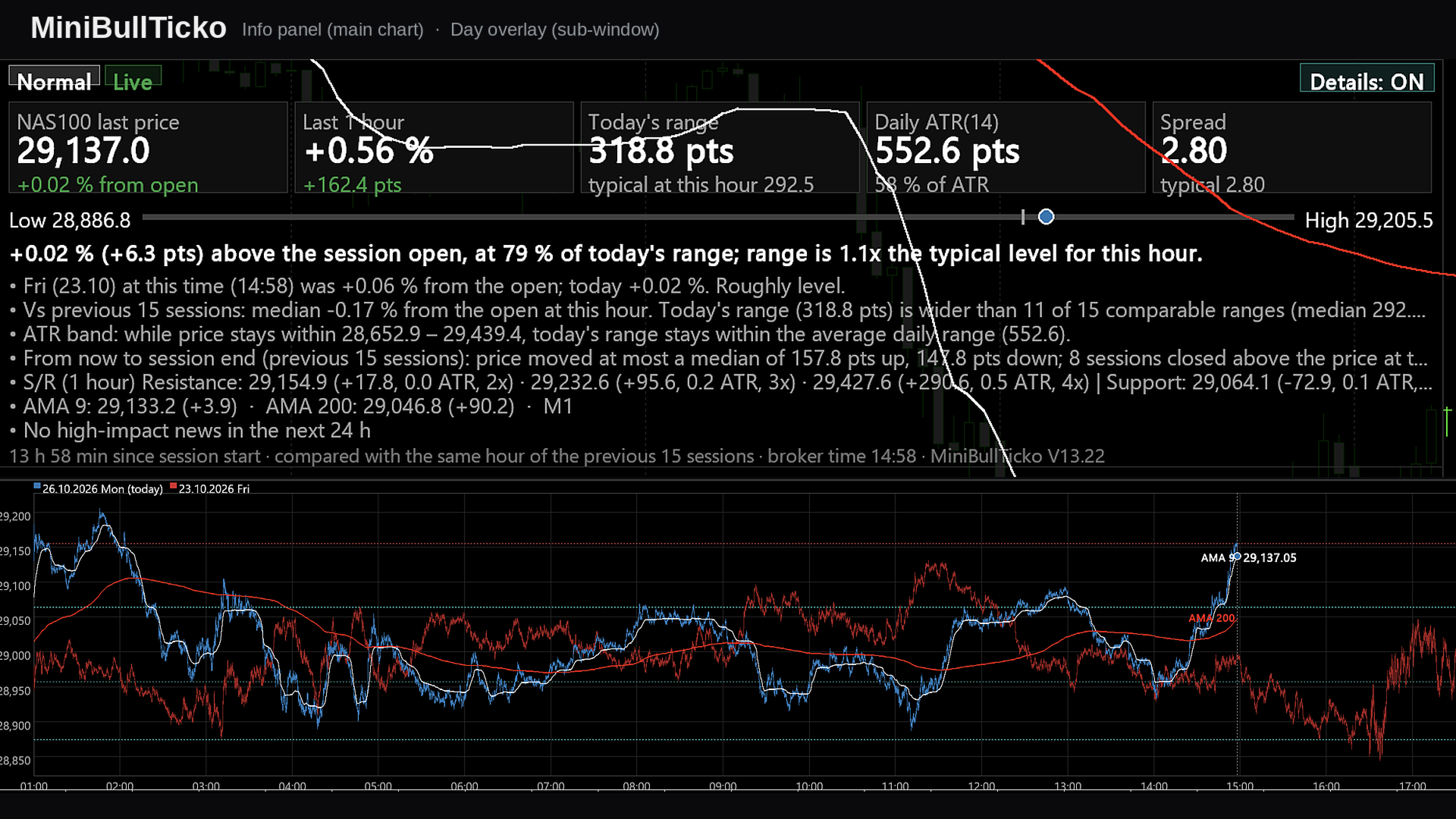
MiniBull Ticko

  • 指标
  • Yusuf Levent Aksun
    Yusuf Levent Aksun
    平台工程师 & AWS 认证专家,拥有超过 20 年的软件开发、云架构和 DevOps 转型经验。
    目前在伦敦 World Wide Technology 公司主导平台工程项目,构建可扩展的基础设施解决方案,
    帮助开发团队更快、更可靠地交付产品。
    🔹 AWS Certified Solutions Architect – Professional
    🔹 AWS Certified DevOps Engineer – Professional
    🔹 数据科学与机器学习(密歇根大学)
  • 版本: 13.22
  • 更新: 26 十月 2026
  • 激活: 5

**Tick-level day overlay, live info panel and automatic Support/Resistance for MetaTrader 5 — built for scalpers.**

MiniBullTicko answers one question that matters to a short-term trader at any moment of the session:

> *"Is today behaving like a normal day **at this exact time of day**, or is something different — more volatile, more expensive to trade, or stretched against a known level?"*

It does this by laying every recent trading session on top of each other **at tick resolution** in an indicator sub-window, while a compact, semi-transparent panel on the main chart summarises the comparison in numbers and plain sentences.

---

## Contents

1. [Screenshots](#1-screenshots)
2. [Key features](#2-key-features)
3. [Requirements and installation](#3-requirements-and-installation)
4. [What you see on the screen](#4-what-you-see-on-the-screen)
5. [Input parameters](#5-input-parameters)
6. [How it works](#6-how-it-works)
7. [Metric and formula reference](#7-metric-and-formula-reference)
8. [A scalper's workflow](#8-a-scalpers-workflow)
9. [Performance notes](#9-performance-notes)
10. [Chart objects and global variables](#10-chart-objects-and-global-variables)
11. [Troubleshooting](#11-troubleshooting)
12. [Limitations and disclaimer](#12-limitations-and-disclaimer)

---

## 1. Screenshots

All images are 1920 × 1080 and use illustrative (synthetic) data.

| # | File | What it explains |
|---|------|------------------|
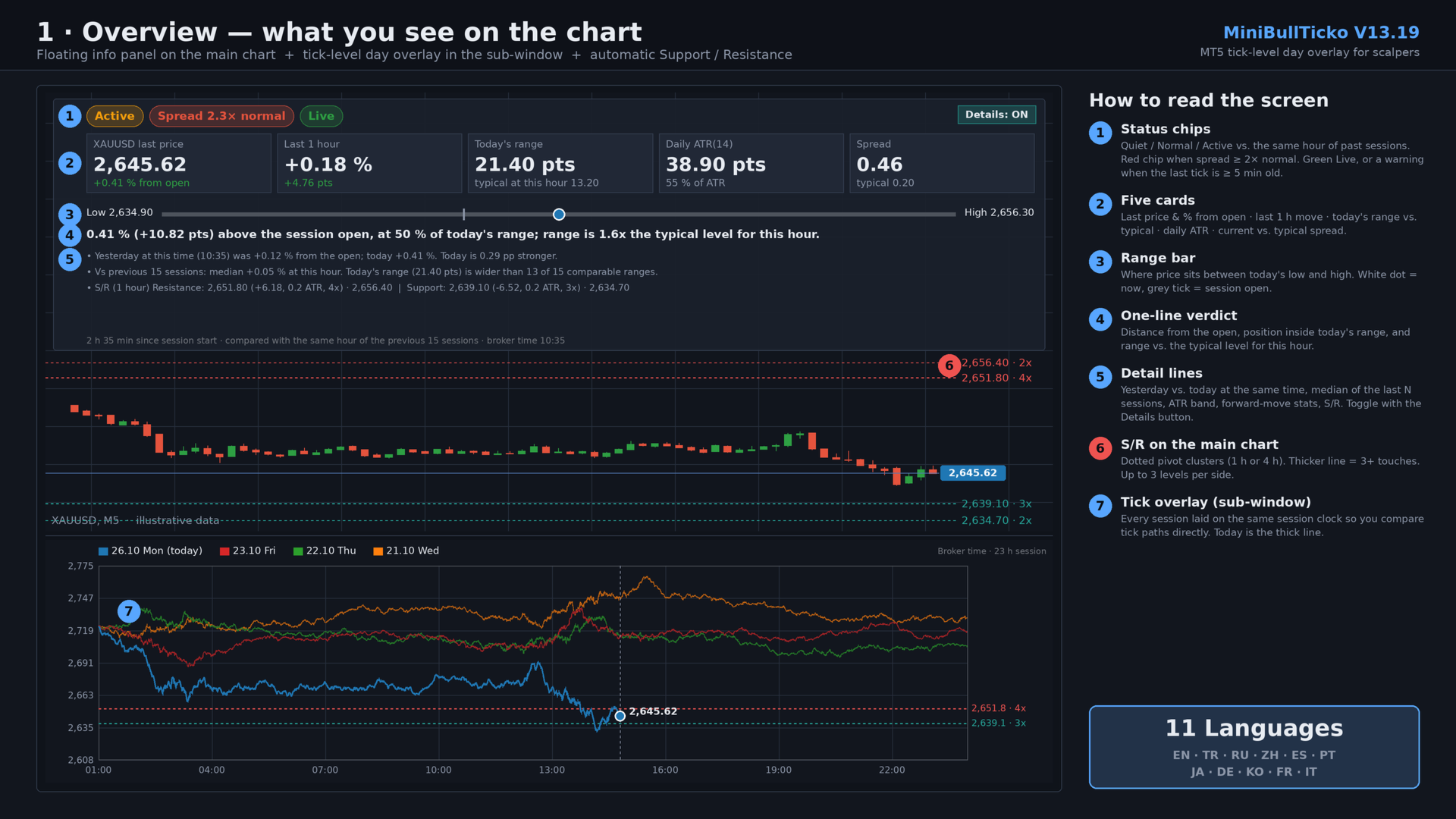
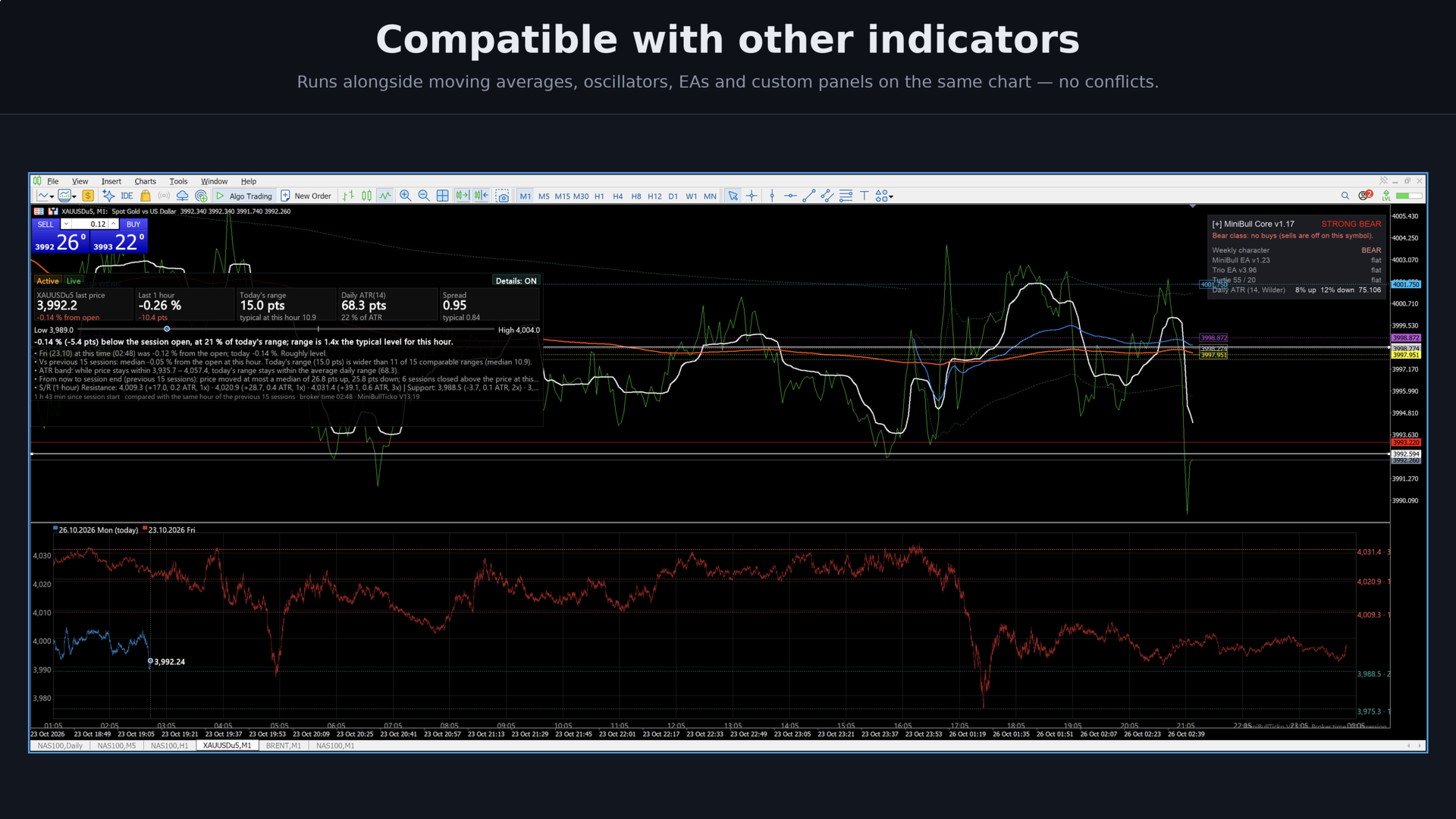
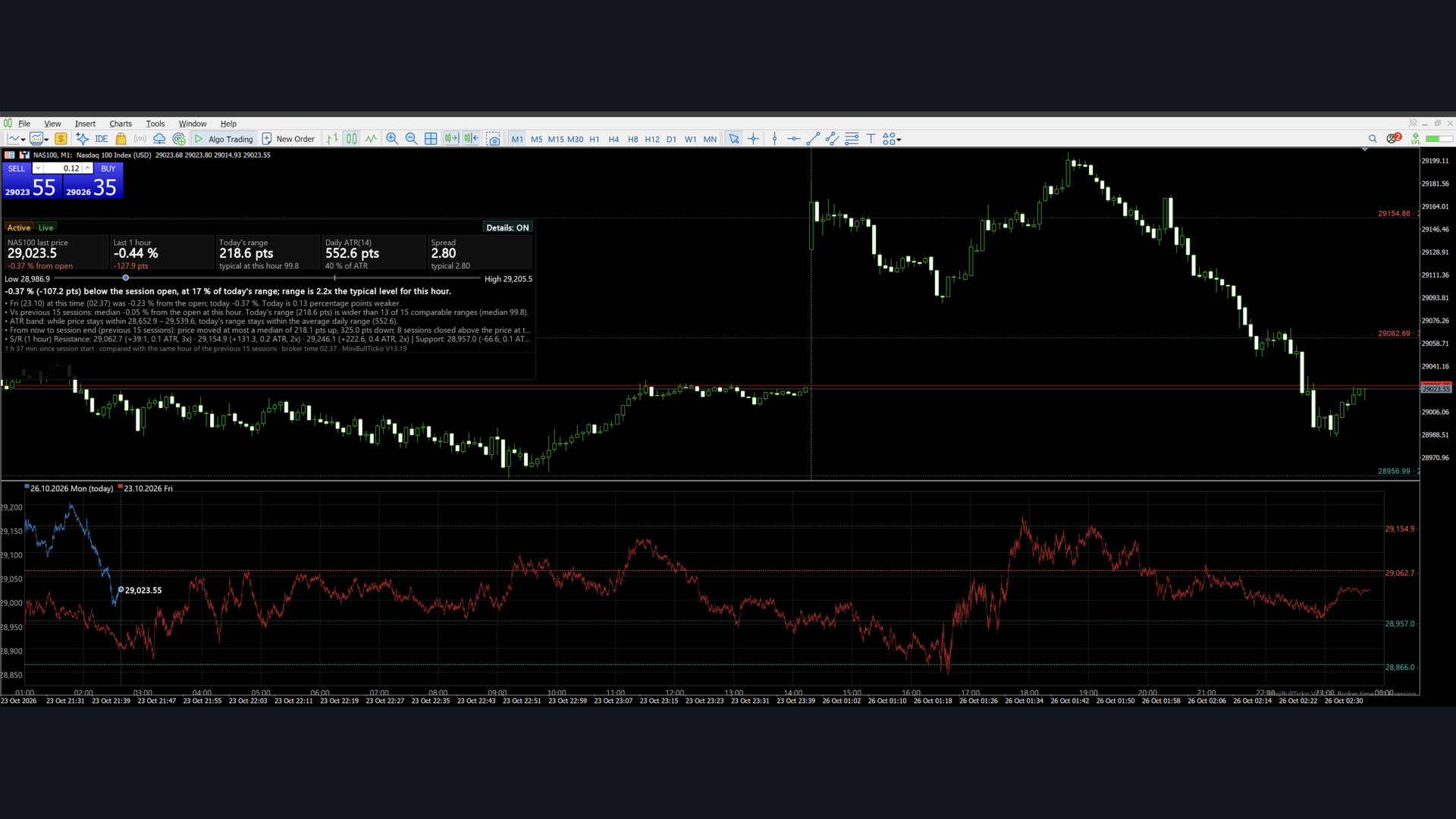
| 1 | `01_overview.png` | The whole screen: main-chart panel, S/R lines, tick overlay sub-window |
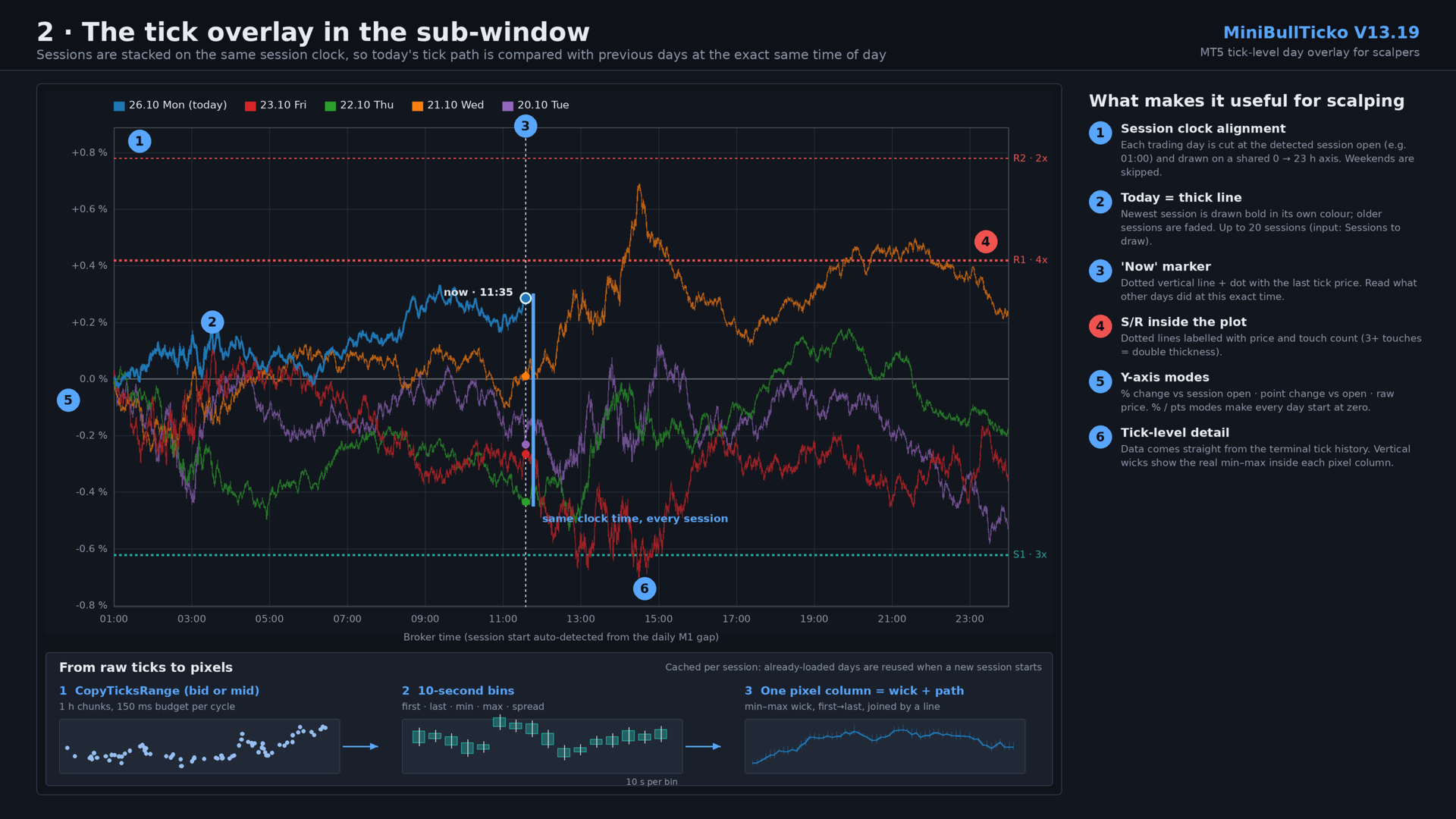
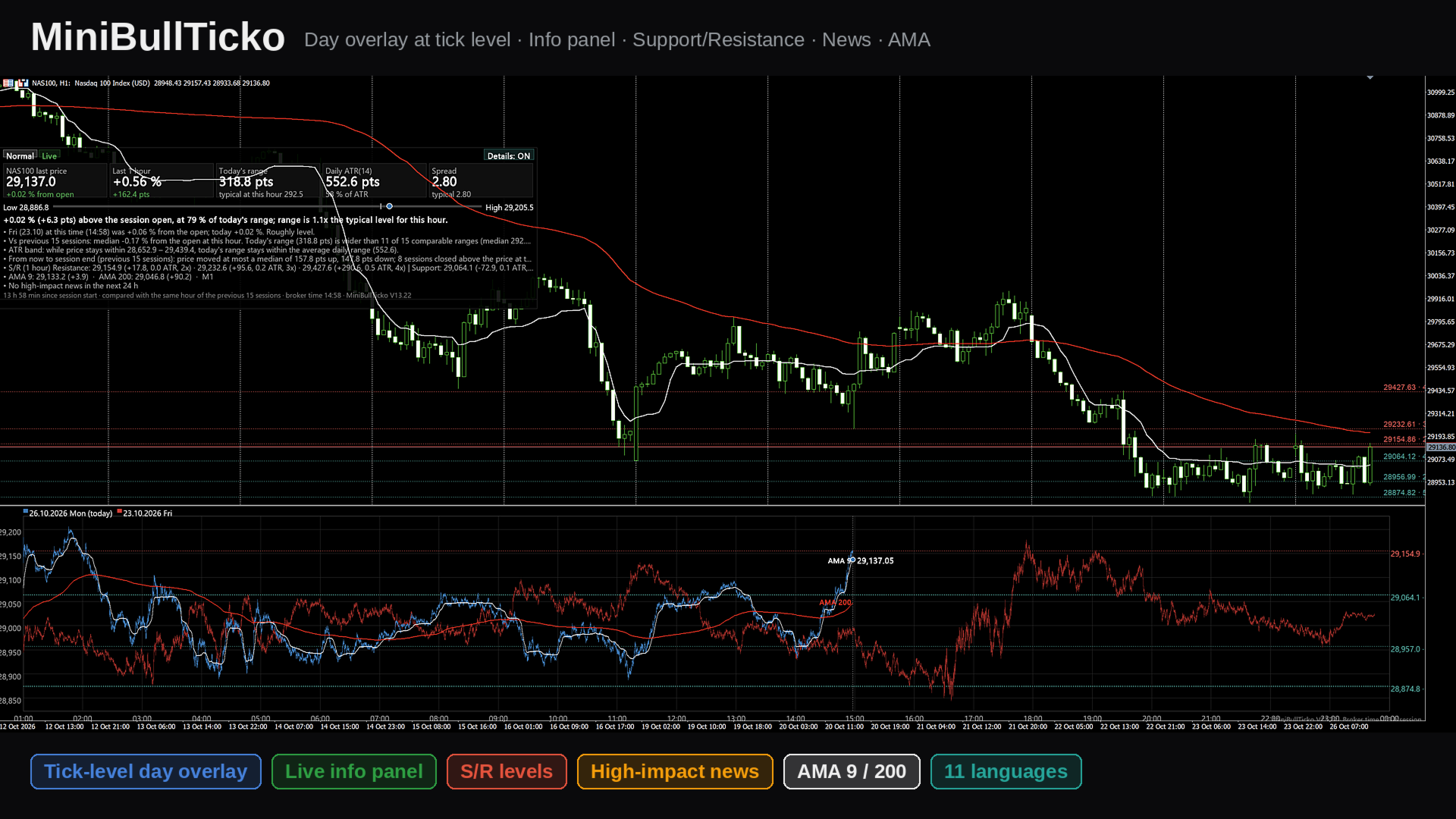
| 2 | `02_tick_overlay.png` | The sub-window in detail: session-clock alignment, "now" marker, tick → bin → pixel pipeline |
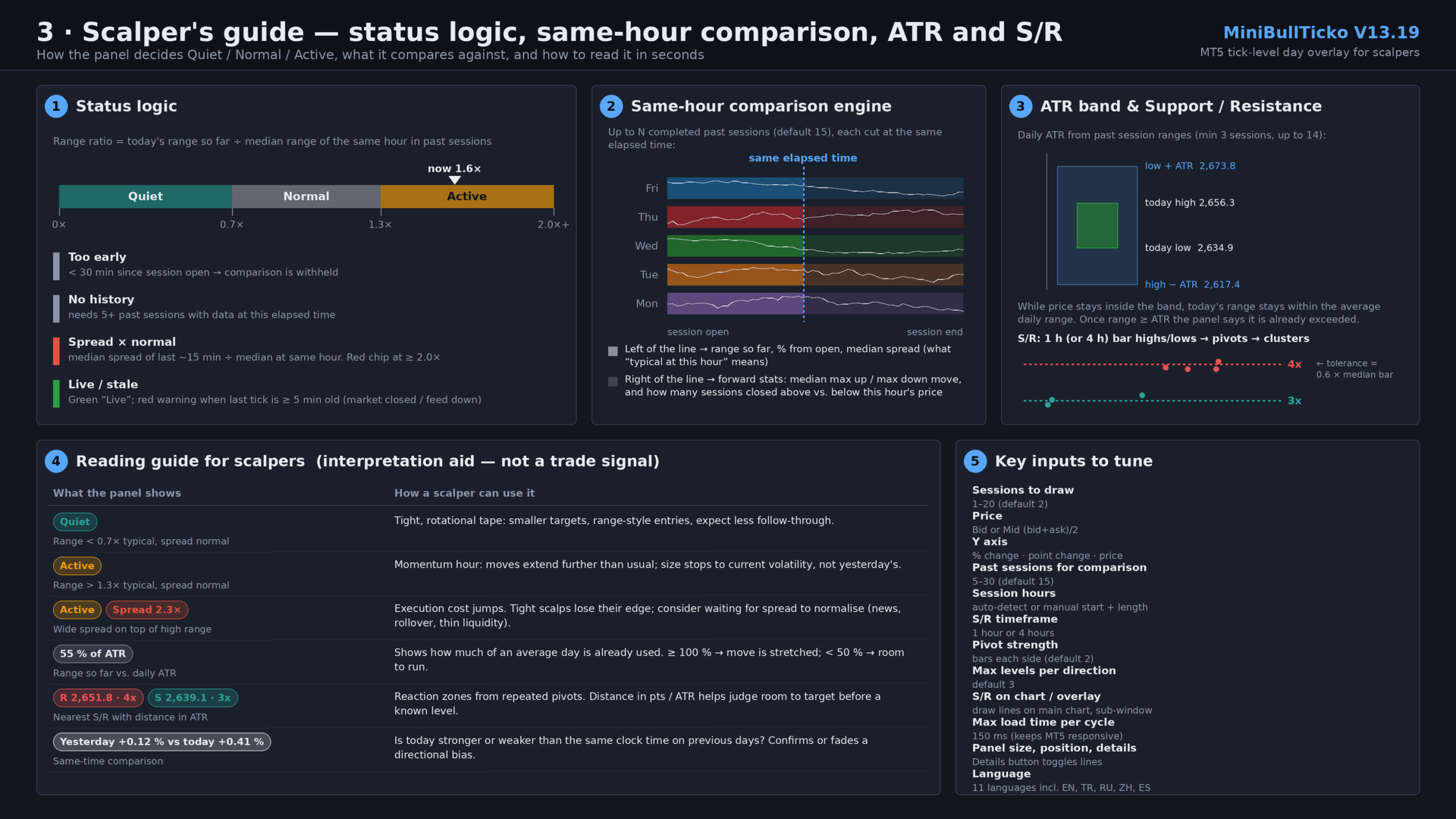
| 3 | `03_scalper_guide.png` | Status logic, same-hour comparison engine, ATR band, S/R clustering, reading guide, key inputs |

![Overview](01_overview.png)

![Tick overlay](02_tick_overlay.png)

![Scalper guide](03_scalper_guide.png)

---

## 2. Key features

- **Tick-level day overlay (sub-window).** Up to 20 sessions are drawn on one shared session clock. Today is a thick line; previous days are faded. Because each day is aligned to the *same time of day*, you compare like with like.
- **Real tick data, no external files.** Ticks are read straight from the terminal with `CopyTicksRange`. No tick-recorder EA and no CSV export/import are needed.
- **"Same hour" comparison panel (main chart).** Status chip (Quiet / Normal / Active), five metric cards, a range bar, a one-sentence verdict and optional detail lines — all computed against the same elapsed time in previous sessions.
- **Spread awareness.** Current spread (median of the last ~15 minutes) is compared with the typical spread at that hour. A red chip appears when it is 2× normal or worse.
- **Feed-health indicator.** "Live" in green, or a warning when the last tick is five minutes old or more.
- **Daily ATR in session terms.** ATR is built from the stored sessions' tick ranges, with an "ATR band" that shows where price must stay for today's range not to exceed the average.
- **Automatic Support / Resistance.** Pivot highs/lows from 1-hour or 4-hour bars (built from tick data) are clustered into levels with touch counts, drawn on the main chart and in the overlay, and listed in the panel with distance in points and in ATR.
- **Automatic session detection.** Session open and length are detected from gaps in M1 history, so it adapts to indices, metals, FX and futures-style CFDs. Manual override is available.
- **11 UI languages.** English, Türkçe, Русский, 中文, Español, Português, 日本語, Deutsch, 한국어, Français, Italiano.
- **Responsive loading.** Data loads in time-boxed slices so the terminal never freezes; already-loaded sessions are cached and reused.

---

## 3. Requirements and installation

**Requirements**

- MetaTrader 5 (build with `CCanvas` and `CopyTicksRange` support — any current build).
- Tick history for the symbol. The indicator needs ticks for roughly *N + 1* sessions (default: 16). If the terminal has not downloaded them yet, `CopyTicksRange` will trigger the download and the panel shows "Loading…" until it is done.
- M1 history for automatic session detection (about 9 days).

**Installation**

1. Save `MiniBullTicko_V13_19.mq5` to `MQL5\Indicators\` (File → Open Data Folder).
2. Open it in MetaEditor and compile (F7). The file is UTF-8 with BOM; if non-Latin characters look broken, re-save as *UTF-8 with BOM*.
3. In the terminal: **Insert → Indicators → Custom → MiniBullTicko_V13_19**. It opens in its own sub-window (`indicator_separate_window`, no plots).
4. The info panel appears on the **main chart** and S/R lines are placed on it automatically.

> Tip: use a chart timeframe you scalp on (M1–M5). The indicator itself is timeframe-independent — it works from ticks — but S/R lines are anchored to the chart and the panel sits on top of it.

---

## 4. What you see on the screen

### 4.1 Info panel (main chart)

A semi-transparent canvas (default 1500 × 450 px, 200 px from the top, 0 px from the left).

| Area | Content |
|------|---------|
| **Status chips** | Session state: *too early / not enough history / Quiet / Normal / Active*; a red *Spread N× normal* chip; *Live* or *Last tick N ago* warning (or *Not live · last tick …* when the session is over). |
| **Five cards** | 1) Last price and % from session open. 2) Last 1-hour change in % and points. 3) Today's range in points and the typical range at this hour. 4) Daily ATR(n) and today's range as % of ATR. 5) Current spread and typical spread. |
| **Range bar** | Today's low ↔ high. Grey tick = session open, white/blue dot = current price. |
| **Verdict sentence** | e.g. *"0.41 % (+10.82 pts) above the session open, at 50 % of today's range; range is 1.6x the typical level for this hour."* |
| **Detail lines** (toggle) | Previous session at the same time vs. today; median of the previous N sessions; ATR exceeded / ATR band; forward-looking stats; S/R list. |
| **Details button** | Top-right of the panel; click to turn the detail lines on/off. The choice is remembered. |
| **Caption** | Time since session start, number of sessions compared, broker time, version. |

### 4.2 Tick overlay (sub-window)

- **X axis:** the session clock in broker time (e.g. 01:00 → 00:00).
- **Y axis (selectable):** % change vs. session open, point change vs. session open, or raw price.
- **Lines:** every session is drawn per pixel column from its 10-second bins — a vertical min-max wick, plus a line joining first/last values — so the path keeps real intraday spikes.
- **Today:** thick line, full colour. **Older sessions:** faded.
- **"Now" marker:** dotted vertical line and a dot with the latest tick price.
- **S/R:** dotted horizontal lines with price and touch count on the right; double thickness at 3+ touches.
- **Legend:** date, weekday and "(today)" tag for each session; a "Loading… n/N" counter while data is still being fetched.

### 4.3 S/R on the main chart

Horizontal lines (`OBJ_HLINE`, dotted) with small text labels showing price and touch count. Resistance is red, support is teal. Tooltips show *Resistance/Support price · touches*.

---

## 5. Input parameters

### General

| Input | Default | Description |
|-------|---------|-------------|
| `InpLang` | English | UI language (11 options). |
| `InpFontName` | *(empty)* | Font name; empty = automatic per language. |
| `InpDays` | 2 | Sessions drawn in the overlay (1–20). |
| `InpPrice` | Bid | `Bid` or `Mid` = (bid + ask) / 2. |
| `InpYMode` | Price | Y axis: `% change`, `Point change`, or `Price`. |
| `InpWindowHeight` | 600 | Sub-window height in px (0 = leave unchanged). |
| `InpFont` | 13 | Base font size (px). |
| `InpFontScale` | 0.9 | Font multiplier — raise to 1.3 / 1.6 on high-DPI screens. |

### Session (broker time)

| Input | Default | Description |
|-------|---------|-------------|
| `InpAutoSession` | true | Detect session start/length automatically from M1 gaps. |
| `InpSessHour` / `InpSessMin` | 1 / 0 | Manual session start. |
| `InpSessLen` | 23 | Manual session length in hours. |

### Panel

| Input | Default | Description |
|-------|---------|-------------|
| `InpShowPanel` | true | Show the info panel on the main chart. |
| `InpPanelWidth` | 1500 | Panel width (px). |
| `InpPanelHeight` | 450 | Panel height (px); 0 = automatic, maximum 600. |
| `InpPanelX` / `InpPanelY` | 0 / 200 | Distance from the left / top of the chart. |
| `InpSpacing` | 1.3 | Line-spacing multiplier. |
| `InpShowDetails` | true | Initial state of the detail lines (the button overrides it afterwards). |
| `InpProfileDays` | 15 | Past sessions used for comparison (clamped to 5–30). |

### Support / Resistance

| Input | Default | Description |
|-------|---------|-------------|
| `InpShowSR` | true | Calculate S/R. |
| `InpSRTf` | 1 hour | Bar timeframe for pivots: 1 h or 4 h. |
| `InpSRPivotK` | 2 | Bars required on each side of a pivot. |
| `InpSRLevels` | 3 | Maximum levels per direction. |
| `InpSROnChart` | true | Draw S/R on the main chart. |
| `InpSROnOverlay` | true | Draw S/R inside the sub-window. |

### Performance

| Input | Default | Description |
|-------|---------|-------------|
| `InpBudgetMs` | 150 | Maximum tick-loading time per timer cycle (ms). |

---

## 6. How it works

### 6.1 Session detection

1. Reads about 9 days of M1 bar times.
2. Finds **gaps between consecutive M1 bars from 30 minutes to 10 hours** — the daily break.
3. Buckets the gap-end times into 5-minute slots over the clock and picks the most frequent slot as the **session start**.
4. Measures the time from that start to the last bar before the next break; the **median** (rounded up with a small tolerance) is the **session length** in hours (1–24).
5. If detection keeps failing (20 attempts), it falls back to the manual inputs.

Sessions are then built backwards day by day from the current session date. **Saturdays and Sundays are skipped.** A day with no ticks (holiday) is marked empty and ignored.

### 6.2 Tick loading

- A timer runs every **250 ms**.
- Each session is read in **1-hour chunks** with `CopyTicksRange(…, COPY_TICKS_ALL, …)`.
- Total loading time per cycle is capped by `InpBudgetMs`; the next cycle continues where it stopped.
- Up to 8 consecutive read failures are tolerated per session before it is treated as empty.
- The live session only reads up to the current server time and resumes from the last tick received.
- When a new session begins, existing session objects are **reused**, so the 15–20 previous days are not reloaded.

### 6.3 Binning

Each tick is reduced into a **10-second bin** of its session: first, last, min and max price (bid or mid) and the last observed spread (`ask − bid`). This keeps memory small (a 23-hour session = 8 280 bins) while preserving intrabar extremes.

### 6.4 Redrawing

- Redraw when new data arrived, at most every 300 ms; a forced refresh every 5 seconds.
- A new session start is checked every second.
- Two `CCanvas` layers are used: one in the sub-window (overlay) and one bitmap object on the main chart (panel, semi-transparent).

---

## 7. Metric and formula reference

All "typical at this hour" values compare today with **completed** previous sessions, each evaluated at the **same elapsed time since session open**.

| Metric | Definition |
|--------|------------|
| **% from open** | `last / first_tick_of_session − 1`, in %. |
| **Last 1 h** | `last / price_one_hour_ago − 1`; shown as "no full hour yet" before 1 h has elapsed. |
| **Today's range** | `session high − session low` so far. |
| **Typical range at this hour** | Median over past sessions of `(high − low)` from session open up to the same elapsed time. Requires ≥ 5 sessions with data at that time. |
| **Range ratio** | `today's range / typical range`. Shown only after the first 30 minutes. |
| **Status** | ratio < 0.7 → **Quiet**; 0.7 – 1.3 → **Normal**; > 1.3 → **Active**. |
| **Too early** | Fewer than 30 minutes since session open. |
| **Spread now** | Median of per-bin spreads over the last 90 bins (≈ 15 min). |
| **Typical spread** | Median over past sessions of the same ~15-minute median spread at that hour (needs ≥ 3 values). |
| **Spread × normal** | `spread now / typical spread`; the red chip appears at ≥ 2.0. |
| **Daily ATR(n)** | Average True Range of past sessions' (high, low, previous close); `n = min(14, sessions − 1)`; needs ≥ 3 past sessions. |
| **% of ATR** | `today's range / ATR × 100`. |
| **ATR band** | While price stays between `today_high − ATR` and `today_low + ATR`, today's range remains within the average daily range. If the range already exceeds ATR, the panel states so. |
| **Previous session line** | Previous session's % from open at this time vs. today's, with the difference in percentage points. |
| **Forward statistics** | From the same elapsed time to session end in past sessions: median maximum up-move, median maximum down-move, and how many closed above vs. below the price at that hour. Shown for the live session only (≥ 5 samples). |

### Support / Resistance algorithm

1. Build 1-hour (or 4-hour) high/low bars from the stored 10-second bins of the last `InpProfileDays + 1` sessions (at least 5 bars required).
2. A bar high/low is a **pivot** if it is the extreme within `InpSRPivotK` bars on each side.
3. Sort pivots and **cluster** neighbours whose distance from the running cluster mean is ≤ `0.6 × median bar range`.
4. Each cluster becomes a level at its **mean price**, with the **number of pivots** as its touch count.
5. Levels above the last price are **resistance** (nearest first), levels at or below are **support** (nearest first), up to `InpSRLevels` per side.
6. In the panel each level shows the distance in points and in ATR, and the touch count (e.g. `2,651.80 (+6.18, 0.2 ATR, 4x)`).

---

## 8. A scalper's workflow

> This is an interpretation aid, not a signal generator. Entries, exits and risk remain your decision.

1. **Glance at the chips.** *Quiet* means tight, rotational tape; *Active* means moves extend further than usual; a red *Spread N×* chip means execution is currently more expensive than normal.
2. **Check feed health.** Green *Live* — good. A "last tick N min ago" warning means the market is closed or the feed is down; ignore stale numbers.
3. **Compare with the same clock time.** In the sub-window, look where the thick line sits relative to the faded days at the dotted "now" line. In `% change` mode, every day starts at zero, so strength vs. weakness is immediate.
4. **Size your targets and stops to today's volatility.** Use the *typical range at this hour* and *% of ATR* cards: below ~50 % of ATR there is room to run; above 100 % the move is already stretched.
5. **Respect the levels.** The nearest resistance/support and their distance in ATR show how much room exists before a level that has been touched repeatedly.
6. **Watch spread before scalping tight.** If spread is ≥ 2× normal (news, rollover, thin liquidity), tight targets can lose their edge.
7. **Use the detail lines** (button on the panel) when you want the written comparison; switch them off to keep the chart clean.

Suggested starting configurations:

| Style | Suggestion |
|-------|-----------|
| Pure scalping, one chart | `InpDays` = 2–3, `InpYMode` = % change, `InpSRTf` = 1 h |
| Intraday context | `InpDays` = 5–8, `InpSRTf` = 4 h, `InpProfileDays` = 20 |
| Small screen | Smaller `InpPanelWidth` / `InpPanelHeight`, details OFF, `InpWindowHeight` ≈ 400 |
| High-DPI display | `InpFontScale` = 1.3–1.6 |

---

## 9. Performance notes

- The first start on a new symbol can take a while: the terminal may need to download tick history for ~16 sessions. The overlay appears first; the panel fills in as completed sessions arrive (counter "Loading… n/N").
- Loading is time-boxed (`InpBudgetMs`), so the terminal remains responsive. Lower it on slow machines; raise it to load faster on strong ones.
- Memory per session is small (≈ 8 k bins × 5 arrays); 20 sessions are comfortably handled.
- Canvas redraws are throttled (300 ms minimum interval).

---

## 10. Chart objects and global variables

| Name | Type | Purpose |
|------|------|---------|
| `GUA_Canvas_<n>` | Bitmap label (canvas) in the indicator sub-window | The tick overlay itself (`<n>` = sub-window index). |
| `GUA_Panel` | Bitmap label (canvas) | The info panel on the main chart; click handling for the Details button. |
| `GUA_SR_R0…` / `GUA_SR_S0…` | `OBJ_HLINE` | Resistance / support lines. |
| `GUA_SR_*_t` | `OBJ_TEXT` | Price and touch-count labels next to the lines. |
| `MBT_details` | Terminal global variable | Remembers the Details ON/OFF state across restarts. |

All `GUA_SR_*` objects are removed when the indicator is removed.

---

## 11. Troubleshooting

| Symptom | Likely cause / fix |
|---------|--------------------|
| "Loading tick data…" for a long time | Terminal is downloading tick history. Keep the chart open; check *Tools → Options → Charts* for the tick-history limits and make sure the symbol is in Market Watch. |
| "No tick data found (check symbol / session hours)" | Broker provides no tick history for this symbol, or session hours were detected incorrectly — set `InpAutoSession = false` and enter the session start/length manually. |
| "Window too small – increase its height" | Sub-window is too short; raise `InpWindowHeight` or drag the splitter. |
| Panel says "too early to compare" | Fewer than 30 minutes since session open — expected. |
| Panel says "Not enough history to compare" | Fewer than 5 past sessions have data at this elapsed time. Wait for loading or increase available tick history. |
| ATR shows "needs 3+ past sessions" | Same reason — ATR needs at least 3 completed past sessions. |
| Text too small / too large | Adjust `InpFont` and `InpFontScale`. |
| Non-Latin characters broken | Re-save the file as UTF-8 with BOM in MetaEditor. |
| No S/R lines | Needs ≥ 5 hourly (or 4-hour) bars of stored sessions; also check `InpShowSR` and `InpSROnChart`. |
| Last tick warning during the day | The market is closed for that symbol or the feed is interrupted. |

---

## 12. Limitations and disclaimer

- Works from **broker time** and the broker's tick history; different brokers may produce slightly different shapes and spreads.
- Weekend days are skipped; holidays without ticks are ignored automatically.
- Bid price is the default; the `Mid` option averages bid and ask when both are available.
- Statistics ("typical", ATR, forward moves) are descriptive summaries of recent sessions and do not predict future price.
- The indicator does not place orders and does not generate alerts.

**Disclaimer:** This tool is for information and analysis only and is not financial advice. Trading leveraged products carries a high risk of loss.

---

*MiniBullTicko V13.19 · © MiniBull*
推荐产品
VWAP Fibo Bands RSJ
JETINVEST
4.83 (12)
VWAP Fibo Bands RSJ is an indicator that traces the lines of the daily VWAP and from it creates bands using Fibonacci proportions. This spectacular indicator creates 10 band levels through the selected VWAP period using Fibonacci ratios. It is fantastic how the prices respect each level of the bands, where it is possible to realize that almost every time the price closes above / below a level of the bands he will seek the next one. If close above will seek to reach the level above and if close
FREE
Haven Stop Loss Hunter
Maksim Tarutin
4.5 (6)
Haven Stop Loss Hunter 2.0 - 流动性分析的新维度 欢迎体验全新升级版 — Haven Stop Loss Hunter 2.0 !这是一款用于识别流动性池和虚假突破(Sweeps/扫荡)的专业工具,现已具备更高的灵活性和功能性 [1]。在此版本中,我们实现了完整的多时间框架(MTF)分析以及先进的气泡/推送提示系统,让您能够及时掌握基于聪明钱概念(Smart Money Concept)的机构资金意图,而无需频繁切换图表 [1]。 我的其他产品 - > 点击这里 。 流动性扫荡(Liquidity Sweep)是市场大资金针对散户交易者止损的猎杀行为。2.0 版本让您不仅能在当前工作图表上,还能同时在更高时间框架(H1, H4, D1)上直观看到这些关键的价格行为,从而对当前的市场环境有更深入的理解 [1]。 2.0 版本有哪些新功能? 多时间框架(MTF)分析 — 现在您可以在当前图表上直接查看来自高时间框架的流动性扫荡 [1]。这有助于您与全局趋势保持一致,即使您在 M5 或 M15 等小周期上进行交易 [1]。 先进的提示系统 — 我们为当前时间框架和
FREE
Watermark Centralized
Ronnie Ferreira Silva
4 (4)
Watermark Centralized Adds a watermark centered with the asset name and chosen period. It is possible to override the font type, font size, font color and separator character. The watermark is positioned behind the candles, not disturbing the visualization. It has automatic re-centering if the window is resized. Hope this indicator helps you, good trading ;)
FREE
Professional Renko Chart MT5 Professional Renko Chart MT5 是一款简洁的 MetaTrader 5 Renko 图表指标,用于在独立的指标窗口中显示 Renko 砖块,并可选择直接在主价格图表上显示 Renko 方框。 该指标适合希望在 MetaTrader 5 中使用熟悉 Renko 图表风格的交易者,其视觉效果类似于 TradingView 等现代图表平台中的 Renko 图表显示方式。它可以将普通的基于时间的K线转换为 Renko 砖块,并以简单、清晰、实用的格式显示结果。 多个普通图表K线可能会形成一个 Renko 砖块。Professional Renko Chart MT5 还可以在主价格图表上显示 Renko 方框,并显示每个 Renko 砖块由多少根普通K线形成。 该指标不是智能交易系统 EA。它不会开仓、平仓或管理交易。它只是一个用于图表显示和市场分析的可视化工具。它可用于手动分析、Renko 图表阅读、趋势观察、价格波动过滤以及市场结构分析。 主要功能 在独立的 MT5 指标窗口中显示 Renko 砖块 Ren
Stop guessing and start executing with precision. Learning complex trading methodologies takes years of screen time—until now. The Propfolio Strategy Mentor OS is an elite, on-chart analytical dashboard that acts as your live digital trading mentor. It doesn't just draw lines on your chart; it actively scans the market, identifies high-probability setups across 8 different institutional strategies, and tells you exactly what to look for in real-time via the Live Mentorship Terminal. Whether you
Ksm mt5
Andriy Sydoruk
3 (2)
Ksm: Smart Solution for Automated Forex Trading Ksm is a tool designed for automating Forex trading, using modern methods of time-series data analysis to work with multiple currency pairs across different timeframes. Key Features and Benefits Multi-currency support : Ksm enables trading across multiple currency pairs, helping traders adapt their strategies to various market conditions. New currency pairs can be easily added. Time-series data analysis : Utilizing advanced algorithms, Ksm analyze
Investopedia FIVE
Joseph Anthony Aya-ay Yutig
Investopedia FIVE EA 基于这篇文章: https://www.investopedia.com/articles/forex/08/five-minute-momo.asp 交易条件 - 寻找低于 X 周期 EMA 和 MACD 的货币对交易处于负区域。 - 等待价格上穿 X 周期 EMA,然后确保 MACD 处于从负向正的交叉过程中,或者在五个柱内进入正区域。 - 在 X 周期 EMA 上方做多 X 个点。 - 在入场时卖出 X 个头寸加上风险金额;移动下半场的止损点以达到盈亏平衡。 - 使用追踪止损 - 风险警告 - 在您购买 ADX PRO 之前,请注意所涉及的风险。 - 过去的表现并不能保证未来的盈利能力(EA 也可能亏损)。 - 显示的回溯测试(例如在屏幕截图中)经过高度优化以找到最佳参数,但因此无法将结果转移到实时交易中。 - 该策略将始终使用止损,但 SL 的执行仍取决于您的经纪商。 如果您对 EA 有任何建议,请给我留言。谢谢!
Viking Alpha DAX Ivar Edition
Valdeci Carlos Dos Passos Albuquerque
Viking Alpha DAX — Germany 40 Expert Advisor for MetaTrader 5 LAUNCH PROMO Only 10 copies at launch price. Price increases with each sale. Launch price: $297 Next price: $497 Final price: $997 Live Performance: FX Blue — Vikingtradingbots What Makes Viking Alpha DAX Different Most DAX robots fail for one simple reason: they treat the Germany 40 like a forex pair. It isn't. The DAX has a heartbeat — a specific rhythm tied to the Frankfurt Stock Exchange opening, the European session structure, an
BTC Master Pro
Farzad Saadatinia
4.62 (13)
BTC Master Pro —— 您值得信赖的比特币纪律化交易伙伴。 全新版本现已集成 OpenAI 人工智能技术 ,在高波动的加密市场环境中,实现更智能的执行与更精准的交易过滤。 本专业级交易机器人专为 Bitcoin (BTCUSD) 在 MetaTrader 5 平台上的交易而设计,专注于结构化执行、风险暴露控制以及智能化风险管理。 当前价格: $699  →  下一阶段: $999  →  最终价格: $999 LIVE SIGNAL HERE 基于 OpenAI 的执行过滤系统 最新版本集成 OpenAI 技术,用于实时分析市场环境并过滤低质量或弱势交易信号。 AI 安全层(AI Safety Layer): 人工智能模块作为交易执行前的第二层审核机制。其功能严格限定为执行过滤工具(而非市场预测工具)。每一笔交易都必须通过结构化逻辑与智能验证流程,以减少不必要的回撤并避免低质量入场。 为什么选择 BTC Master Pro? 加密货币市场——尤其是比特币——具有高度波动性。情绪化决策往往导致不稳定的交易结果。本系统旨在帮助交易者在快速市场变化中保持结构化、纪律性与
Phantom Gold
Ignacio Agustin Mene Franco
Phantom GOLD MT5 v1.0 Phantom GOLD MT5: The algorithmic spectrum that hunts gold moves with surgical precision Phantom GOLD is a next-generation Expert Advisor designed exclusively for XAUUSD (gold), combining modern artificial intelligence with the most powerful Smart Money Concept (SMC) strategies, institutional price action, and advanced trend filters. It's not just a robot: it's an invisible hunter operating in the shadows of the market, detecting high-probability zones where large instit
DAILY OH/OL SDEV QUANT MODEL - STATISTICAL TRADING WITH PRECISION RISK MANAGEMENT TRADE WITH MATHEMATICAL CERTAINTY - KNOW YOUR EXACT STOP-LOSS AND TAKE-PROFIT BEFORE YOU ENTER This indicator analyzes 5,000+ days of price history to give you: Exact entry levels (sigma bands locked at daily open) Exact stop-loss distance (from M
ACRON Supply Demand EA
Georgios Kalomoiropoulos
4.5 (4)
ACRON 供需 EA 是一款全自动交易算法,基于供需概念,并结合价格行为过滤逻辑。它由交易员基于真实交易经验创建,旨在实现长期稳定持续的增长。它旨在进行务实的交易,控制风险,并支持使用不同的策略进行多元化投资。 [产品手册] [常见问题] 购买后 ,请给我们留言,获取 所有 针对 ACRON 供需 EA 优化的 策略。 真实 可靠的结果 。 无曲线拟合,无优化技巧,无误导性回测。业绩表现完全基于您经纪商的过往市场数据,为真实交易提供切合实际的预期。 如有任何疑问,欢迎随时联系 我们。我们将竭诚为您打造长期投资组合,避免不必要的损失。 是什么让它如此强大 100% 自动化交易: 专为基于供需原则的全自动交易而设计。该 EA 还可以进行回测,使交易者能够利用历史数据验证性能并优化策略。 多元化策略方法: 结合不同交易品种和时间框架的多种策略。这有助于平衡整体风险,提升业绩,并实现长期持续盈利。EA 提供无限可能。 预建和自定义策略: 从不同经纪商的各种优化策略中进行选择,开启您的交易之旅。您还可以为任何交易品种和时间范围创建自己的策略,让不同水平的交易者都能根据自己的交易风格调整 EA
ProTrade EA
Jim Ariel Camarce Ignao
Key Features   Automated Candle Pattern Recognition 10 Professional Patterns : Detects Bullish/Bearish Engulfing, Hammer/Shooting Star, Morning/Evening Star, Piercing/Dark Cloud, and 6 additional professional candlestick patterns Smart Filtering : Combine multiple patterns with configurable confirmation logic Volume Confirmation : Optional volume filter to validate pattern strength Multi-Timeframe Analysis : Separate execution and bias timeframes for better timing   Trading Dashboard Int
" Blow It Up!" - The Trading Indicator That Questions Your Life Choices Tired of boring indicators? Meet your new market companion that delivers: "YOLO BUY!" arrows when you should probably panic Explosive rectangle confetti (because why not?) 200+ soul-crushing quotes like "Your stop loss is imaginary" and "This is n't trading, it's donating to whales" Random alerts that roast your strategy This Indicator is lik e Therapy - Because daytrading shouldn't fe el like watching paint dry! Highlights
X Sensors Pro
Igor Nagorniuk
X Sensors Pro 是一个专业的成交量轮廓指标,可在选定周期内可视化交易成交量在价格水平上的分布情况。该指标自动识别局部极值点(HH 和 LL),计算控制点(POC)——成交量最大的价位,并根据识别出的范围构建支撑位和阻力位。 主要功能: 以彩色直方图形式可视化成交量轮廓 自动检测 POC(控制点) 构建 HH(更高高点)和 LL(更低低点)水平线 计算枢轴点及多重支撑/阻力位 看涨(绿色)和看跌(红色)成交量的颜色指示 自适应调整适用于任何时间周期 该指标有何用途? 该指标解决交易者的以下任务: 1. 识别积累和分布区域 成交量总是集中在大户进入或退出市场的位置。POC 显示交易量最大的价格——这是一个心理上重要的水平。 2. 寻找公允价值 POC 通常被视为"公允价值"——市场在其周围花费最多时间的水平。 3. 识别支撑位和阻力位 水平成交量构成价格的自然屏障。某一水平的成交量越大,该水平就越重要。 4. 确认趋势 如果价格高于 POC 且成交量向上倾斜,则趋势强劲。如果价格低于 POC 且成交量为红色,则趋势看跌。 5. 突破或反弹交易 交易者使用 PO
TrailingFusion
Christos Iakovou
FusionTrailing EA – Your Ultimate Weapon for Market Domination! Transform your trading and crush every market move with the most advanced trailing stop system available. FusionTrailing EA delivers unstoppable power with its dual-mode setup: • Fusion Mode: Automatically sets a bulletproof stop loss using a maximum loss threshold and activates smart trailing
Market Projection Pro — MT5 想在图表上观察所选价格周期可能如何延伸?Market Projection Pro 分析您选择的历史区间,提取周期成分,并在分析窗口右侧绘制合成投射。您可以控制历史区间和向前延伸的长度,将计算情景与价格结构及潜在转折区域进行对比。 图表上显示什么 可交互边界允许您直接在图表上选择历史分析区间。 周期成分和合成曲线帮助观察所选走势的节奏。 投射按照指定的未来蜡烛数量延伸计算情景。 可选转折点和转折区域便于检查投射结构。 图表上的计算、构建与清除按钮让操作集中在同一界面。 使用方法 选择两条边界之间的区间,点击 Calculate Cycles,再点击 Build Projection。分析长度是用于计算的历史蜡烛数量;投射范围是向前绘制的蜡烛数量,两者分别设置。修改区间后,请重新计算周期并重建投射。需要比较情景时,选择另一段历史并重复计算;需要观察转折时,开启转折点或区域。 购买前试用 下载演示版,在 MT5 中启动可视化测试,以使用图表按钮和边界。选择历史数据充足的区间,计算周期并构建投射。建议从默认的 70 根蜡烛投射范围开始。
Introducing Neural Bitcoin Impulse - an innovative trading bot created using neural network training technology on voluminous market data sets. The built-in mathematical model of artificial intelligence searches for the potential impulse of each next market bar and uses the resulting patterns of divergence and convergence between the predictive indicators and the price to form high-precision reversal points for opening trading positions. The trading robot is based on the Neural Bar Impulse ind
Acronix Acronix 是一款适用于 MetaTrader 5 的逆势剥头皮交易 EA,主要面向 EURUSD 和 GBPUSD。 Acronix 由 Blackore Finance  开发,结合了 RSI 入场信号、ADX 过滤、自适应入场间距和自动持仓管理。它支持多币种交易,适用于主要外汇货币对及黄金(XAUUSD),并可针对各交易品种设置专属参数。 交易策略 Acronix 通过蜡烛图走势和 RSI 寻找短期价格回调,并使用 ADX 过滤器筛选入场条件。在进行中的逆势剥头皮交易周期内,当价格向不利于最近一次入场的方向移动时,EA 可按设定的间距和手数倍数增加持仓。基于 ADX 的间距调整会从指定持仓数量开始,自适应调整后续入场之间的距离。 每笔新交易均设置止盈(Take Profit)和止损(Stop Loss)。 交易周期的统一止盈位根据按交易量加权的平均入场价格计算。统一的远端止损位设置在经纪商服务器端,根据入场间距自动计算,并在新增持仓后更新。 主要功能 支持多币种交易: 主要面向 EURUSD 和 GBPUSD,同时支持主要外汇货币对和黄金。 动态与固定手数:
V Wave EA
STANTON ROUX
5 (1)
V-Wave EA Unlock the power of automated trading with V-Wave EA ! This cutting-edge Expert Advisor integrates a robust set of indicators, including VWAP , Moving Averages ,  IBS , and FIBO Levels for precise entries. Key Features: 1. Powerful Indicators: VWAP (Volume-Weighted Average Price): The core of the strategy, ensuring optimal entries based on volume-driven market trends. Two Moving Averages: Customize crossover and trend strategies for added confirmation. IBS (Internal Bar Strength): Fin
Exclusive EA for FOREX HEDGE account The EA (FuzzyLogicTrendEA) is based on fuzzy logic strategies based on the analysis of a set of 5 indicators and filters. Each indicator and filter has a weight in the calculation and, when the fuzzy logic result reaches the value defined in the EA parameter, a negotiation is opened seeking a pre-defined gain. As additional functions it is possible to define maximum spread, stop loss and so on . Recommended Symbol: EURUSD, AUDUSD, GBPUSD, NZDUSD, USDCAD, AUD
Smart SuperTrend Scalping Signals Pro is a MetaTrader 5 indicator designed for traders who want a clean visual trend-following system directly on the chart. Instead of displaying the traditional SuperTrend as a line, the indicator colors the actual price candles based on the current market condition. Green candles indicate bullish SuperTrend conditions, red candles indicate bearish SuperTrend conditions, and gray candles indicate sideways or weak-trend conditions. The indicator also includes a s
Manyal trading system, CovEchoTrend Robot, focuses on reliability and flexibility. By employing statistical analysis methods to study the relationships between the base indicator and market patterns, the system enables a deeper understanding of market processes. Intelligent pattern analysis: The application of statistical data processing helps identify key trend reversal points more accurately, signaling significant market shifts. Informed decision-making is based on the intersection of indicato
Gold Quant Intelligence
Ammar Nahil Haj Ali
Gold Quant Intelligence EA Advanced Multi-Market Quantitative Intelligence for XAUUSD Gold Quant Intelligence EA is a professional MetaTrader 5 Expert Advisor designed to analyze the gold market through a multi-market quantitative framework rather than relying on a single technical indicator. The EA continuously evaluates XAUUSD together with Silver, EURUSD, GBPUSD, USDJPY, DXY and US10Y to identify relationships that may provide additional context for the current gold market environment. Its q
Pattern Recognition EA
Claudiu-georgian Zavera
Pattern Recognition EA - From Learn to Earn. The market repeats itself. This EA finds every past repeat of the current candle sequence - and lets history vote the direction. ONE SHAPE. EVERY REPEAT IN HISTORY VOTES. The last N candles on your signal timeframe form a shape. The EA scans the history you choose - a fixed number of bars or everything your broker provides - for the SAME shape, and checks what happened next, every single time. Only when enough repeats exist AND a clear majority of t
Trend Sniper Matrix is an institutional-grade trend-riding quantitative trading terminal engineered strictly for Tier-1 multi-asset market environments. Meticulously optimized for advanced Prop Firm Evaluation Compliance and low-latency execution, this Expert Advisor integrates a high-performance bare-metal framework customized for XAUUSD (GOLD), EURUSD, GBPUSD, and USDJPY on low-latency hedging accounts. The core analytical framework leverages a dual-layered Multi-Timeframe Heiken Ashi Smooth
Day Direction Scanner
Efren Hernandez Partida
5 (3)
Day Direction Scanner is an indicator that uses the direction of the current candlestick on the 1-Day, 4-Hour, 1-Hour, 15-Minute, and 5-Minute periods to determine the market's direction. When all the candlesticks converge in a single direction, the indicator indicates whether the day is bullish or bearish, or if there is no clear direction. It is useful for easily getting an idea of the market's direction during the day. Features: - Works on all currency pairs, indices, and commodities. - F
FREE
O Alpha B3 Renko Trader  é um robô especialista para negociação no Bovespa B3  (miniíndice e minidólar) que une a análise de candlesticks do gráfico Renko (calculado internamente, sem imagens gráficas) com a estratégia Alpha B3 . O robô permite configurar, para os sinais de entrada, o tamanho do brick do gráfico Renko, bem como um número de candlesticks para análise. Além disso, você deve configurar os stops fixos, em pontos. O robô permite também a configuração de funções, tais como número de c
Exclusive Imperium MT5 — 自动化交易系统 Exclusive Imperium MT5 是一款用于 MetaTrader 5 的智能交易顾问(EA),基于市场分析算法和风险管理。该顾问完全自动运行,几乎不需要交易者的干预。 注意!购买后请立即联系我 ,以获取安装和设置说明! 重要提示: 所有示例、截图和测试仅用于演示目的。如果某个货币对在某个经纪商处表现良好,并不意味着在其他经纪商处也会如此。每个经纪商都有自己的报价、点差和交易条件。因此, 每个货币对必须由用户自行优化 ,并且在真实账户上 只能以单一货币模式运行 —— 每个货币对单独运行。多货币模式的截图仅供参考。建议至少 每年优化一次 ,因为市场条件会发生变化。 重要信息: 顾问的演示版本仅供试用。未经优化的测试结果不能反映算法的真实表现。完整使用需要针对经纪商、资金和所选工具进行个性化优化。无论如何,优化必须由用户自行完成,并且至少 每年重复一次 。 请记住:最终结果直接取决于您的经验以及您在优化后设置的参数。 主要特点 分析算法: 指标与过滤器的组合,用于寻找交易机会。 灵活性: 可适应不断变化的市场条件
This indicator uses a mathematical calculation algorithm . This algorithm calculates the remainder between the updated model and the actual values and produces the possible progress of the graph on the graph. It is not a super prophet in trading, but it is very good for the trader when entering the market and to analyze it before entering. Applicable for all currencies. Данный индикатор использует алгоритм математических вычислений . Данный алгоритм вычисляет остаток между обновленной моделью и
该产品的买家也购买
Trend Sniper X
Sarvarbek Abduvoxobov
4.86 (42)
Trend Sniper X 是一款适用于 MetaTrader 5 的多周期趋势跟踪指标,可帮助交易者清晰精准地识别趋势方向和潜在的反转点。 适用于 MT4: https://www.mql5.com/en/market/product/193245 价格信息: 当前价格为促销价,随着后续更新和新功能的推出,价格可能会有所变动。 赠品优惠: 购买后联系作者,即可免费获取该指标的 Auto-Trade Assistant EA(自动交易助手 EA)。 Code2Profit 频道 通过多时间框架分析掌控市场! 如何使用 Trend Sniper X 最大化您的胜率:核心规则与交易时段技巧 技术规格 平台 MetaTrader 5 指标类型 多时间周期趋势指标 运行时间周期 任何图表时间周期,可独立选择更高的时间周期 (M1–MN1) 主要交易品种 外汇、黄金 (XAUUSD) 及其他差价合约 (CFD) 推荐账户 任何账户类型 可视化 彩色趋势蜡烛 (买入/卖出/微弱/变化) + 买入/卖出箭头 附加模块 交易时段方框 (悉尼、东京、伦敦、纽约) 主要功能 多时间周期趋势分析: 直接在
全新王者降临 - 指标 + 订单管理提示(TP1 + TP2 + TP3)+ 可选 Telegram 信号发送器 INCLUDED(免费) (完整交易与信号系统) 我们最强的黄金 EA: Gold Slayer 该指标包含先进的交易策略、可自定义订单管理系统,以及结合 Envelope 扩展的均值回归系统,并通过 RSI 等多重智能确认过滤器进行验证,以捕捉高概率反转入场机会,提供 BUY 与 SELL 信号。 你不仅能够学习如何交易,还能学会如何高效管理多个仓位,并利用之前盈利的持仓来覆盖亏损交易。 专为 M5 周期打造并优化,在 BTCUSD 和 XAUUSD 上表现尤为出色,因为这些市场的流动性能够让信号更加干净、可靠。 该指标会自动生成清晰的多头(Long)与空头(Short)信号,同时基于 ATR 自动计算入场位、止损位和止盈位,让风险管理从一开始就融入系统之中。 多 TP 系统设有三个渐进式目标位,你可以在 TP1 锁定部分利润、在 TP2 继续持仓,并在更大的行情中将仓位持有至 TP3,而这正是平均风险回报比真正开始大放异彩的地方。 默认参数开箱即用,已经针对稳定表现进行
Smart Trend Trading System — MetaTrader 5 购买后,请在 MQL5 上给我发消息,即可免费获得 Smart Universal Expert Advisor,以及在线课程、PDF 手册和私人群组访问权限。 STTS 将趋势方向、入场和出场信号、反转区域及重要价格水平集中呈现在图表上。您可以根据系统手动交易,也可以连接单独的兼容 EA,按照您选择的设置自动执行交易。 一套系统,四种交易思路 STTS 将交易方法分为四大类: • 剥头皮交易 — 跟踪短期信号和市场波动。 • 趋势交易 — 评估方向,寻找趋势中的交易机会。 • 反转交易 — 识别潜在的转折区域和方向变化。 • 成交量交易 — 利用成交量相关信息评估市场活跃程度。 入场和出场箭头、趋势信息、支撑与阻力位及反转区域,帮助您直接在图表上分析交易形态。 先从一种方法开始。了解其信号和设置后,再探索其他方法。 从信号到自动化 Smart Universal Expert Advisor 可连接 STTS,让您自动执行受支持的交易信号。 启用自动交易前,请配置指标连接、仓位大小和交易管理设置
M5 Sniper
MeanFX
5 (3)
让您的交易优势尽在视野之中! M5 Sniper 是 MeanFX 推出的一款全新指标。它将 精准的交易信号 与 自适应 TP/SL 水平 相结合——从而创造出最佳的统计交易机会! 每售出 5 份,价格上涨一次,下一价格为 69$ 购买后请给我发消息,以获取技巧/指南和奖励 EA 它有哪些突出优势? 经过验证的统计表现 ,适用于 Gold XAUUSD( 几乎适用于每一种资产 ,专注于掌握一个时间周期,而不是试图面面俱到却无法获得稳定的结果) 每天每个交易品种 1 至 8 笔交易 ,具有较高的胜率百分比,并让所有统计优势站在我们这一边 图表上 仅显示已确认的 BUY 和 SELL 信号 自适应 TP 和 SL 水平 ,由指标针对每笔交易生成 平均胜率 75%+ 平均 Signal Ratio 最低 1.1+ 警报 和通知也会发送至 手机 **适合 Prop Firm(资金管理公司)**的交易方式 易于理解——适合 所有经验水平 的交易者 创作者提供的个人支持 100% 不重绘、不重新绘制、不滞后 奖励自动化 Expert Advisor(EA) 背后的策略: M5 Sniper 基于
SuperScalp Pro
Van Minh Nguyen
4.54 (37)
SuperScalp Pro - Professional Multi-Layer Confluence Scalping System SuperScalp Pro 是一款先进的剥头皮交易指标,在经典 Supertrend 的基础上加入了多种智能确认过滤器。它可以帮助您识别成功概率更高的 Buy/Sell 交易机会,同时显著减少虚假信号。 清晰的 Buy 和 Sell 箭头会直接显示在图表上,并实时自动计算基于 ATR 的 Stop Loss 和 Take Profit 水平。 购买后,请通过 MQL5 给我发送消息,即可免费获取 SuperScalp Pro Auto Trader EA、用户指南以及私人群组的访问权限。 下载推荐的设置文件: [Set File] 完整文档请参阅产品博客: [User Guide] 加入官方频道,获取最新更新: [Official Channel] SuperScalp Pro 如何工作? 只有当多个确认层同时满足条件时,指标才会生成信号(趋势 + 动量 + 成交量 + 波动率 + 高时间周期趋势)。 Multi-Timeframe (MTF)
SMC Intraday Formula
VividMind Digital Solutions
5 (26)
让我们先坦诚一点。 没有任何一个指标可以单独让你实现盈利。如果有人告诉你可以,那他是在向你兜售一个梦想。任何显示完美买卖箭头的指标都可以被做得看起来毫无瑕疵——只需要放大历史中的某一段并截取成功交易的截图。我们不会这样做。 SMC Intraday Formula 是一个工具。 它为你读取市场结构,标记出概率最高的价格区域,并用简单直白的语言准确告诉你当前智能资金的行为轨迹。你仍然需要做决定。你仍然需要执行交易。但现在,你是带着精确性执行,而不是靠希望。 我们已经在黄金(XAUUSD)以及主要外汇货币对的日内剥头皮交易中使用该指标将近三年。这是我们在 M1、M5、M15 和 M30 上的日常主力工具。它之所以有效,是因为它不试图预测未来——它展示的是当前正在形成的高概率交易机会,并解释 为什么 。 它与其他所有指标有什么不同? 大多数交易指标只做一件事。移动平均线交叉。振荡指标触及某个水平。出现一个箭头。你进场交易。你亏损。你责怪指标。重复。 SMC Intraday Formula 将多个机构级概念整合为一个统一的市场解读: - 斐波那契共振引擎 不只是普通的斐波那契水平——该指标
Entry Points Pro for MT5
Yury Orlov
4.52 (152)
传奇回归:Entry Points Pro 10。 这款传奇指标曾 3 年稳居 MQL5 Market 前三,如今全面重启。 两个版本合计超过 600 条评价,每天有数千名交易者用它交易,演示版下载超过 28,000   MT4+MT5  次。 五年来我读过你们的每一条评价——在第 10 版里,我没有给出许诺,而是把答案直接做进了产品。指标作者自 1999 年入市, 珍视诚信、自己的声誉和自己的客户 。 Entry Points Pro 给出的入场信号严格不重绘。 而且这一次不再只是作者的一面之词,而是可验证的事实:确认信号只在 K 线收盘后标出,自动化测试记录到 零重绘 (在 EURUSD、XAUUSD 和 BTCUSD 上共 2,486,568 次不变量检查——0 次违规)。测试方法完全公开——您可以在策略测试器中自行复现。 购买后,请直接在 MQL5 上给我发私信 ,我会亲自帮您针对您的品种和时间周期完成设置。 我不要求您轻信。请亲自验证——免费 演示版 = 完整版。 没有任何功能被隐藏或关闭。 您图表上的实时统计。 面板会在您的品种和时间周期上统计每个信号的结果:反转离场和止损
Auto Optimized SpeedAngle 是一款机构级的动量向量化系统,通过持续的前瞻优化(Walk-Forward Optimization, WFO)彻底消除了曲线拟合(curve-fitting)。该指标没有采用在市场 状态转换时容易失效的静态输入参数,而是利用出样外验证(Out-of-Sample, OOS) dynamically 动态重新校准设置,从而确保显示的 信号代表真正的统计优势,而非历史巧合。 核心机构级架构 前瞻优化引擎(Walk-Forward Optimization Engine): 核心算法持续扫描数千种回溯周期(lookback)与阈值组合,严格将数据划分为样本内(in-sample)和样本外(out-of-sample)。只有当参数配置在未知数据环境中证明具备数学优越性时,系统才会对其进行 adoption。 量化目标函数(Quantitative Objective Functions): 优化引擎不一味追求绝对毛利,而是聚焦于机构级的稳定性指标。用户可针对系统质量数(SQN)、期望值(每笔交易的平均 R 倍数)或净 R 值进行优化,从而优
Gann Made Easy MT5
Oleg Rodin
5 (12)
Gann Made Easy   是一个专业且易于使用的外汇交易系统,它基于使用先生理论的最佳交易原则。 W.D.江恩。该指标提供准确的买入和卖出信号,包括止损和获利水平。您甚至可以使用推送通知在旅途中进行交易。 购买后请联系我,即可免费获得交易指导和超棒的额外指标! 您可能已经多次听说过江恩交易方法。通常 Gann 的理论不仅对于新手交易者而且对于那些已经有一定交易经验的人来说都是非常复杂的东西。这是因为江恩的交易方法在理论上并不那么容易应用。我花了几年时间来完善这些知识,并将最好的原则应用到我的外汇指标中。 该指标非常易于应用。您所需要的只是将其附加到您的图表并遵循简单的交易建议。该指标不断进行市场分析工作并寻找交易机会。当它检测到一个好的入口点时,它会为您提供一个箭头信号。该指标还显示止损和获利水平。 换句话说,当您像先生一样进行交易时,该指标会为您提供最佳江恩建议。江恩亲自告诉你此时此刻该做什么。但最好的部分是您不需要了解任何有关江恩交易原则的知识,因为该指标会为您完成整个市场分析工作。
ARIPoint
Temirlan Kdyrkhan
1 (4)
ARIPoint is a powerful trading companion designed to generate high-probability entry signals with dynamic TP/SL/DP levels based on volatility. Built-in performance tracking shows win/loss stats, PP1/PP2 hits, and success rates all updated live. Key Features: Buy/Sell signals with adaptive volatility bands Real-time TP/SL/DP levels based on ATR Built-in MA Filter with optional ATR/StdDev volatility Performance stats panel (Success, Profit/Loss, PP1/PP2) Alerts via popup, sound, push, or email Cu
Adaptive Price Action Engine 买指标,免费送EA 自适应多时间框架趋势与K线形态智能分析系统 市场环境始终在变化,不同的市场阶段中,并非所有 Price Action 形态都具有相同的参考价值。 Adaptive Price Action Engine 旨在适应不断变化的市场条件,将 趋势结构、多时间框架分析、K线形态与统计优化 整合到一个统一的分析框架中。 两种自适应模式 Dual Alpha Trend Mode(双 Alpha Trend 模式) 自动搜索适合的 Alpha Trend 参数,并结合低周期与高周期市场结构,使指标能够根据近期市场行为动态调整趋势识别。 Candlestick + Alpha Mode(K线 + Alpha 模式) 将 Alpha Trend 市场状态与 22种多空K线形态 相结合。系统不会简单地对所有形态一视同仁,而是对不同的形态组合进行统计评估,并识别在特定市场环境下表现出更强历史统计特征的配置。 主要功能 趋势参数自动优化 多时间框架市场状态分析 22种多头与空头 Price Action K线形态 对数千种可能
M1 Sniper MT5
Oleg Rodin
5 (7)
M1 SNIPER   是一款易于使用的交易指标系统。它是一个专为 M1 时间框架设计的箭头指标。该指标可以作为独立的系统在 M1 时间框架下进行剥头皮交易,也可以作为您现有交易系统的一部分使用。虽然该交易系统专为 M1 时间框架交易而设计,但它也可以用于其他时间框架。我最初设计此方法是为了交易 XAUUSD 和 BTCUSD。但我发现这种方法在其他市场交易中也同样有用。 指标信号既可以顺势交易,也可以逆势交易。我教授一种特殊的交易技巧,帮助您利用指标信号进行双向交易。该方法基于使用特殊的动态支撑位和阻力位区域。 购买后,您可以立即下载 M1 SNIPER 箭头指标。此外,我还为所有 M1 SNIPER 工具用户免费提供下方屏幕截图所示的 Apollo Dynamic SR 指标!这两个指标的组合可以帮助您更轻松、更准确地利用 M1 时间框架进行交易。 购买后请联系我,免费获取交易提示和奖励指标! 祝您交易成功!
Tokyo mt5 Indicator
Vasiliy Strukov
5 (12)
Tokyo Indicator(东京指标)直观地展示了趋势方向、潜在交易信号及市场状况。 其采用颜色编码的阶梯式趋势线,以蓝色标识看涨阶段,以洋红色标识看跌阶段。配套的方向箭头会在趋势发生变化时,标示出潜在的买入与卖出机会。 内置的综合仪表盘将当前信号、市场倾向、动能、波动率及信号质量整合于同一视图中,方便交易者在观察价格走势的同时评估指标数据,无需在不同面板间切换。 凭借清晰的图表显示和简洁的市场概览,Tokyo Indicator 支持以系统化的方式进行趋势分析与交易确认。 适用于任何时间周期及各类交易品种,尤其适合黄金交易。 购买后请立即联系我,以获取专属赠品!您可以免费获得我们的“强力支撑与趋势扫描”(Strong Support and Trend Scanner)指标,请私信我! 设置说明与使用手册请见此处。 请注意:我不会在 Telegram 上出售我的 EA 或特殊参数设置(set files);我的 EA 仅在 Mql5 平台上提供,而参数设置文件仅在我的博客(此处链接)上发布。请务必警惕诈骗,切勿从他人处购买任何参数设置! 设置 ShowHUD —— 在图表上显示
下一次更新 — 版本 2.52 即将推出![全新功能] 准备迎接 4 项重大新功能,全面提升您的市场分析能力与交易流程! 我们将通过 4 项全新功能,进一步提升市场分析水平,满足您的交易需求。现为您介绍: 1. TRADE OVERVIEW DASHBOARD 2. CONFLUENCE AT ZONE 3. STRONG & WEAK HIGH/LOW 4. OTE 1. TRADE OVERVIEW DASHBOARD 一个帮助您更轻松地了解整体市场状况的仪表盘,为您的交易决策提供参考指引,帮助您系统地分析市场并规划交易,所有信息尽在一个屏幕中。 多时间周期市场概览(Multi-Timeframe Market Overview) 更清晰地了解市场方向与价格结构 快速查看市场状况 为系统化市场分析和入场规划提供指引。 2. CONFLUENCE AT ZONE 当价格进入关键区域时……您将了解有多少项支持因素相互吻合。 关键区域是交易决策至关重要的地方。但仅仅是价格进入某个区域还不够。此功能可帮助您在入场交易前,识别相互吻合的因素,包括信号及其他相关因素,从而进行更全面的分析,并
Boba Analysis Suite
Trade Ready Solutions LLC
5 (2)
Boba Analysis Suite Boba Analysis Suite 是一款适用于 MetaTrader 5 的分析指标。它将市场结构、关键价格区域和整体市场背景整合到同一图表视图中。 该指标源于交易及交易教学的实践经验,旨在帮助用户建立有条理的分析流程:评估市场方向、识别重要价位,并结合多个时间周期进行分析。 结合市场背景进行分析 单个信号的意义取决于市场背景。Boba Analysis Suite 帮助用户将当前图表状况与更大范围的市场结构相结合,并根据预先制定的规则评估交易思路。 分析功能包括: **趋势与市场结构:**评估市场方向及相关结构背景。 **关键价格区域与价位:**在图表上直观标示值得进一步分析的重要区域。 **多时间周期:**整合不同时间周期的信息,评估整体市场背景。 **可视化分析流程:**直接在图表上查看分析信息。 自主做出交易决策 Boba Analysis Suite 适合希望系统分析图表并结合多个时间周期信息的交易者。 该指标用于辅助分析,不会开仓或平仓,也不能替代交易策略或风险管理。每一笔交易的决策均由用户自行做出。 使用与许可 平台:Meta
FiboSniper Pro
Van Minh Nguyen
5 (4)
FiboSniper Pro – Multi-Filter Fibonacci System with Auto SL/TP and Control Panel FiboSniper Pro 是一款技术指标,将动态 Fibonacci Envelopes 与多个确认过滤器相结合,以生成经过筛选的 Buy 和 Sell 信号。Fibonacci 水平基于 Moving Average 和 ATR 计算,然后通过 ADX、EMA、RSI、ATR、Volume、Time 和 Candle 结构进行过滤。该指标直接在图表上显示基于 ATR 自动计算的 Stop Loss 和 Take Profit 水平,并提供交互式控制面板,以便快速调整参数。 购买后,请通过 MQL5 给我发送消息,即可免费获取 Auto Trader X,以及有关如何将该指标的交易信号自动化的说明。 用户指南和设置文件: [Click here] 完整文档请参阅产品博客: [Click here] 加入官方频道获取最新更新: [Click here] 专为偏好结构化入场和清晰风险管理的交易者设计,适用于 Gold (XAU
Break and Retest Hunter
Mohamed Hassan
3.67 (3)
Break and Retest Hunter is a powerful MetaTrader 5 indicator designed to automatically identify support and resistance levels, breakout structures, and potential retest opportunities in real time. Bonus Indicator: After purchasing Break and Retest Hunter , contact me to receive Trade Indicator Assistant EA completely free as a bonus utility. $65 for the next 10 copies . Next price is $120.  Combining adaptive market analysis, clear BUY/SELL signals, Fibonacci-based profit targets, and a premiu
Trend Catcher ind mt5
Ramil Minniakhmetov
5 (18)
趨勢捕捉指標 趨勢捕捉指標結合了作者獨有的客製化自適應趨勢分析指標,用於分析市場價格趨勢。它透過過濾掉短期噪音,並專注於潛在的動能強度、波動性擴張和價格結構行為,來識別真實的市場方向。此外,它還結合了平滑和趨勢過濾等客製化指標,例如移動平均線、相對強弱指標 (RSI) 和波動率過濾器。 您可以在這裡查看實際運行情況以及我的其他產品: https://www.mql5.com/en/users/mechanic/seller 請注意,我不會在 Telegram 上出售 EA 或任何設置,那是騙局。所有設定都可以在我的部落格上免費取得。 重要提示!購買後請立即聯繫我,以獲取使用說明和額外獎勵! 請注意,我不會在 Telegram 上出售 EA 或任何設置,那是騙局。所有設定都可以在我的部落格上免費取得。
Power Candles MT5
Daniel Stein
4.58 (12)
Power Candles V3 - 自我优化的强度指标 Power Candles V3 把货币与品种的强度直接转化为图表上可执行的交易方案。指标不再仅根据强度给K线着色,而是在后台持续运行实时自动优化,为您正面对的品种给出最佳 Stop Loss、Take Profit 与信号阈值。一键采用,Entry、Stop Loss、Take Profit 线就以精确价格绘制在图表上,提醒消息中直接包含方向。 本工具是 Stein Investments 生态系统的一部分 - 18+ 款工具,加上 Max,您的一对一 AI 交易导师。  随时在线,深入了解每一款指标,在您需要梳理思路的那一刻就在那里。  立即认识他: https://stein.investments 每根收盘K线运行 3,000+ 次交易模拟。9 种强度状态。2 种策略并行测试。一键采用最优配置。 为什么需要这个 大多数强度指标只给您一个数值,然后留下三个问题:相信哪个阈值、用哪个 Stop Loss、走哪个交易方向。Power Candles V3 在每根收盘K线上自动回答这些问题。结果就是一个完整的交易方案 -
Neuro Poseidon MT5
Daria Rezueva
4.75 (52)
Neuro Poseidon is a new indicator by Daria Rezueva. It combines precise trading signals with adaptive TP/SL levels - creating best possible trades as a result! Message me and get  Neuro Poseidon Assistant  as a gift to automize your trading process! What makes it stand out? 1. Proven profitability on all assets and timeframes 2. Only confirmed BUY and SELL signals present on the chart 3. Adaptive TP & SL levels generated by the software for each trade 4. Easy to understand - suitable for al
Unix Scalper
Issam Kassas
4 (4)
Unix Scalper — MetaTrader 5 购买后,请在 MQL5 上给我发消息,即可免费获得 Smart Universal Expert Advisor,以及在线课程、PDF 手册和私人群组访问权限。 发现交易形态,看清交易计划,选择执行方式。 UNIX Scalper 将市场分析、BUY/SELL/WAIT 决策以及 Entry、Stop Loss、TP1 和 TP2 水平集中在一个清晰的面板中。 看清信号与交易计划 • 明确的决策:BUY、SELL 或 WAIT。 • 明确的价格水平:Entry、Stop Loss、TP1 和 TP2。 • 多时间周期概览:比较面板中各时间周期的信号。 • 辅助分析:趋势、动量、成交量、波动率、支撑与阻力,以及市场质量。 • 灵活的布局:Minimized、Compact、Standard 或 Full。 查看信号,检查价格水平,再判断该交易形态是否符合您的交易规则。 从黄金和比特币开始 建议首先使用的交易品种:XAUUSD 和 BTCUSD。 探索短期剥头皮交易和较高时间周期分析。选择历史K线范围,通过表现曲线查看所选设置
介绍     Quantum Breakout PRO   ,突破性的 MQL5 指标,正在改变您交易突破区域的方式!由拥有超过13年交易经验的资深交易员团队开发,     量子突破 PRO     旨在通过其创新和动态的突破区域策略将您的交易之旅推向新的高度。 量子突破指标将为您提供带有 5 个利润目标区域的突破区域的信号箭头,以及基于突破框的止损建议。 它既适合新手交易者,也适合专业交易者。 量子 EA 通道:       点击这里 重要的!购买后请私信我领取安装手册。 建议: 时间范围:M15 货币对:GBPJPY、EURJPY、USDJPY、NZDUSD、XAUUSD 账户类型:ECN、Raw 或 Razor,点差极低 经纪商时间:GMT +3 经纪商:IC Markets、Pepperstone with Raw 和 Razor 的点差最低 规格: 不重漆! 最多 5 个建议利润目标区域 建议止损水平 可定制的盒子。您可以设置自己的 Box Time Start 和 Box Time End。 接触 如果您有任何疑问或需要帮助,请通过私人消息与我联系。
FX Trend MT5 NG
Daniel Stein
5 (6)
FX Trend NG:新一代多市场趋势智能分析工具 概述 FX Trend NG 是一款专业的多时间周期趋势分析与市场监控工具,帮助您在几秒钟内全面了解市场结构。 无需在多个图表之间来回切换,您可以立即看到哪些品种处于趋势中、哪里动能正在减弱,以及哪些时间周期之间存在强烈共振。 限时发布优惠 – 仅需 $30(6个月) 或 $80 终身授权 即可拥有 FX Trend NG 。 已经是 Stein Investments 客户? -> 发送消息 以获取专属客户群访问权限。 需要帮助或安装指导? -> 请访问 Stein Investments 官方页面 。 1. FX Trend NG 的核心优势 三状态趋势逻辑 —— 不只是 Buy 或 Sell • 大多数指标仅显示两种状态:Buy 或 Sell。 • FX Trend NG 增加第三种状态: Fade 。 • Fade 表示趋势强度正在减弱,在完全反转之前提前发出信号。 这种结构化逻辑让您看到趋势变化过程,而不仅仅是简单方向信号。 多时间周期分析(M1 至 MN1) • 从短线交易到中长线交易全面覆盖。 • 快速识别趋势
Dynamic Forex28 Navigator MT5
Bernhard Schweigert
5 (1)
多货币强度与动能指标 MT5 Dynamic Forex28 Navigator 是我们长期流行的指标的进化版,将三大功能合而为一: Advanced Currency Strength28 Indicator (700 条评论) Advanced Currency IMPULSE with ALERT (530 条评论) CS28 Combo Signals(近期赠品) 这两个前身指标在 MQL5 Market 上合计获得超过 1,200 条评论,自 2016 年以来一直是 MT4 社区的常用工具。Dynamic Forex28 Navigator MT5 延续了同样经过验证的逻辑。 现已为 MetaTrader 5 全面重构 – 旨在充分利用 MT5 原生的多品种架构。 用户手册: https://www.mql5.com/en/blogs/post/758844 在寻找 MT4 版本?请点击此处: https://www.mql5.com/zh/market/product/122172 这个货币强度指标提供什么? 您喜爱原版指标的一切,现在都通过新功能得到增强。 主要功能 专有
Scalper Vault MT5
Oleg Rodin
5 (1)
Scalper Vault 是一套功能强大且配置完善的交易系统,专为追求日内交易稳定性的交易者而设计。 作为一套完整且独立的交易系统,该高精度指标能够为外汇和二元期权交易者提供机构级的市场分析。 购买后请联系我,获取我的独家交易技巧以及一份超值赠品! Scalper Vault 能够消除凭感觉交易和复杂的各种手动分析,让您只需专注于执行交易,并运用简单易行的交易技巧进行操作。 精准的顺势交易信号:其核心算法通过分析市场结构,仅在市场主导趋势的方向上提供高胜率信号,从而大幅减少错误的入场操作。 精确的顶部与底部探测:系统能够识别市场动能耗尽的状态,从而锁定潜在的反转区域。 基于江恩(Gann)理论的买卖区域:系统会自动绘制江恩数学市场点位,让您能清晰洞察大型机构交易者在何处寻求买入或卖出。 100% 不会重绘(Non-Repainting):一旦K线收盘,生成的信号便会永久固定在图表上。绝无动态偏移,绝无虚假信号——您在历史数据中所见,即为该指标的真实表现。 广泛的市场适用性:适用于各类货币对、黄金、指数以及加密货币交易。
Volatility Master for MetaTrader is a real-time dashboard tool that scans up to  50 symbols  to identify high-volatility , trending markets instantly. With bullish/bearish signals, customizable alerts, and a user-friendly interface, it helps you avoid range-bound conditions and focus on high-probability trades. Clarity leads to confidence. Trade confidently and protect your capital effectively with this powerful dashboard. We don't offer free or bonus indicators in exchange of reviews from you.
Apex Patterns PRO 购买指标 — 免费获取基于该指标的 Expert Advisor。 自我优化的图表形态与突破分析智能 传统的形态扫描器依赖固定输入,在市场波动和结构发生变化时通常表现不佳。 Apex Patterns PRO 旨在适应不断变化的市场条件,将结构性图表形态识别、动量过滤和统计自我优化结合到一个分析框架中。 适应性扫描引擎 自我优化形态模式 在近期历史数据中自动搜索合适的形态参数,使指标能够根据当前市场行为调整其结构检测,而不是使用静态配置。 智能突破过滤 将经典形态识别与动量、成交量和价格行为指标相结合。引擎不会同等对待每次突破,而是评估潜在的市场结构,以识别符合当前统计环境的交易设置。 主要功能 固定的、不重绘的实时信号 自我优化的形态检测参数 丰富的图表结构库(顶部/底部、头肩顶/底、三角形、楔形) 基于动量和成交量的突破过滤 基于市场结构的动态止损和止盈水平 图表信号和实时性能指标 标准的推送、电子邮件和平台提醒 专为适应不断变化的市场条件而设计,而非依赖永久固定的参数 核心理念 目标不是将静态的几何形状强加于动态的市场。 目标是让历史市场数据
SR Liquidity MT5
Oleg Rodin
5 (2)
SR Liquidity   是一款旨在揭示市场流动性高度集中且价格反应最剧烈的隐蔽区域的交易指标。这些特殊的流动性区域充当着强有力的支撑位与阻力位,为您清晰呈现市场最可能发生反转的位置。 SR Liquidity 指标并非简单地绘制常规的支撑/阻力线,而是通过分析实际的价格行为,识别买卖压力积聚的区域。这些区域实际上是推动市场真实波动的流动性池。通过在图表上直观呈现这些区域,该指标能助您在价格反应发生前预判走势——这意味着它实际上能够预测价格方向可能发生的变化。它将原始的价格行为转化为清晰且具实操价值的市场蓝图,标示出那些可能成为市场转折点的关键价位。 该指标适用于任何交易品种和时间周期——包括外汇、指数、金属、加密货币等。支持任意时间周期。 购买后请联系我,以获取交易指南及免费赠送的优质附加指标!
OrderFlux – MetaTrader 5用 Order Flow Footprint Chart・Volume Profile・Market Profile インジケーター OrderFluxは、MetaTrader 5用のオーダーフローFootprintインジケーターです。各ローソク足の内部で何が起きているのかを視覚的に分析できます。1本のローソク足を展開し、価格レベルごとの取引量を表示するとともに、買い手と売り手の成行注文による積極的な取引を区別します。TickデータからリアルタイムでFootprintチャートを構築し、Delta、Imbalance、Absorption、Volume Profile、Market Profile(TPO)、VWAP、Cumulative Delta(CVD)、DOMタブ、経済カレンダーを、見やすく整理された1つのインターフェースに統合します。 通常のチャートが表示するのは、始値、高値、安値、終値だけです。これらは値動きの結果であり、その原因ではありません。OrderFluxは、オーダーフロー取引の中心的な疑問に答えます。実際に値動きを主導
Advanced Supply Demand MT5
Bernhard Schweigert
4.53 (15)
任何新手或专业交易者的最佳解决方案! 该指标是一款独特、高质量、且价格合理的交易工具,因为我们已经整合了许多专有功能和新公式。 依据此更新,您将能够显示双重时间帧区域。 您不仅可以显示一个较高的时间帧,还可以同时显示图表时间帧,加上更高的时间帧:显示嵌套时区。 供需双方所有交易者都会喜欢它。 :) 重要信息披露 高级供需的最大潜力,请访问 https://www.mql5.com/zh/blogs/post/720245   想象您的交易如何得以改善,是因为您能够精准定位入场或目标位吗? 构建于新的底层算法,它可以更轻松地识别出买卖双方之间的潜在失衡。 这是因为它以图形方式展示供需最强劲区域,及其过去的表现(显示旧区域)。 这些功能旨在帮助您更轻松地发现最佳入场区域和价位。 现在您可以针对您的交易品种和时间帧来优化和编辑区域强度! 高级供需指标适用于所有产品和时间帧。 它是一个新的公式,非常新的功能是两个区域强度函数可由用户输入进行调整! 这在交易中是一大优势。 当您学习如何使用专有功能,例如带有价格游离最小 X 因子的区域强度时,您能够判断该区域强劲与否。 供需区域用作警报触发器。
作者的更多信息
# MiniBull Guard v1.30 ## Never trade without a stop again. **You open the trade. MiniBull Guard sets the stop, shows the risk and keeps your head clear.** - **No more naked positions.** Every new trade gets a stop loss within moments, even when you forget, hesitate or trade from your phone. - **A stop the market can breathe around.** Sized from real volatility (ATR) by default, or from a distance you choose. - **Know your loss before it happens.** In money and in percent of your equity, not
FREE
MiniBull Board
Yusuf Levent Aksun
# MiniBull Board **Version 1.14 — MetaTrader 5 indicator (separate window)** **11 languages: English, Turkish, Russian, Chinese, Spanish, Portuguese, Japanese, German, French, Italian, Korean** — automatically in the language of your MetaTrader terminal, or chosen with a single input. MiniBull Board is a compact watch-list dashboard for MetaTrader 5. For every symbol you choose it shows where the price stands today, this week and this month: the current price, the day / week / month opening
FREE
MiniBull Report
Yusuf Levent Aksun
# MiniBull Report (v1.06) — free **Your market briefing in a sub-window. MiniBull Report answers the questions an intraday trader asks before every decision — in plain language, in your own time zone, and with the same answers on every chart timeframe.** *Where is price against the monthly, weekly, daily and 4H trend? How far is it stretched? How much of today's typical range is used? Where are the nearest resistance and support? Is a high-impact event coming? What speaks for a long, what spe
FREE
多时间框架MA分析器:在一个面板中查看11个时间框架的SMA/EMA/KAMA价格位置。 ### Full Description: ** 告别在多个时间框架图表之间切换!** MiniBull Periscope - 多时间框架移动平均线位置分析器 无需打开多个图表即可纵观全局!MiniBull Periscope 同时显示11个时间框架的当前价格相对于移动平均线的位置 - 从月线(MN1)到1分钟(M1)。 **主要功能:** • 11个时间框架合一:MN1、W1、D1、H12、H8、H4、H1、M30、M15、M5、M1 • 3种MA类型:一键切换SMA、EMA和考夫曼自适应均线(KAMA) • 图表可视化:带有独特颜色的水平MA线 • 距离显示:同时显示点数和百分比距离 • 斜率检测:自动趋势方向箭头指示( →) • 信号系统:BUY(高于MA)/ SELL(低于MA)/ WAIT(中性) • 交互按钮:无需重新加载即可更改MA类型 • 警报系统:弹窗、声音和推送通知 • 简洁面板:在独立窗口显示 • 所有计算基于已收盘K线数据 **工作原理:**
FREE
多时间框架综合信号分析器:11个时间框架上的9个指标,评分系统(-9至+9)。 ### Full Description: ** 告别在多个时间框架图表之间切换!** MiniBull MTF Observer - 多时间框架综合信号分析器 终极多指标仪表板!同时分析11个时间框架上的9种不同技术指标,为每个时间框架提供-9到+9的综合评分。 **分析的9个指标:** • RSI(相对强弱指数) • MACD(移动平均收敛散度) • 随机震荡器 • CCI(商品通道指数) • 动量指标 • SMA 5(简单移动平均) • SMA 20 • EMA 21(指数移动平均) • EMA 50 **主要功能:** • 11个时间框架:MN1、W1、D1、H12、H8、H4、H1、M30、M15、M5、M1 • 综合评分:每个时间框架-9至+9 • 信号强度:强(±7-9) / 买卖(±4-6) / 弱(±1-3) / 中性(0) • MA位置信号:可选BUY/SELL/WAIT • 3种MA类型:一键切换SMA、EMA、KAMA • 图表可视化线条 • 点数和百分比距离显
VAMA Signal Simulator 扫描7个时间周期(M1-D1,权重从5%到30%),对每个周期用4条均线和6个振荡指标打分,综合成加权的Strong Buy/Buy/Neutral/Sell/Strong Sell信号。确认信号还必须与波动率自适应的H4均线方向一致(高波动时周期缩短,低波动时周期延长),并且M15和H1趋势方向也要一致。 每个确认信号都会在图表上显示箭头和BUY/SELL标签(按方向着色),并写入CSV日志,包含入场价、ATR、止盈和止损。止损/止盈距离、手数以及可选的重新入场模式(上一笔平仓后立即在同方向开新单,而不是等待反转)均可在Inputs中调整——默认值完全复现原策略的1:1盈亏比,修改则是明确的自主偏离。 面板显示实时的Win/Loss/Pending计数、胜率、按你设置手数计算的模拟盈亏,以及当前方向已持续了多久。 仅信号工具:从不真实下单、修改或平仓。 使用的均线(共4条,每条±1分): SMA(5)、SMA(20)、EMA(21)、EMA(50) 使用的振荡指标(共6个,每个±1分): 指标 参数 信号规则 RSI 周期14 <30→买入
# MiniBull Session S/R · MTF VWAP · Auto **A MetaTrader 5 indicator for intraday index and CFD traders who read the market through session structure, volume-weighted price, and multi-timeframe support/resistance.** Version 4.51 · MT5 (MQL5) · Works on any chart timeframe --- ## What it is MiniBull Session S/R MTF VWAP Auto is an all-in-one context indicator built for people who trade indices (NAS100 and similar) intraday, around session opens, prior-day levels, and volume-weighted fair valu
MiniBull Price Action
Yusuf Levent Aksun
# MiniBull Price Action v49.14 **A complete top-down trading map on one chart: market direction, the zones worth trading, and the exact moment a reversal is confirmed — calculated on closed bars only, no repaint.** MiniBull Price Action answers three questions in order, the same way a disciplined discretionary trader does: 1. **Direction** – Is this a bull market, a bear market, or no market at all? 2. **Zone** – Where is the price worth trading? (In a bull market: pullbacks. In a bear market
MiniBull Core
Yusuf Levent Aksun
# MiniBull Core v1.07 **One chart tool built only from the parts that passed our tests: the MiniBull market class and weekly character, the signals of the MiniBull Price Action EA and the Algorithmic Trio EA, the key daily levels, a day-anchored VWAP and a minimum-lot risk calculator. No repaint, closed bars only.** MiniBull Core is an indicator. **It does not open, close or change any trade.** It shows on your chart where the two MiniBull Expert Advisors would enter and exit, explains in a s
# MiniBull Price Action EA v1.26 **A slow, rule-based trend follower for MetaTrader 5. It buys only when the whole market structure is bullish, holds for weeks, and steps aside when the structure turns.** MiniBull Price Action EA trades the **market class** of the MiniBull Price Action indicator (v49.19). The class combines the monthly, weekly and daily KAMA with a long and a short adaptive moving average into one number from −3 (Strong Bear) to +3 (Strong Bull). The EA enters when the class
# MiniBull Guard&Journal **Automatic ATR stop loss, live risk and margin panel, and a trade journal that grades your discipline from A to F.** Most accounts are not lost because of bad setups. They are lost because of size, missing stops, revenge trades and holding losers too long. MiniBull Guard&Journal watches all of that for you, live, and then shows you the truth in a report card. It never opens a trade. It never closes a trade. It does not use WebRequest or any internet access. Everythi
# Algorithmic Trio EA v3.96 A MetaTrader 5 Expert Advisor that trades US index CFDs (**SPX500, NAS100, US30**) with a multi-timeframe trend engine and a separate, pre-tuned profile for each instrument. It opens one market order at a time at the broker's **minimum lot**, attaches an ATR-based stop-loss and a 2.5 x ATR take-profit, and stops itself after a losing streak. > **Test it on a demo account first.** The EA places real orders. --- ## What it does The EA works only on **closed H4 bar
筛选:
无评论
回复评论