RelicusRoad MT5
- Indicators
- Version: 2.300
- Activations: 10

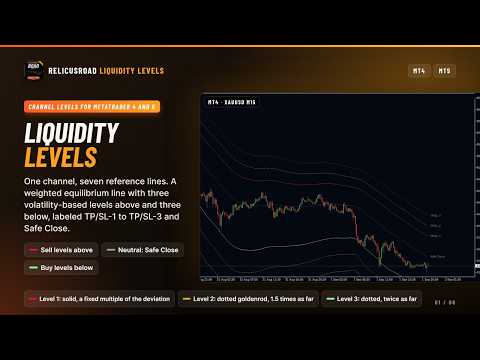
RelicusRoad for MetaTrader 4 and MetaTrader 5 draws a channel of volatility-based liquidity levels around a center line, so you can see at a glance whether price is near its recent average or stretched to an edge where targets and stops belong.
The center line is a weighted average of recent prices. Three Sell levels sit above it and three Buy levels below, each a fixed step further out, so the outer lines are only reached when price has travelled a long way from its average.
What Each Line Tells You
- Neutral line, labelled Safe Close: where recent prices balance out; a trade that has come back to it has done the ordinary part of its job.
- Level 1, labelled TP/SL-1: the normal reach of a swing; in a trend price often runs along this line on the trending side.
- Level 2, labelled TP/SL-2: price is stretched; a place to bank part of a position or tighten the stop.
- Level 3, labelled TP/SL-3: the extreme; treat it as a target for the trade you are in, not a place to open a new one in the same direction.
- Uneven widths: the upper and lower bands are measured separately, so after a strong rise the upper side widens more.
Trading Inside the Channel
- Fade the edges: when price reaches Level 2 or Level 3 and stalls, look for a move back toward the Neutral line, with the stop beyond the next level out.
- Ride the trend: when price keeps bouncing off the Neutral line and holding between it and Level 1 on one side, treat each return to the center as a continuation entry.
- Stagger targets: first target at the next level in your direction, last target two levels away, and move the stop to each level as price passes it.
- Filter your own signals: run your usual trigger, but take longs only in the lower half of the channel and shorts only in the upper half.
Where the Channel Misleads
The levels come from recent volatility, not from resting orders. They show how far price has moved from its average, not where liquidity is waiting, so a close beyond Level 3 in a strong trend is a normal event. When a new trend starts, price can sit outside Level 1 for many bars while the channel catches up; fading the edge is the wrong trade there. In very quiet markets the levels sit too close together to serve as targets.
Picking a Road Type
- Simple Road Narrow (No-Repaint), the default: a 61-bar channel that tracks price closely; the usual choice for intraday charts.
- Simple Road Wide (No-Repaint): the same over 120 bars; slower, fewer touches, suited to swing trades and higher timeframes.
- Smooth Road Narrow and Smooth Road Wide (Repaint): centered averages that use bars on both sides; the newest 61 or 120 bars keep moving, so use them for study, not live entries.
- Trend/Breakout Road (No-Repaint): a 21-bar channel with tighter bands and three lines, projected 21 bars forward; price outside it means the push is strong, price back inside means it is over.
Inputs That Change the Trade
- Road Type (default Simple Road Narrow): see the list above.
- Show Alerts (default off): alerts you when price comes back to test a visible level after the previous seven closes stayed on one side of it (fourteen on the Breakout type); the ALERTS group decides whether that arrives as a popup, an email or a phone push.
- Line names (defaults TP/SL-1 to TP/SL-3 and Safe Close): the text of the chart labels and of the alert message; rename them to match your own trade plan.
Bar History sets how far back the lines run; the remaining inputs show, hide and style the seven lines.
Before You Buy
The channel is recalculated when a new bar opens and does not move while the bar forms. The Simple and Breakout types never use later bars, which is what their No-Repaint names refer to; after a chart reload the most recent closed bars can still read slightly differently from what you saw live.
The small TP/SL and Safe Close labels appear on the Simple and Smooth types only and can stay behind after you remove the indicator; delete them from the object list if so.
About and Support
This is the Road channel from RelicusRoad Pro, sold on its own for traders who want the levels without the signals. It runs standalone and needs no other RelicusRoad product.
Questions and support are handled in the product comments and through the mql5.com messaging system.