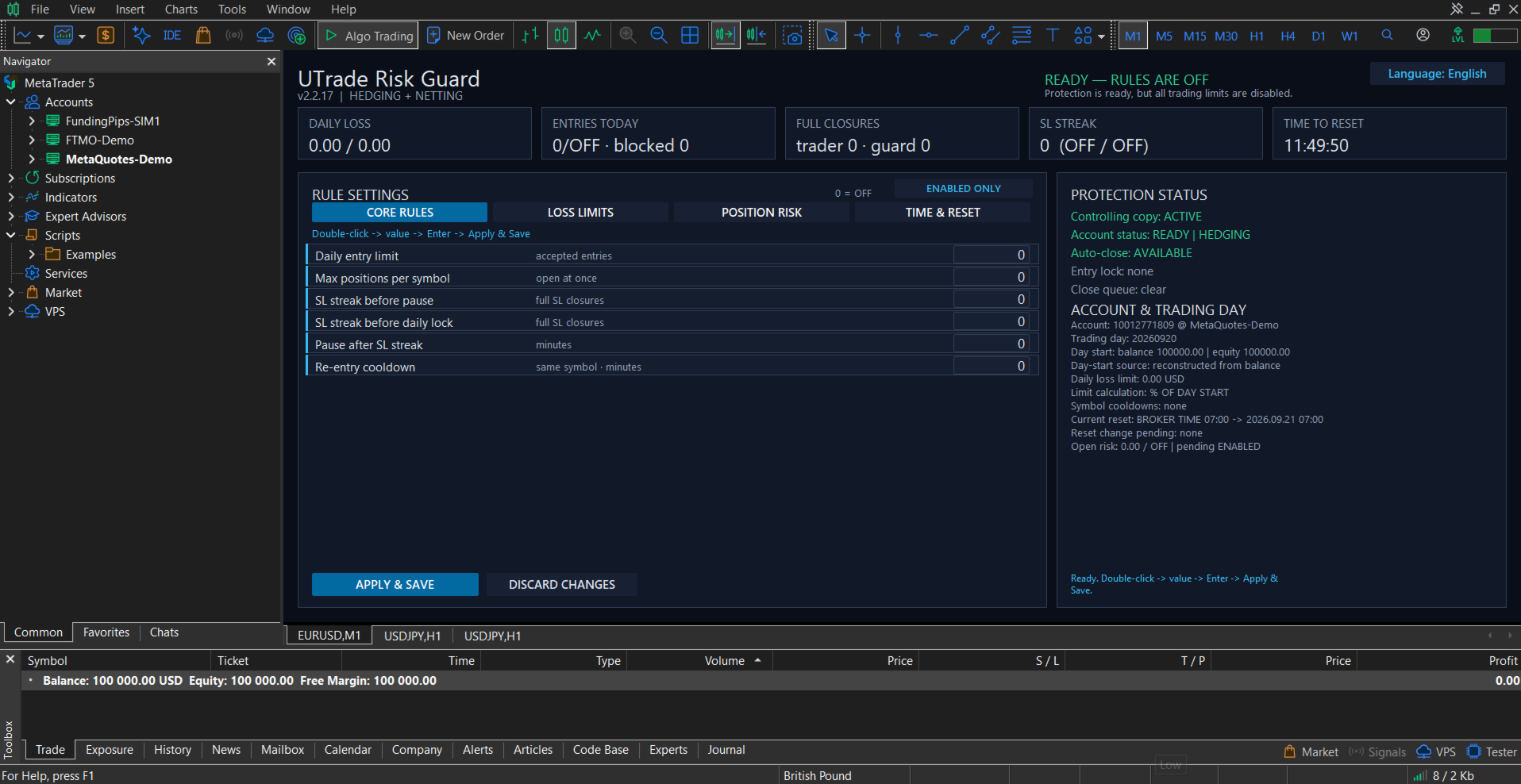
UTrade Risk Guard

Risk rules are easiest to define before a trading session and hardest to follow when pressure rises.

UTrade Risk Guard was created by a trader with more than five years of live trading experience.

Over time, I learned that discipline and psychology influence almost every trading decision. At the same time, constantly checking daily limits, entry counts, position exposure, Stop Losses and the moment when trading should stop consumes attention, energy and focus.

I used to believe that trading discipline had to be controlled entirely through willpower. Later, I realized that the rules could be decided before the session and then enforced automatically.

This allows the trader to focus on market analysis and trade execution while routine risk limits remain active in the background. In my own trading, automating this part of discipline made the process calmer, clearer and less mentally demanding.

That is why I created UTrade Risk Guard.

How UTrade Risk Guard works

UTrade Risk Guard is an account-level risk management utility for MetaTrader 5.

It monitors trading activity and applies the limits selected by the user. It can monitor manual trades, all trading robots, or only trades opened by a selected robot or strategy.

The utility does not analyze the market, provide signals, choose trade direction or open trades. The trader remains responsible for the strategy and every entry decision.

Its purpose is simple: the trader defines the boundaries before the pressure begins, and UTrade Risk Guard monitors them during the trading session.

Who it is for

UTrade Risk Guard can be useful for:

* Traders who open trades manually and want to reduce impulsive decisions.
* Traders following strict daily risk limits.
* Traders working with evaluation or funded-account conditions.
* Users running trading robots without account-level protection.
* Traders who want one control panel for the entire MetaTrader 5 account.

Daily discipline controls

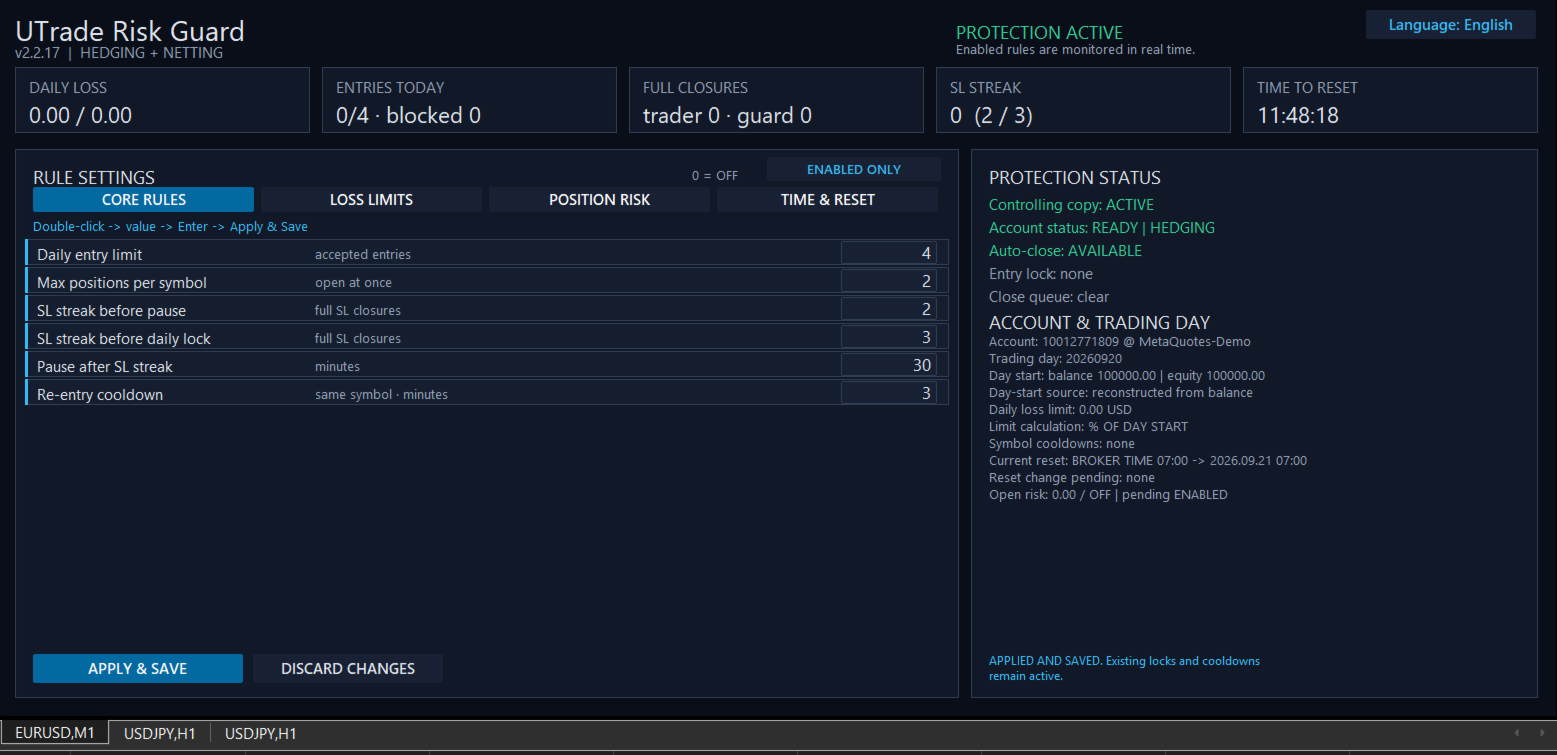
The utility can limit accepted entries per trading day, restrict the number of simultaneous positions per symbol and apply a re-entry cooldown after a full position closure.

It can also respond to consecutive Stop Loss closures. A shorter streak can activate a temporary pause, while a longer streak can block new entries until the next trading-day reset.

The daily entry limit counts accepted entry actions, not the number of positions currently open. An entry blocked by UTrade Risk Guard is recorded separately and does not consume another accepted-entry slot.

Loss protection

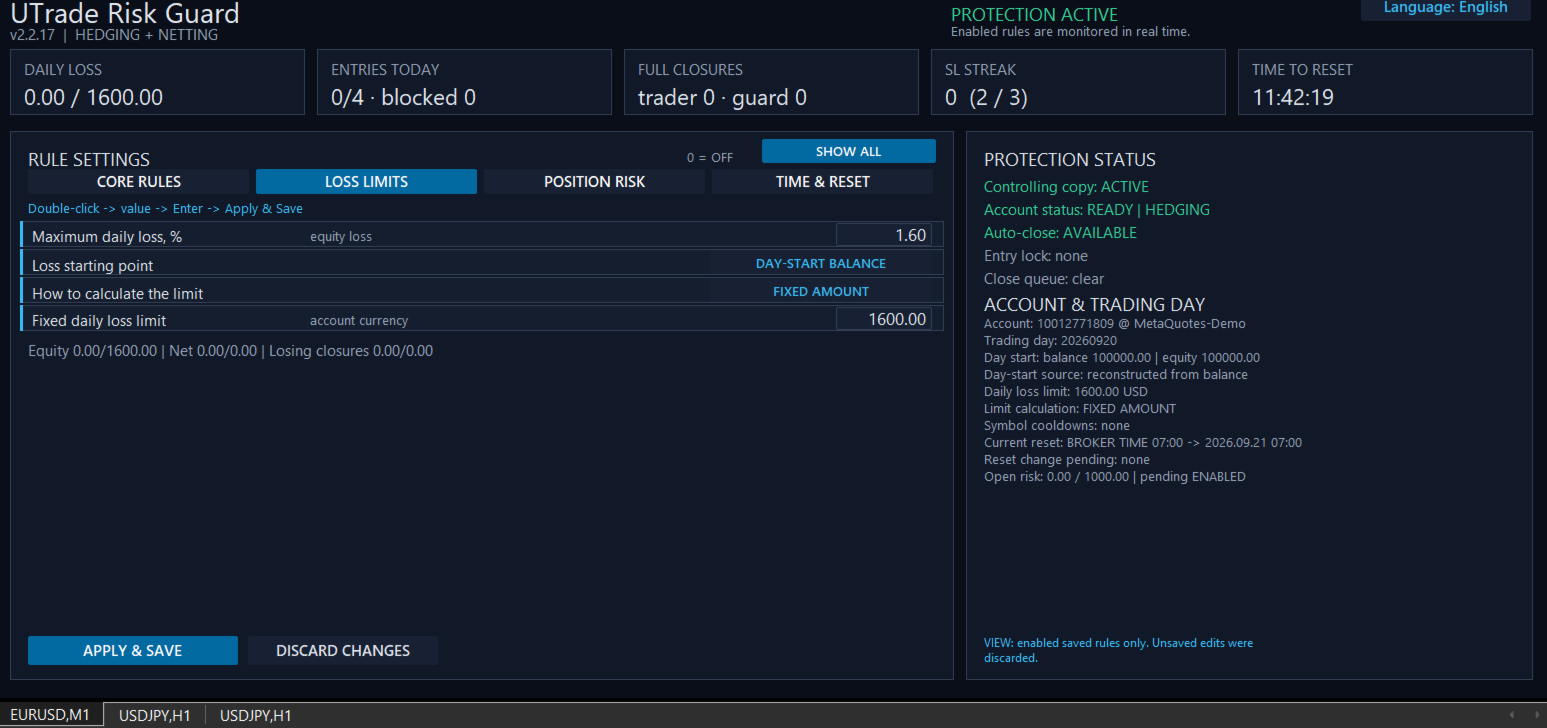
UTrade Risk Guard provides several ways to define the daily loss boundary:

* Maximum daily equity loss measured from either the day-start balance or the day-start equity.
* Percentage of a fixed account size.
* Exact fixed monetary amount.
* Net realized loss, where profitable closures offset losses.
* Gross losing closures, where profits do not restore the consumed loss budget.

Equity is the current account value and includes the unrealized result of open positions.

When an active daily loss limit is reached, new entries are locked until the next reset. UTrade Risk Guard sends closing requests for all positions covered by the active rules. Pending orders within the same monitoring scope can also be removed when this option is enabled.

Position risk controls

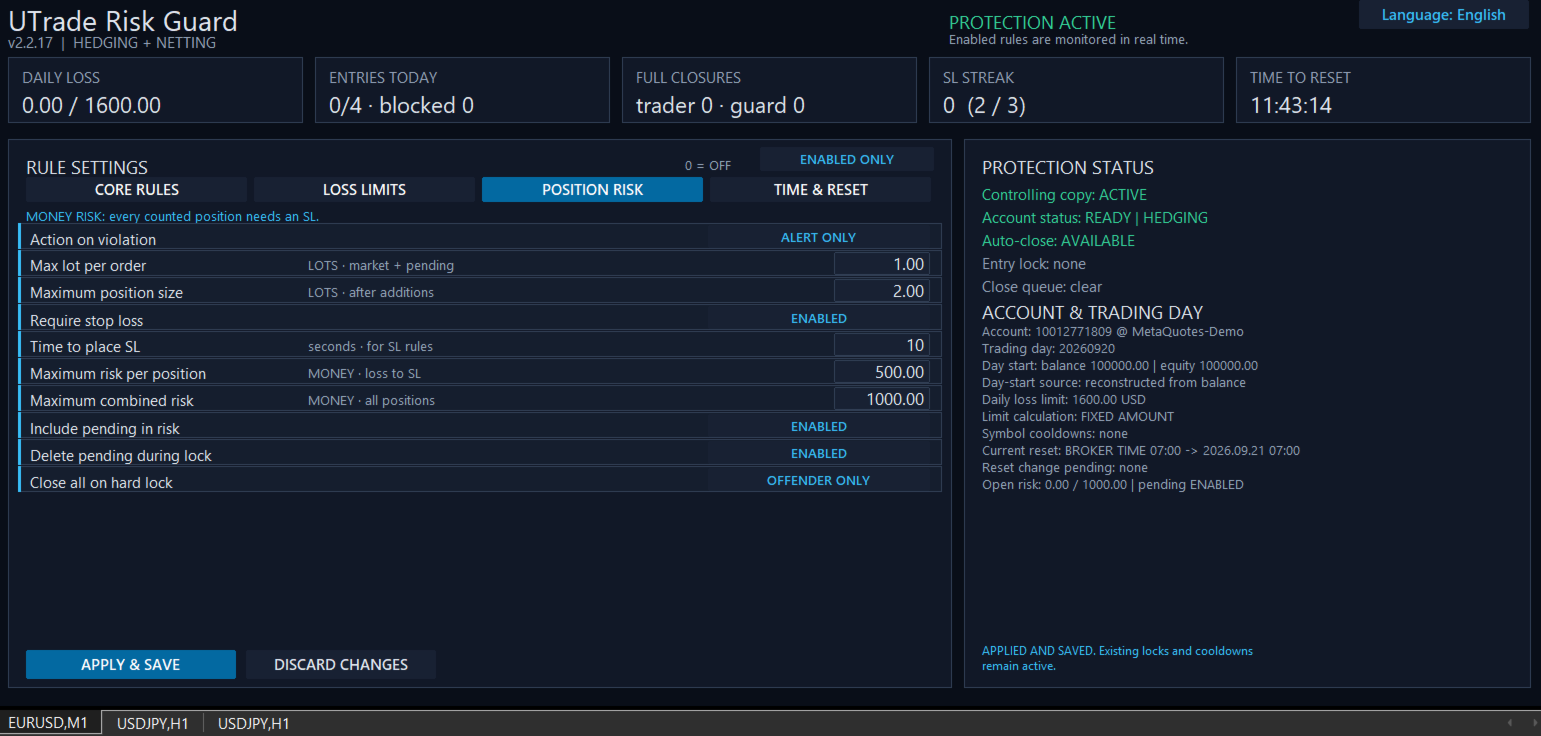
Position risk can be controlled through:

* Maximum volume of one market or pending order.
* Maximum total position volume after additional entries.
* Required Stop Loss.
* Configurable time allowed to place the Stop Loss.
* Maximum monetary risk per position.
* Maximum combined risk across all monitored positions.
* Optional inclusion of pending orders in the combined-risk calculation.

Monetary risk is calculated from the entry price to the Stop Loss using symbol information supplied by the broker. All monetary limits are expressed in the account currency.

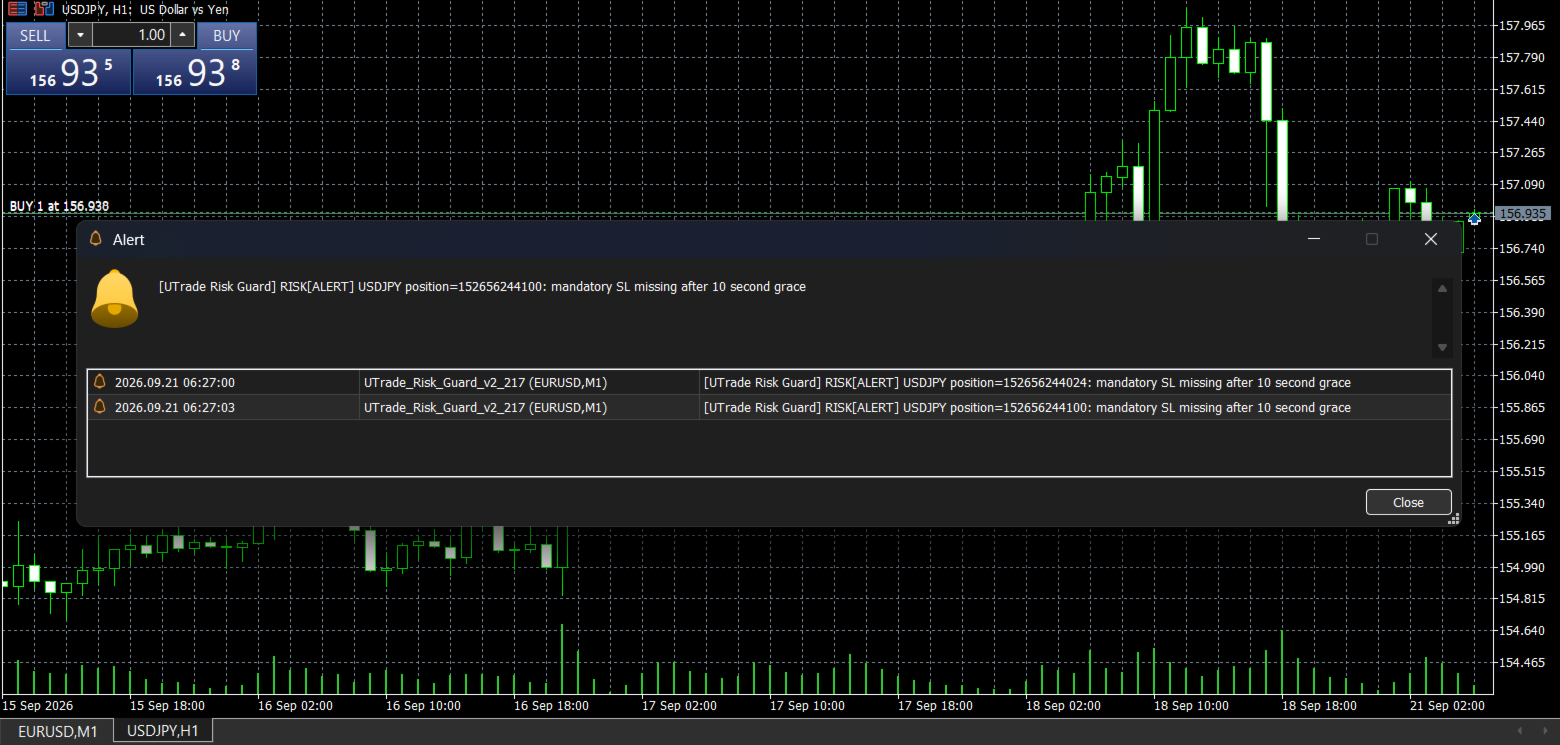
If a position has no usable Stop Loss, its exact monetary risk cannot be calculated. After the configured time expires, UTrade Risk Guard applies the selected response.

Response to a violation

Three position-risk responses are available:

* Alert only: reports the violation without sending a closing request.
* Close the rule violator: sends a closing or deletion request only for the position or pending order that violated the rule.
* Close and lock until reset: sends a closing request for the violating position and blocks new entries until the next trading-day reset.

For a hard position-risk lock, the trader can additionally choose whether to close only the rule violator or all positions covered by the active rules.

Control Center

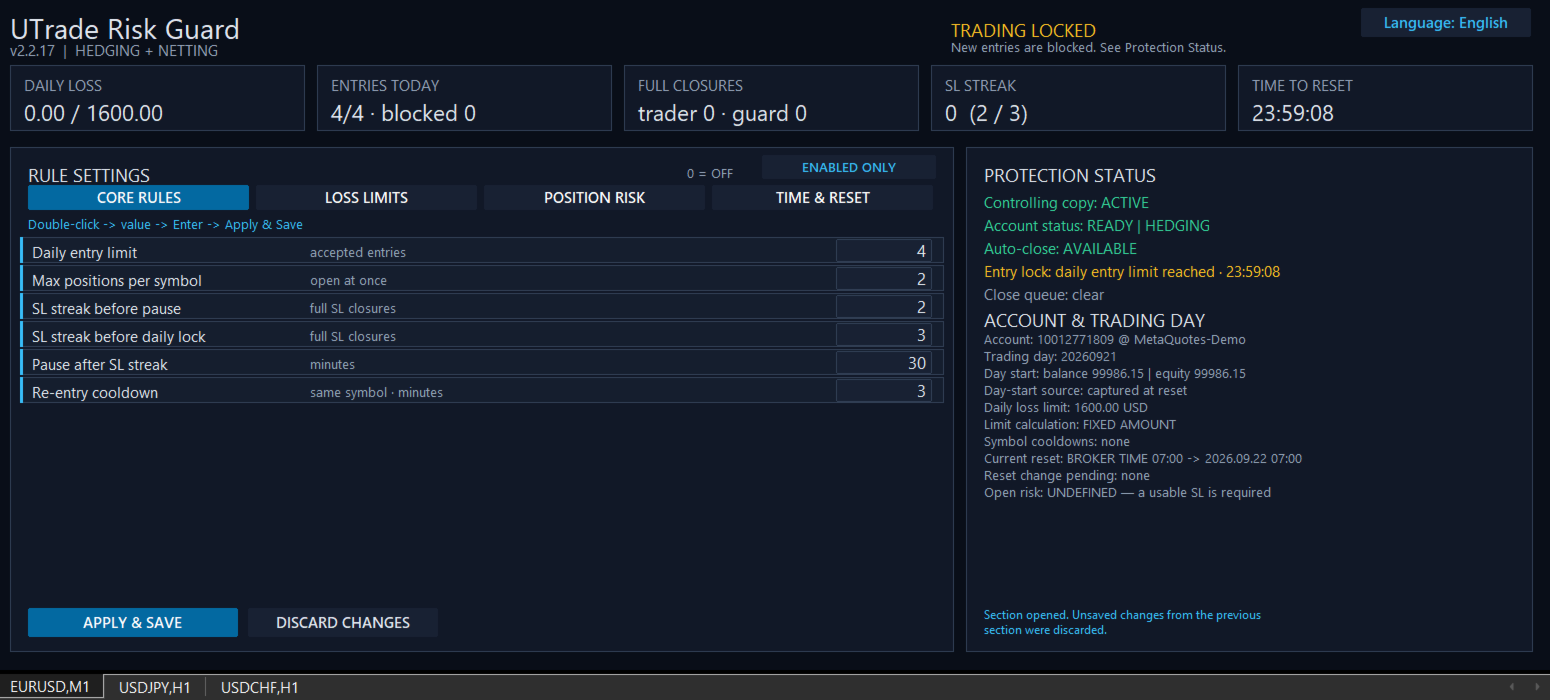
The on-chart dashboard shows:

* Current protection status.
* Daily loss.
* Accepted and blocked entries.
* Trader and guard closures.
* Consecutive Stop Loss count.
* Current open risk.
* Active symbol cooldowns.
* Current entry lock and close queue.
* Time remaining until the next reset.
* Account and trading-day information.

Rules are divided into four sections:

* Core Rules.
* Loss Limits.
* Position Risk.
* Time and Reset.

Disabled rules can be hidden so the panel displays only the protection currently in use.

The interface is available in English, Ukrainian and Russian.

Trading day and reset

The trading-day reset can follow:

* Broker server time.
* UTC.
* A custom UTC offset, optionally using European or United States daylight-saving rules.

Changing the schedule does not move the current trading-day boundary. The new schedule begins after the current reset, preventing an accidental restart or shortening of the active trading day.

Account and execution safety

On a clean first launch, all protection rules are disabled. The trader decides which limits to activate.

Before protection starts, UTrade Risk Guard waits for account data to synchronize. This reduces the risk of using the balance, current account value, positions or history of a previously connected account.

Settings and trading-day state are stored separately for each account identity and can be restored after a terminal restart.

Only one controlling UTrade Risk Guard instance operates in the same MetaTrader terminal. Additional copies do not take control of the account.

Closing requests are checked after submission. Temporary execution errors can be retried, and unfinished closing operations are preserved through terminal restarts.

Retail hedging and retail netting accounts are supported. Netting accounts require account-wide monitoring with Monitor Magic set to 0. Exchange and unknown account modes are blocked for safety.

Getting started

1. Attach UTrade Risk Guard to a chart of a symbol available on the currently connected trading account.
2. Wait until synchronization is complete. On a clean first launch, the dashboard shows “READY — RULES ARE OFF”.
3. Configure only the rules you need.
4. Select Apply and Save.
5. Keep MetaTrader 5 connected and running.

Full setup and feature guide: UTrade Risk Guard for MetaTrader 5

After switching accounts or brokers, verify that the chart symbol remains available and that the dashboard returns to a ready status.

Important notes

Algo Trading must be enabled for automatic position closing and pending-order deletion. MetaTrader 5 must remain open and connected on the trader’s computer or VPS.

The utility reacts after an order has been processed by the trading server. It cannot prevent price gaps, slippage, broker rejections, connection interruptions, execution delays, terminal shutdowns or VPS outages.

UTrade Risk Guard sends and verifies closing requests, but an exact closing price or successful execution under every market condition cannot be guaranteed. Final execution is controlled by the broker and current market conditions.

UTrade Risk Guard is a risk-control utility, not a trading strategy. It does not guarantee profit, compliance with third-party trading rules or protection from every possible trading loss.

Test the selected configuration on a demo account before using it with live funds.
Recommended products
Guardian Yield Keeper is a utility Expert Advisor for traders who want real-time exit management and profit protection for open positions on the current symbol. This EA does not open new trades and does not generate entry signals. Its job is simple: monitor existing positions and close them when your profit or risk conditions are met . It is especially suitable for traders using DCA, Grid, Martingale, or basket trading systems and looking for a dedicated management layer that is more flexible th
Salah Guard
AL MOOSAWI ABDULLAH JAFFER BAQER
Salah Guard Prayer times, Hijri calendar, and optional trade protection for Muslim traders — calculated entirely inside MetaTrader 5. Salah Guard is a MetaTrader 5 utility designed for Muslim traders. It combines daily prayer time calculation, an integrated Hijri calendar, and an optional Trade Guard system that helps you manage your trading activity around prayer times. Trading can be demanding, and it is easy to lose track of time when watching the markets. Salah Guard provides timely reminder
FREE
Product Name MT5 Gold & Silver Multi-Language Trading Panel V17.00 Introduction This is a professional trading panel designed specifically for manual gold and silver traders. It supports five languages: English, Chinese, Spanish, Arabic, and German. The panel automatically detects gold and silver symbols, so users do not need to enter symbol codes manually. It is compatible with most brokers worldwide, including standard accounts, zero spread accounts, and raw spread accounts. Users only need t
MT5 History Checker Can you trust the historical data behind your MT5 backtest? MT5 History Checker is a diagnostic utility designed to identify missing periods and coverage problems in the historical data supplied by your MetaTrader 5 broker. Select the symbol and date range you want to examine and run the checker. The utility analyses the available history and provides a clear PASS, WARNING or FAIL result. What it checks Historical tick-hour coverage M1 historical-data coverage Missing periods
FREE
GoldenRatioX
Serhii Sharlai
GoldenRatioX — Gold Scalping, Refined to Perfection GoldenRatioX is a powerful and intuitive platform for high-speed gold trading, designed specifically for scalpers and active traders who operate on the edge of seconds and aim to squeeze the maximum out of every price movement. After the purchase, please make sure to contact me to receive the settings.  Why gold? Gold is more than just an asset. It’s a highly liquid, volatile instrument with well-defined levels — a perfect match for scalping.
Atlas Trade Desk
Bernhard Wurzlbauer
Atlas Trade Desk MT5 Atlas Trade Desk MT5 is a visual trade panel, risk manager and lot calculator for manual MetaTrader 5 traders. Plan market and pending orders directly on the chart, calculate position size from your selected risk, adjust Entry, Stop Loss and Take Profit visually, and manage open positions from one clean dashboard. The tool is built for discretionary traders who want faster order preparation, clearer risk control and safer position management without switching between multipl
AlgoDevMT5 Trade Manager Pro
Harry Charles H Westwood
AlgoDevMT5 Trade Manager Pro AlgoDevMT5 Trade Manager Pro is a professional trade management and risk control utility for MetaTrader 5. Designed for discretionary traders and funded account traders, this utility helps traders plan trades visually, calculate position size instantly, and manage risk with precision. Trade Manager Pro does not generate trading signals, open trades automatically, or provide investment advice. It is a trader-assistance utility designed to improve consistency and risk
ConsistencyGuard
Vanessa Cristina Ribeiro Dos Anjos
Version 7.04 Major update focused on stronger day trading discipline and account protection. • Post-Session Review mode with configurable review time from 0 to 60 minutes. • Traders can keep MetaTrader 5 open after completing their allowed trades to review charts, take screenshots and complete their trading journal. • Any new trade attempted after the daily trade limit triggers Emergency Close protection. • Emergency Close closes open positions and cancels pending orders before locking and closi
FREE
Product Name: Smart Switch Dashboard STOP WASTING SECONDS. SECONDS COST MONEY. Are you losing trades because you're fumbling through the Market Watch? Is your workspace messy and slowing you down? In trading, Speed is everything. If you aren't organized, you are losing money to traders who are. Smart Switch Dashboard is not just a tool—it is your COMMAND CENTER . Designed for serious Scalpers and Day Traders who demand Speed, Precision, and Zero Lag. DOMINATE YOUR WORKFLOW 1. ULTRA-FAST SY
Trade Assistant 38 in 1
Makarii Gubaydullin
4.91 (23)
Multifunctional tool: Lot Calculator, Grid Orders, R/R ratio, Trade Manager, Supply and Demand zones, Price Action and much more Demo version   |   User manual Trade Assistant   doesn't work in the strategy tester : you can download the   Demo Version HERE  to test the utility . Contact me   for any questions  / ideas for improvement / in case of a bug found If you need a MT4 version, it is available here Simplify, speed up and automate your trading   process . Expand the standard terminal capa
NovaSpread Guard
Dariia Sinielnik
Защитите счёт от проскальзывания и ложных входов Многие стратегии показывают убыток не из-за плохой логики, а из-за входа в неподходящее время: на открытии/закрытии сессий, при аномальном спреде или в условиях низкой ликвидности. NovaSpread Guard — это интеллектуальный фильтр рыночных условий для MetaTrader 5, который автоматически блокирует торговлю, когда параметры рынка выходят за безопасные границы. ️ Ключевые возможности Мониторинг спреда в реальном времени — блокирует вход, если тек
RADAH Dashboard is an advanced performance analytics utility for MetaTrader 5, designed to transform your account history into a clear, organized and interactive trading performance overview. It does not open, modify or close trades. Its purpose is exclusively analytical, allowing you to review the performance of the entire account, a specific symbol, or a strategy identified by its Magic Number. Chart View Visualize your trading performance through an integrated balance/equity performance c
FREE
RiskFrame Account Guard for MetaTrader 5 Account-wide daily loss, drawdown and exposure protection — for every symbol, every magic, manual trades and other EAs. RiskFrame Account Guard monitors the whole trading account and applies the selected protective response when a configured rule is tripped. It works with manual trading, third-party Expert Advisors, trade panels and other order sources. It does not open positions or generate signals. Manual: Open the full RiskFrame Account Guard MT5 user
Rehoboth TradeGate Manager — MT5 Execution Validation & Trade Management TradeGate Manager places a validation layer between your trading decision and the market. TradeGate Manager is available for both MetaTrader 5 and MetaTrader 4 versions. Before an order is sent, TradeGate checks the instrument, spread, stop protection and market conditions against limits you define. If a required condition fails, the order is refused and the panel tells you   what failed and why . Once a position is open,
Key Benefits at a Glance: Lorentzian ML signal generation Majority voting across 3 timeframes Automatic market regime detection Smart equity recovery with group profit targets 1% risk‑based adaptive lot sizing ATR‑based dynamic SL/TP & trailing Emergency drawdown cut Live on‑chart info panel Hybrid Lorentzian Gold ML EA v2.0 – Intelligent Adaptive Trading for XAUUSD Next‑Gen Machine Learning Core A Lorentzian KNN classifier analyzes 5 normalized features (RSI, WaveTren
FREE
DynamicSR Utility
Francis Nyoike Thumbi
DynamicSR Utility— A State-Aware Zone Defense Matrix for Advanced Market Structure Analysis Hello Traders, Welcome to DynamicSR Utility , a state-aware support and resistance intelligence system engineered for traders who want to move beyond static retail levels and analyze zones through a more structured, data-driven approach. If you have followed my technical article series published on the official MQL5 platform , you have already seen the foundation behind this framework: zone scoring, lifec
GOM Trade Manager
Wannapach Chinnaprapa
GOM Trade Manager helps you execute trades the way you want it. Works on all instruments Forex, Commodities, & Crypto. It helps you with lot calculations, spread addition and balance calculations so you can just focus on actual trading. For full automatic planned management, stackable triggers and spread widening protection >> check out GOM Trade Manager Pro . ------------------------------------------NOTABLE FEATURES------------------------------------------ You set everything based on bid
FREE
TradeVision Pro
Ian Nganga Comba
TradeVisonPro Forex Analyzer Pro MT5 Trading Account Analytics and Monitoring Dashboard TradeVisonPro Forex Analyzer Pro is a trading analytics and account monitoring solution designed for MetaTrader 5 users. The product organizes MT5 trading data in a structured web-based dashboard, allowing traders to review account information, monitor open positions, analyze trading history, track strategies, maintain a trading journal, and review performance statistics. TradeVisonPro Forex Analyzer Pro is d
FREE
Quant Panel
Kevin Craig E Gittins
QUANT PANEL Independent per-algo analytics, protected MT5 history and professional PDF reporting Quant Panel is built for traders who run several Expert Advisors or strategies on one MT5 account and need to know how each algo is actually performing. Instead of treating the terminal as one combined portfolio, Quant Panel groups closed positions by EA comment or magic number and calculates every strategy independently. It gives you one clear dashboard for comparing algos, finding weak systems and
EdgeZone EA Inspector - FREE Edition Monte Carlo Analysis Tool for Trading Strategies Important: This is an analysis tool, not a trading robot. It does not execute trades but analyzes strategy data through statistical simulations. The Problem Many Expert Advisors show impressive backtest results but fail in live trading. The most common reason: over-optimization - the strategy was adjusted until it looks perfect for past data, but doesn't work for the future. The Solution: EdgeZone EA Inspector
FREE
Advanced Risk Return Tool
Felipe Monteiro Rodrigues
Advanced Risk Return Tool is a visual Risk/Return planning and management utility for MetaTrader 5. The tool allows you to create and manage Buy and Sell structures directly on the chart, visually positioning Entry, Target and Stop levels while displaying information such as the Risk/Return ratio, distance in pips, volume and financial values. The structures are interactive and can be adjusted directly with the mouse, making trade planning and visual monitoring easier. Main Features Visual Risk/
Phantom Correlation Shield Institutional Over-Exposure & Correlation Guard for MetaTrader 5 Are you running multiple EAs or trading multiple currency pairs at the same time? Then you are almost certainly over-exposed- without knowing it. When you Buy EUR/USD and Buy GBP/USD at the same time, you are essentially doubling your risk on the same trade — because these two pairs move together with a correlation above 0.85. If one trade loses, the other will lose too. Your account takes double the d
SimpleTrade by Gioeste
Giovanni Scelzi
4 (3)
Discover the power of automated trading with **SimpleTradeGioeste**, an Expert Advisor (EA) designed to optimize your trading operations in the Forex market. This innovative EA combines advanced trading strategies with proven technical indicators, offering an unparalleled trading experience. video backtest :  https://youtu.be/OPqqIbu8d3k?si=xkMX6vwOdfmfsE-A ****Strengths**** - **Multi-Indicator Strategy**: SimpleTradeGioeste employs an integrated approach that combines four main technical ind
FREE
ATTENTION ! Utilities do not have a good functionality on backtest mode. For Having a Demo Trial, message me from message box and receive 3 days trial. Our Team Services: If you are want to see our products click the link:   LINK If you have an idea you'd like to develop into an application, click the link:   LINK Instant on-chart stop & target levels, from 1:1 up to 1:6. Trade Ratio Lines MT5 draws an open stop line and objective lines (take-profit) at fixed R-multiples relative to your entry
HTC Panel Indicator
Ricardo Alexandre Laurentino
HTC Panel Indicator is an operational summary dashboard for use in conjunction with trading EA. It provides a concise summary of the current year's trades, open positions and profit history. The summary can be filtered by the current chart asset, by the ID (magic number) of an EA or by all trades performed in the year. The panel must be inserted into the chart as an indicator, making it possible to add it to a chart that already has a trading EA.
FREE
Title : Trade Assistant Manager MT5 Trade Assistant Manager — See your risk before you click Visual Risk Manager is a MetaTrader 5 chart utility for discretionary traders who want a clear, visual way to size positions . Place your Entry, Stop Loss, and Take Profit directly on the chart. The panel shows the lot size, the money at risk, the profit target in money, and the reward-to-risk ratio — updated as you move the lines. What you gain   Faster decisions   : - Automatically calculate the volum
FREE
NeuroExt
Dmytryi Voitukhov
4 (11)
https://t.me/mql5_neuroExt   actual version Signal https://www.mql5.com/ru/signals/1511461 You can use any tool. The bases will be automatically created at the start of the Learn. If you need to start learning from 0 - just delete the base files. Initial deposit - from 200 ye. Options: DO NOT ATTEMPT TO TEST WITHOUT NEURAL NETWORK TRAINING! it is enough for the balance graph after training to be horizontal. generating a training base is extremely simple.  there is a ready-made training for U
FREE
One click to close all (OCCA) provides you posibility to close all open position with one click. Here is no any settings, just run the script and all your open positions will be closed and it will happen very fast ! Works with all types of accounts, with all currency pairs and any broker. The number of open positions is not limited. The script will be useful for trading strategies, in which you need to manage a large number of positions.
Trading panel for manual trading. Has a fairly wide functionality. Allows you to automatically calculate the order size, open both market and pending orders. It has a wide range of options for closing orders, it is possible to partially close orders, close orders after reaching a certain profit or loss, separately close profitable and unprofitable, buy and sell, as well as pending orders. The panel also contains a simple implementation of a grid of pending orders, reverse and lock functions, tr
FREE
Apex Point
Marco Engstermann
Apex Point is a trend-following indicator for MetaTrader 5, transforming complex market data into signals for traders. It displays blue dots for uptrends, red dots for downtrends, and yellow crosses at potential reversals, helping users identify momentum shifts quickly. Key features include a confirmation system requiring multiple bars (default: 3) to validate changes, reducing false signals; dynamic ATR-based offsets for adaptive trailing, with instant ratcheting in the trend direction and smo
FREE
Buyers of this product also purchase
Trade Assistant MT5
Evgeniy Kravchenko
4.43 (216)
It helps to calculate the risk per trade, the easy installation of a new order, order management with partial closing functions, trailing stop of 7 types and other useful functions. Additional materials and instructions Installation instructions - Application instructions - Trial version of the application for a demo account Line function -   shows on the chart the Opening line, Stop Loss, Take Profit. With this function it is easy to set a new order and see its additional characteristics bef
Forex Trade Manager MT5
InvestSoft
4.98 (685)
Trade Manager MT5 is an advanced position size calculator and trade management tool for MetaTrader 5, designed to help traders plan trades faster, control risk more precisely, and manage open positions directly from the chart. It combines order placement, risk based lot calculation, Stop Loss and Take Profit management, Break Even, Trailing Stop, Partial Close, Equity Protection, and external trade management in one panel. Whether you trade forex, indices, metals, commodities, crypto, or future
Local Trade Copier EA MT5
Juvenille Emperor Limited
4.94 (149)
Local Trade Copier EA MT5 is a fast and flexible trade copier for copying and managing trades between multiple MetaTrader 5 accounts on the same Windows computer or Windows VPS. It combines local trade synchronization with Receiver-side controls for lot sizing, risk management, trade filtering, symbol mapping, trade management and account protection. Set up your Transmitter and Receiver terminals in about 1 minute and copy manual or EA trades between accounts at the same or different brokers. U
Telegram to MT5 MultiChannel Copier
Sergio Marquez Uroz
4.61 (18)
Telegram to MT5 Multi-Channel Copier   automatically copies trading signals from your Telegram channels straight to MetaTrader 5. No bots, no browser extensions, no manual copying. A signal arrives in Telegram and the EA opens the trade in your terminal within seconds. And before you copy a channel, the built-in backtester shows you what that channel would have done in your account. The product has two components: a Windows application that listens to your Telegram channels, and this Expert Advi

================================================================================ POC BREAKOUT - V20.72. Full Professional Grade Toolkit ================================================================================ POC Breakout is a full MetaTrader 5 trading dashboard for discretionary traders who want breakout signals, Point of Control (POC) context, volume profiles, order flow, market structure, news, alerts, and advanced trade planning in one professional workspace. Attached directly to you
TradePanel MT5
Alfiya Fazylova
4.88 (170)
Trade Panel is a multi-functional trading assistant. The app contains over 50 trading functions for manual trading and allows you to automate most trading tasks. Application instructions: https://www.mql5.com/en/blogs/post/756482 Trial version of the application for a demo account: https://www.mql5.com/en/blogs/post/750865 How to install the application: https://www.mql5.com/en/blogs/post/756239 How to test the application in visual mode: https://www.mql5.com/en/blogs/post/770277 How to install
Copy Telegram signals with your own trading rules Telegram to MT5 Signal Trader automatically copies text-based trading signals from public and private Telegram channels and groups into MetaTrader 5. Manage multiple providers and MT5 accounts from one desktop app, with individual risk and trade settings for each provider . No Telegram bot or API setup needed for copying. Simply sign in with your own Telegram account by phone or QR code and select the channels or groups you have already joined. Y
FarmedHedge Pair Trading Dashboard
Tanapisit Tepawarapruek
5 (5)
Farmed Hedge Yield Farming | All Markets (Manual - Hybrid - Semi/Automated EA) VERIFIED TRADING RESULTS - Farmed Hedge Yield Axi Copy:  https://www.mql5.com/en/signals/2356376 - Farmed Hedge Yield Exn Copy:   https://www.mql5.com/en/signals/2356404 - Farmed Hedge Yield V Copy:  https://www.mql5.com/en/signals/2357156 IMPORTANT NOTICE: FarmedHedge is a MANUAL-FOCUSED TRADING UTILITY ,not a fully automated EA. Results shown on this Signal include manual trades and overall strategic management.
Exp COPYLOT CLIENT for MT5
Vladislav Andruschenko
3.97 (35)
Professional Trade Copier for MetaTrader 5 Fast, professional, and reliable trade copier for MetaTrader . COPYLOT allows you to copy Forex trades between MT4 and MT5 terminals with support for Hedge and Netting accounts. COPYLOT MT5 version supports: - MT5 Hedge to MT5 Hedge - MT5 Hedge to MT5 Netting - MT5 Netting to MT5 Hedge - MT5 Netting to MT5 Netting - MT4 to MT5 Hedge - MT4 to MT5 Netting MT4 version Full Description +DEMO +PDF How To Buy How To Install How to get Log Files H
Footprint Chart Pro — Professional OrderFlow EA for MetaTrader 5 Version 6.34 | Professional tool for real traders | Institutional-Grade Visualization DEMO USERS - PLEASE SELECT EVERY TICK / REAL TICK WHEN TESTING AND YOU HAVE DOWNLOADED HISTORICAL DATA. IF YOU SEE A WAITING SCREEN AND IT IS NOT DOWNLOADING, IT MEANS YOU HAVE LOW HISTORICAL DATA. TRY 1 MIN AND 5 MIN FIRST ON 1 DAY DATA. ONE DAY DATA SHOULD BE THE NEWEST AND MOST CURRENT DATE. PLEASE WAIT UNTIL THE MARKET HAS ROLLED OVER PERIOD.
Power Candles Strategy Scanner - Self-Optimizing Multi-Symbol Setup Finder Self-optimizing settings work one chart at a time, and finding where they pay off right now means opening chart after chart. Power Candles Strategy Scanner runs the same self-optimizing engine as the Power Candles indicator on every symbol in your Market Watch, side by side. One panel ranks where it pays off: the winning strategy per symbol, its optimized Stop Loss and Take Profit. An alert fires the moment a fresh signal
Grid Manual MT5
Alfiya Fazylova
4.73 (22)
Grid Manual is a trading panel for working with grid strategies. The utility is universal, has flexible settings and an intuitive interface. It works with a grid of orders not only in the direction of averaging losses, but also in the direction of increasing profits. The trader does not need to create and maintain a grid of orders, the utility will do it. It is enough to open an order and the "Grid manual" will automatically create a grid of orders for it and will accompany it until the close. F
HINN MagicEntry Extra
ALGOFLOW OÜ
4.74 (19)
HINN MAGIC ENTRY – the ultimate tool for entry and position management! SIMPLE. FASTEST. INTUITIVE. MAX AUTOMATED. Place orders by selecting a level directly on the chart! full description   ::  demo-version  :: 60-sec-video-description Key features: - Market, limit, and pending orders - Automatic lot size calculation - Automatic spread and commission accounting - Unlimited partitial take-profits  - Breakeven and trailing stop-loss and take-profit  functions - Invalidation leves - Intuitive, a
Signal Trading View to MT5 Pro
Mirel Daniel Gheonu
4.5 (2)
Signal TradingView to MT5 Pro  Instant professional execution between TradingView and MetaTrader 5 Automate your trading strategy with the most robust communication bridge between TradingView alerts and real execution in MT5. Designed for traders who demand speed, flexibility, and impeccable risk management, this Expert Advisor transforms any alert message into a precise market or limit order.   Install and TEST the TRIAL version HERE STRENGTHS AND ADVANTAGES Universal Parsing Engine (Propriet
The News Filter MT5
Leolouiski Gan
4.78 (23)
This product filters   all expert advisors and manual charts   during news time.  It is able to remove any of your EA during news and automatically reattach them after news ends. This product also comes with a complete  order management system   that can handle your open positions and pending orders before the release of any news. Once you purchase   The News Filter , you will no longer need to rely on built-in news filters for future expert advisors, as this product can filter them all from her


Copy your MT5 trades to Interactive Brokers You keep using MT5. Every order you open or close is sent to your IB account. In real time. No coding. No changes to your strategy or EA. Try it first Rent 1 month: $30. Test on a live or paper account. What it does Real-time copying: same direction, reverse, or one side only. Map any MT5 symbol to any IB symbol. Set a lot ratio for each. Forex, Futures, Stocks, CFDs, Metals and Crypto. Position sync: both accounts checked, any difference fixed. Optio
Welcome to ENTRY IN THE ZONE AND SMC MULTI TIMEFRAME  SPECIAL BENEFIT FOR OUR MQL5 CUSTOMERS  FREE ACCESS TO THE NEW TOOL —COMING SOON —   Learn More on Our Official Website : https://www.fableedge.net Entry In The Zone and SMC Multi Timeframe is a real-time market analysis tool based on Smart Money Concepts (SMC), designed to analyze market structure, price direction, and key trading zones. It supports both Single-Timeframe Analysis and Multi-Timeframe Analysis, providing a clearer view of the
Premium Trade Manager - The Trade Panel With a Coach Built In Premium Trade Manager puts a trading coach inside your chart, with a full execution engine underneath it. Set the trade up the way you always do, then let Max, your AI trading coach, read that exact setup against your live account and give you a straight verdict before you commit: is the stop disciplined, is the risk sane, is a high-impact release minutes away, are you near a prop-firm limit. Below sits the engine that runs everything
Anchor Trade Manager
Kalinskie Gilliam
5 (9)
Your EAs cannot see each other, but Anchor can. Anchor gives you one place to coordinate your EAs, manage risk, and decide when trading is allowed. It works alongside the trading bots you already use without any changes to them. The Problem One EA opens a trade. Then another starts trading. The next thing you know, you wake up to multiple grids built across your account. Each EA may be doing exactly what it was designed to do, but together they can place far more risk on your account than you in
Trade Indicator Assistant   is a powerful MT5 utility designed to turn indicators into automated trading systems. Its main feature is the ability to automatically detect an indicator’s   BUY and SELL signal buffers , without requiring you to know the buffer numbers, search through indicator settings, or modify the indicator source code. Bonus Indicator:   After purchasing Trade Indicator Assistant, contact me to receive   Trade Signal Pro   completely free as a bonus indicator. [Download Demo V
MT5 to Telegram Signal Provider turns your trading account into a signal provider. Every trade action, whether manual, by EA or from your phone, is instantly sent as a message to Telegram. You can fully customize the format or use a ready-made template for quick setup. [ Demo ] [ Manual ] [ MT4 Version ] [ Discord Version ]     New: [ Telegram To MT5 ] Setup A step by step user guide is available. Key Features Ability to customize order details sent to subscribers You can create a tiered subs
YuClusters
Yury Kulikov
4.93 (43)
Attention: You can view the program operation in the free version  YuClusters DEMO .  YuClusters is a professional market analysis system. The trader has unique opportunities to analyze the flow of orders, trade volumes, price movements using various charts, profiles, indicators, and graphical objects. YuClusters operates on data based on Time&Sales or ticks information, depending on what is available in the quotes of a financial instrument. YuClusters allows you to build graphs by combining da
DrawDown Limiter
Haidar Lionel Haj Ali
5 (23)
DrawDown Limiter v5.0 — Advanced Account Protection Controller DrawDown Limiter v5.0 is a client-side account protection controller designed to supervise your trading account and automatically react when configured risk, profit, news, schedule, rollover, or position limits are reached. It can monitor manual trades, automated strategies, multiple Expert Advisors, pending orders and floating positions from one dedicated chart. It can protect the complete account or be configured to supervise a spe
VirtualTradePad One Click Trading Panel
Vladislav Andruschenko
4.59 (74)
Trading Panel for MetaTrader 5 — professional one-click trading from chart and keyboard A powerful trading panel for active manual trading, designed to open, manage, and close trades far faster and more efficiently than the standard MetaTrader interface. This panel is built for traders who want full control over positions, pending orders, profit management, and trading execution inside one professional workspace. This is not just another utility. It is a complete trading cockpit for MetaTrader
Smart Stop Scanner – Multi-Asset Stop-Loss Intelligence for Modern Traders Overview The Smart Stop Scanner brings professional stop-loss monitoring to every chart. It analyzes market structure, detects meaningful breakouts, and identifies the most relevant protective levels across Forex, Gold, Indices, Metals, Crypto, and more. All results appear inside one clean, DPI-aware dashboard designed for clarity, speed, and instant decision-making. This tool is part of the Stein Investments ecosystem
Seconds Chart MT5
Boris Sedov
4.61 (18)
Seconds Chart is a unique tool for creating second-based charts in MetaTrader 5 . With Seconds Chart , you can construct charts with timeframes set in seconds, providing unparalleled flexibility and precision in analysis that is unavailable with standard minute or hourly charts. For example, the S15 timeframe indicates a chart with candles lasting 15 seconds. You can use any indicators and Expert Advisors that support custom symbols. Working with them is just as convenient as on standard charts.
Trade Dashboard MT5
Fatemeh Ameri
4.94 (135)
Trade Dashboard simplifies how you open, manage, and control your trades, with built-in lot size calculation. It allows you to execute trades, manage risk, and control positions directly on the chart, with tools such as partial close, breakeven, and trailing stop. Designed to reduce manual work and help you stay focused on your trading decisions. A demo version is available for testing. Detailed explanations of features are provided within the MQL5 platform. Installation instructions are include
Binance Quotes Updater
Andrey Khatimlianskii
5 (1)
This service is designed to stream online cryptocurrency quotes   from the Binance exchange to your MetaTrader 5 terminal. You will find it perfectly suitable if you want to see the quotes of cryptocurrencies in real time — in the Market watch window and on the MetaTrader 5 charts. After running the service, you will have fully featured and automatically updated  cryptocurrency charts in your MetaTrader 5. You can apply templates, color schemes, technical indicators and any non-trading tools to
News Filter EA
Rashed Samir
5 (2)
News Filter EA: Advanced Algo Trading Assistant News Filter EA is an advanced algo trading assistant designed to enhance your trading experience. By using the News Filter EA , you can integrate a Forex economic news filter into your existing expert advisor, even if you do not have access to its source code. In addition to the news filter, you can also specify trading days and hours for your expert. The News Filter EA also includes risk management  and equity protection features. MT4 Version Ma
Prop Guardian Risk Manager MT5 – Drawdown, Risk & Hedge Protection for Prop Firm and Managed Accounts Prop Guardian Risk Manager is a professional risk-control utility for MetaTrader 5, designed for prop firm traders, money managers and anyone who wants strict account-level risk protection. It does not generate trading signals, strategy entries or trading decisions. Instead, it runs in the background, monitors your account risk and can automatically block new exposure, close managed positions or
Filter:
No reviews
Reply to review