Apex Panel Advanced Prop Firm Risk Trade Manager
- Utilities
- Version: 1.1
- Updated: 17 August 2026
- Activations: 9

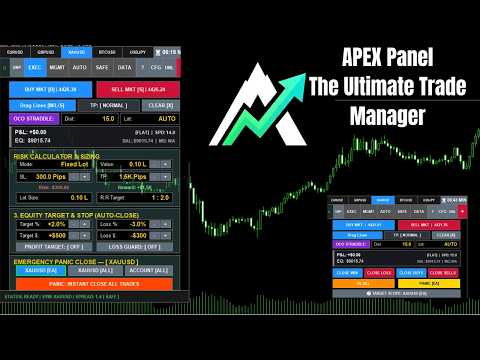
Stop calculating lot sizes manually and protect your funded accounts! Apex Panel Pro is the ultimate institutional-grade Trade Manager and Risk Management Utility for MetaTrader 5. Designed for Prop Firm traders, scalpers, and algorithmic execution, it transforms your chart into a high-speed command center with Smart Grid DCA, Pyramid, Virtual Stealth Exits, and automated Drawdown Shields.
🧮 1. Risk Management & Position Sizing
-
Risk % Sizing: Accurately calculate lot size based on a strict percentage of your account equity.
-
Fixed Cash Risk ($): Lock in a predetermined maximum monetary loss for every trade.
-
Fixed Lot Mode: Bypass the auto-calculator to enter trades with a static contract size.
-
Pips / Price Mode: Input Stop Loss and Take Profit via distance (pips) or exact chart price levels.
-
R:R Presets (1:1 to 1:10): Instantly switch between predefined Risk:Reward templates with auto-target adjustments.
-
Max Account Lots Guard: Block new executions if the total open volume exceeds your allowed threshold.
-
Hover Projection: Preview exact financial exposure ($) and price levels directly on the chart before execution.
📐 2. Advanced Visual Execution
-
Drag & Drop Lines: Visually drag Entry, SL, and TP lines on the chart to preview the setup before executing.
-
Dynamic Order Type: Automatically switch between Limit, Stop, or Market orders based on where you drag the entry line relative to current price.
-
Flip Reverse Box: Instantly flip a pending setup from Long to Short (or vice versa) while maintaining exact SL/TP distances.
-
1-Click Trading: Toggle confirmation pop-ups for lightning-fast, institutional-grade execution speed.
🎯 3. Multi-TP Engine (Scale Out)
-
Up to 5 Targets (Partial TP): Automatically scale out of positions across 5 consecutive targets.
-
Custom % Allocation: Define the exact volume percentage to close at each target (e.g., 50% at TP1, 25% at TP2).
-
Multi-TP Break-Even Rule: Link risk-free actions to specific targets (e.g., auto-move SL to Entry once TP1 is hit).
-
Live TP Lines: Display virtual target lines on the chart that disappear automatically once hit.
-
Tooltip Projections: Hover over target lines to view the exact volume to close and expected profit in dollars.
📰 4. News & Volatility Trading
-
OCO Straddle Engine: Place Buy Stop and Sell Stop orders simultaneously; if one triggers, the other is automatically deleted.
-
Spread Guard: Block new order executions if the live market spread exceeds your predefined maximum limit.
-
Max Slippage Protection: Restrict direct executions within a maximum acceptable slippage distance in pips.
🛡️ 5. Prop-Firm Shields & Protection
-
Daily Drawdown Shield: Calculate true daily starting equity (supporting broker time offsets) and block trading if the daily loss limit is reached.
-
Trailing Drawdown Shield: Track High-Water Mark equity and block execution if the max trailing drawdown is breached.
-
Breach Actions: Choose panel reaction upon rule violation: 'Lock Only' or 'Lock & Close All Open Trades'.
-
1-Click Prop Presets: Instantly load compliant risk settings for major prop firms (e.g., FTMO, FundedNext) or Conservative modes.
-
Reset Peak: Manually reset the High-Water Mark equity peak (essential after receiving payouts).
-
Emergency Lockdown: Manually lock the panel into a 'Read-Only' state to prevent emotional trading.
-
Loss Streak Cooldown: Force a mandatory time-out (X minutes) after consecutive losses to prevent revenge trading.
🚪 6. Trade Management & Tactical Exits
-
Target Scope Control: Choose whether panel buttons affect only EA trades, current symbol trades, or the entire MT5 account.
-
Panic Exits: 1-click buttons to Close All, Close Winners, Close Losers, Close Buys, Close Sells, or Delete Pending Orders.
-
Partial Closes: Liquidate 25%, 50%, or 75% of open volumes instantly.
-
Macro Break-Even: Close 50% of the position and instantly move the remaining Stop Loss to entry.
-
Break-Even All: Move Stop Losses of all profitable trades to entry without closing partial volumes.
-
Flip Reverse: Close all current positions and instantly open a reverse trade with the same net lot size.
-
Cover Losers: Close both winning and losing trades simultaneously when the net overall profit is greater than zero.
🤖 7. Auto Background Engines
-
Individual Auto Break-Even: Secure single trades automatically once a predefined profit trigger in pips is reached.
-
Smart Trailing Stop: Trail price using 3 algorithms (Fixed Pips, ATR volatility, or Parabolic SAR) with start-delay support.
-
Grid DCA Engine: Automatically open recovery trades with custom multipliers when price reverses by a defined step.
-
Pyramid Scaling Engine: Maximize winning trades by automatically adding trend-following (anti-martingale) positions.
-
Basket Net Break-Even: Calculate the average entry price for combined trades (manual, Grid, Pyramid) and secure them as a single block.
-
Virtual Stealth SL/TP: Hide your exits from broker servers, executing them locally to prevent market-maker stop hunting.
-
Equity Target ($/%): Automatically close all trades when the floating profit reaches a specific percentage or dollar amount.
-
Equity Loss Guard ($/%): Emergency auto-close of all trades if floating loss hits a predefined threshold.
📊 8. Stats, Journaling & Export
-
Hero LCD Board: Monitor real-time Net Balance, Equity, Margin Level, floating P&L, and Net Lots exposure.
-
Today's Stats: View closed daily profit ($), trade count, and win rate directly on the chart.
-
Market Dash: Track live Spread, Daily Range, and High/Low prices instantly.
-
Candle Countdown: Permanent top-bar display of the time remaining until the current candle closes.
-
Net BE Line: Visual gold line displaying the exact average entry price for all open positions.
-
TradeZella CSV Export: Extract trading history (Daily, Weekly, Monthly) into a CSV format fully compatible with TradeZella and Excel.
-
Auto Screenshot: Automatically capture high-resolution chart images upon trade entry and exit for professional journaling.
🖥️ 9. UI, Customization & Interactive Guide
-
Watchlist Top Bar: Pin 5 favorite symbols for instant 1-click chart switching.
-
Mini Mode: Collapse the interface into a sleek, compact toolbar containing essential execution and target buttons.
-
Guide Mode (Built-in Help): Click any button while in '?' mode to instantly read its function and calculation logic on the chart.
-
Universal 10-Language Support: Full interface and alerts translated into 10 global languages (English, Spanish, Arabic, etc.).
-
Themes & Scaling: Switch between Dark/Light modes, custom accent colors, and adjust DPI scaling for 4K displays.
-
Save Defaults: Store your preferred risk and visual settings permanently via Global Variables so they persist after restart.
-
Magic Number Isolation: Safely run alongside other EAs without interfering with their trades.
-
Smart Notifications: Receive customizable MT5 mobile push alerts for emergency triggers, targets, and grid actions.
🚀 Continuous Development & Community Driven Apex Panel Pro is built by traders, for traders, and we are committed to continuous improvement. Is there a specific feature, auto-engine, or risk parameter you’d like to see in the next update? Let me know in the comments section below! I actively read all suggestions and implement the best ideas.
⭐️ Your Feedback Matters If this tool has helped you pass your Prop Firm challenges, optimized your risk, or improved your daily trading psychology, please consider leaving a 5-star review. Your support is the fuel that drives our future massive updates!
⚙️ Try It Before You Buy Not convinced yet? Download the Free Demo directly to your MetaTrader 5 terminal right now and experience lightning-fast, institutional-grade execution firsthand on your strategy tester.