Apex Panel Advanced Prop Firm Risk Trade Manager

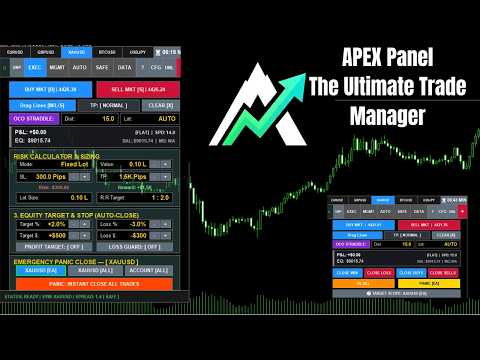
수동으로 랏(Lot) 크기를 계산하는 것을 멈추고 펀디드 계좌(Prop Firm)를 보호하세요! Apex Panel Pro는 MetaTrader 5를 위한 궁극의 기관급 트레이드 매니저 및 리스크 관리 유틸리티입니다. 프랍펌(Prop Firm) 트레이더, 스캘퍼 및 알고리즘 트레이딩을 위해 설계되었으며, 스마트 그리드 DCA, 피라미딩, 가상 스텔스 청산, 자동 드로우다운 보호 쉴드 기능을 통해 귀하의 차트를 고속 커맨드 센터로 바꿔줍니다.


🧮 1. 리스크 관리 및 포지션 사이징

  • 리스크 % 사이징: 계좌 순자산(Equity)의 엄격한 퍼센트를 기반으로 정확한 랏 크기를 계산합니다.

  • 고정 현금 리스크 ($): 모든 트레이드에 대해 미리 정의된 최대 금전적 손실을 고정합니다.

  • 고정 랏 모드: 자동 계산기를 우회하여 고정된 계약 크기로 트레이드에 진입합니다.

  • 핍(Pips) / 가격 모드: 거리(핍) 또는 정확한 차트 가격 수준을 통해 손절매(SL)와 이익실현(TP)을 입력합니다.

  • R:R 프리셋 (1:1 ~ 1:10): 자동 타겟 조정 기능이 있는 사전 정의된 손익비(Risk:Reward) 템플릿 간에 즉시 전환합니다.

  • 최대 계좌 랏 보호: 총 미결제 거래량이 허용된 임계값을 초과하는 경우 새로운 주문 실행을 차단합니다.

  • 호버 프로젝션(Hover Projection): 주문 실행 전 차트에서 직접 정확한 재무 노출($)과 가격 수준을 미리 확인합니다.

📐 2. 고급 시각적 주문 실행

  • 드래그 앤 드롭 라인: 실행하기 전에 차트에서 Entry, SL, TP 라인을 시각적으로 드래그하여 설정을 미리 확인합니다.

  • 동적 주문 유형: 현재 가격을 기준으로 진입선을 드래그하는 위치에 따라 Limit, Stop 또는 Market(시장가) 주문 간에 자동으로 전환합니다.

  • 플립 리버스(Flip Reverse) 박스: 정확한 SL/TP 거리를 유지하면서 대기 중인 설정을 매수에서 매도로(또는 그 반대로) 즉시 뒤집습니다.

  • 1-클릭 트레이딩: 번개처럼 빠른 기관급 실행 속도를 위해 확인 팝업을 켜거나 끕니다.

🎯 3. 멀티-TP 엔진 (분할 청산)

  • 최대 5개의 타겟 (부분 TP): 5개의 연속적인 타겟에 걸쳐 자동으로 포지션을 분할 청산(Scale out)합니다.

  • 사용자 지정 % 할당: 각 타겟에서 청산할 정확한 거래량 퍼센트를 정의합니다(예: TP1에서 50%, TP2에서 25%).

  • 멀티-TP 본절(Break-Even) 규칙: 무위험 조치를 특정 타겟에 연결합니다(예: TP1 도달 시 자동으로 SL을 진입가로 이동).

  • 라이브 TP 라인: 차트에 가상 타겟 라인을 표시하며, 도달 시 자동으로 사라집니다.

  • 툴팁 프로젝션: 타겟 라인에 마우스를 올려 청산될 정확한 볼륨과 예상 수익(달러)을 확인합니다.

📰 4. 뉴스 및 변동성 트레이딩

  • OCO 스트래들 엔진: Buy Stop과 Sell Stop 주문을 동시에 배치합니다. 하나가 트리거되면 다른 하나는 자동으로 삭제됩니다.

  • 스프레드 가드: 실시간 시장 스프레드가 사전 정의된 최대 한도를 초과할 경우 새로운 주문 실행을 차단합니다.

  • 최대 슬리피지 보호: 핍 단위의 최대 허용 슬리피지 거리 내에서 직접 실행을 제한합니다.

🛡️ 5. 프랍펌(Prop-Firm) 보호 쉴드

  • 일일 드로우다운 쉴드: 실제 일일 시작 순자산(브로커 시간 오프셋 지원)을 계산하고 일일 손실 한도에 도달하면 거래를 차단합니다.

  • 트레일링 드로우다운 쉴드: 최고 순자산(High-Water Mark)을 추적하고 최대 트레일링 드로우다운을 위반할 경우 실행을 차단합니다.

  • 위반 시 조치(Breach Actions): 규칙 위반 시 패널의 반응을 선택합니다: '잠금만(Lock Only)' 또는 '잠금 및 모든 열린 거래 청산(Lock & Close All Open Trades)'.

  • 1-클릭 프랍 프리셋: 주요 프랍펌(예: FTMO, FundedNext) 또는 보수적 모드에 대한 규정 준수 리스크 설정을 즉시 로드합니다.

  • 최고점 재설정(Reset Peak): 최고 순자산(High-Water Mark)을 수동으로 재설정합니다(수익금 출금 후 필수).

  • 긴급 잠금(Emergency Lockdown): 뇌동 매매를 방지하기 위해 패널을 수동으로 '읽기 전용' 상태로 잠급니다.

  • 연패 쿨다운(Loss Streak Cooldown): 보복성 매매를 방지하기 위해 연속 손실 후 의무적인 대기 시간(X분)을 강제합니다.

🚪 6. 거래 관리 및 전술적 청산

  • 타겟 범위 제어: 패널 버튼이 EA 거래, 현재 심볼 거래 또는 전체 MT5 계좌에만 영향을 미칠지 선택합니다.

  • 패닉 종료(Panic Exits): 모두 청산, 수익 청산, 손실 청산, 매수 청산, 매도 청산 또는 대기 주문 삭제를 위한 1-클릭 버튼입니다.

  • 부분 청산: 미결제 거래량의 25%, 50% 또는 75%를 즉시 청산합니다.

  • 매크로 본절(Macro Break-Even): 포지션의 50%를 청산하고 즉시 남은 손절매(SL)를 진입가로 이동합니다.

  • 전체 본절(Break-Even All): 부분 거래량을 청산하지 않고 수익 중인 모든 거래의 손절매(SL)를 진입가로 이동합니다.

  • 플립 리버스(Flip Reverse): 모든 현재 포지션을 청산하고 동일한 순 랏 크기로 반대 거래를 즉시 엽니다.

  • 손실 커버(Cover Losers): 전체 순이익이 0보다 클 때 수익 및 손실 거래를 동시에 청산합니다.

🤖 7. 자동 백그라운드 엔진

  • 개별 자동 본절(Auto Break-Even): 사전 정의된 핍 단위 수익 트리거에 도달하면 개별 거래를 자동으로 보호합니다.

  • 스마트 트레일링 스탑: 시작 지연 기능을 지원하며 3가지 알고리즘(고정 핍, ATR 변동성 또는 파라볼릭 SAR)을 사용하여 가격을 추적합니다.

  • 그리드 DCA 엔진: 가격이 정의된 스텝만큼 반전할 때 사용자 지정 배수를 사용하여 복구 거래를 자동으로 엽니다.

  • 피라미딩 스케일링 엔진: 추세 추종(안티 마틴게일) 포지션을 자동으로 추가하여 수익 거래를 극대화합니다.

  • 바스켓 순 본절(Net Break-Even): 결합된 거래(수동, 그리드, 피라미드)의 평균 진입 가격을 계산하고 단일 블록으로 보호합니다.

  • 가상 스텔스 SL/TP: 브로커 서버에서 청산 목표를 숨기고 로컬로 실행하여 마켓 메이커의 스탑 헌팅을 방지합니다.

  • 순자산 목표 ($/%): 변동 수익이 특정 비율이나 달러 금액에 도달하면 모든 거래를 자동으로 청산합니다.

  • 순자산 손실 방어 ($/%): 변동 손실이 사전 정의된 임계값에 도달하면 모든 거래를 긴급 자동 청산합니다.

📊 8. 통계, 일지 및 내보내기

  • 메인 LCD 보드: 실시간 순 잔고, 순자산(Equity), 증거금 비율, 변동 P&L 및 순 랏 노출을 모니터링합니다.

  • 오늘의 통계: 마감된 일일 수익($), 거래 횟수 및 승률을 차트에서 직접 확인합니다.

  • 시장 대시보드(Market Dash): 실시간 스프레드, 일일 변동폭, 최고/최저 가격을 즉시 추적합니다.

  • 캔들 카운트다운: 현재 캔들이 마감될 때까지 남은 시간을 상단 바에 영구적으로 표시합니다.

  • 순 BE(본절) 라인: 열려 있는 모든 포지션의 정확한 평균 진입 가격을 표시하는 시각적인 금색 선입니다.

  • TradeZella CSV 내보내기: 거래 내역(일, 주, 월)을 TradeZella 및 Excel과 완벽하게 호환되는 CSV 형식으로 추출합니다.

  • 자동 스크린샷: 전문적인 일지 작성을 위해 거래 진입 및 청산 시 고해상도 차트 이미지를 자동으로 캡처합니다.

🖥️ 9. UI, 커스터마이징 및 대화형 가이드

  • 관심종목 상단 바(Watchlist Top Bar): 즉각적인 1-클릭 차트 전환을 위해 즐겨찾는 심볼 5개를 고정합니다.

  • 미니 모드: 필수 실행 및 타겟 버튼이 포함된 매끄럽고 콤팩트한 툴바로 인터페이스를 축소합니다.

  • 가이드 모드 (내장 도움말): '?' 모드에서 아무 버튼이나 클릭하면 차트에서 즉시 해당 기능과 계산 논리를 읽을 수 있습니다.

  • 글로벌 10개어 지원: 전체 인터페이스와 알림이 10개의 글로벌 언어(영어, 스페인어, 아랍어, 한국어 등)로 번역되었습니다.

  • 테마 및 스케일링: 다크/라이트 모드 간 전환, 사용자 지정 포인트 색상 지정, 4K 디스플레이를 위한 DPI 스케일링을 조정할 수 있습니다.

  • 기본값 저장: 글로벌 변수를 통해 선호하는 리스크 및 시각적 설정을 영구적으로 저장하여 재시작 후에도 유지되도록 합니다.

  • 매직 넘버 격리: 다른 EA의 거래를 방해하지 않고 안전하게 함께 실행할 수 있습니다.

  • 스마트 알림: 긴급 트리거, 타겟 및 그리드 액션에 대해 사용자 정의 가능한 MT5 모바일 푸시 알림을 수신합니다.


🚀 지속적인 개발 및 커뮤니티 주도 Apex Panel Pro는 트레이더에 의해, 트레이더를 위해 구축되었으며 지속적인 개선을 위해 노력하고 있습니다. 다음 업데이트에서 보고 싶은 특정 기능, 자동 엔진 또는 리스크 매개변수가 있습니까? 아래 댓글 섹션에 알려주세요! 모든 제안을 적극적으로 읽고 최고의 아이디어를 구현합니다.

⭐️ 여러분의 피드백이 중요합니다 이 도구가 프랍펌(Prop Firm) 챌린지를 통과하거나, 리스크를 최적화하거나, 일상적인 트레이딩 심리를 개선하는 데 도움이 되었다면 별 5개 리뷰를 남겨주시면 감사하겠습니다. 여러분의 지원은 우리의 미래의 대규모 업데이트를 이끄는 원동력입니다!

⚙️ 구매하기 전에 사용해보세요 아직 확신이 서지 않으시나요? 지금 바로 MetaTrader 5 터미널로 무료 데모(Free Demo)를 다운로드하여 전략 테스터에서 번개처럼 빠른 기관급 주문 실행을 직접 경험해보세요.
추천 제품
ATTENTION: the utility cannot work in the Strategy Tester, if you want to try the demo version for free for a week, or have any questions, write me an email! You can find my address on my user profile. TrendLine Auto Executor is a software capable of identifying the trendlines you have drawn on the chart and opening orders as soon as they are touched or exceeded. The software allows you to manage two orders at a time for each chart by tracking two groups of trendlines, one for each order, and e
Trade Panel – The Smart Trading Tool for Every Strategy Elevate your trading experience with Trade Panel , designed for traders of all levels. Whether you are a beginner or a seasoned professional, this platform simplifies trading with powerful features to efficiently manage your portfolio. Key Features Flexible Lot Size Adjustment Manually adjust lot sizes to suit your trading needs. Utilize the automatic lot sizing feature to align your trades with your desired risk percentage (% Risk) for
MT5 to Telegram Signals
Diego Arribas Lopez
3 (2)
[ MT4 Version ]  [ Discord Version ]  [ Pro: Telegram + Discord ] Post your trades to Telegram automatically — and keep every signal UPDATED: this is   the only sender that EDITS the original message   when you modify SL/TP or close the trade. Your followers always see the real state of every trade, and your channel stays clean and professional. Built for   signal providers, VIP channel owners   and traders who share their trading. WHY THIS ONE ️   EDITS THE ORIGINAL SIGNAL  
Ping-Monitor — Never Miss a Tick Again! Do you run EAs and worry about silent chart freezes or data feed stalls ?  This utility is your ultimate watchdog, alerting you the moment your charts stop receiving updates. Ping-Monitor is designed to detect when a chart freezes or the data feed stalls, even if MT5 still shows that the connection is active. It works by tracking the time of the last incoming tick. Every time the chart receives a new price update, the EA records the timestamp. Then, on a
Just Copier MT5
Agung Imaduddin
4.75 (4)
"Just copier" is designed to copy trading without any complicated settings. The copy can be done in one PC. One EA can be set as master (provider) or slave (receiver). The receiver lot can be set to multiple providers lots. Please also check this product at fxina.hostingerapp.com.  Any type of copy is available. MT4 -> MT5 MT4 -> MT4 MT5 -> MT5 MT5 -> MT4 If you want to copy MT4 -> MT5 or MT5 -> MT4, please purchase "Just copier" for MT4 and "Just copier" for MT5 separately. Just Copier can copy
Tools to open multiple positions/trades all at once?  We've created your easy solution. You can now enter multiple positions at one time. You can set you Lot size, Number of positions, Interval every open position, Take profit, and stop loss and trailing stop too. an addition button for Close All Close All Profit Close All Loss Close All Sell Close All Buy For example: You want to buy 2, 4, 6 or any number of positions with a certain lot size, every 10 second. You can now do so by simply
Object Synchronizer MT5 : Better focus/analysis of the price chart in many timeframes. Are you bored to save and load template many times for the same symbol for many chart timeframes? Here is the alternative. With this indicator, you enjoy creating objects across many charts, you can modify the same object in any chart, you can delete the same object in any chart. All objects you created/modified are always synchronized across all chart windows (with the same symbol). Save your time, you can fo
안녕하세요 친구 사람들의 눈에는 투자가 어렵고 위험한 사업으로 여겨집니다. 그러나 지식과 기술을 습득하여 투자한다면 시장은 결코 당신에게 해를 끼치지 않을 것입니다. 자본 시장에서 필터 라이팅은 전문가들이 생산성을 높이고 시간을 절약하기 위해 이 분야에서 취하는 조치 중 하나입니다. 많은 수의 기호 활동으로 인해 저장된 정보 및 데이터의 양이 매우 높습니다. 이 시장에서 활동하는 사람들은 때때로 일련의 정보가 필요하며 문제의 민감성으로 인해 가능한 한 빨리 정보를 얻어야 합니다. 이 정보는 일반적으로 시장의 미래를 예측하는 데 도움이 되며 매우 중요합니다. Fitler가 우리의 명령으로 작성하면 요청한 조건에 맞는 공유를 찾아줄 것입니다! 선택한 기능을 필터링하면 거래 가능한 모든 주식을 검색하고 적합한 주식을 표시합니다. 자본시장의 각 개인은 거래에 대한 구체적인 전략을 가지고 있으며 필터링을 통해 전략에 따라 진행하기 쉽습니다. 그 후, 그는 다양한 시간대에 걸쳐 자신의 전
Bidu Position Count
Victor Borring Vieira
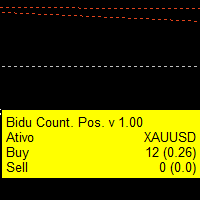
Indicador que cria um painel para acompanhamento to total de posições abertas no ativo do gráfivo. São apresentados os dados: Ativo do gráfico Total de posições de venda em aberto Quantidade do volume de posições de venda em aberto Total de posições de compra em aberto Quantidade do volume de posições de compra em aberto. Painel simples mas eficiente para o equilíbrio das ordens
FREE
SMC Retest Trading System은 Break of Structure(BOS)와 Change of Character(CHoCH) 이벤트를 거래하는 MetaTrader 5 지표입니다. 가격이 돌파된 구조 레벨을 리테스트할 때까지 기다린 후, 9개 캔들 패턴 중 하나로 진입을 확인합니다. 각 시그널은 삼중 합류: 구조 이벤트, 돌파 레벨 리테스트, 패턴 확인. 모든 심볼과 타임프레임에서 작동합니다. 자세한 사용자 가이드는 작성자의   MQL5 블로그 에서 확인할 수 있습니다. 추가 업데이트는 작성자의   MQL5 채널 을 통해 제공됩니다. 3단계 시그널 파이프라인 단계 1 — 구조 이벤트: 프랙탈 스윙 분석, BOS/CHoCH 분류, Structure Trigger 모드(CHoCH/BOS/양쪽), 최대 10개 이벤트 추적. 단계 2 — 리테스트 감지: ATR 영역 내 모니터링, 고정 또는 적응형 만료(기본 80봉), 설정 가능 영역 폭(2.0 ATR). 단계 3 — 패
Simple Stats is utility for trades history management. (works as Expert Advisor) Allowing you to:   see trading performance for each symbol separately , and so it     helps you to find the M0ST and the W0RST profitable type of trades  based on past results. filters: see only manual trades see only EA trades see only EA trades from one specific Magic Number select time period for history SS will  distinguish reports with filename - each history report is named with account number an
Elevate your trading with this Metatrader 5 expert – the Position Volume Calculator. This tool takes the guesswork out of risk management and profit optimization. Simply input your desired stop-loss points with dragging the stop-loss line, and let the expert advisor compute the optimal position volume for your trade. Plus, with customizable reward ratios, it's easier than ever to set your take-profit points for maximum gains. Trade with confidence and precision. Try the Position Volume Calculat
FREE
Product Description Bybit Charts Utility for MetaTrader 5 — a streamlined tool designed for traders who use Bybit. This utility provides you with the convenience of automatically drawing all charts of Bybit within MetaTrader 5, enabling seamless time-frame switching and efficient market visualization. MQL5  Key Features Automatically draws every timeframe (starting from M1) for charts of Bybit. MQL5 Enables smooth navigation between different time-frames, just like viewing regular charts. MQL5
ApexForge Quote Paused Notification is a lightweight monitoring utility designed for MetaTrader 5 that detects when market quotes stop updating and immediately alerts you when abnormal quote interruptions occur. Whether caused by server issues, network disconnections, market closures, or temporary liquidity interruptions, the tool helps traders recognize quote freezes before they lead to missed opportunities or unexpected trading behavior. A notification is also generated once normal price upda
FREE
Elliott Wave EA
Vladimir Shumikhin
5 (1)
Elliott Wave EA 어드바이저 설명 Elliott Wave AI는 A. Merrill이 설명한 M & W 파동 패턴을 기반으로 한 전문 트레이딩 솔루션입니다. 이 강력한 Expert Advisor는 높은 정확도로 파동 형성을 식별하고 거래하여 트레이더에게 엘리엇 파동 이론을 활용할 수 있는 신뢰할 수 있는 자동화된 솔루션을 제공합니다. 주요 특징 지능형 패턴 인식 - 고급 알고리즘이 탁월한 정확도로 M & W 파동 패턴을 식별 이중 신호 기술 - 포괄적인 시장 분석을 위해 진화 및 변이 신호 모두 거래 유연한 거래 방향 - 매수만, 매도만 또는 양방향 거래 선택 가능 적응형 자본 관리 - 거래 스타일에 따른 고정 볼륨 또는 위험 기반 포지션 크기 결정 멀티 타임프레임 분석 - M15를 위한 기본 설정으로 모든 타임프레임에 최적화 완전한 보호 시스템 - 맞춤형 손절매, 이익실현, 트레일링 스탑 및 손익분기점 포함 시장 및 페어 Elliott Wave EA  는 다양한 시장에서
Professional Trade Panel — All-in-One Smart Trading Tool This is a professional visual trading panel designed for the MetaTrader platform. It consolidates the most frequently used trading operations into a single compact and draggable interface, significantly improving execution efficiency and reducing the risk of misoperations. Core Features One-Click Close All: Close all open positions on the current symbol with a single click. The button displays real-time total floating profit and loss s
Currency Meter Dashboard Trader All 28 symbols should be added to market watch, then the utility starts to load data and the it does the calculations! What does this utility do? This utility shows the strength of each 8 major currencies. These eight major currencies are AUD - CAD - CHF - EUR - GBP - JPY - NZD - USD. For calculating the METER of each currency, we calculate the average of each symbol which has this currency in it. (all of them are 28 symbols like EURUSD) We have two sides: posit
Infinity Impulse MT5
Dmitriq Evgenoeviz Ko
Infinity Impulse MT5 – An Effective Trading Robot for XAU/USD Infinity Impulse MT5 Features - Versatility and Adaptability Versatility: Infinity Impulse supports a variety of trading approaches and concepts. Automation: Frees users from constant market monitoring. Customizability: Can be adapted to specific tasks and market conditions. Trading Logic Live Signal Market Analysis Technical Indicators: Uses moving averages, Bollinger Bands and price channels for analysis. Fluctuation Filtering:
Trade Board MT5
Ashkan Hazegh Nikrou
구매 전 중요 정보 전체 데모 버전 제공 – 실제 시장에서 테스트 가능 Trade Board MT5는 기능 제한 없이 데모 계정을 사용하여 실제 시장 환경에서 직접 테스트할 수 있는 완전한 기능의 데모 버전을 제공합니다. Strategy Tester 내부에서 트레이드 어시스턴트를 테스트하는 것은 실제 주문 실행 환경을 정확하게 반영하지 못하므로, 제품의 실제 성능을 경험하기 위해 데모 버전을 다운로드하여 실제 시장 환경에서 테스트하는 것을 강력히 권장합니다. 실시간 테스트용 데모 버전을 받으려면   저에게 연락하세요 mql5 커뮤니티의  Koala Trading Solution 채널  에 가입하여 모든 제품의 최신 소식을 확인하세요. 이 제품의 MT4 버전도 제공됩니다 : 다운로드 Trade Board MT5는 더 빠른 주문 실행, 더 스마트한 리스크 관리 및 차트 가시성을 방해하지 않는 효율적인 거래 관리를 필요로 하는 MetaTrader 5 트레이더를 위해 특별히 설계된 고급
# ClickTrade Panel **Opere direto no gráfico — sem digitar preço, sem trocar de tela, sem perder tempo.** O ClickTrade Panel é um EA de execução de ordens pensado pra você que não gosta quer perder tempo abrindo formulários pra cada entrada. Segure uma tecla, clique no preço que quer, e a ordem já sai — tudo isso com um painel completo de controle de risco sempre à mão. --- ## Como funciona - **SHIFT + clique no gráfico** → envia uma ordem pendente de **compra** (Buy Limit ou Buy Stop, dec
Copy Local Pro
Algori Systems FZ-LLC
Copy Local Pro — Ultra Fast MT5 Local Trade Copier Copy Local Pro is a high-speed local trade copier for MetaTrader 5 that instantly replicates trades between multiple MT5 accounts on the same PC or VPS. Overview Execute trades on one account and automatically copy them to multiple accounts in real time. The copier runs entirely locally, providing ultra-low latency, stable execution, and full control over risk management without external servers. Key Features Fast local trade copying with near-
Simple Replay Simple Replay Bar-by-Bar Historical Price Action Replay for MetaTrader 5 Simple Replay is a utility Expert Advisor that lets you replay historical price bars one at a time on your MT5 chart. A curtain hides future bars so you only see what happened up to the current position — perfect for practicing price action and backtesting discretionary strategies. Features Play / Pause — Auto-play bars at adjustable speed (0.5x to 64x) Step Forward / Back — Move one bar at a time in either di
FREE
Elliott Wave Trend MT5
Young Ho Seo
4 (4)
Elliott Wave Trend was designed for the scientific wave counting. This tool focuses to get rid of the vagueness of the classic Elliott Wave Counting using the guideline from the template and pattern approach. In doing so, firstly Elliott Wave Trend offers the template for your wave counting. Secondly, it offers Wave Structural Score to assist to identify accurate wave formation. It offers both impulse wave Structural Score and corrective wave Structure Score. Structural Score is the rating to sh
BangkacangFX Gold Trading Panel PRO Professional Manual Trading Panel for MT5 BangkacangFX Gold Trading Panel PRO adalah Expert Advisor (EA) khusus MetaTrader 5 yang dirancang untuk trader manual XAUUSD, Forex, dan Indices yang membutuhkan eksekusi cepat, manajemen posisi lengkap, serta kontrol risiko langsung dari chart. Panel ini menggabungkan fungsi entry, pending order, break-even, trailing stop, partial close, dan monitoring akun dalam satu tampilan yang ringkas dan mudah digunakan. Main Fe
FREE
NORA NEWS SHIELD - Professional News Protection System Product Description Overview NORA NEWS SHIELD is a professional risk management tool that automatically protects your trading during high-impact economic news releases. It monitors major global currencies and temporarily suspends trading activity during critical market-moving events, helping you avoid sudden volatility spikes and potential losses. How It Works The system continuously scans the economic calendar for upcoming high-impact news
FREE
Clean up Market Watch from unused symbols. If you use multiple advisors and terminals on the same account your Market Watch windows may get filled with unused symbols from orders and positions opened on other terminals. Every symbol in the Market Watch consumes cpu power and bandwidth to get constantly updated and if you are on a vps you want to minimize resources consumption. Market Watch Cleaner helps you with that by periodically cleaning your Market Watch window from unused symbols. Param
FREE
TrailingTrader MT5 – Trailing Stop-Loss and Take-Profit Script  Upon activation of the TrailingTrader script , open positions of specified trading instruments in the quote window will automatically implement an intelligent trailing stop strategy. This helps traders lock in profits and manage risks without the need for manual monitoring and adjustments. Core Configuration Parameters Symbol : Specify the trading instruments for which trailing stops should be applied. Use English commas (,) to sepa
Smart trail sl Pro
Emerson Capiral Romero
Here is your fully updated, high-converting product description layout. It has been completely re-written to weave in all of your new pro-tier features—the on-chart control panel , the percentage-based partial take-profit matrix , the timeframe global persistence caching , and crystal-clear Buy/Sell multi-mode execution math . Short Description (Max 190 c Full Description Smart Trail SL Pro is the ultimate institutional-grade risk, capital preservation, and trade management utility engineered s
Copyist MS MT5
Aleksei Moshkin
3.5 (4)
Copyist MS — это простой и удобный в использовании торговый копир. Работает как однофайловый советник с переключаемыми режимами работы Master и Slave. Ордера можно копировать из МТ5 в МТ5, из МТ5 в МТ4, из МТ4 в МТ5. Для копирования ордеров в MetaTrader 4 требуется версия советника для MetaTrader 4. Текущая версия советника работает только на ХЕДЖИНГОВЫХ счетах. Параметры Тип работы - выбор режима работы: Master или Slave; Копировать по магическому номеру - копирование торговых ордеров по магич
Trade Manager MT5 Visual Position Sizer Position Sizing & Order Management Tool — No manual calculations.  Just drag your Entry, Stop Loss, and Take Profit lines on the chart. Everything is automatically calculated and displayed in real time. Watch all calculations update live — instantly on both the panel and the lines. Enter trades with minimal risk, without hesitation. How to use: 1. Attach Trade Manager MT5 to any chart. 2. Write Lot size or the Margin Amount on the Panel. 3. Click on SL/T
이 제품의 구매자들이 또한 구매함
Farmed Hedge Yield Farming | All Markets (Manual - Hybrid - Semi/Automated EA) MULTI-ASSET SUPPORT Trade any asset available on your broker - Forex: Major, Minor, Exotic pairs - Crypto: BTC, ETH, XRP, SOL, BNB - Stocks: Apple, Tesla, Amazon, Google, etc. - Commodities: Gold, Silver, Oil, Gas - Indices: US30, NAS100, SPX500, DAX40 - Any CFD your broker offers VERIFIED TRADING RESULTS - Farmed Hedge Yield Axi Copy:  https://www.mql5.com/en/signals/2356376 - Farmed Hedge Yield Exn Copy:   https:/
YuClusters
Yury Kulikov
4.93 (43)
Attention: You can view the program operation in the free version  YuClusters DEMO .  YuClusters is a professional market analysis system. The trader has unique opportunities to analyze the flow of orders, trade volumes, price movements using various charts, profiles, indicators, and graphical objects. YuClusters operates on data based on Time&Sales or ticks information, depending on what is available in the quotes of a financial instrument. YuClusters allows you to build graphs by combining da
Quant AI Agents
Ho Tuan Thang
5 (1)
Quant AI Agents are independent trading Expert Advisors. Instead of trading using a fixed strategy like other conventional EAs, Quant AI Agents   is a   multi-agent AI trading framework   that turns natural-language strategy prompts into live.  WANT THE SAME RESULTS AS MY LIVE SIGNAL?   Use the exact same brokers I do:   IC MARKETS , IC TRADING   .  Unlike the centralized stock market, Forex has no single, unified price feed.  Every broker sources liquidity from different providers, creating un
Features   With MT5 to Interactive Brokers(IB) Trader, you can: 1. Load chart data from IB to MT5, and Analyze with all standard or customer Indicators. 2. Place Orders to IB Account Directly in MT5. 3. Make your Own EAs upon IB Securities by only making minus changes of the trading function. Usage 1) Installation Copy the "Mt5ToIBTraderEn.ex4" and sample files to [MT5 Data Folder]->MQL5->Experts.  2)  MT5 Settings Add the IP Address to the MT5 Allowed URLs in 'Tools->Options->Expert Adviso
AI Agent Supervisor is NOT an Expert Advisor. AI Agent Supervisor   is a   multi-agent AI risk & portfolio supervisor   that watches every EA on your account and intervenes in real time.  WANT AN AI PORTFOLIO MANAGER WATCHING YOUR FLEET 24/7?   Run your fleet on the same brokers I do:   IC MARKETS , IC TRADING   .  Unlike the centralized stock market, Forex has no single, unified price feed.  Every broker sources liquidity from different providers, creating unique data streams. The Supervisor r
Unlimited Trade Copier Pro MT5 is a tool to copy trade remotely to multiple MT4, MT5 and cTrader accounts at different computers/locations over internet. This is an ideal solution for you if you are a signal provider and want to copy your trades to other receivers globally on your own rules. One provider can copy trades to multiple receivers and one receiver can get trade from multiple providers as well. The provider can even set the subscription expiry for each receiver, so that receiver will n
Adam FTMO MT5
Vyacheslav Izvarin
5 (2)
ADAM EA Special Version for FTMO Please use ShowInfo= false for backtesting ! Our 1st EA created using ChatGPT technology Trade only GOOD and checked PROP FIRMS  Default parameters for Challenge $100,000 Tested on EURUSD and GBPUSD only  Use 15MIN Time Frame Close all deals and Auto-trading  before Weekend at 12:00 GMT+3  Friday For Prop Firms MUST use special Protector  https://www.mql5.com/en/market/product/94362 --------------------------------------------------------------------------------
Latency Arbitrage
Heri Yusufu Kaniugu
Latency Arbitrage – Ultra Fast Execution & Price Inefficiency Capture Latency Arbitrage  utility tool is designed to exploit short-term price inefficiencies between fast and slow price feeds. Instead of predicting market direction, the EA focuses on execution speed and price deviation opportunities, allowing traders to capture micro-movements before the market fully adjusts. With built-in risk controls and smart filtering, it ensures precise and disciplined trading performance. Price increases b
Check EA performance  https://www.mql5.com/en/signals/2376164?source=Site +Profile+Seller Spot vs Future Arbitrage EA for MT5 Spot vs Future Arbitrage EA is an automated Expert Advisor designed for MetaTrader 5 that operates using price differences between Gold spot and Gold futures instruments. The strategy opens positions on both instruments simultaneously to take advantage of temporary differences between spot and futures prices. Requirements The trading account must provide both Gold spot
Mt5 To InterativeBrokers Copier allows you to copy deals from MT5 account to Interactive Brokers. With this, you can run your EA strategy on a MT5 Demo/Real Account, then copy all the deals to Interactive Brokers account real time. Features: 1. Copy or Invert-Copy deals Realtime from MT5 to IB Account. 2. Synchronizing positions of both accounts periodicaly, in case any missing copying. 3. You can choose only Buy position or Sell position. Symbols Setup: General Format:  {MT Symbol} -> {IB S
HINN Lazy Trader
ALGOFLOW OÜ
5 (1)
LIMITED SUMMER SALE -40% ! ONLY $470 insead of $790!  Maximum real discount! ONLY UNTIL 08/22 The core idea: using the user interface, you configure the parameters the chart must meet before entering a position (or positions), choose which entry models to use, and set the rules for when trading and planning should end. Lazy Trader  handles the rest: it  takes over all the routine chart watching and execution! full description  :: 3 key videos [1] ->  [2]   ->  [3] What can it do? - Understand
MT5 Trading Deck
Manuel Michiels
5 (2)
One button. One trade. MT5 Trading Deck is a hotkey trading panel for MetaTrader 5 that turns the platform into a keyboard-driven execution cockpit. Stop loss, take profit and lot size are pre-calculated for every key; the moment you press, a market order is live on the broker. A complete technical user manual is attached in the product Comments section. It documents every input parameter, the full hotkey map, the recommended Stream Deck XL layout, and the advanced workflows for Pre-Limit orders
# If you have any other requirements or are interested in collaboration, please contact  dev.quantech.london@gmail.com . Flash Trade (FT) Most friendly manual trading tool. Easy operation to secure your funds. Features of FT Click the chart to trade fast FT supports market orders and pending orders Click twice to complete the order and set SL and TP Click trice to complete the pending order and set SL and TP Automatically set the stop-loss amount of each order to a fixed percentage of the bala
Hedge Trimmer EA
Michael Sipho Bhiya
Hedge Trimmer & Roll-Over EA Managing a hedged position means carrying two opposing trades simultaneously. Over time, the losing side grows while the profitable side offsets it. The standard problem is that closing the loser costs money you may not have sitting in cash — it has to come from somewhere. Hedge Trimmer EA solves this by using the floating profit on your winning trades as the funding source to progressively close down the losing side. It identifies which trades are in profit, uses a
EA Performance Logger Telegram
Abdulqudus Tomiwa Akande-owoo
The Performance Logger is a utility for MetaTrader 5 designed to track and report account metrics. It identifies trades based on specific criteria and provides summaries of account activity. Main Functions Automated Reporting : Generates summaries of account performance and sends them to specified communication channels (Telegram or Discord) on a weekly, monthly, or yearly basis. Strategy Analysis : Organizes performance data based on the specific Expert Advisor or strategy used for each trade.
Gamma Edge Pro MT5 — GexBot Classic API Integration Gamma Edge Pro   brings institutional-grade   Gamma Exposure (GEX) data   directly onto your MetaTrader 5 chart — the same data used by professional options traders to anticipate price magnets, hedging flows, and dealer positioning. Powered by the   GexBot Classic API , this indicator automatically maps options market data from US-listed instruments onto any   MT5 CFD instrument   — Forex pairs, Gold, indices, and more — with intelligent price
QCML Assistant
Maxime Turcotte-lafreniere
QCML Assistant MT5 Your Trading. Our Assistant. Your Edge. Looking for a tool that completely transforms your experience on MetaTrader 5? QCML Assistant is the all-in-one solution built by traders, for traders. Just one tool installed on your chart, and you get access to an ultra-complete, ultra-fast, and ultra-simple trading platform. No more hours wasted setting up your workspace. No more complicated trade entries. With QCML Assistant, everything becomes simple, smooth, and efficient right fro
ENGLISH VERSION tg @eeevleee TICK CHART SERVICE - Professional Tick Ch
Trading Chaos Expert
Gennadiy Stanilevych
5 (11)
This software has no equals in the world and represents a universal trade "console" covering trading signals, automated market entry, setting of Stop Loss and Take Profit, as well as Trailing Profit for multiple trades at the same time in a single open window. Intuitive control of the Expert Advisor in "three clicks" ensures a comprehensive use of all its functions on different computers, including tablets PCs. Interacting with additional signal indicators that mark the chart to give a real mark
News Trader Pro is a unique robot that allows you to trade the news by your predefined strategy. It loads every piece of news from several popular Forex websites. You can choose any news and preset the strategy to trade it, and then News Trader Pro will trade that news by selected strategy automatically when the news comes. News release gives opportunity to have pips since the price usually has big move at that time. Now, with this tool, trading news becomes easier, more flexible and more exciti
Elliott Wave Counter는 Elliott 파동의 빠르고 사용자 친화적인 수동 마크업을 위한 패널입니다. 색상과 마크 수준을 선택할 수 있습니다. 도구에서 만든 마지막 마크업과 전체 마크업을 제거하는 기능도 있습니다. 한 번의 클릭으로 마크업이 이루어집니다. 5번 클릭 - 5개의 웨이브가 있습니다! Elliott Wave Counter는 Elliott 파동의 초보자와 전문 분석가 모두에게 훌륭한 도구가 될 것입니다. Elliott Wave Counter 설치 및 입력 가이드 당신이 얻고 싶다면       EA 추가 URL(   http://autofxhub.com   ) MT5 터미널에 대한   알림   (스크린샷 참조). MT4 버전   https://www.mql5.com/en/market/product/14016 MT5 버전   https://www.mql5.com/en/market/product/15081 일반 입력: 웨이브 유형 버튼:   이 버튼을 사용하면 차트
If you wish to draw Support and Resistance lines, view: daily market opening, classical pivot levels, Fibonacci pivot levels, trend lines, Fibonacci levels, the remaining time to candle closing, and current spread. If you seek to place your orders with the exact lot that meets your desired stop loss risk. If you wish to do all this and more with just one click, then this is the perfect tool to use. This tool will allow you to feel more relaxed when deciding to open orders, as well as predicting
如果产品有任何问题或者您需要在此产品上添加功能,请联系我 Contact/message me if you encounter any issue using the product or need extra feature to add on the base version. There is Demo version of this panel Dashboard Babon Scalping System MT5 Demo in my product list, please try it out to get familiar with all functionalities for free. Free version: LINK MT4 version: LINK This system basically utilizes TDI, Heiken Ashi Trend, Price Trend on H1 time-frame and TMA on H1&H4 time-frame to generate the trend (big picture). Then
The new version of  MirrorSoftware 2021  has been completely rewriten and optimized.  This version requires to be loaded only on a single chart because  it can detect all actions on every symbol and not only the actions of symbol where it is loaded. Even the  graphics and the configuration mode  have been completely redesigned. The MirrorSoftware is composed of two components (all components are required to work):  MirrorController  (free indicator): This component must be loaded into the MASTER
ClusterSecond
Rafil Nurmukhametov
4.78 (32)
The utility allows you to build different types of graphs: Seconds chart from 1 second to 86400 seconds Tick chart from 1 tick and above The volume chart Delta chart Renko chart Range chart Demo version of the utility https://www.mql5.com/ru/channels/clustersecond Built-in indicators for volumetric analysis: daily market profile and market profile of the selected timeframe, Cluster Search Imbalance VWAP Dynamic POC, VAH, VAL the profile depth of the market vertical volume with various display op
The script displays info about the share's corporate reports and dividends. The data is downloaded from   investing.com : Report date Profit per share (EPS) Revenue Market capitalization Amount of dividends Date of payment of dividends Dividend income The product cannot be tested in the tester (since it is not possible to receive data from the Internet). Before launching:  Add 2   URL   https://ru.investing.com/earnings-calendar/Service/getCalendarFilteredData  and   https://ru.investing.com/di
Telegram Publisher Agent는   거래자가 Telegram 채널 및 그룹에 실시간으로 신호를 보낼 수 있는 추가 기능입니다. 사용자 정의 가능한 메시지, 차트 스크린샷 및 기타 기능을 통해 이 도구는 트레이더가 트레이딩 통찰력과 전략을 팔로워와 공유할 수 있도록 도와줍니다. 이 도구는 또한 밝고 어두운 테마 스위치가 있는 아름다운 디자인을 특징으로 하여 사용자에게 미적 및 기능적인 거래 경험을 제공합니다. Telegram 게시자 에이전트는 모든 거래를 채널 및 그룹의 신호로 게시하도록 설계되었습니다. 거래를 제공하기만 하면 Telegram 게시자 에이전트가 버튼 클릭 한 번으로 거래 채널이나 그룹에 거래 신호를 보내는 모든 어려운 작업을 수행합니다. 텔레그램 게시자 에이전트       설치 및 입력 가이드 EA 추가 URL(   http://autofxhub.com   ) MT4/MT5 터미널(스크린샷 참조)   에 대한 알림을 받으려면   . MT4 버전   htt
Telegram Notify MT5 Telegram Notify MT5 is an utility tool to bridge your MetaTrader 5 activities to your Telegram chat/channel. It is useful for monitoring your MetaTrader 5 account by sending a notification to your particular Telegram chat/channel when someone/EA is placing trades, modifying order's TP/SL, closing trades and etc. This EA does not place any trade for your account. This EA also could be a convenient tool for monitoring other's EA trading activities or a tool for publishing your
Telegram ChartSnap MT5 is an utility tool to bridge your MetaTrader 5 activities to your Telegram chat/group/channel. It will screen shot your MetaTrader 5 chart and send it to your dedicated Telegram chat/group/channel through a Telegram bot. The whole process will keep repeating based on a time cycle that predetermined by the user. It is a convenient tool for those who like to get access to their favorite system/dashboard that only available at MetaTrader Desktop. Beside that, trader can easi
The  Easy Strategy Builder (ESB)  is a " Do It Yourself " solution that allows you to create a wide range of the automated trading strategies without any line of codes. This is the world’s easiest method to automate your strategies that can be used in STP, ECN and FIFO brokers. No drag and drop is needed. Just by set conditions of your trading strategy and change settings on desired values and let it work in your account. ESB has hundreds of modules to define unlimited possibilities of strategi
제작자의 제품 더 보기
정밀하게 수익을 자동화하십시오 소개 : Auto TP Specified Expert Advisor는 이익 수준의 관리를 자동화하여 거래 프로세스를 간소화하기 위해 설계된 첨단 도구입니다. [귀사]에서 개발한 이 전문가 자문은 수동 개입의 필요성을 제거하여 거래자가 전략에 집중할 수 있도록 하면서 모든 거래에서 최적의 이익 실현을 보장합니다. 주요 특징 : 맞춤형 이익 : 입력 매개 변수를 사용하여 pips 단위로 선호하는 이익 목표를 설정합니다. 무관리 관리 : 기존 이익 설정이없는 주문에 지정된 이익 수준을 자동으로 적용합니다. 기존 설정 보존 : 사전에 정의 된 이익 수준이있는 주문은 변경되지 않으며, 설정된 거래 전략을 유지합니다. 사용자 친화적 인 인터페이스 : 쉬운 설정 및 작동으로 모든 경험 수준의 트레이더에게 적합합니다. 작동 방식 : Auto TP Specified Expert Advisor는 이익 설정이없는 주문을 지속적으로 분석합니다. 한 번 식
FREE
This utility adds a customizable button to your MetaTrader 4 chart, allowing you to close all open orders with a single click. The button's position automatically adjusts based on the chart size, ensuring it remains visible and accessible. Customize the button's appearance, text, and tooltip to suit your preferences. Simplify your trading workflow and manage your open positions more efficiently with this convenient tool. The UPDATES Would be based on your feedback! Features: Single-click button
FREE
Tired of manually adjusting stops?   This powerful EA   automatically secures your profits   with dynamic trailing stops,   protecting gains   while letting winners run. No trade openings – just   effortless risk management   for your existing positions. Why Traders Love This EA Never Miss Profits Again Auto-locks gains   as price moves in your favor. Eliminates emotional decisions   – sticks to your predefined rules. Three Smart Trailing Modes Choose the method that fits your strategy: F
FREE
* Pivot Points Magic : Effortlessly Plot Pivot Levels on Any Chart** Pivot Points Magic simplifies the process of identifying critical pivot levels on any chart, across all timeframes. With just a few clicks, traders can instantly visualize pivot points, enabling them to make more informed trading decisions. We value your feedback! Share your experience with Pivot Points Magic and help us improve. Your reviews and suggestions are essential for shaping future updates and enhancements to the in
Entry Price Averages
Abdulhadi Darwish
평균 진입 포지션 지표 (The Average Entry Positions Indicator) 평균 진입 포지션 지표는 트레이더에게 차트상에서 평균적인 매수 및 매도 진입 가격을 명확하게 시각적으로 보여줍니다. 이 강력한 도구는 이제 중요한 거래 관리 정보를 계산하고 표시하여, 더 나은 의사 결정과 효율적인 포지션 추적을 돕습니다. 이 도구를 사용함으로써 트레이더는 전체 진입 포지션을 한눈에 빠르게 평가할 수 있습니다. 사용자 참고 사항 - 귀하에게 적합한 도구를 선택하십시오:  * 시각적인 평균 가격 표시만 필요한 경우, 이 제품을 사용하십시오 (차트에 이미 전문가 고문(EA)이 있는 경우).  * 대화형 컨트롤과 차트에서 직접 주문을 관리/청산하는 기능이 필요한 경우, **"Entry Price Averages EA with Close Orders"**를 사용하십시오. Mt5:  * EA (전문가 고문): Entry Price Averages EA with Close Orders
The Candlestick Pattern Detector is an advanced MetaTrader 4 indicator designed to identify and highlight candlestick patterns on your charts. Currently, the indicator detects one specific candlestick pattern - the pinbar, known for its significance in technical analysis and trading strategies. This tool provides traders with visual cues, making it easier to spot potential market reversals or continuations. Features: Customizable Colors: Users can customize the colors of the bullish and bearish
주문 청산 기능이 있는 평균 진입 가격 EA (Entry Price Averages EA with Close Orders) 사용자 참고 사항 - 귀하에게 적합한 도구를 선택하십시오:  * 시각적인 평균 가격 표시만 필요한 경우, 저희의 **평균 진입 가격 MT4 (Entry Price Averages MT4)**를 사용하십시오 (차트에 이미 전문가 (Expert)가 있는 경우).  * 대화형 컨트롤과 차트에서 직접 주문을 관리/청산하는 기능이 필요한 경우, 이 제품을 사용하십시오. Mt5:  * EA (전문가 고문): 평균 진입 가격 EA, 주문 청산 기능 포함 MT5 (Entry Price Averages EA with Close Orders MT5)  * 지표 (Indicator): 평균 진입 가격 MT5 (Entry Price Averages MT5) **평균 진입 가격 EA (Entry Price Averages EA)**는 트레이더에게 차트에서 직접 평균적인 매수 및
Gold Ambush Breakout Aurum Xauusd Algo ゴールド・スナイパー (Gold Sniper) | トレンド・スイング戦略 | 安定した成長 (Note: While the title uses English/Katakana loanwords common in Korean trading, the main text is in Korean) 골드 스나이퍼 (The Gold Sniper) | 추세 스윙 전략 | 꾸준한 자본 성장 Aurum Gold Ambush는 인내와 정밀함을 위해 설계된 XAUUSD(골드) 전문 트레이딩 시스템입니다. 매분마다 거래를 여는 고빈도 매매 봇과 달리, 이 알고리즘은 **스나이퍼(Sniper)**처럼 행동합니다. 완벽한 설정이 나올 때까지 기다렸다가, 최대의 움직임을 포착하기 위해 결정적인 순간에 타격합니다. 이 EA는 거래 횟수(양)보다 거래의 질을 우선시하며, 장기적인 자본 성장을 위해 설계되었습니다. ️ 이 EA가 귀하에게 적합합니까? (
평균 진입 포지션 지표 (The Average Entry Positions Indicator) 평균 진입 포지션 지표 (The Average Entry Positions Indicator)는 트레이더에게 차트상에서 **평균적인 매수 및 매도 진입 가격 (average buy and sell entry prices)**을 명확하게 시각적으로 보여줍니다. 이 강력한 도구는 이제 중요한 **거래 관리 정보 (trade management information)**를 계산하고 표시하여, 더 나은 의사 결정과 **효율적인 포지션 추적 (efficient position tracking)**을 돕습니다. 이 도구를 사용함으로써 트레이더는 **전체 진입 포지션 (overall entry positions)**을 한눈에 빠르게 평가할 수 있습니다. 사용자 참고 사항 - 귀하에게 적합한 도구를 선택하십시오:  * 시각적인 평균 가격 표시 (visual average price display)
주문 청산 기능이 있는 평균 진입 가격 EA (Entry Price Averages EA with Close Orders) 사용자 참고 사항 - 귀하에게 적합한 도구를 선택하십시오:  * 만약 **시각적인 평균 가격 표시 (visual average price display)**만 필요하다면, 저희 **평균 진입 가격 MT5 (Entry Price Averages MT5)**를 사용하십시오 (차트에 이미 전문가 (expert)가 있는 경우).  * **대화형 컨트롤 (interactive controls)**과 **차트에서 직접 주문을 관리/청산하는 기능 (manage/close orders directly from the chart)**이 필요하다면, 이 제품을 사용하십시오. Mt4:  * EA (전문가 고문): 주문 청산 기능이 있는 평균 진입 가격 EA (Entry Price Averages EA with Close Orders)  * 지표 (Indicator): 평균 진
Gold Ambush Breakout Aurum Xauusd Algo ゴールド・スナイパー (Gold Sniper) | トレンド・スイング戦略 | 安定した成長 (Note: While the title uses English/Katakana loanwords common in Korean trading, the main text is in Korean) 골드 스나이퍼 (The Gold Sniper) | 추세 스윙 전략 | 꾸준한 자본 성장 Aurum Gold Ambush는 인내와 정밀함을 위해 설계된 XAUUSD(골드) 전문 트레이딩 시스템입니다. 매분마다 거래를 여는 고빈도 매매 봇과 달리, 이 알고리즘은 **스나이퍼(Sniper)**처럼 행동합니다. 완벽한 설정이 나올 때까지 기다렸다가, 최대의 움직임을 포착하기 위해 결정적인 순간에 타격합니다. 이 EA는 거래 횟수(양)보다 거래의 질을 우선시하며, 장기적인 자본 성장을 위해 설계되었습니다. ️ 이 EA가 귀하에게 적합합니까? (
필터:
리뷰 없음
리뷰 답변