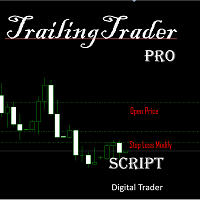
TrailingTradePro

TrailingTrader MT5 – Trailing Stop-Loss and Take-Profit Script 

Upon activation of the TrailingTrader script, open positions of specified trading instruments in the quote window will automatically implement an intelligent trailing stop strategy. This helps traders lock in profits and manage risks without the need for manual monitoring and adjustments.

Core Configuration Parameters

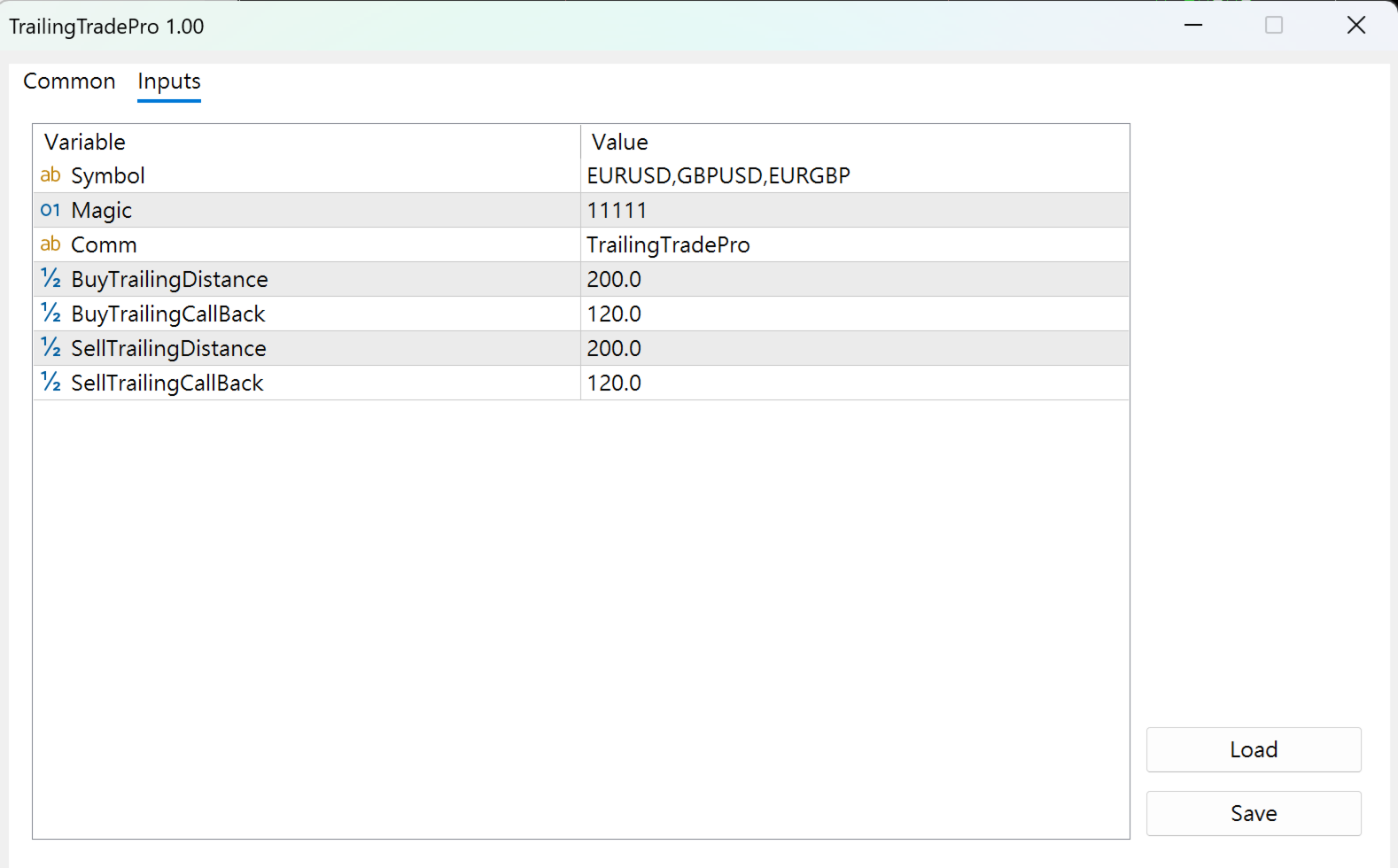
  • Symbol: Specify the trading instruments for which trailing stops should be applied. Use English commas (,) to separate multiple instruments (e.g., EURUSD,GBPUSD).
  • Magic: The identifier code (Magic Number) that matches the open positions you wish to apply the trailing stop to. Enter  -1  if no filtering by Magic Number is required.
  • Comm: The comment that needs to match the open positions. Leave this field blank if no filtering by comments is needed.
  • TrailingDistance: The point threshold at which the trailing stop is activated (i.e., once the position's profit reaches this number of points, the script automatically activates the trailing stop).
  • TrailingCallBack: The callback points for the trailing stop (once activated, if the market price retraces to this number of points, a profitable close will be triggered).

Working Principle

Once an open position is in profit and its profit reaches the set value of TrailingDistance, the script automatically activates the trailing stop. It sets the stop-loss line at “current market price - callback points”.

  • If the market price continues to move favorably, the stop-loss line will adjust accordingly, locking in additional profits.
  • When the market price reverses and touches the stop-loss line, the script executes a close operation, ensuring that earned profits are secured.
  • For multiple open positions of the same instrument, the trailing stop operates independently. Once all orders exceed the set profit range, their stop-loss lines will be adjusted simultaneously, providing unified risk control across the entire portfolio.

Key Features

  • Manual Trading Compatibility: Ideal for traders who prefer manual order placement but cannot monitor the market continuously. Once the trailing stop is triggered, it ensures that orders exit at a profit, avoiding profit erosion.
  • EA Trading Integration: Compatible with Expert Advisors (EAs). By using Magic Numbers or Comments, the script can precisely match orders generated by EAs, offering intervention-based trailing stop management and enhancing EA trading risk controls.
  • Multi-Condition Filtering: Supports filtering based on instrument, Magic Number, and comments, allowing trailing stops to be applied only to targeted orders. This flexibility accommodates various trading needs.

Activation Requirements

  • Ensure that the computer running MT5 is operational 24/7 with a stable internet connection to prevent interruptions in script execution.
  • It is recommended to synchronize the script with an official MT5 Virtual Private Server (VPS) post-activation. This ensures round-the-clock account monitoring and uninterrupted execution of the trailing stop strategy, unaffected by local device shutdowns or network outages.

By integrating these features, TrailingTrader MT5 provides a robust solution for securing profits and managing risks efficiently, catering to both manual traders and those utilizing automated strategies.


Recommended products
Session panel
Timo Mario Hoffmann
Session Panel for MT5 Session Panel is a free MT5 indicator that gives you a fast and convenient live overview of the major trading sessions directly from the chart. Monitor Tokyo, London, and New York session times, see which session is currently active, track countdowns to the next session, and view session overlap information in one compact dashboard. Built for traders who want better market timing, clearer session awareness, and a cleaner chart workflow in live market conditions. Session Pan
FREE
Object Synchronizer MT5 : Better focus/analysis of the price chart in many timeframes. Are you bored to save and load template many times for the same symbol for many chart timeframes? Here is the alternative. With this indicator, you enjoy creating objects across many charts, you can modify the same object in any chart, you can delete the same object in any chart. All objects you created/modified are always synchronized across all chart windows (with the same symbol). Save your time, you can fo
Basic Trade Buttons
Kriengsak Peitaisong
Basic Trade Buttons is a tool to help you to quickly open and close trades, place take profit and stop loss points by clicking on the button of each job that you preferred. Once you attached this tool to mt5 chart, the program will calculate a trade volume(Lots size) automatically to prepare to send to the trade server when you click on 'Buy' or 'Sell' button. Click on 'TP', 'SL' or 'Close' button to place take profit, stop loss based on the predefined levels or to close all open positions respe
This EA is primarily used for scalping XAUUSD. Purpose Removes emotion from trade management   - automatically protects positions and takes profits so you don't have to make difficult decisions under pressure. What It Does ️   Auto Stop Loss Sets SL based on recent highs/lows + buffer No more manual placement stress   Auto Partial Profits Two modes: Fixed Movement : Close 50% after X price movement R-Ratio : Close 50% at 1.2R profit target Locks in gains while letting winners run. ️   One
ATTENTION: the utility cannot work in the Strategy Tester, if you want to try the demo version for free for a week, or have any questions, write me an email! You can find my address on my user profile. TrendLine Auto Executor is a software capable of identifying the trendlines you have drawn on the chart and opening orders as soon as they are touched or exceeded. The software allows you to manage two orders at a time for each chart by tracking two groups of trendlines, one for each order, and e
Hisoka Trade Panel — v6.91 Description: Hisoka Trade Panel is a comprehensive on-chart trade management Expert Advisor for MetaTrader 5. It places a draggable, collapsible panel directly on your chart and lets you manage open positions — break-even locks, trailing stops, partial closes, and SL/TP modification — with one click. All risk math is dollar-based, so the same "BE 5$" button locks $5 of profit consistently across XAUUSD, BTCUSD, EURUSD or any other instrument, regardless of contract siz
Telegram Notification Worker (v5.31) Telegram Notification Worker is a high-performance, professional utility designed to bridge the gap between your MetaTrader 5 terminal and Telegram. It acts as a dedicated background worker that forwards custom alerts, trade events, and system status messages from any of your Expert Advisors (EAs) directly to your Telegram chat or channel. Key Technical Features: Asynchronous Messaging Engine: Unlike standard notification scripts, this worker uses an asynchr
FREE
Trading Rules Enforcer is a deterministic account-discipline monitor for trade-count, loss, time and exposure rules. Key functions: - Clear rule status dashboard - Trading-session restrictions - Overtrading controls - Symbol and Magic Number scope - Daily loss and exposure monitoring - Clear blocking reasons - Operational event history The utility enforces rules configured by the user. It does not generate entry signals, predict market direction or guarantee trading results. Test all rule comb
This utility can compare simultaneously time frames of different instruments and keep under control   the nine major time frames  of an instrument. It is composed by two changers, a crosshair and some additional components : the  multicharts time frames changer   is designed to simultaneously compare time frames for  up to thirty time frames  of different symbols with the  keyboard or the button the multicharts symbols changer can  link up to nine charts and control simultaneously the nine majo
Recovery Manager Panel MT5 is a manual order management panel for traders who want to manage open positions directly from the chart in a clearer and more organized way. This tool is not a signal robot. It does not predict market direction, generate entry signals, or trade automatically based on market forecasts. Instead, it helps traders work with positions that are already open. You can calculate possible recovery lot sizes, view estimated target levels on the chart, and use available floating
Magic Number Manager   is a professional trade management utility for MetaTrader 5 that provides centralized monitoring and control for 20+ Expert Advisors running simultaneously on a single account. Key Features: Performance Dashboard   - Real-time table displaying each EA's total trades, win rate, total profit, average trade, best/worst trade, current drawdown, and profit factor. Color-coded metrics for instant visual assessment. Batch Trade Management   - Close all open positions from a speci
Market Sessions Time PRO
Juan Facundo Valdes
4 (2)
Displays on chart up to  7 markets intraday sessions,   3 weekly ranges and  Daily OHLC levels,  fully customizable Each session and range can be shown or hidden, and be adapted to fit special intraday or intraweek periods according to each trader needs Define sessions start/end times using any of these modes: GMT/UTC time (adjustable to any timezone) Server/broker time (chart time)  Local time (your computer time) PRO version features Open and Close times with minutes presition : they can be
Cos copy trade client
Leatchai Limpapavich
COS COPY TRADE EA: USER MANUAL It must be used in conjunction with the master file. Cos copy trade master | Free Download Trading Utility for MetaTrader 5 1. System Overview & Architecture The COS Copy Trade system is a local, high-speed copying solution designed to replicate trades across accounts running on the same computer . It fully supports copying between different brokers and can mirror trades from an Investor Password account. 2. Installation & Setup Guide Step 1: Deploying the Master
AutoCloseTimer allows you to close positions and delete pending orders at a specified time. Usage Download and drag and drop AutoCloseTimer onto the chart. Check Allow AutoTrading in Common tab. Set parameters in Inputs tab. Notice: The close time must be later than the current market time. Input Parameters CloseSymbol - there are 2 options SymBol Of Chart - just close the symbol of the current chart All Symbols - close all symbols CloseTimerDay - specify a day for AutoCloseTimer. The default
Prop Calculator Assistant Stop blowing Prop Firm accounts due to bad math. Let the Assistant handle the risk. Prop Calculator Assistant   is the ultimate trade management panel designed specifically for traders attempting to pass funding challenges (FTMO, etc.) or managing funded capital. It replaces mental math and manual order dragging with a precision visual interface that keeps you strictly within your rules. This is   not   an auto-trading bot that guesses the market. It is a professional  
CloseByTimeEA
Aleksandr Vasiutin
CloseByTime Utility is a MetaTrader 5 service utility designed to automatically close open positions and delete pending orders at a specified time. It helps traders schedule the end of trading activity in advance, for example at the end of the day, before news releases, or before market close. The utility uses broker server time, supports weekday filtering, and can work with all symbols or only with a selected list of instruments. Features Automatically closes open positions at a specified time.
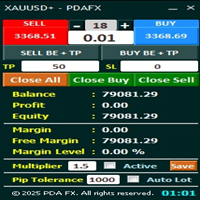
PDA FX One-Click Trade Manager – Your Essential Trading Utility Unlock a new level of trading efficiency with PDA FX One-Click Trade Manager – a must-have utility tool designed for serious forex traders. Whether you're scalping, day trading, or managing swing positions, this panel gives you full control in a clean, lightweight interface. One-Click Execution – Instantly place Buy or Sell orders with minimal delay and full accuracy. Smart TP & SL Management – Modify all open trades with a sing
DDKiller Pro
Njaratahiry Michael Randrianiaina
Stop Blowing Your Account. Once and For All. DDKiller Pro is the MT5 risk guardian that runs silently on your chart and shuts down trading the moment you hit a limit — whether you're grinding a prop firm challenge or managing your own CFD account. The problem every trader knows: You set your rules. You break them anyway. One revenge trade. One overleveraged position. One session that erases a month of gains. DDKiller Pro removes that decision from your hands entirely. What it does: The second yo
Grid Manager — Manual Multi-Basket Grid Assistant for MT5 Grid Manager is a hands-on control panel for building and managing grid "baskets" directly on your chart. You decide the direction and the moment; the tool opens the grid, manages every leg, and protects the position with money-based risk controls, on-chart breakeven/SL/TP lines, and one-click actions. It is an execution and management assistant — fast, visual, and fully under your control. What it is — and what it is not Grid Manager is
Guardian Magic GT
Carlos Eduardo Rivas Istacuy
Guardian Magic GT - Risk Management Expert Advisor for MetaTrader 5 PROTECT YOUR TRADING CAPITAL WITH INTELLIGENT RISK MANAGEMENT Guardian Magic GT is a professional-grade Expert Advisor designed to safeguard your trading operations by implementing sophisticated risk control mechanisms. Whether you run a single bot or manage multiple automated trading systems simultaneously, Guardian Magic GT provides real-time monitoring and automatic position management to ensure your account stays within your
AP Manager
Ardian Putra
Product Title AP Manager – Auto SL, TP, Break Even & Trailing Stop for MT5 Product Description Take full control of your risk management with AP Manager , a powerful and flexible tool designed to automatically manage Stop Loss, Take Profit, Break Even, and Trailing Stop for all your trades. This utility is perfect for traders who want to protect profits, minimize losses, and trade with discipline — without constantly monitoring the charts. Key Features Automatic Stop Loss & Take Pr
It has never been so easy to manage the risk of your account until now, this tool will allow you to have full control of your capital and manage your entries in the synthetic index derivative markets, in an easy, practical and safe way. The available input and configuration parameters are as follows :  RISK MANAGEMENT 1. Value of your account: Here as its name says you will place the value corresponding to the size of your account, for example if your account is 150 dollars the corresponding val
Automated Report Generator for the Spanish Treasury This utility allows you to generate automated reports for the Spanish treasury with several advantages: A detailed report is generated in an HTML file in the MetaTrader 5 base directory. This report includes all operations individually. For accounts nominated in another currency, the report will automatically generate a profit column in euros using the same broker data. Profits in other currencies will be accounted for as indicated by the Spa
CosmiCLab SMC FIBO CosmiCLab SMC FIBO is a professional trading indicator designed for traders who use Smart Money Concepts (SMC), market structure analysis and Fibonacci retracement levels. The indicator automatically detects market swings and builds Fibonacci levels based on the latest impulse movement. It also identifies market structure changes such as BOS (Break of Structure) and CHOCH (Change of Character), helping traders understand the current market direction. CosmiCLab SMC FIBO also pr
Forget about enabling templates when you launch the window. Auto Template Master Service  is a professional utility tool that runs as a system service in MetaTrader 5, and it will do it for you. Unlike traditional indicators or expert advisors (EAs), the program runs in the background of the entire terminal and doesn't require you to add it to each window individually. As soon as you open a new chart of any instrument (Forex, Stocks, Crypto), the service immediately detects the new window and a
Atlas Trade Desk
Bernhard Wurzlbauer
Atlas Trade Desk MT5 Atlas Trade Desk MT5 is a visual trade panel, risk manager and lot calculator for manual MetaTrader 5 traders. Plan market and pending orders directly on the chart, calculate position size from your selected risk, adjust Entry, Stop Loss and Take Profit visually, and manage open positions from one clean dashboard. The tool is built for discretionary traders who want faster order preparation, clearer risk control and safer position management without switching between multipl
Most traders don't lose because of bad analysis. They lose because they couldn't close fast enough. Because they fat-fingered  the wrong lot size. Because a single news spike wiped out three winning trades  before they could react. That's exactly what Apex Trade Manager Pro was built to fix. This is a visual trading panel for MetaTrader 4 and MetaTrader 5. It sits on  your chart and puts every critical trade action — closing, scaling, setting  stops, opening orders — one click away. No menus
Stop calculating lot sizes manually and protect your funded accounts! Apex Panel Pro is the ultimate institutional-grade Trade Manager and Risk Management Utility for MetaTrader 5. Designed for Prop Firm traders, scalpers, and algorithmic execution, it transforms your chart into a high-speed command center with Smart Grid DCA, Pyramid, Virtual Stealth Exits, and automated Drawdown Shields. 1. Risk Management & Position Sizing Risk % Sizing: Accurately calculate lot size based on a strict per
Auto Stop Loss MT5
Nabil Oukhouma
5 (1)
The "Set & Forget" Risk Manager for Multi-Asset Trading Never Leave a Trade Unprotected. Auto Stop Loss (MT5 Manager) is the ultimate background utility for traders who prioritize safety. Unlike standard panels, this tool works tirelessly behind the scenes to instantly secure every trade you place. Whether you open trades manually or via another EA, this manager ensures every position has a hard Stop Loss, Take Profit, and dynamic Trailing Stop attached immediately. The Game Changer:  Manage yo
Fast Chart Navigator MT5 - The Ultimate Symbol Switching Experience Tired of the cluttered Market Watch window taking up your precious screen space? Fast Chart Navigator is a high-performance utility designed for professional traders who demand speed, aesthetics, and a clean workspace. Built with efficiency in mind, this tool allows you to navigate through all your symbols directly from the chart with a single click, featuring a fully interactive UI that feels like a native part of your MetaTrad
Buyers of this product also purchase
Trade Assistant MT5
Evgeniy Kravchenko
4.41 (216)
It helps to calculate the risk per trade, the easy installation of a new order, order management with partial closing functions, trailing stop of 7 types and other useful functions. Additional materials and instructions Installation instructions - Application instructions - Trial version of the application for a demo account Line function -   shows on the chart the Opening line, Stop Loss, Take Profit. With this function it is easy to set a new order and see its additional characteristics bef
Forex Trade Manager MT5
InvestSoft
4.98 (673)
Trade Manager MT5 is an advanced position size calculator and trade management tool for MetaTrader 5, designed to help traders plan trades faster, control risk more precisely, and manage open positions directly from the chart. It combines order placement, risk based lot calculation, Stop Loss and Take Profit management, Break Even, Trailing Stop, Partial Close, Equity Protection, and external trade management in one panel. Whether you trade forex, indices, metals, commodities, crypto, or future
TradePanel MT5
Alfiya Fazylova
4.88 (167)
Trade Panel is a multi-functional trading assistant. The app contains over 50 trading functions for manual trading and allows you to automate most trading tasks. Before making a purchase, you can test the demo version on a demo account. Download the trial version of the application for a demonstration account: https://www.mql5.com/en/blogs/post/750865 . Full instructions here . Trade. Allows you to perform trading operations in one click: Open pending orders and positions with automatic risk cal
Local Trade Copier EA MT5
Juvenille Emperor Limited
4.97 (146)
Experience exceptionally fast trade copying with the   Local Trade Copier EA MT5 . With its easy 1-minute setup, this trade copier allows you to copy trades between multiple MetaTrader terminals on the same Windows computer or Windows VPS with lightning-fast copying speeds of under 0.5 seconds. Whether you're a beginner or a professional trader, the   Local Trade Copier EA MT5   offers a wide range of options to customize it to your specific needs. It's the ultimate solution for anyone looking t
Astro Trade MT5
Indra Maulana
5 (2)
AstroTrade Trading Assistant AstroTrade is a comprehensive multi-functional trading utility developed for the MetaTrader 5 platform. It integrates essential tools for trade execution, risk management, and technical monitoring into a single unified interface. The application is designed to assist traders in managing their daily operations through a visual and structured environment. Visual Trade Execution and Risk Management The application includes a specialized trading panel that assists in c
================================================================================ POC BREAKOUT - V20.72. Full Professional Grade Toolkit ================================================================================ POC Breakout is a full MetaTrader 5 trading dashboard for discretionary traders who want breakout signals, Point of Control (POC) context, volume profiles, order flow, market structure, news, alerts, and advanced trade planning in one professional workspace. Attached directly to you
Beta Release The Telegram to MT5 Signal Trader is nearly at the official alpha release. Some features are still under development and you may encounter minor bugs. If you experience issues, please report them, your feedback helps improve the software for everyone. Telegram to MT5 Signal Trader is a powerful tool that automatically copies trading signals from Telegram channels or groups directly to your MetaTrader 5 account. It supports both public and private Telegram channels, and you can conn
Telegram to MT5 Multi-Channel Copier automatically copies trading signals from your Telegram channels directly into MetaTrader 5. No bots, no browser extensions, no manual copying. You receive a signal on Telegram and the EA opens the trade on your terminal in a few seconds. The product includes two components: a Windows application that listens to your Telegram channels, and this Expert Advisor that executes the signals on your MT5 terminal. An MT4 version is also available. Setup guide and app
HINN MagicEntry Extra
ALGOFLOW OÜ
4.71 (17)
LIMITED SUMMER SALE -40% !   ONLY $30 insead of $50!  Maximum real discount!  ONLY UNTIL 08/22 HINN MAGIC ENTRY – the ultimate tool for entry and position management! SIMPLE. FASTEST. INTUITIVE. MAX AUTOMATED. Place orders by selecting a level directly on the chart! full description   ::  demo-version  :: 60-sec-video-description Key features: - Market, limit, and pending orders - Automatic lot size calculation - Automatic spread and commission accounting - Unlimited partitial take-profits  -
Grid Manual MT5
Alfiya Fazylova
4.73 (22)
Grid Manual is a trading panel for working with grid strategies. The utility is universal, has flexible settings and an intuitive interface. It works with a grid of orders not only in the direction of averaging losses, but also in the direction of increasing profits. The trader does not need to create and maintain a grid of orders, the utility will do it. It is enough to open an order and the "Grid manual" will automatically create a grid of orders for it and will accompany it until the close. F
Trade copier MT5
Alfiya Fazylova
4.58 (52)
Trade Copier is a professional utility designed to copy and synchronize trades between trading accounts. Copying occurs from the account / terminal of the supplier to the account / terminal of the recipient, which are installed on the same computer or VPS . PROMOTION - If you have already purchased the "Trade Copier MT5," you can receive the "Trade Copier MT4" for free (for copying MT4 > MT5 and MT4 < MT5). For more detailed information about the conditions, please contact us via private message
Exp COPYLOT CLIENT for MT5
Vladislav Andruschenko
3.97 (35)
Professional Trade Copier for MetaTrader 5 Fast, professional, and reliable trade copier for MetaTrader . COPYLOT allows you to copy Forex trades between MT4 and MT5 terminals with support for Hedge and Netting accounts. COPYLOT MT5 version supports: - MT5 Hedge to MT5 Hedge - MT5 Hedge to MT5 Netting - MT5 Netting to MT5 Hedge - MT5 Netting to MT5 Netting - MT4 to MT5 Hedge - MT4 to MT5 Netting MT4 version Full Description +DEMO +PDF How To Buy How To Install How to get Log Files H
Telegram To MT5 Ultra
Mirel Daniel Gheonu
5 (4)
Telegram To MT5 — Signal Copier Turn the trading calls from your Telegram channels into real MT5 orders — automatically, on as many accounts as you like, with risk and rules fully under your control. Telegram To MT5 connects the VIP / signal channels you already follow on Telegram to your MetaTrader 5 terminal. A free companion desktop app reads the messages (even from channels that block bots), and this Expert Advisor executes them on your account — applying your own risk settings, symbol mappi
Premium Trade Manager - The Trade Panel With a Coach Built In Premium Trade Manager puts a trading coach inside your chart, with a full execution engine underneath it. Set the trade up the way you always do, then let Max, your AI trading coach, read that exact setup against your live account and give you a straight verdict before you commit: is the stop disciplined, is the risk sane, is a high-impact release minutes away, are you near a prop-firm limit. Below sits the engine that runs everything
Timeless Charts
Samuel Manoel De Souza
5 (8)
Timeless Charts is an all-in-one trading utility for professional traders. It combines custom chart types such as Seconds Charts and Renko with advanced order flow analysis using Footprints , Clusters , Volume Profiles , VWAP studies, and anchored analysis tools for deeper market insight. Trading and position management are handled directly from the chart through an integrated trade management panel , while Market Replay and Virtual Accounts provide environments for practicing trading skills and
Footprint Chart Pro — Professional OrderFlow EA for MetaTrader 5 Version 6.34 | Professional tool for real traders | Institutional-Grade Visualization DEMO USERS - PLEASE SELECT EVERY TICK / REAL TICK WHEN TESTING AND YOU HAVE DOWNLOADED HISTORICAL DATA. IF YOU SEE A WAITING SCREEN AND IT IS NOT DOWNLOADING, IT MEANS YOU HAVE LOW HISTORICAL DATA. TRY 1 MIN AND 5 MIN FIRST ON 1 DAY DATA. ONE DAY DATA SHOULD BE THE NEWEST AND MOST CURRENT DATE. PLEASE WAIT UNTIL THE MARKET HAS ROLLED OVER PERIOD.
Trade Copier Ultimate
Janitha Sandaruwan Amaradasa Wickramasingha Arachchilage
5 (4)
Trade Copier Ultimate - Telegram to MT5 Signal Copier Trade Copier Ultimate automatically copies Telegram trading signals into MetaTrader 5. The EA can read signal messages, detect the symbol, order type, entry price, Stop Loss, Take Profit levels and selected update commands, then execute or manage the trade in MT5 using your lot and risk settings. It is more than a basic Telegram to MT5 copier. TCU also supports Bot API and user-account Bridge workflows, Discord signal routing, local MT5 to MT
FarmedHedge Pair Trading Dashboard
Tanapisit Tepawarapruek
5 (3)
Farmed Hedge Yield Farming | All Markets (Manual - Hybrid - Semi/Automated EA) VERIFIED TRADING RESULTS - Farmed Hedge Yield Axi Copy:  https://www.mql5.com/en/signals/2356376 - Farmed Hedge Yield Exn Copy:   https://www.mql5.com/en/signals/2356404 - Farmed Hedge Yield V Copy:  https://www.mql5.com/en/signals/2357156 * Before purchasing, please feel free to send me a message if you have any questions about the product or setup. ** After purchase,  Contact me via private message to receive t
Global Investing FX Terminal
Santiago Nicolas Pla Casuriaga
The Global Investing FX Terminal is an all-in-one FX dashboard for MetaTrader 5 — CB policy rates, CFTC COT positioning, carry rankings, economic surprises, options skew, retail sentiment, and correlations, thirteen panels in total — rendered on a single zero-flicker canvas overlay and refreshing every 10 seconds from one attached EA. No external software required. Professional FX analysis requires simultaneous access to data that normally lives in separate platforms: rate derivatives, governmen
Signal Trading View to MT5 Pro
Mirel Daniel Gheonu
4.5 (2)
Signal TradingView to MT5 Pro  Instant professional execution between TradingView and MetaTrader 5 Automate your trading strategy with the most robust communication bridge between TradingView alerts and real execution in MT5. Designed for traders who demand speed, flexibility, and impeccable risk management, this Expert Advisor transforms any alert message into a precise market or limit order.   Install and TEST the TRIAL version HERE STRENGTHS AND ADVANTAGES Universal Parsing Engine (Propriet
Trading Chaos Expert
Gennadiy Stanilevych
5 (11)
This software has no equals in the world and represents a universal trade "console" covering trading signals, automated market entry, setting of Stop Loss and Take Profit, as well as Trailing Profit for multiple trades at the same time in a single open window. Intuitive control of the Expert Advisor in "three clicks" ensures a comprehensive use of all its functions on different computers, including tablets PCs. Interacting with additional signal indicators that mark the chart to give a real mark
Power Candles Strategy Scanner - Self-Optimizing Multi-Symbol Setup Finder Power Candles Strategy Scanner runs the same self-optimizing engine that powers the Power Candles indicator - on every symbol in your Market Watch, side by side. One panel tells you which symbols are statistically tradable right now, which strategy wins on each, the optimal Stop Loss / Take Profit pair, and pings you the moment a fresh signal fires. This tool is part of the Stein Investments ecosystem - 18+ tools plus Max
MT5 to Telegram Signal Provider turns your trading account into a signal provider. Every trade action, whether manual, by EA or from your phone, is instantly sent as a message to Telegram. You can fully customize the format or use a ready-made template for quick setup. [ Demo ] [ Manual ] [ MT4 Version ] [ Discord Version ]     New: [ Telegram To MT5 ] Setup A step by step user guide is available. Key Features Ability to customize order details sent to subscribers You can create a tiered subs
Custom Alerts AIO: All-in-One Market Scanner – No Setup Required Overview Custom Alerts AIO is the fastest and easiest way to monitor multiple markets for real-time trading signals—without any setup or extra licenses. It comes with all required Stein Investments indicators already embedded, making it the perfect plug-and-play solution for traders who value simplicity and performance. Just load it to any chart and start receiving alerts across Forex, Metals, Crypto, and Indices. Shares can be a
Welcome to ENTRY IN THE ZONE WITH SMC MULTI TIMEFRAME Entry In The Zone and SMC Multi Timeframe is a real-time market analysis tool based on Smart Money Concepts (SMC), designed to analyze market structure, price direction, and key trading zones. It supports both Single-Timeframe Analysis and Multi-Timeframe Analysis, providing a clearer view of the overall market structure across multiple timeframes, with real-time BUY / SELL signals that do not repaint. It is designed to help filter trading op
Trade Dashboard MT5
Fatemeh Ameri
4.95 (132)
Trade Dashboard simplifies how you open, manage, and control your trades, with built-in lot size calculation. It allows you to execute trades, manage risk, and control positions directly on the chart, with tools such as partial close, breakeven, and trailing stop. Designed to reduce manual work and help you stay focused on your trading decisions. A demo version is available for testing. Detailed explanations of features are provided within the MQL5 platform. Installation instructions are include
Trade Manager DaneTrades
Levi Dane Benjamin
4.23 (30)
DaneTrades Trade Manager is a professional trade panel for MetaTrader 5, designed for fast, accurate execution with built‑in risk control. Place market or pending orders directly from the chart while the panel automatically calculates position size from your chosen risk, helping you stay consistent and avoid emotional decision‑making. The Trade Manager is built for manual traders who want structure: clear risk/reward planning, automation for repeatable management, and safeguards that help reduc
Anchor Trade Manager
Kalinskie Gilliam
5 (7)
Anchor: The EA Manager Your EAs manage their own trades. Anchor manages the account around them. Anchor gives you one place to control your EAs, manage risk and decide when trading is allowed. Any EA, any vendor, any broker or symbol. No source-code changes required. The Problem Most EAs only know what they are doing. They cannot see when another EA is already trading, when several EAs open and are stacking risk or when the account has reached your loss limit. Even using just one EA, it may not
Working Demo Download Copy Cat More Trade Copier MT5 is a local trade copier and a complete risk management and execution framework designed for today’s trading challenges. From prop firm challenges to personal portfolio management, it adapts to every situation with a blend of robust execution, capital protection, flexible configuration, and advanced trade handling. The copier works in both Master (sender) and Slave (receiver) modes, with real-time synchronization of market and pending orders,
VirtualTradePad PRO SE MT5 — professional trading control center for MetaTrader 5 VirtualTradePad PRO SE is a premium chart-based trading panel and trade-management workspace for MetaTrader 5 . It is designed for traders who want faster execution, clearer position control, structured trade management, visual level planning and a professional workflow directly from the chart. This is not only a BUY / SELL panel. PRO SE combines manual trading, pending orders, position management, partial exits, b
More from author
In multi-asset, multi-position trading environments—such as those involving forex, stocks, gold, and other instruments—traders often face a critical pain point: when holding multiple positions in the same instrument, it’s difficult to quickly and intuitively assess the current market price relative to all long and short positions. This makes it challenging to accurately determine the overall average entry cost, leading to delayed stop-loss and take-profit decisions. The problem worsens with mixe
FREE
In multi-asset, multi-position trading environments—such as those involving forex, stocks, gold, and other instruments—traders often face a critical pain point: when holding multiple positions in the same instrument, it’s difficult to quickly and intuitively assess the current market price relative to all long and short positions. This makes it challenging to accurately determine the overall average entry cost, leading to delayed stop-loss and take-profit decisions. The problem worsens with mixe
FREE
Core Positioning Advanced analytical tool designed specifically for MT4, providing in-depth analysis of trading history, uncovering data insights, optimizing strategies, and enhancing profitability. Core Usage Strategy Performance Evaluation: Analyzes profitability, stability, and risk to provide an objective rating from A+ to D. Trading Pattern Discovery: Identifies high-quality assets, time periods, and profit-making habits suited to different market conditions. Risk Management Optimization: C
FREE
Core Positioning Advanced analytical tool designed specifically for MT5, providing in-depth analysis of trading history, uncovering data insights, optimizing strategies, and enhancing profitability. Core Usage Strategy Performance Evaluation: Analyzes profitability, stability, and risk to provide an objective rating from A+ to D. Trading Pattern Discovery: Identifies high-quality assets, time periods, and profit-making habits suited to different market conditions. Risk Management Optimization: C
FREE
Filter:
No reviews
Reply to review