Elliott W3 Navigator
- Experts
-
Duy Van Nguy
 EA Developer — XAUUSD Specialist | DVN CORE
I build high-performance Expert Advisors & accept Custom EA orders.
━━━━━━━━━━━━━━━━━━━━━
MY EA PORTFOLIO:
✦ DVN Core GOLD LION - Version: 1.30
- Activations: 9
ELLIOTT W3 NAVIGATOR — VISUAL WAVE 3 BREAKOUT EA FOR METATRADER 5
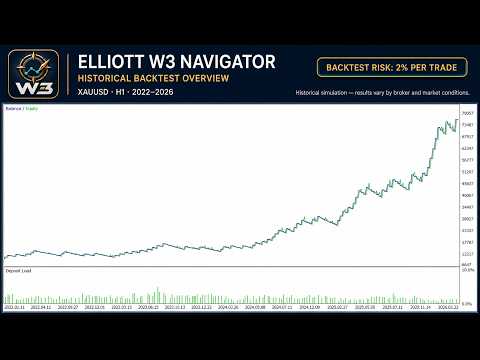
Elliott W3 Navigator turns a structured continuation approach into a clear, automated trading workflow. It is designed for traders who want rules-based entries, visible trade context, and configurable risk controls without constantly interpreting the chart manually. The on-chart interface shows what the EA has detected, what it is waiting for, and how an active setup is being managed.
LIVE SIGNAL
A public MQL5 Signal will be added soon.
PRICING
Launch offer: USD 79
50% OFF
This introductory price applies during the first 7 calendar days after the product is released on MQL5 Market. After this period, the promotional price ends and the regular listing price will apply.
HOW IT WORKS
The EA waits for a confirmed directional market structure instead of reacting to every price movement. It then checks whether the pullback remains within the accepted setup area and waits for a completed candle to confirm that continuation has resumed.
When all active conditions agree, the EA opens a position in the confirmed direction and assigns protective exit levels based on current market movement. A time-based exit can also close a position that remains open beyond the configured holding period.
If a setup is incomplete, too old, blocked by a filter, or unsuitable for execution, the EA remains inactive. The chart panel explains the current state so the user can see why no trade has been opened.
KEY FEATURES
- Clear chart interpretation: displays the detected 0–1–2 structure, retracement area, continuation trigger, and planned trade levels.
- Confirmed entries: evaluates signals from completed candles to reduce reactions to unfinished price movement.
- Flexible deployment: works with the symbol of the attached chart and a configurable analysis timeframe.
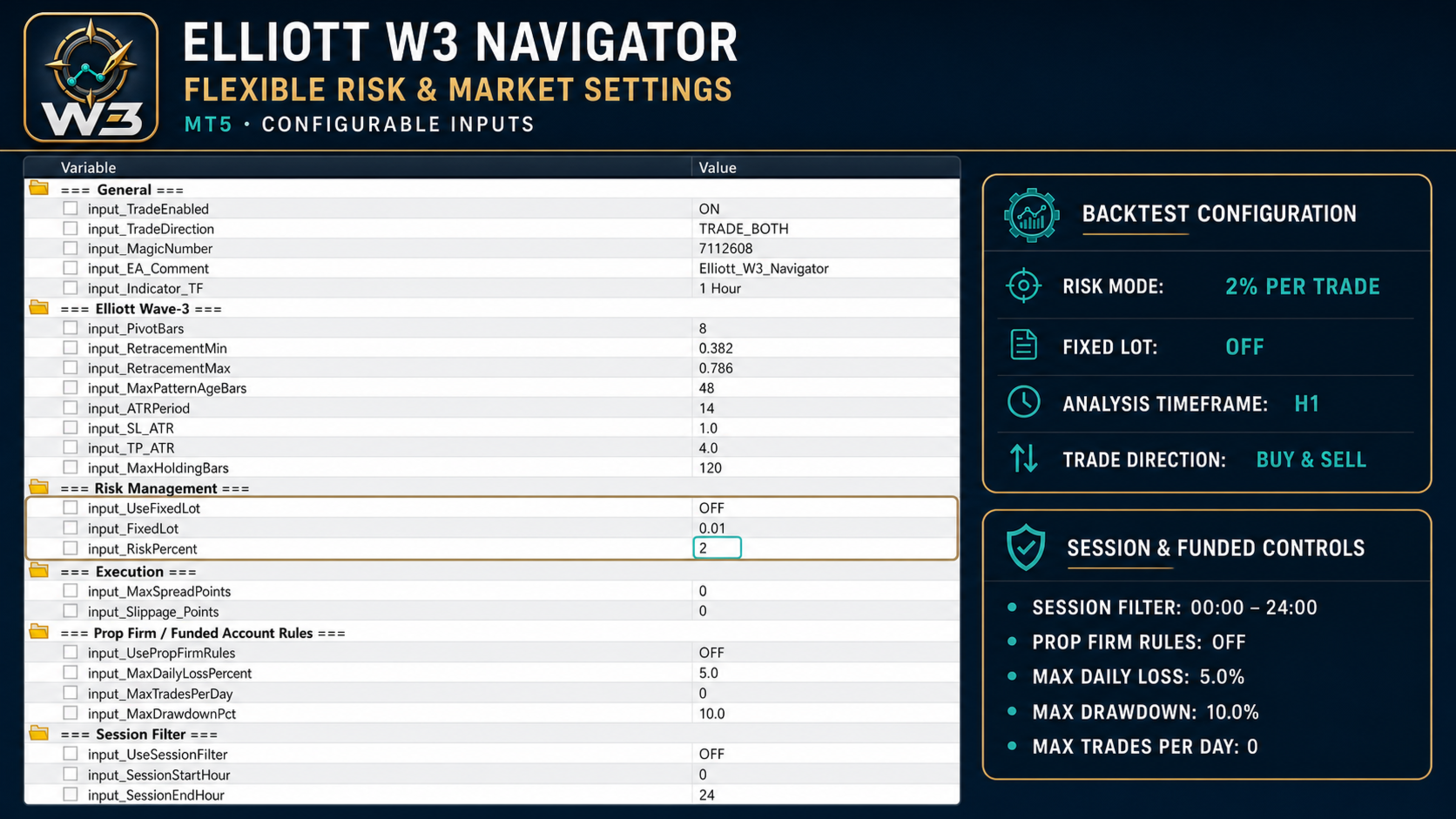
- Two sizing methods: choose a fixed trading volume or balance-based percentage risk sizing.
- Structured position management: uses protective Stop Loss, Take Profit, and an optional maximum holding period.
- Optional trading controls: includes spread, session, weekday, daily-loss, drawdown, and trades-per-day filters.
- Controlled exposure: allows only one open position for the same symbol and Magic Number.
- Practical visual interface: provides English status messages, setup age, position age, waiting reasons, tooltips, and a compact panel mode.
RECOMMENDED SETTINGS
| STARTING CONFIGURATION | |
|---|---|
| Platform | MetaTrader 5 |
| Symbol | Default: XAUUSD. The EA also operates on the symbol of the chart to which it is attached. Test each broker-specific symbol before live use. |
| Analysis timeframe | H1 by default; configurable in the inputs. |
| Trade direction | BUY and SELL by default; either direction can be restricted. |
| Position sizing | Fixed Lot is enabled by default at 0.01. Percentage risk is available when Fixed Lot is disabled and defaults to 1.0%. |
| Broker / Account Type | Compatible with any MT5 broker and account type; Hedging accounts with ECN/RAW conditions are preferred. |
| Recommended brokers | Exness or IC Markets (RAW/ECN account types). Test the exact symbol and account type before live use. |
| Recommended Leverage | 1:100 or higher. |
| Minimum Deposit | USD 200 — conservative risk settings are recommended. |
| VPS | Recommended when continuous operation is required. |
| Initial setup | Start with the default inputs in the Strategy Tester. Change one group of settings at a time and validate the result on unseen data. |
IMPORTANT NOTES
- Each EA instance trades the symbol of its attached chart. To monitor several symbols, attach separate instances to separate charts.
- Use a unique Magic Number when running independent configurations that should be managed separately.
- The selected analysis timeframe controls signal evaluation even when the chart is opened on another timeframe.
- Fixed Lot is enabled by default. The Risk Percent value is used only after Fixed Lot has been disabled.
- The optional session filter uses broker server time.
- The EA contains no grid, martingale, or loss-recovery averaging sequence.
- Spread and execution conditions can change the entry price or prevent an otherwise valid setup from being traded.
- The optional funded-account controls are operational safeguards, not a guarantee that any proprietary trading challenge will be passed.
- Trading leveraged products involves risk of loss. Test carefully and use position sizing appropriate for your circumstances.
FAQ
Q: Do I need a set file?
A: No set file is required to begin testing. Load the EA and retain the default inputs for the first Strategy Tester run. After broker-specific evaluation, you can save your own configuration as a set file.
Q: Can the EA trade different symbols and timeframes?
A: Yes. Each instance uses the symbol of its chart, while the analysis timeframe is selected in the inputs. Use separate charts and suitable Magic Numbers for independent deployments.
Q: How does percentage risk sizing work?
A: Disable Fixed Lot to activate Risk Percent sizing. The EA then calculates volume from account balance, the planned protective distance, and the symbol's tick-value information, subject to the broker's minimum, maximum, and volume step.
Q: Does it use grid or martingale?
A: No. The source contains no grid, martingale, or averaging sequence. It limits exposure to one open position for the same symbol and Magic Number.
Q: Is it suitable for funded accounts?
A: It includes optional daily-loss, drawdown, and trades-per-day controls. These controls can support a risk policy, but they do not guarantee compliance with every firm's rules or successful completion of a challenge.
Q: Which broker should I use?
A: Exness or IC Markets are preferred. Test the exact symbol and account type before live use.
SUPPORT
For product support, contact the seller through the MQL5 product page. Include the EA version, symbol, analysis timeframe, broker server name, relevant input settings, and screenshots or Journal messages so the issue can be reviewed efficiently.
Current release: Version 1.30 — Elliott W3 Navigator identity, configurable symbol/timeframe deployment, professional English chart visualization, and integrated execution and risk controls.