
DVN Core Trendline Breakout
- Experts
-
Duy Van Nguy
 EA Developer — XAUUSD Specialist | DVN CORE
I build high-performance Expert Advisors & accept Custom EA orders.
━━━━━━━━━━━━━━━━━━━━━
MY EA PORTFOLIO:
✦ DVN Core GOLD LION - Version: 2.7
- Updated: 9 August 2026
- Activations: 9
DVN Core Trendline Breakout — Automated Boundary Break EA for Any Symbol on MetaTrader 5
DVN Core Trendline Breakout gives traders a fully automated way to capture momentum when price confirms a decisive structural break — without drawing a single line manually. The EA identifies key price boundaries on its own, monitors them in real time, and enters the moment conditions are met.
Designed to work across any symbol and any timeframe, it comes with a built-in long-term directional filter, an adaptive trailing stop, and a comprehensive Prop Firm Mode — so it fits both personal trading accounts and funded challenge environments right out of the box.
LIVE SIGNAL
LIVE SIGNAL (Verified on MQL5 — publicly visible)
HOW IT WORKS
The EA continuously scans recent price history to locate swing points where price has reversed multiple times. When at least two confirmed turning points align on the same trajectory, the EA recognizes a valid price boundary — either a rising floor or a declining ceiling — and begins monitoring it for a break.
When price closes decisively beyond one of these boundaries, a trade is triggered in the direction of the break. A secondary long-term directional filter ensures that entries are only taken when the broader market bias agrees — trades against the dominant direction are blocked automatically. This keeps the EA aligned with the larger picture without requiring any manual input.
Once a position is open, an adaptive trailing stop engages after the trade moves sufficiently in your favor. The stop then follows price automatically, locking in gains as the move extends. Each trade also carries its own fixed stop loss from the moment it opens — there is no scenario where a position runs without protection.
An optional randomized execution delay adds a layer of protection for prop firm environments, introducing a variable pause between signal detection and order submission. This prevents predictable entry timing that some prop firms flag as automated pattern behavior.
KEY FEATURES
- Fully automated boundary detection — the EA identifies and monitors structural price levels on its own; no manual trendline drawing, no chart setup required
- Works on any symbol and any timeframe — compatible with forex pairs, gold, indices, and other instruments; optimized default settings target XAUUSD on a medium-term chart
- Long-term directional filter — trades are only opened in the direction the broader market is moving; entries against the dominant bias are blocked without any manual input
- Adaptive trailing stop — once a trade is sufficiently in profit, the stop follows price automatically to protect gains; activates only after a meaningful move, avoiding premature stop-outs
- Two stop loss modes — choose between a fixed distance stop or a stop placed at the nearest relevant swing point, adapting to the structure of each individual trade
- Flexible position sizing — run fixed lot mode for full manual control, or switch to percentage-based risk mode where lot size adjusts automatically to your account balance
- No martingale, no grid — every position is independent and carries its own stop loss from the moment it opens; the EA never adds to a losing position
- Prop Firm Ready — built-in daily loss limit, total drawdown cap, profit target auto-halt, MQL5 economic calendar news filter, max spread guard, and daily trade limit; all configurable to match your challenge rules
- Randomized entry delay — optional feature that introduces a variable pause before order submission, reducing the predictability of execution timing for prop firm compliance
- Real-time dashboard — on-chart panel displays current signal status, active boundary levels, open position details, session statistics, and prop firm progress in one view
- Smart error handling — three-tier order retry logic distinguishes temporary market closures from network errors and fatal failures; the EA never enters an unrecoverable error loop
RECOMMENDED SETTINGS
| RECOMMENDED SETTINGS | |
|---|---|
| Symbol | Any symbol — default optimized for XAUUSD (Gold) |
| Timeframe | Any timeframe — default H1 recommended for XAUUSD |
| Minimum deposit | $200 (default 0.01 lot) — $500+ recommended for Risk% mode |
| Leverage | 1:100 or higher recommended |
| Account type | Hedging recommended; Netting compatible |
| Broker type | ECN/STP with low spread and fast execution strongly recommended |
| Recommended brokers | Exness (Pro / Raw Spread), IC Markets (Raw) |
| VPS | Strongly recommended for 24/5 uninterrupted operation |
Set files for additional symbols (EURUSD, US30, GBPUSD, and more) are available in the buyer support group. Contact via MQL5 inbox after purchase to receive access.
PERFORMANCE
| BACKTEST (Strategy Tester, 99% tick quality) | |
|---|---|
| Period | Jan 2025 – May 2026 |
| Symbol | XAUUSD |
| Initial deposit | $200 |
| Net profit | $1,038.15 |
| Win rate | 59.76% |
| Profit factor | 1.91 |
| Max drawdown | 10.94% |
| Total trades | 82 |
Past results are not indicative of future performance. Results will vary depending on broker conditions, spread levels, and market environment.
IMPORTANT NOTES
- No martingale, no grid — every trade is independent and protected by its own stop loss from the moment of entry; the EA never scales into a losing position
- Boundary detection requires sufficient price history — the EA needs at least two confirmed swing points to form a valid boundary line; in low-activity or newly opened markets it may wait before generating its first signal
- Trend filter may reduce trade frequency — when the long-term directional filter is active, signals that run counter to the dominant bias are blocked; this is by design and helps avoid counter-trend entries in trending conditions
- Prop Firm Mode must be configured manually — daily loss limit, total drawdown cap, and profit target values are not pre-filled; set these to match your specific challenge rules before running on a funded account
- VPS is strongly recommended — the EA monitors conditions on every tick and requires a stable, low-latency connection to execute signals accurately; running on a local PC risks missed entries due to disconnections
- Backtest results reflect historical conditions — live performance will differ based on broker spread, execution speed, and current market behavior; always forward-test on a demo account first
- Set files for additional symbols are available — default parameters are optimized for XAUUSD; contact via MQL5 inbox after purchase for set files covering other instruments
FAQ
Q: Do I need a set file to run this EA?
A: No set file is required to get started. The EA runs on its default parameters immediately after attaching to a chart — the only setting you may want to adjust is the lot size to match your account and risk preference. Additionally, if you are trading on a prop firm challenge, enable Prop Firm Mode and configure the daily loss, total drawdown, and profit target values to match your challenge rules. If you want to filter out high-impact news events, the built-in news filter can be enabled separately. These options are available in the input settings.
Q: Which symbols does this EA support?
A: The EA is designed to work on any symbol available in your broker's terminal — forex pairs, gold, indices, commodities, and more. Default parameters are calibrated for XAUUSD. Set files for other instruments are available to buyers through the support group.
Q: How does the EA perform in sideways or choppy markets?
A: The EA requires clearly defined price boundaries with at least two confirmed touch points to generate a signal. In low-structure or choppy conditions, valid boundaries form less frequently — trade activity naturally decreases. The long-term directional filter adds a further layer by blocking entries that do not align with the broader market direction.
Q: What spread level does this EA require?
A: The EA performs best with tight spreads. ECN/STP brokers with raw or near-raw spread conditions are strongly recommended. You can set a maximum spread threshold in the input settings — the EA will skip entries automatically if the spread exceeds that level at signal time.
Q: Is this EA suitable for prop firm challenges?
A: Yes. Prop Firm Mode includes a configurable daily loss limit, total drawdown cap, profit target auto-halt, MQL5 economic calendar news filter, maximum spread guard, and daily trade limit. An optional randomized entry delay is also available to vary execution timing. Configure all values to match your specific challenge rules before running.
Q: Is there ongoing support after purchase?
A: Yes — contact via MQL5 private message after purchase. You will be added to the buyer support group where set files for additional symbols are shared and updated regularly. All version updates are delivered free of charge through the MQL5 update system. Response time is typically within 24 hours.
SUPPORT
After purchasing DVN Core Trendline Breakout, you receive free lifetime updates for all future versions. Bug fixes, new features, and parameter optimizations are delivered automatically through the MQL5 update system — no manual reinstallation required.
For support, contact via MQL5 private message. You will be added to the dedicated buyer support group where set files for additional symbols are regularly shared and updated. Typical response time is within 24 hours. When reporting an issue, please include your broker name, account type, MetaTrader build version, and a screenshot of the Experts tab log.
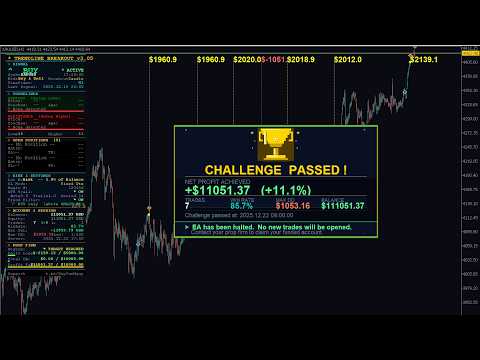


































I really like this EA, nice and safe with a slightly better than 1:1 RR yes not every trade wins but overall end of the month or after many trades the edge plays out and you should be in profit. Works same as the tester which is great to see as well