MultiTP ladder

Try Before You Buy:

You can download and test the Multi Tp Ladder free demo version on a demo account before purchasing.

For MetaTrader 5:
Download: MultiTP ladder   

How to install the trial:

  1. Download the   MultiTP ladder  file above.
  2. In MetaTrader: File → Open Data Folder → MQL5/Experts
  3. Paste the trial file into that folder, then restart MetaTrader.
  4. The trial is fully functional for 12 hours per demo account.

To reset the trial period (demo accounts only):
MetaTrader → Tools → Global Variables → Ctrl+A → Delete.
Important: Only do this on a non-critical demo account. Never delete global variables on a live or prop firm challenge account — other EAs may rely on them.

The trial version will refuse to run on a live or prop account. To use PROP FIRM RULES MANAGER on a real account, please purchase the full version above.

Contact  support:  MQL5  || For your Comprehensive Installation & User Guide 

────────────────────────────────────────────────────────

The setup was textbook. The entry was clean. Price moved your direction instantly.

And then you just... sat there. Watching. Waiting. Not knowing when.

Do you close now and take the 30 pips? Do you hold for the full target? Price pulls back 15 pips and your hands move before your brain does — closed. Breakeven. Maybe a few pips profit. You walk away.

Then you watch it hit 90 pips without you on the chart.

This is not a skill problem. This is a human problem. The moment a trade goes into profit, the fear of losing it overrides everything your analysis said to do. You know what the plan was. You cannot execute it. Nobody can — not under pressure, not across multiple open trades, not when the move happens at 3am.

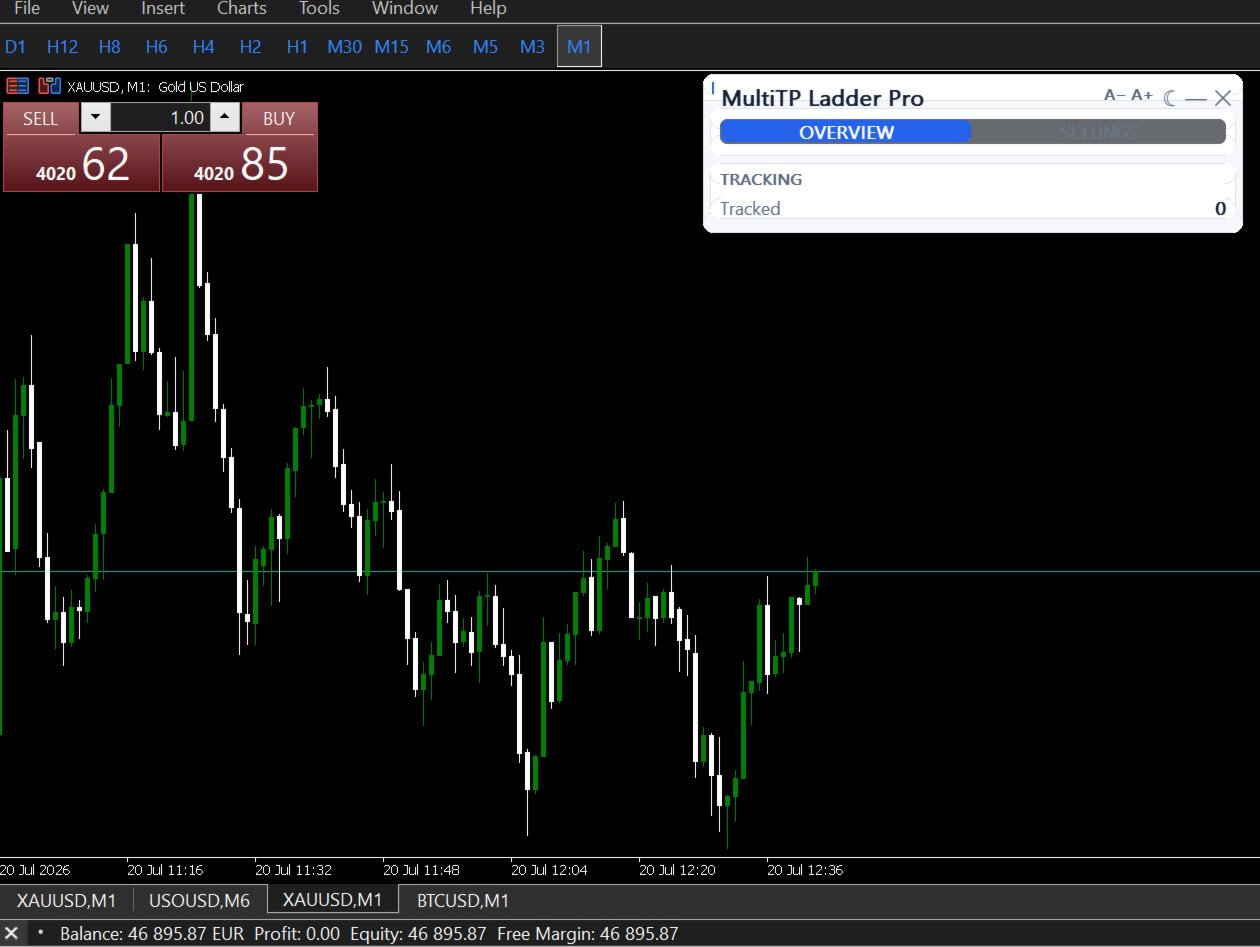
MultiTP Ladder Pro runs the exit you planned before the trade opened. Not the one your emotions write while it's live.

────────────────────────────────────────
WHO THIS IS FOR
────────────────────────────────────────

• Manual traders who enter their own trades but need automated exit management
• Traders who always plan to "take partial profit and let it run" but cannot execute it cleanly under pressure
• Anyone who has closed a winning trade early and watched it run another 80 pips
• Anyone who has held too long and turned a profit into a loss
• Traders running multiple positions simultaneously who cannot manually manage exits on all of them
• Works with other EAs — filter by magic number to apply only where you want it

This is not a signal tool. It does not find trades or enter the market. It manages the exits on trades you already have open — the part of trading that most consistently separates profitable traders from breakeven traders.

────────────────────────────────────────
THE EXIT SEQUENCE — AUTOMATED, START TO FINISH
────────────────────────────────────────

You enter a trade with your TP set. That is all you do. From that point, the EA takes over:

STEP 1 — TP1 HIT
Price reaches your first target (e.g. 50% of the full TP distance).
The EA closes a portion of the position — 33%, 40%, whatever you configured.
Profit is locked. The position is no longer full size.

STEP 2 — BREAKEVEN MOVE
Immediately after TP1 fires, the SL moves to your entry + a small pip buffer.
The remaining position is now risk-free. You cannot lose money on this trade no matter what happens next.

STEP 3 — TP2 HIT
Price reaches your second target (e.g. 75% of the full TP distance).
Another portion closes. More profit booked.
The ATR trailing stop activates on whatever is left.

STEP 4 — ATR TRAILING
The remainder runs with a trailing stop that follows price using ATR as the distance.
The stop only moves in the trade direction — never backwards.
It runs until the trailing stop is hit or the original TP is reached.

Result: you always book something at TP1, the trade becomes risk-free automatically, and the remainder has the best possible chance of catching an extended move — all without watching the screen.

────────────────────────────────────────
A REAL EXAMPLE — XAUUSD BUY TRADE
────────────────────────────────────────

Settings: TP1 at 50%, TP2 at 75%, close 33% at each level

You enter: BUY XAUUSD at 2300.00 | SL: 2290.00 | TP: 2320.00 | Size: 1.00 lot

EA calculates:
  TP1 = 2310.00 (50% of the way)
  TP2 = 2315.00 (75% of the way)

Price hits 2310.00:
  → 0.33 lots closed | profit booked
  → SL moved to 2300.10 | trade is now risk-free

Price hits 2315.00:
  → 0.33 lots closed | more profit booked
  → ATR trailing stop activates on remaining 0.34 lots

Price continues to 2325.00, then reverses:
  → Trailing stop triggers at 2322.00
  → Final portion closed automatically

Total: three separate profit locks, all executed while you were doing something else.

────────────────────────────────────────
THE PROBLEM WITH FREE TOOLS
────────────────────────────────────────

Free partial close tools exist on MQL5. They all share the same three failures:

1. They forget your trades when MT5 restarts. State is held in memory only — the moment you restart the terminal or lose connection, they lose track of every position. Your TP1 fires but there's nothing left tracking it. The breakeven move never happens.

2. They send unrounded lot sizes. The partial close volume is calculated as a percentage and sent directly. If the result does not match your broker's exact volume step, the order is rejected silently — no error shown, no close executed, no indication anything went wrong. You find out when you look at the position.

3. They handle one trade at a time. Open a second trade and the first one breaks. Open a third and the whole thing stops working.

MultiTP Ladder Pro fixes all three:

STATE PERSISTENCE — All tracking data is saved to a CSV file on every state change. When MT5 restarts, the EA loads the file and continues exactly where it left off. TP1 hit status, breakeven status, trailing stop level — all restored. No trade is missed. No state is lost.

PRECISE LOT NORMALIZATION — Every partial close volume is calculated, then floored to your broker's exact volume step, clamped to the broker's minimum and maximum lots, and rounded to the correct decimal places before the order is sent. The order does not get rejected.

MULTI-TRADE TRACKING — The EA maintains a full state record per ticket in a dynamic array. Open 10 trades simultaneously and it tracks all 10 independently. Each one has its own TP1, TP2, breakeven, and trailing state.

────────────────────────────────────────
WHAT ELSE IT DOES
────────────────────────────────────────

WORKS ON ALL TRADES — Manual trades, EA trades, any symbol in MT5. No setup per trade. Just have a TP set.

FILTER BY MAGIC NUMBER OR SYMBOL — Apply the ladder only to specific EAs or only to specific pairs using the FilterMagic and FilterSymbol inputs.

ATR TRAILING ON CONFIRMED BARS — The trailing distance is calculated from the previous closed bar's ATR, not the current forming candle. The stop moves on confirmed momentum. Not on intrabar noise.

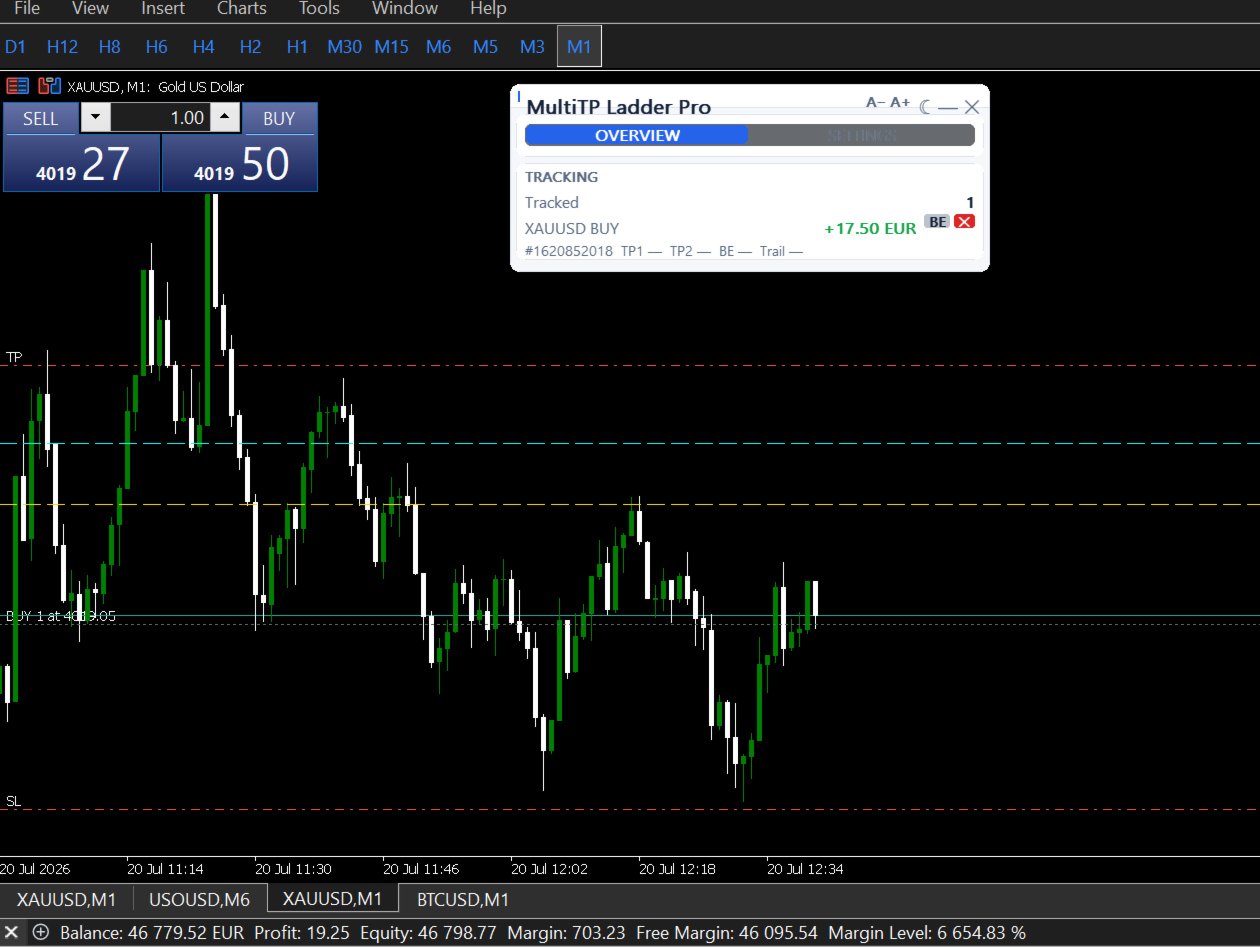
CHART LINES PER TRADE — Optional visual lines on the chart showing entry, TP1, and TP2 for each tracked position. Each line updates to show whether the level was hit.

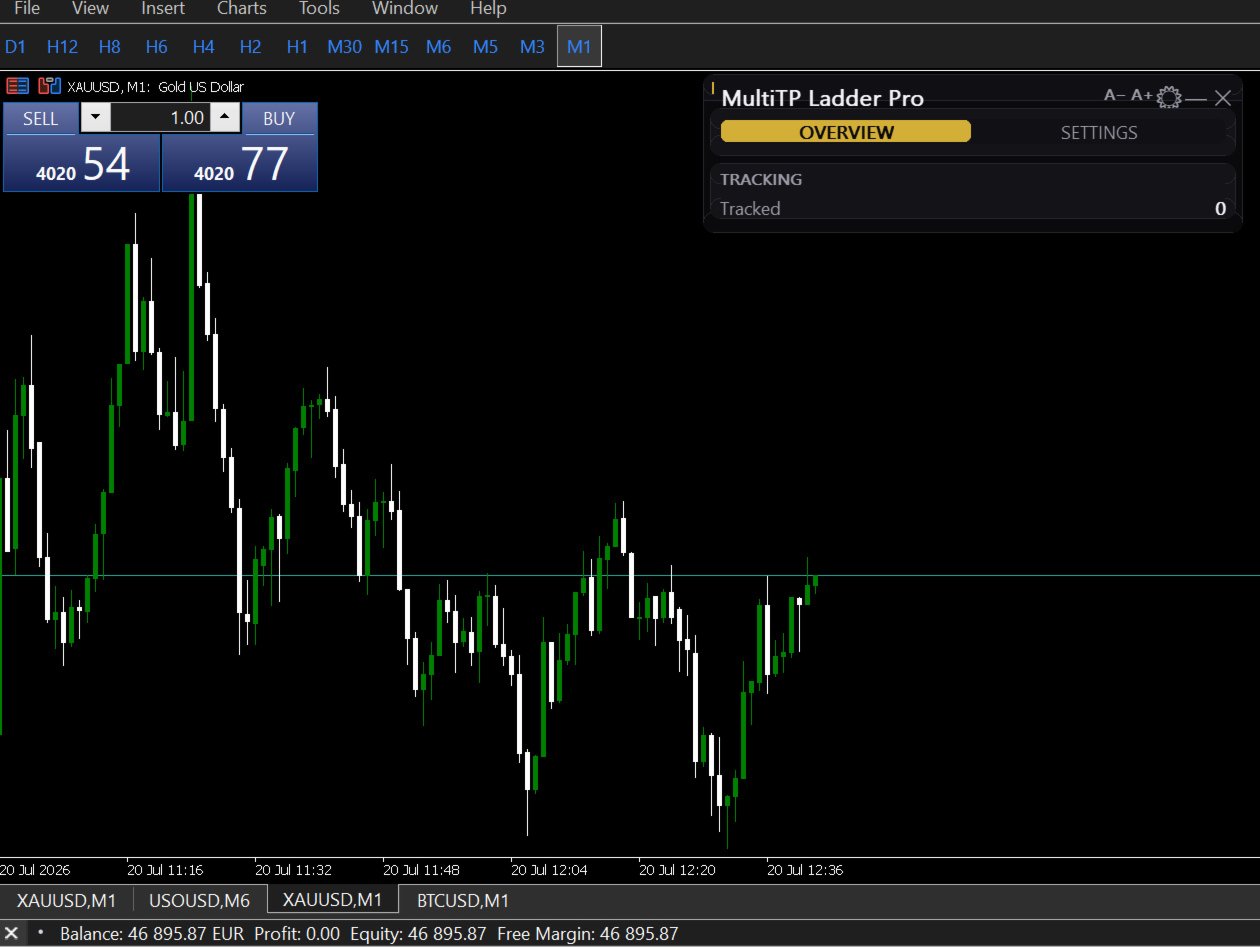
LIVE DASHBOARD — One row per tracked trade showing ticket number, symbol, direction, live P&L, TP1 status, TP2 status, breakeven status, and current trailing SL level. Grows dynamically as more trades are tracked.

TELEGRAM NOTIFICATIONS — Optional Telegram message when TP1 or TP2 fires. Includes ticket number, lots closed, and execution price.

COMPATIBLE WITH PROPGUARD PRO AND DISCIPLINEGUARD PRO — All three utilities use different object name prefixes and GlobalVariable keys. They run simultaneously without interference.

────────────────────────────────────────
INPUT REFERENCE
────────────────────────────────────────

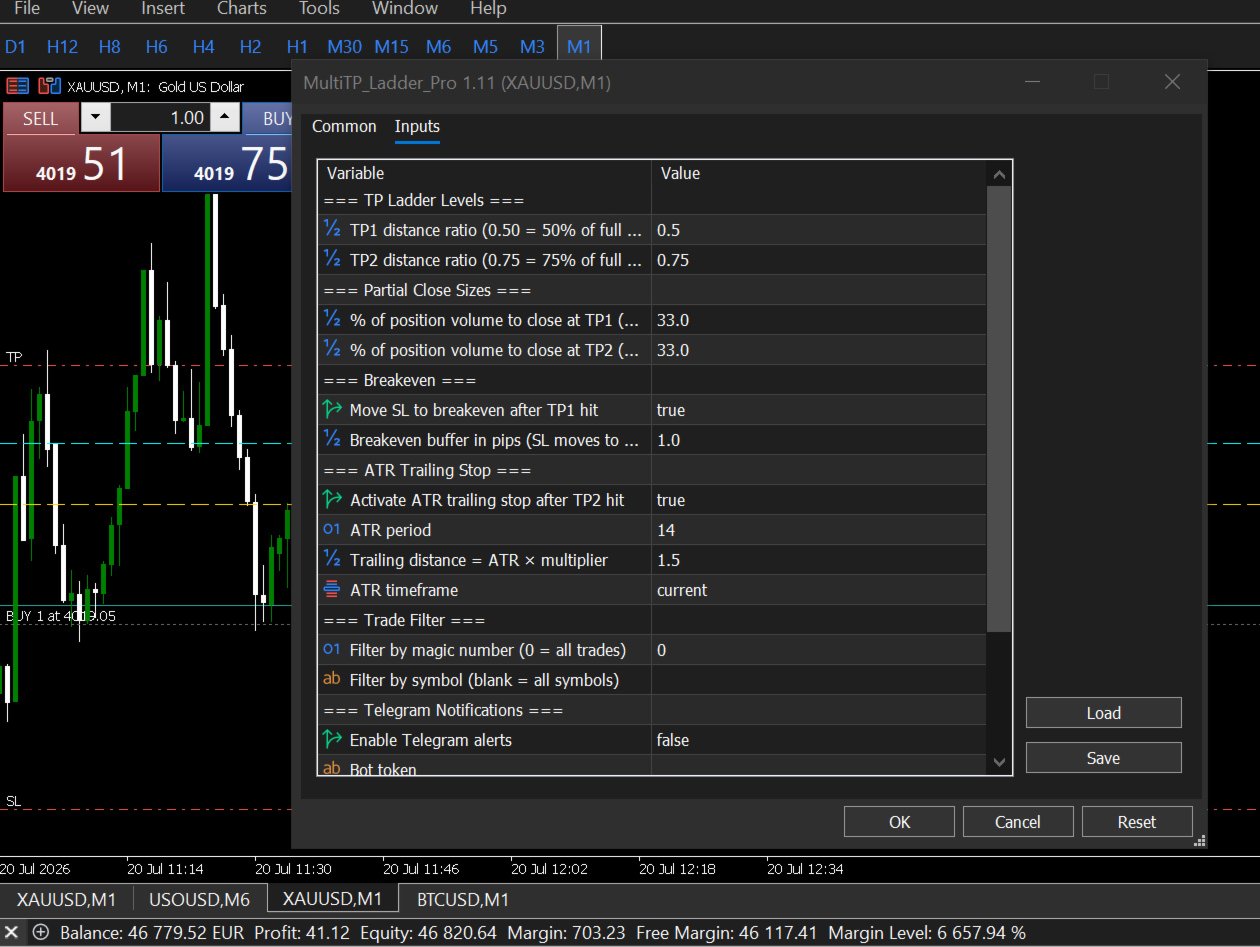
TP LADDER
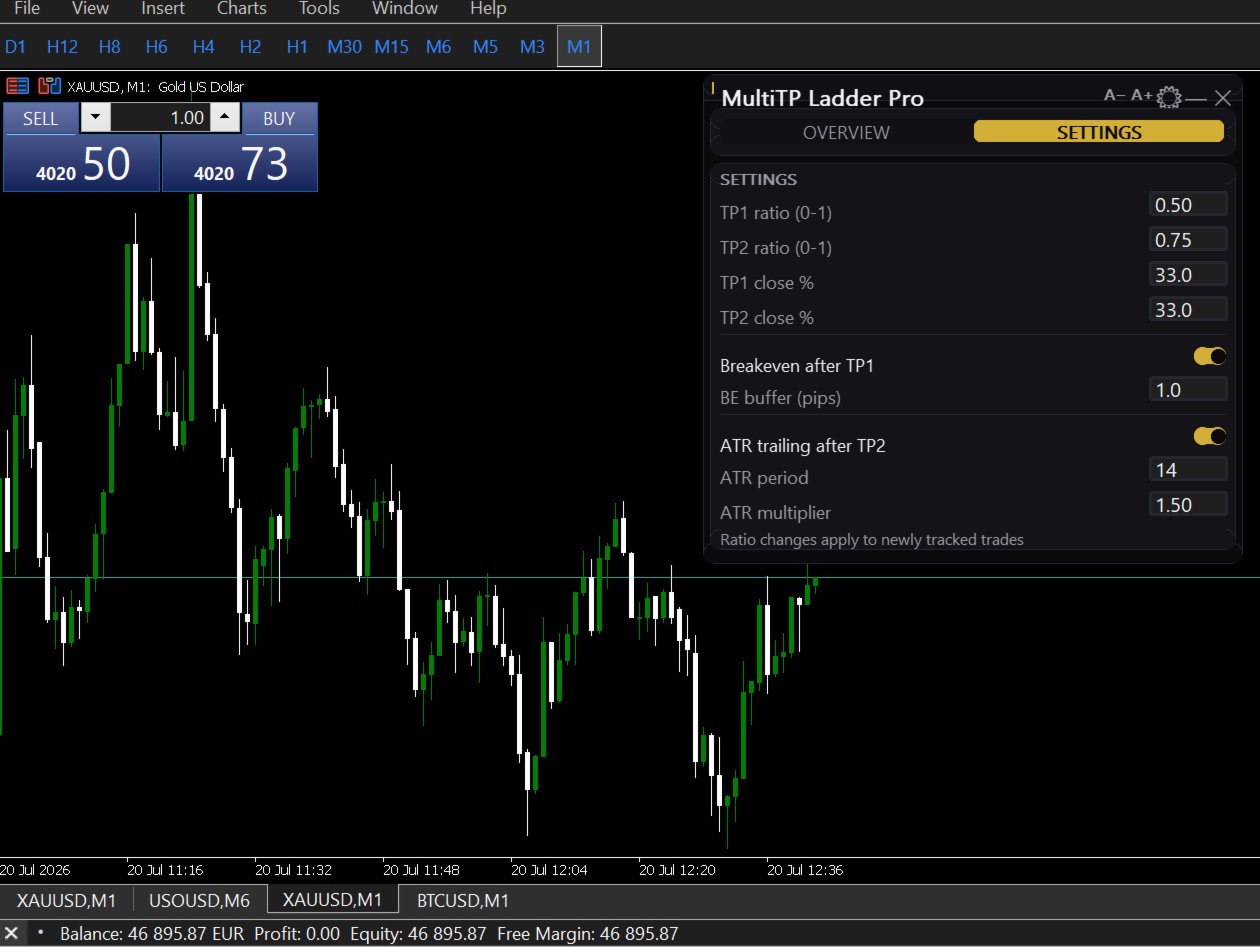
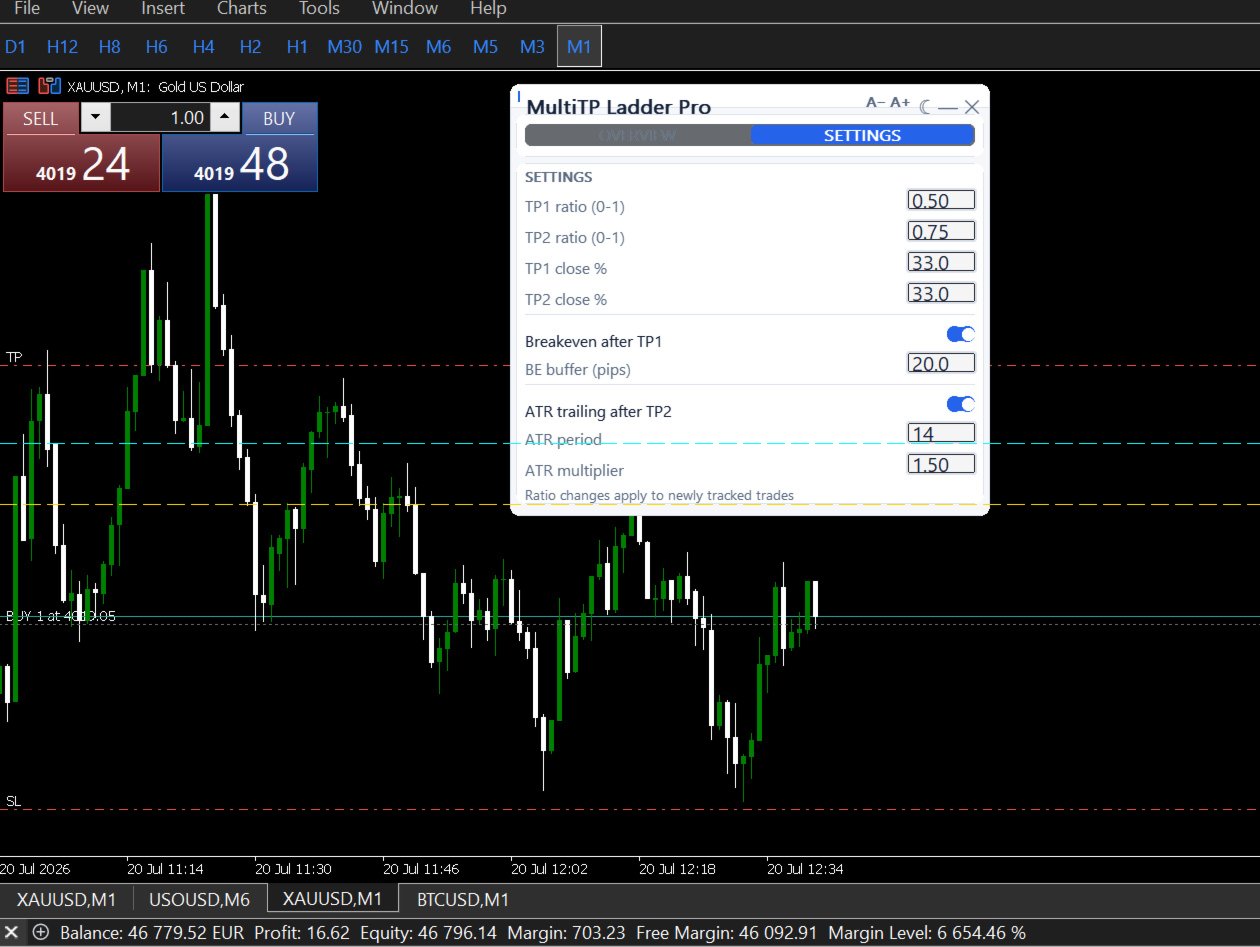
• TP1_Ratio — where TP1 fires as a fraction of your full TP distance (e.g. 0.50 = halfway)
• TP2_Ratio — where TP2 fires (e.g. 0.75 = three-quarters of the way) — must be greater than TP1_Ratio
• TP1_ClosePct — percentage of original position to close at TP1 (e.g. 33)
• TP2_ClosePct — percentage of original position to close at TP2 (e.g. 33)
  The remainder (100 − TP1 − TP2) runs to the original TP with the trailing stop

BREAKEVEN
• EnableBE — move SL to breakeven after TP1 fires (ON/OFF)
• BE_BufferPips — pip buffer above/below entry for the new SL (default: 1.0)

ATR TRAILING STOP
• EnableTrailing — activate after TP2 fires (ON/OFF)
• ATR_Period — ATR lookback period (default: 14)
• ATR_Multiplier — trailing distance = ATR × multiplier (default: 1.5)
• ATR_Timeframe — timeframe for ATR calculation (default: current chart)

FILTERS
• FilterMagic — restrict to trades with this magic number (0 = all trades)
• FilterSymbol — restrict to this symbol only (blank = all symbols)

DISPLAY
• ShowDashboard — show/hide on-chart panel
• DrawTPLines — draw TP1/TP2 lines on chart

TELEGRAM
• EnableTelegram — ON/OFF
• TelegramBotToken — bot token from @BotFather
• TelegramChatID — your personal chat ID

────────────────────────────────────────
REQUIREMENTS
────────────────────────────────────────

• MetaTrader 5 only (not MT4)
• Trades must have a TP set — the EA uses it to calculate TP1 and TP2 distances
• AutoTrading must be enabled

────────────────────────────────────────
KNOWN LIMITATION
────────────────────────────────────────

If the partial close volume after lot normalization falls below your broker's minimum lot size, the EA marks that TP level as hit and skips the partial close rather than send a rejectable order. Very small positions (under approximately 3x the broker minimum) may not produce partial closes at each level. Full details and workarounds are in the user guide.

────────────────────────────────────────
WHAT IS INCLUDED
────────────────────────────────────────
• Full user guide — installation, all settings, worked examples, FAQ, troubleshooting
• Lifetime updates
• Support via MQL5 messages

────────────────────────────────────────
YOUR ENTRY WAS RIGHT. YOUR EXIT SHOULD MATCH IT.
────────────────────────────────────────
Recommended products
The indicator detects and displays М. Gartley's Butterfly pattern. The pattern is plotted by the extreme values of the ZigZag indicator (included in the resources, no need to install). After detecting the pattern, the indicator notifies of that by the pop-up window, a mobile notification and an email. The pattern and wave parameters are displayed on the screenshots. The default parameters are used for demonstration purposes only in order to increase the amount of detected patterns. Parameters z
Overview Harmonic Patterns MT5 is a technical analysis indicator designed for the MetaTrader 5 platform. It identifies and displays harmonic price patterns, such as Butterfly, Cypher, Crab, Bat, Shark, and Gartley, in both bullish and bearish directions. The indicator calculates key price levels, including entry, stop loss, and three take-profit levels, to assist traders in analyzing market movements. Visual elements and customizable alerts enhance usability on the chart. Features Detects six ha
CosmiCLab SMC FIBO CosmiCLab SMC FIBO is a professional trading indicator designed for traders who use Smart Money Concepts (SMC), market structure analysis and Fibonacci retracement levels. The indicator automatically detects market swings and builds Fibonacci levels based on the latest impulse movement. It also identifies market structure changes such as BOS (Break of Structure) and CHOCH (Change of Character), helping traders understand the current market direction. CosmiCLab SMC FIBO also pr
Free automatic Fibonacci is an indicator that automatically plots a Fibonacci retracement based on the number of bars you select on the BarsToScan setting in the indicator. The Fibonacci is automatically updated in real time as new highest and lowest values appears amongst the selected bars. You can select which level values to be displayed in the indicator settings. You can also select the color of the levels thus enabling the trader to be able to attach the indicator several times with differe
FREE
This is  KS ultra master-slave (signal copier) Expert Advisor with advanced symbol mapping support, designed to copy trades from one MetaTrader 5 account (master) to another (slave), even when the brokers use different symbol naming conventions . Core Purpose Copy trading signals (positions + pending orders) from a master account → one or more slave accounts , while intelligently handling: Different symbol names between brokers (e.g. XAUUSD → GOLD , EURUSD.fx → EURUSD , BTCUSD → Bitcoin ) Differ
RSI Divergence Risk Target Signals RSI Divergence Risk Target Signals is a MetaTrader 5 indicator that detects confirmed bullish and bearish RSI divergence and combines the signals with optional trend filters, ATR-based Stop Loss levels, three Take Profit targets, alerts and an internal trade statistics dashboard. The indicator compares confirmed RSI pivot structure with corresponding price highs and lows. It is designed to help traders identify momentum divergence while providing a structure
RRtoolBox
David Ruiz Moreno
RRtoolbox - Professional Tools: Risk:Reward Trading Tool (SL/TP Horizontals + Pending orders + Diagonals), Alerts set on trend lines (for alerts on diagonal levels), SelfManagement (BE, partials...), close/cancelling by time, Statistics, Info and trading on chart. One-Click Trading with Visual Risk:Reward Management RRtoolbox is a comprehensive trading panel that combines one-click order execution,  statistics and  powerful visual Risk:Reward tools, alerts set with trendlines, on chart butt
Product Overview Pattern Recognition Master System is a main‑chart classic candlestick pattern auto‑recognition indicator designed for both the   MT4 and MT5   platforms. It automatically detects and labels eleven classic reversal and continuation patterns on the main chart, covering double tops and bottoms, head‑and‑shoulders tops and bottoms, hammer and hanging man, engulfing, doji, and morning and evening stars, with an independent cooldown period assigned to each pattern category to suppres
FREE
Account Monitor Pro — Your Ultimate Trade Statistics Hub Account Monitor Pro is a professional information dashboard designed for traders who combine Expert Advisors (EAs) and manual trading. The indicator separates statistics in real-time based on your Magic Number, allowing you to clearly see who is driving the profit: the algorithm or yourself. Key Features: Split Monitoring: Instant separation of "Robot" positions (by Magic Number) and "Manual" trades. Multi-language Support: 11 languages in
FREE
Auto Fib Retracements
Ross Adam Langlands Nelson
4.2 (5)
Automatic Fibonacci Retracement Line Indicator. This indicator takes the current trend and if possible draws Fibonacci retracement lines from the swing until the current price. The Fibonacci levels used are: 0%, 23.6%, 38.2%, 50%, 61.8%, 76.4%, 100%. This indicator works for all charts over all timeframes. The Fibonacci levels are also recorded in buffers for use by other trading bots. Any comments, concerns or additional feature requirements are welcome and will be addressed promptly. 
FREE
Tarnix Evenlock
AL MOOSAWI ABDULLAH JAFFER BAQER
A BREAKEVEN STOP THAT STILL LOSES THE COMMISSION IS NOT BREAKEVEN. TARNIX EVENLOCK LOCKS THE REAL ONE. Tarnix Evenlock is a breakeven lock for MetaTrader 5 that counts what the trade really costs. When a position in scope, opened by hand or by another Expert Advisor, has moved in its favour by the trigger you choose (N x ATR, stored the moment the trade is first seen, or a fixed number of points), its stop loss is moved to the entry plus a buffer that pays the spread cushion, the round-turn comm
TradeArchitect Grid Manager  is a chart-based manual trading utility for MetaTrader 5. It combines visual trade planning, risk-based position sizing, market and pending order execution, position management, and optional martingale or anti-martingale progression. The utility does not generate trading signals and does not decide when to buy or sell. The trader chooses the direction, Entry, Stop Loss and Take Profit. GridPlan Trade Manager performs the calculations, checks the plan and manages th
RiskGuard Pro Account Risk Manager
Aly Abdelnaser Madbouly Afifi
RiskGuard Pro enforces a daily loss limit, a profit lock and a maximum drawdown on your account - across your manual trades and any other EA you run. It does not open trades and it does not predict anything. What it does RiskGuard Pro watches your account equity and enforces three limits you set: Daily loss limit - measured against your start-of-day equity. Daily profit lock - stop trading once the day has gone well enough. Maximum drawdown - measured from your account's peak equity, not from to
Close by percentage MT5
Konstantin Kulikov
5 (1)
Hello friends. I wrote this utility specifically for use in my profile with a large number of Expert Advisors and sets ("Joint_profiles_from_grid_sets"   https://www.mql5.com/en/blogs/post/747929 ). Now, in order to limit losses on the account, there is no need to change the "Close_positions_at_percentage_of_loss" parameter on each chart. Just open   one   additional chart, attach this utility and set the desired percentage for closing all trades on the account. The utility has the following fu
Key Features: 200+ Fully Implemented Patterns   across all categories Advanced Market Structure Analysis Smart Money Integration   (Wyckoff, Order Blocks, Liquidity) Professional Risk Management Multi-Timeframe Analysis AI-Powered Confidence Scoring Advanced Visualization Real-time Alerts Pattern Categories: Single Candle Patterns (Hammer, Doji, Marubozu, etc.) Multi-Candle Patterns (Engulfing, Stars, Harami, etc.) Chart Patterns (Head & Shoulders, Cup & Handle, Triangles, etc.) Harmonic Pattern
FREE
Painel de Trading Pro
Dedial Pereira Da Silva
TradePanel Pro - Manual Trading Panel with Grid, Trailing, and Targets  "Complete manual trading panel for MT5: grid, trailing stop, smart breakeven, daily targets and risk management in one click." TradePanel Pro is a professional manual trading panel for MetaTrader 5, built for traders who want speed, organization and automatic position protection — without juggling multiple tools or complex setups. Everything you need lives in a single panel: one-click buy/sell, point-based stops and targe
Babel Assistant
Iurii Bazhanov
4.33 (9)
Babel assistant 1 The MT5 netting robot "Babel_assistant_1" uses the ZigZag indicator to generate Fibonacci levels across M1, M5, M15, H1, H4, D1, and W1 timeframes, and calculates the strength of buy and sell trends. It opens a position using the "Lot for open a position" setting if the specified trend level of 4.925 is exceeded. Then, Babel places pending orders at certain Fibonacci levels and sets the specified Stop Loss and Take Profit lines. The screen displays the current results of the po
FREE
Rhino Chart Drawing Tools for MetaTrader 5 Rhino Chart Drawing Tools provides a TradingView-style drawing workflow for MetaTrader 5. It includes 54 drawing tools, a customizable toolbar, favorites, quick styling, object settings, templates and an object manager. Drawing Tools Lines Trend line, ray, extended line, horizontal line, vertical line, horizontal ray, cross line, trend angle, arrow, path, polyline and info line. Channels Parallel channel, regression channel, flat channel, disjoint chann
Pro Gold System Indicator
PEDRO JOAQUIM GONCALVES GOMES
ADVANCED FUNCTIONALITIES: Trend Score (0-100) with visual bar Intelligent signals with adjustable strength (1-10) Risk management with automatic TP/SL Audible and visual alerts Price zones with smooth filling Multi-indicator analysis (RSI, ATR, BB, EMAs) DESIGN FEATURES Modern Visual: Smooth and well-spaced lines (EMA with 2-3px width) Vibrant and professional colors (Sky Blue, Orange, Gold) Modern arrows (code 233/234) for buy/sell signals Configurable dark/light theme Adjustable transparency f
Automatic fibonacci with alerts is an indicator that automatically plots a fibonacci retracement based on the number of bars you select on the BarsToScan setting in the indicator. The fibonacci is automatically updated in real time as new highest and lowest values appear amongst the selected bars. You can select which level values to be displayed in the indicator settings. You can also select the color of the levels thus enabling the trader to be able to attach the indicator several times with d
FREE
GBPJPY Awesome Oscillator Reversal Breakout (H1) is a fully automated MetaTrader 4 strategy designed to capture **confirmed reversal breakouts** on GBPJPY using an oscillator-based reversal trigger with rule-based **pending STOP execution** beyond recent price structure. The EA was backtested on **GBPJPY on the H1 timeframe** from **April 1, 2004 to April 24, 2024** using a MetaTrader 4 backtest engine (base data: GBPJPY_M1_UTC2). No parameter setup is required — the system is delivered with op
FREE
Discount offer for several days before returning to the original price: $55 Pattern Head and Shoulders is ideal for traders seeking reliable pattern recognition, including both bullish and bearish Head and Shoulders formations, with integrated Fibonacci levels, neckline break detection, and early prediction techniques. A powerful MT5 tool for those who value technical analysis, and precision in identifying chart structures and trend reversals. Dual Detection Methods Method 1 – Classic Patter
Gold Platinum Support Resistance Channels Support Resistance Channels is a technical indicator that automatically detects and draws support and resistance zones using pivot points and price action. It identifies key price levels, ranks channels by strength, highlights broken support and resistance, and offers optional pivot point markers and SMA/EMA moving averages. Designed to help traders identify important market levels, potential breakout areas, and price structure across different timeframe
FREE
OrdinalEdge Mean Reversion — Asian Session OrdinalEdge Mean Reversion is a rules-based  expert advisor designed for the Asian trading  session. The strategy identifies short-term price  extremes and targets a return to the statistical  mean, taking advantage of the low-volatility,  range-bound conditions typical of the Asian session. The expert does not use martingale, grid trading,  or tick scalping. One position is held at a time.  All positions are closed before the London  pre-session ope
Konya Manual Trading Panel 7-Day Free Trial | Professional Trading & Order Management for MetaTrader 5 One Screen. Full Control. Professional Trading Management. Konya Manual Trading Panel is a professional manual trading and order management utility designed for MetaTrader 5. Main Features Manual BUY and SELL trading BUY LIMIT and SELL LIMIT orders Open position and pending order management Stop Loss and Take Profit controls Flexible lot size management Multiple trading instruments Live market

FREE
Risk Panel VIP v5
Saeed Hatam Mahmoudi
Risk Panel VIP (MT5) Risk Panel VIP is a professional tool for MetaTrader 5 designed for fast, disciplined execution. It calculates position size from your balance risk and places Stop Loss / Take Profit accordingly. This is a trade management utility; it does not provide trading signals and does not guarantee any profit. Main functions Draggable Stop Line : place the stop on chart; the panel auto-calculates lot size from your configured risk % of balance (default 2%, editable). Context-aware a
Price Ray
Keni Chetankumar Gajanan -
5 (7)
Price Ray indicator is a utility that will improve the way you trade. Primarily, it shows the Bid, Ask or Last price as a line ray which beams till the current candle, last visible chart candle or extended to all candle bars. The enhanced features in this indicator provide information in an area where you focus most, right next to the current candle. You can select text to be shown above or below the Price ray. The indicator is fully customizable, allowing it to fit any strategy requirements. Th
FREE
Trend Breaks
Vitali Vasilenka
Trend Breaks  — Trend Line Breakout Indicator for MetaTrader 5 Trend Breaks  is an MQL5 indicator that automatically plots dynamic upper and lower trend lines from swing highs and lows and delivers clear signals when those lines are broken. It is ideal for traders who trade breakouts, reversals and trend continuation. What the indicator does Detects swings — finds pivot highs and lows using a configurable Length parameter. Draws dynamic trend lines — an upper line along the last significant hig
FREE
Price Magnet — Price Density and Attraction Levels Indicator Price Magnet is a professional analytical tool designed to identify key support and resistance levels based on statistical Price Density. The indicator analyzes a specified historical period and detects price levels where the market spent the most time. These zones act as “magnets,” attracting price action or forming a structural base for potential reversals. Unlike traditional Volume Profile tools, Price Magnet focuses on price-time d
Professional Opening Range Breakout (ORB) indicator designed for precision session trading with automatic time handling, breakout alerts, and advanced target levels. This indicator automatically identifies the Opening Range for any configurable session, plots the High, Low, and Midpoint levels, and extends them across the trading day. Built-in breakout detection and alerts, range measurements, and extension targets provide traders with clear structure and actionable levels. Ideal for traders usi
Buyers of this product also purchase
Trade Assistant MT5
Evgeniy Kravchenko
4.43 (216)
It helps to calculate the risk per trade, the easy installation of a new order, order management with partial closing functions, trailing stop of 7 types and other useful functions. Additional materials and instructions Installation instructions - Application instructions Line function -   shows on the chart the Opening line, Stop Loss, Take Profit. With this function it is easy to set a new order and see its additional characteristics before opening.   Risk management  - The risk calculation
FarmedHedge Pair Trading Dashboard
Tanapisit Tepawarapruek
5 (7)
Farmed Hedge Yield Farming | All Markets (Manual - Hybrid - Semi/Automated EA) VERIFIED TRADING RESULTS - Farmed Hedge Yield Axi Copy:  https://www.mql5.com/en/signals/2356376 - Farmed Hedge Yield Exn Copy:   https://www.mql5.com/en/signals/2356404 - Farmed Hedge Yield V Copy:  https://www.mql5.com/en/signals/2357156 IMPORTANT NOTICE: FarmedHedge is a MANUAL-FOCUSED TRADING UTILITY ,not a fully automated EA. Results shown on this Signal include manual trades and overall strategic management.
Forex Trade Manager MT5
InvestSoft
4.98 (690)
Trade Manager MT5 is an advanced position size calculator and trade management tool for MetaTrader 5, designed to help traders plan trades faster, control risk more precisely, and manage open positions directly from the chart. It combines order placement, risk based lot calculation, Stop Loss and Take Profit management, Break Even, Trailing Stop, Partial Close, Equity Protection, and external trade management in one panel. Whether you trade forex, indices, metals, commodities, crypto, or future
Local Trade Copier EA MT5
Juvenille Emperor Limited
4.94 (150)
Local Trade Copier EA MT5 is a fast and flexible trade copier for copying and managing trades between multiple MetaTrader 5 accounts on the same Windows computer or Windows VPS. It combines local trade synchronization with Receiver-side controls for lot sizing, risk management, trade filtering, symbol mapping, trade management and account protection. Set up your Transmitter and Receiver terminals in about 1 minute and copy manual or EA trades between accounts at the same or different brokers. U
Telegram to MT5 Multi-Channel Copier   automatically copies trading signals from your Telegram and Discord channels straight to MetaTrader 5. No bots, no browser extensions, no manual copying. A signal arrives in Telegram or Discord and the EA opens the trade in your terminal within seconds. And before you copy a channel, the built-in backtester shows you what that channel would have done in your account. The product has two components: a Windows application that listens to your Telegram channel
EA Overfitter
Stephen J Martret
5 (4)
That backtest looks great. But will it still be making money tomorrow, next week, next month? EA Overfitter re-runs your EA on 100 price histories it has never seen. One score tells you if the edge is real. A backtest tells you what an EA did on one price history — the one that happened to occur. What you cannot tell from it is how much of that result was the strategy and how much was the particular path. EA Overfitter answers that. It builds up to 100 synthetic price histories your EA has n
TradePanel MT5
Alfiya Fazylova
4.89 (174)
Trade Panel is a multi-functional trading assistant. The app contains over 50 trading functions for manual trading and allows you to automate most trading tasks. Application instructions: https://www.mql5.com/en/blogs/post/756482 Trial version of the application for a demo account: https://www.mql5.com/en/blogs/post/750865 How to install the application: https://www.mql5.com/en/blogs/post/756239 How to test the application in visual mode: https://www.mql5.com/en/blogs/post/770277 How to install
News Trade EA MT5
Konstantin Kulikov
4.55 (11)
Present to you the useful robot that I have been using for several years. It can be used in both semi-automatic mode and fully automatic mode. >>> Chat <<< The program contains flexible settings for trading on the news of the economic calendar. It cannot be checked in the strategy tester. Only real work. Download the latest archive of settings: https://www.mql5.com/en/blogs/post/747929 Signals monitoring: https://www.mql5.com/en/signals/author/test-standart When creating your own sets of setti
Exp COPYLOT CLIENT for MT5
Vladislav Andruschenko
3.97 (35)
Professional Trade Copier for MetaTrader 5 Fast, professional, and reliable trade copier for MetaTrader . COPYLOT allows you to copy Forex trades between MT4 and MT5 terminals with support for Hedge and Netting accounts. COPYLOT MT5 version supports: - MT5 Hedge to MT5 Hedge - MT5 Hedge to MT5 Netting - MT5 Netting to MT5 Hedge - MT5 Netting to MT5 Netting - MT4 to MT5 Hedge - MT4 to MT5 Netting MT4 version Full Description +DEMO +PDF How To Buy How To Install How to get Log Files H
Strategy Ledger Pro
Abdullah Uygar Tuna
5 (17)
Strategy Ledger Pro is a read-only account analysis panel for MetaTrader 5. It separates account results by Expert Advisor, strategy, symbol, and magic number, so you can see what each one really contributes. The panel is available in 11 languages: English, Français, Deutsch, Español, Italiano, Português, Русский, Türkçe, 中文, 日本語 and 한국어. Before you download the demo. The Market runs the demo of any paid product in the Strategy Tester only. This panel analyses the trades on your own account, and
Copy Telegram signals with your own trading rules Telegram to MT5 Signal Trader automatically copies text-based trading signals from public and private Telegram channels and groups into MetaTrader 5. Manage multiple providers and MT5 accounts from one desktop app, with individual risk and trade settings for each provider . No Telegram bot or API setup needed for copying. Simply sign in with your own Telegram account by phone or QR code and select the channels or groups you have already joined. Y
================================================================================ POC BREAKOUT - V20.72. Full Professional Grade Toolkit ================================================================================ POC Breakout is a full MetaTrader 5 trading dashboard for discretionary traders who want breakout signals, Point of Control (POC) context, volume profiles, order flow, market structure, news, alerts, and advanced trade planning in one professional workspace. Attached directly to you
The product will copy all telegram signal to MT5 ( which you are member) , also it can work as remote copier.  Easy to set up, copy order instant, can work with almost signal formats, image signal,  s upport to translate other language to English Work with all type of channel or group, even channel have "Restrict Saving Content", work with  multi channel, multi MT5 Work as remote copier: with signal have ticket number, it will copy exactly via ticket number. Support to backtest signal. How to s
Welcome to Entry In The Zone with SMC Multi Timeframe  —  COMPLETE SMC ANALYSIS SYSTEM — ALL IN ONE INDICATOR  Entry In The Zone with SMC Multi Timeframe  An indicator designed for market analysis based on Smart Money Concepts (SMC), displaying Market Structure, Key Zones (Order Blocks, Supply & Demand Zones, and Fair Value Gaps), Liquidity, and real-time BUY / SELL signals. It supports both Single-Timeframe and Multi-Timeframe analysis, along with the Confluence at Zone feature, which helps you
EA Auditor
Stephen J Martret
5 (7)
EA Auditor is an independent analysis tool for traders evaluating Expert Advisors and trading signals on MetaTrader 5. It audits backtest reports, reviews posted developer signals, and cross-verifies the two against each other to help traders assess strategies before committing capital. The MQL5 market offers a wide range of Expert Advisors from many developers, with varying approaches, quality, and transparency. EA Auditor provides a consistent, data-driven framework for reviewing them, answer
Telegram to MT5 Coppy
Sergey Batudayev
5 (10)
Telegram to MT5: The Ultimate Signal Copying Solution Simplify your trading with Telegram to MT5, the modern tool that copies trading signals directly from Telegram channels and chats to your MetaTrader 5 platform, without the need for DLLs. This powerful solution ensures precise signal execution, extensive customization options, saves time, and boosts your efficiency. [ Instructions and DEMO ] [ FAQ ] [ How atach logs properly ] [ Settings descrition ] Key Features Direct Telegram API Integrati
Trade copier MT5
Alfiya Fazylova
4.61 (57)
Trade Copier is a professional utility designed to copy and synchronize trades between trading accounts. Copying occurs from the account / terminal of the supplier to the account / terminal of the recipient, which are installed on the same computer or VPS . Before buying, you can test the demo version on a demo account. Demo version here . Full instruction here . Main functionality and benefits: Supports copying MT5> MT5, MT4> MT5, MT5> MT4, including MT5 netting accounts. * Supports copying Dem
Telegram To MT5 Ultra
Mirel Daniel Gheonu
5 (5)
Telegram To MT5 — Signal Copier Turn the trading calls from your Telegram channels into real MT5 orders — automatically, on as many accounts as you like, with risk and rules fully under your control. Telegram To MT5 connects the VIP / signal channels you already follow on Telegram to your MetaTrader 5 terminal. A free companion desktop app reads the messages (even from channels that block bots), and this Expert Advisor executes them on your account — applying your own risk settings, symbol mappi
Trade Dashboard MT5
Fatemeh Ameri
4.94 (135)
Trade Dashboard simplifies how you open, manage, and control your trades, with built-in lot size calculation. It allows you to execute trades, manage risk, and control positions directly on the chart, with tools such as partial close, breakeven, and trailing stop. Designed to reduce manual work and help you stay focused on your trading decisions. A demo version is available for testing. Detailed explanations of features are provided within the MQL5 platform. Installation instructions are include
Kontrol01 Manager
Andrei Koval
5 (2)
EA Portfolio Control & Cloud Monitoring for MetaTrader 5 Your EAs manage trades. KONTROL_01 manages your EAs. A control system for traders running multiple Expert Advisors on the same account. Coordinate EA activity, manage trading risks and monitor your setup remotely. A detailed User Manual is available via DM after purchase. IN PRACTICE Multiple EAs. No coordination. Your EAs trade independently, unaware of each other's activity. KONTROL_01 coordinates them, limits simultaneous activity a
News Filter EA
Rashed Samir
5 (2)
News Filter EA: Advanced Algo Trading Assistant News Filter EA is an advanced algo trading assistant designed to enhance your trading experience. By using the News Filter EA , you can integrate a Forex economic news filter into your existing expert advisor, even if you do not have access to its source code. In addition to the news filter, you can also specify trading days and hours for your expert. The News Filter EA also includes risk management  and equity protection features. MT4 Version Ma
MT5 to Telegram Signal Provider turns your trading account into a signal provider. Every trade action, whether manual, by EA or from your phone, is instantly sent as a message to Telegram. You can fully customize the format or use a ready-made template for quick setup. [ Demo ] [ Manual ] [ MT4 Version ] [ Discord Version ]     New: [ Telegram To MT5 ] Setup A step by step user guide is available. Key Features Ability to customize order details sent to subscribers You can create a tiered subs
Seconds Chart MT5
Boris Sedov
4.61 (18)
Seconds Chart is a unique tool for creating second-based charts in MetaTrader 5 . With Seconds Chart , you can construct charts with timeframes set in seconds, providing unparalleled flexibility and precision in analysis that is unavailable with standard minute or hourly charts. For example, the S15 timeframe indicates a chart with candles lasting 15 seconds. You can use any indicators and Expert Advisors that support custom symbols. Working with them is just as convenient as on standard charts.
Trader Evolution
Siarhei Vashchylka
5 (7)
" Trader Evolution " - A utility designed for traders who use wave and technical analysis in their work. One tab of the utility is capable of money management and opening orders, and the other can help in making Elliott wave and technical analysis. Manual (Be sure to read before purchasing) | Version for MT4 Advantages 1. Trading in a few clicks. Immediate and pending orders are available in the panel 2. Money management. The program automatically selects the appropriate lot size 3. Simplifies
VirtualTradePad PRO SE MT5 — professional trading control center for MetaTrader 5 VirtualTradePad PRO SE is a premium chart-based trading panel and trade-management workspace for MetaTrader 5 . It is designed for traders who want faster execution, clearer position control, structured trade management, visual level planning and a professional workflow directly from the chart. This is not only a BUY / SELL panel. PRO SE combines manual trading, pending orders, position management, partial exits, b
AW Trade Manager
AW Trading Software Limited
AW Trade Manager is a trade panel for MetaTrader 5 with a risk/reward tool on the chart. A trade is planned with Entry, Stop Loss and Take Profit lines dragged with the mouse: plates show price, distance and money, zones show profit and loss, and the volume is calculated from the risk. Before sending, the confirmation window shows the whole trade with risk, margin and the rules of the position. Manual and instruction -> HERE / Free LIVE Demo -> HERE To manage a position after the entry the panel
Effortlessly manage multiple trading accounts The Local Trade Copier EA is a solution for individual traders or account managers who need to execute trade signals from external sources or who need to manage several accounts at the same time, without the need for a MAM or a PAMM account. It copies from up to 8 master accounts to unlimited slave accounts . [ Installation Guide | Update Guide | Troubleshooting | FAQ | All Products  ] 100% self hosted Easy to install and use It can copy from MT4 t
RETAILBERG FOOTPRINT CHART PRO — Order-Flow Workspace for MetaTrader 5 Version 7.00  |  Professional System  |  31 tools  |  One chart A full 150-page illustrated User Manual is included. Please read the full manual to understand this feature packed footprint chart elements and ui. https://www.mql5.com/en/blogs/post/777982 DEMO / STRATEGY TESTER — PLEASE READ FIRST
Power Candles Strategy Scanner - Self-Optimizing Multi-Symbol Setup Finder Self-optimizing settings work one chart at a time, and finding where they pay off right now means opening chart after chart. Power Candles Strategy Scanner runs the same self-optimizing engine as the Power Candles indicator on every symbol in your Market Watch, side by side. One panel ranks where it pays off: the winning strategy per symbol, its optimized Stop Loss and Take Profit. An alert fires the moment a fresh signal
AW Shepherd Safety MT5
AW Trading Software Limited
5 (5)
AW Shepherd Safety EA is an Expert Advisor for managing open positions. The trader opens the first order from the panel, and from there the EA runs the basket on its own: it adds recovery orders with a trend filter, closes a side on TakeProfit, trailing or stop, and shows the close levels on the chart. Buys and sells are managed separately, and both sides can be open at the same time. A recovery order opens not just on a price step but once Parabolic SAR, two MAs or candle color show a reversal
More from author
SMC OrderBlock Entry Engine The SMC OrderBlock Entry Engine is a Smart Money Concepts indicator for MetaTrader 5 that identifies valid institutional order blocks, confirms them with a Break of Structure, and fires a non-repainting entry signal only after a strict four-step confirmation sequence. Every signal on the chart has passed all four validation rules before appearing. An order block is the last opposing candle before a strong impulsive move that breaks market structure. These zones repre
FREE
SMC Multi EMA TrendLines SMC Multi EMA TrendLines is a MetaTrader 5 indicator that draws up to ten independent moving average lines on the current chart timeframe, displays a live alignment dashboard, and fires alerts when significant EMA events occur. Version 1.11 introduces a complete alert system including EMA crossovers, price crossing an EMA, price approaching an EMA before a cross happens, and full stack alignment detection. Alerts are delivered via MT5 popup, MT5 push notification to you
FREE
Smc Session Killzone and Breakout The Smc Session Killzone and Breakout indicator automates the institutional session trading model for MetaTrader 5. It draws the Asian, London, and New York session ranges as labelled boxes on the chart, detects when price sweeps beyond the Asian session high or low, and fires a non-repainting entry signal after a Market Structure Shift is confirmed. All signals are based on closed bars and do not repaint. The underlying model follows the sequence that institut
FREE
Smc Trend Heatmap The Smc Trend Heatmap is a free multi-timeframe bias dashboard for MetaTrader 5. It scans five timeframes simultaneously - M5, M15, M30, H1, and H4 - and shows the current trend direction on each using a three-condition EMA logic. The dashboard updates continuously in a corner panel and provides an overall bias summary across all active timeframes. The indicator does not draw lines or arrows on the price chart. It operates entirely as a panel and can be placed on any chart rega
FREE
PROP FIRM READY AUTOPILOT TRADE COPIER — by E.A VICTOR MT5→MT5  |  MT5→MT4  ||  MT4→MT4  |  MT4→MT5 Two files. Four directions. Unlimited accounts.  Try Before You Buy You can download and test the AutoPilot Trade Copier free demo version on a demo account before purchasing. For MetaTrader 5 Download:  AutoPilot MT5 TRADE COPIER (TRIAL).ex5 For MetaTrader 4: Download:  AutoPilot MT4 TRADE COPIER (TRIAL).ex4 How to install the trial: Download the   AutoPilot MT4 TRADE COPIER (TRIAL) .ex4 or  Au
PROP FIRM READY  AUTOPILOT TRADE COPIER — by E.A VICTOR MT5→MT5  |  MT5→MT4  ||  MT4→MT4  |  MT4→MT5 Two files. Four directions. Unlimited accounts. Try Before You Buy: You can download and test the AutoPilot Trade Copier free demo version on a demo account before purchasing. For MetaTrader 5: Download: AutoPilot MT5 TRADE COPIER (TRIAL).ex5 For MetaTrader 4: Download: AutoPilot MT4 TRADE COPIER (TRIAL).ex4 How to install the trial: Download the   AutoPilot MT4 TRADE COPIER (TRIAL) .ex4 or Au
Try Before You Buy: You can download and test the DisciplineGuard Pro  free demo version on a demo account before purchasing. For MetaTrader 5: Download:   /   DisciplineGuard Pro   /   How to install the trial: Download the  /   DisciplineGuard Pro   /      file above. In MetaTrader:   File → Open Data Folder →   MQL5/Experts Paste the trial file into that folder, then   restart MetaTrader. The trial is fully functional for 4 hours per demo account. To reset the trial period   (demo accounts o
PROP FIRM RULES MANAGER — Complete Challenge Rule Enforcement for MT5 Monitors every prop firm rule in real-time. Daily loss, max drawdown, profit targets, consistency, EOD rules and more. 5 firm presets built in. Try Before You Buy: You can download and test the PROP FIRM RULES MANAGER  free demo version  on a demo account before pu
PNL MANAGER PRO —    Automatic Exit Manager with Smart Risk Control Set your entry, walk away. PNL Manager Pro sets your stop loss and take-profits automatically, locks in profit in stages, moves you to breakeven, and trails the rest — all while keeping your risk inside the limit you set. Try Before You Buy: You can download and test the Pnl MANAGER  free demo version  on a demo acc
Filter:
No reviews
Reply to review