PGuard Basic
- 유틸리티
- 버전: 1.70
- 업데이트됨: 7 3월 2026

The Free Drawdown Dashboard Built for Prop Firm Traders
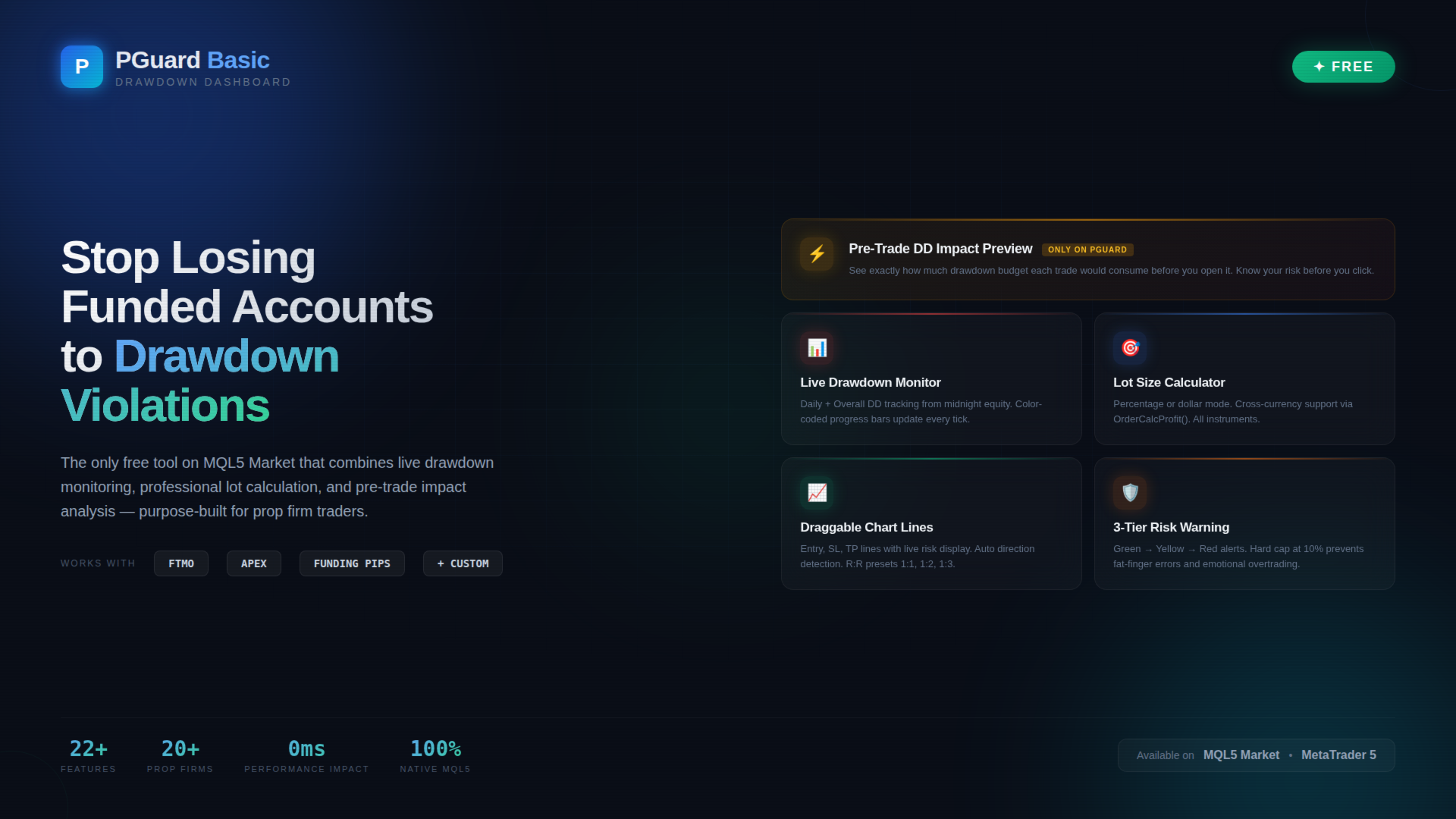
PGuard Basic is the first free Drawdown Dashboard and Lot Calculator designed specifically for Prop Firm Traders on MetaTrader 5. Monitor your Daily and Overall Drawdown in real time, calculate the perfect lot size for every trade, and see the exact impact on your remaining drawdown budget before you open a position. Built for FTMO, Apex Trader Funding, Funding Pips, and any other Prop Firm with configurable Custom Presets.
Most traders fail funded account challenges not because of bad strategy — but because they lose track of their drawdown. One emotional trade, one miscalculated position size, and the account is gone. PGuard Basic solves this by putting your drawdown status front and center on every chart, every session, every trade.
🛡 Why PGuard Basic?
Prop Firm Challenges have strict drawdown rules. FTMO allows only 5% daily and 10% overall drawdown. Apex Trader Funding uses trailing drawdown. Funding Pips calculates on balance. Every firm is different — and manual tracking with spreadsheets or mental math is the number one reason traders blow funded accounts.
PGuard Basic gives you a professional-grade drawdown monitoring dashboard directly on your MetaTrader 5 chart. No external tools, no browser tabs, no manual calculations. Just clear, real-time data exactly where you need it — next to your price action.
⭐ Unique Feature: Pre-Trade Drawdown Impact Preview
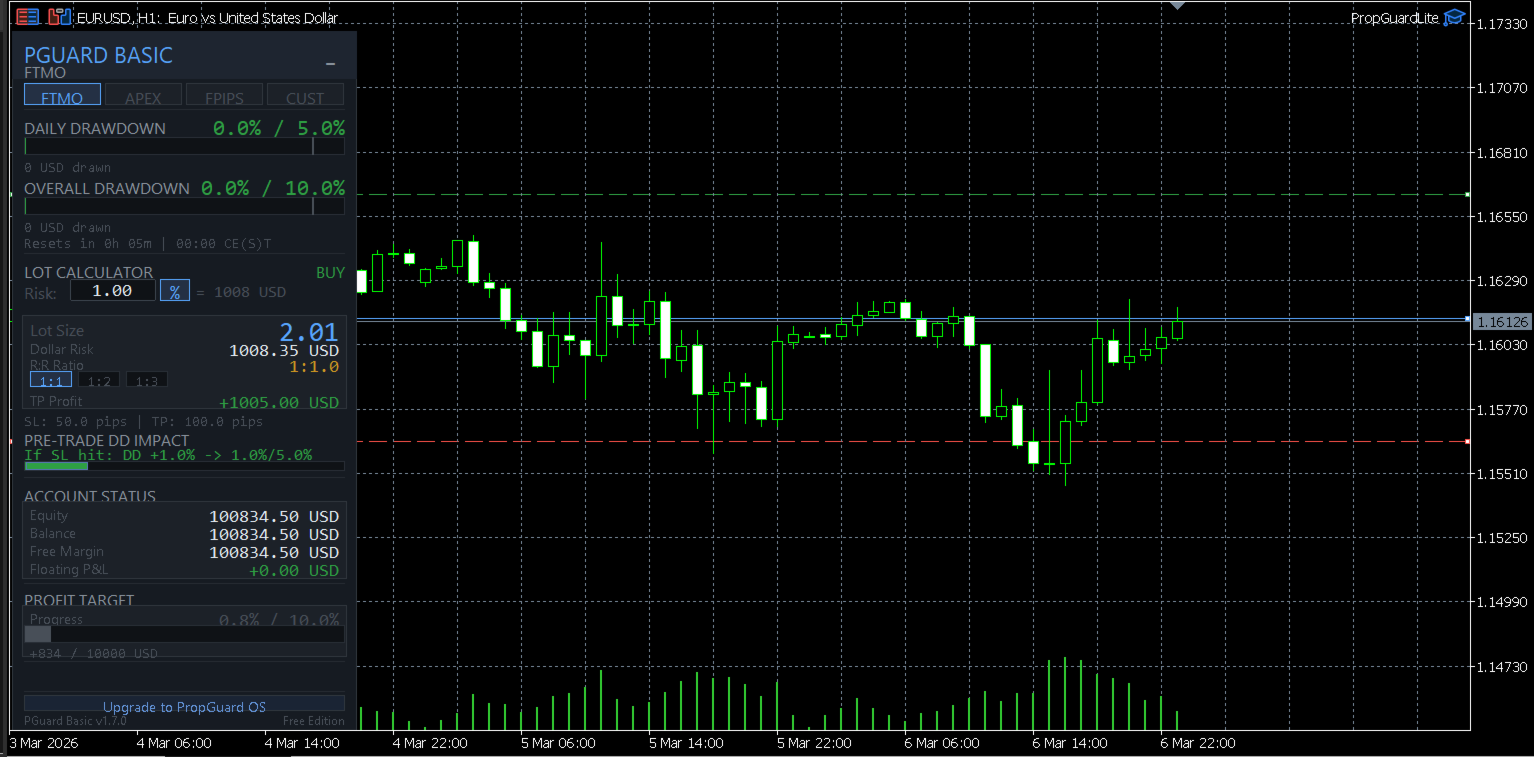
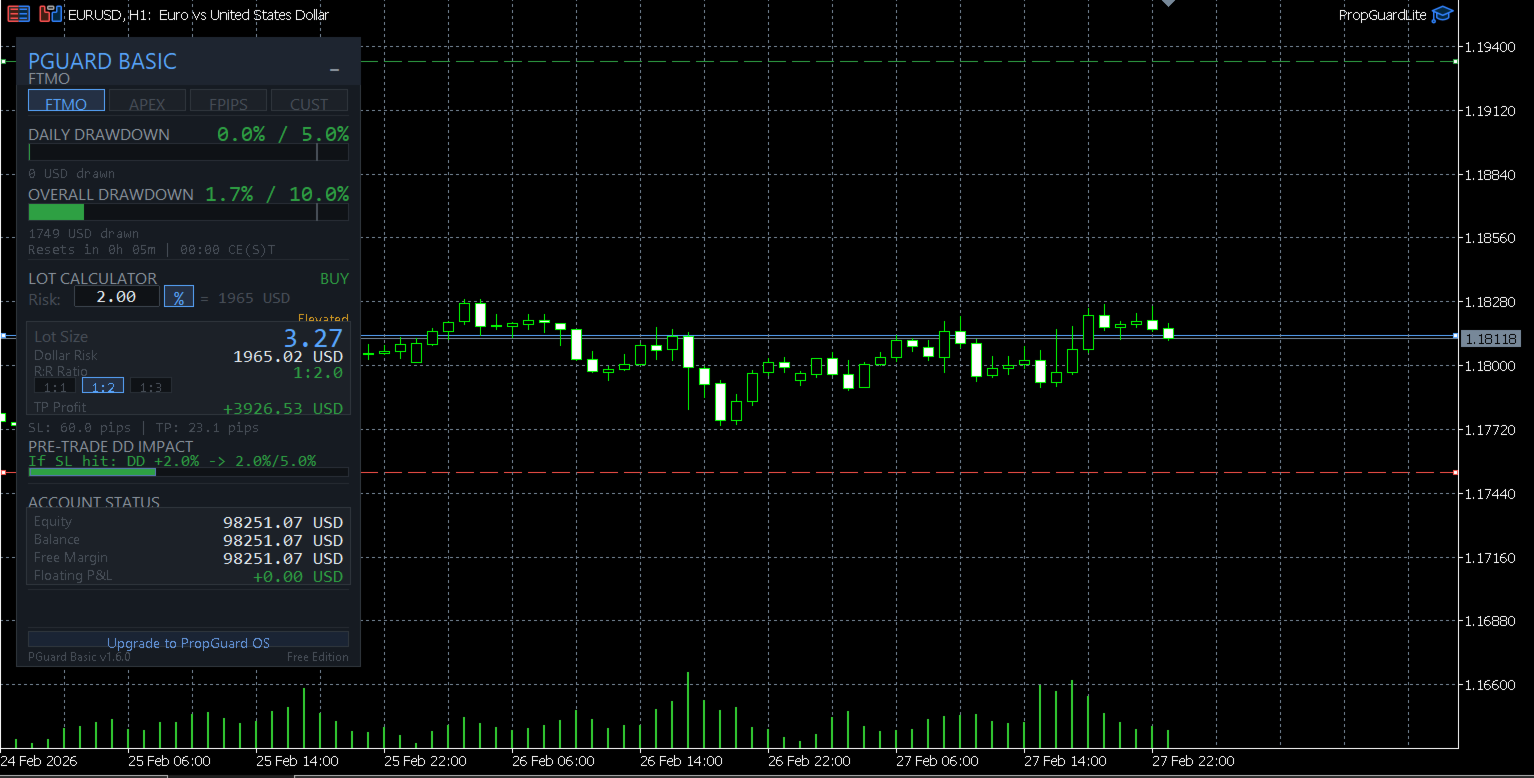
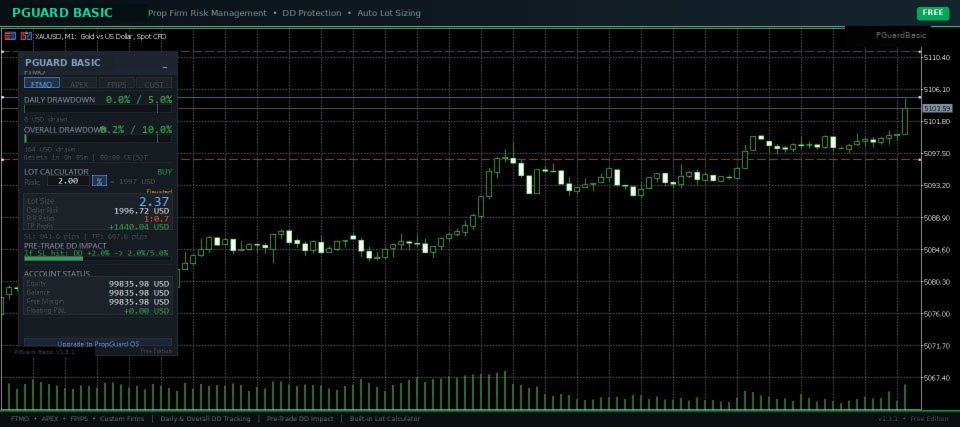
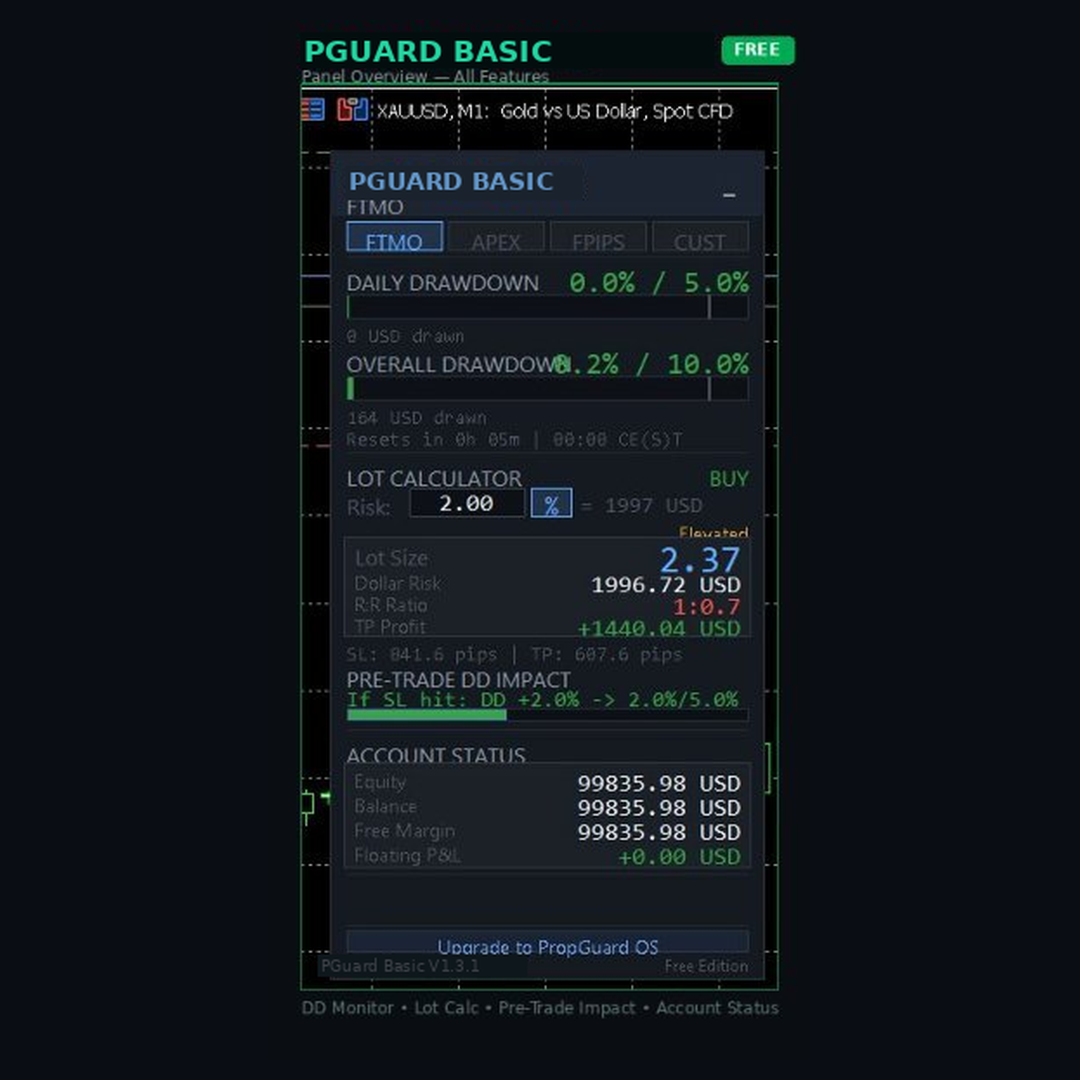
This is the feature that no other free tool on the MQL5 Market offers. Before you open any trade, PGuard Basic shows you exactly how much of your drawdown budget that trade would consume if the stop loss is hit. You see the projected drawdown percentage, the dollar amount at risk, and how close the trade would bring you to your daily or overall limit.
Example: Your FTMO account has 5% daily drawdown. You have already used 2.1%. PGuard Basic shows: "If SL hit: DD +1.4% → 3.5% / 5.0% (70% used)" — so you know instantly whether this trade fits within your risk budget. This single feature has prevented countless account violations for traders who use it consistently.
📊 Live Drawdown Monitoring
PGuard Basic tracks two drawdown metrics simultaneously in real time:
Daily Drawdown: Calculated from your equity at midnight server time (the method used by most prop firms including FTMO). The dashboard shows a visual progress bar that fills up as your daily loss increases, with clear color coding — green for safe zone, yellow for warning zone, and red for critical zone approaching your limit.
Overall Drawdown: Tracked from your initial account balance or highest equity (depending on your firm's rules). This gives you the big-picture view of how close you are to violating the maximum loss rule that would end your challenge or funded account.
Both metrics update on every tick when positions are open. The dashboard shows the exact dollar amount lost, the percentage used, and the remaining budget in both dollars and percent. No guessing, no mental math, no surprises at the end of the trading day.
💰 Professional Lot Size Calculator
Calculate the correct position size for any instrument in seconds. PGuard Basic supports two risk modes:
Percentage Mode: Risk a fixed percentage of your account equity per trade. Set 1% risk and PGuard calculates the exact lot size based on your stop loss distance, the instrument's tick value, and your account currency. The calculation works correctly for Forex pairs, Gold (XAUUSD), Silver, Indices (US30, NAS100, GER40), Crypto (BTCUSD, ETHUSD), and any other CFD instrument.
Dollar Mode: Risk a fixed dollar amount per trade. If your prop firm allows maximum $500 risk per trade, enter $500 and PGuard calculates the matching lot size regardless of the instrument or stop loss distance.
The lot size is automatically rounded to the symbol's lot step (VOLUME_STEP) and clamped between minimum and maximum lot sizes (VOLUME_MIN / VOLUME_MAX). Margin requirements are validated before any calculation is displayed. PGuard Basic uses the native OrderCalcProfit() function as a fallback for cross-currency pairs and exotic instruments where simple tick-value calculations would produce incorrect results.
📈 Visual Chart Lines with Live Risk Display
PGuard Basic places three draggable horizontal lines on your chart: Entry (blue), Stop Loss (red), and Take Profit (green). As you drag any line, the risk calculation updates in real time on the dashboard panel. This gives you an intuitive, visual way to plan your trade setup directly on the price chart.
The system automatically detects the trade direction from line positions. If the Stop Loss is below the Entry line, PGuard recognizes a BUY setup. If the Stop Loss is above Entry, it switches to SELL. No manual selection required.
Pip distances between Entry and SL, as well as Entry and TP, are displayed next to each line. The Risk-to-Reward Ratio updates automatically as you adjust the Take Profit line. Quick-select presets for common R:R ratios (1:1, 1:2, 1:3) let you set your Take Profit with a single click — the TP line moves to the calculated level instantly.
🏢 Prop Firm Presets
PGuard Basic ships with built-in configurations for the most popular prop firms:
FTMO (Challenge & Funded): 5% daily drawdown, 10% overall drawdown, equity-based calculation, reset at 00:00 CE(S)T. PGuard Basic reads the correct midnight equity reference point and calculates daily drawdown exactly as FTMO does — including unrealized floating losses.
Apex Trader Funding: Trailing drawdown model based on the highest equity reached. PGuard Basic tracks the high-water mark and shows remaining drawdown distance from peak equity. Apex uses 17:00 ET as reset time — PGuard adjusts automatically.
Funding Pips: 5% daily drawdown, 10% overall drawdown, balance-based calculation, reset at 00:00 UTC. Balance-based means only closed trades count for daily drawdown — PGuard shows both realized and unrealized calculations so you always have the complete picture.
Custom Preset: For any prop firm not listed above. Configure daily drawdown percentage, overall drawdown percentage, initial balance, reset time (HH:MM), and drawdown model (equity-based or balance-based). This makes PGuard Basic compatible with every prop firm on the market — including The5ers, FundedNext, TrueForex, E8 Funding, SurgeTrader, and any future firm.
🎨 Modern Canvas-Based Dashboard
PGuard Basic features a professionally designed dashboard rendered entirely with the MQL5 Canvas library. The dark theme with glassmorphism-inspired visual elements creates a clean, modern interface that is immediately distinguishable from standard MetaTrader panels and basic label-based tools.
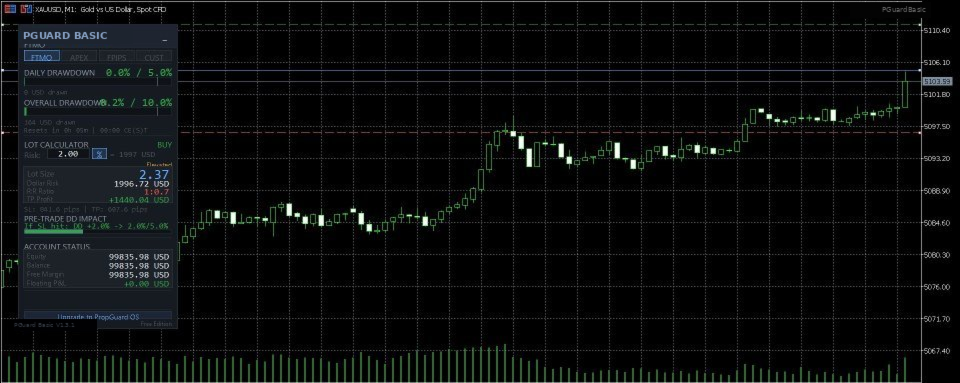
The dashboard displays all critical information at a glance: Account balance and equity, current drawdown status with color-coded progress bars, the lot calculator result with dollar risk and R:R ratio, prop firm preset selection, and the Pre-Trade DD Impact Preview. The panel is compact and does not obstruct your chart analysis. Panel position is saved between sessions via GlobalVariables — it remembers where you placed it even after restarting MetaTrader.
⚙ Risk Warning System
PGuard Basic includes a three-tier risk warning system that alerts you when your per-trade risk exceeds safe thresholds:
Normal (Green): Risk is within acceptable parameters. The panel displays risk values in standard colors. No intervention needed.
Warning (Yellow): Risk exceeds the warning threshold (default: 2% of account). The risk display changes color and a visual warning indicator appears on the panel. This is your signal to double-check the position size before proceeding.
Critical (Red): Risk exceeds the critical threshold (default: 5% of account). The entire risk field pulses red as a clear danger signal. A hard cap at 10% prevents any calculation beyond extremely dangerous risk levels. These thresholds are the safety net that prevents fat-finger errors and emotional overtrading.
📋 Complete Feature List
- Real-time Daily Drawdown monitoring (equity-based, as used by FTMO)
- Real-time Overall Drawdown monitoring (balance or equity-based)
- Pre-Trade Drawdown Impact Preview (unique to PGuard)
- Visual drawdown progress bars with color-coded zones
- Professional lot size calculator (percentage and dollar modes)
- Cross-currency and exotic instrument support via OrderCalcProfit()
- Draggable Entry, Stop Loss, and Take Profit chart lines
- Automatic trade direction detection from line positions
- Risk-to-Reward ratio display with 1:1, 1:2, 1:3 quick presets
- Prop Firm presets: FTMO, Apex Trader Funding, Funding Pips
- Custom preset for any prop firm with configurable rules
- Three-tier risk warning system (normal, warning, critical)
- Hard cap risk protection (10% maximum risk per trade)
- Account information display (balance, equity, free margin)
- Canvas-based dark theme dashboard with glassmorphism design
- Panel position persistence across MetaTrader restarts
- Built-in self-test framework for system validation
- Compatible with all symbols: Forex, Gold, Silver, Indices, Crypto, CFDs
- Works on all timeframes from M1 to Monthly
- Hedging and Netting account support
- Strategy Tester compatible (visual mode)
- No DLL imports — 100% native MQL5 code
🎯 Who Is PGuard Basic For?
Prop Firm Challenge Traders: You are in an FTMO Challenge, Apex Evaluation, or Funding Pips Assessment and cannot afford to lose the account to a drawdown violation. PGuard Basic gives you real-time visibility into your remaining drawdown budget so every trade is calculated and deliberate — not emotional and risky.
Funded Account Traders: You passed the challenge and now manage a funded account. The stakes are higher because a drawdown violation means losing the payout and the account. PGuard Basic monitors your daily and overall limits continuously so you can focus on trading rather than calculating in your head.
Risk-Conscious Retail Traders: Even without a prop firm, PGuard Basic is a professional risk management tool. The lot calculator, chart lines, and risk warning system help you maintain consistent position sizing and avoid the common mistake of taking oversized positions after a losing streak.
Traders Switching Between Firms: If you trade multiple prop firm accounts (e.g., FTMO and Apex simultaneously), switching between drawdown rules is confusing and error-prone. PGuard Basic's firm presets let you swap configurations with a single click — no mental recalculation needed when moving between different accounts and rule sets.
💡 Trading Scenarios Where PGuard Basic Prevents Account Violations
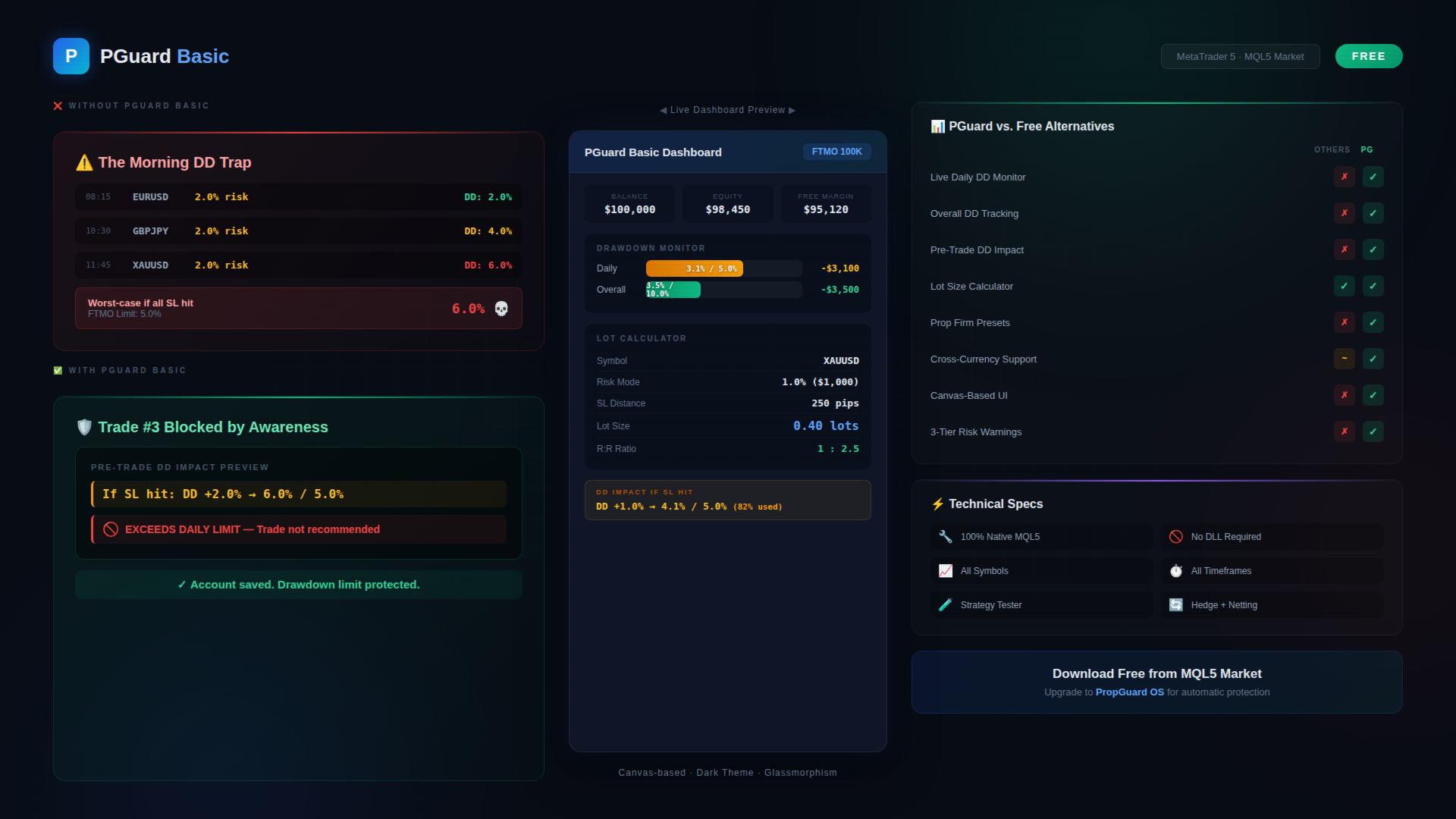
Scenario 1 — The Morning Drawdown Trap: You open MetaTrader at 8:00 AM and see a great setup on EURUSD. You enter a 2% risk trade. Two hours later, another setup on GBPJPY — 2% risk again. Then Gold shows a breakout — 2% risk. By noon, you have three positions running with a combined worst-case drawdown of 6% — exceeding your FTMO 5% daily limit if all stop losses hit. Without PGuard Basic, you would only realize this when checking your balance. With PGuard Basic, the Pre-Trade DD Impact Preview warns you before the third trade: "If SL hit: DD +2.0% → 6.1% / 5.0% — EXCEEDS DAILY LIMIT." The trade is flagged before you risk your account.
Scenario 2 — The Lot Size Miscalculation: You want to trade NAS100 with a 50-point stop loss and 1% risk. NAS100 has a contract size and tick value that differs significantly from Forex pairs. Mental calculation leads to overestimation — you enter 3 lots instead of the correct 1.8 lots. The trade loses, and the actual loss is 1.7% instead of 1%. After three such trades in a week, the accumulated error pushes you over the overall drawdown limit. PGuard Basic's cross-currency calculator would have shown the correct lot size instantly.
Scenario 3 — The Equity vs. Balance Confusion: Your FTMO account shows $100,000 balance after a profitable morning session. You take a swing trade and go to sleep. Overnight, the position moves against you — equity drops to $96,000. When midnight server time hits, FTMO captures the equity at $96,000 as the new daily reference. Your actual daily drawdown budget is now based on $96,000, not $100,000. Many traders miss this distinction. PGuard Basic captures midnight equity automatically via GlobalVariable and shows the correct drawdown calculation from the actual reference point.
🔍 How PGuard Basic Compares to Other Free Tools
The MQL5 Market has many free lot calculators and trade panels. However, none of them combine a position size calculator with live drawdown monitoring and pre-trade drawdown impact analysis. Here is what sets PGuard Basic apart:
Versus standard lot calculators: Free lot calculators calculate position size but show nothing about your drawdown status. You get the right lot size but have no idea whether the trade fits within your daily or overall drawdown budget. PGuard Basic combines both into a single dashboard — lot size AND drawdown context for every trade setup.
Versus generic trade panels: Free trade panels offer one-click execution but ignore prop firm rules entirely. They do not know what FTMO's equity-based drawdown means, they do not track midnight equity, and they do not warn you when a trade would push you over the limit. PGuard Basic is purpose-built for the prop firm workflow.
Versus paid drawdown limiters: Paid drawdown protection tools (typically $50 to $100) close positions automatically when limits are hit. PGuard Basic takes a different approach: it gives you complete drawdown visibility so you can make informed decisions before entering a trade — prevention through awareness rather than reactive position closing. For automatic protection, upgrade to PropGuard OS.
🔧 Input Parameters
- Risk Mode — Choose between percentage-based risk or fixed dollar amount per trade
- Risk Value — Default risk per trade (default: 1.0%)
- Firm Preset — Select your prop firm (FTMO, Apex, Funding Pips) or choose Custom
- Daily DD Limit (%) — Daily drawdown percentage limit for Custom preset
- Overall DD Limit (%) — Overall drawdown percentage limit for Custom preset
- Initial Balance ($) — Starting balance for drawdown calculations
- DD Model — Equity-based or balance-based drawdown calculation
- Reset Time — Daily drawdown reset time (server timezone)
- Magic Number — Unique identifier for order management
- Run Self-Test — Execute the built-in diagnostic system check
💻 System Requirements
- MetaTrader 5 (any broker)
- Hedging or Netting account mode
- Algo Trading enabled in terminal settings
- Works on all timeframes and all symbols
- No external dependencies or DLL files
- Minimum chart size: 340 x 460 pixels
🧪 Testing
You can test PGuard Basic in the MetaTrader 5 Strategy Tester using Visual Mode. Attach the utility to a chart, enable the panel, and explore the drawdown monitoring, lot calculator, and chart lines with simulated data. This allows you to evaluate the complete interface and all calculations before using the tool on a live or demo prop firm account.
PGuard Basic includes a built-in self-test framework. Enable the "Run Self-Test" input parameter to execute the diagnostic suite. The system validates lot calculations, drawdown computations, risk warning thresholds, R:R preset logic, and chart line functionality. All tests must pass with status PASS in the Experts tab.
📦 Installation
Download PGuard Basic from the MQL5 Market. The file is automatically placed in your MetaTrader 5 data folder. Open any chart, click "Insert" → "Expert Advisors" and select PGuard Basic. The dashboard panel appears immediately. Select your prop firm from the dropdown, set your preferred risk level, and you are ready to trade with full drawdown visibility.
Make sure "Algo Trading" is enabled in your MetaTrader 5 terminal settings (Tools → Options → Expert Advisors → Allow Algo Trading). PGuard Basic needs this permission to access account data and manage chart objects.
🚀 Looking for Automatic Protection?
PGuard Basic shows you the danger — PropGuard OS prevents it automatically. If you want your trades to be automatically closed when drawdown limits are reached, automatic lockout when the daily limit is hit, pre-trade validation that blocks dangerous trades before execution, SL Guard that warns you when you widen your stop loss emotionally, one-click break-even, partial close, and trailing stop — then check out PropGuard OS in the MQL5 Market. It includes everything in PGuard Basic plus a complete Compliance Engine, Trade Execution panel, and Psychological Protection features.
Search for PropGuard OS in the MQL5 Market or visit the link in the screenshots section.
❓ Frequently Asked Questions
Does PGuard Basic place trades automatically?
No. PGuard Basic is a risk management dashboard and lot calculator. It monitors your drawdown and calculates position sizes, but all trading decisions and order execution are made by you. For automatic trade execution and compliance protection, see PropGuard OS.
Does it work with my prop firm?
Yes. PGuard Basic supports FTMO, Apex Trader Funding, and Funding Pips out of the box. For any other firm, use the Custom Preset and enter your firm's specific rules (daily DD %, overall DD %, reset time, DD model). This makes PGuard compatible with every prop firm in the market.
Is the drawdown calculation accurate?
PGuard Basic calculates daily drawdown from midnight equity — the same method used by FTMO and most major prop firms. The equity value at server midnight is captured via GlobalVariable and compared to current equity on every tick. This is more accurate than balance-based tools that ignore floating losses.
Does it work on Gold, Indices, and Crypto?
Yes. The lot calculator supports all instrument types: Forex pairs (Majors, Minors, Crosses), Metals (XAUUSD, XAGUSD), Indices (US30, NAS100, GER40, JP225), Crypto (BTCUSD, ETHUSD), and any other CFD. Cross-currency calculations use OrderCalcProfit() as a fallback to ensure correct results on every symbol.
Can I test it before using it on a live account?
Yes. PGuard Basic works in the MetaTrader 5 Strategy Tester (Visual Mode). You can evaluate all features with simulated data. We also recommend testing on a demo account before using it on your funded prop firm account.
Does it slow down my MetaTrader?
No. PGuard Basic uses an event-driven architecture. The dashboard only redraws when data changes (line movement, tick update, button click). There are no heavy calculations running on every tick. CPU usage is negligible even with multiple charts open.
What if my broker uses a different server timezone?
The Custom Preset allows you to configure the exact reset time for daily drawdown. Enter the time in server timezone format (HH:MM). PGuard Basic reads the server time via TimeCurrent() and resets the midnight equity reference at the configured time.
📝 Version History
Version 1.0 — Initial release. Drawdown Dashboard, Lot Calculator, Chart Lines, Firm Presets, Pre-Trade DD Impact Preview, Risk Warning System, Canvas-based UI, Self-Test Framework.
ℹ About the Developer
PGuard is developed and maintained by an active trader who understands the daily challenges of passing and maintaining prop firm accounts. Every feature in PGuard Basic was built to solve real problems that cost real money — missed drawdown limits, miscalculated position sizes, and emotional decisions made without data. If you have questions, feedback, or feature requests, please leave a comment on this product page or send a direct message. Your input directly shapes future updates.
⚠ Disclaimer
PGuard Basic is a risk management utility. It does not generate trading signals, does not execute trades automatically, and does not guarantee compliance with any prop firm's rules. All trading decisions and responsibility remain with the user. Past drawdown calculations depend on accurate midnight equity capture — ensure PGuard Basic is running on your chart during the daily reset time. Always verify critical drawdown levels with your prop firm's official dashboard.
📖 Best Practices for Prop Firm Trading with PGuard Basic
1. Always check the Pre-Trade DD Impact before opening a position. This is the single most important habit for passing prop firm challenges. If the projected drawdown exceeds 80% of your daily limit, reduce the position size or skip the trade entirely.
2. Set your Firm Preset before the trading session starts. Switch to the correct profile (FTMO, Apex, Funding Pips, or Custom) at the beginning of each session. This ensures all drawdown calculations reference the correct limits, reset times, and calculation models.
3. Keep PGuard Basic running during the daily reset window. The midnight equity capture depends on PGuard Basic being active on your chart when the server resets. If MetaTrader is closed at midnight, PGuard captures the equity on the next start — but the reference may be slightly different from what your prop firm recorded.
4. Use the Risk-to-Reward presets consistently. The 1:2 and 1:3 R:R presets help maintain a consistent trading approach. When your stop loss is set, click the R:R preset to automatically place the Take Profit at the correct level. This removes the temptation to set unrealistic take profit targets.
5. Trust the risk warnings. When PGuard Basic shows a yellow or red risk warning, take it seriously. The warning thresholds are calibrated to protect against common mistakes — oversized positions, accumulated risk from multiple trades, and emotional overtrading after losses.
🌐 Supported Prop Firms and Drawdown Models
PGuard Basic's Custom Preset system makes it compatible with virtually every prop firm in the industry. Here is a non-exhaustive list of firms that traders successfully use PGuard Basic with:
FTMO (Challenge, Verification, Funded) — Apex Trader Funding (Evaluation, Funded) — Funding Pips (Assessment, Funded) — The5ers (Hyper Growth, High Stakes) — FundedNext (Stellar Challenge, Express) — E8 Funding (Standard, Extended) — MyFundedFX (Challenge, Rapid) — True Forex Funds — SurgeTrader — Lux Trading Firm — City Traders Imperium — TopStep — OneUp Trader — Earn2Trade — BluFX — The Funded Trader — and many more.
If your prop firm is not listed in the presets, use the Custom configuration. Enter your firm's daily drawdown percentage, overall drawdown percentage, starting balance, reset time, and whether drawdown is calculated from equity or balance. The Custom Preset adapts to any rule set.
Keywords: prop firm risk manager, drawdown dashboard MT5, lot calculator MetaTrader 5, position size calculator free, FTMO drawdown tool, Apex Trader drawdown, Funding Pips calculator, daily drawdown monitor, equity drawdown tracker, prop firm challenge tool, funded account protection, pre-trade risk assessment, drawdown limiter free, risk calculator MT5, lot size calculator, prop firm EA free, trade panel utility MT5, drawdown compliance, prop firm trading tool, equity guard, MetaTrader risk management, funded trader utility