PGuard Basic


The Free Drawdown Dashboard Built for Prop Firm Traders

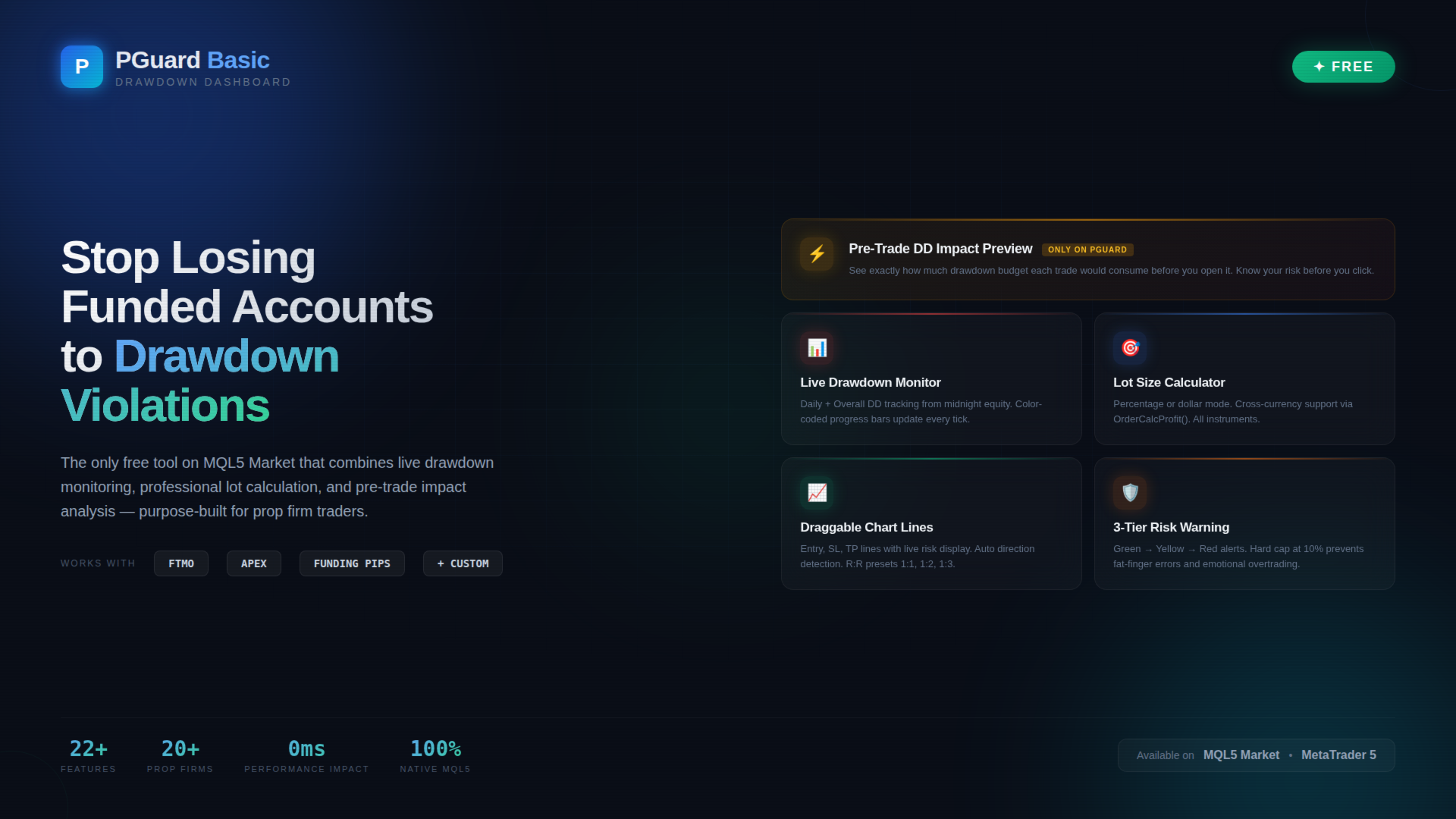
PGuard Basic is the first free Drawdown Dashboard and Lot Calculator designed specifically for Prop Firm Traders on MetaTrader 5. Monitor your Daily and Overall Drawdown in real time, calculate the perfect lot size for every trade, and see the exact impact on your remaining drawdown budget before you open a position. Built for FTMO, Apex Trader Funding, Funding Pips, and any other Prop Firm with configurable Custom Presets.

Most traders fail funded account challenges not because of bad strategy — but because they lose track of their drawdown. One emotional trade, one miscalculated position size, and the account is gone. PGuard Basic solves this by putting your drawdown status front and center on every chart, every session, every trade.

🛡 Why PGuard Basic?

Prop Firm Challenges have strict drawdown rules. FTMO allows only 5% daily and 10% overall drawdown. Apex Trader Funding uses trailing drawdown. Funding Pips calculates on balance. Every firm is different — and manual tracking with spreadsheets or mental math is the number one reason traders blow funded accounts.

PGuard Basic gives you a professional-grade drawdown monitoring dashboard directly on your MetaTrader 5 chart. No external tools, no browser tabs, no manual calculations. Just clear, real-time data exactly where you need it — next to your price action.

⭐ Unique Feature: Pre-Trade Drawdown Impact Preview

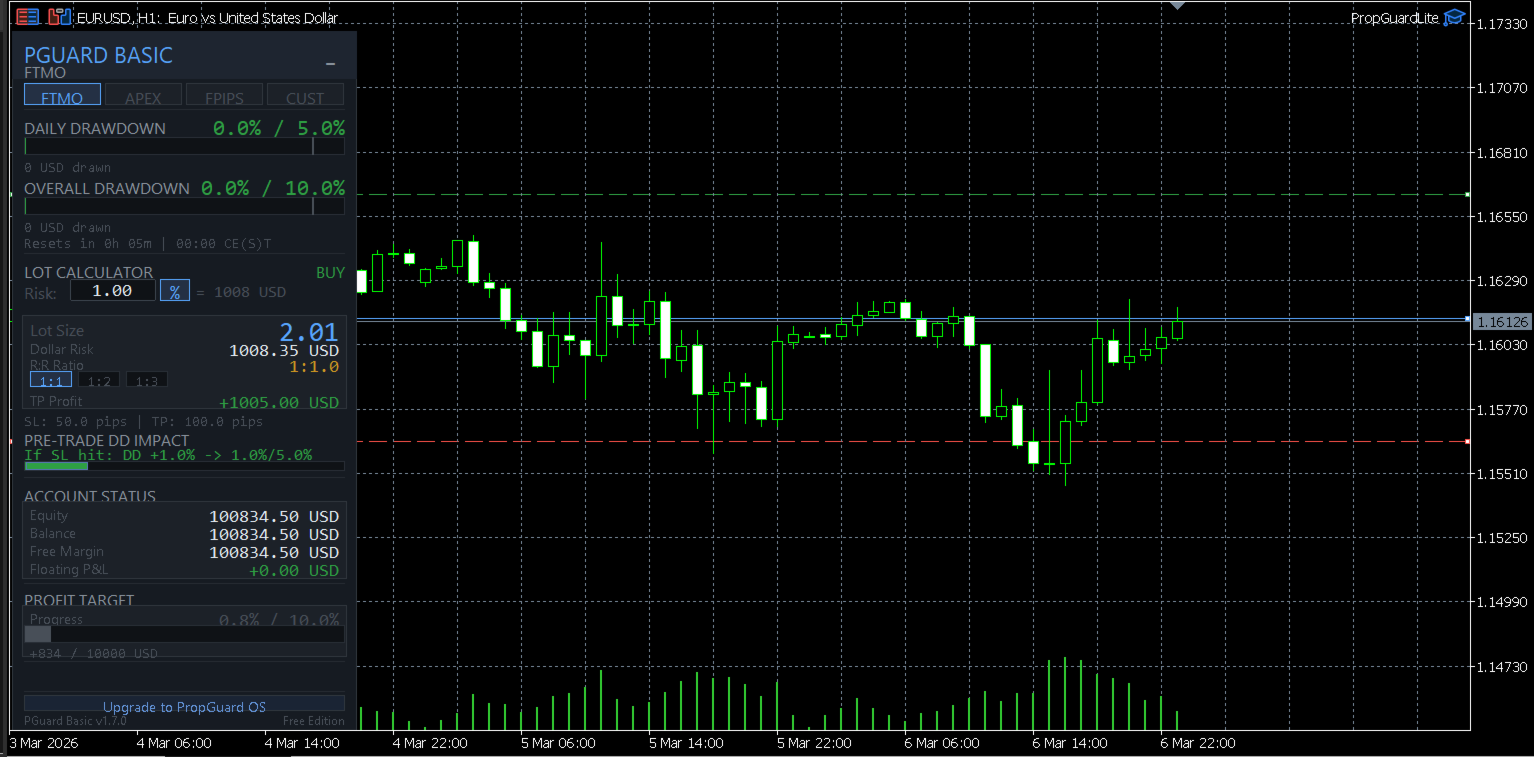
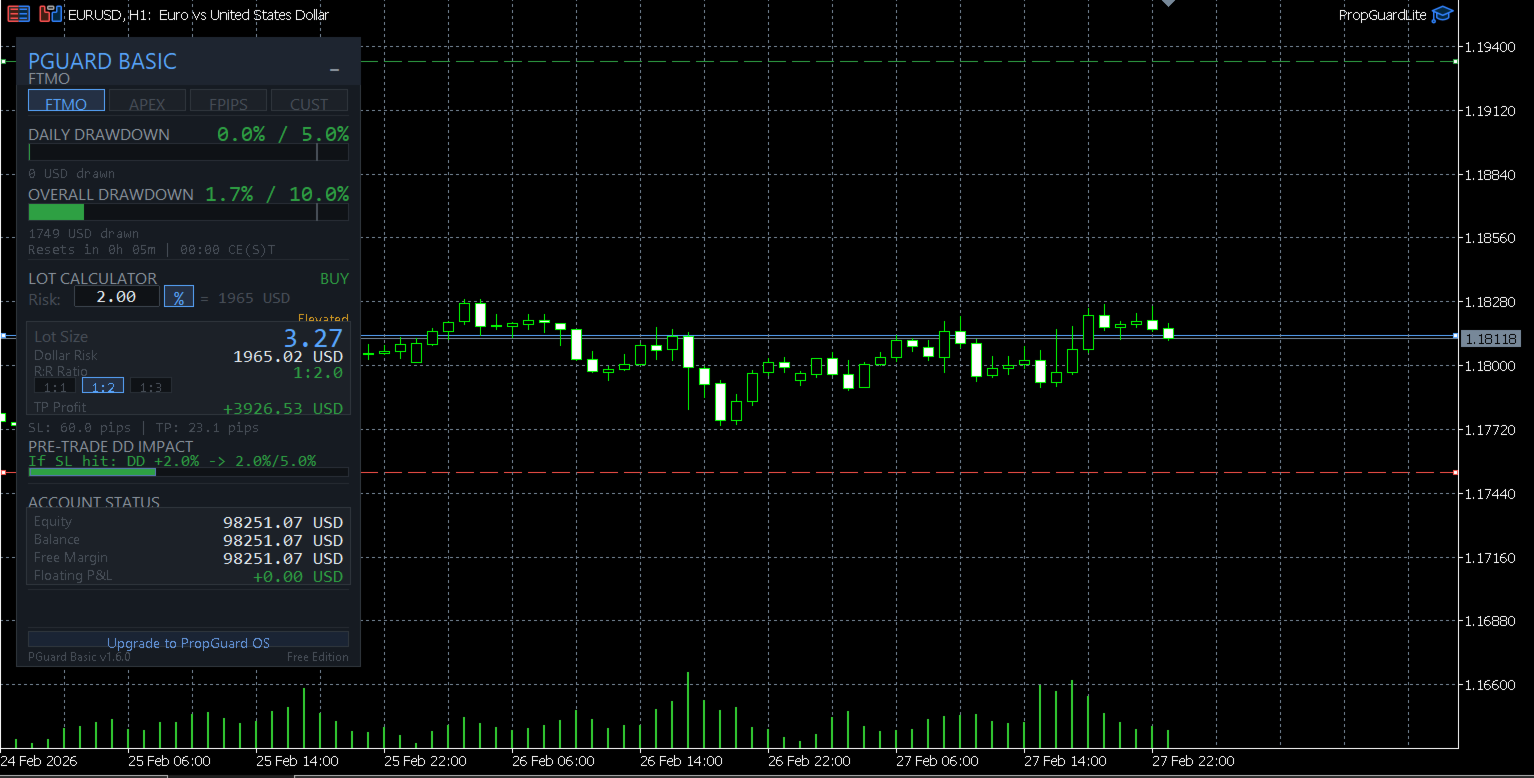
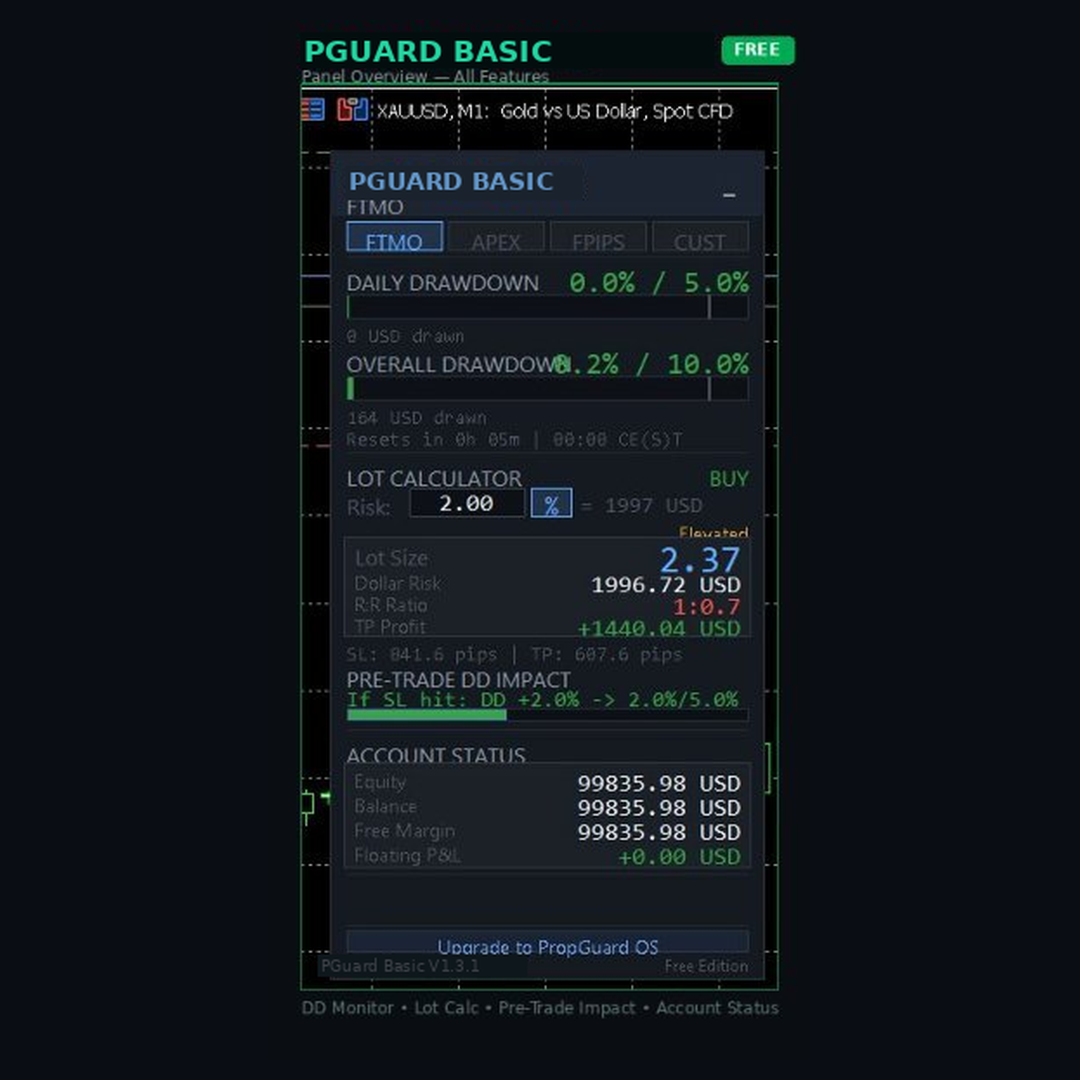
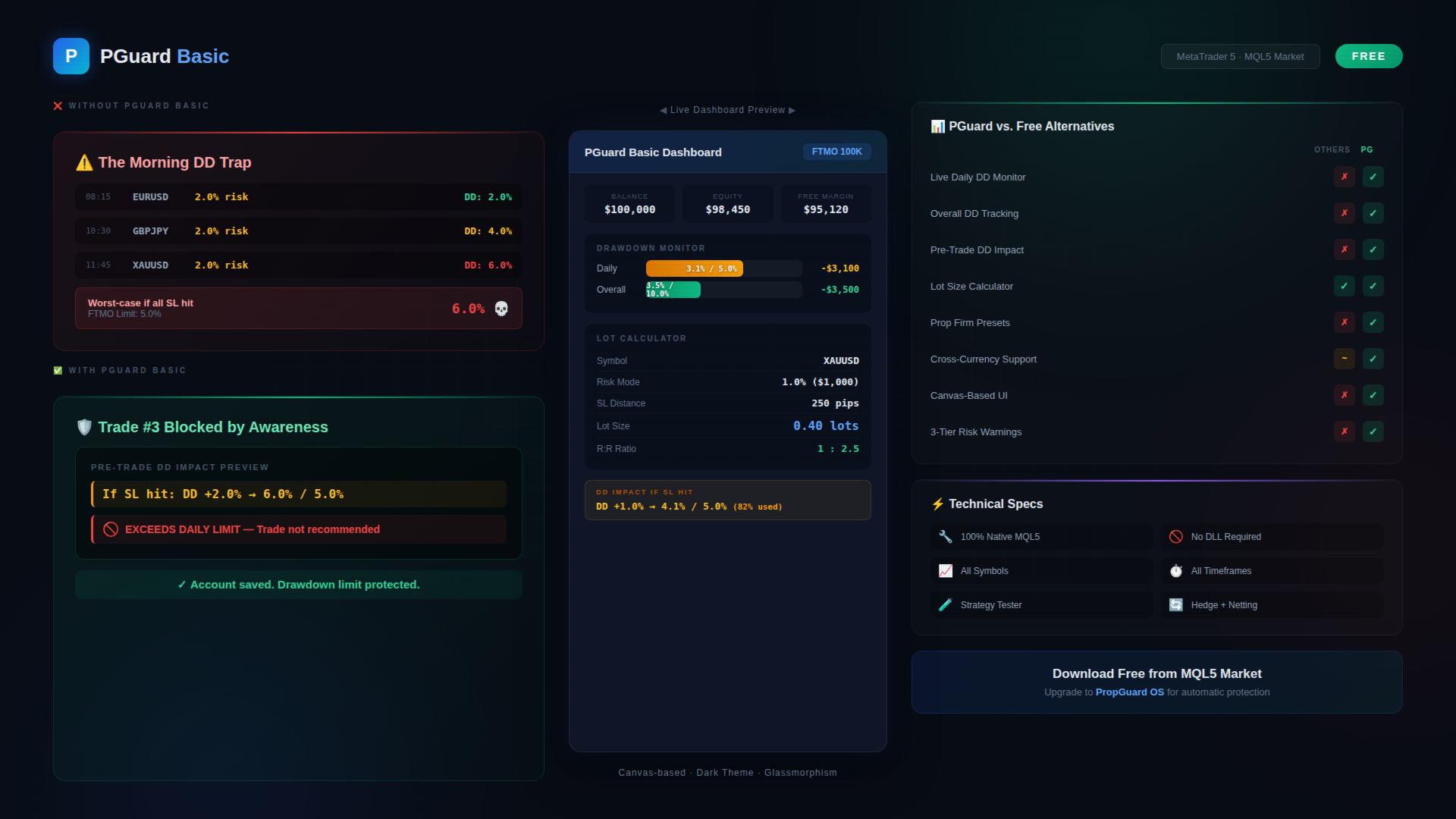
This is the feature that no other free tool on the MQL5 Market offers. Before you open any trade, PGuard Basic shows you exactly how much of your drawdown budget that trade would consume if the stop loss is hit. You see the projected drawdown percentage, the dollar amount at risk, and how close the trade would bring you to your daily or overall limit.

Example: Your FTMO account has 5% daily drawdown. You have already used 2.1%. PGuard Basic shows: "If SL hit: DD +1.4% → 3.5% / 5.0% (70% used)" — so you know instantly whether this trade fits within your risk budget. This single feature has prevented countless account violations for traders who use it consistently.

📊 Live Drawdown Monitoring

PGuard Basic tracks two drawdown metrics simultaneously in real time:

Daily Drawdown: Calculated from your equity at midnight server time (the method used by most prop firms including FTMO). The dashboard shows a visual progress bar that fills up as your daily loss increases, with clear color coding — green for safe zone, yellow for warning zone, and red for critical zone approaching your limit.

Overall Drawdown: Tracked from your initial account balance or highest equity (depending on your firm's rules). This gives you the big-picture view of how close you are to violating the maximum loss rule that would end your challenge or funded account.

Both metrics update on every tick when positions are open. The dashboard shows the exact dollar amount lost, the percentage used, and the remaining budget in both dollars and percent. No guessing, no mental math, no surprises at the end of the trading day.

💰 Professional Lot Size Calculator

Calculate the correct position size for any instrument in seconds. PGuard Basic supports two risk modes:

Percentage Mode: Risk a fixed percentage of your account equity per trade. Set 1% risk and PGuard calculates the exact lot size based on your stop loss distance, the instrument's tick value, and your account currency. The calculation works correctly for Forex pairs, Gold (XAUUSD), Silver, Indices (US30, NAS100, GER40), Crypto (BTCUSD, ETHUSD), and any other CFD instrument.

Dollar Mode: Risk a fixed dollar amount per trade. If your prop firm allows maximum $500 risk per trade, enter $500 and PGuard calculates the matching lot size regardless of the instrument or stop loss distance.

The lot size is automatically rounded to the symbol's lot step (VOLUME_STEP) and clamped between minimum and maximum lot sizes (VOLUME_MIN / VOLUME_MAX). Margin requirements are validated before any calculation is displayed. PGuard Basic uses the native OrderCalcProfit() function as a fallback for cross-currency pairs and exotic instruments where simple tick-value calculations would produce incorrect results.

📈 Visual Chart Lines with Live Risk Display

PGuard Basic places three draggable horizontal lines on your chart: Entry (blue), Stop Loss (red), and Take Profit (green). As you drag any line, the risk calculation updates in real time on the dashboard panel. This gives you an intuitive, visual way to plan your trade setup directly on the price chart.

The system automatically detects the trade direction from line positions. If the Stop Loss is below the Entry line, PGuard recognizes a BUY setup. If the Stop Loss is above Entry, it switches to SELL. No manual selection required.

Pip distances between Entry and SL, as well as Entry and TP, are displayed next to each line. The Risk-to-Reward Ratio updates automatically as you adjust the Take Profit line. Quick-select presets for common R:R ratios (1:1, 1:2, 1:3) let you set your Take Profit with a single click — the TP line moves to the calculated level instantly.

🏢 Prop Firm Presets

PGuard Basic ships with built-in configurations for the most popular prop firms:

FTMO (Challenge & Funded): 5% daily drawdown, 10% overall drawdown, equity-based calculation, reset at 00:00 CE(S)T. PGuard Basic reads the correct midnight equity reference point and calculates daily drawdown exactly as FTMO does — including unrealized floating losses.

Apex Trader Funding: Trailing drawdown model based on the highest equity reached. PGuard Basic tracks the high-water mark and shows remaining drawdown distance from peak equity. Apex uses 17:00 ET as reset time — PGuard adjusts automatically.

Funding Pips: 5% daily drawdown, 10% overall drawdown, balance-based calculation, reset at 00:00 UTC. Balance-based means only closed trades count for daily drawdown — PGuard shows both realized and unrealized calculations so you always have the complete picture.

Custom Preset: For any prop firm not listed above. Configure daily drawdown percentage, overall drawdown percentage, initial balance, reset time (HH:MM), and drawdown model (equity-based or balance-based). This makes PGuard Basic compatible with every prop firm on the market — including The5ers, FundedNext, TrueForex, E8 Funding, SurgeTrader, and any future firm.

🎨 Modern Canvas-Based Dashboard

PGuard Basic features a professionally designed dashboard rendered entirely with the MQL5 Canvas library. The dark theme with glassmorphism-inspired visual elements creates a clean, modern interface that is immediately distinguishable from standard MetaTrader panels and basic label-based tools.

The dashboard displays all critical information at a glance: Account balance and equity, current drawdown status with color-coded progress bars, the lot calculator result with dollar risk and R:R ratio, prop firm preset selection, and the Pre-Trade DD Impact Preview. The panel is compact and does not obstruct your chart analysis. Panel position is saved between sessions via GlobalVariables — it remembers where you placed it even after restarting MetaTrader.

⚙ Risk Warning System

PGuard Basic includes a three-tier risk warning system that alerts you when your per-trade risk exceeds safe thresholds:

Normal (Green): Risk is within acceptable parameters. The panel displays risk values in standard colors. No intervention needed.

Warning (Yellow): Risk exceeds the warning threshold (default: 2% of account). The risk display changes color and a visual warning indicator appears on the panel. This is your signal to double-check the position size before proceeding.

Critical (Red): Risk exceeds the critical threshold (default: 5% of account). The entire risk field pulses red as a clear danger signal. A hard cap at 10% prevents any calculation beyond extremely dangerous risk levels. These thresholds are the safety net that prevents fat-finger errors and emotional overtrading.

📋 Complete Feature List

  • Real-time Daily Drawdown monitoring (equity-based, as used by FTMO)
  • Real-time Overall Drawdown monitoring (balance or equity-based)
  • Pre-Trade Drawdown Impact Preview (unique to PGuard)
  • Visual drawdown progress bars with color-coded zones
  • Professional lot size calculator (percentage and dollar modes)
  • Cross-currency and exotic instrument support via OrderCalcProfit()
  • Draggable Entry, Stop Loss, and Take Profit chart lines
  • Automatic trade direction detection from line positions
  • Risk-to-Reward ratio display with 1:1, 1:2, 1:3 quick presets
  • Prop Firm presets: FTMO, Apex Trader Funding, Funding Pips
  • Custom preset for any prop firm with configurable rules
  • Three-tier risk warning system (normal, warning, critical)
  • Hard cap risk protection (10% maximum risk per trade)
  • Account information display (balance, equity, free margin)
  • Canvas-based dark theme dashboard with glassmorphism design
  • Panel position persistence across MetaTrader restarts
  • Built-in self-test framework for system validation
  • Compatible with all symbols: Forex, Gold, Silver, Indices, Crypto, CFDs
  • Works on all timeframes from M1 to Monthly
  • Hedging and Netting account support
  • Strategy Tester compatible (visual mode)
  • No DLL imports — 100% native MQL5 code

🎯 Who Is PGuard Basic For?

Prop Firm Challenge Traders: You are in an FTMO Challenge, Apex Evaluation, or Funding Pips Assessment and cannot afford to lose the account to a drawdown violation. PGuard Basic gives you real-time visibility into your remaining drawdown budget so every trade is calculated and deliberate — not emotional and risky.

Funded Account Traders: You passed the challenge and now manage a funded account. The stakes are higher because a drawdown violation means losing the payout and the account. PGuard Basic monitors your daily and overall limits continuously so you can focus on trading rather than calculating in your head.

Risk-Conscious Retail Traders: Even without a prop firm, PGuard Basic is a professional risk management tool. The lot calculator, chart lines, and risk warning system help you maintain consistent position sizing and avoid the common mistake of taking oversized positions after a losing streak.

Traders Switching Between Firms: If you trade multiple prop firm accounts (e.g., FTMO and Apex simultaneously), switching between drawdown rules is confusing and error-prone. PGuard Basic's firm presets let you swap configurations with a single click — no mental recalculation needed when moving between different accounts and rule sets.

💡 Trading Scenarios Where PGuard Basic Prevents Account Violations

Scenario 1 — The Morning Drawdown Trap: You open MetaTrader at 8:00 AM and see a great setup on EURUSD. You enter a 2% risk trade. Two hours later, another setup on GBPJPY — 2% risk again. Then Gold shows a breakout — 2% risk. By noon, you have three positions running with a combined worst-case drawdown of 6% — exceeding your FTMO 5% daily limit if all stop losses hit. Without PGuard Basic, you would only realize this when checking your balance. With PGuard Basic, the Pre-Trade DD Impact Preview warns you before the third trade: "If SL hit: DD +2.0% → 6.1% / 5.0% — EXCEEDS DAILY LIMIT." The trade is flagged before you risk your account.

Scenario 2 — The Lot Size Miscalculation: You want to trade NAS100 with a 50-point stop loss and 1% risk. NAS100 has a contract size and tick value that differs significantly from Forex pairs. Mental calculation leads to overestimation — you enter 3 lots instead of the correct 1.8 lots. The trade loses, and the actual loss is 1.7% instead of 1%. After three such trades in a week, the accumulated error pushes you over the overall drawdown limit. PGuard Basic's cross-currency calculator would have shown the correct lot size instantly.

Scenario 3 — The Equity vs. Balance Confusion: Your FTMO account shows $100,000 balance after a profitable morning session. You take a swing trade and go to sleep. Overnight, the position moves against you — equity drops to $96,000. When midnight server time hits, FTMO captures the equity at $96,000 as the new daily reference. Your actual daily drawdown budget is now based on $96,000, not $100,000. Many traders miss this distinction. PGuard Basic captures midnight equity automatically via GlobalVariable and shows the correct drawdown calculation from the actual reference point.

🔍 How PGuard Basic Compares to Other Free Tools

The MQL5 Market has many free lot calculators and trade panels. However, none of them combine a position size calculator with live drawdown monitoring and pre-trade drawdown impact analysis. Here is what sets PGuard Basic apart:

Versus standard lot calculators: Free lot calculators calculate position size but show nothing about your drawdown status. You get the right lot size but have no idea whether the trade fits within your daily or overall drawdown budget. PGuard Basic combines both into a single dashboard — lot size AND drawdown context for every trade setup.

Versus generic trade panels: Free trade panels offer one-click execution but ignore prop firm rules entirely. They do not know what FTMO's equity-based drawdown means, they do not track midnight equity, and they do not warn you when a trade would push you over the limit. PGuard Basic is purpose-built for the prop firm workflow.

Versus paid drawdown limiters: Paid drawdown protection tools (typically $50 to $100) close positions automatically when limits are hit. PGuard Basic takes a different approach: it gives you complete drawdown visibility so you can make informed decisions before entering a trade — prevention through awareness rather than reactive position closing. For automatic protection, upgrade to PropGuard OS.

🔧 Input Parameters

  • Risk Mode — Choose between percentage-based risk or fixed dollar amount per trade
  • Risk Value — Default risk per trade (default: 1.0%)
  • Firm Preset — Select your prop firm (FTMO, Apex, Funding Pips) or choose Custom
  • Daily DD Limit (%) — Daily drawdown percentage limit for Custom preset
  • Overall DD Limit (%) — Overall drawdown percentage limit for Custom preset
  • Initial Balance ($) — Starting balance for drawdown calculations
  • DD Model — Equity-based or balance-based drawdown calculation
  • Reset Time — Daily drawdown reset time (server timezone)
  • Magic Number — Unique identifier for order management
  • Run Self-Test — Execute the built-in diagnostic system check

💻 System Requirements

  • MetaTrader 5 (any broker)
  • Hedging or Netting account mode
  • Algo Trading enabled in terminal settings
  • Works on all timeframes and all symbols
  • No external dependencies or DLL files
  • Minimum chart size: 340 x 460 pixels

🧪 Testing

You can test PGuard Basic in the MetaTrader 5 Strategy Tester using Visual Mode. Attach the utility to a chart, enable the panel, and explore the drawdown monitoring, lot calculator, and chart lines with simulated data. This allows you to evaluate the complete interface and all calculations before using the tool on a live or demo prop firm account.

PGuard Basic includes a built-in self-test framework. Enable the "Run Self-Test" input parameter to execute the diagnostic suite. The system validates lot calculations, drawdown computations, risk warning thresholds, R:R preset logic, and chart line functionality. All tests must pass with status PASS in the Experts tab.

📦 Installation

Download PGuard Basic from the MQL5 Market. The file is automatically placed in your MetaTrader 5 data folder. Open any chart, click "Insert" → "Expert Advisors" and select PGuard Basic. The dashboard panel appears immediately. Select your prop firm from the dropdown, set your preferred risk level, and you are ready to trade with full drawdown visibility.

Make sure "Algo Trading" is enabled in your MetaTrader 5 terminal settings (Tools → Options → Expert Advisors → Allow Algo Trading). PGuard Basic needs this permission to access account data and manage chart objects.

🚀 Looking for Automatic Protection?

PGuard Basic shows you the danger — PropGuard OS prevents it automatically. If you want your trades to be automatically closed when drawdown limits are reached, automatic lockout when the daily limit is hit, pre-trade validation that blocks dangerous trades before execution, SL Guard that warns you when you widen your stop loss emotionally, one-click break-even, partial close, and trailing stop — then check out PropGuard OS in the MQL5 Market. It includes everything in PGuard Basic plus a complete Compliance Engine, Trade Execution panel, and Psychological Protection features.

Search for PropGuard OS in the MQL5 Market or visit the link in the screenshots section.

❓ Frequently Asked Questions

Does PGuard Basic place trades automatically?
No. PGuard Basic is a risk management dashboard and lot calculator. It monitors your drawdown and calculates position sizes, but all trading decisions and order execution are made by you. For automatic trade execution and compliance protection, see PropGuard OS.

Does it work with my prop firm?
Yes. PGuard Basic supports FTMO, Apex Trader Funding, and Funding Pips out of the box. For any other firm, use the Custom Preset and enter your firm's specific rules (daily DD %, overall DD %, reset time, DD model). This makes PGuard compatible with every prop firm in the market.

Is the drawdown calculation accurate?
PGuard Basic calculates daily drawdown from midnight equity — the same method used by FTMO and most major prop firms. The equity value at server midnight is captured via GlobalVariable and compared to current equity on every tick. This is more accurate than balance-based tools that ignore floating losses.

Does it work on Gold, Indices, and Crypto?
Yes. The lot calculator supports all instrument types: Forex pairs (Majors, Minors, Crosses), Metals (XAUUSD, XAGUSD), Indices (US30, NAS100, GER40, JP225), Crypto (BTCUSD, ETHUSD), and any other CFD. Cross-currency calculations use OrderCalcProfit() as a fallback to ensure correct results on every symbol.

Can I test it before using it on a live account?
Yes. PGuard Basic works in the MetaTrader 5 Strategy Tester (Visual Mode). You can evaluate all features with simulated data. We also recommend testing on a demo account before using it on your funded prop firm account.

Does it slow down my MetaTrader?
No. PGuard Basic uses an event-driven architecture. The dashboard only redraws when data changes (line movement, tick update, button click). There are no heavy calculations running on every tick. CPU usage is negligible even with multiple charts open.

What if my broker uses a different server timezone?
The Custom Preset allows you to configure the exact reset time for daily drawdown. Enter the time in server timezone format (HH:MM). PGuard Basic reads the server time via TimeCurrent() and resets the midnight equity reference at the configured time.

📝 Version History

Version 1.0 — Initial release. Drawdown Dashboard, Lot Calculator, Chart Lines, Firm Presets, Pre-Trade DD Impact Preview, Risk Warning System, Canvas-based UI, Self-Test Framework.

ℹ About the Developer

PGuard is developed and maintained by an active trader who understands the daily challenges of passing and maintaining prop firm accounts. Every feature in PGuard Basic was built to solve real problems that cost real money — missed drawdown limits, miscalculated position sizes, and emotional decisions made without data. If you have questions, feedback, or feature requests, please leave a comment on this product page or send a direct message. Your input directly shapes future updates.

⚠ Disclaimer

PGuard Basic is a risk management utility. It does not generate trading signals, does not execute trades automatically, and does not guarantee compliance with any prop firm's rules. All trading decisions and responsibility remain with the user. Past drawdown calculations depend on accurate midnight equity capture — ensure PGuard Basic is running on your chart during the daily reset time. Always verify critical drawdown levels with your prop firm's official dashboard.

📖 Best Practices for Prop Firm Trading with PGuard Basic

1. Always check the Pre-Trade DD Impact before opening a position. This is the single most important habit for passing prop firm challenges. If the projected drawdown exceeds 80% of your daily limit, reduce the position size or skip the trade entirely.

2. Set your Firm Preset before the trading session starts. Switch to the correct profile (FTMO, Apex, Funding Pips, or Custom) at the beginning of each session. This ensures all drawdown calculations reference the correct limits, reset times, and calculation models.

3. Keep PGuard Basic running during the daily reset window. The midnight equity capture depends on PGuard Basic being active on your chart when the server resets. If MetaTrader is closed at midnight, PGuard captures the equity on the next start — but the reference may be slightly different from what your prop firm recorded.

4. Use the Risk-to-Reward presets consistently. The 1:2 and 1:3 R:R presets help maintain a consistent trading approach. When your stop loss is set, click the R:R preset to automatically place the Take Profit at the correct level. This removes the temptation to set unrealistic take profit targets.

5. Trust the risk warnings. When PGuard Basic shows a yellow or red risk warning, take it seriously. The warning thresholds are calibrated to protect against common mistakes — oversized positions, accumulated risk from multiple trades, and emotional overtrading after losses.

🌐 Supported Prop Firms and Drawdown Models

PGuard Basic's Custom Preset system makes it compatible with virtually every prop firm in the industry. Here is a non-exhaustive list of firms that traders successfully use PGuard Basic with:

FTMO (Challenge, Verification, Funded) — Apex Trader Funding (Evaluation, Funded) — Funding Pips (Assessment, Funded) — The5ers (Hyper Growth, High Stakes) — FundedNext (Stellar Challenge, Express) — E8 Funding (Standard, Extended) — MyFundedFX (Challenge, Rapid) — True Forex Funds — SurgeTrader — Lux Trading Firm — City Traders Imperium — TopStep — OneUp Trader — Earn2Trade — BluFX — The Funded Trader — and many more.

If your prop firm is not listed in the presets, use the Custom configuration. Enter your firm's daily drawdown percentage, overall drawdown percentage, starting balance, reset time, and whether drawdown is calculated from equity or balance. The Custom Preset adapts to any rule set.

Keywords: prop firm risk manager, drawdown dashboard MT5, lot calculator MetaTrader 5, position size calculator free, FTMO drawdown tool, Apex Trader drawdown, Funding Pips calculator, daily drawdown monitor, equity drawdown tracker, prop firm challenge tool, funded account protection, pre-trade risk assessment, drawdown limiter free, risk calculator MT5, lot size calculator, prop firm EA free, trade panel utility MT5, drawdown compliance, prop firm trading tool, equity guard, MetaTrader risk management, funded trader utility
Рекомендуем также
Индикатор Crypto_Forex "WPR с 2 скользящими средними" для MT5, без перерисовки. - Сам по себе WPR является одним из лучших осцилляторов для скальпинга. - Индикатор "WPR и 2 скользящие средние" позволяет видеть быстрые и медленные скользящие средние осциллятора WPR. - Индикатор дает возможность увидеть коррекцию цены на очень ранней стадии. - Этот индикатор очень легко настроить через параметры, его можно использовать на любом таймфрейме. - Условия входа на покупку и продажу показаны на изображ
Trend Lines Scalper
Magdalena Estefania Colonna
TREND LINES Scalper Professional Indicator OVERVIEW Trend Lines Scalper is a highly accurate, advanced indicator designed specifically for professional traders looking to maximize their scalping opportunities by automatically detecting trend lines and high-probability signals. This powerful algorithm combines classic technical analysis with modern technology, automatically identifying price patterns and generating accurate, real-time signals for successful scalping trades. MAIN FEATURES
Trading Room Indicator is a professional market-structure tool built to give traders a clear, complete trading framework — combining CPR levels, dynamic targets, and trend direction in one clean view. Instead of guessing direction or overloading the chart with indicators, Trading Room Indicator focuses on what actually matters : levels, direction, and potential price expansion. What This Indicator Provides CPR Structure BUY level SELL level Pivot Point (PP) Designed to highlight equilibrium
Trade Condition Logger MT5
AbelPM Enterprises Pty Ltd
The   Trade   Condition   Logger   is   an   essential   tool,   offering   crucial   insights   into: Current   swap   and   spread   values Automatic   logging   of   fluctuations   in   swap   values Logging spread   value   range over   time Optimise   spread   values for specific instrument Displays   a   comprehensive   summary   on   the   chart,   providing   traders   with   insights   into   trade   conditions.  Review trade conditions for your various   broker   accounts   enabling  
Introducing   Order Blocks Breaker , a brand-new way to identify and leverage order blocks in your trading strategy. After developing multiple order block tools with unique concepts, I’m proud to present this tool that takes things to the next level. Unlike previous tools,   Order Blocks Breaker   not only identifies order blocks but also highlights   Breaker Order Blocks —key areas where the price is likely to retest after a breakout. MT4 -  https://www.mql5.com/en/market/product/124101/ This t
Do you, like me, like to trade with the trend? Then this indicator will help you! Rainbow Trend is a trend indicator, which uses several Moving Averages on the chart. It measures different trend strenght zones for different periods: very long term, long term, mid term, short term and very short term. Each zone has its color, and it is possible to have sound alert when the prices leaves a zone and enters another. Its configuration is very simple. If you find any bug or have any suggestions, conta
Let us introduce the Heikin Ashi RSI Oscillator! This indicator combines the concepts of Heikin Ashi candles with the RSI (Relative Strength Index) to produce an oscillator-like format that can be used to filter out some of the noise associated with standard RSI readings. This provides traders with a smoother representation of market conditions. Here are some articles to read more about the RSI and Heikin Ashi candles: https://www.investopedia.com/terms/r/rsi.asp https://www.investopedia.com/ter
Time to Close Candle
German David Nino Cifuentes
TimeToClose The "TimeToClose" indicator is an essential tool for traders who need to monitor the remaining time before a candle closes. This indicator displays the remaining time directly on the BID line, providing a clear and precise reference during real-time trading. Key Features: Displays the remaining time for the current candle to close. Direct integration on the BID line for better visualization. Simple and user-friendly configuration. Ideal for all types of traders, from beginners to pro
FREE
Trade Mate
Sotirios Apostolos Adaloglou
Trade Mate is the trading tool for manual traders who want to take their trading to the next level. Packed with advanced features like automatic trailing stop loss, lot size calculation, pending orders, partial close, open trade management, and daily drawdown protection(makes it easier to stick to your daily equity risk).  Trade Mate offers everything you need to trade with precision and confidence. Don't settle for less - try Trade Mate today and see the difference for yourself! Check it on You
Риск-менеджер по принципу «Настроил и забыл» для мультивялютной торговли ️ Никогда не оставляйте сделку без защиты. Auto Stop Loss (MT5 Manager) — это незаменимая фоновая утилита для трейдеров, которые ставят безопасность на первое место. В отличие от громоздких торговых панелей, этот инструмент работает незаметно, мгновенно защищая каждую открытую сделку. Открываете ли вы ордера вручную или используете другой советник (EA), этот менеджер гарантирует, что у каждой позиции сразу же появятся жес
Candlestick Pattern Scanner is a multi-timeframe and multi-symbol dashboard and alert system that checks all timeframes and currency pairs for different candlestick patterns that are formed in them. Scanner is integrated   with support and resistance zones so you can check the candlestick patterns in most important areas of the chart to find breakout and reversal patterns in the price chart. Download demo version   (works on M4,M6,M12,H3,H8 timeframes and 20 symbols of Market Watch window) Read
BlueBoat – Prime Cycle is a technical indicator for MetaTrader 5 that visualizes market cycles based on the Fimathe cycle model (Marcelo Ferreira) . It identifies and displays historic and live cycle structures such as CA, C1, C2, C3, etc., helping traders understand the rhythm and timing of price movement across multiple sessions. This tool is ideal for manual analysis or as a supporting signal in discretionary strategies. Key Features Historical Cycle Analysis – Backtest and visualize as many
The   Trendlines Oscillator   helps traders identify trends and momentum based on the normalized distances between the current price and the most recently detected bullish and bearish trend lines. The indicator features bullish and bearish momentum, a signal line with crossings, and multiple smoothing options. USAGE The   Trendlines Oscillator   works by systematically: Identifying pivot highs and lows. Connecting pivots to form bullish (support) and bearish (resistance) trendlines. Measuring
This EA is primarily used for scalping XAUUSD. Purpose Removes emotion from trade management   - automatically protects positions and takes profits so you don't have to make difficult decisions under pressure. What It Does ️   Auto Stop Loss Sets SL based on recent highs/lows + buffer No more manual placement stress   Auto Partial Profits Two modes: Fixed Movement : Close 50% after X price movement R-Ratio : Close 50% at 1.2R profit target Locks in gains while letting winners run. ️   One
SlopeChannelB – инструмент технического анализа, который строит наклонный канал движения цены, предоставляя уникальные возможности для оценки текущего состояния рынка и поиска торговых сигналов. Основные особенности индикатора: Наклонный канал движения цены : Индикатор помогает визуализировать уровни поддержки и сопротивления, которые могут указывать на возможные точки разворота или продолжения тренда. Различные цвета линий и фоновое выделение : Наклонные уровни поддержки и сопротивления от
Visual Dolphin Indicator
AL MOOSAWI ABDULLAH JAFFER BAQER
Visual Dolphin Indicator Unlock the rhythm of the market with the Visual Dolphin Indicator, your ultimate tool for identifying and capitalizing on market trends with clarity and confidence. Designed for both novice and experienced traders, this indicator eliminates the noise and guesswork, providing crystal-clear buy and sell signals directly on your chart. The Logic Behind the Waves The core of the Visual Dolphin Indicator is a sophisticated yet intuitive dual-wave system based on moving avera
Size Bars – индикатор отображает на графике максимальный, минимальный, текущий и средний размер баров (свечей) за выбранный период. Отображаемые параметры индикатора Size Bars: 1)       Текущий размер бара в писах (по максимум/минимум, тело бара). 2)       Максимальный, минимальный и средний размер свечей BUY . 3)       Максимальный, минимальный, средний размер свечей SELL . 4)       Количество свечей BUY и количество свечей SELL . 5)       Среднее количество свечей подряд BUY и SELL . 6)     
Fibo Daily Channel Indicator The  Indicator is a powerful tool for traders, providing precise daily support and resistance levels based on Fibonacci retracement and extension calculations. This indicator automatically draws key pivot points (PP, R1, R2, S1, S2) as well as additional extension levels (R3, R4, S3, S4), helping traders identify potential reversal and breakout zones with ease. It includes customizable alerts and push notifications, allowing traders to receive updates whenever the pr
SPIKE DETECTOR RADAR ALERT – Surgical Precision in Explosive Market Movements Master market spikes with early alerts and high probability accuracy. Spike Detector Radar Alert is an advanced indicator for MetaTrader 5, developed to identify sudden price movements (spikes) in advance with enhanced precision. By combining volatility analysis, momentum strength, and price acceleration, the algorithm delivers clear signals at key market moments. Why traders choose Spike Detector Radar Alert: Mul
Добро пожаловать в HiperCube VIX Код скидки на 25% на Darwinex Zero: DWZ2328770MGM Этот индикатор предоставляет вам реальную информацию о рынке объема sp500 / us500 Определение HiperCube VIX, известный как индекс волатильности CBOE, является широко признанным показателем рыночного страха или стресса. Он сигнализирует об уровне неопределенности и волатильности на фондовом рынке, используя индекс S&P 500 в качестве прокси для широкого рынка. Индекс VIX рассчитывается на основе цен опционных кон
FREE
Price Magnet — Индикатор зон плотности цены и уровней притяжения Price Magnet — это профессиональный аналитический инструмент, который определяет ключевые уровни поддержки и сопротивления на основе статистической плотности распределения цены (Price Density). Индикатор анализирует заданный исторический период и находит ценовые значения, на которых рынок находился дольше всего. Эти зоны выступают в роли «магнитов» — они притягивают цену или служат фундаментом для разворота. В отличие от стандартны
Antabod Multiplier
Rev Anthony Olusegun Aboderin
Antabod Multiplier , the ultimate trading indicator designed to simplify your decision-making process and maximize your trading potential. Built with a robust combination of moving averages and stochastic oscillators, this tool provides clear, actionable signals for both buy and sell opportunities. The Antabod Multiplier stands out with its dynamic trend detection and precision filtering, giving you real-time visual signals to catch trend reversals and optimal entry/exit points with ease. Whethe
Индикатор определяет и отображает на графике паттерн М. Гартли "Бабочка". Выделение паттерна производится по вершинам индикатора ZigZag (включен в ресурсы, не требует допопнительной установки). В момент распознавания паттерна выводится сообщение во всплывающем окне, отправляются оповещения на мобильное устройство и электронный почтовый ящик. Схема паттерна и параметры волн приведены на скриншоте. Параметры, заданные в индикаторе по умолчанию, являются демонстрационными для увеличения количества
Silver Zebra Trading System
AL MOOSAWI ABDULLAH JAFFER BAQER
Silver Zebra Trading System - Uncover Market Momentum Unlock a powerful new way to visualize market trends and momentum with the Silver Zebra Trading System. This unique MetaTrader 5 indicator is designed to give you a clear and immediate understanding of market dynamics, helping you make more informed trading decisions. For just $30, you can add this indispensable tool to your trading arsenal. What is the Silver Zebra Trading System? The Silver Zebra Trading System is a sophisticated indicator
MTF Ichimoku - это индикатор для MetaTrader, основанный на хорошо известном Ichimoku. Ichimoku включен в стандартный набор технических индикаторов MetaTrader 5. Однако, его можно использовать только на текущем таймфрейме. При поиске тренда очень желательно просматривать индикаторы Ишимоку, построенные на более высоких таймфреймах. Индикатор MTF Ichimoku имеет дополнительный параметр - TimeFrame. В нем вы можете указать таймфрейм, по значениям которого будет строиться индикатор. Все остальные осн
TradePilotmt5
Hossein Khalil Alishir
TradePilot Expert Advisor (EA) for MetaTrader 5 TradePilot is a professional and user-friendly Expert Advisor (EA) for MetaTrader 5 (MT5) . It simplifies automated trading , risk management , and trade execution with a smart trading panel . Perfect for beginners and experienced traders looking for a reliable trade manager EA with automated lot size calculation and smart position management. Key Advantages User-Friendly Trading Panel: Customizable panel with buttons and hotkeys for fast ex
Laguerre SuperTrend Clouds   adds an Adaptive Laguerre averaging algorithm and alerts to the widely popular SuperTrend indicator. As the name suggests,   Laguerre SuperTrend Clouds (LSC)   is a trending indicator which works best in trendy (not choppy) markets. The SuperTrend is an extremely popular indicator for intraday and daily trading, and can be used on any timeframe. Incorporating Laguerre's equation to this can facilitate more robust trend detection and smoother filters. The LSC uses the
Total trade manager allows you to manage your trade to maximise your profits and minimise your losses. This is an essential for traders that are looking for consistency within their trading.  The features: Partial Stop Loss: This feature allows you to close a partial percentage of your trade once it goes into negative. So if your stop loss is 20 pips, you could close 75% of your trade at 10 pips and let the remainder of the position to continue running. Auto Stop Loss: This means that once you p
Smart Trail PRO MT5 Ваш универсальный помощник для управления сделками в MetaTrader 5. Smart Trail PRO снимает стресс при сопровождении позиций. Независимо от того, торгуете ли вы вручную или используете советники, утилита защищает ваш капитал с помощью интеллектуального управления стопами, адаптирующегося к волатильности — на всех символах и типах счетов, полностью автоматически. Early Bird – Ограниченное предложение! Цена для первых 10 лицензов : $30 Цена повышается после каждых 10 проданны
The “Summary Risk Target” indicator is designed to show the total number of transactions made on a single pair. The transactions counted include active positions as well as pending orders . By setting a stop loss for each trade, this indicator displays the total potential risk (loss) that may be incurred. This helps traders easily understand their overall risk exposure without the need for manual calculations. Likewise, for take profit , if the TP level is defined—either in terms of pips or at a
FREE
С этим продуктом покупают
Trade Assistant MT5
Evgeniy Kravchenko
4.42 (208)
Помогает рассчитать риск на сделку, простая установка нового ордера с помощью линий, управление ордерами с функциями частичного закрытия, 7 типов трейлинг-стопа и другие полезные функции. Дополнительные материалы и инструкции Инструкция по установке - Инструкция к приложению - Пробная версия приложения для демо счета Функция Линии   - отображает на графике линию открытия, стоп-лосс, тейк-профит. С помощью этой функции легко установить новый ордер и увидеть его дополнительные характеристики пе
Добро пожаловать в Trade Manager EA — лучший инструмент для управления рисками, предназначенный для упрощения, точности и эффективности торговли. Это не просто инструмент для размещения ордеров; это комплексное решение для удобного планирования торгов, управления позициями и усиленного контроля над рисками. Независимо от того, начинающий вы трейдер, опытный специалист или скальпер, нуждающийся в быстром исполнении, Trade Manager EA адаптируется к вашим потребностям и работает с любыми активами:
Local Trade Copier EA MT5
Juvenille Emperor Limited
4.96 (126)
Опыт экстремально быстрого копирования сделок с помощью Local Trade Copier EA MT5 . Благодаря простой установке в течение 1 минуты этот копировщик сделок позволяет вам копировать сделки между несколькими терминалами MetaTrader на одном компьютере с Windows или на Windows VPS с крайне быстрыми скоростями копирования менее 0.5 секунды. Независимо от того, новичок вы или профессиональный трейдер, Local Trade Copier EA MT5 предлагает широкий спектр опций, чтобы настроить его под ваши конкретные по
TradePanel MT5
Alfiya Fazylova
4.86 (148)
Trade Panel — это многофункциональный торговый помощник. Приложение содержит более 50 торговых функций для ручной торговли и позволяет автоматизировать большинство торговых операций. Внимание приложение не работает в тестере стратегий. Перед покупкой вы можете протестировать демоверсию на демо-счете. Демоверсия здесь . Полная инструкция здесь . Торговля. Позволяет совершать торговые операции в один клик: Открыть отложенные ордера и позиции с автоматическим расчетом риска. Открыть несколько ордер
Trade Dashboard MT5
Fatemeh Ameri
4.97 (115)
Tired of complex order placement and manual calculations? Trade Dashboard is your solution. With its user-friendly interface, placing orders becomes effortless, by a single click, you can open trades, set stop loss and take profit levels, manage trade lot size, and calculate risk to reward ratios, allowing you to only focus on your strategy. Say goodbye to manual calculations and streamline your trading experience with Trade Dashboard. Download  Demo Version  right now. You can find  Details of
Бета-версия Telegram to MT5 Signal Trader почти готов к официальному альфа-релизу. Некоторые функции все еще находятся в разработке, и вы можете столкнуться с небольшими ошибками. Если вы заметите проблемы, пожалуйста, сообщите о них, ваша обратная связь помогает улучшать программное обеспечение для всех. Цена увеличится после 20 продаж. Оставшиеся копии по $90:   2/20 . Telegram to MT5 Signal Trader — мощный инструмент, который автоматически копирует торговые сигналы из каналов и групп Telegr
Trade copier MT5
Alfiya Fazylova
4.62 (37)
Trade Copier — это профессиональная утилита, предназначенная для копирования и синхронизации сделок между торговыми счетами. Копирование происходит от счета/терминала поставщика к счету/терминалу получателя, которые установлены на одном компьютере или vps. Перед покупкой вы можете протестировать демо-версию на демо-счете. Демо-версия здесь . Полная инструкция здесь . Основной функционал и преимущества: Русифицированный интерфейс, поддержку на русском языке. Поддерживает копирование МТ5 > МТ5, МТ
Farmed Hedge Yield Farming - Professional Pair Trading Dashboard (Manual - Hybrid - Semi/Automated EA) VERSION 3 - WILD HARVEST UPDATE Trading Approach: - Manual Trading: Primary focus - Auto Pilot: Optional supplementary feature - Full Automation: Not the main purpose Recommended Timeframe: H1-H4 DEMO VERSION Download the free demo to test functionality. Use Strategy Tester with Visual Mode to see how it works. VERIFIED TRADING RESULTS - Farmed Hedge Yield Axi Copy: https://www.mql5.com/en/si
MarketCoachPanel
Maria Makarchuk
4 (1)
MarketCoach Panel — инструмент дисциплины и контроля риска для трейдера MarketCoach Panel — это вспомогательная панель для MetaTrader 5, разработанная для повышения дисциплины в торговле, контроля риска и принятия более осознанных решений. Приложение не совершает сделки и не является торговым советником. Оно помогает трейдеру анализировать текущую ситуацию и соблюдать собственные правила стратегии. Основные возможности • Расчёт лота по риску Автоматический расчёт объёма позиции на основе: проце
HINN MAGIC ENTRY - лучший инструмент для входа и менеджмента позиций! Выставляет ордера через выбор уровня на графике! полное описание    ::    demo-версия    ::   60-sec-video-description Основные функции: - Рыночные, лимитные и отложенные ордера -  Автоматический подсчет лоттажа  -  Автоматический учет спреда и комиссий -  Неограниченное количество промежуточных тейков для позиций - Перевод в безубыток и трейл стоп-лосса и тейк-профита - Уровни инвалидаций - Интуитивно понятный,  адаптивный,
ApexGuard Suite — профессиональная панель контроля риска и дисциплины для MetaTrader 5 ApexGuard Suite — это комплексный инструмент для трейдеров, который помогает структурировать торговлю, контролировать риски и принимать более взвешенные решения прямо внутри терминала MetaTrader 5. Приложение не совершает сделки за вас — его задача дать полный контроль над состоянием счёта, рисками и торговым процессом в удобном визуальном формате. Интерфейс построен как единая панель с вкладками, где каждая о
Exp COPYLOT CLIENT for MT5
Vladislav Andruschenko
3.82 (34)
Trade copier for MT5 - копировщик позиций/СДЕЛОК/ордеров для МetaТrader 5  из МТ4/МТ5) Для копирования на терминал MetaTrader 5 между терминалами МТ5 - МТ5, МТ4 - МТ5  для версии COPYLOT MT5 ( или МТ4 - МТ4 МТ5 - МТ4 для версии COPYLOT MT4). Версия МT4 Полное описание +DEMO +PDF Как купить Как установить    Как получить файлы журналов   Как тестировать и оптимизировать    Все продукты от Expforex Вы также можете копировать сделки в терминал МТ4 (МТ4 - МТ4, МТ5 - МТ4):    COPYLOT CLIENT for M
The product will copy all telegram signal to MT5 ( which you are member) , also it can work as remote copier.  Easy to set up, copy order instant, can work with almost signal formats, image signal,  s upport to translate other language to English Work with all type of channel or group, even channel have "Restrict Saving Content", work with  multi channel, multi MT5 Work as remote copier: with signal have ticket number, it will copy exactly via ticket number. Support to backtest signal. How to s
PhantomBreak Radar — индикатор для MetaTrader 5, предназначенный для выявления ложных пробоев уровней (fake breakout) и рыночных ловушек. Инструмент помогает трейдерам находить моменты, когда цена прокалывает экстремум диапазона, но затем возвращается обратно — формируя потенциальную точку входа в противоположном направлении. Индикатор автоматически анализирует ценовой диапазон за выбранный период, отслеживает выход за его границы и фиксирует повторный вход цены внутрь диапазона. В таких ситуаци
Только сейчас вы можете приобрести  TradeOps Command Center с 10% скидкой всего за 630$. Акция действует до 01.04.2026 Для получение инструкции об использование утилиты обратитесь в личные сообщения! TradeOps Command Center — Профессиональный инструмент контроля риска и дисциплины в трейдинге TradeOps Command Center — это многофункциональная утилита для MetaTrader 5, разработанная для трейдеров, которые стремятся к системному и дисциплинированному подходу к торговле. Продукт объединяет в себе у
Copy Cat More Trade Copier MT5 (Копи-Кот MT5) — это локальный торговый копировщик и полная система управления рисками и исполнения, разработанная для современных торговых задач. От испытаний проп-фирм до управления личным портфелем, он адаптируется к любой ситуации с сочетанием надежного исполнения, защиты капитала, гибкой настройки и продвинутой обработки сделок. Копировщик работает как в режиме Мастер (отправитель), так и в режиме Слейв (получатель), с синхронизацией в реальном времени рыночны
Smart Stop Manager – автоматизированное управление стоп-лоссами с профессиональной точностью Обзор Smart Stop Manager — это исполнительный модуль линейки Smart Stop, созданный для трейдеров, которым требуется структурированное, надежное и полностью автоматизированное управление стоп-лоссами по нескольким открытым позициям одновременно. Панель непрерывно отслеживает активные сделки, рассчитывает оптимальный уровень стоп-лосса на основе рыночной структуры Smart Stop и автоматически обновляет сто
Smart Stop Scanner – многоактивный интеллектуальный сканер стоп-лоссов Общее описание Smart Stop Scanner предоставляет профессиональный контроль стоп-лоссов на любом рынке. Он анализирует рыночную структуру, определяет значимые пробои и формирует ключевые защитные уровни по Forex, Золоту, Индексам, Металлам, Криптовалютам и другим инструментам. Все данные отображаются в одном чистом, информативном и DPI-адаптивном панели для максимальной ясности и скорости принятия решений. Как определяется с
Ultimate Extractor - Professional Trading Analytics for MT5 *****this is the local HTML version of Ultimate Extractor. Check out Ultimate Extractor Cloud on mql5 for the Cloud version****** Ultimate Extractor transforms your MetaTrader 5 trading history into actionable insights with comprehensive analytics, interactive charts, and real-time performance tracking. What It Does Automatically analyzes your MT5 trading history across all Expert Advisors and generates detailed HTML reports with inte
Trade Manager DashPlus
Henry Lyubomir Wallace
5 (13)
DashPlus – это продвинутое средство для управления торговлей, разработанное для повышения эффективности и результативности торговли на платформе MetaTrader 5. Оно предлагает широкий набор функций, включая расчет рисков, управление ордерами, продвинутые системы сеток, инструменты на основе графиков и аналитику производительности. Основные функции Восстановительная Сетка Внедряет систему усреднения и гибкую сетку для управления сделками в неблагоприятных рыночных условиях. Позволяет стратегически
Telegram to MT5: Идеальное решение для копирования сигналов Упростите свою торговлю с Telegram to MT5 — современным инструментом, который копирует торговые сигналы прямо из каналов и чатов Telegram на вашу платформу MetaTrader 5, без необходимости использования DLL. Это мощное решение обеспечивает точное исполнение сигналов, широкие возможности настройки, экономит время и повышает вашу эффективность. [ Instructions and DEMO ] [ FAQ ] Ключевые возможности Прямая интеграция с Telegram API Аутенти
Торговая панель для торговли в один клик.  Работа с позициями и ордерами!  Торговля с  графика  или  клавиатуры  . Используя нашу торговую панель, вы можете торговать в один клик с графика и совершать торговые операции в 30 раз быстрее, чем стандартное управление MetaTrader. Автоматические расчеты параметров и функций, которые облегчают жизнь трейдеру и помогают трейдеру вести торговую деятельность намного быстрее и удобнее. Графические подсказки и полная информация о торговых сделках на графике
MT5 to Telegram Signal Provider — это простой в использовании полностью настраиваемый инструмент, который позволяет отправлять определённые сигналы в чат, канал или группу Telegram, превращая вашу учётную запись в провайдера сигналов . В отличие от большинства конкурирующих продуктов, он не использует импорт DLL. [ Демо ]   [ Руководство ] [ Версия MT4 ] [ Версия для Discord ] [ Канал в Telegram ]  New: [ Telegram To MT5 ] Настройка Доступно пошаговое руководство пользователя . Никаких знаний A
Anchor: The EA Manager A coordination system for traders running multiple EAs. Anchor ensures only one EA can trade at a time, preventing conflicting positions and keeping your portfolio safer. Attach Anchor to any chart. Configure your EAs and their magic numbers. Anchor handles the rest. Built for portfolios. Built for discipline. Built for prop firms. The Problem Running multiple EAs on the same account creates risk. Two gold EAs can open opposite positions on the same candle. Three EA
Seconds Chart MT5
Boris Sedov
4.59 (17)
Seconds Chart — уникальный инструмент для создания секундных графиков в MetaTrader 5 . С помощью Seconds Chart вы можете построить график с таймфреймом, заданным в секундах, получая идеальную гибкость и точность анализа, недоступную на стандартных минутных или часовых графиках. Например, таймфрейм S15 обозначает график со свечами продолжительностью 15 секунд. Вы можете использовать любые индикаторы и советники с поддержкой пользовательских символов. Работать с ними так же удобно, как и на станда
Equity Protect Pro: Ваш эксперт по комплексной защите счетов для спокойной торговли Если вы ищете такие функции, как защита счета, защита капитала, защита портфеля, защита мультистратегий, защита прибыли, сбор прибыли, безопасность торговли, программы контроля рисков, автоматический контроль рисков, автоматическая ликвидация, условная ликвидация, запланированная ликвидация, динамическая ликвидация, скользящий стоп-лосс, закрытие в один клик, ликвидация в один клик и восстановление в один клик,

Risk Manager for MT5
Sergey Batudayev
4.35 (17)
Советник Риск Менеджер для МТ5, очень важная и по моему мнению необходимая программа для каждого трейдера. С помощью данного советника вы сможете контролировать  риск на вашем торговом счету. Контроль риска и прибыли может осуществляться как в  денежном $ эквиваленте так и в % процентном. Для работы советника просто прикрепите его на график валютной пары и выставите значения допустимого риска в валюте депозита или в % от текущего баланса.   [ Инструкция с описанием настроек ] Функции советника
OrderManager MT5
Lukas Roth
4.84 (25)
Представляем   OrderManager : Революционный инструмент для MT5 Управляйте своими сделками как профессионал с новейшим инструментом Order Manager для MetaTrader 5. Разработанный с учетом простоты и удобства использования, Order Manager позволяет вам легко определять и визуализировать риски, связанные с каждой сделкой, что позволяет принимать обоснованные решения и оптимизировать вашу торговую стратегию. Для получения дополнительной информации о OrderManager, пожалуйста, обратитесь к руководству.
Local Trade Copier EA — это решение для индивидуальных трейдеров или менеджеров по работе с клиентами, которым необходимо выполнять торговые сигналы из внешних источников или которым необходимо управлять несколькими счетами одновременно, без необходимости использования МАМ или ПАММ-счета. Он копирует до 8 основных учетных записей на неограниченное количество подчиненных учетных записей. [ Руководство по установке | Руководство по обновлению | Устранение неполадок | Часто задаваемые вопросы | Вс
Cerberus Equity Watcher

Samuel Bandi Roccatello
5 (3)
Cerberus the Equity Watcher — это инструмент управления рисками, который постоянно отслеживает средства на вашем счете и позволяет избежать крупных просадок, вызванных неисправными советниками или вашим эмоциональным поведением, если вы являетесь дискреционным трейдером. Это чрезвычайно полезно для систематических трейдеров, которые полагаются на советники, которые могут содержать ошибки или могут плохо работать в неожиданных рыночных условиях. Cerberus позволяет вам установить минимальное значе
Другие продукты этого автора
CableStarV2 MT4
Richard Heronimus Oehmig Kuhn
Таймфрейм H1 Пара GBPUSD CableStarV2 следует трендовой торговой стратегии. Она использует полосы Боллинджера на графиках HeikenAshi для поиска идеальных точек входа и выхода с рынка. Каждая позиция защищена стоп-лоссом. Бэктесты, показанные на скриншотах, были проведены с настройками по умолчанию. Проведите собственное тестирование, чтобы найти еще лучшие настройки. Пожалуйста, загрузите бесплатную демо-версию, чтобы провести собственное тестирование. CableStarV2 не использует мартингейл и/
CableStarV2
Richard Heronimus Oehmig Kuhn
Таймфрейм H1 Пара GBPUSD CableStarV2 следует трендовой торговой стратегии. Она использует полосы Боллинджера на графиках HeikenAshi для поиска идеальных точек входа и выхода с рынка. Каждая позиция защищена стоп-лоссом. Бэктесты, показанные на скриншотах, были проведены с настройками по умолчанию. Проведите собственное тестирование, чтобы найти еще лучшие настройки. Пожалуйста, загрузите бесплатную демо-версию, чтобы провести собственное тестирование. CableStarV2 не использует мартингейл и/
Goldwise Trend Advisor
Richard Heronimus Oehmig Kuhn
Goldwise Trend Advisor — Professional Gold Trading with Full Transparency Do you know why most Gold EAs fail? Because they trade against the market. Goldwise does the opposite: it identifies the dominant trend on the Daily chart and trades exclusively in its direction. No guessing, no hoping — just disciplined trades with the market, not against it. And the best part: you can see what the EA is doing and why, at all times. No black-box trading. Full transparency, right on your chart. Why Goldwis
PropGuard OS — подушка безопасности для вашего проп-трейдинг счёта Risk Manager | Trade Panel | Prop Firm EA | FTMO & Funding Pips Ready Честно: как вы на самом деле провалили последнюю challenge? Это была стратегия? Скорее всего — нет. Это был один момент : момент, когда небольшой минус превратился в revenge-trade; момент, когда вы «всего на минутку» нарушили правила; момент, когда голова кричала «BUY», хотя план говорил «STOP». Вы бы не сели в машину без ремня безопасности. Почему тогда риску
Фильтр:
Нет отзывов
Ответ на отзыв