PGuard Basic


The Free Drawdown Dashboard Built for Prop Firm Traders

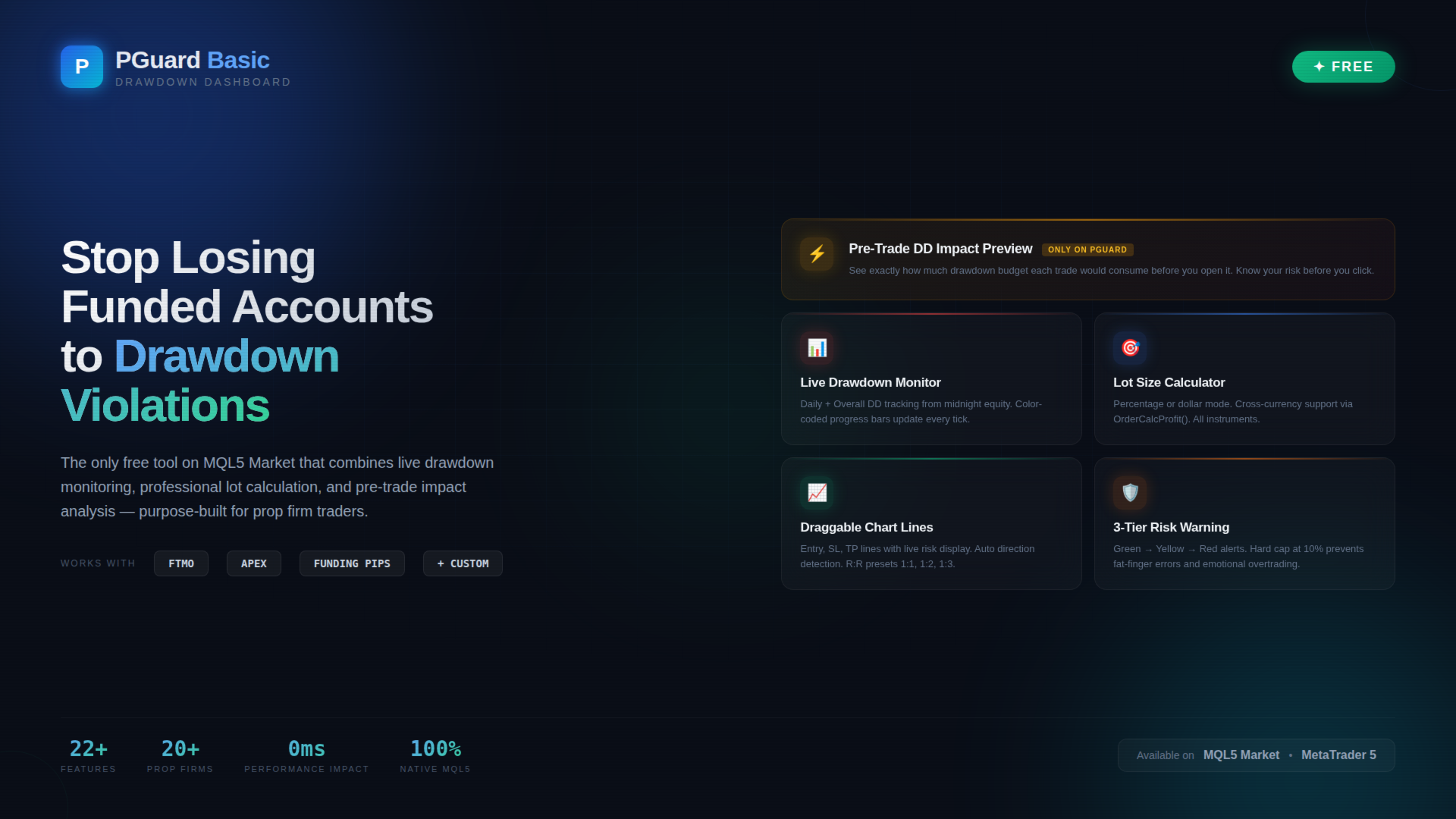
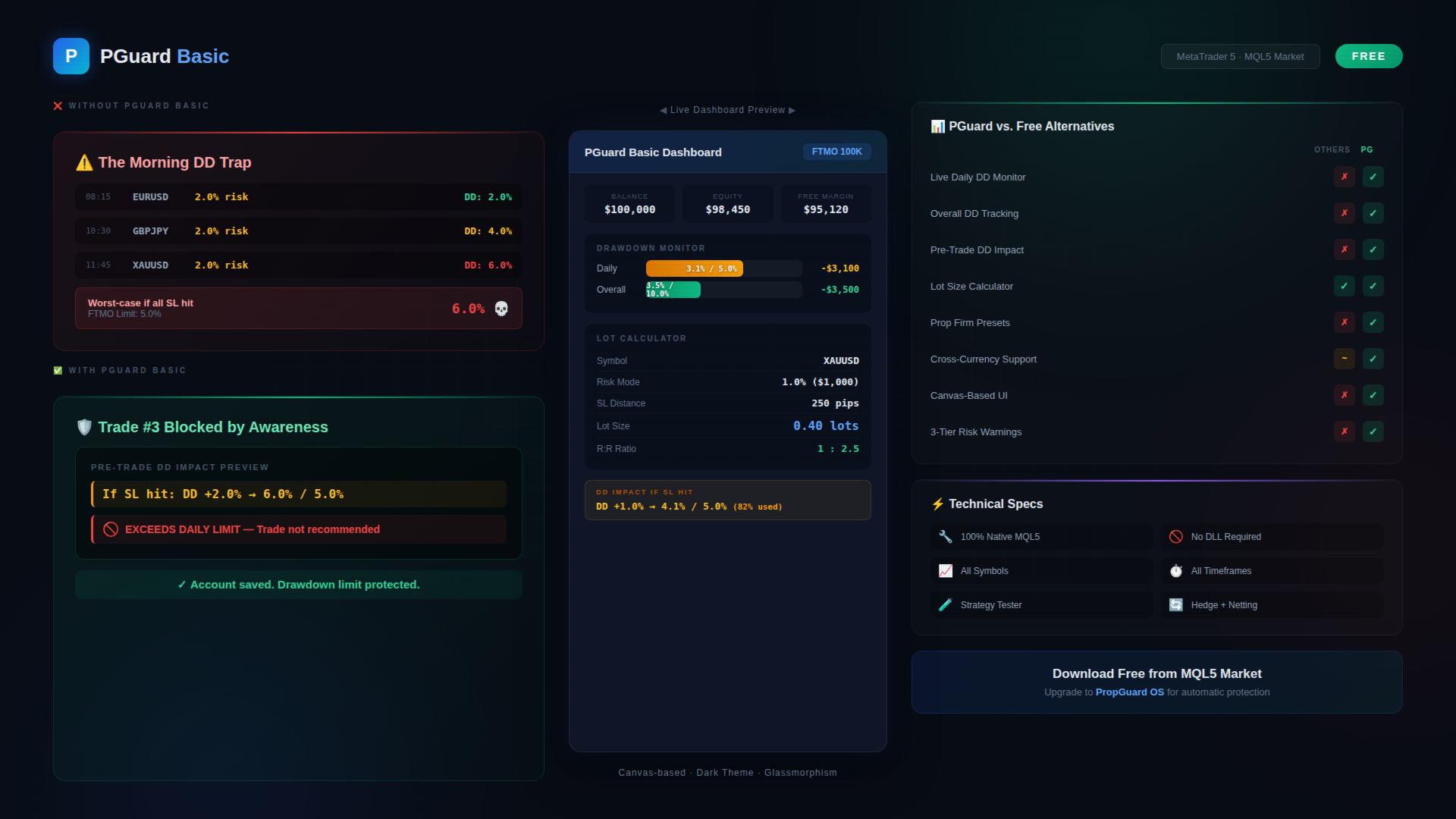
PGuard Basic is the first free Drawdown Dashboard and Lot Calculator designed specifically for Prop Firm Traders on MetaTrader 5. Monitor your Daily and Overall Drawdown in real time, calculate the perfect lot size for every trade, and see the exact impact on your remaining drawdown budget before you open a position. Built for FTMO, Apex Trader Funding, Funding Pips, and any other Prop Firm with configurable Custom Presets.

Most traders fail funded account challenges not because of bad strategy — but because they lose track of their drawdown. One emotional trade, one miscalculated position size, and the account is gone. PGuard Basic solves this by putting your drawdown status front and center on every chart, every session, every trade.

🛡 Why PGuard Basic?

Prop Firm Challenges have strict drawdown rules. FTMO allows only 5% daily and 10% overall drawdown. Apex Trader Funding uses trailing drawdown. Funding Pips calculates on balance. Every firm is different — and manual tracking with spreadsheets or mental math is the number one reason traders blow funded accounts.

PGuard Basic gives you a professional-grade drawdown monitoring dashboard directly on your MetaTrader 5 chart. No external tools, no browser tabs, no manual calculations. Just clear, real-time data exactly where you need it — next to your price action.

⭐ Unique Feature: Pre-Trade Drawdown Impact Preview

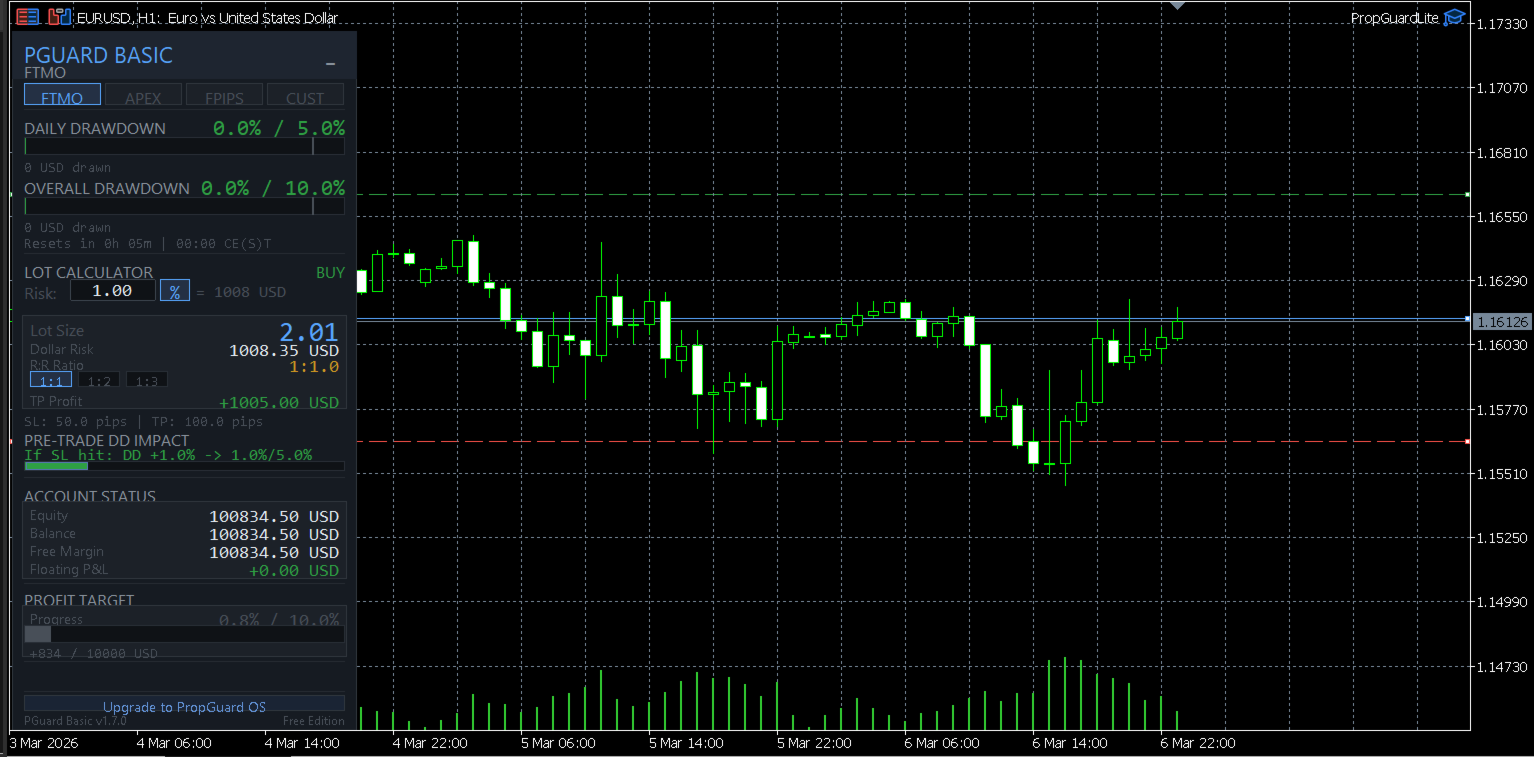
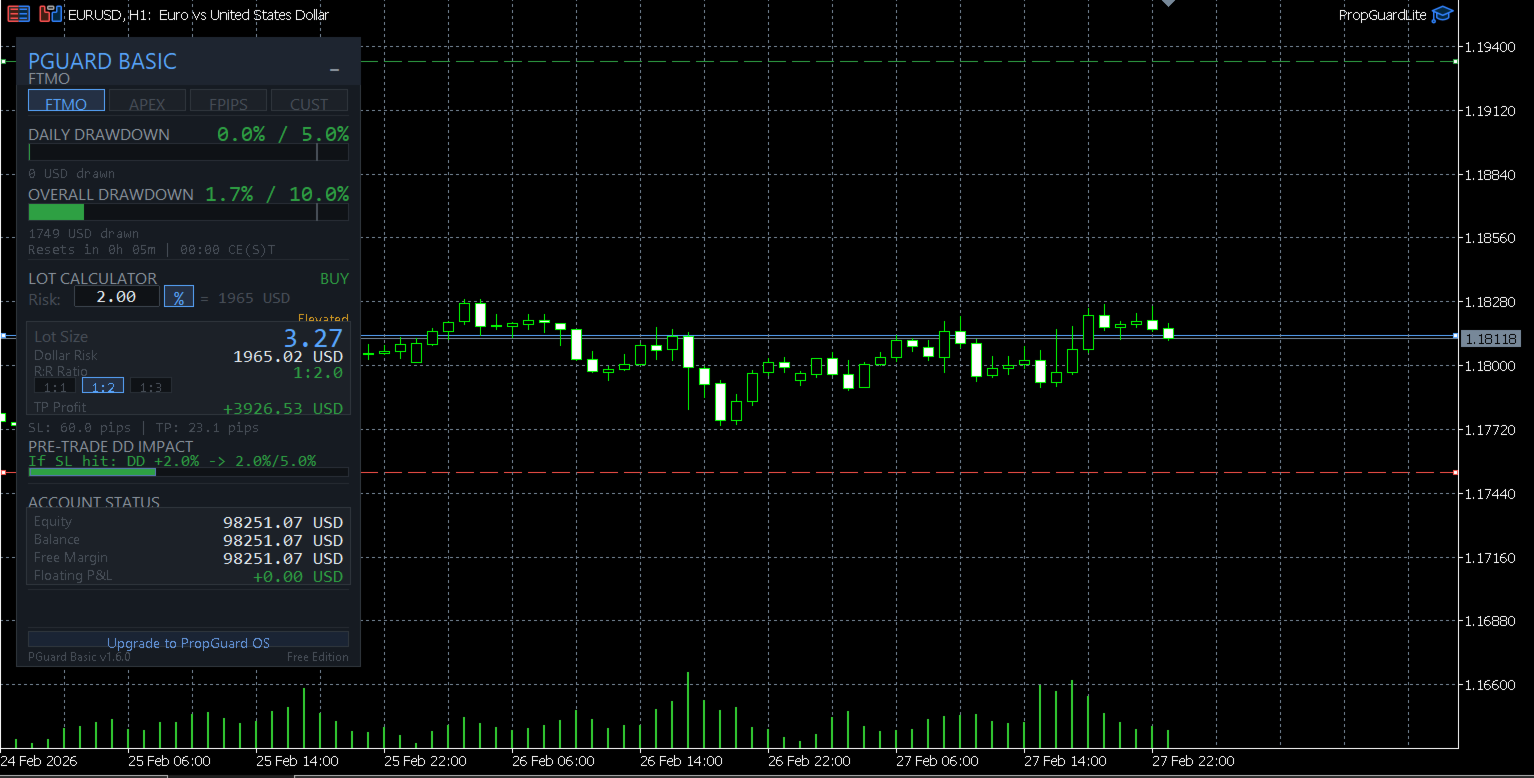
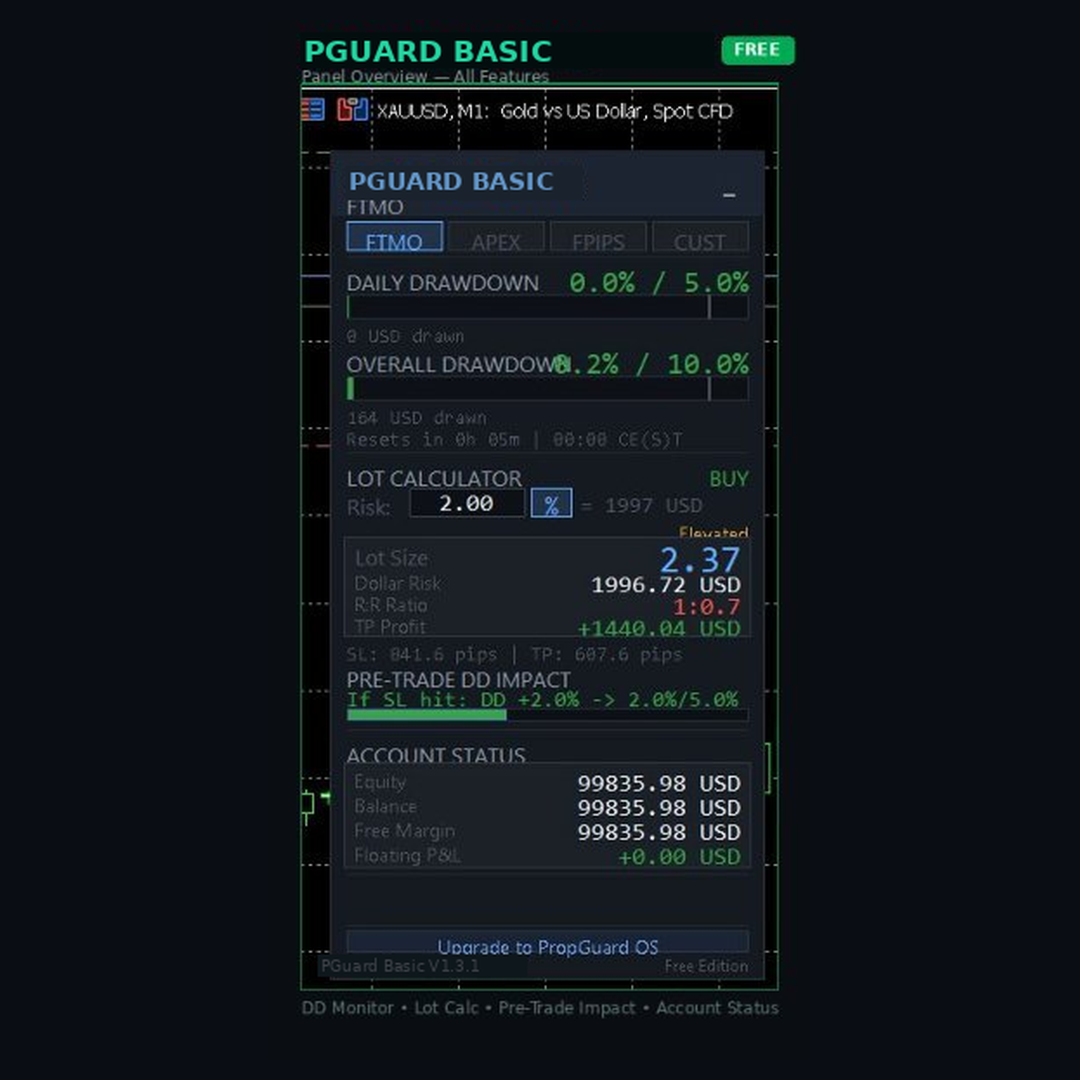
This is the feature that no other free tool on the MQL5 Market offers. Before you open any trade, PGuard Basic shows you exactly how much of your drawdown budget that trade would consume if the stop loss is hit. You see the projected drawdown percentage, the dollar amount at risk, and how close the trade would bring you to your daily or overall limit.

Example: Your FTMO account has 5% daily drawdown. You have already used 2.1%. PGuard Basic shows: "If SL hit: DD +1.4% → 3.5% / 5.0% (70% used)" — so you know instantly whether this trade fits within your risk budget. This single feature has prevented countless account violations for traders who use it consistently.

📊 Live Drawdown Monitoring

PGuard Basic tracks two drawdown metrics simultaneously in real time:

Daily Drawdown: Calculated from your equity at midnight server time (the method used by most prop firms including FTMO). The dashboard shows a visual progress bar that fills up as your daily loss increases, with clear color coding — green for safe zone, yellow for warning zone, and red for critical zone approaching your limit.

Overall Drawdown: Tracked from your initial account balance or highest equity (depending on your firm's rules). This gives you the big-picture view of how close you are to violating the maximum loss rule that would end your challenge or funded account.

Both metrics update on every tick when positions are open. The dashboard shows the exact dollar amount lost, the percentage used, and the remaining budget in both dollars and percent. No guessing, no mental math, no surprises at the end of the trading day.

💰 Professional Lot Size Calculator

Calculate the correct position size for any instrument in seconds. PGuard Basic supports two risk modes:

Percentage Mode: Risk a fixed percentage of your account equity per trade. Set 1% risk and PGuard calculates the exact lot size based on your stop loss distance, the instrument's tick value, and your account currency. The calculation works correctly for Forex pairs, Gold (XAUUSD), Silver, Indices (US30, NAS100, GER40), Crypto (BTCUSD, ETHUSD), and any other CFD instrument.

Dollar Mode: Risk a fixed dollar amount per trade. If your prop firm allows maximum $500 risk per trade, enter $500 and PGuard calculates the matching lot size regardless of the instrument or stop loss distance.

The lot size is automatically rounded to the symbol's lot step (VOLUME_STEP) and clamped between minimum and maximum lot sizes (VOLUME_MIN / VOLUME_MAX). Margin requirements are validated before any calculation is displayed. PGuard Basic uses the native OrderCalcProfit() function as a fallback for cross-currency pairs and exotic instruments where simple tick-value calculations would produce incorrect results.

📈 Visual Chart Lines with Live Risk Display

PGuard Basic places three draggable horizontal lines on your chart: Entry (blue), Stop Loss (red), and Take Profit (green). As you drag any line, the risk calculation updates in real time on the dashboard panel. This gives you an intuitive, visual way to plan your trade setup directly on the price chart.

The system automatically detects the trade direction from line positions. If the Stop Loss is below the Entry line, PGuard recognizes a BUY setup. If the Stop Loss is above Entry, it switches to SELL. No manual selection required.

Pip distances between Entry and SL, as well as Entry and TP, are displayed next to each line. The Risk-to-Reward Ratio updates automatically as you adjust the Take Profit line. Quick-select presets for common R:R ratios (1:1, 1:2, 1:3) let you set your Take Profit with a single click — the TP line moves to the calculated level instantly.

🏢 Prop Firm Presets

PGuard Basic ships with built-in configurations for the most popular prop firms:

FTMO (Challenge & Funded): 5% daily drawdown, 10% overall drawdown, equity-based calculation, reset at 00:00 CE(S)T. PGuard Basic reads the correct midnight equity reference point and calculates daily drawdown exactly as FTMO does — including unrealized floating losses.

Apex Trader Funding: Trailing drawdown model based on the highest equity reached. PGuard Basic tracks the high-water mark and shows remaining drawdown distance from peak equity. Apex uses 17:00 ET as reset time — PGuard adjusts automatically.

Funding Pips: 5% daily drawdown, 10% overall drawdown, balance-based calculation, reset at 00:00 UTC. Balance-based means only closed trades count for daily drawdown — PGuard shows both realized and unrealized calculations so you always have the complete picture.

Custom Preset: For any prop firm not listed above. Configure daily drawdown percentage, overall drawdown percentage, initial balance, reset time (HH:MM), and drawdown model (equity-based or balance-based). This makes PGuard Basic compatible with every prop firm on the market — including The5ers, FundedNext, TrueForex, E8 Funding, SurgeTrader, and any future firm.

🎨 Modern Canvas-Based Dashboard

PGuard Basic features a professionally designed dashboard rendered entirely with the MQL5 Canvas library. The dark theme with glassmorphism-inspired visual elements creates a clean, modern interface that is immediately distinguishable from standard MetaTrader panels and basic label-based tools.

The dashboard displays all critical information at a glance: Account balance and equity, current drawdown status with color-coded progress bars, the lot calculator result with dollar risk and R:R ratio, prop firm preset selection, and the Pre-Trade DD Impact Preview. The panel is compact and does not obstruct your chart analysis. Panel position is saved between sessions via GlobalVariables — it remembers where you placed it even after restarting MetaTrader.

⚙ Risk Warning System

PGuard Basic includes a three-tier risk warning system that alerts you when your per-trade risk exceeds safe thresholds:

Normal (Green): Risk is within acceptable parameters. The panel displays risk values in standard colors. No intervention needed.

Warning (Yellow): Risk exceeds the warning threshold (default: 2% of account). The risk display changes color and a visual warning indicator appears on the panel. This is your signal to double-check the position size before proceeding.

Critical (Red): Risk exceeds the critical threshold (default: 5% of account). The entire risk field pulses red as a clear danger signal. A hard cap at 10% prevents any calculation beyond extremely dangerous risk levels. These thresholds are the safety net that prevents fat-finger errors and emotional overtrading.

📋 Complete Feature List

  • Real-time Daily Drawdown monitoring (equity-based, as used by FTMO)
  • Real-time Overall Drawdown monitoring (balance or equity-based)
  • Pre-Trade Drawdown Impact Preview (unique to PGuard)
  • Visual drawdown progress bars with color-coded zones
  • Professional lot size calculator (percentage and dollar modes)
  • Cross-currency and exotic instrument support via OrderCalcProfit()
  • Draggable Entry, Stop Loss, and Take Profit chart lines
  • Automatic trade direction detection from line positions
  • Risk-to-Reward ratio display with 1:1, 1:2, 1:3 quick presets
  • Prop Firm presets: FTMO, Apex Trader Funding, Funding Pips
  • Custom preset for any prop firm with configurable rules
  • Three-tier risk warning system (normal, warning, critical)
  • Hard cap risk protection (10% maximum risk per trade)
  • Account information display (balance, equity, free margin)
  • Canvas-based dark theme dashboard with glassmorphism design
  • Panel position persistence across MetaTrader restarts
  • Built-in self-test framework for system validation
  • Compatible with all symbols: Forex, Gold, Silver, Indices, Crypto, CFDs
  • Works on all timeframes from M1 to Monthly
  • Hedging and Netting account support
  • Strategy Tester compatible (visual mode)
  • No DLL imports — 100% native MQL5 code

🎯 Who Is PGuard Basic For?

Prop Firm Challenge Traders: You are in an FTMO Challenge, Apex Evaluation, or Funding Pips Assessment and cannot afford to lose the account to a drawdown violation. PGuard Basic gives you real-time visibility into your remaining drawdown budget so every trade is calculated and deliberate — not emotional and risky.

Funded Account Traders: You passed the challenge and now manage a funded account. The stakes are higher because a drawdown violation means losing the payout and the account. PGuard Basic monitors your daily and overall limits continuously so you can focus on trading rather than calculating in your head.

Risk-Conscious Retail Traders: Even without a prop firm, PGuard Basic is a professional risk management tool. The lot calculator, chart lines, and risk warning system help you maintain consistent position sizing and avoid the common mistake of taking oversized positions after a losing streak.

Traders Switching Between Firms: If you trade multiple prop firm accounts (e.g., FTMO and Apex simultaneously), switching between drawdown rules is confusing and error-prone. PGuard Basic's firm presets let you swap configurations with a single click — no mental recalculation needed when moving between different accounts and rule sets.

💡 Trading Scenarios Where PGuard Basic Prevents Account Violations

Scenario 1 — The Morning Drawdown Trap: You open MetaTrader at 8:00 AM and see a great setup on EURUSD. You enter a 2% risk trade. Two hours later, another setup on GBPJPY — 2% risk again. Then Gold shows a breakout — 2% risk. By noon, you have three positions running with a combined worst-case drawdown of 6% — exceeding your FTMO 5% daily limit if all stop losses hit. Without PGuard Basic, you would only realize this when checking your balance. With PGuard Basic, the Pre-Trade DD Impact Preview warns you before the third trade: "If SL hit: DD +2.0% → 6.1% / 5.0% — EXCEEDS DAILY LIMIT." The trade is flagged before you risk your account.

Scenario 2 — The Lot Size Miscalculation: You want to trade NAS100 with a 50-point stop loss and 1% risk. NAS100 has a contract size and tick value that differs significantly from Forex pairs. Mental calculation leads to overestimation — you enter 3 lots instead of the correct 1.8 lots. The trade loses, and the actual loss is 1.7% instead of 1%. After three such trades in a week, the accumulated error pushes you over the overall drawdown limit. PGuard Basic's cross-currency calculator would have shown the correct lot size instantly.

Scenario 3 — The Equity vs. Balance Confusion: Your FTMO account shows $100,000 balance after a profitable morning session. You take a swing trade and go to sleep. Overnight, the position moves against you — equity drops to $96,000. When midnight server time hits, FTMO captures the equity at $96,000 as the new daily reference. Your actual daily drawdown budget is now based on $96,000, not $100,000. Many traders miss this distinction. PGuard Basic captures midnight equity automatically via GlobalVariable and shows the correct drawdown calculation from the actual reference point.

🔍 How PGuard Basic Compares to Other Free Tools

The MQL5 Market has many free lot calculators and trade panels. However, none of them combine a position size calculator with live drawdown monitoring and pre-trade drawdown impact analysis. Here is what sets PGuard Basic apart:

Versus standard lot calculators: Free lot calculators calculate position size but show nothing about your drawdown status. You get the right lot size but have no idea whether the trade fits within your daily or overall drawdown budget. PGuard Basic combines both into a single dashboard — lot size AND drawdown context for every trade setup.

Versus generic trade panels: Free trade panels offer one-click execution but ignore prop firm rules entirely. They do not know what FTMO's equity-based drawdown means, they do not track midnight equity, and they do not warn you when a trade would push you over the limit. PGuard Basic is purpose-built for the prop firm workflow.

Versus paid drawdown limiters: Paid drawdown protection tools (typically $50 to $100) close positions automatically when limits are hit. PGuard Basic takes a different approach: it gives you complete drawdown visibility so you can make informed decisions before entering a trade — prevention through awareness rather than reactive position closing. For automatic protection, upgrade to PropGuard OS.

🔧 Input Parameters

  • Risk Mode — Choose between percentage-based risk or fixed dollar amount per trade
  • Risk Value — Default risk per trade (default: 1.0%)
  • Firm Preset — Select your prop firm (FTMO, Apex, Funding Pips) or choose Custom
  • Daily DD Limit (%) — Daily drawdown percentage limit for Custom preset
  • Overall DD Limit (%) — Overall drawdown percentage limit for Custom preset
  • Initial Balance ($) — Starting balance for drawdown calculations
  • DD Model — Equity-based or balance-based drawdown calculation
  • Reset Time — Daily drawdown reset time (server timezone)
  • Magic Number — Unique identifier for order management
  • Run Self-Test — Execute the built-in diagnostic system check

💻 System Requirements

  • MetaTrader 5 (any broker)
  • Hedging or Netting account mode
  • Algo Trading enabled in terminal settings
  • Works on all timeframes and all symbols
  • No external dependencies or DLL files
  • Minimum chart size: 340 x 460 pixels

🧪 Testing

You can test PGuard Basic in the MetaTrader 5 Strategy Tester using Visual Mode. Attach the utility to a chart, enable the panel, and explore the drawdown monitoring, lot calculator, and chart lines with simulated data. This allows you to evaluate the complete interface and all calculations before using the tool on a live or demo prop firm account.

PGuard Basic includes a built-in self-test framework. Enable the "Run Self-Test" input parameter to execute the diagnostic suite. The system validates lot calculations, drawdown computations, risk warning thresholds, R:R preset logic, and chart line functionality. All tests must pass with status PASS in the Experts tab.

📦 Installation

Download PGuard Basic from the MQL5 Market. The file is automatically placed in your MetaTrader 5 data folder. Open any chart, click "Insert" → "Expert Advisors" and select PGuard Basic. The dashboard panel appears immediately. Select your prop firm from the dropdown, set your preferred risk level, and you are ready to trade with full drawdown visibility.

Make sure "Algo Trading" is enabled in your MetaTrader 5 terminal settings (Tools → Options → Expert Advisors → Allow Algo Trading). PGuard Basic needs this permission to access account data and manage chart objects.

🚀 Looking for Automatic Protection?

PGuard Basic shows you the danger — PropGuard OS prevents it automatically. If you want your trades to be automatically closed when drawdown limits are reached, automatic lockout when the daily limit is hit, pre-trade validation that blocks dangerous trades before execution, SL Guard that warns you when you widen your stop loss emotionally, one-click break-even, partial close, and trailing stop — then check out PropGuard OS in the MQL5 Market. It includes everything in PGuard Basic plus a complete Compliance Engine, Trade Execution panel, and Psychological Protection features.

Search for PropGuard OS in the MQL5 Market or visit the link in the screenshots section.

❓ Frequently Asked Questions

Does PGuard Basic place trades automatically?
No. PGuard Basic is a risk management dashboard and lot calculator. It monitors your drawdown and calculates position sizes, but all trading decisions and order execution are made by you. For automatic trade execution and compliance protection, see PropGuard OS.

Does it work with my prop firm?
Yes. PGuard Basic supports FTMO, Apex Trader Funding, and Funding Pips out of the box. For any other firm, use the Custom Preset and enter your firm's specific rules (daily DD %, overall DD %, reset time, DD model). This makes PGuard compatible with every prop firm in the market.

Is the drawdown calculation accurate?
PGuard Basic calculates daily drawdown from midnight equity — the same method used by FTMO and most major prop firms. The equity value at server midnight is captured via GlobalVariable and compared to current equity on every tick. This is more accurate than balance-based tools that ignore floating losses.

Does it work on Gold, Indices, and Crypto?
Yes. The lot calculator supports all instrument types: Forex pairs (Majors, Minors, Crosses), Metals (XAUUSD, XAGUSD), Indices (US30, NAS100, GER40, JP225), Crypto (BTCUSD, ETHUSD), and any other CFD. Cross-currency calculations use OrderCalcProfit() as a fallback to ensure correct results on every symbol.

Can I test it before using it on a live account?
Yes. PGuard Basic works in the MetaTrader 5 Strategy Tester (Visual Mode). You can evaluate all features with simulated data. We also recommend testing on a demo account before using it on your funded prop firm account.

Does it slow down my MetaTrader?
No. PGuard Basic uses an event-driven architecture. The dashboard only redraws when data changes (line movement, tick update, button click). There are no heavy calculations running on every tick. CPU usage is negligible even with multiple charts open.

What if my broker uses a different server timezone?
The Custom Preset allows you to configure the exact reset time for daily drawdown. Enter the time in server timezone format (HH:MM). PGuard Basic reads the server time via TimeCurrent() and resets the midnight equity reference at the configured time.

📝 Version History

Version 1.0 — Initial release. Drawdown Dashboard, Lot Calculator, Chart Lines, Firm Presets, Pre-Trade DD Impact Preview, Risk Warning System, Canvas-based UI, Self-Test Framework.

ℹ About the Developer

PGuard is developed and maintained by an active trader who understands the daily challenges of passing and maintaining prop firm accounts. Every feature in PGuard Basic was built to solve real problems that cost real money — missed drawdown limits, miscalculated position sizes, and emotional decisions made without data. If you have questions, feedback, or feature requests, please leave a comment on this product page or send a direct message. Your input directly shapes future updates.

⚠ Disclaimer

PGuard Basic is a risk management utility. It does not generate trading signals, does not execute trades automatically, and does not guarantee compliance with any prop firm's rules. All trading decisions and responsibility remain with the user. Past drawdown calculations depend on accurate midnight equity capture — ensure PGuard Basic is running on your chart during the daily reset time. Always verify critical drawdown levels with your prop firm's official dashboard.

📖 Best Practices for Prop Firm Trading with PGuard Basic

1. Always check the Pre-Trade DD Impact before opening a position. This is the single most important habit for passing prop firm challenges. If the projected drawdown exceeds 80% of your daily limit, reduce the position size or skip the trade entirely.

2. Set your Firm Preset before the trading session starts. Switch to the correct profile (FTMO, Apex, Funding Pips, or Custom) at the beginning of each session. This ensures all drawdown calculations reference the correct limits, reset times, and calculation models.

3. Keep PGuard Basic running during the daily reset window. The midnight equity capture depends on PGuard Basic being active on your chart when the server resets. If MetaTrader is closed at midnight, PGuard captures the equity on the next start — but the reference may be slightly different from what your prop firm recorded.

4. Use the Risk-to-Reward presets consistently. The 1:2 and 1:3 R:R presets help maintain a consistent trading approach. When your stop loss is set, click the R:R preset to automatically place the Take Profit at the correct level. This removes the temptation to set unrealistic take profit targets.

5. Trust the risk warnings. When PGuard Basic shows a yellow or red risk warning, take it seriously. The warning thresholds are calibrated to protect against common mistakes — oversized positions, accumulated risk from multiple trades, and emotional overtrading after losses.

🌐 Supported Prop Firms and Drawdown Models

PGuard Basic's Custom Preset system makes it compatible with virtually every prop firm in the industry. Here is a non-exhaustive list of firms that traders successfully use PGuard Basic with:

FTMO (Challenge, Verification, Funded) — Apex Trader Funding (Evaluation, Funded) — Funding Pips (Assessment, Funded) — The5ers (Hyper Growth, High Stakes) — FundedNext (Stellar Challenge, Express) — E8 Funding (Standard, Extended) — MyFundedFX (Challenge, Rapid) — True Forex Funds — SurgeTrader — Lux Trading Firm — City Traders Imperium — TopStep — OneUp Trader — Earn2Trade — BluFX — The Funded Trader — and many more.

If your prop firm is not listed in the presets, use the Custom configuration. Enter your firm's daily drawdown percentage, overall drawdown percentage, starting balance, reset time, and whether drawdown is calculated from equity or balance. The Custom Preset adapts to any rule set.

Keywords: prop firm risk manager, drawdown dashboard MT5, lot calculator MetaTrader 5, position size calculator free, FTMO drawdown tool, Apex Trader drawdown, Funding Pips calculator, daily drawdown monitor, equity drawdown tracker, prop firm challenge tool, funded account protection, pre-trade risk assessment, drawdown limiter free, risk calculator MT5, lot size calculator, prop firm EA free, trade panel utility MT5, drawdown compliance, prop firm trading tool, equity guard, MetaTrader risk management, funded trader utility
Prodotti consigliati
Indicatore Crypto_Forex "WPR con 2 Medie Mobili" per MT5, senza ridisegno. - WPR è uno dei migliori oscillatori per lo scalping. - L'indicatore "WPR e 2 Medie Mobili" consente di visualizzare le medie mobili veloci e lente dell'oscillatore WPR. - L'indicatore offre l'opportunità di visualizzare le correzioni di prezzo molto presto. - È molto facile impostare questo indicatore tramite parametri e può essere utilizzato su qualsiasi timeframe. - È possibile visualizzare le condizioni di ingresso
CosmiCLab SMC FIBO CosmiCLab SMC FIBO is a professional trading indicator designed for traders who use Smart Money Concepts (SMC), market structure analysis and Fibonacci retracement levels. The indicator automatically detects market swings and builds Fibonacci levels based on the latest impulse movement. It also identifies market structure changes such as BOS (Break of Structure) and CHOCH (Change of Character), helping traders understand the current market direction. CosmiCLab SMC FIBO also pr
Introducing   Order Blocks Breaker , a brand-new way to identify and leverage order blocks in your trading strategy. After developing multiple order block tools with unique concepts, I’m proud to present this tool that takes things to the next level. Unlike previous tools,   Order Blocks Breaker   not only identifies order blocks but also highlights   Breaker Order Blocks —key areas where the price is likely to retest after a breakout. MT4 -  https://www.mql5.com/en/market/product/124101/ This t
LT Rainbow Trend
Thiago Duarte
5 (1)
Do you, like me, like to trade with the trend? Then this indicator will help you! Rainbow Trend is a trend indicator, which uses several Moving Averages on the chart. It measures different trend strenght zones for different periods: very long term, long term, mid term, short term and very short term. Each zone has its color, and it is possible to have sound alert when the prices leaves a zone and enters another. Its configuration is very simple. If you find any bug or have any suggestions, conta
Vi presentiamo l' Oscillatore Heikin Ashi RSI ! Questo indicatore combina i concetti delle candele Heikin Ashi con l'RSI (Relative Strength Index) per produrre un formato simile a un oscillatore che può essere utilizzato per filtrare parte del rumore associato alle letture standard dell'RSI. Questo fornisce ai trader una rappresentazione più fluida delle condizioni di mercato. Ecco alcuni articoli per saperne di più sull'RSI e sulle candele Heikin Ashi: https://www.investopedia.com/terms/r/rsi.a
Time to Close Candle
German David Nino Cifuentes
TimeToClose The "TimeToClose" indicator is an essential tool for traders who need to monitor the remaining time before a candle closes. This indicator displays the remaining time directly on the BID line, providing a clear and precise reference during real-time trading. Key Features: Displays the remaining time for the current candle to close. Direct integration on the BID line for better visualization. Simple and user-friendly configuration. Ideal for all types of traders, from beginners to pro
FREE
Auto Stop Loss MT5
Nabil Oukhouma
5 (1)
Il Gestore del Rischio "Set & Forget" per il Trading Multi-Asset ️ Mai lasciare un trade senza protezione. Auto Stop Loss (MT5 Manager) è l'utility di background definitiva per i trader che mettono la sicurezza al primo posto. A differenza dei pannelli standard, questo strumento lavora instancabilmente dietro le quinte per proteggere istantaneamente ogni operazione. Che tu apra trade manualmente o tramite un altro EA, questo manager assicura che ogni posizione abbia immediatamente un Stop Loss
Candlestick Pattern Scanner is a multi-timeframe and multi-symbol dashboard and alert system that checks all timeframes and currency pairs for different candlestick patterns that are formed in them. Scanner is integrated   with support and resistance zones so you can check the candlestick patterns in most important areas of the chart to find breakout and reversal patterns in the price chart. Download demo version   (works on M4,M6,M12,H3,H8 timeframes and 20 symbols of Market Watch window) Read
BlueBoat – Prime Cycle is a technical indicator for MetaTrader 5 that visualizes market cycles based on the Fimathe cycle model (Marcelo Ferreira) . It identifies and displays historic and live cycle structures such as CA, C1, C2, C3, etc., helping traders understand the rhythm and timing of price movement across multiple sessions. This tool is ideal for manual analysis or as a supporting signal in discretionary strategies. Key Features Historical Cycle Analysis – Backtest and visualize as many
Divergent Stochastic Filter II Catch Reversals Early, Filter Noise, Trade with Confidence The Edge: Why This Stochastic is Different  Every trader knows the Stochastic oscillator. But knowing when to trust its signals, that's the real challenge. The Divergent Stochastic Filter II transforms this classic indicator into a precision reversal detection system by adding critical elements: divergence intelligence, signal filtering and exhaustion detection.  While standard Stochastic oscillators fire s
The   Trendlines Oscillator   helps traders identify trends and momentum based on the normalized distances between the current price and the most recently detected bullish and bearish trend lines. The indicator features bullish and bearish momentum, a signal line with crossings, and multiple smoothing options. USAGE The   Trendlines Oscillator   works by systematically: Identifying pivot highs and lows. Connecting pivots to form bullish (support) and bearish (resistance) trendlines. Measuring
Questo EA è utilizzato principalmente per lo scalping su XAUUSD. Scopo   Rimuove l’emozione dalla gestione delle operazioni — protegge automaticamente le posizioni e prende profitto così non devi prendere decisioni difficili sotto pressione. Cosa fa   ️ Stop Loss automatico   Imposta SL basandosi su recenti massimi/minimi + buffer   Niente più stress per la collocazione manuale   Profitti parziali automatici   Due modalità:   Movimento fisso: chiude il 50% dopo uno spostamento di prezzo
SlopeChannelB MT5
MIKHAIL VINOGRADOV
SlopeChannelB – uno strumento di analisi tecnica che costruisce un canale di movimento del prezzo inclinato, offrendo opportunità uniche per valutare la situazione attuale del mercato e trovare segnali di trading. Caratteristiche principali dell'indicatore: Canale di movimento del prezzo inclinato : L'indicatore aiuta a visualizzare i livelli di supporto e resistenza, che possono indicare potenziali punti di inversione o continuazione del trend. Vari colori delle linee e evidenziazione dell
Visual Dolphin Indicator
AL MOOSAWI ABDULLAH JAFFER BAQER
Visual Dolphin Indicator Unlock the rhythm of the market with the Visual Dolphin Indicator, your ultimate tool for identifying and capitalizing on market trends with clarity and confidence. Designed for both novice and experienced traders, this indicator eliminates the noise and guesswork, providing crystal-clear buy and sell signals directly on your chart. The Logic Behind the Waves The core of the Visual Dolphin Indicator is a sophisticated yet intuitive dual-wave system based on moving avera
Size Bars
Viktor Loginov
Size Bars – индикатор отображает на графике максимальный, минимальный, текущий и средний размер баров (свечей) за выбранный период. Отображаемые параметры индикатора Size Bars: 1)       Текущий размер бара в писах (по максимум/минимум, тело бара). 2)       Максимальный, минимальный и средний размер свечей BUY . 3)       Максимальный, минимальный, средний размер свечей SELL . 4)       Количество свечей BUY и количество свечей SELL . 5)       Среднее количество свечей подряд BUY и SELL . 6)     
Fibo Channels
Jeffrey Quiatchon
Fibo Daily Channel Indicator The  Indicator is a powerful tool for traders, providing precise daily support and resistance levels based on Fibonacci retracement and extension calculations. This indicator automatically draws key pivot points (PP, R1, R2, S1, S2) as well as additional extension levels (R3, R4, S3, S4), helping traders identify potential reversal and breakout zones with ease. It includes customizable alerts and push notifications, allowing traders to receive updates whenever the pr
HiperCube VIX
Adrian Lara Carrasco
Benvenuti a HiperCube VIX Codice sconto del 25% su Darwinex Zero: DWZ2328770MGM Questo indicatore fornisce informazioni reali sul mercato del volume di sp500 / us500 Definizione HiperCube VIX, noto come CBOE Volatility Index, è una misura ampiamente riconosciuta della paura o dello stress del mercato. Segnala il livello di incertezza e volatilità nel mercato azionario, utilizzando l'indice S&P 500 come proxy per il mercato in generale. L'indice VIX è calcolato in base ai prezzi dei contratti d
FREE
Price Magnet — Price Density and Attraction Levels Indicator Price Magnet is a professional analytical tool designed to identify key support and resistance levels based on statistical Price Density. The indicator analyzes a specified historical period and detects price levels where the market spent the most time. These zones act as “magnets,” attracting price action or forming a structural base for potential reversals. Unlike traditional Volume Profile tools, Price Magnet focuses on price-time d
Trading Room Indcator
Meshari F M Alkhawaled
Trading Room Indicator is a professional market-structure tool built to give traders a clear, complete trading framework — combining CPR levels, dynamic targets, and trend direction in one clean view. Instead of guessing direction or overloading the chart with indicators, Trading Room Indicator focuses on what actually matters : levels, direction, and potential price expansion. What This Indicator Provides CPR Structure BUY level SELL level Pivot Point (PP) Designed to highlight equilibrium
BerelzBridge
Barend Willem Van Den Berg
BerelzBridge Pro Bridge dati da MT5 a JSON per tutti i time frame con informazioni sul conto. Panoramica BerelzBridge Pro è un indicatore MT5 che esporta i dati di mercato in tempo reale in un file JSON su disco. Scrive prezzi bid e ask, spread, volume tick, statistiche giornaliere, informazioni sul conto e barre OHLCV per tutti i 9 time frame. Il file viene aggiornato a un intervallo configurabile con un default di 2 secondi. L'indicatore funziona insieme agli Expert Advisor sullo stesso grafi
Antabod Multiplier
Rev Anthony Olusegun Aboderin
Antabod Multiplier , the ultimate trading indicator designed to simplify your decision-making process and maximize your trading potential. Built with a robust combination of moving averages and stochastic oscillators, this tool provides clear, actionable signals for both buy and sell opportunities. The Antabod Multiplier stands out with its dynamic trend detection and precision filtering, giving you real-time visual signals to catch trend reversals and optimal entry/exit points with ease. Whethe
The indicator detects and displays М. Gartley's Butterfly pattern. The pattern is plotted by the extreme values of the ZigZag indicator (included in the resources, no need to install). After detecting the pattern, the indicator notifies of that by the pop-up window, a mobile notification and an email. The pattern and wave parameters are displayed on the screenshots. The default parameters are used for demonstration purposes only in order to increase the amount of detected patterns. Parameters z
Silver Zebra Trading System
AL MOOSAWI ABDULLAH JAFFER BAQER
Silver Zebra Trading System - Uncover Market Momentum Unlock a powerful new way to visualize market trends and momentum with the Silver Zebra Trading System. This unique MetaTrader 5 indicator is designed to give you a clear and immediate understanding of market dynamics, helping you make more informed trading decisions. For just $30, you can add this indispensable tool to your trading arsenal. What is the Silver Zebra Trading System? The Silver Zebra Trading System is a sophisticated indicator
Ichimoku MTF
Hoang Ngoc Thach
MTF Ichimoku is a MetaTrader 5 indicator based on well known Ichimoku. In MetaTrader 5 we have Ichimoku already included as a standard technical indicator. However it can be used only for the current timeframe. When we are looking for a trend, it is very desirable to have Ichimokuis showing higher timeframes. MTF Ichimoku presented here has additional parameter - TimeFrame. You can use it to set up higher timeframe from which Ichimokuis will calculate its values. Other basic parameters are not c
TradePilotmt5
Hossein Khalil Alishir
TradePilot Expert Advisor (EA) for MetaTrader 5 TradePilot is a professional and user-friendly Expert Advisor (EA) for MetaTrader 5 (MT5) . It simplifies automated trading , risk management , and trade execution with a smart trading panel . Perfect for beginners and experienced traders looking for a reliable trade manager EA with automated lot size calculation and smart position management. Key Advantages User-Friendly Trading Panel: Customizable panel with buttons and hotkeys for fast ex
Laguerre SuperTrend Clouds   adds an Adaptive Laguerre averaging algorithm and alerts to the widely popular SuperTrend indicator. As the name suggests,   Laguerre SuperTrend Clouds (LSC)   is a trending indicator which works best in trendy (not choppy) markets. The SuperTrend is an extremely popular indicator for intraday and daily trading, and can be used on any timeframe. Incorporating Laguerre's equation to this can facilitate more robust trend detection and smoother filters. The LSC uses the
RSI Currency Strength Meter is a powerful and elegant multi-currency indicator that measures the real-time relative strength of the 8 major currencies using RSI logic. By calculating the smoothed performance of each currency across its major pairs and applying the RSI formula, it delivers clean and responsive strength lines that make it easy to spot which currencies are truly strong or weak at any moment. This indicator is particularly useful for visualizing currency correlations and divergence
Total Trade Manager SL BE TP
Izzet Deniz Erpolat
3 (2)
Total trade manager allows you to manage your trade to maximise your profits and minimise your losses. This is an essential for traders that are looking for consistency within their trading.  The features: Partial Stop Loss: This feature allows you to close a partial percentage of your trade once it goes into negative. So if your stop loss is 20 pips, you could close 75% of your trade at 10 pips and let the remainder of the position to continue running. Auto Stop Loss: This means that once you p
The “Summary Risk Target” indicator is designed to show the total number of transactions made on a single pair. The transactions counted include active positions as well as pending orders . By setting a stop loss for each trade, this indicator displays the total potential risk (loss) that may be incurred. This helps traders easily understand their overall risk exposure without the need for manual calculations. Likewise, for take profit , if the TP level is defined—either in terms of pips or at a
FREE
Gli utenti di questo prodotto hanno anche acquistato
Trade Assistant MT5
Evgeniy Kravchenko
4.42 (207)
It helps to calculate the risk per trade, the easy installation of a new order, order management with partial closing functions, trailing stop of 7 types and other useful functions. Additional materials and instructions Installation instructions - Application instructions - Trial version of the application for a demo account Line function -   shows on the chart the Opening line, Stop Loss, Take Profit. With this function it is easy to set a new order and see its additional characteristics bef
Forex Trade Manager MT5
InvestSoft
4.98 (644)
Benvenuto a Trade Manager EA, lo strumento definitivo per la gestione del rischio , progettato per rendere il trading più intuitivo, preciso ed efficiente. Non è solo uno strumento per l'esecuzione degli ordini, ma una soluzione completa per la pianificazione delle operazioni, la gestione delle posizioni e il controllo del rischio. Che tu sia un principiante, un trader avanzato o uno scalper che necessita di esecuzioni rapide, Trade Manager EA si adatta alle tue esigenze, offrendo flessibilità s
Local Trade Copier EA MT5
Juvenille Emperor Limited
4.96 (134)
Sperimenta una copia di trading eccezionalmente veloce con il   Local Trade Copier EA MT5 . Con la sua facile configurazione in 1 minuto, questo copiatore di trading ti consente di copiare i trades tra diversi terminali di MetaTrader sullo stesso computer Windows o su Windows VPS con velocità di copia ultra veloci inferiori a 0.5 secondi. Che tu sia un trader principiante o professionista,   Local Trade Copier EA MT5   offre una vasta gamma di opzioni per personalizzarlo alle tue esigenze speci
TradePanel MT5
Alfiya Fazylova
4.87 (149)
Trade Panel è un assistente commerciale multifunzionale. L'applicazione contiene più di 50 funzioni di trading per il trading manuale e permette di automatizzare la maggior parte delle attività commerciali. Attenzione! Gli sconti sono limitati nel tempo, ogni martedì il prezzo aumenterà di 5$ (fino a 100$). Prima dell'acquisto, è possibile testare la versione dimostrativa su un conto demo. Scaricare la versione di prova dell'applicazione per un account dimostrativo: https://www.mql5.com/it/blogs
Versione Beta Telegram to MT5 Signal Trader è quasi pronto per il rilascio ufficiale in versione alpha. Alcune funzionalità sono ancora in fase di sviluppo e potresti riscontrare piccoli bug. Se riscontri problemi, ti preghiamo di segnalarli, il tuo feedback aiuta a migliorare il software per tutti. Telegram to MT5 Signal Trader è uno strumento potente che copia automaticamente segnali di trading da canali o gruppi Telegram al tuo account MetaTrader 5 . Supporta canali pubblici e privati e cons
Exp COPYLOT CLIENT for MT5
Vladislav Andruschenko
3.82 (34)
Trade copyr per MT5 è un trade copyr per la piattaforma МetaТrader 5   . Copia le negoziazioni forex   tra       eventuali conti   MT5   -   MT5, MT4   -   MT5 per la versione COPYLOT MT5 (o MT4   -   MT4 MT5   -   MT4 per la versione COPYLOT MT4) Fotocopiatrice affidabile! Versione MT4 Descrizione completa   +DEMO +PDF Come comprare Come installare     Come ottenere i file di registro     Come testare e ottimizzare     Tutti i prodotti di Expforex Puoi anche copiare le operazioni nel termina
Trade Dashboard MT5
Fatemeh Ameri
4.94 (120)
Tired of complex order placement and manual calculations? Trade Dashboard is your solution. With its user-friendly interface, placing orders becomes effortless, by a single click, you can open trades, set stop loss and take profit levels, manage trade lot size, and calculate risk to reward ratios, allowing you to only focus on your strategy. Say goodbye to manual calculations and streamline your trading experience with Trade Dashboard. Download  Demo Version  right now. You can find  Details of
FarmedHedge Pair Trading Dashboard
Tanapisit Tepawarapruek
5 (4)
VERIFIED TRADING RESULTS - Farmed Hedge Yield Axi Copy:  https://www.mql5.com/en/signals/2356376 - Farmed Hedge Yield Exn Copy:   https://www.mql5.com/en/signals/2356404 - Farmed Hedge Yield V Copy:  https://www.mql5.com/en/signals/2357156 Contact me via private message to receive the User Manual and Setup Video. * Thai Lauguage Support Available Farmed Hedge Yield Farming - Professional Pair Trading Dashboard (Manual - Hybrid - Semi/Automated EA) VERSION 3 - WILD HARVEST UPDATE Trading A
Timeless Charts
Samuel Manoel De Souza
5 (3)
Timeless Charts è una soluzione di grafici avanzata, progettata per i trader professionisti che necessitano di grafici personalizzati / timeframe personalizzati – inclusi grafici a secondi / timeframe a secondi, grafici Renko / barre Renko, grafici a cluster / footprint e strumenti avanzati simili a quelli disponibili nelle piattaforme più popolari. A differenza dei tradizionali grafici offline o dei semplici indicatori personalizzati, questa soluzione crea barre completamente personalizzate con
Footprint Chart Pro — Professional OrderFlow EA for MetaTrader 5 Version 6.34 | Professional tool for real traders | Institutional-Grade Visualization DEMO USERS - PLEASE SELECT EVERY TICK / REAL TICK WHEN TESTING AND YOU HAVE DOWNLOADED HISTORICAL DATA. IF YOU SEE A WAITING SCREEN AND IT IS NOT DOWNLOADING, IT MEANS YOU HAVE LOW HISTORICAL DATA. TRY 1 MIN AND 5 MIN FIRST ON 1 DAY DATA. ONE DAY DATA SHOULD BE THE NEWEST AND MOST CURRENT DATE. PLEASE WAIT UNTIL THE MARKET HAS ROLLED OVER PERIOD.
Copy Cat More Trade Copier MT5 (Gatto Copiatore MT5) è un copiatore di trade locale e un framework completo di gestione del rischio ed esecuzione progettato per le sfide di trading odierne. Dalle sfide delle prop firm alla gestione di portafogli personali, si adatta a ogni situazione con una combinazione di esecuzione robusta, protezione del capitale, configurazione flessibile e gestione avanzata dei trade. Il copiatore funziona sia in modalità Master (mittente) che Slave (ricevente), con sincro
Trade copier MT5
Alfiya Fazylova
4.56 (39)
Trade Copier è un'utilità professionale progettata per copiare e sincronizzare le transazioni tra conti di trading. La copiatura avviene dal conto/terminale del fornitore al conto/terminale del destinatario, che sono installati sullo stesso computer o vps. Prima di acquistare, puoi testare la versione demo su un account demo. Versione demo qui . Istruzioni complete qui . Funzionalità e vantaggi principali: Supporta la copia degli ordini: MT5> MT5, MT4> MT5, MT5> MT4, inclusi i conti di compensaz
Trade Manager DaneTrades
Levi Dane Benjamin
4.36 (28)
Trade Manager per aiutarti a entrare e uscire rapidamente dalle operazioni calcolando automaticamente il tuo rischio. Incluse funzionalità che ti aiutano a prevenire l'eccessivo trading, il vendetta trading e il trading emotivo. Le operazioni possono essere gestite automaticamente e i parametri di performance del conto possono essere visualizzati in un grafico. Queste caratteristiche rendono questo pannello ideale per tutti i trader manuali e aiuta a migliorare la piattaforma MetaTrader 5. Suppo
MT5 to Telegram Signal Provider è un'utilità facile da usare e completamente personalizzabile che consente l'invio di segnali specificati a una chat, canale o gruppo Telegram, rendendo il tuo account un fornitore di segnali. A differenza della maggior parte dei prodotti concorrenti, non utilizza importazioni DLL. [ Dimostrativo ] [ Manuale ] [ Versione MT4 ] [ Versione Discord ] [ Canale Telegram ]  New: [ Telegram To MT5 ] Configurazione Una guida utente passo-passo è disponibile. Nessuna cono
AntiOverfit PRO MT5
Enrique Enguix
5 (3)
AntiOverfit PRO: la scomoda verità sui backtest Prima di comprare quell’EA, fermati un attimo. Hai appena trovato un sistema che promette il 250% annuo. Il backtest sembra impeccabile. Il venditore chiede 399 dollari, o magari 1.999. Sulla carta, tutto sembra tornare. Ma c’è un problema: quel backtest non dimostra quello che pensi dimostri. Uno storico, da solo, dimostra ben poco. L’unica cosa che conferma è che quella logica ha funzionato in una specifica sequenza di mercato. Non appena il pre
Anchor Trade Manager
Kalinskie Gilliam
5 (2)
Anchor: The EA Manager A coordination system for traders running multiple EAs. Anchor ensures only one EA can trade at a time, preventing conflicting positions and keeping your portfolio safer. Attach Anchor to any chart. Configure your EAs and their magic numbers. Anchor handles the rest. Built for portfolios. Built for discipline. Built for prop firms. The Problem Running multiple EAs on the same account creates risk. Two gold EAs can open opposite positions on the same candle. Three EA
Ultimate Extractor
Clifton Creath
5 (9)
Ultimate Extractor - Professional Trading Analytics for MT5 *****this is the local HTML version of Ultimate Extractor. For the online version please reach out to me directly****** Ultimate Extractor transforms your MetaTrader 5 trading history into actionable insights with comprehensive analytics, interactive charts, and real-time performance tracking. What It Does Automatically analyzes your MT5 trading history across all Expert Advisors and generates detailed HTML reports with interactive vi
HINN Lazy Trader
ALGOFLOW OÜ
5 (2)
The core idea: using the user interface, you configure the parameters the chart must meet before entering a position (or positions), choose which entry models to use, and set the rules for when trading and planning should end. Lazy Trader  handles the rest: it  takes over all the routine chart watching and execution! full description  :: 3 key videos [1] ->  [2]   ->  [3] What can it do? - Understands Larry Williams market structure - Understands swing market structure by Michael Huddleston
HINN MagicEntry Extra
ALGOFLOW OÜ
4.71 (14)
HINN MAGIC ENTRY – the ultimate tool for entry and position management! Place orders by selecting a level directly on the chart! full description   ::  demo-version  :: 60-sec-video-description Key features: - Market, limit, and pending orders - Automatic lot size calculation - Automatic spread and commission accounting - Unlimited partitial take-profits  - Breakeven and trailing stop-loss and take-profit  functions - Invalidation leves - Intuitive, adaptive, and customizable interface - Works
Advanced Dashboard Ultra
Mirel Daniel Gheonu
5 (1)
Stats Dashboard & Journal ULTRA per MT5 Il Centro di Comando di Trading Completo: Analitica, Automazione & Intelligence delle Notizie. Stats Dashboard ULTRA è l'evoluzione definitiva dello strumento di analisi Pro. Trasforma MetaTrader 5 in una stazione di trading professionale, combinando analisi delle prestazioni di livello istituzionale con protezione automatizzata dalle notizie e metriche psicologiche avanzate. Progettato per trader manuali e gestori di portafogli EA che richiedono il contro
Seconds Chart MT5
Boris Sedov
4.59 (17)
Seconds Chart - uno strumento unico per creare grafici in secondi su MetaTrader 5 . Con Seconds Chart , puoi generare grafici con timeframe definiti in secondi, ottenendo una flessibilità e una precisione d'analisi ideali, non disponibili nei grafici standard in minuti o ore. Ad esempio, il timeframe S15 indica un grafico con candele di 15 secondi. Puoi utilizzare qualsiasi indicatore e Expert Advisor con supporto per simboli personalizzati. Lavorare con loro è comodo quanto operare sui grafici
Crystal Trade Manager – Advanced MT5 Risk and Trade Control Utility Overview Crystal Trade Manager (CTM) is a professional MetaTrader 5 utility designed for risk management, trade automation, and instant execution control. It provides traders with an integrated system for protecting equity, managing daily drawdowns, controlling lot sizes, and applying automation features such as automatic SL/TP, break-even, and trailing stop. The tool is suitable for manual traders, prop-firm challenge particip

Entry In The Zone and SMC Multi Timeframe   is a real-time 2-in-1 market analysis tool that combines market structure analysis and a No Repaint BUY / SELL signal system into a single indicator, built on Smart Money Concepts (SMC) — a widely adopted framework used by professional traders to understand market structure. This indicator helps you see the market more clearly, make decisions based on structure rather than guesswork, and focus on high-probability zones where price is more likely to rea
Telegram To MT5 Receiver
Levi Dane Benjamin
4.31 (16)
Copia i segnali da qualsiasi canale di cui sei membro (compresi quelli privati e ristretti) direttamente sul tuo MT5.  Questo strumento è stato progettato con l'utente in mente offrendo molte funzionalità necessarie per gestire e monitorare gli scambi. Questo prodotto è presentato in un'interfaccia grafica facile da usare e visivamente accattivante. Personalizza le tue impostazioni e inizia ad utilizzare il prodotto in pochi minuti! Guida per l'utente + Demo  | Versione MT4 | Versione Discord
Smart Stop Manager MT5
Daniel Stein
4.33 (3)
Smart Stop Manager – Esecuzione automatica dello stop-loss con precisione professionale Panoramica Smart Stop Manager è il livello di esecuzione della linea Smart Stop, progettato per i trader che richiedono una gestione dello stop-loss strutturata, affidabile e completamente automatizzata su più posizioni aperte. Monitora continuamente tutte le operazioni attive, calcola il livello di stop ottimale utilizzando la logica di struttura di mercato Smart Stop e aggiorna gli stop automaticamente se
KT Equity Protector MT5

KEENBASE SOFTWARE SOLUTIONS
4.25 (4)
Proteggi facilmente il tuo capitale di trading Proteggere il tuo capitale è importante tanto quanto farlo crescere. KT Equity Protector è il tuo gestore del rischio personale: monitora costantemente l’equity del conto e interviene automaticamente per prevenire perdite o bloccare i profitti chiudendo tutti gli ordini attivi e pendenti quando vengono raggiunti i livelli di profitto o perdita predefiniti. Niente più decisioni emotive o congetture: solo protezione affidabile dell’equity che lavora p

The News Filter MT5
Leolouiski Gan
4.75 (20)
Questo prodotto filtra tutti gli esperti consulenti e i grafici manuali durante il periodo delle notizie, così non dovrai preoccuparti di improvvisi picchi di prezzo che potrebbero distruggere le tue impostazioni di trading manuali o le negoziazioni effettuate da altri esperti consulenti. Questo prodotto viene fornito anche con un sistema completo di gestione degli ordini che può gestire le tue posizioni aperte e gli ordini in sospeso prima della pubblicazione di qualsiasi notizia. Una volta che
VirtualTradePad One Click Trading Panel
Vladislav Andruschenko
4.59 (74)
Pannello di trading per il trading in 1 clic.   Lavorare con posizioni e ordini!   Trading dal grafico o dalla tastiera. Con il nostro pannello di trading, puoi eseguire operazioni con un solo clic direttamente dal grafico ed eseguire operazioni di trading 30 volte più velocemente rispetto al controllo MetaTrader standard. I calcoli automatici di parametri e funzioni rendono il trading più veloce e conveniente per i trader. Suggerimenti grafici, etichette informative e informazioni complete sugl
Trade Assistant 38 in 1
Makarii Gubaydullin
4.91 (23)
Strumento multifunzionale: Calcolatore di Lotto, Ordini Grid, Rapporto R/R, Gestore di Trade, Zone di Domanda e Offerta, Price Action e molto altro Versione Demo   |   Manuale Utente L'Assistente di Trading   non funziona nel tester di strategie : puoi scaricare la   Versione Demo QUI  per testare l' utilità . Contattami   per qualsiasi domanda  / idee di miglioramento / in caso di bug riscontrato Se hai bisogno di una versione MT4, è disponibile qui Semplifica, accelera e automatizza il tuo  
The product will copy all telegram signal to MT5 ( which you are member) , also it can work as remote copier.  Easy to set up, copy order instant, can work with almost signal formats, image signal,  s upport to translate other language to English Work with all type of channel or group, even channel have "Restrict Saving Content", work with  multi channel, multi MT5 Work as remote copier: with signal have ticket number, it will copy exactly via ticket number. Support to backtest signal. How to s
Altri dall’autore
PropGuard OS — The Airbag for Your Prop-Trading Account Risk Manager | Trade Panel | Prop Firm EA | FTMO & Funding Pips Ready Be honest: How did you really lose your last challenge? Was it the strategy? Probably not. It was that one moment : The moment a small loss turned into a revenge trade. The moment you “just quickly” bent the rules. The moment your brain screamed “BUY” while your plan said “STOP”. You wouldn’t drive a car without a seatbelt. So why risk a $100,000 account without PropGuar
CableStarV2 MT4
Richard Heronimus Oehmig Kuhn
Timeframe   H1 Pair   GBPUSD The CableStarV2 follows a   trend trading strategy . It uses   Bollinger Bands   on   HeikenAshi Charts   to find the perfect entry and exit points in the market. Every position is secured with a stopp loss. The backtests shown in the screenshots were done with the default settings. Do you own testing to find even better settings. Please download the free demo to do your own testing. The CableStarV2 is not using any   martingale and/or grid functionalities . Still th
CableStarV2
Richard Heronimus Oehmig Kuhn
Timeframe H1 Pair GBPUSD The CableStarV2 follows a trend trading strategy . It uses Bollinger Bands on HeikenAshi Charts to find the perfect entry and exit points in the market. Every position is secured with a stopp loss. The backtests shown in the screenshots were done with the default settings. Do you own testing to find even better settings. Please download the free demo to do your own testing. The CableStarV2 is not using any martingale and/or grid functionalities . Still the tests shown b
Goldwise Trend Advisor
Richard Heronimus Oehmig Kuhn
Goldwise Trend Advisor — Professional Gold Trading with Full Transparency Do you know why most Gold EAs fail? Because they trade against the market. Goldwise does the opposite: it identifies the dominant trend on the Daily chart and trades exclusively in its direction. No guessing, no hoping — just disciplined trades with the market, not against it. And the best part: you can see what the EA is doing and why, at all times. No black-box trading. Full transparency, right on your chart. Why Goldwis
Filtro:
Nessuna recensione
Rispondi alla recensione