Panel Pro
- Utilities
- Version: 3.0
- Activations: 20

1. Order Execution Panel
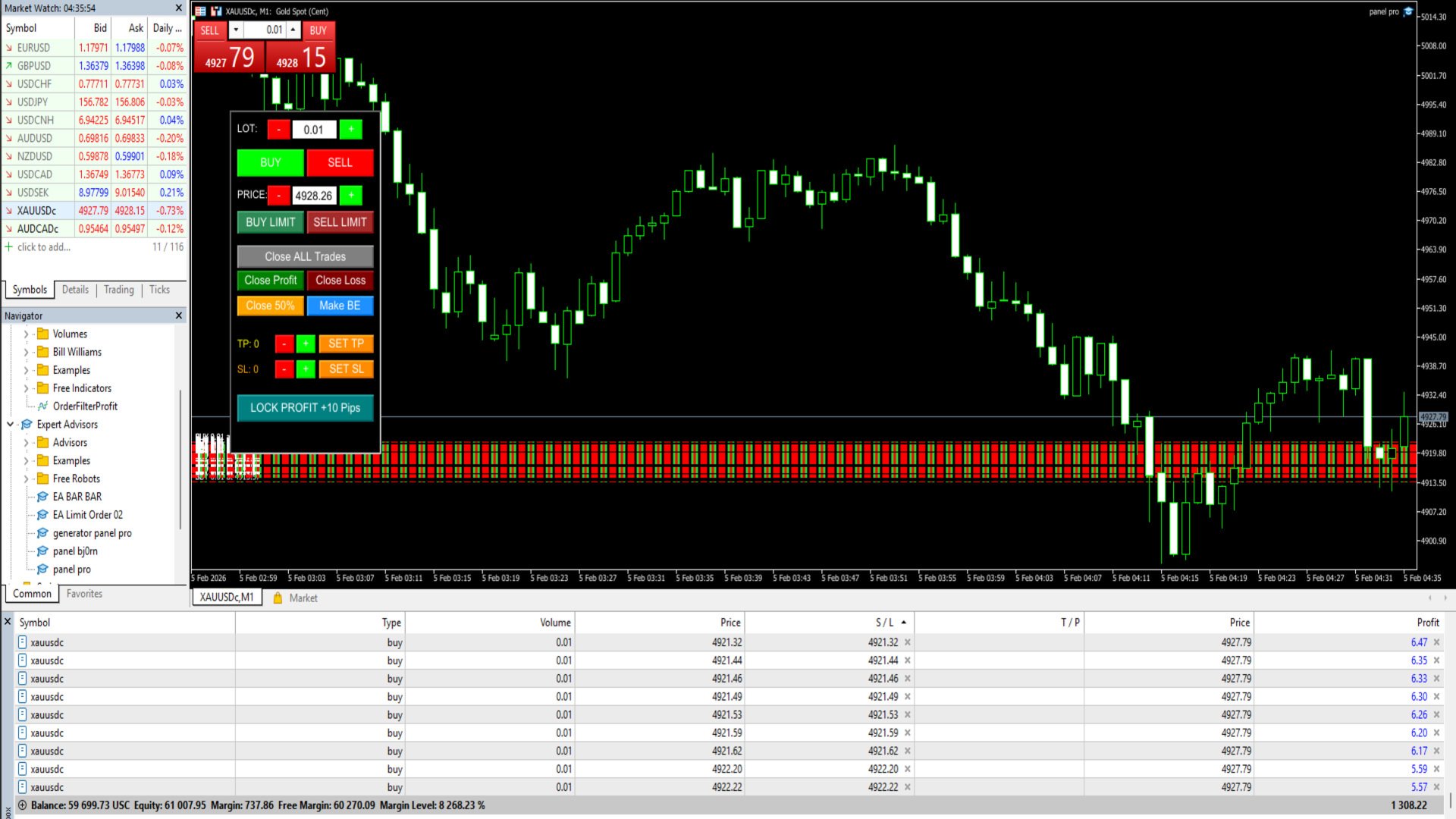
This feature allows you to open positions instantly or on a schedule directly from the chart:
Instant Buy & Sell: Large green (Buy) and red (Sell) buttons for immediate execution at the current market price.
Lot Size Control: You can specify the lot size using the +/- buttons or manually enter the lot size in the Edit Box.
Limit Order (Buy/Sell Limit): A feature for placing a queued order. Unlike standard EAs, this button automatically places a limit order complete with a stop-loss (SL) and stop-loss (TP).
Price Entry (Specific Price): You can specify the limit order execution price (e.g., 5015.00) by typing it in the Price box or adjusting it using the step buttons.
2. Position Closing Feature (Close Logic)
This EA has very flexible closing controls to secure profits or limit losses:
Close ALL Trades: Closes all open positions on the pair with one click.
Close Profit & Close Loss: Separates closings for only positions currently in the blue (profit) or only those currently in the red (loss).
Partial Close 50%: A feature for closing a portion of the lot volume. For example, if you have a 1.00 lot and click Close 50%, 0.50 lots will be closed and the remainder will remain open.
3. Risk Management & Modification (Management)
This feature is designed to maintain the security of existing positions:
Auto SL & TP: Every order opened through the panel will automatically have a Stop Loss and Take Profit according to the pip distance you set.
SET TP & SET SL: If you have an open position without an SL/TP, clicking this button will immediately apply the pip parameters from the panel to all active positions.
Make BE (Break Even): Moves the Stop Loss exactly to the opening price (Entry), so if the price reverses, you won't lose money (Risk Free).
Lock Profit +10 Pips: A special feature for locking in profits. The Stop-Save (SL) will be moved to the Profit position 10 pips from the Entry price.
Default for the XAUUSD pair
4. Technical Features & UI
Universal Management: Thanks to the ManageManualTrades feature, this EA not only controls its own orders but can also control orders you open via mobile (Mobile MT5) as long as they are for the same pair.
Z-Order Priority: An object layer system ensures the button is always at the forefront, ensuring it is highly responsive to clicks without being obscured by the chart or background.
Customizable Layout: The panel position (X, Y) and background color can be adjusted through the EA input menu to avoid obscuring other important information on the chart.