Point Of Week
- Indicators
- Version: 1.1
- Updated: 15 December 2025

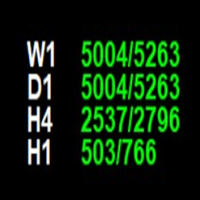
The **Point of Week Indicator** is a powerful MetaTrader 4 indicator that displays point values for multiple timeframes (W1, D1, H4, H1) directly on your chart. It calculates the position of the close price within the candle's range and displays it as a point value, along with the total range of the candle.
## Features
- ✅ Displays point values for 4 timeframes: **Weekly (W1), Daily (D1), 4-Hour (H4), and Hourly (H1)**
- ✅ Shows point value and total range in format: `"point_value/range_value"`
- ✅ **Color-coded display** based on candle direction:
- 🟢 **Green/Lime**: Bullish candle (Close > Open)
- 🔴 **Red/Orange**: Bearish candle (Close < Open)
- ⚪ **White**: Neutral candle (Close = Open)
- ✅ **Fully customizable positioning** (4 corner options)
- ✅ Adjustable font size, colors, and spacing
- ✅ Real-time updates on every tick
- ✅ Compatible with 2-digit, 3-digit, and 5-digit brokers
## Calculation Method
### Point Value Calculation
**For Bullish candles (Close > Open):**
```
Point Value = (Close - Low) / (High - Low) × Range in Points
```
**For Bearish candles (Close < Open):**
```
Point Value = (High - Close) / (High - Low) × Range in Points
```
### Range Value
```
Total Range = (High - Low) / Point
```
The indicator automatically handles 3-digit and 5-digit brokers by adjusting the point value accordingly.
## Installation
1. Copy the `pointOfweek.mq4` file to your MT4 Indicators folder:
```
MetaTrader 4/MQL4/Indicators/
```
2. Compile the indicator in MetaEditor (Press **F7**)
3. Restart MetaTrader 4 or refresh the Navigator window
4. Drag and drop the indicator onto your chart
## Input Parameters
| Parameter | Description | Default Value |
|-----------|-------------|---------------|
| **Corner Position** | Display position: TOP_RIGHT, BOTTOM_RIGHT, TOP_LEFT, BOTTOM_LEFT | BOTTOM_RIGHT |
| **X Position** | Distance from corner horizontally (pixels) | 120 |
| **Y Position** | Distance from corner vertically (pixels) | 30 |
| **Font Size** | Size of the text font | 14 |
| **Bullish Color** | Color for bullish candles | Lime Green |
| **Bearish Color** | Color for bearish candles | Orange Red |
| **Neutral Color** | Color for neutral candles | White |
| **Timeframe Label Color** | Color for timeframe labels | White |
| **Bold Font** | Enable/disable bold text | true |
| **Line Spacing** | Vertical spacing between lines (pixels) | 18 |
## Display Format
The indicator displays information in the following format:
```
W1 1250/3500
D1 450/1200
H4 180/500
H1 75/200
```
**Where:**
- **First number** (e.g., 1250) = Point value (position of close within candle range)
- **Second number** (e.g., 3500) = Total range of the candle in points
- **Colors** indicate candle direction (green = bullish, red = bearish, white = neutral)
## Usage Tips
1. **Positioning**: Choose the corner that doesn't interfere with your trading tools
2. **Colors**: Customize colors to match your chart theme for better visibility
3. **Font Size**: Adjust based on your screen resolution and chart size
4. **Spacing**: Increase line spacing if labels overlap
## Technical Notes
- The indicator uses the **most recent completed candle** (index 0) for calculations
- Point values are rounded to integers for display
- Works with all symbol types (Forex, Stocks, CFDs, etc.)
- Updates in real-time without requiring chart refresh
- No performance impact on chart rendering
## Corner Positions
### TOP_RIGHT (0)
- Displays in the top-right corner
- Timeframes listed from top to bottom: W1, D1, H4, H1
### BOTTOM_RIGHT (1) - Default
- Displays in the bottom-right corner
- Timeframes listed from bottom to top: H1, H4, D1, W1
### TOP_LEFT (2)
- Displays in the top-left corner
- Timeframes listed from top to bottom: W1, D1, H4, H1
### BOTTOM_LEFT (3)
- Displays in the bottom-left corner
- Timeframes listed from bottom to top: H1, H4, D1, W1
## Version
**Version:** 1.00
## Author
Point of Week Indicator
## License
Free to use and modify
---
**Note:** This indicator is based on the point calculation logic from TradeManagerEA.mq5, adapted for MetaTrader 4.