Auto Close Trade by Timer
- Utilities
- Rachmadona Sebayang
- Version: 1.4
- Activations: 5
AutoCloseTradebyTimer is a powerful and flexible risk management utility designed for MetaTrader 4. It automatically closes your open positions at a specific time every day, helping you avoid overnight swap fees, high volatility during market rollovers, or simply allowing you to stick to your trading schedule without being glued to the screen.
Whether you are a manual trader or use other Expert Advisors (EAs), this tool gives you complete control over when your trading day ends.
🚀 Key Advantages
-
Avoid Swap Fees: Automatically close trades before the broker's rollover time to prevent negative swap charges.
-
Risk Management: Prevents holding trades during low-liquidity hours or volatile news events that often occur overnight.
-
Peace of Mind: Set your target time once, and the EA will handle the rest. No need to wake up late to close trades manually.
-
Flexible Filtering: Uniquely designed to distinguish between your manual trades and trades opened by other robots.
🛠️ Main Features
-
Precision Time-Based Closing
-
Closes trades based on the Broker's Server Time, ensuring accuracy regardless of your local time zone.
-
Executes exactly at the Hour and Minute you define.
-
-
Smart Filtering System
-
Manual Trades: Can be set to close only trades you opened manually.
-
EA Trades: Can target a specific Magic Number to close trades managed by other EAs.
-
Hybrid Mode: Capable of closing both manual and specific EA trades simultaneously.
-
-
Multi-Symbol Capability
-
Current Chart Only: Safely manages only the currency pair the EA is attached to.
-
All Symbols Mode: Optionally sweeps the entire account to close ALL matching trades across all currency pairs.
-
-
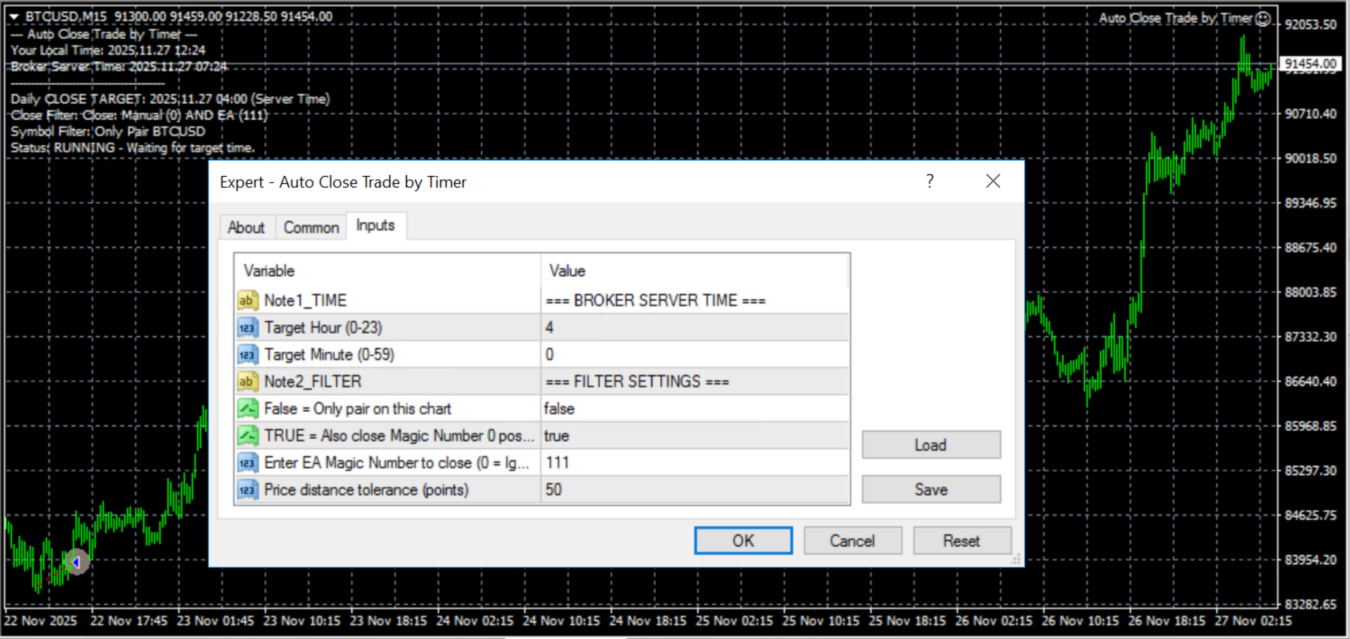
Live On-Chart Dashboard
-
Displays real-time status directly on the chart.
-
Shows your Local Time vs. Broker Server Time (crucial for setup).
-
Clearly indicates the next scheduled close time and active filters.
-
⚙️ Input Parameters
1. Time Settings
-
Note1_TIME: (Info) Section header for time settings.
-
CloseHour: The specific hour (Server Time 0-23) when trades should be closed.
-
CloseMinute: The specific minute (0-59) when trades should be closed.
2. Filter Settings
-
Note2_FILTER: (Info) Section header for filter settings.
-
CloseAllSymbols:
-
false : Closes trades only for the symbol on the current chart (e.g., BTCUSD).
-
true : Closes trades for ALL symbols on the account (Use with caution).
-
-
CloseManualTrades:
-
true : The EA will close trades with Magic Number 0 (Manual trades).
-
false : The EA will ignore manual trades.
-
-
TargetMagicNumber:
-
Set to 0 to ignore this filter.
-
Enter a specific ID (e.g., 12345 ) to close trades opened by another EA with that Magic Number.
-
-
Slippage: The maximum price deviation (in points) allowed during closing. Recommended: 50 for 5-digit brokers (equivalent to 5 pips).
📋 How to Use
-
Attach the EA to any chart (e.g., BTCUSD M15).
-
Look at the dashboard on the chart to see the current Broker Server Time.
-
In the EA settings, set CloseHour and CloseMinute based on when you want to exit (relative to Server Time).
-
Choose your filters (Manual, specific EA, or specific Symbol).
-
Ensure the "AutoTrading" button in MT4 is ON.
PLEASE LET ME KNOW IF NEED MY FURTHER ASSISTANCE TO SETUP :)
In addition, i am also happy to get any feedback for any future enhancement. YOU can drop either a comment/review/PM :)
Cheers!