Volli v9
- Indicators
- Version: 9.24
- Updated: 9 September 2025
- Activations: 18

The indicator also displays the aggregate strength of currencies, recommended stops, trend direction, volume trend and their changes.
Also there is EA.
https://www.mql5.com/en/market/product/145026?source=Site+Profile
Description
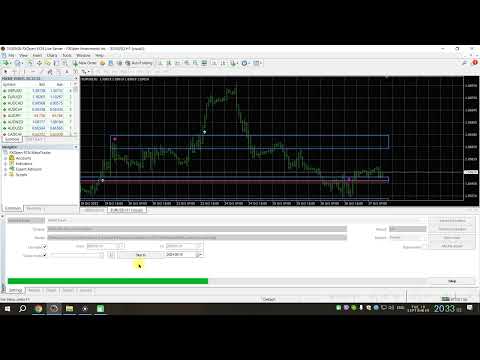
1) The arrows. Drawn on the current candle. On the current candle arrow can disappear. When candle closed arrow remains on the chart. Arrows draws when price go out from the zone (touch). The arrow is designed to make attention to the situation on the chart. There are alert when you see arrows. It is recommended not to reopen an order and not open an additional order if a new arrow in a row one way worse and costs for the previous one(for example when the down arrow costs 1.3020, and previous was priced at 1.3040). 2) Zone. Are drawn on the basis of the largest volume. You can choose from their number, type, whether to show the zone for the current period current period area has its own color, can repaint. Different color zones this indication was volume bullish or bearish. For visual convenience color unidirectional alternating volumes. The zone is intended to identify supply and demand. When the price is suitable to the area, it is recommended to watch the behavior of prices. I.e. how many times the price of the retouch of the zone, how many ran it as it happened (or drastically slow). The combination of zones in one place can be thought of as flat. It is recommended when analyzing for example H1 period to assess the situation on the M5, M5 must not have opposite signal to H1. 3) Trend(red-blue squares) shown in a top of subwindow of the indicator. Do not trade oposite trend! 4) Dividing lines. You can change the view. You can include instead of lines filled with certain color zone. Is used to separate the graph window into zones with small, medium and large volumes. Measured in% in relation to the largest volume. 5) Increasing volume. You can choose after how many bars in a row growing volumes of allocating them. This is the default Blue histograms. Used for monitoring plot where volumes grew. This is usually where price plots unfolding. 6) Falling volumes. You can choose after how many bars in a row of falling volumes of allocating them. The default is white. Used for monitoring plot where falling volumes. Usually in such areas it is advisable to close the order. 7) The most bullish volume. By default, has a bright green color. Shows where for a certain period was the largest volumes of splash on bullish candle. 8) The most bearish volume. By default, the color is red. Shows where for a certain period was the largest volumes of splash on bearish candle. 9) Similar volumes by default are yellow. Show where the plots where similar volumes. 10) OnBalanceVolume. The indicator OBV superimposed on the indicator window in% ratio. Can be used as an oscillator. You can also see this pattern as a double-tap some level indicator window or zones in the indicator window. 11) Correla. indicator window draws a correlation of Exchange calculated from all 28 pairs. Layout and location can be changed. Is used as an input filter, for example, if you pair GBPUSD decided to make a BUY, and the correlation data indicate that GBP significantly weaker for USD, it's best not to open Bai. 12) Name of the indicator on the main chart. Draws the indicator name. Every tick changes the color of a particular symbol. Can be used for visual perception of ticks speed.
It is very important to use a live ECN account.
There is also a description of the settings.
"//////////////////////////Main settings//////////////////////////" count_volumes = tick_volumes; Consider tick volumes, broker (not yet connected) or from ClusterDelta Bars_Count = 2000; Number of bars for counting refresh_in_seconds = 2; Update data in seconds "//////////////////////////Volumes window settings//////////////////////////" identify _ one _ way _ volumes = true ; highlight whether falling or rising or similar amounts in a row (white, blue, yellow histograms) allowable _ indent _ same _ volumes _ identified = 1; permissible backlash in% for the same volume identification (yellow histograms) min _ numb _ same _ way _ volumes _ identified = 4; the minimum number of falling or rising volumes for their display (white and blue histograms) show _ OBV _ line = true ; whether to show the line of the indicator OBV (OnBalanceVolume) show _ volli _ label = true ; whether to show the inscription Volli count _ real _ volumes = false ; whether to use real volumes for calculations (until setting is not active but when volumes appear in MT4 from the broker that you are ready for this) "//////////////////////////Highest Volume settings/////////////////////////" use_highest_volume = true; Show whether the greatest volume TF _ chek = PERIOD _ W 1; the time interval where to look for the greatest volume periods _ highest _ vol = 9; number of intervals use _ vol _ the zones = true ; whether to draw the support zone based on volume use _ double _ volume _ chek = true ; check the set of volumes on 2 candlelight bool draw_doubled_zones = false; whether to draw a zone on the dual plugs show _ current _ zone = true ; whether to draw the zone for the current interval start _ draw _ from clause _ volume _ bar = true ; start of zone of candles with the highest volume number _ of _ the zones = 4; the number of zones to draw Min _ vol _ level _ perc = 55; the minimum number of% of the largest volume on the schedule with the volumes for his show zone _ shift = 0; shear zone relative to the candles with the highest volume Zone_right_side_shift_bars = 3; shift the right edge of the zone Zone_left_side_shift_bars = 0; shift the left edge of the zone zones_width = 2; line thickness zone extern ENUM_LINE_STYLE zones_style = STYLE_DOT; style line zone zones_color_up_today = clrYellow; color zone the current interval with bullish volume zones_color_up = clrLime; color zone with bullish volume zones_color_up2 = clrAqua; color 2 zone with bullish volume zones_color_down_today = clrViolet; color zone the current interval to the bearish volume zones_color_down = clrRed; color zone with the bearish volume zones_color_down2 = clrOrangeRed; color 2 zone with the bearish volume the zones _ ray = true ; to draw a zone up to the current candle the zones _ back = false ; whether the color area to fill show _ normalC _ the zones = true ; whether to show the zone in volume show _ opositeC _ the zones = false ; whether to show the opposite zone in volume use _ sunday _ shift = false ; whether to use the Sunday market opening time sunday_minutes_shift = 120; shift in minutes "//////////////////////////Arrows settings//////////////////////////" show _ arrows = true ; whether to display arrows by zones point _ koef = _10; multiplier paragraph 1 Min _ zone _ width _ points = 0; the minimum size for drawing arrows on it Max _ zone _ width _ points = EMPTY _ VALUE ; the maximum size of area to draw on her shooter use _ refresh _ arrows = false ; an update of the old shooter arrows _ indent = 3; points of indent arrows from candles arrow_code_up = 233; code arrow up arrow_code_down = 234; code arrow down arrow_color_up = clrLime; color arrow up arrow_color_down = clrRed; color arrow down arrows _ width = 1; the thickness of the arrows use _ HL _ (C) _ patern = true ; use a combination of candles1 (e.g. up arrow = Lowe last candle below the upper boundary of the zone + close current candle above the upper boundary of the zone at a certain distance + low and close should be above the bottom of the zone) use _ HL _ HL _ (C) _ patern = false ; use a combination of candles2 (e.g. up arrow = previous Lowe candles above the upper boundary of the zone + Lowe last candle below the upper boundary of the zone + close current candle above the upper boundary of the zone at a certain distance + Lo, and Lo and close should be above the bottom of the zone) distance _ from clause _ zone _ signal = 11; the distance at which the price should be farther from the zone zone _ width _ plus _ from clause = 2; adding items to the border zone, opposite to the direction of the arrow keys (up arrow, for example, the lower bound is increased to 2 points) zone _ width _ plus _ to = 2; adding items to the border zone in the direction of the arrow (e.g. up arrow, the upper limit will be increased to 2 points) input string co_set = "//////////////////////////i settings//////////////////////////"; input bool show_trend = true; //show trend input int trend_period = 60; //trend period input double trend_mult = 1; //trend multiplier trend _ on _ top = true ; to draw trend at the top of the idikatora or on volumes use _ alert _ SWB _ on = false ; alert on/off when you see a trend trend _ up _ alert = " trend up"; alert message when there was a trend up trend _ down _ alert = " trend starts"; alert message when there was a trend down use _ alert _ SWB _ off = false ; on/off alert when candles in a row ended "//////////////////////////Lines in indicator window//////////////////////////" show _ lines = true ; whether to draw a line separating the indicator window in% draw _ colored _ the zones = false ; whether to draw the shaded zones separate indicator window lines_width = 1; thickness lines extern ENUM_LINE_STYLE lines_style = STYLE_DOT; style lines line_center_color = clrDodgerBlue; color Central line line_low_color = clrNavajoWhite; color the bottom line line_high_color = clrOrangeRed; color top of the line line_low_percents = 20; lower border in % line_high_percents = 80; upper border in % "//////////////////////////i settings//////////////////////////" show_corella = true; Show whether the correlation between currencies TF = PERIOD _ W 1; the period from which considered correlation chek _ bar = 0; candle on a point with which considered correlation Percents _ level _1 = 2.5; level one where the rectangle changes color Percents _ level _2 = 5.0; level one where the rectangle changes color Percents _ level .3_3 = 40.0; level one where the rectangle changes color update _ seconds = 7; interval, in seconds, for data refresh symbols _ prefix = ""; the prefix character if needed (proEURUSD) symbols _ postfix = ""; Postfix characters if needed (EURUSDpro) Rectangle _ width = 47; the width of the rectangle, in pixels Rectangle _ height = 25; the height of the rectangle Rectangle _ X = 60; the x-coordinate of the first rectangle Rectangle _ X _ step = 50; step between rectangles on the x-axis Rectangle _ Y = 20; coordinate Y the first rectangle Rectangle _ Y _ step = 48; step between rectangles on an axis Y Rectangle_color_up_3 = clrAqua; color level3 up Rectangle_color_up_2 = clrDodgerBlue; color level2 up Rectangle_color_up_1 = clrLightBlue; color level1 up Rectangle_color_medium_up = clrMoccasin; color level0 + Rectangle_color_medium_down = clrMoccasin; color level0- Rectangle_color_down_1 = clrOrange; color level1 down Rectangle_color_down_2 = clrRed; color level2 down Rectangle_color_down_3 = clrMagenta; color level3 down extern fonts Text_symb_font = font9; font text characters Text _ symb _ color = clrWhite ; the color of the text characters Text _ symb _ size = 7; the size of the text characters Text _ symb _ shift _ X = 8; offset text character relative to the rectangle along the x axis Text _ symb _ shift _ Y = 9; shift text character relative to the rectangle of the Y extern fonts Text_perc_font = font192; font text data Text _ perc _ color = clrBlack ; the color of text data Text _ perc _ size = 9; data text size Text _ perc _ shift _ X = 3; shift text data on a rectangle along the x axis Text _ perc _ shift _ Y = -12; shift text data on the rectangle of the Y percents _ digits = 2; the number of digits after the decimal point in the data "//////////////////////////Alerts on arrows settings//////////////////////////" use _ alert = false ; on/off alert when you see candles on candle closed up _ alert = " Arrow up"; alert message when prompted with an up arrow down _ alert = " Arrow down"; alert message when the down arrow appears use _ sound = false ; on/off the sound when you see candles on candle closed up _ sound = " news "; a sound file when you are prompted with the up arrow down _ sound = " ok "; sound file when the down arrow appears