Complete Trade Manager

1

Complete Trade Manager (MT5)

  • Manages each open position individually
  • Automate exit strategy (great for prop firm challenges)
  • Use R: R based exit or Fixed Pips exit models
  • Scale out of positions (3 x Targets possible)
  • Breakeven after 1st 2nd or 3rd partial take profit
  • Trail Stop Loss
  • Stop Break Even
  • Fixed Target Exit (Without Partial Profit)
  • Equity Target Based Exit
  • Expect More features in the future


Having a plan to exit with trades based on predefined set of rules provides consistency and improves trading edge. Booking profits (at least partial) is particularly important which can minimize your losses and help improve your trading psychology. Remember, it is very important to step away from chart once you have placed a trade. Being glued to the chart and watching ticks need to be avoided once order has been placed. This EA helps you do that by exiting your position based on targets you set.

The EA helps you scale out of positions based on R-multiples (calculated based on stop-loss distance) or fixed pips move from open price. The EA manages each position separately for profit taking.


What Can the EA do For You?

  • Manage multiple open trades individually 
  • Multiple Partial Exits (Based on Multiple of your stop distance (R-Multiple)
  • Multiple Partial Exits (Based on Pips Away from Open Price)
  • Option to Exit Full Position Without Partial Exit (Based on R-Multiple or Fixed Pips from Open Price)
  • Option to Move Stop to Breakeven after Partial Exit
  • Breakeven without partial exit (Based on R-Multiple or Fixed Pips)
  • Close All positions based on equity Target (e.g. Close all positions if Equity is 10% more than Balance, open profit is 10%)

EA Settings:

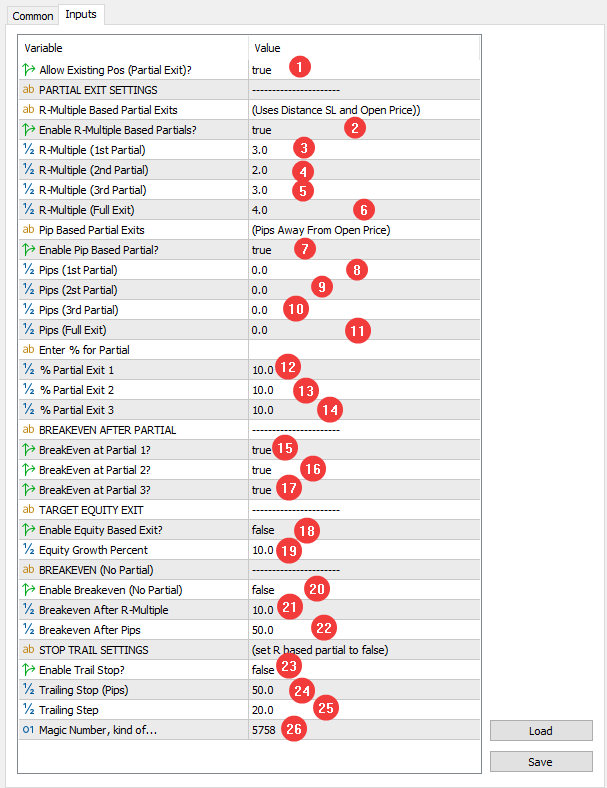
By default, simply loading the EA will not do anything, you must enable features you want to use. Refer to Settings screenshot with Settings screenshot along with description below.

Download UserManual In PDF

1.      Allow Existing Pos (Partial Exit)

Whether or not you want to allow partial exits on existing positions.

If you have open positions when you load the EA to your chart:

TRUE: EA will work with existing positions

FALSE: EA will ignore existing positions (only new positions will be considered)


PARTIAL EXIT SETTINGS

2.      Enable R-Multiple Based Partials?

If you want to use Risk Reward concept to take partial profit, enable this.

EA uses distance between open price and stop loss level to calculate the Risk (R)

Stop Loss required for this feature to work.


3.      R-Multiple (1st Partial)

·         Enter value for R-multiple (e.g. 2 for 2R or 2.5 for 2.5R)

·         If your stop loss is 10 pips, setting this value to 2 will take partial when you are in 20 pip profit.


4.      R-Multiple (2nd Partial)

·         Enter value for R-multiple (e.g. 2 for 2R or 2.5 for 2.5R)

·         If you want multiple partial exits


5.      R-Multiple (3rd Partial)

·         Enter value for R-multiple (e.g. 2 for 2R or 2.5 for 2.5R)

·         If you want multiple partial exits


6.      R-Multiple (Full Exit)

·         Enter value for R-Multiple (e.g. 10 for 10R)

·         Allows you to exit full position after reaching Risk Reward Target

·         For example, use this if you don’t want partial exits but exit full position at profit target.


7.      Enable Pip Based Partial

·         Set True if you want to use pips as profit target for partial exits.


Pip Based Partial Exits

Use this if you want to use pips as your profit target rather than R-Multiple. The pip value is displayed on your chart when you load this EA to the chart. Use the Pip_EA value.


8.      Pips (1st Partial)

Pip for your first partial exit. For example, set it as 20, if you want to exit partial when price moves 20 pips from your open price.

9.      Pips (2nd Partial)

Set value in pips for your second partial exit target.

10.  Pips (3rd Partial)

Set value in pips for your second partial exit target.

11.  Pips (Full Exit)

If you want to exit entire position after reaching certain pips in profit. (e.g. 100 if you want to close full position at 100 pip profit)

Enter % for Partial

In this section you need to enter the partial exit percentage if you want to exit based on R-multiple or pips.

12.  % Partial Exit 1: Enter what percentage you want to exit at 1st partial target (Pip or R Multiple). Example, input 20 if you want to exit 20% at your first target.


13.  % Partial Exit 1: 2nd Partial exit percentage (e.g. 20)


14.  % Partial Exit 1: 2nd Partial exit percentage (e.g. 20)


BREAKEVEN AFTER PARTIAL

The EA allows you to move your stop loss level to breakeven after partial profit has been taken. You can choose to breakeven after 1st Partial Profit or 2nd Partial Profit or 3rd Partial Profit

Note:

After breakeven, no more partials that are based on R-Multiple will be executed as the stop distance is zero after breakeven. The pip based partial exits will continue to work.

For example: If you set breakeven after taking Partial Exit 2, then Partial Exit 3 (only Based on R-Multiple) will not execute. Only pip-based exits will work after this.


15.  Breakeven at Partial 1?

Set True if you want to exit after taking first partial.

16.  Breakeven at Partial 2?

Set True if you want to exit after taking first partial.

17.  Breakeven at Partial 1?

Set True if you want to exit after taking first partial.


TARGET EQUITY EXIT

Allows you to exit all positions after equity target has been set. It can help you close all positions if you are trying to pass prop firm challenges.

18.  Enable Equity Based Exit

Set to true if you want to exit at equity target. You could call it open profit percentage based on current account balance.


19.  Equity Growth Percent

What percent increase in equity do you want before closing all positions. For example, setting 10 implies that the EA will close all positions when your Equity is up by 10%. In other words, when your open profit is 10%, all positions will be closed.


BREAKEVEN (NO PARTIAL)

Use this setting if you simply want to move stop loss level to breakeven but don’t want to take any partial. You can use Risk Reward or Pips to set your target Stop Breakeven point.

20.  Enable Breakeven (No Partial)

Set True if you want to breakeven and not take any partial profits.

21.  Breakeven After R-Multiple

Set your R-Multiple value at which stop will be moved to breakeven. For example, set it to 3 then the EA will move your stop to breakeven after 3R profit.

22.  Breakeven After Pips

Enter how far in pips does the market need to move from your open price for each position before moving stop loss to breakeven. (e.g. 20 for 20 pips away from trade open price)


STOP TRAIL SETTINGS

23.  Enable Stop Trail

Set True if you want to trail your stop. Please note that R-Multiple based partial exits will not execute if you are trailing the stop loss. However, Pips based partial exits will continue to work in conjunction with this feature.

24.  Trailing Stop (pips)

Stop loss distance in pips from current price you want to maintain. (e.g. 30 for 30 pips, EA will maintain 30 pips stop distance)


25.  Trailing Step

How many pips does market has to move each time for stop to be trailed. (Example 10 for 10 pips, EA will wait for 10 pips before trailing stop again)


26.  Magic Number:

No use.


Recommended products
Reversal Composite Candles
MetaQuotes Ltd.
3.69 (16)
The idea of the system is to indentify the reversal patterns using the calculation of the composite candle. The reversal patterns is similar to the "Hammer" and "Hanging Man" patterns in Japanese candlestick analysis. But it uses the composite candle instead the single candle and doesn't need the small body of the composite candle to confirm the reversal. Input parameters: Range - maximal number of bars, used in the calculation of the composite candle. Minimum - minimal size of the composite can
FREE
Free automatic Fibonacci is an indicator that automatically plots a Fibonacci retracement based on the number of bars you select on the BarsToScan setting in the indicator. The Fibonacci is automatically updated in real time as new highest and lowest values appears amongst the selected bars. You can select which level values to be displayed in the indicator settings. You can also select the color of the levels thus enabling the trader to be able to attach the indicator several times with differe
FREE
SimpleTrade by Gioeste
Giovanni Scelzi
4 (3)
Discover the power of automated trading with **SimpleTradeGioeste**, an Expert Advisor (EA) designed to optimize your trading operations in the Forex market. This innovative EA combines advanced trading strategies with proven technical indicators, offering an unparalleled trading experience. video backtest :  https://youtu.be/OPqqIbu8d3k?si=xkMX6vwOdfmfsE-A ****Strengths**** - **Multi-Indicator Strategy**: SimpleTradeGioeste employs an integrated approach that combines four main technical ind
FREE
IMPORTANT NOTE: This is a professional Trade Management Utility and on-chart assistant. It is NOT an automated trading robot. It does not open trades on its own. The UltraFast Trade Manager MT5 is the ultimate execution and risk-management suite designed to give you absolute control over your manual and algorithmic trades. When managing multiple positions, calculating complex net break-even points, or constantly monitoring the economic calendar, hesitation can lead to costly mistakes. This utili
FREE
Morning Range Breakout (Free Version) Morning Range Breakout (Free Version) is a straightforward trading advisor that implements a breakout strategy based on the morning range. It identifies the high and low within a specified time interval (e.g., 08:00–10:00 UTC) and opens a trade on a breakout upward or downward. The free version includes core functionality without restrictions. All parameters and messages are in English, per MQL5 Market requirements. Key Features Detects morning range based
FREE
Follow The Line MT5
Oliver Gideon Amofa Appiah
4.6 (35)
This indicator obeys the popular maxim that: "THE TREND IS YOUR FRIEND" It paints a GREEN line for BUY and also paints a RED line for SELL. (you can change the colors). It gives alarms and alerts of all kinds. IT DOES NOT REPAINT and can be used for all currency pairs and timeframes. Yes, as easy and simple as that. Even a newbie can use it to make great and reliable trades. NB: For best results, get my other premium indicators for more powerful and reliable signals. Get them here: https://www.m
FREE
PZ Goldfinch Scalper EA MT5
PZ TRADING SLU
3.34 (56)
This is the latest iteration of my famous scalper, Goldfinch EA, published for the first time almost a decade ago. It scalps the market on sudden volatility expansions that take place in short periods of time: it assumes and tries to capitalize of inertia in price movement after a sudden price acceleration. This new version has been simplified to allow the trader use the optimization feature of the tester easily to find the best trading parameters. [ Installation Guide | Update Guide | Troublesh
FREE
Donchian Breakout And Rsi
Mattia Impicciatore
4.5 (2)
General Description This indicator is an enhanced version of the classic Donchian Channel , upgraded with practical trading functions. In addition to the standard three lines (high, low, and middle), the system detects breakouts and displays them visually with arrows on the chart, showing only the line opposite to the current trend direction for a cleaner view. The indicator includes: Visual signals : colored arrows on breakout Automatic notifications : popup, push, and email RSI filter : to val
FREE
MA Crossover ADX
MetaQuotes Ltd.
4 (13)
The strategy is based on price crossover with Moving Average indicator, confirmed by ADX indicator. The trade signals: Buy: closing price of the last completed bar is higher than moving average, the moving average increases at the current and last completed bars. Sell: closing price of the last completed bar is lower than moving average, the moving average decreases at the current and last completed bars. To filter the false signal, it checks the trend power (ADX>ADXmin) and trend direction usin
FREE
The Scaled Awesome Oscillator (SAO) represents a refined adaptation of the Awesome Oscillator, aimed at establishing consistent benchmarks for identifying market edges. Unlike the standard Awesome Oscillator, which records the variation in pips across different commodities, the only unchanging reference point is the zero line. This limitation hampers investors and traders from pinpointing specific levels for trend reversals or continuations using the traditional Awesome Indicator, a creation of
FREE
Introduction Welcome to the world of Forex trading, where every tick of the market can be influenced by news events. Introducing our expert advisor for MetaTrader, your ultimate tool for navigating the complexities of news trading. This innovative advisor is specifically designed to automate your trading strategy during key macroeconomic releases, ensuring you never miss an opportunity.  When important indicators are announced, volatility often spikes, creating potential for profit. Our expert
FREE
Budget Golden Scalper M1 — Trial Edition Built for traders who are tired of hype and ready for transparency Let’s be honest. If you have explored automated trading before, you have probably seen systems that looked perfect in backtests but behaved very differently in live markets. Many traders today are understandably cautious — and rightly so. Budget Golden Scalper M1 was created with this reality in mind. This is not marketed as a “holy grail” or a get-rich-quick robot. Instead, it is a str
FREE
TrendEA FourAverage
Mikhail Sergeev
3 (2)
The trend Expert was created specifically to find optimal parameters for the "FourAverage" indicator. The ADVISER trades in the always in a deal mode (closing a buy deal and immediately opening the opposite one). This approach makes it possible to identify the ability of indicators to determine the trend as accurately as possible. The Expert Advisor is fully automatic and has the ability to manage capital using the Martingale method. The default settings are for "XAUUSD(GOLD) H1". The indicator
FREE
Mr Krabs Gold
Maher Matmati
Discover mrKrabsGold – Kelly MultiTP , your ultra-optimized scalping EA designed to maximize profits while controlling risk: Key Features: Scalping & Hedging Strategy: Detects and exploits quick trend reversals with automatic hedging to limit drawdowns. Dynamic Kelly Sizing: Allocates optimal position size based on your past performance using an adjustable Kelly factor. Multi-Take Profit Tiers: Lock in gains in stages (50%, 33%, then the balance) as the move unfolds. Adaptive
FREE
Friend of the Trend: Your Trend Tracker Master the market with Friend of the Trend , the indicator that simplifies trend analysis and helps you identify the best moments to buy, sell, or wait. With an intuitive and visually striking design, Friend of the Trend analyzes price movements and delivers signals through a colorful histogram: Green Bars : Signal an uptrend, indicating buying opportunities. Red Bars : Alert to a downtrend, suggesting potential selling points. Orange Bars : Represent cons
FREE
Hedge Copier Pro — Master EA   is the control unit of a high-speed, LOCAL trade copier for MetaTrader 5. It monitors your prop firm account and instantly broadcasts every trade event to the paired Slave EA — with ZERO latency and NO internet dependency. Designed specifically for prop firm traders, it includes a unique   REVERSE HEDGE mode : the Slave (sold separately) opens the OPPOSITE direction of every Master trade, allowing you to hedge across two accounts simultaneously and protect your fu
FREE
ET1 for MT5
Hui Qiu
3.75 (4)
ET1 for MT5 is new and completely free!! ET1 for MT5 v4.20 Updated!! Now use on XAUUSD(Gold) !!  The success rate is more than 75%   !!! important update: Merge ET9 's breakout strategy Warning!! You can use ET1 completely free, but we do not guarantee ET1 stability, It is recommended that the more powerful ET9 for MT5 version includes the ET1 strategy and guarantees complete and stable returns. The Best Expert Advisor  on   XAUUSD   any timeframes  ET9  for MT5 Updated v4.80 !!  https://www
FREE
Brent Trend Bot
Maksim Kononenko
4.5 (16)
The Brent Trend Bot special feature is simple basic tools and logic of operation. There are no many strategies and dozens of settings, like other EAs, it works according to one algorithm. The operating principle is a trend-following strategy with an attempt to get the maximum profitability adjusted for risk. Therefore, it can be recommended for beginners. Its strong point is the principle of closing transactions. Its goal is not to chase profits, but to minimize the number of unprofitable trans
FREE
Spread Times Histogram and Stats is a spread monitoring indicator for MetaTrader 5. It plots a real-time color-coded histogram of broker spread, tracks a rolling 24-hour average, and fires smart alerts when spread exceeds a configurable dynamic threshold. Key Features - Color-coded histogram: green when spread tightens, red when it widens - Rolling 24-hour average line for ongoing context - Session statistics: minimum, maximum, and average spread for the current session - Smart alert system: f
FREE
Are you tired of drawing trendlines every time you're analyzing charts? Or perhaps you would like more consistency in your technical analysis. Then this is for you. This indicator will draw trend lines automatically when dropped on a chart. How it works Works similar to standard deviation channel found on mt4 and mt5. It has 2 parameters: 1. Starting Bar 2. Number of bars for calculation The   starting bar   is the bar which drawing of the trend lines will begin, while the   number of bars for c
FREE
This EA finds Fair Value Liquidity (FVL) on the chart, tracks when they get mitigated , and then looks for an inversion signal (price “fails” through the zone). When that inversion happens, it places a trade in the opposite direction of the original Liquidity gap (an Inverse FVG approach). It also lets you control when it trades using market sessions , and it can auto-close positions at New York open (all positions or profitable-only). Key advantages Clear, rule-based entries (no guessing): trad
FREE
Indicator measures strength of each currency in your list. Main idea: It simply iterates through all combinations of pairs and adds difference between open and close in percent. Parameters: List of currencies - what currencies will be calculated (maximum is 8) Calculation type - from which data will be strength calculated Calculation data input - used as input related to calculation type Symbol suffix - used in case of suffix on symbols, e.g: when your symbols look like EURUSDm, EURUSDmicro etc
FREE
Macd Rsi Expert
Lakshya Pandey
5 (1)
MACD RSI Optimized EA is a free, fully automated trading robot designed to capture trends using a classic combination of indicators. By merging the trend-following capabilities of the MACD (Moving Average Convergence Divergence) with the momentum filtering of the RSI (Relative Strength Index), this EA aims to filter out market noise and enter trades with higher probability. This version has been specifically optimized for the month of October on the M15 (15-minute) timeframe and performs best on
FREE
QuantScalping
Jakub Schwarz
QuantScalping - Precision Scalping for Consistent Profits Join channel here:  https://www.mql5.com/en/channels/quantbreakprop Overview QuantScalp is a cutting-edge scalping trading strategy designed to maximize your trading efficiency and profitability. Built with advanced algorithms and tailored for high-frequency trading, QuantScalp offers a unique approach to the markets, ensuring faster wins and higher win rates. Key Features Optimized Scalping Strategy : Harnesses advanced technical analy
FREE
Crimson FX
Michael Prescott Burney
Crimson EA emerges as a force to be reckoned with on the USDJPY M15 chart, embodying the perfect fusion of 50 meticulously crafted strategies that span across trend analysis, hedging, and scalping disciplines. This powerhouse operates beyond the confines of conventional stop-loss and take-profit mechanisms, relying instead on precise entry and exit signals generated from its strategic arsenal. Coupled with an advanced reversal function, Crimson EA offers a protective shield to safeguard invest
FREE
Value Chart Candlesticks
Flavio Javier Jarabeck
4.57 (14)
The idea of a Value Chart indicator was presented in the very good book I read back in 2020 , " Dynamic Trading Indicators: Winning with Value Charts and Price Action Profile ", from the authors Mark Helweg and David Stendahl. The idea is simple and the result is pure genius: Present candlestick Price analysis in a detrended way! HOW TO READ THIS INDICATOR Look for Overbought and Oversold levels. Of course, you will need to test the settings a lot to find the "correct" one for your approach. It
FREE
The Waiter mt5 FREE
Massimiliano Pirola
3.5 (2)
What is The Waiter ? It is an automated system to always be ready to catch the big movements of the market How does it work? Set the mode (stop or limit) Set the pending orders distance Set Take Profit / Stop Loss Wait for the big candle settings: entry : 0.OFF  (the expert advisor won't operate. only for chart info purposes.) 1.New candle, new STOP orders  (each new candle two stop orders are placed. If they are not activated by the end of the candle, they will be cancelled) 2.New candle, new
FREE
Go Long Advanced
Phantom Trading Inc.
4.78 (9)
The Go Long EA implements an advanced intraday trading strategy based on the principle of systematic daily trading with multiple technical confirmations. While many traders seek complex algorithms, this EA combines simple yet effective concepts with sophisticated risk management and multiple technical filters. The EA opens positions at a specific time each day, but only when market conditions align with multiple technical indicators. This systematic approach helps capture intraday moves while a
FREE
Show Pips for MT5
Roman Podpora
4.55 (29)
This information indicator will be useful for those who always want to be aware of the current situation on the account. VERSION MT 4 - More useful indicators The indicator displays data such as profit in points, percentage and currency, as well as the spread for the current pair and the time until the bar closes on the current timeframe. There are several options for placing the information line on the chart: - To the right of the price (runs behind the price); - As a comment (in the upper lef
FREE
Range Auto TP SL
Dilwyn Tng
4.56 (45)
Range Auto TP SL  is for you, 100% free for now, download it and give me a good review and you are free to use it for lifetime !!!! Range Auto TP SL is a EA to set Stop Loss and Take Profit level based on range using Average True Range (ATR). It works on both manually opened positions via PC MT5 Teriminals or MT5 Mobiles and EA/robots opened position. You can specify magic number for it to work on or it can work on all the positions. Many EA does not good Stop Loss and Take Profit function and
FREE
Buyers of this product also purchase
Trade Assistant MT5
Evgeniy Kravchenko
4.42 (211)
It helps to calculate the risk per trade, the easy installation of a new order, order management with partial closing functions, trailing stop of 7 types and other useful functions. Additional materials and instructions Installation instructions - Application instructions - Trial version of the application for a demo account Line function -   shows on the chart the Opening line, Stop Loss, Take Profit. With this function it is easy to set a new order and see its additional characteristics bef
Forex Trade Manager MT5
InvestSoft
4.98 (659)
Welcome to Trade Manager MT5 - the ultimate risk management tool designed to make trading more intuitive, precise, and efficient. This is not just an order placement tool; it's a comprehensive solution for seamless trade planning, position management, and enhanced control over risk. Whether you're a beginner taking your first steps, an advanced trader, or a scalper needing rapid executions, Trade Manager MT5 adapts to your needs, offering flexibility across all markets, from forex and indices t
Local Trade Copier EA MT5
Juvenille Emperor Limited
4.96 (139)
Experience exceptionally fast trade copying with the   Local Trade Copier EA MT5 . With its easy 1-minute setup, this trade copier allows you to copy trades between multiple MetaTrader terminals on the same Windows computer or Windows VPS with lightning-fast copying speeds of under 0.5 seconds. Whether you're a beginner or a professional trader, the   Local Trade Copier EA MT5   offers a wide range of options to customize it to your specific needs. It's the ultimate solution for anyone looking t
Beta Release The Telegram to MT5 Signal Trader is nearly at the official alpha release. Some features are still under development and you may encounter minor bugs. If you experience issues, please report them, your feedback helps improve the software for everyone. Telegram to MT5 Signal Trader is a powerful tool that automatically copies trading signals from Telegram channels or groups directly to your MetaTrader 5 account. It supports both public and private Telegram channels, and you can conn
AI Agent Supervisor is NOT an Expert Advisor. AI Agent Supervisor   is a   multi-agent AI risk & portfolio supervisor   that watches every EA on your account and intervenes in real time.  WANT AN AI PORTFOLIO MANAGER WATCHING YOUR FLEET 24/7?   Run your fleet on the same brokers I do:   IC MARKETS , IC TRADING   .  Unlike the centralized stock market, Forex has no single, unified price feed.  Every broker sources liquidity from different providers, creating unique data streams. The Supervisor r
TradePanel MT5
Alfiya Fazylova
4.87 (155)
Trade Panel is a multi-functional trading assistant. The app contains over 50 trading functions for manual trading and allows you to automate most trading tasks. Before making a purchase, you can test the demo version on a demo account. Download the trial version of the application for a demonstration account: https://www.mql5.com/en/blogs/post/750865 . Full instructions here . Trade. Allows you to perform trading operations in one click: Open pending orders and positions with automatic risk cal
FarmedHedge Pair Trading Dashboard
Tanapisit Tepawarapruek
5 (3)
Farmed Hedge Yield Farming | All Markets (Manual - Hybrid - Semi/Automated EA) MULTI-ASSET SUPPORT Trade any asset available on your broker - Forex: Major, Minor, Exotic pairs - Crypto: BTC, ETH, XRP, SOL, BNB - Stocks: Apple, Tesla, Amazon, Google, etc. - Commodities: Gold, Silver, Oil, Gas - Indices: US30, NAS100, SPX500, DAX40 - Any CFD your broker offers VERIFIED TRADING RESULTS - Farmed Hedge Yield Axi Copy:  https://www.mql5.com/en/signals/2356376 - Farmed Hedge Yield Exn Copy:   https:/
Quant AI Agents are independent trading Expert Advisors. Instead of trading using a fixed strategy like other conventional EAs, Quant AI Agents   is a   multi-agent AI trading framework   that turns natural-language strategy prompts into live.  WANT THE SAME RESULTS AS MY LIVE SIGNAL?   Use the exact same brokers I do:   IC MARKETS , IC TRADING   .  Unlike the centralized stock market, Forex has no single, unified price feed.  Every broker sources liquidity from different providers, creating un
Premium Trade Manager - Fast, Disciplined Trade Management for MetaTrader 5 Premium Trade Manager is for traders who want their focus on the decision while the panel runs the routine: sizing, placement, partials, trailing, news and prop-firm limits, handled the same disciplined way on every trade. It is a fast on-chart panel for MetaTrader 5 that takes the mechanical work out of every trade. You decide direction, symbol and timing; the panel sizes the position to your risk, places the order with
AntiOverfit PRO MT5
Enrique Enguix
5 (6)
Before you buy an EA, check whether it really holds up or just got lucky in a backtest. Most robots are sold with a beautiful backtest. Rising equity curve. Good profit factor. Very few doubts. And yet, many of those EAs fall apart as soon as the market stops moving the way it did in that historical run. Why? Because a backtest only proves one thing: that the strategy worked on one specific price path. It does not prove it will hold up under different paths. It does not prove it is robust. And i
Exp COPYLOT CLIENT for MT5
Vladislav Andruschenko
3.91 (33)
Professional Trade Copier for MetaTrader 5 Fast, professional, and reliable trade copier for MetaTrader . COPYLOT allows you to copy Forex trades between MT4 and MT5 terminals with support for Hedge and Netting accounts. COPYLOT MT5 version supports: - MT5 Hedge to MT5 Hedge - MT5 Hedge to MT5 Netting - MT5 Netting to MT5 Hedge - MT5 Netting to MT5 Netting - MT4 to MT5 Hedge - MT4 to MT5 Netting MT4 version Full Description +DEMO +PDF How To Buy How To Install How to get Log Files H
Trade Dashboard MT5
Fatemeh Ameri
4.94 (126)
Trade Dashboard simplifies how you open, manage, and control your trades, with built-in lot size calculation. It allows you to execute trades, manage risk, and control positions directly on the chart, with tools such as partial close, breakeven, and trailing stop. Designed to reduce manual work and help you stay focused on your trading decisions. A demo version is available for testing. Detailed explanations of features are provided within the MQL5 platform. Installation instructions are include
Trade copier MT5
Alfiya Fazylova
4.53 (43)
Trade Copier is a professional utility designed to copy and synchronize trades between trading accounts. Copying occurs from the account / terminal of the supplier to the account / terminal of the recipient, which are installed on the same computer or VPS . PROMOTION - If you have already purchased the "Trade Copier MT5," you can receive the "Trade Copier MT4" for free (for copying MT4 > MT5 and MT4 < MT5). For more detailed information about the conditions, please contact us via private message
Copy Cat More Trade Copier MT5 is a local trade copier and a complete risk management and execution framework designed for today’s trading challenges. From prop firm challenges to personal portfolio management, it adapts to every situation with a blend of robust execution, capital protection, flexible configuration, and advanced trade handling. The copier works in both Master (sender) and Slave (receiver) modes, with real-time synchronization of market and pending orders, trade modifications, pa
Timeless Charts
Samuel Manoel De Souza
5 (6)
Timeless Charts is an all-in-one trading utility for professional traders. It combines custom chart types such as Seconds Charts and Renko with advanced order flow analysis using Footprints , Clusters , Volume Profiles , VWAP studies, and anchored analysis tools for deeper market insight. Trading and position management are handled directly from the chart through an integrated trade management panel , while Market Replay and Virtual Accounts provide environments for practicing trading skills and
Power Candles Strategy Scanner - Self-Optimizing Multi-Symbol Setup Finder Power Candles Strategy Scanner runs the same self-optimizing engine that powers the Power Candles indicator - on every symbol in your Market Watch, side by side. One panel tells you which symbols are statistically tradable right now, which strategy wins on each, the optimal Stop Loss / Take Profit pair, and pings you the moment a fresh signal fires. This tool is part of the Stein Investments ecosystem - 18+ tools plus Max
ManHedger MT5
Peter Mueller
4.83 (6)
THIS EA IS A SEMI-AUTO EA, IT NEEDS USER INPUT. Manual & Test Version Please TEST this product before BUYING  and watch my video about it. The price of the ManHedger will increase to 250$ after 20 copies sold. Contact me for user support or bug reports or if you want the MT4 version! MT4 Version  I do not guarantee any profits or financial success using this EA. With this Expert Advisor, you can: Implement your own Zone Recovery strategy to capitalize on trending markets. Create Grid trading s
HINN MagicEntry Extra
ALGOFLOW OÜ
4.73 (15)
HINN MAGIC ENTRY – the ultimate tool for entry and position management! Place orders by selecting a level directly on the chart! full description   ::  demo-version  :: 60-sec-video-description Key features: - Market, limit, and pending orders - Automatic lot size calculation - Automatic spread and commission accounting - Unlimited partitial take-profits  - Breakeven and trailing stop-loss and take-profit  functions - Invalidation leves - Intuitive, adaptive, and customizable interface - Works
Telegram to mt5 pro
Janet Abu Khalil
3.67 (3)
Telegram to MT5 Pro — Advanced Telegram Signal Copier with Auto-Fix, Multi-TP, Risk Control and Full Trade Management Telegram to MT5 Pro — Professional Telegram Signal Copier Telegram to MT5 Pro is a high-performance trade copier that automatically executes signals from Telegram directly into your MetaTrader 5 account, with full control over risk, execution, and trade management. The system consists of two components: • The Expert Advisor (EA) running inside MetaTrader 5 • A companion desktop
The News Filter MT5
Leolouiski Gan
4.77 (22)
This product filters   all expert advisors and manual charts   during news time.  It is able to remove any of your EA during news and automatically reattach them after news ends. This product also comes with a complete  order management system   that can handle your open positions and pending orders before the release of any news. Once you purchase   The News Filter , you will no longer need to rely on built-in news filters for future expert advisors, as this product can filter them all from her
Footprint Chart Pro — Professional OrderFlow EA for MetaTrader 5 Version 6.34 | Professional tool for real traders | Institutional-Grade Visualization DEMO USERS - PLEASE SELECT EVERY TICK / REAL TICK WHEN TESTING AND YOU HAVE DOWNLOADED HISTORICAL DATA. IF YOU SEE A WAITING SCREEN AND IT IS NOT DOWNLOADING, IT MEANS YOU HAVE LOW HISTORICAL DATA. TRY 1 MIN AND 5 MIN FIRST ON 1 DAY DATA. ONE DAY DATA SHOULD BE THE NEWEST AND MOST CURRENT DATE. PLEASE WAIT UNTIL THE MARKET HAS ROLLED OVER PERIOD.
YuClusters
Yury Kulikov
4.93 (43)
Attention: You can view the program operation in the free version  YuClusters DEMO .  YuClusters is a professional market analysis system. The trader has unique opportunities to analyze the flow of orders, trade volumes, price movements using various charts, profiles, indicators, and graphical objects. YuClusters operates on data based on Time&Sales or ticks information, depending on what is available in the quotes of a financial instrument. YuClusters allows you to build graphs by combining da
MT5 to Telegram Signal Provider turns your trading account into a signal provider. Every trade action, whether manual, by EA or from your phone, is instantly sent as a message to Telegram. You can fully customize the format or use a ready-made template for quick setup. [ Demo ] [ Manual ] [ MT4 Version ] [ Discord Version ]     New: [ Telegram To MT5 ] Setup A step by step user guide is available. Key Features Ability to customize order details sent to subscribers You can create a tiered subs
The product will copy all telegram signal to MT5 ( which you are member) , also it can work as remote copier.  Easy to set up, copy order instant, can work with almost signal formats, image signal,  s upport to translate other language to English Work with all type of channel or group, even channel have "Restrict Saving Content", work with  multi channel, multi MT5 Work as remote copier: with signal have ticket number, it will copy exactly via ticket number. Support to backtest signal. How to s
Telegram To MT5 Receiver
Levi Dane Benjamin
4.31 (16)
Copy trade signals from Telegram channels you already belong to (including private and restricted channels) directly into MetaTrader 5. Set your risk rules once, monitor execution, and manage positions with built-in protections designed to reduce mistakes and overtrading. Fast setup : configure your channels, select what to copy, and start within minutes using a clean on-chart interface. User Guide + Demo | MT4 Version | Discord Version Who this is for Traders who follow one or more signal provi
Trade Manager DaneTrades
Levi Dane Benjamin
4.28 (29)
DaneTrades Trade Manager is a professional trade panel for MetaTrader 5, designed for fast, accurate execution with built‑in risk control. Place market or pending orders directly from the chart while the panel automatically calculates position size from your chosen risk, helping you stay consistent and avoid emotional decision‑making. The Trade Manager is built for manual traders who want structure: clear risk/reward planning, automation for repeatable management, and safeguards that help reduc
EA Portfolio Analyzer
Jimmy Peter Eriksson
4 (1)
Installation Guide:  Click Here! Analyze Multiple Expert Advisors Together Compare EA Results By Magic Number Track Profitability And Drawdowns Filter Results By Date Range Visual Equity Curve And Detailed Metrics Ready To Use In Under One Minute EA Portfolio Analyzer EA Portfolio Analyzer is a professional analytics tool designed to monitor the live performance of multiple Expert Advisors in a clear and structured way. When running several EAs on the same account, it can be difficult to unders
KT Equity Protector MT5
KEENBASE SOFTWARE SOLUTIONS
4.25 (4)
The one EA every MetaTrader trader should be running, but isn't. Most accounts don't blow up because the strategy was wrong. They blow up because, in a bad moment, a trader let a loss run, doubled down, held trades into the weekend, gave back a winning week, or forgot the daily prop-firm limit by one bad click. KT Equity Protector is the automated guardian that won't let that happen. Install it on one chart. Set your rules once in a guided, plain-English wizard: daily loss, max drawdown, profit
Seconds Chart MT5
Boris Sedov
4.59 (17)
Seconds Chart is a unique tool for creating second-based charts in MetaTrader 5 . With Seconds Chart , you can construct charts with timeframes set in seconds, providing unparalleled flexibility and precision in analysis that is unavailable with standard minute or hourly charts. For example, the S15 timeframe indicates a chart with candles lasting 15 seconds. You can use any indicators and Expert Advisors that support custom symbols. Working with them is just as convenient as on standard charts.
Anchor Trade Manager
Kalinskie Gilliam
5 (2)
Anchor: The EA Manager Run your full EA portfolio without conflicts, without stacked risk, and without watching every chart yourself. Anchor coordinates up to 64 Expert Advisors on a single account. Attach Anchor to any chart. Type your EA names and magic numbers in one line. Click OK. Anchor begins coordinating immediately. Built for portfolios. Built for discipline. Built for prop firms. The Problem Running multiple EAs on the same account creates risk. Two gold EAs can open opposite positions
Filter:
424369885
16
424369885 2025.07.07 13:59 
 

Not working...

Vasil Vasilev
218
Vasil Vasilev 2024.07.22 21:04 
 

Not working...

traderIct
14
traderIct 2024.02.28 14:32 
 

User didn't leave any comment to the rating

Reply to review