Candlestick Patterns Trade Panel

The "Candlestick Patterns Trade Panel" is the ultimate tool for traders who trade with Candlesticks Patterns and want the process of identifying a pattern and executing a trade, to be quick and effortless. With various but key input options, this tool suits to people who want to automate their candlesticks patterns manual trading, or assist them to take trades manually but faster than before, or simply inform them with the patterns they want to see.

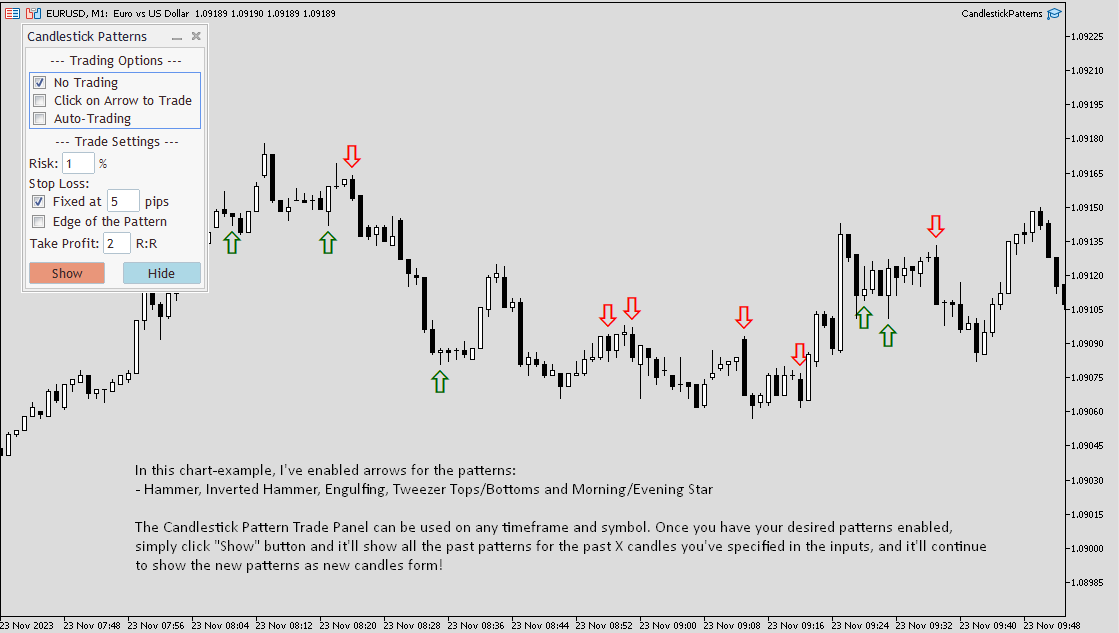
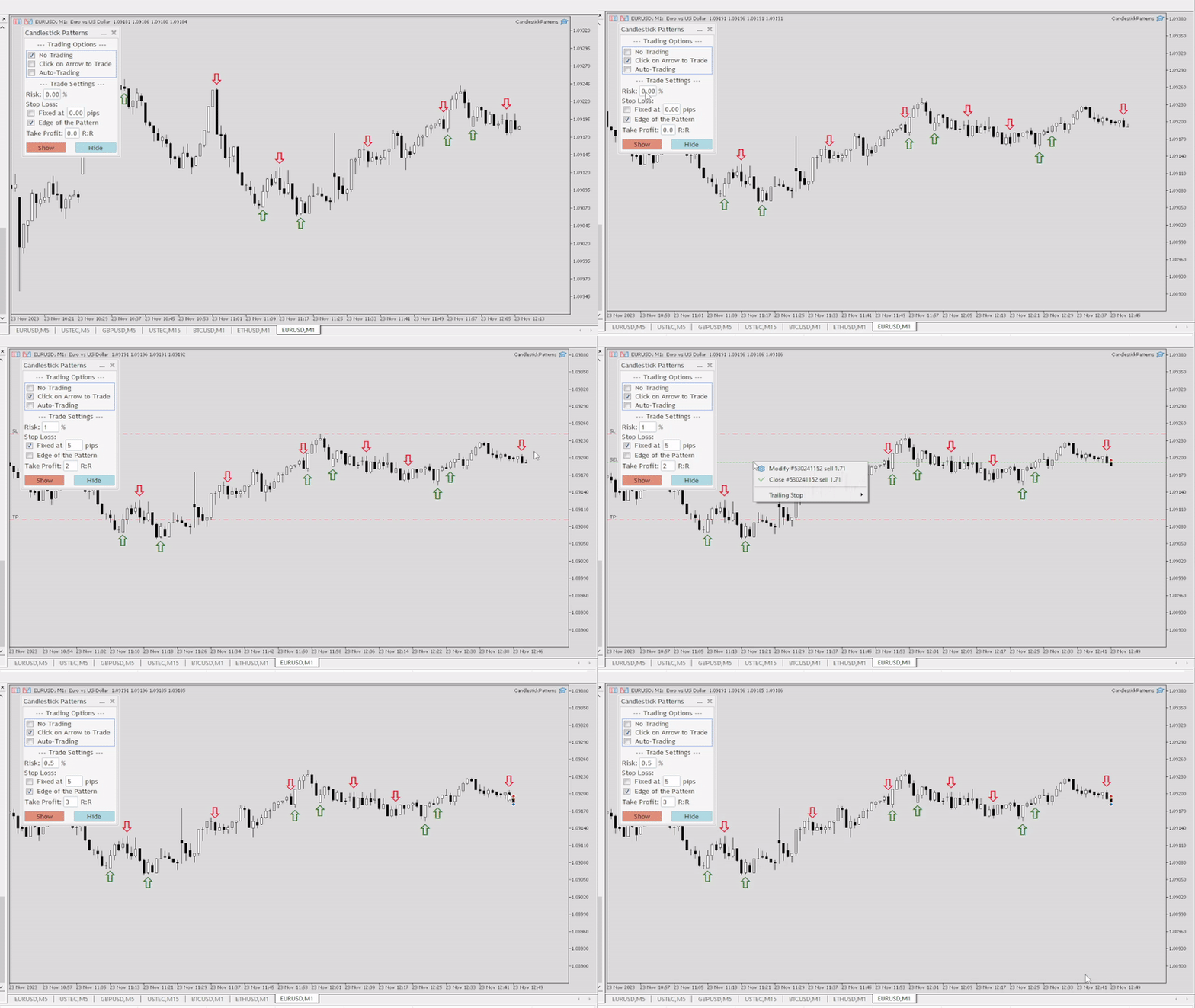
Let's go through the Trade Panel that appears on the top left corner of the chart once you activate the EA on the Symbol you want to use it on. The panel is thoughtfully designed to be simple and only use the main functionalities that a trader might need, because in live trading time is money.

  1. No Trading: It's pre-checked for safety reasons. It essentially indicates that you want the EA to only show the Arrow-object when a Candlestick Pattern appears, and nothing more.
  2. Click on Arrow to Trade: When clicked, you'll be able to semi-manually trade every time a pattern appears with a simple click on the Arrow-object, with the stop loss, take profit and risk already predefined in the "Trade Settings" section of the Panel.
  3. Auto-Trading: When clicked, the EA will automatically trade every specific Candlestick Pattern that you've declared from the inputs tab that you want to Show/Trade. The stop loss, take profit and risk are taken from the  "Trade Settings" section of the Panel. Following the "Trading Options" section, comes the "Trade Settings" section of the Panel. Here are the basic input parameters that a trader need to automate his trading with the assistance of the EA.

  • Risk: Type the Risk % per trade. If you want 1% risk per trade, just type "1" or "1.0", it's the same.
  • Stop Loss:
    1. Fixed at X pips: If you want the Stop Loss of the trade to be fixed, simply select this option and type the pips. 1 pips is based on the Symbol's digits*10. You can check the symbol's specification to check that in advance.
    2. Edge of the Pattern: If you want the Stop Loss to be placed over the edge of the Candlestick Pattern then click this option. For example, if you want to trade an Evening Star formation and you have selected this option, the Stop Loss will be place at the high of the "middle" candle (considering it's a three candlestick pattern formation).
  • Take Profit: Simply define the Risk-to-Reward ratio that you want the T/P to be placed at. It's calculated based on the Stop Loss size. For example, if you have a 10 pips stop loss and you have put "3" in the Take Profit field, it'll use a Take Profit of 30 pips (10x3) on the trade. You'll risk 1 to gain 3.
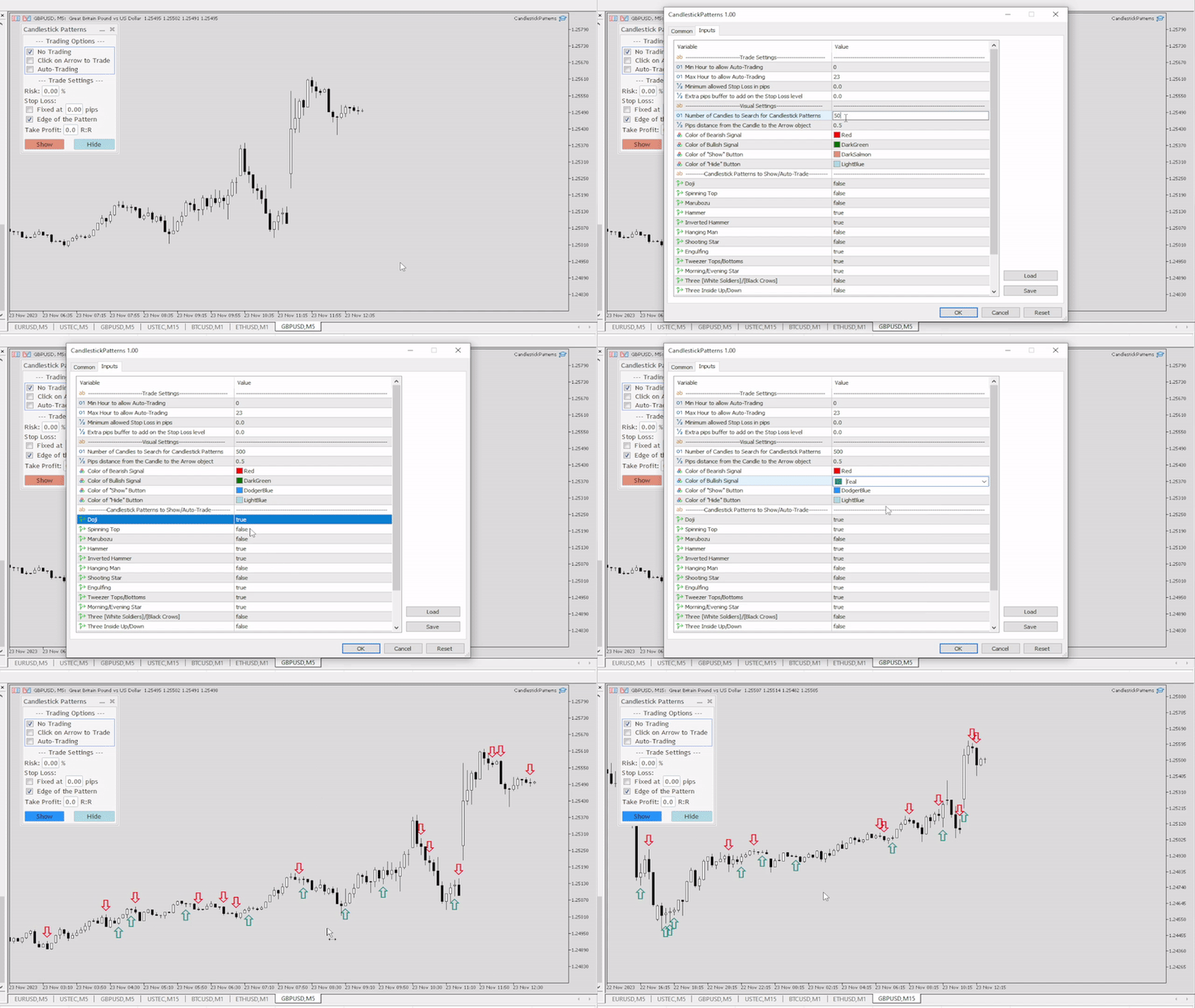
  • Show/Hide Buttons: By clicking these buttons you show or hide, the Arrows objects that signal when a candlestick pattern is formed. When the EA is activated the default state is "Hide", so you need to click on "Show" to get the past signals and also get the new ones as the candlesticks progress. The same applies if you change an input from the input tab and the tool re-activates automatically, you'll need to click on "Show" again. 

Important Note: 
-Don't use comma as a decimal point but a period! For example, if you want to risk 0.5%, you should type in the risk input "0.5" and not "0,5". The same applies for all the input values that are not rounded.
-You can only trade the most recent candlestick pattern with a click of an arrow object, as the EA only uses market execution orders and is ideally used right after a pattern is formed and not on past patterns that don't require speed in execution.


Now that we've explained the functions of the Trade Panel, let's go through the Input Parameters of the EA (not the trade panel) that you can modify based on your needs:

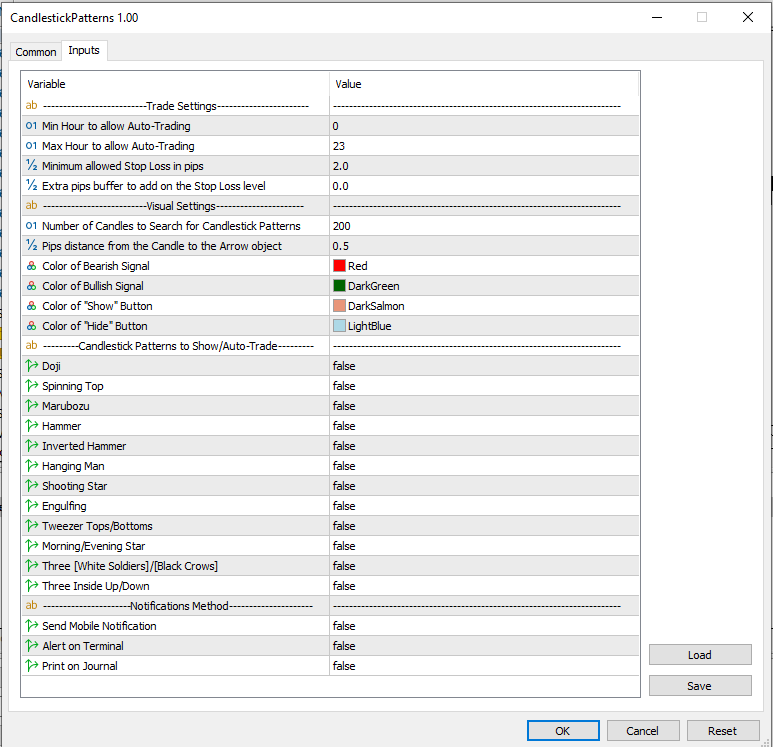
--------------------------Trade Settings---------------------------

  • Min Hour to allow Auto-Trading: For safety reasons of the Auto-Trading option from the trade panel, you can specify the time-window that you want the EA to open new trades. Use the Server's Timezone and not the local timezone.
  • Max Hour to allow Auto-Trading: The Max Hour for Auto-Trading. If set at "19", that means it'll look for trades up to 19:59 (include that whole hour). So it'll stop trading at 20:00.
  • Minimum allowed Stop Loss in pips: This input is designed to protect you from very small stop loss values when Auto-Trading is enabled, particularly when trading on very low timeframes.
  • Extra pips buffer to add on the Stop Loss level: Number of pips over the stop loss level as extra safety to account for the spread.

--------------------------Visual Settings---------------------------

  • Number of Candles to Search for Candlestick Patterns: How many candles in the past the EA will go through to mark the Arrows of the desired patterns, when you click the "Show" button on the Panel.
  • Pips distance from the Candle to the Arrow object: How close the Arrow object will be to each candle. The higher this value, the further the Arrows will be from the candlesticks.
  • Color of Bearish Signal: The color of the Downwards Arrow when a bearish signal forms.
  • Color of Bullish Signal: The color of the Upwards Arrow when a bearish signal forms.
  • Color of "Show" Button: The color of the "Show" Button.
  • Color of "Hide" Button: The color of the "Hide" Button.

---------Candlestick Patterns to Show/Auto-Trade---------

  • Doji
  • Spinning Top
  • Marubozu
  • Hammer
  • Inverted Hammer
  • Hanging Man
  • Shooting Star
  • Engulfing
  • Tweezer Tops/Bottoms
  • Morning/Evening  Start
  • Three [White Soldiers]/[Black Crows]
  • Three Inside Up/Down

The state of all these candlestick patterns is "false" by default. You double-click on the "false" to change its value to "true" (and vice versa). When it's "true", that specific Candlestick Pattern will be shown and traded, if trading is enabled from the panel.

----------------------Notifications Method----------------------

  • Send Mobile Notification: If "true", the EA will send you notifications through your Mobile MT5 app. Make sure you've connected it with your computer's terminal.
  • Alert on Terminal: If "true", the EA will send alerts in a new window when new patterns form, or when there's an error with a trade order.
  • Print on Journal: If "true", the EA will print in the Journal tab of the terminal. It's the lowest form of communication between the user and the EA.
All the Notifications are disabled by default (=false). Simply double click on the value of each, to enable them.


    Extra Notes:

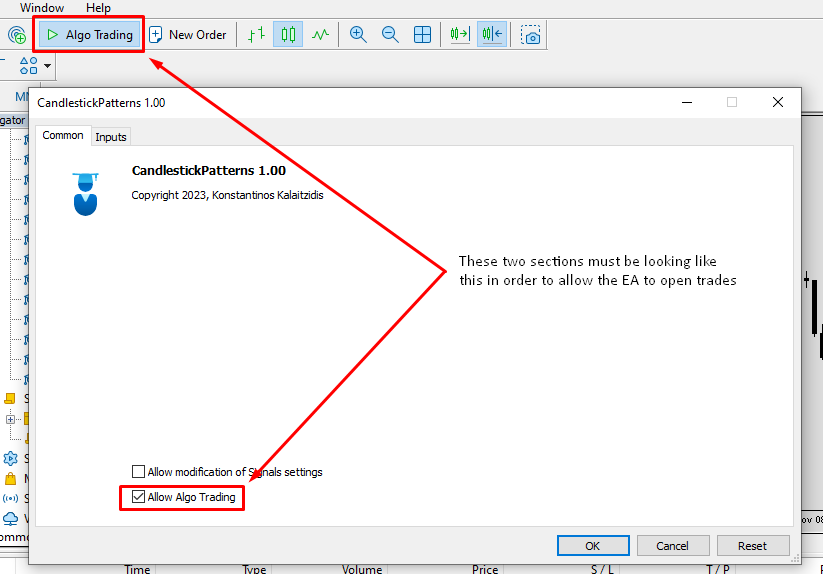
    Make sure "Algo Trading" at the top of the MT5 terminal is enabled (It should be displaying a green triangle) and "Allow Algo Trading" in the "Common" tab is checked.

    The EA confirms a candlestick pattern on a new candle to avoid repainting while its still forming.

    In case of two candlestick patterns form at the same candle close, it'll only trade it once if Auto-Trading is enabled.

    The Candlestick Patterns Methodology of identification is derived from BabyPips as a reference point. Much different information is available online, so I chose the most popular source.

    Please feel free to contact me through my MQL5 profile (by clicking on my name at the top of this page) if you have any question, issue, or a request about an additional feature. Trade safely!

    You can check my Website for the full list of Metatrader tools I provide.


    Recommended products
    SolarTrade Suite Financial Robot: LaunchPad Market Expert - designed to open trades! This is a trading robot that uses special innovative and advanced algorithms to calculate its values, Your Assistant in the World of Financial Markets. Use our set of indicators from the SolarTrade Suite series to better choose the moment to launch this robot. Check out our other products from the SolarTrade Suite series at the bottom of the description. Do you want to confidently navigate the world of inves
    RenkoExpert
    Andrey Goida
    3.8 (5)
    Renko Expert Advisor based on Renko bar simulation.    The EA has two options for building Renko bars. Classic and ATR. In the classic version, renko bars are marked with areas on the main chart; in the ATR version, renko bars are modeled and drawn in the indicator window. Modeling renko bars inside the EA allows you to optimize the robot better than drawing renko bars offline.   Our new product based on artificial intelligence   https://www.mql5.com/ru/market/product/127820   Telegramm channel
    FREE
    Trend Catcher EA Pro MT5
    Issam Kassas
    4.86 (14)
    Trend Catcher EA Pro   — Based on the Most loved Indicator the Trend Catcher and after so many requests, finally we have the trend catcher EA. A next-generation Expert Advisor that blends   Algorithm-driven automation   with   manual trader control   for total command of the market. It’s fast, adaptive, and built for traders who value   clarity, performance, and choice . Designed and optimized for   EURUSD   under real-tick (99.9%) data, Trend Catcher delivers consistent execution without repain
    FREE
    ParitySnap
    Kazutaka Yamamoto
    ParitySnap — Triad Z-Score Reversion Non-Repaint / Hedge-Fund-Inspired Mean Reversion / NY-Close Pivot-SL Holiday Promo (until Dec 25, JST): Lifetime $199 / Rental $30 - Standard after promo: Lifetime $209- / Rental $40 - WHAT IT DOES ParitySnap detects tri-currency parity distortions (e.g., GOLD: XAUUSD–AUDUSD–XAUAUD ) and prints non-repainting entries on the just-closed bar when a Z-score mean-reversion edge is present. Built for traders who value transparency and statistical rigor , it bring
    Classic Market Surfer EA - A Timeless, Proven Strategy for Gold Trading For years, this powerful trading strategy has been hidden from the public-reserved for a select few. Now, for the first time, the Classic Market Surfer EA is available to traders like you.   Built on pure, time-tested trading principles, this EA doesn't rely on trendy gimmicks like AI or machine learning. Instead, it harnesses a classic, robust strategy that has consistently delivered results over the years. This is not a "g
    Owl Smart Levels MT5
    Sergey Ermolov
    4.03 (32)
    MT4 version  |   FAQ The Owl Smart Levels Indicator is a complete trading system within the one indicator that includes such popular market analysis tools as Bill Williams' advanced fractals , Valable ZigZag which builds the correct wave structure of the market, and Fibonacci levels which mark the exact levels of entry into the market and places to take profits. Detailed description of the strategy Instructions for working with the indicator Advisor-assistant in trading Owl Helper Private User
    The SMC Venom Model BPR indicator is a professional tool for traders working within the Smart Money (SMC) concept. It automatically identifies two key patterns on the price chart: FVG   (Fair Value Gap) is a combination of three candles, in which there is a gap between the first and third candles. It forms a zone between levels where there is no volume support, which often leads to a price correction. BPR   (Balanced Price Range) is a combination of two FVG patterns that form a “bridge” - a zon
    General Description This indicator is an enhanced version of the classic Donchian Channel , upgraded with practical trading functions. In addition to the standard three lines (high, low, and middle), the system detects breakouts and displays them visually with arrows on the chart, showing only the line opposite to the current trend direction for a cleaner view. The indicator includes: Visual signals : colored arrows on breakout Automatic notifications : popup, push, and email RSI filter : to val
    FREE
    LT Rainbow Trend
    Thiago Duarte
    5 (1)
    Do you, like me, like to trade with the trend? Then this indicator will help you! Rainbow Trend is a trend indicator, which uses several Moving Averages on the chart. It measures different trend strenght zones for different periods: very long term, long term, mid term, short term and very short term. Each zone has its color, and it is possible to have sound alert when the prices leaves a zone and enters another. Its configuration is very simple. If you find any bug or have any suggestions, conta
    Manus Pro
    Itumeleng Mohlouwa Kgotso Tladi
    MANUS PRO EA The Trading Revolution You've Been Waiting For Are you TIRED of watching other traders make consistent profits while your account bleeds red?   The financial markets don't wait for anyone – and neither should you. MANUS PRO isn't just another Expert Advisor... it's your   TICKET TO FINANCIAL FREEDOM . Why MANUS PRO is Different (And Why Everyone's Talking About It) FOR BEGINNERS: Your Trading Mentor That Never Sleeps Zero Learning Curve   – Install, activate, and watch it wo
    Fibaction
    Abdelkhalek Orabi
    Indicator Name: Fibaction – price action candle Detector Description: Fibo Signal Boxes is a powerful Smart Money Concept (SMC)-inspired indicator that auto-detects price action candles. bullish hammers and shooting stars, then draws precise Fibonacci entry zones and multiple take-profit levels directly on the chart. as for the SL personally i use 40 pips rules  Key Features: Detects bullish hammer and shooting star reversal candles. Automatically draws Fibonacci entry and TP boxes. as
    Reversal Composite Candles
    MetaQuotes Ltd.
    3.67 (15)
    The idea of the system is to indentify the reversal patterns using the calculation of the composite candle. The reversal patterns is similar to the "Hammer" and "Hanging Man" patterns in Japanese candlestick analysis. But it uses the composite candle instead the single candle and doesn't need the small body of the composite candle to confirm the reversal. Input parameters: Range - maximal number of bars, used in the calculation of the composite candle. Minimum - minimal size of the composite can
    FREE
    RSI Master PRO – Professional Expert Advisor for MetaTrader 5 Overview: RSI Master PRO is an Expert Advisor (EA) developed for MT5, designed to trade automatically in the financial markets using the Relative Strength Index (RSI) as its core decision-making engine. Its modular design and fully customizable parameters make it a powerful and flexible tool for traders who base their strategy on this momentum indicator. ️ Key Technical Features: • RSI-Based Logic: Uses RSI readings to generate
    Crypto to MT5
    Rajesh Kumar Nait
    Crypto.com to MT5 Live Candlestick Stream to Metatrader 5 from Crypto.com websocket Its a OHCLV (Open High Low Close Real Volume ) Live Rates Data you can check my other crypto product on my profile  https://www.mql5.com/en/users/rajeshnait/seller 1. OHLCV Data 2. Supports and Creates Multiple Symbols 3. You need to add Crypto.com websocket and api URL as mentioned at Tools > Options > Allow Webrequest from URL tab and also tick Allow Webrequest checkbox - Websocket URL : stream.crypto.com - API
    DF Fib Trader Pro DF Fib Trader Pro is an automated trading system designed for MetaTrader 5. It uses Fibonacci-based price levels combined with trend and structure analysis to define entry and exit points. The EA supports both long and short positions and includes built-in risk management parameters. Core Features: Uses Fibonacci retracement and extension logic to plot entry, SL and TP points. Configurable lot size and stop loss/take profit levels Choice of 1 or 2 entry points Supports fixed o
    FREE
    Girassol Sunflower MT5 Indicator
    Saullo De Oliveira Pacheco
    4.33 (6)
    This is the famous Sunflower indicator for Metatrader5. This indicator marks possible tops and bottoms on price charts. The indicator identifies tops and bottoms in the asset's price history, keep in mind that the current sunflower of the last candle repaints, as it is not possible to identify a top until the market reverses and it is also not possible to identify a bottom without the market stop falling and start rising. If you are looking for a professional programmer for Metatrader5, please
    FREE
    Chart Pattern Master
    Lefika Raphel Sebatane
    The Chart Pattern Master EA is a sophisticated expert that allows you to trade all of the common chart patterns. It automatically identifies the chart patterns for you and even displays them on the chart. Use it as an indicator or as an automated trading expert. All pattern breakouts will be traded automatically for you. Recommendations: Trend Timeframe - 1H Breakout Timeframe - Any Symbol - Any TP and SL - false MIn Balance - $250 NOTE: Increase "Pattern Number of Bars" to scan over longer peri
    CSP eurusd Strategy
    Francisco Tomas Moreno Garcia
    CSP Strategy. This Candlestick Pattern base as the name indicates on  a certain type of pattern on candles (best performance on 1H timeframe).The backtest and optimization was perform on external historical data for this reason a backtest done on meta trader5 will not show the same good results, nevertheless besides the backtest, we have perform a real test for 1 weekfrom the 2023.03.27 to the 2023.0330 the results are exposed on the provided images. Hints to improve this (and most) strategies.
    Gold EA: Proven Power for 1-Minute Gold Trading Transform your trading with our Gold EA, meticulously crafted for 1-minute charts and delivering over 2000% growth in 5 years from just $100-$1000 . No Martingale, No AI Gimmicks : Pure, time-tested strategies with robust money management, stop loss, and take profit for reliable performance across multiple charts. Flexible Trading Modes : Choose Fixed Balance for safe profits, Mark IV for bold growth, or %Balance for high rewards—combine Mark IV an
    Market Maestro: Your Ideal Partner for Automated Forex Trading If you're looking for a reliable assistant for trading in the currency market, Market Maestro is exactly what you need. This modern Forex bot is built using the latest technologies and algorithms, allowing it to effectively analyze market data and make informed trading decisions in real-time. Key Features of Market Maestro 1. Multicurrency Capability for Broad Opportunities Market Maestro can work with a wide range of currency pairs,
    Exclusive EA for FOREX HEDGE account The EA (FuzzyLogicTrendEA) is based on fuzzy logic strategies based on the analysis of a set of 5 indicators and filters. Each indicator and filter has a weight in the calculation and, when the fuzzy logic result reaches the value defined in the EA parameter, a negotiation is opened seeking a pre-defined gain. As additional functions it is possible to define maximum spread, stop loss and so on . Recommended Symbol: EURUSD, AUDUSD, GBPUSD, NZDUSD, USDCAD, AU
    Haven FVG Indicator
    Maksim Tarutin
    5 (7)
    The   Haven FVG   indicator is a market analysis tool that highlights inefficiency areas (Fair Value Gaps, FVG) on the chart, providing traders with key levels for price analysis and decision-making. Other products ->  HERE Main Features: Customizable color settings: Color for Bullish FVG   (Bullish FVG Color). Color for Bearish FVG   (Bearish FVG Color). Flexible FVG visualization: Maximum number of candles for FVG detection. Additional extension of FVG zones by a specified number of bars. Opt
    FREE
    Morning Range Breakout (Free Version) Morning Range Breakout (Free Version) is a straightforward trading advisor that implements a breakout strategy based on the morning range. It identifies the high and low within a specified time interval (e.g., 08:00–10:00 UTC) and opens a trade on a breakout upward or downward. The free version includes core functionality without restrictions. All parameters and messages are in English, per MQL5 Market requirements. Key Features Detects morning range based
    FREE
    Stormer RSI 2
    Ricardo Rodrigues Lucca
    This strategy was learned from Stormer to be used on B3. Basically, 15 minutes before closing the market, it will check RSI and decided if it will open an position. This strategy do not define a stop loss. If the take profit reach the entry price it will close at market the position. The same happens if the maximal number of days is reached. It is created to brazilian people, so all configuration are in portuguese. Sorry Activations allowed have been set to 50.
    Your Trend Friend
    Luigi Nunes Labigalini
    5 (1)
    The trend is your friend! Look at the color of the indicator and trade on that direction. It does not  repaint. After each candle is closed, that's the color of the trend. You can focus on shorter faster trends or major trends, just test what's most suitable for the symbol and timeframe you trade. Simply change the "Length" parameter and the indicator will automatically adapt. You can also change the color, thickness and style of the lines. Download and give it a try! There are big movements w
    Orbit Rage Final 2
    BILLY ARANDUQUE ABCEDE
    Note : i only sell this EA on MQL5, any other sellers is fake. Orbit Rage Final, a cutting-edge trading strategy meticulously designed around the bull/bear candle approach and divergence analysis. This powerful tool is engineered to empower you to shape the life you desire. To embark on this transformative journey, simply download and seamlessly integrate it into your MetaTrader 4 platform by placing it in the experts advisors folder. Orbit Rage Final revolutionizes trading by offering a risk-f

    | Fully-automated Smart Money Concept (ICT) inspired trading solution with multi-strategy capabilities | Built by a grid trader >> for grid traders.  This is MT5 version, click  here  for  Blue CARA MT4  (settings and logics are same in both versions)     Real monitoring signal  -->  Cara Gold Intro Blue CARA EA   ('CARA') - short for  C omprehensive  A lgorithmic   R esponsive   A dvisor is a next-gen  multi-currency    multi-timeframe  EA base on the widely known (and perhaps the most popul
    Magic EA MT5
    Kyra Nickaline Watson-gordon
    Magic EA is an Expert Advisor based on Scalping, Elliot Waves and with filters such as RSI, Stochastic and 3 other strategies managed and decided with the robot smartly. Large number of inputs and settings are tested and optimized and embedded in the program thus inputs are limited and very simple. Using EA doesn't need any professional information or Forex Trading Knowledge. EA can trade on all symbols and all time frames, using special and unique strategies developed by the author. The EA w
    Sonic R Pro Enhanced EA - Version 2025 $249 Only for the First 5 Buyers! Live Signal Check the live performance of Sonic R Pro Enhanced: Live Sonic R Trading Strategy Sonic R Pro Enhanced is an upgraded version of the traditional Sonic R strategy, automating trades based on the Dragon Band (EMA 34 and EMA 89) and incorporating advanced algorithms to maximize performance. Timeframes: M15, M30 Supported Pairs: XAUUSD, BTCUSD, AUDJPY, USDJPY Trading Style: Swing Trading - Pullback & Counter-
    The RSI-Based Automatic Buy Strategy Expert Advisor (EA) is designed to automatically open buy positions when the RSI indicator enters the oversold zone. It smartly spaces new trades by maintaining a minimum distance between open positions to prevent excessive exposure. With adjustable take profit (TP) levels and lot sizes, this EA is specifically tailored for the XAUUSD (Gold) pair on the M5 timeframe. This Expert Advisor offers reliable and disciplined trade management for traders who want to
    FREE
    Buyers of this product also purchase
    Trade Assistant MT5
    Evgeniy Kravchenko
    4.42 (204)
    It helps to calculate the risk per trade, the easy installation of a new order, order management with partial closing functions, trailing stop of 7 types and other useful functions. Additional materials and instructions Installation instructions - Application instructions - Trial version of the application for a demo account Line function -   shows on the chart the Opening line, Stop Loss, Take Profit. With this function it is easy to set a new order and see its additional characteristics bef
    Forex Trade Manager MT5
    InvestSoft
    4.98 (574)
    Welcome to Trade Manager MT5 - the ultimate risk management tool designed to make trading more intuitive, precise, and efficient. This is not just an order placement tool; it's a comprehensive solution for seamless trade planning, position management, and enhanced control over risk. Whether you're a beginner taking your first steps, an advanced trader, or a scalper needing rapid executions, Trade Manager MT5 adapts to your needs, offering flexibility across all markets, from forex and indices t
    TradePanel MT5
    Alfiya Fazylova
    4.86 (143)
    Trade Panel is a multifunctional trading assistant. The application contains more than 50 trading functions for manual trading and allows you to automate most trading operations. Attention, the application does not work in the strategy tester. Before purchasing, you can test the demo version on a demo account. The demo version is here . Full instructions here . Trade. Allows you to perform trading operations in one click: Open pending orders and positions with automatic risk calculation. Open mu
    Local Trade Copier EA MT5
    Juvenille Emperor Limited
    4.96 (116)
    Experience exceptionally fast trade copying with the   Local Trade Copier EA MT5 . With its easy 1-minute setup, this trade copier allows you to copy trades between multiple MetaTrader terminals on the same Windows computer or Windows VPS with lightning-fast copying speeds of under 0.5 seconds. Whether you're a beginner or a professional trader, the   Local Trade Copier EA MT5   offers a wide range of options to customize it to your specific needs. It's the ultimate solution for anyone looking t
    Trade Dashboard MT5
    Fatemeh Ameri
    4.96 (103)
    Tired of complex order placement and manual calculations? Trade Dashboard is your solution. With its user-friendly interface, placing orders becomes effortless, by a single click, you can open trades, set stop loss and take profit levels, manage trade lot size, and calculate risk to reward ratios, allowing you to only focus on your strategy. Say goodbye to manual calculations and streamline your trading experience with Trade Dashboard. Download  Demo Version  right now. You can find  Details of
    Ultimate Extractor
    Clifton Creath
    5 (7)
    Ultimate Extractor - Professional Trading Analytics for MT5 Ultimate Extractor transforms your MetaTrader 5 trading history into actionable insights with comprehensive analytics, interactive charts, and real-time performance tracking. What It Does Automatically analyzes your MT5 trading history across all Expert Advisors and generates detailed HTML reports with interactive visualizations. Tracks live performance metrics including open positions, floating P/L, and drawdown in real-time. Supports
    Beta Release The Telegram to MT5 Signal Trader is nearly at the official alpha release. Some features are still under development and you may encounter minor bugs. If you experience issues, please report them, your feedback helps improve the software for everyone. The price will increase after 20 sales. Remaining copies at $90: 2/20 . Telegram to MT5 Signal Trader is a powerful tool that automatically copies trading signals from Telegram channels or groups directly to your MetaTrader 5 account
    Smart Stop Scanner – Multi-Asset Stop-Loss Intelligence for Modern Traders Overview The Smart Stop Scanner brings professional stop-loss monitoring to every chart. It analyzes market structure, detects meaningful breakouts, and identifies the most relevant protective levels across Forex, Gold, Indices, Metals, Crypto, and more. All results appear inside one clean, DPI-aware dashboard designed for clarity, speed, and instant decision-making. How Stop-Loss Levels Are Identified Instead of rely
    Copy Cat More Trade Copier MT5 is a local trade copier and a complete risk management and execution framework designed for today’s trading challenges. From prop firm challenges to personal portfolio management, it adapts to every situation with a blend of robust execution, capital protection, flexible configuration, and advanced trade handling. The copier works in both Master (sender) and Slave (receiver) modes, with real-time synchronization of market and pending orders, trade modifications, pa
    Smart Stop Manager – Automated Stop-Loss Execution with Professional Precision Overview The Smart Stop Manager is the execution layer of the Smart Stop lineup, built for traders who require structured, reliable, and fully automated stop-loss management across multiple open positions. It continuously monitors active trades, calculates the optimal stop level using Smart Stop market-structure logic, and updates stops automatically with clean, transparent rules. Whether managing a single asset or
    Trade Manager DashPlus
    Henry Lyubomir Wallace
    5 (11)
    DashPlus is an advanced trade management tool designed to enhance your trading efficiency and effectiveness on the MetaTrader 5 platform. It offers a comprehensive suite of features, including risk calculation, order management, advanced grid systems, chart-based tools, and performance analytics. Key Features 1. Recovery Grid Implements an averaging and flexible grid system to manage trades during adverse market conditions. Allows for strategic entry and exit points to optimize trade recovery
    MT5 to Telegram Signal Provider turns your trading account into a signal provider. Every trade action, whether manual, by EA or from your phone, is instantly sent as a message to Telegram. You can fully customize the format or use a ready-made template for quick setup. [ Demo ] [ Manual ] [ MT4 Version ] [ Discord Version ]     New: [ Telegram To MT5 ] Setup A step by step user guide is available. Key Features Ability to customize order details sent to subscribers You can create a tiered subs
    Seconds Chart MT5
    Boris Sedov
    4.59 (17)
    Seconds Chart is a unique tool for creating second-based charts in MetaTrader 5 . With Seconds Chart , you can construct charts with timeframes set in seconds, providing unparalleled flexibility and precision in analysis that is unavailable with standard minute or hourly charts. For example, the S15 timeframe indicates a chart with candles lasting 15 seconds. You can use any indicators and Expert Advisors that support custom symbols. Working with them is just as convenient as on standard charts.
    Grid Manual MT5
    Alfiya Fazylova
    4.9 (20)
    Grid Manual is a trading panel for working with grid strategies. The utility is universal, has flexible settings and an intuitive interface. It works with a grid of orders not only in the direction of averaging losses, but also in the direction of increasing profits. The trader does not need to create and maintain a grid of orders, the utility will do it. It is enough to open an order and the "Grid manual" will automatically create a grid of orders for it and will accompany it until the close. F
    HINN MagicEntry Extra
    ALGOFLOW OÜ
    4.6 (10)
    HINN MAGIC ENTRY – the ultimate tool for entry and position management! Place orders by selecting a level directly on the chart! Key features: - Market, limit, and pending orders - Automatic lot size calculation - Automatic spread and commission accounting - Unlimited partitial take-profits  - Breakeven and trailing stop-loss  functions - Intuitive, adaptive, and customizable interface - Session and strong algorithmic level visualization - Works with any assets and account types Join the   ALG
    Exp COPYLOT CLIENT for MT5
    Vladislav Andruschenko
    3.82 (34)
    Trade copier for MT5 is a trade copier for the МetaТrader 5 platform. It copies forex trades  between any accounts   MT5 - MT5, MT4 - MT5 for the COPYLOT MT5 version (or MT4 - MT4 MT5 - MT4 for the COPYLOT MT4 version)    Reliable copier!         MT4 version Full Description +DEMO +PDF   How To Buy    How To Install     How to get Log Files    How To Test and Optimize    All products from Expforex You can also copy trades in the МТ4 terminal (МТ4 - МТ4, МТ5 - МТ4):     COPYLOT CLIENT for MT4
    Trade Manager DaneTrades
    Levi Dane Benjamin
    4.33 (27)
    Trade Manager to help you quickly enter and exit trades while automatically calculating your risk. Including features to help prevent you from Over Trading, Revenge Trading and Emotional Trading. Trades can be managed automatically and the account performance metrics can be visualised in a graph. These features make this panel ideal for all manual traders and it helps to enhance the MetaTrader 5 platform. Multi Language support. MT4 Version  |  User Guide + Demo The Trade Manager does not work i
    EasyInsight AIO MT5
    Alain Verleyen
    4.91 (11)
    EASY Insight AIO – All-In-One Power for AI-Driven Trading Want to skip the setup and start scanning the entire market – Forex, Gold, Crypto, Indices, and even Stocks – in seconds? EASY Insight AIO is the complete plug-and-play solution for AI-powered trade analysis. It includes all core Stein Investments indicators built-in and automatically exports clean, structured CSV files – perfect for backtesting, AI prompts, and live market decision-making. No need to install or configure indicators manu
    Copier->Convenient and fast interface interaction, users can use it right away   ->>>> Recommended to use on Windows computers or VPS Windows Features: Diversified and personalized copy trading settings: 1. Different lot modes can be set for different signal sources 2. Different signal sources can be set for forward and reverse copy trading 3. Signals can be set with comments 4. Whether to calibrate the lot according to the contract lot Diversified and personalized copy order settings 2: 1. Dif
    Cerberus Equity Watcher
    Samuel Bandi Roccatello
    5 (3)
    Cerberus the Equity Watcher  is a risk management tool that constantly monitors your account equity and avoid major drawdowns, caused by faulty EAs or by your emotional behaviour if you are a discretional trader. It is extremely useful for systematic traders that rely on EAs that might contain bugs, or that might not performed well in unexpected market conditions.  Cerberus let you set a minimum equity value and (optionally) a  maximum value , if either of those are reached all positioned are f
    VirtualTradePad One Click Trading Panel
    Vladislav Andruschenko
    4.58 (72)
    Trading Panel for trading in One click.  Working with positions and orders!  Trading from the  chart  or the  keyboard . With our trading panel, you can execute trades with a single click directly from the chart and perform trading operations 30 times faster than with the standard MetaTrader control. Automatic calculations of parameters and functions make trading faster and more convenient for traders. Graphic tips, info labels, and full information on trade deals are on the chart MetaTrader.  
    Telegram to MT5 Coppy
    Sergey Batudayev
    5 (7)
    Telegram to MT5: The Ultimate Signal Copying Solution Simplify your trading with Telegram to MT5, the modern tool that copies trading signals directly from Telegram channels and chats to your MetaTrader 5 platform, without the need for DLLs. This powerful solution ensures precise signal execution, extensive customization options, saves time, and boosts your efficiency. [ Instructions and DEMO ] Key Features Direct Telegram API Integration Authenticate via phone number and secure code. Easily man
    EasyTrade MT5
    Alain Verleyen
    5 (2)
    Easy Trade – Smart, Simple, Powerful Trade Management Easy Trade is the all-in-one trade management solution for MetaTrader users who want to keep risk under control and execution ultra-smooth. Designed from scratch with trader feedback in mind, Easy Trade makes it easy to execute, monitor, and manage trades across multiple symbols – without overcomplicating your workflow. Whether you're scalping manually or managing a small portfolio of setups, Easy Trade keeps your focus where it belongs: on
    Trade Assistant 38 in 1
    Makarii Gubaydullin
    4.91 (22)
    Ultimate Trade Assistant MT5 — Multifunctional Trading Panel All-in-one trading assistant with over 66 professional tools for smart, fast, and precise trading. This advanced trading utility combines risk management, order automation, technical analysis, and portfolio control in one powerful and intuitive dashboard. It helps traders reduce manual work, minimize mistakes, and make more confident trading decisions. Why Traders Choose This Tool Open, manage, and close trades faster — everything from
    Zentral Trading Manager
    Ray Zeanrik Parreno Fredeluces
    5 (4)
    Zentral Trading Manager Your Command Center for Precision Trading — Now Stronger than Ever Take control of your trades like never before. Zentral Trading Manager is your all-in-one manual trading panel for MetaTrader 5 — built for scalpers, day traders, and serious strategy execution. Fully compatible with both Mac and Windows laptops. High-DPI safe. No more layout issues. Key Features (Latest 2025 Update): • One-Click Close – Instantly close Buy/Sell, winning/losing trades, or even half positi
    The product will copy all telegram signal to MT5 ( which you are member) , also it can work as remote copier.  Easy to set up, copy order instant, can work with almost signal formats, image signal,  s upport to translate other language to English Work with all type of channel or group, even channel have "Restrict Saving Content", work with  multi channel, multi MT5 Work as remote copier: with signal have ticket number, it will copy exactly via ticket number. Support to backtest signal. How to s
    MT5 To Tradovate
    Laurent Xavier Richer
    MT5 → Tradovate Bridge (Prop-Firm Ready) Mirror your MT5 trades into Tradovate in real time—perfect for running your favorite indices/gold EA on MT5 while meeting the rules of top prop firms like Apex , etc. What it does Live mirroring: Replicates MT5 market executions (open/close) to Tradovate as market orders. Symbol routing:  Map your chart (e.g., US100/USTEC) to the right futures contract (MNQ/NQ/MES/ES/…); roll-aware (quarterly/monthly). Position cap: Limit how many MT5 positions are mirro
    Auto Trade Copier for MT5
    Vu Trung Kien
    4.36 (25)
    Auto Trade Copier is designed to copy trades to multiple MT4, MT5 and cTrader accounts/terminals with 100% accuracy. The provider and receiver accounts must be on the same PC/VPS. With this tool, you can copy trades to receiver accounts on the same PC/VPS. All trading actions will be copied from provider to receiver perfectly. This version can be used on MT5 accounts only. For MT4 accounts, you must use Auto Trade Copier (for MT4). Reference: - For MT4 receiver, please download Trade Receiver Fr
    Custom Alerts AIO: All-in-One Market Scanner – No Setup Required Overview Custom Alerts AIO is the fastest and easiest way to monitor multiple markets for real-time trading signals—without any setup or extra licenses. It comes with all required Stein Investments indicators already embedded, making it the perfect plug-and-play solution for traders who value simplicity and performance. Just load it to any chart and start receiving alerts across Forex, Metals, Crypto, and Indices. Shares can be a
    Entry In The Zone and SMC Multi Timeframe  is a real-time market analysis tool developed based on Smart Money Concepts (SMC). It is designed to help traders analyze market structure systematically and gain a clearer view of overall market direction. The system analyzes  Reversal Points, Key Zones, and Market Structure  across multiple timeframes, while displaying  Point Of Interest (POI) , No Repaint Signals, and Auto Fibonacci Levels  to help detect pullbacks and reversal points with precision.
    More from author
    Revenge Trading Protector MT 5
    Konstantinos Kalaitzidis
    5 (3)
    Revenge Trading Protector is a simple but effective tool for traders who can fall victim to revenge trading. Being a day-trader myself, I understand the psychological aspect of revenge trading and the desire to cover the losses. So, I developed this tool (that I use myself too) to be 100% sure I’m able to remain patient after a loss and not make irrational trading decisions. When you take a loss, the Revenge Trading Protector EA prevents you from opening another order   (either limit order, sto
    News Filter Protector
    Konstantinos Kalaitzidis
    5 (1)
    News Filter Protector is designed to protect your from having open positions/orders on news announcements. In today's world where news can cause unpredictable volatility and extended losses, such a tool is very helpful for your peace of mind since you don't need to check the calendar ever again!  Let's go through the Inputs of the EA to get an understanding of how each parameter works: --------------------------------News Settings-------------------------------- Currencies of the News to Filter
    FVG Screener
    Konstantinos Kalaitzidis
    4.67 (3)
    The "FVG Screener" is a FREE utility tool designed to identify and alert on "fair value gaps" (FVGs), a concept popularized by ICT. This EA is intended to be used by traders who use fair value gaps in their trading.  The panel provides a simple and intuitive interface for selecting the desired timeframes, enabling traders to focus on specific timeframes regardless of the timeframe that their chart is on. The EA scans the market for imbalances or FVGs, which are essentially discrepancies between
    FREE
    Revenge Trading Protector
    Konstantinos Kalaitzidis
    5 (1)
    Revenge Trading Protector is a simple but effective tool for traders who can fall victim to revenge trading. Being a day-trader myself, I understand the psychological aspect of revenge trading and the desire to cover the losses. So, I developed this tool (that I use myself too) to be 100% sure I’m able to remain patient after a loss and not make irrational trading decisions. When you take a loss, the Revenge Trading Protector EA prevents you from opening another order (either limit order, sto
    Lot Size Limiter
    Konstantinos Kalaitzidis
    This Expert Advisor helps enforce disciplined risk management by preventing new trades from being opened once a specified cumulative lot size across all open positions is reached. Designed for MT5, the EA continuously monitors the account’s active trades and calculates the total lot size. If the total exceeds the predefined limit, the EA temporarily blocks the execution of new market or pending orders. This is particularly useful for traders who want to control exposure/emotions during high-vola
    Drawdown Protector
    Konstantinos Kalaitzidis
    5 (1)
    Drawdown Protector is a utility tool used to manage your desired Max Daily Drawdown. In the era of prop firms and challenges, it's highly important to be aware of daily drawdown limits. It's an effective EA that is simple to use for Equity Drawdown Management and prevention of revenge trading.  Input parameters:   How many Hours to block trading? - Here, you set how many hours you want the EA to block new trades, after the Daily % Drawdown is breached. Value must be >0. Block trading until the n
    Trade Notifications
    Konstantinos Kalaitzidis
    5 (3)
    "Trade Notifications" is a utility tool, aimed to inform you either with mobile notifications or terminal alerts on every opened or closed trade, as well as the $ profit/loss result of each trade. It's a tool I've been using myself for a long time, and I decided to share it for free! Input Parameters:  (every input is a  true/false type,   double click on it to change its value)  Notify for Closed Positions PnL : If true, it'll notify you for the $ result of any trade that is closed. This way,
    FREE
    FVG Screener PRO
    Konstantinos Kalaitzidis
    5 (1)
    The "FVG Screener PRO" is a utility tool designed to identify and alert on "fair value gaps" (FVGs), a concept popularized by ICT, but also to allow fast and efficient trade executions through its panel. This EA is intended to be used by traders who use fair value gaps in their trading.  The panel provides a simple and intuitive interface for selecting the desired timeframes, enabling traders to focus on specific timeframes regardless of the timeframe that their chart is on. The EA scans the mar
    Drawdown Protector MT4
    Konstantinos Kalaitzidis
    5 (2)
    Drawdown protector is used to manage your desired Max Daily Drawdown. It's a highly valuable tool for traders, especially for prop firm traders, you need to be careful of the drawdown limits.  It's an effective EA that is simple to use for Equity Drawdown Management purposes.  It works by blocking new trades - and closing existing trades, when the floating Equity (not Balance) exceeds the Daily Loss limit you've set. Also, you can set a Maximum Loss Limit for a SINGLE trade, which if exceeded, i
    Scalping Scale in
    Konstantinos Kalaitzidis
    The "Scalping Scale in" is a utility tool designed for scalpers who want to scale in an initial position at fixed distances without worrying about the S/L and T/P placement, because every second counts when scalping. How it works: You set your desired values in the inputs tab of the EA, and more specifically what Risk-to-Reward you want the T/P to be placed, how wide you want your S/L (in pips) - which also is the distance of the next next stop order (scale in position). You manually click Buy
    Anti Grid Position Protector
    Konstantinos Kalaitzidis
    Anti Grid Position Protector is a utility tool designed to protect you from the temptation of adding to a losing position in a hope of a drawdown recovery, or trying to hedge when you're not intended too. --------------------------Inputs--------------------------- Allow Hedging on Losing Positions? - It's a true/false input (double click to switch its value) which allows/disallows opening a trade (either pending order or market execution) in the opposite direction on an existing losing position
    Symbol Drawdown Manager
    Konstantinos Kalaitzidis
    Symbol Drawdown Protector is a utility tool used to manage your desired Max Daily Drawdown only on a  specific trading symbol. It's like a %-based stop loss, but it's functioning as a revenge protector tool too. In the era of prop firms and challenges, it's   highly important   to be aware of daily drawdown limits. It's an effective EA that is simple to use for Equity Drawdown Management and prevention of revenge trading.  Input parameters:  Daily % Drawdown  - Here you set the Maximum Daily Dra
    Filter:
    No reviews
    Reply to review