Revenge Trading Protector MT 5

5

Revenge Trading Protector is a simple but effective tool for traders who can fall victim to revenge trading. Being a day-trader myself, I understand the psychological aspect of revenge trading and the desire to cover the losses.
So, I developed this tool (that I use myself too) to be 100% sure I’m able to remain patient after a loss and not make irrational trading decisions.


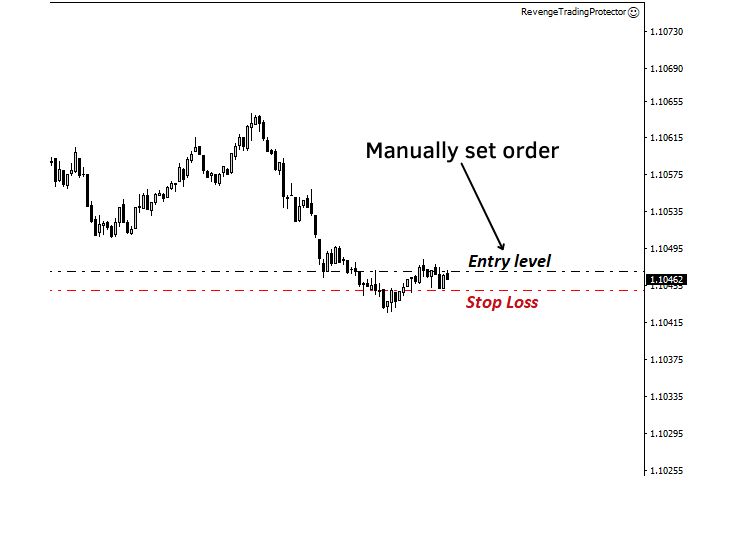
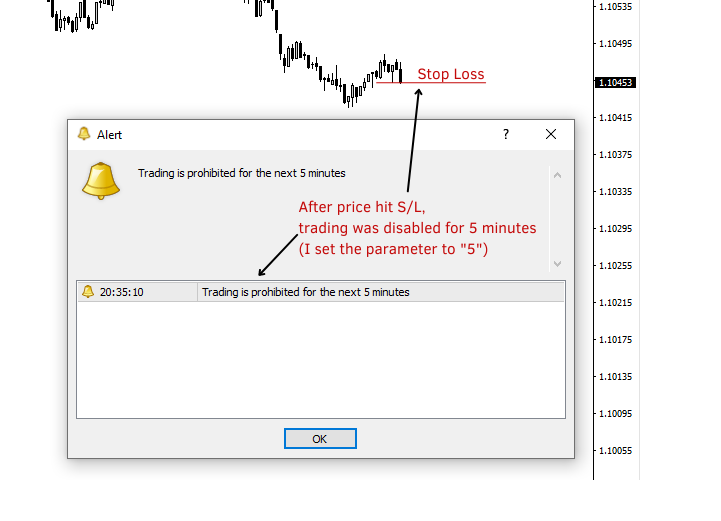
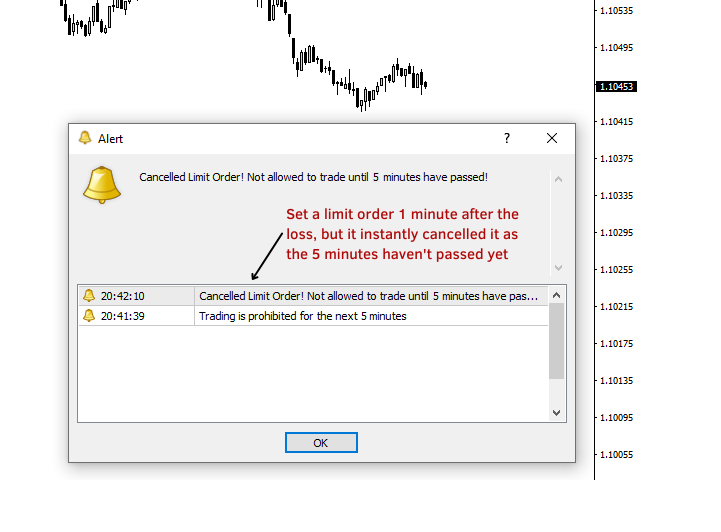
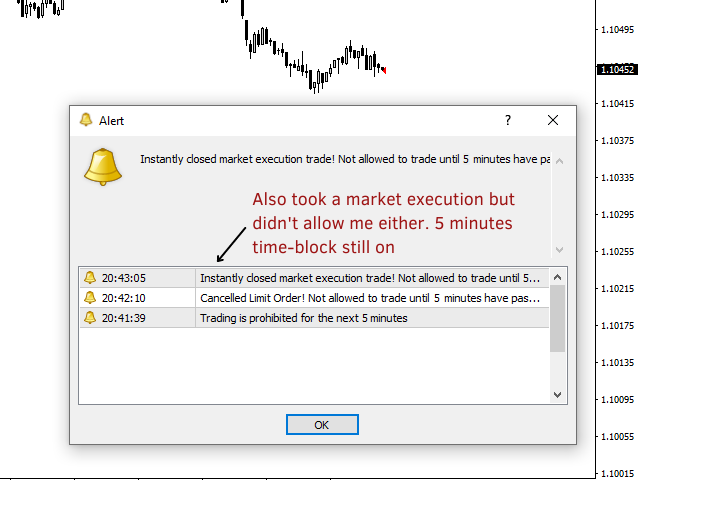
When you take a loss, the Revenge Trading Protector EA prevents you from opening another order (either limit order, stop order or market execution order) until the desired time break has elapsed. 
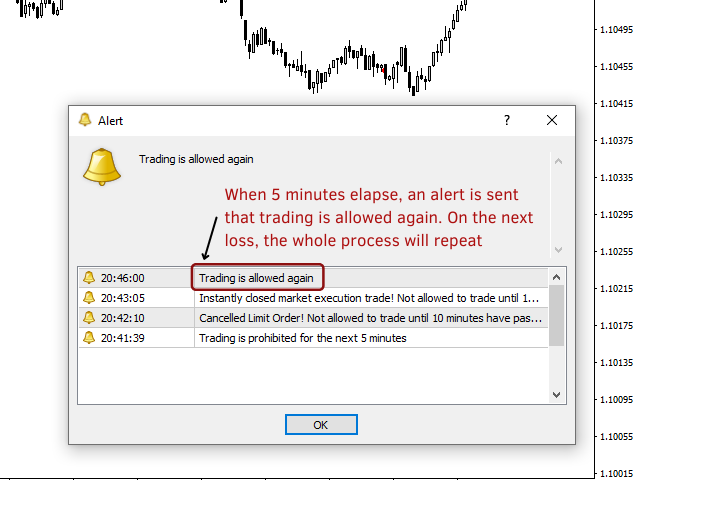
For example, if you take a loss at 10:45am and you have set a 30-minute time break, any order you set before 11:15am will be instantly canceled by the EA. Once you’re allowed again you’ll be notified with an alert.
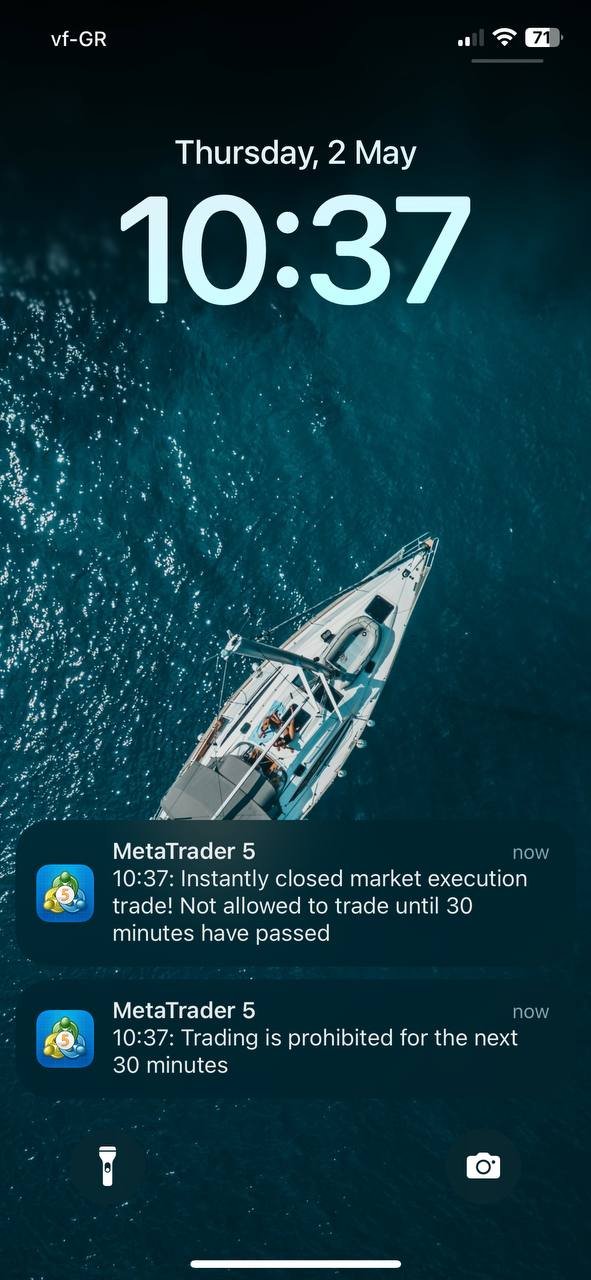
Any attempt of entering a trade before the 30 minutes have elapsed, you’ll be notified respectively.


Additional feature: The Maximum Equity Drawdown is meant to prevent any type of entry order for the rest of the day (calendar day) when you exceed the desired maximum equity drawdown. 
For example, let’s assume you’ve set the maximum drawdown at 2% and you’re already -1.75% for the day, if you take another trade and the floating loss exceeds 0.25% (so it goes at -2%),
the EA will automatically close the trade and prohibit trading for the rest of the day.


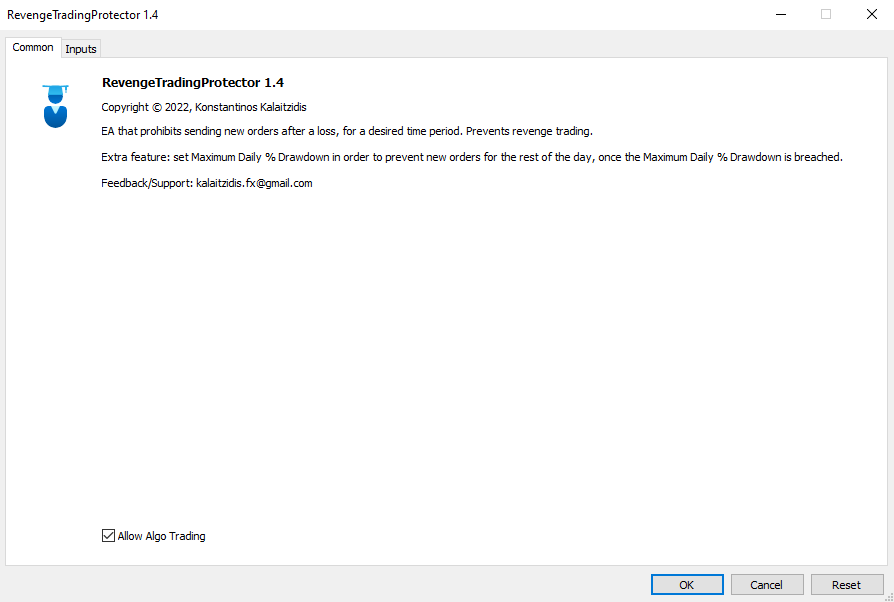
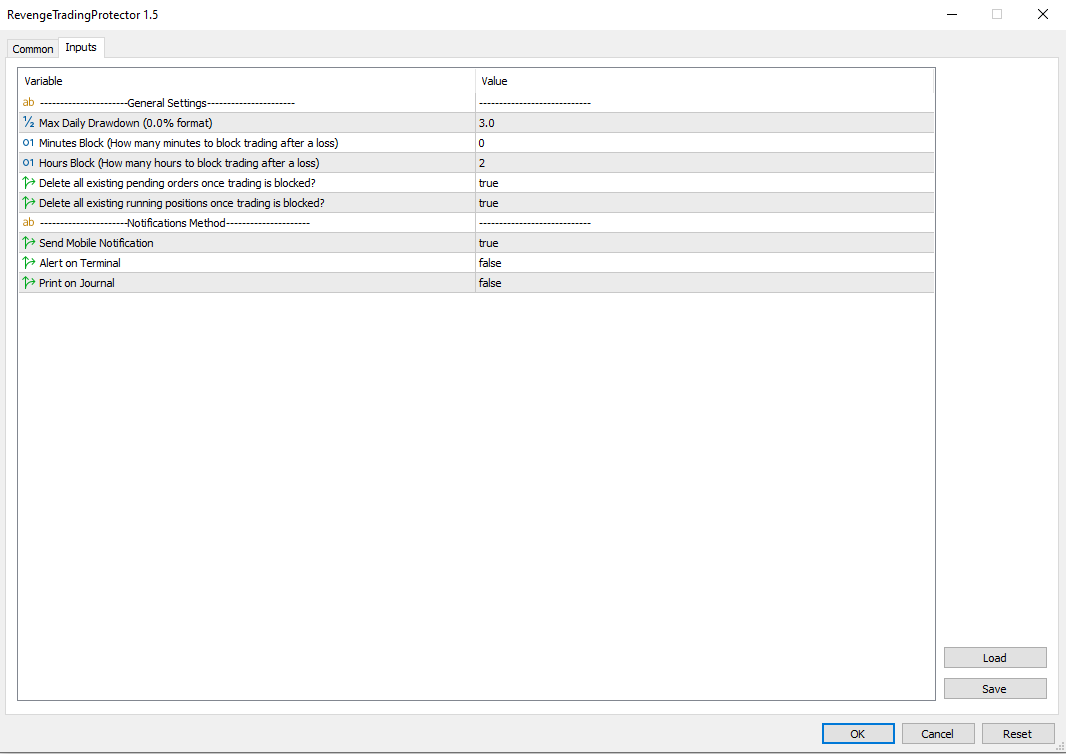
The user inserts the value of the 3 parameters:

  • Max DD:  It’s the desired maximum drawdown in %. By typing “2”, it translates to 2% maximum desired drawdown for each day. 
  • MinutesBlock:  It’s the desired number of minutes that will need to elapse in order to enable trading again. (based on the first example, here you would type “30”)
  • HoursBlock: It’s the desired number of hours that will need to elapse in order to enable trading again.
  • Delete all existing pending orders once trading is blocked: (true/false) If "false", the EA will NOT close pending orders that were added BEFORE the loss that triggered the revenge trading protection.
    For example, if you have this setting at "false", and you have set a buy limit order at 2pm, then if you take a loss at 3pm, it will not remove the buy limit from your terminal! It will however block any new order/position after the loss was registered (after 3pm), for as long you've set the Minutes or HoursBlock before. - By default, the value of this parameter is "true", so it'll delete all pending order when a loss is registered, regardless of when the pending order was set.
  • Delete all existing pending orders once trading is blocked: (true/false)  If "false", the EA will NOT close running trades that were added BEFORE the loss that triggered the revenge trading protection.
    For example, if you have this setting at "false", and you have set a buy position at 2pm, then if you take a loss at 3pm, it will not close the "buy" trade from your terminal! It will however block any new order/position after the loss was registered (after 3pm), for as long you've set the Minutes or HoursBlock before. - By default, the value of this parameter is "true", so it'll delete all running positions when a loss is registered, regardless of when the trades were opened.
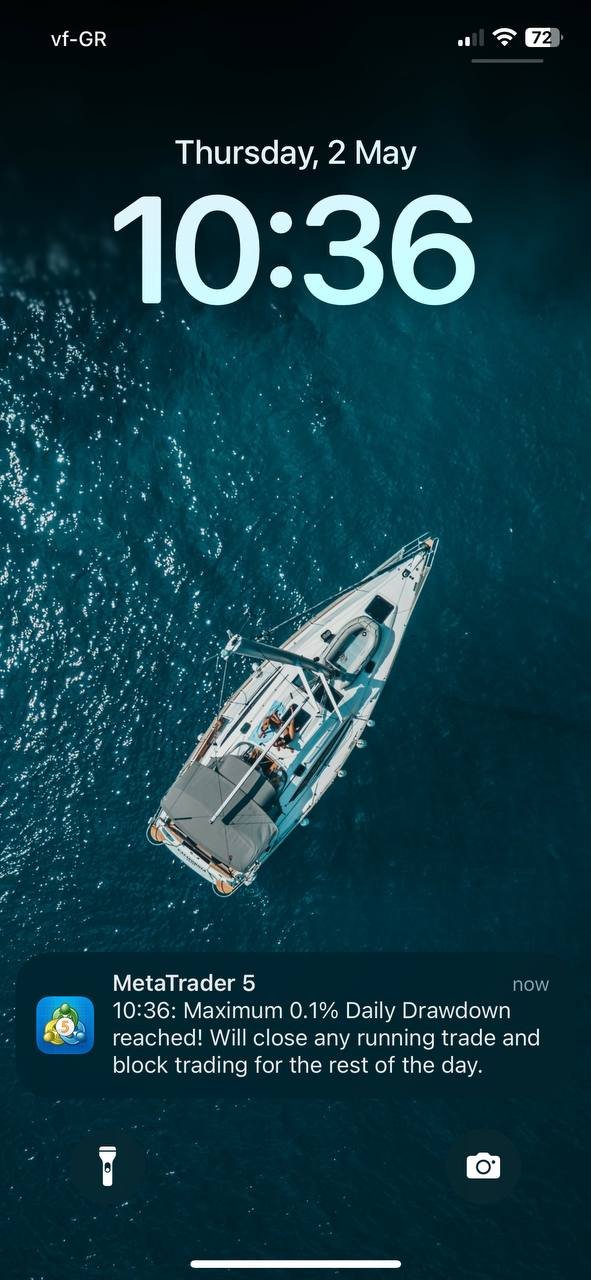
  • Send Mobile Notification: If "true", the EA will send you notifications through your Mobile MT5 app. Make sure you've connected it with your computer's terminal. (I have attached a screenshot of a test notification, for illustration purposes)
  • Alert on Terminal: If "true", the EA will send alerts in a new window when new patterns form, or when there's an error with a trade order.
  • Print on Journal: If "true", the EA will print in the Journal tab of the terminal. It's the lowest form of communication between the user and the EA.

         Important Notes: 

  • You must set the value of the desired time block ONLY on ONE PARAMETER. Either “MinutesBlock” or “HoursBlock”. The other parameter must be remained at 0. You can’t insert “30” on MinutesBlock and “1” on HoursBlock if you want a 1.5-hour break.
  • It's highly advised to use an MT5 on a VPS (Virtual Private Server) so that the EA runs 24/7 hence the drawdown and time-block limits function effectively! This is how I do it too. 
  • If you don’t want to use the Daily Drawdown Protector feature, just leave the “Max DD” parameter’s value at 0. It’ll not be used.
  • If a loss is registered and trading becomes prohibited for the desired time period, please note that any other pending order/running trade will be automatically closed! Any pending orders will need to be set again when trading becomes enabled again.
    If you wish this to be different, please contact me.
  • Make sure to enable AlgoTrading from the MT5, otherwise it’ll not run properly. (the EA isn’t permitted to open new orders, only to cancel/close orders/trades)
  • The EA doesn’t consider the seconds in the time break. For example, if a loss is taken at 10:45:26, and the time break is set at 3 minutes, the trading will be allowed again at 10:48:00. 
  • It is advised that you first test in on a demo to see how it works.
  • The "Free Demo" that you can try in this page, can't work on strategy tester where MQL facilitates this "free demo". So, there's not an issue with the tool that you can't test it properly in the "demo" version.
  • You only need to activate the EA on one chart, and it'll work across all pairs you trade. Any loss/drawdown is measured globally and not for each pair. (for example, taking a loss on EUR/USD will disable trading for X amount of time you've set)
  • ANY Expert Advisor does NOT have the capacity to block a USER from placing manual trades. It can only intervene after a trade is placed manually, but that happens instantly (on the next price tick).

Please feel free to contact me through my MQL5 profile (by clicking on my name at the top of this page) if you have any question, issue, or a request about an additional feature. Trade safely!

You can check my Website for the full list of Metatrader tools I provide.


Reviews 3
HariK98
24
HariK98 2025.10.10 18:56 
 

Exactly what I was looking for. Konstantinos has been super helpful - answering all my questions before and after I got the tool.

BloodFire50
50
BloodFire50 2025.03.11 20:26 
 

This changed my life. The one thing that kept me from being profitable was overtrading and this EA solved it. Super easy to use and the support form Konstantinos was amazing!! I highly recommend his products!! Thanks again

Matthew Phillip Clarke
329
Matthew Phillip Clarke 2023.12.28 00:32 
 

It works like a charm. It simply stops me from making an emotional after taking a loss which makes all the world a difference. I set it to 30 minutes, so I can regain my poise and reassess the market, and by the time the 30 minutes was over, it had made a reversal and the trading conditions were very obvious and I didn't waste a lot of money making a million attempts to get in the wrong direction through emotional trading. Another idea for a future product or to add to this product, is some sort of tool to stop people from adding to a losing trade unless they're deliberately hedging, I'd be the first to buy it, I cannot find anything that exists like this on MT5.

Recommended products
CoPilot dashboard MT5
Frederic Jacques Collomb
CoPilot — Daily Trading Dashboard Know your numbers. Trade with clarity. MT4 version What is CoPilot? CoPilot is a professional-grade trading assistant that displays in real time all your daily performance statistics directly on the chart — with a live equity curve that updates trade by trade. Designed for active traders who need instant visibility into their session without leaving the chart, CoPilot aggregates every closed trade of the day across all symbols and presents them in a clean, color
RBreaker
Zhong Long Wu
RBreaker Gold Indicators is a short-term intraday trading strategy for gold futures that combines trend following and intraday reversal approaches. It not only captures profits during trending markets but also enables timely profit-taking and counter-trend trading during market reversals. This strategy has been ranked among the top ten most profitable trading strategies by the American magazine   Futures Truth   for 15 consecutive years. It boasts a long lifecycle and remains widely used and st
Before installing the HeatMap indicator make sure you are using a broker that gives you access to the Depth of market (DOM) !! This indicator creates a heatmap on your chart allowing you to see the buy or sell limit orders easily and in real time. You have the possibility to change the setting and the colors of the HeatMap in order to adapt to all markets and all charts. Here is an example of a setting you can use with the NASDAQ100 on the AMPGlobal broker :  https://www.youtube.com/watch?v=x0Y
CosmiCLab SMC FIBO CosmiCLab SMC FIBO is a professional trading indicator designed for traders who use Smart Money Concepts (SMC), market structure analysis and Fibonacci retracement levels. The indicator automatically detects market swings and builds Fibonacci levels based on the latest impulse movement. It also identifies market structure changes such as BOS (Break of Structure) and CHOCH (Change of Character), helping traders understand the current market direction. CosmiCLab SMC FIBO also pr
Was: $249  Now: $99   Market Profile defines a number of day types that can help the trader to determine market behaviour. A key feature is the Value Area, representing the range of price action where 70% of trading took place. Understanding the Value Area can give traders valuable insight into market direction and establish the higher odds trade. It is an excellent addition to any system you may be using. Inspired by Jim Dalton’s book “Mind Over Markets”, this indicator is designed to suit the
Trading Utility for Forex Currency Pairs Only not for Gold  Functions Auto Lot Calculation based on Risk Auto stoploss  Auto TakeProfit Breakeven Auto Close Half % Close in percentage with respect to the PIPs Pending Orders BuyLimit Sell Limit with distances BuyStop Sell Stop    with distances Trading Informations Risk in percentage For Multiple trades Combine Takeprofit and Combine Stoplosses
Inverted_Chart_EA Utility Expert Advisor Inverted_Chart_EA creates and maintains a mirror-inverted chart of any symbol and timeframe. It automatically generates a custom instrument (e.g. US30_INV ) and keeps its price history updated in real time, with bars mirrored around a chosen pivot. This utility gives traders a new way to analyze the market from a different perspective by flipping the chart upside down. Why use an inverted chart? Highlight hidden patterns – price formations that look ordin
Overview Mirror Signals Service EA (Text only)   is a powerful monitoring Expert Advisor that automatically sends   real-time Telegram notifications   for all important trade events on your MetaTrader 5 account. It is engineered specifically for   signal providers ,   trade-copier operators ,   auditors ,   educators , and   professional trading services   that require immediate, detailed, and reliable reporting. Everything from   entries, exits, SL/TP changes, comment changes, trailing sto
SmartRAL
Jemy Yeferson Dimu Ludji
SmartRAL (Smart Risk Auto-Lot EA) SmartRAL: The Ultimate Risk & Lot Management Expert Advisor (EA) SmartRAL is an essential tool for traders who demand precise risk management and automated position sizing in MetaTrader 5. Stop guessing your lot size and let the algorithm handle the calculations. This EA allows you to trade with confidence by guaranteeing your risk exposure on every single trade, while offering absolute flexibility in setting your Stop Loss (SL). Key Features & Benefits Guarante
Evo Max
Joseph Saeidian
Combination of years of experience!  Spartan — EVO MAX Edition : T rend, Reversal and Exhaustion Indicator Time Frame M1 only. GOLD The multi-timeframe RSI confluence  system that only fires when the market actually agrees with you. Most indicators scream "BUY!" every time a single line wiggles. "Evo Max" is built on the opposite philosophy: a signal only appears when multiple timeframes line up at once. No noise. No hero trades. Just high-conviction arrows. Why traders love it Multi-timeframe
Premium level is a unique indicator with more than 80% accuracy of correct predictions! This indicator has been tested for more than two months by the best Trading Specialists! The author's indicator you will not find anywhere else! From the screenshots you can see for yourself the accuracy of this tool! 1 is great for trading binary options with an expiration time of 1 candle. 2 works on all currency pairs, stocks, commodities, cryptocurrencies Instructions: As soon as the red arrow app
Crash 1000 Scalping Indicator for the Crash 1000 Deriv Synthetic Index. Introduction The Crash 1000 Scalping Indicator is a specialized tool designed for the Crash 1000 index on the Deriv Synthetic market. This indicator is particularly useful for scalping on the M1 timeframe, helping traders to identify precise entry and exit points for buy positions. It is designed to be non-repainting, providing clear signals with audible alerts and push notifications, and is compatible with mobile devices th
Bastion is a monitor-and-close-only risk manager for prop-firm traders. It watches your account against your firm's daily-loss and maximum-drawdown limits in real time and force-closes your open positions BEFORE you cross a line. It never opens a trade of its own, so it stays fully within the tools allowed by FTMO, FundedNext, The5ers, FTUK and FXIFY. Why traders fail challenges A large share of failed evaluations end on a single daily-loss breach: a moment of inattention, a news spike, one tra
Noize Absorption Index - is the manual trading system that measures the difference of pressure between bears forces and bulls forces. Green line - is a noize free index that showing curent situation. Zero value of index shows totally choppy/flat market.Values above zero level shows how powerfull bullish wave is and values below zero measures bearish forces.Up arrow appears on bearish market when it's ready to reverse, dn arrow appears on weak bullish market, as a result of reverse expectation.
Price Magnet — Price Density and Attraction Levels Indicator Price Magnet is a professional analytical tool designed to identify key support and resistance levels based on statistical Price Density. The indicator analyzes a specified historical period and detects price levels where the market spent the most time. These zones act as “magnets,” attracting price action or forming a structural base for potential reversals. Unlike traditional Volume Profile tools, Price Magnet focuses on price-time d
Overview RealCost Risk Governor MT5 is an account and trade-risk monitoring utility for MetaTrader 5. It does not predict price movement and does not provide buy or sell signals. It watches configured risk limits and shows a compact on-chart panel for daily P/L, floating P/L, equity drawdown, trade count, open positions, pending orders, total lots, and chart spread. The default mode is alert-only. If the trader explicitly enables protection actions, the utility can close scoped positions, del
Professional Opening Range Breakout (ORB) indicator designed for precision session trading with automatic time handling, breakout alerts, and advanced target levels. This indicator automatically identifies the Opening Range for any configurable session, plots the High, Low, and Midpoint levels, and extends them across the trading day. Built-in breakout detection and alerts, range measurements, and extension targets provide traders with clear structure and actionable levels. Ideal for traders usi
DRS Semi Automated
Enrique Alexander Madera Pimentel
DRS Semi Automated: Fair Value Gap Trading Inspired by the DRS strategy made by SMT FX. To learn more, visit their website. Key Features: 1. Fair Value Gap Detection: Identifies bullish and bearish Fair Value Gaps on the 5-minute timeframe. 2. Customizable Trading Sessions: Trade London, New York, or both sessions with adjustable start times. 3. Risk Management: Set risk percentage and choose between equity-based or fixed balance risk calculation. 4. Bias Selection: Manually select bullish or
Level Volume Pro
John Samfel Bucton Josol
HAT IT DOES   MONTHLY HIGH & LOW — AUTO-DRAWN EVERY MONTH Draws the High and Low of every month for the current year (or any year you set). Each level extends as a horizontal ray into the future so you always see where price is reacting to historical monthly extremes. Color-coded (blue = high, red = low), labeled (JAN HIGH, FEB LOW etc.), fully customizable width and style. Toggle individual months on or off.   WEEKLY HIGH & LOW
Extra Time Scale Bar
Mostafa Saad Saeed Shawara
Extra Time Scale Bar Here is the MT4 version is a tool designed to enhance your trading by allowing you to add a personalized time bar to your charts. With this tool, you're no longer limited to server time alone—you can set the chart to display any time zone of your choice, like your local time, Greenwich Mean Time, or any other. Features of  Extra Time Scale Bar: 1. Time Zone Customization:  Choose the time zone that suits your trading needs and display it directly on your chart for enhance
Pro Gold System Indicator
PEDRO JOAQUIM GONCALVES GOMES
ADVANCED FUNCTIONALITIES: Trend Score (0-100) with visual bar Intelligent signals with adjustable strength (1-10) Risk management with automatic TP/SL Audible and visual alerts Price zones with smooth filling Multi-indicator analysis (RSI, ATR, BB, EMAs) DESIGN FEATURES Modern Visual: Smooth and well-spaced lines (EMA with 2-3px width) Vibrant and professional colors (Sky Blue, Orange, Gold) Modern arrows (code 233/234) for buy/sell signals Configurable dark/light theme Adjustable transparency f
One of the number sequences is called "Forest Fire Sequence". It has been recognized as one of the most beautiful new sequences. Its main feature is that this sequence avoids linear trends, even the shortest ones. It is this property that formed the basis of this indicator. When analyzing a financial time series, this indicator tries to reject all possible trend options. And only if he fails, then he recognizes the presence of a trend and gives the appropriate signal. This approach allows one t
TradeGuard Capital Protection Professional Risk, Exposure & Trade Manager for MetaTrader 5 This utility acts as a professional insurance system for your trading account. TradeGuard Capital Protection is a professional-grade risk & money management utility designed to protect your trading account from excessive losses, emotional trading, and uncontrolled exposure. This tool does NOT open trades . It strictly manages risk, drawdown, exposure, and safety protections . Perfect for manual traders, EA
TradePilotmt5
Hossein Khalil Alishir
TradePilot Expert Advisor (EA) for MetaTrader 5 TradePilot is a professional and user-friendly Expert Advisor (EA) for MetaTrader 5 (MT5) . It simplifies automated trading , risk management , and trade execution with a smart trading panel . Perfect for beginners and experienced traders looking for a reliable trade manager EA with automated lot size calculation and smart position management. Key Advantages User-Friendly Trading Panel: Customizable panel with buttons and hotkeys for fast ex
Range Volume Hybrid Generator
Trade The Volume Waves Single Member P.C.
1. Introduction Range Volume Hybrid (RVH) is a MetaTrader 5 Expert Advisor that creates custom chart symbols using a unique dual-condition bar formation method. Unlike traditional charts where bars close based on a single criterion (time, range, or volume), RVH bars close only when BOTH a minimum price range AND a minimum volume threshold are met simultaneously.  Download also and install RVH Monito r Indicator - to control the EA from the custom charts (it's Free)  https://www.mql5.com/en/marke
Crypto_Forex Indicator "WPR with 2 Moving Averages" for MT5, No Repaint. - WPR itself is one of the best oscillators for scalping. - "WPR and 2 Moving Averages" Indicator allows you to see Fast and Slow Moving Averages of WPR oscillator. - Indicator gives opportunities to see the price corrections very early. - It is very easy to set up this indicator via parameters, it can be used on any time-frame. - You can see Buy and Sell entry conditions on the pictures. - With PC and Mobile alerts on WP
Trend Master V2
Oratile Pitsoane
What Is Trend Master Pro? Trend Master Pro   is a professional-grade trend trading indicator built for MetaTrader 5. It was designed with one goal in mind — to keep you on the right side of the market at all times by combining three powerful technical tools into a single, clean, easy-to-read display directly on your price chart. Instead of cluttering your screen with multiple separate indicators, Trend Master Pro fuses an   EMA Ribbon trend filter , a   ZigZag swing point engine , and a   breako
HAS RSI Signal — Professional Trend Indicator with SL/TP Calculation HAS RSI Signal is a powerful trading tool that combines time-tested classics with modern noise-filtering algorithms. The indicator analyzes the market through the prism of Heiken Ashi Smoothed candles and the RSI oscillator, providing clear entry signals at trend reversals or when exiting overbought/oversold zones. Key Advantages: Double Filtration: Using Heiken Ashi Smoothed eliminates market "noise," while RSI confirms the mo
Our   Basic Support and Resistance   indicator is the solution you need to boost your technical analysis. This indicator allows you to project support and resistance levels on the chart /   MT4 Version Features Integration of Fibonacci Levels:  With the option to display Fibonacci levels alongside support and resistance levels, our indicator gives you an even deeper insight into market behavior and possible reversal areas. Performance Optimization:  With the option to update extended lines onl
The indicator automatically identifies and labels essential elements of market structure shift, including: Break of Structure (BoS): Detected when there is a significant price movement breaking previous structural points. It mark possible uptrend and downtrend lines(UP & DN, It means constantly update high and low ), and once the price breaks through these lines, mark the red (BEAR) and green (BULL) arrows. BoS typically occurs when the price decisively moves through swing lows or swing highs t
Buyers of this product also purchase
Trade Assistant MT5
Evgeniy Kravchenko
4.41 (215)
It helps to calculate the risk per trade, the easy installation of a new order, order management with partial closing functions, trailing stop of 7 types and other useful functions. Additional materials and instructions Installation instructions - Application instructions - Trial version of the application for a demo account Line function -   shows on the chart the Opening line, Stop Loss, Take Profit. With this function it is easy to set a new order and see its additional characteristics bef
Forex Trade Manager MT5
InvestSoft
4.98 (668)
Trade Manager MT5 is an advanced position size calculator and trade management tool for MetaTrader 5, designed to help traders plan trades faster, control risk more precisely, and manage open positions directly from the chart. It combines order placement, risk based lot calculation, Stop Loss and Take Profit management, Break Even, Trailing Stop, Partial Close, Equity Protection, and external trade management in one panel. Whether you trade forex, indices, metals, commodities, crypto, or future
Local Trade Copier EA MT5
Juvenille Emperor Limited
4.97 (144)
Experience exceptionally fast trade copying with the   Local Trade Copier EA MT5 . With its easy 1-minute setup, this trade copier allows you to copy trades between multiple MetaTrader terminals on the same Windows computer or Windows VPS with lightning-fast copying speeds of under 0.5 seconds. Whether you're a beginner or a professional trader, the   Local Trade Copier EA MT5   offers a wide range of options to customize it to your specific needs. It's the ultimate solution for anyone looking t
================================================================================ POC BREAKOUT - V20.72. Full Professional Grade Toolkit ================================================================================ POC Breakout is a full MetaTrader 5 trading dashboard for discretionary traders who want breakout signals, Point of Control (POC) context, volume profiles, order flow, market structure, news, alerts, and advanced trade planning in one professional workspace. Attached directly to you
TradePanel MT5
Alfiya Fazylova
4.88 (166)
Trade Panel is a multi-functional trading assistant. The app contains over 50 trading functions for manual trading and allows you to automate most trading tasks. Before making a purchase, you can test the demo version on a demo account. Download the trial version of the application for a demonstration account: https://www.mql5.com/en/blogs/post/750865 . Full instructions here . Trade. Allows you to perform trading operations in one click: Open pending orders and positions with automatic risk cal
Beta Release The Telegram to MT5 Signal Trader is nearly at the official alpha release. Some features are still under development and you may encounter minor bugs. If you experience issues, please report them, your feedback helps improve the software for everyone. Telegram to MT5 Signal Trader is a powerful tool that automatically copies trading signals from Telegram channels or groups directly to your MetaTrader 5 account. It supports both public and private Telegram channels, and you can conn
Premium Trade Manager - The Trade Panel With a Coach Built In Premium Trade Manager puts a trading coach inside your chart, with a full execution engine underneath it. Set the trade up the way you always do, then let Max, your AI trading coach, read that exact setup against your live account and give you a straight verdict before you commit: is the stop disciplined, is the risk sane, is a high-impact release minutes away, are you near a prop-firm limit. Below sits the engine that runs everything
Exp COPYLOT CLIENT for MT5
Vladislav Andruschenko
3.97 (35)
Professional Trade Copier for MetaTrader 5 Fast, professional, and reliable trade copier for MetaTrader . COPYLOT allows you to copy Forex trades between MT4 and MT5 terminals with support for Hedge and Netting accounts. COPYLOT MT5 version supports: - MT5 Hedge to MT5 Hedge - MT5 Hedge to MT5 Netting - MT5 Netting to MT5 Hedge - MT5 Netting to MT5 Netting - MT4 to MT5 Hedge - MT4 to MT5 Netting MT4 version Full Description +DEMO +PDF How To Buy How To Install How to get Log Files H
Footprint Chart Pro — Professional OrderFlow EA for MetaTrader 5 Version 6.34 | Professional tool for real traders | Institutional-Grade Visualization DEMO USERS - PLEASE SELECT EVERY TICK / REAL TICK WHEN TESTING AND YOU HAVE DOWNLOADED HISTORICAL DATA. IF YOU SEE A WAITING SCREEN AND IT IS NOT DOWNLOADING, IT MEANS YOU HAVE LOW HISTORICAL DATA. TRY 1 MIN AND 5 MIN FIRST ON 1 DAY DATA. ONE DAY DATA SHOULD BE THE NEWEST AND MOST CURRENT DATE. PLEASE WAIT UNTIL THE MARKET HAS ROLLED OVER PERIOD.
Telegram to MT5 Multi-Channel Copier automatically copies trading signals from your Telegram channels directly into MetaTrader 5. No bots, no browser extensions, no manual copying. You receive a signal on Telegram and the EA opens the trade on your terminal in a few seconds. The product includes two components: a Windows application that listens to your Telegram channels, and this Expert Advisor that executes the signals on your MT5 terminal. An MT4 version is also available. Setup guide and app
Anchor Trade Manager
Kalinskie Gilliam
5 (6)
Anchor: The EA Manager Your EAs manage their own trades. Anchor manages the account around them. Anchor gives you one place to control your EAs, manage risk and decide when trading is allowed. Any EA, any vendor, any broker or symbol. No source-code changes required. The Problem Most EAs only know what they are doing. They cannot see when another EA is already trading, when several EAs open and are stacking risk or when the account has reached your loss limit. Even using just one EA, it may not
Trade Dashboard MT5
Fatemeh Ameri
4.95 (132)
Trade Dashboard simplifies how you open, manage, and control your trades, with built-in lot size calculation. It allows you to execute trades, manage risk, and control positions directly on the chart, with tools such as partial close, breakeven, and trailing stop. Designed to reduce manual work and help you stay focused on your trading decisions. A demo version is available for testing. Detailed explanations of features are provided within the MQL5 platform. Installation instructions are include
YuClusters
Yury Kulikov
4.93 (43)
Attention: You can view the program operation in the free version  YuClusters DEMO .  YuClusters is a professional market analysis system. The trader has unique opportunities to analyze the flow of orders, trade volumes, price movements using various charts, profiles, indicators, and graphical objects. YuClusters operates on data based on Time&Sales or ticks information, depending on what is available in the quotes of a financial instrument. YuClusters allows you to build graphs by combining da
FarmedHedge Pair Trading Dashboard
Tanapisit Tepawarapruek
5 (3)
Farmed Hedge Yield Farming | All Markets (Manual - Hybrid - Semi/Automated EA) MULTI-ASSET SUPPORT Trade any asset available on your broker - Forex: Major, Minor, Exotic pairs - Crypto: BTC, ETH, XRP, SOL, BNB - Stocks: Apple, Tesla, Amazon, Google, etc. - Commodities: Gold, Silver, Oil, Gas - Indices: US30, NAS100, SPX500, DAX40 - Any CFD your broker offers VERIFIED TRADING RESULTS - Farmed Hedge Yield Axi Copy:  https://www.mql5.com/en/signals/2356376 - Farmed Hedge Yield Exn Copy:   https:/
Power Candles Strategy Scanner - Self-Optimizing Multi-Symbol Setup Finder Power Candles Strategy Scanner runs the same self-optimizing engine that powers the Power Candles indicator - on every symbol in your Market Watch, side by side. One panel tells you which symbols are statistically tradable right now, which strategy wins on each, the optimal Stop Loss / Take Profit pair, and pings you the moment a fresh signal fires. This tool is part of the Stein Investments ecosystem - 18+ tools plus Max

Adam FTMO MT5
Vyacheslav Izvarin
5 (2)
ADAM EA Special Version for FTMO Please use ShowInfo= false for backtesting ! Our 1st EA created using ChatGPT technology Trade only GOOD and checked PROP FIRMS  Default parameters for Challenge $100,000 Tested on EURUSD and GBPUSD only  Use 15MIN Time Frame Close all deals and Auto-trading  before Weekend at 12:00 GMT+3  Friday For Prop Firms MUST use special Protector  https://www.mql5.com/en/market/product/94362 --------------------------------------------------------------------------------
VirtualTradePad PRO SE MT5 — professional trading control center for MetaTrader 5 VirtualTradePad PRO SE is a premium chart-based trading panel and trade-management workspace for MetaTrader 5 . It is designed for traders who want faster execution, clearer position control, structured trade management, visual level planning and a professional workflow directly from the chart. This is not only a BUY / SELL panel. PRO SE combines manual trading, pending orders, position management, partial exits, b
VirtualTradePad One Click Trading Panel
Vladislav Andruschenko
4.59 (74)
Trading Panel for MetaTrader 5 — professional one-click trading from chart and keyboard A powerful trading panel for active manual trading, designed to open, manage, and close trades far faster and more efficiently than the standard MetaTrader interface. This panel is built for traders who want full control over positions, pending orders, profit management, and trading execution inside one professional workspace. This is not just another utility. It is a complete trading cockpit for MetaTrader
Working Demo Download Copy Cat More Trade Copier MT5 is a local trade copier and a complete risk management and execution framework designed for today’s trading challenges. From prop firm challenges to personal portfolio management, it adapts to every situation with a blend of robust execution, capital protection, flexible configuration, and advanced trade handling. The copier works in both Master (sender) and Slave (receiver) modes, with real-time synchronization of market and pending orders,
Timeless Charts
Samuel Manoel De Souza
5 (7)
Timeless Charts is an all-in-one trading utility for professional traders. It combines custom chart types such as Seconds Charts and Renko with advanced order flow analysis using Footprints , Clusters , Volume Profiles , VWAP studies, and anchored analysis tools for deeper market insight. Trading and position management are handled directly from the chart through an integrated trade management panel , while Market Replay and Virtual Accounts provide environments for practicing trading skills and
The product will copy all telegram signal to MT5 ( which you are member) , also it can work as remote copier.  Easy to set up, copy order instant, can work with almost signal formats, image signal,  s upport to translate other language to English Work with all type of channel or group, even channel have "Restrict Saving Content", work with  multi channel, multi MT5 Work as remote copier: with signal have ticket number, it will copy exactly via ticket number. Support to backtest signal. How to s
Trade Manager DaneTrades
Levi Dane Benjamin
4.23 (30)
DaneTrades Trade Manager is a professional trade panel for MetaTrader 5, designed for fast, accurate execution with built‑in risk control. Place market or pending orders directly from the chart while the panel automatically calculates position size from your chosen risk, helping you stay consistent and avoid emotional decision‑making. The Trade Manager is built for manual traders who want structure: clear risk/reward planning, automation for repeatable management, and safeguards that help reduc
The News Filter MT5
Leolouiski Gan
4.78 (23)
This product filters   all expert advisors and manual charts   during news time.  It is able to remove any of your EA during news and automatically reattach them after news ends. This product also comes with a complete  order management system   that can handle your open positions and pending orders before the release of any news. Once you purchase   The News Filter , you will no longer need to rely on built-in news filters for future expert advisors, as this product can filter them all from her
Elevate Your Trading Signals with Our Advanced Telegram Bridge EA It’s time to captivate your audience with real-time trading updates that are both professional and visually appealing. Contact me to see the demo and get a trial version We have significantly invested in user friendly features that create a unique experience for customers and providers.  SIGNAL BRIDGE is able to deliver 100% COPIER FRIENDLY SIGNALS for all business cases, even bypassing Metatrader logics where other EAs struggle!
Quant AI Agents
Ho Tuan Thang
5 (1)
Quant AI Agents are independent trading Expert Advisors. Instead of trading using a fixed strategy like other conventional EAs, Quant AI Agents   is a   multi-agent AI trading framework   that turns natural-language strategy prompts into live.  WANT THE SAME RESULTS AS MY LIVE SIGNAL?   Use the exact same brokers I do:   IC MARKETS , IC TRADING   .  Unlike the centralized stock market, Forex has no single, unified price feed.  Every broker sources liquidity from different providers, creating un
Trade Assistant 38 in 1
Makarii Gubaydullin
4.91 (23)
Multifunctional tool: Lot Calculator, Grid Orders, R/R ratio, Trade Manager, Supply and Demand zones, Price Action and much more Demo version   |   User manual Trade Assistant   doesn't work in the strategy tester : you can download the   Demo Version HERE  to test the utility . Contact me   for any questions  / ideas for improvement / in case of a bug found If you need a MT4 version, it is available here Simplify, speed up and automate your trading   process . Expand the standard terminal capa
KT Equity Protector MT5
KEENBASE SOFTWARE SOLUTIONS
3.6 (5)
The one EA every MetaTrader trader should be running, but isn't. Most accounts don't blow up because the strategy was wrong. They blow up because, in a bad moment, a trader let a loss run, doubled down, held trades into the weekend, gave back a winning week, or forgot the daily prop-firm limit by one bad click. KT Equity Protector is the automated guardian that won't let that happen. Install it on one chart. Set your rules once in a guided, plain-English wizard: daily loss, max drawdown, profit
Trade Panel PRO MT5 Trade Panel PRO MT5 is a manual trading panel for MetaTrader 5 designed to prepare, execute and manage positions directly from the chart, with visual risk control at every step. The tool combines order preparation, automatic position sizing based on risk, interactive Entry, Stop Loss and Take Profit zones, and several trade management functions into a single interface. Version 2.0 updates Version 2.0 introduces several improvements to streamline the execution workflow: Automa
Seconds Chart MT5
Boris Sedov
4.61 (18)
Seconds Chart is a unique tool for creating second-based charts in MetaTrader 5 . With Seconds Chart , you can construct charts with timeframes set in seconds, providing unparalleled flexibility and precision in analysis that is unavailable with standard minute or hourly charts. For example, the S15 timeframe indicates a chart with candles lasting 15 seconds. You can use any indicators and Expert Advisors that support custom symbols. Working with them is just as convenient as on standard charts.
Active Lines
Yury Kulikov
5 (2)
Attention: Demo version for review and testing can be downloaded here . It does not allow trading and can only be run on one chart. Active Lines - a powerful professional tool for operations with lines on charts. Active Lines provides a wide range of actions for events when the price crosses lines. For example: notify, open/modify/close a position, place/remove pending orders. With Active Lines you can assign several tasks to one line, for each of which you can set individual trigger conditions
More from author
FVG Screener
Konstantinos Kalaitzidis
4.67 (3)
The "FVG Screener" is a FREE utility tool designed to identify and alert on "fair value gaps" (FVGs), a concept popularized by ICT. This EA is intended to be used by traders who use fair value gaps in their trading.  The panel provides a simple and intuitive interface for selecting the desired timeframes, enabling traders to focus on specific timeframes regardless of the timeframe that their chart is on. The EA scans the market for imbalances or FVGs, which are essentially discrepancies between
FREE
Trade Notifications
Konstantinos Kalaitzidis
5 (5)
"Trade Notifications" is a utility tool, aimed to inform you either with mobile notifications or terminal alerts on every opened or closed trade, as well as the $ profit/loss result of each trade. It's a tool I've been using myself for a long time, and I decided to share it for free! Input Parameters:  (every input is a  true/false type,   double click on it to change its value)  Notify for Closed Positions PnL : If true, it'll notify you for the $ result of any trade that is closed. This way,
FREE
Drawdown Protector MT4
Konstantinos Kalaitzidis
5 (2)
Drawdown protector is used to manage your desired Max Daily Drawdown. It's a highly valuable tool for traders, especially for prop firm traders, you need to be careful of the drawdown limits.  It's an effective EA that is simple to use for Equity Drawdown Management purposes.  It works by blocking new trades - and closing existing trades, when the floating Equity (not Balance) exceeds the Daily Loss limit you've set. Also, you can set a Maximum Loss Limit for a SINGLE trade, which if exceeded, i
News Filter Protector
Konstantinos Kalaitzidis
5 (1)
News Filter Protector is designed to protect your from having open positions/orders on news announcements. In today's world where news can cause unpredictable volatility and extended losses, such a tool is very helpful for your peace of mind since you don't need to check the calendar ever again!  Let's go through the Inputs of the EA to get an understanding of how each parameter works: --------------------------------News Settings-------------------------------- Currencies of the News to Filter
Lot Size Limiter
Konstantinos Kalaitzidis
This Expert Advisor helps enforce disciplined risk management by preventing new trades from being opened once a specified cumulative lot size across all open positions is reached. Designed for MT5, the EA continuously monitors the account’s active trades and calculates the total lot size. If the total exceeds the predefined limit, the EA temporarily blocks the execution of new market or pending orders. This is particularly useful for traders who want to control exposure/emotions during high-vola

Revenge Trading Protector
Konstantinos Kalaitzidis
5 (1)
Revenge Trading Protector is a simple but effective tool for traders who can fall victim to revenge trading. Being a day-trader myself, I understand the psychological aspect of revenge trading and the desire to cover the losses. So, I developed this tool (that I use myself too) to be 100% sure I’m able to remain patient after a loss and not make irrational trading decisions. When you take a loss, the Revenge Trading Protector EA prevents you from opening another order (either limit order, sto
Drawdown Protector
Konstantinos Kalaitzidis
5 (1)
Drawdown Protector is a utility tool used to manage your desired Max Daily Drawdown. In the era of prop firms and challenges, it's highly important to be aware of daily drawdown limits. It's an effective EA that is simple to use for Equity Drawdown Management and prevention of revenge trading.  Input parameters:   How many Hours to block trading? - Here, you set how many hours you want the EA to block new trades, after the Daily % Drawdown is breached. Value must be >0. Block trading until the n
Scalping Scale in
Konstantinos Kalaitzidis
The "Scalping Scale in" is a utility tool designed for scalpers who want to scale in an initial position at fixed distances without worrying about the S/L and T/P placement, because every second counts when scalping. How it works: You set your desired values in the inputs tab of the EA, and more specifically what Risk-to-Reward you want the T/P to be placed, how wide you want your S/L (in pips) - which also is the distance of the next next stop order (scale in position). You manually click Buy
The "Candlestick Patterns Trade Panel" is the ultimate tool for traders who trade with Candlesticks Patterns and want the process of identifying a pattern and executing a trade, to be quick and effortless . With various but key input options, this tool suits to people who want to automate their candlesticks patterns manual trading, or assist them to take trades manually but faster than before, or simply inform them with the patterns they want to see. Let's go through the Trade Panel that appears
Anti Grid Position Protector
Konstantinos Kalaitzidis
Anti Grid Position Protector is a utility tool designed to protect you from the temptation of adding to a losing position in a hope of a drawdown recovery, or trying to hedge when you're not intended too. --------------------------Inputs--------------------------- Allow Hedging on Losing Positions? - It's a true/false input (double click to switch its value) which allows/disallows opening a trade (either pending order or market execution) in the opposite direction on an existing losing position
FVG Screener PRO
Konstantinos Kalaitzidis
5 (1)
The "FVG Screener PRO" is a utility tool designed to identify and alert on "fair value gaps" (FVGs), a concept popularized by ICT, but also to allow fast and efficient trade executions through its panel. This EA is intended to be used by traders who use fair value gaps in their trading.  The panel provides a simple and intuitive interface for selecting the desired timeframes, enabling traders to focus on specific timeframes regardless of the timeframe that their chart is on. The EA scans the mar
Symbol Drawdown Manager
Konstantinos Kalaitzidis
Symbol Drawdown Protector is a utility tool used to manage your desired Max Daily Drawdown only on a  specific trading symbol. It's like a %-based stop loss, but it's functioning as a revenge protector tool too. In the era of prop firms and challenges, it's   highly important   to be aware of daily drawdown limits. It's an effective EA that is simple to use for Equity Drawdown Management and prevention of revenge trading.  Input parameters:  Daily % Drawdown  - Here you set the Maximum Daily Dra
Filter:
HariK98
24
HariK98 2025.10.10 18:56 
 

Exactly what I was looking for. Konstantinos has been super helpful - answering all my questions before and after I got the tool.

Konstantinos Kalaitzidis
7589
Reply from developer Konstantinos Kalaitzidis 2025.10.10 20:21
I appreciate it Hari, thanks for your trust and your kind words!
BloodFire50
50
BloodFire50 2025.03.11 20:26 
 

This changed my life. The one thing that kept me from being profitable was overtrading and this EA solved it. Super easy to use and the support form Konstantinos was amazing!! I highly recommend his products!! Thanks again

Konstantinos Kalaitzidis
7589
Reply from developer Konstantinos Kalaitzidis 2025.03.11 20:32
I appreciate your words man, thank you! I'm happy to see the positive impact of my EAs :) Let me know if you need anything else.
Matthew Phillip Clarke
329
Matthew Phillip Clarke 2023.12.28 00:32 
 

It works like a charm. It simply stops me from making an emotional after taking a loss which makes all the world a difference. I set it to 30 minutes, so I can regain my poise and reassess the market, and by the time the 30 minutes was over, it had made a reversal and the trading conditions were very obvious and I didn't waste a lot of money making a million attempts to get in the wrong direction through emotional trading. Another idea for a future product or to add to this product, is some sort of tool to stop people from adding to a losing trade unless they're deliberately hedging, I'd be the first to buy it, I cannot find anything that exists like this on MT5.

Konstantinos Kalaitzidis
7589
Reply from developer Konstantinos Kalaitzidis 2023.12.28 12:26
Thank you very much! I'm glad it solved your problem and will seriously consider adding the new function that you suggested! Have a great end to the year Matthew🙂
Reply to review