

Monochronic Trading (Part 1): How to Detect Broker Timezone and DST in MQL5
 1 678
1 678
 0
0

Introduction
This article series aims to find the optimal trading time for a given strategy. We do this by matching time and strategy parameters to identify historically profitable trading windows. If a trade moves as predicted only after you are stopped out, the issue is usually timing or stop-loss placement. Either your timing is inaccurate, or your stop-loss is poorly positioned. A feasible and intriguing solution is to coordinate your strategy with time, in a monochronic sense, by pairing one time window with a singular strategy and testing them together.
This insight led me to the work of anthropologist Edward Twitchell Hall Jr. and his concept of monochronic time, the idea that certain cultures view time as linear, scheduled, and compartmentalized. In monochronic cultures, people focus on one task at a time and organize their lives around fixed schedules and deadlines. Markets somewhat reflect this same structure. Institutional traders work defined hours. News releases follow calendars. Trading sessions have opening and closing procedures. Rather than creating a trading expert to trade whenever a setup appears, in this series, we will incorporate time awareness to enter a trade when probabilities are favorable based on time and schedule patterns.
Why Broker Time and DST Matter
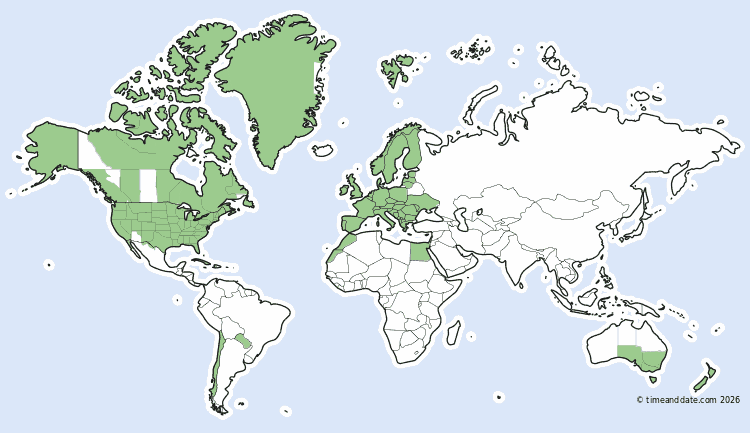
Before we build any expert advisors or start optimization, we must define a few prerequisites. For accurate Strategy Tester simulations when using session times like NYSE, you must know the broker's time zone and DST schedule.
Why?
When live trading, the expert advisor relies on the broker's server time. If the broker observes Daylight Saving Time (DST), that server time shifts by an hour relative to GMT/UTC. For example, a broker base time at UTC+2 would move to UTC+3 once DST is active. This creates a problem in the Strategy Tester because the TimeGMT() function doesn't actually return GMT time, the function returns the broker's time, with no way to reliably calculate the real GMT offset. Without knowing the broker's true time zone, we can't convert between broker time and session time in either direction, so we can't reliably tell when a trading session is active.
Even once we know the broker's time zone, DST introduces a second problem when session start times shift relative to the broker's time. For example, if the Tokyo session (TSE) starts at 2:00 AM broker time (UTC+2) when the broker's DST is inactive, it will start at 1:00 AM broker time (UTC+3) once DST is active. If the EA doesn't account for this shift, it will miss the first hour of the Tokyo session whenever DST is active.
NFP-Based DST Detection
You can ask the broker or research which DST schedule they use. We will rather create a script to determine this for us as brokers don't always tell you which DST schedule they follow or any at all. My previous method was accurate before 2025, but irregular NFP dates caused by the US government shutdown invalidated it because the method relied on those dates. My new solution will still make use of NFP dates but if irregular data is detected another year should be analyzed to retrieve an accurate reading.
How it works in a nutshell:
- Calendar data retrieval
- Volatility analysis
- DST pattern matching
- Time zone output

NFP (Non-Farm Payrolls) releases often cause predictable volatility spikes in EURUSD at times published in the MQL5 Economic Calendar. All of the NFP dates for a given year are retrieved, and we check to verify if all the M15 volatility patterns match the respective dates, if not, the broker most certainly utilizes a DST schedule, and we cross-reference this mismatching pattern with other DST schedules to identify a match.
DST Calendar Generation
bool IsNthWeekday(int year, int month, int weekday, int nth, int &day_out)
// nth > 0 find the Nth occurrence
// nth < 0 find the LAST occurrence (used for EU which ends on the last Sunday)
The function above loops through every day in a given month, counts matching weekdays, and modifies the reference day_out variable with the day of the month number when it hits the target occurrence.
Given a specific year, month, weekday (0 = Sunday ... 6 = Saturday), and an occurrence number nth, the function finds which calendar day of the month this day represents, and writes it into day_out variable.
For example:
- 2nd Sunday of March, returns 9 (if March 9 is the second Sunday)
- 1st Monday of September, returns 1
- Last Sunday of October (nth = -1), returns 26
GetEUDSTDates(int year, datetime &start, datetime &end)
GetUSDSTDates(int year, datetime &start, datetime &end)
GetAUDSTDates(int year, datetime &start, datetime &end)
These are the three functions that translate real-world DST rules into datetime values as represented in the table below.
| Region | DST Start | DST End |
|---|---|---|
| EU | Last Sunday of March at 01:00 | Last Sunday of October |
| US | 2nd Sunday of March at 07:00 | 1st Sunday of November at 06:00 |
| AU | 1st Sunday of October at 16:00 | 1st Sunday of April (the following year ahead) at 16:00 |
DST Range Evaluation
IsInDSTRange(datetime date, datetime start, datetime end, bool southernHemisphere = false)
//-- Southern hemisphere: active if date >= start OR date < end
//-- Northern hemisphere: active if date >= start AND date < end
IsInDSTRange function determines whether a given date is within a DST period where the hemisphere determines how we check due to Australia's DST schedule overlapping into the next year.
Volatility Detection
double GetCandleHeight(string symbol, datetime time)
GetCandleHeight() retrieves the high-low range of a single M15 candle at a given datetime.
bool IsCandleLargerThanSurrounding(string symbol, datetime time, int offsetSeconds)
//-- True = NFP spike detected at this timestamp
//-- False = no unusual volatility here
Compares the target candle against the candles one hour before and one hour after. If the center candle is larger/taller than both neighbors, the NFP spike is confirmed at that time.
EURUSD Discovery
string FindEURUSD(bool &wasAdded)
EURUSD
EURUSDm
EURUSD.pro
EURUSD.a
The function locates a valid EURUSD symbol and handles broker-specific symbol naming. The process is as follows:
- Search the Market Watch
- Search all available symbols
- Add EURUSD equivalent symbol if necessary
Economic Calendar Integration
bool GetNFPDates(int year, string &dates[])
Retrieves historical NFP releases from the MQL5 Economic Calendar for a specific year and assigns these values into the dates array.
DST Detection Algorithm
string DetectBrokerDST(int year_increment = 0)
Step 1: Find EURUSD Symbol
Step 2: Load NFP dates
Step 3: For each NFP date, check whether the EURUSD M15 candle at that time shows a volatility spike. Track when the pattern flips, if NFP was consistently volatile at datetime X, then suddenly stops being volatile, the broker shifted their clock (DST transition happened).
Step 4: Compare the detected shift window against calculated EU, US, and AU DST transition dates. Whichever region's transition falls within the window is your broker's DST rule.
Output and Configuration
DisplayTimezoneInfo(string detectedDST) Once the DST type is known, the function reads the current offset between TimeTradeServer() and TimeGMT(). It then checks whether DST is active, recalculates the base UTC offset, and prints the EA-ready broker offset and DST rule.
BrokerBaseUTCOffset = UTC_PLUS_2;
BrokerDSTRule = DST_EU;
The script will be attached in this article named TimeDetectionTool.mq5
Design Decisions
Why NFP specifically?
NFP is a highly valued high-impact scheduled US release it occurs monthly on a known first Friday schedule normally and consistently produces large single candle spikes on multiple symbols. This makes it a reliable volatility fingerprint.
Why M15 candles?
The NFP spike is violent but brief. M15 gives enough resolution to confirm the spike.
Why does the script not work in the Strategy Tester?
The Economic Calendar API (CalendarValueHistory) returns no data inside the tester, so the script exits the tester with a clear explanation.
Why TimeTradeServer() instead of TimeCurrent()?
TimeCurrent() only updates when a new tick arrives, making it unreliable on weekends or illiquid instruments/symbols. TimeTradeServer() pulls the server's current time regardless of market activity.
Optimizer Project Design
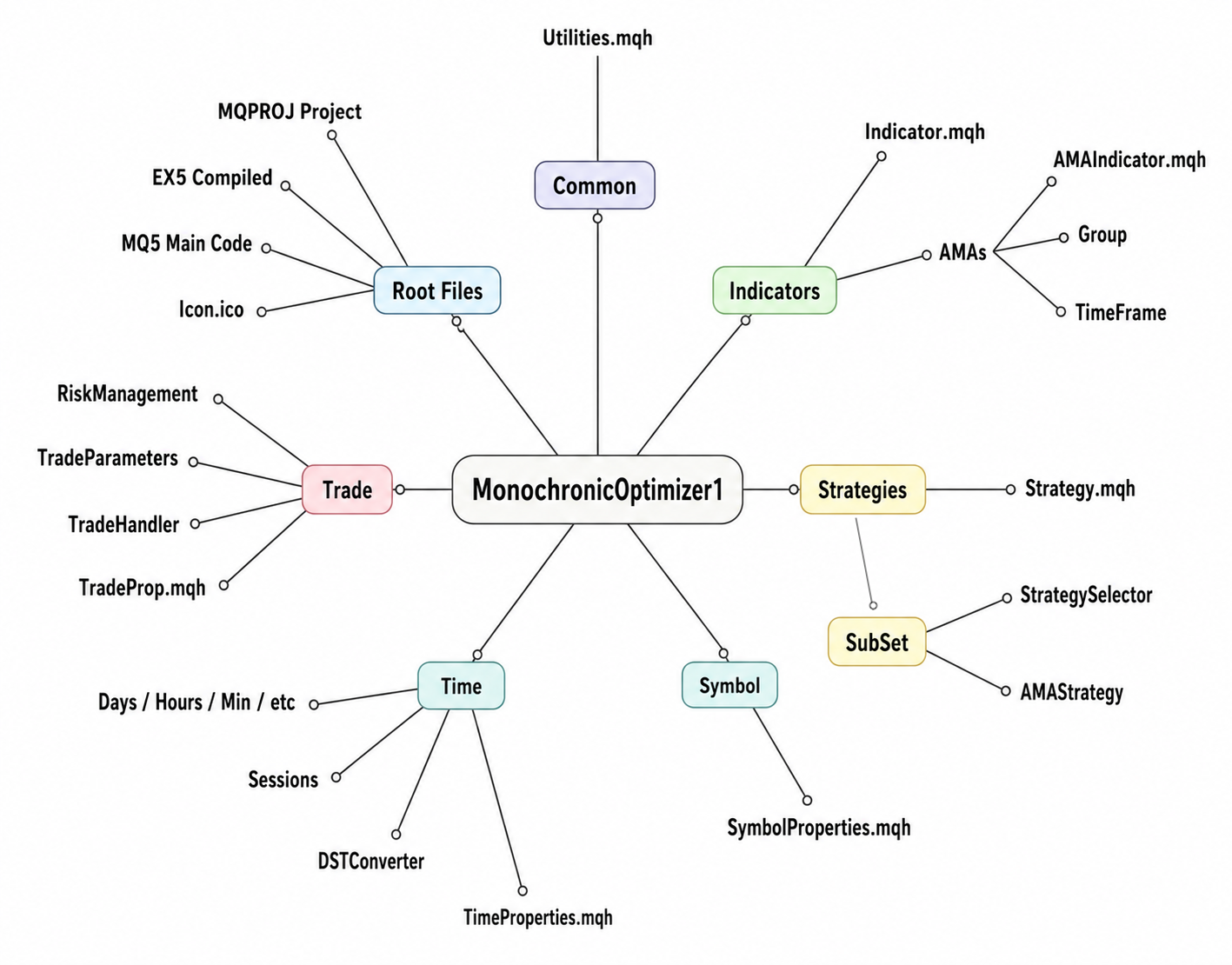
The project layout utilizes an object-oriented framework to keep code maintainable, components are mapped based on their operation. The project is designed to handle expansion with more indicators and more signals.
Common Directory
MQL5/Experts/MonochronicOptimizer1/Common/Utilities.mqh
The common directory contains shared utilities used across the optimizer: safe resource cleanup, logging, and basic configuration validation. These utilities keep the rest of the framework easier to maintain and reduce repeated error-handling code.
Indicators Directory
The indicators directory is the signal generation layer of the EA. The AMA module creates five Adaptive Moving Averages with different periods. Instead of relying on a single crossover, the optimizer compares every AMA pair and converts the result into a six-state trend signal: strong uptrend, uptrend, weak uptrend, weak downtrend, downtrend, or strong downtrend. These pair signals are then aggregated across all selected timeframes.
Structure:
| Path | Filename | Purpose |
|---|---|---|
| MQL5/Experts/MonochronicOptimizer1/Indicators/ | Indicator.mqh | abstract base class |
| MQL5/Experts/MonochronicOptimizer1/Indicators/AMAs/ | AMAIndicator.mqh | five-AMA generation + pairwise signals |
| MQL5/Experts/MonochronicOptimizer1/Indicators/AMAs/TimeFrame/ | AMA.mqh | single timeframe wrapper |
| MQL5/Experts/MonochronicOptimizer1/Indicators/AMAs/Group/ | GroupSelector.mqh | multi-timeframe aggregator |
MQL5/Experts/MonochronicOptimizer1/Indicators/Indicator.mqh
This file establishes the abstract base class CIndicatorBase from which all indicators inherit, to standardize how all indicators are initialized, refreshed and released.
MQL5/Experts/MonochronicOptimizer1/Indicators/AMAs/AMAIndicator.mqh
The CAMAIndicator inherits from CIndicatorBase and manages five Adaptive Moving Averages (AMAs) to produce advanced signals from ten pairwise comparisons between these AMAs to generate a consensus multi layered trend signal based on a majority vote.
MQL5/Experts/MonochronicOptimizer1/Indicators/AMAs/Group/GroupSelector.mqh
CGroupSelectAMAs aggregates signals across multiple timeframes and outputs the most-agreed signal.The timeframe list is copied from the global group configuration, and for each timeframe a signal is generated. All signal counts are declared into the vector signalcounts variable, where the vector variable's max value is assigned to the countmax integer variable. This countmax variable is compared with all signal counts to find a match and return this signal Enum as the maximum timeframe agreement signal.
Strategies Directory
The strategies directory is the decision layer, its sole responsibility is translating the consensus AMA signal produced by the indicators into a trade direction.
Structure:
| Path | Filename | Purpose |
|---|---|---|
| MQL5/Experts/MonochronicOptimizer1/Strategies/ | Strategy.mqh | base class + enums |
| MQL5/Experts/MonochronicOptimizer1/Strategies/SubSet/ | StrategySelector.mqh | strategy selection |
| MQL5/Experts/MonochronicOptimizer1/Strategies/SubSet/AMAs/ | AMAStrategy.mqh | trade direction assignments |
MQL5/Experts/MonochronicOptimizer1/Strategies/Strategy.mqh
This file contains the CStrategyBase class which defines the different strategies using the enum EStrategyType to be implemented alongside the entry signal states for each strategy. Indicator group class is initialized here.
MQL5/Experts/MonochronicOptimizer1/Strategies/SubSet/AMAs/AMAStrategy.mqh
This class expands upon the AMA strategy Enum types by translating them into entry signals.
Before translating the signals, the indicator group object should exist in memory and all the timeframe charts should be loaded correctly. If either check fails ENRTY_NONE is returned. Once the signal is retrieved the switch statement allocates to the matching Enum signal and a Entry signal is returned.
Strategies Heatmap
Strategies and their purpose:
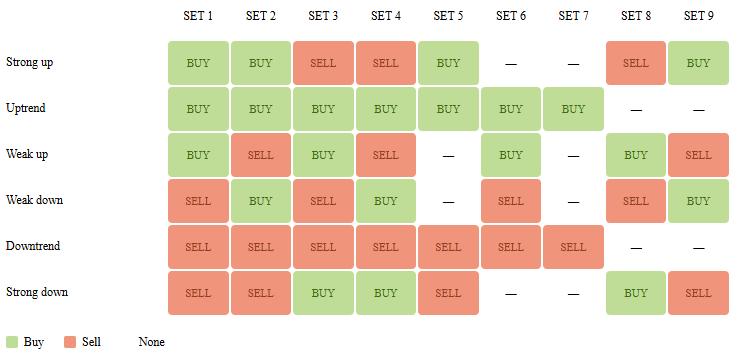
- SET 1: Pure Trend Following
- SET 2: Trend with Weak Counter-Trading
- SET 3: Mean Reverting Extremes
- SET 4: Pure Counter-Trend / Mean Reversion
- SET 5: Strict Trend Confirmation Filter
- SET 6: Conservative Trend Continuation
- SET 7: Conservative Pullback Execution
- SET 8: Swing Exhaustion Trading
- SET 9: Aggressive Swing Reversal
Time Directory
The time directory is dedicated to time conversions, declarations and management.
Structure:
| Path | Filename | Purpose |
|---|---|---|
| MQL5/Experts/MonochronicOptimizer1/Time/ | TimeProperties.mqh | timehub class + STimeData + timeframe group |
| MQL5/Experts/MonochronicOptimizer1/Time/Quarters/ | TimeQuarters.mqh | EQuarter enum |
| MQL5/Experts/MonochronicOptimizer1/Time/Months/ | TimeMonths.mqh | EMonthOfYear enum |
| MQL5/Experts/MonochronicOptimizer1/Time/Weeks/ | TimeWeeks.mqh | EWeekOfMonth + EWeeksOfMonth enums |
| MQL5/Experts/MonochronicOptimizer1/Time/Days/ | TimeDays.mqh | ETradingDay enum |
| MQL5/Experts/MonochronicOptimizer1/Time/Hours/ | TimeHours.mqh | EHourOfDay + ESessionHourOffset enums |
| MQL5/Experts/MonochronicOptimizer1/Time/Minutes/ | TimeMinutes.mqh | EMinuteOfHour enum 00/15/30/45 marks |
| MQL5/Experts/MonochronicOptimizer1/Time/Seconds/ | TimeSeconds.mqh | ESecondOfMinute enum |
| MQL5/Experts/MonochronicOptimizer1/Time/Sessions/ | TimeSessions.mqh | broker session window management |
| MQL5/Experts/MonochronicOptimizer1/Time/Sessions/ | IntradaySession.mqh | OPEN/MID/CLOSE session classifier |
| MQL5/Experts/MonochronicOptimizer1/Time/DSTConverter/ | SessionTimeConverter.mqh | DST-aware broker/session time conversion |
MQL5/Experts/MonochronicOptimizer1/Time/DSTConverter/SessionTimeConverter.mqh
This file handles DST-aware time zone conversion between a trading session's local time and the broker's server time.
         //-- Major Forex & Stock Sessions
         case SESSION_LONDON:
            info.baseUTCOffset = 0;
            info.dstRule = DST_EU;
            info.name = "London (GMT/BST)";
            info.sessionStartHour = 8;
            info.sessionStartMinute = 0;
            info.sessionEndHour = 16;
            info.sessionEndMinute = 30;
            break;
	...
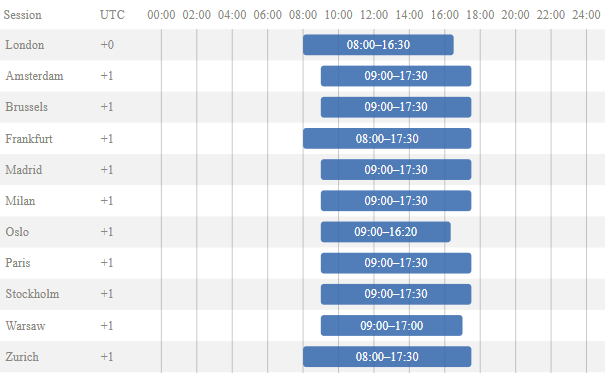
SSessionTimezone struct holds metadata for a session as shown above for London session.
The supported EU DST Sessions are shown below:
MQL5/Experts/MonochronicOptimizer1/Time/TimeProperties.mqh
CTimeProperties provides the calendar matching logic and utilizes other supporting functions to aid with calendar matching. The Timeframe group is declared and set here for the indicators to use. In this class we create a time data structure to work with all the calendar characteristics.
struct STimeFramesGroup
 {
  CArrayList<ENUM_TIMEFRAMES> TimeFrame;//Store group timeframes
  //-- Average Period Seconds
  int                Period_Seconds()
   {
    int secs = 0, count = 0;
    count = TimeFrame.Count();
    for(int i = 0; i < count; i++)
     {
      ENUM_TIMEFRAMES value;
      TimeFrame.TryGetValue(i, value);
      secs += PeriodSeconds(value);
     }
    return (count == 0) ? secs : int(secs / count);
   }
 } g_group;
The TimeFrame array list will store all the timeframes in the g_group variable for the multi-timeframe signal aggregation. Whereas the Period_Seconds function retrieves the average period seconds of all timeframe in the array list, this will be used for order expiration when placing stop orders.
In order to perform calendar matching we need to retrieve the current time into the STimeData structure.
  static void        UpdateTimeData(STimeData &time_data)
   {
     MqlDateTime dt;
     TimeToStruct(TimeTradeServer(), dt);
     time_data.month = (EMonthOfYear)dt.mon;
     time_data.quarter = (EQuarter)((dt.mon - 1) / 3);
     time_data.weeks = (EWeeksOfTheMonth)MathMin(MathFloor((dt.day - 1) / 7.0), 3);
     time_data.week = (EWeekOfMonth)MathMin(MathFloor((dt.day - 1) / 14.0), 1);
     ...
   }
The function UpdateTimeData updates the reference variable time_data with the current time.
| Assignment | Explanation |
|---|---|
| time_data.month = (EMonthOfYear)dt.mon | Casting of the 1-12 month number into the matching EMonthOfYear enum value. |
| time_data.quarter = (EQuarter) ((dt.mon)-1)/3) | Integer division maps months to quarters, where months:
|
| time_data.weeks = (EWeeksOfTheMonth)MathMin(MathFloor((dt.day -1)/7.0),3) | This groups the day of month into one of four weeks, each with a length of 7 days, where days:
|
| time_data.week = (EWeekOfMonth)MathMin(MathFloor((dt.day - 1)/14.0),1) | days 1-14 equals 0 (Week 1), days 15+ equals 1 (Week 2) |
The IsCalendarMatch function is responsible for the calendar filtration by checking the current calendar and the input calendar configuration to find a match, hour data is not included during this check because a separate function CIntradaySession::IsSessionHourMatch() is solely responsible for checking the trading hour.
MQL5/Experts/MonochronicOptimizer1/Time/Sessions/IntradaySession.mqh
IntradaySession takes into account market type and session time zones to configure intraday sessions from open, mid to close. This is useful when we want to trade the opening hour of London session instead of the whole session or if we would like to trade the last hour of the closing period of a session. Different financial markets follow different trading schedules, for example the forex market trades almost continuously during the week, while the stock market operates within fixed business hours. IntradaySession supports various market types that influence the trading sessions.
Here are the different intraday session configurations for the Equity market:
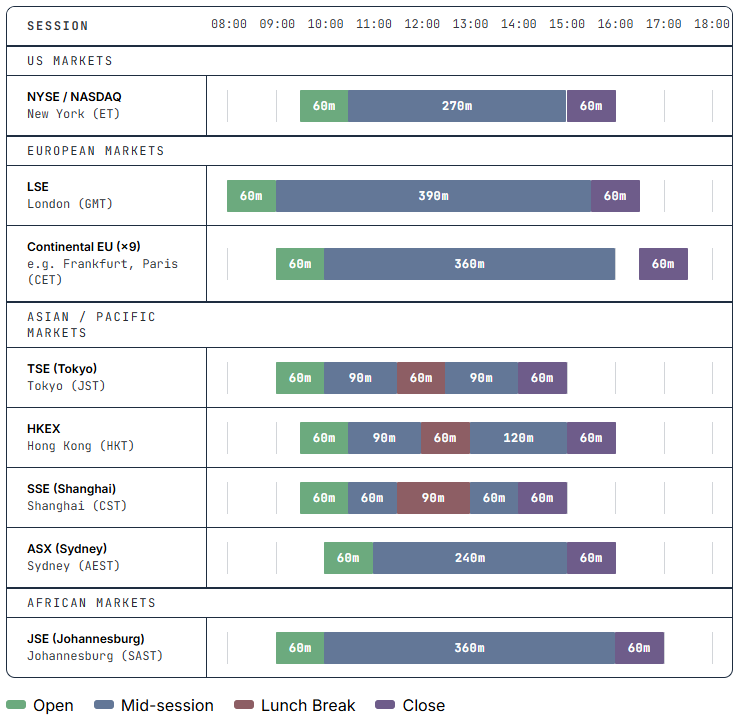
Once we have configured the desired market intraday session, we need to know if we are in the correct session window with the hour and minute offset within that session to open a trade. IsSessionHourMatch function takes on the responsibility to match current session window with hour and minute offset to the input settings.
The IsSessionHourMatch function verifies:
- session type
- hour offset
- 15-minute mark
- DST-adjusted broker time
Global Trading Sessions and Market Rhythms
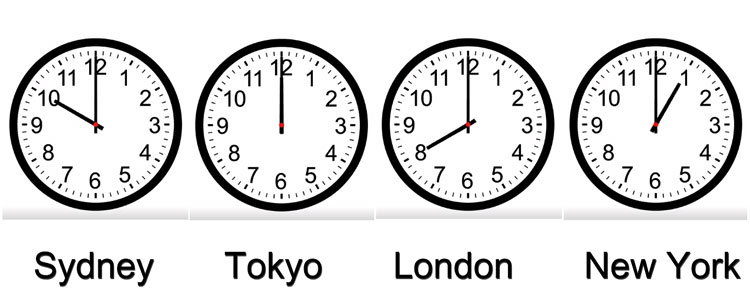
Financial markets run in sessions based on different time-zones, and each session has its own pace.
| Session | Major Market | Time(GMT) |
|---|---|---|
| US | New York | ~1pm-10pm |
| Asian | Tokyo | Midnight-9am |
| European | London | ~8am-5pm |
Session-specific activity in certain instruments can create recurring trading opportunities. Example:
USD/JPY is most active in Asian session and New York sessions, while EUR/USD peaks during European and New York sessions. Gold is notably volatile during New York and London sessions especially in the session overlap. Equity indices see higher concentration of moves at local market open/close time, U.S. indices see big swings right at 9:30 ET open and near the 4:00 ET close. Whereas commodities like oil react to scheduled releases at 14:30 ET and also show session patterns.
Quarter-Hour Marks and Scheduled EventsWhy are sub-hour intervals – the 00, 15, 30, and 45-minute marks important?
Because many events and market mechanisms align on clock-time. In practice, major economic releases and fixings tend to occur on the hour or half-hour. For example, U.S. employment reports, CPI, Fed minutes and most U.S. data drop at :30 or on the hour, while European indicators often come right on the hour (:00).
Intraday stock-market patterns show these quarter-hour effects. On a typical trading day, volume and volatility surge at the 9:30 ET open and remain elevated for the first several minutes. In the minutes following the open, one often sees the initial flurry (~9:31–9:45) followed by a retracement or consolidation. For example, it is common for price to pull back around 9:45 ET (15 minutes after open) before resuming a trend.
Conclusion
In this first part of the series, we introduced the concept of monochronic trading—pairing a trading strategy with specific market time windows rather than treating time as a passive background variable. Before any meaningful time-based optimization can begin, however, an Expert Advisor must first understand the broker's time zone and daylight saving schedule. We addressed this problem by developing an automated NFP-based approach that determines both the broker's UTC offset and its DST rule, providing a reliable foundation for time-aware trading systems.
We also introduced the overall architecture of the Monochronic Optimizer framework and the role of its main modules. Rather than optimizing every possible parameter through brute force, the framework is designed to evaluate how market sessions, calendar events, and scheduled time intervals influence the performance of different trading strategies.
In the next article, we will move from infrastructure to experimentation by performing large-scale back-testing, exporting trading results, and analyzing them statistically to identify persistent time windows with a measurable trading edge.
I hope you found this article useful.
Files summary table:
| # | File | Description |
|---|---|---|
| 1 | Common/Utilities.mqh | Shared utilities for logging, validation, and resource management. |
| 2 | Indicators/Indicator.mqh | Abstract base class for all indicators. |
| 3 | Indicators/AMAs/AMAIndicator.mqh | Generates five AMA-based trend signals. |
| 4 | Indicators/AMAs/TimeFrame/AMA.mqh | Single-timeframe AMA wrapper. |
| 5 | Indicators/AMAs/Group/GroupSelector.mqh | Aggregates signals across multiple timeframes. |
| 6 | Strategies/Strategy.mqh | Base strategy framework and shared definitions. |
| 7 | Strategies/SubSet/AMAs/AMAStrategy.mqh | Implements the nine AMA trading strategies. |
| 8 | Strategies/SubSet/StrategySelector.mqh | Selects the active trading strategy. |
| 9 | Symbol/SymbolProperties.mqh | Symbol, price, and lot-size helper functions. |
| 10 | Time/TimeProperties.mqh | Calendar filtering and timeframe management. |
| 11 | Time/DSTConverter/SessionTimeConverter.mqh | DST-aware conversion between broker and session time. |
| 12 | Time/Sessions/IntradaySession.mqh | Classifies session phases and validates trading windows. |
| 13 | Time/Sessions/TimeSessions.mqh | Reads broker trading sessions and market hours. |
| 14 | Time/Months/TimeMonths.mqh | Month-based trading filters. |
| 15 | Time/Quarters/TimeQuarters.mqh | Quarter-based trading filters. |
| 16 | Time/Weeks/TimeWeeks.mqh | Week-of-month trading filters. |
| 17 | Time/Days/TimeDays.mqh | Day-of-week trading filters. |
| 18 | Time/Hours/TimeHours.mqh | Hour-of-day and session-hour filters. |
| 19 | Time/Minutes/TimeMinutes.mqh | Quarter-hour (00/15/30/45) filters. |
| 20 | Time/Seconds/TimeSeconds.mqh | Second-of-minute definitions. |
| 21 | Trade/TradeProp.mqh | Main trade execution controller. |
| 22 | Trade/Handles/TradeHandler.mqh | Manages open positions and trailing logic. |
| 23 | Trade/Parameters/TradeParameters.mqh | Calculates trade parameters and magic number. |
| 24 | Trade/Risk/RiskManagement.mqh | Position sizing and risk management. |
| 25 | MonochronicOptimizer1.mq5 | Main Expert Advisor entry point. |
Warning: All rights to these materials are reserved by MetaQuotes Ltd. Copying or reprinting of these materials in whole or in part is prohibited.
This article was written by a user of the site and reflects their personal views. MetaQuotes Ltd is not responsible for the accuracy of the information presented, nor for any consequences resulting from the use of the solutions, strategies or recommendations described.

 Algorithmic Arbitrage Trading Using Graph Theory
 Market Simulation: Position View (V)
 Building an Interactive AnchorFlow Volume Profile Indicator (MTF) in MQL5
 From Basic to Intermediate: Random Access to Files (I)

- Free trading apps
- Over 8,000 signals for copying
- Economic news for exploring financial markets
You agree to website policy and terms of use