

Market Simulation (Part 23): Getting Started with SQL (VI)
 1 208
1 208
 0
0

Introduction
In the previous article Market Simulation (Part 22): Getting Started with SQL (V) we looked at how to use—or, more precisely, how to associate—a primary key with a foreign key. If this is not clear yet, I recommend reading the previous articles first. That background is necessary to fully understand what we will do here.
Understanding query results
In the previous article, we created a small database to illustrate the use of primary keys together with foreign keys. However, when we query this configuration, we are likely to get a result that is quite different from what we expect. To make this clearer, we will use the following code to query the database.
SELECT * FROM tb_Quotes;
Code 01
The result is shown below.
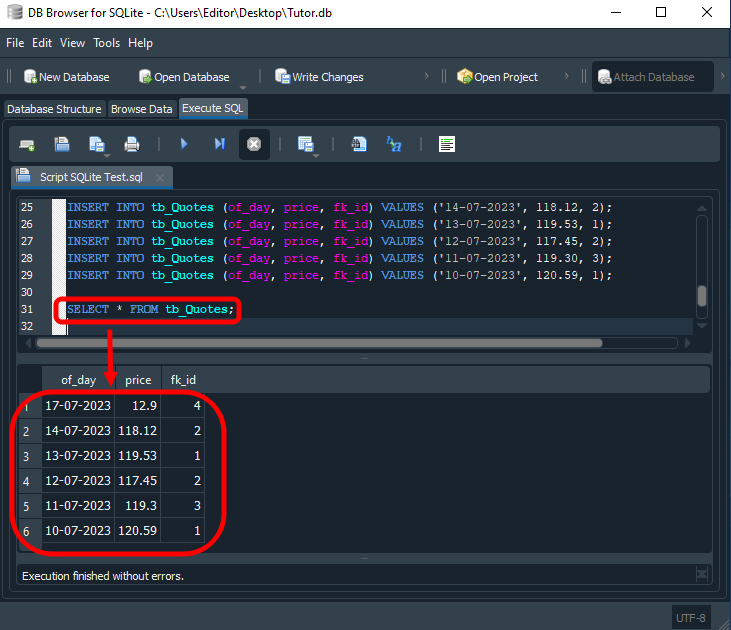
Image 01
At this point, you may ask yourself: "What did I do wrong?" The answer is: nothing. Many people avoid using foreign keys in their databases precisely because they do not understand the concept behind this type of key. As a result, they end up creating non-relational databases, which makes both maintenance and the structure itself much more complicated. This also increases the amount of processing and the workload handled by SQL.
One of SQL's greatest strengths is that it lets us create tables that seem independent while still relating them—or, more precisely, relating the values stored in them. This allows us to avoid one of the biggest problems that existed before SQL: data duplication. You may not yet see how harmful duplication is to a database, but it can essentially cancel out one of the main benefits of using SQL when building a database for an application.
Visualizing the database diagram
There are several tools for visualizing database diagrams, with different feature sets. In DB Browser, which we are using here to explain certain points, this kind of diagram cannot be generated, at least at the time of writing. Since DB Browser is open source and receives updates through GitHub, this feature may already be available by the time you read this article. One alternative is to use DBeaver. This program has a free version that can be downloaded and used without much difficulty. Once DBeaver is installed, follow these steps to view the diagram:
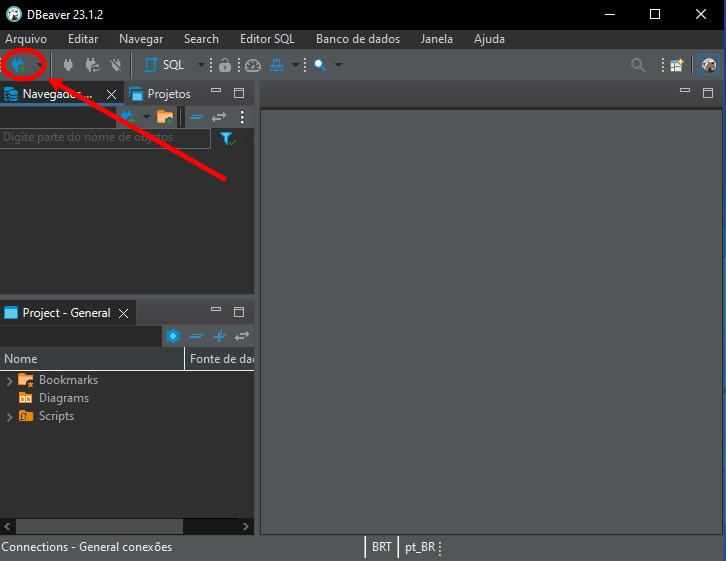
Image 02
This will open a new window, as shown below.
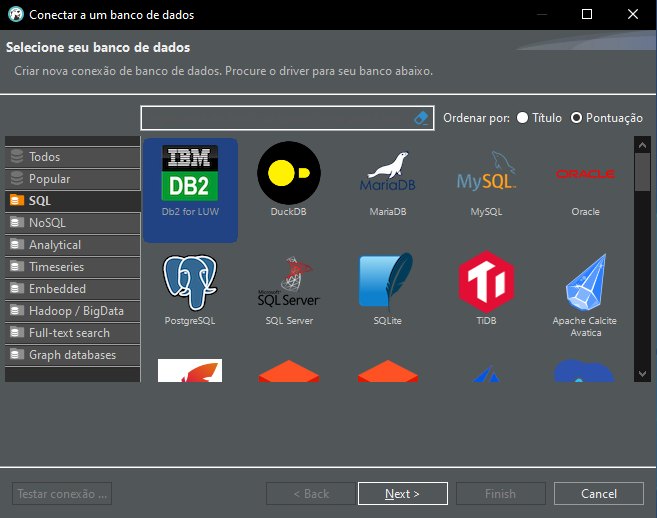
Image 03
Here we need to select the database type to display. Remember that we are using SQLite. Find and select it, as shown below.
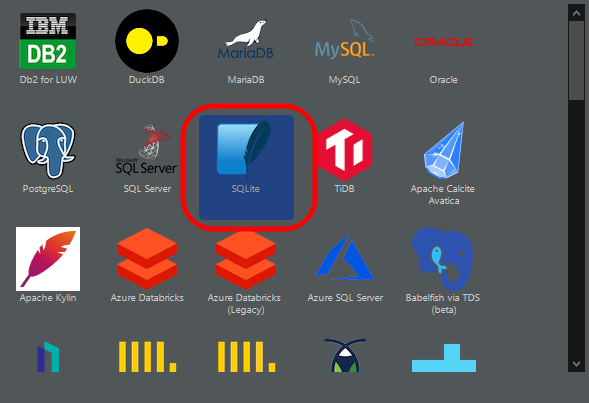
Image 04
Great, now we will see the following window.
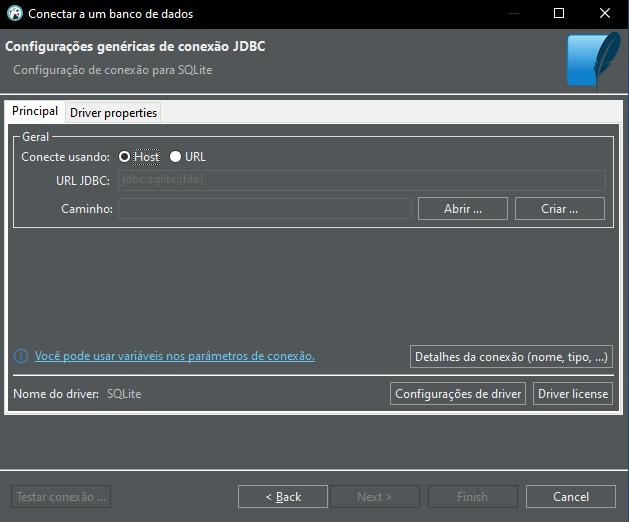
Image 05
Here you need to enter the path and name of the database to be opened, as shown below.
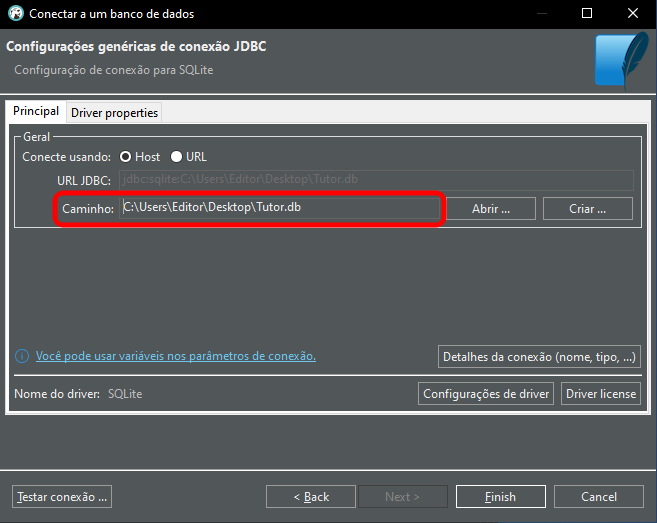
Image 06
After that, click "Finish", and the final screen will appear.
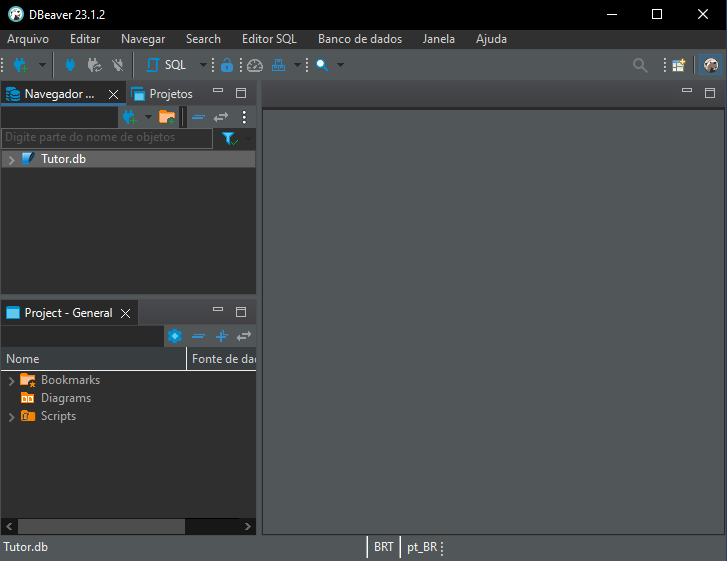
Image 07
If everything has been done correctly, the result will look like Image 07, with our database ready to use. We can now open the diagram by clicking the highlighted items below:
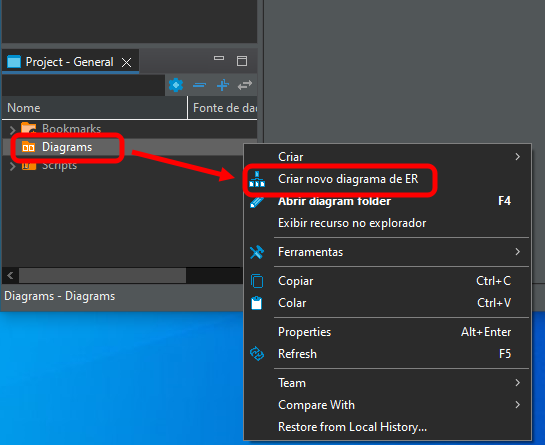
Image 08
The window shown below will open:
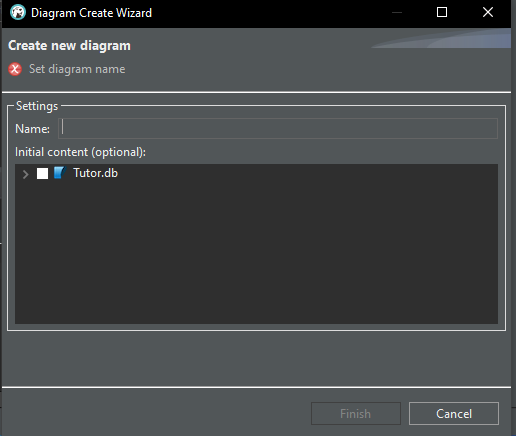
Image 09
Now give the new diagram a name, as shown in the image. You can choose any name you want.
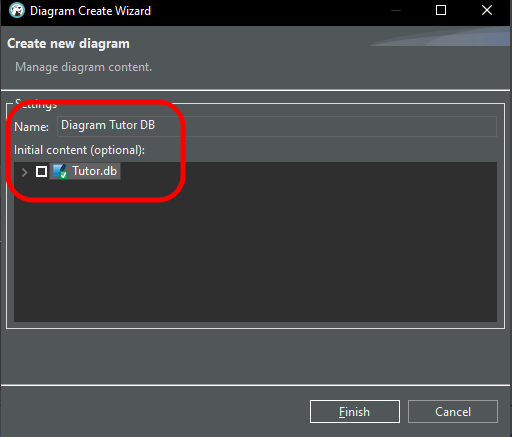
Image 10
Finally, after clicking the "Finish" button, we get the following result:
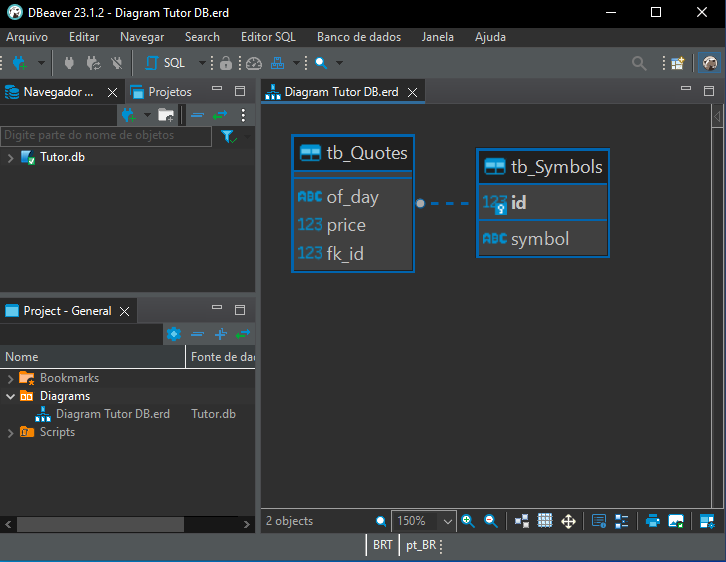
Image 11
Interpreting the diagram
Image 11 clearly shows the relationship between the tb_Quotes and tb_Symbols tables. At first, you may think this is a one-to-one relationship, meaning that each record in tb_Symbols has one corresponding record in tb_Quotes. This can happen in some cases. However, pay attention to one detail in the diagram. It is subtle but important, and the image below highlights exactly what you should look at.
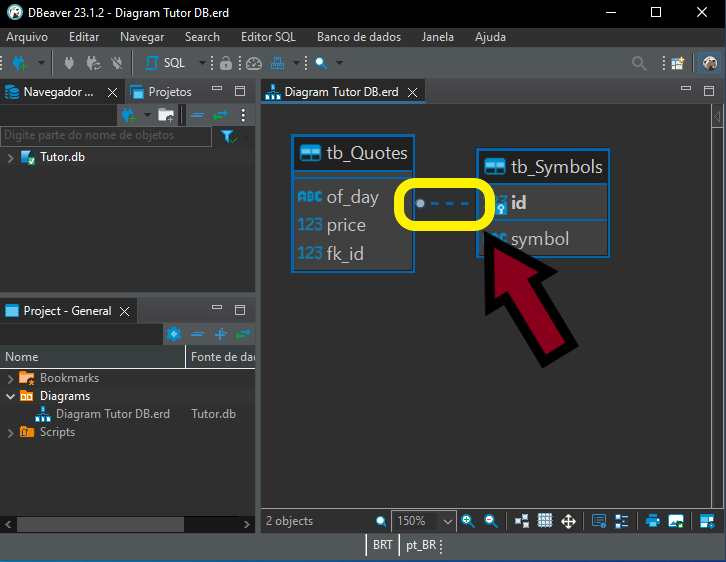
Image 12
Notice that there is a small circle on one side, while the other side has no such marker. Pay close attention to this. What does it mean? It indicates a one-to-many relationship. In other words, the table on the side with the circle may contain many records for each record in the table linked by that line. Knowing how to interpret this correctly helps us write better queries. It also makes database changes much easier and less error-prone.
This matters because when a record in one table can be referenced many times in one or more other tables, we can better understand and design triggers for adding new data, deleting records, or updating database information. But that is a topic for another discussion. At this stage, we need to understand how this type of relationship helps us visualize the database contents correctly.
Working with data in SQL
So far, we have only looked at creating the database diagram. Now we will return to DB Browser. Remember that MetaEditor can also be used to obtain the same result shown here, although the code used to query the database is slightly different. The code in question is shown below:
01. PRAGMA FOREIGN_KEYS = ON;
02.
03. DROP TABLE IF EXISTS tb_Quotes;
04. DROP TABLE IF EXISTS tb_Symbols;
05.
06. CREATE TABLE IF NOT EXISTS tb_Symbols
07. (
08.     id INTEGER PRIMARY KEY,
09.     symbol TEXT NOT NULL UNIQUE
10. );
11.
12. CREATE TABLE IF NOT EXISTS tb_Quotes
13. (
14.     of_day TEXT NOT NULL,
15.     price NUMERIC NOT NULL,
16.     fk_id INTEGER NOT NULL,
17.     FOREIGN KEY (fk_id) REFERENCES tb_Symbols(id)
18. );
19.
20. INSERT INTO tb_Symbols (id, symbol) VALUES(1, 'BOVA11');
21. INSERT INTO tb_Symbols (id, symbol) VALUES(3, 'PETR4');
22. INSERT INTO tb_Symbols (id, symbol) VALUES(2, 'WDOQ23');
23. INSERT INTO tb_Symbols (id, symbol) VALUES(4, 'VALE3');
24. INSERT INTO tb_Quotes (of_day, price, fk_id) VALUES ('17-07-2023', 12.90, 4);
25. INSERT INTO tb_Quotes (of_day, price, fk_id) VALUES ('14-07-2023', 118.12, 2);
26. INSERT INTO tb_Quotes (of_day, price, fk_id) VALUES ('13-07-2023', 119.53, 1);
27. INSERT INTO tb_Quotes (of_day, price, fk_id) VALUES ('12-07-2023', 117.45, 2);
28. INSERT INTO tb_Quotes (of_day, price, fk_id) VALUES ('11-07-2023', 119.30, 3);
29. INSERT INTO tb_Quotes (of_day, price, fk_id) VALUES ('10-07-2023', 120.59, 1);
30.
31. SELECT * FROM tb_Quotes, tb_Symbols;
Code 02
When this script is executed, SQL returns 24 records. Why? Let's see what happened. Look at the output produced by the code in the image below:
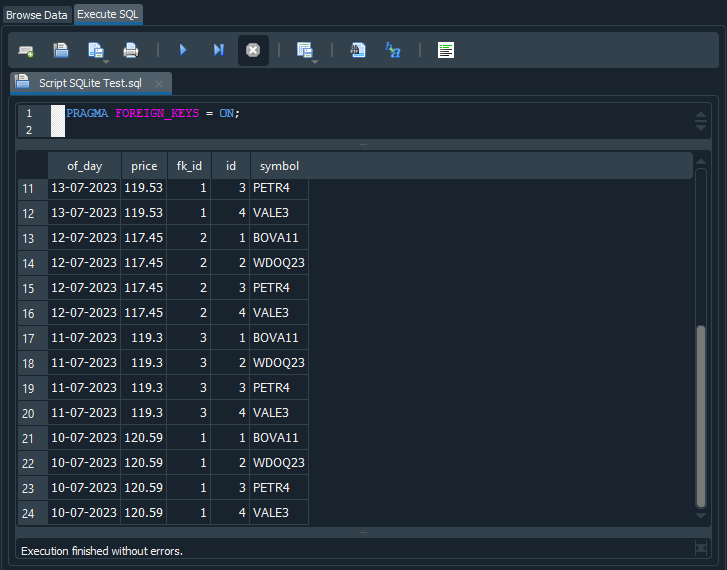
Image 13
You can see that the same quote value and date are repeated across rows 17 to 20. In other words, SQL interpreted the SELECT command as a request to combine the contents of tb_Quotes and tb_Symbols. As a result, values from tb_Quotes are repeated while values from tb_Symbols change. Since tb_Quotes contains six records and tb_Symbols contains four records, combining the two tables produces 24 records. Is it now clear why SQL returns 24 records?
Now look closely at Image 13. In some cases, the fk_id value matches the id value. Interesting, isn't it? Why does this happen? The value stored in fk_id indicates which value we should look up. Returning to the diagram in Image 12, we can see that id belongs to tb_Symbols, while fk_id belongs to tb_Quotes.
Now we need to use what is known as an alias. In other words, we assign aliases to the tables so that we can relate one table to the other. This tells SQL how to assemble the result set correctly. When using aliases, avoid reserved words. Some implementations may handle them, but in general, and to avoid confusing other SQL programmers, reserved words should not be used as aliases in SQL code. The new code is shown below:
01. PRAGMA FOREIGN_KEYS = ON;
02.
03. DROP TABLE IF EXISTS tb_Quotes;
04. DROP TABLE IF EXISTS tb_Symbols;
05.
06. CREATE TABLE IF NOT EXISTS tb_Symbols
07. (
08.     id INTEGER PRIMARY KEY,
09.     symbol TEXT NOT NULL UNIQUE
10. );
11.
12. CREATE TABLE IF NOT EXISTS tb_Quotes
13. (
14.     of_day TEXT NOT NULL,
15.     price NUMERIC NOT NULL,
16.     fk_id INTEGER NOT NULL,
17.     FOREIGN KEY (fk_id) REFERENCES tb_Symbols(id)
18. );
19.
20. INSERT INTO tb_Symbols (id, symbol) VALUES(1, 'BOVA11');
21. INSERT INTO tb_Symbols (id, symbol) VALUES(3, 'PETR4');
22. INSERT INTO tb_Symbols (id, symbol) VALUES(2, 'WDOQ23');
23. INSERT INTO tb_Symbols (id, symbol) VALUES(4, 'VALE3');
24. INSERT INTO tb_Quotes (of_day, price, fk_id) VALUES ('17-07-2023', 12.90, 4);
25. INSERT INTO tb_Quotes (of_day, price, fk_id) VALUES ('14-07-2023', 118.12, 2);
26. INSERT INTO tb_Quotes (of_day, price, fk_id) VALUES ('13-07-2023', 119.53, 1);
27. INSERT INTO tb_Quotes (of_day, price, fk_id) VALUES ('12-07-2023', 117.45, 2);
28. INSERT INTO tb_Quotes (of_day, price, fk_id) VALUES ('11-07-2023', 119.30, 3);
29. INSERT INTO tb_Quotes (of_day, price, fk_id) VALUES ('10-07-2023', 120.59, 1);
30.
31. SELECT *
32.     FROM tb_Quotes AS tq, tb_Symbols AS ts
33.     WHERE tq.fk_id = ts.id;
Code 03
When this code is executed, we will get the result shown in the image below:
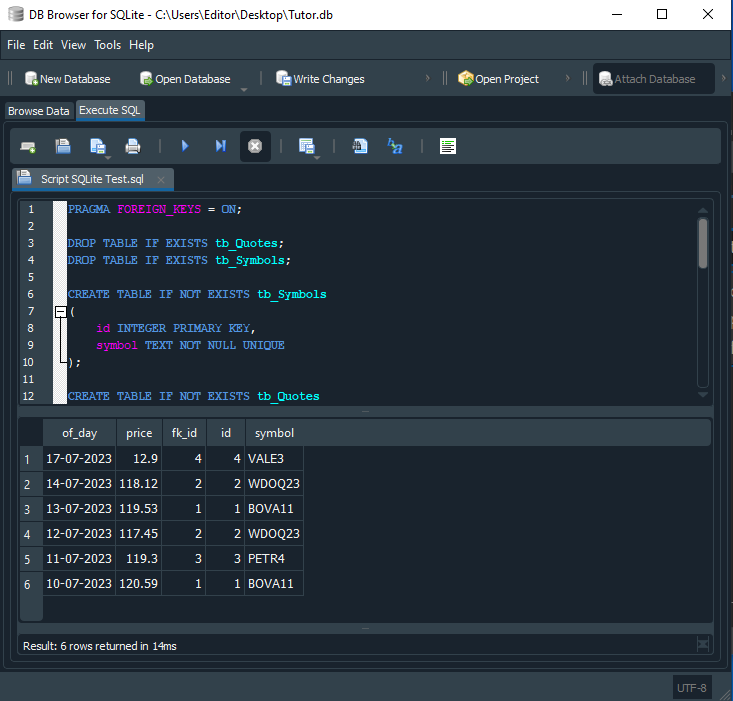
Image 14
As if by magic, we now get exactly what we expected: six quote records showing the symbol, date, and instrument price. Now let's see why this happens. In line 32 of the script, we add an alias after each table name.
Line 33 tells SQL how to relate the two tables and return the correct result. Here, the WHERE clause defines the criteria used to filter the result set. In this case, whenever the fk_id value in tb_Quotes matches the id value in tb_Symbols, the row should be included in the output. The SELECT command can therefore consider the combinations shown earlier, but the WHERE filter makes SQL return only the rows we actually requested.
A small clarification to the explanation above: strictly speaking, SQL does not necessarily iterate physically through every possible row combination. The engine chooses a more efficient execution plan for the query. Doing this naively would very quickly degrade overall system performance. In practice, SQL starts from one of the tables and then looks up the required fields in the other table to perform the comparisons and matches. This makes the query much more efficient.
We can improve the output of the SQL query even further. Column names often look somewhat odd, and sometimes, as you saw in Image 14, SQL returns columns we do not need. How can we remove this extra information? It is very simple: tell SQL which columns we want and what names they should have. This brings us to the script shown below:
01. PRAGMA FOREIGN_KEYS = ON;
02.
03. DROP TABLE IF EXISTS tb_Quotes;
04. DROP TABLE IF EXISTS tb_Symbols;
05.
06. CREATE TABLE IF NOT EXISTS tb_Symbols
07. (
08.     id INTEGER PRIMARY KEY,
09.     symbol TEXT NOT NULL UNIQUE
10. );
11.
12. CREATE TABLE IF NOT EXISTS tb_Quotes
13. (
14.     of_day TEXT NOT NULL,
15.     price NUMERIC NOT NULL,
16.     fk_id INTEGER NOT NULL,
17.     FOREIGN KEY (fk_id) REFERENCES tb_Symbols(id)
18. );
19.
20. INSERT INTO tb_Symbols (id, symbol) VALUES(1, 'BOVA11');
21. INSERT INTO tb_Symbols (id, symbol) VALUES(3, 'PETR4');
22. INSERT INTO tb_Symbols (id, symbol) VALUES(2, 'WDOQ23');
23. INSERT INTO tb_Symbols (id, symbol) VALUES(4, 'VALE3');
24. INSERT INTO tb_Quotes (of_day, price, fk_id) VALUES ('17-07-2023', 12.90, 4);
25. INSERT INTO tb_Quotes (of_day, price, fk_id) VALUES ('14-07-2023', 118.12, 2);
26. INSERT INTO tb_Quotes (of_day, price, fk_id) VALUES ('13-07-2023', 119.53, 1);
27. INSERT INTO tb_Quotes (of_day, price, fk_id) VALUES ('12-07-2023', 117.45, 2);
28. INSERT INTO tb_Quotes (of_day, price, fk_id) VALUES ('11-07-2023', 119.30, 3);
29. INSERT INTO tb_Quotes (of_day, price, fk_id) VALUES ('10-07-2023', 120.59, 1);
30.
31. SELECT tq.of_day AS 'Quote Date',
32.        tq.price AS 'Current Price',
33.        ts.symbol AS 'Asset Name'
34.     FROM tb_Quotes AS tq, tb_Symbols AS ts
35.     WHERE tq.fk_id = ts.id;
Code 04
The result is shown below:
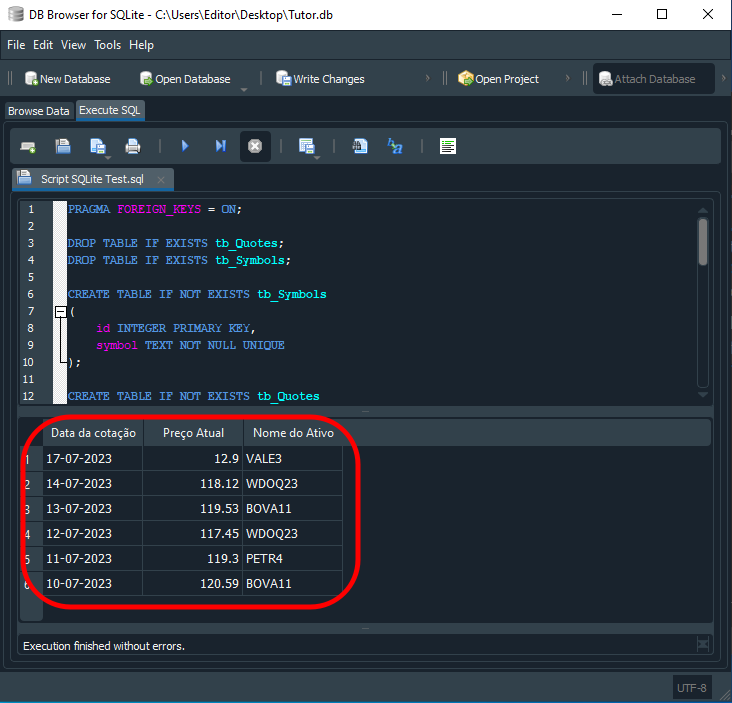
Image 15
"Wow! So SQL is not quite what I imagined. I always thought it was just a set of meaningless instructions, but now I see that it can actually be very interesting." And this is only a warm-up. Many people think that external programs are required to further process the returned data, but this can be done directly in SQL. For example, suppose we want the data ordered with the highest prices first and the lowest prices last. To do this, we can use code like the following:
01. PRAGMA FOREIGN_KEYS = ON;
02.
03. DROP TABLE IF EXISTS tb_Quotes;
04. DROP TABLE IF EXISTS tb_Symbols;
05.
06. CREATE TABLE IF NOT EXISTS tb_Symbols
07. (
08.     id INTEGER PRIMARY KEY,
09.     symbol TEXT NOT NULL UNIQUE
10. );
11.
12. CREATE TABLE IF NOT EXISTS tb_Quotes
13. (
14.     of_day TEXT NOT NULL,
15.     price NUMERIC NOT NULL,
16.     fk_id INTEGER NOT NULL,
17.     FOREIGN KEY (fk_id) REFERENCES tb_Symbols(id)
18. );
19.
20. INSERT INTO tb_Symbols (id, symbol) VALUES(1, 'BOVA11');
21. INSERT INTO tb_Symbols (id, symbol) VALUES(3, 'PETR4');
22. INSERT INTO tb_Symbols (id, symbol) VALUES(2, 'WDOQ23');
23. INSERT INTO tb_Symbols (id, symbol) VALUES(4, 'VALE3');
24. INSERT INTO tb_Quotes (of_day, price, fk_id) VALUES ('17-07-2023', 12.90, 4);
25. INSERT INTO tb_Quotes (of_day, price, fk_id) VALUES ('14-07-2023', 118.12, 2);
26. INSERT INTO tb_Quotes (of_day, price, fk_id) VALUES ('13-07-2023', 119.53, 1);
27. INSERT INTO tb_Quotes (of_day, price, fk_id) VALUES ('12-07-2023', 117.45, 2);
28. INSERT INTO tb_Quotes (of_day, price, fk_id) VALUES ('11-07-2023', 119.30, 3);
29. INSERT INTO tb_Quotes (of_day, price, fk_id) VALUES ('10-07-2023', 120.59, 1);
30.
31. SELECT tq.of_day AS 'Quote Date',
32.        tq.price AS 'Current Price',
33.        ts.symbol AS 'Asset Name'
34.     FROM tb_Quotes AS tq, tb_Symbols AS ts
35.     WHERE tq.fk_id = ts.id
36.     ORDER BY price DESC;
Code 05
The result of executing Code 05 in SQL is shown below:
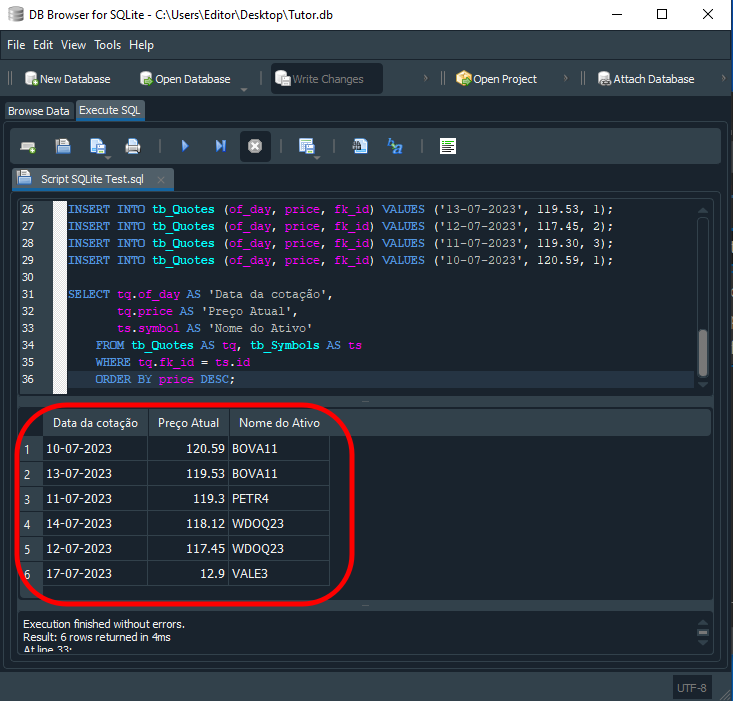
Image 16
Be careful when working with records
In the article Market Simulation (Part 19): Getting Started with SQL (II) we explained how records can be changed or removed using the UPDATE and DELETE commands. Although this works, it is not the best way to work with a relational database, because the approach is error-prone when several tables are related to one another. To understand the problem, let's return to Code 05 and do something very simple. Up to line 29, we create the database and insert data into it. Whether the data is correct is not important here; we simply want to create the database. When we execute the SELECT query on line 31, we get the result shown below:
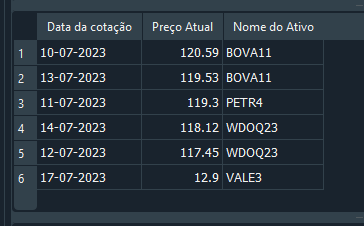
Image 17
At this point, we notice that one record contains incorrect information. Instead of recreating the entire database or deleting the record, we decide to use the UPDATE command to correct the value. This is done as follows:
1. UPDATE tb_Quotes SET price = 29.58 WHERE fk_id = 3;
2.
3. SELECT tq.of_day AS 'Quote Date',
4.        tq.price AS 'Current Price',
5.        ts.symbol AS 'Asset Name'
6.     FROM tb_Quotes AS tq, tb_Symbols AS ts
7.     WHERE tq.fk_id = ts.id
8.     ORDER BY price DESC;
Code 06
And we get the result shown below:
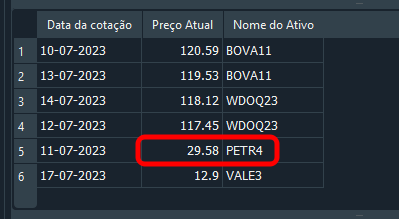
Image 18
Good. The record has been updated, and you may feel pleased, thinking that you already know how to work with SQL. However, if you look at Code 05, where we insert data into the database, you can see that there is only one record for PETR4. In that case, the information can easily be changed or even deleted. Now let's think a little. What if, instead of PETR4, we need to change the record for WDOQ23? How would we do that? One could immediately say: "It's simple; I would use the following command":
01. UPDATE tb_Quotes
02.      SET price = 119
03.      WHERE fk_id = 2
04.        AND of_day = '14-07-2023';
05.
06. SELECT tq.of_day AS 'Quote Date',
07.        tq.price AS 'Current Price',
08.        ts.symbol AS 'Asset Name'
09.     FROM tb_Quotes AS tq, tb_Symbols AS ts
10.     WHERE tq.fk_id = ts.id
11.     ORDER BY price DESC;
Code 07
Again, you are right: the result is shown below. This worked because we filtered the rows by both fk_id and of_day.
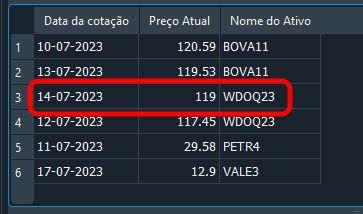
Image 19
Updating a record in a relational database
A good, although not the only, way to edit a relational database is to understand exactly what each SQL command does. Put another way, if you do not understand SQL commands, you may conclude that SQL is extremely limited. But once you understand it, you can do a great deal. And by "a great deal", I mean a great deal indeed. I have seen people write external code to solve tasks that could have been handled directly in SQL. They usually do this because they do not fully understand how SQL works. With that in mind, let's see how to make the same change as in the previous section, but this time without manually entering the fk_id value.
At this point, you may be thinking: "So, are we going to use a non-relational table structure?" No, dear reader. We will keep the relational model. To achieve the same goal as in the previous section, we will update Code 07 as follows.
01. UPDATE tb_Quotes
02.     SET price = 4985.5
03.     WHERE fk_id = (SELECT ts.id FROM tb_Symbols AS ts WHERE ts.symbol = 'WDOQ23')
04.       AND of_day = '14-07-2023';
05.
06. SELECT tq.of_day AS 'Quote Date',
07.        tq.price AS 'Current Price',
08.        ts.symbol AS 'Asset Name'
09.     FROM tb_Quotes AS tq, tb_Symbols AS ts
10.     WHERE tq.fk_id = ts.id
11.     ORDER BY price DESC;
Code 08
"Man, what kind of madness is this? Are you sure it will work? I have never seen anyone do anything this crazy." Your skepticism is understandable, dear reader. But look at the result below:
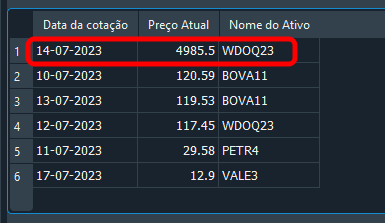
Image 20
Notice that we used a slightly different value specifically to show that it works. So the question is: how does the code above work? At no point do we specify fk_id or the identifier to use. Nevertheless, the correct record is changed. We provide the symbol name and the corresponding date. This is important: although each record has its own date, we should think more realistically. On the same date, the database may contain different symbols with different prices. Therefore, filtering by both date and symbol greatly increases query accuracy and returns exactly the requested record.
You may not have noticed it, but we have just explained how the code above works. If you did not understand or fully grasp the idea, do not be discouraged. These things are difficult to understand at first. Let's carefully examine what happens in Code 08. Notice that the UPDATE command is split across several lines. We did this deliberately so that we can explain what is happening.
In line 01, we state that we want to update a record in the tb_Quotes table. If we had used DELETE instead of UPDATE, the record would have been deleted from the table. Therefore, the explanation also applies to deleting records. In line 02, we specify which column will be updated and which value it should contain after the update. I think the reasoning is clear up to this point. In line 03, using the reserved word WHERE, we define the filtering criteria so that SQL knows how to find the required record. Now pay very close attention, because this is where many beginners get confused.
Each of these commands behaves, in a sense, like a function: it returns values. The returned value may be a single value, or it may be a compound result containing several values or fields. Therefore, a SELECT command can return just one value, as it does here. It can also return many values in a table-like structure, exactly as happens when the SELECT command on line 06 is executed.
When the filtering criteria are specific enough and are applied to the right table, the SELECT command returns a unique value, which means that the result can be treated almost like a variable. "But wait a second. SQLite does not let us use variables, does it?" Well, more or less. If we know how to work with SQL, and not just with SQLite, we can in practice use values inside SQL code in a variable-like way. This issue will become clearer later, because we will need to take additional steps when using related tables to ensure database consistency.
Returning to the explanation, note that in line 03 we specify the symbol name, in this case WDOQ23. This makes SQL look in tb_Symbols, the table specified in the SELECT command. What is it looking for? The value ts.id. In other words, once the query is executed, SELECT returns the ID value from the row whose symbol name is WDOQ23. SQL then uses the value found in one table to determine which record should be updated in another table. Is that all? Yes, dear reader, that is exactly what we are doing here. And the chance of making a mistake is much lower.
However, not everything is perfect. We may provide the name of a symbol whose identifier cannot be found. Although this may seem unusual, such situations are quite common in practice. Consequently, Code 08 will not handle this situation properly. To put it more clearly: we can try to do something, and SQL will not necessarily tell us that there was an error or that the command was interpreted differently from what we intended. We may simply assume that everything worked, because the only output we see is the result of the SELECT command on line 06.
At this stage, it may not be obvious why this is a problem. If the implementation reports no errors, we may be left with the illusion that everything is fine. Later, when we try to find or use the data we thought was there, we may get an unpleasant surprise: the information is not in the expected state. Often, the information needed to diagnose and fix the problem will no longer be available.
Checking whether a record was updated
SQLite provides a relatively simple way to check whether the record value we wanted to update was actually updated. For this, we need a small piece of code. But before moving on to the code, we should consider something. It is common to hear that, after updating or even adding a record to a database, we should run a SELECT statement to check whether everything succeeded. There is a small problem with this approach. If we are working with a small database, or with one that has only a few changes, using SELECT to verify the update is indeed reasonable. However, especially in shared databases, checking several updated records with SELECT is not always straightforward.
Fortunately, shared databases typically run on servers, so SQLite usually falls outside that scenario. Even so, an SQLite database may still require hundreds or even thousands of records to be updated. Just imagine the work involved in checking each one individually with SELECT to confirm that the database was updated correctly. This is why we need a somewhat different approach. Checking each updated record individually is perfectly acceptable only when making small changes to the database.
As the workload and the number of operations increase, however, we need a different approach. In addition to the method shown shortly, there is another, almost equivalent method, but we will discuss it later. For now, let's focus on the first task: how can we use SQLite to find out whether the requested record updates were executed?
There is a fairly simple solution. However, use it carefully to avoid problems caused by applying it incorrectly. The demonstration code is shown below:
1. UPDATE tb_Quotes
2.     SET price = 4987.5
3.     WHERE fk_id = (SELECT ts.id FROM tb_Symbols AS ts WHERE ts.symbol = 'WDOQ23')
4.       AND of_day = '14-07-2023';
5.
6. SELECT changes() 'Updated Records';
Code 09
When this code is executed, we will see the following result:
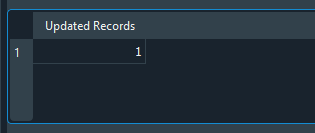
Image 21
Notice that the result is the value one. Why? Because the UPDATE statement performed one update, or one change, in the database. If we executed hundreds or even thousands of updates, the displayed value would correspond to the number of rows changed by the UPDATE statement. However, consider the following: if the same code were changed as shown in the figure below, the result would be different, as you can see in that same image:
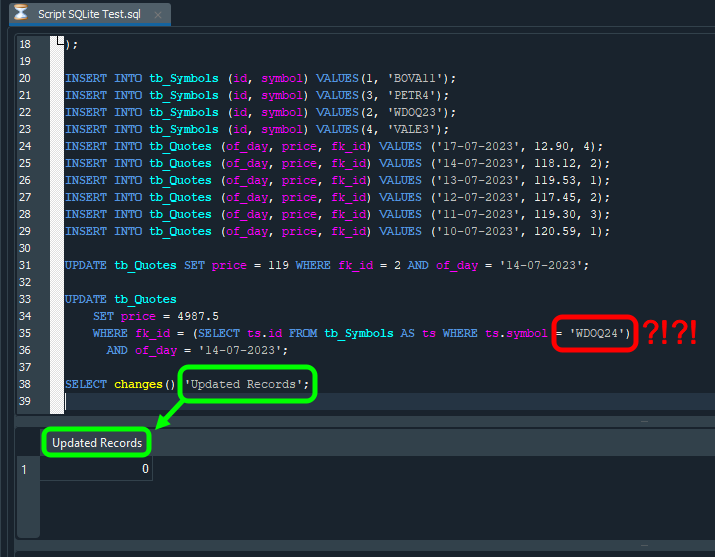
Image 22
In this image, the change from the previous version is highlighted in red. Notice that only the symbol name was changed. Since no such symbol exists, the SELECT command cannot determine which identifier should be used. As a result, the UPDATE command does not change any rows. When we then use SELECT to check how many rows were changed, it returns a value different from what we expected. In this case, the value is zero: we expected an UPDATE to occur, but because we specified a symbol name that does not exist in the table, the UPDATE statement was executed but affected no rows.
There is another detail in the image above, highlighted in green. The column header returned by SQL is exactly the information specified in the SELECT command. If we do not know this, we may be tempted to do something more complicated. But, as you can see, some things can be controlled quite easily.
However, as mentioned earlier, the command we are using is intended only to check how many rows were changed by the most recent UPDATE statement. Since SQLite allows us to create local, user-managed databases, we can also approach this in a completely different way.
For those who did not know, SQLite can be downloaded directly from its GitHub repository, and its source code can be modified so that it behaves slightly differently from the standard version. Since the purpose of this article series is not to show how to do that, we will only mention the fact. Depending on the SQLite implementation being used, errors during updates or inserts may be handled quite differently from the method shown here. In other words, to choose the best approach, study the documentation for the implementation you intend to use.
Before moving on to the next topic, let's examine the method we used to check a database update in more detail. In this case, SELECT changes() shows only the result of the most recent UPDATE command. Suppose we use the code fragment shown below:
1. UPDATE tb_Quotes SET price = 119 WHERE fk_id = 2 AND of_day = '14-07-2023';
2.
3. UPDATE tb_Quotes SET price = 4987.5 WHERE fk_id = (SELECT ts.id FROM tb_Symbols AS ts WHERE ts.symbol = 'WDOQ24') AND of_day = '14-07-2023';
4.
5. SELECT changes() 'Updated Records';
Code 10
Notice that we now run two UPDATE commands. Naturally, we might expect a cumulative result or at least something representative, since both commands are in the same script. But that is not how it works. If we examine line 03 carefully, we can see that it matches the code shown in Image 22. The only new part in Code 10 is line 01. Therefore, even though the UPDATE statement on line 03 is executed but affects no rows, as it certainly will, we might expect a non-zero value when line 05 is executed. However, when we run the code, SQL returns zero. What went wrong? Did both lines 01 and 03 fail? No. Line 01 changed a row, while the UPDATE statement on line 03 was executed but affected no rows.
Why? Because before checking the result of line 01, we sent another request to SQL in line 03. Therefore, when we ask SQL what happened, it reports only the result of the most recent UPDATE statement, namely that line 03 was executed but affected no rows. Some people spend a lot of time trying to understand why a script does or does not work as expected. In the end, the problem is usually that we are making assumptions. In programming, assumptions rarely lead to good results: they mean that we expect something to happen instead of verifying that it actually did. So never rely on assumptions. Make sure everything works before blaming everything around you.
Final thoughts
One way or another, there is another issue we need to address when using related databases or tables—such as in our system, where one table stores symbol names and another stores quote data. Such a schema could be much more complex, with several relationships across multiple closely related tables. All of this is handled through primary and foreign keys.
To understand the scale of the problem, or the complexity of the task ahead, consider the following scenario: at some point in the future, we decide to stop using a particular symbol because it is no longer worth storing or monitoring. Such a decision may be made sooner or later. The main problem, and exactly where the difficulty begins, is this: how do we delete the symbol's records from the database? Many people will say that the solution is simple: create a loop or run an SQL query that deletes the records for us. Yes, that would be roughly the idea if we were working with a database made up of one huge table of records, which in my opinion is complete madness. But that is fine; everyone knows, or should know, what they are doing.
Writing an SQL query to delete all records for a particular symbol would be very simple. All you would need is a DELETE command, and the command itself would look very similar to UPDATE. This is a minor detail, so we will not discuss it here. But what if the database does not use one table, but several related tables? How do we delete all records related to a particular symbol? Now things become a little more complicated, don't they?
Now think about the schema we are using. If you delete a symbol name from tb_Symbols, you will inevitably affect the result returned when querying the database with the command shown below.
SELECT tq.of_day AS 'Quote Date',
       tq.price AS 'Current Price',
       ts.symbol AS 'Asset Name'
    FROM tb_Quotes AS tq, tb_Symbols AS ts
    WHERE tq.fk_id = ts.id
    ORDER BY price DESC;
Code 11
| File | Description |
|---|---|
| Experts\Expert Advisor.mq5 | Demonstrates interaction between Chart Trade and the Expert Advisor. Mouse Study is required for the interaction. |
| Indicators\Chart Trade.mq5 | Creates a window for configuring the order to be sent. Mouse Study is required for the interaction. |
| Indicators\Market Replay.mq5 | Creates controls for interacting with the replay/simulation service. Mouse Study is required for the interaction. |
| Indicators\Mouse Study.mq5 | Provides interaction between graphical controls and the user. It is required both for the replay/simulation system and for live market operation. |
| Services\Market Replay.mq5 | Creates and maintains the market replay/simulation service, the main file of the entire system. |
| Code VS C++\Servidor.cpp | Creates and maintains a server socket written in C++ for the Mini Chat version. |
| Code in Python\Server.py | Creates and maintains a Python socket used for communication between MetaTrader 5 and Excel. |
| Indicators\Mini Chat.mq5 | Allows a mini-chat to be implemented through an indicator. A server is required for operation. |
| Experts\Mini Chat.mq5 | Allows a mini-chat to be implemented using an Expert Advisor. A server is required for operation. |
| Scripts\SQLite.mq5 | Demonstrates how to use an SQL script with MQL5. |
| Files\Script 01.sql | Demonstrates how to create a simple table with a foreign key. |
| Files\Script 02.sql | Shows how to add values to a table. |
Translated from Portuguese by MetaQuotes Ltd.
Original article: https://www.mql5.com/pt/articles/12987
Warning: All rights to these materials are reserved by MetaQuotes Ltd. Copying or reprinting of these materials in whole or in part is prohibited.
This article was written by a user of the site and reflects their personal views. MetaQuotes Ltd is not responsible for the accuracy of the information presented, nor for any consequences resulting from the use of the solutions, strategies or recommendations described.

 From Basic to Intermediate: Function Pointers
 Low-Frequency Quantitative Strategies in MetaTrader 5 (Part 3): A Regime-Adaptive Mean-Reversion Swing Trading System
 Analyzing Price Time Gaps in MQL5 (Part II): Creating a Heat Map of Liquidity Distribution Over Time
 MQL5 Trading Tools (Part 34): Replacing Native Chart Objects with an Interactive Canvas Drawing Layer

- Free trading apps
- Over 8,000 signals for copying
- Economic news for exploring financial markets
You agree to website policy and terms of use