

Python-MetaTrader 5 Strategie-Tester (Teil 02): Umgang mit Balken, Ticks und Überladung eingebauter Funktionen in einem Simulator
 402
402
 0
0

Inhalt
- Einführung
- Handhabung von MetaTrader 5 Historische Ticks
- Umgang mit MetaTrader 5 Historische Balken
- Überladen von MetaTrader 5-Funktionen
- symbol_info_tick
- symbol_info
- copy_rates_from
- copy_rates_from_pos
- copy_rates_range
- copy_ticks_from
- copy_ticks_range
- orders_total
- orders_get
- positions_total
- positions_get
- history_orders_total
- history_orders_get
- deals_total
- history_deals_get
- account_info
- order_calc_profit
- order_calc_margin
- Abschließende Überlegungen
Einführung
Im vorangegangenen Artikel haben wir eine Simulatorklasse in Python namens TradeSimulator besprochen und erstellt, die in hohem Maße auf Informationen aus dem MetaTrader 5 basiert, wie z. B. Ticks, Bar-Daten, Symbolinformationen und vieles mehr.
Der erste Artikel legte den Grundstein für die Nachahmung des MetaTrader 5-Clients und seines Strategie-Testers (Simulators). In diesem Artikel werden wir Tick- und Balken-Daten sowie Funktionen, die denen des Python-MetaTrader 5-Moduls ähneln, in den Simulator einführen und mit solch einem Schritt näher an die Replikation des MetaTrader 5 herankommen.
Handhabung von MetaTrader 5 Historische Ticks
Ticks sind die detailliertesten Echtzeit-Kursaktualisierungen für ein Finanzinstrument, die jede einzelne Kursänderung, Geld-/Briefbewegung und jedes Handelsvolumen darstellen.
Im Gegensatz zu den OHLC-Balken (Open, High, Low, Close) liefern die Ticks Daten auf Millisekundenebene.
Sie kennen vielleicht die Funktion OnTick aus der Programmiersprache MQL5. (Die Hauptfunktion für MQL5-Bots, die beim Eintreffen eines neuen Ticks aufgerufen wird).
Das MetaTrader 5-Terminal stützt sich bei der Eröffnung, Überwachung und Schließung von Handelsgeschäften stark auf Tick-Daten. Keine Ticks, keine Operationen auf dieser Plattform.
Daher müssen wir in der Lage sein, Ticks zu erhalten und zu verarbeiten, ähnlich wie es das Terminal tut.
Das Python-MetaTrader 5-Modul bietet verschiedene Möglichkeiten, um Ticks zu erhalten; eine davon ist die Funktion copy_ticks_range:
copy_ticks_range(
   symbol,       // symbol name
   date_from,    // date the ticks are requested from
   date_to,      // date, up to which the ticks are requested
   flags         // combination of flags defining the type of requested ticks
   )
Versuchen wir, Tick-Daten von MetaTrader 5 zu sammeln.
def fetch_ticks(start_datetime: datetime, end_datetime: datetime, symbol: str):

    ticks = mt5.copy_ticks_range(symbol, start_datetime, end_datetime, mt5.COPY_TICKS_ALL)

    print(f"Fetched {len(ticks)} ticks for {symbol} from {start_datetime} to {end_datetime}")
    print(ticks[:5])  # Print first 5 ticks for inspection

    return ticks
Beispiel.
import MetaTrader5 as mt5
from datetime import datetime, timezone

if __name__ == "__main__":
    if not mt5.initialize():
        print(f"Failed to Initialize MetaTrader5. Error = {mt5.last_error()}")
        mt5.shutdown()
        quit()

    symbol = "EURUSD"
    start_dt = datetime(2025, 1, 1, 0, 0, tzinfo=timezone.utc)
    end_dt = datetime(2025, 12, 1, 1, 0, tzinfo=timezone.utc)

    fetch_ticks(start_dt, end_dt, symbol)
Ausgabe:
Fetched 2814462 ticks for EURUSD from 2025-01-01 00:00:00+00:00 to 2025-12-01 01:00:00+00:00
[(1758499200, 1.17403, 1.17603, 0., 0, 1758499200161, 134, 0.)
 (1758499247, 1.17405, 1.17605, 0., 0, 1758499247468, 134, 0.)
 (1758499500, 1.17346, 1.17546, 0., 0, 1758499500116, 134, 0.)
 (1758499505, 1.173  , 1.175  , 0., 0, 1758499505869, 134, 0.)
 (1758499510, 1.17307, 1.17487, 0., 0, 1758499510079, 134, 0.)]
Wie Sie sehen können, konnten wir in nur 11 Monaten 2,8 Millionen Tick-Daten erhalten. Wir können auch seine Größe in Megabyte überprüfen (dies sollte uns eine grobe Schätzung geben, wie viel Speicher (RAM) von dieser einzelnen Tick-Anfrage verbraucht wird).
    # calculate tick array size in megabytes
    size_in_bytes = ticks.nbytes
    size_in_mb = size_in_bytes / (1024 * 1024)
    print(f"Tick array size: {size_in_mb:.2f} MB")
Ausgabe:
Tick array size: 161.04 MB Wie Sie sehen, haben die Daten von nur 11 Monaten einen Umfang von nur 0,1 GB. Stellen Sie sich nun vor, dass ein Nutzer in unserem Simulator (Strategietester) beschließt, einen Multi-Currency-Bot mit 12 Symbolen über 20 Jahre hinweg zu testen: Wie stark würde das unseren Speicher und die Gesamtleistung belasten?
Wir müssen den besten Ansatz finden, um diese Datenmenge zu verarbeiten, ohne zu viel Speicher zu verbrauchen und eine angemessene Gesamtleistung zu erzielen.
Polars-DataFrames sind eine der besten Lösungen für Situationen wie diese.
Polars ist einfach zu bedienen und sehr schnell; seine Streaming-API ermöglicht es Entwicklern, große Datenmengen zu verarbeiten (Datenmengen, die größer als der Speicher sind, z. B. 100 GB+) auf sehr effiziente Weise.
Da wir nicht mehr Numpy-Arrays für die gesamte Datenspeicherung verwenden werden, müssen wir auch den Datenerfassungsprozess in kleinere, weniger speicherintensive Tick-Data-Chunks aufteilen.
def ticks_to_polars(ticks):
    return pl.DataFrame({
        "time": ticks["time"],
        "bid": ticks["bid"],
        "ask": ticks["ask"],
        "last": ticks["last"],
        "volume": ticks["volume"],
        "time_msc": ticks["time_msc"],
        "flags": ticks["flags"],
        "volume_real": ticks["volume_real"],
    })

def fetch_historical_ticks(start_datetime: datetime,
                           end_datetime: datetime,
                           symbol: str):

    # first of all, we have to ensure the symbol is valid and can be used for requesting data
    if not utils.ensure_symbol(symbol=symbol):
        print(f"Symbol {symbol} not available")
        return

    current = start_datetime.replace(day=1, hour=0, minute=0, second=0)

    while True:
        month_start, month_end = utils.month_bounds(current)

        # Cap last month to end_date
        if (
            month_start.year == end_datetime.year and
            month_start.month == end_datetime.month
        ):
            month_end = end_datetime

        # Stop condition
        if month_start > end_datetime:
            break

        print(f"Processing ticks {month_start:%Y-%m-%d} -> {month_end:%Y-%m-%d}")

        # --- fetch data here ---
        ticks = mt5.copy_ticks_range(
            symbol,
            month_start,
            month_end,
            mt5.COPY_TICKS_ALL
        )

        if ticks is None or len(ticks) == 0:

            config.simulator_logger.critical(f"Failed to Get ticks. Error = {mt5.last_error()}")
            current = (month_start + timedelta(days=32)).replace(day=1) # Advance to next month safely

            continue

        df = ticks_to_polars(ticks)

        df = df.with_columns([
            pl.from_epoch("time", time_unit="s").dt.replace_time_zone("utc").alias("time")
        ])

        df = df.with_columns([
            pl.col("time").dt.year().alias("year"),
            pl.col("time").dt.month().alias("month"),
        ])

        df.write_parquet(
            os.path.join(config.TICKS_HISTORY_DIR, symbol),
            partition_by=["year", "month"],
            mkdir=True
        )

        if config.debug:
           print(df.head(-10))

        # Advance to next month safely
        current = (month_start + timedelta(days=32)).replace(day=1)
Anstatt also mit copy_ticks_range alle Ticks auf einmal zu sammeln, sammeln wir die Ticks iterativ für jeden Monat und speichern die Informationen in separaten Dateien.
      df.write_parquet(
            os.path.join(config.TICKS_HISTORY_DIR, symbol),
            partition_by=["year", "month"],
            mkdir=True
        )
Drucken wir aus, um zu sehen, was das DataFrame-Objekt enthält.
print(df.head(-10)) # optional, see what data looks like
Ausgabe:
2025-12-24 16:41:44,138 | CRITICAL | simulator.log20251224 | fetch_historical_ticks 52 --> Failed to Get ticks. Error = (1, 'Success')
Processing ticks 2025-07-01 -> 2025-07-31
2025-12-24 16:41:44,139 | CRITICAL | simulator.log20251224 | fetch_historical_ticks 52 --> Failed to Get ticks. Error = (1, 'Success')
Processing ticks 2025-08-01 -> 2025-08-31
2025-12-24 16:41:44,140 | CRITICAL | simulator.log20251224 | fetch_historical_ticks 52 --> Failed to Get ticks. Error = (1, 'Success')
Processing ticks 2025-09-01 -> 2025-09-30
shape: (434_916, 10)
┌─────────────────────────┬─────────┬─────────┬──────┬───┬───────┬─────────────┬──────┬───────┐
│ time                    ┆ bid     ┆ ask     ┆ last ┆ … ┆ flags ┆ volume_real ┆ year ┆ month │
│ ---                     ┆ ---     ┆ ---     ┆ ---  ┆   ┆ ---   ┆ ---         ┆ ---  ┆ ---   │
│ datetime[μs, UTC]       ┆ f64     ┆ f64     ┆ f64  ┆   ┆ u32   ┆ f64         ┆ i32  ┆ i8    │
╞═════════════════════════╪═════════╪═════════╪══════╪═══╪═══════╪═════════════╪══════╪═══════╡
│ 2025-09-22 00:00:00 UTC ┆ 1.17403 ┆ 1.17603 ┆ 0.0  ┆ … ┆ 134   ┆ 0.0         ┆ 2025 ┆ 9     │
│ 2025-09-22 00:00:47 UTC ┆ 1.17405 ┆ 1.17605 ┆ 0.0  ┆ … ┆ 134   ┆ 0.0         ┆ 2025 ┆ 9     │
│ 2025-09-22 00:05:00 UTC ┆ 1.17346 ┆ 1.17546 ┆ 0.0  ┆ … ┆ 134   ┆ 0.0         ┆ 2025 ┆ 9     │
│ 2025-09-22 00:05:05 UTC ┆ 1.173   ┆ 1.175   ┆ 0.0  ┆ … ┆ 134   ┆ 0.0         ┆ 2025 ┆ 9     │
│ 2025-09-22 00:05:10 UTC ┆ 1.17307 ┆ 1.17487 ┆ 0.0  ┆ … ┆ 134   ┆ 0.0         ┆ 2025 ┆ 9     │
│ …                       ┆ …       ┆ …       ┆ …    ┆ … ┆ …     ┆ …           ┆ …    ┆ …     │
│ 2025-09-30 23:58:44 UTC ┆ 1.17335 ┆ 1.17343 ┆ 0.0  ┆ … ┆ 4     ┆ 0.0         ┆ 2025 ┆ 9     │
│ 2025-09-30 23:58:45 UTC ┆ 1.17335 ┆ 1.17342 ┆ 0.0  ┆ … ┆ 4     ┆ 0.0         ┆ 2025 ┆ 9     │
│ 2025-09-30 23:58:46 UTC ┆ 1.17335 ┆ 1.17343 ┆ 0.0  ┆ … ┆ 4     ┆ 0.0         ┆ 2025 ┆ 9     │
│ 2025-09-30 23:58:47 UTC ┆ 1.17335 ┆ 1.17342 ┆ 0.0  ┆ … ┆ 4     ┆ 0.0         ┆ 2025 ┆ 9     │
│ 2025-09-30 23:58:50 UTC ┆ 1.17334 ┆ 1.1734  ┆ 0.0  ┆ … ┆ 134   ┆ 0.0         ┆ 2025 ┆ 9     │
└─────────────────────────┴─────────┴─────────┴──────┴───┴───────┴─────────────┴──────┴───────┘
Processing ticks 2025-10-01 -> 2025-10-31
shape: (1_401_674, 10)
┌─────────────────────────┬─────────┬─────────┬──────┬───┬───────┬─────────────┬──────┬───────┐
│ time                    ┆ bid     ┆ ask     ┆ last ┆ … ┆ flags ┆ volume_real ┆ year ┆ month │
│ 2025-10-01 00:00:01 UTC ┆ 1.17337 ┆ 1.17506 ┆ 0.0  ┆ … ┆ 134   ┆ 0.0         ┆ 2025 ┆ 10    │
│ 2025-10-01 00:00:02 UTC ┆ 1.17337 ┆ 1.17402 ┆ 0.0  ┆ … ┆ 4     ┆ 0.0         ┆ 2025 ┆ 10    │
│ 2025-10-01 00:00:02 UTC ┆ 1.17337 ┆ 1.17389 ┆ 0.0  ┆ … ┆ 4     ┆ 0.0         ┆ 2025 ┆ 10    │
│ …                       ┆ …       ┆ …       ┆ …    ┆ … ┆ …     ┆ …           ┆ …    ┆ …     │
│ 2025-10-31 23:56:43 UTC ┆ 1.15368 ┆ 1.15368 ┆ 0.0  ┆ … ┆ 134   ┆ 0.0         ┆ 2025 ┆ 10    │
│ 2025-10-31 23:56:52 UTC ┆ 1.15369 ┆ 1.15369 ┆ 0.0  ┆ … ┆ 134   ┆ 0.0         ┆ 2025 ┆ 10    │
│ 2025-10-31 23:56:52 UTC ┆ 1.15371 ┆ 1.15371 ┆ 0.0  ┆ … ┆ 134   ┆ 0.0         ┆ 2025 ┆ 10    │
│ 2025-10-31 23:56:53 UTC ┆ 1.1537  ┆ 1.1537  ┆ 0.0  ┆ … ┆ 134   ┆ 0.0         ┆ 2025 ┆ 10    │
│ 2025-10-31 23:56:53 UTC ┆ 1.15371 ┆ 1.15371 ┆ 0.0  ┆ … ┆ 134   ┆ 0.0         ┆ 2025 ┆ 10    │
└─────────────────────────┴─────────┴─────────┴──────┴───┴───────┴─────────────┴──────┴───────┘
Processing ticks 2025-11-01 -> 2025-11-30
shape: (976_714, 10)
┌─────────────────────────┬─────────┬─────────┬──────┬───┬───────┬─────────────┬──────┬───────┐
│ time                    ┆ bid     ┆ ask     ┆ last ┆ … ┆ flags ┆ volume_real ┆ year ┆ month │
│ ---                     ┆ ---     ┆ ---     ┆ ---  ┆   ┆ ---   ┆ ---         ┆ ---  ┆ ---   │
│ datetime[μs, UTC]       ┆ f64     ┆ f64     ┆ f64  ┆   ┆ u32   ┆ f64         ┆ i32  ┆ i8    │
╞═════════════════════════╪═════════╪═════════╪══════╪═══╪═══════╪═════════════╪══════╪═══════╡
│ 2025-11-03 00:00:00 UTC ┆ 1.1528  ┆ 1.15365 ┆ 0.0  ┆ … ┆ 134   ┆ 0.0         ┆ 2025 ┆ 11    │
│ 2025-11-03 00:01:00 UTC ┆ 1.1528  ┆ 1.15365 ┆ 0.0  ┆ … ┆ 130   ┆ 0.0         ┆ 2025 ┆ 11    │
│ 2025-11-03 00:01:00 UTC ┆ 1.1528  ┆ 1.15365 ┆ 0.0  ┆ … ┆ 4     ┆ 0.0         ┆ 2025 ┆ 11    │
│ 2025-11-03 00:01:21 UTC ┆ 1.15295 ┆ 1.15365 ┆ 0.0  ┆ … ┆ 130   ┆ 0.0         ┆ 2025 ┆ 11    │
│ 2025-11-03 00:01:25 UTC ┆ 1.15282 ┆ 1.15365 ┆ 0.0  ┆ … ┆ 130   ┆ 0.0         ┆ 2025 ┆ 11    │
│ …                       ┆ …       ┆ …       ┆ …    ┆ … ┆ …     ┆ …           ┆ …    ┆ …     │
│ 2025-11-28 23:55:12 UTC ┆ 1.15948 ┆ 1.16018 ┆ 0.0  ┆ … ┆ 134   ┆ 0.0         ┆ 2025 ┆ 11    │
│ 2025-11-28 23:55:13 UTC ┆ 1.15955 ┆ 1.16017 ┆ 0.0  ┆ … ┆ 134   ┆ 0.0         ┆ 2025 ┆ 11    │
│ 2025-11-28 23:55:36 UTC ┆ 1.15948 ┆ 1.16018 ┆ 0.0  ┆ … ┆ 134   ┆ 0.0         ┆ 2025 ┆ 11    │
│ 2025-11-28 23:55:37 UTC ┆ 1.15953 ┆ 1.16017 ┆ 0.0  ┆ … ┆ 134   ┆ 0.0         ┆ 2025 ┆ 11    │
│ 2025-11-28 23:55:54 UTC ┆ 1.15954 ┆ 1.16024 ┆ 0.0  ┆ … ┆ 134   ┆ 0.0         ┆ 2025 ┆ 11    │
│ time                    ┆ bid     ┆ ask     ┆ last ┆ … ┆ flags ┆ volume_real ┆ year ┆ month │
│ ---                     ┆ ---     ┆ ---     ┆ ---  ┆   ┆ ---   ┆ ---         ┆ ---  ┆ ---   │
│ datetime[μs, UTC]       ┆ f64     ┆ f64     ┆ f64  ┆   ┆ u32   ┆ f64         ┆ i32  ┆ i8    │
╞═════════════════════════╪═════════╪═════════╪══════╪═══╪═══════╪═════════════╪══════╪═══════╡
│ 2025-12-01 00:00:00 UTC ┆ 1.15936 ┆ 1.15969 ┆ 0.0  ┆ … ┆ 134   ┆ 0.0         ┆ 2025 ┆ 12    │
│ 2025-12-01 00:00:06 UTC ┆ 1.15934 ┆ 1.15962 ┆ 0.0  ┆ … ┆ 134   ┆ 0.0         ┆ 2025 ┆ 12    │
│ 2025-12-01 00:00:11 UTC ┆ 1.15935 ┆ 1.15997 ┆ 0.0  ┆ … ┆ 134   ┆ 0.0         ┆ 2025 ┆ 12    │
│ 2025-12-01 00:00:15 UTC ┆ 1.15936 ┆ 1.15979 ┆ 0.0  ┆ … ┆ 134   ┆ 0.0         ┆ 2025 ┆ 12    │
│ 2025-12-01 00:00:21 UTC ┆ 1.15936 ┆ 1.15964 ┆ 0.0  ┆ … ┆ 4     ┆ 0.0         ┆ 2025 ┆ 12    │
│ …                       ┆ …       ┆ …       ┆ …    ┆ … ┆ …     ┆ …           ┆ …    ┆ …     │
│ 2025-12-01 00:59:57 UTC ┆ 1.15964 ┆ 1.16005 ┆ 0.0  ┆ … ┆ 4     ┆ 0.0         ┆ 2025 ┆ 12    │
│ 2025-12-01 00:59:57 UTC ┆ 1.15972 ┆ 1.16012 ┆ 0.0  ┆ … ┆ 134   ┆ 0.0         ┆ 2025 ┆ 12    │
│ 2025-12-01 00:59:57 UTC ┆ 1.15967 ┆ 1.16005 ┆ 0.0  ┆ … ┆ 134   ┆ 0.0         ┆ 2025 ┆ 12    │
│ 2025-12-01 00:59:57 UTC ┆ 1.15971 ┆ 1.16009 ┆ 0.0  ┆ … ┆ 134   ┆ 0.0         ┆ 2025 ┆ 12    │
│ 2025-12-01 00:59:57 UTC ┆ 1.15965 ┆ 1.16005 ┆ 0.0  ┆ … ┆ 134   ┆ 0.0         ┆ 2025 ┆ 12    │
└─────────────────────────┴─────────┴─────────┴──────┴───┴───────┴─────────────┴──────┴───────┘
January 2024:
 shape: (0, 10)
┌───────────────────┬─────┬─────┬──────┬───┬───────┬─────────────┬──────┬───────┐
│ time              ┆ bid ┆ ask ┆ last ┆ … ┆ flags ┆ volume_real ┆ year ┆ month │
│ ---               ┆ --- ┆ --- ┆ ---  ┆   ┆ ---   ┆ ---         ┆ ---  ┆ ---   │
│ datetime[μs, UTC] ┆ f64 ┆ f64 ┆ f64  ┆   ┆ u32   ┆ f64         ┆ i32  ┆ i8    │
╞═══════════════════╪═════╪═════╪══════╪═══╪═══════╪═════════════╪══════╪═══════╡
└───────────────────┴─────┴─────┴──────┴───┴───────┴─────────────┴──────┴───────┘
shape: (1, 2)
┌───────────────────┬───────────────────┐
│ time_min          ┆ time_max          │
│ ---               ┆ ---               │
│ datetime[μs, UTC] ┆ datetime[μs, UTC] │
╞═══════════════════╪═══════════════════╡
│ null              ┆ null              │
└───────────────────┴───────────────────┘
Eines der coolsten Dinge an einer Polars-Methode namens write_parquet ist, dass sie bei Angabe eines Wertes im Argument partition_by die empfangenen Spalten als Gruppen verwendet und Daten in separaten Unterordnern speichert.
Nach der Tick-Sammlung von zwei Instrumenten.
if __name__ == "__main__":

    if not mt5.initialize():
        print(f"Failed to Initialize MetaTrader5. Error = {mt5.last_error()}")
        mt5.shutdown()
        quit()

    symbol = "EURUSD"
    start_dt = datetime(2025, 1, 1, 0, 0, tzinfo=timezone.utc)
    end_dt = datetime(2025, 12, 1, 1, 0, tzinfo=timezone.utc)

    fetch_historical_ticks(start_datetime=start_dt, end_datetime=end_dt, symbol=symbol)
    fetch_historical_ticks(start_datetime=start_dt, end_datetime=end_dt, symbol= "GBPUSD")

    path = os.path.join(config.TICKS_HISTORY_DIR, symbol)
    lf = pl.scan_parquet(path)

    jan_2024 = (
        lf
        .filter(
            (pl.col("year") == 2024) &
            (pl.col("month") == 1)
        )
        .collect(engine="streaming")
    )

    print("January 2024:\n", jan_2024.head(-10))
    print(
        jan_2024.select([
            pl.col("time").min().alias("time_min"),
            pl.col("time").max().alias("time_max")
        ])
    )

    mt5.shutdown()
Nachstehend sehen Sie, wie die Ausgabeordner aussehen.
(venv) c:\Users\Omega Joctan\OneDrive\Documents\PyMetaTester>tree History
Folder PATH listing
Volume serial number is 2CFE-3A78
C:\USERS\OMEGA JOCTAN\ONEDRIVE\DOCUMENTS\PYMETATESTER\HISTORY
├───Bars
│   ├───EURUSD
│   │   └───M5
└───Ticks
    ├───EURUSD
    │   └───year=2025
    │       ├───month=10
    │       ├───month=11
    │       ├───month=12
    │       └───month=9
    └───GBPUSD
        └───year=2025
            ├───month=10
            ├───month=11
            ├───month=12
            └───month=9
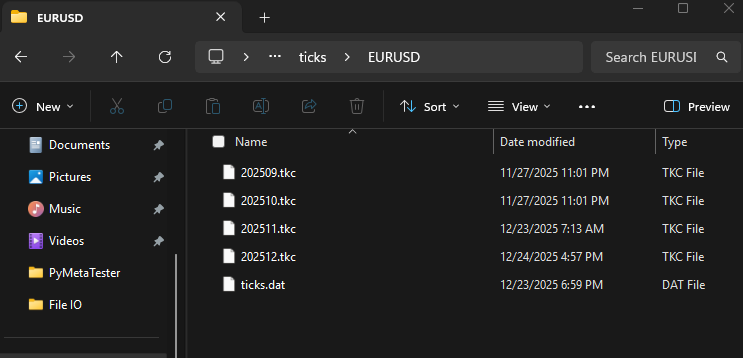
Leider habe ich nicht alle von mir angeforderten Tickdaten (vom 1. Januar bis zum 1. Dezember 2025) erhalten. Es scheint, dass nicht mehr Ticks übertragen werden, als in Ihrem MetaTrader 5-Terminal verfügbar sind. In meinem Fall verfügte mein Broker nur über Tickdaten von einigen Monaten (und genau die bekam ich auch immer wieder).
Von: C:\Users\Omega\AppData\Roaming\MetaQuotes\Terminal\010E047102812FC0C18890992854220E\bases\<broker name>\ticks\EURUSD
Umgang mit MetaTrader 5 Historische Balken
Im Gegensatz zu den Ticks basieren die Balken auf dem Zeitrahmen. Es ist einfacher, mit Balken zu arbeiten als mit Ticks. Ähnlich wie wir die Ticks erfasst haben, müssen wir auch die Balkendaten erfassen.
Zunächst müssen wir sicherstellen, dass das Symbol verfügbar ist, und es im MarketWatch auswählen, bevor wir seine Balken abfragen.
Innerhalb von utils.py
def ensure_symbol(symbol: str) -> bool:
    info = mt5.symbol_info(symbol)
    if info is None:
        print(f"Symbol {symbol} not found")
        return False

    if not info.visible:
        if not mt5.symbol_select(symbol, True):
            print(f"Failed to select symbol {symbol}")
            return False
    return True
Wir sammeln dann Daten vom ersten bis zum letzten Tag des Monats.
def fetch_historical_bars(symbol: str,
                          timeframe: int,
                          start_datetime: datetime,
                          end_datetime: datetime):
    """
    Fetch historical bar data for a given symbol and timeframe, forward in time.
    Saves data to a single Parquet file in append mode.
    """

    if not utils.ensure_symbol(symbol=symbol):
        print(f"Symbol {symbol} not available")
        return

    current = start_datetime.replace(day=1, hour=0, minute=0, second=0)

    while True:
        month_start, month_end = utils.month_bounds(current)

        # Cap last month to end_date
        if (
            month_start.year == end_datetime.year and
            month_start.month == end_datetime.month
        ):
            month_end = end_datetime

        # Stop condition
        if month_start > end_datetime:
            break

        print(f"Processing {month_start:%Y-%m-%d} -> {month_end:%Y-%m-%d}")

        # --- fetch data here ---
        rates = mt5.copy_rates_range(
            symbol,
            timeframe,
            month_start,
            month_end
        )

        if rates is None and len(rates)==0:
            config.simulator_logger.warning(f"Failed to Get bars from MetaTrader5")
            current = (month_start + timedelta(days=32)).replace(day=1) # Advance to next month safely
            continue

        df = bars_to_polars(rates)
Wir speichern die Daten der Balken in ihren jeweiligen Parkettdateien, getrennt nach Monaten und Jahren (als Unterordner).
df = df.with_columns([
    pl.from_epoch("time", time_unit="s").dt.replace_time_zone("utc").alias("time")
])

df = df.with_columns([
    pl.col("time").dt.year().alias("year"),
    pl.col("time").dt.month().alias("month"),
])

tf_name = utils.TIMEFRAMES_REV[timeframe]
df.write_parquet(
    os.path.join(config.BARS_HISTORY_DIR, symbol, tf_name),
    partition_by=["year", "month"],
    mkdir=True
)

if config.is_debug:
    print(df.head(-10))

# Advance to next month safely
current = (month_start + timedelta(days=32)).replace(day=1)
Zum Beispiel, Balken, die von drei Symbolen während 10 Monaten gesammelt wurden.
if __name__ == "__main__":

    if not mt5.initialize():
        print(f"Failed to Initialize MetaTrader5. Error = {mt5.last_error()}")
        mt5.shutdown()
        quit()

    start_date = datetime(2022, 1, 1, tzinfo=timezone.utc)
    end_date = datetime(2025, 1, 10, tzinfo=timezone.utc)

    fetch_historical_bars("XAUUSD", mt5.TIMEFRAME_M1, start_date, end_date)
    fetch_historical_bars("EURUSD", mt5.TIMEFRAME_H1, start_date, end_date)
    fetch_historical_bars("GBPUSD", mt5.TIMEFRAME_M5, start_date, end_date)

    # read polaris dataframe and print the head for both symbols

    symbol = "GBPUSD"
    timeframe = utils.TIMEFRAMES_REV[mt5.TIMEFRAME_M5]

    path = os.path.join(config.BARS_HISTORY_DIR, symbol, timeframe)

    lf = pl.scan_parquet(path)

    jan_2024 = (
        lf
        .filter(
            (pl.col("year") == 2024) &
            (pl.col("month") == 1)
        )
        .collect(engine="streaming")
    )

    print("January 2024:\n", jan_2024.head(-10))
    print(
        jan_2024.select([
            pl.col("time").min().alias("time_min"),
            pl.col("time").max().alias("time_max")
        ])
    )

    mt5.shutdown()
Ausgabe:
(venv) c:\Users\Omega Joctan\OneDrive\Documents\PyMetaTester>tree History
Folder PATH listing
Volume serial number is 2CFE-3A78
C:\USERS\OMEGA JOCTAN\ONEDRIVE\DOCUMENTS\PYMETATESTER\HISTORY
├───Bars
│   ├───EURUSD
│   │   ├───H1
│   │   │   ├───year=2022
│   │   │   │   ├───month=1
│   │   │   │   ├───month=10
│   │   │   │   ├───month=11
│   │   │   │   ├───month=12
│   │   │   │   ├───month=2
│   │   │   │   ├───month=3
│   │   │   │   ├───month=4
│   │   │   │   ├───month=5
│   │   │   │   ├───month=6
│   │   │   │   ├───month=7
│   │   │   │   ├───month=8
│   │   │   │   └───month=9
│   │   │   ├───year=2023
│   │   │   │   ├───month=1
│   │   │   │   ├───month=10
│   │   │   │   ├───month=11
│   │   │   │   ├───month=12
│   │   │   │   ├───month=2
│   │   │   │   ├───month=3
│   │   │   │   ├───month=4
│   │   │   │   ├───month=5
│   │   │   │   ├───month=6
│   │   │   │   ├───month=7
│   │   │   │   ├───month=8
│   │   │   │   └───month=9
│   │   │   ├───year=2024
│   │   │   │   ├───month=1
│   │   │   │   ├───month=10
│   │   │   │   ├───month=11
│   │   │   │   ├───month=12
│   │   │   │   ├───month=2
│   │   │   │   ├───month=3
│   │   │   │   ├───month=4
│   │   │   │   ├───month=5
│   │   │   │   ├───month=6
│   │   │   │   ├───month=7
│   │   │   │   ├───month=8
│   │   │   │   └───month=9
│   │   │   └───year=2025
│   │   │       └───month=1
│   │   └───M5
│   │       ├───year=2022
│   │       │   ├───month=1
│   │       │   ├───month=10
│   │       │   ├───month=11
│   │       │   ├───month=12
│   │       │   ├───month=2
│   │       │   ├───month=3
│   │       │   ├───month=4
│   │       │   ├───month=5
│   │       │   ├───month=6
│   │       │   ├───month=7
│   │       │   ├───month=8
│   │       │   └───month=9
│   │       ├───year=2023
│   │       │   ├───month=1
│   │       │   ├───month=10
│   │       │   ├───month=11
│   │       │   ├───month=12
│   │       │   ├───month=2
│   │       │   ├───month=3
│   │       │   ├───month=4
│   │       │   ├───month=5
│   │       │   ├───month=6
│   │       │   ├───month=7
│   │       │   ├───month=8
│   │       │   └───month=9
│   │       ├───year=2024
│   │       │   ├───month=1
│   │       │   ├───month=10
│   │       │   ├───month=11
│   │       │   ├───month=12
│   │       │   ├───month=2
│   │       │   ├───month=3
│   │       │   ├───month=4
│   │       │   ├───month=5
│   │       │   ├───month=6
│   │       │   ├───month=7
│   │       │   ├───month=8
│   │       │   └───month=9
│   │       └───year=2025
│   │           └───month=1
└───Ticks
    ├───EURUSD
    │   └───year=2025
    │       ├───month=10
    │       ├───month=11
    │       ├───month=12
    │       └───month=9
    └───GBPUSD
        └───year=2025
            ├───month=10
            ├───month=11
            ├───month=12
            └───month=9
Überladen von MetaTrader 5-Funktionen
Auch im letzten Artikel konnten wir einige Handelsvorgänge simulieren, obwohl wir uns bei Ticks, Kursen und einigen wichtigen Details zu sehr auf MetaTrader 5 verlassen haben. Dieses Mal möchten wir einen vollständig oder zumindest nahezu vollständig isolierten nutzerdefinierten Simulator haben.
Zunächst fügen wir eine Testerinstanz hinzu, d.h. wenn ein Nutzer einen Simulator mit einem auf false gesetzten Argument IS_TESTER (der Strategietestermodus) startet, extrahieren wir wichtige Informationen wie Kurse und Ticks nicht direkt aus MetaTrader 5, sondern aus den nutzerdefinierten Pfaden (die in den vorherigen Abschnitten erstellt wurden).
Wir machen das Gegenteil, wenn IS_TESTER auf false gesetzt ist, dann werden wir solche Daten direkt aus MetaTrader 5 extrahieren.
class Simulator:
    def __init__(self, simulator_name: str, mt5_instance: mt5, deposit: float, leverage: str="1:100"):

        #... other variables

        self.IS_RUNNING = True # is the simulator running or stopped
        self.IS_TESTER = True # are we on the strategy tester mode or live trading

        self.symbol_info_cache: dict[str, namedtuple] = {}

    def Start(self, IS_TESTER: bool) -> bool: # simulator start

        self.IS_TESTER = IS_TESTER

    def Stop(self): # simulator stopped
        self.IS_RUNNING = False
        pass
symbol_info_tick
Jetzt, wo wir die Tickdaten aus einem nahegelegenen Pfad speichern und lesen können, benötigen wir eine Möglichkeit, diese Informationen an den Nutzer zurückzugeben, genau wie es der MetaTrader 5-Client macht.
symbol_info_tick(
   symbol      // financial instrument name
)
Wir benötigen eine ähnliche Funktion innerhalb der Simulatorklasse. Eine Funktion muss entscheiden, ob sie Ticks von MetaTrader 5 oder Ticks innerhalb eines Simulators zurückgibt.
    def symbol_info_tick(self, symbol: str) -> namedtuple:

        if self.IS_TESTER:
            return self.tick_cache[symbol]

        try:
            tick = self.mt5_instance.symbol_info_tick(symbol)
        except Exception as e:
            self.__GetLogger().warning(f"Failed. MT5 Error = {self.mt5_instance.last_error()}")

        return tick
Innerhalb einer Simulatorklasse haben wir ein Array, das die letzten Ticks aufzeichnet.
Innerhalb eines Klassenkonstruktors:
self.tick_cache: dict[str, namedtuple] = {}
Allerdings muss der Simulator mit dieser Tick-Information gefüttert werden. Wir benötigen eine Funktion für eine solche Aufgabe.
def TickUpdate(self, symbol: str, tick: namedtuple):
    self.tick_cache[symbol] = tick
symbol_info
Diese Funktion ruft Daten von der MetaTrader 5-Plattform zu einem bestimmten Finanzinstrument ab.
symbol_info(
   symbol      // financial instrument name
)
Wir benötigen eine ähnliche Funktion in unserer Simulatorklasse, aber sie sollte diese Daten von MetaTrader 5 nur einmal im Leben eines Simulators anfordern.
Nachdem die Daten eines Symbols aus MetaTrader 5 extrahiert wurden, müssen die Werte für die spätere Verwendung in einem Array gespeichert werden (dies reduziert die „MetaTrader 5-Abhängigkeit“ und verbessert die Gesamtleistung).
def symbol_info(self, symbol: str) -> namedtuple:

    """Gets data on the specified financial instrument."""

    if symbol not in self.symbol_info_cache:
        info = self.mt5_instance.symbol_info(symbol)
        if info is None:
           return None

       self.symbol_info_cache[symbol] = info

   return self.symbol_info_cache[symbol]
Ein Array für die temporäre Speicherung von Symboldaten wird ähnlich wie das oben beschriebene Array für die Speicherung von Ticks definiert.
self.symbol_info_cache: dict[str, namedtuple] = {}
copy_rates_from
Diese Funktion ruft Balken aus dem MetaTrader 5-Terminal ab, beginnend mit dem angegebenen Datum bis zu bestimmten früheren Balken.
copy_rates_from(
   symbol,       // symbol name
   timeframe,    // timeframe
   date_from,    // initial bar open date
   count         // number of bars
   )
In einer ähnlichen Funktion in unserer Klasse stellen wir zunächst sicher, dass ein bestimmtes Anfangsdatum im UTC-Format vorliegt.
def copy_rates_from(self, symbol: str, timeframe: int, date_from: datetime, count: int) -> np.array:

    date_from = utils.ensure_utc(date_from)
Wenn ein Nutzer den Strategietester-Modus gewählt hat (IS_TESTER=true), werden die Daten der Balken in Parkettdateien gespeichert.
if self.IS_TESTER:

    # instead of getting data from MetaTrader 5, get data stored in our custom directories

    path = os.path.join(config.BARS_HISTORY_DIR, symbol, utils.TIMEFRAMES_REV[timeframe])
    lf = pl.scan_parquet(path)

    try:
        rates = (
            lf
            .filter(pl.col("time") <= date_from) # get data starting at the given date
            .sort("time", descending=True)
            .limit(count) # limit the request to some bars
            .select([
                pl.col("time").dt.epoch("s").cast(pl.Int64).alias("time"),

                pl.col("open"),
                pl.col("high"),
                pl.col("low"),
                pl.col("close"),
                pl.col("tick_volume"),
                pl.col("spread"),
                pl.col("real_volume"),
            ]) # return only what's required
            .collect(engine="streaming") # the streming engine, doesn't store data in memory
        ).to_dicts()

        rates = np.array(rates)[::-1] # reverse an array so it becomes oldest -> newest

    except Exception as e:
        config.tester_logger.warn(f"Failed to copy rates {e}")
        return np.array(dict())
else:

    rates = self.mt5_instance.copy_rates_from(symbol, timeframe, date_from, count)
    rates = np.array(self.__mt5_rates_to_dicts(rates))

    if rates is None:
        config.simulator_logger.warn(f"Failed to copy rates. MetaTrader 5 error = {self.mt5_instance.last_error()}")
        return np.array(dict())

return rates
Wenn die Variable innerhalb einer Klasse IS_TESTER auf false gesetzt ist, erhalten wir die Daten der Balken direkt vom MetaTrader 5.
Da MetaTrader 5 ein strukturiertes Numpy-Array zurückgibt, müssen wir es in ein Numpy-Array mit Datenwörterbüchern für jedes Element im Array umwandeln. Dadurch stimmt es mit dem Format überein, das nach der Konvertierung eines Polars-DataFrame-Objekts empfangen wird.
def __mt5_rates_to_dicts(self, rates) -> list[dict]:

    if rates is None or len(rates) == 0:
        return []

    # structured numpy array from MT5
    if rates.dtype.names is not None:
        return [
            {name: r[name].item() if hasattr(r[name], "item") else r[name]
            for name in rates.dtype.names}
            for r in rates
        ]
Beispiel für die Verwendung:
sim = Simulator(simulator_name="MySimulator", mt5_instance=mt5, deposit=1078.30, leverage="1:500")

start = datetime(2025, 1, 1)
bars = 10

sim.Start(IS_TESTER=True) # start the simulator in the strategy tester mode
rates = sim.copy_rates_from(symbol="EURUSD", timeframe=mt5.TIMEFRAME_H1, date_from=start, count=bars)
print("is_tester=true\n", rates)

sim.Start(IS_TESTER=False) # start the simulator in real-time trading
rates = sim.copy_rates_from(symbol="EURUSD", timeframe=mt5.TIMEFRAME_H1, date_from=start, count=bars)

print("is_tester=false\n",rates)
Ausgabe:
is_tester=true
 [{'time': 1735653600, 'open': 1.04104, 'high': 1.04145, 'low': 1.03913, 'close': 1.03928, 'tick_volume': 2543, 'spread': 0, 'real_volume': 0}
 {'time': 1735657200, 'open': 1.03929, 'high': 1.03973, 'low': 1.03836, 'close': 1.0393, 'tick_volume': 3171, 'spread': 0, 'real_volume': 0}
 {'time': 1735660800, 'open': 1.03931, 'high': 1.03943, 'low': 1.03748, 'close': 1.03759, 'tick_volume': 4073, 'spread': 0, 'real_volume': 0}
 {'time': 1735664400, 'open': 1.03759, 'high': 1.03893, 'low': 1.03527, 'close': 1.03548, 'tick_volume': 5531, 'spread': 0, 'real_volume': 0}
 {'time': 1735668000, 'open': 1.03548, 'high': 1.03614, 'low': 1.0346899999999999, 'close': 1.03504, 'tick_volume': 3918, 'spread': 0, 'real_volume': 0}
 {'time': 1735671600, 'open': 1.03504, 'high': 1.03551, 'low': 1.03442, 'close': 1.03493, 'tick_volume': 3279, 'spread': 0, 'real_volume': 0}
 {'time': 1735675200, 'open': 1.0348600000000001, 'high': 1.03569, 'low': 1.03455, 'close': 1.0352999999999999, 'tick_volume': 2693, 'spread': 0, 'real_volume': 0}
 {'time': 1735678800, 'open': 1.0352999999999999, 'high': 1.03647, 'low': 1.03516, 'close': 1.03548, 'tick_volume': 1840, 'spread': 0, 'real_volume': 0}
 {'time': 1735682400, 'open': 1.03549, 'high': 1.03633, 'low': 1.03546, 'close': 1.03586, 'tick_volume': 1192, 'spread': 0, 'real_volume': 0}
 {'time': 1735686000, 'open': 1.03586, 'high': 1.0361, 'low': 1.03527, 'close': 1.03527, 'tick_volume': 975, 'spread': 0, 'real_volume': 0}]
is_tester=false
 [{'time': 1735653600, 'open': 1.04104, 'high': 1.04145, 'low': 1.03913, 'close': 1.03928, 'tick_volume': 2543, 'spread': 0, 'real_volume': 0}
 {'time': 1735657200, 'open': 1.03929, 'high': 1.03973, 'low': 1.03836, 'close': 1.0393, 'tick_volume': 3171, 'spread': 0, 'real_volume': 0}
 {'time': 1735660800, 'open': 1.03931, 'high': 1.03943, 'low': 1.03748, 'close': 1.03759, 'tick_volume': 4073, 'spread': 0, 'real_volume': 0}
 {'time': 1735664400, 'open': 1.03759, 'high': 1.03893, 'low': 1.03527, 'close': 1.03548, 'tick_volume': 5531, 'spread': 0, 'real_volume': 0}
 {'time': 1735668000, 'open': 1.03548, 'high': 1.03614, 'low': 1.0346899999999999, 'close': 1.03504, 'tick_volume': 3918, 'spread': 0, 'real_volume': 0}
 {'time': 1735671600, 'open': 1.03504, 'high': 1.03551, 'low': 1.03442, 'close': 1.03493, 'tick_volume': 3279, 'spread': 0, 'real_volume': 0}
 {'time': 1735675200, 'open': 1.0348600000000001, 'high': 1.03569, 'low': 1.03455, 'close': 1.0352999999999999, 'tick_volume': 2693, 'spread': 0, 'real_volume': 0}
 {'time': 1735678800, 'open': 1.0352999999999999, 'high': 1.03647, 'low': 1.03516, 'close': 1.03548, 'tick_volume': 1840, 'spread': 0, 'real_volume': 0}
 {'time': 1735682400, 'open': 1.03549, 'high': 1.03633, 'low': 1.03546, 'close': 1.03586, 'tick_volume': 1192, 'spread': 0, 'real_volume': 0}
 {'time': 1735686000, 'open': 1.03586, 'high': 1.0361, 'low': 1.03527, 'close': 1.03527, 'tick_volume': 975, 'spread': 0, 'real_volume': 0}]
copy_rates_from_pos
Laut der Dokumentation holt diese Funktion Balken aus dem MetaTrader 5-Terminal ab einem bestimmten Index.
Der Balken mit Index 0 ist der aktuellste, der mit dem größten Index ist der älteste Balken im Terminal.
Dies ist die kniffligste aller Funktionen, die Balkeninformationen aus dem MetaTrader 5 kopieren, einfach weil sie zeitabhängig ist.
Da der Balken bei Index 0 immer der aktuelle Balken ist, bedeutet dies, dass die aktuelle Funktion die aktuelle Tickzeit kennen sollte. Wenn wir einen Simulator im sogenannten Strategietester ausführen, erben wir die Funktion copy_rates_from, die eine Zeitangabe für das Startdatum benötigt.
Wir geben ihm das Startdatum von:
aktuelle Zeit + Sekunden des aktuelle Zeitrahmens * Anzahl der vom Nutzer angeforderten Balken.
    def copy_rates_from_pos(self, symbol: str, timeframe: int, start_pos: int, count: int) -> np.array:

        if self.tick is None or self.tick.time is None:
            self.__GetLogger().critical("Time information not found in the ticker, call the function 'TickUpdate' giving it the latest tick information")
            now = datetime.now(tz=timezone.utc)
        else:
            now = self.tick.time

        if self.IS_TESTER:
            rates = self.copy_rates_from(symbol=symbol,
                                        timeframe=timeframe,
                                        date_from=now+timedelta(seconds=utils.PeriodSeconds(timeframe)*start_pos),
                                        count=count)

        else:

            rates = self.mt5_instance.copy_rates_from_pos(symbol, timeframe, start_pos, count)
            rates = np.array(self.__mt5_rates_to_dicts(rates))

            if rates is None:
                self.__GetLogger().warning(f"Failed to copy rates. MetaTrader 5 error = {self.mt5_instance.last_error()}")
                return np.array(dict())

        return rates
Wenn IS_TESTER=false ist (das System läuft in Echtzeit), erhält der Simulator die Balken direkt vom MetaTrader 5 Terminal.
Beispiel für die Verwendung:
sim = Simulator(simulator_name="MySimulator", mt5_instance=mt5, deposit=1078.30, leverage="1:500")

start = datetime(2025, 1, 1)
bars = 10
symbol = "EURUSD"
timeframe = mt5.TIMEFRAME_H1

sim.Start(IS_TESTER=True)
rates = sim.copy_rates_from_pos(symbol=symbol, timeframe=timeframe, start_pos=0, count=bars)

print("is_tester=true\n", rates)

sim.Start(IS_TESTER=False) # start the simulator in real-time trading
rates = sim.copy_rates_from_pos(symbol=symbol, timeframe=timeframe, start_pos=0, count=bars)

print("is_tester=false\n",rates)
Ausgabe:
(venv) C:\Users\Omega Joctan\OneDrive\Documents\PyMetaTester>python test.py
2025-12-25 12:42:33,366 | CRITICAL | tester |  copy_rates_from_pos 221 --> Time information not found in the ticker, call the function 'TickUpdate' giving it the latest tick information
is_tester=true
 [{'time': 1766584800, 'open': 1.17927, 'high': 1.17932, 'low': 1.1784, 'close': 1.17843, 'tick_volume': 1983, 'spread': 0, 'real_volume': 0}
 {'time': 1766588400, 'open': 1.17843, 'high': 1.17909, 'low': 1.17838, 'close': 1.17853, 'tick_volume': 2783, 'spread': 0, 'real_volume': 0}
 {'time': 1766592000, 'open': 1.17849, 'high': 1.17869, 'low': 1.17773, 'close': 1.17807, 'tick_volume': 2690, 'spread': 0, 'real_volume': 0}
 {'time': 1766595600, 'open': 1.17804, 'high': 1.17825, 'low': 1.17754, 'close': 1.17781, 'tick_volume': 2834, 'spread': 0, 'real_volume': 0}
 {'time': 1766599200, 'open': 1.17781, 'high': 1.1781, 'low': 1.17732, 'close': 1.17795, 'tick_volume': 2354, 'spread': 0, 'real_volume': 0}
 {'time': 1766602800, 'open': 1.17794, 'high': 1.17832, 'low': 1.17726, 'close': 1.17766, 'tick_volume': 1424, 'spread': 0, 'real_volume': 0}
 {'time': 1766606400, 'open': 1.17764, 'high': 1.17798, 'low': 1.17744, 'close': 1.17788, 'tick_volume': 1105, 'spread': 0, 'real_volume': 0}
 {'time': 1766610000, 'open': 1.17788, 'high': 1.1782, 'low': 1.17787, 'close': 1.17817, 'tick_volume': 654, 'spread': 0, 'real_volume': 0}
 {'time': 1766613600, 'open': 1.17817, 'high': 1.17819, 'low': 1.1779, 'close': 1.1779600000000001, 'tick_volume': 608, 'spread': 0, 'real_volume': 0}
 {'time': 1766617200, 'open': 1.1779600000000001, 'high': 1.17797, 'low': 1.17761, 'close': 1.17768, 'tick_volume': 1165, 'spread': 0, 'real_volume': 0}]
2025-12-25 12:42:33,394 | CRITICAL | simulator |  copy_rates_from_pos 221 --> Time information not found in the ticker, call the function 'TickUpdate' giving it the latest tick information
is_tester=false
 [{'time': 1766584800, 'open': 1.17927, 'high': 1.17932, 'low': 1.1784, 'close': 1.17843, 'tick_volume': 1983, 'spread': 0, 'real_volume': 0}
 {'time': 1766588400, 'open': 1.17843, 'high': 1.17909, 'low': 1.17838, 'close': 1.17853, 'tick_volume': 2783, 'spread': 0, 'real_volume': 0}
 {'time': 1766592000, 'open': 1.17849, 'high': 1.17869, 'low': 1.17773, 'close': 1.17807, 'tick_volume': 2690, 'spread': 0, 'real_volume': 0}
 {'time': 1766595600, 'open': 1.17804, 'high': 1.17825, 'low': 1.17754, 'close': 1.17781, 'tick_volume': 2834, 'spread': 0, 'real_volume': 0}
 {'time': 1766599200, 'open': 1.17781, 'high': 1.1781, 'low': 1.17732, 'close': 1.17795, 'tick_volume': 2354, 'spread': 0, 'real_volume': 0}
 {'time': 1766602800, 'open': 1.17794, 'high': 1.17832, 'low': 1.17726, 'close': 1.17766, 'tick_volume': 1424, 'spread': 0, 'real_volume': 0}
 {'time': 1766606400, 'open': 1.17764, 'high': 1.17798, 'low': 1.17744, 'close': 1.17788, 'tick_volume': 1105, 'spread': 0, 'real_volume': 0}
 {'time': 1766610000, 'open': 1.17788, 'high': 1.1782, 'low': 1.17787, 'close': 1.17817, 'tick_volume': 654, 'spread': 0, 'real_volume': 0}
 {'time': 1766613600, 'open': 1.17817, 'high': 1.17819, 'low': 1.1779, 'close': 1.1779600000000001, 'tick_volume': 608, 'spread': 0, 'real_volume': 0}
 {'time': 1766617200, 'open': 1.1779600000000001, 'high': 1.17797, 'low': 1.17761, 'close': 1.17768, 'tick_volume': 1165, 'spread': 0, 'real_volume': 0}]
copy_rates_range
Diese Funktion holt Balken im angegebenen Datumsbereich aus dem MetaTrader 5 Terminal.
copy_rates_range(
   symbol,       // symbol name
   timeframe,    // timeframe
   date_from,    // date the bars are requested from
   date_to       // date, up to which the bars are requested
   )
Im Gegensatz zu den beiden vorangegangenen gibt diese Funktion die Balken zwischen zwei Daten (date_from), dem Startdatum, und (date_to), einem Enddatum, zurück.
    def copy_rates_range(self, symbol: str, timeframe: int, date_from: datetime, date_to: datetime):

        date_from = utils.ensure_utc(date_from)
        date_to = utils.ensure_utc(date_to)

        if self.IS_TESTER:

            # instead of getting data from MetaTrader 5, get data stored in our custom directories

            path = os.path.join(config.BARS_HISTORY_DIR, symbol, utils.TIMEFRAMES_REV[timeframe])
            lf = pl.scan_parquet(path)

            try:
                rates = (
                    lf
                    .filter(
                            (pl.col("time") >= pl.lit(date_from)) &
                            (pl.col("time") <= pl.lit(date_to))
                        ) # get bars between date_from and date_to
                    .sort("time", descending=True)
                    .select([
                        pl.col("time").dt.epoch("s").cast(pl.Int64).alias("time"),

                        pl.col("open"),
                        pl.col("high"),
                        pl.col("low"),
                        pl.col("close"),
                        pl.col("tick_volume"),
                        pl.col("spread"),
                        pl.col("real_volume"),
                    ]) # return only what's required
                    .collect(engine="streaming") # the streming engine, doesn't store data in memory
                ).to_dicts()

                rates = np.array(rates)[::-1] # reverse an array so it becomes oldest -> newest

            except Exception as e:
                self.__GetLogger().warning(f"Failed to copy rates {e}")
                return np.array(dict())
        else:

            rates = self.mt5_instance.copy_rates_range(symbol, timeframe, date_from, date_to)
            rates = np.array(self.__mt5_rates_to_dicts(rates))

            if rates is None:
                self.__GetLogger().warning(f"Failed to copy rates. MetaTrader 5 error = {self.mt5_instance.last_error()}")
                return np.array(dict())

        return rates
copy_ticks_from
Laut der Dokumentation ruft diese Funktion Ticks vom MetaTrader 5 Terminal ab einem bestimmten Datum ab.
copy_ticks_from(
   symbol,       // symbol name
   date_from,    // date the ticks are requested from
   count,        // number of requested ticks
   flags         // combination of flags defining the type of requested ticks
   )
In einer ähnlichen Funktion in unserer Simulatorklasse lesen wir Ticks aus unserer Datenbank, wenn ein Nutzer einen Strategietester-Modus (IS_TESTER=true) ausgewählt hat, und lesen sie im Gegensatz dazu direkt aus MetaTrader 5.
    def copy_ticks_from(self, symbol: str, date_from: datetime, count: int, flags: int=mt5.COPY_TICKS_ALL) -> np.array:

        date_from = utils.ensure_utc(date_from)
        flag_mask = self.__tick_flag_mask(flags)

        if self.IS_TESTER:

            path = os.path.join(config.TICKS_HISTORY_DIR, symbol)
            lf = pl.scan_parquet(path)

            try:
                ticks = (
                    lf
                    .filter(pl.col("time") >= pl.lit(date_from)) # get data starting at the given date
                    .filter((pl.col("flags") & flag_mask) != 0)
                    .sort(
                        ["time", "time_msc"],
                        descending=[False, False]
                    )
                    .limit(count) # limit the request to a specified number of ticks
                    .select([
                        pl.col("time").dt.epoch("s").cast(pl.Int64).alias("time"),

                        pl.col("bid"),
                        pl.col("ask"),
                        pl.col("last"),
                        pl.col("volume"),
                        pl.col("time_msc"),
                        pl.col("flags"),
                        pl.col("volume_real"),
                    ])
                    .collect(engine="streaming") # the streming engine, doesn't store data in memory
                ).to_dicts()

                ticks = np.array(ticks)

            except Exception as e:
                self.__GetLogger().warning(f"Failed to copy ticks {e}")
                return np.array(dict())
        else:

            ticks = self.mt5_instance.copy_ticks_from(symbol, date_from, count, flags)
            ticks = np.array(self.__mt5_data_to_dicts(ticks))

            if ticks is None:
                self.__GetLogger().warning(f"Failed to copy ticks. MetaTrader 5 error = {self.mt5_instance.last_error()}")
                return np.array(dict())

        return ticks
Da eine Tick-Anfrage mit einer Flag-Option versehen ist, mit der der Nutzer entscheiden kann, welche Art von Ticks er erhalten möchte, benötigen wir eine Möglichkeit, eine Flag-Maske zu erstellen, die für das Filtern von Ticks je nach den Bedürfnissen des Nutzers nützlich ist.
In der Dokumentation heißt es dazu:
Ein Flag definiert den Typ der angeforderten Ticks.
Die Flag-Werte sind in der Enumeration COPY_TICKS beschrieben.
| ID | Beschreibung |
|---|---|
| COPY_TICKS_ALL | alle Ticks |
| COPY_TICKS_INFO | Ticks mit Geld- und/oder Briefkursänderungen |
| COPY_TICKS_TRADE | Ticks, die letzte und/oder volumenmäßige Preisänderungen enthalten |
TICK_FLAG definiert mögliche Flags für Ticks. Diese Flags werden verwendet, um Ticks zu beschreiben, die von den Funktionen copy_ticks_from() und copy_ticks_range() erhalten werden.
| ID | Beschreibung |
|---|---|
| TICK_FLAG_BID | geänderter Geldkurs |
| TICK_FLAG_ASK | geänderter Briefkurs |
| TICK_FLAG_LAST | geänderter Last-Preis |
| TICK_FLAG_VOLUME | geändertes Volumen |
| TICK_FLAG_BUY | geänderter letzter Kaufkurs |
| TICK_FLAG_SELL | geänderter letzter Verkaufskurs |
    def __tick_flag_mask(self, flags: int) -> int:
        if flags == mt5.COPY_TICKS_ALL:
            return (
                mt5.TICK_FLAG_BID
                | mt5.TICK_FLAG_ASK
                | mt5.TICK_FLAG_LAST
                | mt5.TICK_FLAG_VOLUME
                | mt5.TICK_FLAG_BUY
                | mt5.TICK_FLAG_SELL
            )

        mask = 0
        if flags & mt5.COPY_TICKS_INFO:
            mask |= mt5.TICK_FLAG_BID | mt5.TICK_FLAG_ASK
        if flags & mt5.COPY_TICKS_TRADE:
            mask |= mt5.TICK_FLAG_LAST | mt5.TICK_FLAG_VOLUME

        return mask
Beispiel für die Verwendung:
sim = Simulator(simulator_name="MySimulator", mt5_instance=mt5, deposit=1078.30, leverage="1:500")

start = datetime(2025, 1, 1)
end = datetime(2025, 1, 5)

bars = 10
symbol = "EURUSD"
timeframe = mt5.TIMEFRAME_H1

sim.Start(IS_TESTER=True) # start simulation in the strategy tester

ticks = sim.copy_ticks_from(symbol=symbol, date_from=start.replace(month=12, hour=0, minute=0), count=bars)

print("is_tester=true\n", ticks)

sim.Start(IS_TESTER=False) # start the simulator in real-time trading

ticks = sim.copy_ticks_from(symbol=symbol, date_from=start.replace(month=12, hour=0, minute=0), count=bars)

print("is_tester=false\n", ticks)
Ausgabe:
is_tester=true
 [{'time': 1764547200, 'bid': 1.15936, 'ask': 1.1596899999999999, 'last': 0.0, 'volume': 0, 'time_msc': 1764547200174, 'flags': 134, 'volume_real': 0.0}
 {'time': 1764547206, 'bid': 1.15934, 'ask': 1.15962, 'last': 0.0, 'volume': 0, 'time_msc': 1764547206476, 'flags': 134, 'volume_real': 0.0}
 {'time': 1764547211, 'bid': 1.1593499999999999, 'ask': 1.15997, 'last': 0.0, 'volume': 0, 'time_msc': 1764547211273, 'flags': 134, 'volume_real': 0.0}
 {'time': 1764547215, 'bid': 1.15936, 'ask': 1.15979, 'last': 0.0, 'volume': 0, 'time_msc': 1764547215872, 'flags': 134, 'volume_real': 0.0}
 {'time': 1764547221, 'bid': 1.15936, 'ask': 1.15964, 'last': 0.0, 'volume': 0, 'time_msc': 1764547221475, 'flags': 4, 'volume_real': 0.0}
 {'time': 1764547231, 'bid': 1.1593499999999999, 'ask': 1.15997, 'last': 0.0, 'volume': 0, 'time_msc': 1764547231674, 'flags': 134, 'volume_real': 0.0}
 {'time': 1764547260, 'bid': 1.1593499999999999, 'ask': 1.15997, 'last': 0.0, 'volume': 0, 'time_msc': 1764547260073, 'flags': 130, 'volume_real': 0.0}
 {'time': 1764547265, 'bid': 1.15892, 'ask': 1.15998, 'last': 0.0, 'volume': 0, 'time_msc': 1764547265485, 'flags': 134, 'volume_real': 0.0}
 {'time': 1764547320, 'bid': 1.15892, 'ask': 1.15998, 'last': 0.0, 'volume': 0, 'time_msc': 1764547320074, 'flags': 130, 'volume_real': 0.0}
 {'time': 1764547345, 'bid': 1.15894, 'ask': 1.15998, 'last': 0.0, 'volume': 0, 'time_msc': 1764547345872, 'flags': 134, 'volume_real': 0.0}]
is_tester=false
 [{'time': 1764547200, 'bid': 1.15936, 'ask': 1.1596899999999999, 'last': 0.0, 'volume': 0, 'time_msc': 1764547200174, 'flags': 134, 'volume_real': 0.0}
 {'time': 1764547206, 'bid': 1.15934, 'ask': 1.15962, 'last': 0.0, 'volume': 0, 'time_msc': 1764547206476, 'flags': 134, 'volume_real': 0.0}
 {'time': 1764547211, 'bid': 1.1593499999999999, 'ask': 1.15997, 'last': 0.0, 'volume': 0, 'time_msc': 1764547211273, 'flags': 134, 'volume_real': 0.0}
 {'time': 1764547215, 'bid': 1.15936, 'ask': 1.15979, 'last': 0.0, 'volume': 0, 'time_msc': 1764547215872, 'flags': 134, 'volume_real': 0.0}
 {'time': 1764547221, 'bid': 1.15936, 'ask': 1.15964, 'last': 0.0, 'volume': 0, 'time_msc': 1764547221475, 'flags': 4, 'volume_real': 0.0}
 {'time': 1764547231, 'bid': 1.1593499999999999, 'ask': 1.15997, 'last': 0.0, 'volume': 0, 'time_msc': 1764547231674, 'flags': 134, 'volume_real': 0.0}
 {'time': 1764547260, 'bid': 1.1593499999999999, 'ask': 1.15997, 'last': 0.0, 'volume': 0, 'time_msc': 1764547260073, 'flags': 130, 'volume_real': 0.0}
 {'time': 1764547265, 'bid': 1.15892, 'ask': 1.15998, 'last': 0.0, 'volume': 0, 'time_msc': 1764547265485, 'flags': 134, 'volume_real': 0.0}
 {'time': 1764547320, 'bid': 1.15892, 'ask': 1.15998, 'last': 0.0, 'volume': 0, 'time_msc': 1764547320074, 'flags': 130, 'volume_real': 0.0}
 {'time': 1764547345, 'bid': 1.15894, 'ask': 1.15998, 'last': 0.0, 'volume': 0, 'time_msc': 1764547345872, 'flags': 134, 'volume_real': 0.0}]
copy_ticks_range
Gemäß der Dokumentation ruft diese Funktion die Ticks für den angegebenen Datumsbereich aus dem MetaTrader 5 Terminal ab.
Funktionssignatur
copy_ticks_range(
   symbol,       // symbol name
   date_from,    // date the ticks are requested from
   date_to,      // date, up to which the ticks are requested
   flags         // combination of flags defining the type of requested ticks
   )
Nachfolgend finden Sie eine ähnliche Implementierung der Funktion innerhalb der Klasse Simulator.
     def copy_ticks_range(self, symbol: str, date_from: datetime, date_to: datetime, flags: int=mt5.COPY_TICKS_ALL) -> np.array:

        date_from = utils.ensure_utc(date_from)
        date_to = utils.ensure_utc(date_to)

        flag_mask = self.__tick_flag_mask(flags)

        if self.IS_TESTER:

            path = os.path.join(config.TICKS_HISTORY_DIR, symbol)
            lf = pl.scan_parquet(path)

            try:
                ticks = (
                    lf
                    .filter(
                            (pl.col("time") >= pl.lit(date_from)) &
                            (pl.col("time") <= pl.lit(date_to))
                        ) # get ticks between date_from and date_to
                    .filter((pl.col("flags") & flag_mask) != 0)
                    .sort(
                        ["time", "time_msc"],
                        descending=[False, False]
                    )
                    .select([
                        pl.col("time").dt.epoch("s").cast(pl.Int64).alias("time"),

                        pl.col("bid"),
                        pl.col("ask"),
                        pl.col("last"),
                        pl.col("volume"),
                        pl.col("time_msc"),
                        pl.col("flags"),
                        pl.col("volume_real"),
                    ])
                    .collect(engine="streaming") # the streaming engine, doesn't store data in memory
                ).to_dicts()

                ticks = np.array(ticks)

            except Exception as e:
                self.__GetLogger().warning(f"Failed to copy ticks {e}")
                return np.array(dict())
        else:

            ticks = self.mt5_instance.copy_ticks_range(symbol, date_from, date_to, flags)
            ticks = np.array(self.__mt5_data_to_dicts(ticks))

            if ticks is None:
                self.__GetLogger().warning(f"Failed to copy ticks. MetaTrader 5 error = {self.mt5_instance.last_error()}")
                return np.array(dict())

        return ticks
Beispiel für die Verwendung:
sim = Simulator(simulator_name="MySimulator", mt5_instance=mt5, deposit=1078.30, leverage="1:500")

sim.Start(IS_TESTER=True) # start simulation in the strategy tester

ticks = sim.copy_ticks_range(symbol=symbol,
                             date_from=start.replace(month=12, hour=0, minute=0),
                             date_to=end.replace(month=12, hour=0, minute=5))

print("is_tester=true\n", ticks)

sim.Start(IS_TESTER=False) # start the simulator in real-time trading

ticks = sim.copy_ticks_range(symbol=symbol,
                             date_from=start.replace(month=12, hour=0, minute=0),
                             date_to=end.replace(month=12, hour=0, minute=5))

print("is_tester=false\n", ticks)
Ausgabe:
is_tester=true
 [{'time': 1764547200, 'bid': 1.15936, 'ask': 1.1596899999999999, 'last': 0.0, 'volume': 0, 'time_msc': 1764547200174, 'flags': 134, 'volume_real': 0.0}
 {'time': 1764547206, 'bid': 1.15934, 'ask': 1.15962, 'last': 0.0, 'volume': 0, 'time_msc': 1764547206476, 'flags': 134, 'volume_real': 0.0}
 {'time': 1764547211, 'bid': 1.1593499999999999, 'ask': 1.15997, 'last': 0.0, 'volume': 0, 'time_msc': 1764547211273, 'flags': 134, 'volume_real': 0.0}
 ...
 {'time': 1764550799, 'bid': 1.15965, 'ask': 1.16006, 'last': 0.0, 'volume': 0, 'time_msc': 1764550799475, 'flags': 134, 'volume_real': 0.0}
 {'time': 1764550799, 'bid': 1.15971, 'ask': 1.16011, 'last': 0.0, 'volume': 0, 'time_msc': 1764550799669, 'flags': 134, 'volume_real': 0.0}
 {'time': 1764550799, 'bid': 1.15965, 'ask': 1.16006, 'last': 0.0, 'volume': 0, 'time_msc': 1764550799877, 'flags': 134, 'volume_real': 0.0}]
is_tester=false
 [{'time': 1764547200, 'bid': 1.15936, 'ask': 1.1596899999999999, 'last': 0.0, 'volume': 0, 'time_msc': 1764547200174, 'flags': 134, 'volume_real': 0.0}
 {'time': 1764547206, 'bid': 1.15934, 'ask': 1.15962, 'last': 0.0, 'volume': 0, 'time_msc': 1764547206476, 'flags': 134, 'volume_real': 0.0}
 {'time': 1764547211, 'bid': 1.1593499999999999, 'ask': 1.15997, 'last': 0.0, 'volume': 0, 'time_msc': 1764547211273, 'flags': 134, 'volume_real': 0.0}
 ...
 {'time': 1764893040, 'bid': 1.16424, 'ask': 1.16479, 'last': 0.0, 'volume': 0, 'time_msc': 1764893040071, 'flags': 130, 'volume_real': 0.0}
 {'time': 1764893061, 'bid': 1.16424, 'ask': 1.16479, 'last': 0.0, 'volume': 0, 'time_msc': 1764893061887, 'flags': 4, 'volume_real': 0.0}
 {'time': 1764893096, 'bid': 1.16424, 'ask': 1.16482, 'last': 0.0, 'volume': 0, 'time_msc': 1764893096077, 'flags': 4, 'volume_real': 0.0}]
Im vorigen Artikel hatten wir nutzerdefinierte Funktionen zum Abrufen von Informationen über offene Positionen, Aufträge, Geschäfte usw. Dieses Mal werden wir sie alle mit der Syntax vom Python-MetaTrader5-Modul überladen.
orders_total
Gemäß der Dokumentation erhält diese Funktion die Anzahl der aktiven Orders vom MetaTrader 5 Terminal.
orders_total()
Sie gibt einen ganzzahligen Wert zurück.
Wenn ein Simulator im Strategietester läuft, gibt die Funktion die Anzahl der Aufträge zurück, die in einem Container für simulierte Aufträge gespeichert sind; andernfalls gibt sie Aufträge vom MetaTrader 5-Client zurück.
def orders_total(self) -> int:

    """Get the number of active orders.

    Returns (int): The number of active orders in either a simulator or MetaTrader 5
        """

    return len(self.orders_container) if self.IS_TESTER else self.mt5_instance.orders_total()
orders_get
Gemäß der Dokumentation erhält diese Funktion aktive Aufträge mit der Möglichkeit, nach Symbol oder Ticket zu filtern. Es gibt drei Anrufoptionen.
orders_get()
Aufruf zur Angabe eines Symbols, für das aktive Aufträge empfangen werden sollen.
orders_get(
   symbol="SYMBOL"      // symbol name
)
Aufruf zur Angabe einer Gruppe von Symbolen, für die aktive Aufträge empfangen werden sollen.
orders_get(
   group="GROUP"        // filter for selecting orders for symbols
)
Aufruf mit Angabe des Tickets des Auftrags.
orders_get(
   ticket=TICKET        // ticket
)
Diese Funktion gibt Informationen in Form einer benannten Tupelstruktur (namedtuple) zurück. Im Falle eines Fehlers wird None zurückgegeben. Die Informationen über den Fehler können mit last_error() abgerufen werden.
Damit unser Simulator dem MetaTrader 5-Terminal möglichst nahekommt, müssen wir einen ähnlichen Datentyp (namedtuple) zurückgeben.
from collections import namedtuple
Wir können die entsprechende Funktion in unserem Simulator wie folgt definieren:
def orders_get(self, symbol: Optional[str] = None, group: Optional[str] = None, ticket: Optional[int] = None) -> namedtuple:
    """G et active orders with the ability to filter by symbol or ticket. There are three call options.

    Returns:

        list: Returns info in the form of a named tuple structure (namedtuple). Return None in case of an error. The info on the error can be obtained using last_error().
    """
Wir müssen nicht nur ein sogenanntes Namedtupel zurückgeben, sondern auch einen ähnlichen Inhalt für einen solchen Datentyp haben.
    def __init__(self, simulator_name: str, mt5_instance: mt5, deposit: float, leverage: str="1:100"):

        # ----------------- TradeOrder --------------------------

        self.TradeOrder = namedtuple(
            "TradeOrder",
            [
                "ticket",
                "time_setup",
                "time_setup_msc",
                "time_done",
                "time_done_msc",
                "time_expiration",
                "type",
                "type_time",
                "type_filling",
                "state",
                "magic",
                "position_id",
                "position_by_id",
                "reason",
                "volume_initial",
                "volume_current",
                "price_open",
                "sl",
                "tp",
                "price_current",
                "price_stoplimit",
                "symbol",
                "comment",
                "external_id",
            ]
        )
Nachfolgend finden Sie eine ähnliche Funktion in unserer Simulatorklasse.
    def orders_get(self, symbol: Optional[str] = None, group: Optional[str] = None, ticket: Optional[int] = None) -> namedtuple:

        self.__orders_container__.extend([order1, order2])

        if self.IS_TESTER:

            orders = self.__orders_container__

            # no filters → return all orders
            if symbol is None and group is None and ticket is None:
                return tuple(orders)

            # symbol filter (highest priority)
            if symbol is not None:
                return tuple(o for o in orders if o.symbol == symbol)

            # group filter
            if group is not None:
                return tuple(o for o in orders if fnmatch.fnmatch(o.symbol, group))

            # ticket filter
            if ticket is not None:
                return tuple(o for o in orders if o.ticket == ticket)

            return tuple()

        try:
            if symbol is not None:
                return self.mt5_instance.orders_get(symbol=symbol)

            if group is not None:
                return self.mt5_instance.orders_get(group=group)

            if ticket is not None:
                return self.mt5_instance.orders_get(ticket=ticket)

            return self.mt5_instance.orders_get()

        except Exception:
            return None
Wenn ein Nutzer den Strategietester-Modus auswählt (IS_TESTER=true), erhalten wir die Aufträge und ihre Informationen aus einem Simulator; andernfalls extrahieren wir sie aus dem MetaTrader 5-Terminal.
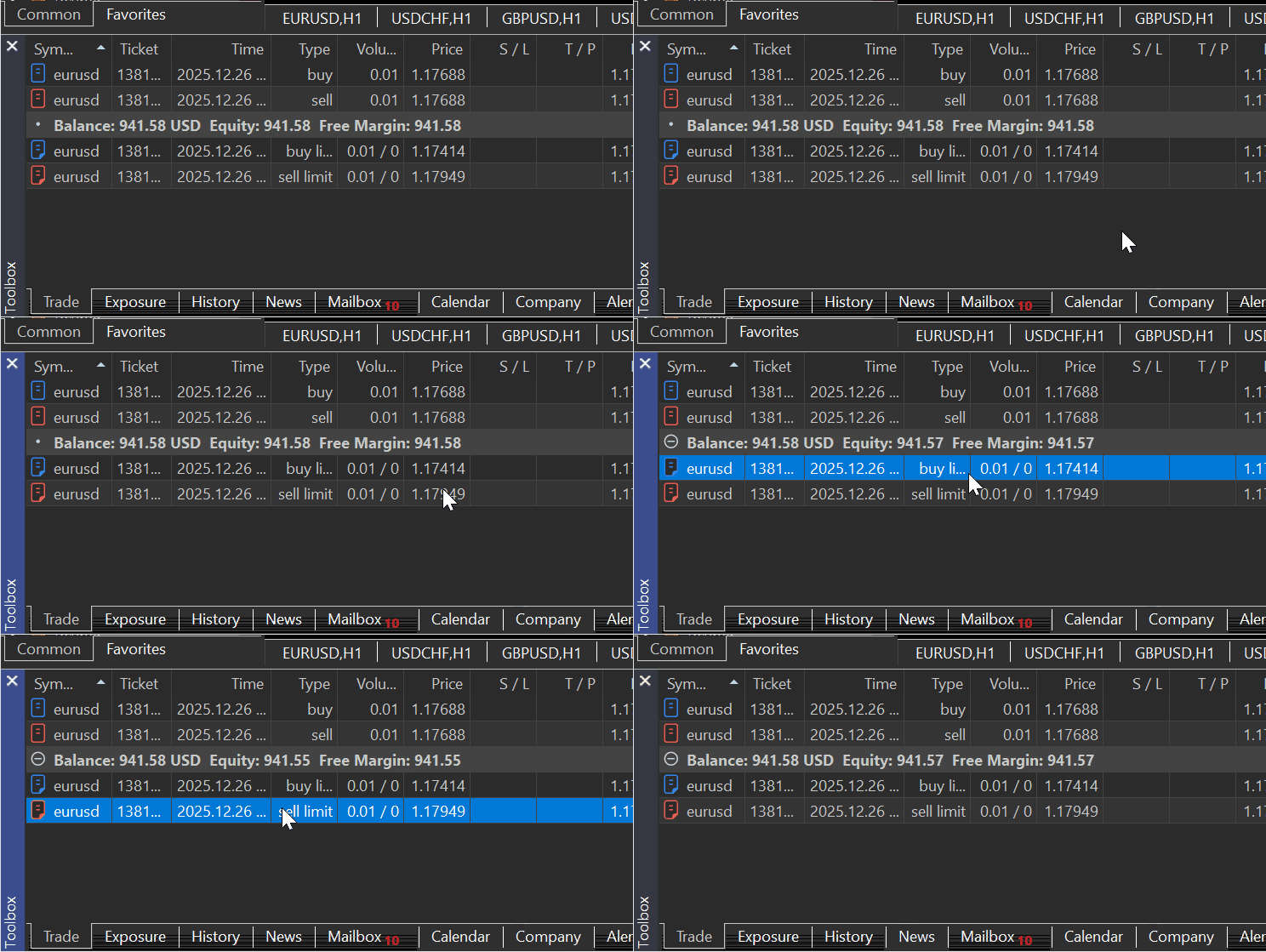
Mit zwei schwebenden Aufträgen in meinem MetaTrader 5 Terminal:
Und zwei simulierte Abschlüsse:
        order1 = self.TradeOrder(
            ticket=123456,
            time_setup=int(datetime.now().timestamp()),
            time_setup_msc=int(datetime.now().timestamp() * 1000),
            time_done=0,
            time_done_msc=0,
            time_expiration=0,
            type=mt5.ORDER_TYPE_BUY_LIMIT,
            type_time=0,
            type_filling=mt5.ORDER_FILLING_RETURN,
            state=mt5.ORDER_STATE_PLACED,
            magic=0,
            position_id=0,
            position_by_id=0,
            reason=0,
            volume_initial=0.01,
            volume_current=0.01,
            price_open=1.1750,
            sl=1.1700,
            tp=1.1800,
            price_current=1.1750,
            price_stoplimit=0.0,
            symbol="GBPUSD",
            comment="",
            external_id="",
        )

        order2 = self.TradeOrder(
            ticket=123457,
            time_setup=int(datetime.now().timestamp()),
            time_setup_msc=int(datetime.now().timestamp() * 1000),
            time_done=0,
            time_done_msc=0,
            time_expiration=0,
            type=mt5.ORDER_TYPE_SELL_LIMIT,
            type_time=0,
            type_filling=mt5.ORDER_FILLING_RETURN,
            state=mt5.ORDER_STATE_PLACED,
            magic=0,
            position_id=0,
            position_by_id=0,
            reason=0,
            volume_initial=0.01,
            volume_current=0.01,
            price_open=1.1800,
            sl=1.1850,
            tp=1.1700,
            price_current=1.1800,
            price_stoplimit=0.0,
            symbol="EURUSD",
            comment="",
            external_id="",
        )

        self.__orders_container__.extend([order1, order2])
Anschließend prüfen wir, ob Aufträge sowohl im MetaTrader 5 als auch im Simulator vorhanden sind.
sim = Simulator(simulator_name="MySimulator", mt5_instance=mt5, deposit=1078.30, leverage="1:500")

sim.Start(IS_TESTER=True) # start simulation in the strategy tester
print("Orders in the simulator:\n", sim.orders_get())


sim.Start(IS_TESTER=False) # start the simulator in real-time trading
print("Orders in MetaTrader 5:\n", sim.orders_get())
Ausgaben:
Orders in the simulator:
 (TradeOrder(ticket=123456, time_setup=1766749779, time_setup_msc=1766749779726, time_done=0, time_done_msc=0, time_expiration=0, type=2, type_time=0, type_filling=2, state=1, magic=0, position_id=0, position_by_id=0, reason=0, volume_initial=0.01, volume_current=0.01, price_open=1.175, sl=1.17, tp=1.18, price_current=1.175, price_stoplimit=0.0, symbol='GBPUSD', comment='', external_id=''),
 TradeOrder(ticket=123457, time_setup=1766749779, time_setup_msc=1766749779726, time_done=0, time_done_msc=0, time_expiration=0, type=3, type_time=0, type_filling=2, state=1, magic=0, position_id=0, position_by_id=0, reason=0, volume_initial=0.01, volume_current=0.01, price_open=1.18, sl=1.185, tp=1.17, price_current=1.18, price_stoplimit=0.0, symbol='EURUSD', comment='', external_id=''))
Orders in MetaTrader 5:
 (TradeOrder(ticket=1381968725, time_setup=1766748043, time_setup_msc=1766748043247, time_done=0, time_done_msc=0, time_expiration=0, type=2, type_time=0, type_filling=2, state=1, magic=0, position_id=0, position_by_id=0, reason=0, volume_initial=0.01, volume_current=0.01, price_open=1.17414, sl=0.0, tp=0.0, price_current=1.17769, price_stoplimit=0.0, symbol='EURUSD', comment='', external_id=''),
TradeOrder(ticket=1381968767, time_setup=1766748049, time_setup_msc=1766748049051, time_done=0, time_done_msc=0, time_expiration=0, type=3, type_time=0, type_filling=2, state=1, magic=0, position_id=0, position_by_id=0, reason=0, volume_initial=0.01, volume_current=0.01, price_open=1.17949, sl=0.0, tp=0.0, price_current=1.17769, price_stoplimit=0.0, symbol='EURUSD', comment='', external_id=''))
positions_total
Laut der Dokumentation gibt diese Funktion die Anzahl der offenen Positionen im MetaTrader 5-Client zurück.
positions_total()
Im Folgenden wird eine ähnliche Methode in einem Simulator beschrieben.
    def positions_total(self) -> int:
        """Get the number of open positions in MetaTrader 5 client.

        Returns:
            int: number of positions
        """

        if self.IS_TESTER:
            return len(self.__positions_container__)
        try:
            total = self.mt5_instance.positions_total()
        except Exception as e:
            self.__GetLogger().error(f"MetaTrader5 error = {e}")
            return -1

        return total
positions_get
Diese Methode sieht ähnlich aus und funktioniert ähnlich wie die oben beschriebene Methode orders_get.
Die Funktion zeigt offene Positionen an und bietet die Möglichkeit, nach Symbolen oder Tickets zu filtern. Es gibt drei Anrufoptionen.
Ein Aufruf ohne Parameter liefert offene Positionen für alle Symbole.
positions_get()
Ein Aufruf mit Angabe eines Symbols liefert offene Positionen eines bestimmten Handelsinstruments.
positions_get(
   symbol="SYMBOL"      // symbol name
)
Aufruf zur Angabe einer Gruppe von Symbolen, für die offene Positionen empfangen werden sollen.
positions_get(
   group="GROUP"        // filter for selecting positions by symbols
)
Aufruf mit Angabe eines Positionstickets.
positions_get(
   ticket=TICKET        // ticket
)
Ähnlich wie die Methode orders_get liefert auch diese Methode Daten in Form einer benannten Tuple-Struktur. Im Falle eines Fehlers gibt sie None zurück. Die Information über den Fehler kann mit last_error() abgefragt werden.
Das heißt, wir benötigen eine ähnliche Struktur für die Speicherung von Positionsinformationen in unserem Simulator, ähnlich wie die, die vom Modul MetaTrader 5-Python zurückgegeben wird.
    def positions_get(self, symbol: Optional[str] = None, group: Optional[str] = None, ticket: Optional[int] = None) -> namedtuple:

        if self.IS_TESTER:

            positions = self.__positions_container__

            # no filters → return all positions
            if symbol is None and group is None and ticket is None:
                return tuple(positions)

            # symbol filter (highest priority)
            if symbol is not None:
                return tuple(o for o in positions if o.symbol == symbol)

            # group filter
            if group is not None:
                return tuple(o for o in positions if fnmatch.fnmatch(o.symbol, group))

            # ticket filter
            if ticket is not None:
                return tuple(o for o in positions if o.ticket == ticket)

            return tuple()

        try:
            if symbol is not None:
                return self.mt5_instance.positions_get(symbol=symbol)

            if group is not None:
                return self.mt5_instance.positions_get(group=group)

            if ticket is not None:
                return self.mt5_instance.positions_get(ticket=ticket)

            return self.mt5_instance.positions_get()

        except Exception:
            return None
Beispiel für die Verwendung:
sim = Simulator(simulator_name="MySimulator", mt5_instance=mt5, deposit=1078.30, leverage="1:500")

sim.Start(IS_TESTER=True) # start simulation in the strategy tester
print("positions total in the Simulator: ",sim.positions_total())
print("positions in the Simulator:\n",sim.positions_get())

sim.Start(IS_TESTER=False) # start the simulator in real-time trading
print("positions total in MetaTrader5: ",sim.positions_total())
print("positions in MetaTraer5:\n",sim.positions_get())
Ausgabe:
(venv) C:\Users\Omega Joctan\OneDrive\Documents\PyMetaTester>python test.py
positions total in the Simulator:  0
positions in the Simulator:
 ()
positions total in MetaTrader5:  2
positions in MetaTraer5:
 (TradePosition(ticket=1381981938, time=1766748992, time_msc=1766748992425, time_update=1766748992, time_update_msc=1766748992425, type=0, magic=0, identifier=1381981938, reason=0, volume=0.01, price_open=1.17688, sl=0.0, tp=0.0, price_current=1.17755, swap=0.0, profit=0.67, symbol='EURUSD', comment='', external_id=''),
TradePosition(ticket=1381981988, time=1766748994, time_msc=1766748994018, time_update=1766748994, time_update_msc=1766748994018, type=1, magic=0, identifier=1381981988, reason=0, volume=0.01, price_open=1.17688, sl=0.0, tp=0.0, price_current=1.17755, swap=0.0, profit=-0.67, symbol='EURUSD', comment='', external_id=''))
history_orders_total
Der Dokumentation zufolge ermittelt diese Methode die Anzahl der Aufträge in der Handelshistorie innerhalb eines bestimmten Zeitintervalls.
history_orders_total(
   date_from,    // date the orders are requested from
   date_to       // date, up to which the orders are requested
   )
Parameter:
- date_from: Ein Datum, ab dem die Aufträge angefordert werden. Festgelegt durch das 'datetime'-Objekt oder als die Anzahl der seit 1970.01.01 verstrichenen Sekunden.
- date_to: Ein Datum, bis zu dem die Aufträge angefordert werden. Festgelegt durch das 'datetime'-Objekt oder als die Anzahl der seit 1970.01.01 verstrichenen Sekunden.
Eine ähnliche Funktion in einem Simulator kann wie folgt implementiert werden:
    def history_orders_total(self, date_from: datetime, date_to: datetime) -> int:

        # date range is a requirement

        if date_from is None or date_to is None:
            self.__GetLogger().error("date_from and date_to must be specified")
            return None

        date_from = utils.ensure_utc(date_from)
        date_to = utils.ensure_utc(date_to)

        if self.IS_TESTER:

            date_from_ts = int(date_from.timestamp())
            date_to_ts   = int(date_to.timestamp())

            return sum(
                        1
                        for o in self.__orders_history_container__
                        if date_from_ts <= o.time_setup <= date_to_ts
                    )

        try:
            total = self.mt5_instance.history_orders_total(date_from, date_to)
        except Exception as e:
            self.__GetLogger().error(f"MetaTrader5 error = {e}")
            return -1

        return total
Beispiel für die Verwendung:
sim.Start(IS_TESTER=True) # start simulation in the strategy tester

date_to = datetime.now()
date_from = date_to - timedelta(days=1)

print(sim.history_orders_total(date_from=date_from,date_to=date_to))

sim.Start(IS_TESTER=False) # start the simulator in real-time trading

print(sim.history_orders_total(date_from=date_from,date_to=date_to))
Ausgabe:
(venv) C:\Users\Omega Joctan\OneDrive\Documents\PyMetaTester>python test.py
orders in the last 24 hours in the Simulator: 0
orders in the last 24 hours in MetaTrader5: 3
history_orders_get
Der Dokumentation zufolge werden mit dieser Methode Aufträge aus einer Handelshistorie abgerufen, wobei die Möglichkeit besteht, nach Ticket oder Position zu filtern.
Sie gibt alle Aufträge zurück, die in ein bestimmtes Intervall fallen.
Es gibt drei Anrufoptionen:
history_orders_get(
   date_from,                // date the orders are requested from
   date_to,                  // date, up to which the orders are requested
   group="GROUP"        // filter for selecting orders by symbols
   )
Aufruf mit Angabe des Auftragstickets. Gibt einen Auftrag mit dem angegebenen Ticket zurück.
history_orders_get(
   ticket=TICKET        // order ticket
)
Aufruf mit Angabe des Positionstickets. Liefert alle Aufträge mit einem Positionsticket, das in der Eigenschaft ORDER_POSITION_ID angegeben ist.
history_orders_get(
   position=POSITION    // position ticket
)
Genau wie in der Funktion history_orders_total lesen wir alle Informationen aus einem Array namens __orders_history_container__ mit zusätzlichen Filtern für ticket (Auftragsticket), position (Ticket einer gespeicherten Position) und group (der Filter für die Anordnung einer Gruppe von notwendigen Symbolen).
    def history_orders_get(self,
                           date_from: datetime,
                           date_to: datetime,
                           group: Optional[str] = None,
                           ticket: Optional[int] = None,
                           position: Optional[int] = None
                           ) -> namedtuple:

        if self.IS_TESTER:

            orders = self.__orders_history_container__

            # ticket filter (highest priority)
            if ticket is not None:
                return tuple(o for o in orders if o.ticket == ticket)

            # position filter
            if position is not None:
                return tuple(o for o in orders if o.position_id == position)

            # date range is a requirement
            if date_from is None or date_to is None:
                self.__GetLogger().error("date_from and date_to must be specified")
                return None

            date_from_ts = int(utils.ensure_utc(date_from).timestamp())
            date_to_ts   = int(utils.ensure_utc(date_to).timestamp())

            filtered = (
                o for o in orders
                if date_from_ts <= o.time_setup <= date_to_ts
            ) # obtain orders that fall within this time range

            # optional group filter
            if group is not None:
                filtered = (
                    o for o in filtered
                    if fnmatch.fnmatch(o.symbol, group)
                )

            return tuple(filtered)

        try: # we are not on the strategy tester simulation

            if ticket is not None:
                return self.mt5_instance.history_orders_get(date_from, date_to, ticket=ticket)

            if position is not None:
                return self.mt5_instance.history_orders_get(date_from, date_to, position=position)

            if date_from is None or date_to is None:
                raise ValueError("date_from and date_to are required")

            date_from = utils.ensure_utc(date_from)
            date_to   = utils.ensure_utc(date_to)

            if group is not None:
                return self.mt5_instance.history_orders_get(
                    date_from, date_to, group=group
                )

            return self.mt5_instance.history_orders_get(date_from, date_to)

        except Exception as e:
            self.__GetLogger().error(f"MetaTrader5 error = {e}")
            return None
history_deals_total
Der Dokumentation zufolge ermittelt diese Funktion die Anzahl der Deals in der Handelshistorie innerhalb eines bestimmten Intervalls.
history_deals_total(
   date_from,    // date the deals are requested from
   date_to       // date, up to which the deals are requested
   )
Parameter:
- date_from: Ein Datum, ab dem die Handelsgeschäfte angefordert werden. Festgelegt durch das 'datetime'-Objekt oder als die Anzahl der seit 1970.01.01 verstrichenen Sekunden.
- date_to: Ein Datum, bis zu dem die Handelsgeschäfte angefordert werden. Festgelegt durch das 'datetime'-Objekt oder als die Anzahl der seit 1970.01.01 verstrichenen Sekunden.
    def history_deals_total(self, date_from: datetime, date_to: datetime) -> int:
        """
        Get the number of deals in history within the specified date range.

        Args:
            date_from (datetime): Date the orders are requested from. Set by the 'datetime' object or as several seconds elapsed since 1970.01.01.

            date_to (datetime, required): Date, up to which the orders are requested. Set by the 'datetime' object or as several seconds elapsed since 1970.01.01.

        Returns:
            An integer value.
        """

        if date_from is None or date_to is None:
            self.__GetLogger().error("date_from and date_to must be specified")
            return -1

        date_from = utils.ensure_utc(date_from)
        date_to   = utils.ensure_utc(date_to)

        if self.IS_TESTER:

            date_from_ts = int(date_from.timestamp())
            date_to_ts   = int(date_to.timestamp())

            return sum(
                1
                for d in self.__deals_history_container__
                if date_from_ts <= d.time <= date_to_ts
            )

        try:
            return self.mt5_instance.history_deals_total(date_from, date_to)

        except Exception as e:
            self.__GetLogger().error(f"MetaTrader5 error = {e}")
            return -1
Beispiel für die Verwendung:
sim = Simulator(simulator_name="MySimulator", mt5_instance=mt5, deposit=1078.30, leverage="1:500")

date_to = datetime.now()
date_from = date_to - timedelta(days=1)

print("Total deals in the last 24 hours in MetaTrader5:", sim.history_deals_total(date_from=date_from,date_to=date_to))

sim.Start(IS_TESTER=False) # start the simulator in real-time trading

print("Total deals in the last 24 hours in MetaTrader5:", sim.history_deals_total(date_from=date_from,date_to=date_to))
Ausgabe:
Total deals in the last 24 hours in MetaTrader5: 0
Total deals in the last 24 hours in MetaTrader5: 3
history_deals_get
Der Dokumentation zufolge werden mit dieser Methode Handelsgeschäfte aus einem Handelsverlauf innerhalb eines bestimmten Zeitintervalls abgerufen, wobei die Möglichkeit besteht, nach Ticket oder Position zu filtern.
Die Funktion hat drei Varianten.
history_deals_get(
   date_from,                // date the deals are requested from
   date_to,                  // date, up to which the deals are requested
   group="GROUP"             // filter for selecting deals for symbols
   )
Aufruf mit Angabe des Auftragstickets. Gibt alle Handelsgeschäfte zurück, die das angegebene Auftragsticket in der Eigenschaft DEAL_ORDER haben.
history_deals_get(
   ticket=TICKET        // order ticket
)
Aufruf mit Angabe des Positionstickets. Liefert alle Handelsgeschäfte mit dem angegebenen Positionsticket in der Eigenschaft DEAL_POSITION_ID .
history_deals_get(
   position=POSITION    // position ticket
)
In der Simulatorklasse erstellen wir eine Methode mit demselben Namen. Wenn ein Nutzer das Modell des Strategietesters auswählt (IS_TESTER=true), wird der Geschäftsverlauf aus einem Array innerhalb eines Simulators extrahiert; andernfalls werden diese Informationen direkt aus dem MetaTrader 5-Client extrahiert.
    def history_deals_get(self,
                          date_from: datetime,
                          date_to: datetime,
                          group: Optional[str] = None,
                          ticket: Optional[int] = None,
                          position: Optional[int] = None
                        ) -> namedtuple:

        if self.IS_TESTER:

            deals = self.__deals_history_container__

            # ticket filter (highest priority)
            if ticket is not None:
                return tuple(d for d in deals if d.ticket == ticket)

            # position filter
            if position is not None:
                return tuple(d for d in deals if d.position_id == position)

            # date range is a requirement
            if date_from is None or date_to is None:
                self.__GetLogger().error("date_from and date_to must be specified")
                return None

            date_from_ts = int(utils.ensure_utc(date_from).timestamp())
            date_to_ts   = int(utils.ensure_utc(date_to).timestamp())

            filtered = (
                d for d in deals
                if date_from_ts <= d.time <= date_to_ts
            ) # obtain orders that fall within this time range

            # optional group filter
            if group is not None:
                filtered = (
                    d for d in filtered
                    if fnmatch.fnmatch(d.symbol, group)
                )

            return tuple(filtered)

        try: # we are not on the strategy tester simulation

            if ticket is not None:
                return self.mt5_instance.history_deals_get(date_from, date_to, ticket=ticket)

            if position is not None:
                return self.mt5_instance.history_deals_get(date_from, date_to, position=position)

            if date_from is None or date_to is None:
                raise ValueError("date_from and date_to are required")

            date_from = utils.ensure_utc(date_from)
            date_to   = utils.ensure_utc(date_to)

            if group is not None:
                return self.mt5_instance.history_deals_get(
                    date_from, date_to, group=group
                )

            return self.mt5_instance.history_deals_get(date_from, date_to)

        except Exception as e:
            self.__GetLogger().error(f"MetaTrader5 error = {e}")
            return None
Beispiel für die Verwendung:
sim = Simulator(simulator_name="MySimulator", mt5_instance=mt5, deposit=1078.30, leverage="1:500")

sim.Start(IS_TESTER=True) # start simulation in the strategy tester

date_to = datetime.now()
date_from = date_to - timedelta(days=1)

print("deals in the last 24 hours in the Simulator:\n", sim.history_deals_get(date_from=date_from,date_to=date_to))

sim.Start(IS_TESTER=False) # start the simulator in real-time trading

print("Deals in the last 24 hours in MetaTrader5:\n", sim.history_deals_get(date_from=date_from,date_to=date_to))
Ausgabe:
(venv) C:\Users\Omega Joctan\OneDrive\Documents\PyMetaTester>python test.py
deals in the last 24 hours in the Simulator:
 ()
Deals in the last 24 hours in MetaTrader5:
 (TradeDeal(ticket=1134768493, order=1381981938, time=1766748992, time_msc=1766748992425, type=0, entry=0, magic=0, position_id=1381981938, reason=0, volume=0.01, price=1.17688, commission=-0.04, swap=0.0, profit=0.0, fee=0.0, symbol='EURUSD', comment='', external_id=''),
TradeDeal(ticket=1134768532, order=1381981988, time=1766748994, time_msc=1766748994018, type=1, entry=0, magic=0, position_id=1381981988, reason=0, volume=0.01, price=1.17688, commission=-0.04, swap=0.0, profit=0.0, fee=0.0, symbol='EURUSD', comment='', external_id=''),
TradeDeal(ticket=1135016562, order=1381968767, time=1766763381, time_msc=1766763381530, type=1, entry=0, magic=0, position_id=1381968767, reason=0, volume=0.01, price=1.17953, commission=-0.04, swap=0.0, profit=0.0, fee=0.0, symbol='EURUSD', comment='', external_id=''))
account_info
Es ist notwendig, eine Möglichkeit zu haben, Kontoinformationen sowohl vom MetaTrader 5 Terminal als auch vom Simulator zu erhalten. Um dies in unserer Klasse zu erreichen, benötigen wir eine ähnliche Art der Speicherung und des Zugriffs auf die Anmeldedaten dieser Konten.
Wenn Sie Kontoinformationen von MetaTrader 5 mit der Methode account_info() abfragen, erhalten Sie ein Tupel, das wie folgt aussieht:
AccountInfo(login=52557820, trade_mode=0, leverage=500, limit_orders=200, margin_so_mode=0, trade_allowed=True, trade_expert=True, margin_mode=2, currency_digits=2, fifo_close=False, balance=941.54, credit=0.0, profit=2.37, equity=943.91, margin=2.36, margin_free=941.55, margin_level=39996.18644067797, margin_so_call=100.0, margin_so_so=0.0, margin_initial=0.0, margin_maintenance=0.0, assets=0.0, liabilities=0.0, commission_blocked=0.0, name='OMEGA MSIGWA', server='ICMarketsSC-Demo', currency='USD', company='Raw Trading Ltd')
In der Dokumentation heißt es, dass die Funktion Informationen in Form einer benannten Tupelstruktur (namedtuple) zurückgibt. Im Falle eines Fehlers gibt sie None zurück. Die Information über den Fehler kann mit last_error() abgefragt werden.
Wir definieren eine ähnliche Struktur innerhalb der Klasse Simulator.
        self.AccountInfo = namedtuple(
            "AccountInfo",
            [
                "login",
                "trade_mode",
                "leverage",
                "limit_orders",
                "margin_so_mode",
                "trade_allowed",
                "trade_expert",
                "margin_mode",
                "currency_digits",
                "fifo_close",
                "balance",
                "credit",
                "profit",
                "equity",
                "margin",
                "margin_free",
                "margin_level",
                "margin_so_call",
                "margin_so_so",
                "margin_initial",
                "margin_maintenance",
                "assets",
                "liabilities",
                "commission_blocked",
                "name",
                "server",
                "currency",
                "company",
            ]
        )
Da wir mit dieser Simulatorklasse den MetaTrader 5 imitieren wollen, müssen wir einige der Informationen des MetaTrader 5-Kontos in ein simuliertes Konto übertragen.
        mt5_acc_info = mt5_instance.account_info()

        if mt5_acc_info is None:
            raise RuntimeError("Failed to obtain MT5 account info")

        self.__account_state_update(
            account_info=self.AccountInfo(
                # ---- identity / broker-controlled ----
                login=11223344,
                trade_mode=mt5_acc_info.trade_mode,
                leverage=int(leverage.split(":")[1]),
                limit_orders=mt5_acc_info.limit_orders,
                margin_so_mode=mt5_acc_info.margin_so_mode,
                trade_allowed=mt5_acc_info.trade_allowed,
                trade_expert=mt5_acc_info.trade_expert,
                margin_mode=mt5_acc_info.margin_mode,
                currency_digits=mt5_acc_info.currency_digits,
                fifo_close=mt5_acc_info.fifo_close,

                # ---- simulator-controlled financials ----
                balance=deposit,                # simulator starting balance
                credit=mt5_acc_info.credit,
                profit=0.0,
                equity=deposit,
                margin=0.0,
                margin_free=deposit,
                margin_level=0.0,

                # ---- risk thresholds (copied from broker) ----
                margin_so_call=mt5_acc_info.margin_so_call,
                margin_so_so=mt5_acc_info.margin_so_so,
                margin_initial=mt5_acc_info.margin_initial,
                margin_maintenance=mt5_acc_info.margin_maintenance,

                # ---- rarely used but keep parity ----
                assets=mt5_acc_info.assets,
                liabilities=mt5_acc_info.liabilities,
                commission_blocked=mt5_acc_info.commission_blocked,

                # ---- descriptive ----
                name="John Doe",
                server="MetaTrader5-Simulator",
                currency=mt5_acc_info.currency,
                company=mt5_acc_info.company,
            )
        )
Wir geben alle Details an, außer den finanziellen Details, die wir berechnen können, wie Kontostand, Kapital, Marge, freie Marge und Margenhöhe.
In der Funktion account_info wird geprüft, ob ein Nutzer den Strategietester-Modus ausgewählt hat (IS_TESTER=true); dann werden die Kontoinformationen des Simulators zurückgegeben; andernfalls werden die Informationen eines Kontos in MetaTrader 5 zurückgegeben.
    def account_info(self) -> namedtuple:

        """Gets info on the current trading account."""

        if self.IS_TESTER:
            return self.AccountInfo

        mt5_ac_info = self.mt5_instance.account_info()
        if  mt5_ac_info is None:
            self.__GetLogger().warning(f"Failed to obtain MT5 account info, MT5 Error = {self.mt5_instance.last_error()}")
            return

        return mt5_ac_info
Beispiel für die Verwendung:
sim = Simulator(simulator_name="MySimulator", mt5_instance=mt5, deposit=1078.30, leverage="1:200")

sim.Start(IS_TESTER=True) # start simulation in the strategy tester
print("simulator's account info: ", sim.account_info())

sim.Start(IS_TESTER=False) # start the simulator in real-time trading
print("MetaTrader5's account info: ", sim.account_info())
Ausgabe:
(venv) C:\Users\Omega Joctan\OneDrive\Documents\PyMetaTester>python test.py
simulator's account info:  AccountInfo(login=11223344, trade_mode=0, leverage=200, limit_orders=200, margin_so_mode=0, trade_allowed=True, trade_expert=True, margin_mode=2, currency_digits=2, fifo_close=False, balance=1078.3, credit=0.0, profit=0.0, equity=1078.3, margin=0.0, margin_free=1078.3, margin_level=0.0, margin_so_call=100.0, margin_so_so=0.0, margin_initial=0.0, margin_maintenance=0.0, assets=0.0, liabilities=0.0, commission_blocked=0.0, name='John Doe', server='MetaTrader5-Simulator', currency='USD', company='Raw Trading Ltd')
MetaTrader5's account info:  AccountInfo(login=52557820, trade_mode=0, leverage=500, limit_orders=200, margin_so_mode=0, trade_allowed=True, trade_expert=True, margin_mode=2, currency_digits=2, fifo_close=False, balance=941.54, credit=0.0, profit=2.37, equity=943.91, margin=2.36, margin_free=941.55, margin_level=39996.18644067797, margin_so_call=100.0, margin_so_so=0.0, margin_initial=0.0, margin_maintenance=0.0, assets=0.0, liabilities=0.0, commission_blocked=0.0, name='OMEGA MSIGWA', server='ICMarketsSC-Demo', currency='USD', company='Raw Trading Ltd')
order_calc_profit
Dies ist eine der nützlichen Funktionen in unserem Simulator, da sie bei der Einschätzung des Risikos oder des angestrebten Gewinns für eine bestimmte Position/Order hilft.
In der Dokumentation heißt es dazu.
Diese Funktion gibt den Gewinn in der Kontowährung für eine bestimmte Handelsoperation zurück.
order_calc_profit(
   action,          // order type (ORDER_TYPE_BUY or ORDER_TYPE_SELL)
   symbol,          // symbol name
   volume,          // volume
   price_open,      // open price
   price_close      // close price
   );
Um eine ähnliche Funktion in MQL5 zu erstellen, müssen wir die innere Funktionsweise dieser MetaTrader 5-Funktion verstehen.
Eine ausführliche Beschreibung des Programms finden Sie hier: https://www.mql5.com/de/book/automation/experts/experts_ordercalcprofit
Nachfolgend finden Sie eine Tabelle mit Formeln zur Schätzung des Gewinns eines Auftrags im MetaTrader 5.
| Identifier | Formel |
|---|---|
| SYMBOL_CALC_MODE_FOREX | (ClosePrice - OpenPrice) * ContractSize * Lots |
| SYMBOL_CALC_MODE_FOREX_NO_LEVERAGE | (ClosePrice - OpenPrice) * ContractSize * Lots |
| SYMBOL_CALC_MODE_CFD | (ClosePrice - OpenPrice) * ContractSize * Lots |
| SYMBOL_CALC_MODE_CFDINDEX | (ClosePrice - OpenPrice) * ContractSize * Lots |
| SYMBOL_CALC_MODE_CFDLEVERAGE | (ClosePrice - OpenPrice) * ContractSize * Lots |
| SYMBOL_CALC_MODE_EXCH_STOCKS | (ClosePrice - OpenPrice) * ContractSize * Lots |
| SYMBOL_CALC_MODE_EXCH_STOCKS_MOEX | (ClosePrice - OpenPrice) * ContractSize * Lots |
| SYMBOL_CALC_MODE_FUTURES | (ClosePrice - OpenPrice) * Lots * TickPrice / TickSize |
| SYMBOL_CALC_MODE_EXCH_FUTURES | (ClosePrice - OpenPrice) * Lots * TickPrice / TickSize |
| SYMBOL_CALC_MODE_EXCH_FUTURES_FORTS | (ClosePrice - OpenPrice) * Lots * TickPrice / TickSize |
| SYMBOL_CALC_MODE_EXCH_BONDS | Lots * ContractSize * (ClosePrice * FaceValue + AccruedInterest) |
| SYMBOL_CALC_MODE_EXCH_BONDS_MOEX | Lots * ContractSize * (ClosePrice * FaceValue + AccruedInterest) |
| SYMBOL_CALC_MODE_SERV_COLLATERAL | Lots * ContractSize * MarketPrice * LiqudityRate |
Wir führen die gleichen Formeln in einer Funktion mit ähnlichem Namen in unserem Simulator ein.
    def order_calc_profit(self,
                        action: int,
                        symbol: str,
                        volume: float,
                        price_open: float,
                        price_close: float) -> float:
        """
        Return profit in the account currency for a specified trading operation.

        Args:
            action (int): The type of position taken, either 0 (buy) or 1 (sell).
            symbol (str): Financial instrument name.
            volume (float):   Trading operation volume.
            price_open (float): Open Price.
            price_close (float): Close Price.
        """


        sym = self.symbol_info(symbol)

        if self.IS_TESTER:

            contract_size = sym.trade_contract_size

            # --- Determine direction ---
            if action == mt5.ORDER_TYPE_BUY:
                direction = 1
            elif action == mt5.ORDER_TYPE_SELL:
                direction = -1
            else:
                self.__GetLogger().critical("order_calc_profit failed: invalid order type")
                return 0.0

            # --- Core profit calculation ---

            calc_mode = sym.trade_calc_mode
            price_delta = (price_close - price_open) * direction

            try:
                # ------------------ FOREX / CFD / STOCKS -----------------------
                if calc_mode in (
                    mt5.SYMBOL_CALC_MODE_FOREX,
                    mt5.SYMBOL_CALC_MODE_FOREX_NO_LEVERAGE,
                    mt5.SYMBOL_CALC_MODE_CFD,
                    mt5.SYMBOL_CALC_MODE_CFDINDEX,
                    mt5.SYMBOL_CALC_MODE_CFDLEVERAGE,
                    mt5.SYMBOL_CALC_MODE_EXCH_STOCKS,
                    mt5.SYMBOL_CALC_MODE_EXCH_STOCKS_MOEX,
                ):
                    profit = price_delta * contract_size * volume

                # ---------------- FUTURES --------------------
                elif calc_mode in (
                    mt5.SYMBOL_CALC_MODE_FUTURES,
                    mt5.SYMBOL_CALC_MODE_EXCH_FUTURES,
                    # mt5.SYMBOL_CALC_MODE_EXCH_FUTURES_FORTS,
                ):
                    tick_value = sym.trade_tick_value
                    tick_size = sym.trade_tick_size

                    if tick_size <= 0:
                        self.__GetLogger().critical("Invalid tick size")
                        return 0.0

                    profit = price_delta * volume * (tick_value / tick_size)

                # ---------- BONDS -------------------

                elif calc_mode in (
                    mt5.SYMBOL_CALC_MODE_EXCH_BONDS,
                    mt5.SYMBOL_CALC_MODE_EXCH_BONDS_MOEX,
                ):
                    face_value = sym.trade_face_value
                    accrued_interest = sym.trade_accrued_interest

                    profit = (
                        volume
                        * contract_size
                        * (price_close * face_value + accrued_interest)
                        - volume
                        * contract_size
                        * (price_open * face_value)
                    )

                # ------ COLLATERAL -------
                elif calc_mode == mt5.SYMBOL_CALC_MODE_SERV_COLLATERAL:
                    liquidity_rate = sym.trade_liquidity_rate
                    market_price = (
                        self.tick.ask if action == mt5.ORDER_TYPE_BUY else self.tick.bid
                    )

                    profit = (
                        volume
                        * contract_size
                        * market_price
                        * liquidity_rate
                    )

                else:
                    self.__GetLogger().critical(
                        f"Unsupported trade calc mode: {calc_mode}"
                    )
                    return 0.0

                return round(profit, 2)

            except Exception as e:
                self.__GetLogger().critical(f"Failed: {e}")
                return 0.0

        # if we are not on the strategy tester

        try:
            profit = self.mt5_instance.order_calc_profit(
                action,
                symbol,
                volume,
                price_open,
                price_close
            )

        except Exception as e:
            self.__GetLogger().critical(f"Failed to calculate profit of a position, MT5 error = {self.mt5_instance.last_error()}")
            return np.nan

        return profit
Beispiel für die Verwendung:
sim = Simulator(simulator_name="MySimulator", mt5_instance=mt5, deposit=1078.30, leverage="1:500")

sim.Start(IS_TESTER=True) # start simulation in the strategy tester

profit = sim.order_calc_profit(action=mt5.POSITION_TYPE_SELL, symbol=symbol, volume=0.01, price_open=entry, price_close=tp)
print("Simulator profit caclulate: ", profit)

sim.Start(IS_TESTER=False) # start the simulator in real-time trading

profit = sim.order_calc_profit(action=mt5.POSITION_TYPE_SELL, symbol=symbol, volume=0.01, price_open=entry, price_close=tp)
print("MT5 profit caclulate: ", round(profit, 2))
Ausgabe:
Simulator profit caclulate:  1.68
MT5 profit caclulate:  1.68
order_calc_margin
Dies ist eine weitere nützliche Funktion in der MetaTrader 5 API, auch wenn ihre Funktionen weniger bekannt sind.
Der Dokumentation zufolge berechnet diese Funktion die Marge in der Kontowährung, um eine bestimmte Handelsoperation durchzuführen.
Die folgende Tabelle enthält die Formeln, die zur Erstellung der Funktion „order_calc_margin“ verwendet wurden.
| Identifier | Formel |
|---|---|
| SYMBOL_CALC_MODE_FOREX Forex | Lots * ContractSize * MarginRate / Leverage |
| SYMBOL_CALC_MODE_FOREX_NO_LEVERAGE Forex ohne Hebel | Lots * ContractSize * MarginRate |
| SYMBOL_CALC_MODE_CFD CFD | Lots * ContractSize * MarketPrice * MarginRate |
| SYMBOL_CALC_MODE_CFDLEVERAGE CFD mit Hebel | Lots * ContractSize * MarketPrice * MarginRate / Leverage |
| SYMBOL_CALC_MODE_CFDINDEX CFDs auf Indizes | Lots * ContractSize * MarketPrice * TickPrice / TickSize * MarginRate |
| SYMBOL_CALC_MODE_EXCH_STOCKS Börsennotierte Wertpapiere | Lots * ContractSize * LastPrice * MarginRate |
| SYMBOL_CALC_MODE_EXCH_STOCKS_MOEX Wertpapiere an der MOEX | Lots * ContractSize * LastPrice * MarginRate |
| SYMBOL_CALC_MODE_FUTURES Futures | Lots * InitialMargin * MarginRate |
| SYMBOL_CALC_MODE_EXCH_FUTURES Futures an der Börse | Lots * InitialMargin * MarginRate oder |
| SYMBOL_CALC_MODE_EXCH_FUTURES_FORTS Futures auf FORTS | Lots * InitialMargin * MarginRate oder |
| SYMBOL_CALC_MODE_EXCH_BONDS Anleihen an der Börse | Lots * ContractSize * FaceValue * OpenPrice / 100 |
| SYMBOL_CALC_MODE_EXCH_BONDS_MOEX Anleihen an der MOEX | Lots * ContractSize * FaceValue * OpenPrice / 100 |
| SYMBOL_CALC_MODE_SERV_COLLATERAL | Nicht handelbare Vermögenswerte (Marge nicht anwendbar) |
Wir werden dieselben Formeln verwenden, um die Marge des Auftrags in unserer Simulatorklasse zu schätzen.
    def order_calc_margin(self, action: int, symbol: str, volume: float, price: float) -> float:
        """
        Return margin in the account currency to perform a specified trading operation.

        """

        if volume <= 0 or price <= 0:
            self.__GetLogger().error("order_calc_margin failed: invalid volume or price")
            return 0.0

        if not self.IS_TESTER:
            try:
                return round(self.mt5_instance.order_calc_margin(action, symbol, volume, price), 2)
            except Exception:
                self.__GetLogger().warning(f"Failed: MT5 Error = {self.mt5_instance.last_error()}")
                return 0.0

        # IS_TESTER = True
        sym = self.symbol_info(symbol)

        contract_size = sym.trade_contract_size
        leverage = max(self.AccountInfo.leverage, 1)

        margin_rate = (
            sym.margin_initial
            if sym.margin_initial > 0
            else sym.margin_maintenance
        )

        if margin_rate <= 0: # if margin rate is zero set it to 1
            margin_rate = 1.0

        mode = sym.trade_calc_mode

        if mode == self.mt5_instance.SYMBOL_CALC_MODE_FOREX:
            margin = (volume * contract_size * price) / leverage

        elif mode == self.mt5_instance.SYMBOL_CALC_MODE_FOREX_NO_LEVERAGE:
            margin = volume * contract_size * price

        elif mode in (
            self.mt5_instance.SYMBOL_CALC_MODE_CFD,
            self.mt5_instance.SYMBOL_CALC_MODE_CFDINDEX,
            self.mt5_instance.SYMBOL_CALC_MODE_EXCH_STOCKS,
            self.mt5_instance.SYMBOL_CALC_MODE_EXCH_STOCKS_MOEX,
        ):
            margin = volume * contract_size * price * margin_rate

        elif mode == self.mt5_instance.SYMBOL_CALC_MODE_CFDLEVERAGE:
            margin = (volume * contract_size * price * margin_rate) / leverage

        elif mode in (
            self.mt5_instance.SYMBOL_CALC_MODE_FUTURES,
            self.mt5_instance.SYMBOL_CALC_MODE_EXCH_FUTURES,
            # self.mt5_instance.SYMBOL_CALC_MODE_EXCH_FUTURES_FORTS,
        ):
            margin = volume * sym.margin_initial

        elif mode in (
            self.mt5_instance.SYMBOL_CALC_MODE_EXCH_BONDS,
            self.mt5_instance.SYMBOL_CALC_MODE_EXCH_BONDS_MOEX,
        ):
            margin = (
                volume
                * contract_size
                * sym.trade_face_value
                * price
                / 100
            )

        elif mode == self.mt5_instance.SYMBOL_CALC_MODE_SERV_COLLATERAL:
            margin = 0.0

        else:
            self.__GetLogger().warning(f"Unknown calc mode {mode}, fallback margin formula used")
            margin = (volume * contract_size * price) / leverage

        return round(margin, 2)
Der Teil mit margin_rate ist der kniffligste Teil, da wir sicherstellen müssen, dass die Werte vorhanden sind, bevor wir den richtigen Wert für die Rate festlegen.
Abschließende Überlegungen
In diesem Artikel haben wir eine Methode zur Übergabe von Tick-Daten in unserem Simulator eingeführt und fast alle notwendigen Funktionen der MetaTrader 5-Python-API implementiert. Dies bringt uns einer isolierten Umgebung zur Simulation der Funktionsweise von MetaTrader 5 näher, und wir werden damit einen nutzerdefinierten Strategietester für unsere Python-Handelsbots erstellen.
Im nächsten Artikel werden wir Handelsfunktionen implementieren und eine Handelsaktivität für einige Ticks in der Vergangenheit simulieren. Weitere interessante Dinge sind auf dem Weg, also bleiben Sie dran!
Peace out.
Teilen Sie Ihre Gedanken mit und helfen Sie, dieses Projekt auf GitHub zu verbessern: https://github.com/MegaJoctan/PyMetaTester
Abschnitt mit den Anhängen
| Dateiname | Beschreibung und Verwendung |
|---|---|
| bars.py | Die Datei verfügt über Funktionen zum Sammeln von Balken aus dem MetaTrader 5-Client in einer nutzerdefinierten Datei und Pfad. |
| ticks.py | Die Datei verfügt über Funktionen zum Speichern von Ticks aus dem MetaTrader 5-Client in einer nutzerdefinierten Datei am nutzerdefiniertem Pfad. |
| config.py | Eine Python-Konfigurationsdatei, in der die nützlichsten Variablen für die Wiederverwendbarkeit im gesamten Projekt definiert sind. |
| utils.py | Eine Python-Datei mit Hilfsprogrammen, die einfache Funktionen zur Bewältigung verschiedener Aufgaben enthält (Helfer). |
| simulator.py | Die Datei beinhaltet eine Klasse namens Simulator. Unsere zentrale Simulatorlogik befindet sich an einem Ort. |
| test.py | Eine Datei zum Testen des gesamten Codes und der Funktionen, die in diesem Beitrag besprochen werden. |
| error_description.py | Es verfügt über Funktionen zur Umwandlung aller MetaTrader 5-Fehlercodes in menschenlesbare Meldungen. |
| requirements.txt | Enthält alle Python-Abhängigkeiten und deren Versionen, die in diesem Projekt verwendet werden. |
Übersetzt aus dem Englischen von MetaQuotes Ltd.
Originalartikel: https://www.mql5.com/en/articles/20455
Warnung: Alle Rechte sind von MetaQuotes Ltd. vorbehalten. Kopieren oder Vervielfältigen untersagt.
Dieser Artikel wurde von einem Nutzer der Website verfasst und gibt dessen persönliche Meinung wieder. MetaQuotes Ltd übernimmt keine Verantwortung für die Richtigkeit der dargestellten Informationen oder für Folgen, die sich aus der Anwendung der beschriebenen Lösungen, Strategien oder Empfehlungen ergeben.

 Erstellen von nutzerdefinierten Indikatoren in MQL5 (Teil 4): Smart WaveTrend Crossover mit zwei Oszillatoren
 Larry Williams Marktgeheimnisse (Teil 5): Automatisieren der Strategie des Volatilitätsausbruchs in MQL5
 Erstellen von nutzerdefinierten Indikatoren in MQL5 (Teil 5): WaveTrend Crossover Evolution mit einer Leinwand für Nebelverläufe, Signalblasen und Risikomanagement
 Aufbau von Volatilitätsmodellen in MQL5 (Teil I): Die erste Implementierung

- Freie Handelsapplikationen
- Über 8.000 Signale zum Kopieren
- Wirtschaftsnachrichten für die Lage an den Finanzmärkte
Sie stimmen der Website-Richtlinie und den Nutzungsbedingungen zu.