

Python-MetaTrader 5ストラテジーテスター(第2回):シミュレーターにおけるバー、ティック、組み込み関数のオーバーロード処理
 288
288
 0
0

内容
- はじめに
- MetaTrader 5の過去ティックの扱い
- MetaTrader 5の過去バーの扱い
- MetaTrader 5関数のオーバーロード
- symbol_info_tick
- symbol_info
- copy_rates_from
- copy_rates_from_pos
- copy_rates_range
- copy_ticks_from
- copy_ticks_range
- orders_total
- orders_get
- positions_total
- positions_get
- history_orders_total
- history_orders_get
- deals_total
- history_deals_get
- account_info
- order_calc_profit
- order_calc_margin
- 最終的な考察
はじめに
前回の記事では、MetaTrader 5から取得したティックデータ、バーデータ、銘柄情報などに大きく依存するPythonのシミュレータークラス「TradeSimulator」について解説しました。
最初の記事では、MetaTrader 5クライアントおよびそのストラテジーテスター(シミュレーター)を模倣するために必要な基礎を構築しました。本記事では、ティックデータおよびバーデータを導入し、さらにPython-MetaTrader 5モジュールが提供する関数に類似した機能をシミュレーター内に実装していきます。これにより、MetaTrader 5が提供する機能の再現に一歩近づきます。
MetaTrader 5の過去ティックの扱い
ティックとは、金融商品の最も細かいリアルタイム価格更新単位であり、個々の価格変動、Bid/Ask価格の動き、取引量を表します。
OHLCバー(始値、高値、安値、終値)とは異なり、ティックはミリ秒単位でデータを提供します。
MQL5プログラミング言語のOnTick関数をご存じかもしれません。これは新しいティックが到着するたびに呼び出される、MQL5ボットのメイン関数です。
MetaTrader 5ターミナルは、取引の開始、監視、終了のすべてにおいてティックデータに大きく依存しています。このプラットフォームでは、ティックがなければいかなる処理もおこなえません。
そのため、ターミナルと同様にティックを取得し、処理できるようにする必要があります。
Python-MetaTrader 5モジュールでは、ティックを取得するためのいくつかの方法が提供されています。そのひとつがcopy_ticks_range関数です。
copy_ticks_range(
   symbol,       // symbol name
   date_from,    // date the ticks are requested from
   date_to,      // date, up to which the ticks are requested
   flags         // combination of flags defining the type of requested ticks
   )
MetaTrader 5からティックデータを取得してみましょう。
def fetch_ticks(start_datetime: datetime, end_datetime: datetime, symbol: str):

    ticks = mt5.copy_ticks_range(symbol, start_datetime, end_datetime, mt5.COPY_TICKS_ALL)

    print(f"Fetched {len(ticks)} ticks for {symbol} from {start_datetime} to {end_datetime}")
    print(ticks[:5])  # Print first 5 ticks for inspection

    return ticks
例:
import MetaTrader5 as mt5
from datetime import datetime, timezone

if __name__ == "__main__":
    if not mt5.initialize():
        print(f"Failed to Initialize MetaTrader5. Error = {mt5.last_error()}")
        mt5.shutdown()
        quit()

    symbol = "EURUSD"
    start_dt = datetime(2025, 1, 1, 0, 0, tzinfo=timezone.utc)
    end_dt = datetime(2025, 12, 1, 1, 0, tzinfo=timezone.utc)

    fetch_ticks(start_dt, end_dt, symbol)
出力:
Fetched 2814462 ticks for EURUSD from 2025-01-01 00:00:00+00:00 to 2025-12-01 01:00:00+00:00
[(1758499200, 1.17403, 1.17603, 0., 0, 1758499200161, 134, 0.)
 (1758499247, 1.17405, 1.17605, 0., 0, 1758499247468, 134, 0.)
 (1758499500, 1.17346, 1.17546, 0., 0, 1758499500116, 134, 0.)
 (1758499505, 1.173  , 1.175  , 0., 0, 1758499505869, 134, 0.)
 (1758499510, 1.17307, 1.17487, 0., 0, 1758499510079, 134, 0.)]
ご覧のとおり、わずか11か月分で280万件のティックデータを取得することができました。このデータのサイズはメガバイト単位で確認することもできます(これにより、この1回のティック取得でどれくらいのメモリ(RAM)が消費されるのか、おおよその目安を把握できます)。
    # calculate tick array size in megabytes
    size_in_bytes = ticks.nbytes
    size_in_mb = size_in_bytes / (1024 * 1024)
    print(f"Tick array size: {size_in_mb:.2f} MB")
出力:
Tick array size: 161.04 MB ご覧のとおり、わずか11か月分のデータで約0.1GBの容量になります。では、シミュレーター(ストラテジーテスター)において、ユーザーが12銘柄の多通貨ボットを20年間テストするとしたら、メモリ使用量や全体のパフォーマンスにどれほどの負荷がかかることになるでしょうか。
このように大量のデータを扱う場合、メモリを過度に消費せず、かつ十分なパフォーマンスを維持できる最適なアプローチを見つける必要があります。
その解決策のひとつとして、PolarsのDataFrameが非常に有効です。
Polarsは使いやすく非常に高速であり、そのストリーミングAPIにより、メモリに収まりきらないような大規模データセット(たとえば100GB以上のデータ)であっても、非常に効率的に処理できます。
また、データ全体の保存にNumPy配列を使用しないため、データ取得処理も、より小さくメモリ負荷の少ないティックデータのチャンク単位に分割する必要があります。
def ticks_to_polars(ticks):
    return pl.DataFrame({
        "time": ticks["time"],
        "bid": ticks["bid"],
        "ask": ticks["ask"],
        "last": ticks["last"],
        "volume": ticks["volume"],
        "time_msc": ticks["time_msc"],
        "flags": ticks["flags"],
        "volume_real": ticks["volume_real"],
    })

def fetch_historical_ticks(start_datetime: datetime,
                           end_datetime: datetime,
                           symbol: str):

    # first of all, we have to ensure the symbol is valid and can be used for requesting data
    if not utils.ensure_symbol(symbol=symbol):
        print(f"Symbol {symbol} not available")
        return

    current = start_datetime.replace(day=1, hour=0, minute=0, second=0)

    while True:
        month_start, month_end = utils.month_bounds(current)

        # Cap last month to end_date
        if (
            month_start.year == end_datetime.year and
            month_start.month == end_datetime.month
        ):
            month_end = end_datetime

        # Stop condition
        if month_start > end_datetime:
            break

        print(f"Processing ticks {month_start:%Y-%m-%d} -> {month_end:%Y-%m-%d}")

        # --- fetch data here ---
        ticks = mt5.copy_ticks_range(
            symbol,
            month_start,
            month_end,
            mt5.COPY_TICKS_ALL
        )

        if ticks is None or len(ticks) == 0:

            config.simulator_logger.critical(f"Failed to Get ticks. Error = {mt5.last_error()}")
            current = (month_start + timedelta(days=32)).replace(day=1) # Advance to next month safely

            continue

        df = ticks_to_polars(ticks)

        df = df.with_columns([
            pl.from_epoch("time", time_unit="s").dt.replace_time_zone("utc").alias("time")
        ])

        df = df.with_columns([
            pl.col("time").dt.year().alias("year"),
            pl.col("time").dt.month().alias("month"),
        ])

        df.write_parquet(
            os.path.join(config.TICKS_HISTORY_DIR, symbol),
            partition_by=["year", "month"],
            mkdir=True
        )

        if config.debug:
           print(df.head(-10))

        # Advance to next month safely
        current = (month_start + timedelta(days=32)).replace(day=1)
そのため、copy_ticks_rangeを使ってすべてのティックを一度に取得するのではなく、月ごとにティックデータを順次取得し、取得したデータを個別のファイルに保存していきます。
      df.write_parquet(
            os.path.join(config.TICKS_HISTORY_DIR, symbol),
            partition_by=["year", "month"],
            mkdir=True
        )
DataFrameオブジェクトの中身を確認するために、出力してみましょう。
print(df.head(-10)) # optional, see what data looks like
出力:
2025-12-24 16:41:44,138 | CRITICAL | simulator.log20251224 | fetch_historical_ticks 52 --> Failed to Get ticks. Error = (1, 'Success')
Processing ticks 2025-07-01 -> 2025-07-31
2025-12-24 16:41:44,139 | CRITICAL | simulator.log20251224 | fetch_historical_ticks 52 --> Failed to Get ticks. Error = (1, 'Success')
Processing ticks 2025-08-01 -> 2025-08-31
2025-12-24 16:41:44,140 | CRITICAL | simulator.log20251224 | fetch_historical_ticks 52 --> Failed to Get ticks. Error = (1, 'Success')
Processing ticks 2025-09-01 -> 2025-09-30
shape: (434_916, 10)
┌─────────────────────────┬─────────┬─────────┬──────┬───┬───────┬─────────────┬──────┬───────┐
│ time                    ┆ bid     ┆ ask     ┆ last ┆ … ┆ flags ┆ volume_real ┆ year ┆ month │
│ ---                     ┆ ---     ┆ ---     ┆ ---  ┆   ┆ ---   ┆ ---         ┆ ---  ┆ ---   │
│ datetime[μs, UTC]       ┆ f64     ┆ f64     ┆ f64  ┆   ┆ u32   ┆ f64         ┆ i32  ┆ i8    │
╞═════════════════════════╪═════════╪═════════╪══════╪═══╪═══════╪═════════════╪══════╪═══════╡
│ 2025-09-22 00:00:00 UTC ┆ 1.17403 ┆ 1.17603 ┆ 0.0  ┆ … ┆ 134   ┆ 0.0         ┆ 2025 ┆ 9     │
│ 2025-09-22 00:00:47 UTC ┆ 1.17405 ┆ 1.17605 ┆ 0.0  ┆ … ┆ 134   ┆ 0.0         ┆ 2025 ┆ 9     │
│ 2025-09-22 00:05:00 UTC ┆ 1.17346 ┆ 1.17546 ┆ 0.0  ┆ … ┆ 134   ┆ 0.0         ┆ 2025 ┆ 9     │
│ 2025-09-22 00:05:05 UTC ┆ 1.173   ┆ 1.175   ┆ 0.0  ┆ … ┆ 134   ┆ 0.0         ┆ 2025 ┆ 9     │
│ 2025-09-22 00:05:10 UTC ┆ 1.17307 ┆ 1.17487 ┆ 0.0  ┆ … ┆ 134   ┆ 0.0         ┆ 2025 ┆ 9     │
│ …                       ┆ …       ┆ …       ┆ …    ┆ … ┆ …     ┆ …           ┆ …    ┆ …     │
│ 2025-09-30 23:58:44 UTC ┆ 1.17335 ┆ 1.17343 ┆ 0.0  ┆ … ┆ 4     ┆ 0.0         ┆ 2025 ┆ 9     │
│ 2025-09-30 23:58:45 UTC ┆ 1.17335 ┆ 1.17342 ┆ 0.0  ┆ … ┆ 4     ┆ 0.0         ┆ 2025 ┆ 9     │
│ 2025-09-30 23:58:46 UTC ┆ 1.17335 ┆ 1.17343 ┆ 0.0  ┆ … ┆ 4     ┆ 0.0         ┆ 2025 ┆ 9     │
│ 2025-09-30 23:58:47 UTC ┆ 1.17335 ┆ 1.17342 ┆ 0.0  ┆ … ┆ 4     ┆ 0.0         ┆ 2025 ┆ 9     │
│ 2025-09-30 23:58:50 UTC ┆ 1.17334 ┆ 1.1734  ┆ 0.0  ┆ … ┆ 134   ┆ 0.0         ┆ 2025 ┆ 9     │
└─────────────────────────┴─────────┴─────────┴──────┴───┴───────┴─────────────┴──────┴───────┘
Processing ticks 2025-10-01 -> 2025-10-31
shape: (1_401_674, 10)
┌─────────────────────────┬─────────┬─────────┬──────┬───┬───────┬─────────────┬──────┬───────┐
│ time                    ┆ bid     ┆ ask     ┆ last ┆ … ┆ flags ┆ volume_real ┆ year ┆ month │
│ 2025-10-01 00:00:01 UTC ┆ 1.17337 ┆ 1.17506 ┆ 0.0  ┆ … ┆ 134   ┆ 0.0         ┆ 2025 ┆ 10    │
│ 2025-10-01 00:00:02 UTC ┆ 1.17337 ┆ 1.17402 ┆ 0.0  ┆ … ┆ 4     ┆ 0.0         ┆ 2025 ┆ 10    │
│ 2025-10-01 00:00:02 UTC ┆ 1.17337 ┆ 1.17389 ┆ 0.0  ┆ … ┆ 4     ┆ 0.0         ┆ 2025 ┆ 10    │
│ …                       ┆ …       ┆ …       ┆ …    ┆ … ┆ …     ┆ …           ┆ …    ┆ …     │
│ 2025-10-31 23:56:43 UTC ┆ 1.15368 ┆ 1.15368 ┆ 0.0  ┆ … ┆ 134   ┆ 0.0         ┆ 2025 ┆ 10    │
│ 2025-10-31 23:56:52 UTC ┆ 1.15369 ┆ 1.15369 ┆ 0.0  ┆ … ┆ 134   ┆ 0.0         ┆ 2025 ┆ 10    │
│ 2025-10-31 23:56:52 UTC ┆ 1.15371 ┆ 1.15371 ┆ 0.0  ┆ … ┆ 134   ┆ 0.0         ┆ 2025 ┆ 10    │
│ 2025-10-31 23:56:53 UTC ┆ 1.1537  ┆ 1.1537  ┆ 0.0  ┆ … ┆ 134   ┆ 0.0         ┆ 2025 ┆ 10    │
│ 2025-10-31 23:56:53 UTC ┆ 1.15371 ┆ 1.15371 ┆ 0.0  ┆ … ┆ 134   ┆ 0.0         ┆ 2025 ┆ 10    │
└─────────────────────────┴─────────┴─────────┴──────┴───┴───────┴─────────────┴──────┴───────┘
Processing ticks 2025-11-01 -> 2025-11-30
shape: (976_714, 10)
┌─────────────────────────┬─────────┬─────────┬──────┬───┬───────┬─────────────┬──────┬───────┐
│ time                    ┆ bid     ┆ ask     ┆ last ┆ … ┆ flags ┆ volume_real ┆ year ┆ month │
│ ---                     ┆ ---     ┆ ---     ┆ ---  ┆   ┆ ---   ┆ ---         ┆ ---  ┆ ---   │
│ datetime[μs, UTC]       ┆ f64     ┆ f64     ┆ f64  ┆   ┆ u32   ┆ f64         ┆ i32  ┆ i8    │
╞═════════════════════════╪═════════╪═════════╪══════╪═══╪═══════╪═════════════╪══════╪═══════╡
│ 2025-11-03 00:00:00 UTC ┆ 1.1528  ┆ 1.15365 ┆ 0.0  ┆ … ┆ 134   ┆ 0.0         ┆ 2025 ┆ 11    │
│ 2025-11-03 00:01:00 UTC ┆ 1.1528  ┆ 1.15365 ┆ 0.0  ┆ … ┆ 130   ┆ 0.0         ┆ 2025 ┆ 11    │
│ 2025-11-03 00:01:00 UTC ┆ 1.1528  ┆ 1.15365 ┆ 0.0  ┆ … ┆ 4     ┆ 0.0         ┆ 2025 ┆ 11    │
│ 2025-11-03 00:01:21 UTC ┆ 1.15295 ┆ 1.15365 ┆ 0.0  ┆ … ┆ 130   ┆ 0.0         ┆ 2025 ┆ 11    │
│ 2025-11-03 00:01:25 UTC ┆ 1.15282 ┆ 1.15365 ┆ 0.0  ┆ … ┆ 130   ┆ 0.0         ┆ 2025 ┆ 11    │
│ …                       ┆ …       ┆ …       ┆ …    ┆ … ┆ …     ┆ …           ┆ …    ┆ …     │
│ 2025-11-28 23:55:12 UTC ┆ 1.15948 ┆ 1.16018 ┆ 0.0  ┆ … ┆ 134   ┆ 0.0         ┆ 2025 ┆ 11    │
│ 2025-11-28 23:55:13 UTC ┆ 1.15955 ┆ 1.16017 ┆ 0.0  ┆ … ┆ 134   ┆ 0.0         ┆ 2025 ┆ 11    │
│ 2025-11-28 23:55:36 UTC ┆ 1.15948 ┆ 1.16018 ┆ 0.0  ┆ … ┆ 134   ┆ 0.0         ┆ 2025 ┆ 11    │
│ 2025-11-28 23:55:37 UTC ┆ 1.15953 ┆ 1.16017 ┆ 0.0  ┆ … ┆ 134   ┆ 0.0         ┆ 2025 ┆ 11    │
│ 2025-11-28 23:55:54 UTC ┆ 1.15954 ┆ 1.16024 ┆ 0.0  ┆ … ┆ 134   ┆ 0.0         ┆ 2025 ┆ 11    │
│ time                    ┆ bid     ┆ ask     ┆ last ┆ … ┆ flags ┆ volume_real ┆ year ┆ month │
│ ---                     ┆ ---     ┆ ---     ┆ ---  ┆   ┆ ---   ┆ ---         ┆ ---  ┆ ---   │
│ datetime[μs, UTC]       ┆ f64     ┆ f64     ┆ f64  ┆   ┆ u32   ┆ f64         ┆ i32  ┆ i8    │
╞═════════════════════════╪═════════╪═════════╪══════╪═══╪═══════╪═════════════╪══════╪═══════╡
│ 2025-12-01 00:00:00 UTC ┆ 1.15936 ┆ 1.15969 ┆ 0.0  ┆ … ┆ 134   ┆ 0.0         ┆ 2025 ┆ 12    │
│ 2025-12-01 00:00:06 UTC ┆ 1.15934 ┆ 1.15962 ┆ 0.0  ┆ … ┆ 134   ┆ 0.0         ┆ 2025 ┆ 12    │
│ 2025-12-01 00:00:11 UTC ┆ 1.15935 ┆ 1.15997 ┆ 0.0  ┆ … ┆ 134   ┆ 0.0         ┆ 2025 ┆ 12    │
│ 2025-12-01 00:00:15 UTC ┆ 1.15936 ┆ 1.15979 ┆ 0.0  ┆ … ┆ 134   ┆ 0.0         ┆ 2025 ┆ 12    │
│ 2025-12-01 00:00:21 UTC ┆ 1.15936 ┆ 1.15964 ┆ 0.0  ┆ … ┆ 4     ┆ 0.0         ┆ 2025 ┆ 12    │
│ …                       ┆ …       ┆ …       ┆ …    ┆ … ┆ …     ┆ …           ┆ …    ┆ …     │
│ 2025-12-01 00:59:57 UTC ┆ 1.15964 ┆ 1.16005 ┆ 0.0  ┆ … ┆ 4     ┆ 0.0         ┆ 2025 ┆ 12    │
│ 2025-12-01 00:59:57 UTC ┆ 1.15972 ┆ 1.16012 ┆ 0.0  ┆ … ┆ 134   ┆ 0.0         ┆ 2025 ┆ 12    │
│ 2025-12-01 00:59:57 UTC ┆ 1.15967 ┆ 1.16005 ┆ 0.0  ┆ … ┆ 134   ┆ 0.0         ┆ 2025 ┆ 12    │
│ 2025-12-01 00:59:57 UTC ┆ 1.15971 ┆ 1.16009 ┆ 0.0  ┆ … ┆ 134   ┆ 0.0         ┆ 2025 ┆ 12    │
│ 2025-12-01 00:59:57 UTC ┆ 1.15965 ┆ 1.16005 ┆ 0.0  ┆ … ┆ 134   ┆ 0.0         ┆ 2025 ┆ 12    │
└─────────────────────────┴─────────┴─────────┴──────┴───┴───────┴─────────────┴──────┴───────┘
January 2024:
 shape: (0, 10)
┌───────────────────┬─────┬─────┬──────┬───┬───────┬─────────────┬──────┬───────┐
│ time              ┆ bid ┆ ask ┆ last ┆ … ┆ flags ┆ volume_real ┆ year ┆ month │
│ ---               ┆ --- ┆ --- ┆ ---  ┆   ┆ ---   ┆ ---         ┆ ---  ┆ ---   │
│ datetime[μs, UTC] ┆ f64 ┆ f64 ┆ f64  ┆   ┆ u32   ┆ f64         ┆ i32  ┆ i8    │
╞═══════════════════╪═════╪═════╪══════╪═══╪═══════╪═════════════╪══════╪═══════╡
└───────────────────┴─────┴─────┴──────┴───┴───────┴─────────────┴──────┴───────┘
shape: (1, 2)
┌───────────────────┬───────────────────┐
│ time_min          ┆ time_max          │
│ ---               ┆ ---               │
│ datetime[μs, UTC] ┆ datetime[μs, UTC] │
╞═══════════════════╪═══════════════════╡
│ null              ┆ null              │
└───────────────────┴───────────────────┘
Polarsのwrite_parquetメソッドの優れた点のひとつは、引数partition_byに値を指定すると、その列をグループとして扱い、データを別々のサブフォルダに分割して保存してくれることです。
2つの銘柄からティックデータを取得した場合
if __name__ == "__main__":

    if not mt5.initialize():
        print(f"Failed to Initialize MetaTrader5. Error = {mt5.last_error()}")
        mt5.shutdown()
        quit()

    symbol = "EURUSD"
    start_dt = datetime(2025, 1, 1, 0, 0, tzinfo=timezone.utc)
    end_dt = datetime(2025, 12, 1, 1, 0, tzinfo=timezone.utc)

    fetch_historical_ticks(start_datetime=start_dt, end_datetime=end_dt, symbol=symbol)
    fetch_historical_ticks(start_datetime=start_dt, end_datetime=end_dt, symbol= "GBPUSD")

    path = os.path.join(config.TICKS_HISTORY_DIR, symbol)
    lf = pl.scan_parquet(path)

    jan_2024 = (
        lf
        .filter(
            (pl.col("year") == 2024) &
            (pl.col("month") == 1)
        )
        .collect(engine="streaming")
    )

    print("January 2024:\n", jan_2024.head(-10))
    print(
        jan_2024.select([
            pl.col("time").min().alias("time_min"),
            pl.col("time").max().alias("time_max")
        ])
    )

    mt5.shutdown()
出力フォルダは以下のようになります。
(venv) c:\Users\Omega Joctan\OneDrive\Documents\PyMetaTester>tree History
Folder PATH listing
Volume serial number is 2CFE-3A78
C:\USERS\OMEGA JOCTAN\ONEDRIVE\DOCUMENTS\PYMETATESTER\HISTORY
├───Bars
│   ├───EURUSD
│   │   └───M5
└───Ticks
    ├───EURUSD
    │   └───year=2025
    │       ├───month=10
    │       ├───month=11
    │       ├───month=12
    │       └───month=9
    └───GBPUSD
        └───year=2025
            ├───month=10
            ├───month=11
            ├───month=12
            └───month=9
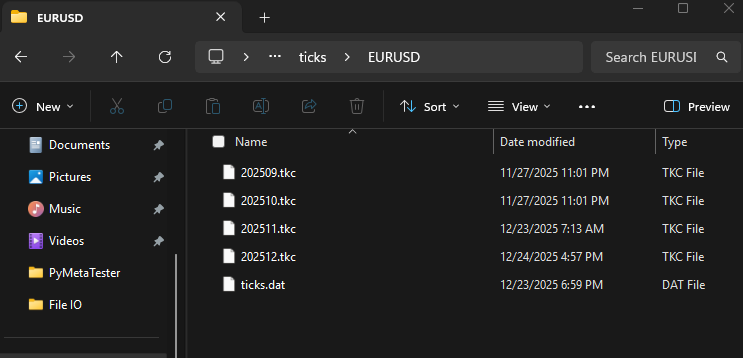
残念ながら、要求したすべてのティックデータ(2025年1月1日~12月1日)を取得することはできませんでした。どうやら、MetaTrader 5ターミナルに存在する以上のティックデータを取得することはできないようです。この場合、利用しているブローカーに数か月分のティックデータしか保存されておらず、その範囲のデータしか取得できませんでした。
ファイル: C:\Users\Omega\AppData\Roaming\MetaQuotes\Terminal\010E047102812FC0C18890992854220E\bases\<broker name>\ticks\EURUSD
MetaTrader 5の過去バーの扱い
ティックとは異なり、バーは時間足に基づいているため、ティックよりも扱いやすいです。 ティックの取得方法と同様に、バーのデータも同じような手順で取得する必要があります。
まず最初に、バーのデータをリクエストする前に、対象の銘柄が気配値表示で利用可能であることを確認し、選択しておく必要があります。
utils.py
def ensure_symbol(symbol: str) -> bool:
    info = mt5.symbol_info(symbol)
    if info is None:
        print(f"Symbol {symbol} not found")
        return False

    if not info.visible:
        if not mt5.symbol_select(symbol, True):
            print(f"Failed to select symbol {symbol}")
            return False
    return True
次に、月の初日から最終日までのデータを取得します。
def fetch_historical_bars(symbol: str,
                          timeframe: int,
                          start_datetime: datetime,
                          end_datetime: datetime):
    """
    Fetch historical bar data for a given symbol and timeframe, forward in time.
    Saves data to a single Parquet file in append mode.
    """

    if not utils.ensure_symbol(symbol=symbol):
        print(f"Symbol {symbol} not available")
        return

    current = start_datetime.replace(day=1, hour=0, minute=0, second=0)

    while True:
        month_start, month_end = utils.month_bounds(current)

        # Cap last month to end_date
        if (
            month_start.year == end_datetime.year and
            month_start.month == end_datetime.month
        ):
            month_end = end_datetime

        # Stop condition
        if month_start > end_datetime:
            break

        print(f"Processing {month_start:%Y-%m-%d} -> {month_end:%Y-%m-%d}")

        # --- fetch data here ---
        rates = mt5.copy_rates_range(
            symbol,
            timeframe,
            month_start,
            month_end
        )

        if rates is None and len(rates)==0:
            config.simulator_logger.warning(f"Failed to Get bars from MetaTrader5")
            current = (month_start + timedelta(days=32)).replace(day=1) # Advance to next month safely
            continue

        df = bars_to_polars(rates)
バーのデータは、それぞれ対応するParquetファイルに保存します。そして、月および年ごとにサブフォルダで分割して管理します。
df = df.with_columns([
    pl.from_epoch("time", time_unit="s").dt.replace_time_zone("utc").alias("time")
])

df = df.with_columns([
    pl.col("time").dt.year().alias("year"),
    pl.col("time").dt.month().alias("month"),
])

tf_name = utils.TIMEFRAMES_REV[timeframe]
df.write_parquet(
    os.path.join(config.BARS_HISTORY_DIR, symbol, tf_name),
    partition_by=["year", "month"],
    mkdir=True
)

if config.is_debug:
    print(df.head(-10))

# Advance to next month safely
current = (month_start + timedelta(days=32)).replace(day=1)
たとえば、3つの銘柄から10か月間にわたってバーのデータを取得します。
if __name__ == "__main__":

    if not mt5.initialize():
        print(f"Failed to Initialize MetaTrader5. Error = {mt5.last_error()}")
        mt5.shutdown()
        quit()

    start_date = datetime(2022, 1, 1, tzinfo=timezone.utc)
    end_date = datetime(2025, 1, 10, tzinfo=timezone.utc)

    fetch_historical_bars("XAUUSD", mt5.TIMEFRAME_M1, start_date, end_date)
    fetch_historical_bars("EURUSD", mt5.TIMEFRAME_H1, start_date, end_date)
    fetch_historical_bars("GBPUSD", mt5.TIMEFRAME_M5, start_date, end_date)

    # read polaris dataframe and print the head for both symbols

    symbol = "GBPUSD"
    timeframe = utils.TIMEFRAMES_REV[mt5.TIMEFRAME_M5]

    path = os.path.join(config.BARS_HISTORY_DIR, symbol, timeframe)

    lf = pl.scan_parquet(path)

    jan_2024 = (
        lf
        .filter(
            (pl.col("year") == 2024) &
            (pl.col("month") == 1)
        )
        .collect(engine="streaming")
    )

    print("January 2024:\n", jan_2024.head(-10))
    print(
        jan_2024.select([
            pl.col("time").min().alias("time_min"),
            pl.col("time").max().alias("time_max")
        ])
    )

    mt5.shutdown()
出力:
(venv) c:\Users\Omega Joctan\OneDrive\Documents\PyMetaTester>tree History
Folder PATH listing
Volume serial number is 2CFE-3A78
C:\USERS\OMEGA JOCTAN\ONEDRIVE\DOCUMENTS\PYMETATESTER\HISTORY
├───Bars
│   ├───EURUSD
│   │   ├───H1
│   │   │   ├───year=2022
│   │   │   │   ├───month=1
│   │   │   │   ├───month=10
│   │   │   │   ├───month=11
│   │   │   │   ├───month=12
│   │   │   │   ├───month=2
│   │   │   │   ├───month=3
│   │   │   │   ├───month=4
│   │   │   │   ├───month=5
│   │   │   │   ├───month=6
│   │   │   │   ├───month=7
│   │   │   │   ├───month=8
│   │   │   │   └───month=9
│   │   │   ├───year=2023
│   │   │   │   ├───month=1
│   │   │   │   ├───month=10
│   │   │   │   ├───month=11
│   │   │   │   ├───month=12
│   │   │   │   ├───month=2
│   │   │   │   ├───month=3
│   │   │   │   ├───month=4
│   │   │   │   ├───month=5
│   │   │   │   ├───month=6
│   │   │   │   ├───month=7
│   │   │   │   ├───month=8
│   │   │   │   └───month=9
│   │   │   ├───year=2024
│   │   │   │   ├───month=1
│   │   │   │   ├───month=10
│   │   │   │   ├───month=11
│   │   │   │   ├───month=12
│   │   │   │   ├───month=2
│   │   │   │   ├───month=3
│   │   │   │   ├───month=4
│   │   │   │   ├───month=5
│   │   │   │   ├───month=6
│   │   │   │   ├───month=7
│   │   │   │   ├───month=8
│   │   │   │   └───month=9
│   │   │   └───year=2025
│   │   │       └───month=1
│   │   └───M5
│   │       ├───year=2022
│   │       │   ├───month=1
│   │       │   ├───month=10
│   │       │   ├───month=11
│   │       │   ├───month=12
│   │       │   ├───month=2
│   │       │   ├───month=3
│   │       │   ├───month=4
│   │       │   ├───month=5
│   │       │   ├───month=6
│   │       │   ├───month=7
│   │       │   ├───month=8
│   │       │   └───month=9
│   │       ├───year=2023
│   │       │   ├───month=1
│   │       │   ├───month=10
│   │       │   ├───month=11
│   │       │   ├───month=12
│   │       │   ├───month=2
│   │       │   ├───month=3
│   │       │   ├───month=4
│   │       │   ├───month=5
│   │       │   ├───month=6
│   │       │   ├───month=7
│   │       │   ├───month=8
│   │       │   └───month=9
│   │       ├───year=2024
│   │       │   ├───month=1
│   │       │   ├───month=10
│   │       │   ├───month=11
│   │       │   ├───month=12
│   │       │   ├───month=2
│   │       │   ├───month=3
│   │       │   ├───month=4
│   │       │   ├───month=5
│   │       │   ├───month=6
│   │       │   ├───month=7
│   │       │   ├───month=8
│   │       │   └───month=9
│   │       └───year=2025
│   │           └───month=1
└───Ticks
    ├───EURUSD
    │   └───year=2025
    │       ├───month=10
    │       ├───month=11
    │       ├───month=12
    │       └───month=9
    └───GBPUSD
        └───year=2025
            ├───month=10
            ├───month=11
            ├───month=12
            └───month=9
MetaTrader 5関数のオーバーロード
前回の記事では、ティックやレート、その他の重要な情報について大きくMetaTrader 5へ依存しながらも、いくつかの取引操作をシミュレーションすることができました。今回は、より完全に、あるいはそれに近い形で外部依存を排除したカスタムシミュレーターを目指します。
まず最初にテスターインスタンスを追加します。つまり、ユーザーがシミュレーターを起動する際に IS_TESTER引数がtrueの場合(ストラテジーテスターモード)、ティックやレートなどの重要なデータをMetaTrader 5から直接取得するのではなく、前のセクションで作成したカスタムパスから取得するようにします。
逆に、IS_TESTERがfalseに設定されている場合は、MetaTrader 5から直接データを取得するようにします。
class Simulator:
    def __init__(self, simulator_name: str, mt5_instance: mt5, deposit: float, leverage: str="1:100"):

        #... other variables

        self.IS_RUNNING = True # is the simulator running or stopped
        self.IS_TESTER = True # are we on the strategy tester mode or live trading

        self.symbol_info_cache: dict[str, namedtuple] = {}

    def Start(self, IS_TESTER: bool) -> bool: # simulator start

        self.IS_TESTER = IS_TESTER

    def Stop(self): # simulator stopped
        self.IS_RUNNING = False
        pass
symbol_info_tick
ローカルパスからティックデータを保存および読み込みできる仕組みが整ったので、次はMetaTrader 5クライアントと同様に、その情報をユーザーへ返す仕組みが必要になります。
symbol_info_tick(
   symbol      // financial instrument name
)
シミュレータークラス内にも同様の関数が必要です。関数は、ティックをMetaTrader 5から返すのか、それともシミュレーター内部のデータから返すのかを判断しなければなりません。
    def symbol_info_tick(self, symbol: str) -> namedtuple:

        if self.IS_TESTER:
            return self.tick_cache[symbol]

        try:
            tick = self.mt5_instance.symbol_info_tick(symbol)
        except Exception as e:
            self.__GetLogger().warning(f"Failed. MT5 Error = {self.mt5_instance.last_error()}")

        return tick
シミュレータークラス内には、最近のティックを追跡するための配列があります。
クラスコンストラクタ:
self.tick_cache: dict[str, namedtuple] = {}
しかし、このシミュレーターにはティック情報を供給する必要があります。そのため、その役割を担う関数が必要になります。
def TickUpdate(self, symbol: str, tick: namedtuple):
    self.tick_cache[symbol] = tick
symbol_info
この関数は、指定された金融商品に関するデータをMetaTrader 5プラットフォームから取得します。
symbol_info(
   symbol      // financial instrument name
)
シミュレータークラスにも同様の関数が必要ですが、シミュレーターの実行中にMetaTrader 5からこのデータを複数回要求するべきではありません。
MetaTrader 5から銘柄のデータを取得した後、それを後で使用できるように配列内に格納しておくことで、「MetaTrader 5への依存度」を低減し、全体的なパフォーマンスの向上にもつながります。
def symbol_info(self, symbol: str) -> namedtuple:

    """Gets data on the specified financial instrument."""

    if symbol not in self.symbol_info_cache:
        info = self.mt5_instance.symbol_info(symbol)
        if info is None:
           return None

       self.symbol_info_cache[symbol] = info

   return self.symbol_info_cache[symbol]
銘柄のデータを一時的に保存するための配列は、先ほど説明したティックを保存するためのものと同様の方法で定義されます。
self.symbol_info_cache: dict[str, namedtuple] = {}
copy_rates_from
この関数は、指定された日付からその前の一定本数までのバーをMetaTrader 5ターミナルから取得します。
copy_rates_from(
   symbol,       // symbol name
   timeframe,    // timeframe
   date_from,    // initial bar open date
   count         // number of bars
   )
クラス内の同様の関数では、まず指定された開始日時がUTC形式であることを確認します。
def copy_rates_from(self, symbol: str, timeframe: int, date_from: datetime, count: int) -> np.array:

    date_from = utils.ensure_utc(date_from)
ユーザーがストラテジーテスターモードを選択している場合 (IS_TESTER=true)、バーのデータはParquetファイルに保存されているものを取得します。
if self.IS_TESTER:

    # instead of getting data from MetaTrader 5, get data stored in our custom directories

    path = os.path.join(config.BARS_HISTORY_DIR, symbol, utils.TIMEFRAMES_REV[timeframe])
    lf = pl.scan_parquet(path)

    try:
        rates = (
            lf
            .filter(pl.col("time") <= date_from) # get data starting at the given date
            .sort("time", descending=True)
            .limit(count) # limit the request to some bars
            .select([
                pl.col("time").dt.epoch("s").cast(pl.Int64).alias("time"),

                pl.col("open"),
                pl.col("high"),
                pl.col("low"),
                pl.col("close"),
                pl.col("tick_volume"),
                pl.col("spread"),
                pl.col("real_volume"),
            ]) # return only what's required
            .collect(engine="streaming") # the streming engine, doesn't store data in memory
        ).to_dicts()

        rates = np.array(rates)[::-1] # reverse an array so it becomes oldest -> newest

    except Exception as e:
        config.tester_logger.warn(f"Failed to copy rates {e}")
        return np.array(dict())
else:

    rates = self.mt5_instance.copy_rates_from(symbol, timeframe, date_from, count)
    rates = np.array(self.__mt5_rates_to_dicts(rates))

    if rates is None:
        config.simulator_logger.warn(f"Failed to copy rates. MetaTrader 5 error = {self.mt5_instance.last_error()}")
        return np.array(dict())

return rates
IS_TESTERがクラス内でfalseに設定されている場合、バーのデータはMetaTrader 5から直接取得します。
MetaTrader 5は構造化されたNumPy配列を返すため、それを各要素ごとに辞書形式のデータを持つNumPy配列へ変換します。この方法により、Polars DataFrameオブジェクトから変換された後のデータ形式と一致させることができ、データ処理の一貫性が保たれます。
def __mt5_rates_to_dicts(self, rates) -> list[dict]:

    if rates is None or len(rates) == 0:
        return []

    # structured numpy array from MT5
    if rates.dtype.names is not None:
        return [
            {name: r[name].item() if hasattr(r[name], "item") else r[name]
            for name in rates.dtype.names}
            for r in rates
        ]
使用例:
sim = Simulator(simulator_name="MySimulator", mt5_instance=mt5, deposit=1078.30, leverage="1:500")

start = datetime(2025, 1, 1)
bars = 10

sim.Start(IS_TESTER=True) # start the simulator in the strategy tester mode
rates = sim.copy_rates_from(symbol="EURUSD", timeframe=mt5.TIMEFRAME_H1, date_from=start, count=bars)
print("is_tester=true\n", rates)

sim.Start(IS_TESTER=False) # start the simulator in real-time trading
rates = sim.copy_rates_from(symbol="EURUSD", timeframe=mt5.TIMEFRAME_H1, date_from=start, count=bars)

print("is_tester=false\n",rates)
出力:
is_tester=true
 [{'time': 1735653600, 'open': 1.04104, 'high': 1.04145, 'low': 1.03913, 'close': 1.03928, 'tick_volume': 2543, 'spread': 0, 'real_volume': 0}
 {'time': 1735657200, 'open': 1.03929, 'high': 1.03973, 'low': 1.03836, 'close': 1.0393, 'tick_volume': 3171, 'spread': 0, 'real_volume': 0}
 {'time': 1735660800, 'open': 1.03931, 'high': 1.03943, 'low': 1.03748, 'close': 1.03759, 'tick_volume': 4073, 'spread': 0, 'real_volume': 0}
 {'time': 1735664400, 'open': 1.03759, 'high': 1.03893, 'low': 1.03527, 'close': 1.03548, 'tick_volume': 5531, 'spread': 0, 'real_volume': 0}
 {'time': 1735668000, 'open': 1.03548, 'high': 1.03614, 'low': 1.0346899999999999, 'close': 1.03504, 'tick_volume': 3918, 'spread': 0, 'real_volume': 0}
 {'time': 1735671600, 'open': 1.03504, 'high': 1.03551, 'low': 1.03442, 'close': 1.03493, 'tick_volume': 3279, 'spread': 0, 'real_volume': 0}
 {'time': 1735675200, 'open': 1.0348600000000001, 'high': 1.03569, 'low': 1.03455, 'close': 1.0352999999999999, 'tick_volume': 2693, 'spread': 0, 'real_volume': 0}
 {'time': 1735678800, 'open': 1.0352999999999999, 'high': 1.03647, 'low': 1.03516, 'close': 1.03548, 'tick_volume': 1840, 'spread': 0, 'real_volume': 0}
 {'time': 1735682400, 'open': 1.03549, 'high': 1.03633, 'low': 1.03546, 'close': 1.03586, 'tick_volume': 1192, 'spread': 0, 'real_volume': 0}
 {'time': 1735686000, 'open': 1.03586, 'high': 1.0361, 'low': 1.03527, 'close': 1.03527, 'tick_volume': 975, 'spread': 0, 'real_volume': 0}]
is_tester=false
 [{'time': 1735653600, 'open': 1.04104, 'high': 1.04145, 'low': 1.03913, 'close': 1.03928, 'tick_volume': 2543, 'spread': 0, 'real_volume': 0}
 {'time': 1735657200, 'open': 1.03929, 'high': 1.03973, 'low': 1.03836, 'close': 1.0393, 'tick_volume': 3171, 'spread': 0, 'real_volume': 0}
 {'time': 1735660800, 'open': 1.03931, 'high': 1.03943, 'low': 1.03748, 'close': 1.03759, 'tick_volume': 4073, 'spread': 0, 'real_volume': 0}
 {'time': 1735664400, 'open': 1.03759, 'high': 1.03893, 'low': 1.03527, 'close': 1.03548, 'tick_volume': 5531, 'spread': 0, 'real_volume': 0}
 {'time': 1735668000, 'open': 1.03548, 'high': 1.03614, 'low': 1.0346899999999999, 'close': 1.03504, 'tick_volume': 3918, 'spread': 0, 'real_volume': 0}
 {'time': 1735671600, 'open': 1.03504, 'high': 1.03551, 'low': 1.03442, 'close': 1.03493, 'tick_volume': 3279, 'spread': 0, 'real_volume': 0}
 {'time': 1735675200, 'open': 1.0348600000000001, 'high': 1.03569, 'low': 1.03455, 'close': 1.0352999999999999, 'tick_volume': 2693, 'spread': 0, 'real_volume': 0}
 {'time': 1735678800, 'open': 1.0352999999999999, 'high': 1.03647, 'low': 1.03516, 'close': 1.03548, 'tick_volume': 1840, 'spread': 0, 'real_volume': 0}
 {'time': 1735682400, 'open': 1.03549, 'high': 1.03633, 'low': 1.03546, 'close': 1.03586, 'tick_volume': 1192, 'spread': 0, 'real_volume': 0}
 {'time': 1735686000, 'open': 1.03586, 'high': 1.0361, 'low': 1.03527, 'close': 1.03527, 'tick_volume': 975, 'spread': 0, 'real_volume': 0}]
copy_rates_from_pos
ドキュメントによると、この関数は指定されたインデックスからMetaTrader 5ターミナルのバーを取得します。
インデックス0には現在のバーがあり、インデックスが大きくなるほど過去のより古いバーになります。
これはMetaTrader 5からバー情報をコピーする関数の中で最も扱いが難しいもののひとつです。というのも、この処理は時間に強く依存しているためです。
インデックス0のバーが常に現在のバーであるということは、この関数が現在のティック時刻を正しく認識している必要があるということです。 シミュレーターをいわゆるストラテジーテスターモードで実行する場合には、copy_rates_from関数を利用し、開始日時として時間を入力します。
開始日を以下のように設定します。
現在時刻 + 現在の時間足(秒)× ユーザーが要求したバー数
    def copy_rates_from_pos(self, symbol: str, timeframe: int, start_pos: int, count: int) -> np.array:

        if self.tick is None or self.tick.time is None:
            self.__GetLogger().critical("Time information not found in the ticker, call the function 'TickUpdate' giving it the latest tick information")
            now = datetime.now(tz=timezone.utc)
        else:
            now = self.tick.time

        if self.IS_TESTER:
            rates = self.copy_rates_from(symbol=symbol,
                                        timeframe=timeframe,
                                        date_from=now+timedelta(seconds=utils.PeriodSeconds(timeframe)*start_pos),
                                        count=count)

        else:

            rates = self.mt5_instance.copy_rates_from_pos(symbol, timeframe, start_pos, count)
            rates = np.array(self.__mt5_rates_to_dicts(rates))

            if rates is None:
                self.__GetLogger().warning(f"Failed to copy rates. MetaTrader 5 error = {self.mt5_instance.last_error()}")
                return np.array(dict())

        return rates
IS_TESTER=falseの場合(リアルタイム実行時)、シミュレーターはMetaTrader 5ターミナルから直接バーのデータを取得します。
使用例:
sim = Simulator(simulator_name="MySimulator", mt5_instance=mt5, deposit=1078.30, leverage="1:500")

start = datetime(2025, 1, 1)
bars = 10
symbol = "EURUSD"
timeframe = mt5.TIMEFRAME_H1

sim.Start(IS_TESTER=True)
rates = sim.copy_rates_from_pos(symbol=symbol, timeframe=timeframe, start_pos=0, count=bars)

print("is_tester=true\n", rates)

sim.Start(IS_TESTER=False) # start the simulator in real-time trading
rates = sim.copy_rates_from_pos(symbol=symbol, timeframe=timeframe, start_pos=0, count=bars)

print("is_tester=false\n",rates)
出力:
(venv) C:\Users\Omega Joctan\OneDrive\Documents\PyMetaTester>python test.py
2025-12-25 12:42:33,366 | CRITICAL | tester |  copy_rates_from_pos 221 --> Time information not found in the ticker, call the function 'TickUpdate' giving it the latest tick information
is_tester=true
 [{'time': 1766584800, 'open': 1.17927, 'high': 1.17932, 'low': 1.1784, 'close': 1.17843, 'tick_volume': 1983, 'spread': 0, 'real_volume': 0}
 {'time': 1766588400, 'open': 1.17843, 'high': 1.17909, 'low': 1.17838, 'close': 1.17853, 'tick_volume': 2783, 'spread': 0, 'real_volume': 0}
 {'time': 1766592000, 'open': 1.17849, 'high': 1.17869, 'low': 1.17773, 'close': 1.17807, 'tick_volume': 2690, 'spread': 0, 'real_volume': 0}
 {'time': 1766595600, 'open': 1.17804, 'high': 1.17825, 'low': 1.17754, 'close': 1.17781, 'tick_volume': 2834, 'spread': 0, 'real_volume': 0}
 {'time': 1766599200, 'open': 1.17781, 'high': 1.1781, 'low': 1.17732, 'close': 1.17795, 'tick_volume': 2354, 'spread': 0, 'real_volume': 0}
 {'time': 1766602800, 'open': 1.17794, 'high': 1.17832, 'low': 1.17726, 'close': 1.17766, 'tick_volume': 1424, 'spread': 0, 'real_volume': 0}
 {'time': 1766606400, 'open': 1.17764, 'high': 1.17798, 'low': 1.17744, 'close': 1.17788, 'tick_volume': 1105, 'spread': 0, 'real_volume': 0}
 {'time': 1766610000, 'open': 1.17788, 'high': 1.1782, 'low': 1.17787, 'close': 1.17817, 'tick_volume': 654, 'spread': 0, 'real_volume': 0}
 {'time': 1766613600, 'open': 1.17817, 'high': 1.17819, 'low': 1.1779, 'close': 1.1779600000000001, 'tick_volume': 608, 'spread': 0, 'real_volume': 0}
 {'time': 1766617200, 'open': 1.1779600000000001, 'high': 1.17797, 'low': 1.17761, 'close': 1.17768, 'tick_volume': 1165, 'spread': 0, 'real_volume': 0}]
2025-12-25 12:42:33,394 | CRITICAL | simulator |  copy_rates_from_pos 221 --> Time information not found in the ticker, call the function 'TickUpdate' giving it the latest tick information
is_tester=false
 [{'time': 1766584800, 'open': 1.17927, 'high': 1.17932, 'low': 1.1784, 'close': 1.17843, 'tick_volume': 1983, 'spread': 0, 'real_volume': 0}
 {'time': 1766588400, 'open': 1.17843, 'high': 1.17909, 'low': 1.17838, 'close': 1.17853, 'tick_volume': 2783, 'spread': 0, 'real_volume': 0}
 {'time': 1766592000, 'open': 1.17849, 'high': 1.17869, 'low': 1.17773, 'close': 1.17807, 'tick_volume': 2690, 'spread': 0, 'real_volume': 0}
 {'time': 1766595600, 'open': 1.17804, 'high': 1.17825, 'low': 1.17754, 'close': 1.17781, 'tick_volume': 2834, 'spread': 0, 'real_volume': 0}
 {'time': 1766599200, 'open': 1.17781, 'high': 1.1781, 'low': 1.17732, 'close': 1.17795, 'tick_volume': 2354, 'spread': 0, 'real_volume': 0}
 {'time': 1766602800, 'open': 1.17794, 'high': 1.17832, 'low': 1.17726, 'close': 1.17766, 'tick_volume': 1424, 'spread': 0, 'real_volume': 0}
 {'time': 1766606400, 'open': 1.17764, 'high': 1.17798, 'low': 1.17744, 'close': 1.17788, 'tick_volume': 1105, 'spread': 0, 'real_volume': 0}
 {'time': 1766610000, 'open': 1.17788, 'high': 1.1782, 'low': 1.17787, 'close': 1.17817, 'tick_volume': 654, 'spread': 0, 'real_volume': 0}
 {'time': 1766613600, 'open': 1.17817, 'high': 1.17819, 'low': 1.1779, 'close': 1.1779600000000001, 'tick_volume': 608, 'spread': 0, 'real_volume': 0}
 {'time': 1766617200, 'open': 1.1779600000000001, 'high': 1.17797, 'low': 1.17761, 'close': 1.17768, 'tick_volume': 1165, 'spread': 0, 'real_volume': 0}]
copy_rates_range
この関数は、指定された日付範囲内のバーをMetaTrader 5ターミナルから取得します。
copy_rates_range(
   symbol,       // symbol name
   timeframe,    // timeframe
   date_from,    // date the bars are requested from
   date_to       // date, up to which the bars are requested
   )
前の2つとは異なり、この関数は2つの日付の間にあるバーを返します。すなわち、開始日であるdate_fromと終了日であるdate_toの範囲内のデータを取得します。
    def copy_rates_range(self, symbol: str, timeframe: int, date_from: datetime, date_to: datetime):

        date_from = utils.ensure_utc(date_from)
        date_to = utils.ensure_utc(date_to)

        if self.IS_TESTER:

            # instead of getting data from MetaTrader 5, get data stored in our custom directories

            path = os.path.join(config.BARS_HISTORY_DIR, symbol, utils.TIMEFRAMES_REV[timeframe])
            lf = pl.scan_parquet(path)

            try:
                rates = (
                    lf
                    .filter(
                            (pl.col("time") >= pl.lit(date_from)) &
                            (pl.col("time") <= pl.lit(date_to))
                        ) # get bars between date_from and date_to
                    .sort("time", descending=True)
                    .select([
                        pl.col("time").dt.epoch("s").cast(pl.Int64).alias("time"),

                        pl.col("open"),
                        pl.col("high"),
                        pl.col("low"),
                        pl.col("close"),
                        pl.col("tick_volume"),
                        pl.col("spread"),
                        pl.col("real_volume"),
                    ]) # return only what's required
                    .collect(engine="streaming") # the streming engine, doesn't store data in memory
                ).to_dicts()

                rates = np.array(rates)[::-1] # reverse an array so it becomes oldest -> newest

            except Exception as e:
                self.__GetLogger().warning(f"Failed to copy rates {e}")
                return np.array(dict())
        else:

            rates = self.mt5_instance.copy_rates_range(symbol, timeframe, date_from, date_to)
            rates = np.array(self.__mt5_rates_to_dicts(rates))

            if rates is None:
                self.__GetLogger().warning(f"Failed to copy rates. MetaTrader 5 error = {self.mt5_instance.last_error()}")
                return np.array(dict())

        return rates
copy_ticks_from
ドキュメントによると、この関数は、指定された日付からMetaTrader 5ターミナルのティックデータを取得します。
copy_ticks_from(
   symbol,       // symbol name
   date_from,    // date the ticks are requested from
   count,        // number of requested ticks
   flags         // combination of flags defining the type of requested ticks
   )
シミュレータークラス内の同様の関数では、ユーザーがストラテジーテスターモードを選択している場合 (IS_TESTER=true)はデータベースからティックを読み込み、リアルタイム実行時にはMetaTrader 5から直接ティックを取得します。
    def copy_ticks_from(self, symbol: str, date_from: datetime, count: int, flags: int=mt5.COPY_TICKS_ALL) -> np.array:

        date_from = utils.ensure_utc(date_from)
        flag_mask = self.__tick_flag_mask(flags)

        if self.IS_TESTER:

            path = os.path.join(config.TICKS_HISTORY_DIR, symbol)
            lf = pl.scan_parquet(path)

            try:
                ticks = (
                    lf
                    .filter(pl.col("time") >= pl.lit(date_from)) # get data starting at the given date
                    .filter((pl.col("flags") & flag_mask) != 0)
                    .sort(
                        ["time", "time_msc"],
                        descending=[False, False]
                    )
                    .limit(count) # limit the request to a specified number of ticks
                    .select([
                        pl.col("time").dt.epoch("s").cast(pl.Int64).alias("time"),

                        pl.col("bid"),
                        pl.col("ask"),
                        pl.col("last"),
                        pl.col("volume"),
                        pl.col("time_msc"),
                        pl.col("flags"),
                        pl.col("volume_real"),
                    ])
                    .collect(engine="streaming") # the streming engine, doesn't store data in memory
                ).to_dicts()

                ticks = np.array(ticks)

            except Exception as e:
                self.__GetLogger().warning(f"Failed to copy ticks {e}")
                return np.array(dict())
        else:

            ticks = self.mt5_instance.copy_ticks_from(symbol, date_from, count, flags)
            ticks = np.array(self.__mt5_data_to_dicts(ticks))

            if ticks is None:
                self.__GetLogger().warning(f"Failed to copy ticks. MetaTrader 5 error = {self.mt5_instance.last_error()}")
                return np.array(dict())

        return ticks
ティックのリクエストには、ユーザーが取得したいティックの種類を指定できるフラグオプションが含まれているため、ユーザーの要件に応じてティックをフィルタリングできるように、フラグマスクを作成する仕組みが必要になります。
ドキュメントによると、
フラグは、要求されるティックの種類を定義します。
フラグの値はCOPY_TICKS列挙型に定義されています。
| ID | 説明 |
|---|---|
| COPY_TICKS_ALL | すべてのティック |
| COPY_TICKS_INFO | Ask価格やBid価格の変更を含むティック |
| COPY_TICKS_TRADE | Last価格や出来高の変化を含むティック |
TICK_FLAGはティックに対する可能なフラグを定義します。これらのフラグは、copy_ticks_from()およびcopy_ticks_range()()関数によって取得されるティックの種類を表すために使用されます。
| ID | 説明 |
|---|---|
| TICK_FLAG_BID | Bid価格が変更された |
| TICK_FLAG_ASK | Ask価格が変更された |
| TICK_FLAG_LAST | Last価格が変更された |
| TICK_FLAG_VOLUME | 取引量が変更された |
| TICK_FLAG_BUY | 直近の買いレートが更新された |
| TICK_FLAG_SELL | 直近の売りレートが更新された |
    def __tick_flag_mask(self, flags: int) -> int:
        if flags == mt5.COPY_TICKS_ALL:
            return (
                mt5.TICK_FLAG_BID
                | mt5.TICK_FLAG_ASK
                | mt5.TICK_FLAG_LAST
                | mt5.TICK_FLAG_VOLUME
                | mt5.TICK_FLAG_BUY
                | mt5.TICK_FLAG_SELL
            )

        mask = 0
        if flags & mt5.COPY_TICKS_INFO:
            mask |= mt5.TICK_FLAG_BID | mt5.TICK_FLAG_ASK
        if flags & mt5.COPY_TICKS_TRADE:
            mask |= mt5.TICK_FLAG_LAST | mt5.TICK_FLAG_VOLUME

        return mask
使用例:
sim = Simulator(simulator_name="MySimulator", mt5_instance=mt5, deposit=1078.30, leverage="1:500")

start = datetime(2025, 1, 1)
end = datetime(2025, 1, 5)

bars = 10
symbol = "EURUSD"
timeframe = mt5.TIMEFRAME_H1

sim.Start(IS_TESTER=True) # start simulation in the strategy tester

ticks = sim.copy_ticks_from(symbol=symbol, date_from=start.replace(month=12, hour=0, minute=0), count=bars)

print("is_tester=true\n", ticks)

sim.Start(IS_TESTER=False) # start the simulator in real-time trading

ticks = sim.copy_ticks_from(symbol=symbol, date_from=start.replace(month=12, hour=0, minute=0), count=bars)

print("is_tester=false\n", ticks)
出力:
is_tester=true
 [{'time': 1764547200, 'bid': 1.15936, 'ask': 1.1596899999999999, 'last': 0.0, 'volume': 0, 'time_msc': 1764547200174, 'flags': 134, 'volume_real': 0.0}
 {'time': 1764547206, 'bid': 1.15934, 'ask': 1.15962, 'last': 0.0, 'volume': 0, 'time_msc': 1764547206476, 'flags': 134, 'volume_real': 0.0}
 {'time': 1764547211, 'bid': 1.1593499999999999, 'ask': 1.15997, 'last': 0.0, 'volume': 0, 'time_msc': 1764547211273, 'flags': 134, 'volume_real': 0.0}
 {'time': 1764547215, 'bid': 1.15936, 'ask': 1.15979, 'last': 0.0, 'volume': 0, 'time_msc': 1764547215872, 'flags': 134, 'volume_real': 0.0}
 {'time': 1764547221, 'bid': 1.15936, 'ask': 1.15964, 'last': 0.0, 'volume': 0, 'time_msc': 1764547221475, 'flags': 4, 'volume_real': 0.0}
 {'time': 1764547231, 'bid': 1.1593499999999999, 'ask': 1.15997, 'last': 0.0, 'volume': 0, 'time_msc': 1764547231674, 'flags': 134, 'volume_real': 0.0}
 {'time': 1764547260, 'bid': 1.1593499999999999, 'ask': 1.15997, 'last': 0.0, 'volume': 0, 'time_msc': 1764547260073, 'flags': 130, 'volume_real': 0.0}
 {'time': 1764547265, 'bid': 1.15892, 'ask': 1.15998, 'last': 0.0, 'volume': 0, 'time_msc': 1764547265485, 'flags': 134, 'volume_real': 0.0}
 {'time': 1764547320, 'bid': 1.15892, 'ask': 1.15998, 'last': 0.0, 'volume': 0, 'time_msc': 1764547320074, 'flags': 130, 'volume_real': 0.0}
 {'time': 1764547345, 'bid': 1.15894, 'ask': 1.15998, 'last': 0.0, 'volume': 0, 'time_msc': 1764547345872, 'flags': 134, 'volume_real': 0.0}]
is_tester=false
 [{'time': 1764547200, 'bid': 1.15936, 'ask': 1.1596899999999999, 'last': 0.0, 'volume': 0, 'time_msc': 1764547200174, 'flags': 134, 'volume_real': 0.0}
 {'time': 1764547206, 'bid': 1.15934, 'ask': 1.15962, 'last': 0.0, 'volume': 0, 'time_msc': 1764547206476, 'flags': 134, 'volume_real': 0.0}
 {'time': 1764547211, 'bid': 1.1593499999999999, 'ask': 1.15997, 'last': 0.0, 'volume': 0, 'time_msc': 1764547211273, 'flags': 134, 'volume_real': 0.0}
 {'time': 1764547215, 'bid': 1.15936, 'ask': 1.15979, 'last': 0.0, 'volume': 0, 'time_msc': 1764547215872, 'flags': 134, 'volume_real': 0.0}
 {'time': 1764547221, 'bid': 1.15936, 'ask': 1.15964, 'last': 0.0, 'volume': 0, 'time_msc': 1764547221475, 'flags': 4, 'volume_real': 0.0}
 {'time': 1764547231, 'bid': 1.1593499999999999, 'ask': 1.15997, 'last': 0.0, 'volume': 0, 'time_msc': 1764547231674, 'flags': 134, 'volume_real': 0.0}
 {'time': 1764547260, 'bid': 1.1593499999999999, 'ask': 1.15997, 'last': 0.0, 'volume': 0, 'time_msc': 1764547260073, 'flags': 130, 'volume_real': 0.0}
 {'time': 1764547265, 'bid': 1.15892, 'ask': 1.15998, 'last': 0.0, 'volume': 0, 'time_msc': 1764547265485, 'flags': 134, 'volume_real': 0.0}
 {'time': 1764547320, 'bid': 1.15892, 'ask': 1.15998, 'last': 0.0, 'volume': 0, 'time_msc': 1764547320074, 'flags': 130, 'volume_real': 0.0}
 {'time': 1764547345, 'bid': 1.15894, 'ask': 1.15998, 'last': 0.0, 'volume': 0, 'time_msc': 1764547345872, 'flags': 134, 'volume_real': 0.0}]
copy_ticks_range
ドキュメントによると、この関数は、指定された日付範囲のティックデータをMetaTrader 5ターミナルから取得します。
関数シグネチャ:
copy_ticks_range(
   symbol,       // symbol name
   date_from,    // date the ticks are requested from
   date_to,      // date, up to which the ticks are requested
   flags         // combination of flags defining the type of requested ticks
   )
以下は、クラスSimulator内における同様の関数の実装例です。
     def copy_ticks_range(self, symbol: str, date_from: datetime, date_to: datetime, flags: int=mt5.COPY_TICKS_ALL) -> np.array:

        date_from = utils.ensure_utc(date_from)
        date_to = utils.ensure_utc(date_to)

        flag_mask = self.__tick_flag_mask(flags)

        if self.IS_TESTER:

            path = os.path.join(config.TICKS_HISTORY_DIR, symbol)
            lf = pl.scan_parquet(path)

            try:
                ticks = (
                    lf
                    .filter(
                            (pl.col("time") >= pl.lit(date_from)) &
                            (pl.col("time") <= pl.lit(date_to))
                        ) # get ticks between date_from and date_to
                    .filter((pl.col("flags") & flag_mask) != 0)
                    .sort(
                        ["time", "time_msc"],
                        descending=[False, False]
                    )
                    .select([
                        pl.col("time").dt.epoch("s").cast(pl.Int64).alias("time"),

                        pl.col("bid"),
                        pl.col("ask"),
                        pl.col("last"),
                        pl.col("volume"),
                        pl.col("time_msc"),
                        pl.col("flags"),
                        pl.col("volume_real"),
                    ])
                    .collect(engine="streaming") # the streaming engine, doesn't store data in memory
                ).to_dicts()

                ticks = np.array(ticks)

            except Exception as e:
                self.__GetLogger().warning(f"Failed to copy ticks {e}")
                return np.array(dict())
        else:

            ticks = self.mt5_instance.copy_ticks_range(symbol, date_from, date_to, flags)
            ticks = np.array(self.__mt5_data_to_dicts(ticks))

            if ticks is None:
                self.__GetLogger().warning(f"Failed to copy ticks. MetaTrader 5 error = {self.mt5_instance.last_error()}")
                return np.array(dict())

        return ticks
使用例:
sim = Simulator(simulator_name="MySimulator", mt5_instance=mt5, deposit=1078.30, leverage="1:500")

sim.Start(IS_TESTER=True) # start simulation in the strategy tester

ticks = sim.copy_ticks_range(symbol=symbol,
                             date_from=start.replace(month=12, hour=0, minute=0),
                             date_to=end.replace(month=12, hour=0, minute=5))

print("is_tester=true\n", ticks)

sim.Start(IS_TESTER=False) # start the simulator in real-time trading

ticks = sim.copy_ticks_range(symbol=symbol,
                             date_from=start.replace(month=12, hour=0, minute=0),
                             date_to=end.replace(month=12, hour=0, minute=5))

print("is_tester=false\n", ticks)
出力:
is_tester=true
 [{'time': 1764547200, 'bid': 1.15936, 'ask': 1.1596899999999999, 'last': 0.0, 'volume': 0, 'time_msc': 1764547200174, 'flags': 134, 'volume_real': 0.0}
 {'time': 1764547206, 'bid': 1.15934, 'ask': 1.15962, 'last': 0.0, 'volume': 0, 'time_msc': 1764547206476, 'flags': 134, 'volume_real': 0.0}
 {'time': 1764547211, 'bid': 1.1593499999999999, 'ask': 1.15997, 'last': 0.0, 'volume': 0, 'time_msc': 1764547211273, 'flags': 134, 'volume_real': 0.0}
 ...
 {'time': 1764550799, 'bid': 1.15965, 'ask': 1.16006, 'last': 0.0, 'volume': 0, 'time_msc': 1764550799475, 'flags': 134, 'volume_real': 0.0}
 {'time': 1764550799, 'bid': 1.15971, 'ask': 1.16011, 'last': 0.0, 'volume': 0, 'time_msc': 1764550799669, 'flags': 134, 'volume_real': 0.0}
 {'time': 1764550799, 'bid': 1.15965, 'ask': 1.16006, 'last': 0.0, 'volume': 0, 'time_msc': 1764550799877, 'flags': 134, 'volume_real': 0.0}]
is_tester=false
 [{'time': 1764547200, 'bid': 1.15936, 'ask': 1.1596899999999999, 'last': 0.0, 'volume': 0, 'time_msc': 1764547200174, 'flags': 134, 'volume_real': 0.0}
 {'time': 1764547206, 'bid': 1.15934, 'ask': 1.15962, 'last': 0.0, 'volume': 0, 'time_msc': 1764547206476, 'flags': 134, 'volume_real': 0.0}
 {'time': 1764547211, 'bid': 1.1593499999999999, 'ask': 1.15997, 'last': 0.0, 'volume': 0, 'time_msc': 1764547211273, 'flags': 134, 'volume_real': 0.0}
 ...
 {'time': 1764893040, 'bid': 1.16424, 'ask': 1.16479, 'last': 0.0, 'volume': 0, 'time_msc': 1764893040071, 'flags': 130, 'volume_real': 0.0}
 {'time': 1764893061, 'bid': 1.16424, 'ask': 1.16479, 'last': 0.0, 'volume': 0, 'time_msc': 1764893061887, 'flags': 4, 'volume_real': 0.0}
{'time': 1764893096, 'bid': 1.16424, 'ask': 1.16482, 'last': 0.0, 'volume': 0, 'time_msc': 1764893096077, 'flags': 4, 'volume_real': 0.0}] 前回の記事では、保有ポジション、注文、取引などの情報を取得するためのカスタム関数を用意しました。今回は、それらすべてをPython-MetaTrader5モジュールの構文でオーバーロードします。
orders_total
ドキュメントによると、この関数はMetaTrader 5ターミナルから有効な注文数を取得します。
orders_total()
整数値が返されます。
ストラテジーテスターでシミュレーターが実行されている場合、この関数はシミュレーション用の注文コンテナに保存されている注文数を返します。そうでない場合は、MetaTrader 5クライアントの注文情報を返します。
def orders_total(self) -> int:

    """Get the number of active orders.

    Returns (int): The number of active orders in either a simulator or MetaTrader 5
        """

    return len(self.orders_container) if self.IS_TESTER else self.mt5_instance.orders_total()
orders_get
ドキュメントによると、この関数は有効な注文を取得し、銘柄やチケットによるフィルタリング機能を備えています。呼び出しオプションは3つあります。
orders_get()
銘柄を指定して呼び出した場合、その銘柄に対するアクティブな注文が返されます。
orders_get(
   symbol="SYMBOL"      // symbol name
)
銘柄のグループを指定して呼び出す場合、その条件に一致する複数銘柄のアクティブな注文が取得されます。
orders_get(
   group="GROUP"        // filter for selecting orders for symbols
)
注文チケットを指定して呼び出す場合、その特定の注文が取得されます。
orders_get(
   ticket=TICKET        // ticket
)
この関数は、namedtuple(名前付きタプル)構造の形式で情報を返します。エラーが発生した場合はNoneを返します。エラーの詳細情報はlast_error()を使用して取得できます。
シミュレーターをMetaTrader 5ターミナルにできるだけ近づけるためには、同様のデータ型を返す必要があります。
from collections import namedtuple
シミュレーター内では、この関数を次のように定義できます。
def orders_get(self, symbol: Optional[str] = None, group: Optional[str] = None, ticket: Optional[int] = None) -> namedtuple:
    """G et active orders with the ability to filter by symbol or ticket. There are three call options.

    Returns:

        list: Returns info in the form of a named tuple structure (namedtuple). Return None in case of an error. The info on the error can be obtained using last_error().
    """
単にいわゆるnamedtupleを返すだけではなく、そのデータ型の内容自体も同様の構造にする必要があります。
    def __init__(self, simulator_name: str, mt5_instance: mt5, deposit: float, leverage: str="1:100"):

        # ----------------- TradeOrder --------------------------

        self.TradeOrder = namedtuple(
            "TradeOrder",
            [
                "ticket",
                "time_setup",
                "time_setup_msc",
                "time_done",
                "time_done_msc",
                "time_expiration",
                "type",
                "type_time",
                "type_filling",
                "state",
                "magic",
                "position_id",
                "position_by_id",
                "reason",
                "volume_initial",
                "volume_current",
                "price_open",
                "sl",
                "tp",
                "price_current",
                "price_stoplimit",
                "symbol",
                "comment",
                "external_id",
            ]
        )
以下は、シミュレータークラス内の同様の関数です。
    def orders_get(self, symbol: Optional[str] = None, group: Optional[str] = None, ticket: Optional[int] = None) -> namedtuple:

        self.__orders_container__.extend([order1, order2])

        if self.IS_TESTER:

            orders = self.__orders_container__

            # no filters → return all orders
            if symbol is None and group is None and ticket is None:
                return tuple(orders)

            # symbol filter (highest priority)
            if symbol is not None:
                return tuple(o for o in orders if o.symbol == symbol)

            # group filter
            if group is not None:
                return tuple(o for o in orders if fnmatch.fnmatch(o.symbol, group))

            # ticket filter
            if ticket is not None:
                return tuple(o for o in orders if o.ticket == ticket)

            return tuple()

        try:
            if symbol is not None:
                return self.mt5_instance.orders_get(symbol=symbol)

            if group is not None:
                return self.mt5_instance.orders_get(group=group)

            if ticket is not None:
                return self.mt5_instance.orders_get(ticket=ticket)

            return self.mt5_instance.orders_get()

        except Exception:
            return None
ユーザーがストラテジーテスターモードを選択している場合(IS_TESTER=true)、注文およびその情報はシミュレーター内部から取得します。それ以外の場合は、MetaTrader 5ターミナルから取得します。
MetaTrader 5ターミナルに2つの指値注文があり、
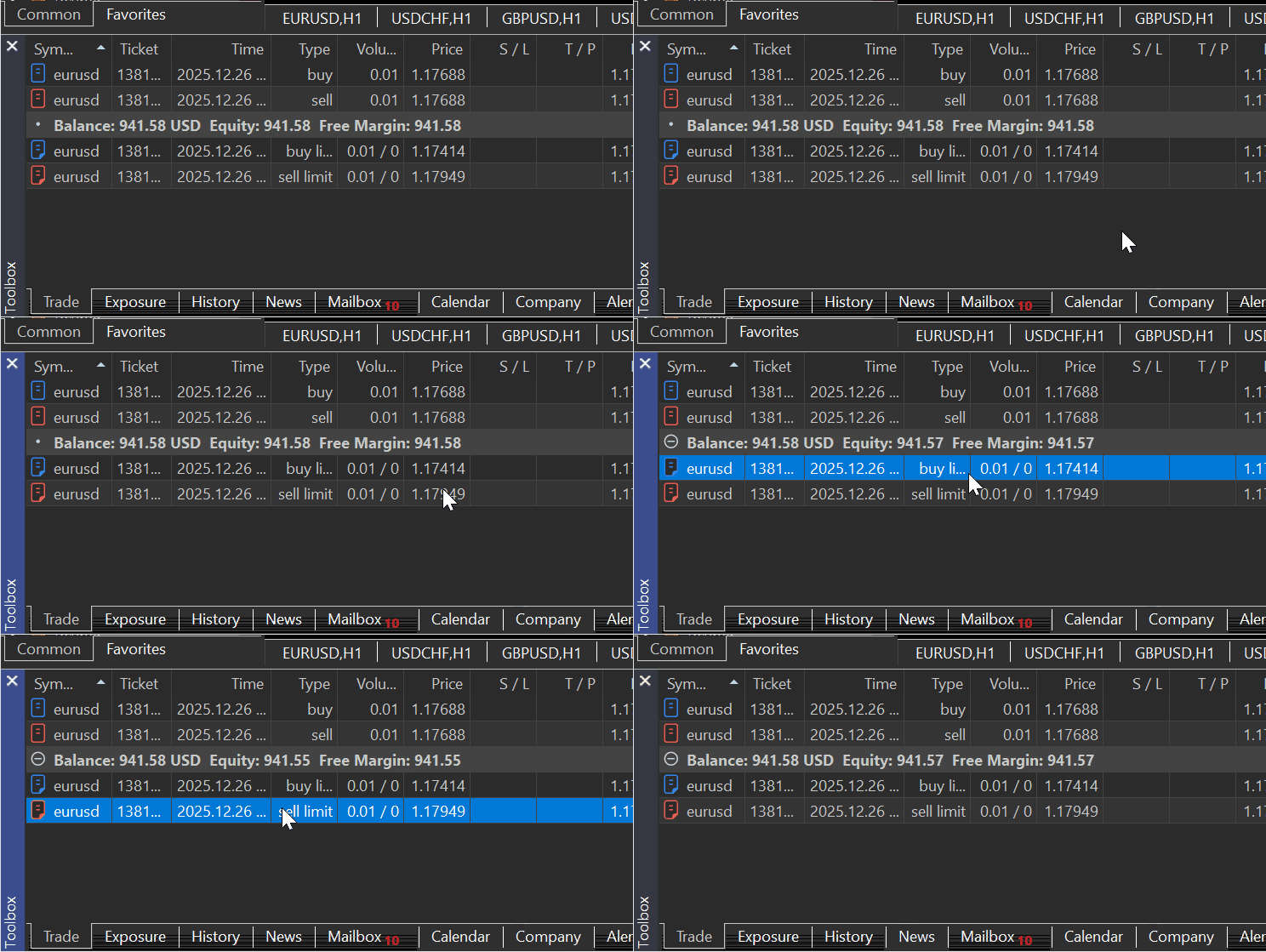
シミュレーション上でも2つの取引が存在している場合
        order1 = self.TradeOrder(
            ticket=123456,
            time_setup=int(datetime.now().timestamp()),
            time_setup_msc=int(datetime.now().timestamp() * 1000),
            time_done=0,
            time_done_msc=0,
            time_expiration=0,
            type=mt5.ORDER_TYPE_BUY_LIMIT,
            type_time=0,
            type_filling=mt5.ORDER_FILLING_RETURN,
            state=mt5.ORDER_STATE_PLACED,
            magic=0,
            position_id=0,
            position_by_id=0,
            reason=0,
            volume_initial=0.01,
            volume_current=0.01,
            price_open=1.1750,
            sl=1.1700,
            tp=1.1800,
            price_current=1.1750,
            price_stoplimit=0.0,
            symbol="GBPUSD",
            comment="",
            external_id="",
        )

        order2 = self.TradeOrder(
            ticket=123457,
            time_setup=int(datetime.now().timestamp()),
            time_setup_msc=int(datetime.now().timestamp() * 1000),
            time_done=0,
            time_done_msc=0,
            time_expiration=0,
            type=mt5.ORDER_TYPE_SELL_LIMIT,
            type_time=0,
            type_filling=mt5.ORDER_FILLING_RETURN,
            state=mt5.ORDER_STATE_PLACED,
            magic=0,
            position_id=0,
            position_by_id=0,
            reason=0,
            volume_initial=0.01,
            volume_current=0.01,
            price_open=1.1800,
            sl=1.1850,
            tp=1.1700,
            price_current=1.1800,
            price_stoplimit=0.0,
            symbol="EURUSD",
            comment="",
            external_id="",
        )

        self.__orders_container__.extend([order1, order2])
MetaTrader 5とシミュレーターの両方で注文が存在するかどうかを確認します。
sim = Simulator(simulator_name="MySimulator", mt5_instance=mt5, deposit=1078.30, leverage="1:500")

sim.Start(IS_TESTER=True) # start simulation in the strategy tester
print("Orders in the simulator:\n", sim.orders_get())


sim.Start(IS_TESTER=False) # start the simulator in real-time trading
print("Orders in MetaTrader 5:\n", sim.orders_get())
出力:
Orders in the simulator:
 (TradeOrder(ticket=123456, time_setup=1766749779, time_setup_msc=1766749779726, time_done=0, time_done_msc=0, time_expiration=0, type=2, type_time=0, type_filling=2, state=1, magic=0, position_id=0, position_by_id=0, reason=0, volume_initial=0.01, volume_current=0.01, price_open=1.175, sl=1.17, tp=1.18, price_current=1.175, price_stoplimit=0.0, symbol='GBPUSD', comment='', external_id=''),
 TradeOrder(ticket=123457, time_setup=1766749779, time_setup_msc=1766749779726, time_done=0, time_done_msc=0, time_expiration=0, type=3, type_time=0, type_filling=2, state=1, magic=0, position_id=0, position_by_id=0, reason=0, volume_initial=0.01, volume_current=0.01, price_open=1.18, sl=1.185, tp=1.17, price_current=1.18, price_stoplimit=0.0, symbol='EURUSD', comment='', external_id=''))
Orders in MetaTrader 5:
 (TradeOrder(ticket=1381968725, time_setup=1766748043, time_setup_msc=1766748043247, time_done=0, time_done_msc=0, time_expiration=0, type=2, type_time=0, type_filling=2, state=1, magic=0, position_id=0, position_by_id=0, reason=0, volume_initial=0.01, volume_current=0.01, price_open=1.17414, sl=0.0, tp=0.0, price_current=1.17769, price_stoplimit=0.0, symbol='EURUSD', comment='', external_id=''),
TradeOrder(ticket=1381968767, time_setup=1766748049, time_setup_msc=1766748049051, time_done=0, time_done_msc=0, time_expiration=0, type=3, type_time=0, type_filling=2, state=1, magic=0, position_id=0, position_by_id=0, reason=0, volume_initial=0.01, volume_current=0.01, price_open=1.17949, sl=0.0, tp=0.0, price_current=1.17769, price_stoplimit=0.0, symbol='EURUSD', comment='', external_id=''))
positions_total
ドキュメントによると、この関数はMetaTrader 5クライアントにおける保有ポジションの数を返します。
positions_total()
以下が、シミュレーターにおける同様のメソッドです。
    def positions_total(self) -> int:
        """Get the number of open positions in MetaTrader 5 client.

        Returns:
            int: number of positions
        """

        if self.IS_TESTER:
            return len(self.__positions_container__)
        try:
            total = self.mt5_instance.positions_total()
        except Exception as e:
            self.__GetLogger().error(f"MetaTrader5 error = {e}")
            return -1

        return total
positions_get
このメソッドは、先ほど説明したorders_getと同様の見た目と動作を持っています。
ドキュメントによると:
この関数は保有ポジションを取得し、銘柄やチケットによるフィルタリング機能を備えています。呼び出し方法は3種類あります。
パラメータなしで呼び出した場合、すべての銘柄の保有ポジションが返されます。
positions_get()
銘柄を指定して呼び出した場合、その銘柄の保有ポジションが返されます。
positions_get(
   symbol="SYMBOL"      // symbol name
)
銘柄のグループを指定して呼び出した場合、そのグループの保有ポジションが返されます。
positions_get(
   group="GROUP"        // filter for selecting positions by symbols
)
ポジションチケットを指定して呼び出した場合、そのチケットの保有ポジションが返されます。
positions_get(
   ticket=TICKET        // ticket
)
orders_getメソッドと同様、このメソッドはnamedtuple構造の形式でデータを返します。エラーが発生した場合はNoneを返し、エラーの詳細はlast_error()で取得できます。
したがって、シミュレーター内でもMetaTrader 5-Pythonモジュールが返すものと同様の構造に合わせて、ポジション情報を保存するための同等のデータ構造が必要になります。
    def positions_get(self, symbol: Optional[str] = None, group: Optional[str] = None, ticket: Optional[int] = None) -> namedtuple:

        if self.IS_TESTER:

            positions = self.__positions_container__

            # no filters → return all positions
            if symbol is None and group is None and ticket is None:
                return tuple(positions)

            # symbol filter (highest priority)
            if symbol is not None:
                return tuple(o for o in positions if o.symbol == symbol)

            # group filter
            if group is not None:
                return tuple(o for o in positions if fnmatch.fnmatch(o.symbol, group))

            # ticket filter
            if ticket is not None:
                return tuple(o for o in positions if o.ticket == ticket)

            return tuple()

        try:
            if symbol is not None:
                return self.mt5_instance.positions_get(symbol=symbol)

            if group is not None:
                return self.mt5_instance.positions_get(group=group)

            if ticket is not None:
                return self.mt5_instance.positions_get(ticket=ticket)

            return self.mt5_instance.positions_get()

        except Exception:
            return None
使用例:
sim = Simulator(simulator_name="MySimulator", mt5_instance=mt5, deposit=1078.30, leverage="1:500")

sim.Start(IS_TESTER=True) # start simulation in the strategy tester
print("positions total in the Simulator: ",sim.positions_total())
print("positions in the Simulator:\n",sim.positions_get())

sim.Start(IS_TESTER=False) # start the simulator in real-time trading
print("positions total in MetaTrader5: ",sim.positions_total())
print("positions in MetaTraer5:\n",sim.positions_get())
出力:
(venv) C:\Users\Omega Joctan\OneDrive\Documents\PyMetaTester>python test.py
positions total in the Simulator:  0
positions in the Simulator:
 ()
positions total in MetaTrader5:  2
positions in MetaTraer5:
 (TradePosition(ticket=1381981938, time=1766748992, time_msc=1766748992425, time_update=1766748992, time_update_msc=1766748992425, type=0, magic=0, identifier=1381981938, reason=0, volume=0.01, price_open=1.17688, sl=0.0, tp=0.0, price_current=1.17755, swap=0.0, profit=0.67, symbol='EURUSD', comment='', external_id=''),
TradePosition(ticket=1381981988, time=1766748994, time_msc=1766748994018, time_update=1766748994, time_update_msc=1766748994018, type=1, magic=0, identifier=1381981988, reason=0, volume=0.01, price_open=1.17688, sl=0.0, tp=0.0, price_current=1.17755, swap=0.0, profit=-0.67, symbol='EURUSD', comment='', external_id=''))
history_orders_total
ドキュメントによると、このメソッドは、特定の期間内における取引履歴の注文数を取得します。
history_orders_total(
   date_from,    // date the orders are requested from
   date_to       // date, up to which the orders are requested
   )
パラメータ:
- date_from:注文の取得開始日。datetimeオブジェクト、または1970年1月1日からの経過秒数で指定します。
- date_to:注文の取得終了日。datetimeオブジェクト、または1970年1月1日からの経過秒数で指定します。
シミュレーターにおける同様の関数は、以下のように実装できます。
    def history_orders_total(self, date_from: datetime, date_to: datetime) -> int:

        # date range is a requirement

        if date_from is None or date_to is None:
            self.__GetLogger().error("date_from and date_to must be specified")
            return None

        date_from = utils.ensure_utc(date_from)
        date_to = utils.ensure_utc(date_to)

        if self.IS_TESTER:

            date_from_ts = int(date_from.timestamp())
            date_to_ts   = int(date_to.timestamp())

            return sum(
                        1
                        for o in self.__orders_history_container__
                        if date_from_ts <= o.time_setup <= date_to_ts
                    )

        try:
            total = self.mt5_instance.history_orders_total(date_from, date_to)
        except Exception as e:
            self.__GetLogger().error(f"MetaTrader5 error = {e}")
            return -1

        return total
使用例:
sim.Start(IS_TESTER=True) # start simulation in the strategy tester

date_to = datetime.now()
date_from = date_to - timedelta(days=1)

print(sim.history_orders_total(date_from=date_from,date_to=date_to))

sim.Start(IS_TESTER=False) # start the simulator in real-time trading

print(sim.history_orders_total(date_from=date_from,date_to=date_to))
出力:
(venv) C:\Users\Omega Joctan\OneDrive\Documents\PyMetaTester>python test.py
orders in the last 24 hours in the Simulator: 0
orders in the last 24 hours in MetaTrader5: 3
history_orders_get
ドキュメントによると、このメソッドは取引履歴から注文を取得し、チケットやポジションによるフィルタリング機能を備えています。
指定された期間内に含まれるすべての注文を返します。
呼び出し方法は3種類あります。
history_orders_get(
   date_from,                // date the orders are requested from
   date_to,                  // date, up to which the orders are requested
   group="GROUP"        // filter for selecting orders by symbols
   )
注文チケットを指定して呼び出した場合、指定されたチケット番号の注文を返します。
history_orders_get(
   ticket=TICKET        // order ticket
)
ポジションチケットを指定して呼び出した場合、ORDER_POSITION_IDプロパティで指定されたポジションチケットを持つすべての注文を返します。
history_orders_get(
   position=POSITION    // position ticket
)
history_orders_total関数と同様に、すべての情報はorders_history_containerという配列から取得されます。さらに、注文チケット、ポジション(保存されているポジションのチケット)、およびグループ(必要な銘柄を整理するためのフィルター)による追加のフィルタリングがおこなわれます。
    def history_orders_get(self,
                           date_from: datetime,
                           date_to: datetime,
                           group: Optional[str] = None,
                           ticket: Optional[int] = None,
                           position: Optional[int] = None
                           ) -> namedtuple:

        if self.IS_TESTER:

            orders = self.__orders_history_container__

            # ticket filter (highest priority)
            if ticket is not None:
                return tuple(o for o in orders if o.ticket == ticket)

            # position filter
            if position is not None:
                return tuple(o for o in orders if o.position_id == position)

            # date range is a requirement
            if date_from is None or date_to is None:
                self.__GetLogger().error("date_from and date_to must be specified")
                return None

            date_from_ts = int(utils.ensure_utc(date_from).timestamp())
            date_to_ts   = int(utils.ensure_utc(date_to).timestamp())

            filtered = (
                o for o in orders
                if date_from_ts <= o.time_setup <= date_to_ts
            ) # obtain orders that fall within this time range

            # optional group filter
            if group is not None:
                filtered = (
                    o for o in filtered
                    if fnmatch.fnmatch(o.symbol, group)
                )

            return tuple(filtered)

        try: # we are not on the strategy tester simulation

            if ticket is not None:
                return self.mt5_instance.history_orders_get(date_from, date_to, ticket=ticket)

            if position is not None:
                return self.mt5_instance.history_orders_get(date_from, date_to, position=position)

            if date_from is None or date_to is None:
                raise ValueError("date_from and date_to are required")

            date_from = utils.ensure_utc(date_from)
            date_to   = utils.ensure_utc(date_to)

            if group is not None:
                return self.mt5_instance.history_orders_get(
                    date_from, date_to, group=group
                )

            return self.mt5_instance.history_orders_get(date_from, date_to)

        except Exception as e:
            self.__GetLogger().error(f"MetaTrader5 error = {e}")
            return None
history_deals_total
ドキュメントによると、この関数は指定された期間内の取引履歴における取引件数を取得します。
history_deals_total(
   date_from,    // date the deals are requested from
   date_to       // date, up to which the deals are requested
   )
パラメータ:
- date_from: 取引の取得開始日。datetimeオブジェクト、または1970年1月1日からの経過秒数で指定します。
- date_to:取引の取得終了日。datetimeオブジェクト、または1970年1月1日からの経過秒数で指定します。
    def history_deals_total(self, date_from: datetime, date_to: datetime) -> int:
        """
        Get the number of deals in history within the specified date range.

        Args:
            date_from (datetime): Date the orders are requested from. Set by the 'datetime' object or as several seconds elapsed since 1970.01.01.

            date_to (datetime, required): Date, up to which the orders are requested. Set by the 'datetime' object or as several seconds elapsed since 1970.01.01.

        Returns:
            An integer value.
        """

        if date_from is None or date_to is None:
            self.__GetLogger().error("date_from and date_to must be specified")
            return -1

        date_from = utils.ensure_utc(date_from)
        date_to   = utils.ensure_utc(date_to)

        if self.IS_TESTER:

            date_from_ts = int(date_from.timestamp())
            date_to_ts   = int(date_to.timestamp())

            return sum(
                1
                for d in self.__deals_history_container__
                if date_from_ts <= d.time <= date_to_ts
            )

        try:
            return self.mt5_instance.history_deals_total(date_from, date_to)

        except Exception as e:
            self.__GetLogger().error(f"MetaTrader5 error = {e}")
            return -1
使用例:
sim = Simulator(simulator_name="MySimulator", mt5_instance=mt5, deposit=1078.30, leverage="1:500")

date_to = datetime.now()
date_from = date_to - timedelta(days=1)

print("Total deals in the last 24 hours in MetaTrader5:", sim.history_deals_total(date_from=date_from,date_to=date_to))

sim.Start(IS_TESTER=False) # start the simulator in real-time trading

print("Total deals in the last 24 hours in MetaTrader5:", sim.history_deals_total(date_from=date_from,date_to=date_to))
出力:
Total deals in the last 24 hours in MetaTrader5: 0
Total deals in the last 24 hours in MetaTrader5: 3
history_deals_get
ドキュメントによると、このメソッドは指定された期間内の取引履歴から約定(deal)を取得し、チケットやポジションによるフィルタリング機能を備えています。
この関数には3つのバリエーションがあります。
history_deals_get(
   date_from,                // date the deals are requested from
   date_to,                  // date, up to which the deals are requested
   group="GROUP"             // filter for selecting deals for symbols
   )
注文チケットを指定して呼び出した場合、DEAL_ORDERプロパティで指定された注文チケットを持つすべての約定を返します。
history_deals_get(
   ticket=TICKET        // order ticket
)
ポジションチケットを指定して呼び出した場合、DEAL_POSITION_IDプロパティで指定されたポジションチケットを持つすべての約定を返します。
history_deals_get(
   position=POSITION    // position ticket
)
シミュレータークラスに、同じ名前のメソッドを作成します。ユーザーがストラテジーテスターモードを選択している場合(IS_TESTER=true)、約定履歴はシミュレーター内の配列から取得されます。それ以外の場合は、その情報はMetaTrader 5クライアントから直接取得されます。
    def history_deals_get(self,
                          date_from: datetime,
                          date_to: datetime,
                          group: Optional[str] = None,
                          ticket: Optional[int] = None,
                          position: Optional[int] = None
                        ) -> namedtuple:

        if self.IS_TESTER:

            deals = self.__deals_history_container__

            # ticket filter (highest priority)
            if ticket is not None:
                return tuple(d for d in deals if d.ticket == ticket)

            # position filter
            if position is not None:
                return tuple(d for d in deals if d.position_id == position)

            # date range is a requirement
            if date_from is None or date_to is None:
                self.__GetLogger().error("date_from and date_to must be specified")
                return None

            date_from_ts = int(utils.ensure_utc(date_from).timestamp())
            date_to_ts   = int(utils.ensure_utc(date_to).timestamp())

            filtered = (
                d for d in deals
                if date_from_ts <= d.time <= date_to_ts
            ) # obtain orders that fall within this time range

            # optional group filter
            if group is not None:
                filtered = (
                    d for d in filtered
                    if fnmatch.fnmatch(d.symbol, group)
                )

            return tuple(filtered)

        try: # we are not on the strategy tester simulation

            if ticket is not None:
                return self.mt5_instance.history_deals_get(date_from, date_to, ticket=ticket)

            if position is not None:
                return self.mt5_instance.history_deals_get(date_from, date_to, position=position)

            if date_from is None or date_to is None:
                raise ValueError("date_from and date_to are required")

            date_from = utils.ensure_utc(date_from)
            date_to   = utils.ensure_utc(date_to)

            if group is not None:
                return self.mt5_instance.history_deals_get(
                    date_from, date_to, group=group
                )

            return self.mt5_instance.history_deals_get(date_from, date_to)

        except Exception as e:
            self.__GetLogger().error(f"MetaTrader5 error = {e}")
            return None
使用例:
sim = Simulator(simulator_name="MySimulator", mt5_instance=mt5, deposit=1078.30, leverage="1:500")

sim.Start(IS_TESTER=True) # start simulation in the strategy tester

date_to = datetime.now()
date_from = date_to - timedelta(days=1)

print("deals in the last 24 hours in the Simulator:\n", sim.history_deals_get(date_from=date_from,date_to=date_to))

sim.Start(IS_TESTER=False) # start the simulator in real-time trading

print("Deals in the last 24 hours in MetaTrader5:\n", sim.history_deals_get(date_from=date_from,date_to=date_to))
出力:
(venv) C:\Users\Omega Joctan\OneDrive\Documents\PyMetaTester>python test.py
deals in the last 24 hours in the Simulator:
 ()
Deals in the last 24 hours in MetaTrader5:
 (TradeDeal(ticket=1134768493, order=1381981938, time=1766748992, time_msc=1766748992425, type=0, entry=0, magic=0, position_id=1381981938, reason=0, volume=0.01, price=1.17688, commission=-0.04, swap=0.0, profit=0.0, fee=0.0, symbol='EURUSD', comment='', external_id=''),
TradeDeal(ticket=1134768532, order=1381981988, time=1766748994, time_msc=1766748994018, type=1, entry=0, magic=0, position_id=1381981988, reason=0, volume=0.01, price=1.17688, commission=-0.04, swap=0.0, profit=0.0, fee=0.0, symbol='EURUSD', comment='', external_id=''),
TradeDeal(ticket=1135016562, order=1381968767, time=1766763381, time_msc=1766763381530, type=1, entry=0, magic=0, position_id=1381968767, reason=0, volume=0.01, price=1.17953, commission=-0.04, swap=0.0, profit=0.0, fee=0.0, symbol='EURUSD', comment='', external_id=''))
account_info
MetaTrader 5ターミナルとシミュレーターの両方からアカウント情報を取得する仕組みが必要です。そのためには、私たちのクラス内で、これらのアカウントの認証情報を同様の方法で保存およびアクセスできるようにする必要があります。
MetaTrader 5 から account_info()メソッドを使ってアカウント情報を取得すると、次のようなタプルが返されることが分かります。
AccountInfo(login=52557820, trade_mode=0, leverage=500, limit_orders=200, margin_so_mode=0, trade_allowed=True, trade_expert=True, margin_mode=2, currency_digits=2, fifo_close=False, balance=941.54, credit=0.0, profit=2.37, equity=943.91, margin=2.36, margin_free=941.55, margin_level=39996.18644067797, margin_so_call=100.0, margin_so_so=0.0, margin_initial=0.0, margin_maintenance=0.0, assets=0.0, liabilities=0.0, commission_blocked=0.0, name='OMEGA MSIGWA', server='ICMarketsSC-Demo', currency='USD', company='Raw Trading Ltd')
ドキュメントによると、この関数は、namedtuple構造の形式で情報を返します。エラーが発生した場合はNoneを返し、エラーの詳細はlast_error()で取得できます。
シミュレータークラス内にも同様の構造を定義します。
        self.AccountInfo = namedtuple(
            "AccountInfo",
            [
                "login",
                "trade_mode",
                "leverage",
                "limit_orders",
                "margin_so_mode",
                "trade_allowed",
                "trade_expert",
                "margin_mode",
                "currency_digits",
                "fifo_close",
                "balance",
                "credit",
                "profit",
                "equity",
                "margin",
                "margin_free",
                "margin_level",
                "margin_so_call",
                "margin_so_so",
                "margin_initial",
                "margin_maintenance",
                "assets",
                "liabilities",
                "commission_blocked",
                "name",
                "server",
                "currency",
                "company",
            ]
        )
このシミュレータークラスでMetaTrader 5を模倣することを目的としているため、MetaTrader 5のアカウント情報の一部をあらかじめ設定(格納)しておく必要があります。
        mt5_acc_info = mt5_instance.account_info()

        if mt5_acc_info is None:
            raise RuntimeError("Failed to obtain MT5 account info")

        self.__account_state_update(
            account_info=self.AccountInfo(
                # ---- identity / broker-controlled ----
                login=11223344,
                trade_mode=mt5_acc_info.trade_mode,
                leverage=int(leverage.split(":")[1]),
                limit_orders=mt5_acc_info.limit_orders,
                margin_so_mode=mt5_acc_info.margin_so_mode,
                trade_allowed=mt5_acc_info.trade_allowed,
                trade_expert=mt5_acc_info.trade_expert,
                margin_mode=mt5_acc_info.margin_mode,
                currency_digits=mt5_acc_info.currency_digits,
                fifo_close=mt5_acc_info.fifo_close,

                # ---- simulator-controlled financials ----
                balance=deposit,                # simulator starting balance
                credit=mt5_acc_info.credit,
                profit=0.0,
                equity=deposit,
                margin=0.0,
                margin_free=deposit,
                margin_level=0.0,

                # ---- risk thresholds (copied from broker) ----
                margin_so_call=mt5_acc_info.margin_so_call,
                margin_so_so=mt5_acc_info.margin_so_so,
                margin_initial=mt5_acc_info.margin_initial,
                margin_maintenance=mt5_acc_info.margin_maintenance,

                # ---- rarely used but keep parity ----
                assets=mt5_acc_info.assets,
                liabilities=mt5_acc_info.liabilities,
                commission_blocked=mt5_acc_info.commission_blocked,

                # ---- descriptive ----
                name="John Doe",
                server="MetaTrader5-Simulator",
                currency=mt5_acc_info.currency,
                company=mt5_acc_info.company,
            )
        )
計算可能な財務情報(口座残高、エクイティ、証拠金、余剰証拠金、証拠金維持率など)を除き、すべての詳細をあらかじめ設定しておきます。
account_info関数の内部では、ユーザーがストラテジーテスターモードを選択している(IS_TESTER=true)かどうかを確認し、その場合はシミュレーターのアカウント情報を返します。それ以外の場合は、MetaTrader 5のアカウントから取得した情報を返します。
    def account_info(self) -> namedtuple:

        """Gets info on the current trading account."""

        if self.IS_TESTER:
            return self.AccountInfo

        mt5_ac_info = self.mt5_instance.account_info()
        if  mt5_ac_info is None:
            self.__GetLogger().warning(f"Failed to obtain MT5 account info, MT5 Error = {self.mt5_instance.last_error()}")
            return

        return mt5_ac_info
使用例:
sim = Simulator(simulator_name="MySimulator", mt5_instance=mt5, deposit=1078.30, leverage="1:200")

sim.Start(IS_TESTER=True) # start simulation in the strategy tester
print("simulator's account info: ", sim.account_info())

sim.Start(IS_TESTER=False) # start the simulator in real-time trading
print("MetaTrader5's account info: ", sim.account_info())
出力:
(venv) C:\Users\Omega Joctan\OneDrive\Documents\PyMetaTester>python test.py
simulator's account info:  AccountInfo(login=11223344, trade_mode=0, leverage=200, limit_orders=200, margin_so_mode=0, trade_allowed=True, trade_expert=True, margin_mode=2, currency_digits=2, fifo_close=False, balance=1078.3, credit=0.0, profit=0.0, equity=1078.3, margin=0.0, margin_free=1078.3, margin_level=0.0, margin_so_call=100.0, margin_so_so=0.0, margin_initial=0.0, margin_maintenance=0.0, assets=0.0, liabilities=0.0, commission_blocked=0.0, name='John Doe', server='MetaTrader5-Simulator', currency='USD', company='Raw Trading Ltd')
MetaTrader5's account info:  AccountInfo(login=52557820, trade_mode=0, leverage=500, limit_orders=200, margin_so_mode=0, trade_allowed=True, trade_expert=True, margin_mode=2, currency_digits=2, fifo_close=False, balance=941.54, credit=0.0, profit=2.37, equity=943.91, margin=2.36, margin_free=941.55, margin_level=39996.18644067797, margin_so_call=100.0, margin_so_so=0.0, margin_initial=0.0, margin_maintenance=0.0, assets=0.0, liabilities=0.0, commission_blocked=0.0, name='OMEGA MSIGWA', server='ICMarketsSC-Demo', currency='USD', company='Raw Trading Ltd')
order_calc_profit
これはシミュレーター内でも有用な関数のひとつであり、特定のポジションや注文においてどれだけリスクを取っているか、またはどれだけの利益を狙っているかを推定するのに役立ちます。
ドキュメントによると、
この関数は特定の取引操作に対して、口座通貨での利益を返します。
order_calc_profit(
   action,          // order type (ORDER_TYPE_BUY or ORDER_TYPE_SELL)
   symbol,          // symbol name
   volume,          // volume
   price_open,      // open price
   price_close      // close price
   );
MetaTrader 5 の関数と同様のものをMQL5で作成するためには、この関数の内部動作を理解する必要があります。
詳細については、https://www.mql5.com/ja/book/automation/experts/experts_ordercalcprofitをご覧ください。
以下の表は、MetaTrader 5 における注文の利益を推定するための数式をまとめたものです。
| 識別子 | 式 |
|---|---|
| SYMBOL_CALC_MODE_FOREX | (終値 - 始値)* 契約サイズ * ロット数 |
| SYMBOL_CALC_MODE_FOREX_NO_LEVERAGE | (終値 - 始値)* 契約サイズ * ロット数 |
| SYMBOL_CALC_MODE_CFD | (終値 - 始値)* 契約サイズ * ロット数 |
| SYMBOL_CALC_MODE_CFDINDEX | (終値 - 始値)* 契約サイズ * ロット数 |
| SYMBOL_CALC_MODE_CFDLEVERAGE | (終値 - 始値)* 契約サイズ * ロット数 |
| SYMBOL_CALC_MODE_EXCH_STOCKS | (終値 - 始値)* 契約サイズ * ロット数 |
| SYMBOL_CALC_MODE_EXCH_STOCKS_MOEX | (終値 - 始値)* 契約サイズ * ロット数 |
| SYMBOL_CALC_MODE_FUTURES | (終値 - 始値) * ロット数 * ティック価格 / ティックサイズ |
| SYMBOL_CALC_MODE_EXCH_FUTURES | (終値 - 始値) * ロット数 * ティック価格 / ティックサイズ |
| SYMBOL_CALC_MODE_EXCH_FUTURES_FORTS | (終値 - 始値) * ロット数 * ティック価格 / ティックサイズ |
| SYMBOL_CALC_MODE_EXCH_BONDS | ロット数 * 契約サイズ * (終値 * 額面価格 + 発生利息) |
| SYMBOL_CALC_MODE_EXCH_BONDS_MOEX | ロット数 * 契約サイズ * (終値 * 額面価格 + 発生利息) |
| SYMBOL_CALC_MODE_SERV_COLLATERAL | ロット数 * 契約サイズ * 市場価格 * 流動率 |
シミュレーター内の同様の名前の関数に、同じ数式を導入します。
    def order_calc_profit(self,
                        action: int,
                        symbol: str,
                        volume: float,
                        price_open: float,
                        price_close: float) -> float:
        """
        Return profit in the account currency for a specified trading operation.

        Args:
            action (int): The type of position taken, either 0 (buy) or 1 (sell).
            symbol (str): Financial instrument name.
            volume (float):   Trading operation volume.
            price_open (float): Open Price.
            price_close (float): Close Price.
        """


        sym = self.symbol_info(symbol)

        if self.IS_TESTER:

            contract_size = sym.trade_contract_size

            # --- Determine direction ---
            if action == mt5.ORDER_TYPE_BUY:
                direction = 1
            elif action == mt5.ORDER_TYPE_SELL:
                direction = -1
            else:
                self.__GetLogger().critical("order_calc_profit failed: invalid order type")
                return 0.0

            # --- Core profit calculation ---

            calc_mode = sym.trade_calc_mode
            price_delta = (price_close - price_open) * direction

            try:
                # ------------------ FOREX / CFD / STOCKS -----------------------
                if calc_mode in (
                    mt5.SYMBOL_CALC_MODE_FOREX,
                    mt5.SYMBOL_CALC_MODE_FOREX_NO_LEVERAGE,
                    mt5.SYMBOL_CALC_MODE_CFD,
                    mt5.SYMBOL_CALC_MODE_CFDINDEX,
                    mt5.SYMBOL_CALC_MODE_CFDLEVERAGE,
                    mt5.SYMBOL_CALC_MODE_EXCH_STOCKS,
                    mt5.SYMBOL_CALC_MODE_EXCH_STOCKS_MOEX,
                ):
                    profit = price_delta * contract_size * volume

                # ---------------- FUTURES --------------------
                elif calc_mode in (
                    mt5.SYMBOL_CALC_MODE_FUTURES,
                    mt5.SYMBOL_CALC_MODE_EXCH_FUTURES,
                    # mt5.SYMBOL_CALC_MODE_EXCH_FUTURES_FORTS,
                ):
                    tick_value = sym.trade_tick_value
                    tick_size = sym.trade_tick_size

                    if tick_size <= 0:
                        self.__GetLogger().critical("Invalid tick size")
                        return 0.0

                    profit = price_delta * volume * (tick_value / tick_size)

                # ---------- BONDS -------------------

                elif calc_mode in (
                    mt5.SYMBOL_CALC_MODE_EXCH_BONDS,
                    mt5.SYMBOL_CALC_MODE_EXCH_BONDS_MOEX,
                ):
                    face_value = sym.trade_face_value
                    accrued_interest = sym.trade_accrued_interest

                    profit = (
                        volume
                        * contract_size
                        * (price_close * face_value + accrued_interest)
                        - volume
                        * contract_size
                        * (price_open * face_value)
                    )

                # ------ COLLATERAL -------
                elif calc_mode == mt5.SYMBOL_CALC_MODE_SERV_COLLATERAL:
                    liquidity_rate = sym.trade_liquidity_rate
                    market_price = (
                        self.tick.ask if action == mt5.ORDER_TYPE_BUY else self.tick.bid
                    )

                    profit = (
                        volume
                        * contract_size
                        * market_price
                        * liquidity_rate
                    )

                else:
                    self.__GetLogger().critical(
                        f"Unsupported trade calc mode: {calc_mode}"
                    )
                    return 0.0

                return round(profit, 2)

            except Exception as e:
                self.__GetLogger().critical(f"Failed: {e}")
                return 0.0

        # if we are not on the strategy tester

        try:
            profit = self.mt5_instance.order_calc_profit(
                action,
                symbol,
                volume,
                price_open,
                price_close
            )

        except Exception as e:
            self.__GetLogger().critical(f"Failed to calculate profit of a position, MT5 error = {self.mt5_instance.last_error()}")
            return np.nan

        return profit
使用例:
sim = Simulator(simulator_name="MySimulator", mt5_instance=mt5, deposit=1078.30, leverage="1:500")

sim.Start(IS_TESTER=True) # start simulation in the strategy tester

profit = sim.order_calc_profit(action=mt5.POSITION_TYPE_SELL, symbol=symbol, volume=0.01, price_open=entry, price_close=tp)
print("Simulator profit caclulate: ", profit)

sim.Start(IS_TESTER=False) # start the simulator in real-time trading

profit = sim.order_calc_profit(action=mt5.POSITION_TYPE_SELL, symbol=symbol, volume=0.01, price_open=entry, price_close=tp)
print("MT5 profit caclulate: ", round(profit, 2))
出力:
Simulator profit caclulate:  1.68
MT5 profit caclulate:  1.68
order_calc_margin
これは、MetaTrader 5 API におけるもうひとつの有用な関数ですが、その動作はあまり広く知られていません。
ドキュメントによると、この関数は、指定された取引操作を実行するために必要となる、口座通貨建ての証拠金を計算します。
以下の表は、order_calc_margin 関数がどのように構築されているかを示すために使用される数式をまとめたものです。
| 識別子 | 式 |
|---|---|
| SYMBOL_CALC_MODE_FOREX 外国為替 | ロット数 * 契約サイズ * 証拠金率 / レバレッジ |
| SYMBOL_CALC_MODE_FOREX_NO_LEVERAGE レバレッジなしのFX | ロット数 * 契約サイズ * 証拠金率 |
| SYMBOL_CALC_MODE_CFD CFD | ロット数 * 契約サイズ * 市場価格 * 証拠金率 |
| SYMBOL_CALC_MODE_CFDLEVERAGE レバレッジを効かせたCFD | ロット数 * 契約サイズ * 市場価格 * 証拠金率 / レバレッジ |
| SYMBOL_CALC_MODE_CFDINDEX 指数に関するCFD | ロット数 * 契約サイズ * 市場価格 * ティック価格 / ティックサイズ * 証拠金率 |
| SYMBOL_CALC_MODE_EXCH_STOCKS 証券取引所に上場されている証券 | ロット数 * 契約サイズ * 最終価格 * 証拠金率 |
| SYMBOL_CALC_MODE_EXCH_STOCKS_MOEX MOEX上場証券 | ロット数 * 契約サイズ * 最終価格 * 証拠金率 |
| SYMBOL_CALC_MODE_FUTURES 先物 | ロット数 * 初期証拠金 * 証拠金率 |
| SYMBOL_CALC_MODE_EXCH_FUTURES 証券取引所の先物取引 | ロット数 * 初期証拠金 * 証拠金率 または |
| SYMBOL_CALC_MODE_EXCH_FUTURES_FORTS FORTSの先物取引 | ロット数 * 初期証拠金 * 証拠金率 または |
| SYMBOL_CALC_MODE_EXCH_BONDS 証券取引所に上場されている債券 | ロット数 × 契約サイズ × 額面金額 × オープン価格 / 100 |
| SYMBOL_CALC_MODE_EXCH_BONDS_MOEX MOEX上場債券 | ロット数 × 契約サイズ × 額面金額 × オープン価格 / 100 |
| SYMBOL_CALC_MODE_SERV_COLLATERAL | 非取引資産(証拠金不要) |
シミュレータークラスでは、注文の証拠金を推定する際に、同じ数式を使用します。
    def order_calc_margin(self, action: int, symbol: str, volume: float, price: float) -> float:
        """
        Return margin in the account currency to perform a specified trading operation.

        """

        if volume <= 0 or price <= 0:
            self.__GetLogger().error("order_calc_margin failed: invalid volume or price")
            return 0.0

        if not self.IS_TESTER:
            try:
                return round(self.mt5_instance.order_calc_margin(action, symbol, volume, price), 2)
            except Exception:
                self.__GetLogger().warning(f"Failed: MT5 Error = {self.mt5_instance.last_error()}")
                return 0.0

        # IS_TESTER = True
        sym = self.symbol_info(symbol)

        contract_size = sym.trade_contract_size
        leverage = max(self.AccountInfo.leverage, 1)

        margin_rate = (
            sym.margin_initial
            if sym.margin_initial > 0
            else sym.margin_maintenance
        )

        if margin_rate <= 0: # if margin rate is zero set it to 1
            margin_rate = 1.0

        mode = sym.trade_calc_mode

        if mode == self.mt5_instance.SYMBOL_CALC_MODE_FOREX:
            margin = (volume * contract_size * price) / leverage

        elif mode == self.mt5_instance.SYMBOL_CALC_MODE_FOREX_NO_LEVERAGE:
            margin = volume * contract_size * price

        elif mode in (
            self.mt5_instance.SYMBOL_CALC_MODE_CFD,
            self.mt5_instance.SYMBOL_CALC_MODE_CFDINDEX,
            self.mt5_instance.SYMBOL_CALC_MODE_EXCH_STOCKS,
            self.mt5_instance.SYMBOL_CALC_MODE_EXCH_STOCKS_MOEX,
        ):
            margin = volume * contract_size * price * margin_rate

        elif mode == self.mt5_instance.SYMBOL_CALC_MODE_CFDLEVERAGE:
            margin = (volume * contract_size * price * margin_rate) / leverage

        elif mode in (
            self.mt5_instance.SYMBOL_CALC_MODE_FUTURES,
            self.mt5_instance.SYMBOL_CALC_MODE_EXCH_FUTURES,
            # self.mt5_instance.SYMBOL_CALC_MODE_EXCH_FUTURES_FORTS,
        ):
            margin = volume * sym.margin_initial

        elif mode in (
            self.mt5_instance.SYMBOL_CALC_MODE_EXCH_BONDS,
            self.mt5_instance.SYMBOL_CALC_MODE_EXCH_BONDS_MOEX,
        ):
            margin = (
                volume
                * contract_size
                * sym.trade_face_value
                * price
                / 100
            )

        elif mode == self.mt5_instance.SYMBOL_CALC_MODE_SERV_COLLATERAL:
            margin = 0.0

        else:
            self.__GetLogger().warning(f"Unknown calc mode {mode}, fallback margin formula used")
            margin = (volume * contract_size * price) / leverage

        return round(margin, 2)
margin_rateの部分は最も厄介で、どのレート値を使用するべきか判断する前に、必要な値がすべて存在していることを確認しなければなりません。
最終的な考察
本記事では、シミュレーターにおけるティックデータの受け渡し方法を紹介し、MetaTrader 5 の Python API が提供するほぼすべての必要な関数を実装しました。これにより、MetaTrader 5 の動作を再現するための独立した環境に一歩近づくことができました。この仕組みによって、Python製自動売買ボットのためのカスタムストラテジーテスターを構築することが可能になります。
次回の記事では、取引関数を実装し、過去のいくつかのティックデータに対して取引の動作をシミュレーションする予定です。さらに興味深い内容が続きますので、ぜひご期待ください。
では、また。
GitHub: https://github.com/MegaJoctan/PyMetaTesterで、このプロジェクトに関するご意見を共有し、改善にご協力ください。
添付ファイル
| ファイル名 | 説明と使用法 |
|---|---|
| bars.py | MetaTrader 5クライアントからバーデータを取得し、指定したファイルパスに保存する関数を含むファイルです。 |
| ticks.py | MetaTrader 5クライアントからティックデータを取得し、指定したファイルパスに保存する関数を含むファイルです。 |
| config.py | プロジェクト全体で再利用性を高めるための変数を定義した設定ファイルです。 |
| utils.py | さまざまなタスクを支援するシンプルな関数(ヘルパー関数)を含むユーティリティファイルです。 |
| simulator.py | Simulatorというクラスを定義し、シミュレーターの主要なロジックをまとめたファイルです。 |
| test.py | 本記事で説明したコードや関数をテストするためのファイルです。 |
| error_description.py | MetaTrader 5のエラーコードを人間が読めるメッセージに変換する関数を含むファイルです。 |
| requirements.txt | このプロジェクトで使用されるPythonの依存関係とそのバージョンを記述したファイルです。 |
MetaQuotes Ltdにより英語から翻訳されました。
元の記事: https://www.mql5.com/en/articles/20455
警告: これらの資料についてのすべての権利はMetaQuotes Ltd.が保有しています。これらの資料の全部または一部の複製や再プリントは禁じられています。
この記事はサイトのユーザーによって執筆されたものであり、著者の個人的な見解を反映しています。MetaQuotes Ltdは、提示された情報の正確性や、記載されているソリューション、戦略、または推奨事項の使用によって生じたいかなる結果についても責任を負いません。

 ラリー・ウィリアムズの『市場の秘密』(第4回):MQL5における短期的スイングハイとスイングローの自動化
 MQL5でボラティリティモデルを構築する(第I回):初期実装
 データベースは簡単(第1回):SQLiteを用いたMQL5向け軽量ORMフレームワーク
 MQL5でのAI搭載取引システムの構築(第8回):アニメーション、タイミング指標、応答管理ツールによるUIの改善

- 無料取引アプリ
- 8千を超えるシグナルをコピー
- 金融ニュースで金融マーケットを探索