Multi Currency Strength Dashboard PRO MT4

💡 MT5 SÜRÜMÜNÜ MÜ ARIYORSUNUZ? Eğer MetaTrader 5 kullanıyorsanız, native sürümü almak için buraya tıklayın: 👉 https://www.mql5.com/en/market/product/155546

Multi-Currency Strength Dashboard PRO — Profesyonel Para Birimi Güç Göstergesi (MT4)

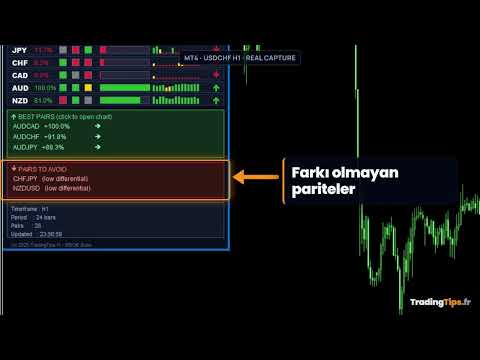
Multi-Currency Strength Dashboard PRO, MetaTrader 4 için geliştirilmiş, Forex piyasasındaki ana para birimlerinin göreceli gücünü gerçek zamanlı olarak ölçen gelişmiş bir indikatördür. 28 adede kadar ana pariteyi analiz eder, 8 ana para biriminin normalize edilmiş gücünü hesaplar ve izlenmesi veya kaçınılması gereken en uygun pariteleri hızlıca belirlemenizi sağlayan kapsamlı bir kontrol paneli (dashboard) sunar.

İndikatörün Amacı

  • Para birimlerinin gücü ve zayıflığı hakkında net ve anlık bir görünüm sağlamak.

  • "Güçlü vs Zayıf" kombinasyonlarını vurgulayarak güçlü trendleri tespit etmeye yardımcı olmak.

  • İşlem yapılacak paritelerin seçimini iyileştirmek için bir filtre görevi görmek.

  • Birden fazla grafik açmaya gerek kalmadan Forex analizini özetlemek.

Temel Özellikler

  • Çoklu Para Birimi Analizi (Multi-Currency): 8 ana para biriminin (USD, EUR, GBP, JPY, CHF, CAD, AUD, NZD) gücünün eş zamanlı hesaplanması.

  • 28 Pariteye Kadar Analiz: Brokerinizde mevcut olan paritelerin otomatik tespiti.

  • Kapsamlı Görsel Panel: %0–100 güç çubukları, dinamik renkler, yüzdeler ve trend göstergeleri.

  • En İyi Pariteler (Best Pairs): En yüksek farka (güçlü vs zayıf) sahip kombinasyonların belirlenmesi.

  • Kaçınılması Gereken Pariteler: Düşük farka sahip (yönsüz/yatay piyasa) kesişimlerin tespiti.

  • Multi-Timeframe (Çoklu Zaman Dilimi): Daha fazla istikrar için birden fazla zaman dilimini yumuşatma veya birleştirme yeteneği.

  • Veri Yumuşatma (Smoothing): Piyasa gürültüsünü azaltmak için yapılandırılabilir ortalama.

  • Entegre Alarmlar: Güçlü para birimi, zayıf para birimi veya en iyi parite tespit edildiğinde bildirim.

  • Özelleştirilebilir Arayüz: Panel konumu, renkler, genişlik ve yazı tipleri.

Nasıl Kullanılır?

  1. İndikatörü herhangi bir MT4 grafiğine sürükleyin.

  2. CalculationTimeframe aracılığıyla hesaplama zaman dilimini seçin.

  3. Analiz periyodunu ayarlayın (örneğin 24 bar).

  4. Stratejinize göre multi-timeframe analizini ve yumuşatmayı etkinleştirin veya devre dışı bırakın.

  5. "Best Pairs" (En İyi Pariteler) ve "Worst Pairs" (En Kötü Pariteler) bölümlerini eşik değerlerinize göre yapılandırın.

  6. Fırsatlardan haberdar olmak istiyorsanız yerel alarmları veya anlık (push) bildirimleri etkinleştirin.

  7. Paneli stratejileriniz için bir filtre olarak kullanın veya piyasayı tek bakışta analiz edin.

Ana Parametreler

CALCULATION SETTINGS (Hesaplama Ayarları) CalculationTimeframe , CalculationPeriod , UseMultiTimeframe , SmoothResults , SmoothingPeriod

VISUAL DASHBOARD (Görsel Panel) ShowDashboard , PanelX , PanelY , PanelWidth , PanelBgColor , HeaderColor , StrongColor , MediumColor , WeakColor , BarWidth , FontSize

PAIR RECOMMENDATIONS (Parite Önerileri) ShowBestPairs , MinStrengthDiff , ShowWorstPairs

ALERTS & NOTIFICATIONS (Alarmlar ve Bildirimler) EnableAlerts , AlertOnStrongCurrency , AlertOnWeakCurrency , AlertOnBestPair , EnablePushNotifications

ADVANCED OPTIONS (Gelişmiş Seçenekler) ShowHistoricalTrend , ShowPercentageChange , Use28Pairs , ExcludeExoticPairs

Kullanım İpuçları (Best Practices)

  • Bir para biriminin diğerinden belirgin şekilde daha güçlü olduğu kesişimleri önceliklendirin.

  • Göreceli gücü benzer olan paritelerden kaçının: Bu durum genellikle düzensiz veya yatay hareketlere yol açar.

  • Kısa vadeli işlemler (Scalping/Day Trading) için daha kısa periyotlar kullanın (örneğin: 12–24 bar).

  • Swing trading için periyodu artırın veya yumuşatmayı (smoothing) etkinleştirin.

  • Kararlarınızı iyileştirmek için para birimi gücünü teknik stratejinizle birleştirin.

  • Gerçek hesapta kullanmadan önce ayarlarınızı mutlaka demo hesapta test edin.

Uyumluluk

  • Platform: MetaTrader 4 (Indicator).

  • Semboller: Ana Forex pariteleri (Brokere bağlı olarak 28 pariteye kadar).

  • Zaman Dilimleri: M1'den MN'ye kadar ( CalculationTimeframe baz alınarak hesaplanır).

  • Hesap Türleri: Hedging ve Netting.

SSS (Sıkça Sorulan Sorular)

İndikatör otomatik işlem açar mı? Hayır. Sadece analiz sağlar, herhangi bir emir iletmez.

Değerler neden gerçek zamanlı olarak değişiyor? Para birimi gücü piyasa hareketlerine göre değişir, bu dinamik bir indikatör için normaldir.

Sistem kendini yeniden boyar mı (Repaint)? Değerler son barda (mevcut mumda) hareket edebilir, ancak geçmiş veriler analiz edilen periyotlarla tutarlı kalır.

Brokerimde tüm pariteler yoksa ne olur? İndikatör yalnızca mevcut sembolleri kullanır ve bazı pariteler eksikse bir uyarı mesajı görüntüler.

Yasal Uyarı

Forex ticareti yüksek kayıp riski içerir. Bu indikatör piyasanın sentetik bir görünümünü sunar ancak sonuç garanti etmez ve yatırım tavsiyesi niteliğinde değildir. Gerçek kullanım öncesinde ayarlarınızı daima demo hesapta test edin.

Değişiklik Günlüğü (Changelog)

v1.00 — İlk sürüm: Çoklu para birimi paneli, en iyi/en kötü pariteler, alarmlar, gelişmiş seçenekler, 28 pariteye kadar analiz.

Anahtar Kelimeler

Currency Strength, Multi-Currency Dashboard, Para Birimi Gücü, Forex İndikatörü, Trend Filtresi, Market Tarayıcı, Forex Pariteleri, MT4 İndikatör.


Önerilen ürünler
Market Monitor
Rodrigo Rethka Goncalves
Market Monitor – Smart Asset Performance Dashboard for MT4 Turn your MetaTrader 4 into a professional trading intelligence center! Market Monitor is a powerful monitoring tool that displays, in real time, the most relevant performance metrics of each symbol being traded — helping you make faster, smarter, and more strategic decisions. What Does This Indicator Do? Market Monitor scans all open and historical orders, consolidates the data by symbol, and displays everything in visual pa
QuickClose: Instant Order Management Made Simple QuickClose   allows you to instantly close all orders with a single click. It operates at high speed, giving you the flexibility to close orders for a specific symbol or all symbols at once. This makes trade management significantly faster and more efficient. This   Expert Advisor can swiftly close all buy and sell orders either for a selected symbol or across all trades. The   SymbolButton is specifically designed for order closure, featuring bo
This tool monitors your current Expert Advisors and manages stop losses and take profits. You can customize which EAs and/or which currencies to monitor. It is primarily meant for EAs that you feel manage stop losses and/or take profits poorly. If you want this tool to be able to monitor manual trades, please use '0' (zero) as the magic number. Supports hidden stoploss and take profit Supports ATR-calculated dynamic stoploss Supports Breakeven for individual trades Supports Trailing stop Lower r
The professional utilities "Ichimoku Waves Meter" to analyse graphs using the correct interpretation of Ichimoku kinkōhyō! Is a graphic program that allows traders to quickly and easily measure the proportions between the indicated points on the price graph. This time and price indicator is a basic tool for analysing the chart according to the Ichimoku strategy on the MT4 platform. Using this tool allows an insightful and complete analysis of time waves as well as price waves in a very short ti
Hello Traders! Version 3.0 of the script has been released!  What's new?  Thanks to your suggestions I have inserted these changes to the tool: 1 - Data input are now date picker, it will be easier and faster to set the data export period; 2 - A message box will check that there is not a file with the same name in your folder; 3 - Error message to check that data insert are correct. If you like this product, take a look to the FULL INTERFACE!   MT4 To Excel Interface This script is a very usefu
MQL5 Blogları: https://www.mql5.com/en/blogs/post/761446 MT4 Sürümü: https://www.mql5.com/en/market/product/136790 MT5 Sürümü: https://www.mql5.com/en/market/product/136791 Time Wizard, hız, zamanlama ve işlem kontrolünü tek bir temiz kontrol panelinde bir araya getirmek isteyen yatırımcılar için tasarlanmış profesyonel bir işlem asistanıdır. Bu Uzman Danışman, olay bazlı işlem, planlı işlem ve hızlı yarı otomatik emir yönetimi için tasarlanmıştır. Emirlerinizi önceden hazırlamanıza, tam işle
A tool for logging personal and downloaded MQL5 trade history data  between specified date range into a CSV file and capturing open trade and close trade chart pictures This History Capturer and Writer tool is an Indicator, so it works well in coexistence with other expert advisor on the same chart $30  for the next 25 downloaders, next price: $30 Try Free Trial Version Here:   Download Free Trial Features: Trade History Chart Screenshot : Capture the opening and closing charts for each hist
Скрипт используется для сбора статистики по переходам цены между уровнями сетки, размер которой задается в настройках (смотрите индикатор Transitions between levels ). Данные записываются в CSV файл. Есть два режима сбора статистики: SeparateTransition - учитывается каждый отдельный переход (смотрите скриншот 2). Время перехода - время, когда цена коснулась нового уровня. Accumulation - в файл записывается количество однонаправленных переходов  (смотрите скриншот 4). Например, -7 - семь пеерех
The Expert Advisor will help you forward all pop-up alert with screenshot from  MetaTrader 4 to Telegram channel/ group, also forward all notifications to Telegram. Parameters  -  Telegram Bot Token - create bot on Telegram and get token.  -  Telegram Chat ID  - input your Telegram user ID,  group / channel ID  -  Forward Alert - default true, to forward alert.  -  Send message as caption of Screenshot - default false, set true to send message below Screenshot  How to setup and guide  - Telegram
Copy Trader is a convenient and fast order copier for MetaTrader4. The EA performs the copying of orders from the server terminal to one or several client terminals. It monitors opening/closing, StopLoss and TakeProfit, and also pending orders. It uses a magic number for its orders, which allows to open other orders in the client terminal both manually and using other experts; It has a minimum of settings. Install the Expert Advisor in two terminals: Choose MODE - SERVER on the terminal to copy
The script allows you to close all opened positions for a given currency pair ( EURUSD by default, but it can be changed to any existing currency pair) when Sum of Profit from all opened positions (by chosen currency pair) is equal or greater than value of the input parameter: SumProfit . Input Parameters sSymbol = EURUSD SumProfit  = 100 Slippage = 2 You can change SumProfit  to any positive value ( in dollars , not in points!). This script closes all positions for a given currency pair only.
HEDGE   120   is an EA that opens an order if the market moves an adverse will make a safe zone . Hedging with Forex is a strategy used to protect one's position in a currency pair from an adverse move. It is typically a form of short-term protection when a trader is concerned about news or an event triggering volatility in currency markets. The main reason that you want to use hedging on your trades is to limit risk. Hedging can be a bigger part of your trading plan if done carefully. I
This is a semi-automatic Expert Advisor. A user draws a support or a resistance line in the form of a horizontal line or a trendline on a chart. A command in the format of UP|DN_xxxx:yyyy is specified in the line name; the Expert Advisor understands it as a signal to buy or sell setting a stop loss and a take profit. EA settings include a parameter with a lot size and a value for moving stop loss to breakeven. If stop loss = 0, the EA does not use breakeven. If this parameter is greater than zer
Program for automatic placement of stop loss and take profit orders. Values are calculated as points distance from open price. BreakEven option is also included. all options could be applied to BUY, SELL separately or together. Enter values ​​in points in the fields on the right side of the menu and press dedicated button to aplly your settings. If in doubt, The instruction is displayed in the tooltip.
FREE
close all profitable orders The set contains scripts for different purposes, facilitating work in the MetaTrader 4 terminal. If necessary, a screen is provided for some scripts. Before working on a real account, check (on a demo account) whether the required script responds to your tasks (for example, there is a script for opening five orders at the same time, by default the lot is set to 10; so that you do not accidentally open five positions with a total volume of 50 lots - be attentive))) Use
Rosy Pro Panel MT4
Theresia Yovitha Herwanda
5 (1)
Download DEMO here:  https://www.mql5.com/en/blogs/post/759769   An ultimate panel you've never seen before.  Compact and nice Trade panel with large Total P/L and it's percentage display. Groups for trades summary available: Ticket, Symbol, Type, Category, and Magic. Average price field helps you know your trading average price and direction. Set magic and comment of your trading in a very easy way. Group closing by symbol, type, category or magic - only by one click. Close All button for a qu
Trade History Exporter automatically exports trade history to a CSV (comma separated values) file. Trade History Exporter: - automatically exports trade history every time a trade is closed - allows you to manually force an export by using the "W" key on your keyboard - can use Order Comments as Magic Numbers - useful for instance when using a Trade Copier - calculates the Net Profit per trade
This EA is based on the relationship between the three currencies, interaction, and thus hedging, I now find the most ideal pair of currencies is the default parameter of the three pairs of currencies, On the parameters Parameter setting is very simple, "Huoli" is profitable n USD. Users can determine the number of orders according to the funds of the account.
Superior Telegram Signals Multi-Platform Trade Copier & Notification System   Available for MetaTrader 4 and MetaTrader 5 Superior Telegram Signals   is a utility that connects a trading terminal to the Telegram application. It is designed to send automated trade notifications, chart screenshots, and account status updates to a specified Telegram chat, channel, or group. Use Cases This tool can be used by: Signal Providers:   To automate the broadcasting of trade signals, modifications, and clos
Heaven Assistant: Simplify Your MT4 Management Simplify the management of the MetaTrader 4 (MT4) platform with the Heaven Assistant . This Expert Advisor (EA) is a robust tool that allows you to control and customize your trading environment in an efficient and user-friendly manner. Key Features: Multiple Pairs Opening: Quick access to most currency pairs, both major and minor, plus exotic pairs. The ability to open indices, metals, and cryptocurrencies with a single click. Template Change: Easi
One Click Trader is a tool designed for MetaTrader 4 platform, which enables you to take your trading to the next level. It enables you to open, manage and close your trades in simple an efficient way by just one click of your mouse button. Up arrow minimizes the OCT panel Down arrow maximizes the OCT panel Right arrow displays the next panel with additional features Left arrow hides the panel with additional features Red SELL button enables you to open short market orders Red SELL STOP button e
Утилита для подсчета лотов в закрытых сделках прямо на графике, чтобы не вести подсчеты на бумаге, в таблице или в уме, была разработана данная программа которая будет считать за вас! Очень удобно для торговли, где необходим постоянный контроль количества лотов закрытых позиций, для подсчета комиссионных с комиссий и спреда которые как раз и начисляются за это количество лотов.
Introducing the OrderManager: A Revolutionary Utility for MT4 Manage your trades like a pro with the all-new Order Manager utility for MetaTrader 4. Designed with simplicity and ease-of-use in mind, the Order Manager allows you to effortlessly define and visualize the risk associated with each trade, enabling you to make informed decisions and optimize your trading strategy.  Key Features: Risk Management: Define the risk of your trades quickly and easily, allowing you to make better decisio
Welcome guys !  I offer to you this MT4 project I've been working on for the last 2 years ( roughly over 900h of work.. ).  This is a complete tool that will change the way you see MT4, because I almost recoded it entirely ! It will provides you a solid base for risk management, order positionning, hedging, account preservation and journaling. I wanted an all-in-one panel that covers both scalping and swing trading and that suits every type of trader.       Main goal was : NO INPUTS. Never
PLEASE NOTE:   The "AUTO" function of the EA has NOT yet been activated . It's still ongoing testing. Once it becomes available, clients will get a free upgrade to EA 2.0                        Also .... PLEASE follow the instructions below in order for the functions to work properly. Introduction: The Phoenix Project (EA) Our Expert Advisor is both refined and practical. It is geared towards helping the traders be constantly aware of their risk PER trade while it helps them manage that risk.
The program is designed for copying your successful orders. The price is often fluctuates within a channel. But there is no time to monitor the terminal and place the next orders, especially if it happens at night. Place an order, when it closed with profit, the program repeats your order as a pending limit order. This will continue until the order closes with a loss, or the price goes too far away and the pending order will not trigger. An offset is provided for inclined channels. The order wil
This indicator will allow you to quickly go to the chart section that interests you, without unnecessary time costs. pt_shift - step of vertical scrolling; ButtonsHeight - button height; ButtonsWidth - button width; ButtonsColor - color of buttons; ButtonsBordersColor - button border color; Font - font; TextColor - button text color; TextSize - button text size; ButtonsBack - buttons in the background; ButtonsSelection - select buttons for movements; ButtonsHidden - hide buttons in
RSI Dashboard is a great tool for quickest possible analysis of multiple currency pairs  at the same time in terms of Oversold or Overbought . All displayed and used by indicator symbols are freely to choose and are specified using a space separated list in parameters you're able to analyze not only predetermined ones, but everything that your broker offers, also commodities, equities, indices, ones with prefixes, suffixes etc. There are 3 types of alerts: alert notifications in the MT4 termin
This indicator is useful for monitoring the performance of individual strategies or even everything of the entire portfolio of strategies directly on your MT4. In this way you can view the equity line and the balance line directly on the chart. In addition, you can set a line based on the percentage number of DD Max that the individual strategy can reach. Try it.
MT4 Local Trade Copier A file-based trade copying system for MetaTrader 4 that synchronizes trades between Master and Client terminals on the same computer or network. Key Features Master/Client Architecture : One Master terminal broadcasts trades, multiple Client terminals can receive and replicate them File-Based Communication : Uses shared folder system for reliable inter-terminal communication Flexible Lot Management : Copy exact lot sizes or use fixed lot sizes on client accounts Customizab
Bu ürünün alıcıları ayrıca şunları da satın alıyor
Local Trade Copier EA MT4
Juvenille Emperor Limited
4.96 (110)
Local Trade Copier EA MT4 ile olağanüstü hızlı işlem kopyalama deneyimi yaşayın. Kolay 1 dakikalık kurulumuyla bu işlem kopyalayıcısı, aynı Windows bilgisayarda veya Windows VPS'te birden fazla MetaTrader terminali arasında işlemleri kopyalamanıza olanak tanır ve 0.5 saniyenin altındaki şimşek hızında kopyalama hızları sunar. Başlangıç seviyesinde veya profesyonel bir tüccar olsanız da, Local Trade Copier EA MT4 , spesifik ihtiyaçlarınıza göre özelleştirmek için geniş bir seçenek yelpazesi sunar
Exp COPYLOT CLIENT for MT4
Vladislav Andruschenko
4.69 (65)
MetaTrader 4 için profesyonel işlem kopyalayıcı MetaTrader 4 için hızlı, güvenilir ve profesyonel bir işlem kopyalayıcı. COPYLOT , MetaTrader 4 ve MetaTrader 5 terminalleri arasında Forex işlemlerinin kopyalanmasını sağlar ve farklı hesap türleri ile işlem senaryoları için esnek senkronizasyon sunar. COPYLOT MT4 sürümü şunları destekler: MetaTrader 4 → MetaTrader 4 MetaTrader 5 Hedge → MetaTrader 4 MetaTrader 5 Netting → MetaTrader 4   MT5 sürümü Tam açıklama + DEMO + PDF Nasıl satın alınır Nası
Trade Manager EA’ye hoş geldiniz! Ticaretin daha sezgisel, hassas ve verimli hale gelmesi için tasarlanmış nihai risk yönetim aracı ile tanışın. Bu sadece bir emir verme aracı değil; ticaret planlaması, pozisyon yönetimi ve risk kontrolü için kapsamlı bir çözüm. İster yeni başlayan bir yatırımcı olun, ister deneyimli bir trader ya da hızlı emir gerektiren bir scalper, Trade Manager EA ihtiyaçlarınıza uyum sağlar ve forex, endeksler, emtialar ve kripto paralar dahil tüm piyasalarda esneklik sunar
Trade Assistant MT4
Evgeniy Kravchenko
4.43 (197)
It helps to calculate the risk per trade, the easy installation of a new order, order management with partial closing functions, trailing stop of 7 types and other useful functions. Additional materials and instructions Installation instructions   -   Application instructions   -   Trial version of the application for a demo account Line function -   shows on the chart the Opening line, Stop Loss, Take Profit. With this function it is easy to set a new order and see its additional characteris
TradePanel MT4
Alfiya Fazylova
4.84 (95)
Trade Panel, çok işlevli bir ticaret asistanıdır. Uygulama, manuel ticaret için 50'den fazla ticaret fonksiyonu içerir ve çoğu ticaret görevini otomatikleştirmeyi mümkün kılar. Satın almadan önce demo hesapta demo sürümü test edebilirsiniz. Demo hesap için uygulamanın deneme sürümünü indirin: https://www.mql5.com/en/blogs/post/750865 . Talimatların tamamı buraya . Ticaret. Tek tıklamayla ticaret işlemleri yapmayı sağlar: Risk otomatik hesaplaması ile bekleyen emirleri ve pozisyonları açmak. Bird
Effortlessly calculate lot sizes and manage trades to save time and avoid costly errors The Trade Pad Pro EA is a tool for the Metatrader Platform that aims to help traders manage their trades more efficiently and effectively. It has a user-friendly visual interface that allows users to easily place and manage an unlimited number of trades, helping to avoid human errors and enhance their trading activity. [ Installation Guide | Update Guide | Troubleshooting | FAQ | All Products ] One of the k
Telegram'dan MT4'e:   Nihai Sinyal Kopyalama Çözümü Telegram ile MT4'e   işlemlerinizi kolaylaştırın, DLL'lere ihtiyaç duymadan doğrudan Telegram kanallarından ve sohbetlerinden MetaTrader 4 platformunuza işlem sinyallerini kopyalamak için tasarlanmış son teknoloji yardımcı program. Bu sağlam çözüm, sinyallerin benzersiz hassasiyet ve özelleştirme seçenekleriyle sorunsuz bir şekilde yürütülmesini sağlayarak size zaman kazandırır ve verimliliğinizi artırır. [ Instructions and DEMO ] Temel Özellik
Riskinizi otomatik olarak hesaplarken işlemlere hızlı bir şekilde girip çıkmanıza yardımcı olacak Ticaret Yöneticisi. Aşırı Ticaret, İntikam Ticareti ve Duygusal Ticaretten korunmanıza yardımcı olacak özellikler içerir. İşlemler otomatik olarak yönetilebilir ve hesap performans ölçümleri bir grafikte görselleştirilebilir. Bu özellikler, bu paneli tüm manuel yatırımcılar için ideal kılar ve MetaTrader 4 platformunun geliştirilmesine yardımcı olur. Çoklu Dil desteği. MT5 Sürümü  |  Kullanım Kılavu
Kopyalama Ustası MT4       MetaTrader 4 ve MetaTrader 5 terminalleri için bir ticaret kopyalama aracıdır. Her iki yönde de kopyalamayı destekler: MT4'ten MT5'e, MT5'ten MT4'e ve aynı tipteki hesaplar arasında MT4'ten MT4'e. Doğru çalışabilmesi için tüm terminallerin aynı PC veya VPS üzerinde çalışması gerekmektedir. [ Instruction  and Demo ]  MetaTrader 4'e kopyalamak için ayrı bir sürüm —       Kopyalama Ustası MT5       - gereklidir. Başlıca Özellikler: Kopyalama Modları Hem Master hem de Rec
News Filter EA: Advanced Algo Trading Assistant News Filter EA is an advanced algo trading assistant designed to enhance your trading experience. By using the   News Filter EA , you can integrate a Forex economic news filter into your existing expert advisor, even if you do not have access to its source code. In addition to the news filter, you can also specify   trading days   and   hours   for your expert. The News Filter EA also includes   risk management   and   equity protection   features
Close If Profit or Loss with Trailing for MetaTrader 4 — toplam kâr veya toplam zarar ile otomatik kapatma MetaTrader 4 için pratik bir işlem yönetimi aracıdır. Toplam kâr veya toplam zarar belirlediğiniz seviyeye ulaştığında, seçilen pozisyonları otomatik olarak kapatabilir. Expert Advisor açık işlemleri izler, değişken kâr/zarar sonucunu hesaplar, Trailing Profit kullanabilir ve pozisyonları manuel müdahaleden daha hızlı yönetmenize yardımcı olur. MetaTrader 4 hâlâ manuel trader’lar, scalper’
DrawDown Limiter MT4
Haidar Lionel Haj Ali
5 (8)
Drawdown Limiter EA You are in the right place if you were searching for Drawdown control, Drawdown limiter, Balance protection, Equity Protection or Daily Drawdown Limit related to Prop Firm, FTMO, or Funded account trading, or if you want to protect your trading account. Have you suffered from controlling your drawdown when trading funded accounts? This EA is meant for you. Prop firms usually set a rule called “Trader Daily Drawdown”, and if it is not respected, you are disqualified.  I am an
Trade Dashboard simplifies how you open, manage, and control your trades, with built-in lot size calculation. It allows you to execute trades, manage risk, and control positions directly on the chart, with tools such as partial close, breakeven, and trailing stop. Designed to reduce manual work and help you stay focused on your trading decisions. A demo version is available for testing. Detailed explanations of features are provided within the MQL5 platform. Installation instructions are include
Hello friends. I wrote this utility specifically for use in my profile with a large number of Expert Advisors and sets ("Joint_profiles_from_grid_sets" https://www.mql5.com/en/blogs/post/747929 ). Now, in order to limit losses on the account, there is no need to change the "Close_positions_at_percentage_of_loss" parameter on each chart. Just open one additional chart, attach this utility and set the desired percentage for closing all trades on the account. The utility has the following function
Working Trial Download Copy Cat More Trade Copier MT4 is not just a simple local trade copier; it is a complete risk management and execution framework designed for today’s trading challenges. From prop firm challenges to personal portfolio management, it adapts to every situation with its blend of robust execution, capital protection, flexible configuration, and advanced trade handling. The copier works in both   Master (sender) and Slave (receiver)   modes, with real-time synchronization of
Trade copier MT4
Alfiya Fazylova
4.56 (32)
Trade Copier, ticaret hesapları arasındaki işlemleri kopyalamak ve senkronize etmek için tasarlanmış profesyonel bir yardımcı programdır. Kopyalama, tedarikçinin hesabından/terminalinden alıcının aynı bilgisayarda veya vps'de kurulu olan hesabına/terminaline gerçekleşir. KAMPANYA - Eğer zaten "Trade copier MT5" aldıysanız, "Trade copier MT4"ü ücretsiz olarak alabilirsiniz (MT4 > MT5 ve MT4 < MT5 kopyalamalar için). Koşullar hakkında daha fazla bilgi almak için lütfen bizimle özel mesaj yoluyla i
Candlestick Pattern Scanner is a multi-timeframe and multi-symbol dashboard and alert system that checks all timeframes and currency pairs for different candlestick patterns that are formed in them. Scanner is integrated with support and resistance zones so you can check the candlestick patterns in the most important areas of the chart to find breakout and reversal patterns in the price chart. Download demo version   (works on M30,D1,W1 timeframes and 20 symbols of Market Watch window) Read the
The product will copy all telegram signal to MT4   ( which you are member  ) , also it can work as remote copier.  Easy to set up, copy order instant, can work with almost signal formats, image signal, s upport to translate other language to English Work with all type of channel or group, even channel have "Restrict Saving Content", work with  multi channel, multi MT5 Work as remote copier: with signal have ticket number, it will copy exactly via ticket number. Support to backtest signal. How to
VirtualTradePad PRO SE MT4 — MetaTrader 4 için gelişmiş işlem paneli ve grafik çalışma alanı VirtualTradePad PRO SE , MetaTrader 4 için profesyonel bir işlem paneli ve trade yönetim çalışma alanıdır. Traderların işlemleri tek bir grafik tabanlı arayüzden daha hızlı açmasına, yönetmesine, korumasına, kapatmasına ve analiz etmesine yardımcı olur. Ürün, basit bir buton setinden daha fazlasına ihtiyaç duyan aktif manuel traderlar için oluşturulmuştur. PRO SE; tek tıkla emir yürütme, bekleyen emirler
MT4 to Discord Signal Provider , ticaret sinyallerini doğrudan Discord'a göndermek için tasarlanmış kullanıcı dostu ve tamamen özelleştirilebilir bir araçtır. Bu araç, ticaret hesabınızı etkili bir sinyal sağlayıcısına dönüştürür. Mesaj formatlarını tarzınıza uyacak şekilde özelleştirin! Kolay kullanım için önceden tasarlanmış şablonlardan seçim yapın ve hangi mesaj öğelerini dahil etmek veya çıkarmak istediğinize karar verin. [ Demo ] [ Kullanım Kılavuzu ] [ MT5 Versiyonu ] [ Telegram Versiyonu
THIS EA IS A SEMI-AUTO EA, IT NEEDS USER INPUT. Manual & Test Version Please TEST this product before   BUYING  and watch my video about it. Contact me for user support or bug reports, or if you want the MT5 version! MT5 Version I do not guarantee any profits or financial success using this EA. With this Expert Advisor, you can: Implement your own   Zone Recovery   strategy to capitalize on trending markets. Create   Grid   trading strategies, to profit from ranging markets. Place orders easil
RS Trade Copier - gerçek grafik arayüze sahip, ultra hızlı yerel işlem kopyalayıcı. Hesap numaralarını elle girmeyi bırakın. Artık 200'den fazla anlaşılmaz giriş parametresiyle uğraşmak yok. Birden fazla MT4 ve MT5 terminali arasında işlem operasyonlarını kopyalamak için güvenilir ve esnek bir araçtır. Hem profesyonel yatırımcılar, sinyal hizmetleri hem de bireysel yatırımcılar için uygundur. Bir veya birden fazla Sağlayıcıdan bir veya birden fazla Alıcıya ticareti senkronize eder ve bunu yüksek
MT4 to Telegram Signal Provider , Telegram'a sinyal göndermeyi sağlayan ve hesabınızı bir sinyal sağlayıcısına dönüştüren kullanımı kolay ve tamamen özelleştirilebilir bir araçtır. Mesajların formatı tamamen özelleştirilebilir! Ancak basit kullanım için, önceden tanımlanmış bir şablonu seçebilir ve mesajın belirli kısımlarını etkinleştirebilir veya devre dışı bırakabilirsiniz. [ Demo ]  [ Kullanım Kılavuzu ] [ MT5 Sürümü ] [ Discord Sürümü ] [ Telegram Kanalı ]  New: [ Telegram To MT5 ] Kurulum
Exp4 Duplicator
Vladislav Andruschenko
4.5 (22)
Duplicator for MetaTrader 4 — tek bir terminal içinde çalışan profesyonel işlem ve emir çoğaltma sistemi Zaten açık olan işlemleri otomatik olarak çoğaltmak, hacmi büyütmek, kendi lot kurallarını uygulamak ve çoğaltılmış pozisyonları hassas bir mantıkla yönetmek isteyen yatırımcılar için geliştirilmiş güçlü bir Expert Advisor. Manuel işlem yapanlar, otomatik sistem kullananlar ve terminalde zaten mevcut olan pozisyonları daha esnek şekilde yönetmek isteyenler için pratik bir çözümdür. Duplicato
Seconds Chart - MetaTrader 4 için saniye bazlı grafikler oluşturmanıza olanak sağlayan eşsiz bir araçtır. Seconds Chart sayesinde saniye cinsinden zaman dilimleriyle grafik oluşturabilir, standart dakika veya saatlik grafiklerde mümkün olmayan esneklik ve analiz hassasiyetine ulaşabilirsiniz. Örneğin, S15 zaman dilimi 15 saniyelik mum çubuklarını ifade eder. Tüm indikatörleri, uzman danışmanları ve komut dosyalarını standart grafiklerde olduğu gibi kolaylıkla kullanabilirsiniz. Standart araçları
Telegram to MT4 Multi-Channel Copier copia automaticamente i segnali di trading dai tuoi canali Telegram direttamente in MetaTrader 4. Niente bot, niente estensioni del browser, niente copia manuale. Ricevi un segnale su Telegram e l'EA apre l'operazione sul tuo terminale in pochi secondi. Il prodotto include due componenti: un'applicazione Windows che ascolta i tuoi canali Telegram, e questo Expert Advisor che esegue i segnali sul tuo terminale MT4. È disponibile anche la versione MT5. Guida di
Exp SafetyLock PRO
Vladislav Andruschenko
4.57 (28)
SAFETYLOCK , yatırımcıların mevcut açık pozisyonları için ters bir emir belirleyerek ani piyasa dönüşlerine karşı korunmalarını sağlar. Bir yatırımcı veya EA yeni bir pozisyon açtığında, SAFETYLOCK otomatik olarak bu pozisyona ters yönde bir bekleyen emir oluşturur. Pozisyon zarar etmeye başlarsa, bekleyen emir devreye girer ve pozisyonu kilitleyerek zararı sınırlamaya yardımcı olur. Bu EA, başlangıç pozisyonunu kapatma, takip eden durdurma (trailing stop) ile çalışarak kazançları maksimize etme
VirtualTradePad mt4 Extra
Vladislav Andruschenko
4.85 (61)
1 tıklama ile ticaret için Ticaret Paneli.   Pozisyonlar ve emirlerle çalışmak!   Grafikten veya klavyeden alım satım. Alım satım panelimizi kullanarak, grafikten tek bir tıklamayla alım satım yapabilir ve alım satım işlemlerini standart MetaTrader kontrolünden 30 kat daha hızlı gerçekleştirebilirsiniz. Bir tüccar için hayatı kolaylaştıran ve bir tüccarın ticaret faaliyetlerini çok daha hızlı ve daha rahat gerçekleştirmesine yardımcı olan parametrelerin ve işlevlerin otomatik hesaplamaları. Graf
Risk/Reward Tool, MetaTrader 4'te işlem planlama, görselleştirme ve gerçekleştirme şeklinizi devrim niteliğinde değiştirmek için tasarlanmış profesyonel düzeyde bir Uzman Danışmandır. İster hassas risk yönetimine değer veren isteğe bağlı bir trader olun, ister işlem kurulumlarını görsel olarak test etmesi gereken bir strateji geliştiricisi olun, bu araç zarif ve sezgisel bir arayüzde ihtiyacınız olan her şeyi sağlar. Temel pozisyon hesaplayıcılarından farklı olarak, Risk/Reward Tool görsel işlem
Custom Alerts AIO: Tüm Piyasaları Takip Et — Hiçbir Kurulum Gerekmez Genel Bakış Custom Alerts AIO , hiçbir ek yapılandırma gerektirmeyen, kullanıma hazır bir piyasa izleme çözümüdür. Gerekli tüm göstergeler — FX Power, FX Volume, FX Dynamic, FX Levels, IX Power — iç yapısına gömülüdür. Grafik görüntülemesi olmadan çalışır, bu da onu sessiz ve verimli bir şekilde gerçek zamanlı alarm üretimi için mükemmel hale getirir. Brokerınızın sunduğu tüm varlık sınıflarını destekler: Forex, Metaller, End
Yazarın diğer ürünleri
Market Structure Order Block Dashboard MT5, piyasa yapısını ve ana fiyat reaksiyon bölgelerini doğrudan grafikte okumak isteyen traderlar için tasarlanmış bir MT5 göstergesidir. BOS, ChoCH, Order Blocks, Fair Value Gaps (FVG), Likidite, Kill Zones, Volume Profile ve hızlı analiz için kompakt bir paneli bir araya getirir. Bu gösterge, piyasa yapısını, ICT ve Smart Money kavramlarını karar çerçevesi olarak kullanan traderlara yöneliktir. Trend devamlarını, olası tersine dönüşleri, fiyat dengesizli
SMC Trade Pilot MT5 Smart Money Concepts trader'ları için yarı otomatik trading asistanı. Grafik ekran görüntüsü içeren sinyalleri doğrudan Telegram üzerinden alın, ardından tek dokunuşla işlemi yerleştirin. Bilgisayardan uzakta olsanız bile pozisyonlarınızı telefonunuzdan yönetin. Çözdüğü sorun Smart Money setup'ları sizi beklemez. Order Blocks ve Liquidity Sweeps, Londra açılışında, New York açılışında veya Asya seansının ortasında oluşur ve genellikle siz iş yerinde, toplantıda veya ekrandan
Liquidity Sweeps Detector PRO MT5 — Sürüm 1.5 Çoklu Zaman Dilimi Liquidity Sweeps Detector PRO MT5 , Piyasa Yapısı Değişimi (MSS) onayı ile likidite süpürmelerini (liquidity sweeps) tespit eden, MetaTrader 5 için bir teknik analiz göstergesidir. Smart Money Concepts / ICT metodolojisine dayanarak Buy Side Liquidity (BSL) ve Sell Side Liquidity (SSL) seviyelerini belirler ve yapı değişimiyle takip edilen stop avlarını işaret eder. Gösterge, A+ / A / B / C konfluens puanlamasıyla yerel çoklu zama
Position Size Calculator Lite MT5 - Ucretsiz risk yonetim gostergesi (v2.0) Position Size Calculator'in ucretsiz Lite surumu . SL/TP cizgilerinin etkilesimli surukle birak, Sabit Lot modu ve panelden Risk/R:R/ATR ayari ihtiyaciniz varsa, Market'teki PRO surumune bakin: Position Size Calculator PRO MT5 . Genel bakis Position Size Calculator Lite MT5 , risk yuzdesi, ATR tabanli Stop Loss ve hedef risk/odul oranina dayali olarak bir islem icin onerilen lot boyutunu hesaplayan ucretsiz bir gosterged
FREE
Market Structure Order Block Dashboard MT4, piyasa yapısını ve fiyatın ana tepki bölgelerini doğrudan grafikte okumak isteyen yatırımcılar için tasarlanmış bir MetaTrader 4 göstergesidir. BOS, ChoCH, Order Blocks, Fair Value Gaps (FVG), Likidite, Kill Zones, Volume Profile ve hızlı analiz için kompakt bir gösterge panelini birleştirir. Bu gösterge, piyasa yapısı, ICT ve Smart Money kavramlarını karar çerçevesi olarak kullanan yatırımcılara yöneliktir. Trend devamlarını, olası dönüşleri, fiyat de
Trade Panel PRO MT5 Trade Panel PRO MT5, her adimda goerseli risk kontrolu ile dogrudan grafikten pozisyonlari hazirlamak, yuruturmek ve yonetmek icin tasarlanmis MetaTrader 5 manuel trading paneldir. Arac, emir hazirlama, risk bazli otomatik pozisyon boyutu hesaplamasi, etkilesimli Entry, Stop Loss ve Take Profit bolgeleri ve yuruturmeden sonra birkac trade yonetim islevini tek bir arayuzde birlestirir. Surum 2.0 Yenilikleri Surum 2.0, yuruturme is akisini akiciligi icin birkac iyilestirme geti

Multi-Currency Strength Dashboard PRO MT5 (v3.0) – Birleşik Arayüz, Satır İçi Sparklines, CSV Dışa Aktarma Multi-Currency Strength Dashboard PRO , en fazla 28 Forex paritesini (brokerinizdeki mevcut sembollere göre) analiz ederek 8 ana para biriminin (USD, EUR, GBP, JPY, CHF, CAD, AUD, NZD) gerçek zamanlı göreli gücünü ölçen bir MetaTrader 5 göstergesidir. 3.0 sürümü, TradingTips Dashboard Suite temasıyla uyumlu tam görsel yenileme (MSOB Dashboard göstergesiyle aynı görünüm), satır içi geçmiş sp

Trendline Targets Dashboard MT5 Uyarlanabilir bir SuperTrend motoru üzerine kurulu trend takip göstergesi. Net bir trend çizgisi çizer, her trend değişimini işaretler ve risk katları (R) temelinde bir stop loss ile üç take-profit hedefi yansıtır. Her ayar, grafik üzerindeki canlı kontrol panelinden doğrudan ayarlanabilir; isteğe bağlı kalite filtreleri, yapılandırılabilir uyarılar ve dahili bir pozisyon büyüklüğü hesaplayıcısı içerir. CANLI KONTROL PANELİ Grafikte Quick Settings panelini açın
Lot ve Risk Hesaplayıcı PRO MT5 (v2.30) Position Size Calculator PRO , MetaTrader 5 için gelişmiş bir risk yönetim aracıdır ve işlem başına riskiniz, Stop Loss mesafeniz ve sembol özelliklerine (tick değeri, tick boyutu, hacim min/maks/adım, marj) göre önerilen lot hacmini hesaplar. İşlem operasyonu yok: bu gösterge emir açmaz veya kapatmaz ve pozisyon yönetmez. Para yönetiminizi standartlaştırmak ve pozisyona girmeden önce boyutlandırma hatalarını azaltmak için bir karar destek aracıdır. Grafik

Trailing Stop Manager Basic — Ücretsiz trailing stop EA (MT5) Trailing Stop Manager Basic, Trailing Stop Manager PRO'nun ücretsiz sürümüdür. Bu MetaTrader 5 Expert Advisor, hesabınızın tüm açık pozisyonlarında sabit pip trailing stop yönetimini, break-even'i ve 1 seviyeli kısmi kapatmayı otomatikleştirir. Manuel emirler ve başka herhangi bir EA tarafından üretilen emirlerle çalışır. Araç, PRO sürümüyle aynı profesyonel görsel dashboard'u içerir — günlük istatistikler, gerçek zamanlı P&L, pozisyo
FREE
Multi Currency Strength Dashboard Mini (FREE) – Currency Strength Meter for MetaTrader 5 Multi Currency Strength Dashboard Mini , MetaTrader 5 için ücretsiz bir göstergedir ve 8 ana para biriminin (USD, EUR, GBP, JPY, CHF, CAD, AUD, NZD) göreceli gücünü gerçek zamanlı olarak net ve hızlı okunabilir bir gösterge panelinde sunar. Amaç: birkaç saniye içinde güçlü ve zayıf para birimlerini belirleyerek izleme listenizi yönlendirmek (örneğin, güçlü bir para birimi zayıf bir para birimine karşı olan p
FREE
Position Size Calculator PRO MT4 V2.0 – Lot Hesaplama + Görsel SL/TP Bölgeleri (Sürükle & Bırak) ile Daha Hızlı ve Daha Doğru Risk Yönetimi Position Size Calculator PRO MT4 V2.0 , MetaTrader 4 için geliştirilmiş bir pozisyon boyutlandırma (money management) göstergesidir. İşlem başına risk , Stop Loss mesafesi ve sembol özelliklerine (tick value, tick size, marjin, kaldıraç vb.) göre en uygun lot büyüklüğünü otomatik olarak hesaplar. V2.0 büyük bir güncellemedir: artık sadece panel okumak yerine
SMC Trade Pilot MT4 Smart Money Concepts yatırımcıları için yarı otomatik işlem asistanı. Sinyalleri grafik ekran görüntüsüyle doğrudan Telegram'da alın ve işlemi tek dokunuşla açın. Bilgisayarınızdan uzakta olsanız bile pozisyonlarınızı telefonunuzdan yönetin. Çözdüğü sorun Smart Money kurulumları beklemez. Order Block'lar ve likidite süpürmeleri Londra açılışında, New York açılışında veya Asya seansının ortasında oluşur; çoğu zaman siz işteyken, toplantıdayken veya ekran başında değilken. Siz
Liquidity Sweeps Detector PRO MT4 Buy-side ve sell-side likiditeyi haritalayan, fiyatın bir likidite seviyesini süpürdüğü anı tespit eden ve ardından gelen Market Structure Shift (MSS) hareketini doğrulayan bir Smart Money Concepts (SMC / ICT) göstergesidir. Her geçerli sweep + MSS bir okla işaretlenir ve çoklu zaman dilimi konfluansıyla notlandırılır; otomatik risk-getiri projeksiyonu ve grafik üzerinde canlı bir panel sunar. NE YAPAR Onaylanmış swing tepe ve diplerinden buy-side (BSL) ve sel
Trailing Stop Manager PRO v3.0 — Pozisyon Yönetim Paketi (MT5) Trailing Stop Manager PRO, tüm açık pozisyonlarınızın yönetimini otomatikleştiren bir MetaTrader 5 Expert Advisor'ıdır: trailing stop, başabaş, kısmi kapatma, drawdown koruması ve uyarılar. Sürüm 3.0, trailing modlarını çoğaltan, Telegram uyarılarını ekleyen, Funded hesaplar için drawdown koruması entegre eden ve etkileşimli kontrollere sahip görsel bir gösterge paneli sunan tam bir yeniden yapılandırmadır. EA, manuel emirlerle ve ba
Filtrele:
Değerlendirme yok
Değerlendirmeye yanıt