Multi Currency Strength Dashboard PRO MT4

💡 MT5 버전을 찾고 계신가요? MetaTrader 5를 사용 중이라면, 여기를 클릭하여 네이티브 버전을 확인하세요: 👉 https://www.mql5.com/en/market/product/155546

Multi-Currency Strength Dashboard PRO — 전문가용 통화 강도 지표 (MT4)

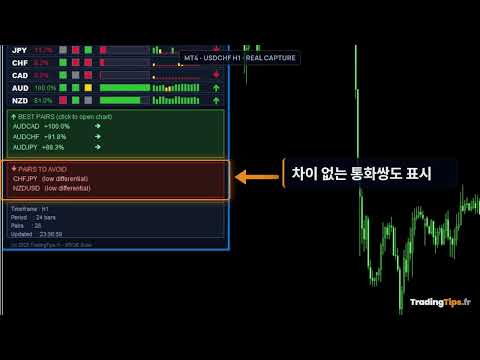
Multi-Currency Strength Dashboard PRO는 MetaTrader 4를 위한 고급 지표로, 외환 시장 주요 통화의 상대적 강도를 실시간으로 측정합니다. 최대 28개의 주요 통화쌍을 분석하고, 8개 주요 통화의 정규화된 강도를 계산하여, 트레이딩하거나 피해야 할 통화쌍을 빠르게 식별할 수 있는 완벽한 대시보드를 제공합니다.

지표의 목적

  • 통화의 강세와 약세를 명확하고 즉각적으로 시각화합니다.

  • "강세 vs 약세" 조합을 강조하여 강력한 추세를 포착하도록 돕습니다.

  • 트레이딩할 통화쌍 선택을 개선하기 위한 필터 역할을 합니다.

  • 여러 차트를 열지 않고도 외환 시장 분석을 종합적으로 수행할 수 있습니다.

주요 기능

  • 다중 통화 분석 (Multi-Currency Analysis): 8개 주요 통화(USD, EUR, GBP, JPY, CHF, CAD, AUD, NZD)의 강도를 동시에 계산합니다.

  • 최대 28개 통화쌍 분석: 브로커에서 제공하는 통화쌍을 자동으로 감지합니다.

  • 완벽한 시각적 대시보드: 0–100% 강도 바, 동적 색상, 백분율 및 추세 표시.

  • 최적의 통화쌍 (Best Pairs): 격차가 가장 큰(강세 vs 약세) 조합을 식별합니다.

  • 피해야 할 통화쌍: 강도 차이가 적은(방향성 없는 횡보장) 교차 통화쌍을 감지합니다.

  • 멀티 타임프레임 (Multi-timeframe): 안정성을 높이기 위해 여러 시간대를 평활화하거나 결합할 수 있습니다.

  • 데이터 스무딩 (Smoothing): 시장 노이즈를 줄이기 위한 설정 가능한 평균화 기능.

  • 내장 알림 (Alerts): 강한 통화, 약한 통화 또는 최적의 통화쌍 감지 시 알림 발송.

  • 인터페이스 설정: 패널 위치, 색상, 너비 및 글꼴 설정 가능.

사용 방법

  1. MT4 차트에 지표를 드래그 앤 드롭합니다.

  2. CalculationTimeframe 을 통해 계산할 시간대를 선택합니다.

  3. 분석 기간을 설정합니다 (예: 24 캔들).

  4. 전략에 따라 멀티 타임프레임 분석 및 스무딩 기능을 활성화/비활성화합니다.

  5. 임계값에 따라 "Best Pairs" 및 "Worst Pairs" 섹션을 구성합니다.

  6. 기회를 놓치지 않으려면 로컬 알림 또는 푸시 알림을 활성화하세요.

  7. 대시보드를 전략의 필터로 사용하거나 시장을 한눈에 분석하는 데 활용하세요.

주요 매개변수

CALCULATION SETTINGS (계산 설정) CalculationTimeframe , CalculationPeriod , UseMultiTimeframe , SmoothResults , SmoothingPeriod

VISUAL DASHBOARD (시각적 대시보드) ShowDashboard , PanelX , PanelY , PanelWidth , PanelBgColor , HeaderColor , StrongColor , MediumColor , WeakColor , BarWidth , FontSize

PAIR RECOMMENDATIONS (통화쌍 추천) ShowBestPairs , MinStrengthDiff , ShowWorstPairs

ALERTS & NOTIFICATIONS (알림 및 통지) EnableAlerts , AlertOnStrongCurrency , AlertOnWeakCurrency , AlertOnBestPair , EnablePushNotifications

ADVANCED OPTIONS (고급 옵션) ShowHistoricalTrend , ShowPercentageChange , Use28Pairs , ExcludeExoticPairs

사용 팁 (Best Practices)

  • 한 통화가 다른 통화보다 훨씬 강한 교차(Crossover) 지점을 우선시하세요.

  • 상대적 강도가 비슷한 통화쌍은 피하세요. 이러한 경우 움직임이 불규칙하거나 횡보할 가능성이 큽니다.

  • 단기 트레이딩의 경우 더 짧은 기간을 사용하세요 (예: 12–24 캔들).

  • 스윙 트레이딩의 경우 기간을 늘리거나 스무딩 기능을 활성화하세요.

  • 통화 강도와 본인의 기술적 분석 전략을 결합하여 의사 결정을 개선하세요.

  • 실계좌 사용 전 반드시 데모 계좌에서 설정을 테스트하세요.

호환성

  • 플랫폼: MetaTrader 4 (Indicator).

  • 심볼: 주요 외환 통화쌍 (브로커에 따라 최대 28개).

  • 타임프레임: M1 ~ MN ( CalculationTimeframe 기준 계산).

  • 계좌 유형: 헤징(Hedging) 및 네팅(Netting).

자주 묻는 질문 (FAQ)

이 지표가 자동으로 포지션을 진입하나요? 아니요. 분석 정보만 제공하며 주문을 실행하지는 않습니다.

왜 값이 실시간으로 변하나요? 통화 강도는 시장 변동에 따라 진화하며, 이는 동적 지표의 정상적인 특성입니다.

시스템이 리페인트(Repaint)하나요? 마지막 캔들(현재 봉)에서는 값이 변할 수 있지만, 지난 기록은 분석된 기간과 일치하게 유지됩니다.

브로커에 모든 통화쌍이 없으면 어떻게 되나요? 지표는 사용 가능한 심볼만 사용하며, 일부 통화쌍이 누락된 경우 경고 메시지를 표시합니다.

면책 조항

트레이딩은 높은 손실 위험을 수반합니다. 이 지표는 시장에 대한 종합적인 시각을 제공하지만 결과를 보장하지 않으며 투자 권유가 아닙니다. 실계좌 사용 전 항상 데모 계좌에서 설정을 테스트하십시오.

변경 내역 (Changelog)

v1.00 — 초기 릴리스: 다중 통화 대시보드, 베스트/워스트 통화쌍, 알림, 고급 옵션, 최대 28개 통화쌍 분석.

키워드

Currency Strength, Multi-Currency Dashboard, 통화 강도, 외환 지표, 추세 필터, 마켓 스캐너, 외환 통화쌍, MT4 지표.


추천 제품
Market Monitor
Rodrigo Rethka Goncalves
Market Monitor – Smart Asset Performance Dashboard for MT4 Turn your MetaTrader 4 into a professional trading intelligence center! Market Monitor is a powerful monitoring tool that displays, in real time, the most relevant performance metrics of each symbol being traded — helping you make faster, smarter, and more strategic decisions. What Does This Indicator Do? Market Monitor scans all open and historical orders, consolidates the data by symbol, and displays everything in visual pa
QuickClose: Instant Order Management Made Simple QuickClose   allows you to instantly close all orders with a single click. It operates at high speed, giving you the flexibility to close orders for a specific symbol or all symbols at once. This makes trade management significantly faster and more efficient. This   Expert Advisor can swiftly close all buy and sell orders either for a selected symbol or across all trades. The   SymbolButton is specifically designed for order closure, featuring bo
This tool monitors your current Expert Advisors and manages stop losses and take profits. You can customize which EAs and/or which currencies to monitor. It is primarily meant for EAs that you feel manage stop losses and/or take profits poorly. If you want this tool to be able to monitor manual trades, please use '0' (zero) as the magic number. Supports hidden stoploss and take profit Supports ATR-calculated dynamic stoploss Supports Breakeven for individual trades Supports Trailing stop Lower r
The professional utilities "Ichimoku Waves Meter" to analyse graphs using the correct interpretation of Ichimoku kinkōhyō! Is a graphic program that allows traders to quickly and easily measure the proportions between the indicated points on the price graph. This time and price indicator is a basic tool for analysing the chart according to the Ichimoku strategy on the MT4 platform. Using this tool allows an insightful and complete analysis of time waves as well as price waves in a very short ti
Hello Traders! Version 3.0 of the script has been released!  What's new?  Thanks to your suggestions I have inserted these changes to the tool: 1 - Data input are now date picker, it will be easier and faster to set the data export period; 2 - A message box will check that there is not a file with the same name in your folder; 3 - Error message to check that data insert are correct. If you like this product, take a look to the FULL INTERFACE!   MT4 To Excel Interface This script is a very usefu
MQL5 블로그: https://www.mql5.com/en/blogs/post/761446 MT4 버전: https://www.mql5.com/en/market/product/136790 MT5 버전: https://www.mql5.com/en/market/product/136791 Time Wizard는 속도, 타이밍, 실행 제어 기능을 하나의 깔끔한 대시보드에서 필요로 하는 트레이더를 위해 설계된 전문 트레이딩 어시스턴트입니다. 이 Expert Advisor는 이벤트 기반 트레이딩, 예약 실행, 빠른 반자동 주문 관리 기능을 제공합니다. 주문을 미리 준비하고, 정확한 실행 시간을 지정하고, 계층형 대기 주문을 설정하고, 손절매 및 이익 실현으로 위험을 관리하고, 차트의 간편한 인터페이스에서 모든 것을 모니터링할 수 있습니다. 경제 이벤트, 개장 시간, 돌파 시점 또는 사용자 지정 일정 등 어떤 시점을 기준으로 거래하든 Time Wizard는 체계적이고 규율 있는 실행을
A tool for logging personal and downloaded MQL5 trade history data  between specified date range into a CSV file and capturing open trade and close trade chart pictures This History Capturer and Writer tool is an Indicator, so it works well in coexistence with other expert advisor on the same chart $30  for the next 25 downloaders, next price: $30 Try Free Trial Version Here:   Download Free Trial Features: Trade History Chart Screenshot : Capture the opening and closing charts for each hist
Скрипт используется для сбора статистики по переходам цены между уровнями сетки, размер которой задается в настройках (смотрите индикатор Transitions between levels ). Данные записываются в CSV файл. Есть два режима сбора статистики: SeparateTransition - учитывается каждый отдельный переход (смотрите скриншот 2). Время перехода - время, когда цена коснулась нового уровня. Accumulation - в файл записывается количество однонаправленных переходов  (смотрите скриншот 4). Например, -7 - семь пеерех
The Expert Advisor will help you forward all pop-up alert with screenshot from  MetaTrader 4 to Telegram channel/ group, also forward all notifications to Telegram. Parameters  -  Telegram Bot Token - create bot on Telegram and get token.  -  Telegram Chat ID  - input your Telegram user ID,  group / channel ID  -  Forward Alert - default true, to forward alert.  -  Send message as caption of Screenshot - default false, set true to send message below Screenshot  How to setup and guide  - Telegram
Copy Trader MT4
Denis Luchinkin
5 (1)
Copy Trader is a convenient and fast order copier for MetaTrader4. The EA performs the copying of orders from the server terminal to one or several client terminals. It monitors opening/closing, StopLoss and TakeProfit, and also pending orders. It uses a magic number for its orders, which allows to open other orders in the client terminal both manually and using other experts; It has a minimum of settings. Install the Expert Advisor in two terminals: Choose MODE - SERVER on the terminal to copy
The script allows you to close all opened positions for a given currency pair ( EURUSD by default, but it can be changed to any existing currency pair) when Sum of Profit from all opened positions (by chosen currency pair) is equal or greater than value of the input parameter: SumProfit . Input Parameters sSymbol = EURUSD SumProfit  = 100 Slippage = 2 You can change SumProfit  to any positive value ( in dollars , not in points!). This script closes all positions for a given currency pair only.
Hedge 120
Hassane Zibara
HEDGE   120   is an EA that opens an order if the market moves an adverse will make a safe zone . Hedging with Forex is a strategy used to protect one's position in a currency pair from an adverse move. It is typically a form of short-term protection when a trader is concerned about news or an event triggering volatility in currency markets. The main reason that you want to use hedging on your trades is to limit risk. Hedging can be a bigger part of your trading plan if done carefully. I
Guard channel
Alexandr Gershkevich
This is a semi-automatic Expert Advisor. A user draws a support or a resistance line in the form of a horizontal line or a trendline on a chart. A command in the format of UP|DN_xxxx:yyyy is specified in the line name; the Expert Advisor understands it as a signal to buy or sell setting a stop loss and a take profit. EA settings include a parameter with a lot size and a value for moving stop loss to breakeven. If stop loss = 0, the EA does not use breakeven. If this parameter is greater than zer
Signalator Local Trade Copier MT4 is a fast local trade copier for running Master and Receiver terminals on the same computer or VPS. It supports cross-platform copying between MT4, MT5 and cTrader terminals in any direction: MT4 ↔ MT5 ↔ cTrader , and all other combinations. Copy trades locally without an external cloud relay. The Master publishes trade activity into a local bridge, and each Receiver controls what to copy, which Master accounts to accept, how to map symbols, how to size lots, an
Program for automatic placement of stop loss and take profit orders. Values are calculated as points distance from open price. BreakEven option is also included. all options could be applied to BUY, SELL separately or together. Enter values ​​in points in the fields on the right side of the menu and press dedicated button to aplly your settings. If in doubt, The instruction is displayed in the tooltip.
FREE
close all profitable orders The set contains scripts for different purposes, facilitating work in the MetaTrader 4 terminal. If necessary, a screen is provided for some scripts. Before working on a real account, check (on a demo account) whether the required script responds to your tasks (for example, there is a script for opening five orders at the same time, by default the lot is set to 10; so that you do not accidentally open five positions with a total volume of 50 lots - be attentive))) Use
Rosy Pro Panel MT4
Theresia Yovitha Herwanda
5 (1)
Download DEMO here:  https://www.mql5.com/en/blogs/post/759769   An ultimate panel you've never seen before.  Compact and nice Trade panel with large Total P/L and it's percentage display. Groups for trades summary available: Ticket, Symbol, Type, Category, and Magic. Average price field helps you know your trading average price and direction. Set magic and comment of your trading in a very easy way. Group closing by symbol, type, category or magic - only by one click. Close All button for a qu
Trade History Exporter automatically exports trade history to a CSV (comma separated values) file. Trade History Exporter: - automatically exports trade history every time a trade is closed - allows you to manually force an export by using the "W" key on your keyboard - can use Order Comments as Magic Numbers - useful for instance when using a Trade Copier - calculates the Net Profit per trade
This EA is based on the relationship between the three currencies, interaction, and thus hedging, I now find the most ideal pair of currencies is the default parameter of the three pairs of currencies, On the parameters Parameter setting is very simple, "Huoli" is profitable n USD. Users can determine the number of orders according to the funds of the account.
Superior Telegram Signals Multi-Platform Trade Copier & Notification System   Available for MetaTrader 4 and MetaTrader 5 Superior Telegram Signals   is a utility that connects a trading terminal to the Telegram application. It is designed to send automated trade notifications, chart screenshots, and account status updates to a specified Telegram chat, channel, or group. Use Cases This tool can be used by: Signal Providers:   To automate the broadcasting of trade signals, modifications, and clos
Heaven Assistant: MT4 관리 단순화 Heaven Assistant를 통해 MetaTrader 4 (MT4) 플랫폼 관리를 단순화하세요. 이 전문가 어드바이저(EA)는 효과적이고 사용자 친화적인 방식으로 거래 환경을 제어하고 사용자 정의 할 수 있게 해주는 견고한 도구입니다. 핵심 기능: 다수의 페어 열기: 주요 및 마이너 통화 쌍뿐만 아니라 이국적인 통화 쌍에 대한 빠른 액세스. 한 번의 클릭으로 지수, 금속 및 암호화폐를 열 수 있습니다. 템플릿 변경: 모든 열린 페어에 대해 좋아하는 템플릿을 적용하여 차트 뷰를 쉽게 사용자 정의 할 수 있습니다. 시간프레임 변경: 모든 열린 차트의 시간프레임을 변경하여 거래 스타일에 적응하십시오. 이점: 쉬운 사용: 입력 패널을 통한 쉬우면서 빠른 설정. 특정 차트에만 동작을 적용하는 필터링 옵션. 시간 절약: 여러 페어와 설정을 쉽게 관리하여 소중한 시간을 절약하십시오. 사용자 정의 가능: 주요, 마이너, 이국적인 페어, 지수,
One Click Trader is a tool designed for MetaTrader 4 platform, which enables you to take your trading to the next level. It enables you to open, manage and close your trades in simple an efficient way by just one click of your mouse button. Up arrow minimizes the OCT panel Down arrow maximizes the OCT panel Right arrow displays the next panel with additional features Left arrow hides the panel with additional features Red SELL button enables you to open short market orders Red SELL STOP button e
Introducing the OrderManager: A Revolutionary Utility for MT4 Manage your trades like a pro with the all-new Order Manager utility for MetaTrader 4. Designed with simplicity and ease-of-use in mind, the Order Manager allows you to effortlessly define and visualize the risk associated with each trade, enabling you to make informed decisions and optimize your trading strategy.  Key Features: Risk Management: Define the risk of your trades quickly and easily, allowing you to make better decisio
Welcome guys !  I offer to you this MT4 project I've been working on for the last 2 years ( roughly over 900h of work.. ).  This is a complete tool that will change the way you see MT4, because I almost recoded it entirely ! It will provides you a solid base for risk management, order positionning, hedging, account preservation and journaling. I wanted an all-in-one panel that covers both scalping and swing trading and that suits every type of trader.       Main goal was : NO INPUTS. Never
PLEASE NOTE:   The "AUTO" function of the EA has NOT yet been activated . It's still ongoing testing. Once it becomes available, clients will get a free upgrade to EA 2.0                        Also .... PLEASE follow the instructions below in order for the functions to work properly. Introduction: The Phoenix Project (EA) Our Expert Advisor is both refined and practical. It is geared towards helping the traders be constantly aware of their risk PER trade while it helps them manage that risk.
Replicator
Aleksej Shcherbak
The program is designed for copying your successful orders. The price is often fluctuates within a channel. But there is no time to monitor the terminal and place the next orders, especially if it happens at night. Place an order, when it closed with profit, the program repeats your order as a pending limit order. This will continue until the order closes with a loss, or the price goes too far away and the pending order will not trigger. An offset is provided for inclined channels. The order wil
This indicator will allow you to quickly go to the chart section that interests you, without unnecessary time costs. pt_shift - step of vertical scrolling; ButtonsHeight - button height; ButtonsWidth - button width; ButtonsColor - color of buttons; ButtonsBordersColor - button border color; Font - font; TextColor - button text color; TextSize - button text size; ButtonsBack - buttons in the background; ButtonsSelection - select buttons for movements; ButtonsHidden - hide buttons in
RSI Dashboard is a great tool for quickest possible analysis of multiple currency pairs  at the same time in terms of Oversold or Overbought . All displayed and used by indicator symbols are freely to choose and are specified using a space separated list in parameters you're able to analyze not only predetermined ones, but everything that your broker offers, also commodities, equities, indices, ones with prefixes, suffixes etc. There are 3 types of alerts: alert notifications in the MT4 termin
This indicator is useful for monitoring the performance of individual strategies or even everything of the entire portfolio of strategies directly on your MT4. In this way you can view the equity line and the balance line directly on the chart. In addition, you can set a line based on the percentage number of DD Max that the individual strategy can reach. Try it.
MT4 Local Trade Copier A file-based trade copying system for MetaTrader 4 that synchronizes trades between Master and Client terminals on the same computer or network. Key Features Master/Client Architecture : One Master terminal broadcasts trades, multiple Client terminals can receive and replicate them File-Based Communication : Uses shared folder system for reliable inter-terminal communication Flexible Lot Management : Copy exact lot sizes or use fixed lot sizes on client accounts Customizab
이 제품의 구매자들이 또한 구매함
Trade Manager EA에 오신 것을 환영합니다. 이 도구는 거래를 보다 직관적이고 정확하며 효율적으로 만들기 위해 설계된 궁극적인 리스크 관리 도구 입니다. 단순한 주문 실행 도구가 아닌, 원활한 거래 계획, 포지션 관리 및 리스크 제어를 위한 종합 솔루션입니다. 초보자부터 고급 트레이더, 빠른 실행이 필요한 스캘퍼에 이르기까지 Trade Manager EA는 외환, 지수, 상품, 암호화폐 등 다양한 시장에서 유연성을 제공합니다. Trade Manager EA를 사용하면 복잡한 계산은 이제 과거의 일이 됩니다. 시장을 분석하고 진입, 손절 및 익절 수준을 차트의 수평선으로 표시한 후 리스크를 설정하면, Trade Manager가 이상적인 포지션 크기를 즉시 계산하고 SL 및 TP 값을 실시간으로 표시합니다. 모든 거래가 간편하게 관리됩니다. 주요 기능: 포지션 크기 계산기 : 정의된 리스크에 따라 거래 크기를 즉시 결정합니다. 간단한 거래 계획 : 진입, 손절, 익절을 위한
Local Trade Copier EA MT4
Juvenille Emperor Limited
4.96 (110)
Local Trade Copier EA MT4 를 사용하여 매우 빠른 거래 복사 경험을 해보세요. 1분 안에 간편하게 설정할 수 있으며, 이 거래 복사기를 사용하면 Windows 컴퓨터 또는 Windows VPS에서 여러 개의 MetaTrader 터미널 간에 거래를 0.5초 미만의 초고속 복사 속도로 복사할 수 있습니다. 초보자든 전문가든 Local Trade Copier EA MT4 는 다양한 옵션을 제공하여 사용자의 특정 요구에 맞게 맞춤 설정할 수 있습니다. 이는 수익 잠재력을 높이려는 모든 사람을 위한 최고의 솔루션입니다. 지금 사용해보시고 이것이 왜 시장에서 가장 빠르고 쉬운 무역용 복사기인지 알아보세요! 팁: 여기 에서 데모 계정에서 Local Trade Copier EA MT4 데모 버전을 다운로드하여 사용해 볼 수 있습니다. 다운로드한 무료 데모 파일을 MT4 >> File >> Open Data Folder >> MQL4 >> Experts 폴더에 붙여넣고 터미널
Unlimited Trade Copier Pro is a tool to copy trade remotely to multiple MT4, MT5 and cTrader accounts at different computers/locations over internet. This is an ideal solution for you if you are a signal provider and want to copy your trades to other receivers globally on your own rules. One provider can copy trades to multiple receivers and one receiver can get trade from multiple providers as well. The provider can even set the subscription expiry for each receiver, so that receiver will not b
Exp COPYLOT CLIENT for MT4
Vladislav Andruschenko
4.69 (65)
MetaTrader 4용 전문 트레이드 복사기 MetaTrader 4 용 빠르고 안정적이며 전문적인 트레이드 복사기입니다. COPYLOT 은 MetaTrader 4 와 MetaTrader 5 터미널 간에 Forex 거래를 복사할 수 있으며, 다양한 계좌 유형과 운용 방식에 맞춰 유연한 동기화 환경을 제공합니다. COPYLOT MT4 버전 지원 방식: MetaTrader 4 → MetaTrader 4 MetaTrader 5 Hedge → MetaTrader 4 MetaTrader 5 Netting → MetaTrader 4   MT5 버전 상세 설명 + DEMO + PDF 구매 방법 설치 방법 로그 파일 확인 방법 테스트 및 최적화 방법 Expforex의 모든 제품 MetaTrader 5 버전 을 사용하면 MetaTrader 5 → MetaTrader 5 및 MetaTrader 4 → MetaTrader 5 복사도 지원됩니다: COPYLOT CLIENT for MT5 COPYLOT 은
Trade Assistant MT4
Evgeniy Kravchenko
4.43 (197)
거래당 위험 계산, 라인을 사용한 손쉬운 신규 주문, 부분 청산 기능을 통한 주문 관리, 7가지 유형의 트레일링 스탑 및 기타 유용한 기능을 제공합니다. 추가 자료 및 지침 설치 지침 - 애플리케이션 지침 - 데모 계정용 애플리케이션 평가판 라인 기능       - 차트에 개시선, 손절매, 차익실현을 표시합니다. 이 기능을 사용하면 새로운 주문을 쉽게 하고 개봉 전에 추가 특성을 볼 수 있습니다. 위기 관리       -       위험 계산 기능은 설정된 위험과 손절매 주문의 크기를 고려하여 새 주문의 볼륨을 계산합니다. 이를 통해 손절매 크기를 설정하고 동시에 설정된 위험을 존중할 수 있습니다. 로트 계산 버튼 - 위험 계산을 활성화/비활성화합니다. 필요한 위험 값은 위험 필드에 0에서 100 사이의 백분율 또는 예금 통화로 설정됩니다. 설정 탭에서 위험 계산 옵션을 선택합니다. $ 통화, % 잔액, % 지분, % 자유 마진, % 사용자 정의, % AB 이전 일, % AB
거래하고자 하는 주요 영역을 파악한 후 자동으로 거래 지원 및 저항 또는 공급 및 수요 구역을 설정합니다. 이 EA를 사용하면 한 번의 클릭으로 매수 및 매도 구역을 그린 다음 가격이 바뀔 것으로 예상되는 정확한 위치에 배치할 수 있습니다. 그런 다음 EA는 해당 구역을 모니터링하고 구역에 대해 지정한 가격 액션에 따라 자동으로 거래를 수행합니다. 초기 거래가 수행되면 EA는 대상 구역이 되는 반대 구역에서 이익을 얻습니다. 그런 다음 거래를 종료하고 진입할 새 구역을 그리거나 이익을 얻고 즉시 반대 방향으로 거래를 역전하여 "항상 시장" 스타일 전략을 만드는 두 가지 선택이 있습니다. 입력 및 전략이 포함된 전체 매뉴얼은 여기에 있습니다: https://www.mql5.com/en/blogs/post/760256 이 EA는 시장에서 고정 또는 하드 스톱 로스를 사용하지 않는 포지션 트레이더 또는 달러 비용 평균 거래 전략을 위해 설계되었습니다. 대신, 다음에 가능한 지지 또는
News Filter EA: Advanced Algo Trading Assistant News Filter EA is an advanced algo trading assistant designed to enhance your trading experience. By using the   News Filter EA , you can integrate a Forex economic news filter into your existing expert advisor, even if you do not have access to its source code. In addition to the news filter, you can also specify   trading days   and   hours   for your expert. The News Filter EA also includes   risk management   and   equity protection   features
Trade copier MT4
Alfiya Fazylova
4.58 (33)
Trade Copier는 거래 계정 간의 거래를 복사하고 동기화하도록 설계된 전문 유틸리티입니다. 복사는 공급자의 계정/단말기에서 동일한 컴퓨터 또는 vps에 설치된 수신자의 계정/단말기로 발생합니다. 프로모션 - 이미 "Trade copier MT4"를 구매하셨다면, "Trade copier MT5"를 무료로 받으실 수 있습니다 (MT4 → MT5 및 MT4 ← MT5 복사용). 조건에 대한 자세한 정보를 원하시면, 개인 메시지를 통해 저희에게 문의해 주시기 바랍니다! 구매하기 전에 데모 계정에서 데모 버전을 테스트할 수 있습니다. 데모 버전 여기 . 전체 지침 여기 . 주요 기능 및 이점: 복사기는 "МТ4> МТ4", "МТ4> МТ5", "МТ5> МТ4" 복사를 지원합니다. 복사기는 데모 계정 > 실 계정, 실 계정 > 데모 계정, 데모 계정 > 데모 계정 및 실제 계정 > 실 계정 복사를 지원합니다. 복사기는 읽기 전용 암호가 적용된 투자자 계정에서 복사를 지원합니다. 하
Trade Copier Professional — 로컬 복사 솔루션   Trade Copier Professional 은 MetaTrader 4/5 용 신뢰성 높은 로컬 거래 복사 시스템입니다. 동일한 컴퓨터 내 여러 계좌에서 포지션을 즉시 복제할 수 있으며, 내장된 안전 제어 기능과 전문적인 대시보드를 제공합니다.   개요   이 EA는 단일 파일에서 Master 모드와 Slave 모드 모두로 작동하며, 매끄럽게 전환할 수 있습니다. MT4 와 MT5 터미널 간 거래를 인터넷에 의존하지 않고 복사할 수 있으며, 로컬 파일 기반 통신을 통해 최대 속도와 안정성을 보장합니다. 실시간 대시보드는 연결 상태, 복사 통계, 일일 성과를 표시합니다.   로트 및 리스크 관리   네 가지 로트 계산 모드가 제공됩니다: 고정 로트, 배수, 리스크 비율, 잔액 비율. 손절매와 익절은 조정 또는 스케일링이 가능하며, 필요 시 신호를 반대로 복사할 수 있습니다. 안전 기능에는 일일 손실 및 거래
DrawDown Limiter MT4
Haidar Lionel Haj Ali
5 (8)
Drawdown Limiter EA You are in the right place if you were searching for Drawdown control, Drawdown limiter, Balance protection, Equity Protection or Daily Drawdown Limit related to Prop Firm, FTMO, or Funded account trading, or if you want to protect your trading account. Have you suffered from controlling your drawdown when trading funded accounts? This EA is meant for you. Prop firms usually set a rule called “Trader Daily Drawdown”, and if it is not respected, you are disqualified.  I am an
Support and Resistance Dashboard for MT4 is a multi-timeframe and multi-symbol scanner and alert system that finds S/R zones and pivot points for all timeframes and symbols and alerts when price has interaction with them. If you are using support and resistance (or supply and demand) zones in your trading strategy, this dashboard and its alert and filtering system is a big time saver for you. Download demo version   (works on M 1,M5,M30,W1   timeframes) Full description of scanner parameters ->
작동 체험판 다운로드 Copy Cat More (카피캣) MT4 트레이드 카피어 (Trade Copier) 는 단순한 로컬 트레이드 카피어가 아닙니다. 오늘날의 트레이딩 과제를 위해 설계된 완전한 리스크 관리 및 실행 프레임워크 (risk management and execution framework) 입니다. 프롭 펌 (prop firm) 챌린지부터 개인 포트폴리오 관리까지, 견고한 실행, 자본 보호, 유연한 설정, 고급 트레이드 처리의 조합으로 모든 상황에 적응합니다. 이 카피어는   마스터 (Master, 송신측) 와 슬레이브 (Slave, 수신측)   두 모드 모두에서 작동하며, 시장가 주문과 대기 주문, 트레이드 수정, 부분 청산, 상호 청산 (Close By) 작업을 실시간으로 동기화합니다. 데모 및 실거래 계좌, 트레이딩 또는 인베스터 로그인 모두와 호환되며, EA·터미널·VPS가 재시작되더라도 영구 트레이드 메모리 (Persistent Trade Memory) 시
Telegram to MT4 Multi-Channel Copier 는 Telegram 채널의 트레이딩 신호를 자동으로 MetaTrader 4로 직접 복사합니다. 봇도, 브라우저 확장 프로그램도, 수동 복사도 필요 없습니다. Telegram에서 신호를 받으면 EA가 몇 초 안에 터미널에서 거래를 엽니다. 본 제품은 두 가지 구성 요소로 구성되어 있습니다: Telegram 채널을 감시하는 Windows 애플리케이션과 MT4 터미널에서 신호를 실행하는 이 Expert Advisor입니다. MT5 버전도 제공됩니다. 설정 가이드 및 애플리케이션 다운로드: https://www.mql5.com/en/blogs/post/768988 작동 방식 Windows 애플리케이션은 봇이 아닌 사용자 자신의 API 자격 증명을 사용하여 Telegram에 연결됩니다. 이는 프라이빗 및 VIP 채널을 포함하여 구독 중인 모든 채널, 그룹 또는 주제를 읽을 수 있음을 의미합니다. 신호를 감지하면 이를 파싱하여
Master Close via Telegram can help you perform some management tasks on MT4/MT5 remotely via your Telegram by one click, easy to set up & use. Demo here (see more Master Notify   Master Control  ) ************************************************************************************ LIST OF COMMANDS: info_acc -  Get account info info_pen -   Get pending orders details info_pos -   Get positions details info_pos_sum -   Get positions summary close_pen -   Delete all pending orders close_pos_all -
Strategy Builder offers an incredible amount of functionality. It combines a trade panel with configurable automation (covert indicators into an EA), real-time statistics (profit & draw down) plus automatic optimization of SL, TP/exit, trading hours, indicator inputs. Multiple indicators can be combined into an single alert/trade signal and can include custom indicators, even if just have ex4 file or purchased from Market. The system is easily configured via a CONFIG button and associated pop-up
PZ Trade Pad Pro MT4
PZ TRADING SLU
3.67 (3)
Effortlessly calculate lot sizes and manage trades to save time and avoid costly errors The Trade Pad Pro EA is a tool for the Metatrader Platform that aims to help traders manage their trades more efficiently and effectively. It has a user-friendly visual interface that allows users to easily place and manage an unlimited number of trades, helping to avoid human errors and enhance their trading activity. [ Installation Guide | Update Guide | Troubleshooting | FAQ | All Products ] One of the k
MT4 to Telegram Signal Provider 는 사용하기 쉽고 완전히 사용자 정의가 가능한 도구로, 텔레그램으로 신호를 보내어 계정을 신호 제공자로 변환할 수 있습니다. 메시지 형식은 완전히 사용자 정의가 가능합니다! 그러나 간단한 사용을 위해 미리 정의된 템플릿을 선택하고 메시지의 특정 부분을 활성화하거나 비활성화할 수도 있습니다. [ 데모 ]  [ 매뉴얼 ] [ MT5 버전 ] [ 디스코드 버전 ] [ 텔레그램 채널 ]  New: [ Telegram To MT5 ] 설정 단계별 사용자 가이드 가 제공됩니다. 텔레그램 API에 대한 지식이 필요 없으며, 개발자가 필요한 모든 것을 제공합니다. 주요 기능 구독자에게 보낸 주문 세부 정보를 사용자 정의할 수 있는 기능 예를 들어 브론즈, 실버, 골드와 같은 계층 구독 모델을 만들 수 있습니다. 골드 구독은 모든 신호 등을 받게 됩니다. ID, 심볼 또는 코멘트별 주문 필터링 주문이 실행된 차트의 스크린샷을 포함 보낸
The product will copy all telegram signal to MT4   ( which you are member  ) , also it can work as remote copier.  Easy to set up, copy order instant, can work with almost signal formats, image signal, s upport to translate other language to English Work with all type of channel or group, even channel have "Restrict Saving Content", work with  multi channel, multi MT5 Work as remote copier: with signal have ticket number, it will copy exactly via ticket number. Support to backtest signal. How to
수동 매매를 위한 전문가용 트레이딩 패널로, 정밀한 진입부터 계좌 보호까지 매매의 전 과정을 차트 위 하나의 창에 담았습니다. 정해진 리스크에 정확히 맞춰 모든 포지션의 거래량을 산정하고, RR Tool로 차트에 직접 라인을 그려 거래를 설계하며, Market 주문과 예약 주문은 물론 Grid와 OCO까지 사용할 수 있습니다. 포지션 관리는 패널이 대신 처리합니다. 최대 다섯 단계 부분 청산, 여섯 가지 트레일링 스탑, 브레이크이븐, Virtual SL/TP를 지원합니다. 일간·주간·월간 한도가 예치금을 지키며, 기준을 넘기는 즉시 자동으로 발동됩니다. 가이드와 무료 Live 데모 무료 Live 데모 버전은 여기에서 이용할 수 있습니다 ( Free Live Demo ). 제품 사용 가이드는 여기에서 확인할 수 있습니다 ( User Manual ). NT Trade Manager는 트레이더의 모든 작업 흐름을 차트 위 작고 간결한 패널 하나에 모아, 터미널 창을 오갈 필요도, 진입할
TradePanel MT4
Alfiya Fazylova
4.84 (95)
Trade Panel은 다기능 거래 도우미입니다. 이 애플리케이션에는 50개 이상의 수동 거래 기능이 포함되어 있으며 대부분의 거래 작업을 자동화할 수 있습니다. 구매하기 전에 데모 계정에서 데모 버전을 테스트할 수 있습니다. 데모 계정용 애플리케이션 체험판 다운로드: https://www.mql5.com/en/blogs/post/750865 . 전체 지침 여기 . 거래. 한 번의 클릭으로 거래를 수행할 수 있습니다: 리스크 자동 계산과 함께 예약 주문 및 포지션 열기. 한 번의 클릭으로 여러 주문 및 포지션 열기. 주문 그리드 열기. 예약 주문 및 포지션을 그룹별로 닫기. 포지션 방향 전환 (Buy 닫기 > Sell 열기, Sell 닫기 > Buy 열기). 포지션 잠금 (부족한 포지션을 열어 Buy와 Sell 포지션의 수량을 동일하게 만들기). 모든 포지션 한 번의 클릭으로 부분적으로 닫기. 모든 포지션의 테이크 프로핏과 스톱로스를 같은 가격 수준에 설정. 모든 포지션의 스톱로스를
목표 수익 도달 시 자동 수익 실현 EquityTargetCloser   — 는 MetaTrader 5용 유틸리티 전문가 어드바이저(EA)로,   순자산(Equity)이 현재 잔고를 지정된 수익 금액만큼 초과하면 모든 시장 포지션을 청산하고 예약 주문을 삭제합니다. 모든 포지션을 청산한 후 목표는 자동으로 상향 조정됩니다. 새 임계값 = 새 잔고 + 지정된 수익. EA는 거래를 시작하지 않고 기존 포지션만 관리하여 수익을 확실하게 고정하고 축적된 자금을 보호합니다. MT5-version:  https://www.mql5.com/en/market/product/169839 작동 방식 전문가 어드바이저는   순자산(Equity)   을 동적 목표와 지속적으로 비교합니다. 목표 =   현재 잔고(Balance) + plusMoney   (미국 달러). 순자산이 이 금액 이상이 되면 보호 기능이 작동합니다.   모든 시장 포지션   (모든 심볼)을 청산합니다. 매개변수   Delete p
복사기->편리하고 빠른 인터페이스 상호작용으로 사용자가 바로 사용 가능       ->>>> Windows 컴퓨터 또는 VPS Windows에서 사용하는 것이 좋습니다. 특징: 다양하고 개인화된 복사 거래 설정: 1. 다양한 신호 소스에 대해 다양한 로트 모드를 설정할 수 있습니다. 2. 다양한 신호 소스를 포워드 및 리버스 복사 거래에 대해 설정할 수 있습니다. 3. 신호는 주석으로 설정할 수 있습니다. 4. 계약 로트에 따라 로트를 교정할지 여부 다양하고 개인화된 복사 주문 설정 2: 1. 다양한 품종에 대해 다양한 로트 모드를 설정할 수 있습니다. 2. 정방향 및 역방향 복사 주문에 대해 다양한 품종을 설정할 수 있습니다. 3. 주석으로 신호를 설정할 수 있습니다. 4. 계약 로트에 따라 로트를 교정할지 여부 댓글 필터링, MAGIC 필터링, 시그널 로트 필터링, 로컬 제품 필터링 근무시간 설정 역동기화 SLAVE 닫힘 주문 바인딩 기능: 모든 주문은 설정된 신호 소스 주문
Trade Copier Global
Laszlo Tormasi
5 (15)
Trade Copier Global: The name speaks for itself. This copier allows you to copy orders between MT4 terminals even if they are not installed on the same computer. Features Copying trades between MT4 terminals around the world with a short delay. Automatically recognizes symbol prefixes. Can connect many Slaves to the same Master. Supports pending and market orders. Supports partial order close (with limitations, see below) Can send messages and notifications to the Slaves from the Master Several
Auto Trade Copier
Vu Trung Kien
4.76 (85)
Auto Trade Copier is designed to copy trades to multiple MT4, MT5 and cTrader accounts/terminals with 100% accuracy. The provider and receiver accounts must be on the same PC/VPS. With this tool, you can copy trades to receiver accounts on the same PC/VPS. All trading actions will be copied from provider to receiver perfectly. This version can be used on MT4 accounts only. For MT5 accounts, you must use Auto Trade Copier for MT5 . Reference: - For MT4 receiver, please download Trade Receiver Fre
Telegram to MT4 Coppy
Sergey Batudayev
4.09 (11)
Telegram에서 MT4로:   최고의 신호 복사 솔루션 최첨단 유틸리티인   Telegram to MT4를   사용하여 거래를 간소화하세요. DLL 없이도 Telegram 채널과 채팅에서 MetaTrader 4 플랫폼으로 거래 신호를 직접 복사할 수 있습니다. 이 강력한 솔루션은 탁월한 정밀도와 맞춤 설정 옵션을 통해 원활한 신호 실행을 보장하여 시간을 절약하고 효율성을 높여줍니다. [ Instructions and DEMO ] 주요 특징 직접 Telegram API 통합 전화번호와 보안 코드를 통해 인증하세요. 사용자 친화적인 EXE 브리지를 사용하여 채팅 ID를 손쉽게 가져오고 관리하세요. 여러 채널/채팅을 추가, 삭제, 새로 고침하여 동시에 신호를 복사합니다. 고급 필터를 사용한 신호 파싱 사용자 정의 예외 단어(예: "보고서", "요약")가 포함된 원치 않는 신호를 건너뜁니다. 유연한 SL 및 TP 형식을 지원합니다: 가격, 핍 또는 포인트. 신호가 가격 대신 지점을 지정
Trading History MT4
Siarhei Vashchylka
5 (9)
Trading History - A program for trading and money management on the history of quotes in stratagy tester. It can work with pending and immediate orders, and is equipped with trailing stop, breakeven and take profit functions. Very good for training and testing different strategies. Manual (Be sure to read before purchasing) Advantages 1. Allows you to test any trading strategy in the shortest possible time 2. An excellent simulator for trading training. You can gain months of trading experience
Custom Alerts AIO: 다중 시장을 동시에 모니터링 – 설정 없이 즉시 사용 가능 개요 Custom Alerts AIO 는 복잡한 설정 없이 즉시 사용할 수 있는 통합 시장 모니터링 도구입니다. FX Power, FX Volume, FX Dynamic, FX Levels, IX Power 등 필요한 모든 지표가 내장되어 있어 별도의 설치나 구성 없이 알림 기능을 바로 사용할 수 있습니다. 차트 그래픽 없이 작동하며, Forex, 금속, 지수, 암호화폐 등 주요 자산군을 모두 지원합니다. 주식(Symbols)은 별도로 입력하여 추가할 수 있으나, MetaTrader에서는 일반적으로 제한적으로만 사용됩니다. 1. 왜 Custom Alerts AIO를 선택해야 하나요? 추가 라이선스가 필요 없습니다 • 모든 Stein Investments 지표가 내장되어 있어 별도 구매가 필요 없습니다. • 즉시 알림 기능을 시작할 수 있어 빠르고 간편합니다. 모든 시장을 하나의 도구로
MACD Divergence Scanner is a multi-timeframe and multi-symbol dashboard and alert that checks all timeframes and symbols to find regular and hidden divergences between price chart and MACD indicator. This divergence scanner is integrated with support and resistance zones so you can check the MACD divergences in the most important areas of the chart to find trend reversals in the price chart. Download demo version   (works on M 1,M5,M30,W1   timeframes) Full description of scanner parameters ->  
King Trade Copier MT4
Mohammed Maher Al-sayed Mohammed Ahmed Saleh
King Trade Copier MT4 – Lightning-Fast Local Trade Copier (Master + Slave in ONE file) King Trade Copier is a professional local trade copier that mirrors every trading action from one Master account to unlimited Slave accounts on the same PC or VPS — with an internal copy latency of just a few milliseconds. It was built by a real trader for daily real-money use, with one goal: whatever happens on the Master must happen on the Slave, instantly and without exceptions. Watch the demo video to s
Telegram to MT4 Pro란 무엇인가요? Telegram to MT4 Pro 는 비공개, 공개 및 제한된 Telegram 채널과 그룹의 신호를 사용자의 MetaTrader 4 계정으로 자동 복사합니다. Telegram to MT4 Pro 는 모든 Telegram 채널 또는 그룹의 트레이딩 신호를 사용자의 MetaTrader 4 계정으로 실시간 자동 복사하는 전문 신호 복사기이며, 각 거래를 완전히 제어할 수 있습니다. 이 시스템은 함께 작동하는 두 부분으로 구성됩니다: 이 Expert Advisor — 거래 실행을 위해 MT4 차트에 설치됩니다 보조 데스크톱 앱 — TelegramMT4Pro.exe — Telegram에 연결하고 신호를 EA로 전달합니다 여러 Telegram 제공자를 여러 MT4 계정에 동시에 연결할 수 있습니다. 모든 설정은 계정별, 제공자별로 구성할 수 있습니다. 참고: 시스템은 자동으로 작동합니다. MetaTrader 내부에서 수동 연결 설정이 필요하지
제작자의 제품 더 보기
Market Structure Order Block Dashboard MT5는 시장 구조와 주요 가격 반응 구역을 차트에서 직접 읽고자 하는 트레이더를 위해 설계된 MT5 지표입니다. BOS, ChoCH, 오더 블록, Fair Value Gap (FVG), 유동성, Kill Zones, Volume Profile 그리고 빠른 분석을 위한 콤팩트한 대시보드를 결합합니다. 이 지표는 시장 구조, ICT 및 Smart Money 개념을 의사결정 프레임워크로 사용하는 트레이더를 대상으로 합니다. 추세 지속, 가능한 반전, 가격 불균형, 유동성 타겟 및 관심 구역을 보다 체계적으로 식별하는 데 도움을 줄 수 있습니다. 구매자를 위한 포함 리소스 구매 후 MQL5 개인 메시지로 요청하시면 완전한 PDF 사용 설명서와 파라미터 설정 팁을 제공해 드립니다. MQL5 개인 메시지를 통한 직접 기술 지원. 1.20 버전은 두 가지 주요 추가 기능을 제공합니다: Pending BOS / Pending
Position Size Calculator Lite MT5 - 무료 리스크 관리 지표 (v2.0) Position Size Calculator의 무료 Lite 버전 입니다. SL/TP 라인의 인터랙티브 드래그 앤 드롭, 고정 로트 모드, 패널에서 Risk/R:R/ATR 조정 기능이 필요한 경우 Market의 PRO 버전을 참조하세요: Position Size Calculator PRO MT5 . 개요 Position Size Calculator Lite MT5 는 리스크 백분율, ATR 기반 손절매, 목표 리스크/리워드 비율을 기반으로 거래의 권장 로트 크기를 계산하는 무료 지표입니다. 거래 작업 없음: 이 지표는 주문을 열거나 닫지 않으며 포지션을 관리하지 않습니다. MT5에서 수동으로 거래를 배치하기 전 의사결정 지원 도구입니다. v2.0 새로운 기능 - UI 갱신 새로운 MSOB 스타일 대시보드: 글로우 헤더, 중앙 LOT, 3D Entry/SL/TP 셀, 결과 바 (Risk
FREE
로트 및 리스크 계산기 PRO MT5 (v2.30) Position Size Calculator PRO 는 MetaTrader 5용 고급 리스크 관리 도구로, 거래당 리스크, 손절매 거리, 심볼 사양 (틱 값, 틱 크기, 최소/최대/스텝 거래량, 마진)을 기반으로 권장 로트 수량을 계산합니다. 거래 작업 없음: 이 지표는 주문을 열거나 닫지 않으며 포지션을 관리하지 않습니다. 자금 관리를 표준화하고 포지션 진입 전 사이징 오류를 줄이기 위한 의사결정 지원 도구입니다. 차트에 표시되는 내용 리스크 및 SL 거리에 따른 권장 로트 크기 Entry / Stop Loss / Take Profit과 핍/포인트 거리 예상 리스크 (계좌 통화 및 %)와 SL에서의 잠재 손실 TP에서의 잠재 이익과 리스크/리워드 비율 (R:R) 필요 마진과 마진 수준 (브로커가 지원하는 경우) SL/TP 시각적 영역과 실시간 가격 라벨 (선택 사항) 헤더 아래에 실시간 스프레드와 ATR v2.30 새로운 기능 U
Liquidity Sweeps Detector PRO MT5 — 버전 1.5 멀티 타임프레임 Liquidity Sweeps Detector PRO MT5 는 시장 구조 전환(MSS) 확인을 동반한 유동성 스윕(liquidity sweeps) 을 감지하는 MetaTrader 5용 기술적 분석 지표입니다. Smart Money Concepts / ICT 방법론에 기반하여 Buy Side Liquidity(BSL) 및 Sell Side Liquidity(SSL) 레벨을 식별하고, 스톱 헌트와 그에 이은 구조 전환을 알려줍니다. 이 지표는 A+ / A / B / C 컨플루언스 점수를 갖춘 네이티브 멀티 타임프레임 분석을 제공합니다. 어떠한 주문도 내지 않습니다. 이는 시각적 분석 도구이며 트레이딩 로봇이 아닙니다. 출시 혜택 출시 가격: $39 (처음 판매되는 5개 라이선스), 이후 $59. 구매자 보너스: 전체 PDF 가이드 (최적 설정, 주석이 달린 셋업 예시, 진입/청산 방법). 받
Liquidity Sweeps Detector PRO MT4 매수 측과 매도 측 유동성을 매핑하고, 가격이 유동성 레벨을 스윕하는 순간을 감지하며, 뒤따르는 시장 구조 전환 (MSS)을 확인하는 Smart Money Concepts (SMC / ICT) 지표입니다. 유효한 sweep + MSS마다 화살표로 표시하고 멀티 타임프레임 컨플루언스로 등급을 매기며, 자동 손익비 투영과 차트 위 실시간 패널을 제공합니다. 기능 확인된 스윙 고점과 저점에서 매수 측 (BSL) 과 매도 측 (SSL) 유동성을 매핑합니다. 유동성 sweep (스톱 헌팅)을 감지합니다: 가격이 레벨을 뚫은 뒤 다시 안쪽으로 마감합니다. setup을 검증하기 전에 sweep 이후의 시장 구조 전환 (MSS) 을 확인합니다. BSL + MSS에는 숏 화살표를, SSL + MSS에는 롱 화살표를 표시합니다. 멀티 타임프레임 컨플루언스 세 개의 상위 타임프레임(기본값 M15 / H1 / H4)을 캐시된 바이어스 엔진


Session Volume Profile SMC 는 가격이 어디로 갔는지뿐 아니라 시장이 실제로 어디에서 거래했는지를 보여줍니다. 각 세션(일·주·월)마다 차트에 직접 가로형 볼륨 프로파일을 구성하여, 가장 많은 활동이 몰렸고 이후 가격이 존중하는 경향이 있는 가격 수준을 드러냅니다. 대부분의 차트는 가격만 보여줍니다. Volume Profile 은 빠진 차원, 즉 각 가격에서 얼마나 거래되었는가 를 더합니다. 본 지표는 이를 세션 단위의 명확한 해석으로 바꾸고, 그 위에 Smart Money Concepts(SMC) 시장 구조 관점을 겹쳐, 거래량과 구조를 하나의 도구에서 볼 수 있게 합니다. 무엇을 그리는가 각 세션에 대해 POC (Point of Control, 가장 많이 거래된 가격), VAH 와 VAL (밸류 에어리어 상·하단), 그리고 세션 거래량의 대부분을 담는 음영 처리된 밸류 에어리어 를 포함한 완전한 볼륨 프로파일을 그립니다. 세션이 마감되면 그 POC, VA
SMC Trade Pilot MT5 Smart Money Concepts 트레이더를 위한 반자동 트레이딩 어시스턴트. 차트 스크린샷이 포함된 신호를 Telegram에서 받고, 한 번의 탭으로 트레이드를 실행하세요. 컴퓨터에서 떨어져 있어도 휴대폰에서 포지션을 관리할 수 있습니다. 해결하는 문제 Smart Money 셋업은 당신을 기다리지 않습니다. Order Blocks와 Liquidity Sweeps는 런던 개장, 뉴욕 개장 또는 아시아 세션 중에 형성되며, 이때 당신은 업무 중이거나 회의 중이거나 화면에서 떨어져 있을 때가 많습니다. 차트를 확인할 즈음이면 셋업은 이미 지나갔습니다. SMC Trade Pilot은 당신의 휴대폰을 실시간 트레이딩 콕핏으로 바꿔줍니다. 어시스턴트는 SMC 신호를 찾기 위해 차트를 24시간 스캔합니다. 셋업이 형성되면 완전한 트레이드 티켓을 Telegram 채팅에 전송합니다: 차트 스크린샷, 방향, 진입 가격, 권장 손절, 권장 익절, 품질 점수. 결
Trade Panel PRO MT5 Trade Panel PRO MT5 는 MetaTrader 5 용 수동 트레이딩 패널로, 각 단계에서 시각적으로 리스크를 통제하면서 차트에서 직접 포지션을 준비, 실행 및 관리하도록 설계되었습니다. 이 도구는 주문 준비, 리스크에 따른 자동 포지션 크기 계산, 인터랙티브한 Entry, Stop Loss, Take Profit 영역, 실행 후 여러 트레이드 관리 기능을 단일 인터페이스에 결합합니다. 버전 2.0 업데이트 2.0 버전은 실행 워크플로우를 원활하게 하기 위해 여러 개선 사항을 도입합니다: 자동 방향 전환: Take Profit 또는 Stop Loss 를 진입 가격을 넘어 드래그하면 셋업이 반대 방향으로 전환되고 다른 레벨이 자동으로 재계산됩니다 SL 및 TP 레벨을 히스토리 방향으로 연장하는 가벼운 점선으로 이전 고점 및 저점에 대한 보정을 용이하게 합니다 방향에 따라 색상이 지정되는 실행 셀, 계산된 랏이 중앙에 표시됩니다 트레일링 거
Trendline Targets Dashboard MT5 적응형 SuperTrend 엔진을 기반으로 하는 추세 추종 지표입니다. 명확한 추세선을 그리고, 모든 추세 전환을 표시하며, 리스크 배수(R)를 기반으로 손절과 세 개의 익절 목표를 투영합니다. 모든 설정은 차트의 실시간 컨트롤 패널에서 직접 조정할 수 있으며, 선택적 품질 필터, 구성 가능한 알림, 내장 포지션 크기 계산기를 제공합니다. 실시간 컨트롤 패널 차트에서 Quick Settings 패널을 열어 속성 창을 다시 열지 않고 모든 것을 즉석에서 조정하세요: SuperTrend 진폭(민감도). 상위 시간대 필터: on/off, 시간대, EMA 기간. 활성 익절 개수와 TP1 / TP2 / TP3 / SL 레벨. TP1 이후 손절을 본전으로 이동(on/off). 세션 시간 필터(시작/종료, 서버 시간). 품질 필터, 통계 샘플 크기, 랏 계산기용 리스크 %. 변경할 때마다 차트와 통계가 즉시 갱신됩니다. 기능 ATR
Multi-Currency Strength Dashboard PRO MT5 (v3.0) – 통합 UI, 인라인 스파크라인, CSV 내보내기 Multi-Currency Strength Dashboard PRO 는 MetaTrader 5 지표로, 최대 28개 외환 페어 (브로커에서 제공하는 심볼에 따라 다름)를 분석하여 8개 주요 통화 (USD, EUR, GBP, JPY, CHF, CAD, AUD, NZD)의 실시간 상대적 강도 를 측정합니다. 버전 3.0은 TradingTips Dashboard Suite 테마와 완전히 통합된 시각적 개편(MSOB Dashboard 지표와 동일한 룩앤필)과 함께, 인라인 히스토리 스파크라인, CSV 내보내기 버튼, 드래그 앤 드롭 위치 지정, 알림 유형별 전용 사운드 라우팅을 도입합니다. 목표는 통화 강도를 빠르고 구조화된 방식으로 보여주어 분석할 페어를 선택 (강한 통화 대 약한 통화)하고 강도 차이가 낮은 페어를 피하도록 돕는 것입니다. 주요 기능
Market Structure Order Block Dashboard MT4 는 차트에서 시장 구조와 주요 가격 반응 영역을 직접 읽으려는 트레이더를 위해 설계된 MetaTrader 4 지표입니다. BOS, ChoCH, Order Blocks, Fair Value Gaps (FVG), 유동성, Kill Zones, Volume Profile 및 빠른 분석을 위한 컴팩트한 대시보드를 결합합니다. 이 지표는 시장 구조, ICT 및 Smart Money 개념을 의사 결정 프레임워크로 사용하는 트레이더를 대상으로 합니다. 추세 연속성, 가능한 반전, 가격 불균형, 유동성 목표 및 관심 영역을 보다 구조화된 방식으로 식별하는 데 도움이 됩니다. 구매자에게 제공되는 리소스 구매 후 MQL5 비공개 메시지로 간단히 요청하여 완전한 PDF 사용자 가이드 및 매개변수 설정 팁을 받을 수 있습니다. MQL5 비공개 메시지를 통한 직접 기술 지원. 이 MT4 버전은 MT5 버전 1.20의 모든 기능을
Trailing Stop Manager Basic — 무료 트레일링 스톱 EA (MT5) Trailing Stop Manager Basic 는 Trailing Stop Manager PRO 의 무료 버전입니다. 이 MetaTrader 5 Expert Advisor 는 계정의 모든 오픈 포지션에 대한 고정 핍 트레일링 스톱, 브레이크이븐, 1 단계 부분 청산을 자동화합니다. 수동 주문과 다른 모든 EA 가 생성한 주문에 작동합니다. 도구는 PRO 버전과 동일한 전문 시각적 대시보드를 포함합니다 — 일일 통계, 실시간 P&L, 포지션 상태, 인터랙티브 컨트롤. 무료 PDF 사용자 가이드는 요청 시 제공됩니다 : 다운로드 후 MQL5 를 통해 개인 메시지를 보내주시면 받으실 수 있습니다. 가이드는 전체 구성, 상품별 모범 사례, 권장 매개변수를 다룹니다. 포함된 기능 (무료) 고정 핍 트레일링 스톱 , 거리와 스텝 설정 가능. 자동 브레이크이븐 , 안전 마진 설정 가능. 1 단계 부분 청
FREE
Multi Currency Strength Dashboard Mini (FREE) – Currency Strength Meter for MetaTrader 5 Multi Currency Strength Dashboard Mini 는 MetaTrader 5 용 무료 인디케이터로, 주요 8개 통화 (USD, EUR, GBP, JPY, CHF, CAD, AUD, NZD)의 상대 강도를 명확하고 빠르게 읽을 수 있는 대시보드 형태로 실시간 표시합니다. 목표: 몇 초 만에 강한 통화와 약한 통화를 파악하여 워치리스트를 효율적으로 구성하는 것 (예: 강한 통화와 약한 통화로 구성된 페어 선택). 버전 2.00 신기능 TradingTips UI 스타일의 완전한 비주얼 리프레시 (진한 네이비 패널, 네온 글로우 테두리, 블루 헤더). 섹션 박스 안의 컬러 강도 바 (녹색 / 골드 / 적색). 8개 통화별 트렌드 화살표 (상승 / 하락 / 중립). 헤더 바를 잡고 드래그 앤 드롭으로 대시보드 이동.
FREE
Trailing Stop Manager PRO v3.0 — 포지션 관리 스위트 (MT5) Trailing Stop Manager PRO는 모든 보유 포지션의 관리를 자동화하는 MetaTrader 5용 Expert Advisor입니다: 트레일링 스톱, 본전, 부분 청산, 드로다운 보호 및 알림. 버전 3.0은 트레일링 모드를 확장하고, Telegram 알림을 추가하며, Funded 계정용 드로다운 보호를 통합하고, 인터랙티브 컨트롤이 있는 시각적 대시보드를 제공하는 완전한 리빌드입니다. 이 EA는 수동 주문 및 다른 Expert Advisor에서 생성된 주문과 함께 작동합니다. 계정의 모든 포지션을 관리하거나 특정 심볼 및 MagicNumber를 타겟팅할 수 있습니다 (멀티 전략 구성용 CSV 목록). v3.0의 새로운 기능 6가지 트레일링 스톱 모드 (v1.0에서는 2가지): Fixed Pips, ATR, Chandelier Exit, Moving Average (SMA/EMA),
Position Size Calculator PRO MT4 V2.0 – 로트 계산 + 차트 SL/TP 시각화 영역(드래그 & 드롭)으로 빠르고 정확한 리스크 관리 Position Size Calculator PRO MT4 V2.0 는 MetaTrader 4용 포지션 사이징 (자금/리스크 관리, Money Management) 인디케이터입니다. 거래당 리스크 , Stop Loss 거리, 그리고 종목 사양(tick value, tick size, 증거금, 레버리지 등)을 기반으로 최적의 로트(LOT) 사이즈 를 자동 계산합니다. V2.0은 대규모 업그레이드입니다. 단순히 패널을 “읽는” 수준을 넘어, 차트에서 직접 트레이드를 컨트롤 할 수 있도록 SL/TP 시각화 영역 , BUY/SELL 모드 , 그리고 원클릭 조정 버튼 (Risk %, R:R, ATR)을 제공합니다. V2.0 핵심 업데이트 BUY & SELL 완전 지원 (1클릭 방향 전환). 차트에 새로운 인터랙티브 영역 추가: St
SMC Trade Pilot MT4 Smart Money Concepts 트레이더를 위한 반자동 트레이딩 어시스턴트. 차트 스크린샷과 함께 신호를 Telegram으로 바로 받고, 한 번의 탭으로 거래를 실행하세요. 컴퓨터에서 멀리 떨어져 있어도 휴대폰으로 포지션을 관리할 수 있습니다. 해결하는 문제 Smart Money 셋업은 기다려 주지 않습니다. 오더블록과 유동성 스윈은 런던 개장, 뉴욕 개장 또는 아시아 세션 중간에 형성되며, 대개 당신이 일하거나 회의 중이거나 화면 앞에 없을 때 나타납니다. 차트를 보는 순간 셋업은 이미 지나갔거나 가격이 움직여 버립니다. SMC Trade Pilot는 휴대폰을 실시간 트레이딩 콕핏으로 바꿔 줍니다. EA가 차트를 지속적으로 스캔하여 SMC 신호를 찾습니다. 셋업이 형성되면 전체 거래 카드를 Telegram으로 전송합니다: 차트 스크린샷, 방향, 진입가, 권장 손절가, 권장 익절가, 품질 점수. 결정은 당신의 몫입니다. 한 번 탭하여 실행,
Session Volume Profile SMC 는 가격이 어디로 갔는지뿐 아니라 시장이 실제로 어디에서 거래했는지를 보여줍니다. 각 세션(일·주·월)마다 차트에 직접 가로형 볼륨 프로파일을 구성하여, 가장 많은 활동이 몰렸고 이후 가격이 존중하는 경향이 있는 가격 수준을 드러냅니다. 대부분의 차트는 가격만 보여줍니다. Volume Profile 은 빠진 차원, 즉 각 가격에서 얼마나 거래되었는가 를 더합니다. 본 지표는 이를 세션 단위의 명확한 해석으로 바꾸고, 그 위에 Smart Money Concepts(SMC) 시장 구조 관점을 겹쳐, 거래량과 구조를 하나의 도구에서 볼 수 있게 합니다. 무엇을 그리는가 각 세션에 대해 POC (Point of Control, 가장 많이 거래된 가격), VAH 와 VAL (밸류 에어리어 상·하단), 그리고 세션 거래량의 대부분을 담는 음영 처리된 밸류 에어리어 를 포함한 완전한 볼륨 프로파일을 그립니다. 세션이 마감되면 그 POC, VA
SMC Signal Matrix는 여러 종목을 지원하는 Smart Money Concepts 스캐너입니다. 여러 종목을 동시에 분석하여 각 페어의 시장 구조 추세, 진입 신호, 컨플루언스 품질 점수, 가장 가까운 오더블록, 최신 유동성 스윕을 하나의 패널에 표시합니다. 차트를 하나씩 열 필요 없이 관심목록 전체의 시장 구조를 한 패널에서 읽을 수 있습니다. 스캐너는 모든 종목에 동일한 Smart Money Concepts 엔진을 적용합니다. 시장 구조(Break of Structure 및 Change of Character), 오더블록, 페어 밸류 갭, 유동성입니다. 모든 값은 마감된 캔들에서 읽으므로 패널은 현재 캔들을 다시 그리지 않습니다. 종목별 각 열의 의미 멀티 타임프레임 추세 바: 세 개의 타임프레임(예 M15, H1, H4)에서의 구조 추세 신호: Buy 또는 Sell, 확정된 추세와 오더블록이 일치하고 가격이 존으로 되돌아올 때만 표시 품질: 오더블록 강도, 가격과 존
필터:
리뷰 없음
리뷰 답변