

MQL5でのAI搭載取引システムの構築(第6回):チャットの削除と検索機能の導入
 530
530
 0
0

はじめに
前回の記事(第5回)では、MetaQuotes Language 5 (MQL5)で開発したChatGPT統合プログラムにおいて、画面スペースを最適化するために展開および縮小可能なサイドバーを追加し、効率的なチャットナビゲーションのために大・小の履歴ポップアップを組み込み、さらに複数行の入力をスムーズに操作できるようにして、永続的な暗号化ストレージを実現しました。第6回では、AI搭載の取引システムにチャット削除と検索機能を追加します。このアップグレードにより、サイドバーや履歴ポップアップにインタラクティブな削除ボタンを設置し、新しい検索ポップアップではリアルタイムでフィルタリングが可能になります。その結果、古いチャットを削除したり、タイトルや内容で必要な会話を素早く見つけたりできるようになります。もちろん、チャートデータからのAI駆動のシグナルなど、システムの基本機能は維持されます。本記事では以下のトピックを扱います。
- AIインターフェースにおけるチャット削除機能と検索機能の価値
- MQL5での実装
- チャット削除と検索のテスト
- 結論
この記事を読み終える頃には、高度なチャット管理機能を備えたMQL5 AI取引アシスタントを手に入れ、自由にカスタマイズできる状態になります。
AIインターフェースにおけるチャット削除機能と検索機能の価値
AI取引インターフェースにおけるチャット削除機能および検索機能は、整理された効率的な作業環境を維持する上で非常に重要です。不要または古くなった会話を履歴から削除することで、現在の市場分析に集中できるスペースを確保し、プレッシャーのかかる取引中に混乱するのを防ぐことができます。検索機能はこれを補完し、タイトルや内容に含まれるキーワードで特定のチャットを迅速に検索できるようにします。これにより、過去のAIが生成したシグナルの推奨や戦略に関する議論などを参照する際の時間を節約できます。特に、変動の激しい市場では、過去の情報を参考に素早く意思決定することが重要です。これらの機能を組み合わせることで、認知負荷を軽減し、不要な会話を選択的に削除することでデータプライバシーを保護し、全体的な生産性を向上させることができます。結果として、AIアシスタントは散らかったアーカイブではなく、効率的に活用できるツールとして機能します。
私たちのアプローチは、サイドバーや大・小の履歴ポップアップ、検索結果にホバー時に表示される削除ボタンをWingdingsアイコンで追加し、専用の検索ポップアップでリアルタイムでフィルタリング(大文字と小文字を区別しない)とカスタムスクロールバーを実装することです。また、チャット保存ロジックを更新し、削除が発生してもアクティブなチャットを維持するか最新のチャットに切り替えるようにします。すべてのビューでシームレスにUIを更新し、効率的に会話を管理できるAI取引アシスタントを構築します。さらに、前回のバージョンでお約束したように、トグルアイコンの使用など、アップグレードされたUIに合わせていくつかの要素を微調整します。以下に、私たちが目指す機能のビジュアル表現を示します。

MQL5での実装
アップグレードを実装するために、まず検索ポップアップ用に追加する検索スクロールバーオブジェクトを定義します。これは、これまで常に定義を追加してきた方法と同じ基準に沿ったものになります。削除ボタンや検索バーなどのその他のオブジェクトについては、削除を簡単におこなえるように、デフォルトの接頭辞結合を使用します。
//+------------------------------------------------------------------+
//|                                         AI ChatGPT EA Part 6.mq5 |
//|                           Copyright 2025, Allan Munene Mutiiria. |
//|                                   https://t.me/Forex_Algo_Trader |
//+------------------------------------------------------------------+
#property copyright "Copyright 2025, Allan Munene Mutiiria."
#property link "https://t.me/Forex_Algo_Trader"
#property version "1.00"
#property strict
#property icon "1. Forex Algo-Trader.ico"

#define SEARCH_SCROLL_LEADER "ChatGPT_Search_Scroll_Leader"
#define SEARCH_SCROLL_UP_REC "ChatGPT_Search_Scroll_Up_Rec"
#define SEARCH_SCROLL_UP_LABEL "ChatGPT_Search_Scroll_Up_Label"
#define SEARCH_SCROLL_DOWN_REC "ChatGPT_Search_Scroll_Down_Rec"
#define SEARCH_SCROLL_DOWN_LABEL "ChatGPT_Search_Scroll_Down_Label"
#define SEARCH_SCROLL_SLIDER "ChatGPT_Search_Scroll_Slider"
検索ポップアップのスクロールバー要素については、#defineを使って定数を定義します。トラックにはSEARCH_SCROLL_LEADER、上ボタンとその矢印にはSEARCH_SCROLL_UP_RECおよびSEARCH_SCROLL_UP_LABEL、下ボタンとその矢印にはSEARCH_SCROLL_DOWN_RECおよびSEARCH_SCROLL_DOWN_LABEL、ドラッグ可能なスライダーにはSEARCH_SCROLL_SLIDERという名前を割り当てます。これにより、検索結果ビューのスクロールを扱うオブジェクトの作成や管理関数で、一貫した参照が可能になります。次に、削除および検索要素用の新しいカラー変数とホバー変数を追加します。
color search_original_bg = clrLightSlateGray;
color search_darker_bg;
bool search_hover = false;
color search_close_original_bg = clrLightGray;
color search_close_darker_bg;
bool search_close_hover = false;
color delete_original_bg = clrBeige;
color delete_darker_bg;

bool showing_search_popup = false;
int search_popup_x, search_popup_y, search_popup_w, search_popup_h;
string search_popup_objects[];
string search_chat_bgs[];
string search_delete_btns[];
int search_scroll_pos = 0;
bool search_scroll_visible = false;
int search_total_height = 0;
int search_visible_height = 0;
int search_slider_height = 20;
bool search_movingStateSlider = false;
int search_mlbDownX_Slider = 0;
int search_mlbDownY_Slider = 0;
int search_mlbDown_YD_Slider = 0;
bool just_opened_search = false;
string current_search_query = "";
ここでは、AIインターフェースの新しい検索および削除機能をサポートするための追加のグローバル変数を定義します。まず、検索ボタン用のカラーを設定します。search_original_bgはライトスレートグレー、search_darker_bgはホバー状態用です。また、search_hoverフラグでマウス操作を追跡して、ユーザーにわかりやすい動的な色変化を実現します。同様に、検索ポップアップの閉じるボタンにはsearch_close_original_bg(ライトグレー)とsearch_close_darker_bg、ホバーフラグとしてsearch_close_hoverを設定します。削除ボタンにはdelete_original_bg(ベージュ)とdelete_darker_bgを設定し、ポップアップやサイドバー全体で一貫したスタイルを保ちます。
検索ポップアップ自体には、表示フラグshowing_search_popup、位置を指定する座標(search_popup_x/y/w/h)、要素を管理するための配列search_popup_objects、search_chat_bgs、search_delete_btnsを用意し、背景やボタンなどの要素を管理およびクリーンアップできるようにします。スクロール対応としては、スクロール位置用のsearch_scroll_pos、表示フラグsearch_scroll_visible、高さ情報search_total_height、search_visible_height、スライダーの高さ(search_slider_height = 20)、スライダーのドラッグ状態search_movingStateSlider、マウス押下位置search_mlbDownX_Slider、search_mlbDownY_Slider、search_mlbDown_YD_Sliderを設定し、滑らかな操作を可能にします。
just_opened_searchフラグは、開いた直後のクリックでポップアップが即座に閉じないようにします。current_search_queryにはユーザーの入力を格納し、リアルタイムフィルタリングを可能にします。これにより、サイドバーや小・大ポップアップなど様々なビューでの検索や削除を処理でき、メインインターフェースに影響を与えずにチャット管理を強化できます。新しい要素の色を扱うため、これらの変数はOnInitイベントハンドラ内に追加します。
int OnInit() {
   //--- added init logic

   search_darker_bg = DarkenColor(search_original_bg);
   search_close_darker_bg = DarkenColor(search_close_original_bg);
   delete_darker_bg = DarkenColor(delete_original_bg);

   //--- the rest remain the same

   return(INIT_SUCCEEDED);
}
OnInitイベントハンドラ内では、検索および削除機能に特化した新しいホバー用の濃い色の初期化を追加します。具体的には、search_darker_bgはsearch_original_bgをDarkenColorで暗くして設定し、同様にsearch_close_darker_bgはsearch_close_original_bgから、delete_darker_bgはdelete_original_bgから生成して設定します。これにより、マウス操作時の視覚的なフィードバックが得られるようになります。その他の関数の処理は従来のバージョンと変わらず、ログファイルのオープン、画像のスケーリング、サイドバーのセットアップ、ダッシュボードの作成、イベントの有効化などを行った後、INIT_SUCCEEDEDを返して起動成功を確認します。削除ボタンを追加する前に、まずチャットを削除するためのロジックを定義しておきます。
void DeleteChat(int id) {
   int idx = GetChatIndex(id);
   if (idx < 0) return;
   if (current_chat_id == id) {
      if (ArraySize(chats) > 1) {
         int new_idx = (idx == ArraySize(chats) - 1) ? idx - 1 : ArraySize(chats) - 1;
         current_chat_id = chats[new_idx].id;
         current_title = chats[new_idx].title;
         conversationHistory = chats[new_idx].history;
      } else {
         CreateNewChat();
         return;
      }
   }
   ArrayRemove(chats, idx, 1);
   SaveChats();
   long history_y = ObjectGetInteger(0, "ChatGPT_HistoryButton", OBJPROP_YDISTANCE);
   if (showing_small_history_popup) {
      DeleteSmallHistoryPopup();
      if (!sidebarExpanded && ArraySize(chats) > 0) {
         ShowSmallHistoryPopup((int)history_y);
      }
   }
   if (showing_big_history_popup) {
      DeleteBigHistoryPopup();
      if (ArraySize(chats) > 0) {
         ShowBigHistoryPopup();
      }
   }
   if (showing_search_popup) {
      DeleteSearchPopup();
      if (ArraySize(chats) > 0) {
         ShowSearchPopup();
      }
   }
   UpdateSidebarDynamic();
   UpdateResponseDisplay();
   UpdatePromptDisplay();
   ChartRedraw();
}
次に、特定のチャットをIDで永続ストレージおよびUIから削除するDeleteChat関数を実装します。これにより、アクティブチャットの処理もスムーズにおこない、操作時の混乱を避けます。まず、GetChatIndexを使って削除対象チャットのインデックスを取得し、見つからなければそのまま処理を終了します。対象が現在のチャット(current_chat_idと一致)で、他にチャットが存在する場合は新しいチャットを選択します。最後のインデックスの場合は前のチャットを優先、それ以外は最後のチャットを選び、current_chat_id、current_title、conversationHistoryを更新します。もしチャットが残っていなければ、CreateNewChatを呼び出して処理を終了します。
次に、ArrayRemoveを使ってchats配列から該当チャットを削除し(インデックスとカウント1を指定)、SaveChatsで変更を保存します。その後、開いているポップアップを更新します。小型履歴ポップアップの場合はDeleteSmallHistoryPopupで削除し、サイドバーが縮小状態かつチャットが残っていれば再表示します。再表示にはObjectGetIntegerで履歴ボタンのy座標を使用します。同様に、大型履歴および検索ポップアップもチャットが残っていれば削除後に再表示します。最後に、UpdateSidebarDynamicでサイドバーを更新し、レスポンスおよびプロンプトの表示をリフレッシュして、ChartRedrawでチャートを再描画して削除内容を反映します。次に、動的サイドバー関数を更新し、削除ボタンの作成も含めるようにします。
void UpdateSidebarDynamic() {
   int total = ObjectsTotal(0, 0, -1);
   for (int j = total - 1; j >= 0; j--) {
      string name = ObjectName(0, j, 0, -1);
      if (StringFind(name, "ChatGPT_NewChatButton") == 0 || StringFind(name, "ChatGPT_ClearButton") == 0 || StringFind(name, "ChatGPT_HistoryButton") == 0 || StringFind(name, "ChatGPT_SearchButton") == 0 || StringFind(name, "ChatGPT_ChatLabel_") == 0 || StringFind(name, "ChatGPT_ChatBg_") == 0 || StringFind(name, "ChatGPT_SidebarLogo") == 0 || StringFind(name, "ChatGPT_NewChatIcon") == 0 || StringFind(name, "ChatGPT_NewChatLabel") == 0 || StringFind(name, "ChatGPT_ClearIcon") == 0 || StringFind(name, "ChatGPT_ClearLabel") == 0 || StringFind(name, "ChatGPT_HistoryIcon") == 0 || StringFind(name, "ChatGPT_HistoryLabel") == 0 || StringFind(name, "ChatGPT_SearchLabel") == 0 || StringFind(name, "ChatGPT_SearchIcon") == 0 || StringFind(name, "ChatGPT_ToggleButton") == 0 || StringFind(name, "ChatGPT_SideDelete_") == 0) {
         ObjectDelete(0, name);
      }
   }
   ArrayResize(side_chat_bgs, 0);
   ArrayResize(side_delete_btns, 0);
   int sidebarX = g_dashboardX;
   int itemY = g_mainY + 10;
   string sidebar_logo_resource = sidebarExpanded ? ((StringLen(g_scaled_sidebar_resource) > 0) ? g_scaled_sidebar_resource : resourceImgLogo) : ((StringLen(g_scaled_sidebar_small) > 0) ? g_scaled_sidebar_small : resourceImgLogo);
   int logo_size = sidebarExpanded ? 81 : 30;
   createBitmapLabel("ChatGPT_SidebarLogo", sidebarX + (g_sidebarWidth - logo_size)/2, itemY, logo_size, logo_size, sidebar_logo_resource, clrNONE, CORNER_LEFT_UPPER);
   ObjectSetInteger(0, "ChatGPT_SidebarLogo", OBJPROP_ZORDER, 1);
   itemY += logo_size + 5;
   createButton("ChatGPT_SearchButton", sidebarX + 5, itemY, g_sidebarWidth - 10, g_buttonHeight, "", clrWhite, 11, search_original_bg, clrDarkSlateGray);
   ObjectSetInteger(0, "ChatGPT_SearchButton", OBJPROP_ZORDER, 1);
   int iconX = sidebarExpanded ? sidebarX + 5 + 10 : sidebarX + (g_sidebarWidth - 20)/2-6;
   createLabel("ChatGPT_SearchIcon", iconX, itemY + (g_buttonHeight - 20)/2-6, "L", clrWhite, 24, "Webdings", CORNER_LEFT_UPPER);
   ObjectSetInteger(0, "ChatGPT_SearchIcon", OBJPROP_ZORDER, 2);
   ObjectSetInteger(0, "ChatGPT_SearchIcon", OBJPROP_SELECTABLE, false);
   if (sidebarExpanded) {
      createLabel("ChatGPT_SearchLabel", sidebarX + 5 + 10 + 20 + 5, itemY + (g_buttonHeight - 20)/2, "Search", clrWhite, 11, "Arial", CORNER_LEFT_UPPER);
      ObjectSetInteger(0, "ChatGPT_SearchLabel", OBJPROP_ZORDER, 2);
      ObjectSetInteger(0, "ChatGPT_SearchLabel", OBJPROP_SELECTABLE, false);
   }
   itemY += g_buttonHeight + 5;
   createButton("ChatGPT_NewChatButton", sidebarX + 5, itemY, g_sidebarWidth - 10, g_buttonHeight, "", clrWhite, 11, new_chat_original_bg, clrRoyalBlue);
   ObjectSetInteger(0, "ChatGPT_NewChatButton", OBJPROP_ZORDER, 1);
   string newchat_icon_resource = (StringLen(g_scaled_newchat_resource) > 0) ? g_scaled_newchat_resource : resourceNewChat;
   iconX = sidebarExpanded ? sidebarX + 5 + 10 : sidebarX + 5 + (g_sidebarWidth - 10 - 30)/2;
   createBitmapLabel("ChatGPT_NewChatIcon", iconX, itemY + (g_buttonHeight - 30)/2, 30, 30, newchat_icon_resource, clrNONE, CORNER_LEFT_UPPER);
   ObjectSetInteger(0, "ChatGPT_NewChatIcon", OBJPROP_ZORDER, 2);
   ObjectSetInteger(0, "ChatGPT_NewChatIcon", OBJPROP_SELECTABLE, false);
   if (sidebarExpanded) {
      createLabel("ChatGPT_NewChatLabel", sidebarX + 5 + 10 + 30 + 5, itemY + (g_buttonHeight - 20)/2, "New Chat", clrWhite, 11, "Arial", CORNER_LEFT_UPPER);
      ObjectSetInteger(0, "ChatGPT_NewChatLabel", OBJPROP_ZORDER, 2);
      ObjectSetInteger(0, "ChatGPT_NewChatLabel", OBJPROP_SELECTABLE, false);
   }
   itemY += g_buttonHeight + 5;
   createButton("ChatGPT_ClearButton", sidebarX + 5, itemY, g_sidebarWidth - 10, g_buttonHeight, "", clrWhite, 11, clear_original_bg, clrIndianRed);
   ObjectSetInteger(0, "ChatGPT_ClearButton", OBJPROP_ZORDER, 1);
   string clear_icon_resource = (StringLen(g_scaled_clear_resource) > 0) ? g_scaled_clear_resource : resourceClear;
   iconX = sidebarExpanded ? sidebarX + 5 + 10 : sidebarX + 5 + (g_sidebarWidth - 10 - 30)/2;
   createBitmapLabel("ChatGPT_ClearIcon", iconX, itemY + (g_buttonHeight - 30)/2, 30, 30, clear_icon_resource, clrNONE, CORNER_LEFT_UPPER);
   ObjectSetInteger(0, "ChatGPT_ClearIcon", OBJPROP_ZORDER, 2);
   ObjectSetInteger(0, "ChatGPT_ClearIcon", OBJPROP_SELECTABLE, false);
   if (sidebarExpanded) {
      createLabel("ChatGPT_ClearLabel", sidebarX + 5 + 10 + 30 + 5, itemY + (g_buttonHeight - 20)/2, "Clear", clrWhite, 11, "Arial", CORNER_LEFT_UPPER);
      ObjectSetInteger(0, "ChatGPT_ClearLabel", OBJPROP_ZORDER, 2);
      ObjectSetInteger(0, "ChatGPT_ClearLabel", OBJPROP_SELECTABLE, false);
   }
   itemY += g_buttonHeight + 5;
   createButton("ChatGPT_HistoryButton", sidebarX + 5, itemY, g_sidebarWidth - 10, g_buttonHeight, "", clrBlack, 12, history_original_bg, clrGray);
   ObjectSetInteger(0, "ChatGPT_HistoryButton", OBJPROP_ZORDER, 1);
   string history_icon_resource = (StringLen(g_scaled_history_resource) > 0) ? g_scaled_history_resource : resourceHistory;
   iconX = sidebarExpanded ? sidebarX + 5 + 10 : sidebarX + 5 + (g_sidebarWidth - 10 - 30)/2;
   createBitmapLabel("ChatGPT_HistoryIcon", iconX, itemY + (g_buttonHeight - 30)/2, 30, 30, history_icon_resource, clrNONE, CORNER_LEFT_UPPER);
   ObjectSetInteger(0, "ChatGPT_HistoryIcon", OBJPROP_ZORDER, 2);
   ObjectSetInteger(0, "ChatGPT_HistoryIcon", OBJPROP_SELECTABLE, false);
   if (sidebarExpanded) {
      createLabel("ChatGPT_HistoryLabel", sidebarX + 5 + 10 + 30 + 5, itemY + (g_buttonHeight - 20)/2, "History", clrBlack, 12, "Arial", CORNER_LEFT_UPPER);
      ObjectSetInteger(0, "ChatGPT_HistoryLabel", OBJPROP_ZORDER, 2);
      ObjectSetInteger(0, "ChatGPT_HistoryLabel", OBJPROP_SELECTABLE, false);
   }
   itemY += g_buttonHeight + 5;
   if (sidebarExpanded) {
      int numChats = MathMin(ArraySize(chats), 7);
      int chatIndices[7];
      for (int i = 0; i < numChats; i++) {
         chatIndices[i] = ArraySize(chats) - 1 - i;
      }
      for (int i = 0; i < numChats; i++) {
         int chatIdx = chatIndices[i];
         string hashed_id = EncodeID(chats[chatIdx].id);
         string fullText = chats[chatIdx].title + " > " + hashed_id;
         string labelText = fullText;
         if (StringLen(fullText) > 19) {
            labelText = StringSubstr(fullText, 0, 16) + "...";
         }
         string bgName = "ChatGPT_ChatBg_" + hashed_id;
         createRecLabel(bgName, sidebarX + 5 + 10, itemY, g_sidebarWidth - 10 - 10, 25, clrBeige, 1, DarkenColor(clrBeige, 0.9), BORDER_FLAT, STYLE_SOLID);
         ObjectSetInteger(0, bgName, OBJPROP_ZORDER, 1);
         color textColor = (chats[chatIdx].id == current_chat_id) ? clrBlue : clrBlack;
         createLabel("ChatGPT_ChatLabel_" + hashed_id, sidebarX + 10 + 10, itemY + 3, labelText, textColor, 10, "Arial", CORNER_LEFT_UPPER, ANCHOR_LEFT_UPPER);
         ObjectSetInteger(0, "ChatGPT_ChatLabel_" + hashed_id, OBJPROP_ZORDER, 2);
         string deleteName = "ChatGPT_SideDelete_" + hashed_id;
         createButton(deleteName, sidebarX + g_sidebarWidth - 30, itemY + 3, 0, 20, "V", clrBeige, 15, clrBeige, clrBeige, "Wingdings 2");
         ObjectSetInteger(0, deleteName, OBJPROP_ZORDER, 2);
         int size = ArraySize(side_chat_bgs);
         ArrayResize(side_chat_bgs, size + 1);
         side_chat_bgs[size] = bgName;
         int del_size = ArraySize(side_delete_btns);
         ArrayResize(side_delete_btns, del_size + 1);
         side_delete_btns[del_size] = deleteName;
         itemY += 25 + 3;
      }
   }
   itemY += 5;
   string toggle_text = sidebarExpanded ? "9" : ":";
   createButton("ChatGPT_ToggleButton", sidebarX + 5, itemY, g_sidebarWidth - 10, g_buttonHeight, toggle_text, clrBlack, 15, toggle_original_bg, clrGray,"Webdings");
   ObjectSetInteger(0, "ChatGPT_ToggleButton", OBJPROP_ZORDER, 1);
   ChartRedraw();
}
ここでは、サイドバーの最初のボタンとして検索ボタンを追加します(縮小状態ではアイコンのみ表示)およびホバー時に表示される削除アイコンを追加します。特定の変更点は識別しやすいようにハイライト表示しています。これにより、以下の結果が得られます。

展開状態のサイドバーに削除ボタンを追加したため、縮小状態の小型ポップアップにも追加する必要があります。表示する各チャットに対して削除ボタンを追加する形になります。
void ShowSmallHistoryPopup(int button_y) {
   ArrayResize(small_popup_objects, 0);
   ArrayResize(small_chat_bgs, 0);
   ArrayResize(small_delete_btns, 0);
   long history_x = ObjectGetInteger(0, "ChatGPT_HistoryButton", OBJPROP_XDISTANCE);
   long history_w = ObjectGetInteger(0, "ChatGPT_HistoryButton", OBJPROP_XSIZE);
   int popup_x = (int)(history_x + history_w);
   int popup_y = button_y;
   int popup_w = 200;
   int item_height = 25;
   int num_chats = MathMin(ArraySize(chats), 7);
   int items_h = num_chats * (item_height + 5) - 5;
   int popup_h = items_h + g_buttonHeight + 20;
   string popup_bg = "ChatGPT_SmallHistoryBg";
   createRecLabel(popup_bg, popup_x, popup_y, popup_w, popup_h, clrWhite, 1, clrLightGray);
   int size = ArraySize(small_popup_objects);
   ArrayResize(small_popup_objects, size + 1);
   small_popup_objects[size] = popup_bg;
   int item_y = popup_y + 10;
   for (int i = 0; i < num_chats; i++) {
      int chatIdx = ArraySize(chats) - 1 - i;
      string hashed_id = EncodeID(chats[chatIdx].id);
      string labelText = chats[chatIdx].title;
      if (StringLen(labelText) > 25) labelText = StringSubstr(labelText, 0, 22) + "...";
      string bgName = "ChatGPT_SmallChatBg_" + hashed_id;
      createRecLabel(bgName, popup_x + 10, item_y, popup_w - 20, item_height, clrBeige, 1, DarkenColor(clrBeige, 0.9), BORDER_FLAT, STYLE_SOLID);
      string labelName = "ChatGPT_SmallChatLabel_" + hashed_id;
      createLabel(labelName, popup_x + 20, item_y + 3, labelText, clrBlack, 10, "Arial", CORNER_LEFT_UPPER, ANCHOR_LEFT_UPPER);
      string deleteName = "ChatGPT_SmallDelete_" + hashed_id;
      createButton(deleteName, popup_x + popup_w - 20 - 15, item_y + 3, 0, 20, "V", clrBeige, 15, clrBeige, clrBeige, "Wingdings 2");
      size = ArraySize(small_popup_objects);
      ArrayResize(small_popup_objects, size + 3);
      small_popup_objects[size] = bgName;
      small_popup_objects[size + 1] = labelName;
      small_popup_objects[size + 2] = deleteName;
      int bg_size = ArraySize(small_chat_bgs);
      ArrayResize(small_chat_bgs, bg_size + 1);
      small_chat_bgs[bg_size] = bgName;
      int del_size = ArraySize(small_delete_btns);
      ArrayResize(small_delete_btns, del_size + 1);
      small_delete_btns[del_size] = deleteName;
      item_y += item_height + 5;
   }
   string see_more = "ChatGPT_SeeMoreButton";
   createButton(see_more, popup_x + 10, item_y, popup_w - 20, g_buttonHeight, "See All", clrWhite, 11, see_more_original_bg, clrDarkBlue);
   size = ArraySize(small_popup_objects);
   ArrayResize(small_popup_objects, size + 1);
   small_popup_objects[size] = see_more;
   small_popup_x = popup_x;
   small_popup_y = popup_y;
   small_popup_w = popup_w;
   small_popup_h = popup_h;
   showing_small_history_popup = true;
   just_opened_small = true;
}
void DeleteSmallHistoryPopup() {
   for (int i = 0; i < ArraySize(small_popup_objects); i++) {
      ObjectDelete(0, small_popup_objects[i]);
   }
   ArrayResize(small_popup_objects, 0);
   ArrayResize(small_chat_bgs, 0);
   ArrayResize(small_delete_btns, 0);
   showing_small_history_popup = false;
}
ここでのロジックは非常に簡単で、自明です。各チャットに削除ボタンを追加し、ポップアップが閉じられたときにクリーンアップするだけです。大きなポップアップでも同じ処理をおこないます。検索ポップアップを作成するには新しい関数が必要ですが、ロジックは大きなチャットポップアップと同様です。そのためのロジックを以下に実装します。
void ShowSearchPopup() {
   current_search_query = "";
   ArrayResize(search_popup_objects, 0);
   ArrayResize(search_chat_bgs, 0);
   ArrayResize(search_delete_btns, 0);
   search_scroll_pos = 0;
   search_scroll_visible = false;
   int popup_w = g_mainWidth - 20;
   int item_height = 25;
   int num_chats = ArraySize(chats);
   search_total_height = num_chats * (item_height + 5) - 5;
   int max_h = g_displayHeight - 20;
   int content_h = max_h - 40 - 40 - 10; // extra for search header
   search_visible_height = content_h - 35;
   int popup_h = max_h;
   search_popup_w = popup_w;
   search_popup_h = popup_h;
   search_popup_x = g_mainContentX + 10;
   search_popup_y = g_mainY + g_headerHeight + g_padding + 10;
   string popup_bg = "ChatGPT_SearchBg";
   createRecLabel(popup_bg, search_popup_x, search_popup_y, popup_w, popup_h, C'250,250,250', 1, clrDodgerBlue);
   int size = ArraySize(search_popup_objects);
   ArrayResize(search_popup_objects, size + 1);
   search_popup_objects[size] = popup_bg;
   string close_button = "ChatGPT_SearchCloseButton";
   createButton(close_button, search_popup_x + popup_w -40 -10, search_popup_y + 5, 40, 30, "r", clrRed, 13, search_close_original_bg, clrGray,"Webdings");
   size = ArraySize(search_popup_objects);
   ArrayResize(search_popup_objects, size + 1);
   search_popup_objects[size] = close_button;
   string search_edit = "ChatGPT_SearchInput";
   createEdit(search_edit, search_popup_x + 10, search_popup_y + 5, popup_w - 20 - 40 - 10, 30, "", clrBlack, 16, clrGainsboro, clrLightGray, "Calibri");
   ObjectSetInteger(0, search_edit, OBJPROP_BORDER_TYPE, BORDER_FLAT);
   size = ArraySize(search_popup_objects);
   ArrayResize(search_popup_objects, size + 1);
   search_popup_objects[size] = search_edit;
   string search_placeholder = "ChatGPT_SearchPlaceholder";
   int lineHeight = TextGetHeight("A", "Arial", 11);
   int labelY = search_popup_y + 5 + (30 - lineHeight) / 2 - 3;
   createLabel(search_placeholder, search_popup_x + 10 + 2, labelY, "Search Chats", clrGray, 11, "Arial", CORNER_LEFT_UPPER);
   size = ArraySize(search_popup_objects);
   ArrayResize(search_popup_objects, size + 1);
   search_popup_objects[size] = search_placeholder;
   int content_y = search_popup_y + 40 + 40;
   string content_bg = "ChatGPT_SearchContentBg";
   createRecLabel(content_bg, search_popup_x + 10, content_y, popup_w - 20, content_h, clrWhite, 1, clrGainsboro, BORDER_FLAT, STYLE_SOLID);
   size = ArraySize(search_popup_objects);
   ArrayResize(search_popup_objects, size + 1);
   search_popup_objects[size] = content_bg;
   bool need_search_scroll = search_total_height > search_visible_height;
   int reserved_w = need_search_scroll ? 16 : 0;
   int item_w = popup_w - 20 - 20 - reserved_w;
   UpdateSearchDisplay();
   if (need_search_scroll) {
      CreateSearchScrollbar();
      search_scroll_visible = true;
      UpdateSearchSliderPosition();
      UpdateSearchButtonColors();
   }
   showing_search_popup = true;
   just_opened_search = true;
   ChartRedraw();
}
void CreateSearchScrollbar() {
   int scrollbar_x = search_popup_x + search_popup_w - 10 - 16;
   int scrollbar_y = search_popup_y + 40 + 40 + 16;
   int scrollbar_width = 16;
   int scrollbar_height = search_popup_h - 40 - 40 - 10 - 2 * 16;
   int button_size = 16;
   createRecLabel(SEARCH_SCROLL_LEADER, scrollbar_x, scrollbar_y, scrollbar_width, scrollbar_height, C'220,220,220', 1, clrGainsboro, BORDER_FLAT, STYLE_SOLID, CORNER_LEFT_UPPER);
   createRecLabel(SEARCH_SCROLL_UP_REC, scrollbar_x, search_popup_y + 40 + 40, scrollbar_width, button_size, clrGainsboro, 1, clrGainsboro, BORDER_FLAT, STYLE_SOLID, CORNER_LEFT_UPPER);
   createLabel(SEARCH_SCROLL_UP_LABEL, scrollbar_x + 2, search_popup_y + 40 + 40 + -2, CharToString(0x35), clrDimGray, getFontSizeByDPI(10), "Webdings", CORNER_LEFT_UPPER);
   createRecLabel(SEARCH_SCROLL_DOWN_REC, scrollbar_x, search_popup_y + 40 + 40 + (search_popup_h - 40 - 40 - 10) - button_size, scrollbar_width, button_size, clrGainsboro, 1, clrGainsboro, BORDER_FLAT, STYLE_SOLID, CORNER_LEFT_UPPER);
   createLabel(SEARCH_SCROLL_DOWN_LABEL, scrollbar_x + 2, search_popup_y + 40 + 40 + (search_popup_h - 40 - 40 - 10) - button_size + -2, CharToString(0x36), clrDimGray, getFontSizeByDPI(10), "Webdings", CORNER_LEFT_UPPER);
   search_slider_height = CalculateSearchSliderHeight();
   createRecLabel(SEARCH_SCROLL_SLIDER, scrollbar_x, search_popup_y + 40 + 40 + (search_popup_h - 40 - 40 - 10) - button_size - search_slider_height, scrollbar_width, search_slider_height, clrSilver, 1, clrGainsboro, BORDER_FLAT, STYLE_SOLID, CORNER_LEFT_UPPER);
   int size = ArraySize(search_popup_objects);
   ArrayResize(search_popup_objects, size + 6);
   search_popup_objects[size] = SEARCH_SCROLL_LEADER;
   search_popup_objects[size + 1] = SEARCH_SCROLL_UP_REC;
   search_popup_objects[size + 2] = SEARCH_SCROLL_UP_LABEL;
   search_popup_objects[size + 3] = SEARCH_SCROLL_DOWN_REC;
   search_popup_objects[size + 4] = SEARCH_SCROLL_DOWN_LABEL;
   search_popup_objects[size + 5] = SEARCH_SCROLL_SLIDER;
}
int CalculateSearchSliderHeight() {
   int scroll_area_height = search_popup_h - 40 - 40 - 25 - 2 * 16;
   int slider_min_height = 20;
   if (search_total_height <= search_visible_height) return scroll_area_height;
   double visible_ratio = (double)search_visible_height / search_total_height;
   int height = (int)MathFloor(scroll_area_height * visible_ratio);
   return MathMax(slider_min_height, height);
}
void UpdateSearchSliderPosition() {
   int scrollbar_x = search_popup_x + search_popup_w - 10 - 16;
   int scrollbar_y = search_popup_y + 40 + 40 + 16;
   int scroll_area_height = search_popup_h - 40 - 40 - 25 - 2 * 16;
   int max_scroll = MathMax(0, search_total_height - search_visible_height);
   if (max_scroll <= 0) return;
   double scroll_ratio = (double)search_scroll_pos / max_scroll;
   int scroll_area_y_max = scrollbar_y + scroll_area_height - search_slider_height;
   int scroll_area_y_min = scrollbar_y;
   int new_y = scroll_area_y_min + (int)(scroll_ratio * (scroll_area_y_max - scroll_area_y_min));
   new_y = MathMax(scroll_area_y_min, MathMin(new_y, scroll_area_y_max));
   ObjectSetInteger(0, SEARCH_SCROLL_SLIDER, OBJPROP_YDISTANCE, new_y);
}
void UpdateSearchButtonColors() {
   int max_scroll = MathMax(0, search_total_height - search_visible_height);
   if (search_scroll_pos == 0) {
      ObjectSetInteger(0, SEARCH_SCROLL_UP_LABEL, OBJPROP_COLOR, clrSilver);
   } else {
      ObjectSetInteger(0, SEARCH_SCROLL_UP_LABEL, OBJPROP_COLOR, clrDimGray);
   }
   if (search_scroll_pos == max_scroll) {
      ObjectSetInteger(0, SEARCH_SCROLL_DOWN_LABEL, OBJPROP_COLOR, clrSilver);
   } else {
      ObjectSetInteger(0, SEARCH_SCROLL_DOWN_LABEL, OBJPROP_COLOR, clrDimGray);
   }
}
void SearchScrollUp() {
   if (search_scroll_pos > 0) {
      search_scroll_pos = MathMax(0, search_scroll_pos - 30);
      UpdateSearchDisplay();
      if (search_scroll_visible) {
         UpdateSearchSliderPosition();
         UpdateSearchButtonColors();
      }
   }
}
void SearchScrollDown() {
   int max_scroll = MathMax(0, search_total_height - search_visible_height);
   if (search_scroll_pos < max_scroll) {
      search_scroll_pos = MathMin(max_scroll, search_scroll_pos + 30);
      UpdateSearchDisplay();
      if (search_scroll_visible) {
         UpdateSearchSliderPosition();
         UpdateSearchButtonColors();
      }
   }
}
void UpdateSearchDisplay() {
   int total = ObjectsTotal(0, 0, -1);
   for (int j = total - 1; j >= 0; j--) {
      string name = ObjectName(0, j, 0, -1);
      if (StringFind(name, "ChatGPT_SearchChatBg_") == 0 || StringFind(name, "ChatGPT_SearchChatLabel_") == 0 || StringFind(name, "ChatGPT_SearchDelete_") == 0) {
         ObjectDelete(0, name);
      }
   }
   ArrayResize(search_chat_bgs, 0);
   ArrayResize(search_delete_btns, 0);
   Chat filtered[];
   ArrayResize(filtered, 0);
   for (int i = 0; i < ArraySize(chats); i++) {
      string lower_title = chats[i].title;
      StringToLower(lower_title);
      string lower_history = chats[i].history;
      StringToLower(lower_history);
      string lower_query = current_search_query;
      StringToLower(lower_query);
      if (StringFind(lower_title, lower_query) >= 0 || StringFind(lower_history, lower_query) >= 0 || lower_query == "") {
         int fsize = ArraySize(filtered);
         ArrayResize(filtered, fsize + 1);
         filtered[fsize] = chats[i];
      }
   }
   int num_chats = ArraySize(filtered);
   search_total_height = num_chats * (25 + 5) - 5;
   bool need_search_scroll = search_total_height > search_visible_height;
   bool prev_search_scroll_visible = search_scroll_visible;
   search_scroll_visible = need_search_scroll;
   if (search_scroll_visible != prev_search_scroll_visible) {
      if (search_scroll_visible) {
         CreateSearchScrollbar();
      } else {
         DeleteSearchScrollbar();
      }
   }
   int reserved_w = search_scroll_visible ? 16 : 0;
   int item_w = search_popup_w - 20 - 20 - reserved_w;
   int item_y = search_popup_y + 40 + 40 + 10 - search_scroll_pos;
   int end_y = search_popup_y + 40 + 40 + (search_popup_h - 40 - 40 - 10) - 25;
   int start_idx = 0;
   int current_h = 0;
   for (int i = 0; i < num_chats; i++) {
      if (current_h >= search_scroll_pos) {
         start_idx = i;
         item_y = search_popup_y + 40 + 40 + 10 + (current_h - search_scroll_pos);
         break;
      }
      current_h += 25 + 5;
   }
   int visible_count = 0;
   current_h = 0;
   for (int i = start_idx; i < num_chats; i++) {
      if (current_h + 25 > search_visible_height) break;
      current_h += 25 + 5;
      visible_count++;
   }
   for (int i = 0; i < visible_count; i++) {
      int chatIdx = num_chats - 1 - (start_idx + i);
      string hashed_id = EncodeID(filtered[chatIdx].id);
      string fullText = filtered[chatIdx].title + " > " + hashed_id;
      string labelText = fullText;
      if (StringLen(fullText) > 35) {
         labelText = StringSubstr(fullText, 0, 32) + "...";
      }
      string bgName = "ChatGPT_SearchChatBg_" + hashed_id;
      if (item_y >= search_popup_y + 40 + 40 + 10 && item_y < end_y) {
         createRecLabel(bgName, search_popup_x + 20, item_y, item_w, 25, clrBeige, 1, DarkenColor(clrBeige, 0.9), BORDER_FLAT, STYLE_SOLID);
      }
      string labelName = "ChatGPT_SearchChatLabel_" + hashed_id;
      if (item_y >= search_popup_y + 40 + 40 + 10 && item_y < end_y) {
         createLabel(labelName, search_popup_x + 30, item_y + 3, labelText, clrBlack, 10, "Arial", CORNER_LEFT_UPPER, ANCHOR_LEFT_UPPER);
      }
      string deleteName = "ChatGPT_SearchDelete_" + hashed_id;
      if (item_y >= search_popup_y + 40 + 40 + 10 && item_y < end_y) {
         createButton(deleteName, search_popup_x + 20 + item_w - 25, item_y + 3, 0, 20, "V", clrBeige, 15, clrBeige, clrBeige, "Wingdings 2");
      }
      int size = ArraySize(search_popup_objects);
      ArrayResize(search_popup_objects, size + 3);
      search_popup_objects[size] = bgName;
      search_popup_objects[size + 1] = labelName;
      search_popup_objects[size + 2] = deleteName;
      int bg_size = ArraySize(search_chat_bgs);
      ArrayResize(search_chat_bgs, bg_size + 1);
      search_chat_bgs[bg_size] = bgName;
      int del_size = ArraySize(search_delete_btns);
      ArrayResize(search_delete_btns, del_size + 1);
      search_delete_btns[del_size] = deleteName;
      item_y += 25 + 5;
   }
   if (search_scroll_visible) {
      search_slider_height = CalculateSearchSliderHeight();
      ObjectSetInteger(0, SEARCH_SCROLL_SLIDER, OBJPROP_YSIZE, search_slider_height);
      UpdateSearchSliderPosition();
      UpdateSearchButtonColors();
   }
   ChartRedraw();
}
void DeleteSearchScrollbar() {
   ObjectDelete(0, SEARCH_SCROLL_LEADER);
   ObjectDelete(0, SEARCH_SCROLL_UP_REC);
   ObjectDelete(0, SEARCH_SCROLL_UP_LABEL);
   ObjectDelete(0, SEARCH_SCROLL_DOWN_REC);
   ObjectDelete(0, SEARCH_SCROLL_DOWN_LABEL);
   ObjectDelete(0, SEARCH_SCROLL_SLIDER);
}
void DeleteSearchPopup() {
   for (int i = 0; i < ArraySize(search_popup_objects); i++) {
      ObjectDelete(0, search_popup_objects[i]);
   }
   DeleteSearchScrollbar();
   ArrayResize(search_popup_objects, 0);
   ArrayResize(search_chat_bgs, 0);
   ArrayResize(search_delete_btns, 0);
   showing_search_popup = false;
   search_scroll_visible = false;
}
まず、ShowSearchPopup関数を実装し、チャット検索用の専用ポップアップを作成します。current_search_queryを空にリセットし、配列search_popup_objects、search_chat_bgs、search_delete_btnsをクリアし、スクロール位置と表示フラグを0/falseで初期化します。ポップアップの寸法はg_mainWidthとg_displayHeightに基づいて計算し、メインコンテンツから内側に配置します。背景ChatGPT_SearchBgはcreateRecLabelでライトグレーにdodgerblueの枠線、閉じるボタンChatGPT_SearchCloseButtonはcreateButtonでWebdingsrを赤、入力フィールドChatGPT_SearchInputはcreateEditでgainsboro、プレースホルダラベルChatGPT_SearchPlaceholderは[Search Chats]をグレーのArialフォントで作成します。コンテンツ背景ChatGPT_SearchContentBgは白にgainsboro(ゲインズボロ)枠線で作成し、総チャット数からスクロールの必要性を判定します。UpdateSearchDisplayを呼び出して結果を表示し、必要であればCreateSearchScrollbarを呼び出し、表示フラグをtrueに設定、位置と色を更新し、showing_search_popupとjust_opened_searchをtrueにしてChartRedrawで再描画します。
CreateSearchScrollbar関数では、検索ポップアップ用スクロールバーを構築します。リーダートラックはcreateRecLabelでライトグレーにgainsboro枠線、上下の矩形はgainsboro、ラベルはWebdings矢印をdimgray、スライダーはsilverにgainsboro枠線で作成します。位置はsearch_popup_x/y/w/hから計算し、名前はsearch_popup_objectsに追加してクリーンアップできるようにします。CalculateSearchSliderHeightは表示領域に対する総高さの比率からスライダー高さを計算し、最小20ピクセル、スクロール不要の場合は全体領域を返します。UpdateSearchSliderPositionはsearch_scroll_pos比率を使ってスライダーyを調整し、MathMaxMathMinでスクロール領域内に制限し、ObjectSetIntegerで設定します。UpdateSearchButtonColorsは上下矢印をスクロール不可時にsilver、スクロール可能時にdimgrayで表示します。SearchScrollUpとSearchScrollDownはsearch_scroll_posを30減算/加算し、0/maxにクランプしてUpdateSearchDisplayで表示を更新、表示中であればUpdateSearchSliderPositionとUpdateSearchButtonColorsで位置と色を更新します。
UpdateSearchDisplayでは既存の検索チャット背景、ラベル、StringFind関数を用いて削除ボタンをObjectsTotalとObjectDeleteでクリアし、配列をリセットします。chats配列をfiltered配列にフィルタリングし、タイトル、履歴、クエリをStringToLowerで小文字化、StringFindで一致を判定、クエリが空の場合はすべて含めます。search_total_heightをfiltered数から再計算し、スクロールの必要性と予約幅を判定、アイテム幅を設定します。search_scroll_posから開始インデックスとyを計算し、search_visible_height内の表示アイテム数をカウント、ループで背景ChatGPT_SearchChatBg_、ラベルChatGPT_SearchChatLabel_(タイトルを切り詰め)、削除ボタンChatGPT_SearchDelete_をWingdingsVでベージュ(初期非表示サイズ0)で作成し、配列に格納、表示範囲内の場合のみ位置を設定します。search_scroll_visibleがtrueであればCalculateSearchSliderHeightでスライダー高さを更新し、サイズ、UpdateSearchSliderPositionで位置、UpdateSearchButtonColorsで色を設定します。
DeleteSearchScrollbar関数は検索スクロールバーのすべてのオブジェクトを削除します。DeleteSearchPopupはsearch_popup_objects内のすべてのオブジェクトを削除し、スクロールバーはDeleteSearchScrollbarで削除、配列とフラグshowing_search_popup、search_scroll_visibleをfalseにリセットします。これにより、次のインターフェースの作成が可能になります。

インターフェースを担当する関数が準備できたので、チャートイベントハンドラ内で呼び出せるようにします。これにより、必要に応じてオブジェクトやイベントを作成できます。アプローチはメインチャット表示と同じですが、こちらは検索処理を担当します。
void OnChartEvent(const int id, const long &lparam, const double &dparam, const string &sparam) {

   //--- variables for elements

   if (id == CHARTEVENT_CLICK) {
      int clickX = (int)lparam;
      int clickY = (int)dparam;
      if (showing_big_history_popup) {
         if (just_opened_big) {
            just_opened_big = false;
         } else if (clickX < big_popup_x || clickX > big_popup_x + big_popup_w || clickY < big_popup_y || clickY > big_popup_y + big_popup_h) {
            DeleteBigHistoryPopup();
            ChartRedraw();
         }
      }
      if (showing_small_history_popup) {
         if (just_opened_small) {
            just_opened_small = false;
         } else if (clickX < small_popup_x || clickX > small_popup_x + small_popup_w || clickY < small_popup_y || clickY > small_popup_y + small_popup_h) {
            DeleteSmallHistoryPopup();
            ChartRedraw();
         }
      }
      if (showing_search_popup) {
         if (just_opened_search) {
            just_opened_search = false;
         } else if (clickX < search_popup_x || clickX > search_popup_x + search_popup_w || clickY < search_popup_y || clickY > search_popup_y + search_popup_h) {
            DeleteSearchPopup();
            ChartRedraw();
         }
      }
      return;
   }
   if (id == CHARTEVENT_OBJECT_CLICK) {
      if (StringFind(sparam, "ChatGPT_ChatLabel_") == 0 || StringFind(sparam, "ChatGPT_SmallChatLabel_") == 0 || StringFind(sparam, "ChatGPT_BigChatLabel_") == 0 || StringFind(sparam, "ChatGPT_SearchChatLabel_") == 0) {
         string prefix = "";
         if (StringFind(sparam, "ChatGPT_ChatLabel_") == 0) prefix = "ChatGPT_ChatLabel_";
         else if (StringFind(sparam, "ChatGPT_SmallChatLabel_") == 0) prefix = "ChatGPT_SmallChatLabel_";
         else if (StringFind(sparam, "ChatGPT_BigChatLabel_") == 0) prefix = "ChatGPT_BigChatLabel_";
         else if (StringFind(sparam, "ChatGPT_SearchChatLabel_") == 0) prefix = "ChatGPT_SearchChatLabel_";
         string hashed_id = StringSubstr(sparam, StringLen(prefix));
         int new_id = DecodeID(hashed_id);
         int idx = GetChatIndex(new_id);
         if (idx >= 0 && new_id != current_chat_id) {
            UpdateCurrentHistory();
            current_chat_id = new_id;
            current_title = chats[idx].title;
            conversationHistory = chats[idx].history;
            if (showing_small_history_popup) DeleteSmallHistoryPopup();
            if (showing_big_history_popup) DeleteBigHistoryPopup();
            if (showing_search_popup) DeleteSearchPopup();
            UpdateResponseDisplay();
            UpdateSidebarDynamic();
            ChartRedraw();
         }
         return;
      } else if (StringFind(sparam, "ChatGPT_SideDelete_") == 0 || StringFind(sparam, "ChatGPT_SmallDelete_") == 0 || StringFind(sparam, "ChatGPT_BigDelete_") == 0 || StringFind(sparam, "ChatGPT_SearchDelete_") == 0) {
         string prefix = "";
         if (StringFind(sparam, "ChatGPT_SideDelete_") == 0) prefix = "ChatGPT_SideDelete_";
         else if (StringFind(sparam, "ChatGPT_SmallDelete_") == 0) prefix = "ChatGPT_SmallDelete_";
         else if (StringFind(sparam, "ChatGPT_BigDelete_") == 0) prefix = "ChatGPT_BigDelete_";
         else if (StringFind(sparam, "ChatGPT_SearchDelete_") == 0) prefix = "ChatGPT_SearchDelete_";
         string hashed_id = StringSubstr(sparam, StringLen(prefix));
         int del_id = DecodeID(hashed_id);
         DeleteChat(del_id);
         return;
      }
   }

   //---

   else if (id == CHARTEVENT_OBJECT_CLICK && sparam == "ChatGPT_SearchButton") {
      ShowSearchPopup();
      just_opened_search = true;
   } else if (id == CHARTEVENT_OBJECT_CLICK && sparam == "ChatGPT_SearchCloseButton") {
      DeleteSearchPopup();
      ChartRedraw();
   } else if (id == CHARTEVENT_OBJECT_CLICK && (sparam == SEARCH_SCROLL_UP_REC || sparam == SEARCH_SCROLL_UP_LABEL)) {
      SearchScrollUp();
   } else if (id == CHARTEVENT_OBJECT_CLICK && (sparam == SEARCH_SCROLL_DOWN_REC || sparam == SEARCH_SCROLL_DOWN_LABEL)) {
      SearchScrollDown();
   } else if (id == CHARTEVENT_OBJECT_ENDEDIT && sparam == "ChatGPT_SearchInput") {
      current_search_query = (string)ObjectGetString(0, sparam, OBJPROP_TEXT);
      if (StringLen(current_search_query) == 0) {
         if (ObjectFind(0, "ChatGPT_SearchPlaceholder") < 0) {
            int lineHeight = TextGetHeight("A", "Arial", 11);
            int labelY = search_popup_y + 5 + (30 - lineHeight) / 2 - 3;
            createLabel("ChatGPT_SearchPlaceholder", search_popup_x + 10 + 2, labelY, "Search Chats", clrGray, 11, "Arial", CORNER_LEFT_UPPER);
         }
      } else {
         if (ObjectFind(0, "ChatGPT_SearchPlaceholder") >= 0) {
            ObjectDelete(0, "ChatGPT_SearchPlaceholder");
         }
      }
      UpdateSearchDisplay();
      ChartRedraw();
   }

   // mouse move logic same implementation

}
チャット削除および検索機能をサポートするために、OnChartEventイベントハンドラを使用します。ここでは、新しい検索ポップアップと削除ボタンに対するクリックや編集イベントを中心に処理します。一般的なクリック(CHARTEVENT_CLICK)では、clickXとclickY座標を取得し、任意のポップアップ(大履歴、小履歴、検索)が開いているかを確認します。開いていて、かつjust_opened_searchなどのフラグが立っていなければ、クリックがポップアップ外であれば該当ポップアップ(ここではDeleteSearchPopup)を閉じ、ChartRedrawで再描画して処理を終了します。
オブジェクトクリック(CHARTEVENT_OBJECT_CLICK)では、検索を中心にチャットの選択を処理します。「ChatGPT_SearchChatLabel_」の接頭辞をチェックし、ハッシュ化されたIDを抽出して共通処理をおこないます。開いているポップアップを閉じ、UpdateResponseDisplayとUpdateSidebarDynamicでレスポンス表示とサイドバーを更新し、ChartRedrawで再描画して処理を終了します。削除の場合は「ChatGPT_SideDelete_」や「ChatGPT_SearchDelete_」の接頭辞を確認し、IDを抽出およびデコードしてDeleteChatを呼び出し、チャットを削除して処理を終了します。
検索ボタンChatGPT_SearchButtonがクリックされた場合はShowSearchPopupを呼び、just_opened_searchをtrueに設定します。検索閉じるボタンChatGPT_SearchCloseButtonではDeleteSearchPopupを呼び出し、再描画します。検索スクロールバー要素(SEARCH_SCROLL_UP_REC/SEARCH_SCROLL_UP_LABELやSEARCH_SCROLL_DOWN_REC/SEARCH_SCROLL_DOWN_LABEL)では、SearchScrollUpまたはSearchScrollDownをトリガーします。編集イベント(CHARTEVENT_OBJECT_ENDEDIT)では、ChatGPT_SearchInputの入力をcurrent_search_queryとして取得します。空の場合は、存在しなければプレースホルダChatGPT_SearchPlaceholderをcreateLabelで[Search Chats]をグレーのArialフォントで作成します。空でなければプレースホルダが存在する場合は削除します。その後、UpdateSearchDisplayで検索結果を更新し、再描画します。マウス移動によるホバー効果やスクロールのロジックは従来の実装パターンに従い、省略していますが、インターフェース全体で一貫した操作性を確保します。この更新により、チャートイベント処理は完了しました。次におこなうべきは、検索ポップアップに優先度を与え、ちらつきを防ぐことです。
void UpdateResponseDisplay() {
   if (showing_small_history_popup || showing_big_history_popup || showing_search_popup) return;

   //--- rest of the function logic

}
ここでは、関数の冒頭にある条件文を拡張し、検索ポップアップが表示されているときは更新をブロックするようにします。これにより、検索ポップアップを開いた状態では、ポップアップ内で作成されるため、レスポンス表示の更新をスキップします。コンパイル後、検索ポップアップについては以下のような結果が得られます。

ビジュアライゼーションから、新しい検索および削除要素を追加することでプログラムをアップグレードでき、目的を達成できたことが確認できます。残っている作業は、このプログラムのバックテストをおこなうことです。バックテストについては次のセクションで扱います。
チャット削除と検索のテスト
テストを実施し、以下はコンパイル後のビジュアライゼーションを単一のGraphics Interchange Format (GIF)ビットマップ形式で示したものです。
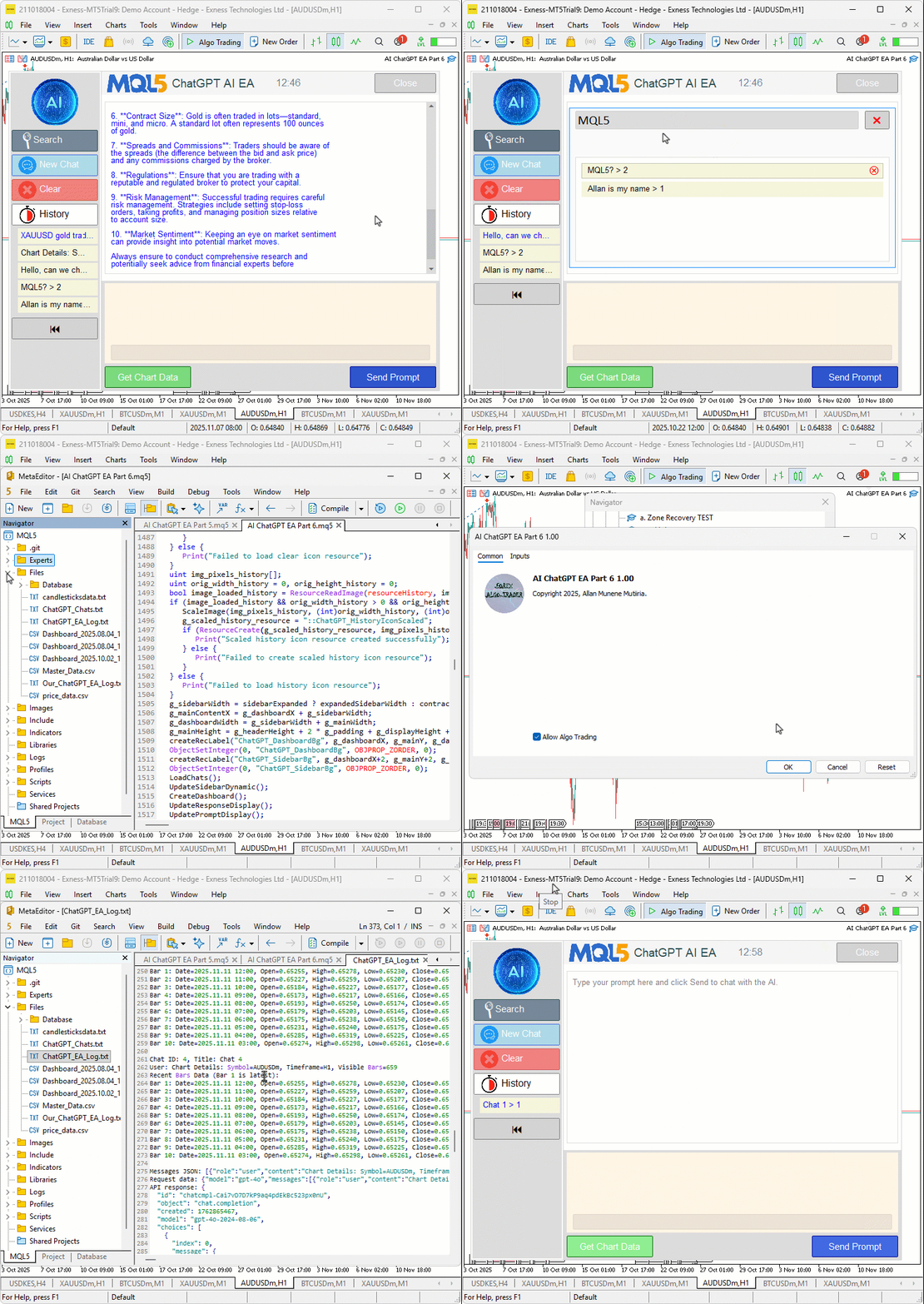
ビジュアライゼーションから、チャットログを改ざんせずに整合性を維持していることが確認できます。チャットを頻繁に使用しており、ログ自体も削除したい場合は、以下のロジックを実装することになります。
void ClearLogsForChat(int del_id) {
   if (logFileHandle != INVALID_HANDLE) {
      FileClose(logFileHandle);
   }
   string tempFile = "Temp_Log.txt";
   int readHandle = FileOpen(LogFileName, FILE_READ | FILE_TXT);
   if (readHandle == INVALID_HANDLE) {
      Print("Failed to open log for reading: ", GetLastError());
      ReopenLogHandle();
      return;
   }
   int writeHandle = FileOpen(tempFile, FILE_WRITE | FILE_TXT);
   if (writeHandle == INVALID_HANDLE) {
      Print("Failed to open temp log: ", GetLastError());
      FileClose(readHandle);
      ReopenLogHandle();
      return;
   }

   bool skipBlock = false;
   while (!FileIsEnding(readHandle)) {
      string line = FileReadString(readHandle);
      if (StringFind(line, "Chat ID: ") == 0) {
         // Reset skip for new block
         skipBlock = false;
         // Parse ID
         int commaPos = StringFind(line, ", Title: ");
         if (commaPos > 0) {
            string idStr = StringSubstr(line, 9, commaPos - 9);
            int chatId = (int)StringToInteger(idStr);
            if (chatId == del_id) {
               skipBlock = true;
            }
         }  // If parse fails, don't skip (safe default)
      }
      if (!skipBlock) {
         FileWrite(writeHandle, line);
      }
   }

   FileClose(readHandle);
   FileClose(writeHandle);

   FileDelete(LogFileName);
   FileMove(tempFile, 0, LogFileName, 0);

   ReopenLogHandle();
}

void ReopenLogHandle() {
   logFileHandle = FileOpen(LogFileName, FILE_READ | FILE_WRITE | FILE_TXT);
   if (logFileHandle != INVALID_HANDLE) {
      FileSeek(logFileHandle, 0, SEEK_END);
   } else {
      Print("Failed to reopen log: ", GetLastError());
   }
}

void DeleteChat(int id) {

   //--- rest of the logic

   ArrayRemove(chats, idx, 1);
   ClearLogsForChat(id); //--- we call the function after removing the chats
   SaveChats();

   //--- rest of the logic

}
まず、ClearLogsForChat関数を作成し、特定のチャット(del_idで識別される)に属するすべてのログエントリを削除できるようにします。最初に、logFileHandleが有効かどうかを確認します。これはログファイルが現在開かれていることを意味します。有効であれば、FileClose関数を使用して安全に閉じ、読み書き操作の準備をおこないます。次に、変数tempFileに一時ファイル名を定義し、Temp_Log.txtを割り当てます。このファイルはクリーンアップ中の中間ストレージとして使用します。その後、メインログファイル(LogFileNameに保存されている)をFileOpenで読み取りモード(FILE_READ、FILE_TXT)で開きます。ファイルを開けない場合は、ReopenLogHandle関数を呼び出してログファイルへのアクセスを復元し、関数を終了します。
次に、一時ファイルをFileOpenで書き込みモード(FILE_WRITE、FILE_TXT)で開きます。開けない場合は、ReopenLogHandleを呼んでから処理を終了します。両方のファイルが正常に開いた場合、boolean型変数skipBlockをfalseで初期化します。この変数は、特定のログブロックを書き込むかスキップするかを判断するために使用します。その後、while (!FileIsEnding(readHandle))ループでログファイルの末尾まで処理をおこないます。ループ内でFileReadStringを使って各行をlineに読み込みます。行が「Chat ID:」で始まる場合(StringFindで判定)、新しいチャットエントリの開始と認識します。skipBlockをfalseにリセットし、次にチャットIDを抽出します。チャットIDの抽出は、StringFindで行内のTitle:の位置を見つけ、StringSubstrでID部分を取得し、StringToIntegerで整数に変換します。抽出したchatIdが削除対象のdel_idと一致する場合、skipBlockをtrueに設定し、そのチャットに関連するすべての行を書き込まないようにします。その他の行はFileWriteで一時ファイルに書き戻し、他のチャットのログだけを保持します。
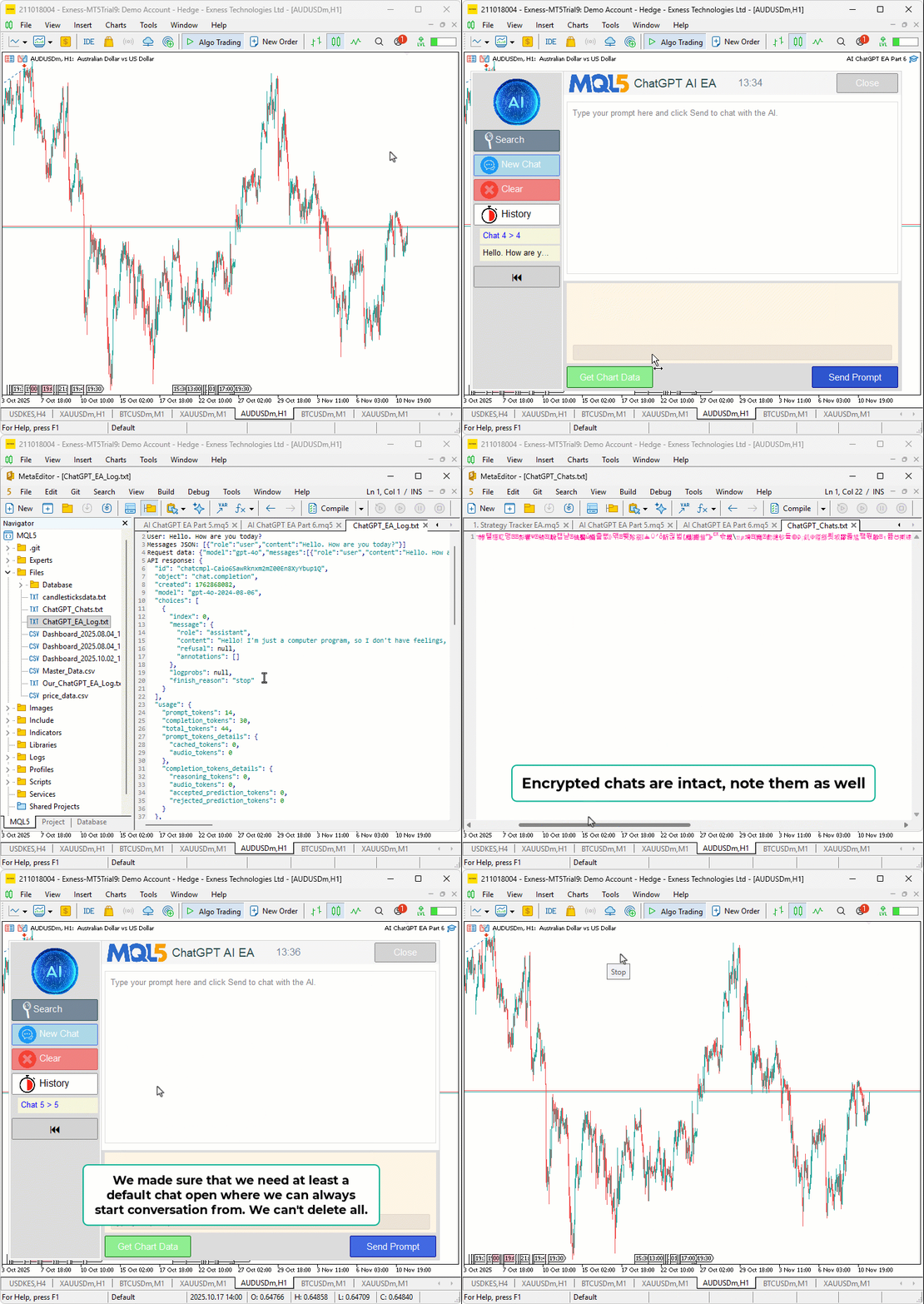
すべての行を処理した後、FileCloseで両方のファイルを閉じます。次に、FileDeleteで古いログファイルを削除し、FileMoveで一時ファイルを元の名前に変更して置き換えます。これにより、古いログがきれいに置き換えられます。最後にReopenLogHandleを呼び出してメインログファイルを再度開き、通常の操作を続行できるようにします。ReopenLogHandle関数のロジックはここでは新しいものではありません。チャット削除時にこの関数を呼び出すことで、ログ削除の重い処理をおこないます。ログを削除したくない場合は、この変更は無視できます。ただし、大量のログがある場合は、ファイルの再オープンや書き換えにより処理が遅くなる点に注意が必要です。実際には、ログ削除を制御するための入力パラメータを追加しました。デフォルトはtrueです。以下をご覧ください。
input bool DeleteLogsOnChatDelete = true;  // Clear logs when deleting chats?

//--- added conditional log clearing
if (DeleteLogsOnChatDelete) {
   ClearLogsForChat(id);
}
コンパイルすると、次の結果が得られます。
結論
今回は、MQL5で開発したAI搭載取引システムをさらに進化させ、サイドバーやポップアップ上のホバー表示削除ボタンによるチャット削除機能と、タイトルや履歴を大文字小文字を区別せずリアルタイムで検索できる検索ポップアップを導入しました。これにより、永続的に暗号化された会話を効率的に管理しつつ、複数行入力やチャートデータからのAI駆動のシグナル生成を維持できます。これらの機能により、不要な情報を整理し、関連性の高いインサイトを迅速に取得できるようになり、動的な市場環境でも直感的な操作とシームレスなUI更新で生産性を向上できます。今後のパートでは、AIシグナルに基づく高度な自動売買の実装や、マルチシンボル監視を組み込んだ完全自動アシスタントの構築を予定しています。どうぞご期待ください。
添付ファイル
| シリアル番号 | 名前 | 種類 | 詳細 |
|---|---|---|---|
| 1 | AI_JSON_FILE.mqh | JSONクラスライブラリ | JSONのシリアライズおよびデシリアライズを扱うクラス |
| 2 | AI_CREATE_OBJECTS_FNS.mqh | オブジェクト関数ライブラリ | ラベルやボタンなどの可視化オブジェクトを作成する関数 |
| 3 | AI_ChatGPT_EA_Part_6.mq5 | EA | AI統合を扱うメインのEA |
MetaQuotes Ltdにより英語から翻訳されました。
元の記事: https://www.mql5.com/en/articles/20254
警告: これらの資料についてのすべての権利はMetaQuotes Ltd.が保有しています。これらの資料の全部または一部の複製や再プリントは禁じられています。
この記事はサイトのユーザーによって執筆されたものであり、著者の個人的な見解を反映しています。MetaQuotes Ltdは、提示された情報の正確性や、記載されているソリューション、戦略、または推奨事項の使用によって生じたいかなる結果についても責任を負いません。

 機械学習の限界を克服する(第7回):自動戦略選択
 取引戦略の開発:擬似ピアソン相関アプローチ
 取引戦略の開発:Flower Volatility Indexのトレンドフォローアプローチ
 プライスアクション分析ツールキットの開発(第50回):MQL5でのRVGI、CCI、SMA Confluenceエンジンの開発

- 無料取引アプリ
- 8千を超えるシグナルをコピー
- 金融ニュースで金融マーケットを探索