RenkoFromRealTicks
- Utilidades
- Stanislav Korotky
- Versión: 1.6
- Actualizado: 15 febrero 2024
- Activaciones: 5
Este experto no comercial utiliza la llamada función de símbolos personalizados(disponible tambiénen la API MQL ) para construir gráficos renko basados en el historial de ticks reales del símbolo estándar seleccionado. RenkoFromRealTicks genera cotizaciones de símbolos personalizados, por lo que puede abrir muchos gráficos para aplicar diferentes EAs e indicadores al renko. También transmite ticks reales para actualizar los gráficos renko en tiempo real.
El gráfico renko generado utiliza el marco temporal M1. No tiene sentido cambiar el gráfico renko a otro marco temporal que no sea M1. La hora de inicio de una barra "minuto" normalmente corresponde a la hora de inicio del cuadro renko. La hora de finalización de dicha barra "minuto" es ficticia (MetaTrader no permite barras con diferente duración), en su lugar debe mirar la hora de inicio de la siguiente barra "minuto". Opcionalmente, puede habilitar el marcado de las cajas por la hora de cierre (ver CloseTimeMode más abajo).
Tras su colocación en un gráfico, RenkoFromRealTicks descarga el historial de ticks y genera barras renko para el símbolo personalizado. Esto puede llevar un tiempo y requerir espacio adicional en el disco. EA muestra un progreso en el comentario. Cuando el proceso finaliza, el comentario tiene este aspecto:
RenkoChart(100 pt): open EURUSD_T_r100 / 1000 bars
donde 100pt es el tamaño de caja solicitado en puntos, EURUSD_T_r100 es un nombre de símbolo personalizable, 1000 es un número de cajas generadas (si el EA se está ejecutando por primera vez, este es el número total de barras renko, pero si continúa con los resultados de una sesión de terminal anterior, el número de nuevas cajas puede ser unos pocos, porque sólo se generan las cajas más recientes que faltan).
Puede construir renko más rápido y con menos recursos usando RenkoCharts. Pero RenkoFromRealTicks es más preciso y con más funciones.
Parámetros
- RenkoBoxSize - tamaño de la caja en puntos, por defecto - 100;
- ShowWicks - activar/desactivar mechas en renko, por defecto - true;
- EmulateOnLineChart - habilita/deshabilita la emulación de ticks en gráficos renko, por defecto - true; actualiza indicadores y otros EAs en backtests y online;
- OutputSymbolName - nombre del símbolo personalizado para renko, por defecto - cadena vacía - entonces el nombre se forma como "Symbol_T_PrefixSizeSuffix", donde Symbol - símbolo de trabajo actual, Prefix - "r" (renko) mechas están habilitadas o "b" (brick) si están deshabilitadas, Size - RenkoBoxSize; Suffix opcional - "c" para el modo de tiempo de cierre; "g" - para el tipo de renko gapless;
- Reset - una opción para forzar el recálculo completo de todo el gráfico renko, por defecto - false; después de que se establece en true y se completan los cálculos, se recomienda restablecerlo a false con el fin de eliminar los recálculos excesivos en cada reinicio de la terminal; este modo es útil en casos raros, cuando el gráfico renko generado contiene un error por alguna razón; normalmente la opción está desactivada, porque el EA continúa el cálculo de forma inteligente desde la caja existente más reciente;
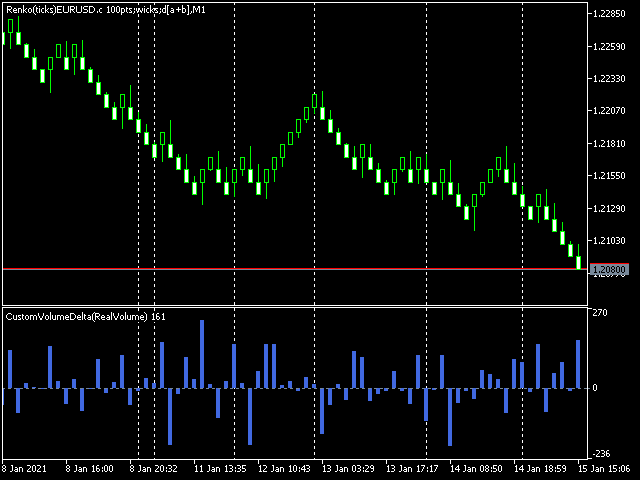
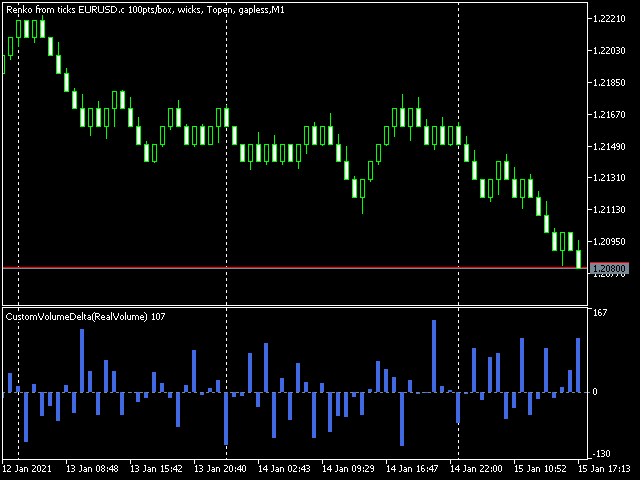
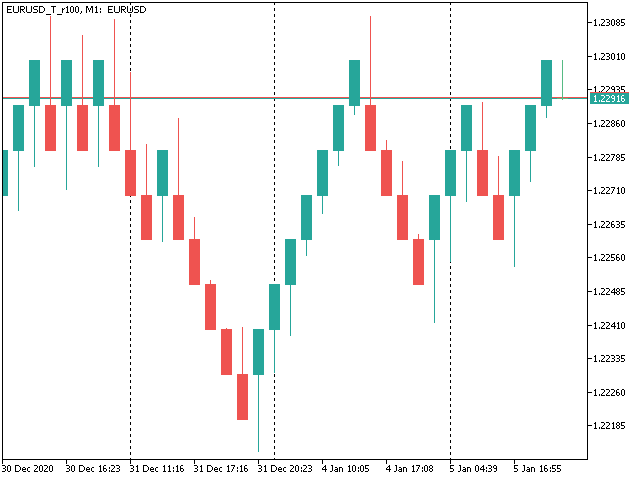
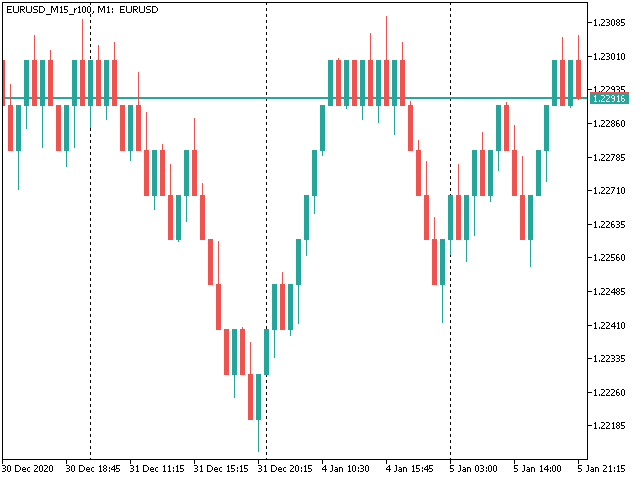
- RenkoType - selector del algoritmo de cálculo de la caja: Convencional o Gapless (también conocido como no-gap, rail-to-rail, ver ejemplos en las imágenes);
- VolumeType - selector de los cálculos de volúmenes por caja: Total Volume, o Delta Volume con cualquiera de los 3 algoritmos (Ask vs Bid, Ask + Bid, Tick Flags);
- CloseTimeMode - cuando es true, las cajas se muestran y forman a su hora de cierre; en este modo sólo se genera 1 tick por caja, cuando la caja se añade completamente formada a un gráfico; por defecto - false, es decir, las cajas se crean a la hora de apertura (la última "caja" viva se actualiza continuamente y no es realmente una caja hasta que se cierra);
- DropTicksOutsideBars - filtra los ticks incorrectos (valores atípicos);
- StartFrom - hora de inicio del procesamiento del historial de ticks, 0 significa el principio;
- StopAt - tiempo donde parar, 0 significa hasta el tiempo actual;
Métodos Delta de Volumen
En el método Ask vs Bid los volúmenes de ticks se consideran para comprar si el precio Ask aumenta, y para vender si el Bid disminuye (por favor, tenga en cuenta que en algunas cuentas/símbolos el Bid cambia más frecuentemente que el Ask, lo que introduce un sesgo negativo; esta es la especificidad de la plataforma).
El método Ask+Bid analiza los cambios del precio medio (suma de Ask y Bid): subir - comprar, bajar - vender.
Tick Flags se basa en banderas de compra/venta y sólo es aplicable a las bolsas.
Hello,
I have traded Renko for many years manually without using EAs. Like many other traders, I faced the challenge when attempting to Backtest and/or optimize trading EAs based on custom symbols (Renko charts) in MT5. I have tested different Renko Generators EAs. I have generally struggled with these main points:

A-Backtesting results vary a lot.
B-The coders who created these EAs are not responsive and if they do respond, their replies are very short and do not address my concerns.
C- When applying Renko Generators on custom symbols, some Renko generators do not work or the backtesting results do not show 100 percent history quality.
For example: using third-party Tick Data providers to create a custom symbol for any pair and then creating a Renko custom symbol based on this imported tick data. Not all MT5 brokers offer tick data for previous years and thus we need to rely on imported tick data.
The result is that either the Renko Generator does not create a Renko custom symbol (because the source chart is a custom tick data chart) or it creates a custom symbol but the backtesting shows zero percent history quality. Regardless of how accurate and precise the Renko Generator is, there will always be limitations with MT5. It is inevitable as MT5 does not offer a custom-tailored solution for Renko bars. Any EA generator is simply trying to apply the concept of Renko on a time-based chart.
In a time chart, all data series (o/h/l/c) have to be manipulated by any Renko Generator. There are limits and issues. Stanislav (the creator of RenkoFromRealTicks) is very transparent about it in one of his articles. Read them to understand. This shortfall will apply to any Renko Generator you use (from Stanislav or others).
All right! So now starts my review of Stanislav Korotky Renko Generator (RenkoFromRealticks) EA.
1- Communication and support:
I give 5 stars out of 5 for the communication with Stanislav. I purchased his EA when it was version 1. There were so many backtracks done from my end and I had many questions to send to Stanislav. To be honest and straightforward, I am a very skeptical person by nature and I compare different products and always question the result.
It has been a couple of weeks and Stanislav was always responsive and updated his EA with a newer version to address a concern I have. He has also backtested two of my EAs and changed the code in one of them to make sure (from his view) that the backtesting is accurate. I have also sent him a third EA and some tick data and asked him to backtest it without changing the code and his results closely matched with mine.
I have never had such a communication channel with any other Renko Coder! Thank you, Stanislav for your support. I have also sensed you are a sincere coder who takes responsibility for his work and is very open with limitations (from MT5) without hiding or polishing them.
2-Applying RenkoFromRealTicks on Custom symbols: No issues at all. Let’s say you have a custom EURUSD chart built from tick data provided by a third party. You can apply RenkoFromRealTicks on it and it will generate the Renko bars. Some other Renko Generators do not! This is because they rely on one-minute data and the authors won't inform you.
3-Backtesting: Some Renko Generators have a special mode for backtesting. In other words, the user has to change the Renko size for reversal bars. (for example, Reno Reversal should be 200 percent of Renko bar). This is not wrong as this depends on the Author’s recommendations when backtesting. However, in the case of RenkoFromRealTicks, you do not need such a feature and you should not worry about (the artificial opening of a bar) affecting the backtest.
I have exhausted this concern with Stanislav! Besides, it is a lot nicer to see the authentic look of Renko Bars in the bactested chart. Also bear in mind, that some Renko Generators do not address this issue at all! Coders decline to inform their users if backtesting is synthetic and not real. So again: it depends on how the Renko generator is coded and what are the recommendations (if any) for Backtesting.
The recommendation from Stanislav is to choose (Bulk Ticks per box) in the Tick History Mode for the most accurate backtesting. Stanislav may need to update the description of the EA for Backtesting.
Some Renko Generators do not deal well with (compressed tick data)! Read this carefully! Some tick data providers offer a compressed version of their tick data to reduce the file size of tick data. That is great; sometimes you would get 99 percent quality instead of 100 percent.
A one percent difference is not that much when it comes to reducing file sizes on your PC. However, here is the issue: Some Renko generators do not handle well such compressed Data. They construct the bars in the wrong way affect your trading EA Backtesting and give you an unrealistic high profit factor.
But when it comes to RenkoFromReal Ticks, there was no issue at all. This Renko generator deals very well with either compressed or standard-sized data. There was no real concerning discrepancy when I backtested my trading EAs. The important thing is that you have a detailed log report to investigate the construction of Renko bars and the tick data you are using. I have also once downloaded the wrong format of ticks from one of the tick data providers. I downloaded a .csv file that was not meant for MT5. RealDataFrom Ticks EA generated a blank custom symbol and upon going through the log report, I noticed many ticks are being missed or are bad. I then downloaded the right format for MT5, and the EA worked like a charm.
However, when I used another Renko generator, the bars were still created and the trading EA got me an unrealistic high-profit factor. I realized then that RenkoFromRealTicks is a trustworthy Renko generator I should use.
C-History Quality: With RenkoFromRealTicks, I got 99 percent quality with the compressed data and 100 percent quality with standard-size data. When it comes to standard size tick data, I tested another commercial Renko generator and it was close to RenkoFromRealTicks EA but it shows history quality at Zero percent! This does not give me assurance the backtesting is good (even if the results are very close).
D-Online Trading: I have not tested it on online mode but I do not see any reason why it would not perform as expected. Usually, the issue of any Renko EA generator is in backtesting not in online mode.
E-takes a bit of time when constructing the renko bars: I believe this is because it is a genuine Renko generator that does build Renko from real ticks. I have similar MT4 Renko generators that take some time to construct Renko HST and FXT files from tick data. Besides, I was skeptical of other MT5 Renko generators that generate Renko bars on the fly! Or in a few seconds.
I hope I have given a comprehensive review of the product based on experience and knowledge.
Finally, I want to add that I did not have a reference point to compare the backtesting results I got from my trading EAs tested on Renko bars generated by RenkoFromRealTicks EA. I used a couple of EAs in MT4 and MT5 and was looking for an outlier here or there. The best way to make sure that any Renko Generator EA is offering the best backtesting results is to run an EA on a server for a month or so and compare the life trading results with the backtested ones. I have not done this yet.
My Recommendations for future development: (This depends on the users’ opinion and voting for such features)
1-I wish I see another EA from Stanislav (a different product with a different purchase) that offers Flexible Renko Construction. (i.e. changing the open and close offset by percentage). This way it will be a universal Renko builder to create Mean Renko or other exotic Renko bars.
The current EA offers Conventional and rail-to-rail (Point O Chart) Renko bars. The author would be able to code a new Renko generator if there is enough demand for it.
2-Option to build a Renko chart based on a percentage of the price. This will be great for stock trading. I am not fond of Renko based on ATR and I think the percentages will be a better option.
Thank you,