RenkoFromRealTicks

4.5

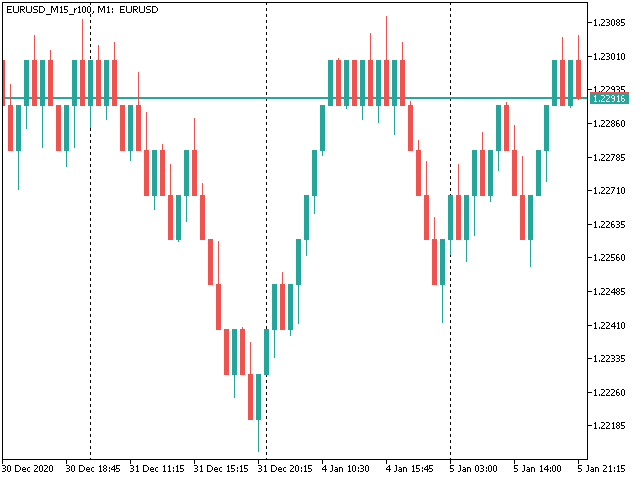
This non-trading expert utilizes so called custom symbols feature (available in MQL API as well) to build renko charts based on history of real ticks of selected standard symbol. RenkoFromRealTicks generates custom symbol quotes, thus you may open many charts to apply different EAs and indicators to the renko. It also transmits real ticks to update renko charts in real time.

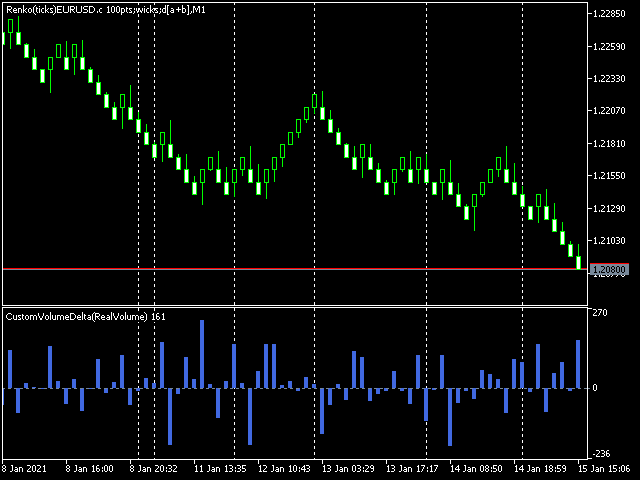
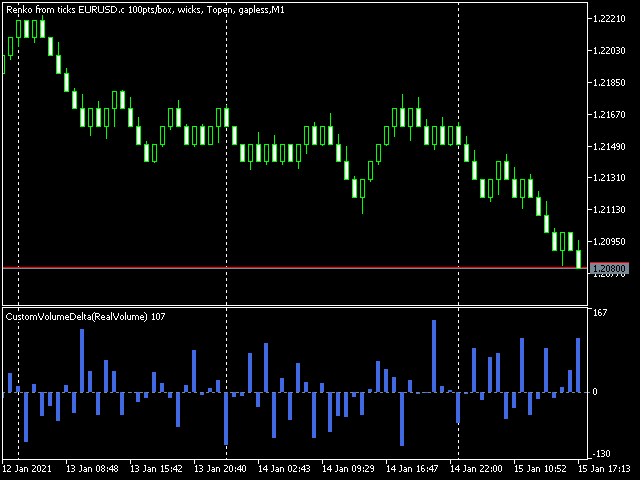
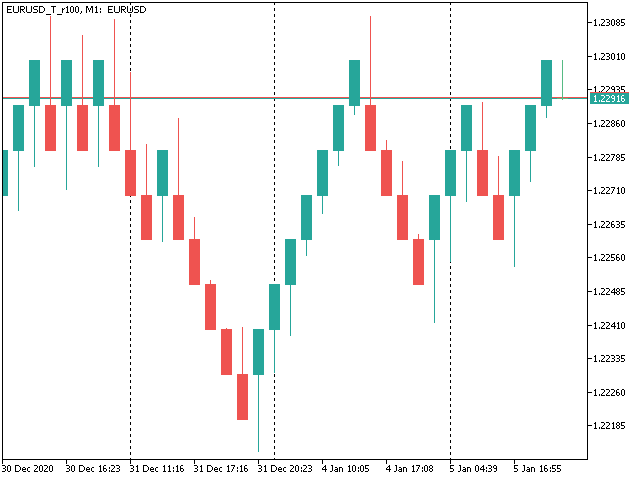
The generated renko chart uses M1 timeframe. It makes no sense to switch the renko chart to a timeframe other than M1. The start time of a "minute" bar does normally correspond to the start time of renko box. The end time of a such "minute" bar is dummy (MetaTrader does not allow for bars with different duration), instead you should look at start time of the next "minute" bar. Optionally, you may enable markup of the boxes by close time (see CloseTimeMode below).

After its placement on a chart, RenkoFromRealTicks downloads tick history and generates renko bars for the custom symbol. This may take a while and require additional space on the disk. EA shows a progress in the comment. When the process is finished, the comment looks like this:

RenkoChart(100pt): open EURUSD_T_r100 / 1000 bars

where 100pt is the requested box size in points, EURUSD_T_r100 is a customizable symbol name, 1000 is a number of generated boxes (if EA is running for the very first time, this is the total number of renko bars, but if it continues on results of a previous terminal session, the number of new boxes can be a few, because only most recent, missing boxes are generated).

You may build renko faster and with less resources using RenkoCharts. But RenkoFromRealTicks is more precise and feature-reach.


Unique feature - volume delta per box. The delta is encoded in a special way, because MetaTrader does not support negative volumes. This is why you need free CustomVolumeDelta indicator to view it.

Parameters

  • RenkoBoxSize - box size in points, by default - 100;
  • ShowWicks - enable/disable wicks on renko, by default - true;
  • EmulateOnLineChart - enable/disable ticks emulation on renko charts, by default - true; it updates indicators and other EAs on backtests and online;
  • OutputSymbolName - name of the custom symbol for renko, by default - empty string - then the name is formed as "Symbol_T_PrefixSizeSuffix", where Symbol - current work symbol, Prefix - "r" (renko) wicks are enabled or "b" (brick) if disabled, Size - RenkoBoxSize; optional Suffix - "c" for close time mode; "g" - for gapless renko type;
  • Reset - an option to enforce complete recalculation of entire renko chart, by default - false; after it is set to true and calculations are completed, it is recommended to reset it back to false in order to eliminate excessive recalculations on every terminal restart; this mode is helpful in rare cases, when generated renko chart contains an error for some reason; normally the option is disabled, because the EA continues calculation smartly from the most recent existing box;
  • RenkoType - selector of the box calculation algorithm: Conventional or Gapless (also known as non-gap, rail-to-rail, see examples in the pictures);
  • VolumeType - selector of the volumes per box calculations: Total Volume, or Delta Volume with either of 3 algorithms (Ask vs Bid, Ask + Bid, Tick Flags);
  • CloseTimeMode - when true, boxes are shown and formed at their close time; in this mode only 1 tick is generated per box, when box is added completely formed to a chart; by default - false, i.e. boxes are created at open time (the latest live "box" is updated continuously and is not actually a box until it's closed);
  • DropTicksOutsideBars - filter out incorrect ticks (outliers);
  • StartFrom - time where to start the tick history processing, 0 means very beginning;
  • StopAt - time where to stop, 0 means till current time;


Volume Delta Methods

In the method Ask vs Bid tick volumes are considered for buy if Ask price increases, and for sell if Bid decreases (please note, that on some accounts/symbols Bid changes more frequent than Ask, which introduces a negative bias; this is the platform specificity).

The method Ask+Bid analyses the changes of the average price (sum of Ask and Bid): move up - buy, move down - sell.

Tick Flags is based on buy/sell tick flags and applicable for exchanges only.

Comentários 3
Mohamed Tharwat Hussein El Sherief
377
 

Hello,

I have traded Renko for many years manually without using EAs. Like many other traders, I faced the challenge when attempting to Backtest and/or optimize trading EAs based on custom symbols (Renko charts) in MT5. I have tested different Renko Generators EAs. I have generally struggled with these main points:

A-Backtesting results vary a lot.

B-The coders who created these EAs are not responsive and if they do respond, their replies are very short and do not address my concerns.

C- When applying Renko Generators on custom symbols, some Renko generators do not work or the backtesting results do not show 100 percent history quality.

For example: using third-party Tick Data providers to create a custom symbol for any pair and then creating a Renko custom symbol based on this imported tick data. Not all MT5 brokers offer tick data for previous years and thus we need to rely on imported tick data.

The result is that either the Renko Generator does not create a Renko custom symbol (because the source chart is a custom tick data chart) or it creates a custom symbol but the backtesting shows zero percent history quality. Regardless of how accurate and precise the Renko Generator is, there will always be limitations with MT5. It is inevitable as MT5 does not offer a custom-tailored solution for Renko bars. Any EA generator is simply trying to apply the concept of Renko on a time-based chart.

In a time chart, all data series (o/h/l/c) have to be manipulated by any Renko Generator. There are limits and issues. Stanislav (the creator of RenkoFromRealTicks) is very transparent about it in one of his articles. Read them to understand. This shortfall will apply to any Renko Generator you use (from Stanislav or others).

All right! So now starts my review of Stanislav Korotky Renko Generator (RenkoFromRealticks) EA.

1- Communication and support:

I give 5 stars out of 5 for the communication with Stanislav. I purchased his EA when it was version 1. There were so many backtracks done from my end and I had many questions to send to Stanislav. To be honest and straightforward, I am a very skeptical person by nature and I compare different products and always question the result.

It has been a couple of weeks and Stanislav was always responsive and updated his EA with a newer version to address a concern I have. He has also backtested two of my EAs and changed the code in one of them to make sure (from his view) that the backtesting is accurate. I have also sent him a third EA and some tick data and asked him to backtest it without changing the code and his results closely matched with mine.

I have never had such a communication channel with any other Renko Coder! Thank you, Stanislav for your support. I have also sensed you are a sincere coder who takes responsibility for his work and is very open with limitations (from MT5) without hiding or polishing them.

2-Applying RenkoFromRealTicks on Custom symbols: No issues at all. Let’s say you have a custom EURUSD chart built from tick data provided by a third party. You can apply RenkoFromRealTicks on it and it will generate the Renko bars. Some other Renko Generators do not! This is because they rely on one-minute data and the authors won't inform you.

3-Backtesting: Some Renko Generators have a special mode for backtesting. In other words, the user has to change the Renko size for reversal bars. (for example, Reno Reversal should be 200 percent of Renko bar). This is not wrong as this depends on the Author’s recommendations when backtesting. However, in the case of RenkoFromRealTicks, you do not need such a feature and you should not worry about (the artificial opening of a bar) affecting the backtest.

I have exhausted this concern with Stanislav! Besides, it is a lot nicer to see the authentic look of Renko Bars in the bactested chart. Also bear in mind, that some Renko Generators do not address this issue at all! Coders decline to inform their users if backtesting is synthetic and not real. So again: it depends on how the Renko generator is coded and what are the recommendations (if any) for Backtesting.

The recommendation from Stanislav is to choose (Bulk Ticks per box) in the Tick History Mode for the most accurate backtesting. Stanislav may need to update the description of the EA for Backtesting.

Some Renko Generators do not deal well with (compressed tick data)! Read this carefully! Some tick data providers offer a compressed version of their tick data to reduce the file size of tick data. That is great; sometimes you would get 99 percent quality instead of 100 percent.

A one percent difference is not that much when it comes to reducing file sizes on your PC. However, here is the issue: Some Renko generators do not handle well such compressed Data. They construct the bars in the wrong way affect your trading EA Backtesting and give you an unrealistic high profit factor.

But when it comes to RenkoFromReal Ticks, there was no issue at all. This Renko generator deals very well with either compressed or standard-sized data. There was no real concerning discrepancy when I backtested my trading EAs. The important thing is that you have a detailed log report to investigate the construction of Renko bars and the tick data you are using. I have also once downloaded the wrong format of ticks from one of the tick data providers. I downloaded a .csv file that was not meant for MT5. RealDataFrom Ticks EA generated a blank custom symbol and upon going through the log report, I noticed many ticks are being missed or are bad. I then downloaded the right format for MT5, and the EA worked like a charm.

However, when I used another Renko generator, the bars were still created and the trading EA got me an unrealistic high-profit factor. I realized then that RenkoFromRealTicks is a trustworthy Renko generator I should use.

C-History Quality: With RenkoFromRealTicks, I got 99 percent quality with the compressed data and 100 percent quality with standard-size data. When it comes to standard size tick data, I tested another commercial Renko generator and it was close to RenkoFromRealTicks EA but it shows history quality at Zero percent! This does not give me assurance the backtesting is good (even if the results are very close).

D-Online Trading: I have not tested it on online mode but I do not see any reason why it would not perform as expected. Usually, the issue of any Renko EA generator is in backtesting not in online mode.

E-takes a bit of time when constructing the renko bars: I believe this is because it is a genuine Renko generator that does build Renko from real ticks. I have similar MT4 Renko generators that take some time to construct Renko HST and FXT files from tick data. Besides, I was skeptical of other MT5 Renko generators that generate Renko bars on the fly! Or in a few seconds.

I hope I have given a comprehensive review of the product based on experience and knowledge.

Finally, I want to add that I did not have a reference point to compare the backtesting results I got from my trading EAs tested on Renko bars generated by RenkoFromRealTicks EA. I used a couple of EAs in MT4 and MT5 and was looking for an outlier here or there. The best way to make sure that any Renko Generator EA is offering the best backtesting results is to run an EA on a server for a month or so and compare the life trading results with the backtested ones. I have not done this yet.

My Recommendations for future development: (This depends on the users’ opinion and voting for such features)

1-I wish I see another EA from Stanislav (a different product with a different purchase) that offers Flexible Renko Construction. (i.e. changing the open and close offset by percentage). This way it will be a universal Renko builder to create Mean Renko or other exotic Renko bars.

The current EA offers Conventional and rail-to-rail (Point O Chart) Renko bars. The author would be able to code a new Renko generator if there is enough demand for it.

2-Option to build a Renko chart based on a percentage of the price. This will be great for stock trading. I am not fond of Renko based on ATR and I think the percentages will be a better option.

Thank you,

carlospelegrini
87
carlospelegrini 2022.09.29 17:45 
 

the only non-gap renko I found.. it works okay

Produtos recomendados
This MT5 indicator provides real-time updates of classic Renko charts. Renko charts focus on price movement, filtering out noise and highlighting trends. What are Renko candles? Renko charts display price movement using "bricks" of equal size, ignoring time. A new brick is drawn only when the price moves by a specified amount. They help visualize trends by removing time-based noise. Parameters - BrickSizePoints  (20): Renko brick size in points - HistoryDepthSec  (3600): Historical data to ini
FREE
Gino Renko
Stephane, Andr Valette
1 (1)
Another renko-based indicator. It returns different usable values ​​for an EA, and is directly displayed on the main chart. Its setting is very simple: The size of the renko The number of bars taken into account The falling color The color on the rise Returned values: Buffer 0 : Value of the middle Buffer 1 : Value of the Top Buffer 2 : Value of the Bottom Buffer 3 : Direction of renko (0.0 for top ; 1.0 for bottom) Buffer 4 : Ratio of the renko, for example, if it is twice, 3 times, ro more of
World Session Zone Clock for MetaTrader 5 (MT5) *NO DEMO VERSION AVAILABLE* World Session Clock is a professional market session clock for MetaTrader 5 that visually displays global trading sessions in real time . It helps traders quickly identify market opens, closes, and session overlaps without manual time calculations or time-zone adjustments. The product combines a 24-hour analog clock , digital time display , session arcs , and optional chart session zones into a clean, lightweight interf
Renko Builder GLX1
Eranga Thilina Dhanushka Gallage
GLX1 Renko Builder   Expert Advisor (EA) can create the Renko bar charts on any symbol. The Renko charts are generated as real-time custom symbol charts which can be further used for technical analysis with any MT5 compatible indicator.  Find the free   GLX1 Renko Euro   Expert Advisor from here.  https://www.mql5.com/en/market/product/115074 Included Features: Truly responsive Renko Charting on a custom symbol chart Accurate automatic live chart update Ability to attach any MT5 indicator Abi
Indicador "MR BEAST - Detectador de Mejores Spikes" para el Índice BOOM1000 (M1) El indicador "MR BEAST - Detectador de Mejores Spikes" es una herramienta especializada y altamente precisa diseñada exclusivamente para operar en el índice CRASH 1000, con un enfoque específico en el marco temporal de 1 minuto (M1). Desarrollado por el reconocido trader Mr. Beast, este indicador ha sido meticulosamente diseñado para identificar únicamente los mejores spikes, permitiendo a los operadores capitalizar
KT Renko Live Charts MT5
KEENBASE SOFTWARE SOLUTIONS
O utilitário KT Renko Live Chart cria gráficos Renko no MT5 que podem ser utilizados para especulação, análise técnica ou negociação ao vivo. O gráfico Renko gerado por esta ferramenta é compatível com a maioria dos indicadores personalizados e Expert Advisors automatizados. Totalmente compatível com nosso indicador Renko Patterns e com o EA Renko Patterns. Recursos Uma ferramenta Renko simples e direta que fornece gráficos Renko no MT5 sem configurações complicadas. Compatível com a maioria do
DAILY OH/OL SDEV QUANT MODEL - STATISTICAL TRADING WITH PRECISION RISK MANAGEMENT TRADE WITH MATHEMATICAL CERTAINTY - KNOW YOUR EXACT STOP-LOSS AND TAKE-PROFIT BEFORE YOU ENTER This indicator analyzes 5,000+ days of price history to give you: Exact entry levels (sigma bands locked at daily open) Exact stop-loss distance (from M
Renko Chart
Marcin Konieczny
3.56 (9)
This indicator allows to display Renko charts in the indicator window. Renko charts show only price movements that are bigger than the specified box size. It helps to eliminate noise and allows to focus on main trends. Time is not a factor here. Only price movements are taken into account. That's why Renko chart is not synchronized with the main chart it is attached to. Indicator works in two modes: CLOSE - only close prices are taken into account while building the chart HIGH_LOW - only high/l
FREE
O   Indicador ATR Baseado em Heiken Ashi   é uma ferramenta única de análise de volatilidade que combina o   Average True Range (ATR)   com os cálculos das   velas Heiken Ashi , proporcionando uma medição mais estável e confiável da volatilidade do mercado. Ao contrário do ATR tradicional, que usa velas padrão, este indicador aplica a fórmula Heiken Ashi para filtrar o ruído do mercado e fornecer sinais mais claros. Principais recursos: •   Cálculo do ATR baseado em Heiken Ashi   – oferece uma
FREE
Renko Plus
Eadvisors Software Inc.
Com o Renko Plus você consegue utilizar os recursos na funcionalidade Indicador, basta adicioná-lo ao gráfico do Metatrader5.             O gráfico Renko é um tipo de gráfico, desenvolvido pelos japoneses, que é construído usando o movimento de preços em vez de preços e intervalos de tempo padronizados, como a maioria dos gráficos. Acredita-se que tenha o nome da palavra japonesa para tijolos, "renga", já que o gráfico se parece com uma série de tijolos.             Um novo tijolo
Heiken Ashii PRO
Magdalena Estefania Colonna
HEIKEN ASHI PRO Advanced Trading Indicator for MetaTrader 5 OVERVIEW Heiken Ashi PRO is an advanced technical indicator developed specifically for MetaTrader 5, designed to provide clear and accurate trading signals through Heiken Ashi candlestick analysis and an automatic alert system. This indicator combines the traditional Heiken Ashi methodology with an intelligent trend reversal detection system, offering immediate visual signals for buy and sell trades. KEY FEATURES Custom Heike
The Expert Advisor is used to create Renko chart, realtime updates, easy for technical analysis. Backtest your strategy with all indicators with Renko chart in MetaTrader 5. Parameters Box Size : input the number of box size. Show Wicks : if true , draw a candle with high/low. History Start: input the date to creat first candle. Maximum Bars: limit number of bars on renko chart How to use Attach the Expert Advisor to a chart (timeframe M1), for which you want to create a renko. Input box size a
This SMT (Smart Money Technique) divergence indicator identifies discrepancies in price movement between two different trading symbols, helping traders detect potential market reversals. This tool compares the price action of two correlated assets, such as two currency pairs or indices, to spot divergences where one asset's price moves in the opposite direction of the other. For example, while one symbol may be making higher highs, the other might be making lower highs, signaling a divergence. T
FREE
Os candles do tipo Heikin Ashi são uma ferramenta poderosa para os traders, oferecendo uma visualização clara e suave das tendências do mercado. Diferente dos candles tradicionais, eles filtram o ruído do mercado, proporcionando uma visão mais limpa da direção e força do mercado, ajudando os traders a tomar decisões mais informadas. O indicador Hull Heikin Ashi Smoothed da Minions Labs leva isso um passo além, integrando a Hull Moving Average para maior suavização e precisão. Este indicador não
Advanced 4xZeovo MT5 Indicator (MetaTrader 5)   Product Description  4xZeovo is a powerful trading indicator system monitoring 24/7 financial markets. Metatrader5 tool designed to find the best buying/selling opportunities and notifies the user.    Making life easy for traders in helping with the two most difficult decisions with the use of advanced innovate trading indicators aiming to encourage users to hold the winning positions and take profit at the best times.    Equipped with a unique tra
Indicador "MR BEAST - Detectador de Mejores Spikes" para el Índice CRASH 300(M1) El indicador "MR BEAST - Detectador de Mejores Spikes" es una herramienta especializada y altamente precisa diseñada exclusivamente para operar en el índice CRASH 1000, con un enfoque específico en el marco temporal de 1 minuto (M1). Desarrollado por el reconocido trader Mr. Beast, este indicador ha sido meticulosamente diseñado para identificar únicamente los mejores spikes, permitiendo a los operadores capitalizar
Indicador "MR BEAST - Detectador de Mejores Spikes" para el Índice CRASH 500(M1) El indicador "MR BEAST - Detectador de Mejores Spikes" es una herramienta especializada y altamente precisa diseñada exclusivamente para operar en el índice CRASH 1000, con un enfoque específico en el marco temporal de 1 minuto (M1). Desarrollado por el reconocido trader Mr. Beast, este indicador ha sido meticulosamente diseñado para identificar únicamente los mejores spikes, permitiendo a los operadores capitalizar
Trend Direction ADX indicator Trend Direction ADX is part of a serie of indicators used to characterize market conditions. Almost any strategy only work under certain market conditions. Therefore it is important to be able to characterize market conditions at any time: trend direction, trend strength, volatility, etc.. Trend Direction ADX is an indicator to be used to characterize trend direction: trending up trending down ranging Trend Direction ADX is based on ADX standard indicator. Tre
Gino Renko EA
Stephane, Andr Valette
Here is an EA based on the Renko indicator, it can be used with currencies, commodities, and forex. Just associate it with the corresponding graph. The indicator used for the EA is available here, but it is not necessary for its operation, they are 2 independent products: https://www.mql5.com/fr/market/product/87852?source=Site +Market+MT5+Indicator+Search+Rating006%3agino+renko Personally I don't like renko like EA, and I haven't done any tests to find out which configuration is the best. Th
Auto Channel Trader
Ross Adam Langlands Nelson
The Auto Channel Trader creates a channel by plotting a line along the high points and low points of the chart, the EA then makes long trades near the bottom of the channel and short trades near the top of the channel. The channel is created by finding high points for the top line and low points for the bottom line, these points are shown with arrows. A line of best fit is then plotted through these points and extended until the end of the chart.  The length of the channel is determined by the M
Bands are a form of technical analysis that traders use to plot trend lines that are two standard deviations away from the simple moving average price of a security. The goal is to help a trader know when to enter or exit a position by identifying when an asset has been overbought or oversold. This indicator will show upper and lover bands. You can change input parameters nPeriod and  nMethod to calculate those bands for each timeframe. Aqua clouds represent up or down trends.
Dobiforex AI Service é uma plataforma especializada que oferece assistência inteligente em negociações para traders de forex. Este assistente utiliza análise avançada de mercado em tempo real para ajudar os traders a tomar decisões mais informadas em suas estratégias de negociação. Ao se cadastrar no site da Dobiforex e acessar o painel dedicado, os usuários podem integrar este serviço inteligente em sua plataforma de negociação. A Dobiforex, utilizando algoritmos avançados e aprendizado de máqu
O Alpha B3 Renko Trader  é um robô especialista para negociação no Bovespa B3  (miniíndice e minidólar) que une a análise de candlesticks do gráfico Renko (calculado internamente, sem imagens gráficas) com a estratégia Alpha B3 . O robô permite configurar, para os sinais de entrada, o tamanho do brick do gráfico Renko, bem como um número de candlesticks para análise. Além disso, você deve configurar os stops fixos, em pontos. O robô permite também a configuração de funções, tais como número de c
O indicador cria cotações atuais, que podem ser comparadas com as históricas e, com base nisso, fazer uma previsão do movimento dos preços. O indicador possui um campo de texto para navegação rápida até a data desejada. Opções: Símbolo - seleção do símbolo que o indicador exibirá; SymbolPeriod - seleção do período do qual o indicador coletará dados; IndicatorColor - cor do indicador; HorisontalShift - deslocamento das cotações desenhadas pelo indicador pelo número especificado de barras; I
HLC bar MT5 Wyckoff
Eduardo Da Costa Custodio Santos
O indicador "HLC_bar_MT5 Wyckoff" para MT5 foi criado para facilitar a análise na hora da negociação. A Barra HLC foi utilizada por Richard Wyckoff e atualmente muito utilizada nas operações de "VSA". Wyckoff descobriu que a utilização da Máxima, mínima e fechamento deixava o gráfico muito mais limpo e fácil de ser analisado. O Indicador "HLC_bar_MT5 Wyckoff" permite: # Alterar a largura da barra; # Deixar a barra da mesma cor; # E destacar a barra que abriu e fechou no mesmo preço. As c
Renko Charts Pro
Makarii Gubaydullin
Filtre pequenos movimentos de preço e concentre-se na tendência geral . O indicador de gráfico Renko ajudará você a filtrar pequenos movimentos de preço para que possa se concentrar na tendência geral. O preço deve se mover uma quantidade especificada para criar um bloco Renko. Isso facilita identificar a direção atual da tendência em que o preço está se movendo. Utilitário multifuncional : inclui 66+ funções  |   Entre em contato comigo  se tiver alguma dúvida  |    Versão para MT4 Nas configu
All about time and price by ICT. This indicator provides a comprehensive view of ICT killzones, Silver Bullet times, and ICT Macros, enhancing your trading experience.  In those time windows price either seeks liquidity or imbalances and you often find the most energetic price moves and turning points. Features: Automatic Adaptation: The ICT killzones intelligently adapt to the specific chart you are using. For Forex charts, it follows the ICT Forex times: In EST timezone: Session: Asia: 20h00-0
Renko + ATR Trend Envelope PRO+ (Non-Repainting) Renko + ATR Trend Envelope PRO+ is a clean trend-filter indicator that combines a Renko-style step histogram with an ATR-based trend envelope. It highlights trend direction, volatility expansion/contraction and trend reversals with arrows and optional alerts. This tool is ideal for: Trend following strategies Breakout confirmation Filtering false entries during choppy markets Visualizing volatility using ATR envelopes Key Features Renko-Style Hi
RENKO PRICE ACTION ATR é um "Expert Advisor" desenvolvido através da construção do Gráfico Renko aonde cada BRICK tem o tamanho calculado através do ATR do período selecionado pelo usuário. Os gráficos Renko são projetados para filtrar movimentos menores de preços, desta forma tornando mais fácil que os traders concentrem-se em tendências importantes. Devido à sua eficiência em detecção de tendências de preços é possível também identificar com muita clareza suportes e resistências assim como as
Inteligência artificial treinável e redes neuronais. Indicador Financeiro SolarTrade Suite - Indicador de Mercado Theia! Este é um indicador que utiliza algoritmos especiais, inovadores e avançados para calcular os seus valores, O seu Assistente no Mundo dos Mercados Financeiros. O Indicador SolarTrade Suite - Theia Market prevê o preço de um instrumento financeiro com vários valores de antecedência e apresenta as suas leituras como um comentário na janela do terminal. Veja os nossos outros
Os compradores deste produto também adquirem
Trade Assistant MT5
Evgeniy Kravchenko
4.41 (205)
Ajuda a calcular o risco por comércio, a fácil instalação de uma nova encomenda, gestão de encomendas com funções de fecho parcial, trailing stop de 7 tipos e outras funções úteis. Materiais e instruções adicionais Instruções de instalação   -   Instruções para a aplicação   -   Versão de teste da aplicação para uma conta de demonstração Função de linha Mostra no gráfico a linha de Abertura, Stop Loss, Take Profit. Com esta função é fácil definir uma nova ordem e ver as suas características ad
Bem-vindo ao Trade Manager EA—uma ferramenta de gestão de risco criada para tornar o trading mais intuitivo, preciso e eficiente. Não é apenas uma ferramenta para executar ordens, mas uma solução abrangente para planejamento de operações, gerenciamento de posições e controle de risco. Seja você um iniciante, trader avançado ou scalper que precisa de execução rápida, o Trade Manager EA adapta-se às suas necessidades, oferecendo flexibilidade em todos os mercados, desde forex e índices até commodi
Local Trade Copier EA MT5
Juvenille Emperor Limited
4.96 (121)
Experimente uma cópia de negociação excepcionalmente rápida com o Local Trade Copier EA MT5 . Com sua fácil configuração de 1 minuto, este copiador de negociações permite que você copie negociações entre vários terminais MetaTrader no mesmo computador Windows ou em um Windows VPS com velocidades de cópia ultra rápidas de menos de 0.5 segundos. Seja você um trader iniciante ou profissional, o   Local Trade Copier EA MT5   oferece uma ampla gama de opções para personalizá-lo de acordo com suas ne
Versão Beta O Telegram to MT5 Signal Trader está quase no lançamento oficial da versão alfa. Alguns recursos ainda estão em desenvolvimento e você pode encontrar pequenos erros. Se tiver problemas, por favor reporte, seu feedback ajuda a melhorar o software para todos. O preço aumentará após 20 vendas. Cópias restantes a $90: 2/20 . Telegram to MT5 Signal Trader é uma ferramenta poderosa que copia automaticamente sinais de trading de canais ou grupos do Telegram diretamente para sua conta Meta
TradePanel MT5
Alfiya Fazylova
4.86 (148)
O Trade Panel é um assistente comercial multifuncional. A aplicação contém mais de 50 funções de negociação para negociação manual e permite automatizar a maioria das operações de negociação. Atenção, a aplicação não funciona no testador de estratégia. Antes de comprar, pode testar a versão de demonstração numa conta de demonstração. Versão de demonstração aqui . Instruções completas aqui . Comércio. Permite realizar operações de negociação com um clique: Abra as ordens e posições pendentes com
Trade Dashboard MT5
Fatemeh Ameri
4.96 (110)
Tired of complex order placement and manual calculations? Trade Dashboard is your solution. With its user-friendly interface, placing orders becomes effortless, by a single click, you can open trades, set stop loss and take profit levels, manage trade lot size, and calculate risk to reward ratios, allowing you to only focus on your strategy. Say goodbye to manual calculations and streamline your trading experience with Trade Dashboard. Download  Demo Version  right now. You can find  Details of
Copy Cat More Trade Copier MT5 (Gato Copiador MT5) é um copiador de negociações local e uma estrutura completa de gestão de riscos e execução projetada para os desafios comerciais de hoje. Desde desafios de prop firms até gestão de portfólio pessoal, ele se adapta a cada situação com uma combinação de execução robusta, proteção de capital, configuração flexível e manuseio avançado de negociações. O copiador funciona tanto no modo Master (remetente) quanto Slave (receptor), com sincronização em t
Ultimate Extractor
Clifton Creath
5 (9)
Ultimate Extractor - Professional Trading Analytics for MT5 *****this is the local HTML version of Ultimate Extractor. Check out Ultimate Extractor Cloud on mql5 for the Cloud version****** Ultimate Extractor transforms your MetaTrader 5 trading history into actionable insights with comprehensive analytics, interactive charts, and real-time performance tracking. What It Does Automatically analyzes your MT5 trading history across all Expert Advisors and generates detailed HTML reports with inte
Trade Manager DaneTrades
Levi Dane Benjamin
4.33 (27)
Trade Manager para ajudá-lo a entrar e sair rapidamente de negociações enquanto calcula automaticamente seu risco. Incluindo recursos para ajudar a evitar negociações excessivas, negociações de vingança e negociações emocionais. As negociações podem ser gerenciadas automaticamente e as métricas de desempenho da conta podem ser visualizadas em um gráfico. Esses recursos tornam este painel ideal para todos os traders manuais e ajudam a aprimorar a plataforma MetaTrader 5. Suporte multilíngue. Vers
YuClusters
Yury Kulikov
4.93 (43)
Atenção: A versão demo para revisão e teste está aqui . YuClusters é um sistema profissional de análise de mercado. O trader tem oportunidades únicas para analisar o fluxo de pedidos, volumes de negociação, movimentos de preços usando vários gráficos, perfis, indicadores e objetos gráficos. O YuClusters opera com base em dados de Tempos e Negócios ou informações de ticks, dependendo do que está disponível nas cotações de um instrumento financeiro. O YuClusters permite que você crie gráficos com
MT5 to Telegram Signal Provider é uma utilidade fácil de usar e totalmente personalizável que permite o envio de sinais especificados para o chat, canal ou grupo do Telegram, tornando sua conta um fornecedor de sinais . Ao contrário da maioria dos produtos concorrentes, ele não usa importações de DLL. [ Demonstração ] [ Manual ] [ Versão MT4 ] [ Versão Discord ] [ Canal do Telegram ]  New: [ Telegram To MT5 ] Configuração Um guia do usuário passo a passo está disponível. Não é necessário conhec
The product will copy all telegram signal to MT5 ( which you are member) , also it can work as remote copier.  Easy to set up, copy order instant, can work with almost signal formats, image signal,  s upport to translate other language to English Work with all type of channel or group, even channel have "Restrict Saving Content", work with  multi channel, multi MT5 Work as remote copier: with signal have ticket number, it will copy exactly via ticket number. Support to backtest signal. How to s
Grid Manual MT5
Alfiya Fazylova
4.9 (20)
"Grid Manual" é um painel comercial para trabalhar com uma grade de ordens. O utilitário é universal, possui configurações flexíveis e uma interface intuitiva. Ele trabalha com uma grade de ordens não apenas na direção da média das perdas, mas também na direção do aumento dos lucros. O trader não precisa criar e manter uma grade de ordens, tudo será feito pelo ""Grid Manual". Basta abrir um orden e o "Grid manual" criará automaticamente uma grade de ordens para ele e trabalhará com ele até que s
HINN MagicEntry Extra
ALGOFLOW OÜ
4.67 (12)
HINN MAGIC ENTRY – the ultimate tool for entry and position management! Place orders by selecting a level directly on the chart! full description Key features: - Market, limit, and pending orders - Automatic lot size calculation - Automatic spread and commission accounting - Unlimited partitial take-profits  - Breakeven and trailing stop-loss and take-profit  functions - Invalidation leves - Intuitive, adaptive, and customizable interface - Works with any assets and account types Really feels
ManHedger MT5
Peter Mueller
4.8 (5)
THIS EA IS A SEMI-AUTO EA, IT NEEDS USER INPUT. Manual & Test Version Please TEST this product before BUYING  and watch my video about it. The price of the ManHedger will increase to 250$ after 20 copies sold. Contact me for user support or bug reports or if you want the MT4 version! MT4 Version  I do not guarantee any profits or financial success using this EA. With this Expert Advisor, you can: Implement your own Zone Recovery strategy to capitalize on trending markets. Create Grid trading s
Telegram To MT5 Receiver
Levi Dane Benjamin
4.53 (15)
Copie os sinais de qualquer canal do qual você seja membro (incluindo privados e restritos) diretamente para o seu MT5.  Esta ferramenta foi projetada com o usuário em mente, oferecendo muitos recursos que você precisa para gerenciar e monitorar as negociações. Este produto é apresentado em uma interface gráfica fácil de usar e visualmente atraente. Personalize suas configurações e comece a usar o produto em minutos! Guia do usuário + Demo  | Versão MT4 | Versão Discord Se deseja experimentar
Exp COPYLOT CLIENT for MT5
Vladislav Andruschenko
3.82 (34)
Copiadora de comércio para MT5 é um  comércio   copiadora para a plataforma МetaТrader 5 . Ele copia negociações forex  entre   qualquer conta   MT5  - MT5, MT4  - MT5 para a versão COPYLOT MT5 (ou MT4  - MT4 MT5  - MT4 para a versão COPYLOT MT4) Copiadora confiável! Versão MT 4 Descrição completa +DEMO +PDF Como comprar Como instalar    Como obter arquivos de log    Como testar e otimizar    Todos os produtos da Expforex Você também pode copiar negociações no terminal МТ4 ( МТ4  - МТ4, МТ5  -
Farmed Hedge Yield Farming - Professional Pair Trading Dashboard (Manual-Hybrid-Fully Automated EA) LAUNCH PROMOTION - 40% OFF! Regular Price: $599 Launch Price: $359 (Limited Time!) ( ภาษาไทย -  ระบบเทรดฟาร์มเห็ด by FX2TRADE รายละเอียดเต็มภาษาไทยติดตามได้ที่เพจ Facebook มี Support คนไทย / สามารถพูดคุย ติดต่อ ภาษาไทยได้  ซื้อแล้วอย่าลืม ติดต่อเข้ากลุ่ม ระบบเทรดฟาร์มเห็ดได้ฟรี) VERIFIED TRADING RESULTS Farmed Hedge Yield O:   https://www.mql5.com/en/signals/2354372   New Up
Smart Stop Manager – Execução automática de stop-loss com precisão profissional Visão geral O Smart Stop Manager é a camada de execução da linha Smart Stop, desenvolvido para traders que precisam de uma gestão de stop-loss estruturada, fiável e totalmente automatizada em múltiplas posições abertas. Ele monitora continuamente todas as operações ativas, calcula o nível ideal de stop usando a lógica de estrutura de mercado do Smart Stop e atualiza os stops automaticamente com regras claras e tran
Smart Stop Scanner – Sistema multiactivo de análise de stops baseado em estrutura de mercado Visão geral O Smart Stop Scanner oferece aos traders um monitoramento profissional de níveis de stop-loss em múltiplos mercados. O sistema identifica automaticamente as zonas de stop mais relevantes com base na estrutura real do mercado, rupturas significativas e lógica de price action — tudo apresentado em um painel unificado, claro e totalmente compatível com telas de alta resolução (DPI-aware). Func
Telegram to MT5 Coppy
Sergey Batudayev
5 (7)
Telegram para MT5:   A solução definitiva para cópia de sinais Simplifique suas negociações com o Telegram para MT5, a ferramenta moderna que copia sinais de negociação diretamente dos canais e chats do Telegram para a sua plataforma MetaTrader 5, sem a necessidade de DLLs. Esta solução poderosa garante execução precisa dos sinais, amplas opções de personalização, economiza tempo e aumenta sua eficiência. [ Instructions and DEMO ] Principais características Integração direta da API do Telegram A
EasyInsight AIO MT5
Alain Verleyen
4.91 (11)
EASY Insight AIO – A solução tudo-em-um para trading inteligente e sem esforço Visão geral Imagine analisar todo o mercado — Forex, Ouro, Cripto, Índices e até Ações — em segundos, sem precisar examinar gráficos manualmente, instalar indicadores ou lidar com configurações complicadas. EASY Insight AIO é sua ferramenta definitiva de exportação para trading com IA, pronta para usar. Ela oferece um panorama completo do mercado em um único arquivo CSV limpo — pronto para análise imediata no ChatGP
Advanced trading tool: One click smart orders that execute under your conditions Developed by trader for trading community:  position size calculator (lot size), open position after price action, strategy builder, set and forget trading, mobile notifications Risk Management -  Risk percentage position size calculator, gain percentage, target risk reward ratio, spread and commissions are included in calculations 7 Advanced order types  - Set and forget trading with price action automation (OCO,
Crypto Charting
Rajesh Kumar Nait
5 (5)
Crypto Charting for MT5 – Integração de gráficos de criptomoedas no MetaTrader 5 Visão geral Crypto Charting for MT5 oferece gráficos OHLC em tempo real através de WebSocket. Suporta múltiplas corretoras e atualizações automáticas no MT5. Funcionalidades Dados em tempo real via WebSocket Sincronização automática de histórico Atualizações programadas após falhas de conexão Compatível com todos os timeframes do MT5 Dados OHLCV completos Suporte ao testador de estratégias Reconexão automática Corr
The News Filter MT5
Leolouiski Gan
4.74 (19)
Este produto filtra todos os consultores especializados e gráficos manuais durante o horário das notícias, para que você não precise se preocupar com picos de preços repentinos que possam destruir suas configurações de negociação manuais ou negociações realizadas por outros consultores especializados. Este produto também vem com um sistema de gerenciamento de pedidos completo que pode lidar com suas posições abertas e ordens pendentes antes do lançamento de qualquer notícia. Depois de comprar o
Ferramenta de Trading Binance para MT5 1. Este produto inclui gráfico ao vivo via websocket, gráfico histórico, atualizações automáticas ao reiniciar o terminal MT5 para que funcione sem problemas, sem intervenção manual, permitindo-lhe negociar na Binance sem problemas. Negociação, gráfico ao vivo e dados históricos disponíveis para Spot e Futuros Recursos do gráfico: 1. Gráfico OHLC ao vivo via Websocket (WSS) 2. Atualizar histórico via API 3.º Atualizar automaticamente o histórico nos gráf
HINN Lazy Trader
ALGOFLOW OÜ
5 (2)
Lazy Trader is your personal risk management assistant that independently finds the best market entries, manages positions, and helps you extract maximum profit from every trading idea! It monitors charts from M1 to W1 , finds optimal entry points based on your parameters, and manages trades without your involvement: - Got an idea on the daily chart? No need to wait for lower timeframes to form a signal — Lazy Trader will check everything and open all necessary positions while you live your lif
Take a Break MT5
Eric Emmrich
4.83 (23)
The most advanced news filter on MQL market - free demo available Take a Break has transformed from a basic news filter into a comprehensive account protection solution. It seamlessly pauses any other Expert Advisors during news events or based on your custom filters, all while safeguarding your EA settings - restoring them automatically when trading resumes for complete peace of mind. Typical use cases: A single news filter for all your EAs. Stop trading during news/high volatility (+ close all
Seconds Chart MT5
Boris Sedov
4.59 (17)
Seconds Chart — uma ferramenta exclusiva para criar gráficos de segundos no MetaTrader 5 . Com o Seconds Chart , você pode criar gráficos com períodos definidos em segundos, proporcionando flexibilidade e precisão ideais para análise, indisponíveis em gráficos padrão de minutos ou horas. Por exemplo, o período S15 indica um gráfico com velas de 15 segundos. Você pode usar qualquer indicador ou Expert Advisor com suporte a símbolos personalizados. Trabalhar com eles é tão conveniente quanto negoc
Cerberus Equity Watcher
Samuel Bandi Roccatello
5 (3)
Cerberus the Equity Watcher é uma ferramenta de gerenciamento de risco que monitora constantemente o patrimônio da sua conta e evita grandes perdas, causadas por EAs defeituosos ou por seu comportamento emocional. É extremamente útil para traders sistemáticos que dependem de EAs que podem conter bugs ou que podem não ter um bom desempenho em condições de mercado inesperadas. Cerberus permite que você defina um valor mínimo de patrimônio e (opcionalmente) um valor máximo, se qualquer um deles for
Mais do autor
WalkForwardOptimizer MT5
Stanislav Korotky
3.78 (9)
WalkForwardOptimizer library allows you to perform rolling and cluster walk-forward optimization of expert advisers (EA) in MetaTrader 5. To use the library include its header file WalkForwardOptimizer.mqh into your EA source code, add call provided functions as appropriate. Once the library is embedded into EA, you may start optimization according to the procedure described in the User guide . When it's finished, intermediate results are saved into a CSV file and some special global variables.
RenkoCharts
Stanislav Korotky
This non-trading expert utilizes so called custom symbols feature ( available in MQL as well ) to build renko charts based on historical quotes of selected standard symbol and to refresh renko in real-time according to new ticks. Also, it translates real ticks to the renko charts, which allows other EAs and indicators to trade and analyze renko. Place RenkoCharts on a chart of a work instrument. The lesser timeframe of the source chart is, the more precise resulting renko chart is, but the lesse
AutomaticZigZag
Stanislav Korotky
4.5 (2)
This is a non-parametric ZigZag providing 4 different methods of calculation. Upward edge continues on new bars while their `highs` are above highest `low` among previous bars, downward edge continues on next bars while their `lows` are below lowest `high` among previous; Gann swing: upward edge continues while `highs` and `lows` are higher than on the left adjacent bar, downward edge continues while `highs` and `lows` are lower than on the left adjacent bar. Inside bars (with lower `high` and
FREE
ADXS
Stanislav Korotky
5 (3)
Ever wondered why standard ADX is made unsigned and what if it would be kept signed? This indicator gives the answer, which allows you to trade more efficient. This indicator calculates ADX values using standard formulae, but excludes operation of taking the module of ADX values, which is forcedly added into ADX for some reason. In other words, the indicator preserves natural signs of ADX values, which makes it more consistent, easy to use, and gives signals earlier than standard ADX. Strictly s
CustomVolumeDelta
Stanislav Korotky
5 (1)
This indicator displays volume delta (of either tick volume or real volume) encoded in a custom symbol, generated by special expert advisers, such as RenkoFromRealTicks . MetaTrader does not allow negative values in the volumes, this is why we need to encode deltas in a special way, and then use CustomVolumeDelta indicator to decode and display the deltas. This indicator is applicable only for custom instruments generated in appropriate way (with signed volumes encoded). It makes no sense to ap
FREE
ADXSignal
Stanislav Korotky
Classical ADX revamped to provide faster and more solid trading signals. This indicator calculates ADX values using standard formulae, but excludes operation of taking the module of ADX values, which is forcedly added into ADX for some reason. In other words, the indicator preserves natural signs of ADX values, which makes it more consistent, easy to use, and gives signals earlier than standard ADX. Strictly speaking, any conversion to an absolute value destroys a part of information, and it mak
This is a demo version of a non-trading expert , which utilizes so called the custom symbols feature ( available in MQL as well ) to build renko charts based on historical quotes of selected standard symbol and to refresh renko in real-time according to new ticks. Also it translates real ticks to the renko charts, which allows other EAs and indicators to trade and analyze renko. Place the EA on a chart of a working instrument. The lesser timeframe of the source chart is, the more precise resulti
FREE
PointsVsBars
Stanislav Korotky
This indicator provides a statistical analysis of price changes (in points) versus time delta (in bars). It calculates a matrix of full statistics about price changes during different time periods, and displays either distribution of returns in points for requested bar delta, or distribution of time deltas in bars for requested return. Please, note, that the indicator values are always a number of times corresponding price change vs bar delta occurred in history. Parameters: HistoryDepth - numbe
FREE
Order Book, known also as Market Book, market depth, Level 2, - is a dynamically updated table with current volumes of orders to buy and to sell specific financial instument at price levels near Bid and Ask. MetaTrader 5 provides the means for receiving market book from your broker, but in real time only, without access to its history. This expert adviser OrderBook History Playback allows you to playback the market book events on the history using files, created by OrderBook Recorder . The exper
FREE
HZZM
Stanislav Korotky
4 (1)
This is an adaptive ZigZag based on modification of  HZZ indicator (original source code is available in this article ). Most important changes in this version: two additional indicator buffers added for zigzag evolution monitoring - they show cross signs at points where zigzag direction first changes; zigzag range (H) autodetection on day by day basis; time-dependent adjustment of zigzag range. Parameters: H - zigzag range in points; this parameter is similar to original HZZ, but it can take 0
FREE
Comparator
Stanislav Korotky
4.75 (4)
This indicator compares the price changes during the specified period for the current symbol and other reference symbol. It allows to analyze the similar movements of highly correlated symbols, such as XAUUSD and XAGUSD, and find their occasional convergences and divergences for trading opportunities. The indicator displays the following buffers: light-green thick line - price changes of the current symbol for TimeGap bars; light-blue thin line - price changes of the reference symbol ( LeadSymbo
FREE
WalkForwardDemo MT5
Stanislav Korotky
WalkForwardDemo is an expert adviser (EA) demonstrating how the built-in library WalkForwardOptimizer (WFO) for walk-forward optimization works. It allows you to easily optimize, view and analyze your EA performance and robustness in unknown trading conditions of future. You may find more details about walk-forward optimization in Wikipedia . Once you have performed optimization using WFO, the library generates special global variables (saved in an "archived" file with GVF-extension) and a CSV-f
FREE
Order Book, known also as Market Book, market depth, Level 2, - is a dynamically updated table with current volumes of orders to buy and to sell specific financial instument at price levels near Bid and Ask. MetaTrader 5 provides the means for receiving market book from your broker in real time. The expert OrderBook Recorder records market book changes and stores them in local files for further usage in indicators and expert adviser, including testing in the tester. The expert stores market book
FREE
ReturnAutoScale
Stanislav Korotky
5 (2)
The indicator calculates running total of linear weighted returns. It transforms rates into integrated and difference-stationary time series with distinctive buy and sell zones. Buy zones are shown in blue, sell zones in red. Parameters: period - number of bars to use for linear weighted calculation; default value - 96; smoothing - period for EMA; default value - 5; mode - an integer value for choosing calculation mode: 0 - long term trading; 1 - medium term trading; 2 - short term trading; defa
FREE
OrderBook Utilities is a script, which performs several service operations on order book hob-files, created by OrderBook Recorder . The script processes a file for work symbol of the current chart. The file date is selected by means of the input parameter CustomDate (if it's filled in) or by the point where the script is dropped on the chart. Depending from the operation, useful information is written into the log, and optionally new file is created. The operation is selected by the input parame
FREE
This script allows performing a walk-forward analysis of trading experts based on the data collected by the WalkForwardLight MT5 library. The script builds a cluster walk forward report and rolling walk forward reports that refine it, in the form of a single HTML page. This script is optional, as the library automatically generates the report immediate after the optimization in the tester is complete. However, the script is convenient because it allows using the same collected data to rebuild th
FREE
Year2Year
Stanislav Korotky
This indicator shows price changes for the same days in past years. D1 timeframe is required. This is a predictor indicator that finds D1 bars for the same days in past 8 years and shows their relative price changes on the current chart. Parameters: LookForward - number of days (bars) to show "future" price changes; default is 5; Offset - number of days (bars) to shift back in history; default is 0; ShowAverage - mode switch; true - show mean value for all 8 years and deviation bounds; false - s
FREE
SOMFX1Builder
Stanislav Korotky
5 (1)
If you like trading by candle patterns and want to reinforce this approach by modern technologies, this script is for you. In fact, it is a part of a toolbox, that includes a neural network engine implementing Self-Organizing Map (SOM) for candle patterns recognition, prediction, and provides you with an option to explore input and resulting data. The toolbox contains: SOMFX1Builder  - this script for training neural networks; it builds a file with generalized data about most characteristic pric
FREE
Mirror
Stanislav Korotky
This indicator predicts rate changes based on the chart display principle. It uses the idea that the price fluctuations consist of "action" and "reaction" phases, and the "reaction" is comparable and similar to the "action", so mirroring can be used to predict it. The indicator has three parameters: predict - the number of bars for prediction (24 by default); depth - the number of past bars that will be used as mirror points; for all depth mirroring points an MA is calculated and drawn on the ch
If you like trading crosses (such as AUDJPY, CADJPY, EURCHF, and similar), you should take into account what happens with major currencies (especially, USD and EUR) against the work pair: for example, while trading AUDJPY, important levels from AUDUSD and USDJPY may have an implicit effect. This indicator allows you to view hidden levels, calculated from the major rates. It finds nearest extremums in major quotes for specified history depth, which most likely form resistence or support levels, a
EvoLevels
Stanislav Korotky
The indicator displays most prominent price levels and their changes in history. It dynamically detects regions where price movements form attractors and shows up to 8 of them. The attractors can serve as resistance or support levels and outer bounds for rates. Parameters: WindowSize - number of bars in the sliding window which is used for detection of attractors; default is 100; MaxBar - number of bars to process (for performance optimization); default is 1000; when the indicator is called from
This is an intraday indicator that uses conventional formulae for daily and weekly levels of pivot, resistance and support, but updates them dynamically bar by bar. It answers the question how pivot levels would behave if every bar were considered as the last bar of a day. At every point in time, it takes N latest bars into consideration, where N is either the number of bars in a day (round the clock, i.e. in 24h) or the number of bars in a week - for daily and weekly levels correspondingly. So,

Most of traders use resistance and support levels for trading, and many people draw these levels as lines that go through extremums on a chart. When someone does this manually, he normally does this his own way, and every trader finds different lines as important. How can one be sure that his vision is correct? This indicator helps to solve this problem. It builds a complete set of virtual lines of resistance and support around current price and calculates density function for spatial distributi
The indicator draws a histogram of important levels for several major currencies attached to the current cross rates. It is intended for using on charts of crosses. It displays a histogram calculated from levels of nearest extremums of related major currencies. For example, hidden levels for AUDJPY can be detected by analyzing extremums of AUD and JPY rates against USD, EUR, GBP, and CHF. All instruments built from these currencies must be available on the client. This is an extended version of
StatBars
Stanislav Korotky
The indicator provides a statistic histogram of estimated price movements for intraday bars. It builds a histogram of average price movements for every intraday bar in history, separately for each day of week. Bars with movements above standard deviation or with higher percentage of buys than sells, or vice versa, can be used as direct trading signals. The indicator looks up current symbol history and sums up returns on every single intraday bar on a specific day of week. For example, if current
This is an easy to use signal indicator which shows and alerts probability measures for buys and sells in near future. It is based on statistical data gathered on existing history and takes into account all observed price changes versus corresponding bar intervals in the past. The statistical calculations use the same matrix as another related indicator - PointsVsBars. Once the indicator is placed on a chart, it shows 2 labels with current estimation of signal probability and alerts when signal
CCFpExtra
Stanislav Korotky
CCFpExtra is an extended version of the classic cluster indicator - CCFp. This is the MT4 version of indicator  CCFpExt available for MT5. Despite the fact that MT5 version was published first, it is MT4 version which was initially developed and tested, long before MT4 market was launched. Main Features Arbitrary groups of tickers or currencies are supported: can be Forex, CFDs, futures, spot, indices; Time alignment of bars for different symbols with proper handling of possibly missing bars, in
This is a signal indicator for automatic trading which shows probability measures for buys and sells for each bar. It is based on statistical data gathered on existing history and takes into account all observed price changes versus corresponding bar intervals in the past. The core of the indicator is the same as in PriceProbablility indicator intended for manual trading. Unlike PriceProbability this indicator should be called from MQL4 Expert Advisors or used for history visual analysis. The in
The main idea of this indicator is rates analysis and prediction by Fourier transform. Indicator decomposes exchange rates into main harmonics and calculates their product in future. You may use the indicator as a standalone product, but for better prediction accuracy there is another related indicator - FreqoMaster - which uses FreqoMeterForecast as a backend engine and combines several instances of FreqoMeterForecast for different frequency bands. Parameters: iPeriod - number of bars in the ma
FreqoMaster
Stanislav Korotky
The main idea of this indicator is rates analysis and prediction by Fourier transform. The indicator decomposes exchange rates into main harmonics and calculates their product in future. The indicator shows 2 price marks in history, depicting price range in the past, and 2 price marks in future with price movement forecast. Buy or sell decision and take profit size are displayed in a text label in the indicator window. The indicator uses another indicator as an engine for calculations - FreqoMet
Filtro:
Mohamed Tharwat Hussein El Sherief
377
 

Hello,

I have traded Renko for many years manually without using EAs. Like many other traders, I faced the challenge when attempting to Backtest and/or optimize trading EAs based on custom symbols (Renko charts) in MT5. I have tested different Renko Generators EAs. I have generally struggled with these main points:

A-Backtesting results vary a lot.

B-The coders who created these EAs are not responsive and if they do respond, their replies are very short and do not address my concerns.

C- When applying Renko Generators on custom symbols, some Renko generators do not work or the backtesting results do not show 100 percent history quality.

For example: using third-party Tick Data providers to create a custom symbol for any pair and then creating a Renko custom symbol based on this imported tick data. Not all MT5 brokers offer tick data for previous years and thus we need to rely on imported tick data.

The result is that either the Renko Generator does not create a Renko custom symbol (because the source chart is a custom tick data chart) or it creates a custom symbol but the backtesting shows zero percent history quality. Regardless of how accurate and precise the Renko Generator is, there will always be limitations with MT5. It is inevitable as MT5 does not offer a custom-tailored solution for Renko bars. Any EA generator is simply trying to apply the concept of Renko on a time-based chart.

In a time chart, all data series (o/h/l/c) have to be manipulated by any Renko Generator. There are limits and issues. Stanislav (the creator of RenkoFromRealTicks) is very transparent about it in one of his articles. Read them to understand. This shortfall will apply to any Renko Generator you use (from Stanislav or others).

All right! So now starts my review of Stanislav Korotky Renko Generator (RenkoFromRealticks) EA.

1- Communication and support:

I give 5 stars out of 5 for the communication with Stanislav. I purchased his EA when it was version 1. There were so many backtracks done from my end and I had many questions to send to Stanislav. To be honest and straightforward, I am a very skeptical person by nature and I compare different products and always question the result.

It has been a couple of weeks and Stanislav was always responsive and updated his EA with a newer version to address a concern I have. He has also backtested two of my EAs and changed the code in one of them to make sure (from his view) that the backtesting is accurate. I have also sent him a third EA and some tick data and asked him to backtest it without changing the code and his results closely matched with mine.

I have never had such a communication channel with any other Renko Coder! Thank you, Stanislav for your support. I have also sensed you are a sincere coder who takes responsibility for his work and is very open with limitations (from MT5) without hiding or polishing them.

2-Applying RenkoFromRealTicks on Custom symbols: No issues at all. Let’s say you have a custom EURUSD chart built from tick data provided by a third party. You can apply RenkoFromRealTicks on it and it will generate the Renko bars. Some other Renko Generators do not! This is because they rely on one-minute data and the authors won't inform you.

3-Backtesting: Some Renko Generators have a special mode for backtesting. In other words, the user has to change the Renko size for reversal bars. (for example, Reno Reversal should be 200 percent of Renko bar). This is not wrong as this depends on the Author’s recommendations when backtesting. However, in the case of RenkoFromRealTicks, you do not need such a feature and you should not worry about (the artificial opening of a bar) affecting the backtest.

I have exhausted this concern with Stanislav! Besides, it is a lot nicer to see the authentic look of Renko Bars in the bactested chart. Also bear in mind, that some Renko Generators do not address this issue at all! Coders decline to inform their users if backtesting is synthetic and not real. So again: it depends on how the Renko generator is coded and what are the recommendations (if any) for Backtesting.

The recommendation from Stanislav is to choose (Bulk Ticks per box) in the Tick History Mode for the most accurate backtesting. Stanislav may need to update the description of the EA for Backtesting.

Some Renko Generators do not deal well with (compressed tick data)! Read this carefully! Some tick data providers offer a compressed version of their tick data to reduce the file size of tick data. That is great; sometimes you would get 99 percent quality instead of 100 percent.

A one percent difference is not that much when it comes to reducing file sizes on your PC. However, here is the issue: Some Renko generators do not handle well such compressed Data. They construct the bars in the wrong way affect your trading EA Backtesting and give you an unrealistic high profit factor.

But when it comes to RenkoFromReal Ticks, there was no issue at all. This Renko generator deals very well with either compressed or standard-sized data. There was no real concerning discrepancy when I backtested my trading EAs. The important thing is that you have a detailed log report to investigate the construction of Renko bars and the tick data you are using. I have also once downloaded the wrong format of ticks from one of the tick data providers. I downloaded a .csv file that was not meant for MT5. RealDataFrom Ticks EA generated a blank custom symbol and upon going through the log report, I noticed many ticks are being missed or are bad. I then downloaded the right format for MT5, and the EA worked like a charm.

However, when I used another Renko generator, the bars were still created and the trading EA got me an unrealistic high-profit factor. I realized then that RenkoFromRealTicks is a trustworthy Renko generator I should use.

C-History Quality: With RenkoFromRealTicks, I got 99 percent quality with the compressed data and 100 percent quality with standard-size data. When it comes to standard size tick data, I tested another commercial Renko generator and it was close to RenkoFromRealTicks EA but it shows history quality at Zero percent! This does not give me assurance the backtesting is good (even if the results are very close).

D-Online Trading: I have not tested it on online mode but I do not see any reason why it would not perform as expected. Usually, the issue of any Renko EA generator is in backtesting not in online mode.

E-takes a bit of time when constructing the renko bars: I believe this is because it is a genuine Renko generator that does build Renko from real ticks. I have similar MT4 Renko generators that take some time to construct Renko HST and FXT files from tick data. Besides, I was skeptical of other MT5 Renko generators that generate Renko bars on the fly! Or in a few seconds.

I hope I have given a comprehensive review of the product based on experience and knowledge.

Finally, I want to add that I did not have a reference point to compare the backtesting results I got from my trading EAs tested on Renko bars generated by RenkoFromRealTicks EA. I used a couple of EAs in MT4 and MT5 and was looking for an outlier here or there. The best way to make sure that any Renko Generator EA is offering the best backtesting results is to run an EA on a server for a month or so and compare the life trading results with the backtested ones. I have not done this yet.

My Recommendations for future development: (This depends on the users’ opinion and voting for such features)

1-I wish I see another EA from Stanislav (a different product with a different purchase) that offers Flexible Renko Construction. (i.e. changing the open and close offset by percentage). This way it will be a universal Renko builder to create Mean Renko or other exotic Renko bars.

The current EA offers Conventional and rail-to-rail (Point O Chart) Renko bars. The author would be able to code a new Renko generator if there is enough demand for it.

2-Option to build a Renko chart based on a percentage of the price. This will be great for stock trading. I am not fond of Renko based on ATR and I think the percentages will be a better option.

Thank you,

carlospelegrini
87
carlospelegrini 2022.09.29 17:45 
 

the only non-gap renko I found.. it works okay

Alexey Lushnikov
1797
Alexey Lushnikov 2022.04.15 14:58 
 

O usuário não deixou nenhum comentário para sua avaliação

Responder ao comentário