RenkoFromRealTicks
- Utilitys
- Stanislav Korotky
- Version: 1.6
- Aktualisiert: 15 Februar 2024
- Aktivierungen: 5
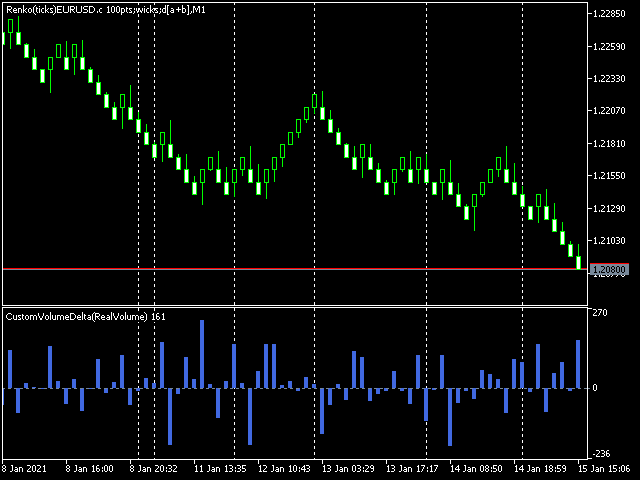
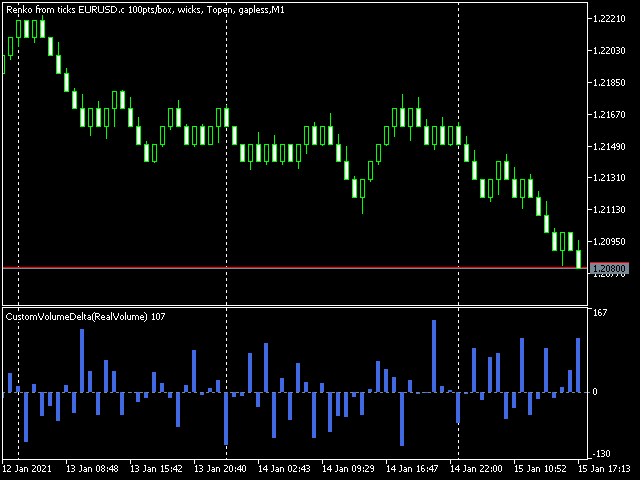
Dieser Nicht-Handelsexperte nutzt die so genannte Custom-Symbols-Funktion(die auch in der MQL-API verfügbar ist ), um Renko-Charts zu erstellen, die auf der Historie der realen Ticks des ausgewählten Standardsymbols basieren. RenkoFromRealTicks erzeugt benutzerdefinierte Symbol-Zitate, so dass Sie viele Charts öffnen können, um verschiedene EAs und Indikatoren auf den Renko anzuwenden. Es überträgt auch echte Ticks, um Renko-Charts in Echtzeit zu aktualisieren.
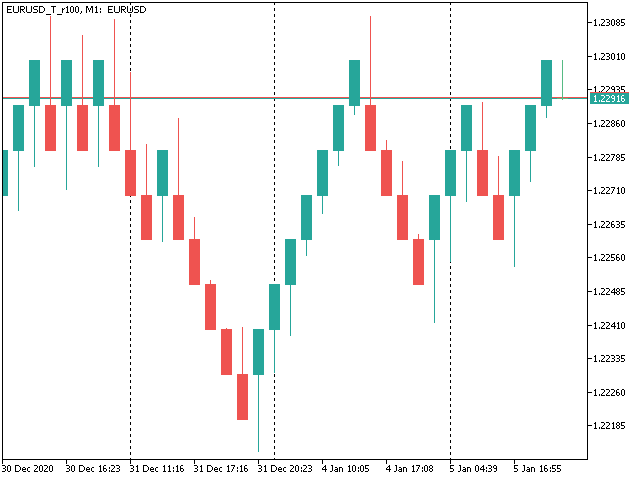
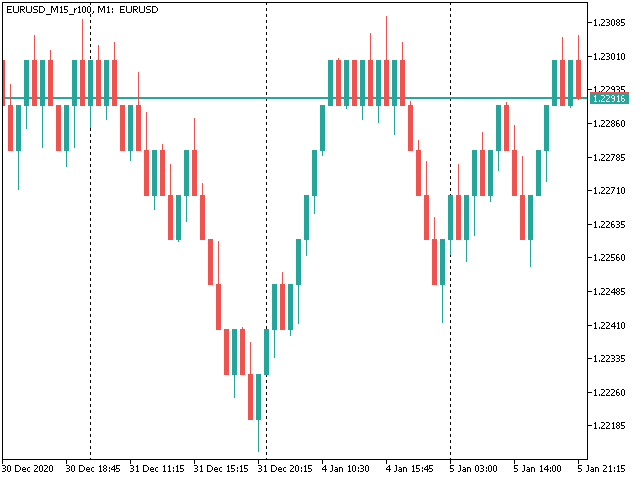
Der generierte Renko-Chart verwendet den M1-Zeitrahmen. Es macht keinen Sinn, den Renko-Chart auf einen anderen Zeitrahmen als M1 umzustellen. Die Startzeit eines "Minuten"-Balkens entspricht normalerweise der Startzeit der Renko-Box. Die Endzeit eines solchen "Minuten"-Balkens ist ein Dummy (MetaTrader erlaubt keine Balken mit unterschiedlicher Dauer), stattdessen sollten Sie die Startzeit des nächsten "Minuten"-Balkens betrachten. Optional können Sie die Markierung der Boxen nach Schlusszeit aktivieren (siehe CloseTimeMode unten).
Nach der Platzierung auf einem Chart lädt RenkoFromRealTicks die Tick-Historie herunter und erzeugt Renko-Balken für das benutzerdefinierte Symbol. Dies kann eine Weile dauern und zusätzlichen Speicherplatz auf der Festplatte erfordern. EA zeigt den Fortschritt im Kommentar an. Wenn der Prozess abgeschlossen ist, sieht der Kommentar wie folgt aus:
RenkoChart(100 pt): open EURUSD_T_r100 / 1000 bars
wobei 100pt die gewünschte Boxgröße in Punkten ist, EURUSD_T_r100 ist ein anpassbarer Symbolname, 1000 ist die Anzahl der generierten Boxen (wenn der EA zum allerersten Mal ausgeführt wird, ist dies die Gesamtzahl der Renko-Balken, aber wenn er mit den Ergebnissen einer vorherigen Terminalsitzung fortfährt, kann die Anzahl der neuen Boxen geringer sein, da nur die neuesten, fehlenden Boxen generiert werden).
Mit RenkoCharts können Sie Renkos schneller und mit weniger Ressourcen erstellen. Aber RenkoFromRealTicks ist präziser und hat einen größeren Funktionsumfang.
Parameter
- RenkoBoxSize - Größe der Box in Punkten, standardmäßig - 100;
- ShowWicks - aktiviert/deaktiviert Dochte im Renko, standardmäßig - true;
- EmulateOnLineChart - aktiviert/deaktiviert die Emulation von Ticks auf Renko-Charts, standardmäßig - true; es aktualisiert Indikatoren und andere EAs bei Backtests und online;
- OutputSymbolName - Name des benutzerdefinierten Symbols für Renko, standardmäßig - leerer String - dann wird der Name als "Symbol_T_PrefixSizeSuffix" gebildet, wobei Symbol - aktuelles Arbeitssymbol, Präfix - "r" (Renko) Dochte sind aktiviert oder "b" (Brick), wenn deaktiviert, Größe - RenkoBoxSize; optionaler Suffix - "c" für Close-Time-Modus; "g" - für Gapless-Renko-Typ;
- Reset - eine Option, um eine vollständige Neuberechnung des gesamten Renko-Charts zu erzwingen, standardmäßig - false; nachdem sie auf true gesetzt wurde und die Berechnungen abgeschlossen sind, wird empfohlen, sie wieder auf false zurückzusetzen, um übermäßige Neuberechnungen bei jedem Neustart des Terminals zu vermeiden; dieser Modus ist in seltenen Fällen hilfreich, wenn der generierte Renko-Chart aus irgendeinem Grund einen Fehler enthält; normalerweise ist die Option deaktiviert, da der EA die Berechnung intelligent von der letzten vorhandenen Box aus fortsetzt;
- RenkoType - Auswahl des Box-Berechnungsalgorithmus: Konventionell oder Gapless (auch bekannt als non-gap, rail-to-rail, siehe Beispiele in den Bildern);
- VolumeType - Selektor für die Volumenberechnung pro Box: Gesamtvolumen oder Delta-Volumen mit einem von 3 Algorithmen (Ask vs Bid, Ask + Bid, Tick Flags);
- CloseTimeMode - wenn true, werden die Boxen zum Zeitpunkt ihres Schließens angezeigt und gebildet; in diesem Modus wird nur 1 Tick pro Box generiert, wenn die Box vollständig zu einem Diagramm hinzugefügt wird; standardmäßig - false, d.h. Boxen werden zum Zeitpunkt des Öffnens erstellt (die letzte Live-"Box" wird kontinuierlich aktualisiert und ist eigentlich keine Box, bis sie geschlossen wird);
- DropTicksOutsideBars - filtert falsche Ticks (Ausreißer) heraus;
- StartFrom - Zeitpunkt, an dem die Verarbeitung des Tickverlaufs beginnen soll, 0 bedeutet ganz am Anfang;
- StopAt - Zeitpunkt, an dem gestoppt werden soll, 0 bedeutet bis zum aktuellen Zeitpunkt;
Volumen-Delta-Methoden
Bei der Methode Ask vs. Bid wird das Tick-Volumen für den Kauf berücksichtigt, wenn der Ask-Preis steigt, und für den Verkauf, wenn der Bid-Preis sinkt (bitte beachten Sie, dass sich bei einigen Konten/Symbolen der Bid-Preis häufiger ändert als der Ask-Preis, was zu einer negativen Verzerrung führt; dies ist die Spezifität der Plattform).
Die Methode Ask+Bid analysiert die Änderungen des Durchschnittspreises (Summe aus Ask und Bid): Anstieg - Kauf, Rückgang - Verkauf.
Tick Flags basiert auf Buy/Sell Tick Flags und ist nur für Börsen anwendbar.
Hello,
I have traded Renko for many years manually without using EAs. Like many other traders, I faced the challenge when attempting to Backtest and/or optimize trading EAs based on custom symbols (Renko charts) in MT5. I have tested different Renko Generators EAs. I have generally struggled with these main points:
A-Backtesting results vary a lot.
B-The coders who created these EAs are not responsive and if they do respond, their replies are very short and do not address my concerns.
C- When applying Renko Generators on custom symbols, some Renko generators do not work or the backtesting results do not show 100 percent history quality.
For example: using third-party Tick Data providers to create a custom symbol for any pair and then creating a Renko custom symbol based on this imported tick data. Not all MT5 brokers offer tick data for previous years and thus we need to rely on imported tick data.
The result is that either the Renko Generator does not create a Renko custom symbol (because the source chart is a custom tick data chart) or it creates a custom symbol but the backtesting shows zero percent history quality. Regardless of how accurate and precise the Renko Generator is, there will always be limitations with MT5. It is inevitable as MT5 does not offer a custom-tailored solution for Renko bars. Any EA generator is simply trying to apply the concept of Renko on a time-based chart.
In a time chart, all data series (o/h/l/c) have to be manipulated by any Renko Generator. There are limits and issues. Stanislav (the creator of RenkoFromRealTicks) is very transparent about it in one of his articles. Read them to understand. This shortfall will apply to any Renko Generator you use (from Stanislav or others).

All right! So now starts my review of Stanislav Korotky Renko Generator (RenkoFromRealticks) EA.
1- Communication and support:
I give 5 stars out of 5 for the communication with Stanislav. I purchased his EA when it was version 1. There were so many backtracks done from my end and I had many questions to send to Stanislav. To be honest and straightforward, I am a very skeptical person by nature and I compare different products and always question the result.
It has been a couple of weeks and Stanislav was always responsive and updated his EA with a newer version to address a concern I have. He has also backtested two of my EAs and changed the code in one of them to make sure (from his view) that the backtesting is accurate. I have also sent him a third EA and some tick data and asked him to backtest it without changing the code and his results closely matched with mine.
I have never had such a communication channel with any other Renko Coder! Thank you, Stanislav for your support. I have also sensed you are a sincere coder who takes responsibility for his work and is very open with limitations (from MT5) without hiding or polishing them.
2-Applying RenkoFromRealTicks on Custom symbols: No issues at all. Let’s say you have a custom EURUSD chart built from tick data provided by a third party. You can apply RenkoFromRealTicks on it and it will generate the Renko bars. Some other Renko Generators do not! This is because they rely on one-minute data and the authors won't inform you.
3-Backtesting: Some Renko Generators have a special mode for backtesting. In other words, the user has to change the Renko size for reversal bars. (for example, Reno Reversal should be 200 percent of Renko bar). This is not wrong as this depends on the Author’s recommendations when backtesting. However, in the case of RenkoFromRealTicks, you do not need such a feature and you should not worry about (the artificial opening of a bar) affecting the backtest.
I have exhausted this concern with Stanislav! Besides, it is a lot nicer to see the authentic look of Renko Bars in the bactested chart. Also bear in mind, that some Renko Generators do not address this issue at all! Coders decline to inform their users if backtesting is synthetic and not real. So again: it depends on how the Renko generator is coded and what are the recommendations (if any) for Backtesting.
The recommendation from Stanislav is to choose (Bulk Ticks per box) in the Tick History Mode for the most accurate backtesting. Stanislav may need to update the description of the EA for Backtesting.
Some Renko Generators do not deal well with (compressed tick data)! Read this carefully! Some tick data providers offer a compressed version of their tick data to reduce the file size of tick data. That is great; sometimes you would get 99 percent quality instead of 100 percent.
A one percent difference is not that much when it comes to reducing file sizes on your PC. However, here is the issue: Some Renko generators do not handle well such compressed Data. They construct the bars in the wrong way affect your trading EA Backtesting and give you an unrealistic high profit factor.
But when it comes to RenkoFromReal Ticks, there was no issue at all. This Renko generator deals very well with either compressed or standard-sized data. There was no real concerning discrepancy when I backtested my trading EAs. The important thing is that you have a detailed log report to investigate the construction of Renko bars and the tick data you are using. I have also once downloaded the wrong format of ticks from one of the tick data providers. I downloaded a .csv file that was not meant for MT5. RealDataFrom Ticks EA generated a blank custom symbol and upon going through the log report, I noticed many ticks are being missed or are bad. I then downloaded the right format for MT5, and the EA worked like a charm.
However, when I used another Renko generator, the bars were still created and the trading EA got me an unrealistic high-profit factor. I realized then that RenkoFromRealTicks is a trustworthy Renko generator I should use.
C-History Quality: With RenkoFromRealTicks, I got 99 percent quality with the compressed data and 100 percent quality with standard-size data. When it comes to standard size tick data, I tested another commercial Renko generator and it was close to RenkoFromRealTicks EA but it shows history quality at Zero percent! This does not give me assurance the backtesting is good (even if the results are very close).
D-Online Trading: I have not tested it on online mode but I do not see any reason why it would not perform as expected. Usually, the issue of any Renko EA generator is in backtesting not in online mode.
E-takes a bit of time when constructing the renko bars: I believe this is because it is a genuine Renko generator that does build Renko from real ticks. I have similar MT4 Renko generators that take some time to construct Renko HST and FXT files from tick data. Besides, I was skeptical of other MT5 Renko generators that generate Renko bars on the fly! Or in a few seconds.
I hope I have given a comprehensive review of the product based on experience and knowledge.
Finally, I want to add that I did not have a reference point to compare the backtesting results I got from my trading EAs tested on Renko bars generated by RenkoFromRealTicks EA. I used a couple of EAs in MT4 and MT5 and was looking for an outlier here or there. The best way to make sure that any Renko Generator EA is offering the best backtesting results is to run an EA on a server for a month or so and compare the life trading results with the backtested ones. I have not done this yet.
My Recommendations for future development: (This depends on the users’ opinion and voting for such features)
1-I wish I see another EA from Stanislav (a different product with a different purchase) that offers Flexible Renko Construction. (i.e. changing the open and close offset by percentage). This way it will be a universal Renko builder to create Mean Renko or other exotic Renko bars.
The current EA offers Conventional and rail-to-rail (Point O Chart) Renko bars. The author would be able to code a new Renko generator if there is enough demand for it.
2-Option to build a Renko chart based on a percentage of the price. This will be great for stock trading. I am not fond of Renko based on ATR and I think the percentages will be a better option.
Thank you,