RenkoFromRealTicks

4.67

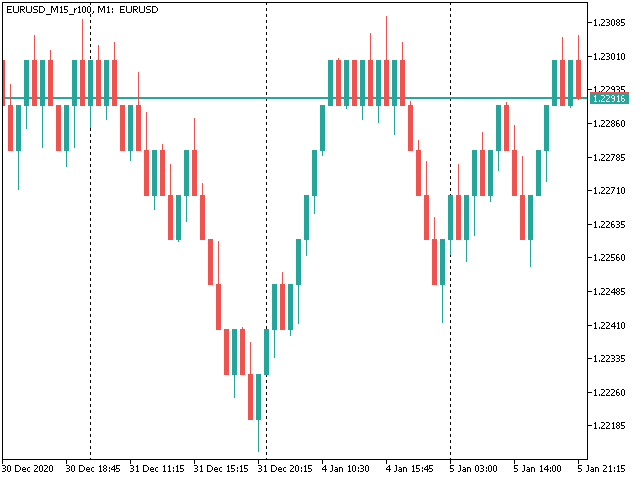
This non-trading expert utilizes so called custom symbols feature (available in MQL API as well) to build renko charts based on history of real ticks of selected standard symbol. RenkoFromRealTicks generates custom symbol quotes, thus you may open many charts to apply different EAs and indicators to the renko. It also transmits real ticks to update renko charts in real time.

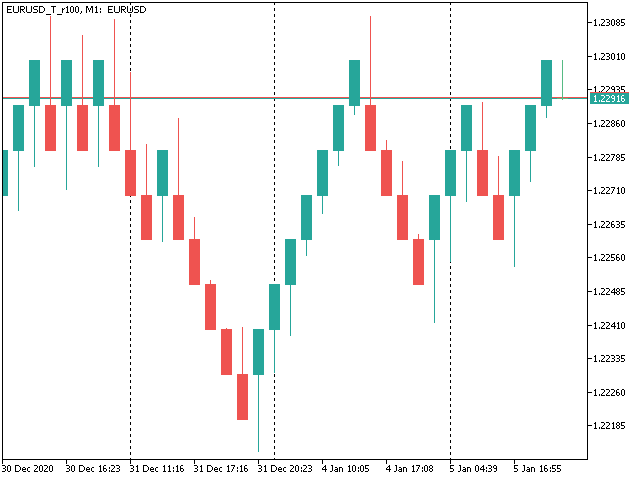
The generated renko chart uses M1 timeframe. It makes no sense to switch the renko chart to a timeframe other than M1. The start time of a "minute" bar does normally correspond to the start time of renko box. The end time of a such "minute" bar is dummy (MetaTrader does not allow for bars with different duration), instead you should look at start time of the next "minute" bar. Optionally, you may enable markup of the boxes by close time (see CloseTimeMode below).

After its placement on a chart, RenkoFromRealTicks downloads tick history and generates renko bars for the custom symbol. This may take a while and require additional space on the disk. EA shows a progress in the comment. When the process is finished, the comment looks like this:

RenkoChart(100pt): open EURUSD_T_r100 / 1000 bars

where 100pt is the requested box size in points, EURUSD_T_r100 is a customizable symbol name, 1000 is a number of generated boxes (if EA is running for the very first time, this is the total number of renko bars, but if it continues on results of a previous terminal session, the number of new boxes can be a few, because only most recent, missing boxes are generated).

You may build renko faster and with less resources using RenkoCharts. But RenkoFromRealTicks is more precise and feature-reach.


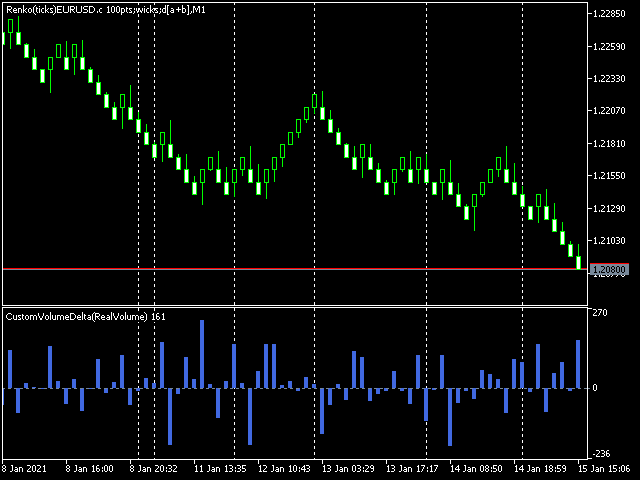
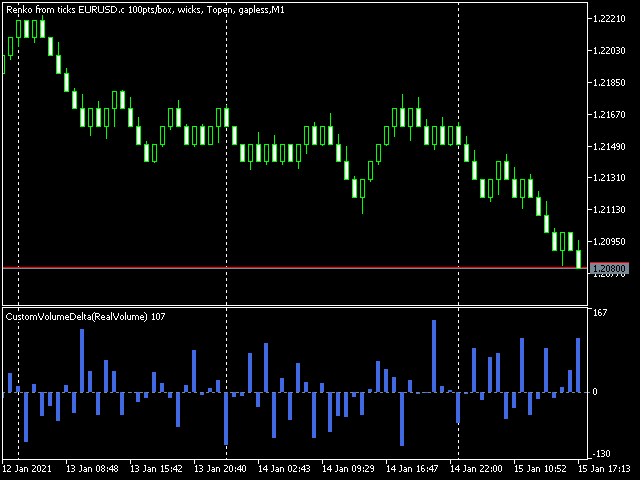
Unique feature - volume delta per box. The delta is encoded in a special way, because MetaTrader does not support negative volumes. This is why you need free CustomVolumeDelta indicator to view it.

Parameters

  • RenkoBoxSize - box size in points, by default - 100;
  • ShowWicks - enable/disable wicks on renko, by default - true;
  • EmulateOnLineChart - enable/disable ticks emulation on renko charts, by default - true; it updates indicators and other EAs on backtests and online;
  • OutputSymbolName - name of the custom symbol for renko, by default - empty string - then the name is formed as "Symbol_T_PrefixSizeSuffix", where Symbol - current work symbol, Prefix - "r" (renko) wicks are enabled or "b" (brick) if disabled, Size - RenkoBoxSize; optional Suffix - "c" for close time mode; "g" - for gapless renko type;
  • Reset - an option to enforce complete recalculation of entire renko chart, by default - false; after it is set to true and calculations are completed, it is recommended to reset it back to false in order to eliminate excessive recalculations on every terminal restart; this mode is helpful in rare cases, when generated renko chart contains an error for some reason; normally the option is disabled, because the EA continues calculation smartly from the most recent existing box;
  • RenkoType - selector of the box calculation algorithm: Conventional or Gapless (also known as non-gap, rail-to-rail, see examples in the pictures);
  • VolumeType - selector of the volumes per box calculations: Total Volume, or Delta Volume with either of 3 algorithms (Ask vs Bid, Ask + Bid, Tick Flags);
  • CloseTimeMode - when true, boxes are shown and formed at their close time; in this mode only 1 tick is generated per box, when box is added completely formed to a chart; by default - false, i.e. boxes are created at open time (the latest live "box" is updated continuously and is not actually a box until it's closed);
  • DropTicksOutsideBars - filter out incorrect ticks (outliers);
  • StartFrom - time where to start the tick history processing, 0 means very beginning;
  • StopAt - time where to stop, 0 means till current time;


Volume Delta Methods

In the method Ask vs Bid tick volumes are considered for buy if Ask price increases, and for sell if Bid decreases (please note, that on some accounts/symbols Bid changes more frequent than Ask, which introduces a negative bias; this is the platform specificity).

The method Ask+Bid analyses the changes of the average price (sum of Ask and Bid): move up - buy, move down - sell.

Tick Flags is based on buy/sell tick flags and applicable for exchanges only.

Отзывы 4
Ryan L Johnson
5107
Ryan L Johnson 2026.05.13 17:59 
 

I remember Stanislav Korotky from way back in the heyday of mql4.com. He is a trading veteran. I've been using Stanislav's older and free RenkoTicks utility for several years but due to my current needs and recent MQL5/MT5 updates, I needed a new Renko utility. In general, I really liked the way that RenkoTicks worked so I purchased RenkoFromRealTicks. I should note that this my first purchase ever on mql5.com, and could potentially be my only purchase ever. Once I started writing EA's to run on custom charts, there was no turning back. One feature of RenkoFromRealTicks that manual traders will really like is how the current brick body prints with respect to the current bar open price. Other Renko utilities tend to print a giant current brick body that starts at the previous brick's close─until the current brick closes. In contrast thereto, RenkoFromRealTicks prints bricks more like a standard timeframe bar would print. In conclusion, Stan is the man and more so than Gann.

Mohamed Tharwat Hussein El Sherief
377
Mohamed Tharwat Hussein El Sherief 2024.02.27 06:50 
 

Hello,

I have traded Renko for many years manually without using EAs. Like many other traders, I faced the challenge when attempting to Backtest and/or optimize trading EAs based on custom symbols (Renko charts) in MT5. I have tested different Renko Generators EAs. I have generally struggled with these main points:

A-Backtesting results vary a lot.

B-The coders who created these EAs are not responsive and if they do respond, their replies are very short and do not address my concerns.

C- When applying Renko Generators on custom symbols, some Renko generators do not work or the backtesting results do not show 100 percent history quality.

For example: using third-party Tick Data providers to create a custom symbol for any pair and then creating a Renko custom symbol based on this imported tick data. Not all MT5 brokers offer tick data for previous years and thus we need to rely on imported tick data.

The result is that either the Renko Generator does not create a Renko custom symbol (because the source chart is a custom tick data chart) or it creates a custom symbol but the backtesting shows zero percent history quality. Regardless of how accurate and precise the Renko Generator is, there will always be limitations with MT5. It is inevitable as MT5 does not offer a custom-tailored solution for Renko bars. Any EA generator is simply trying to apply the concept of Renko on a time-based chart.

In a time chart, all data series (o/h/l/c) have to be manipulated by any Renko Generator. There are limits and issues. Stanislav (the creator of RenkoFromRealTicks) is very transparent about it in one of his articles. Read them to understand. This shortfall will apply to any Renko Generator you use (from Stanislav or others).

All right! So now starts my review of Stanislav Korotky Renko Generator (RenkoFromRealticks) EA.

1- Communication and support:

I give 5 stars out of 5 for the communication with Stanislav. I purchased his EA when it was version 1. There were so many backtracks done from my end and I had many questions to send to Stanislav. To be honest and straightforward, I am a very skeptical person by nature and I compare different products and always question the result.

It has been a couple of weeks and Stanislav was always responsive and updated his EA with a newer version to address a concern I have. He has also backtested two of my EAs and changed the code in one of them to make sure (from his view) that the backtesting is accurate. I have also sent him a third EA and some tick data and asked him to backtest it without changing the code and his results closely matched with mine.

I have never had such a communication channel with any other Renko Coder! Thank you, Stanislav for your support. I have also sensed you are a sincere coder who takes responsibility for his work and is very open with limitations (from MT5) without hiding or polishing them.

2-Applying RenkoFromRealTicks on Custom symbols: No issues at all. Let’s say you have a custom EURUSD chart built from tick data provided by a third party. You can apply RenkoFromRealTicks on it and it will generate the Renko bars. Some other Renko Generators do not! This is because they rely on one-minute data and the authors won't inform you.

3-Backtesting: Some Renko Generators have a special mode for backtesting. In other words, the user has to change the Renko size for reversal bars. (for example, Reno Reversal should be 200 percent of Renko bar). This is not wrong as this depends on the Author’s recommendations when backtesting. However, in the case of RenkoFromRealTicks, you do not need such a feature and you should not worry about (the artificial opening of a bar) affecting the backtest.

I have exhausted this concern with Stanislav! Besides, it is a lot nicer to see the authentic look of Renko Bars in the bactested chart. Also bear in mind, that some Renko Generators do not address this issue at all! Coders decline to inform their users if backtesting is synthetic and not real. So again: it depends on how the Renko generator is coded and what are the recommendations (if any) for Backtesting.

The recommendation from Stanislav is to choose (Bulk Ticks per box) in the Tick History Mode for the most accurate backtesting. Stanislav may need to update the description of the EA for Backtesting.

Some Renko Generators do not deal well with (compressed tick data)! Read this carefully! Some tick data providers offer a compressed version of their tick data to reduce the file size of tick data. That is great; sometimes you would get 99 percent quality instead of 100 percent.

A one percent difference is not that much when it comes to reducing file sizes on your PC. However, here is the issue: Some Renko generators do not handle well such compressed Data. They construct the bars in the wrong way affect your trading EA Backtesting and give you an unrealistic high profit factor.

But when it comes to RenkoFromReal Ticks, there was no issue at all. This Renko generator deals very well with either compressed or standard-sized data. There was no real concerning discrepancy when I backtested my trading EAs. The important thing is that you have a detailed log report to investigate the construction of Renko bars and the tick data you are using. I have also once downloaded the wrong format of ticks from one of the tick data providers. I downloaded a .csv file that was not meant for MT5. RealDataFrom Ticks EA generated a blank custom symbol and upon going through the log report, I noticed many ticks are being missed or are bad. I then downloaded the right format for MT5, and the EA worked like a charm.

However, when I used another Renko generator, the bars were still created and the trading EA got me an unrealistic high-profit factor. I realized then that RenkoFromRealTicks is a trustworthy Renko generator I should use.

C-History Quality: With RenkoFromRealTicks, I got 99 percent quality with the compressed data and 100 percent quality with standard-size data. When it comes to standard size tick data, I tested another commercial Renko generator and it was close to RenkoFromRealTicks EA but it shows history quality at Zero percent! This does not give me assurance the backtesting is good (even if the results are very close).

D-Online Trading: I have not tested it on online mode but I do not see any reason why it would not perform as expected. Usually, the issue of any Renko EA generator is in backtesting not in online mode.

E-takes a bit of time when constructing the renko bars: I believe this is because it is a genuine Renko generator that does build Renko from real ticks. I have similar MT4 Renko generators that take some time to construct Renko HST and FXT files from tick data. Besides, I was skeptical of other MT5 Renko generators that generate Renko bars on the fly! Or in a few seconds.

I hope I have given a comprehensive review of the product based on experience and knowledge.

Finally, I want to add that I did not have a reference point to compare the backtesting results I got from my trading EAs tested on Renko bars generated by RenkoFromRealTicks EA. I used a couple of EAs in MT4 and MT5 and was looking for an outlier here or there. The best way to make sure that any Renko Generator EA is offering the best backtesting results is to run an EA on a server for a month or so and compare the life trading results with the backtested ones. I have not done this yet.

My Recommendations for future development: (This depends on the users’ opinion and voting for such features)

1-I wish I see another EA from Stanislav (a different product with a different purchase) that offers Flexible Renko Construction. (i.e. changing the open and close offset by percentage). This way it will be a universal Renko builder to create Mean Renko or other exotic Renko bars.

The current EA offers Conventional and rail-to-rail (Point O Chart) Renko bars. The author would be able to code a new Renko generator if there is enough demand for it.

2-Option to build a Renko chart based on a percentage of the price. This will be great for stock trading. I am not fond of Renko based on ATR and I think the percentages will be a better option.

Thank you,

carlospelegrini
87
carlospelegrini 2022.09.29 17:45 
 

the only non-gap renko I found.. it works okay

Рекомендуем также
This MT5 indicator provides real-time updates of classic Renko charts. Renko charts focus on price movement, filtering out noise and highlighting trends. What are Renko candles? Renko charts display price movement using "bricks" of equal size, ignoring time. A new brick is drawn only when the price moves by a specified amount. They help visualize trends by removing time-based noise. Parameters - BrickSizePoints  (20): Renko brick size in points - HistoryDepthSec  (3600): Historical data to ini
FREE
Gino Renko
Stephane, Andr Valette
1 (1)
Another renko-based indicator. It returns different usable values ​​for an EA, and is directly displayed on the main chart. Its setting is very simple: The size of the renko The number of bars taken into account The falling color The color on the rise Returned values: Buffer 0 : Value of the middle Buffer 1 : Value of the Top Buffer 2 : Value of the Bottom Buffer 3 : Direction of renko (0.0 for top ; 1.0 for bottom) Buffer 4 : Ratio of the renko, for example, if it is twice, 3 times, ro more of
Мировые торговые сессии для MetaTrader 5 (MT5) World Session Clock — это профессиональные часы торговых сессий для MetaTrader 5, которые визуально отображают глобальные торговые сессии в режиме реального времени. Они помогают трейдерам быстро определять время открытия и закрытия рынков, а также периоды перекрытия сессий без ручных расчетов времени или корректировки часовых поясов. Продукт сочетает в себе 24-часовые аналоговые часы, цифровое отображение времени, дуги сессий и дополнительные зон
Renko Builder GLX1
Eranga Thilina Dhanushka Gallage
GLX1 Renko Builder   Expert Advisor (EA) can create the Renko bar charts on any symbol. The Renko charts are generated as real-time custom symbol charts which can be further used for technical analysis with any MT5 compatible indicator.  Find the free   GLX1 Renko Euro   Expert Advisor from here.  https://www.mql5.com/en/market/product/115074 Included Features: Truly responsive Renko Charting on a custom symbol chart Accurate automatic live chart update Ability to attach any MT5 indicator Abi
Exp5 Duplicator
Vladislav Andruschenko
4.78 (9)
Duplicator для MetaTrader 5 — профессиональный дубликатор позиций внутри одного терминала Надёжный советник для трейдеров, которым нужно автоматически дублировать уже открытые позиции в MetaTrader 5, увеличивать объём, применять собственные настройки лота и сопровождать дубликаты по заданным правилам. Это удобный инструмент для ручной торговли, алгоритмических систем и гибкого управления уже существующими позициями внутри одного терминала. Duplicator для MT5 не открывает позиции по собственной
Power Candles Strategy Scanner — самооптимизирующийся инструмент для поиска настроек по нескольким инструментам Power Candles Strategy Scanner использует тот же самооптимизирующийся движок, что и индикатор Power Candles — для всех символов в вашем Market Watch, одновременно. На одной панели отображается информация о том, какие символы в данный момент являются статистически торгуемыми, какая стратегия выигрывает на каждом из них, оптимальная пара Stop Loss / Take Profit, а также отправляется увед
Indicador "MR BEAST - Detectador de Mejores Spikes" para el Índice BOOM1000 (M1) El indicador "MR BEAST - Detectador de Mejores Spikes" es una herramienta especializada y altamente precisa diseñada exclusivamente para operar en el índice CRASH 1000, con un enfoque específico en el marco temporal de 1 minuto (M1). Desarrollado por el reconocido trader Mr. Beast, este indicador ha sido meticulosamente diseñado para identificar únicamente los mejores spikes, permitiendo a los operadores capitalizar
KT Renko Live Charts MT5
KEENBASE SOFTWARE SOLUTIONS
Утилита KT Renko Live Chart создает графики Ренко в терминале MT5, которые можно использовать как для спекулятивной торговли, так и для реальной торговли в режиме онлайн. Графики Ренко, создаваемые с помощью этой утилиты, поддерживают большинство пользовательских индикаторов и автоматических торговых советников. Полностью совместима с нашим индикатором Renko Patterns и советником Renko Patterns EA. Особенности Простая и понятная утилита Ренко, предоставляющая график Ренко на MT5 без сложных нас
DAILY OH/OL SDEV QUANT MODEL - STATISTICAL TRADING WITH PRECISION RISK MANAGEMENT TRADE WITH MATHEMATICAL CERTAINTY - KNOW YOUR EXACT STOP-LOSS AND TAKE-PROFIT BEFORE YOU ENTER This indicator analyzes 5,000+ days of price history to give you: Exact entry levels (sigma bands locked at daily open) Exact stop-loss distance (from M
Advanced CRT Indicator MT5 — Candle Range Theory Tool Advanced CRT Indicator MT5 is a professional analysis tool that automates Candle Range Theory. It identifies consolidation ranges, breakout levels, Fair Value Gaps (FVG), and profit targets, with a real-time dashboard and alerts. Overview - Multi-timeframe candle range detection   - Automatic breakout levels with buffer settings   - Fair Value Gap identification and tracking   - Up to three customizable target levels (Risk:Reward ratios)  
GDS Renko Anatomy GDS Renko Anatomy 2D is a next-generation Renko visualization engine for MetaTrader 5. This is not a classic Renko chart. The indicator transforms market movement into a layered structural map where trend pressure, reversals, momentum continuity, and market topology become visually readable in real time. Designed with a modern dark institutional aesthetic, Anatomy 2D displays price action as a synthetic Renko structure with adaptive visual layers and semantic market interpreta
FREE
Renko Chart
Marcin Konieczny
3.56 (9)
Индикатор Renko Chart позволяет отображать графики "ренко" в окне индикатора. Тип графиков "ренко" показывает лишь движения цены, большие заданного (box size). Он помогает устранить шум и сосредоточиться на основных трендах. При построении графика время не учитывается, используются лишь ценовые движения. По этой причине графики "Ренко" не похожи на графики цены. Индикатор работает в 2 режимах: CLOSE - при построении графика "ренко" используются только цены Close; HIGH_LOW - при построении график
FREE
ATR Индикатор на основе Heiken Ashi   – это уникальный инструмент анализа волатильности, который сочетает   Средний Истинный Диапазон (ATR)   с   расчетами свечей Heiken Ashi , обеспечивая более плавное и надежное измерение рыночной волатильности. В отличие от традиционного ATR, который использует стандартные свечи, этот индикатор применяет формулу Heiken Ashi, чтобы исключить рыночный шум и предоставить более точные сигналы. Основные особенности: •   ATR на основе свечей Heiken Ashi   – более
FREE
Renko Plus
Eadvisors Software Inc.
With Renko Plus you can use the features in the Indicator functionality, just add it to the Metatrader5 chart.             The Renko chart is a type of chart, developed by the Japanese, that is constructed using price movement rather than standardized prices and time intervals like most charts. It is believed to be named after the Japanese word for bricks, "renga", as the graphic looks like a series of bricks.             A new brick is created when the price moves a specified pri
Советник отображает обновляющийся в реальном времени график ренко для простоты технического анализа. Протестируйте на истории вашу стратегию, используя график ренко в MetaTrader 5. Параметры Box Size : размер окна. Show Wicks : при true отображать свечу с максимумом/минимумом. History Start: дата создания первой свечи. Применение Запустите советника на графике (таймфрейм M1), для которого хотите создать ренко. Введите размер окна и дату. Используйте график ренко только на M1.
This SMT (Smart Money Technique) divergence indicator identifies discrepancies in price movement between two different trading symbols, helping traders detect potential market reversals. This tool compares the price action of two correlated assets, such as two currency pairs or indices, to spot divergences where one asset's price moves in the opposite direction of the other. For example, while one symbol may be making higher highs, the other might be making lower highs, signaling a divergence. T
FREE
Uriel Bitcoin Capital
Jose Aurelio Fiorio Weberhofer
ПРОВЕРЕННАЯ ЭФФЕКТИВНОСТЬ — 8.4 ГОДА, WALK-FORWARD ВАЛИДАЦИЯ, 99% РЕАЛЬНЫХ ТИКОВ Profit Factor 1.25 | Sharpe Ratio 1.68 | 282 сделки Чистая прибыль +$7,754 на стартовом депозите $10,000 (LotSize по умолчанию 0.20) Макс. просадка эквити 18.06% | Recovery Factor 2.36 | Винрейт 47.5% Протестировано с января 2018 по май 2026 на BTCUSD M30 в Strategy Tester MetaTrader 5 при 99% качестве реальных тиков (тиковые данные Dukascopy через TickStory как пользовательский символ). Без синтетической интерполяц
Heikin Ashi candlesticks are a powerful tool for traders, offering a clear and smooth visualization of market trends. Unlike traditional candlesticks, they filter out market noise, providing a cleaner view of the market's direction and strength, which helps traders make more informed decisions. The Hull Heikin Ashi Smoothed indicator from Minions Labs takes this a step further by integrating the Hull Moving Average for enhanced smoothing and precision. This indicator not only simplifies trend id
Advanced 4xZeovo MT5 Indicator (MetaTrader 5)   Product Description  4xZeovo is a powerful trading indicator system monitoring 24/7 financial markets. Metatrader5 tool designed to find the best buying/selling opportunities and notifies the user.    Making life easy for traders in helping with the two most difficult decisions with the use of advanced innovate trading indicators aiming to encourage users to hold the winning positions and take profit at the best times.    Equipped with a unique tra
Indicador "MR BEAST - Detectador de Mejores Spikes" para el Índice CRASH 300(M1) El indicador "MR BEAST - Detectador de Mejores Spikes" es una herramienta especializada y altamente precisa diseñada exclusivamente para operar en el índice CRASH 1000, con un enfoque específico en el marco temporal de 1 minuto (M1). Desarrollado por el reconocido trader Mr. Beast, este indicador ha sido meticulosamente diseñado para identificar únicamente los mejores spikes, permitiendo a los operadores capitalizar
Indicador "MR BEAST - Detectador de Mejores Spikes" para el Índice CRASH 500(M1) El indicador "MR BEAST - Detectador de Mejores Spikes" es una herramienta especializada y altamente precisa diseñada exclusivamente para operar en el índice CRASH 1000, con un enfoque específico en el marco temporal de 1 minuto (M1). Desarrollado por el reconocido trader Mr. Beast, este indicador ha sido meticulosamente diseñado para identificar únicamente los mejores spikes, permitiendo a los operadores capitalizar
Trend Direction ADX indicator Trend Direction ADX is part of a serie of indicators used to characterize market conditions. Almost any strategy only work under certain market conditions. Therefore it is important to be able to characterize market conditions at any time: trend direction, trend strength, volatility, etc.. Trend Direction ADX is an indicator to be used to characterize trend direction: trending up trending down ranging Trend Direction ADX is based on ADX standard indicator. Tre
GDS Renko Entry Helper Pro GDS Renko Entry Helper Pro HOW THE SYSTEM WORKS This tool is part of the Golden Delta Renko trading system. The system is designed to guide you step by step: 1.   Renko Zones       → shows where key levels are   2.   Entry Helper      → highlights where to focus   3.   Entry Helper PRO      → shows setup quality and context   4.   Trade Desk Panel      → executes trades with full control  
Gino Renko EA
Stephane, Andr Valette
Here is an EA based on the Renko indicator, it can be used with currencies, commodities, and forex. Just associate it with the corresponding graph. The indicator used for the EA is available here, but it is not necessary for its operation, they are 2 independent products: https://www.mql5.com/fr/market/product/87852?source=Site +Market+MT5+Indicator+Search+Rating006%3agino+renko Personally I don't like renko like EA, and I haven't done any tests to find out which configuration is the best. Th
Auto Channel Trader
Ross Adam Langlands Nelson
The Auto Channel Trader creates a channel by plotting a line along the high points and low points of the chart, the EA then makes long trades near the bottom of the channel and short trades near the top of the channel. The channel is created by finding high points for the top line and low points for the bottom line, these points are shown with arrows. A line of best fit is then plotted through these points and extended until the end of the chart.  The length of the channel is determined by the M
Полосы - это форма технического анализа, которую трейдеры используют для построения линий тренда, которые находятся на расстоянии двух стандартных отклонений от простой скользящей средней цены ценной бумаги. Цель состоит в том, чтобы помочь трейдеру узнать, когда входить или выходить из позиции, определяя, когда актив был перекуплен или перепродан. Данный индикатор показывает две полосы - верхнюю и нижнюю. Вы можете изменять параметры nPeriod и  nMethod, чтобы настроить расчет этих полос для каж
Сервис Dobiforex AI — это специализированная платформа, предлагающая интеллектуальную помощь для трейдеров на рынке Форекс. Этот помощник использует продвинутый анализ рынка в режиме реального времени, чтобы помочь трейдерам принимать более обоснованные решения в их торговых стратегиях. Зарегистрировавшись на сайте Dobiforex и получив доступ к их специализированной панели, пользователи могут интегрировать этот интеллектуальный сервис в свою торговую платформу. Dobiforex, используя продвинутые а
O Alpha B3 Renko Trader  é um robô especialista para negociação no Bovespa B3  (miniíndice e minidólar) que une a análise de candlesticks do gráfico Renko (calculado internamente, sem imagens gráficas) com a estratégia Alpha B3 . O robô permite configurar, para os sinais de entrada, o tamanho do brick do gráfico Renko, bem como um número de candlesticks para análise. Além disso, você deve configurar os stops fixos, em pontos. O robô permite também a configuração de funções, tais como número de c
HLC bar MT5 Wyckoff
Eduardo Da Costa Custodio Santos
Индикатор «HLC_bar_MT5 Wyckoff» для MT5 был создан для облегчения анализа во время торговли. Панель HLC использовалась Ричардом Вайкоффом и в настоящее время широко используется в операциях VSA. Вайкофф обнаружил, что использование максимума, минимума и закрытия сделало график намного чище и проще для анализа. Индикатор «HLC_bar_MT5 Wyckoff» позволяет: # Изменить ширину полосы; # Оставьте полосу того же цвета; # И выделите бар, который открывался и закрывался по одной цене. Цвета и ширина легко
Фильтруйте мелкие движения цен и сосредоточьтесь на общем тренде . Индикатор Renko chart поможет вам отфильтровать мелкие движения цен, чтобы вы могли сосредоточиться на общем тренде. Цена должна пройти заданное расстояние, чтобы сформировать кирпичик Renko. Это упрощает определение текущего направления тренда, в котором движется цена. Многофункциональная утилита : включает более 66 функций  |   Свяжитесь со мной  если у вас есть вопросы  |    Версия для MT4 В настройках индикатора вы можете на
С этим продуктом покупают
Trade Assistant MT5
Evgeniy Kravchenko
4.42 (210)
Помогает рассчитать риск на сделку, простая установка нового ордера с помощью линий, управление ордерами с функциями частичного закрытия, 7 типов трейлинг-стопа и другие полезные функции. Дополнительные материалы и инструкции Инструкция по установке - Инструкция к приложению - Пробная версия приложения для демо счета Функция Линии   - отображает на графике линию открытия, стоп-лосс, тейк-профит. С помощью этой функции легко установить новый ордер и увидеть его дополнительные характеристики пе
Добро пожаловать в Trade Manager EA — лучший инструмент для управления рисками, предназначенный для упрощения, точности и эффективности торговли. Это не просто инструмент для размещения ордеров; это комплексное решение для удобного планирования торгов, управления позициями и усиленного контроля над рисками. Независимо от того, начинающий вы трейдер, опытный специалист или скальпер, нуждающийся в быстром исполнении, Trade Manager EA адаптируется к вашим потребностям и работает с любыми активами:
Local Trade Copier EA MT5
Juvenille Emperor Limited
4.96 (138)
Опыт экстремально быстрого копирования сделок с помощью Local Trade Copier EA MT5 . Благодаря простой установке в течение 1 минуты этот копировщик сделок позволяет вам копировать сделки между несколькими терминалами MetaTrader на одном компьютере с Windows или на Windows VPS с крайне быстрыми скоростями копирования менее 0.5 секунды. Независимо от того, новичок вы или профессиональный трейдер, Local Trade Copier EA MT5 предлагает широкий спектр опций, чтобы настроить его под ваши конкретные по
TradePanel MT5
Alfiya Fazylova
4.87 (154)
Trade Panel — это многофункциональный торговый помощник. Приложение содержит более 50 торговых функций для ручной торговли и позволяет автоматизировать большинство торговых операций. Перед покупкой вы можете протестировать демоверсию на демо-счете. Скачать пробную версию приложения для демонстрационного аккаунта: https://www.mql5.com/ru/blogs/post/750864 . Полная инструкция здесь . Торговля. Позволяет совершать торговые операции в один клик: Открыть отложенные ордера и позиции с автоматическим р
Farmed Hedge Yield Farming | All Markets (Manual - Hybrid - Semi/Automated EA) MULTI-ASSET SUPPORT Trade any asset available on your broker - Forex: Major, Minor, Exotic pairs - Crypto: BTC, ETH, XRP, SOL, BNB - Stocks: Apple, Tesla, Amazon, Google, etc. - Commodities: Gold, Silver, Oil, Gas - Indices: US30, NAS100, SPX500, DAX40 - Any CFD your broker offers VERIFIED TRADING RESULTS - Farmed Hedge Yield Axi Copy:  https://www.mql5.com/en/signals/2356376 - Farmed Hedge Yield Exn Copy:   https:/
Quant AI Agents is NOT AN Expert Advisor. Quant AI Agents   is a   multi-agent AI trading framework   that turns natural-language strategy prompts into live.  WANT THE SAME RESULTS AS MY LIVE SIGNAL?   Use the exact same brokers I do:   IC MARKETS , IC TRADING   .  Unlike the centralized stock market, Forex has no single, unified price feed.  Every broker sources liquidity from different providers, creating unique data streams. Other brokers can only achieve trading performance equivalent to 60
Бета-версия Telegram to MT5 Signal Trader почти готов к официальному альфа-релизу. Некоторые функции все еще находятся в разработке, и вы можете столкнуться с небольшими ошибками. Если вы заметите проблемы, пожалуйста, сообщите о них, ваша обратная связь помогает улучшать программное обеспечение для всех. Telegram to MT5 Signal Trader — мощный инструмент, который автоматически копирует торговые сигналы из каналов и групп Telegram прямо в ваш счёт MetaTrader 5 . Поддерживаются как публичные, так
Exp COPYLOT CLIENT for MT5
Vladislav Andruschenko
3.91 (33)
Профессиональный копировщик сделок для MetaTrader 5 Быстрый, профессиональный и надежный копировщик сделок для MetaTrader . COPYLOT позволяет копировать сделки Forex между терминалами MT4 и MT5 с поддержкой счетов Hedge и Netting . Версия COPYLOT для MT5 поддерживает: - MT5 Hedge → MT5 Hedge - MT5 Hedge → MT5 Netting - MT5 Netting → MT5 Hedge - MT5 Netting → MT5 Netting - MT4 → MT5 Hedge - MT4 → MT5 Netting Версия MT4 Полное описание + DEMO + PDF Как купить Как установить Как получить файлы жур
Trade Dashboard MT5
Fatemeh Ameri
4.94 (124)
Trade Dashboard simplifies how you open, manage, and control your trades, with built-in lot size calculation. It allows you to execute trades, manage risk, and control positions directly on the chart, with tools such as partial close, breakeven, and trailing stop. Designed to reduce manual work and help you stay focused on your trading decisions. A demo version is available for testing. Detailed explanations of features are provided within the MQL5 platform. Installation instructions are include
YuClusters
Yury Kulikov
4.93 (43)
Внимание: Ознакомиться с работой программы можно с помощью бесплатной версии  YuClusters DEMO . YuClusters это профессиональная система анализа рынка. Для трейдера открываются уникальные возможности анализа потока ордеров, объемов торговли, движения цены используя различные графики, профили, индикаторы, графические объекты. YuClusters оперирует данными на основе ленты сделок или тиковой информации, в зависимости от того, что доступно в котировках финансового инструмента.  YuClusters позволяет с
Premium Trade Manager - Быстрое и дисциплинированное управление сделками в MetaTrader 5 Premium Trade Manager - это быстрая панель на графике для MetaTrader 5, которая берёт на себя всю механическую работу по каждой сделке. Вы принимаете решение о направлении, символе и моменте входа - панель рассчитывает объём позиции исходя из вашего риска, выставляет ордер со стопом и целью, масштабирует выход частичными закрытиями, перемещает стоп и следит за экономическим календарём вместо вас. Встроенная н
MT5 to Telegram Signal Provider — это простой в использовании полностью настраиваемый инструмент, который позволяет отправлять определённые сигналы в чат, канал или группу Telegram, превращая вашу учётную запись в провайдера сигналов . В отличие от большинства конкурирующих продуктов, он не использует импорт DLL. [ Демо ]   [ Руководство ] [ Версия MT4 ] [ Версия для Discord ] [ Канал в Telegram ]  New: [ Telegram To MT5 ] Настройка Доступно пошаговое руководство пользователя . Никаких знаний A
AXR Prop Guard
Stoyan Kirilov Karlov
AXR Prop Guard AXR Prop Guard — это утилита защиты риска на уровне всего счета для MetaTrader 5. Она создана для трейдеров prop-фирм, funded-account challenges и серьезной защиты личных торговых счетов. Продукт входит в линейку инструментов AXR. Для обновлений и вариантов связи используйте официальные страницы MQL5: AXR MQL5 Channel: обновления продукта, заметки к релизам и новые инструменты AXR Telegram: открыть профиль продавца ; контакт Telegram указан в описании профиля. После покупки, пожал
Seconds Chart MT5
Boris Sedov
4.59 (17)
Seconds Chart - уникальный инструмент для создания секундных графиков в MetaTrader 5 . С помощью Seconds Chart вы можете построить график с таймфреймом, заданным в секундах, получая идеальную гибкость и точность анализа, недоступную на стандартных минутных или часовых графиках. Например, таймфрейм S15 обозначает график со свечами продолжительностью 15 секунд. Вы можете использовать любые индикаторы и советники с поддержкой пользовательских символов. Работать с ними так же удобно, как и на станда
Прежде чем покупать EA, проверьте, действительно ли он держится, или ему просто повезло в бэктесте. Большинство роботов продаются с красивым бэктестом. Растущая кривая доходности. Хороший profit factor. Почти никаких сомнений. И всё же многие такие EA разваливаются, как только рынок перестаёт двигаться так, как в этом историческом участке. Почему? Потому что бэктест доказывает только одно: что эта стратегия сработала на одном конкретном ценовом пути. Он не доказывает, что система выдержит другие
Copy Cat More Trade Copier MT5 (Копи-Кот MT5) — это локальный торговый копировщик и полная система управления рисками и исполнения, разработанная для современных торговых задач. От испытаний проп-фирм до управления личным портфелем, он адаптируется к любой ситуации с сочетанием надежного исполнения, защиты капитала, гибкой настройки и продвинутой обработки сделок. Копировщик работает как в режиме Мастер (отправитель), так и в режиме Слейв (получатель), с синхронизацией в реальном времени рыночны
HINN MAGIC ENTRY - лучший инструмент для входа и менеджмента позиций! Выставляет ордера через выбор уровня на графике! полное описание    ::    demo-версия    ::   60-sec-video-description Основные функции: - Рыночные, лимитные и отложенные ордера -  Автоматический подсчет лоттажа  -  Автоматический учет спреда и комиссий -  Неограниченное количество промежуточных тейков для позиций - Перевод в безубыток и трейл стоп-лосса и тейк-профита - Уровни инвалидаций - Интуитивно понятный,  адаптивный,
Timeless Charts
Samuel Manoel De Souza
5 (5)
Timeless Charts is an all-in-one trading utility for professional traders. It combines custom chart types such as Seconds Charts and Renko with advanced order flow analysis using Footprints , Clusters , Volume Profiles , VWAP studies, and anchored analysis tools for deeper market insight. Trading and position management are handled directly from the chart through an integrated trade management panel , while Market Replay and Virtual Accounts provide environments for practicing trading skills and
Footprint Chart Pro — Professional OrderFlow EA for MetaTrader 5 Version 6.34 | Professional tool for real traders | Institutional-Grade Visualization DEMO USERS - PLEASE SELECT EVERY TICK / REAL TICK WHEN TESTING AND YOU HAVE DOWNLOADED HISTORICAL DATA. IF YOU SEE A WAITING SCREEN AND IT IS NOT DOWNLOADING, IT MEANS YOU HAVE LOW HISTORICAL DATA. TRY 1 MIN AND 5 MIN FIRST ON 1 DAY DATA. ONE DAY DATA SHOULD BE THE NEWEST AND MOST CURRENT DATE. PLEASE WAIT UNTIL THE MARKET HAS ROLLED OVER PERIOD.
Anchor Trade Manager
Kalinskie Gilliam
5 (2)
Anchor: The EA Manager Run your full EA portfolio without conflicts, without stacked risk, and without watching every chart yourself. Anchor coordinates up to 64 Expert Advisors on a single account so only one trades at a time. Attach Anchor to any chart. Type your EA names and magic numbers in one line. Anchor handles the rest. Built for portfolios. Built for discipline. Built for prop firms. The Problem Running multiple EAs on the same account creates risk. Two gold EAs can open opposite posit
The Ultimate TradingView to MT5 Bridge Automation Прекратите торговлю вручную и избавьтесь от проблем с задержками. TradingView to MT5 Copier PRO — это самый быстрый и надежный мост для исполнения ваших алертов TradingView напрямую в MetaTrader 5. Используете ли вы пользовательские индикаторы, скрипты тестера стратегий или ручную разметку, этот советник (EA) мгновенно исполняет ваши сделки, используя технологию High-Speed WebSocket . В отличие от простых копировщиков, эта PRO-версия включает Are
Bots Builder Pro MT5
Andrey Barinov
4.17 (6)
Это визуальный конструктор стратегий. Единственный в своем роде. Превратите свои торговые стратегии и идеи в советники, не написав ни одной строчки кода. Создавайте файлы исходного кода mql в несколько кликов и получайте полнофункциональных советников, готовых к реальной работе, тестеру стратегий и облачной оптимизации. Вариантов для тех, кто не имеет навыков программирования и не может создавать свои торговые решения на языке MQL, очень мало. Теперь с помощью Bots Builder Pro каждый может созд
The product will copy all telegram signal to MT5 ( which you are member) , also it can work as remote copier.  Easy to set up, copy order instant, can work with almost signal formats, image signal,  s upport to translate other language to English Work with all type of channel or group, even channel have "Restrict Saving Content", work with  multi channel, multi MT5 Work as remote copier: with signal have ticket number, it will copy exactly via ticket number. Support to backtest signal. How to s
Ultimate Extractor - Professional Trading Analytics for MT5 *****this is the local HTML version of Ultimate Extractor. !!!!!it is not compatible with Cloud!!!! For the online version please reach out to me directly****** Ultimate Extractor transforms your MetaTrader 5 trading history into actionable insights with comprehensive analytics, interactive charts, and real-time performance tracking. What It Does Automatically analyzes your MT5 trading history across all Expert Advisors and generates
AlgoRadar
Stephen J Martret
5 (4)
AlgoRadar is an on-chart analytics dashboard for MT5 that aggregates Expert Advisor performance across multiple accounts, brokers, and platforms, including both MT4 and MT5 data, into a single live view on your MT5 chart. All analysis runs from the chart interface, with no external applications or manual report processing required. EA Analysis and Ranking For traders running multiple Expert Advisors, AlgoRadar provides a consolidated view of each EA's performance across accounts. Active EAs a
Торговая панель для MetaTrader 5 — профессиональная торговля в один клик с графика и клавиатуры Мощная торговая панель для активного ручного трейдинга, которая позволяет открывать, сопровождать и закрывать сделки значительно быстрее и удобнее, чем стандартными средствами MetaTrader. Панель создана для тех, кто хочет получить полный контроль над позициями, ордерами, прибылью и торговыми сценариями в одном рабочем пространстве. Это не просто вспомогательная утилита. Это полноценный торговый интер
Telegram to MT5: Идеальное решение для копирования сигналов Упростите свою торговлю с Telegram to MT5 — современным инструментом, который копирует торговые сигналы прямо из каналов и чатов Telegram на вашу платформу MetaTrader 5, без необходимости использования DLL. Это мощное решение обеспечивает точное исполнение сигналов, широкие возможности настройки, экономит время и повышает вашу эффективность. [ Instructions and DEMO ] [ FAQ ] [ How atach logs properly ] [ Settings descrition ] Ключевые
DrawDown Limiter
Haidar Lionel Haj Ali
5 (20)
Drawdown Limiter EA You are in the right place if you were searching for Drawdown control, Drawdown limiter, Balance protection, Equity Protection or Daily Drawdown Limit related to Prop Firm, FTMO, or Funded account trading, or if you want to protect your trading account. Have you suffered from controlling your drawdown when trading funded accounts? This EA is meant for you. Prop firms usually set a rule called “Trader Daily Drawdown”, and if it is not respected, you are disqualified.  I am an
Telegram to mt5 pro
Janet Abu Khalil
3.67 (3)
Telegram to MT5 Pro — Расширенный копировщик сигналов Telegram с Auto-Fix, Multi-TP, управлением риском и полным управлением сделками Telegram to MT5 Pro — профессиональный копировщик сигналов Telegram Telegram to MT5 Pro автоматически копирует торговые сигналы из Telegram прямо в ваш аккаунт MetaTrader 5 в реальном времени с полным контролем риска, исполнения и управления сделками. Система состоит из двух компонентов: • Expert Advisor (EA), работающий внутри MetaTrader 5 • Desktop bridge прило
Take a Break MT5
Eric Emmrich
4.75 (24)
News filter, equity guard & session control for all your EAs — one tool, full protection Take a Break has evolved from a basic news filter into a comprehensive account protection solution . It pauses your other Expert Advisors during news events or based on custom filters. When trading resumes, it automatically restores your entire chart setup , including all EA settings. Why traders choose Take a Break One news filter for all your EAs — no more relying on individual built-in filters that may o
Другие продукты этого автора
Библиотека WalkForwardOptimizer позволяет выполнить пошаговую и кластерную форвард-оптимизацию ( walk-forward optimization ) советника в МетаТрейдер 5. Для использования необходимо включить заголовочный файл WalkForwardOptimizer.mqh в код советника и добавить необходимые вызовы функций. Когда библиотека встроена в советник, можно запускать оптимизацию в соответствии с процедурой, описанной в Руководстве пользователя . По окончанию оптимизации промежуточные результаты сохраняются в CSV-файл и наб
Индикатор сравнивает котировки заданного символа с синтетической котировкой, рассчитываемой из двух других "справочных" символов. Индикатор полезен для проверки поведения символа Форекс с помощью соответствующих фондовых индексов и обнаружения их схождения/расхождения, что может указывать на будущее движение цен. Главная идея заключается в том, что все фондовые индексы котируются в определенных валютах и потому демонстрируют корреляцию с парами Форекс, в которых эти валюты используются. Когда ма
ADXS
Stanislav Korotky
5 (3)
Почему стандартный ADX сделан беззнаковым и что будет, если знак сохранить? Если вы заинтересовались этим вопросом, то вот индикатор, который на него отвечает и позволяет торговать более эффективно. Индикатор вычисляет ADX по стандартным формулам, но исключает операцию взятия модуля от значений ADX, которая по какой-то причине искусственно добавлена в ADX. Другими словами, индикатор сохраняет исходный знак значений ADX, что делает их более точными, простыми для использования и более ранними по с
AutomaticZigZag
Stanislav Korotky
4.5 (2)
Это непараметрический зигзаг с несколькими режимами работы. Ребра идут вверх до тех пор, пока не встретится бар, максимум (high) которого ниже самого высокого минимума (low), а ребра вниз продолжаются до тех пор, пока не встретится бар, минимум (low) которого расположен выше самого низкого максимума (high); Развороты Ганна: ребро идет вверх пока high и low повышаются у каждого следующего бара; ребро идет вниз пока high и low понижаются у каждого следующего бара; внутренние бары (с более низким
FREE
This indicator displays volume delta (of either tick volume or real volume) encoded in a custom symbol, generated by special expert advisers, such as RenkoFromRealTicks . MetaTrader does not allow negative values in the volumes, this is why we need to encode deltas in a special way, and then use CustomVolumeDelta indicator to decode and display the deltas. This indicator is applicable only for custom instruments generated in appropriate way (with signed volumes encoded). It makes no sense to ap
FREE
Индикатор позволяет анализировать дельты тиковых объемов. Он отслеживает тики вверх и вниз и подсчитывает на их основе тиковые объемы для покупок и продаж (раздельно), а также их разницу. Кроме того, он выводит объемы в разбивке по кластерам (ячейкам) цен внутри указанного периода баров. Этот индикатор аналогичен VolumeDeltaMT5 (тот использует почти такие же алгоритмы, но не обрабатывает тики и потому не может применяться на M1). Именно поэтому был создан VolumeDeltaM1. С другой стороны, VolumeD
Order Book, известный также как Market Book, глубина рынка, стакан цен, Level 2, - это предоставляемая брокером динамически обновляемая таблица с данными по текущим объемам торговых заявок на покупку и продажу для различных уровней цен вблизи Bid и Ask конкретного финансового инструмента. MetaTrader 5 предоставляет возможность трансляции стакана цен , но только в реальном времени. Данный эксперт OrderBook History Playback позволяет воспроизводить события стакана на истории из предварительно сохр
FREE
Это демо-версия неторгующего эксперта , который использует функционал пользовательских символов ( доступный также из MQL ) для построения графиков ренко на основе истории выбранного стандартного символа и их обновления в режиме реального времени по приходу свежих котировок. Также он транслирует на график ренко реальные тики, что позволяет торговать другим советникам на ренко и строить индикаторы от ренко. Советник следует разместить на графике рабочего инструмента. Чем меньше исходный таймфрейм,
FREE
Данный скрипт помогает проводить walk-forward анализ торговых экспертов на основе специальных данных, собранных библиотекой WalkForwardLight MT5 . Скрипт строит кластерный walk-forward отчет и уточняющие его rolling walk-forward отчеты в виде единой HTML-страницы. Скрипт опционален, потому что библиотека сама автоматически генерирует отчет сразу по завершении оптимизации в тестере. Однако скрипт удобен тем, что позволяет на тех же собранных данных перестроить HTML-отчет, используя другие доступн
FREE
WalkForwardDemo - это эксперт со встроенной библиотекой пошаговой форвард-оптимизации WalkForwardOptimizer (WFO), предназначенный для демонстрации её работы. Библиотека позволяет оптимизировать, просматривать и анализировать показатели советника и его устойчивость в неизвестных условиях будущих котировок, генерируя html-отчеты. Подробности об этом виде оптимизации (walk-forward optimization) - в английской Wikipedia . В процессе оптимизации WFO создает специальные глобальные переменные (они сохр
FREE
HZZM
Stanislav Korotky
4 (1)
HZZM - это адаптивный зигзаг, построенный на модификации индикатора  HZZ  (исходный код доступен в статье ). Наиболее важные изменения: добавлено 2 индикаторных буфера, позволяющих отслеживать построение новых отрезков зигзага - в точках, где сменяется направление зигзага, выводятся цветные крестики; диапазон зигзага (H) может автоматически определяться в движении на основе дневного диапазона; диапазон зигзага может изменяться в зависимости от времени существования текущего отрезка. Параметры: H
FREE
Comparator
Stanislav Korotky
4.75 (4)
Данный индикатор сравнивает изменения цен за указанный период для текущего символа и другого эталонного символа. Он позволяет проанализировать похожесть движений высококоррелированных символов, таких как XAUUSD и XAGUSD, и обнаружить происходящие время от времени схождения и расхождения, пригодные для торговли. Индикатор выводит следующие буфера: светло-зеленая толстая линия - изменения цены текущего символа за TimeGap баров; светло-голубая тонкая линия - изменения цены эталонного символа ( Lead
FREE
ReturnAutoScale
Stanislav Korotky
5 (2)
Индикатор вычисляет нарастающий итог от линейно взвешенных результатов виртуальных торгов. Это преобразует котировки в интегрированный, разностно-стационарный ряд с легко различимыми зонами покупок и продаж. Зоны покупок - синие, зоны продаж - красные. Параметры: period - количество баров для расчета линейно-взвешенной суммы; по-умолчанию - 96; smoothing - период EMA-сглаживания; по-умолчанию - 5; mode - целое число, определяющее режим расчетов: 0 - долгосрочная торговля; 1 - среднесрочная торго
FREE
Order Book, известный также как Market Book, глубина рынка, стакан цен, Level 2, - это предоставляемая брокером динамически обновляемая таблица с данными по текущим объемам торговых заявок на покупку и продажу для различных уровней цен вблизи Bid и Ask конкретного финансового инструмента. MetaTrader 5 предоставляет возможность трансляции стакана цен в реальном времени. Данный эксперт OrderBook Recorder позволяет записывать все события об изменении стакана и сохранять их в файлы для дальнейшего и
FREE
OrderBook Utilities - это скрипт, который выполняет несколько вспомогательных операций с hob-файлами истории стакана, сохраненными с помощью OrderBook Recorder . Скрипт обрабатывает файл для рабочего символа текущего графика. Конкретный файл определяется с помощью параметра CustomDate (если он заполнен) или по точке сброса скрипта на график. В зависимости от операции, результат обработки пишется только в лог, или в лог и выходной файл. Операция выбирается с помощью параметра Operation: проверка
FREE
SOMFX1Builder
Stanislav Korotky
5 (1)
Если вы торгуете с использованием свечных фигур и хотите усовершенствовать свои методы современными технологиями, этот скрипт для вас. Фактически он является частью набора инструментов, который основывается на нейросетевом движке самоорганизующихся карт (Self-Organizing Map, SOM) для распознавания и предсказания свечных фигур, а также для исследования входных данных и результатов работы сети. Набор содержит: SOMFX1Builder  - данный скрипт для обучения нейронных сетей; он создает файл с обобщенны
FREE
Индикатор показывает изменения цены за те же дни в прошлые годы. Требуется таймфрейм D1. Индикатор предсказывает на основе баров D1 на тех же днях прошлых лет относительное изменение цен. Параметры: LookForward - количество дней (баров) для показа "будущих" изменений цен; по-умолчанию - 5; Offset - количество дней (баров) для сдвига назад по истории; по-умолчанию - 0; ShowAverage - переключатель режима; true - показывать среднее для всех 8 прошлых лет и границы стандартного отклонения; false - п
FREE
Индикатор предоставляет статистический анализ изменений цен (в пунктах) в отношении к временному периоду (в барах), за который эти изменения произошли. Он рассчитывает полную матрицу статистики для различных временных промежутков и изменений цен, а затем показывает распределение: либо изменений цен для заданного интервала в барах, либо интервалов в барах, потребовавшихся для получения заданного изменения цены. Важно отметить, что индикатор всегда показывает количество раз в истории, когда случил
FREE
Mirror
Stanislav Korotky
Это индикатор-предсказатель изменений курса, основывающийся на принципе отображения графика. Он использует идею о том, что колебания курсов состоят из фаз "воздействия" и "реакции", причем "реакция" соизмерима и похожа на "воздействие", поэтому для её прогнозирования можно применить зеркало. У индикатора 3 параметра: predict - количество баров для прогнозирования (24 по-умолчанию); depth - количество баров в прошлом, которые будут использоваться в качестве точек отображения; для всех depth отобр
Если вы торгуете кроссы (например, AUDJPY, CADJPY, EURCHF, и т.д.), необходимо принимать во внимание, что происходит с основными валютами (особенно, USD и EUR) относительно рабочей пары: например, при торговле AUDJPY, важные уровни AUDUSD и USDJPY могут оказывать эффект. Этот индикатор позволяет увидеть скрытые уровни, рассчитываемые из котировок основной валюты. Он находит ближайшие (по цене) экстремумы в истории заданной глубины. Экстремумы, скорее всего, являются для "мажора" линиями поддержк
Индикатор отображает наиболее заметные текущие уровни цен и их изменения в истории. Он динамически выявляет области значений, в которых движения цен сформировали своего рода аттракторы и рисует для них линии на графике. Аттракторы могут служить линиями поддержки или сопротивления, а также обозначать внешние границы диапазона котировок. Параметры: WindowSize  - количество баров в скользящем окне, которое используется для выявления аттракторов; по-умолчанию - 100; MaxBar  - количество баров для об
Это индикатор для внутридневной торговли, использующий стандартные формулы расчета дневных и недельных уровней разворота, поддержки и сопротивления, но обновляющий их динамически на каждом баре. Он дает ответ на вопрос, как эти уровни вели бы себя, если бы текущий бар был последним в сутках. В каждый момент времени индикатор учитывает N последних баров, где N - либо количество баров в сутках, либо количество баров в неделе - для дневных и недельных уровней соответственно. Таким образом, "дневные
Большинство трейдеров торгует с использованием линий поддержки и сопротивления, и многие строят эти линии как прямые, проходящие через экстремумы графика. Если делать это вручную, то у каждого все получается по-своему - сколько трейдеров, столько и линий поддержки и сопротивления. Но как все же можно быть уверенным, что личный взгляд на график правильный? Этот индикатор помогает решить эту проблему. Он строит полный набор виртуальных линий поддержки и сопротивления вокруг текущей цены и вычисляе
Индикатор строит гистограмму важных уровней для нескольких основных валют, наложенную на курс текущего кросса. Индикатор имеет смысл, в первую очередь, для кроссов, поскольку влияние на них со стороны "мэйджоров" несоизмеримо больше, чем в обратную сторону. Индикатор показывает гистограмму "скученности" уровней, которые выявляются как экстремумы связанных основных валютных пар. Например, скрытые уровни для AUDJPY могут быть выявлены за счет анализа экстремумов в курсах AUD и JPY относительно USD
Индикатор предоставляет статистическую картину ценовых движений внутридневных баров. Он строит гистограмму усредненных ценовых движений на каждом внутридневном баре, в разбивке по дням недели. Бары с движением выше стандартного отклонения или с более высоким процентом покупок, чем продаж (или наоборот), могут считаться непосредственными сигналами для торговли. Индикатор просматривает историю текущего символа и суммирует изменения котировок на каждом внутридневном баре с учетом дня недели. Наприм
Это простой в использовании сигнальный индикатор, который выводит оценку вероятности успешной покупки или продажи в ближайшем будущем, а также выдает предупреждения при возникновении сильных сигналов. Он основан на обработке статистических данных из истории и анализирует изменения цен по отношению к интервалам в барах, за которые эти изменения произошли. Вычисления используют такую же матрицу, как и родственный индикатор - PointsVsBars. После размещения на графике индикатор показывать две метки
CCFpExtra - это расширенная версия известного классического кластерного индикатора CCFp. Это полный аналог индикатора CCFpExt для MT5. Хотя версия для MT5 была опубликована в маркете первой, именно версия для МТ4 была разработана и протестирована инзначально, намного раньше открытия маркета для МТ4. Основные возможности поддерживаются произвольные группы тикеров и валют: Форекс, CFD, фьючерсы, спот, индексы; производится выравнивания баров различных символов по времени с учетом возможных пропуск
Это сигнальный индикатор для автоматической торговли, который предоставляет оценку вероятности успешной покупки или продажи на каждом баре. Он основан на обработке статистических данных из истории и анализирует изменения цен по отношению к интервалам в барах, за которые эти изменения произошли. Ядро индикатора - то же самое, что и в индикаторе PriceProbability для ручной торговли. В отличие от PriceProbability, данный индикатор предназначен для вызова из эксперта или визуального анализа на истор
Суть данного индикатора - анализ и предсказание котировок с помощью преобразования Фурье. Индикатор раскладывает ряд цен на гармоники и вычисляет их продукт на следующих барах. Вы можете использовать индикатор как самостоятельный продукт, однако для улучшения качества предсказания создан другой, родственный индикатор -  FreqoMaster  - который вызывает FreqoMeterForecast в качестве движка и объединяет результаты работы нескольких экземпляров FreqoMeterForecast для различных частотных диапазонов.
Суть данного индикатора - анализ и предсказание котировок с помощью преобразования Фурье. Индикатор раскладывает ряд цен на гармоники и вычисляет их продукт на следующих барах. Индикатор выводит на истории ценовые метки, обозначающие размах цен в прошлом, а также ценовые метки с предполагаемым движением в будущем. Также прогнозируемое решение о покупке или продаже и размер take profit указывается в текстовой метке в окне индикатора. Индикатор использует в качестве "движка" для расчетов другой ин
Фильтр:
Ryan L Johnson
5107
Ryan L Johnson 2026.05.13 17:59 
 

I remember Stanislav Korotky from way back in the heyday of mql4.com. He is a trading veteran. I've been using Stanislav's older and free RenkoTicks utility for several years but due to my current needs and recent MQL5/MT5 updates, I needed a new Renko utility. In general, I really liked the way that RenkoTicks worked so I purchased RenkoFromRealTicks. I should note that this my first purchase ever on mql5.com, and could potentially be my only purchase ever. Once I started writing EA's to run on custom charts, there was no turning back. One feature of RenkoFromRealTicks that manual traders will really like is how the current brick body prints with respect to the current bar open price. Other Renko utilities tend to print a giant current brick body that starts at the previous brick's close─until the current brick closes. In contrast thereto, RenkoFromRealTicks prints bricks more like a standard timeframe bar would print. In conclusion, Stan is the man and more so than Gann.

Mohamed Tharwat Hussein El Sherief
377
Mohamed Tharwat Hussein El Sherief 2024.02.27 06:50 
 

Hello,

I have traded Renko for many years manually without using EAs. Like many other traders, I faced the challenge when attempting to Backtest and/or optimize trading EAs based on custom symbols (Renko charts) in MT5. I have tested different Renko Generators EAs. I have generally struggled with these main points:

A-Backtesting results vary a lot.

B-The coders who created these EAs are not responsive and if they do respond, their replies are very short and do not address my concerns.

C- When applying Renko Generators on custom symbols, some Renko generators do not work or the backtesting results do not show 100 percent history quality.

For example: using third-party Tick Data providers to create a custom symbol for any pair and then creating a Renko custom symbol based on this imported tick data. Not all MT5 brokers offer tick data for previous years and thus we need to rely on imported tick data.

The result is that either the Renko Generator does not create a Renko custom symbol (because the source chart is a custom tick data chart) or it creates a custom symbol but the backtesting shows zero percent history quality. Regardless of how accurate and precise the Renko Generator is, there will always be limitations with MT5. It is inevitable as MT5 does not offer a custom-tailored solution for Renko bars. Any EA generator is simply trying to apply the concept of Renko on a time-based chart.

In a time chart, all data series (o/h/l/c) have to be manipulated by any Renko Generator. There are limits and issues. Stanislav (the creator of RenkoFromRealTicks) is very transparent about it in one of his articles. Read them to understand. This shortfall will apply to any Renko Generator you use (from Stanislav or others).

All right! So now starts my review of Stanislav Korotky Renko Generator (RenkoFromRealticks) EA.

1- Communication and support:

I give 5 stars out of 5 for the communication with Stanislav. I purchased his EA when it was version 1. There were so many backtracks done from my end and I had many questions to send to Stanislav. To be honest and straightforward, I am a very skeptical person by nature and I compare different products and always question the result.

It has been a couple of weeks and Stanislav was always responsive and updated his EA with a newer version to address a concern I have. He has also backtested two of my EAs and changed the code in one of them to make sure (from his view) that the backtesting is accurate. I have also sent him a third EA and some tick data and asked him to backtest it without changing the code and his results closely matched with mine.

I have never had such a communication channel with any other Renko Coder! Thank you, Stanislav for your support. I have also sensed you are a sincere coder who takes responsibility for his work and is very open with limitations (from MT5) without hiding or polishing them.

2-Applying RenkoFromRealTicks on Custom symbols: No issues at all. Let’s say you have a custom EURUSD chart built from tick data provided by a third party. You can apply RenkoFromRealTicks on it and it will generate the Renko bars. Some other Renko Generators do not! This is because they rely on one-minute data and the authors won't inform you.

3-Backtesting: Some Renko Generators have a special mode for backtesting. In other words, the user has to change the Renko size for reversal bars. (for example, Reno Reversal should be 200 percent of Renko bar). This is not wrong as this depends on the Author’s recommendations when backtesting. However, in the case of RenkoFromRealTicks, you do not need such a feature and you should not worry about (the artificial opening of a bar) affecting the backtest.

I have exhausted this concern with Stanislav! Besides, it is a lot nicer to see the authentic look of Renko Bars in the bactested chart. Also bear in mind, that some Renko Generators do not address this issue at all! Coders decline to inform their users if backtesting is synthetic and not real. So again: it depends on how the Renko generator is coded and what are the recommendations (if any) for Backtesting.

The recommendation from Stanislav is to choose (Bulk Ticks per box) in the Tick History Mode for the most accurate backtesting. Stanislav may need to update the description of the EA for Backtesting.

Some Renko Generators do not deal well with (compressed tick data)! Read this carefully! Some tick data providers offer a compressed version of their tick data to reduce the file size of tick data. That is great; sometimes you would get 99 percent quality instead of 100 percent.

A one percent difference is not that much when it comes to reducing file sizes on your PC. However, here is the issue: Some Renko generators do not handle well such compressed Data. They construct the bars in the wrong way affect your trading EA Backtesting and give you an unrealistic high profit factor.

But when it comes to RenkoFromReal Ticks, there was no issue at all. This Renko generator deals very well with either compressed or standard-sized data. There was no real concerning discrepancy when I backtested my trading EAs. The important thing is that you have a detailed log report to investigate the construction of Renko bars and the tick data you are using. I have also once downloaded the wrong format of ticks from one of the tick data providers. I downloaded a .csv file that was not meant for MT5. RealDataFrom Ticks EA generated a blank custom symbol and upon going through the log report, I noticed many ticks are being missed or are bad. I then downloaded the right format for MT5, and the EA worked like a charm.

However, when I used another Renko generator, the bars were still created and the trading EA got me an unrealistic high-profit factor. I realized then that RenkoFromRealTicks is a trustworthy Renko generator I should use.

C-History Quality: With RenkoFromRealTicks, I got 99 percent quality with the compressed data and 100 percent quality with standard-size data. When it comes to standard size tick data, I tested another commercial Renko generator and it was close to RenkoFromRealTicks EA but it shows history quality at Zero percent! This does not give me assurance the backtesting is good (even if the results are very close).

D-Online Trading: I have not tested it on online mode but I do not see any reason why it would not perform as expected. Usually, the issue of any Renko EA generator is in backtesting not in online mode.

E-takes a bit of time when constructing the renko bars: I believe this is because it is a genuine Renko generator that does build Renko from real ticks. I have similar MT4 Renko generators that take some time to construct Renko HST and FXT files from tick data. Besides, I was skeptical of other MT5 Renko generators that generate Renko bars on the fly! Or in a few seconds.

I hope I have given a comprehensive review of the product based on experience and knowledge.

Finally, I want to add that I did not have a reference point to compare the backtesting results I got from my trading EAs tested on Renko bars generated by RenkoFromRealTicks EA. I used a couple of EAs in MT4 and MT5 and was looking for an outlier here or there. The best way to make sure that any Renko Generator EA is offering the best backtesting results is to run an EA on a server for a month or so and compare the life trading results with the backtested ones. I have not done this yet.

My Recommendations for future development: (This depends on the users’ opinion and voting for such features)

1-I wish I see another EA from Stanislav (a different product with a different purchase) that offers Flexible Renko Construction. (i.e. changing the open and close offset by percentage). This way it will be a universal Renko builder to create Mean Renko or other exotic Renko bars.

The current EA offers Conventional and rail-to-rail (Point O Chart) Renko bars. The author would be able to code a new Renko generator if there is enough demand for it.

2-Option to build a Renko chart based on a percentage of the price. This will be great for stock trading. I am not fond of Renko based on ATR and I think the percentages will be a better option.

Thank you,

carlospelegrini
87
carlospelegrini 2022.09.29 17:45 
 

the only non-gap renko I found.. it works okay

Alexey Lushnikov
1797
Alexey Lushnikov 2022.04.15 14:58 
 

Пользователь не оставил комментарий к оценке

Ответ на отзыв