SyncTrade MT5 Local Copier

  • Utilities
  • Ida Bagus Githa Dyatmika
    Ida Bagus Githa Dyatmika
    ✅ My signal is only to use Live account, Not using Demo account because there will be Big differences in trading result due to Slippage, Spread, and Commission
    ❎ My products are ONLY SOLD via MQL5 website. If you see it somewhere else, be aware of scam.
    ⚠ HIGH RISK WARNING: ⚠
  • Version: 1.0
  • Activations: 5

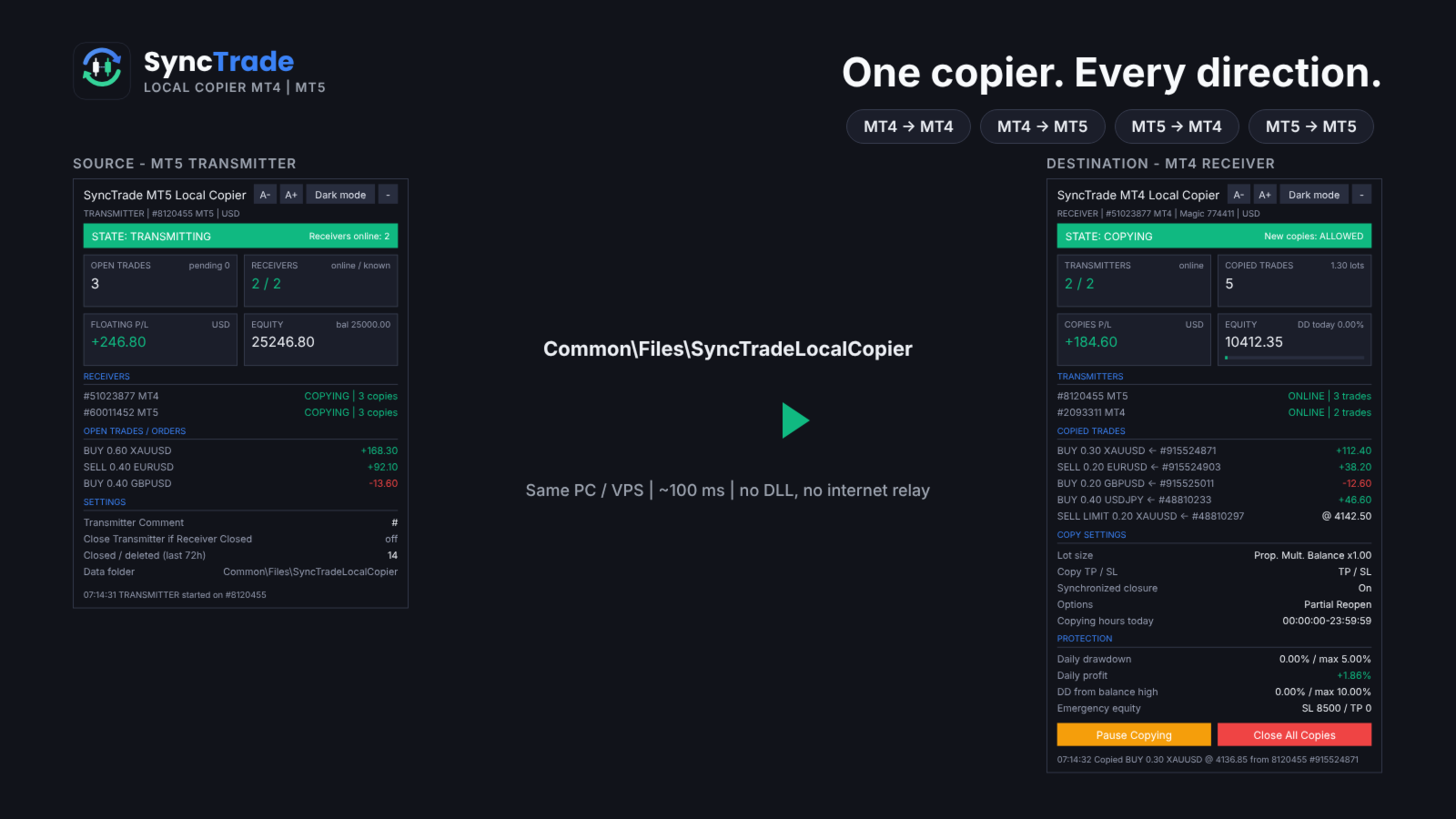
SyncTrade Local Copier copies trades between MetaTrader terminals on the same Windows PC or VPS, in milliseconds, with no internet relay, no DLL and no WebRequest.

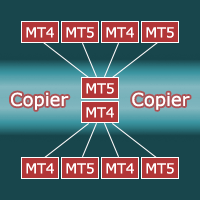
It works across platforms. Use SyncTrade MT4 Local Copier on MT4 and SyncTrade MT5 Local Copier on MT5. Both share the same local data folder, so all four directions work: MT4 → MT4, MT4 → MT5, MT5 → MT4, MT5 → MT5.

One EA, three roles:

  • Transmitter: the source account.
  • Receiver: the destination account that opens the copies.
  • Self Copier: copies or multiplies trades inside the same account.

One Transmitter can feed any number of Receivers. One Receiver can follow several Transmitters, mixed MT4 and MT5.

Main features

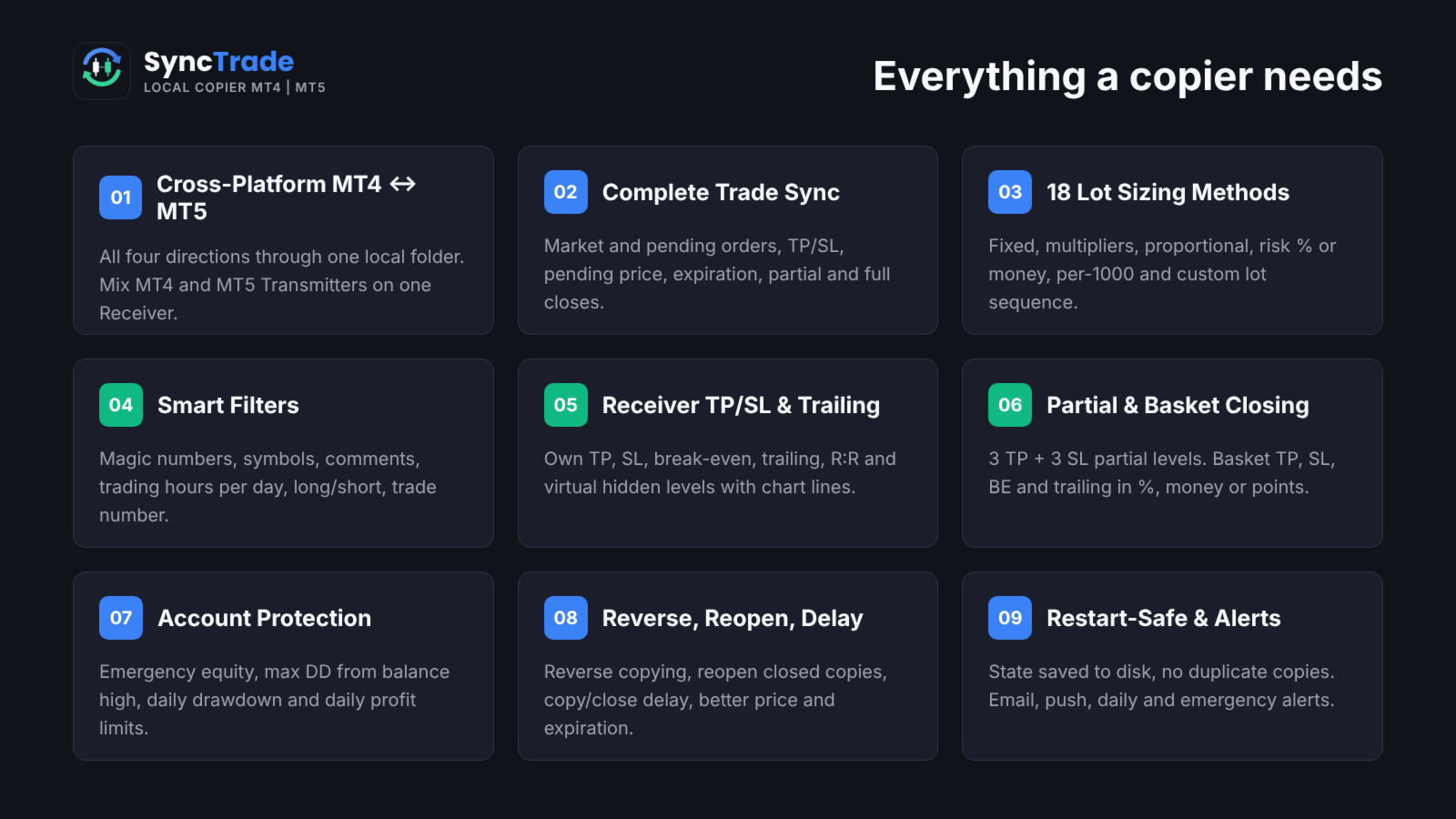
  • MT4 ↔ MT5 copying in all directions, every ~100 ms.
  • Market trades and pending orders, with TP/SL, pending price, expiration, partial and full closes kept in sync.
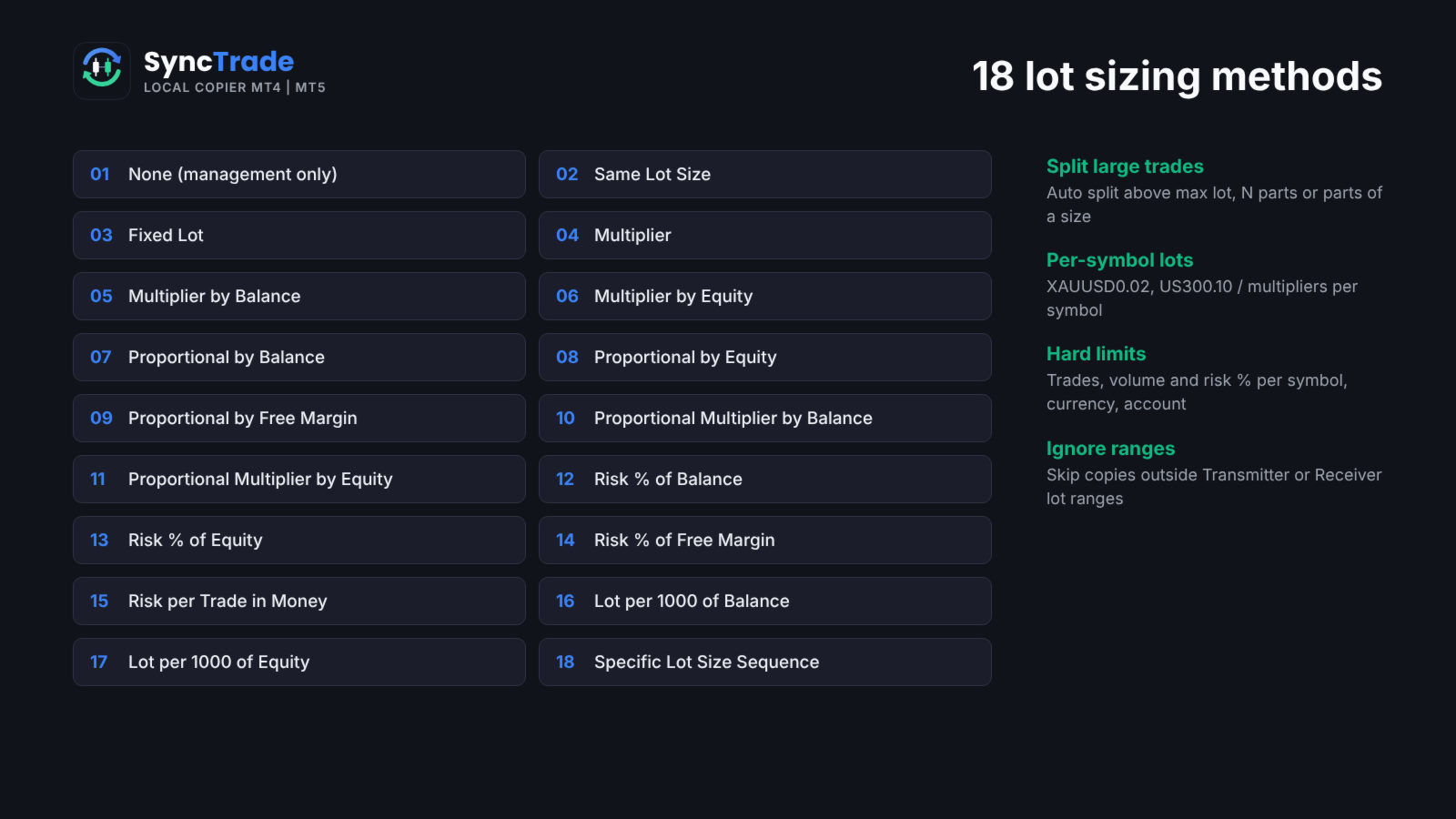
  • 18 lot sizing methods, custom lots and multipliers per symbol, automatic split of large trades.
  • Filters by magic number, symbol, comment, trading hours per day, direction and trade number.
  • Reverse copying, reopen of closed copies, copy and close delay, better-price entry and exit.
  • Receiver TP/SL, break-even, trailing stop, R:R target and hidden (virtual) levels.
  • Partial closing at 3 TP and 3 SL levels; basket TP, SL, break-even and trailing.
  • Emergency equity stop, max drawdown from balance high, daily drawdown and daily profit limits.
  • Email, push, daily and emergency notifications.
  • Symbol mapping with prefix, suffix and 30 special symbol pairs.
  • State saved to disk: no duplicate copies after a restart.
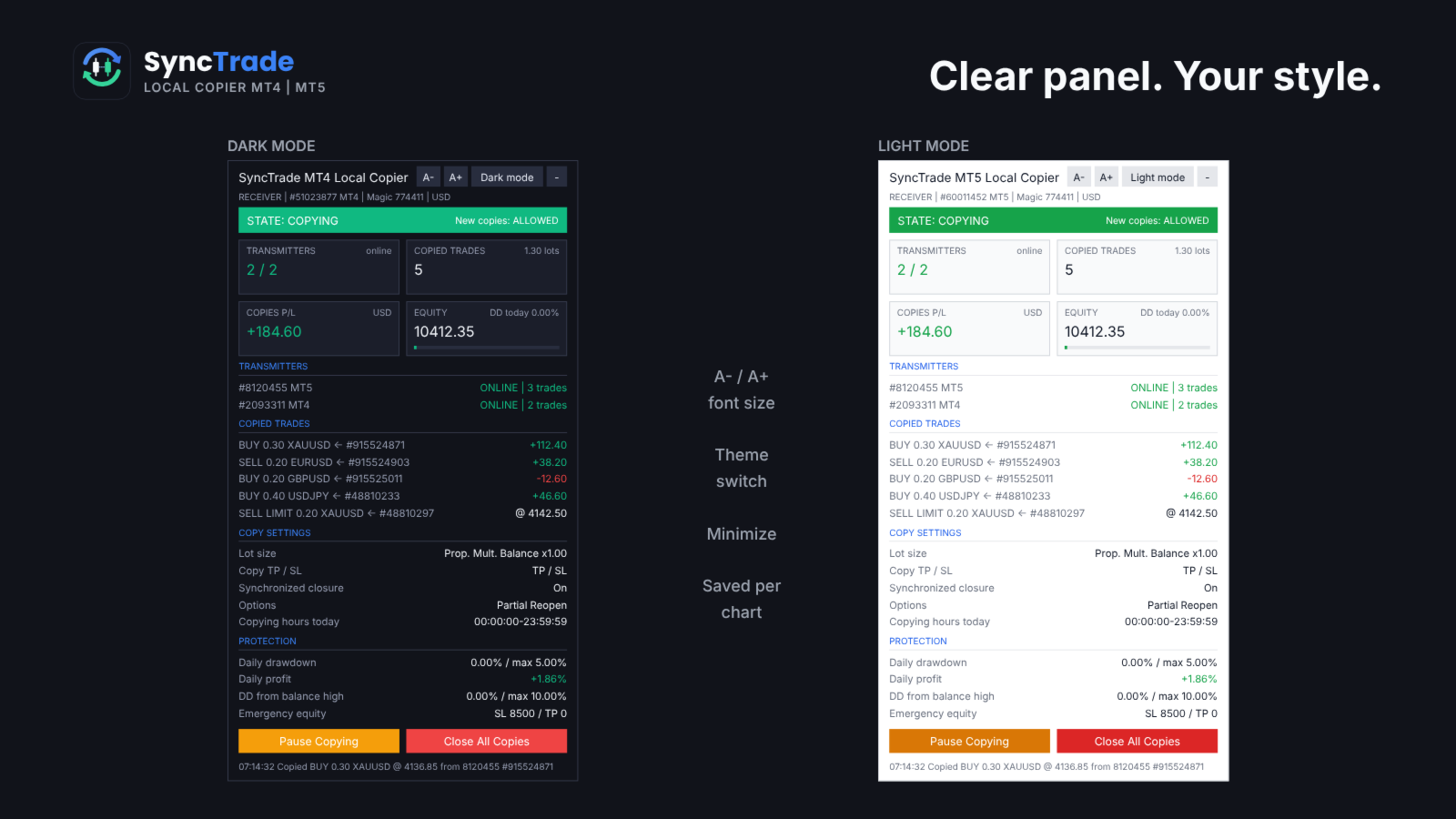
  • On-chart panel with dark/light theme, font size and minimize.

Quick setup

  1. On the source terminal, attach SyncTrade and set Account Mode = Transmitter.
  2. On the destination terminal, attach SyncTrade and set Account Mode = Receiver.
  3. Enter the source account number in Transmitter Account Number (or leave it empty to follow all Transmitters on the PC).
  4. Choose the Lot Size Type and other options.
  5. Enable Algo Trading in both terminals.
  6. The Receiver panel should show the Transmitter as ONLINE and the state COPYING.

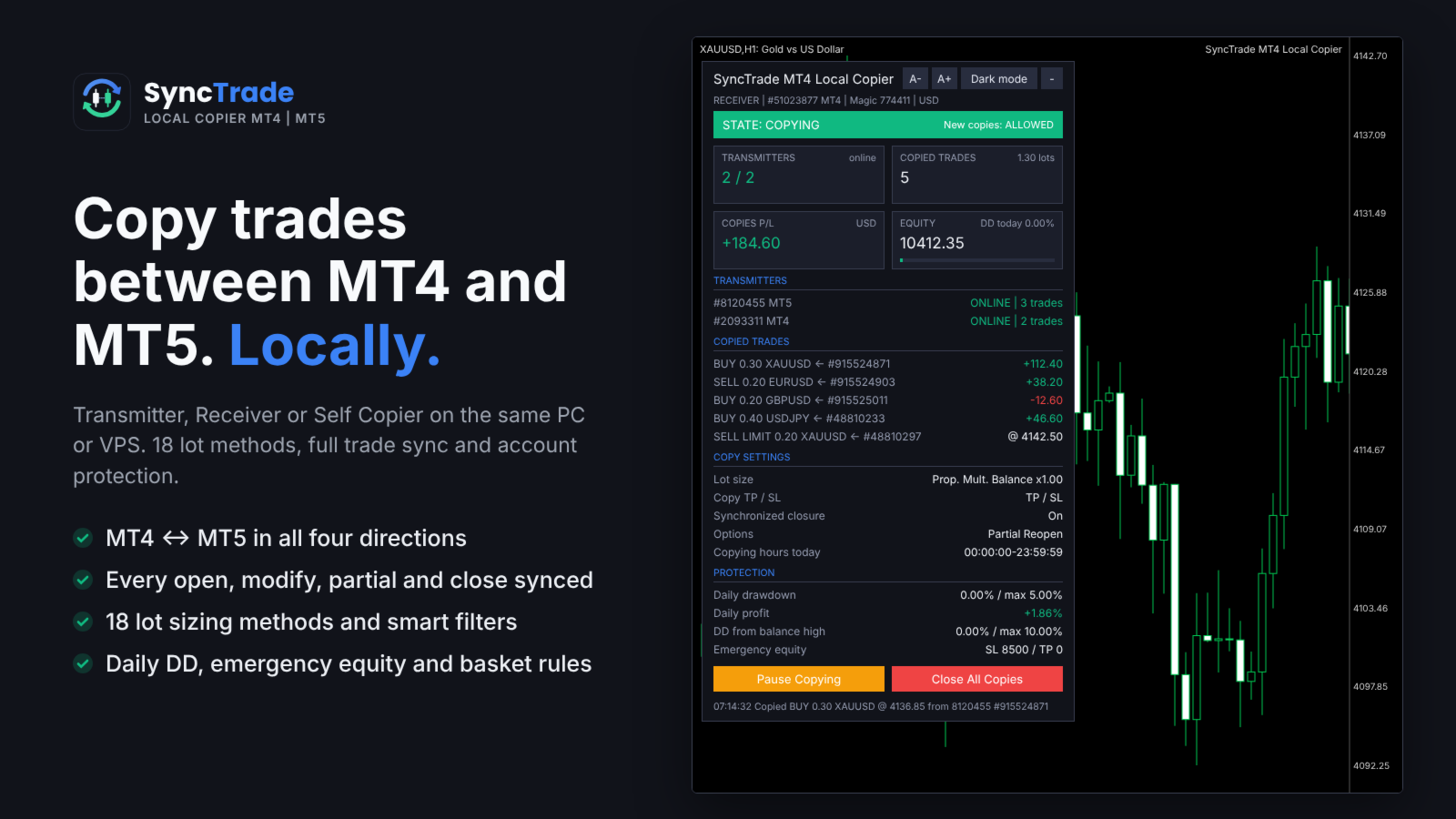
The panel shows the copier state, Transmitters (or Receivers) with platform and status, every copied trade with its source ticket and live P/L, copy settings and protection status. Buttons on the Receiver: Pause/Resume Copying, Close All Copies, and Reset Stop.

Requirements

  • All terminals on the same Windows PC or VPS, same Windows user.
  • Algo Trading enabled on every Receiver.
  • MT5 Receivers: hedging account recommended (netting merges copies on one symbol).
  • Copying needs two live terminals, so it cannot be tested in the Strategy Tester. Use demo accounts.

INPUT PARAMETERS

0 or an empty field = option off. Per-symbol format: first number for all symbols, then symbol + value, e.g. 30,XAUUSD60,BTCUSD2000 .

Account Setup

  • Account Mode: Transmitter, Receiver or Self Copier.
  • Transmitter Account Number: account(s) to follow, comma-separated, MT4 and MT5 mixed. Empty = all Transmitters on this PC.
  • Transmitter Comment: comment sent with each trade. # = original comment, @ = original ticket, % = magic, & = Transmitter account.
  • Receiver Comment: comment for copies; replaces the Transmitter Comment (max 31 characters).

General Settings & Trade Filters

  • Magic Number: magic of copied trades. Not 0; use a different value per Receiver on one account.
  • Magic Numbers to Copy: copy only these. Exact 3245 , partial (14) , range 100-200 ; 0 = manual trades.
  • Maximum Number of Copied Magic Numbers: max different Transmitter magics copied at once.
  • Maximum Receiver Account Magic Numbers: max different magics on the whole Receiver account.
  • Magic Numbers Not to Copy: never copy these (same format).
  • Symbols to Copy / Symbols Not to Copy: include or exclude Receiver symbols, e.g. EURUSD,XAUUSD .
  • Maximum Number of Copied Symbols: max different symbols copied at once.
  • Maximum Receiver Account Symbols: max different symbols on the whole Receiver account.
  • Comments to Copy / Comments Not to Copy: exact comment or partial match in brackets, e.g. (Grid) .

Copying / Multiplying Options

  • Copy on Monday … Sunday: copying hours per day (Receiver server time), e.g. 00:00:00-12:00:00,14:00:00-23:59:59 . Empty = no copying that day.
  • Transmitter Server Offset Hours: hours added to Transmitter time to match Receiver time.
  • Copy Long Trades / Copy Short Trades: copy BUY or SELL trades and orders.
  • Copy Current Trades: copy trades already open when the Receiver starts.
  • Copy New Trades: copy trades opened after the Receiver starts.
  • Copy Take Profit / Copy Stop Loss: copy the Transmitter TP / SL.
  • Take Profit Multiplier / Stop Loss Multiplier: multiply the TP / SL distance.
  • Add/Subtract Points in TP Level / SL Level: add or subtract points (when the multiplier is 1).
  • Do Not Copy Trades/Orders Without SL: skip trades with no SL.
  • Allow TP/SL Manual Change: true = your manual TP/SL change on a copy is kept; false = the EA restores the synced levels.
  • Copy Market Trades / Copy Pending Orders: copy open trades / pending orders. Pending off = the trade is copied when it triggers.
  • Maximum Spread in Points: wait while the spread is higher. Per symbol.
  • Maximum Slippage in Points: slippage for opening and closing.
  • Maximum Copying Difference in Points: wait while the price is further than this from the Transmitter open price.
  • Use Copying Expiration in Seconds / Copying Expiration in Seconds: stop trying to copy a trade after this time.
  • Copying Delay in Seconds: delay before copying, fixed 5 or random 5,20 .
  • Retry Attempts in Seconds: wait before retrying a failed order.
  • Better Price / Better Price Difference in Points: copy only at a better price than the Transmitter by this many points (negative allows worse). Per symbol.
  • Reverse Copying: BUY ↔ SELL, BUY LIMIT ↔ SELL STOP, BUY STOP ↔ SELL LIMIT, TP ↔ SL.
  • Keep Original TP/SL Distances: measure TP/SL from the Receiver open price instead of using the Transmitter levels.
  • Min Distance in Points for Same Symbol/Direction Trades/Orders: no new copy near an existing copy on the same symbol and direction.

Lot Size Management

  • Lot Size Type: None (no new copies), Same Lot Size, Fixed Lot, Multiplier, Multiplier by Balance, Multiplier by Equity, Proportional by Balance / Equity / Free Margin, Proportional Multiplier by Balance / Equity, Risk per Trade in % of Balance / Equity / Free Margin, Risk per Trade in Money, Lot Size per 1000 of Balance / Equity, Specific Lot Size Sequence.
  • Add/Subtract to Same Lot Size: added to the Transmitter lot.
  • Fixed Lot Size: lot for every copy.
  • Multiplier: Transmitter lot × value.
  • Multiplier by Balance / Equity: Transmitter lot × Receiver balance (equity) ÷ value.
  • Proportional Multiplier by Balance / Equity: Transmitter lot × Receiver/Transmitter balance (equity) ratio × value.
  • Risk per Trade in % of Balance / Equity / Free Margin: lot so that the SL loses this %. No SL = not copied.
  • Risk per Trade in Money: lot so that the SL loses this amount.
  • Lot Size per 1000 of Balance / Equity: value × balance (equity) ÷ 1000.
  • Specific Lot Size Sequence: lots for the 1st, 2nd, 3rd… copy on a symbol, e.g. 0.01,0.02,0.04 . End with 0 to stop after the list.
  • Automatic Split of Copied Trades: split lots above the broker maximum.
  • Split Copied Trades in Parts: split each copy into N trades.
  • Split Copied Trades in Parts of: split each copy into trades of this size.
  • Custom Symbol Fixed Lot Sizes / Custom Symbol Multipliers: per-symbol values, e.g. 0.05,XAUUSD0.02 .
  • Copying from / Up to Symbol Trade/Order Number: copy only the N-th to M-th Transmitter trade on a symbol (e.g. grid levels). Per symbol.
  • Total Symbol / Account Copied Trades: max open copies per symbol / account.
  • Maximum Risk % per Symbol / per Currency / Account Risk %: max total SL risk of copies, in % of balance.
  • Total Symbol / Account Copied Volume: max total lots of copies.
  • Minimum / Maximum Receiver Lot Size: raise to the minimum; cap each copy at the maximum.
  • Ignore Receiver Lot Size Below / Above: skip if the calculated lot is outside the range.
  • Ignore Transmitter Lot Size Below / Above: skip Transmitter trades outside the range.
  • Minimum Volume Step: rounding step for copy lots.

Limits on count, volume and risk make a copy wait; ignore rules skip it.

Trade Management

  • Synchronized Trade Closure: False, True, True for Market Trades Only, True for Pending Orders Only, True for Same Trade/Order Type.
  • Closure Delay in Seconds: delay before closing, fixed or random range.
  • Closure Better Price / Difference in Points: close only at the Transmitter close price or better. Per symbol.
  • Reopen Closed Copied Trades: when a copy closes on the Receiver while the Transmitter trade is open: False, Instantly, At Open Price or Better, At a Specific Time.
  • Reopen Closed Copied Trades Time: time (HH:MM) for the time-based reopen.
  • Apply Partial Closure: reduce copies proportionally when the Transmitter closes part of a trade.
  • Close Transmitter if Receiver is Closed (Transmitter): close the original trade when a copy is closed on a Receiver.

Receiver TP/SL & Trailing Management

  • Virtual/Hidden TP/SL Levels: TP/SL kept by the EA, not sent to the broker.
  • Show Virtual Levels on Chart: draw virtual TP/SL lines.
  • Use TP/SL Levels in: Points or Money.
  • Take Profit / Stop Loss in Points (Money): fixed TP / SL for each copy.
  • Break Even Profit in Points (Money): move SL to the open price at this profit.
  • Trailing Start / Stop / Step in Points (Money): start profit, distance and step of the trailing SL.
  • TP Based on Risk/Reward Ratio 1/: TP = SL distance × value.

Partial Closure Management

  • Partial Closure Take Profit % 1-3 / TP Lot Size % 1-3: at X% of the way to TP, close Y% of the initial lot.
  • Partial Closure Stop Loss % 1-3 / SL Lot Size % 1-3: at X% of the way to SL, close Y% of the initial lot.

Scheduled Trade Closure

  • Close All Copied Market Trades on / Time: day (or Every Day) and time to close all copies.
  • Delete All Copied Pending Orders on / Time: day and time to delete copied pending orders.
  • Close Copied Trades in Minutes: close each copy after N minutes.

Basket Trade Management (in % of Balance, Money and Average Points)

  • Use Basket Take Profit / Stop Loss: close all copies at this basket profit / loss.
  • Use Basket Break Even: after this profit, close all if the basket returns to 0.
  • Use Basket Trailing Stop Loss, Start / Stop / Step: trail a locked basket profit; close all when it is hit.

Emergency Account Protection

  • Use Emergency Account Protection: enable the equity levels below.
  • Receiver Account Stop Loss Equity / Take Profit Equity: close all copies and stop copying at this equity.
  • Max Drawdown % from Balance High: close all and stop copying at this drawdown.
  • Maximum Daily Drawdown from / in % / in Money: close all and pause until the next day (reference: Balance or Equity).
  • Maximum Daily Profit from / in % / in Money: same, for daily profit.
  • No Copying if Transmitter / Receiver Drawdown %>: no new copies above this drawdown.
  • Copy Only if Transmitter Drawdown %> / per Symbol>: copy only above this drawdown.

After an emergency stop, copying resumes after re-attaching the EA or pressing Reset Stop on the panel.

Notification Settings

  • Send Email / Push Notification: on each copy and protection event.
  • Send Daily Notification / Time: daily account report at these times, e.g. 08:00,20:00 .
  • Send Emergency Notification / Emergency Notification Equity: alert when equity falls below levels, e.g. 9000,8000 .

Symbol Mapping Settings

  • Prefix / Suffix of the Transmitter Account: removed from source symbols.
  • Prefix / Suffix of the Receiver Account: added to Receiver symbols.
  • Special Symbol 1-30: direct pairs TRANSMITTER,RECEIVER , e.g. GOLD,XAUUSD .

Panel

  • Show Panel, Panel theme (Dark/Light), Font size 7-16, Panel X / Y.

FAQ

Does it work between two computers? No. SyncTrade is a local copier; all terminals must run on the same PC or VPS.

Different brokers? Yes. Use prefix, suffix and Special Symbol inputs when names differ.

What if a terminal goes offline? The Receiver waits; nothing is opened or closed until the Transmitter is back. No trade is copied twice after a restart.

Several Receivers on one account? Yes, with a different Magic Number on each.

Trading involves risk. Test all settings on demo accounts first.

Recommended products
DrawDown Limiter
Haidar Lionel Haj Ali
5 (23)
DrawDown Limiter v5.0 — Advanced Account Protection Controller DrawDown Limiter v5.0 is a client-side account protection controller designed to supervise your trading account and automatically react when configured risk, profit, news, schedule, rollover, or position limits are reached. It can monitor manual trades, automated strategies, multiple Expert Advisors, pending orders and floating positions from one dedicated chart. It can protect the complete account or be configured to supervise a spe
RisklyCopy MT5
Gabriele Liberto
RisklyCopy copies trades from a master account to one or more receiving accounts running on the same computer or VPS. It works between MT5 terminals, between MT4 terminals, and between MT4 and MT5, also with different brokers. How it works - Attach RisklyCopy in SEND mode on the master account and in RECEIVE mode on each receiving account, using the same channel name. - New trades, stop loss and take profit changes, partial closes and closes are copied. Lot calculation on the receiving accoun
Copy trading EA
Dimitar Shuytsov
# DS_Copy_EA - User Description DS_Copy_EA is a MetaTrader 5 Expert Advisor that copies trades between MT5 terminals running on the same machine. One EA instance acts as a **Provider** (signal source) and another acts as a **Receiver** (copier). The mode is selected in the EA settings. **How it works:** 1. The **Provider** publishes its open positions internally every 500ms 2. The **Receiver** reads every 1 second, detects new/changed/closed positions, and mirrors them on its own account 3. I
Exp COPYLOT CLIENT for MT5
Vladislav Andruschenko
3.97 (35)
Professional Trade Copier for MetaTrader 5 Fast, professional, and reliable trade copier for MetaTrader . COPYLOT allows you to copy Forex trades between MT4 and MT5 terminals with support for Hedge and Netting accounts. COPYLOT MT5 version supports: - MT5 Hedge to MT5 Hedge - MT5 Hedge to MT5 Netting - MT5 Netting to MT5 Hedge - MT5 Netting to MT5 Netting - MT4 to MT5 Hedge - MT4 to MT5 Netting MT4 version Full Description +DEMO +PDF How To Buy How To Install How to get Log Files H
Aurum Intraday EA
Rodrigo Leonardo Favreau Giuliodoro
Aurum Intraday EA – Advanced Gold Trading Algorithm The Aurum Intraday EA is a powerful automated trading system designed specifically for Gold (XAUUSD) traders who want to capture strong intraday movements while maintaining full control over risk and strategy configuration. Built with a robust algorithm and optimized for H1 and H4 timeframes (H4 recommended) , this Expert Advisor is capable of identifying high-probability opportunities in the gold market and executing trades with precision and
Burning Teko for GOLD EA Fully Automated XAUUSD Strategy • Zero Inputs • Smart Auto‑Risk System Overview Burning Teko for GOLD EA is a completely automated trading system built exclusively for XAUUSD on the H1 timeframe . The EA requires no user configuration — all trading logic, risk control, and lot sizing are automatically calculated based on the account balance and internal algorithms . This makes the EA ideal for traders who want a simple, plug‑and‑play solution without the complexit
RSI Finite State Machine Expert Advisor Overview RSI Finite State Machine Expert Advisor is an automated trading system for MetaTrader 5 that uses the Relative Strength Index (RSI) to generate trading signals. The Expert Advisor is built around a Finite State Machine (FSM) architecture, making the trading process organized, predictable, and easy to maintain. This product is tends to secure that trades are executed in a controlled sequence. This prevents random or repeated trade entries and guar
Bober Real MT5
Arnold Bobrinskii
4.88 (16)
Bober Real MT5 is a fully automatic Forex trading Expert Advisor. This robot was made in 2014 year and did a lot of profitbale trades during this period. So far over 7000% growth on my personal account. There was many updates but 2019 update is the best one. The robot can run on any instrument, but the results are better with EURGBP, GBPUSD, on the M5 timeframe. Robot doesn't show good results in tester or live account if you run incorrect sets. Set files for Live accounts availible only for cu
GapRider EA - Dynamic Buy-Side Gap Trading Expert Advisor Overview GapRider EA is a sophisticated, adaptive Expert Advisor (EA) designed for MetaTrader 5, specializing in buy-side gap trading. This EA identifies significant market gaps and places strategic buy orders, leveraging dynamic sizing based on market volatility to optimize trade entries and exits. With a robust set of features, GapRider offers traders a powerful tool to capitalize on price retracements following large market movements
GFX Scalping AI Robot Pro MT5 Professional AI-Powered Forex and Gold Scalping Expert Advisor for MetaTrader 5   Live results:  https://www.mql5.com/en/signals   Live results:  https://www.mql5.com/en/signals/2390660 GFX Scalping AI Robot Pro is an advanced automated trading system developed for high-speed Forex and Gold scalping. The EA combines an intelligent signal-scoring engine, adaptive market profiles, weighted multi-timeframe confirmation, chart-pattern analysis, advanced market filte
Customized Copy MT5
Kyra Nickaline Watson-gordon
Customized Copy is a Multi-Terminal visual trade copying utility that supports Metatrader4 and Metatrader5 for Trade Copying.  You can activate EA on 10 different PCs/VPS. On each PC/VPS can install on Unlimited Terminals. Specifications :     Real Time, Multi Terminal - Multi Account - MT4/MT5 trade copying (support over 50 accounts at same time)     All settings are input visually.     Visual display and modify of copy map and network     Each copy path can be used with different settings
Btc Infinity
Nur Hidayanti
BTC INFINITY GRID Smart Adaptive Averaging • 24/7 Automatic Trading BTC INFINITY GRID is an Expert Advisor (EA) for MetaTrader 5, specifically designed for automated Bitcoin trading 24 hours a day. The EA uses a Smart Adaptive Averaging system that adapts to current market conditions before adding new positions. Additional positions are not opened based solely on price distance, but are managed according to the prevailing market conditions (trend strength filter). FEATURES Smart Adaptive Averag
Expert Starco Assistance is designed as a trading assistant and will perform the best performance and most accurate calculations for capital management for your trades. Features of this expert: Candle closing timer The possibility of determining the placement of the profit limit Ability to calculate volume based on fixed amount, percentage, fixed amount The possibility of opening a trade in the form of market or limit or stop limit
SolarTrade Suite Financial Robot: LaunchPad Market Expert - designed to open trades! This is a trading robot that uses special innovative and advanced algorithms to calculate its values, Your Assistant in the World of Financial Markets. Use our set of indicators from the SolarTrade Suite series to better choose the moment to launch this robot. Check out our other products from the SolarTrade Suite series at the bottom of the description. Do you want to confidently navigate the world of inves
MENEMANI Smart TRaders | Semi-Automated Supply/Demand, FVG & Order Block Trading Assistant. Available for MetaTrader 5 and MetaTrader 4 (two separate Market products — install the build that matches your terminal).   MENEMANI Smart TRaders is a professional trading assistant (utility EA) that scans, scores, and visualizes institutional price zones — then lets you execute a complete pending-order plan from a single dashboard. You stay in control: the EA never opens a trade on its own. You pick t
TradeX Chart Trading
Jose Roque Do Carmo Junior
5 (1)
Welcome to TradeX Chart Trading Netting and Hedge accounts. Functionalities SHIFT to buy; CTRL to sell; Breakeven; Visual flag of pending orders on the chart; Blocking the BUY/EJECT/SELL buttons to prevent accidental sending of orders; Spread visualization when clicking on the asset being traded; Candlestick countdown; List of open positions; Percentage balance of all transactions for the current day. Warning It does not work in Strategy Tester. Updates and improvements coming soon!
SZ Range Rider
Fazry Achbar Winandha
SZ Range Rider — MT5 Expert Advisor NO GRID, NO MARTINGALE, NO ARBITRAGE Overview SZ Range Rider is an automated MT5 Expert Advisor designed primarily for XAUUSD (Gold) using an advanced volatility breakout trading approach. The EA combines proprietary market-range analysis with automated risk, money, and multi-stage trade management. It is engineered for traders who demand a systematic, disciplined automated strategy without the need for constant manual intervention. Every position operates wit
# GMRFX Copytrade Local & Lan > **Copy-Trade Master/Slave — One EA, File-Based Sync, Zero Network Config.** > Copy trades between MT5 terminals on the same PC, across your local network, or over the internet — using nothing but a shared folder. --- **Version:** 1.00   **Developer:** GMR FX ([ gmrfx.app ]( https://gmrfx.app ))   **Category:** Trade Copiers / Utilities   --- ## What Is This? **GMRFX Copytrade Local & Lan** is a single Expert Advisor that handles both **Master** (sender) and
Maximas e Minimas
Lucas Ricardo Almeida Muniz
LUCRAM EA 2.01 — Configurable Trading Robot for MetaTrader 5 LUCRAM EA is an automated trading robot developed for MetaTrader 5. It allows traders to create different trading configurations by combining high-and-low strategies, moving averages, technical indicators, market filters, and customizable exit rules. The robot can open buy positions, sell positions, or trade in both directions. It is suitable for testing Day Trading and Swing Trading strategies across different financial instruments an
AK Strategy Creator  ( STC ) enables traders to create, edit and save their own strategies using MT5 standard and custom indicators. Attach your strategy's indicators or load your chart template. Add/Remove indicators and modify their settings as needed. Once satisfied, save as chart template. Give the template a specific name as it will be needed for demo/live trading. To backtest the strategy in Strategy Tester, save the template also under the name "tester". If it's already available, overwri
---  Last 5 copies left free. Next there will be  a price 30$ --- DRAGON SWING EA (for EUR/USD 20 minutes) NO MARTINGALES NO CUMULATE ORDERS NO PARTIAL CLOSURES OR HEDGING NO CONFUSIONAL PARAMETERS, MULTI-CHARTS OR MULTI TIMEFRAME NOT OVER-FIT OR COMPLICATED AND RISKY STATEGIES THAT CRASH AFTER FEW DAYS This is a healty, simple, durable and solid Expert Advisor. Suitable and simple to use also for beginners with little capital. DESCRIPTION: The strategy of this expert advisor is to operate du
CopierMT5
Dmitry Fedoseev
Copier for the MetaTrader5 terminal. Designed to copy trade from one terminal to another. Works both on netting and hedging accounts. Copying from a netting account can be performed simultaneously to both netting and hedging accounts. Also, from a hedging account, copying can be performed simultaneously to both netting and hedging accounts. Compatible with the version for the MetaTrader4 terminal; if available, copying can be performed between different terminals (also regardless of the type of
Fast M5
Mojtaba Soltaninejad
This robot is not such a martingale and is designed based on a special and unique strategy which is beneficial for traders who are looking for quick profitable trading processes, that is why it works in 5 minutes timeframe as well as theCurrency pair of EUR/USD. Instructions for EXPERT settings FastM5: Adjust/select 0.1 for any  any 1000 USD, “refer to the photos attached” It means you need to trade 1 Lat per 10000 USD.
Impulse Radar MT5 is a multi-market scanner designed to quickly identify unusually strong price movements across symbols visible in MetaTrader 5 Market Watch. The utility analyzes closed candles only on up to three configurable timeframes. It compares candle body, total range, tick volume and current spread with the ATR of each instrument, allowing comparable measurements across Forex, metals, indices, CFDs and cryptocurrencies. Each event receives a deterministic score from 0 to 100 represen
Introduction to EA Auto Martingale MT5 Auto Martingale is an Expert Advisor (EA) that helps you easily create Dollar Cost Averaging (DCA) trades from your manual trades. With advanced settings, the EA Auto Martingale allows you to create a perfect Martingale strategy in your own way, optimizing profits and managing risks effectively. I will increase the price by 10 USD for every 10 orders Main Features of Auto Martingale: 1. Magic Number : Default is 0. This value will automatically be based o
Grid Aroon Directional Shift EA
AL MOOSAWI ABDULLAH JAFFER BAQER
The trading limiter that stops you from breaking your own daily loss and trade limits. • Please test the product in the Strategy Tester before purchasing to understand how it works. • If you face any issues, contact me via private message—I’m always available to help. • After purchase, send me a screenshot of your order to receive a   FREE EA   as a gift. Most grid EAs open the first trade because price drifted a fixed number of points. Nothing changed in the market. The distance simply ran ou
Gildora
DRT Circle
Gildora — Precision Grid Architecture Gildora takes a different approach to grid trading. Built around the idea of using smaller grid intervals and controlled exposure , Gildora is designed for traders looking to deploy a grid system without requiring the larger starting capital commonly associated with wider grid structures. More of our products:  Click Here After purchase, please send a private message to receive set files and setup instructions. MQL5 Announcement Channel MQL5 Group Price
First Buyer 1000$ Next Buyer Will Be 2000$ and will be higher EXPERT ADVISOR: SMART CHEAP AND GOOD 2026   Turn $5 into $65,000 - The Ultimate Low-Cost, High-Return Trading Bot! This is a budget-friendly Expert Advisor, but do not let the low price fool you. If an inexpensive application has the power to turn a mere $5 into $65,000, you are incredibly lucky to have your hands on this system. WHY YOU NEED THIS EXPERT ADVISOR TODAY: 1. Massive ROI Potential from Micro Accounts   You do not need hu
# Aurum Regime Momentum EA ## Adaptive regime-based trading for MetaTrader 5 Aurum Regime Momentum EA is an automated trading system designed for Gold and other broker symbols with the same market structure. It combines higher-timeframe regime classification with momentum confirmation, ATR-based risk control, and systematic position management. The EA reads multiple timeframes automatically from one host chart: - Entry timeframe: H1 by default - Confirmation timeframe: H4 by default - Regim
Magic Grid MT5
Aliaksandr Charkes
4.14 (7)
Magic Grid MT5 is a non-indicator Expert Advisor using a grid strategy (on a hedging account). The strategy is based on automatic reopening of grid pending orders, after closing their market positions (by Take-Profit, Stop-Loss or manually). Pending orders are placed with a specified step from the initial prices, which can be entered manually or generated automatically (once at the beginning of the trade).   The robot can trade on any timeframe, on any currency pair, on several currency pairs,
Buyers of this product also purchase
Trade Assistant MT5
Evgeniy Kravchenko
4.43 (216)
It helps to calculate the risk per trade, the easy installation of a new order, order management with partial closing functions, trailing stop of 7 types and other useful functions. Additional materials and instructions Installation instructions - Application instructions Line function -   shows on the chart the Opening line, Stop Loss, Take Profit. With this function it is easy to set a new order and see its additional characteristics before opening.   Risk management  - The risk calculation
Forex Trade Manager MT5
InvestSoft
4.98 (691)
Trade Manager MT5 is an advanced position size calculator and trade management tool for MetaTrader 5, designed to help traders plan trades faster, control risk more precisely, and manage open positions directly from the chart. It combines order placement, risk based lot calculation, Stop Loss and Take Profit management, Break Even, Trailing Stop, Partial Close, Equity Protection, and external trade management in one panel. Whether you trade forex, indices, metals, commodities, crypto, or future
FarmedHedge Pair Trading Dashboard
Tanapisit Tepawarapruek
5 (7)
Farmed Hedge Yield Farming | All Markets (Manual - Hybrid - Semi/Automated EA) VERIFIED TRADING RESULTS - Farmed Hedge Yield Axi Copy:  https://www.mql5.com/en/signals/2356376 - Farmed Hedge Yield Exn Copy:   https://www.mql5.com/en/signals/2356404 - Farmed Hedge Yield V Copy:  https://www.mql5.com/en/signals/2357156 IMPORTANT NOTICE: FarmedHedge is a MANUAL-FOCUSED TRADING UTILITY ,not a fully automated EA. Results shown on this Signal include manual trades and overall strategic management.
Telegram to MT5 MultiChannel Copier
Sergio Marquez Uroz
4.71 (24)
Telegram to MT5 Multi-Channel Copier   automatically copies trading signals from your Telegram and Discord channels straight to MetaTrader 5. No bots, no browser extensions, no manual copying. A signal arrives in Telegram or Discord and the EA opens the trade in your terminal within seconds. And before you copy a channel, the built-in backtester shows you what that channel would have done in your account. The product has two components: a Windows application that listens to your Telegram channel
EA Overfitter
Stephen J Martret
5 (4)
That backtest looks great. But will it still be making money tomorrow, next week, next month? EA Overfitter re-runs your EA on 100 price histories it has never seen. One score tells you if the edge is real. A backtest tells you what an EA did on one price history — the one that happened to occur. What you cannot tell from it is how much of that result was the strategy and how much was the particular path. EA Overfitter answers that. It builds up to 100 synthetic price histories your EA has n
TradePanel MT5
Alfiya Fazylova
4.89 (174)
Trade Panel is a multi-functional trading assistant. The app contains over 50 trading functions for manual trading and allows you to automate most trading tasks. Application instructions: https://www.mql5.com/en/blogs/post/756482 Trial version of the application for a demo account: https://www.mql5.com/en/blogs/post/750865 How to install the application: https://www.mql5.com/en/blogs/post/756239 How to test the application in visual mode: https://www.mql5.com/en/blogs/post/770277 How to install
News Trade EA MT5
Konstantin Kulikov
4.55 (11)
Present to you the useful robot that I have been using for several years. It can be used in both semi-automatic mode and fully automatic mode. >>> Chat <<< The program contains flexible settings for trading on the news of the economic calendar. It cannot be checked in the strategy tester. Only real work. Download the latest archive of settings: https://www.mql5.com/en/blogs/post/747929 Signals monitoring: https://www.mql5.com/en/signals/author/test-standart When creating your own sets of setti
Power Candles Strategy Scanner - Self-Optimizing Multi-Symbol Setup Finder Self-optimizing settings work one chart at a time, and finding where they pay off right now means opening chart after chart. Power Candles Strategy Scanner runs the same self-optimizing engine as the Power Candles indicator on every symbol in your Market Watch, side by side. One panel ranks where it pays off: the winning strategy per symbol, its optimized Stop Loss and Take Profit. An alert fires the moment a fresh signal
Copy Telegram signals with your own trading rules Telegram to MT5 Signal Trader automatically copies text-based trading signals from public and private Telegram channels and groups into MetaTrader 5. Manage multiple providers and MT5 accounts from one desktop app, with individual risk and trade settings for each provider . No Telegram bot or API setup needed for copying. Simply sign in with your own Telegram account by phone or QR code and select the channels or groups you have already joined. Y
================================================================================ POC BREAKOUT - V20.72. Full Professional Grade Toolkit ================================================================================ POC Breakout is a full MetaTrader 5 trading dashboard for discretionary traders who want breakout signals, Point of Control (POC) context, volume profiles, order flow, market structure, news, alerts, and advanced trade planning in one professional workspace. Attached directly to you
Welcome to Entry In The Zone with SMC Multi Timeframe / Complete SMC Analysis System & Trading Tools — All in One Indicator Entry In The Zone with SMC Multi Timeframe An indicator designed for market analysis based on Smart Money Concepts (SMC), displaying Market Structure, Key Zones (Order Blocks, Supply & Demand Zones, and Fair Value Gaps), Liquidity, and real-time BUY / SELL signals. It supports both Single-Timeframe and Multi-Timeframe analysis, along with the Confluence at Zone feature, whi
Strategy Builder offers an incredible amount of functionality. It combines a trade panel with configurable automation (covert indicators into an EA), real-time statistics (profit & draw down) plus automatic optimization of SL, TP/exit, trading hours, indicator inputs. Multiple indicators can be combined into an single alert/trade signal and can include custom indicators, even if just have ex4 file or purchased from Market. The system is easily configured via a CONFIG button and associated pop-u
EA Auditor
Stephen J Martret
5 (7)
EA Auditor is an independent analysis tool for traders evaluating Expert Advisors and trading signals on MetaTrader 5. It audits backtest reports, reviews posted developer signals, and cross-verifies the two against each other to help traders assess strategies before committing capital. The MQL5 market offers a wide range of Expert Advisors from many developers, with varying approaches, quality, and transparency. EA Auditor provides a consistent, data-driven framework for reviewing them, answer
Kontrol01 Manager
Andrei Koval
5 (2)
EA Portfolio Control & Cloud Monitoring for MetaTrader 5 Your EAs manage trades. KONTROL_01 manages your EAs. A control system for traders running multiple Expert Advisors on the same account. Coordinate EA activity, manage trading risks and monitor your setup remotely. A detailed User Manual is available via DM after purchase. IN PRACTICE Multiple EAs. No coordination. Your EAs trade independently, unaware of each other's activity. KONTROL_01 coordinates them, limits simultaneous activity a
News Filter EA
Rashed Samir
5 (2)
News Filter EA: Advanced Algo Trading Assistant News Filter EA is an advanced algo trading assistant designed to enhance your trading experience. By using the News Filter EA , you can integrate a Forex economic news filter into your existing expert advisor, even if you do not have access to its source code. In addition to the news filter, you can also specify trading days and hours for your expert. The News Filter EA also includes risk management  and equity protection features. MT4 Version Ma
Trade Manager DaneTrades
Levi Dane Benjamin
4.13 (31)
DaneTrades Trade Manager is a professional trade panel for MetaTrader 5, designed for fast, accurate execution with built‑in risk control. Place market or pending orders directly from the chart while the panel automatically calculates position size from your chosen risk, helping you stay consistent and avoid emotional decision‑making. The Trade Manager is built for manual traders who want structure: clear risk/reward planning, automation for repeatable management, and safeguards that help reduc
The product will copy all telegram signal to MT5 ( which you are member) , also it can work as remote copier.  Easy to set up, copy order instant, can work with almost signal formats, image signal,  s upport to translate other language to English Work with all type of channel or group, even channel have "Restrict Saving Content", work with  multi channel, multi MT5 Work as remote copier: with signal have ticket number, it will copy exactly via ticket number. Support to backtest signal. How to s
VirtualTradePad PRO SE MT5 — professional trading control center for MetaTrader 5 VirtualTradePad PRO SE is a premium chart-based trading panel and trade-management workspace for MetaTrader 5 . It is designed for traders who want faster execution, clearer position control, structured trade management, visual level planning and a professional workflow directly from the chart. This is not only a BUY / SELL panel. PRO SE combines manual trading, pending orders, position management, partial exits, b
Effortlessly manage multiple trading accounts The Local Trade Copier EA is a solution for individual traders or account managers who need to execute trade signals from external sources or who need to manage several accounts at the same time, without the need for a MAM or a PAMM account. It copies from up to 8 master accounts to unlimited slave accounts . [ Installation Guide | Update Guide | Troubleshooting | FAQ | All Products  ] 100% self hosted Easy to install and use It can copy from MT4 t
SMC Trade Pilot MT5
Prime Horizon
5 (1)
Order block, BOS and ChoCH expert advisor for MetaTrader 5, with Telegram alerts SMC Trade Pilot MT5 reads market structure on your chart and sends the signal to Telegram. It marks break of structure (BOS) and change of character (ChoCH), draws order blocks with a strength score , tracks fair value gaps (FVG) and liquidity sweeps, displays a volume profile with point of control, value area high and low, and sums everything up in a compact dashboard with a multi-timeframe panel, a confluence scor
MT5 to Telegram Signal Provider turns your trading account into a signal provider. Every trade action, whether manual, by EA or from your phone, is instantly sent as a message to Telegram. You can fully customize the format or use a ready-made template for quick setup. [ Demo ] [ Manual ] [ MT4 Version ] [ Discord Version ]     New: [ Telegram To MT5 ] Setup A step by step user guide is available. Key Features Ability to customize order details sent to subscribers You can create a tiered subs
AW Shepherd Safety MT5
AW Trading Software Limited
5 (5)
AW Shepherd Safety EA is an Expert Advisor for managing open positions. The trader opens the first order from the panel, and from there the EA runs the basket on its own: it adds recovery orders with a trend filter, closes a side on TakeProfit, trailing or stop, and shows the close levels on the chart. Buys and sells are managed separately, and both sides can be open at the same time. A recovery order opens not just on a price step but once Parabolic SAR, two MAs or candle color show a reversal
Dealer Panel
Mian Rameez Ali
Dealer's Panel No signal decides anything here — a hand does. One click, and the panel calculates what's underneath: lot size from risk, target from a 30-step balance ladder that remembers exactly how far an account has climbed. Toggle between market and pending without touching an input field. Set a stop, and the take-profit can write itself — a fixed share of the balance, translated into price with no arithmetic left for the trader to get wrong. One trade live at a time; it won't let a seco
RETAILBERG FOOTPRINT CHART PRO — Order-Flow Workspace for MetaTrader 5 Version 7.00  |  Professional System  |  31 tools  |  One chart A full 150-page illustrated User Manual is included. Please read the full manual to understand this feature packed footprint chart elements and ui. https://www.mql5.com/en/blogs/post/777982 DEMO / STRATEGY TESTER — PLEASE READ FIRST
Astro Trade MT5
Indra Maulana
5 (8)
25% discount on the release of the tool: only for the next 3 buyers Send a message to receive a demo version. AstroTrade Trading Assistant AstroTrade is a comprehensive multi-functional trading utility developed for the MetaTrader 5 platform. It integrates essential tools for trade execution, risk management, and technical monitoring into a single unified interface. The application is designed to assist traders in managing their daily operations through a visual and structured environment. Vi
Bneu Prop Firm Pass System
Marvinson Salavia Caballero
5 (1)
BNEU PROP FIRM PASS SYSTEM v2.37 PRODUCT OVERVIEW Bneu Prop Firm Pass System is a professional risk management and account protection utility for MetaTrader 5. Attach to any chart and configure your account rules. The system monitors daily loss, maximum drawdown, profit target, trading days, open risk, margin usage, news events, pending orders, weekend restrictions, and rollover restrictions from one dashboard. It includes a 5-tab premium dashboard, prop firm presets, custom rules, Risk Sentine
Elliott Wave Helper
Siarhei Vashchylka
4.93 (14)
Elliott Wave Helper is a panel for constructing wave analysis. Manual (Be sure to read before purchasing) | Version for MT4 Advantages 1. Constructing wave analysis and wave structure in a few clicks 2. Availability of all wave analysis patterns, including triangles and combinations 3. All nine wave display styles, including a special circle font 4. Change colors and display styles of wave groups directly from the chart 5. Binding all elements to a set timeframe or timeframes 6. A template syste
Close by percentage MT5
Konstantin Kulikov
5 (1)
Hello friends. I wrote this utility specifically for use in my profile with a large number of Expert Advisors and sets ("Joint_profiles_from_grid_sets"   https://www.mql5.com/en/blogs/post/747929 ). Now, in order to limit losses on the account, there is no need to change the "Close_positions_at_percentage_of_loss" parameter on each chart. Just open   one   additional chart, attach this utility and set the desired percentage for closing all trades on the account. The utility has the following fu
REVDEN AI Desk: Run Your Trading From One Conversation With Your Own AI, on REVDEN's Market Context Imagine running your trading from one conversation. REVDEN AI Desk brings it into MetaTrader 5: you ask your own AI how it reads the market, and it answers from REVDEN's full context on the symbols you trade, with their state, their risk picture and the releases ahead. Its proposals arrive with entry, stop, target and risk, and you approve the ones that fit. Your rules change the same way: write w
How much more can my account lose today? Attach RiskGuard to one chart to see today's loss, the limit you chose and the amount remaining. It watches open trades placed by you and by your other trading robots. The first time it starts, it only monitors. First setup on a demo account Attach RiskGuard to one chart. On first use it monitors without closing trades. Set your daily limit. Select Preview protection and check how many positions and pending orders are in scope. If the counts look right, a
More from author
Onic Scalper
Ida Bagus Githa Dyatmika
Onic Scalper EA use Breakout Strategy and Trend Following Strategy for Scalping Trading Methods This EA trades the breakouts from daily relative highs and lows. For the entry, stop orders are used for the fastest possible execution. Profits can be secured by the adjustable trailing stop. The backtests shown in the screenshots were done with the default settings. There might be better or worse settings.  Please download the free demo to do your own testing.This EA does not use any martingale and/
My Trade Panel MT4
Ida Bagus Githa Dyatmika
My Trade Panel MT4 A manual trading panel for MetaTrader 4. It calculates your lot size from the risk you choose, places market and pending orders in one click, and manages open positions with breakeven, partial close, and seven types of trailing stop. It does not open trades on its own. You make the decisions and the panel handles the math and the routine work. Line function Show Entry, Stop Loss, and Take Profit lines on the chart. Drag them to plan a trade and see the lot, risk, and reward b
SyncTrade MT4 Local Copier
Ida Bagus Githa Dyatmika
SyncTrade Local Copier copies trades between MetaTrader terminals on the same Windows PC or VPS, in milliseconds, with no internet relay, no DLL and no WebRequest. It works across platforms. Use SyncTrade MT4 Local Copier on MT4 and SyncTrade MT5 Local Copier on MT5. Both share the same local data folder, so all four directions work: MT4 → MT4, MT4 → MT5, MT5 → MT4, MT5 → MT5 . One EA, three roles: Transmitter : the source account. Receiver : the destination account that opens the copies. Self C
Onic Scalper MT5
Ida Bagus Githa Dyatmika
Onic Scalper EA use Breakout Strategy and Trend Following Strategy for Scalping Trading Methods  This EA trades the breakouts from daily relative highs and lows. For the entry, stop orders are used for the fastest possible execution. Profits can be secured by the adjustable trailing stop. The backtests shown in the screenshots were done with the default settings. There might be better or worse settings.  Please download the free demo to do your own testing.This EA does not use any martingale and
My Trade Panel MT5
Ida Bagus Githa Dyatmika
My Trade Panel MT5 A manual trading panel for MetaTrader 5. It calculates your lot size from the risk you choose, places market and pending orders in one click, and manages open positions with breakeven, partial close, and seven types of trailing stop. It does not open trades on its own. You make the decisions and the panel handles the math and the routine work. Line function Show Entry, Stop Loss, and Take Profit lines on the chart. Drag them to plan a trade and see the lot, risk, and reward b
PropShield Risk Manager
Ida Bagus Githa Dyatmika
Short description (Market field): Account-level risk guardian for prop firm challenges: daily/overall loss locks, SL risk limits, news filter, daily profit cap and consistency tracking. PropShield Risk Manager protects a prop firm challenge or funded account from the mistakes that end it: a daily drawdown breach, an overall drawdown breach, an oversized trade, a trade opened into high-impact news, or one oversized winning day that ruins the consistency rule. It is a utility, not a trading robot.
Filter:
No reviews
Reply to review