SyncTrade MT5 Local Copier

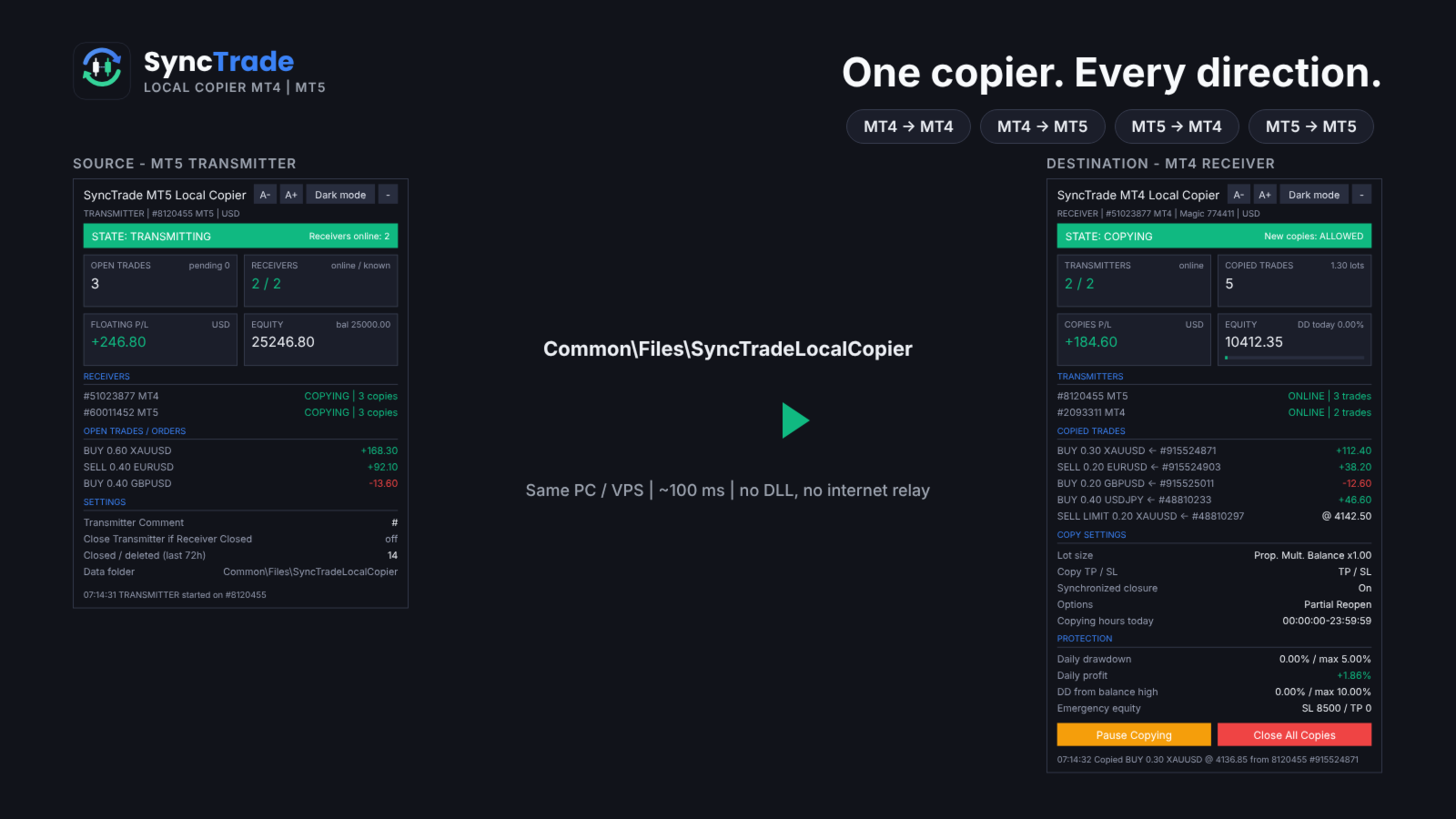
SyncTrade Local Copier copies trades between MetaTrader terminals on the same Windows PC or VPS, in milliseconds, with no internet relay, no DLL and no WebRequest.

It works across platforms. Use SyncTrade MT4 Local Copier on MT4 and SyncTrade MT5 Local Copier on MT5. Both share the same local data folder, so all four directions work: MT4 → MT4, MT4 → MT5, MT5 → MT4, MT5 → MT5.

One EA, three roles:

  • Transmitter: the source account.
  • Receiver: the destination account that opens the copies.
  • Self Copier: copies or multiplies trades inside the same account.

One Transmitter can feed any number of Receivers. One Receiver can follow several Transmitters, mixed MT4 and MT5.

Main features

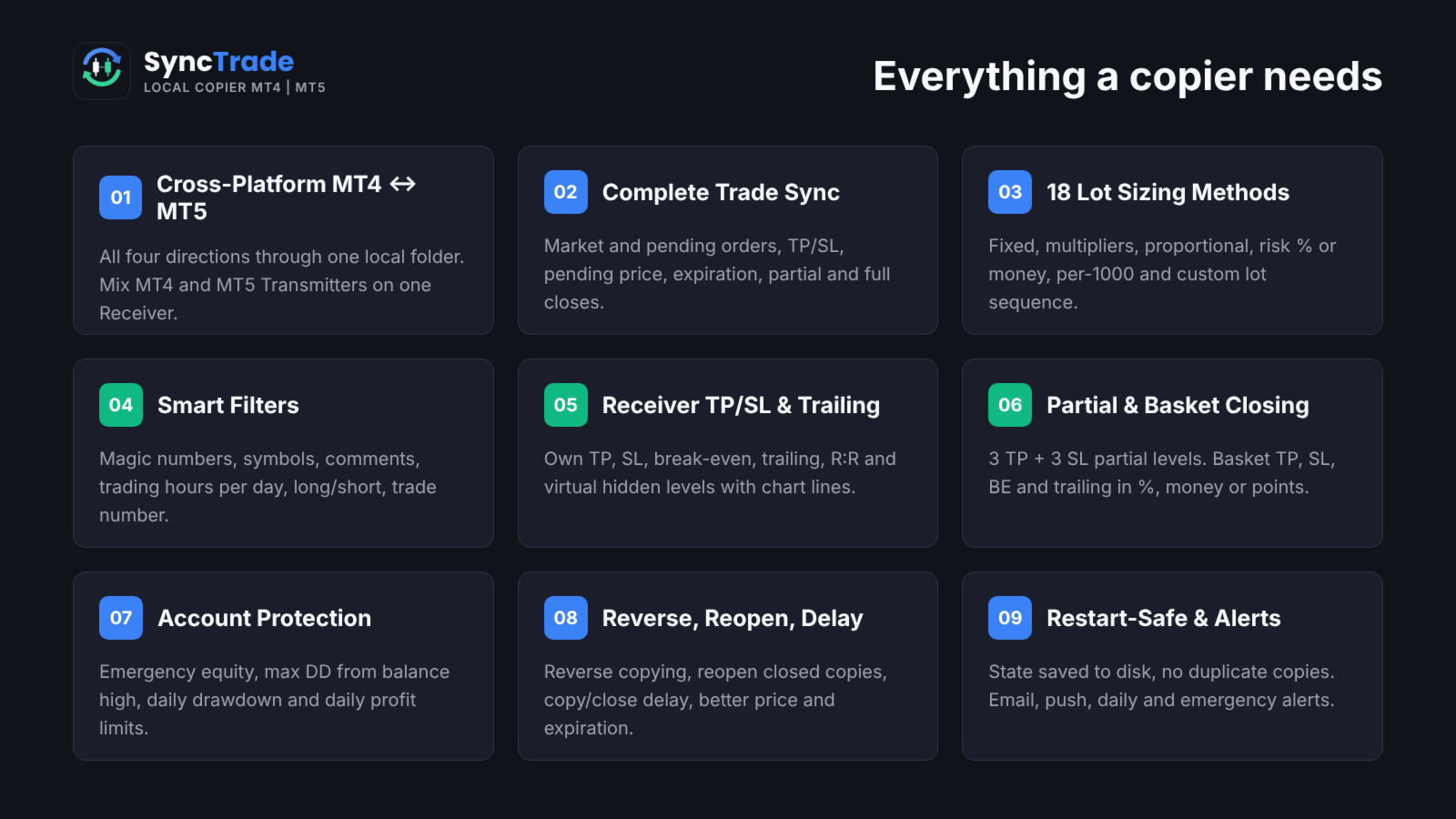
  • MT4 ↔ MT5 copying in all directions, every ~100 ms.
  • Market trades and pending orders, with TP/SL, pending price, expiration, partial and full closes kept in sync.
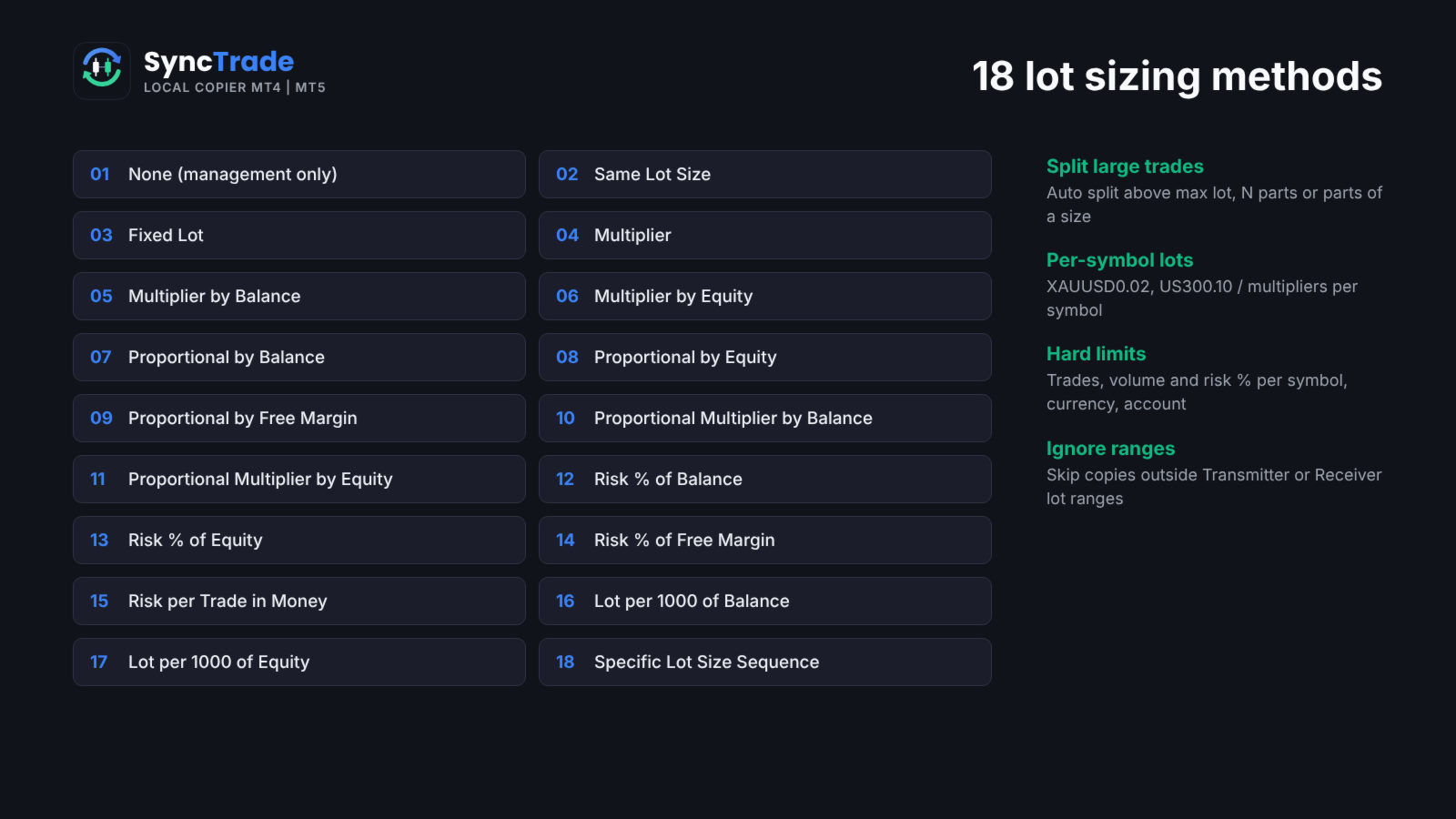
  • 18 lot sizing methods, custom lots and multipliers per symbol, automatic split of large trades.
  • Filters by magic number, symbol, comment, trading hours per day, direction and trade number.
  • Reverse copying, reopen of closed copies, copy and close delay, better-price entry and exit.
  • Receiver TP/SL, break-even, trailing stop, R:R target and hidden (virtual) levels.
  • Partial closing at 3 TP and 3 SL levels; basket TP, SL, break-even and trailing.
  • Emergency equity stop, max drawdown from balance high, daily drawdown and daily profit limits.
  • Email, push, daily and emergency notifications.
  • Symbol mapping with prefix, suffix and 30 special symbol pairs.
  • State saved to disk: no duplicate copies after a restart.
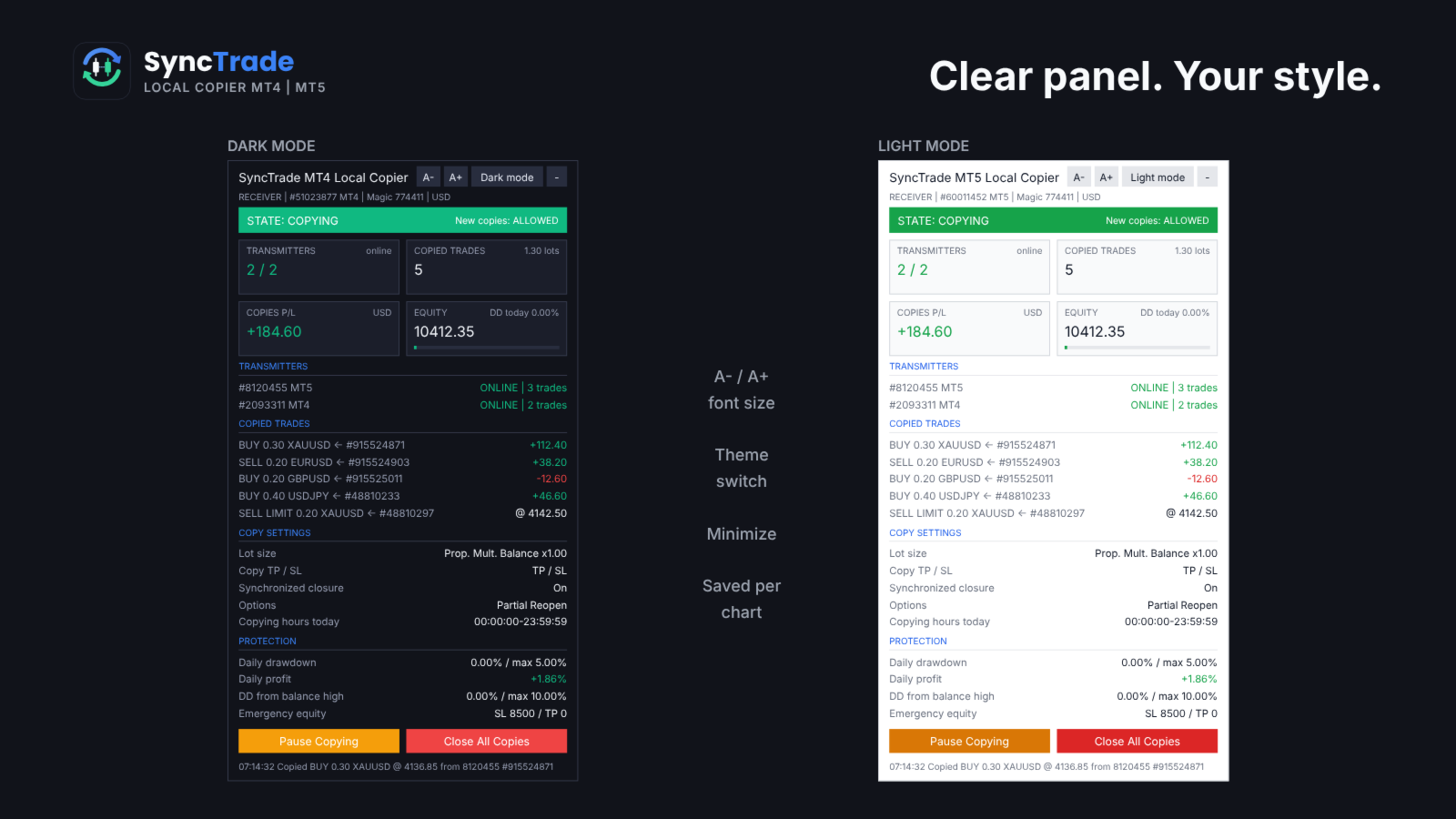
  • On-chart panel with dark/light theme, font size and minimize.

Quick setup

  1. On the source terminal, attach SyncTrade and set Account Mode = Transmitter.
  2. On the destination terminal, attach SyncTrade and set Account Mode = Receiver.
  3. Enter the source account number in Transmitter Account Number (or leave it empty to follow all Transmitters on the PC).
  4. Choose the Lot Size Type and other options.
  5. Enable Algo Trading in both terminals.
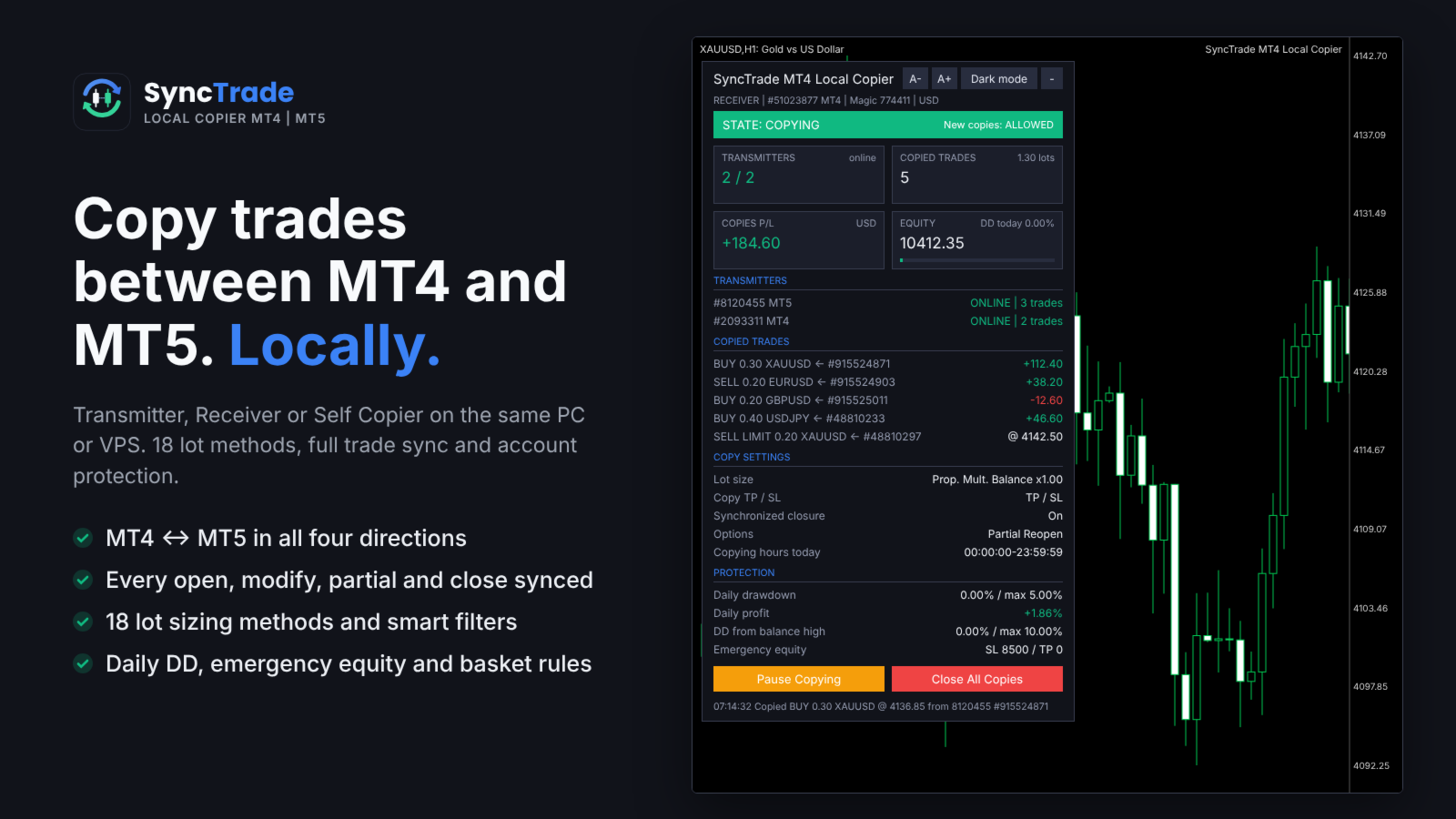
  6. The Receiver panel should show the Transmitter as ONLINE and the state COPYING.

The panel shows the copier state, Transmitters (or Receivers) with platform and status, every copied trade with its source ticket and live P/L, copy settings and protection status. Buttons on the Receiver: Pause/Resume Copying, Close All Copies, and Reset Stop.

Requirements

  • All terminals on the same Windows PC or VPS, same Windows user.
  • Algo Trading enabled on every Receiver.
  • MT5 Receivers: hedging account recommended (netting merges copies on one symbol).
  • Copying needs two live terminals, so it cannot be tested in the Strategy Tester. Use demo accounts.

INPUT PARAMETERS

0 or an empty field = option off. Per-symbol format: first number for all symbols, then symbol + value, e.g. 30,XAUUSD60,BTCUSD2000 .

Account Setup

  • Account Mode: Transmitter, Receiver or Self Copier.
  • Transmitter Account Number: account(s) to follow, comma-separated, MT4 and MT5 mixed. Empty = all Transmitters on this PC.
  • Transmitter Comment: comment sent with each trade. # = original comment, @ = original ticket, % = magic, & = Transmitter account.
  • Receiver Comment: comment for copies; replaces the Transmitter Comment (max 31 characters).

General Settings & Trade Filters

  • Magic Number: magic of copied trades. Not 0; use a different value per Receiver on one account.
  • Magic Numbers to Copy: copy only these. Exact 3245 , partial (14) , range 100-200 ; 0 = manual trades.
  • Maximum Number of Copied Magic Numbers: max different Transmitter magics copied at once.
  • Maximum Receiver Account Magic Numbers: max different magics on the whole Receiver account.
  • Magic Numbers Not to Copy: never copy these (same format).
  • Symbols to Copy / Symbols Not to Copy: include or exclude Receiver symbols, e.g. EURUSD,XAUUSD .
  • Maximum Number of Copied Symbols: max different symbols copied at once.
  • Maximum Receiver Account Symbols: max different symbols on the whole Receiver account.
  • Comments to Copy / Comments Not to Copy: exact comment or partial match in brackets, e.g. (Grid) .

Copying / Multiplying Options

  • Copy on Monday … Sunday: copying hours per day (Receiver server time), e.g. 00:00:00-12:00:00,14:00:00-23:59:59 . Empty = no copying that day.
  • Transmitter Server Offset Hours: hours added to Transmitter time to match Receiver time.
  • Copy Long Trades / Copy Short Trades: copy BUY or SELL trades and orders.
  • Copy Current Trades: copy trades already open when the Receiver starts.
  • Copy New Trades: copy trades opened after the Receiver starts.
  • Copy Take Profit / Copy Stop Loss: copy the Transmitter TP / SL.
  • Take Profit Multiplier / Stop Loss Multiplier: multiply the TP / SL distance.
  • Add/Subtract Points in TP Level / SL Level: add or subtract points (when the multiplier is 1).
  • Do Not Copy Trades/Orders Without SL: skip trades with no SL.
  • Allow TP/SL Manual Change: true = your manual TP/SL change on a copy is kept; false = the EA restores the synced levels.
  • Copy Market Trades / Copy Pending Orders: copy open trades / pending orders. Pending off = the trade is copied when it triggers.
  • Maximum Spread in Points: wait while the spread is higher. Per symbol.
  • Maximum Slippage in Points: slippage for opening and closing.
  • Maximum Copying Difference in Points: wait while the price is further than this from the Transmitter open price.
  • Use Copying Expiration in Seconds / Copying Expiration in Seconds: stop trying to copy a trade after this time.
  • Copying Delay in Seconds: delay before copying, fixed 5 or random 5,20 .
  • Retry Attempts in Seconds: wait before retrying a failed order.
  • Better Price / Better Price Difference in Points: copy only at a better price than the Transmitter by this many points (negative allows worse). Per symbol.
  • Reverse Copying: BUY ↔ SELL, BUY LIMIT ↔ SELL STOP, BUY STOP ↔ SELL LIMIT, TP ↔ SL.
  • Keep Original TP/SL Distances: measure TP/SL from the Receiver open price instead of using the Transmitter levels.
  • Min Distance in Points for Same Symbol/Direction Trades/Orders: no new copy near an existing copy on the same symbol and direction.

Lot Size Management

  • Lot Size Type: None (no new copies), Same Lot Size, Fixed Lot, Multiplier, Multiplier by Balance, Multiplier by Equity, Proportional by Balance / Equity / Free Margin, Proportional Multiplier by Balance / Equity, Risk per Trade in % of Balance / Equity / Free Margin, Risk per Trade in Money, Lot Size per 1000 of Balance / Equity, Specific Lot Size Sequence.
  • Add/Subtract to Same Lot Size: added to the Transmitter lot.
  • Fixed Lot Size: lot for every copy.
  • Multiplier: Transmitter lot × value.
  • Multiplier by Balance / Equity: Transmitter lot × Receiver balance (equity) ÷ value.
  • Proportional Multiplier by Balance / Equity: Transmitter lot × Receiver/Transmitter balance (equity) ratio × value.
  • Risk per Trade in % of Balance / Equity / Free Margin: lot so that the SL loses this %. No SL = not copied.
  • Risk per Trade in Money: lot so that the SL loses this amount.
  • Lot Size per 1000 of Balance / Equity: value × balance (equity) ÷ 1000.
  • Specific Lot Size Sequence: lots for the 1st, 2nd, 3rd… copy on a symbol, e.g. 0.01,0.02,0.04 . End with 0 to stop after the list.
  • Automatic Split of Copied Trades: split lots above the broker maximum.
  • Split Copied Trades in Parts: split each copy into N trades.
  • Split Copied Trades in Parts of: split each copy into trades of this size.
  • Custom Symbol Fixed Lot Sizes / Custom Symbol Multipliers: per-symbol values, e.g. 0.05,XAUUSD0.02 .
  • Copying from / Up to Symbol Trade/Order Number: copy only the N-th to M-th Transmitter trade on a symbol (e.g. grid levels). Per symbol.
  • Total Symbol / Account Copied Trades: max open copies per symbol / account.
  • Maximum Risk % per Symbol / per Currency / Account Risk %: max total SL risk of copies, in % of balance.
  • Total Symbol / Account Copied Volume: max total lots of copies.
  • Minimum / Maximum Receiver Lot Size: raise to the minimum; cap each copy at the maximum.
  • Ignore Receiver Lot Size Below / Above: skip if the calculated lot is outside the range.
  • Ignore Transmitter Lot Size Below / Above: skip Transmitter trades outside the range.
  • Minimum Volume Step: rounding step for copy lots.

Limits on count, volume and risk make a copy wait; ignore rules skip it.

Trade Management

  • Synchronized Trade Closure: False, True, True for Market Trades Only, True for Pending Orders Only, True for Same Trade/Order Type.
  • Closure Delay in Seconds: delay before closing, fixed or random range.
  • Closure Better Price / Difference in Points: close only at the Transmitter close price or better. Per symbol.
  • Reopen Closed Copied Trades: when a copy closes on the Receiver while the Transmitter trade is open: False, Instantly, At Open Price or Better, At a Specific Time.
  • Reopen Closed Copied Trades Time: time (HH:MM) for the time-based reopen.
  • Apply Partial Closure: reduce copies proportionally when the Transmitter closes part of a trade.
  • Close Transmitter if Receiver is Closed (Transmitter): close the original trade when a copy is closed on a Receiver.

Receiver TP/SL & Trailing Management

  • Virtual/Hidden TP/SL Levels: TP/SL kept by the EA, not sent to the broker.
  • Show Virtual Levels on Chart: draw virtual TP/SL lines.
  • Use TP/SL Levels in: Points or Money.
  • Take Profit / Stop Loss in Points (Money): fixed TP / SL for each copy.
  • Break Even Profit in Points (Money): move SL to the open price at this profit.
  • Trailing Start / Stop / Step in Points (Money): start profit, distance and step of the trailing SL.
  • TP Based on Risk/Reward Ratio 1/: TP = SL distance × value.

Partial Closure Management

  • Partial Closure Take Profit % 1-3 / TP Lot Size % 1-3: at X% of the way to TP, close Y% of the initial lot.
  • Partial Closure Stop Loss % 1-3 / SL Lot Size % 1-3: at X% of the way to SL, close Y% of the initial lot.

Scheduled Trade Closure

  • Close All Copied Market Trades on / Time: day (or Every Day) and time to close all copies.
  • Delete All Copied Pending Orders on / Time: day and time to delete copied pending orders.
  • Close Copied Trades in Minutes: close each copy after N minutes.

Basket Trade Management (in % of Balance, Money and Average Points)

  • Use Basket Take Profit / Stop Loss: close all copies at this basket profit / loss.
  • Use Basket Break Even: after this profit, close all if the basket returns to 0.
  • Use Basket Trailing Stop Loss, Start / Stop / Step: trail a locked basket profit; close all when it is hit.

Emergency Account Protection

  • Use Emergency Account Protection: enable the equity levels below.
  • Receiver Account Stop Loss Equity / Take Profit Equity: close all copies and stop copying at this equity.
  • Max Drawdown % from Balance High: close all and stop copying at this drawdown.
  • Maximum Daily Drawdown from / in % / in Money: close all and pause until the next day (reference: Balance or Equity).
  • Maximum Daily Profit from / in % / in Money: same, for daily profit.
  • No Copying if Transmitter / Receiver Drawdown %>: no new copies above this drawdown.
  • Copy Only if Transmitter Drawdown %> / per Symbol>: copy only above this drawdown.

After an emergency stop, copying resumes after re-attaching the EA or pressing Reset Stop on the panel.

Notification Settings

  • Send Email / Push Notification: on each copy and protection event.
  • Send Daily Notification / Time: daily account report at these times, e.g. 08:00,20:00 .
  • Send Emergency Notification / Emergency Notification Equity: alert when equity falls below levels, e.g. 9000,8000 .

Symbol Mapping Settings

  • Prefix / Suffix of the Transmitter Account: removed from source symbols.
  • Prefix / Suffix of the Receiver Account: added to Receiver symbols.
  • Special Symbol 1-30: direct pairs TRANSMITTER,RECEIVER , e.g. GOLD,XAUUSD .

Panel

  • Show Panel, Panel theme (Dark/Light), Font size 7-16, Panel X / Y.

FAQ

Does it work between two computers? No. SyncTrade is a local copier; all terminals must run on the same PC or VPS.

Different brokers? Yes. Use prefix, suffix and Special Symbol inputs when names differ.

What if a terminal goes offline? The Receiver waits; nothing is opened or closed until the Transmitter is back. No trade is copied twice after a restart.

Several Receivers on one account? Yes, with a different Magic Number on each.

Trading involves risk. Test all settings on demo accounts first.

Рекомендуем также
DrawDown Limiter
Haidar Lionel Haj Ali
5 (23)
DrawDown Limiter v5.0 — Расширенный контроллер защиты торгового счёта DrawDown Limiter v5.0 — это клиентский контроллер защиты торгового счёта, предназначенный для мониторинга вашей торговли и автоматической реакции при достижении настроенных лимитов риска, прибыли, новостей, расписания, ролловера или количества позиций. Он может контролировать ручные сделки, автоматические стратегии, несколько советников, отложенные ордера и открытые позиции с одного отдельного графика. Он может защищать весь т
RisklyCopy copies trades from a master account to one or more receiving accounts running on the same computer or VPS. It works between MT5 terminals, between MT4 terminals, and between MT4 and MT5, also with different brokers. How it works - Attach RisklyCopy in SEND mode on the master account and in RECEIVE mode on each receiving account, using the same channel name. - New trades, stop loss and take profit changes, partial closes and closes are copied. Lot calculation on the receiving accoun
# DS_Copy_EA - User Description DS_Copy_EA is a MetaTrader 5 Expert Advisor that copies trades between MT5 terminals running on the same machine. One EA instance acts as a **Provider** (signal source) and another acts as a **Receiver** (copier). The mode is selected in the EA settings. **How it works:** 1. The **Provider** publishes its open positions internally every 500ms 2. The **Receiver** reads every 1 second, detects new/changed/closed positions, and mirrors them on its own account 3. I
Exp COPYLOT CLIENT for MT5
Vladislav Andruschenko
3.97 (35)
Профессиональный копировщик сделок для MetaTrader 5 Быстрый, профессиональный и надежный копировщик сделок для MetaTrader . COPYLOT позволяет копировать сделки Forex между терминалами MT4 и MT5 с поддержкой счетов Hedge и Netting . Версия COPYLOT для MT5 поддерживает: - MT5 Hedge → MT5 Hedge - MT5 Hedge → MT5 Netting - MT5 Netting → MT5 Hedge - MT5 Netting → MT5 Netting - MT4 → MT5 Hedge - MT4 → MT5 Netting Версия MT4 Полное описание + DEMO + PDF Как купить Как установить Как получить файлы жур
Aurum Intraday EA
Rodrigo Leonardo Favreau Giuliodoro
Aurum Intraday EA – Advanced Gold Trading Algorithm The Aurum Intraday EA is a powerful automated trading system designed specifically for Gold (XAUUSD) traders who want to capture strong intraday movements while maintaining full control over risk and strategy configuration. Built with a robust algorithm and optimized for H1 and H4 timeframes (H4 recommended) , this Expert Advisor is capable of identifying high-probability opportunities in the gold market and executing trades with precision and
Burning Teko for GOLD EA Fully Automated XAUUSD Strategy • Zero Inputs • Smart Auto‑Risk System Overview Burning Teko for GOLD EA is a completely automated trading system built exclusively for XAUUSD on the H1 timeframe . The EA requires no user configuration — all trading logic, risk control, and lot sizing are automatically calculated based on the account balance and internal algorithms . This makes the EA ideal for traders who want a simple, plug‑and‑play solution without the complexit
RSI Finite State Machine Expert Advisor Overview RSI Finite State Machine Expert Advisor is an automated trading system for MetaTrader 5 that uses the Relative Strength Index (RSI) to generate trading signals. The Expert Advisor is built around a Finite State Machine (FSM) architecture, making the trading process organized, predictable, and easy to maintain. This product is tends to secure that trades are executed in a controlled sequence. This prevents random or repeated trade entries and guar
Bober Real MT5
Arnold Bobrinskii
4.88 (16)
Bober Real MT5 — полностью автоматический советник для торговли на рынке Forex. Робот создан в 2014 году и за этот период сделал множество прибыльных сделок, показав более 7000% прироста депозита на моем личном счете. Было выпущено много обновлений, но версия 2019 года считается самой стабильной и прибыльной. Робот можно запускать на любых инструментах, но лучшие результаты достигаются на EURGBP , GBPUSD , таймфрейм M5 . Робот не покажет хорошие результаты в тестере или на реальном счете, если
GapRider EA - Динамический экспертный советник для торговли гэпами на стороне покупки Обзор GapRider EA — это сложный и адаптивный экспертный советник (EA), разработанный для MetaTrader 5, специализирующийся на торговле гэпами на стороне покупки. Этот EA выявляет значительные рыночные гэпы и размещает стратегические ордера на покупку, используя динамическую настройку размеров на основе волатильности рынка для оптимизации входов и выходов из сделок. Благодаря надежному набору функций, GapRider пр
GFX Scalping AI Robot Pro MT5 Professional AI-Powered Forex and Gold Scalping Expert Advisor for MetaTrader 5   Live results:  https://www.mql5.com/en/signals   Live results:  https://www.mql5.com/en/signals/2390660 GFX Scalping AI Robot Pro is an advanced automated trading system developed for high-speed Forex and Gold scalping. The EA combines an intelligent signal-scoring engine, adaptive market profiles, weighted multi-timeframe confirmation, chart-pattern analysis, advanced market filte
Customized Copy MT5
Kyra Nickaline Watson-gordon
Customized Copy is a Multi-Terminal visual trade copying utility that supports Metatrader4 and Metatrader5 for Trade Copying.  You can activate EA on 10 different PCs/VPS. On each PC/VPS can install on Unlimited Terminals. Specifications :     Real Time, Multi Terminal - Multi Account - MT4/MT5 trade copying (support over 50 accounts at same time)     All settings are input visually.     Visual display and modify of copy map and network     Each copy path can be used with different settings
BTC INFINITY GRID Smart Adaptive Averaging • 24/7 Automatic Trading BTC INFINITY GRID is an Expert Advisor (EA) for MetaTrader 5, specifically designed for automated Bitcoin trading 24 hours a day. The EA uses a Smart Adaptive Averaging system that adapts to current market conditions before adding new positions. Additional positions are not opened based solely on price distance, but are managed according to the prevailing market conditions (trend strength filter). FEATURES Smart Adaptive Averag
Expert Starco Assistance разработан как торговый помощник и обеспечит максимальную производительность и наиболее точные расчеты по управлению капиталом для ваших сделок. Особенности этого эксперта: Таймер закрытия свечи Возможность определения размещения лимита прибыли Возможность расчета объема на основе фиксированной суммы, процента, фиксированной суммы Возможность открытия сделки в форме маркета или лимита или стоп-лимита.
Финансовый Робот SolarTrade Suite: LaunchPad Market Expert - предназначенный для открытия торговых сделок! Это торговый робот, который использует особые инновационные и передовые алгоритмы для рассчета своих значений, Ваш Помошник в Мире Финансовых Рынков. Испольуйте наш набор индикаторов из серии SolarTrade Suite чтобы лучше выбрать момент для запуска этого робота. Проверьте другие наши продукты из серии SolarTrade Suite внизу описания. Хотите уверенно ориентироваться в мире инвестиций и фи
MENEMANI Smart TRaders | Semi-Automated Supply/Demand, FVG & Order Block Trading Assistant. Available for MetaTrader 5 and MetaTrader 4 (two separate Market products — install the build that matches your terminal).   MENEMANI Smart TRaders is a professional trading assistant (utility EA) that scans, scores, and visualizes institutional price zones — then lets you execute a complete pending-order plan from a single dashboard. You stay in control: the EA never opens a trade on its own. You pick t
TradeX Chart Trading
Jose Roque Do Carmo Junior
5 (1)
Welcome to TradeX Chart Trading Netting and Hedge accounts. Functionalities SHIFT to buy; CTRL to sell; Breakeven; Visual flag of pending orders on the chart; Blocking the BUY/EJECT/SELL buttons to prevent accidental sending of orders; Spread visualization when clicking on the asset being traded; Candlestick countdown; List of open positions; Percentage balance of all transactions for the current day. Warning It does not work in Strategy Tester. Updates and improvements coming soon!
SZ Range Rider
Fazry Achbar Winandha
SZ Range Rider — MT5 Expert Advisor NO GRID, NO MARTINGALE, NO ARBITRAGE Overview SZ Range Rider is an automated MT5 Expert Advisor designed primarily for XAUUSD (Gold) using an advanced volatility breakout trading approach. The EA combines proprietary market-range analysis with automated risk, money, and multi-stage trade management. It is engineered for traders who demand a systematic, disciplined automated strategy without the need for constant manual intervention. Every position operates wit
# GMRFX Copytrade Local & Lan > **Copy-Trade Master/Slave — One EA, File-Based Sync, Zero Network Config.** > Copy trades between MT5 terminals on the same PC, across your local network, or over the internet — using nothing but a shared folder. --- **Version:** 1.00   **Developer:** GMR FX ([ gmrfx.app ]( https://gmrfx.app ))   **Category:** Trade Copiers / Utilities   --- ## What Is This? **GMRFX Copytrade Local & Lan** is a single Expert Advisor that handles both **Master** (sender) and
Maximas e Minimas
Lucas Ricardo Almeida Muniz
LUCRAM EA 2.01 — Configurable Trading Robot for MetaTrader 5 LUCRAM EA is an automated trading robot developed for MetaTrader 5. It allows traders to create different trading configurations by combining high-and-low strategies, moving averages, technical indicators, market filters, and customizable exit rules. The robot can open buy positions, sell positions, or trade in both directions. It is suitable for testing Day Trading and Swing Trading strategies across different financial instruments an
AK Strategy Creator (STC) позволяет трейдерам создавать, редактировать и сохранять собственные стратегии, используя стандартные и пользовательские индикаторы MT5. Прикрепите индикаторы вашей стратегии с желаемыми настройками, затем подключите советника STC EA, который будет считывать прикрепленные индикаторы, чтобы вы могли использовать их для определения условий входа и выхода при покупке и продаже. В список индикаторов всегда включены два индикатора по умолчанию , позволяющие получить досту
---  Last 5 copies left free. Next there will be  a price 30$ --- DRAGON SWING EA (for EUR/USD 20 minutes) NO MARTINGALES NO CUMULATE ORDERS NO PARTIAL CLOSURES OR HEDGING NO CONFUSIONAL PARAMETERS, MULTI-CHARTS OR MULTI TIMEFRAME NOT OVER-FIT OR COMPLICATED AND RISKY STATEGIES THAT CRASH AFTER FEW DAYS This is a healty, simple, durable and solid Expert Advisor. Suitable and simple to use also for beginners with little capital. DESCRIPTION: The strategy of this expert advisor is to operate du
CopierMT5
Dmitry Fedoseev
Копировщик для терминала MetaTrader5. Предназначен для копирования торговли с одного терминала на другой. Работает как на неттинговых счетах, так и на хеджинговых. Причем копирование с неттингового счета может выполняться одновременно и на неттинговые счета, и на хеджинговые. Так же и с хеджингового счета копирование может выполняться одновременно и на неттинговые счета, и на хеджинговые. Совместим с версией для терминала MetaTrader4; при ее наличие, копирование можно выполнять между различными
Fast M5
Mojtaba Soltaninejad
This robot is not such a martingale and is designed based on a special and unique strategy which is beneficial for traders who are looking for quick profitable trading processes, that is why it works in 5 minutes timeframe as well as theCurrency pair of EUR/USD. Instructions for EXPERT settings FastM5: Adjust/select 0.1 for any  any 1000 USD, “refer to the photos attached” It means you need to trade 1 Lat per 10000 USD.
Impulse Radar MT5 — это мульти-рыночный сканер, предназначенный для быстрого обнаружения необычно сильных ценовых движений по символам, отображаемым в Обзоре рынка MetaTrader 5. Программа анализирует только закрытые свечи на максимум трех настраиваемых таймфреймах. Она сравнивает тело свечи, полный диапазон, тиковый объем и текущий спред с ATR каждого инструмента, что позволяет сопоставлять результаты для Forex, металлов, индексов, CFD и криптовалют. Каждому событию присваивается детерминиров
Введение в EA Auto Martingale MT5 Auto Martingale — это советник (EA), который помогает вам легко создавать сделки с усреднением долларовой стоимости (DCA) из ваших ручных сделок. С расширенными настройками EA Auto Martingale позволяет вам создать идеальную стратегию Мартингейла по-своему, эффективно оптимизируя прибыль и управляя рисками. Основные функции Auto Martingale: Magic Number : Значение по умолчанию — 0. Это значение будет автоматически основано на вашей первой ручной сделке. Maximum D
Grid Aroon Directional Shift EA
AL MOOSAWI ABDULLAH JAFFER BAQER
The trading limiter that stops you from breaking your own daily loss and trade limits. • Please test the product in the Strategy Tester before purchasing to understand how it works. • If you face any issues, contact me via private message—I’m always available to help. • After purchase, send me a screenshot of your order to receive a   FREE EA   as a gift. Most grid EAs open the first trade because price drifted a fixed number of points. Nothing changed in the market. The distance simply ran ou
Gildora — Архитектура прецизионной сети Gildora применяет иной подход к сеточной торговле. В основе системы лежит использование уменьшенных шагов сетки и контролируемого уровня рыночного риска (экспозиции); решение предназначено для трейдеров, желающих использовать сеточную стратегию, но не располагающих значительным стартовым капиталом, который обычно требуется для сеток с широким шагом. Другие наши продукты: нажмите здесь После покупки, пожалуйста, напишите личное сообщение, чтобы получить
First Buyer 1000$ Next Buyer Will Be 2000$ and will be higher EXPERT ADVISOR: SMART CHEAP AND GOOD 2026   Turn $5 into $65,000 - The Ultimate Low-Cost, High-Return Trading Bot! This is a budget-friendly Expert Advisor, but do not let the low price fool you. If an inexpensive application has the power to turn a mere $5 into $65,000, you are incredibly lucky to have your hands on this system. WHY YOU NEED THIS EXPERT ADVISOR TODAY: 1. Massive ROI Potential from Micro Accounts   You do not need hu
# Aurum Regime Momentum EA ## Adaptive regime-based trading for MetaTrader 5 Aurum Regime Momentum EA is an automated trading system designed for Gold and other broker symbols with the same market structure. It combines higher-timeframe regime classification with momentum confirmation, ATR-based risk control, and systematic position management. The EA reads multiple timeframes automatically from one host chart: - Entry timeframe: H1 by default - Confirmation timeframe: H4 by default - Regim
Magic Grid MT5
Aliaksandr Charkes
4.14 (7)
Magic Grid MT5 - безындикаторный советник, использующий сеточную стратегию (на счету типа хеджинг). Стратегия основана на автоматическом переоткрытии сетевых отложенных ордеров, после закрытия их рыночных позиций (по тейк-профит, стоп-лосс или вручную). Отложенные ордера размещаются с заданным шагом от исходных цен, которые могут вводиться вручную или генерироваться автоматически (1 раз в начале торговли). Робот может торговать на любом тайм-фрейме, на любой валютной паре, на нескольких валютны
С этим продуктом покупают
Trade Assistant MT5
Evgeniy Kravchenko
4.43 (216)
Помогает рассчитать риск на сделку, простая установка нового ордера с помощью линий, управление ордерами с функциями частичного закрытия, 7 типов трейлинг-стопа и другие полезные функции. Дополнительные материалы и инструкции Инструкция по установке - Инструкция к приложению Функция Линии   - отображает на графике линию открытия, стоп-лосс, тейк-профит. С помощью этой функции легко установить новый ордер и увидеть его дополнительные характеристики перед открытием. Управление риском   -   функ
Добро пожаловать в Trade Manager EA — лучший инструмент для управления рисками, предназначенный для упрощения, точности и эффективности торговли. Это не просто инструмент для размещения ордеров; это комплексное решение для удобного планирования торгов, управления позициями и усиленного контроля над рисками. Независимо от того, начинающий вы трейдер, опытный специалист или скальпер, нуждающийся в быстром исполнении, Trade Manager EA адаптируется к вашим потребностям и работает с любыми активами:
Farmed Hedge Yield Farming | All Markets (Manual - Hybrid - Semi/Automated EA) VERIFIED TRADING RESULTS - Farmed Hedge Yield Axi Copy:  https://www.mql5.com/en/signals/2356376 - Farmed Hedge Yield Exn Copy:   https://www.mql5.com/en/signals/2356404 - Farmed Hedge Yield V Copy:  https://www.mql5.com/en/signals/2357156 IMPORTANT NOTICE: FarmedHedge is a MANUAL-FOCUSED TRADING UTILITY ,not a fully automated EA. Results shown on this Signal include manual trades and overall strategic management.
Telegram to MT5 Multi-Channel Copier   автоматически копирует торговые сигналы из ваших Telegram- и Discord -каналов прямо в MetaTrader 5. Без ботов, без браузерных расширений, без ручного копирования. Сигнал приходит в Telegram или Discord — и советник открывает сделку в вашем терминале за считанные секунды. А перед тем как копировать канал, встроенный бэктестер покажет, что этот канал сделал бы на вашем счёте. Продукт состоит из двух компонентов: приложения для Windows, которое слушает ваши Te
EA Overfitter
Stephen J Martret
5 (4)
Бэктест выглядит отлично. Но будет ли советник зарабатывать завтра, через неделю, через месяц? EA Overfitter прогоняет вашего советника по 100 историям цены, которых он никогда не видел. Одна оценка показывает, реально ли преимущество. Бэктест показывает, что советник сделал на одной истории цены — на той, которая случайно произошла. Из него невозможно понять, какая часть результата была заслугой стратегии, а какая — конкретного пути цены. EA Overfitter отвечает на этот вопрос. Он строит до 10
TradePanel MT5
Alfiya Fazylova
4.89 (174)
Trade Panel — это многофункциональный торговый помощник. Приложение содержит более 50 торговых функций для ручной торговли и позволяет автоматизировать большинство торговых операций. Инструкция к приложению: https://www.mql5.com/ru/blogs/post/756476 Пробная версия приложения для демо-счета: https://www.mql5.com/ru/blogs/post/750864 Как установить приложение: https://www.mql5.com/ru/blogs/post/750096 Как тестировать приложение в визуальном режиме: https://www.mql5.com/ru/blogs/post/770274 Как уст
News Trade EA MT5
Konstantin Kulikov
4.55 (11)
Представляю полезного робота, которым пользуюсь сам уже несколько лет. Может использоваться как в полуавтоматическом, так и в полностью автоматическом режиме. >>> Chat <<< Программа содержит гибкие настройки торговли на новостях экономического календаря. В тестере стратегий проверить нельзя. Только реальная работа. Скачайте последний архив настроек: https://www.mql5.com/en/blogs/post/747929 Мониторинг сигналов: https://www.mql5.com/ru/signals/author/test-standart При создании своих собственных
Power Candles Strategy Scanner: самооптимизирующийся поиск сетапов по множеству символов Сканер, который пищит на каждое шевеление, приучает вас его игнорировать. Одно оживлённое закрытие свечи, оповещение за оповещением, и тот единственный сетап, который вы действительно торгуете, тонет в шуме. Power Candles Strategy Scanner запускает самооптимизирующийся движок Power Candles на каждом символе вашего Market Watch и оповещает только о том, что прошло ваши собственные фильтры: силу последней закр
Копируйте сигналы из Telegram по своим торговым правилам Telegram to MT5 Signal Trader автоматически копирует текстовые торговые сигналы из открытых и закрытых каналов и групп Telegram в MetaTrader 5. Управляйте несколькими поставщиками сигналов и счетами MT5 из одного приложения для компьютера, задавая индивидуальные параметры риска и торговли для каждого поставщика . Для копирования не нужны бот Telegram и настройка API. Просто войдите в свой аккаунт Telegram по номеру телефона или QR-коду и в
================================================================================ POC BREAKOUT - V20.72. Full Professional Grade Toolkit ================================================================================ POC Breakout is a full MetaTrader 5 trading dashboard for discretionary traders who want breakout signals, Point of Control (POC) context, volume profiles, order flow, market structure, news, alerts, and advanced trade planning in one professional workspace. Attached directly to you
Следующее обновление — версия 2.52 уже скоро! [НОВОЕ] Приготовьтесь к 4 новым важным функциям, призванным улучшить ваш анализ рынка и торговый процесс. Мы выводим анализ рынка на новый уровень с помощью 4 новых функций, разработанных с учётом ваших потребностей в трейдинге. Представляем: 1. TRADE OVERVIEW DASHBOARD 2. CONFLUENCE AT ZONE 3. STRONG & WEAK HIGH/LOW 4. OTE 1. TRADE OVERVIEW DASHBOARD Панель, которая помогает легче понимать общую картину рынка, предоставляя рекомендации для поддержк
Strategy Builder offers an incredible amount of functionality. It combines a trade panel with configurable automation (covert indicators into an EA), real-time statistics (profit & draw down) plus automatic optimization of SL, TP/exit, trading hours, indicator inputs. Multiple indicators can be combined into an single alert/trade signal and can include custom indicators, even if just have ex4 file or purchased from Market. The system is easily configured via a CONFIG button and associated pop-u
EA Auditor
Stephen J Martret
5 (7)
EA Auditor is an independent analysis tool for traders evaluating Expert Advisors and trading signals on MetaTrader 5. It audits backtest reports, reviews posted developer signals, and cross-verifies the two against each other to help traders assess strategies before committing capital. The MQL5 market offers a wide range of Expert Advisors from many developers, with varying approaches, quality, and transparency. EA Auditor provides a consistent, data-driven framework for reviewing them, answer
EA Portfolio Control & Cloud Monitoring for MetaTrader 5 Your EAs manage trades. KONTROL_01 manages your EAs. A control system for traders running multiple Expert Advisors on the same account. Coordinate EA activity, manage trading risks and monitor your setup remotely. A detailed User Manual is available via DM after purchase. IN PRACTICE Multiple EAs. No coordination. Your EAs trade independently, unaware of each other's activity. KONTROL_01 coordinates them, limits simultaneous activity a
News Filter EA
Rashed Samir
5 (2)
News Filter EA: Advanced Algo Trading Assistant News Filter EA is an advanced algo trading assistant designed to enhance your trading experience. By using the News Filter EA , you can integrate a Forex economic news filter into your existing expert advisor, even if you do not have access to its source code. In addition to the news filter, you can also specify trading days and hours for your expert. The News Filter EA also includes risk management  and equity protection features. MT4 Version Ma
Trade Manager DaneTrades
Levi Dane Benjamin
4.13 (31)
Trade Manager, который поможет вам быстро входить и выходить из сделок, автоматически рассчитывая риск. Включает функции, которые помогут предотвратить чрезмерную торговлю, торговлю из мести и эмоциональную торговлю. Сделками можно управлять автоматически, а показатели эффективности счета можно визуализировать в виде графика. Эти функции делают эту панель идеальной для всех трейдеров, занимающихся ручной торговлей, и помогают улучшить платформу MetaTrader 5. Многоязычная поддержка. Версия для МТ
The product will copy all telegram signal to MT5 ( which you are member) , also it can work as remote copier.  Easy to set up, copy order instant, can work with almost signal formats, image signal,  s upport to translate other language to English Work with all type of channel or group, even channel have "Restrict Saving Content", work with  multi channel, multi MT5 Work as remote copier: with signal have ticket number, it will copy exactly via ticket number. Support to backtest signal. How to s
VirtualTradePad PRO SE MT5 — профессиональный торговый центр управления для MetaTrader 5 VirtualTradePad PRO SE — это премиальная торговая панель и рабочая среда управления сделками на графике для MetaTrader 5 . Она создана для трейдеров, которым нужны более быстрое исполнение, более понятный контроль позиций, структурированное управление сделками, визуальное планирование уровней и профессиональный рабочий процесс прямо с графика. Это не просто панель BUY / SELL. PRO SE объединяет ручную торговл
Local Trade Copier EA — это решение для индивидуальных трейдеров или менеджеров по работе с клиентами, которым необходимо выполнять торговые сигналы из внешних источников или которым необходимо управлять несколькими счетами одновременно, без необходимости использования МАМ или ПАММ-счета. Он копирует до 8 основных учетных записей на неограниченное количество подчиненных учетных записей. [ Руководство по установке | Руководство по обновлению | Устранение неполадок | Часто задаваемые вопросы | Вс
Советник order block, BOS и ChoCH для MetaTrader 5, с оповещениями в Telegram SMC Trade Pilot MT5 читает структуру рынка на вашем графике и отправляет сигнал в Telegram. Он отмечает пробой структуры (BOS) и смену характера (ChoCH), рисует order blocks с оценкой силы , отслеживает fair value gaps (FVG) и liquidity sweeps, показывает volume profile с point of control, value area high и value area low, и сводит всё в компактную панель с мультитаймфреймовым блоком, оценкой конфлюэнса и сессиями kill
MT5 to Telegram Signal Provider — это простой в использовании полностью настраиваемый инструмент, который позволяет отправлять определённые сигналы в чат, канал или группу Telegram, превращая вашу учётную запись в провайдера сигналов . В отличие от большинства конкурирующих продуктов, он не использует импорт DLL. [ Демо ]   [ Руководство ] [ Версия MT4 ] [ Версия для Discord ] [ Канал в Telegram ]  New: [ Telegram To MT5 ] Настройка Доступно пошаговое руководство пользователя . Никаких знаний A
AW Shepherd Safety MT5
AW Trading Software Limited
5 (5)
AW Shepherd Safety EA - советник для сопровождения открытых позиций. Первый ордер открывает трейдер с панели, дальше советник ведёт корзину сам: доливает ордера восстановления с фильтром тренда, закрывает сторону по TakeProfit, трейлингу или стопу и показывает уровни закрытия на графике. Покупки и продажи ведутся отдельно, обе стороны могут быть открыты одновременно. Ордер восстановления открывается не просто по шагу цены, а после разворота в сторону позиции по Parabolic SAR, двум MA или цвету с
Dealer's Panel No signal decides anything here — a hand does. One click, and the panel calculates what's underneath: lot size from risk, target from a 30-step balance ladder that remembers exactly how far an account has climbed. Toggle between market and pending without touching an input field. Set a stop, and the take-profit can write itself — a fixed share of the balance, translated into price with no arithmetic left for the trader to get wrong. One trade live at a time; it won't let a seco
RETAILBERG FOOTPRINT CHART PRO — Order-Flow Workspace for MetaTrader 5 Version 7.00  |  Professional System  |  31 tools  |  One chart A full 150-page illustrated User Manual is included. Please read the full manual to understand this feature packed footprint chart elements and ui. https://www.mql5.com/en/blogs/post/777982 DEMO / STRATEGY TESTER — PLEASE READ FIRST
Astro Trade MT5
Indra Maulana
5 (8)
25% discount on the release of the tool: only for the next 3 buyers Send a message to receive a demo version. AstroTrade Trading Assistant AstroTrade is a comprehensive multi-functional trading utility developed for the MetaTrader 5 platform. It integrates essential tools for trade execution, risk management, and technical monitoring into a single unified interface. The application is designed to assist traders in managing their daily operations through a visual and structured environment. Vi
Bneu Prop Firm Pass System
Marvinson Salavia Caballero
5 (1)
BNEU PROP FIRM PASS SYSTEM v2.37 PRODUCT OVERVIEW Bneu Prop Firm Pass System is a professional risk management and account protection utility for MetaTrader 5. Attach to any chart and configure your account rules. The system monitors daily loss, maximum drawdown, profit target, trading days, open risk, margin usage, news events, pending orders, weekend restrictions, and rollover restrictions from one dashboard. It includes a 5-tab premium dashboard, prop firm presets, custom rules, Risk Sentine
Elliott Wave Helper
Siarhei Vashchylka
4.93 (14)
Elliott Wave Helper - панель для построения волнового анализа.   Инструкция/Мануал ( Обязательно читайте перед приобретением ) | Версия для МТ4 Преимущества 1. Построение волнового анализа и волновой структуры в несколько кликов 2. Наличие всех паттернов волнового анализа, включая треугольник и комбинации 3. Все девять стилей отображения волн, включая специальный шрифт с кружочками 4. Изменение цветов и стилей отображения групп волны прямо с графика 5. Привязка всех элементов к установленному т
Close by percentage MT5
Konstantin Kulikov
5 (1)
Привет, друзья. Эту утилиту я написал специально для использования в своем профиле с большим количеством экспертов и сетов ("Joint_profiles_from_grid_sets"   https://www.mql5.com/en/blogs/post/747929 ).  Теперь, чтобы ограничить убытки на счёте, нет необходимости менять параметр "Close_positions_at_percentage_of_loss" на каждом чарте. Просто откройте   один   дополнительный чарт, прикрепите данную утилиту и настройте желаемый процент по закрытию всех сделок на счёте. Утилита имеет следующий фун
REVDEN AI Desk: ведите свою торговлю в одном разговоре с собственным ИИ на рыночном контексте REVDEN Представьте, что вся ваша торговля ведётся в одном разговоре. REVDEN AI Desk переносит это в MetaTrader 5: вы спрашиваете собственный ИИ, как он читает рынок, и он отвечает на основе полного контекста REVDEN по символам, которыми вы торгуете, с их состоянием, картиной риска и предстоящими релизами. Его предложения приходят с входом, стопом, целью и риском, и вы одобряете те, что вам подходят. Ваш
Сколько осталось до дневного лимита убытка? Установите RiskGuard на один график: панель покажет текущий убыток, выбранный лимит и оставшуюся сумму. Она учитывает как ручные сделки, так и позиции других советников. При первом запуске включено только наблюдение. Первый запуск на демосчёте Установите RiskGuard на один график. При первом запуске он наблюдает за счётом и не закрывает позиции. Задайте дневной лимит. Нажмите Проверить настройки и проверьте число выбранных позиций и отложенных ордеров.
Другие продукты этого автора
Onic Scalper
Ida Bagus Githa Dyatmika
Onic Scalper EA use Breakout Strategy and Trend Following Strategy for Scalping Trading Methods This EA trades the breakouts from daily relative highs and lows. For the entry, stop orders are used for the fastest possible execution. Profits can be secured by the adjustable trailing stop. The backtests shown in the screenshots were done with the default settings. There might be better or worse settings.  Please download the free demo to do your own testing.This EA does not use any martingale and/
My Trade Panel MT4
Ida Bagus Githa Dyatmika
My Trade Panel MT4 A manual trading panel for MetaTrader 4. It calculates your lot size from the risk you choose, places market and pending orders in one click, and manages open positions with breakeven, partial close, and seven types of trailing stop. It does not open trades on its own. You make the decisions and the panel handles the math and the routine work. Line function Show Entry, Stop Loss, and Take Profit lines on the chart. Drag them to plan a trade and see the lot, risk, and reward b
SyncTrade Local Copier copies trades between MetaTrader terminals on the same Windows PC or VPS, in milliseconds, with no internet relay, no DLL and no WebRequest. It works across platforms. Use SyncTrade MT4 Local Copier on MT4 and SyncTrade MT5 Local Copier on MT5. Both share the same local data folder, so all four directions work: MT4 → MT4, MT4 → MT5, MT5 → MT4, MT5 → MT5 . One EA, three roles: Transmitter : the source account. Receiver : the destination account that opens the copies. Self C
Onic Scalper MT5
Ida Bagus Githa Dyatmika
Onic Scalper EA use Breakout Strategy and Trend Following Strategy for Scalping Trading Methods  This EA trades the breakouts from daily relative highs and lows. For the entry, stop orders are used for the fastest possible execution. Profits can be secured by the adjustable trailing stop. The backtests shown in the screenshots were done with the default settings. There might be better or worse settings.  Please download the free demo to do your own testing.This EA does not use any martingale and
My Trade Panel MT5
Ida Bagus Githa Dyatmika
My Trade Panel MT5 A manual trading panel for MetaTrader 5. It calculates your lot size from the risk you choose, places market and pending orders in one click, and manages open positions with breakeven, partial close, and seven types of trailing stop. It does not open trades on its own. You make the decisions and the panel handles the math and the routine work. Line function Show Entry, Stop Loss, and Take Profit lines on the chart. Drag them to plan a trade and see the lot, risk, and reward b
PropShield Risk Manager
Ida Bagus Githa Dyatmika
Short description (Market field): Account-level risk guardian for prop firm challenges: daily/overall loss locks, SL risk limits, news filter, daily profit cap and consistency tracking. PropShield Risk Manager protects a prop firm challenge or funded account from the mistakes that end it: a daily drawdown breach, an overall drawdown breach, an oversized trade, a trade opened into high-impact news, or one oversized winning day that ruins the consistency rule. It is a utility, not a trading robot.
Фильтр:
Нет отзывов
Ответ на отзыв