SyncTrade MT5 Local Copier

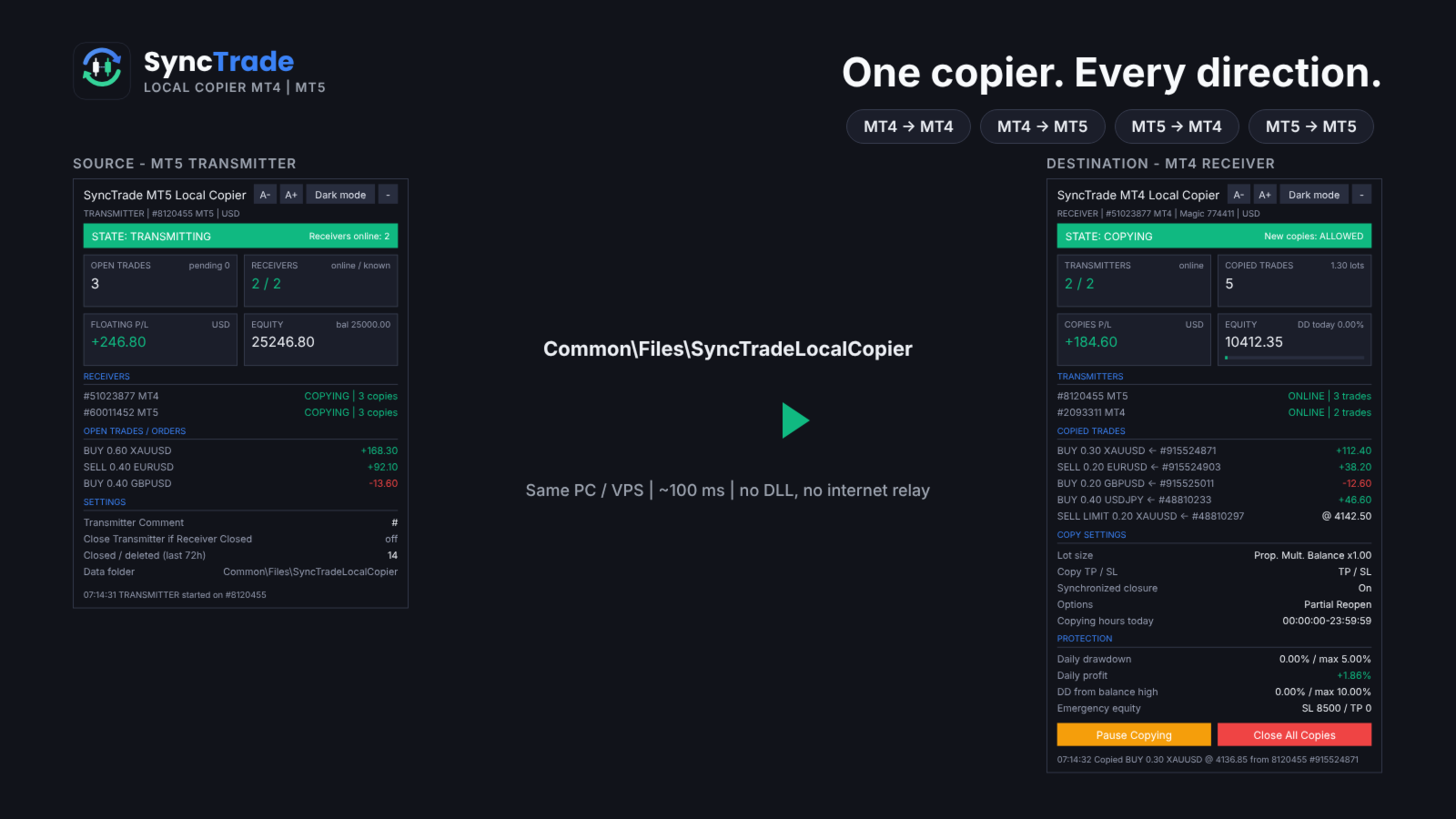
SyncTrade Local Copier copies trades between MetaTrader terminals on the same Windows PC or VPS, in milliseconds, with no internet relay, no DLL and no WebRequest.

It works across platforms. Use SyncTrade MT4 Local Copier on MT4 and SyncTrade MT5 Local Copier on MT5. Both share the same local data folder, so all four directions work: MT4 → MT4, MT4 → MT5, MT5 → MT4, MT5 → MT5.

One EA, three roles:

  • Transmitter: the source account.
  • Receiver: the destination account that opens the copies.
  • Self Copier: copies or multiplies trades inside the same account.

One Transmitter can feed any number of Receivers. One Receiver can follow several Transmitters, mixed MT4 and MT5.

Main features

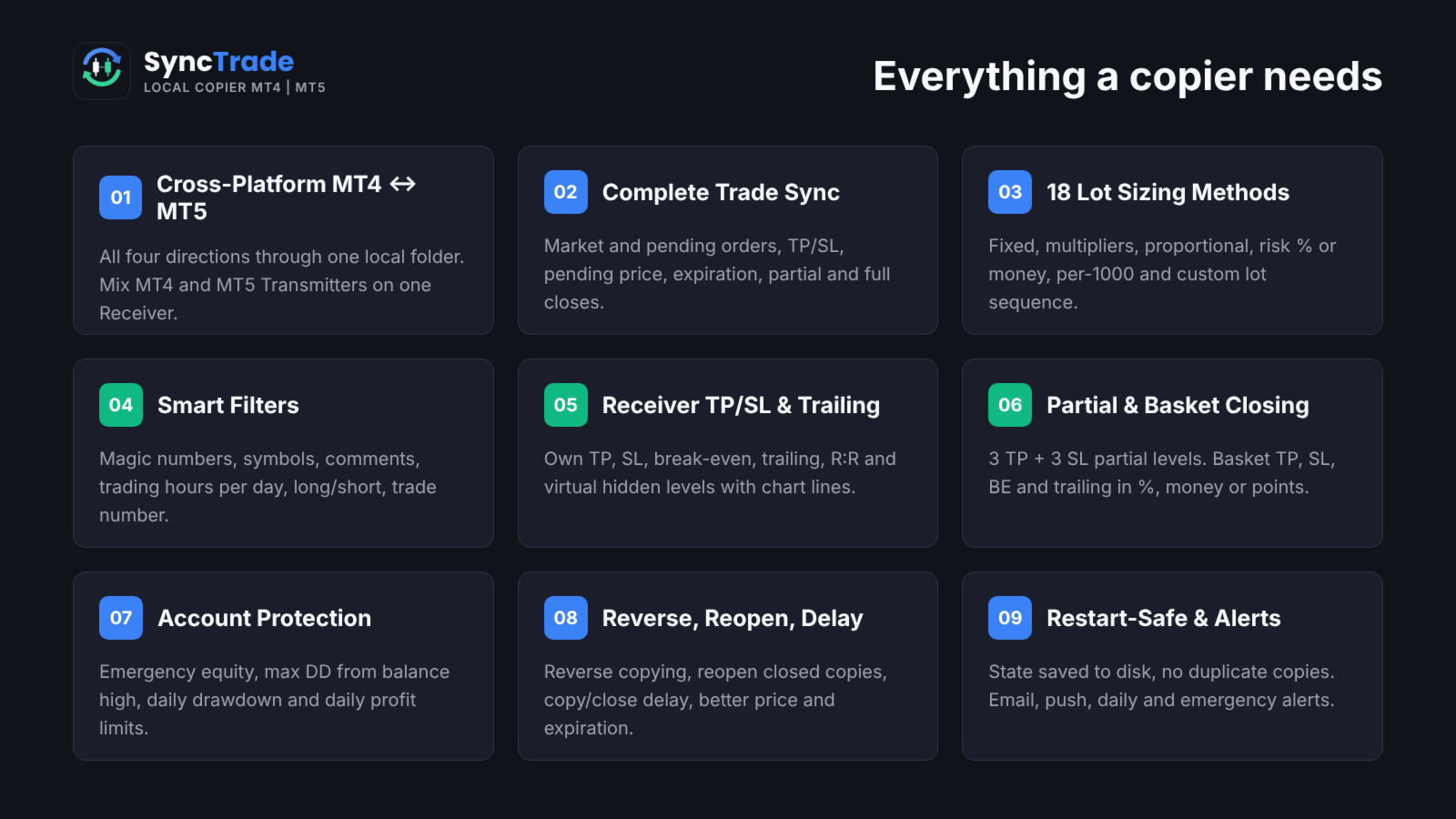
  • MT4 ↔ MT5 copying in all directions, every ~100 ms.
  • Market trades and pending orders, with TP/SL, pending price, expiration, partial and full closes kept in sync.
  • 18 lot sizing methods, custom lots and multipliers per symbol, automatic split of large trades.
  • Filters by magic number, symbol, comment, trading hours per day, direction and trade number.
  • Reverse copying, reopen of closed copies, copy and close delay, better-price entry and exit.
  • Receiver TP/SL, break-even, trailing stop, R:R target and hidden (virtual) levels.
  • Partial closing at 3 TP and 3 SL levels; basket TP, SL, break-even and trailing.
  • Emergency equity stop, max drawdown from balance high, daily drawdown and daily profit limits.
  • Email, push, daily and emergency notifications.
  • Symbol mapping with prefix, suffix and 30 special symbol pairs.
  • State saved to disk: no duplicate copies after a restart.
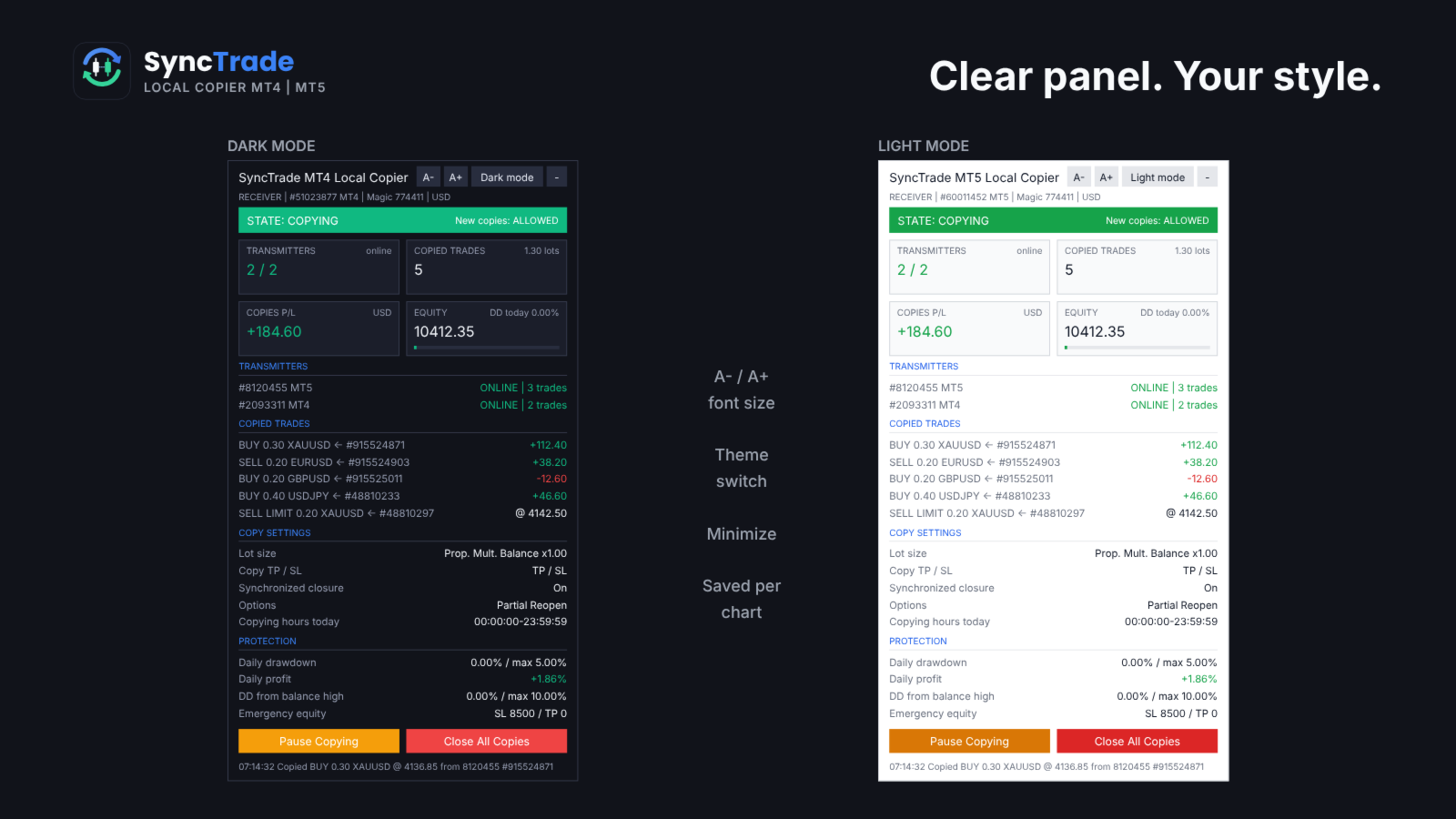
  • On-chart panel with dark/light theme, font size and minimize.

Quick setup

  1. On the source terminal, attach SyncTrade and set Account Mode = Transmitter.
  2. On the destination terminal, attach SyncTrade and set Account Mode = Receiver.
  3. Enter the source account number in Transmitter Account Number (or leave it empty to follow all Transmitters on the PC).
  4. Choose the Lot Size Type and other options.
  5. Enable Algo Trading in both terminals.
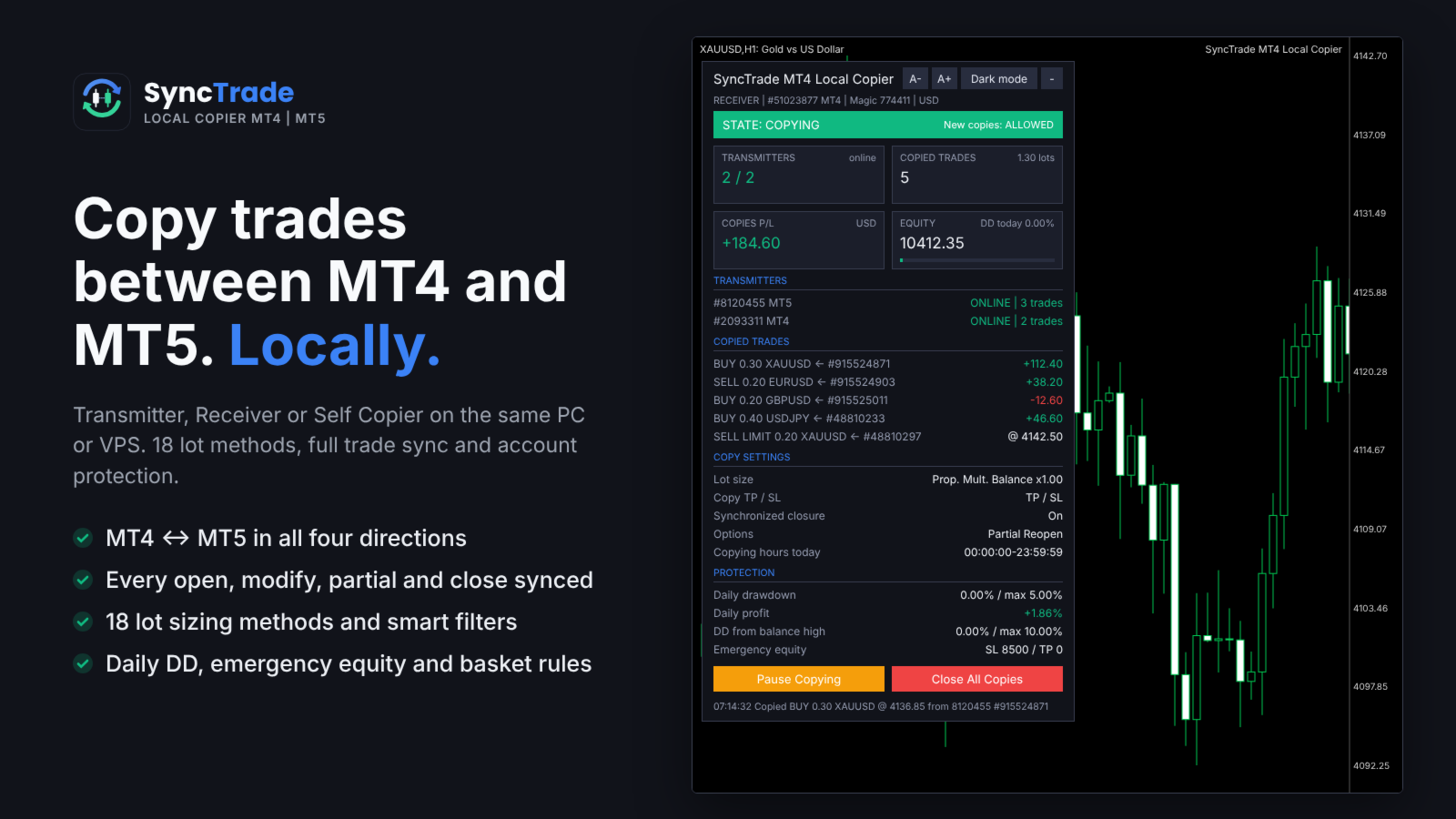
  6. The Receiver panel should show the Transmitter as ONLINE and the state COPYING.

The panel shows the copier state, Transmitters (or Receivers) with platform and status, every copied trade with its source ticket and live P/L, copy settings and protection status. Buttons on the Receiver: Pause/Resume Copying, Close All Copies, and Reset Stop.

Requirements

  • All terminals on the same Windows PC or VPS, same Windows user.
  • Algo Trading enabled on every Receiver.
  • MT5 Receivers: hedging account recommended (netting merges copies on one symbol).
  • Copying needs two live terminals, so it cannot be tested in the Strategy Tester. Use demo accounts.

INPUT PARAMETERS

0 or an empty field = option off. Per-symbol format: first number for all symbols, then symbol + value, e.g. 30,XAUUSD60,BTCUSD2000 .

Account Setup

  • Account Mode: Transmitter, Receiver or Self Copier.
  • Transmitter Account Number: account(s) to follow, comma-separated, MT4 and MT5 mixed. Empty = all Transmitters on this PC.
  • Transmitter Comment: comment sent with each trade. # = original comment, @ = original ticket, % = magic, & = Transmitter account.
  • Receiver Comment: comment for copies; replaces the Transmitter Comment (max 31 characters).

General Settings & Trade Filters

  • Magic Number: magic of copied trades. Not 0; use a different value per Receiver on one account.
  • Magic Numbers to Copy: copy only these. Exact 3245 , partial (14) , range 100-200 ; 0 = manual trades.
  • Maximum Number of Copied Magic Numbers: max different Transmitter magics copied at once.
  • Maximum Receiver Account Magic Numbers: max different magics on the whole Receiver account.
  • Magic Numbers Not to Copy: never copy these (same format).
  • Symbols to Copy / Symbols Not to Copy: include or exclude Receiver symbols, e.g. EURUSD,XAUUSD .
  • Maximum Number of Copied Symbols: max different symbols copied at once.
  • Maximum Receiver Account Symbols: max different symbols on the whole Receiver account.
  • Comments to Copy / Comments Not to Copy: exact comment or partial match in brackets, e.g. (Grid) .

Copying / Multiplying Options

  • Copy on Monday … Sunday: copying hours per day (Receiver server time), e.g. 00:00:00-12:00:00,14:00:00-23:59:59 . Empty = no copying that day.
  • Transmitter Server Offset Hours: hours added to Transmitter time to match Receiver time.
  • Copy Long Trades / Copy Short Trades: copy BUY or SELL trades and orders.
  • Copy Current Trades: copy trades already open when the Receiver starts.
  • Copy New Trades: copy trades opened after the Receiver starts.
  • Copy Take Profit / Copy Stop Loss: copy the Transmitter TP / SL.
  • Take Profit Multiplier / Stop Loss Multiplier: multiply the TP / SL distance.
  • Add/Subtract Points in TP Level / SL Level: add or subtract points (when the multiplier is 1).
  • Do Not Copy Trades/Orders Without SL: skip trades with no SL.
  • Allow TP/SL Manual Change: true = your manual TP/SL change on a copy is kept; false = the EA restores the synced levels.
  • Copy Market Trades / Copy Pending Orders: copy open trades / pending orders. Pending off = the trade is copied when it triggers.
  • Maximum Spread in Points: wait while the spread is higher. Per symbol.
  • Maximum Slippage in Points: slippage for opening and closing.
  • Maximum Copying Difference in Points: wait while the price is further than this from the Transmitter open price.
  • Use Copying Expiration in Seconds / Copying Expiration in Seconds: stop trying to copy a trade after this time.
  • Copying Delay in Seconds: delay before copying, fixed 5 or random 5,20 .
  • Retry Attempts in Seconds: wait before retrying a failed order.
  • Better Price / Better Price Difference in Points: copy only at a better price than the Transmitter by this many points (negative allows worse). Per symbol.
  • Reverse Copying: BUY ↔ SELL, BUY LIMIT ↔ SELL STOP, BUY STOP ↔ SELL LIMIT, TP ↔ SL.
  • Keep Original TP/SL Distances: measure TP/SL from the Receiver open price instead of using the Transmitter levels.
  • Min Distance in Points for Same Symbol/Direction Trades/Orders: no new copy near an existing copy on the same symbol and direction.

Lot Size Management

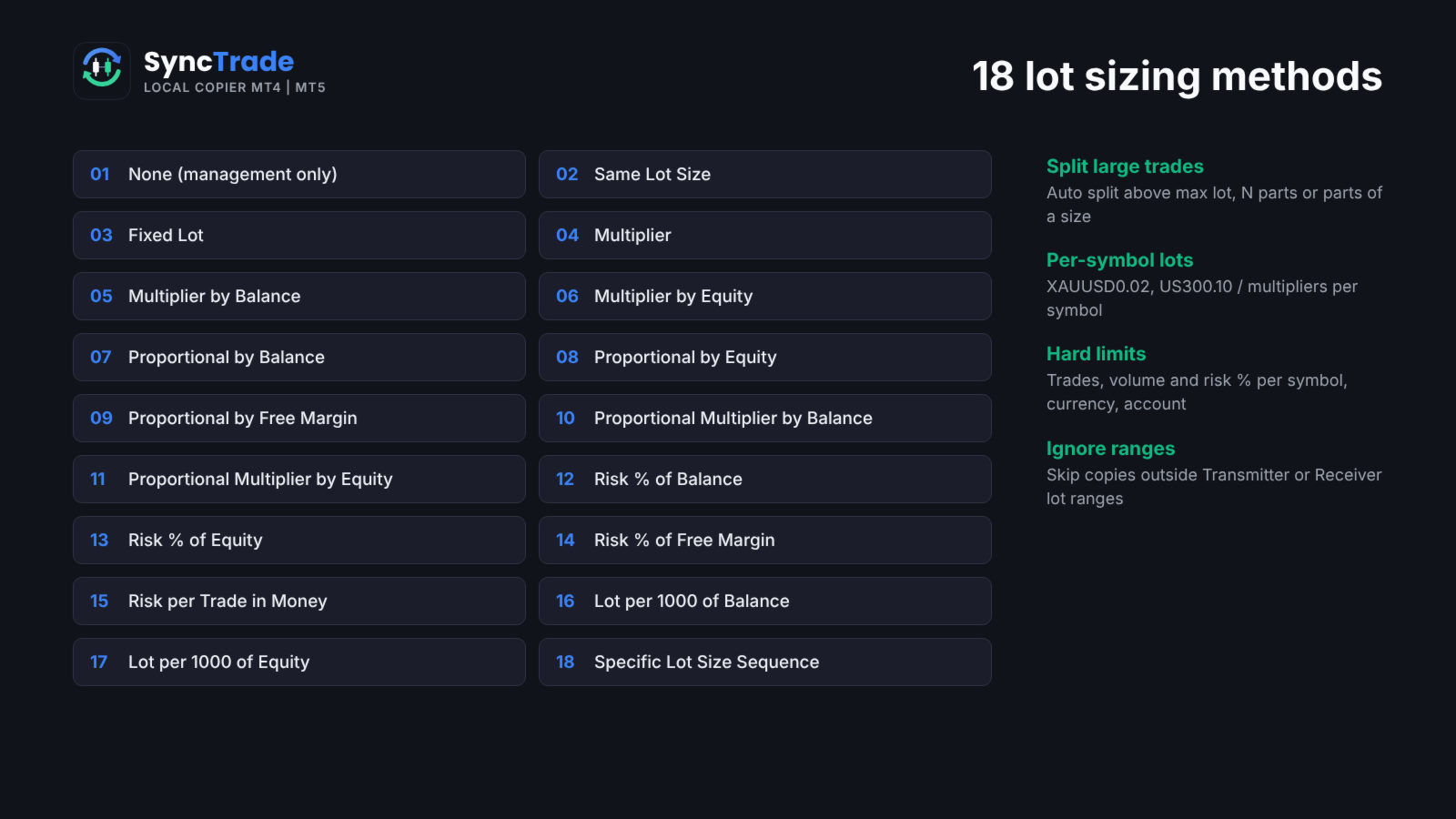
  • Lot Size Type: None (no new copies), Same Lot Size, Fixed Lot, Multiplier, Multiplier by Balance, Multiplier by Equity, Proportional by Balance / Equity / Free Margin, Proportional Multiplier by Balance / Equity, Risk per Trade in % of Balance / Equity / Free Margin, Risk per Trade in Money, Lot Size per 1000 of Balance / Equity, Specific Lot Size Sequence.
  • Add/Subtract to Same Lot Size: added to the Transmitter lot.
  • Fixed Lot Size: lot for every copy.
  • Multiplier: Transmitter lot × value.
  • Multiplier by Balance / Equity: Transmitter lot × Receiver balance (equity) ÷ value.
  • Proportional Multiplier by Balance / Equity: Transmitter lot × Receiver/Transmitter balance (equity) ratio × value.
  • Risk per Trade in % of Balance / Equity / Free Margin: lot so that the SL loses this %. No SL = not copied.
  • Risk per Trade in Money: lot so that the SL loses this amount.
  • Lot Size per 1000 of Balance / Equity: value × balance (equity) ÷ 1000.
  • Specific Lot Size Sequence: lots for the 1st, 2nd, 3rd… copy on a symbol, e.g. 0.01,0.02,0.04 . End with 0 to stop after the list.
  • Automatic Split of Copied Trades: split lots above the broker maximum.
  • Split Copied Trades in Parts: split each copy into N trades.
  • Split Copied Trades in Parts of: split each copy into trades of this size.
  • Custom Symbol Fixed Lot Sizes / Custom Symbol Multipliers: per-symbol values, e.g. 0.05,XAUUSD0.02 .
  • Copying from / Up to Symbol Trade/Order Number: copy only the N-th to M-th Transmitter trade on a symbol (e.g. grid levels). Per symbol.
  • Total Symbol / Account Copied Trades: max open copies per symbol / account.
  • Maximum Risk % per Symbol / per Currency / Account Risk %: max total SL risk of copies, in % of balance.
  • Total Symbol / Account Copied Volume: max total lots of copies.
  • Minimum / Maximum Receiver Lot Size: raise to the minimum; cap each copy at the maximum.
  • Ignore Receiver Lot Size Below / Above: skip if the calculated lot is outside the range.
  • Ignore Transmitter Lot Size Below / Above: skip Transmitter trades outside the range.
  • Minimum Volume Step: rounding step for copy lots.

Limits on count, volume and risk make a copy wait; ignore rules skip it.

Trade Management

  • Synchronized Trade Closure: False, True, True for Market Trades Only, True for Pending Orders Only, True for Same Trade/Order Type.
  • Closure Delay in Seconds: delay before closing, fixed or random range.
  • Closure Better Price / Difference in Points: close only at the Transmitter close price or better. Per symbol.
  • Reopen Closed Copied Trades: when a copy closes on the Receiver while the Transmitter trade is open: False, Instantly, At Open Price or Better, At a Specific Time.
  • Reopen Closed Copied Trades Time: time (HH:MM) for the time-based reopen.
  • Apply Partial Closure: reduce copies proportionally when the Transmitter closes part of a trade.
  • Close Transmitter if Receiver is Closed (Transmitter): close the original trade when a copy is closed on a Receiver.

Receiver TP/SL & Trailing Management

  • Virtual/Hidden TP/SL Levels: TP/SL kept by the EA, not sent to the broker.
  • Show Virtual Levels on Chart: draw virtual TP/SL lines.
  • Use TP/SL Levels in: Points or Money.
  • Take Profit / Stop Loss in Points (Money): fixed TP / SL for each copy.
  • Break Even Profit in Points (Money): move SL to the open price at this profit.
  • Trailing Start / Stop / Step in Points (Money): start profit, distance and step of the trailing SL.
  • TP Based on Risk/Reward Ratio 1/: TP = SL distance × value.

Partial Closure Management

  • Partial Closure Take Profit % 1-3 / TP Lot Size % 1-3: at X% of the way to TP, close Y% of the initial lot.
  • Partial Closure Stop Loss % 1-3 / SL Lot Size % 1-3: at X% of the way to SL, close Y% of the initial lot.

Scheduled Trade Closure

  • Close All Copied Market Trades on / Time: day (or Every Day) and time to close all copies.
  • Delete All Copied Pending Orders on / Time: day and time to delete copied pending orders.
  • Close Copied Trades in Minutes: close each copy after N minutes.

Basket Trade Management (in % of Balance, Money and Average Points)

  • Use Basket Take Profit / Stop Loss: close all copies at this basket profit / loss.
  • Use Basket Break Even: after this profit, close all if the basket returns to 0.
  • Use Basket Trailing Stop Loss, Start / Stop / Step: trail a locked basket profit; close all when it is hit.

Emergency Account Protection

  • Use Emergency Account Protection: enable the equity levels below.
  • Receiver Account Stop Loss Equity / Take Profit Equity: close all copies and stop copying at this equity.
  • Max Drawdown % from Balance High: close all and stop copying at this drawdown.
  • Maximum Daily Drawdown from / in % / in Money: close all and pause until the next day (reference: Balance or Equity).
  • Maximum Daily Profit from / in % / in Money: same, for daily profit.
  • No Copying if Transmitter / Receiver Drawdown %>: no new copies above this drawdown.
  • Copy Only if Transmitter Drawdown %> / per Symbol>: copy only above this drawdown.

After an emergency stop, copying resumes after re-attaching the EA or pressing Reset Stop on the panel.

Notification Settings

  • Send Email / Push Notification: on each copy and protection event.
  • Send Daily Notification / Time: daily account report at these times, e.g. 08:00,20:00 .
  • Send Emergency Notification / Emergency Notification Equity: alert when equity falls below levels, e.g. 9000,8000 .

Symbol Mapping Settings

  • Prefix / Suffix of the Transmitter Account: removed from source symbols.
  • Prefix / Suffix of the Receiver Account: added to Receiver symbols.
  • Special Symbol 1-30: direct pairs TRANSMITTER,RECEIVER , e.g. GOLD,XAUUSD .

Panel

  • Show Panel, Panel theme (Dark/Light), Font size 7-16, Panel X / Y.

FAQ

Does it work between two computers? No. SyncTrade is a local copier; all terminals must run on the same PC or VPS.

Different brokers? Yes. Use prefix, suffix and Special Symbol inputs when names differ.

What if a terminal goes offline? The Receiver waits; nothing is opened or closed until the Transmitter is back. No trade is copied twice after a restart.

Several Receivers on one account? Yes, with a different Magic Number on each.

Trading involves risk. Test all settings on demo accounts first.

おすすめのプロダクト
DrawDown Limiter
Haidar Lionel Haj Ali
5 (23)
DrawDown Limiter v5.0 — 高度な口座保護コントローラー DrawDown Limiter v5.0 は、取引口座を監視し、設定されたリスク、利益、ニュース、スケジュール、ロールオーバー、またはポジション数の制限に達した際に自動的に対応する、クライアント側で動作する口座保護コントローラーです。 1つの専用チャートから、 手動取引、自動売買戦略、複数のExpert Advisor、指値・逆指値注文、保有ポジション を監視できます。口座全体を保護することも、Magic Numberを使用して特定のEAまたは複数のEAのみを監視することもできます。 DrawDown Limiter の目的は、単にドローダウンを表示することではありません。 設定した取引ルールを積極的に適用し 、保護条件が有効である限り、そのルールを継続的に実行することを目的としています。 DrawDown Limiter v5.0 は、損失額だけを監視するのではなく、戦略がいつ取引を継続できるのか、どのエクスポージャーを維持できるのか、いつ取引を停止すべきか、そして自動売買環境をいつ安全に再開できるのかま
RisklyCopy copies trades from a master account to one or more receiving accounts running on the same computer or VPS. It works between MT5 terminals, between MT4 terminals, and between MT4 and MT5, also with different brokers. How it works - Attach RisklyCopy in SEND mode on the master account and in RECEIVE mode on each receiving account, using the same channel name. - New trades, stop loss and take profit changes, partial closes and closes are copied. Lot calculation on the receiving accoun
# DS_Copy_EA - User Description DS_Copy_EA is a MetaTrader 5 Expert Advisor that copies trades between MT5 terminals running on the same machine. One EA instance acts as a **Provider** (signal source) and another acts as a **Receiver** (copier). The mode is selected in the EA settings. **How it works:** 1. The **Provider** publishes its open positions internally every 500ms 2. The **Receiver** reads every 1 second, detects new/changed/closed positions, and mirrors them on its own account 3. I
Exp COPYLOT CLIENT for MT5
Vladislav Andruschenko
3.97 (35)
MetaTrader 5 用のプロフェッショナル取引コピー機 MetaTrader 向けの高速・高性能・信頼性の高い 取引コピー機 です。 COPYLOT は、MT4 と MT5 のターミナル間で Forex 取引をコピーでき、 Hedge 口座と Netting 口座の両方に対応しています。 COPYLOT MT5 版の対応構成: - MT5 Hedge → MT5 Hedge - MT5 Hedge → MT5 Netting - MT5 Netting → MT5 Hedge - MT5 Netting → MT5 Netting - MT4 → MT5 Hedge - MT4 → MT5 Netting MT4 版 完全な説明 + DEMO + PDF 購入方法 インストール方法 ログファイルの取得方法 テストと最適化の方法 Expforex のすべての製品 MT4 ターミナルへのコピーも可能です(MT4 → MT4、MT5 → MT4): COPYLOT CLIENT for MT4 COPYLOT は、2台、3台、さらには10台のターミナル間で同時に動作できる、プロフェッ
Aurum Intraday EA
Rodrigo Leonardo Favreau Giuliodoro
Aurum Intraday EA – Advanced Gold Trading Algorithm The Aurum Intraday EA is a powerful automated trading system designed specifically for Gold (XAUUSD) traders who want to capture strong intraday movements while maintaining full control over risk and strategy configuration. Built with a robust algorithm and optimized for H1 and H4 timeframes (H4 recommended) , this Expert Advisor is capable of identifying high-probability opportunities in the gold market and executing trades with precision and
Burning Teko for GOLD EA Fully Automated XAUUSD Strategy • Zero Inputs • Smart Auto‑Risk System Overview Burning Teko for GOLD EA is a completely automated trading system built exclusively for XAUUSD on the H1 timeframe . The EA requires no user configuration — all trading logic, risk control, and lot sizing are automatically calculated based on the account balance and internal algorithms . This makes the EA ideal for traders who want a simple, plug‑and‑play solution without the complexit
RSI Finite State Machine Expert Advisor Overview RSI Finite State Machine Expert Advisor is an automated trading system for MetaTrader 5 that uses the Relative Strength Index (RSI) to generate trading signals. The Expert Advisor is built around a Finite State Machine (FSM) architecture, making the trading process organized, predictable, and easy to maintain. This product is tends to secure that trades are executed in a controlled sequence. This prevents random or repeated trade entries and guar
Bober Real MT5
Arnold Bobrinskii
4.88 (16)
Bober Real MT5 is a fully automatic Forex trading Expert Advisor. This robot was made in 2014 year and did a lot of profitbale trades during this period. So far over 7000% growth on my personal account. There was many updates but 2019 update is the best one. The robot can run on any instrument, but the results are better with EURGBP, GBPUSD, on the M5 timeframe. Robot doesn't show good results in tester or live account if you run incorrect sets. Set files for Live accounts availible only for cu
GapRider EA - ダイナミックな買いサイドギャップトレーディングエキスパートアドバイザー 概要 GapRider EAは、MetaTrader 5向けに設計された洗練された適応型エキスパートアドバイザー(EA)で、買いサイドのギャップトレーディングに特化しています。このEAは、市場の大きなギャップを特定し、戦略的な買い注文を配置し、市場のボラティリティに基づくダイナミックなサイジングを活用して、トレードのエントリーとエグジットを最適化します。堅牢な機能セットを備えたGapRiderは、大きな市場変動後の価格リトレースメントを活用する強力なツールをトレーダーに提供し、初心者から経験豊富なトレーダーまで適しています。 主な機能 ダイナミックサイジングテクノロジー : 平均ローソク足レンジに基づいてストップロス、トレイリングストップ、エントリー条件を自動的に調整し、変化する市場環境への適応性を確保します。 ギャップ検出メカニズム : ユーザーが定義した閾値(デフォルト:平均ローソク足レンジの3倍)を超える大きな価格変動(ギャップ)を特定し、高確率のトレードセットアップをピンポイント
GFX Scalping AI Robot Pro MT5 Professional AI-Powered Forex and Gold Scalping Expert Advisor for MetaTrader 5   Live results:  https://www.mql5.com/en/signals   Live results:  https://www.mql5.com/en/signals/2390660 GFX Scalping AI Robot Pro is an advanced automated trading system developed for high-speed Forex and Gold scalping. The EA combines an intelligent signal-scoring engine, adaptive market profiles, weighted multi-timeframe confirmation, chart-pattern analysis, advanced market filte
Customized Copy MT5
Kyra Nickaline Watson-gordon
Customized Copy is a Multi-Terminal visual trade copying utility that supports Metatrader4 and Metatrader5 for Trade Copying.  You can activate EA on 10 different PCs/VPS. On each PC/VPS can install on Unlimited Terminals. Specifications :     Real Time, Multi Terminal - Multi Account - MT4/MT5 trade copying (support over 50 accounts at same time)     All settings are input visually.     Visual display and modify of copy map and network     Each copy path can be used with different settings
BTC INFINITY GRID Smart Adaptive Averaging • 24/7 Automatic Trading BTC INFINITY GRID is an Expert Advisor (EA) for MetaTrader 5, specifically designed for automated Bitcoin trading 24 hours a day. The EA uses a Smart Adaptive Averaging system that adapts to current market conditions before adding new positions. Additional positions are not opened based solely on price distance, but are managed according to the prevailing market conditions (trend strength filter). FEATURES Smart Adaptive Averag
Expert Starco Assistance is designed as a trading assistant and will perform the best performance and most accurate calculations for capital management for your trades. Features of this expert: Candle closing timer The possibility of determining the placement of the profit limit Ability to calculate volume based on fixed amount, percentage, fixed amount The possibility of opening a trade in the form of market or limit or stop limit
SolarTrade Suite 金融ロボット: LaunchPad Market Expert - 取引を開始するために設計されています! これは、革新的で高度なアルゴリズムを使用して値を計算する取引ロボットであり、金融​​市場の世界でのアシスタントです。 SolarTrade Suite シリーズのインジケーター セットを使用して、このロボットを起動するタイミングをより適切に選択してください。 説明の下部にある SolarTrade Suite シリーズの他の製品をご覧ください。 投資と金融市場の世界を自信を持ってナビゲートしたいですか? SolarTrade Suite 金融ロボット: LaunchPad Market Expert は、情報に基づいた投資決定を行い、利益を増やすのに役立つ革新的なソフトウェアです。 SolarTrade Suite 金融ロボット: LaunchPad Market Expert の利点: - 正確な計算: 当社のロボットは、高度なアルゴリズムと分析方法を使用して、市場の動きを正確に予測します。 資産を売買するのに最適なタイミングを
MENEMANI Smart TRaders | Semi-Automated Supply/Demand, FVG & Order Block Trading Assistant. Available for MetaTrader 5 and MetaTrader 4 (two separate Market products — install the build that matches your terminal).   MENEMANI Smart TRaders is a professional trading assistant (utility EA) that scans, scores, and visualizes institutional price zones — then lets you execute a complete pending-order plan from a single dashboard. You stay in control: the EA never opens a trade on its own. You pick t
TradeX Chart Trading
Jose Roque Do Carmo Junior
5 (1)
Welcome to TradeX Chart Trading Netting and Hedge accounts. Functionalities SHIFT to buy; CTRL to sell; Breakeven; Visual flag of pending orders on the chart; Blocking the BUY/EJECT/SELL buttons to prevent accidental sending of orders; Spread visualization when clicking on the asset being traded; Candlestick countdown; List of open positions; Percentage balance of all transactions for the current day. Warning It does not work in Strategy Tester. Updates and improvements coming soon!
SZ Range Rider
Fazry Achbar Winandha
SZ Range Rider — MT5 Expert Advisor NO GRID, NO MARTINGALE, NO ARBITRAGE Overview SZ Range Rider is an automated MT5 Expert Advisor designed primarily for XAUUSD (Gold) using an advanced volatility breakout trading approach. The EA combines proprietary market-range analysis with automated risk, money, and multi-stage trade management. It is engineered for traders who demand a systematic, disciplined automated strategy without the need for constant manual intervention. Every position operates wit
# GMRFX Copytrade Local & Lan > **Copy-Trade Master/Slave — One EA, File-Based Sync, Zero Network Config.** > Copy trades between MT5 terminals on the same PC, across your local network, or over the internet — using nothing but a shared folder. --- **Version:** 1.00   **Developer:** GMR FX ([ gmrfx.app ]( https://gmrfx.app ))   **Category:** Trade Copiers / Utilities   --- ## What Is This? **GMRFX Copytrade Local & Lan** is a single Expert Advisor that handles both **Master** (sender) and
Maximas e Minimas
Lucas Ricardo Almeida Muniz
LUCRAM EA 2.01 — Configurable Trading Robot for MetaTrader 5 LUCRAM EA is an automated trading robot developed for MetaTrader 5. It allows traders to create different trading configurations by combining high-and-low strategies, moving averages, technical indicators, market filters, and customizable exit rules. The robot can open buy positions, sell positions, or trade in both directions. It is suitable for testing Day Trading and Swing Trading strategies across different financial instruments an
AK Strategy Creator  ( STC ) enables traders to create, edit and save their own strategies using MT5 standard and custom indicators. Attach your strategy's indicators or load your chart template. Add/Remove indicators and modify their settings as needed. Once satisfied, save as chart template. Give the template a specific name as it will be needed for demo/live trading. To backtest the strategy in Strategy Tester, save the template also under the name "tester". If it's already available, overwri
---  Last 5 copies left free. Next there will be  a price 30$ --- DRAGON SWING EA (for EUR/USD 20 minutes) NO MARTINGALES NO CUMULATE ORDERS NO PARTIAL CLOSURES OR HEDGING NO CONFUSIONAL PARAMETERS, MULTI-CHARTS OR MULTI TIMEFRAME NOT OVER-FIT OR COMPLICATED AND RISKY STATEGIES THAT CRASH AFTER FEW DAYS This is a healty, simple, durable and solid Expert Advisor. Suitable and simple to use also for beginners with little capital. DESCRIPTION: The strategy of this expert advisor is to operate du
Copier for the MetaTrader5 terminal. Designed to copy trade from one terminal to another. Works both on netting and hedging accounts. Copying from a netting account can be performed simultaneously to both netting and hedging accounts. Also, from a hedging account, copying can be performed simultaneously to both netting and hedging accounts. Compatible with the version for the MetaTrader4 terminal; if available, copying can be performed between different terminals (also regardless of the type of
Fast M5
Mojtaba Soltaninejad
This robot is not such a martingale and is designed based on a special and unique strategy which is beneficial for traders who are looking for quick profitable trading processes, that is why it works in 5 minutes timeframe as well as theCurrency pair of EUR/USD. Instructions for EXPERT settings FastM5: Adjust/select 0.1 for any  any 1000 USD, “refer to the photos attached” It means you need to trade 1 Lat per 10000 USD.
Impulse Radar MT5 は、MetaTrader 5 の気配値表示に登録されている銘柄から、通常より強い価格変動を素早く検出するためのマルチマーケットスキャナーです。 最大3つの設定可能な時間足で、確定済みのローソク足のみを分析します。ローソク足の実体、値幅、ティックボリューム、現在のスプレッドを各銘柄の ATR と比較するため、Forex、貴金属、指数、CFD、暗号資産など異なる市場を比較できます。 各イベントには0から100までの決定論的な強度スコアが付与されます。このスコアは相対的な値動きの強さのみを示すものであり、成功確率や売買シグナルを意味するものではありません。 主な機能: - 複数銘柄・複数時間足のスキャン - デフォルトは M5、M15、H1 - 確定済みローソク足のみを分析 - Body/ATR、Range/ATR、Volume Ratio、Spread/ATR - 0~100の値動き強度スコア - 上昇、下降、中立の分類 - スコアまたはイベント経過時間による並び替え - ページ切り替え対応のコンパクトなダッシュボード - 行をクリックして対象銘
EA Auto Martingale MT5の紹介 Auto Martingale は、手動トレードからドルコスト平均法(DCA)トレードを簡単に作成できるエキスパートアドバイザー(EA)です。高度な設定により、EA Auto Martingale は、利益を最適化し、リスクを効果的に管理しながら、独自の方法で完璧なマーチンゲール戦略を作成することができます。 Auto Martingaleの主な機能: Magic Number : デフォルトは0です。この値は最初の手動トレードに基づいて自動的に設定されます。 Maximum Deviation / Slippage : トレードを保護するための最大偏差/スリッページを制限します。 Validate Available Order Margin : 新しいトレードを実行する前に利用可能なマージンを確認します。 Indicator Input : Auto Martingaleは、period=3およびshift=2のパラメータを持つSMAインジケーターを使用して、価格が逆行したときのエントリーポイントを決定し、その後価格が回復する兆候
Grid Aroon Directional Shift EA
AL MOOSAWI ABDULLAH JAFFER BAQER
The trading limiter that stops you from breaking your own daily loss and trade limits. • Please test the product in the Strategy Tester before purchasing to understand how it works. • If you face any issues, contact me via private message—I’m always available to help. • After purchase, send me a screenshot of your order to receive a   FREE EA   as a gift. Most grid EAs open the first trade because price drifted a fixed number of points. Nothing changed in the market. The distance simply ran ou
Gildora — 高精度グリッド・アーキテクチャ Gildoraは、グリッドトレードに対して独自のアプローチを採用しています。 グリッド間隔を狭く設定し、エクスポージャー(市場への露出度)を適切に管理するという考え方に基づき、Gildoraは設計されています。そのため、一般的なグリッド構造で必要とされるような多額の初期資金を用意することなく、グリッドシステムを運用したいと考えるトレーダーに適しています。 その他の製品: ここをクリック ご購入後、セットファイルと設定手順をお受け取りになるには、プライベートメッセージをお送りください。 MQL5 お知らせチャンネル MQL5 グループ 価格に関するお知らせ :販売数が3件に達した後、価格は59ドルから159ドルに値上げされます。その後、3件販売されるごとに50ドルずつ値上げされます。最終的な目標価格は2,000ドルです。 一味違うグリッドシステム Gildoraは、単に一定間隔で取引を配置し、相場の動きを待つだけではありません。 このEAは、多角的なシグナル確認手法を用いて市場環境を評価します。単一のインジケーターに依存する
First Buyer 1000$ Next Buyer Will Be 2000$ and will be higher EXPERT ADVISOR: SMART CHEAP AND GOOD 2026   Turn $5 into $65,000 - The Ultimate Low-Cost, High-Return Trading Bot! This is a budget-friendly Expert Advisor, but do not let the low price fool you. If an inexpensive application has the power to turn a mere $5 into $65,000, you are incredibly lucky to have your hands on this system. WHY YOU NEED THIS EXPERT ADVISOR TODAY: 1. Massive ROI Potential from Micro Accounts   You do not need hu
# Aurum Regime Momentum EA ## Adaptive regime-based trading for MetaTrader 5 Aurum Regime Momentum EA is an automated trading system designed for Gold and other broker symbols with the same market structure. It combines higher-timeframe regime classification with momentum confirmation, ATR-based risk control, and systematic position management. The EA reads multiple timeframes automatically from one host chart: - Entry timeframe: H1 by default - Confirmation timeframe: H4 by default - Regim
Magic Grid MT5
Aliaksandr Charkes
4.14 (7)
Magic Grid MT5 is a non-indicator Expert Advisor using a grid strategy (on a hedging account). The strategy is based on automatic reopening of grid pending orders, after closing their market positions (by Take-Profit, Stop-Loss or manually). Pending orders are placed with a specified step from the initial prices, which can be entered manually or generated automatically (once at the beginning of the trade).   The robot can trade on any timeframe, on any currency pair, on several currency pairs,
このプロダクトを購入した人は以下も購入しています
Trade Assistant MT5
Evgeniy Kravchenko
4.43 (216)
取引 ごとのリスクの 計算、新規注文 の 簡単 な 設置、部分的 な 決済機能 を 持 つ 注文管理、 7 種類 のトレーリングストップなど 、便利 な 機能 を 備 えています 。 追加の資料と説明書 インストール手順   -   アプリケーションの手順   ライン機能 チャート上にオープニングライン、ストップロス、テイクプロフィットを表示します。この機能により、新規注文を簡単に設定することができ、注文を出す前にその特徴を確認することができます。   リスク計算 リスク計算機能は、設定されたリスクとストップロス注文のサイズを考慮して、新規注文のボリュームを計算します。ストップロスの大きさを自由に設定できると同時に、設定したリスクを守ることができます。 Lot calc ボタン - リスク 計算 を 有効 / 無効 にします 。 Risk フィールドでは 、必要 なリスクの 値 を 0 から 100 までのパーセンテージまたは 預金通貨 で 設定 します 。 設定」 タブで 、 リスク 計算 の 種類 を 選択 します :「 $ 通貨」、「 % 残高」、「 % エクイティ 」、「
Trade Manager EAへようこそ。これは、取引をより直感的、正確、そして効率的にするために設計された究極の リスク管理ツール です。これは単なるオーダー実行ツールではなく、包括的な取引計画、ポジション管理、リスク管理のためのソリューションです。初心者から上級者、迅速な実行を必要とするスキャルパーまで、Trade Manager EAはあらゆるニーズに対応し、為替、指数、商品、暗号通貨などさまざまな市場で柔軟に対応します。 Trade Manager EAを使用すると、複雑な計算が過去のものになります。市場を分析し、エントリーポイント、ストップロス、テイクプロフィットのレベルをチャート上のラインでマークし、リスクを設定するだけで、Trade Managerが最適なポジションサイズを即座に計算し、SLとTPをピップ、ポイント、口座通貨でリアルタイムに表示します。すべての取引が簡単かつ効果的に管理されます。 主な機能: ポジションサイズ計算機 :定義されたリスクに基づいて取引サイズを瞬時に決定します。 簡単な取引計画 :エントリー、ストップロス、テイクプロフィットを設定するためのド
Farmed Hedge Yield Farming | All Markets (Manual - Hybrid - Semi/Automated EA) VERIFIED TRADING RESULTS - Farmed Hedge Yield Axi Copy:  https://www.mql5.com/en/signals/2356376 - Farmed Hedge Yield Exn Copy:   https://www.mql5.com/en/signals/2356404 - Farmed Hedge Yield V Copy:  https://www.mql5.com/en/signals/2357156 IMPORTANT NOTICE: FarmedHedge is a MANUAL-FOCUSED TRADING UTILITY ,not a fully automated EA. Results shown on this Signal include manual trades and overall strategic management.
Telegram to MT5 Multi-Channel Copier   は、 Telegram と Discord チャンネルのトレードシグナルを MetaTrader 5 へ自動コピーします。ボット不要、ブラウザ拡張不要、手動コピー不要。Telegram や Discord にシグナルが届くと、EA が数秒であなたのターミナルに注文を出します。 さらに、チャンネルをコピーする前に、内蔵バックテスターでそのチャンネルがあなたの口座でどう動いたかを確認できます。 製品は 2 つのコンポーネントで構成されます:Telegram チャンネルを監視する Windows アプリと、MT5 ターミナルでシグナルを執行する本 EA です。MT4 版もあります   こちら . 購入前にお試しください:   アプリは無料でダウンロードできます。ご自身のチャンネルを接続し、各シグナルがどのように読み取られるかをご確認ください。Backtest タブと実際の取引には、購入またはレンタルした EA が必要です。このページの無料デモはストラテジーテスターでのみ動作し、テスターでは Telegram と D
EA Overfitter
Stephen J Martret
5 (4)
That backtest looks great. But will it still be making money tomorrow, next week, next month? EA Overfitter re-runs your EA on 100 price histories it has never seen. One score tells you if the edge is real. A backtest tells you what an EA did on one price history — the one that happened to occur. What you cannot tell from it is how much of that result was the strategy and how much was the particular path. EA Overfitter answers that. It builds up to 100 synthetic price histories your EA has n
TradePanel MT5
Alfiya Fazylova
4.89 (174)
Trade Panelは多機能なトレーディングアシスタントです。アプリには手動取引用の50以上のトレーディング機能が搭載されており、ほとんどの取引作業を自動化することができます。 アプリの説明書: https://www.mql5.com/en/blogs/post/756482 デモ口座用アプリの試用版: https://www.mql5.com/en/blogs/post/750865 アプリのインストール方法: https://www.mql5.com/en/blogs/post/756239 アプリをビジュアルモードでテストする方法: https://www.mql5.com/en/blogs/post/770277 VPSのMetaTraderにアプリをインストールする方法: https://www.mql5.com/en/blogs/post/770190 取引。 ワンクリックで取引操作を行うことができます: リスクを自動計算して指値注文やポジションを開く。 複数の注文やポジションをワンクリックで開く。 注文のグリッドを開く。 保留中の注文やポジションをグループごとに閉じる
News Trade EA MT5
Konstantin Kulikov
4.55 (11)
僕自身が数年間使っている便利なロボットをご紹介します。半自動モードでも完全自動モードでもお使いいただけます。 >>> Chat <<< 当プログラムは経済指標カレンダーで発表されるニュースをもとにした取引の柔軟な設定が可能です。戦略テスターでは確認不可です。実際の取引のみです。 最新の設定アーカイブをダウンロードしてください: https://www.mql5.com/en/blogs/post/747929 シグナルモニタリング: https://www.mql5.com/en/signals/author/test-standart 当該エキスパート・アドバイザーのためのカスタマイズ設定セットを作る場合は、ブログの全パラメータの説明を参照してください :   https://www.mql5.com/en/blogs/post/748545 。 基本的なデフォルト設定について 一つのチャートからGBPとの通貨ペア(GBPUSD、EURGBP、GBPJPY、GBPCAD、GBPAUD、GBPCHF)で取引をします。GBPは最もボラティリティの高い通貨のため、取引が成功するチ
Power Candles Strategy Scanner:自己最適化するマルチシンボル・セットアップファインダー わずかな動きのたびに鳴るスキャナーは、やがて無視されるようになります。慌ただしいローソク足の確定ひとつでアラートが次々と届き、本当にトレードしたい唯一のセットアップがノイズに埋もれてしまう。 Power Candles Strategy Scanner は、自己最適化する Power Candles エンジンを Market Watch のすべてのシンボルで動かし、あなた自身のフィルターを通過したものだけを知らせます。基準は、直近の確定足の強さ、セットアップのリスクリワード、リアルタイムのスプレッド、そしてあなたがトレードする資産クラスです。シンボルがリストに入った瞬間、スキャナーがあなたを呼びます。フィルターで外したものはすべて静かなまま。同じローソク足の確定で出たヒットは、すべて1通のメッセージにまとめて届きます。 購入前にパネルとすべてのフィルターをご覧ください。 スクリーンショット、全機能のツアー、Power Candles との連携ワークフロー: stein.
自分の取引ルールで Telegram のシグナルをコピー Telegram to MT5 Signal Trader は、Telegram の公開・非公開チャンネルやグループから、テキスト形式の取引シグナルを MetaTrader 5 へ自動でコピーします。1つのデスクトップアプリで複数の配信者と MT5 口座を管理し、 配信者ごとにリスクと取引設定を個別に指定 できます。 シグナルのコピーに Telegram ボットや API 設定は必要ありません。 電話番号または QR コードでご自身の Telegram アカウントにログインし、すでに参加しているチャンネルやグループを選ぶだけです。ボットの作成や、Telegram API トークン、API ID、API hash の入力は不要です。 ポジションサイズを選び、複数の利確水準に分けて決済し、建値へのストップ移動やトレーリングストップを自動化できます。配信者のシグナルを受け取りながら、実際の取引方法は自分で管理できます。 本製品は、この MT5 エキスパートアドバイザ(EA)と、必須の Windows 連携アプリで構成されます。 インス
================================================================================ POC BREAKOUT - V20.72. Full Professional Grade Toolkit ================================================================================ POC Breakout is a full MetaTrader 5 trading dashboard for discretionary traders who want breakout signals, Point of Control (POC) context, volume profiles, order flow, market structure, news, alerts, and advanced trade planning in one professional workspace. Attached directly to you
次回アップデート — バージョン 2.52 近日公開!【新機能】 市場分析とトレードワークフローを強化する、4つの主要な新機能にご期待ください 皆様のトレードニーズに応える4つの新機能により、市場分析を次のレベルへと引き上げます。新機能をご紹介します: 1. TRADE OVERVIEW DASHBOARD 2. CONFLUENCE AT ZONE 3. STRONG & WEAK HIGH/LOW 4. OTE 1. TRADE OVERVIEW DASHBOARD 市場全体の状況をより簡単に把握できるダッシュボードです。トレード判断をサポートするガイダンスを提供し、市場分析とトレード計画を体系的に行えるよう支援します。すべてを1つの画面で確認できます。 マルチタイムフレーム市場概要(Multi-Timeframe Market Overview) 市場の方向性と価格構造をより明確に把握 市場状況をすばやく確認 体系的な市場分析とエントリー計画のためのガイダンス 2. CONFLUENCE AT ZONE 価格が重要なゾーンに入るとき…いくつのサポート要因が一致しているかを確認で
Strategy Builder offers an incredible amount of functionality. It combines a trade panel with configurable automation (covert indicators into an EA), real-time statistics (profit & draw down) plus automatic optimization of SL, TP/exit, trading hours, indicator inputs. Multiple indicators can be combined into an single alert/trade signal and can include custom indicators, even if just have ex4 file or purchased from Market. The system is easily configured via a CONFIG button and associated pop-u
EA Auditor
Stephen J Martret
5 (7)
EA Auditor is an independent analysis tool for traders evaluating Expert Advisors and trading signals on MetaTrader 5. It audits backtest reports, reviews posted developer signals, and cross-verifies the two against each other to help traders assess strategies before committing capital. The MQL5 market offers a wide range of Expert Advisors from many developers, with varying approaches, quality, and transparency. EA Auditor provides a consistent, data-driven framework for reviewing them, answer
EA Portfolio Control & Cloud Monitoring for MetaTrader 5 Your EAs manage trades. KONTROL_01 manages your EAs. A control system for traders running multiple Expert Advisors on the same account. Coordinate EA activity, manage trading risks and monitor your setup remotely. A detailed User Manual is available via DM after purchase. IN PRACTICE Multiple EAs. No coordination. Your EAs trade independently, unaware of each other's activity. KONTROL_01 coordinates them, limits simultaneous activity a
News Filter EA: Advanced Algo Trading Assistant News Filter EA is an advanced algo trading assistant designed to enhance your trading experience. By using the News Filter EA , you can integrate a Forex economic news filter into your existing expert advisor, even if you do not have access to its source code. In addition to the news filter, you can also specify trading days and hours for your expert. The News Filter EA also includes risk management  and equity protection features. MT4 Version Ma
Trade Manager は、リスクを自動的に計算しながら、取引を迅速に開始および終了するのに役立ちます。 過剰取引、復讐取引、感情的な取引を防止する機能が含まれています。 取引は自動的に管理され、アカウントのパフォーマンス指標はグラフで視覚化できます。 これらの機能により、このパネルはすべてのマニュアル トレーダーにとって理想的なものとなり、MetaTrader 5 プラットフォームの強化に役立ちます。多言語サポート。 MT4バージョン  |  ユーザーガイド + デモ Trade Manager はストラテジー テスターでは機能しません。 デモについてはユーザーガイドをご覧ください。 危機管理 % または $ に基づくリスクの自動調整 固定ロットサイズを使用するか、ボリュームとピップに基づいた自動ロットサイズ計算を使用するオプション RR、Pips、または価格を使用した損益分岐点ストップロス設定トレーリングストップロス設定 目標に達したときにすべての取引を自動的に終了するための 1 日あたりの最大損失 (%)。 過度のドローダウンからアカウントを保護し、オーバートレードを防ぎます
The product will copy all telegram signal to MT5 ( which you are member) , also it can work as remote copier.  Easy to set up, copy order instant, can work with almost signal formats, image signal,  s upport to translate other language to English Work with all type of channel or group, even channel have "Restrict Saving Content", work with  multi channel, multi MT5 Work as remote copier: with signal have ticket number, it will copy exactly via ticket number. Support to backtest signal. How to s
VirtualTradePad PRO SE MT5 — MetaTrader 5向けプロフェッショナル取引コントロールセンター VirtualTradePad PRO SE は、 MetaTrader 5 向けのプレミアムなチャートベースの取引パネルであり、トレード管理ワークスペースです。より速い執行、明確なポジション管理、構造化されたトレード管理、視覚的なレベル計画、そしてチャート上で完結するプロフェッショナルなワークフローを求めるトレーダー向けに設計されています。 これは単なる BUY / SELL パネルではありません。PRO SE は、手動取引、予約注文、ポジション管理、部分決済、バスケット損益管理、平均化レベル、ATMルール、シグナル監視、リアルタイム市場情報、ストラテジーテスター (Strategy Tester) ワークフロー、VPS向け運用を、1つの連携されたインターフェースに統合します。 MT4版 | 完全な説明とスクリーンショット | 購入方法 | インストール方法 | ログファイルの取得方法 | テストと最適化の方法 | Expforex のすべての製品 PRO
Local Trade Copier EA は、MAMまたはPAMMアカウントを必要とせずに、外部ソースからのトレードシグナルを実行する必要がある、または同時に複数のアカウントを管理する必要がある個々のトレーダーまたはアカウントマネージャー向けのソリューションです。最大8つのマスターアカウントから無制限のスレーブアカウントにコピーします [ インストールガイド | アップデートガイド | トラブルシューティング | FAQ | すべての製品 ] 100%セルフホスト インストールと使用が簡単 インストーラー、構成ファイル、サーバー、メモリパイプ、DLLは使用されていません EAを永久に使用するための1000回のアクティベーション ローカル実行、ネットワーク遅延なし それはあなたがこれまでに必要とするすべての機能を実装します: 最大8つのマスターアカウントと無制限のスレーブアカウント すべてのブローカーおよびDD / NDD / ECN / STP実行で動作します 異なる口座通貨の口座で動作します ライブアカウントとデモアカウントの間で区別なく機能します マスターアカウントとスレーブア
MetaTrader 5 用の order block・BOS・ChoCH エキスパートアドバイザー、Telegram 通知付き SMC Trade Pilot MT5 はチャート上の市場構造を読み取り、シグナルを Telegram に送信します。構造のブレイク(BOS)と性格の変化(ChoCH)を表示し、 強度スコア付きの order block を描画し、fair value gap(FVG)と liquidity sweep を追跡し、point of control、value area high、value area low を含む volume profile を表示し、マルチタイムフレームパネル、コンフルエンススコア、kill zone セッションを備えたコンパクトなダッシュボードにまとめます。 確定と同時に表示し、その後に確認 ブレイクはローソク足の確定と同時に PENDING と表示されます。確認を待たずに表示され、新たな高値または安値が確認した時点で確定に変わります。設定した本数のローソク足で自動的に期限切れとなり、価格が無効化した場合は消えます。送信する通知は設定
MT5 to Telegram Signal Provider は、Telegramのチャット、チャンネル、またはグループに 指定された シグナルを送信することができる、完全にカスタマイズ可能な簡単なユーティリティです。これにより、あなたのアカウントは シグナルプロバイダー になります。 競合する製品とは異なり、DLLのインポートは使用していません。 [ デモ ] [ マニュアル ] [ MT4版 ] [ Discord版 ] [ Telegramチャンネル ]  New: [ Telegram To MT5 ] セットアップ ステップバイステップの ユーザーガイド が利用可能です。 Telegram APIの知識は必要ありません。必要な全ては開発者から提供されます。 主な特長 購読者に送信する注文の詳細をカスタマイズする機能 例えば、Bronze、Silver、Goldといった階層型のサブスクリプションモデルを作成できます。Goldサブスクリプションでは、すべてのシグナルが提供されます。 id、シンボル、またはコメントによって注文をフィルターできます 注文が実行されたチャート
AW Shepherd Safety MT5
AW Trading Software Limited
5 (5)
AW Shepherd Safety EA は、保有中のポジションを管理するエキスパートアドバイザーです。最初の注文はトレーダーがパネルから発注し、その後は EA がバスケットを自動で管理します。トレンドフィルターを通してリカバリー注文を追加し、TakeProfit、トレーリング、またはストップでサイドを決済し、決済の水準をチャートに表示します。 買いと売りは別々に管理され、両方のサイドを同時に保有できます。リカバリー注文は、価格が一定の間隔だけ動いたというだけでは発注されず、Parabolic SAR、2本の MA、またはローソク足の色でポジション方向への反転が確認されてから発注されます。Orders Magic number が一致していれば、手動や他の EA で発注したポジションも管理の対象になります。 EA によるポジション管理の流れ: 1 トレーダーが Open Buy または Open Sell ボタンで、Order Size 欄のロットで最初の注文を発注します。 2 価格がポジションに不利な方向へ Minimal step between recovery orders
Dealer's Panel No signal decides anything here — a hand does. One click, and the panel calculates what's underneath: lot size from risk, target from a 30-step balance ladder that remembers exactly how far an account has climbed. Toggle between market and pending without touching an input field. Set a stop, and the take-profit can write itself — a fixed share of the balance, translated into price with no arithmetic left for the trader to get wrong. One trade live at a time; it won't let a seco
RETAILBERG FOOTPRINT CHART PRO — Order-Flow Workspace for MetaTrader 5 Version 7.00  |  Professional System  |  31 tools  |  One chart A full 150-page illustrated User Manual is included. Please read the full manual to understand this feature packed footprint chart elements and ui. https://www.mql5.com/en/blogs/post/777982 DEMO / STRATEGY TESTER — PLEASE READ FIRST
25% discount on the release of the tool: only for the next 3 buyers Send a message to receive a demo version. AstroTrade Trading Assistant AstroTrade is a comprehensive multi-functional trading utility developed for the MetaTrader 5 platform. It integrates essential tools for trade execution, risk management, and technical monitoring into a single unified interface. The application is designed to assist traders in managing their daily operations through a visual and structured environment. Vi
Bneu Prop Firm Pass System
Marvinson Salavia Caballero
5 (1)
BNEU PROP FIRM PASS SYSTEM v2.37 PRODUCT OVERVIEW Bneu Prop Firm Pass System is a professional risk management and account protection utility for MetaTrader 5. Attach to any chart and configure your account rules. The system monitors daily loss, maximum drawdown, profit target, trading days, open risk, margin usage, news events, pending orders, weekend restrictions, and rollover restrictions from one dashboard. It includes a 5-tab premium dashboard, prop firm presets, custom rules, Risk Sentine
Elliott Wave Helper
Siarhei Vashchylka
4.93 (14)
Elliott Wave Helper is a panel for constructing wave analysis. Manual (Be sure to read before purchasing) | Version for MT4 Advantages 1. Constructing wave analysis and wave structure in a few clicks 2. Availability of all wave analysis patterns, including triangles and combinations 3. All nine wave display styles, including a special circle font 4. Change colors and display styles of wave groups directly from the chart 5. Binding all elements to a set timeframe or timeframes 6. A template syste
Hello friends. I wrote this utility specifically for use in my profile with a large number of Expert Advisors and sets ("Joint_profiles_from_grid_sets"   https://www.mql5.com/en/blogs/post/747929 ). Now, in order to limit losses on the account, there is no need to change the "Close_positions_at_percentage_of_loss" parameter on each chart. Just open   one   additional chart, attach this utility and set the desired percentage for closing all trades on the account. The utility has the following fu
REVDEN AI Desk:あなた自身の AI との一つの会話で、REVDEN のマーケットコンテキストをもとにトレードを運営する トレードのすべてを一つの会話で運営する姿を想像してみてください。 REVDEN AI Desk はそれを MetaTrader 5 にもたらします。あなた自身の AI に相場をどう読んでいるかを尋ねると、AI はあなたが取引する銘柄について REVDEN の完全なコンテキストをもとに答えます。銘柄の状態、リスク像、今後の指標発表まで含めてです。AI の提案はエントリー、ストップ、ターゲット、リスクとともに届き、合うものをあなたが承認します。ルールの変更も同じ方法です。変えたい点を書けば、AI が新しいルールブックの草案を作り、採用するかどうかはあなたが決めます。会話の周りには、マーケット全体が一つの画面にまとまっています。 デスクとセットアップガイドをご覧ください。 すべての画面、すべての設定、そしてあなた自身の AI との最初のステップ: stein.investments/products/revden-ai-desk AI との一つの会話、マーケッ
複数のEAや手動取引を使っているときも、チャート1枚で「今日の損失」「設定した上限」「上限までの残り」を確認できます。RiskGuardは新しい売買を始めるEAではありません。どの取引の決済を任せるかは、開始前に自分で選べます。 まずはデモ口座で試す チャートを1枚開いてRiskGuardを追加します。初回は「監視のみ」で、取引を閉じません。 日次上限を決め、「開始前に確認」で決済対象の建玉と予約注文の件数を確認します。 対象が正しければMT5とEAのアルゴリズム取引を許可し、「この内容で開始」を押します。「監視のみに戻す」で新たな決済依頼を止められます。 1日の損失上限を決める たとえば開始残高100万円の口座で上限を2%にすると、1日の枠は2万円です。現在の損失が1万2,000円なら、残りは8,000円。決済済みの損益と、保有中の取引の含み損益を合わせて計算します。前日から持ち越した含み損も含みます。入出金は取引損益と区別します。 上限に達したらどうなる? 対象の建玉に決済を依頼し、対象の予約注文を取り消します。日次の停止は次の区切り時刻まで続き、その間に新しく成立した対象取引も決
作者のその他のプロダクト
Onic Scalper
Ida Bagus Githa Dyatmika
Onic Scalper EA use Breakout Strategy and Trend Following Strategy for Scalping Trading Methods This EA trades the breakouts from daily relative highs and lows. For the entry, stop orders are used for the fastest possible execution. Profits can be secured by the adjustable trailing stop. The backtests shown in the screenshots were done with the default settings. There might be better or worse settings.  Please download the free demo to do your own testing.This EA does not use any martingale and/
My Trade Panel MT4 A manual trading panel for MetaTrader 4. It calculates your lot size from the risk you choose, places market and pending orders in one click, and manages open positions with breakeven, partial close, and seven types of trailing stop. It does not open trades on its own. You make the decisions and the panel handles the math and the routine work. Line function Show Entry, Stop Loss, and Take Profit lines on the chart. Drag them to plan a trade and see the lot, risk, and reward b
SyncTrade Local Copier copies trades between MetaTrader terminals on the same Windows PC or VPS, in milliseconds, with no internet relay, no DLL and no WebRequest. It works across platforms. Use SyncTrade MT4 Local Copier on MT4 and SyncTrade MT5 Local Copier on MT5. Both share the same local data folder, so all four directions work: MT4 → MT4, MT4 → MT5, MT5 → MT4, MT5 → MT5 . One EA, three roles: Transmitter : the source account. Receiver : the destination account that opens the copies. Self C
Onic Scalper MT5
Ida Bagus Githa Dyatmika
Onic Scalper EA use Breakout Strategy and Trend Following Strategy for Scalping Trading Methods  This EA trades the breakouts from daily relative highs and lows. For the entry, stop orders are used for the fastest possible execution. Profits can be secured by the adjustable trailing stop. The backtests shown in the screenshots were done with the default settings. There might be better or worse settings.  Please download the free demo to do your own testing.This EA does not use any martingale and
My Trade Panel MT5 A manual trading panel for MetaTrader 5. It calculates your lot size from the risk you choose, places market and pending orders in one click, and manages open positions with breakeven, partial close, and seven types of trailing stop. It does not open trades on its own. You make the decisions and the panel handles the math and the routine work. Line function Show Entry, Stop Loss, and Take Profit lines on the chart. Drag them to plan a trade and see the lot, risk, and reward b
Short description (Market field): Account-level risk guardian for prop firm challenges: daily/overall loss locks, SL risk limits, news filter, daily profit cap and consistency tracking. PropShield Risk Manager protects a prop firm challenge or funded account from the mistakes that end it: a daily drawdown breach, an overall drawdown breach, an oversized trade, a trade opened into high-impact news, or one oversized winning day that ruins the consistency rule. It is a utility, not a trading robot.
フィルタ:
レビューなし
レビューに返信