AurumEdge News Countdown

  • Utilities
  • Anthony Nwabueze Onyenweaku
    Anthony Nwabueze Onyenweaku
    • Executive Director at  Amchery Season One Ltd
    • Nigeria
    • 1313
    I’m Tony, founder of AurumEdge Tech. I build Expert Advisors and indicators for MetaTrader 5 in MQL5, focusing on gold (XAUUSD), forex and indices (US30, NAS100, GER40).
    What I do:
    • Custom EAs from your strategy rules: breakout, trend, session-based, grid-free risk-managed systems
  • Version: 1.1
  • Updated: 5 November 2026
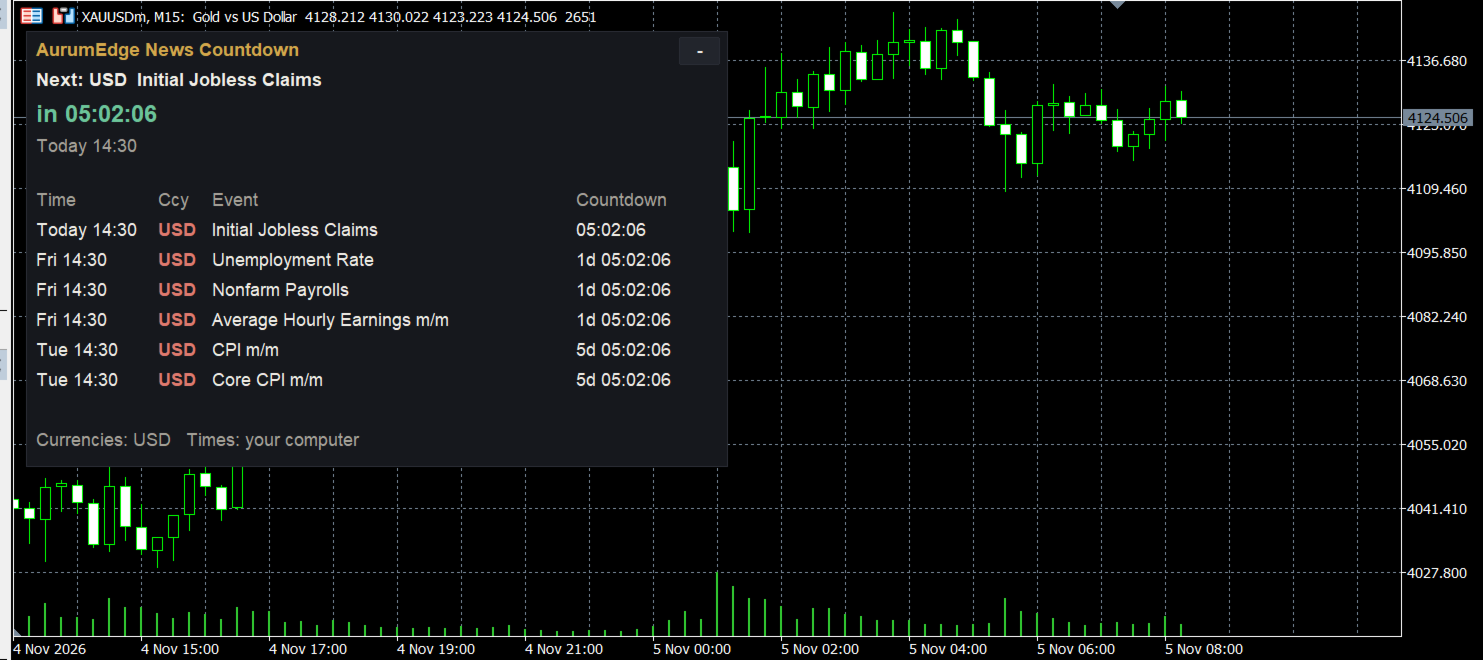
AurumEdge News Countdown keeps the economic calendar on your chart, so a big release never catches you by surprise.

What it shows
- The next event for this chart's currencies, with a large live countdown (turns red in the last 15 minutes)
- Forecast and previous values for the next event
- A list of upcoming events: time, currency, event name and countdown
- The latest released event with its actual result next to the forecast
- Optional dotted vertical lines on the chart at each event time (hover to see the name)

Alerts
- Two alerts before each event (default 15 and 5 minutes), as pop-up, sound and/or push notification to the MT5 mobile app

Easy to use
- Currencies are picked automatically from the chart: USD on gold, EUR and USD on EURUSD, and so on. You can also type your own list, for example USD,EUR,GBP.
- High-impact events only, or high and medium.
- Times shown in your computer's time or in broker server time.
- The "-" button shrinks the panel to just the next event.

Good to know
- The data comes from MetaTrader 5's built-in economic calendar, so no website or extra setup is needed. The terminal must be connected to your broker.
- The economic calendar is not available in the Strategy Tester; attach the indicator to a live chart.
- News releases can bring wide spreads and fast moves. This indicator shows when they are due; it does not predict the result or the market reaction.

Inputs
- Currencies, which events (high / high and medium), number of events in the list, days ahead, time display
- Alert minutes (two), pop-up, push, sound
- Vertical lines on/off and colours
- Panel position and font size
Recommended products
DESCRIPTION: Position Size Calculator — On-Chart Risk Management Tool Never risk too much on a single trade again. This calculator displays real-time position sizing for 3 risk levels simultaneously, calculated from your live account balance and current ATR-based stop loss distance. DISPLAYS 3 RISK SCENARIOS AT ONCE: Risk Level 1 (1%): Risk amount in dollars + Lot size Risk Level 2 (2%): Risk amount in dollars + Lot size Risk Level 3 (3%): Risk amount in dollars + Lot size All lot sizes are dyna
FREE
Gold Scalping Matrix MT5
Mohamed Abdulmohsen Mohamed Saeed Ali
The Gold Scalping Matrix is an advanced trading algorithm designed to capitalize on market action and price reversals in the gold market. This innovative bot employs real time market behavior trading strategy, intelligently placing buy and sell orders at predetermined intervals around the current market price.  All Configuration Set Files for back-test and live accounts   All Experts for back-Test find the new free versions before change to paid Recommended Broker Support group   or DM for any
Risk Calculator – PeterT (MT5 EA) What It Does This is a Position Size & Risk Calculator Expert Advisor for MetaTrader 5. It places a floating panel on your chart that automatically calculates the correct lot size based on your account balance and the risk percentage you set. Instead of doing math manually before every trade, the tool handles it instantly — so you always know exactly how much you're risking. Key Features Auto Lot Sizing — Enter your risk % and Stop Loss in pips, and the EA inst
Overview : The Advanced News Trading Panel is a versatile tool designed for traders who rely on news-based trading strategies. This Expert Advisor (EA) provides an intuitive graphical interface that allows users to quickly set up pending orders and manage risk with ease. With the ability to automatically place Buy/Sell Stop orders based on your pre-set stop order distance from the bid/ask price, stop-loss and take-profit levels, the EA allows for precision trading during high-volatility news eve
Sessions Killzone
Wafa Mohammed Omar Abou Alwafa
Session Killzone Indicator Indicator that helps you to identify the killzone times of both London and NewYork sessions which usually is the most times for high volatility and taking liquidity from the market. Killzone times are configurable through indicator parameters. The indicator adjusts the range of the killzones based on the daily trading range.
FREE
Close All Trades Button
PHOENIX GLOBAL INVESTMENTS LTD
5 (2)
Closing several open positions one at a time during a fast-moving market or a platform issue wastes time, and every extra second adds slippage exposure. Close All Trades Button gives you instant, portfolio-wide position closure from a single click. Press the button and every open position closes sequentially with automatic retry logic for rejections and requotes, so a single stuck order doesn't block the rest. How it speeds up your exit - One click closes every open position on the account t
FREE
Welcome to Smart Algo Trade Panel Manager MT5 - the ultimate   risk management tool designed to make trading more effective based on user needs.  It is a comprehensive solution for seamless trade planning, position management, and enhanced control over risk. It does not matter weather you a beginner or an advanced trader, or a scalper needing rapid executions, SmartAlgo Trade Panel  adapts to your needs offering flexibility across all markets of your choice. You can put SL, Lot and TP of choice
Origin of EA Security Guard Due to unknown bugs in EA, account funds can unexpectedly drop from tens of thousands of dollars to zero within a day. To prevent such incidents, the ultimate purpose of EA Security Guard is: To prevent random opening/closing of orders due to unknown EA bugs that could lead to account fund depletion. EA Security Guard User Guide What is baoan-gj (Security Guard Tool) This is a security tool designed for traders, primarily aimed at monitoring and preventing abnormal tr
ApexTrend
Oluwaseun James Okewoye
Built for Momentum. Engineered for Discipline. Designed for Growth. ApexTrend EA is a powerful trend-following Expert Advisor created to capture explosive moves in the market — while protecting your capital with structured, rule-based risk management.  ApexTrend v2.61 , a high-performance trend-following powerhouse engineered for traders who prioritize capital preservation as much as profit. Built on over 3 years of algorithmic refinement, ApexTrend combines institutional-grade execution with a
FX Live — Stats Export Works only with   https://fxlive.trading Monitor all your MetaTrader accounts from a single dashboard, in real time, across every broker. FX Live Stats Export is an utility, not a trading robot. It never opens, modifies or closes a position. It reads your account and sends the data to your private FX Live dashboard, so you can follow every account you own from one place — on your computer or your phone — without switching between MetaTrader terminals. WHAT IT DOES Attac
FREE
Breakeven line calculator
Wafa Mohammed Omar Abou Alwafa
5 (3)
This indicator shows the breakeven line level for the total number of open positions of the current symbol with P/L value and total volume. This indicator is helpful to decide the exit level when using a trading grid strategy. The style of the breakeven line is customizable to choose the color, line shape and font size of the positions description. Send mobile notification when crossing a positive P/L target

FREE
Telegram EA Manager
Ebunoluwa Abimb Owodunni
All in one Multipurpose Telegram Trade Management , Manage and Copy Trades on the go From Telegram Pro Version MT5:  www.mql5.com/en/market/product/95742 Pro Version MT4:  www.mql5.com/en/market/product/85691 Execute Trades on mobile with fast execution When away from desktop MT5, or scalping the market with mobile device, or needed to copy trades from telegram groups while away, or doing some other activities, Telegram EA Manager is an effective tool to perform any trade operation with swift
FREE
Symbol Cost Info
Opeyemi Fuad Anokwu
Introducing the “Symbol Cost Info MT5” indicator – your ultimate tool for staying ahead in the forex market! This innovative indicator is designed to empower traders with real-time cost information, directly on their charts. Here’s why every trader needs the “Symbol Cost Info MT5” in their arsenal: Real-Time Spread Monitoring : Keep a close eye on the spread for any currency pair, ensuring you enter the market at the most cost-effective times. Pip Value at Your Fingertips : Instantly know the v
FREE
PropShield Guard
Esting Alexis Puerta Perez
PropShield Guard protects a prop firm challenge or funded account from rule violations. It has no trading strategy: it watches the whole account (your manual trades and any other EA) and enforces your limits automatically. What it does Daily loss and maximum loss monitoring on equity, with safety thresholds below the firm's limit. Soft limit: blocks new trades. Hard limit: closes everything and locks trading until the next control day or manual unlock. Presets for FTMO 2-Step, FTMO 1-Step, FTMO
AO Trade
Ka Lok Louis Wong
The AO Trade system is specifically tailored for trend trading, leveraging auction or news times as reference points for comparison with other specific order times to anticipate market trends. **All time parameters utilized in the EA are based on your terminal time. Different brokers may operate on different GMT time zones, which can further vary due to Daylight Saving Time adjustments.** **Kindly ensure thorough verification of time settings aligned with your terminal before implementation.**
Virtual Basket TP SL Manager
Moh Nugraha Kusuma
5 (1)
"Manage multiple positions as a single unit with hidden targets." The Virtual Basket TP SL Manager is a professional MetaTrader 5 utility designed to automate the closing of positions based on the total profit or loss of a group of orders (a "basket"). By utilizing Virtual Levels , all Take Profit (TP) and Stop Loss (SL) targets are stored locally within the EA's memory and are not sent to the broker's server, keeping your strategy safe from stop-hunting and price manipulation. Key Features Virt
FREE
Pips Kicker
Andrey Barinov
4.2 (5)
Pips Kicker is a professional trend following mean reversion trading system. It continuously analyzes current market structure, calculates the most relevant parameters, and combines them with advanced market filters to identify high-probability trading opportunities. Take advantage of the current launch promo price . ONLY 10 copies of Pips Kicker are available at $499. Price will be increased after that. LIMITED TIME BUY 1 GET 1 FREE offer. Buy Pips Kicker and get 1 of my other Market EAs for
Relentless Trade Journal
Loysean Mappang Bandaay
Relentless Trade Journal — Free Trade Statistics for MetaTrader 5 Most trade journals flatter you. They add up your closing profits and skip the commission you paid on entry, so they show a rosier number than the truth. You think you are breaking even when you are actually losing to costs. Relentless Trade Journal shows you the honest picture, right on your chart. It is free. If it shows you one cost you were missing, an honest review helps other traders find it. It is a non-trading utility.
FREE
Advanced Live signal panel
Taha Saber Ashour Kamel
5 (1)
Advanced Signals Pro v10.0 is a professional-grade, all-in-one trading dashboard that combines 11 powerful technical indicators into a single, elegant interface. Monitor multiple symbols simultaneously, receive instant buy/sell signals with calculated targets, and make informed trading decisions with confidence. adjust parameters as you wish and if you want to see detailed analysis for any pair double click on it you will get tp , sl and support and resistance and accurate signal Whether you're
FREE
DeMarshall Pip Hunter EA
Desmond Ebimobowei Dogubo
DeMarshall Pip Hunter EA is a powerful and advanced trading expert advisor designed and built with confidence to help traders in the financial market. This expert advisor utilizes sophisticated algorithms and technical analysis to identify profitable trading opportunities and execute trades with precision. It is equipped with features such as trend detection, risk management, and customizable settings to cater to different trading styles and preferences. DeMarshall Pip Hunter EA is suitable for
Smart FVG Stats
- Md Rashidul Hasan
5 (1)
The  Smart FVG Statistics Indicator  is a powerful MetaTrader 5 tool designed to automatically identify, track, and analyze Fair Value Gaps (FVGs) on your charts. Love it? Hate it? Let me know in a review! Feature requests and ideas for new tools are highly appreciated. :) Try "The AUDCAD Trader": https://www.mql5.com/en/market/product/151841 Key Features Advanced  Fair Value Gap  Detection Automatic Identification : Automatically scans for both bullish and bearish FVGs across specified histo
FREE
================================================================ MATRIX CONDITION MONITOR Live Trade Condition Panel for MetaTrader 5 Fully Automatic -- Works with ALL Matrix EAs ================================================================ NEVER MISS A TRADE SETUP AGAIN Matrix Condition Monitor is a free utility that attaches to any chart and automatically checks all 10 trade conditions in real time -- showing you exactly why a trade will or will not open, and alerting you the moment ever
FREE
Forget about enabling templates when you launch the window. Auto Template Master Service  is a professional utility tool that runs as a system service in MetaTrader 5, and it will do it for you. Unlike traditional indicators or expert advisors (EAs), the program runs in the background of the entire terminal and doesn't require you to add it to each window individually. As soon as you open a new chart of any instrument (Forex, Stocks, Crypto), the service immediately detects the new window and a
TerminatorTrades
Uriel Alfredo Evia Canche
"Terminator Trades " EA robot, built on the powerful MQ5 code,  is designed to simplify the process of closing your positions and pending orders. You can adjust if you want close all the trades or by specific symbols. With just a single click on a button, you can efficiently manage your current positions, ensuring that you never miss an opportunity to terminate a trade.  Close Trades , Delete Pending Orders with Terminator Trades. 
FREE
INFINITY STAT PANEL — account statistics for MetaTrader 5 The INFINITY STAT PANEL shows the trading results directly on the chart. Analyze profits and losses based on Expert Advisor comments, transaction wizards and trading instruments, track commissions and swaps, and compare results for a selected period. The panel is suitable for any type of account, including when using multiple Expert Advisors on the same account. Additional information about the broker, account type, and the broker’s
FREE
Pro Trader Assistant 1.1 - The Ultimate Trading Companion NB: DOES NOT WORK ON STRATEGY TESTER. FOR TESTING, DM ME   Trade Simple, Smarter, Safer, and More Efficiently Are you ready to transform your trading with institutional-grade risk management? Pro Trader Assistant 1.1  is your complete solution for mastering trading psychology, risk control, and execution efficiency. Built for both prop firm challenges and retail trading. Why Choose Pro Trader Assistant 1.1 Perfect for retail trading
Lodestar
Alex Amuyunzu Raymond
LODESTAR — The Session-Aware Execution Engine That Trades Like a Desk, Not a Bot "LODESTAR — Where Institutional Session Logic Meets Retail Accessibility." What Lodestar Actually Is Lodestar is not another grid martingale, not another RSI crossover, not another "holy grail" repackaged from a YouTube tutorial. Lodestar is a conditional, cost-aware session execution engine — a research-grade Expert Advisor for MetaTrader 5 that trades the world's major cash and futures sessions using the same logi
The   Close script   is a simple tool that allows traders to close their trades by three methods. Just run the script and choose the close method. Closing methods Symbol  - Allows closing all open trades for a specific symbol. All_Trades  - Allows closing all open trades. Magic_Number  - Allows closing all open trades according to their magic number. Recommendation AutoTrading functions must be activated.  If the AutoTrading function is disabled, the script will not work. EA should be stopped.
FREE
Session panel
Timo Mario Hoffmann
Session Panel for MT5 Session Panel is a free MT5 indicator that gives you a fast and convenient live overview of the major trading sessions directly from the chart. Monitor Tokyo, London, and New York session times, see which session is currently active, track countdowns to the next session, and view session overlap information in one compact dashboard. Built for traders who want better market timing, clearer session awareness, and a cleaner chart workflow in live market conditions. Session Pan
FREE
GOM Trade Manager
Wannapach Chinnaprapa
GOM Trade Manager helps you execute trades the way you want it. Works on all instruments Forex, Commodities, & Crypto. It helps you with lot calculations, spread addition and balance calculations so you can just focus on actual trading. For full automatic planned management, stackable triggers and spread widening protection >> check out GOM Trade Manager Pro . ------------------------------------------NOTABLE FEATURES------------------------------------------ You set everything based on bid
FREE
Buyers of this product also purchase
Trade Assistant MT5
Evgeniy Kravchenko
4.43 (216)
It helps to calculate the risk per trade, the easy installation of a new order, order management with partial closing functions, trailing stop of 7 types and other useful functions. Additional materials and instructions Installation instructions - Application instructions Line function -   shows on the chart the Opening line, Stop Loss, Take Profit. With this function it is easy to set a new order and see its additional characteristics before opening.   Risk management  - The risk calculation
Forex Trade Manager MT5
InvestSoft
4.98 (689)
Trade Manager MT5 is an advanced position size calculator and trade management tool for MetaTrader 5, designed to help traders plan trades faster, control risk more precisely, and manage open positions directly from the chart. It combines order placement, risk based lot calculation, Stop Loss and Take Profit management, Break Even, Trailing Stop, Partial Close, Equity Protection, and external trade management in one panel. Whether you trade forex, indices, metals, commodities, crypto, or future
FarmedHedge Pair Trading Dashboard
Tanapisit Tepawarapruek
5 (7)
Farmed Hedge Yield Farming | All Markets (Manual - Hybrid - Semi/Automated EA) VERIFIED TRADING RESULTS - Farmed Hedge Yield Axi Copy:  https://www.mql5.com/en/signals/2356376 - Farmed Hedge Yield Exn Copy:   https://www.mql5.com/en/signals/2356404 - Farmed Hedge Yield V Copy:  https://www.mql5.com/en/signals/2357156 IMPORTANT NOTICE: FarmedHedge is a MANUAL-FOCUSED TRADING UTILITY ,not a fully automated EA. Results shown on this Signal include manual trades and overall strategic management.
Telegram to MT5 MultiChannel Copier
Sergio Marquez Uroz
4.68 (22)
Telegram to MT5 Multi-Channel Copier   automatically copies trading signals from your Telegram and Discord channels straight to MetaTrader 5. No bots, no browser extensions, no manual copying. A signal arrives in Telegram or Discord and the EA opens the trade in your terminal within seconds. And before you copy a channel, the built-in backtester shows you what that channel would have done in your account. The product has two components: a Windows application that listens to your Telegram channel
Local Trade Copier EA MT5
Juvenille Emperor Limited
4.94 (150)
Local Trade Copier EA MT5 is a fast and flexible trade copier for copying and managing trades between multiple MetaTrader 5 accounts on the same Windows computer or Windows VPS. It combines local trade synchronization with Receiver-side controls for lot sizing, risk management, trade filtering, symbol mapping, trade management and account protection. Set up your Transmitter and Receiver terminals in about 1 minute and copy manual or EA trades between accounts at the same or different brokers. U
TradePanel MT5
Alfiya Fazylova
4.88 (172)
Trade Panel is a multi-functional trading assistant. The app contains over 50 trading functions for manual trading and allows you to automate most trading tasks. Application instructions: https://www.mql5.com/en/blogs/post/756482 Trial version of the application for a demo account: https://www.mql5.com/en/blogs/post/750865 How to install the application: https://www.mql5.com/en/blogs/post/756239 How to test the application in visual mode: https://www.mql5.com/en/blogs/post/770277 How to install
News Trade EA MT5
Konstantin Kulikov
4.55 (11)
Present to you the useful robot that I have been using for several years. It can be used in both semi-automatic mode and fully automatic mode. >>> Chat <<< The program contains flexible settings for trading on the news of the economic calendar. It cannot be checked in the strategy tester. Only real work. Download the latest archive of settings: https://www.mql5.com/en/blogs/post/747929 Signals monitoring: https://www.mql5.com/en/signals/author/test-standart When creating your own sets of setti
Copy Telegram signals with your own trading rules Telegram to MT5 Signal Trader automatically copies text-based trading signals from public and private Telegram channels and groups into MetaTrader 5. Manage multiple providers and MT5 accounts from one desktop app, with individual risk and trade settings for each provider . No Telegram bot or API setup needed for copying. Simply sign in with your own Telegram account by phone or QR code and select the channels or groups you have already joined. Y
Strategy Ledger Pro
Abdullah Uygar Tuna
5 (14)
Strategy Ledger Pro is a read-only account analysis panel for MetaTrader 5. It separates account results by Expert Advisor, strategy, symbol, and magic number, so you can see what each one really contributes. The panel is available in 11 languages: English, Français, Deutsch, Español, Italiano, Português, Русский, Türkçe, 中文, 日本語 and 한국어. Before you download the demo. The Market runs the demo of any paid product in the Strategy Tester only. This panel analyses the trades on your own account, and
================================================================================ POC BREAKOUT - V20.72. Full Professional Grade Toolkit ================================================================================ POC Breakout is a full MetaTrader 5 trading dashboard for discretionary traders who want breakout signals, Point of Control (POC) context, volume profiles, order flow, market structure, news, alerts, and advanced trade planning in one professional workspace. Attached directly to you
Exp COPYLOT CLIENT for MT5
Vladislav Andruschenko
3.97 (35)
Professional Trade Copier for MetaTrader 5 Fast, professional, and reliable trade copier for MetaTrader . COPYLOT allows you to copy Forex trades between MT4 and MT5 terminals with support for Hedge and Netting accounts. COPYLOT MT5 version supports: - MT5 Hedge to MT5 Hedge - MT5 Hedge to MT5 Netting - MT5 Netting to MT5 Hedge - MT5 Netting to MT5 Netting - MT4 to MT5 Hedge - MT4 to MT5 Netting MT4 version Full Description +DEMO +PDF How To Buy How To Install How to get Log Files H
The product will copy all telegram signal to MT5 ( which you are member) , also it can work as remote copier.  Easy to set up, copy order instant, can work with almost signal formats, image signal,  s upport to translate other language to English Work with all type of channel or group, even channel have "Restrict Saving Content", work with  multi channel, multi MT5 Work as remote copier: with signal have ticket number, it will copy exactly via ticket number. Support to backtest signal. How to s
EA Overfitter
Stephen J Martret
5 (3)
That backtest looks great. But will it still be making money tomorrow, next week, next month? EA Overfitter re-runs your EA on 100 price histories it has never seen. One score tells you if the edge is real. A backtest tells you what an EA did on one price history — the one that happened to occur. What you cannot tell from it is how much of that result was the strategy and how much was the particular path. EA Overfitter answers that. It builds up to 100 synthetic price histories your EA has n
Power Candles Strategy Scanner - Self-Optimizing Multi-Symbol Setup Finder Self-optimizing settings work one chart at a time, and finding where they pay off right now means opening chart after chart. Power Candles Strategy Scanner runs the same self-optimizing engine as the Power Candles indicator on every symbol in your Market Watch, side by side. One panel ranks where it pays off: the winning strategy per symbol, its optimized Stop Loss and Take Profit. An alert fires the moment a fresh signal
HINN MagicEntry Extra
ALGOFLOW OÜ
4.74 (19)
HINN MAGIC ENTRY – the ultimate tool for entry and position management! SIMPLE. FASTEST. INTUITIVE. MAX AUTOMATED. Place orders by selecting a level directly on the chart! full description   ::  demo-version  :: 60-sec-video-description Key features: - Market, limit, and pending orders - Automatic lot size calculation - Automatic spread and commission accounting - Unlimited partitial take-profits  - Breakeven and trailing stop-loss and take-profit  functions - Invalidation leves - Intuitive, a
Telegram To MT5 Ultra
Mirel Daniel Gheonu
5 (5)
Telegram To MT5 — Signal Copier Turn the trading calls from your Telegram channels into real MT5 orders — automatically, on as many accounts as you like, with risk and rules fully under your control. Telegram To MT5 connects the VIP / signal channels you already follow on Telegram to your MetaTrader 5 terminal. A free companion desktop app reads the messages (even from channels that block bots), and this Expert Advisor executes them on your account — applying your own risk settings, symbol mappi
Timeless Charts
Samuel Manoel De Souza
5 (9)
Timeless Charts is an all-in-one trading utility for professional traders. It combines custom chart types such as Seconds Charts and Renko with advanced order flow analysis using Footprints , Clusters , Volume Profiles , VWAP studies, and anchored analysis tools for deeper market insight. Trading and position management are handled directly from the chart through an integrated trade management panel , while Market Replay and Virtual Accounts provide environments for practicing trading skills and
VirtualTradePad One Click Trading Panel
Vladislav Andruschenko
4.59 (74)
Trading Panel for MetaTrader 5 — professional one-click trading from chart and keyboard A powerful trading panel for active manual trading, designed to open, manage, and close trades far faster and more efficiently than the standard MetaTrader interface. This panel is built for traders who want full control over positions, pending orders, profit management, and trading execution inside one professional workspace. This is not just another utility. It is a complete trading cockpit for MetaTrader
Anchor Trade Manager
Kalinskie Gilliam
5 (8)
Your EAs cannot see each other, but Anchor can. Anchor gives you one place to coordinate your EAs, manage risk, and decide when trading is allowed. It works alongside the trading bots you already use without any changes to them. The Problem One EA opens a trade. Then another starts trading. The next thing you know, you wake up to multiple grids built across your account. Each EA may be doing exactly what it was designed to do, but together they can place far more risk on your account than you in
Boleta Scalper Ultra
Nelson Lopes De Paula Neto
ScalperBoleta Ultra — Trading Panel for MetaTrader 5 ScalperBoleta Ultra is a manual trading panel developed for MetaTrader 5, focused on scalping and day trading. It centralizes order execution, position management, and risk control directly on the chart, providing greater convenience and operational efficiency. Main Features: Buy and Sell: Execute orders using on-screen buttons or keyboard shortcuts. Position Management: Fully or partially close open positions. Lot Size Control: Adjust trading
VirtualTradePad PRO SE MT5 — professional trading control center for MetaTrader 5 VirtualTradePad PRO SE is a premium chart-based trading panel and trade-management workspace for MetaTrader 5 . It is designed for traders who want faster execution, clearer position control, structured trade management, visual level planning and a professional workflow directly from the chart. This is not only a BUY / SELL panel. PRO SE combines manual trading, pending orders, position management, partial exits, b
Trade Indicator Assistant   is a powerful MT5 utility designed to turn indicators into automated trading systems. Its main feature is the ability to automatically detect an indicator’s   BUY and SELL signal buffers , without requiring you to know the buffer numbers, search through indicator settings, or modify the indicator source code. Bonus Indicator:   After purchasing Trade Indicator Assistant, contact me to receive   Trade Signal Pro   completely free as a bonus indicator. [Download Demo V
Trade Manager DaneTrades
Levi Dane Benjamin
4.13 (31)
DaneTrades Trade Manager is a professional trade panel for MetaTrader 5, designed for fast, accurate execution with built‑in risk control. Place market or pending orders directly from the chart while the panel automatically calculates position size from your chosen risk, helping you stay consistent and avoid emotional decision‑making. The Trade Manager is built for manual traders who want structure: clear risk/reward planning, automation for repeatable management, and safeguards that help reduc
Welcome to Entry In The Zone with SMC Multi Timeframe  —  COMPLETE SMC ANALYSIS SYSTEM — ALL IN ONE INDICATOR  Entry In The Zone with SMC Multi Timeframe  An indicator designed for market analysis based on Smart Money Concepts (SMC), displaying Market Structure, Key Zones (Order Blocks, Supply & Demand Zones, and Fair Value Gaps), Liquidity, and real-time BUY / SELL signals. It supports both Single-Timeframe and Multi-Timeframe analysis, along with the Confluence at Zone feature, which helps you
MT5 to Telegram Signal Provider turns your trading account into a signal provider. Every trade action, whether manual, by EA or from your phone, is instantly sent as a message to Telegram. You can fully customize the format or use a ready-made template for quick setup. [ Demo ] [ Manual ] [ MT4 Version ] [ Discord Version ]     New: [ Telegram To MT5 ] Setup A step by step user guide is available. Key Features Ability to customize order details sent to subscribers You can create a tiered subs
Seconds Chart MT5
Boris Sedov
4.61 (18)
Seconds Chart is a unique tool for creating second-based charts in MetaTrader 5 . With Seconds Chart , you can construct charts with timeframes set in seconds, providing unparalleled flexibility and precision in analysis that is unavailable with standard minute or hourly charts. For example, the S15 timeframe indicates a chart with candles lasting 15 seconds. You can use any indicators and Expert Advisors that support custom symbols. Working with them is just as convenient as on standard charts.
Advanced Dashboard Ultra
Mirel Daniel Gheonu
5 (6)
Stats Dashboard & Journal ULTRA for MT5   The Complete Trading Command Center: Analytics, Automation & News Intelligence.   Stats Dashboard ULTRA is the ultimate evolution of the analytics tool. It transforms MetaTrader 5 into a professional trading station, combining institutional-grade performance analysis with automated news   protection and advanced psychological metrics. Designed for manual traders and EA portfolio managers who demand total control.     NEW IN ULTRA VERSION    * News I
Trade copier MT5
Alfiya Fazylova
4.61 (57)
Trade Copier is a professional utility designed to copy and synchronize trades between trading accounts. Copying occurs from the account / terminal of the supplier to the account / terminal of the recipient, which are installed on the same computer or VPS . Before buying, you can test the demo version on a demo account. Demo version here . Full instruction here . Main functionality and benefits: Supports copying MT5> MT5, MT4> MT5, MT5> MT4, including MT5 netting accounts. * Supports copying Dem
DrawDown Limiter
Haidar Lionel Haj Ali
5 (23)
DrawDown Limiter v5.0 — Advanced Account Protection Controller DrawDown Limiter v5.0 is a client-side account protection controller designed to supervise your trading account and automatically react when configured risk, profit, news, schedule, rollover, or position limits are reached. It can monitor manual trades, automated strategies, multiple Expert Advisors, pending orders and floating positions from one dedicated chart. It can protect the complete account or be configured to supervise a spe
Telegram to MT5 Coppy
Sergey Batudayev
5 (10)
Telegram to MT5: The Ultimate Signal Copying Solution Simplify your trading with Telegram to MT5, the modern tool that copies trading signals directly from Telegram channels and chats to your MetaTrader 5 platform, without the need for DLLs. This powerful solution ensures precise signal execution, extensive customization options, saves time, and boosts your efficiency. [ Instructions and DEMO ] [ FAQ ] [ How atach logs properly ] [ Settings descrition ] Key Features Direct Telegram API Integrati
More from author
AurumEdge Risk Guard
Anthony Nwabueze Onyenweaku
Free lot size calculator for MetaTrader 5. Drag the stop-loss line and instantly see the lot size for your risk, the money at risk, reward:risk, margin and spread. AurumEdge Risk Guard is a free position-size calculator that sits on your chart. HOW IT WORKS Two dashed lines appear on the chart: a red stop-loss line and a green take-profit line. Drag the red line to where you would place your stop. The panel instantly shows: - the lot size for your chosen risk (type the risk % directly into th


FREE
AurumEdge Risk Guard MT4
Anthony Nwabueze Onyenweaku
AurumEdge Risk Guard MT4 is a free position-size calculator that sits on your chart. HOW IT WORKS Two dashed lines appear on the chart: a red stop-loss line and a green take-profit line. Drag the red line to where you would place your stop. The panel instantly shows: - the lot size for your chosen risk (type the risk % directly into the panel) - the money at risk, and the actual % after rounding to your broker's lot step - BUY or SELL, worked out from the side of price your stop is on - reward:
FREE
AurumEdge Level Grid MT4
Anthony Nwabueze Onyenweaku
Daily, weekly and monthly pivot levels in Classic, Fibonacci, Camarilla or Woodie style, drawn before the session starts, with clear labels and prices. AurumEdge Level Grid MT4 draws the pivot levels many traders use for support, resistance and targets. Every level is calculated from the previous period, so it is on the chart before price gets there. WHAT IT SHOWS - Pivot (P), resistance R1 to R3 and support S1 to S3 (Camarilla adds R4 and S4) - Daily, weekly and monthly pivots, each with its
AurumEdge Trend Compass MT4
Anthony Nwabueze Onyenweaku
Labels swing highs and lows (HH, HL, LH, LL), marks breaks of structure and changes of character, and shows the higher-timeframe trend. Non-repainting. AurumEdge Trend Compass MT4 reads market structure for you, so you can see at a glance whether the market is making higher highs and higher lows, or lower highs and lower lows. WHAT IT SHOWS - Swing labels: HH (higher high), HL (higher low), LH (lower high), LL (lower low) - BOS (break of structure): price closes beyond the last swing in the d
AurumEdge Sweep Radar MT4
Anthony Nwabueze Onyenweaku
Shows the session and daily levels where liquidity sits, marks when price sweeps them, and highlights fair value gaps. Non-repainting. AurumEdge Sweep Radar MT4 draws the key reference levels many intraday traders watch, and tells you when price runs through one of them and is pushed back. WHAT IT SHOWS - Asian session high and low, with the Asian range shaded - Previous day's high and low (PDH / PDL) - Liquidity sweeps: an arrow when a candle trades beyond one of these levels and closes back
AurumEdge Turning Zones MT4
Anthony Nwabueze Onyenweaku
Shades the area where a pullback is most likely to turn, before price gets there, and grades it by how many independent tools agree on that area. AurumEdge Turning Zones MT4 finds the latest significant swing and marks its pullback zone. It then checks whether other tools point to the same area, and makes the zone brighter when they do. WHAT IT SHOWS - The latest significant swing (a dotted line from its start to its end) and its pullback levels: 38.2%, 50%, 61.8%, 78.6% and 100% - The turnin
AurumEdge Rejection Signal MT4
Anthony Nwabueze Onyenweaku
Marks rejection candles that form at meaningful price areas, graded A, B or C by how many areas agree. Confirmed on the candle close: never repaints. AurumEdge Rejection Signal MT4 looks for candles with a long wick that pushed into an area and was pushed back. It only shows them when they form somewhere meaningful. THE AREAS IT CHECKS - Daily pivot levels (P, R1 to R3, S1 to S3) - The pullback zone of the latest swing (61.8% to 78.6% by default) - The outer Bollinger Bands THE GRADE - A: th
AurumEdge Market Scanner MT4
Anthony Nwabueze Onyenweaku
AurumEdge Market Scanner saves you from flicking through charts. One panel shows where the trend stands on many symbols and timeframes at once, so you can spend your time on the charts that matter. Each row shows - Trend on each timeframe (default M15, H1, H4, D1):   strong up, up, no clear trend, down, strong down - RSI on a timeframe you choose (default H1), highlighted at 70 and above or 30 and below - Day range: how much of the average daily range (daily ATR) today has already covered, hig
AurumEdge Prop Guardian MT4
Anthony Nwabueze Onyenweaku
Account guard for prop firm challenges: closes all trades before your daily-loss or maximum-drawdown limit is reached, then blocks new trades until it is safe. AurumEdge Prop Guardian MT4 watches your whole account and acts before a prop firm rule is broken. Attach it to one chart and it protects every trade on the account, whether opened by you or by any EA. WHAT IT DOES - Daily loss guard: when equity falls to your daily safety line, it closes all trades and blocks trading until the next da
AurumEdge Risk Guard Pro MT4
Anthony Nwabueze Onyenweaku
One-click trade panel for MT4: drag your stop-loss line, click BUY or SELL, and the lot size is calculated from your risk. Break-even and trailing stop included. AurumEdge Risk Guard Pro MT4 is a trade panel that sizes every trade from your risk, so each trade risks what you planned, no more. HOW IT WORKS 1. Dra- Warns when the stop is so close to the price that the spread alone can hit it- Warns when the stop is so close to the price that the spread alone can hit itg the red stop-loss line t
AurumEdge Standard Gold
Anthony Nwabueze Onyenweaku
AurumEdge Standard is an Expert Advisor for gold (XAUUSD) on MetaTrader 5. It combines four independent trading engines in one EA. Each engine looks for its own type of opportunity, so the EA does not rely on a single idea. It trades in both directions. Main features - Four independent engines in one EA, buys and sells. - Stop loss on every trade, placed on the server when the position opens. - No grid, no martingale, no averaging down. - Risk per trade set as a percentage of equity, with a ca
AurumEdge Fusion Gold
Anthony Nwabueze Onyenweaku
AurumEdge Fusion is an Expert Advisor for gold (XAUUSD) on MetaTrader 5. It runs five independent engines spread across the trading day, aiming for steady growth with smaller drawdowns. Main features - Five independent engines in one EA. - Stop loss on every trade. No grid, no martingale, no averaging down. - Risk per trade as a percentage of equity, with a cap on total open risk. - Daily loss lock and drawdown lock that pause trading automatically. - High-impact news filter: no new trades 5 m
AurumEdge Turbo Gold
Anthony Nwabueze Onyenweaku
AurumEdge Turbo is a higher-risk Expert Advisor for gold (XAUUSD) on MetaTrader 5. It runs five engines in one EA at 1% risk per trade by default, for traders who want faster growth and accept deeper drawdowns. Main features - Five engines in one EA, buys and sells. - Stop loss on every trade. No grid, no martingale, no averaging down. - Risk per trade adjustable (1% default; 0.5% roughly halves both growth and swings). - Weekend gap protection and a cap on total open risk. - Daily loss lock a
AurumEdge Prop Firm Gold
Anthony Nwabueze Onyenweaku
AurumEdge Prop is an Expert Advisor for gold (XAUUSD) on MetaTrader 5, made for prop-firm challenges and funded accounts. Two trading engines run inside prop-firm guards that you set to your firm's rules. Prop-firm guards - Enter your firm's daily loss limit, maximum loss (static or trailing) and profit target. - The EA stops trading a safety buffer before each limit is reached. - Optional: close trades when the profit target is reached; stop after a daily profit cap; close before news for fir
AurumEdge Sweep Radar
Anthony Nwabueze Onyenweaku
Shows the session and daily levels where liquidity sits, marks when price sweeps them, and highlights fair value gaps. Non-repainting. AurumEdge Sweep Radar draws the key reference levels many intraday traders watch, and tells you when price runs through one of them and is pushed back. WHAT IT SHOWS - Asian session high and low, with the Asian range shaded - Previous day's high and low (PDH / PDL) - Liquidity sweeps: an arrow when a candle trades beyond one of these levels and closes back ins
AurumEdge Trend Compass
Anthony Nwabueze Onyenweaku
Labels swing highs and lows (HH, HL, LH, LL), marks breaks of structure and changes of character, and shows the higher-timeframe trend. Non-repainting. AurumEdge Trend Compass reads market structure for you, so you can see at a glance whether the market is making higher highs and higher lows, or lower highs and lower lows. WHAT IT SHOWS - Swing labels: HH (higher high), HL (higher low), LH (lower high), LL (lower low) - BOS (break of structure): price closes beyond the last swing in the direc
AurumEdge Level Grid
Anthony Nwabueze Onyenweaku
Daily, weekly and monthly pivot levels in Classic, Fibonacci, Camarilla or Woodie style, drawn before the session starts, with clear labels and prices. AurumEdge Level Grid draws the pivot levels many traders use for support, resistance and targets. Every level is calculated from the previous period, so it is on the chart before price gets there. WHAT IT SHOWS - Pivot (P), resistance R1 to R3 and support S1 to S3 (Camarilla adds R4 and S4) - Daily, weekly and monthly pivots, each with its own
AurumEdge Turning Zones
Anthony Nwabueze Onyenweaku
Shades the area where a pullback is most likely to turn, before price gets there, and grades it by how many independent tools agree on that area. AurumEdge Turning Zones finds the latest significant swing and marks its pullback zone. It then checks whether other tools point to the same area, and makes the zone brighter when they do. WHAT IT SHOWS - The latest significant swing (a dotted line from its start to its end) and its pullback levels: 38.2%, 50%, 61.8%, 78.6% and 100% - The turning zo
AurumEdge Rejection Signal
Anthony Nwabueze Onyenweaku
Marks rejection candles that form at meaningful price areas, graded A, B or C by how many areas agree. Confirmed on the candle close: never repaints. AurumEdge Rejection Signal looks for candles with a long wick that pushed into an area and was pushed back. It only shows them when they form somewhere meaningful. THE AREAS IT CHECKS - Daily pivot levels (P, R1 to R3, S1 to S3) - The pullback zone of the latest swing (61.8% to 78.6% by default) - The outer Bollinger Bands THE GRADE - A: the wi
AurumEdge Risk Guard Pro
Anthony Nwabueze Onyenweaku
One-click trade panel for MT5: drag your stop-loss line, click BUY or SELL, and the lot size is calculated from your risk. Break-even and trailing stop included. AurumEdge Risk Guard Pro is a trade panel that sizes every position from your risk, so each trade risks what you planned, no more. How it works 1. Drag the red stop-loss line to where your stop belongs. Below the price = BUY, above the price = SELL. 2. Drag the green take-profit line to your target (optional). 3. Click the BUY or SELL b
AurumEdge Prop Guardian
Anthony Nwabueze Onyenweaku
AurumEdge Prop Guardian watches your whole account and acts before a prop firm rule is broken. Attach it to one chart and it protects every trade on the account, whether opened by you or by any EA. What it does - Daily loss guard: when equity falls to your daily safety line, it closes all trades and blocks trading until the next day starts. - Maximum drawdown guard: static, trailing equity or trailing balance. When equity reaches the safety line, it closes all trades and blocks trading until
AurumEdge Market Scanner
Anthony Nwabueze Onyenweaku
AurumEdge Market Scanner saves you from flicking through charts. One panel shows where the trend stands on many symbols and timeframes at once, so you can spend your time on the charts that matter. Each row shows - Trend on each timeframe (default M15, H1, H4, D1):   strong up, up, no clear trend, down, strong down - RSI on a timeframe you choose (default H1), highlighted at 70 and above or 30 and below - Day range: how much of the average daily range (daily ATR) today has already covered, hig
Filter:
No reviews
Reply to review