PropShield Guard
- Utilities
- Version: 1.0
- Activations: 10

PropShield Guard protects a prop firm challenge or funded account from rule violations. It has no trading strategy: it watches the whole account (your manual trades and any other EA) and enforces your limits automatically.
What it does
- Daily loss and maximum loss monitoring on equity, with safety thresholds below the firm's limit.
- Soft limit: blocks new trades. Hard limit: closes everything and locks trading until the next control day or manual unlock.
- Presets for FTMO 2-Step, FTMO 1-Step, FTMO Instant and a generic strict set, plus fully custom rules.
- Profit target progress, minimum trading days, best-day consistency, inactivity warning.
- Optional rules: max positions, trades per day, losing streak, lots per position and in total, risk per position and open risk, mandatory Stop Loss (alert / emergency SL / close).
- Weekend protection using the symbol's real trading sessions.
- Economic calendar news alerts and protection (live only).
- Server request counter to stay below hyperactivity limits.
- Pop-up, sound, push and e-mail alerts.
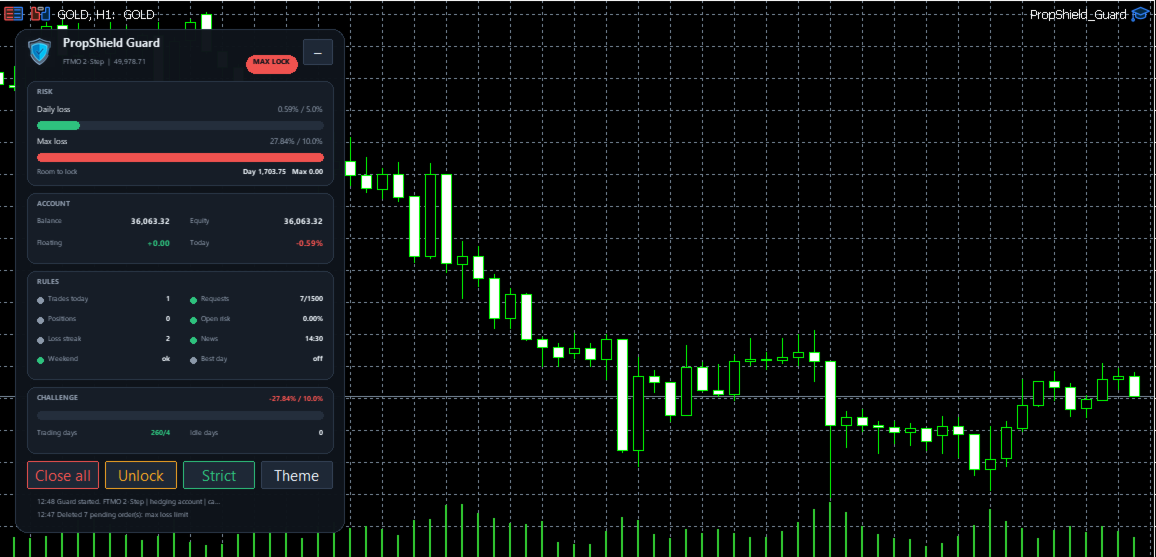
Control panel with status, risk bars, remaining room before lock, account figures, rule indicators, challenge progress, dark/light theme and English/Spanish language. Buttons: Close all, Unlock, Strict/Alerts mode, Theme (dangerous actions ask for confirmation).
How to use: attach it to ONE chart (any symbol), allow algorithmic trading, choose your preset and keep the terminal running (a VPS is recommended). Initial capital is detected from the account history or can be typed in.
Important
- PropShield Guard does not open trades in live trading. In the Strategy Tester only, it opens small demo trades so the guard has something to protect.
- It cannot stop an order from being sent: it closes violating positions right after. Gaps and slippage can exceed limits; keep using Stop Loss.
- Firm rules change and differ between accounts. Always check your firm's current rules. Presets are starting points.
- It needs the terminal to be online and algorithmic trading enabled.
- Not affiliated with, endorsed or sponsored by any prop firm. No profit is promised or implied. Trading involves risk.
- Rule preset: FTMO 2-Step, FTMO 1-Step, FTMO Instant, Generic strict or Custom. Custom uses the manual [Custom] values.
- Initial capital: base for all percentages. 0 = detected from deposits in the account history.
- Challenge start: date used to count trading days, profit and consistency (0 = whole history).
- [Custom] daily loss, base, reset clock, max loss and type: the firm's own limits (static, trailing end-of-day or trailing intraday).
- Profit target %, Minimum trading days, Best-day share limit %: 0 = use the preset value.
- Enforcement mode: Strict (blocks and closes) or Alerts only (never closes).
- Soft limit % (60): at this share of the firm's daily or max-loss limit, new trades are blocked.
- Hard daily limit % (80) and Hard max-loss limit % (70): close everything and lock trading (daily lock lasts until the next control day, max-loss lock until manual unlock).
- Lock at target and Stop after +N% in a day: protect gains. Example, 100,000 account, 5% daily limit: soft limit at 3,000 lost, hard limit at 4,000 lost.
Input parameters
Quick setup: choose your Rule preset, leave Initial capital at 0 (auto-detected from the account history, or type the real value), keep Enforcement mode = Strict, check the Server clock model and enable the alerts you use. Everything else has safe defaults; optional rules are off (0) until you enable them.
1. Prop firm rules
2. Protection thresholds
3. Trade rules (0 = off): max positions, trades per day, losing streak, lots per position and in total, SL risk per position and in total, and Stop Loss protection (Off / Alert / Auto emergency SL / Close) with a grace period.
4. Time rules: weekend protection (closes N minutes before the symbol's weekly close), Friday cut-off, and the server clock model (FTMO-like New York + shift, live difference, or fixed offset). The clock drives the daily reset: check the warning in the Experts tab at start-up.
5. News (live only): Off, Alerts or Protect; currencies, medium impact, minutes before/after, delete pending orders, close positions.
6. Request limit: internal daily cap (default 1500) and warning level; new trades are blocked when the cap is reached.
7. Alerts: pop-up, sound, push, e-mail.
8. Scope and execution: whole account, chart symbol only, or one magic number; max deviation and retries when closing.
9. Panel: language (English/Spanish), theme, scale, position.
10. Strategy Tester: demo trades (tester only) so the guard has something to protect. The EA never opens trades in live trading.