Portfolio Command Desk

Envelope monitoring for multi-EA accounts. Each magic number is watched against its own backtest; you get a traffic light on the chart and an alert only when a state changes. Includes the full free measurement layer.

What it is

You run several Expert Advisors on one account. This utility reads their closed history, groups it by magic number, and watches every system against its own backtest: a traffic light on the chart, and an alert only when a state actually changes. Underneath sits a full measurement layer - per-system statistics, combined drawdown, correlation, Monte Carlo. It never places an order.

What this adds over the free Desk

The free Portfolio Correlation Desk measures your portfolio. This one stands guard over it.

Free edition: https://www.mql5.com/en/market/product/188832

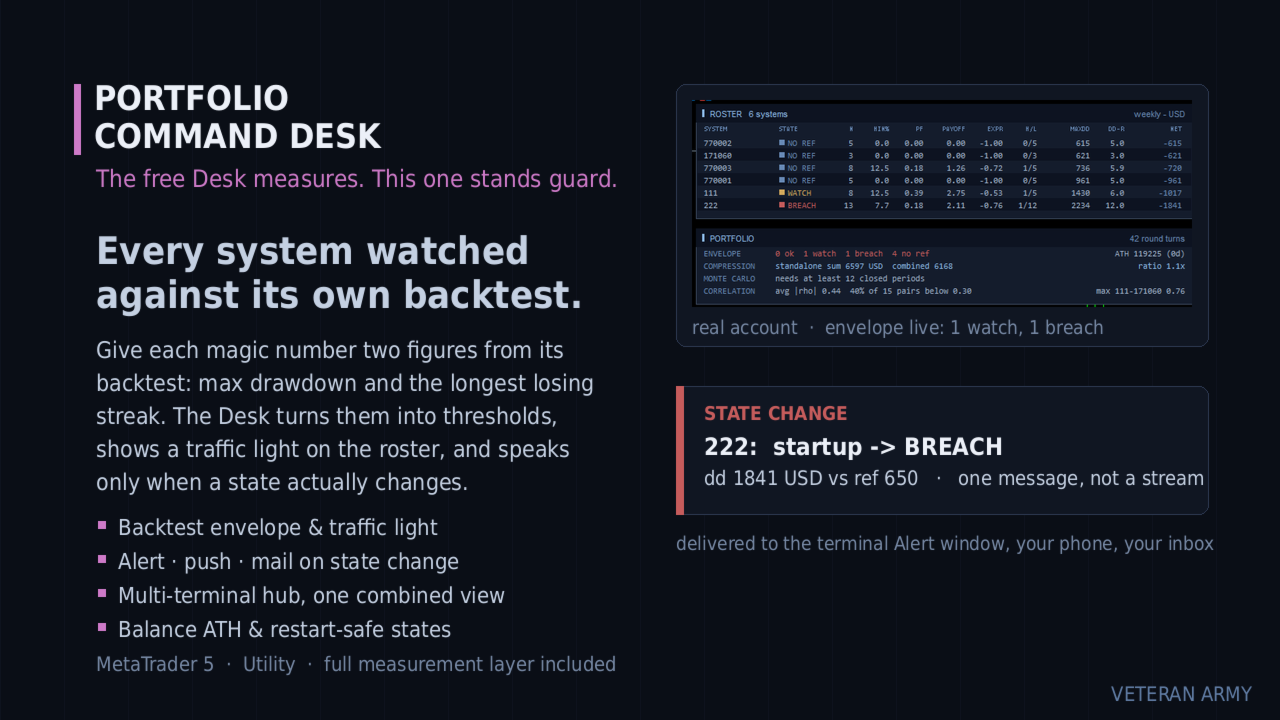
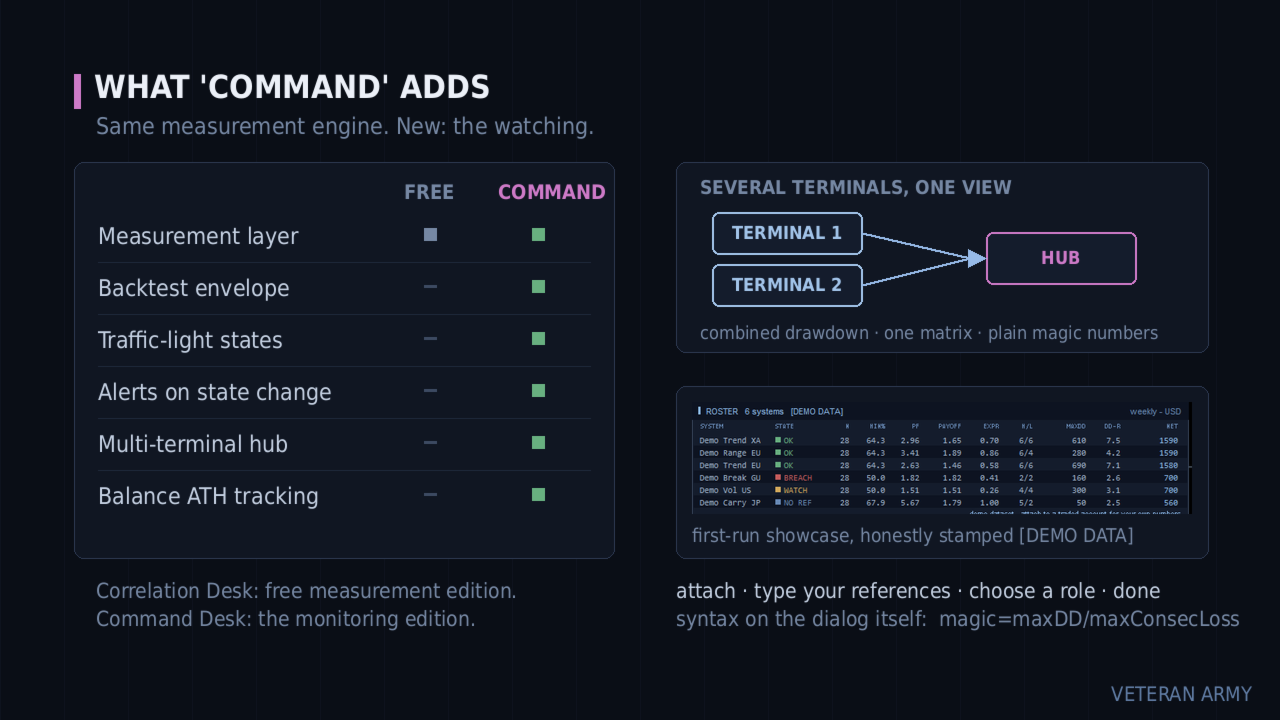
Every system is watched against its own backtest. You give each magic number two figures: the backtest maximum drawdown and the longest losing streak. The Desk turns them into thresholds and shows a traffic light on the roster - OK, WATCH, BREACH.

It speaks only when something changes. A system crossing into WATCH is one message - terminal Alert, push to your phone, e-mail, your choice. No repeats while it stays there, and one message when it recovers. Restarting the terminal does not replay old alerts.

Several terminals, one view. Run it on every MetaTrader on your VPS and let one of them aggregate the rest: one combined drawdown, one correlation matrix, one roster across all of them.

Everything the free edition measures is included and unchanged.

The envelope

The idea comes from a simple question: is this system still behaving like its backtest, or has it left that envelope?

You answer with one input line, and the syntax is printed right on the input dialog:

111=800/6;222=650/4
(magic = maxDD / maxConsecLoss)

From those two figures per system the Desk builds the thresholds:

  • WATCH when the current drawdown reaches 1.5x your reference, or the live losing streak reaches max(1.5x, +3) of your reference streak.
  • BREACH when the current drawdown reaches 2.0x the reference.
  • OK again when it comes back down - one recovery message, not a stream. A small hysteresis band keeps a value hovering at a line from flapping.

Systems without a reference simply show a grey NO REF badge. They are still measured, just not judged.

The envelope watches the CURRENT drawdown, not the all-time record - a system that recovers turns green again, which is the whole point.

It still measures

The complete free layer is inside: per-system statistics, standalone vs combined drawdown with the compression ratio, the Monte Carlo reshuffle with percentiles, and the correlation heat map on daily, weekly or monthly profit and loss. If you only want measurement, the free Portfolio Correlation Desk is that product.

Multi-terminal

Each terminal runs the same EA with a role, named in plain words on the input dialog: "this terminal only", "publish this terminal into the hub folder", or "aggregate every published terminal".

Publishers write their closed history into the shared MetaTrader folder; the hub merges every published terminal with its own trades and runs the whole analysis on the combined data. All terminals must be on the same machine or VPS - that is where the shared folder lives. The hub view refreshes within one refresh period, about 15 seconds.

The hub shows plain magic numbers, with no terminal prefix, to keep the panel readable. For efficient tracking we recommend giving EAs on different terminals different magic numbers.

Alerts always fire on the terminal that owns the system, so nothing is ever notified twice.

The panels

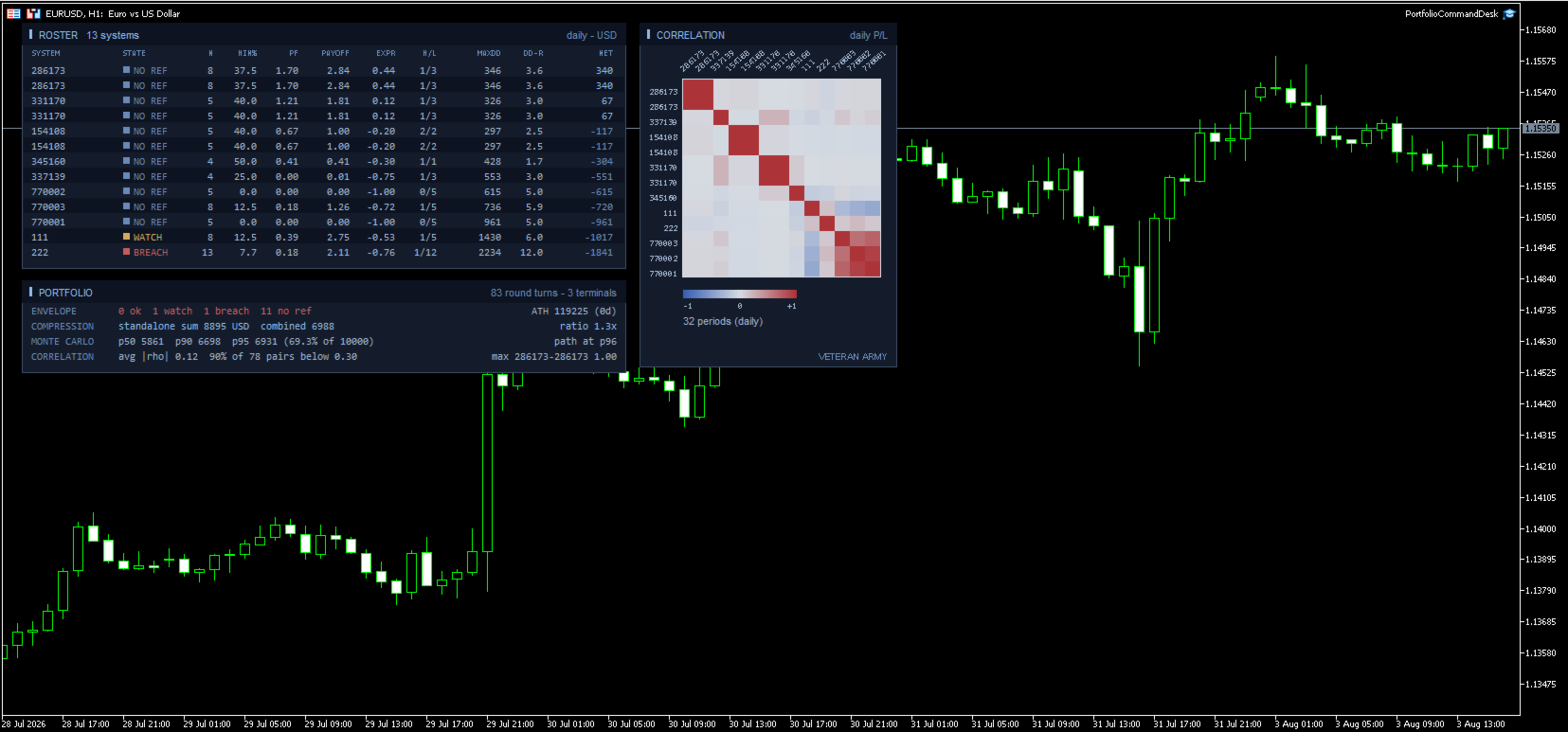
ROSTER - one row per system with a colored STATE cell, then the full statistics: trades, win rate, profit factor, payoff, expectancy in R, streaks, max drawdown, DD in R, net.

PORTFOLIO - the ENVELOPE line first (how many ok / watch / breach / no ref), with the balance all-time high and its age on the right. Then compression, Monte Carlo and correlation, as in the free edition.

CORRELATION - the heat map. Axis labels are drawn at a slant so full magic numbers stay readable even with forty systems on the grid.

A new balance high is one quiet notification too, with how long the previous peak stood.

Inputs

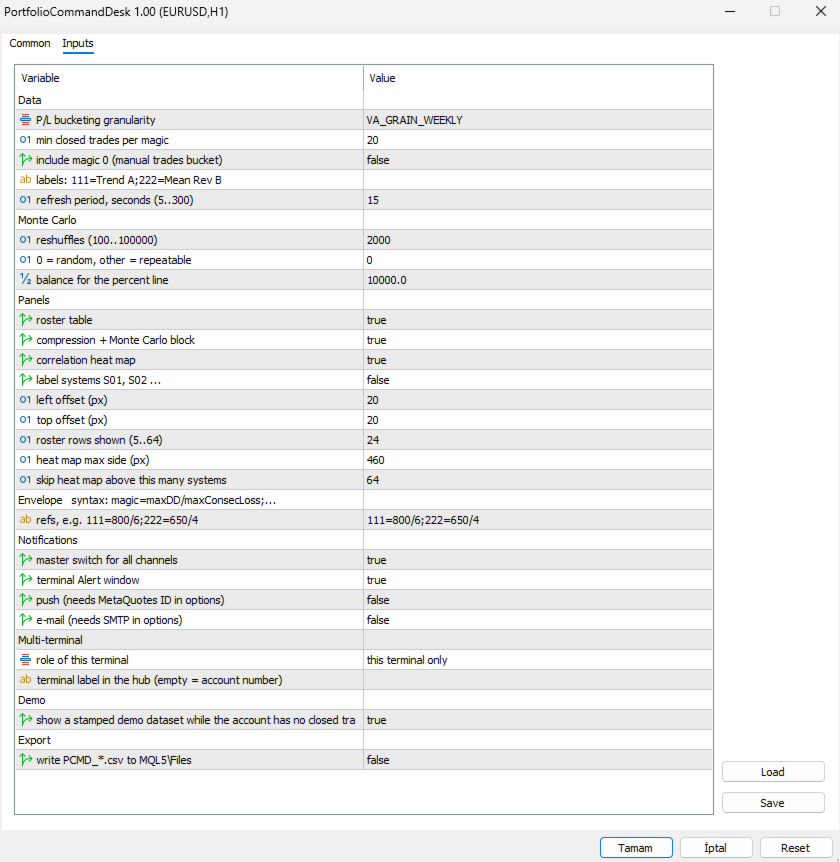
The dialog is grouped, and the envelope group carries the syntax in its own heading so you never have to look it up.

Envelope

  • refs - one line, one entry per system: 111=800/6;222=650/4 . Read it as magic = maximum drawdown / longest losing streak, both taken from that system's backtest. Spaces are fine, a trailing semicolon is fine, and a repeated magic simply overrides the earlier one. Systems you leave out are still measured; they just show a grey NO REF badge instead of being judged. Malformed entries are skipped and counted in the log so a typo never passes unnoticed.

Notifications

  • master switch for all channels - one flag to silence everything without losing your per-channel setup.
  • terminal Alert window - the pop-up inside MetaTrader.
  • push - to the MetaQuotes app on your phone. Needs your MetaQuotes ID in the terminal options; if it is missing, the log says so once.
  • e-mail - needs SMTP configured in the terminal options, same one-time note if it is not.

Multi-terminal

  • role of this terminal - three plain choices: this terminal only, publish this terminal into the hub folder, or aggregate every published terminal. Publishers write their history to the shared folder; the aggregator merges all of them with its own trades.
  • terminal label in the hub - a short name for this terminal. Left empty it uses the account number. Only used to tell published files apart, not shown on the panel.

Data

  • P/L bucketing granularity - correlate on daily, weekly or monthly results. Monthly is the default and the safest; on sparse daily buckets the empty cells pull correlations toward zero. Weekly suits accounts that trade often.
  • min closed trades per magic - systems below this count are left out of the report and out of the combined portfolio, so the comparison stays like for like. Raise it if young systems are muddying the picture.
  • include magic 0 - off by default. On most terminals that bucket holds manual trades and any EA left on its default magic.
  • labels: 111=Trend A;222=Mean Rev B - give systems names instead of numbers: 111=Trend A;222=Mean Rev B . Names appear on the roster, the heat map axis and in the alert text.
  • refresh period, seconds - how often the panel looks for new closed trades, 5 to 300. The aggregator also re-reads the published files on this beat, so it sets how fresh the combined view is.

Monte Carlo

  • reshuffles - how many times your period results are reordered, 100 to 100000. 2000 is plenty.
  • 0 = random, other = repeatable - the seed. 0 draws a random seed each run. Any other value makes the percentiles repeatable, which matters when the figure goes into a report or a comparison over time.
  • balance for the percent line - reference balance used only to express the 95th percentile drawdown as a percentage.

Panels

  • roster table, compression + Monte Carlo block, correlation heat map - turn each block on or off independently.
  • label systems S01, S02 ... - hides real magic numbers behind generic labels. Useful for screenshots and for sharing results.
  • left offset / top offset - where the panels sit on the chart, in pixels from the top left corner.
  • roster rows shown - 5 to 64. Cap it when you have more systems than you want on screen; the ones with the largest net still come first.
  • heat map max side - the largest square the grid may occupy, in pixels. The cell size follows from it.
  • skip heat map above this many systems - above this count the heat map is skipped, because the grid would need more rectangles than the chart can redraw comfortably. The other panels carry on.

Demo

  • show a stamped demo dataset while the account has no closed trades - a deterministic sample portfolio with the traffic light live on it, so you can see the product working before you have history. Every title carries [DEMO DATA]. Demo data never notifies, never writes CSV and never touches the state file. Your first real closed trade replaces it permanently.

Export

  • write PCMD_*.csv to MQL5\Files - writes the roster (including the state column) and the correlation matrix to disk on each refresh. Disabled automatically while the demo dataset is on display.

What it does not do

It never places, modifies or closes an order. It does not produce signals or predictions. It does not connect to any network or external service - the multi-terminal hub is plain files in the shared MetaTrader folder on your own machine.

Drawdowns are measured on closed trades and do not include the floating excursion of open positions. Alerts require the terminal to be running, which on a VPS it is.

Getting started

Attach to any chart. Type your references. Turn on the channels you want. If you run several terminals, pick the roles. Done - it only talks to you when a state changes.

MetaTrader 5.
Recommended products
Fvg In Fvg
Claudiu-georgian Zavera
FVG In FVG EA — From Learn to Earn. The most-watched imbalance on any chart, taken where you have not seen it before: a Fair Value Gap confirmed inside a Fair Value Gap. A GAP EVERYONE WATCHES. AN EXECUTION NO ONE ELSE HAS. The EA detects the Fair Value Gap — the 3-candle imbalance — on a higher timeframe, then requires a second FVG, formed inside the first, on the timeframes you choose. Only an overlap above your threshold validates the zone: Most Powerful Overlap FVG Zones — rigorously selec
Galaxy X Quantum Edge
Gezani Paulus Nkuna
GALAXY X [QUANTUM EDGE] is an advanced MetaTrader 5 automated trading robot designed around the Smart Money Concepts (SMC) strategy, using market structure, swing points, order blocks, Fair Value Gaps (FVG), liquidity/sweep confirmations, and trend analysis to identify potential high-quality trading opportunities. The robot is designed to adapt to changing market conditions by monitoring volatility and market regimes, adjusting its trading frequency and risk exposure accordingly, while incorpora
Ticks Charting
Mativenga Geoffrey Mativenga
Tick Copier EA — Description & Usage Guide Instead of seeing the market like everybody else using time based charts, instead view the market using ticks like an x-ray. This Expert Advisor (EA) for MetaTrader 5 copies live ticks from the chart it is attached to and sends them to a custom symbol you already created (for example EURUSD TICKS ). Each time a new market tick arrives:  EA reads the current tick data from the source symbol. It copies the tick values: time bid price ask price last price
QuantumGold Matrix
Mohammed Lamine Kasmi
QuantumXAU Matrix – Smart Gold Trading EA for MetaTrader 5 QuantumXAU Matrix is a powerful, fully automated Expert Advisor specifically designed for XAUUSD (Gold) on the MetaTrader 5 platform. It follows a smart averaging strategy with controlled risk management, aiming for consistent profits through adaptive lot sizing and precise trade timing. Symbol-specific : Trades only on XAUUSD for optimized performance Automated logic : Opens positions based on market distance and profit targets
QTS Gold Guardian AI Backtest from 2015 - 2025 Institutional-grade Gold Scalper powered by Neural Network. Features Smart Hedging, Equity Protection, and Volatility Adaptation. No dangerous Martingale. QTS Gold Guardian AI is the ultimate solution for XAUUSD (Gold) scalping, designed to survive volatile market conditions. Unlike traditional scalpers that blow accounts, QTS focuses on Capital Preservation first. Key Features: Neural Network Logic: Uses advanced logic to detect micro-trends on
Boom Trader
Godbless C Nygu
Join Deriv now link on my profile>>>> Boom Trader This robot is developed to trade Boom 1000 which is available on Deriv. Boom 1000 is one of other many indices which its behaviour is to form the spike of few pips, Those spikes always happen after 1000 ticks. To avoid spikes i came up with idea of develop the robot which take sells and few buys. IMPORTANT! After the purchase please send me a private message to receive the installation manual and the setup instructions. •All settings on this ro
MSRLab Deriv Portfolio EA
Adebayo Oluwaseun Ojo
MSRLab Deriv Portfolio EA This is the EA running live on this account https://www.mql5.com/en/signals/2394931 A compiled, one-chart MetaTrader 5 Expert Advisor for Deriv synthetic-index accounts. The MSRLab Deriv Portfolio EA is built around a curated multi-symbol portfolio with account configuration embedded directly in the compiled product. User just need to d ownload the EA from MQL5, attach it to one chart, enable Algo Trading. The advise is to forward-test it on Demo before the intended Der
GridTrailling
Chaianan Kraimud
Smart breakout grid EA with trailing pending orders, trailing stop, session/news filters, drawdown protection, and netting-safe execution for MT5. GridTrailingEA is a smart pending-order grid Expert Advisor with trailing pending orders, trailing stop, session filter, news-time filter, drawdown protection, and market-safe validation for MT5. GridTrailingEA is a MetaTrader 5 Expert Advisor designed for traders who want a clean and controlled grid-style pending order system. The EA places Buy Stop
Titan Backup
Elies Noah Siebenpfeiffer
Introducing Titan Backup : Are you ready to enhance your trading game with an automated system built for precision and flexibility? Meet Titan Backup , your expert trading assistant designed to capture high-profit breakouts by identifying accumulation zones . This powerful Expert Advisor (EA) excels in high-volatility markets such as the Nasdaq 100 and Crypto 10 , offering both hands-free automation and manual assistance to support your trading strategies. How Titan Backup Works: Titan Backup ru
Click Sent Order
Supanat Wiboonpanit
This program is a GUI for issuing orders that can be done more quickly. Faster TP SL setting This program is not an automated trading platform. Trading is risky, please manage your risk. We do not accept any responsibility. It should be tried with Demo before using it with Real. Normally, the setting sets the risk to 1:1 to shift manually or to enter the risk to x:1, where x can be entered and everything can move freely. Thank you to all customers who have purchased our products. We would like t
Orydax Zenvar
Pablo Orcaray Lopez
Orydax Zenvar — XAUUSD Expert Advisor for MetaTrader 5 Turn a demanding market routine into a clear, automated process. Orydax Zenvar is a daily gold level strategy for MetaTrader 5, with XAUUSD D1 as the recommended starting setup. It follows the market continuously, waits for a qualified gold level inside its daily market and risk context, and handles the trading workflow when its confirmation process is complete. It is designed for users seeking selective daily gold automation: traders who va
BlackVault AI EA
Anton Vizzhachii
5 (1)
BLACKVAULT EA — Automated Gold Trading System XAUUSD M5 | Expert Advisor for MetaTrader 5 BlackVault is not another grid system or martingale dressed up in a nice wrapper. It is a structured trading system for gold, built on a principle we place above raw performance: risk control comes before performance. Inside the EA is logic built around Opening Range Breakout (ORB) patterns, adaptive ATR and spread filtering , and a dynamic risk module that evaluates market conditions before each entry, not
Dark Gold MT5
Marco Solito
4.56 (102)
Dark Gold  is a fully automatic Expert Advisor for  Scalping   Trading on Gold , Bitcoin , Eurusd and Gbpusd. This Expert Advisor needs attention, in fact presents highly customizable. Dark Gold is based on   Dark Support Resistance mt5  indicator   (owning it is not necessary) , these Trades can be manage with some strategies. If you   Buy this Expert   Advisor you can   write a feedback   at market and   get Dark Support Resistance indicator for Free , for More info contact me The basic strate
Gann Gold EA MT5
Elif Kaya
4.5 (8)
- Final real price is 1000$ - Discount and price is 199$ (Next price is 300$),  Price will be increased after 1 purchase. Welcome, Gold GANN Expert opens automatically trade with Highly profit, Fixed small Stop loss. - Lifetime update free User Manaul No Martingale, No Grid, No Scam I am focused on help my clients, not just earn. The Gann Gold EA is High safety by small fix Stop Loss, which sets trades based on good risk to reward ratio(1:3). It is fully worked on exploiting the volatility of
Do NOT believe the smooth equity curves of the top rated bots. They all use tricks to make beautiful back tests, but once traded live the bots all fail. Some tricks: DCA and martingale with 1 trillion dollars of demo funds, overfit with the best parameters possible... The best systems usually includes few simple rules. They're not sexy and the equity curves are always bumpy. But they're robust and have higher chance of surviving on live markets.  This is a Long only trend-following Expert Adviso
Ultra Prokit Tool
Francis Muchai Waweru
ULTRA PRO TOOLKIT EA Draw it. Size it. Execute it. Most charts are buried under tools that refuse to talk to each other. You mark a level in one place, work out your lot size somewhere else, then hand-type an order and hope you remembered the stop. Ultra Pro Toolkit EA puts the entire workflow on one panel: sketch your market structure, tell it how many dollars you are willing to lose, and let it handle the arithmetic and the order routing. ️ This is a manual trading cockpit, not a signal
Trend Pyramid v5.00 | Gold XAUUSD Floating‑Profit Pyramid EA   This floating‑profit pyramid gold EA only adds positions after existing orders generate floating profit, avoiding blind position‑adding under loss conditions. It adopts EMA20 plus ADX24 dual‑indicator filter to filter false oscillation signals and reduce invalid order openings. Multiple hard risk controls are built‑in to protect your account.   Core advantages   1. Add positions only on floating profit, no position‑adding at loss: a
SuperTrend AI Clustering EA
Michael Prescott Burney
SuperTrend AI Clustering Expert Advisor for MetaTrader 5 SuperTrend AI Clustering is an adaptive trend-following Expert Advisor for MetaTrader 5 designed to adjust itself to changing market conditions. Instead of using one fixed SuperTrend multiplier, the EA evaluates multiple factor values at the same time, measures their recent performance, applies K-Means clustering, and selects the factor group that is currently performing best. This creates a dynamic SuperTrend model that can respond to dif
Drill Pump 51
Husain A M A Alasfour
Overview Drill Pump 51 is a complete, multi-system Expert Advisor for XAUUSD (gold) on the H1 timeframe in MetaTrader 5. It combines a trend-breakout growth engine (PUMP), an adaptive two-way Grid and an optional Emergency spike system, all running under layered account protection. It is designed for a 3,000 USD account and works out of the box with its default settings: attach it to one XAUUSD H1 chart, enable Algo Trading, and it manages entries, exits and protection by itself. How it works •
Harness institutional strategies with Institutional VWAP Reversal EA: Capture reversals via VWAP deviation bands, volume spikes, and 200 EMA trend filter. Targets 5% monthly profit with 5% max daily DD, including profit caps, breakeven SL, and signal reversal options—ideal for prop-trading challenges. Customize TP/SL by percentages, RR, or candles; trade with trend or both sides. Optimized for forex majors and gold, with time-restricted execution for low-risk, reliable automation in volatile mar
The Daily Ranger USTEC Ultimate EA is an intraday trading system designed to capture the full potential of the Nasdaq index's (also known as USTEC, US100, NAS100, NQ100) distinctive intraday volatility. The EA trades during the New York trading sesssion taking maximum 2 high quality intraday trades with SL and TP all the time. NO GRID, NO MARTINGALE, NO ADDING TO LOSERS The EA is tested with real tick data, the most accurate way to test an EA. Choose your preferred Risk Per Trade, and watch our
Array Breakout X Yen
Kantachart Bangngoen
Array Breakout X Yen — six breakout strategies working as one team on a single USDJPY chart. Tested on real ticks from 2016 to 2026, then locked inside the EA. You choose a risk level; the EA does the rest. Launch price 199 USD — final price 599 USD The price steps up as the product builds its track record. Whatever price you buy at, you get every update; a price rise never touches a licence already bought. START HERE — READ BEFORE USING What to expect and how to judge the results the right
NexusPilot Core is an MT5 EA Manage and Prop Firm Control tool designed for traders who run multiple Expert Advisors, manual trades, or funded account challenges. It is not a signal indicator or trading strategy. Its main purpose is to help you supervise your account, control EA activity, and reduce the risk of breaking prop firm rules. With one centralized dashboard, NexusPilot Core monitors drawdown, Magic Numbers, EA exposure, pending orders, no-SL trades, margin level, floating loss, tradi
AutoSLTP for Scalpers
Aaron Nii Amartey Donkor
SL$TPauto Expert Advisor SL$TPauto automatically manages Stop Loss (SL) and Take Profit (TP) levels for all trades on a specific symbol. This Expert Advisor scans whatever chart it's placed on and works based on that chart's symbol, functioning independently across multiple charts simultaneously. Key Features: Automatically places Stop Loss (SL) and Take Profit (TP) for all open trades on the current chart symbol Applies the same Stop Loss (SL) and Take Profit (TP) settings to any new trades as
Forex Strike EA
Abderrahmane Benali
FOREX Strike EA – Discipline Meets Opportunity FOREX Strike EA is an intelligent automated trading system built to bring structure, control, and consistency to the Forex market. Designed with modern MQL5 standards, it focuses on precision execution and disciplined awareness rather than aggressive exposure. By combining smart order placement with adaptive money management, the system engages the market only when conditions align—allowing you to trade with confidence, not emotion. Operating withi
Bogdanoff EA x Wojak
Phonephiphat Vangmeuangkhong
Bogdanoff EA x Wojak  is a fully automated breakout system built for Gold (XAUUSD) Backtest Results ️ Fill in with your own verified Strategy Tester report before publishing — see note at the end of this document. Tested on XAUUSD, [TIMEFRAME USED FOR THE TEST] , from [START DATE] to [END DATE] Starting balance: [YOUR TEST BALANCE] Ending balance: [YOUR TEST RESULT] ( [TOTAL RETURN %] ) Maximum drawdown: [MAX DRAWDOWN %] Win rate: [WIN RATE %] · Profit factor: [PROFIT FACTOR] · Total trades: [T
Pro Scalping Tool
Mohammad Nazmul Hassan
### **ProScalpingToolEA.mq5 Analysis & Description** **Overview:**   The `ProScalpingToolEA.mq5` script is an Expert Advisor (EA) for MetaTrader 5, designed to assist with automated trading. It includes features for placing, managing, and monitoring trades. --- ### **Key Functionalities:** 1. **Trade Execution & Management:**    - Uses the `CTrade` class from `Trade.mqh` to manage trading operations.    - Allows placing buy and sell orders with a configurable lot size.    - Trades are iden
Lions Roar Trend Strength Grid EA
AL MOOSAWI ABDULLAH JAFFER BAQER
The trading limiter that stops you from breaking your own daily loss and trade limits. • Please test the product in the Strategy Tester before purchasing to understand how it works. • If you face any issues, contact me via private message—I’m always available to help. • After purchase, send me a screenshot of your order to receive a   FREE EA   as a gift. Most grid robots start the same way: price moves two hundred points, so the first order opens. It does not ask whether the market was going
Dynamic RSI Guardian – Precision Trading with Full Risk Management Dynamic RSI Guardian is a professional algorithmic trading system designed for traders who value consistent performance, strict risk control, and flexibility . Built with advanced pip-based calculations and intelligent RSI-driven filters, it ensures every trade follows strict rules to minimize risk while maximizing opportunities. Key Features: Smart Entry System • RSI-based multi-filter confirmation • Detects high-probability
FREE
Buyers of this product also purchase
Trade Assistant MT5
Evgeniy Kravchenko
4.43 (216)
It helps to calculate the risk per trade, the easy installation of a new order, order management with partial closing functions, trailing stop of 7 types and other useful functions. Additional materials and instructions Installation instructions - Application instructions Line function -   shows on the chart the Opening line, Stop Loss, Take Profit. With this function it is easy to set a new order and see its additional characteristics before opening.   Risk management  - The risk calculation
Forex Trade Manager MT5
InvestSoft
4.98 (689)
Trade Manager MT5 is an advanced position size calculator and trade management tool for MetaTrader 5, designed to help traders plan trades faster, control risk more precisely, and manage open positions directly from the chart. It combines order placement, risk based lot calculation, Stop Loss and Take Profit management, Break Even, Trailing Stop, Partial Close, Equity Protection, and external trade management in one panel. Whether you trade forex, indices, metals, commodities, crypto, or future
Telegram to MT5 MultiChannel Copier
Sergio Marquez Uroz
4.68 (22)
Telegram to MT5 Multi-Channel Copier   automatically copies trading signals from your Telegram and Discord channels straight to MetaTrader 5. No bots, no browser extensions, no manual copying. A signal arrives in Telegram or Discord and the EA opens the trade in your terminal within seconds. And before you copy a channel, the built-in backtester shows you what that channel would have done in your account. The product has two components: a Windows application that listens to your Telegram channel
TradePanel MT5
Alfiya Fazylova
4.88 (170)
Trade Panel is a multi-functional trading assistant. The app contains over 50 trading functions for manual trading and allows you to automate most trading tasks. Application instructions: https://www.mql5.com/en/blogs/post/756482 Trial version of the application for a demo account: https://www.mql5.com/en/blogs/post/750865 How to install the application: https://www.mql5.com/en/blogs/post/756239 How to test the application in visual mode: https://www.mql5.com/en/blogs/post/770277 How to install
Copy Telegram signals with your own trading rules Telegram to MT5 Signal Trader automatically copies text-based trading signals from public and private Telegram channels and groups into MetaTrader 5. Manage multiple providers and MT5 accounts from one desktop app, with individual risk and trade settings for each provider . No Telegram bot or API setup needed for copying. Simply sign in with your own Telegram account by phone or QR code and select the channels or groups you have already joined. Y

================================================================================ POC BREAKOUT - V20.72. Full Professional Grade Toolkit ================================================================================ POC Breakout is a full MetaTrader 5 trading dashboard for discretionary traders who want breakout signals, Point of Control (POC) context, volume profiles, order flow, market structure, news, alerts, and advanced trade planning in one professional workspace. Attached directly to you
News Trade EA MT5
Konstantin Kulikov
4.55 (11)
Present to you the useful robot that I have been using for several years. It can be used in both semi-automatic mode and fully automatic mode. >>> Chat <<< The program contains flexible settings for trading on the news of the economic calendar. It cannot be checked in the strategy tester. Only real work. In the terminal settings, you need to add the news site to the list of allowed URLs. Click Tools > Options > Expert Advisors. Check the option "Allow WebRequests for listed URL:". Add this (de
Dealer Panel
Mian Rameez Ali
Dealer's Panel No signal decides anything here — a hand does. One click, and the panel calculates what's underneath: lot size from risk, target from a 30-step balance ladder that remembers exactly how far an account has climbed. Toggle between market and pending without touching an input field. Set a stop, and the take-profit can write itself — a fixed share of the balance, translated into price with no arithmetic left for the trader to get wrong. One trade live at a time; it won't let a seco
FarmedHedge Pair Trading Dashboard
Tanapisit Tepawarapruek
5 (7)
Farmed Hedge Yield Farming | All Markets (Manual - Hybrid - Semi/Automated EA) VERIFIED TRADING RESULTS - Farmed Hedge Yield Axi Copy:  https://www.mql5.com/en/signals/2356376 - Farmed Hedge Yield Exn Copy:   https://www.mql5.com/en/signals/2356404 - Farmed Hedge Yield V Copy:  https://www.mql5.com/en/signals/2357156 IMPORTANT NOTICE: FarmedHedge is a MANUAL-FOCUSED TRADING UTILITY ,not a fully automated EA. Results shown on this Signal include manual trades and overall strategic management.
MT5 to Telegram Signal Provider turns your trading account into a signal provider. Every trade action, whether manual, by EA or from your phone, is instantly sent as a message to Telegram. You can fully customize the format or use a ready-made template for quick setup. [ Demo ] [ Manual ] [ MT4 Version ] [ Discord Version ]     New: [ Telegram To MT5 ] Setup A step by step user guide is available. Key Features Ability to customize order details sent to subscribers You can create a tiered subs
Next Update — Version 2.52 Coming Soon! [NEW] Get Ready for 4 Major New Features Designed to Enhance Your Market Analysis and Trading Workflow We’re taking market analysis to the next level with 4   new features designed to meet your trading needs. Introducing: TRADE OVERVIEW DASHBOARD CONFLUENCE AT ZONE STRONG & WEAK HIGH/LOW OPTIMAL TRADE ENTRY —  OTE 1. TADE OVERVIEW DASHBOARD  A dashboard that helps you understand the overall market picture more easily, providing guidance to support your
RETAILBERG FOOTPRINT CHART PRO — Order-Flow Workspace for MetaTrader 5 Version 7.00  |  Professional System  |  31 tools  |  One chart A full 150-page illustrated User Manual is included. Please read the full manual to understand this feature packed footprint chart elements and ui. https://www.mql5.com/en/blogs/post/777982 DEMO / STRATEGY TESTER — PLEASE READ FIRST
Grid Manual MT5
Alfiya Fazylova
4.73 (22)
Grid Manual is a trading panel for working with grid strategies. The utility is universal, has flexible settings and an intuitive interface. It works with a grid of orders not only in the direction of averaging losses, but also in the direction of increasing profits. The trader does not need to create and maintain a grid of orders, the utility will do it. It is enough to open an order and the "Grid manual" will automatically create a grid of orders for it and will accompany it until the close. F
Anchor Trade Manager
Kalinskie Gilliam
5 (9)
Your EAs cannot see each other, but Anchor can. Anchor gives you one place to coordinate your EAs, manage risk, and decide when trading is allowed. It works alongside the trading bots you already use without any changes to them. The Problem One EA opens a trade. Then another starts trading. The next thing you know, you wake up to multiple grids built across your account. Each EA may be doing exactly what it was designed to do, but together they can place far more risk on your account than you in
The Patch
Mian Rameez Ali
The Patch It never opens a trade. It walks behind the ones that did. Every open position, every pending order — checked twice a second for the one thing that's easy to forget: a stop, a target. Found bare, it doesn't ask. It writes the missing number in, measured in points from wherever the position began, and moves on to the next. No strategy, no opinion on direction. Just the quiet assumption that nothing should ever sit on the market unprotected — not because someone decided it shouldn't,
Power Candles Strategy Scanner - Self-Optimizing Multi-Symbol Setup Finder Self-optimizing settings work one chart at a time, and finding where they pay off right now means opening chart after chart. Power Candles Strategy Scanner runs the same self-optimizing engine as the Power Candles indicator on every symbol in your Market Watch, side by side. One panel ranks where it pays off: the winning strategy per symbol, its optimized Stop Loss and Take Profit. An alert fires the moment a fresh signal
Trader Evolution
Siarhei Vashchylka
5 (7)
" Trader Evolution " - A utility designed for traders who use wave and technical analysis in their work. One tab of the utility is capable of money management and opening orders, and the other can help in making Elliott wave and technical analysis. Manual (Be sure to read before purchasing) | Version for MT4 Advantages 1. Trading in a few clicks. Immediate and pending orders are available in the panel 2. Money management. The program automatically selects the appropriate lot size 3. Simplifies
YuClusters
Yury Kulikov
4.93 (43)
Attention: You can view the program operation in the free version  YuClusters DEMO .  YuClusters is a professional market analysis system. The trader has unique opportunities to analyze the flow of orders, trade volumes, price movements using various charts, profiles, indicators, and graphical objects. YuClusters operates on data based on Time&Sales or ticks information, depending on what is available in the quotes of a financial instrument. YuClusters allows you to build graphs by combining da
Prop Guardian Risk Manager MT5 – Drawdown, Risk & Hedge Protection for Prop Firm and Managed Accounts Prop Guardian Risk Manager is a professional risk-control utility for MetaTrader 5, designed for prop firm traders, money managers and anyone who wants strict account-level risk protection. It does not generate trading signals, strategy entries or trading decisions. Instead, it runs in the background, monitors your account risk and can automatically block new exposure, close managed positions or
The product will copy all telegram signal to MT5 ( which you are member) , also it can work as remote copier.  Easy to set up, copy order instant, can work with almost signal formats, image signal,  s upport to translate other language to English Work with all type of channel or group, even channel have "Restrict Saving Content", work with  multi channel, multi MT5 Work as remote copier: with signal have ticket number, it will copy exactly via ticket number. Support to backtest signal. How to s
Floor Watch
Syed Tauqeer Hussain Shah
Floor Watch One number, watched every thirty seconds: how far equity has fallen since the day began — or since its highest point, if it's told to trail the peak instead of the open. Cross the line and it doesn't argue. Every open position closes, every pending order vanishes, and anything that slips through afterward gets shut the moment it appears. Not asked. Removed. The floor holds until the clock turns 5 AM Pakistan time — then, and only then, does the day start over. One rule. No except
EA Auditor
Stephen J Martret
5 (6)
EA Auditor is an independent analysis tool for traders evaluating Expert Advisors and trading signals on MetaTrader 5. It audits backtest reports, reviews posted developer signals, and cross-verifies the two against each other to help traders assess strategies before committing capital. The MQL5 market offers a wide range of Expert Advisors from many developers, with varying approaches, quality, and transparency. EA Auditor provides a consistent, data-driven framework for reviewing them, answer
Trade Manager DashPlus
Henry Lyubomir Wallace
4.85 (13)
DashPlus is an advanced trade management tool designed to enhance your trading efficiency and effectiveness on the MetaTrader 5 platform. It offers a comprehensive suite of features, including risk calculation, order management, advanced grid systems, chart-based tools, and performance analytics. Key Features 1. Recovery Grid Implements an averaging and flexible grid system to manage trades during adverse market conditions. Allows for strategic entry and exit points to optimize trade recovery
Buy once. Get all my MT4 and MT5 indicators and trading robots (EAs) - available now and released in the future - at no extra cost. Contact me after purchase for instructions to receive them. The price is planned to rise by 50$ after every 10 purchases, up to 999$. The Market price at checkout applies. Keep the indicator you trust. Automate the work around it. Your signal. Your rules. Your execution. Already have an MT5 indicator you rely on, but still need to watch the chart, wait for a signal
DrawDown Limiter
Haidar Lionel Haj Ali
5 (23)
DrawDown Limiter v5.0 — Advanced Account Protection Controller DrawDown Limiter v5.0 is a client-side account protection controller designed to supervise your trading account and automatically react when configured risk, profit, news, schedule, rollover, or position limits are reached. It can monitor manual trades, automated strategies, multiple Expert Advisors, pending orders and floating positions from one dedicated chart. It can protect the complete account or be configured to supervise a spe
Master Your Trading Discipline   Stop losing your hard-earned gains to overtrading and emotional decisions. The Discipline Tool is your ultimate trading assistant, ensuring strict risk management in real-time. Key Protection Features: Advanced Drawdown Defense : Automatically halts trading if your daily drawdown exceeds a preset threshold (percentage or dollar amount). Real-Time Equity Lock : Safeguard profits by referencing peak equity, ensuring drawdown stays within control. Hard Profit Target
Trade Manager DaneTrades
Levi Dane Benjamin
4.13 (31)
DaneTrades Trade Manager is a professional trade panel for MetaTrader 5, designed for fast, accurate execution with built‑in risk control. Place market or pending orders directly from the chart while the panel automatically calculates position size from your chosen risk, helping you stay consistent and avoid emotional decision‑making. The Trade Manager is built for manual traders who want structure: clear risk/reward planning, automation for repeatable management, and safeguards that help reduc
EA Overfitter
Stephen J Martret
5 (1)
That backtest looks great. But will it still be making money tomorrow, next week, next month? EA Overfitter re-runs your EA on 100 price histories it has never seen. One score tells you if the edge is real. A backtest tells you what an EA did on one price history — the one that happened to occur. What you cannot tell from it is how much of that result was the strategy and how much was the particular path. EA Overfitter answers that. It builds up to 100 synthetic price histories your EA has n
Copy Cat More Trade Copier MT5 is a local trade copier and a complete risk management and execution framework designed for today’s trading challenges. From prop firm challenges to personal portfolio management, it adapts to every situation with a blend of robust execution, capital protection, flexible configuration, and advanced trade handling. The copier works in both Master (sender) and Slave (receiver) modes, with real-time synchronization of market and pending orders, trade modifications, pa
Trade Indicator Assistant   is a powerful MT5 utility designed to turn indicators into automated trading systems. Its main feature is the ability to automatically detect an indicator’s   BUY and SELL signal buffers , without requiring you to know the buffer numbers, search through indicator settings, or modify the indicator source code. Bonus Indicator:   After purchasing Trade Indicator Assistant, contact me to receive   Trade Signal Pro   completely free as a bonus indicator. [Download Demo V
More from author
Three institutional lenses. One deterministic engine. Most tools show you one dimension of the market. This indicator fuses the three that professionals cross-check constantly — and makes them talk to each other on a single chart: WHERE — Session Volume Profile. Per-session horizontal profiles with POC, VAH/VAL and a shaded Value Area, split into buying vs. selling pressure. You see the levels the market has actually accepted — and the thin air pockets it hasn't. WHEN — CVD Pressure Divergence.
FREE
Hard limits for prop firm and challenge accounts Prop firm rules are not suggestions. Breach the daily loss limit by one dollar and the account is gone, whatever the equity curve looked like an hour earlier. The problem is that the rule lives on the firm's server while your positions live in your terminal, and nothing in MetaTrader 5 connects the two. Prop Firm Circuit Breaker sits on one chart and watches the whole account. The name is literal: an exchange halts trading when a threshold is bre
FREE
Read-only analytics for accounts running several EAs. Groups your closed trades by magic number and measures how much of their combined risk actually cancels out. Free measurement edition. The monitoring and alerting edition is Portfolio Command Desk:  https://www.mql5.com/en/market/product/188884 The problem You run five Expert Advisors. Each backtest looked fine on its own. But the account does not trade five systems, it trades one portfolio, and no report in MetaTrader tells you how those sys
FREE
Volume Trio Multi is a three-layer market-structure tool for MetaTrader 5: session Volume Profile (POC, VAH/VAL, Value Area), a CVD volume-pressure histogram with a strict Regular divergence engine, and anchored VWAP with standard-deviation bands — extended with a watchlist scanner that runs all three across the symbols in your Market Watch. This is the Pro edition of my free indicator, Volume Trio. The base engine is identical, so this page describes only what Pro adds. For the three layers the
Start with the loss, not the profit. First decide how deep a drawdown you are willing to sit through — and then let the system go after returns inside that limit. That is the order Veteran Army Gold works in. And because gold does not move the way currencies move, it works the market one price level at a time, buying and selling, instead of betting the account on a single idea. The same discipline behind Veteran Army FX, applied to a single market that behaves like nothing else. At a glance Mark
Start with the loss, not the profit. First decide how deep a drawdown you are willing to sit through — 5-10%, 20-30%, or more — and then let the system go after returns inside that limit. That is the order Veteran Army Nasdaq works in. And because no one knows when the index will make its next real move — or in which direction — it stands ready on both sides of one market, with many independent systems instead of one confident bet. At a glance Market: US Tech 100 index, long and short, on the H1
Filter:
No reviews
Reply to review