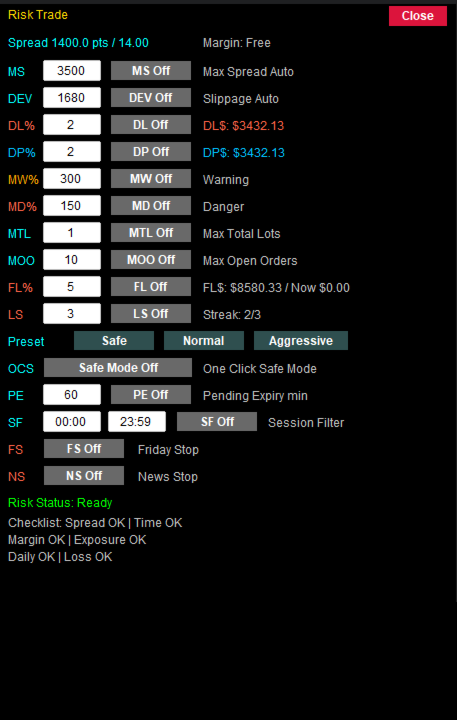
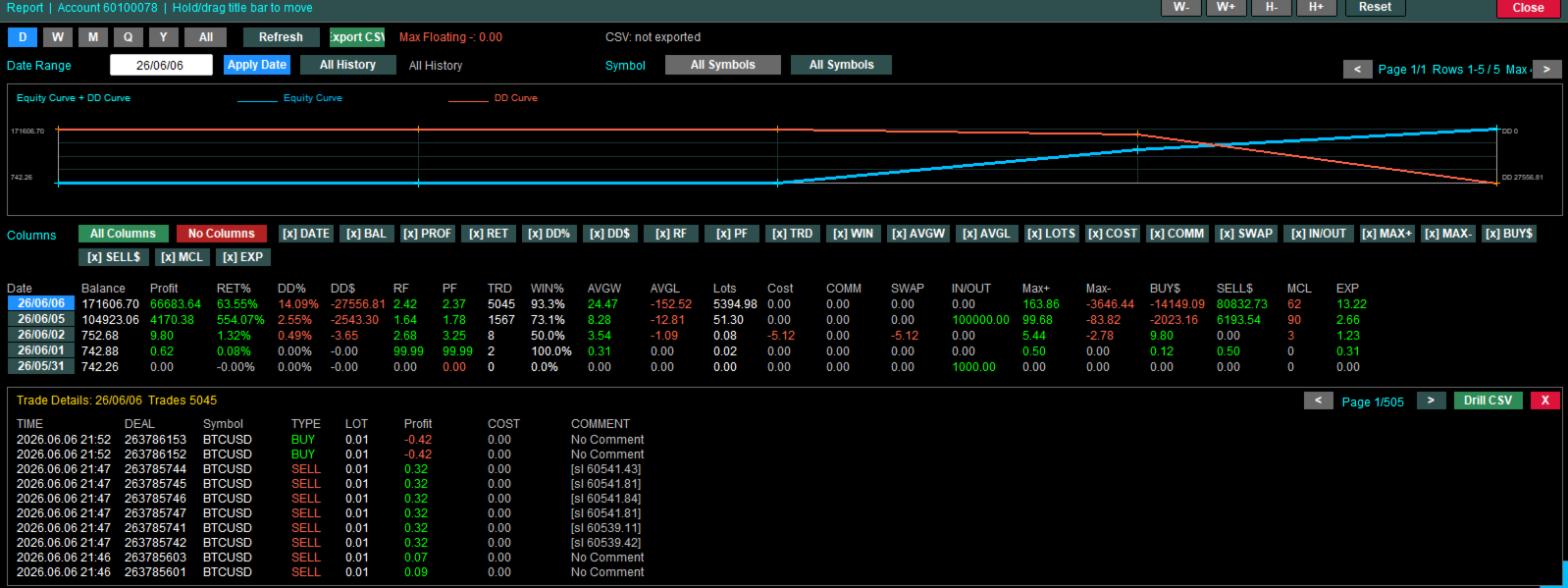
One Click Panel V4

Faster execution, clearer order control, and better trading discipline.

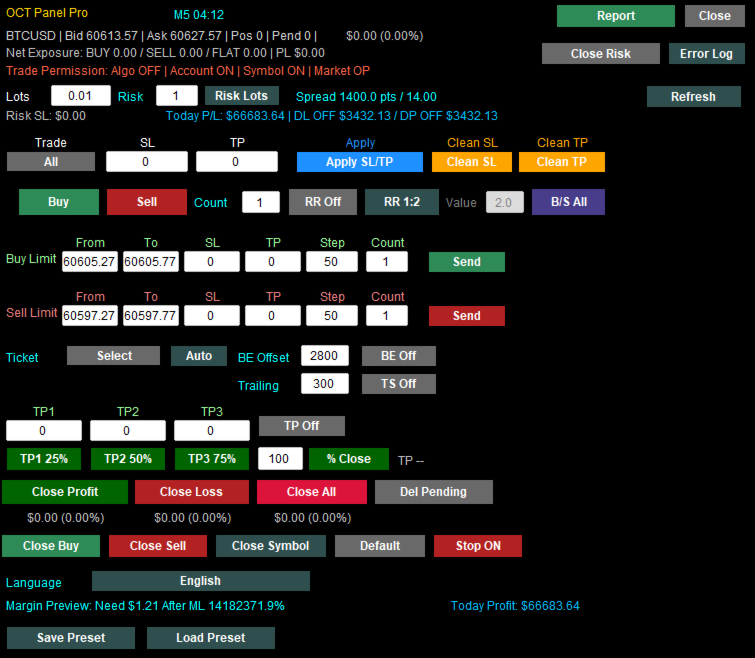
OCT Panel — Professional MT5 Trading Control Panel

OCT Panel is built for traders who want faster execution, clearer order control, and better trading discipline.

OCT Panel is a professional trading assistant panel designed for MetaTrader 5.
It helps traders manage orders, positions, Stop Loss, Take Profit, pending orders, and trade execution more efficiently during manual trading.

OCT is not a signal system and does not guarantee profit.
It is a practical trading utility created to improve trading workflow, execution speed, order management, and risk control.

Key Benefits

  • Faster trade execution
  • Clearer order and position control
  • Easier Stop Loss and Take Profit management
  • More efficient pending order management
  • Reduced repetitive manual operations
  • Better trading discipline through structured order control
  • Suitable for manual traders, scalpers, and short-term traders

Main Features

  • One-click Buy and Sell execution
  • Fast order closing functions
  • Apply Stop Loss and Take Profit quickly
  • Manage Buy Limit and Sell Limit orders
  • Delete pending orders efficiently
  • Visual trading control panel
  • Designed for Gold, Forex, Index, and CFD trading
  • Suitable for manual trading and short-term trading strategies
  • Helps traders improve workflow and reduce operation errors

Who Is OCT Panel For?

OCT Panel is suitable for traders who:

  • Trade manually on MetaTrader 5
  • Need faster trade execution
  • Manage multiple orders or positions
  • Frequently trade Gold, Forex, Indices, or CFDs
  • Want better control over Stop Loss and Take Profit
  • Need a practical and reliable trading control panel
  • Prefer a clear visual interface instead of repeated manual clicks

Important Notice

OCT Panel is a trading utility tool.
It does not predict market direction and does not guarantee trading profits.

All trading involves risk.
Users should apply proper risk management and test the product on a demo account before using it on a real account.


Charges start on January 1, 2027.


Change list

01.Improved multilingual text rendering, with English fallback when localized text cannot be displayed correctly.

02.Added Volume Flow information and improved its placement and size for easier reading.

03.Simplified the GRID selection display to prevent selected trade rows from covering summary information.

04.Improved trailing-stop profit protection by preventing stop adjustments before effective profit protection is available.

05.Added dual-direction stop orders and combined buy-limit and sell-limit controls into one row.

06.Added chart support and resistance levels to help identify relevant price reference areas.

07.Improved multi-timeframe support and resistance zone integration to reduce duplication between nearby zones.

08.Added filled support and resistance zones to make relevant price ranges easier to identify.

09.Improved overlapping zone display and update stability to reduce visual clutter on charts.

10.Improved support and resistance zone colors and subtle fills for clearer chart visibility.

11.Improved valid-touch detection for support and resistance zones to provide more consistent zone information.

12.Added automatic adjustment for break-even and trailing-stop functions to simplify ongoing position management.

13.Restored manual break-even and trailing-stop controls to give users direct control over these functions.

14.Added immediate GRID take-profit previews after position selection for review before applying changes.

15.Simplified support and resistance strength labels to make zone information easier to understand.

16.Removed duplicate long-term position status text to reduce overlapping information on the panel.

17.Improved long-term position protection by excluding selected trades from general management and bulk closure.

18.Kept position selectors open during selection to make choosing multiple trades more convenient.

19.Moved the long-term position control and added a separate selector to improve panel layout.

20.Combined GRID and long-term position selection in Order Manager to simplify trade management.

21.Enlarged the Order Manager window and improved spacing for easier trade selection and reading.

22.Improved selection consistency to prevent the same position entering both long-term and GRID management.

23.Simplified direction indicators into colored lights for a cleaner and more readable display.

24.Arranged multi-timeframe direction lights horizontally to make signals across timeframes easier to compare.

25.Added combined profit management for selected buy and sell positions with target-based closure.

26.Improved compatibility with other EAs to reduce interference between separate trade management functions.

27.Added multiple-position selection for applying stop-loss and take-profit changes to selected trades.

28.Improved take-profit previews and application updates after changes to the profit target.

29.Improved GRID TP feedback to avoid reporting unchanged take-profit levels as failed operations.


Recommended products
Renko Chart with Moving Average. Classic Renko charts idea. It is protted on main chart and Moving Average can be applied. Prices for bars are used from a lower timeframe. Parameters: BarsBack - how many bars of lower timeframe to use. If value is zero than it will use all available bars. LTF - lower timeframe. BrickSize - Renko bar in points. BullishColor - color for bull candle. BearishColor - color for bear candle. HideLineChart - if this value is true the line chart when be hidden when sele
FREE
MASi Three Screens
Aleksey Terentev
5 (2)
MASi Three Screens is based on the trading strategy by Dr. Alexander Elder. This indicator is a collection of algorithms. Algorithms are based on the analysis of charts of several timeframes. You can apply any of the provided algorithms. List of versions of algorithms:     ThreeScreens v1.0 - A simple implementation, with analysis of the MACD line;     ThreeScreens v1.1 - A simple implementation, with analysis of the MACD histogram;     ThreeScreens v1.2 - Combines the first two algorithms in
FREE
RedeeCash Multime XMA
Patrick Odonnell Ingle
About : Crossing Moving Averages on Multiple Timeframes. While a traditional trend strategy would be to choose one time frame like the Daily to estimate trend, this expert advisor will open a trade in the direction of the trend when ALL timeframes from 5M to Monthly, show the same trend.       SINGLE_CURRENCY = true,  permits operations on a single currency, when disabled (FALSE), will trade the currencies selected in the market watch window on metatrader.       CONCURRENT_ORDERS=0, restricts th
FREE
Most killzone indicators draw boxes. This one also checks whether the boxes work. ICT Killzones Honest Stats for MetaTrader 4 draws the four ICT killzones (Asia, London open, New York open, London close) and measures on your own chart how often the day's high or low really formed inside each one, next to what pure chance would give, and how often the London Judas swing really reverses. Free, part of the Honest Stats series. MT5 version | ICT FVG Honest Stats MT4 (free) | ICT Liquidity Levels Hon
FREE
Trades Extractor
Medilane Bernard Philippe Couratier
Jarfac Trades Extractor Description: Le "Jarfac Trades Extractor" est un script MQL4 conçu pour les traders qui souhaitent exporter et analyser leurs trades historiques. En un seul clic, le script génère un fichier CSV contenant des informations détaillées sur chaque trade exécuté pendant une période spécifiée. Caractéristiques principales : Filtrage par Période : Définissez une période personnalisée pour l'extraction. Possibilité de désactiver le filtrage par période. Filtrage par Commentaire :
FREE
Double Fibonacci
Fabio Mazzotta
5 (1)
Fibonacci will be designed by default based on the monthly candle but you can simultaneously view Fibonacci on a weekly candle or you can choose your two favorite timeframes. When you run this script, an input prompt will appear and the following input parameters can be configured: Input Parameters: Name Example Default Timeframe1 Monthly 43200 Timeframe2 Weekly 10080 TF1status 1 on 1 TF2status 0 off 0 candleID you can choose which candle to apply 1 Prefix1 It's is the prefix of the first object
FREE
This EA gives traders a clean, full-window view of how large a position each Market Watch symbol can support at different percentages of account balance used as margin. It helps you quickly compare sizing options across symbols and risk levels without ever placing or modifying orders. The goal is simple position-size awareness so you can decide exposure before you trade. Benefits Shows lot size potential across Market Watch symbols at up to three different % of balance margin levels side-by-sid
FREE
Check Execution Broker
Nikolaos Pantzos
5 (1)
This expert is a tool to check broker execution and spread. Attach expert in any chart and wait to finish check. Expert sends a pending order (Buy Stop) away from the current price (100 pips) and then modifies it. When expert is removed from chart, pending orders expire and are deleted after 15 minutes. You can to get source code from here . Parameters OrdersID - Magic number for orders. ManualLotSize - Lot size for orders. TypeOfOrderUse - Type of order to place (pending or market). TimesModi
FREE
Power Renko MT4
Pierce Vallieres
Power Renko is an indicator which plots Renko bricks underneath the chart using a histogram. You can select the brick size and the timeframe of the Renko bricks as well as whether or not to use the close price or the high/low price of the candles. Renko bricks are based on price alone, not time, therefor the Renko bricks will not be aligned with the chart's time. They are extremely useful for trend trading and many different strategies can be formed from them. Buffers are provided allowing you t
ProfPro
Dzintars Ansons
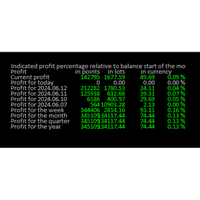
Online  Diary:  This indicator is designed to help traders keep track of profits and losses over various time periods, such as current profit, today’s profit, yesterday’s profit, and so on, up to the profit for the current year. The indicator offers several configuration options, such as the calculation of profit percentage relative to the balance at the beginning of the day, week, month, quarter, or year. It also allows for the customization of text placement and colors to suit the user’s needs
FREE
The indicator shows entry points with Risk-Reward-Ratio 1 to 5. Main timeframe H1. Works on every pair. The main logic - is to find a reversal level, and then track the price reaction to this level. Doesn't need any settings. As a standard, it paint 5 levels of the same take-profit (red / blue for sellers and buys) and 1 stop-loss level - orange. ATTENTION! Test version of the indicator. Works only on the USDCAD pair! The full version can be bought here https://www.mql5.com/en/market/product/61
FREE
Candle GAP
Thushara Dissanayake
3 (1)
The Candle GAP indicator is an essential tool for traders utilizing Gap Trading Strategies as it automatically identifies candle gaps for each day of the week. A gap refers to a price level difference between the close and open of two consecutive days. This indicator recognizes four types of gap patterns: Common, Breakaway, Continuation, and Exhaustion. By incorporating this indicator into any chart, traders can validate their signals and enhance their trading decisions. One of the key features
FREE
Trendline indicator
David Muriithi
2 (1)
Are you tired of drawing trendlines every time you're analyzing charts? Or perhaps you would like more consistency in your technical analysis. Then this is for you. This indicator will draw trend lines automatically when dropped on a chart. How it works Works similar to standard deviation channel found on mt4 and mt5. It has 2 parameters: 1. Starting Bar 2. Number of bars for calculation The   starting bar   is the bar which drawing of the trend lines will begin, while the   number of bars for c
FREE
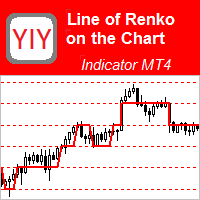
This indicator is the basis for an Expert Advisor that can be categorized as "almost Grail". See details below.             This indicator displays the projection of the Renko chart on the price chart. This projection is displayed as a stepped line, not as "bricks" (rectangles). See slides 1 and 2. Abbreviated name of the indicator: LRC – L ine of R enko on the price C hart.             The principle of its construction is very simple. First, a grid of horizontal lines (levels) is bu
FREE
Multi TF MA Levels
Luke Anthony Caras
Multi-TF MA Levels plots a single moving average across multiple timeframes directly on your chart, giving you instant context at every level of the market. No switching charts. No mental maths. Just clean, flat lines showing exactly where the MA sits on M15, M30, H1, H4 and D1 — all updated on confirmed bar close so there is no repainting. Features Plots the local timeframe MA plus up to 5 higher timeframe MAs simultaneously HTF lines only update on confirmed bar close — no repainting Higher ti
FREE
MAD Bands (Moving Average Deviation Bands) MAD Bands are intended to be used when you want to visually check the behavior of price volatility in relation to a moving average. MAD_Bands (MQL4 version) parameter description This document explains the MT4 parameter input screen for each setting item (input parameter). Group: Main (basic settings) Period Default   :       20 Explanation   : The number of candlesticks used to calculate the moving average (Mid) and band width. The larger the value,
FREE
Risk2Reward MATR is a visual trade planner for MetaTrader 4. It paints multi-timeframe ATR reward and stop zones on the chart so you can judge the distance and the payoff before you place the trade yourself. It does not send, modify, or close orders. Purpose The motive is planning, not automation. A single ATR on the chart timeframe often hides the larger and smaller ranges you actually trade against. This EA builds three stacked take-profit slices, each from its own timeframe, period, and mul
FREE
Utility for know all informations and settings of terminal where the utility is loaded. The informations that you can know are for example: - The path of folder where the terminal start - The path of   folder where the terminal store the indicators, experts advisors etc - The path of   common folder - The permission to use DLL, to automated trading etc - The permission to send email, FTP or notifications to smartphone and many other informations
FREE
TiborsTimer
Tibor Hartmut Sturm
Tibors Timer -  Indikator zur Übersicht und Klarheit im Chart Dieser Indikator wurde von mir geschrieben, da ich oftmals die wichtigsten Informationen während eines Trades bzw. im Chart mühevoll suchen musste. Bitte täglich neu in den Chart ziehen.   Er zeigt folgendes an: - Akuteller Kurs - Aktuelles Handelspaar - Die Zeiteinheit - Die Restzeit zur nächsten Kerzenbildung - Die Nummer des Handelskontos - Die Frei Verfügbare Margin - Margin auf 1 Lot - Der Aktuelle Hebel  - Der Aktuelle Spprea
FREE
A simple chart player for replaying historical charts. You can review market movements by advancing candlesticks one bar at a time. Playback can be paused during operation and resumed at any time. [Features] Automatic playback from past to future Advances one bar at a fixed interval Pause is available during playback [Playback Specifications] Playback direction: Past → Future Playback speed: Fixed Bars moved: 1 bar per step Pause / Resume playback END to stop playback [Controls] Pause / Restar
FREE
Market Profile 3
Hussien Abdeltwab Hussien Ryad
3 (2)
Market Profile 3 MetaTrader 4 indicator  — is a classic Market Profile implementation that can show the price density over time, outlining the most important price levels, value area, and control value of a given trading session. This indicator can be attached to timeframes between M1 and D1 and will show the Market Profile for daily, weekly, monthly, or even intraday sessions. Lower timeframes offer higher precision. Higher timeframes are recommended for better visibility. It is also possible t
FREE
Chaos Trader Lite
John Davis
1 (1)
Chaos Trader Lite attempts to use aspects of chaos theory to place trades in the marketplace. This Expert Advisor, in particular, draws upon theories made by Bill Williams. Every version of MetaTrader contains the Bill Williams indicators. I wondered why was he deemed so important as to have his own set of indicators added to MetaTrader with name attribution. Conducting research I found that Bill Williams wrote a book using chaos theory to trade the markets. The Bill Williams indicators are usef
FREE
The indicator displays Renko bars on the chart and uses them to plot the ZigZag - trend lines connecting the local Lows and Highs of the price movement. Renko - specialized display of the price action, in which the graph is displayed not every bar of the time frame, but only under the condition that the price had passed more than the specified number of points. Renko bars are not bound to a time frame, so the indicator can work on any time frame with the same efficiency. This implementation of t
Features: 1- Get OB/OS Levels from Golden MA Levels 2- Wait for Buy/Sell Start Level Cross 3- Optional: Should price cross Mid Level in earlier bars 4- Optional: Crossing bar High/Medium Volume 5- Optional: MA Stacked to check up/down trend for current TF 6- Optional: NRTR higher timeframes aligned Check Detailed blog post explained: https://www.mql5.com/en/blogs/post/758457 Levels with Buffers available here: Golden MA Levels Indicator: https://www.mql5.com/en/market/product/119515 Note: Arr
FREE
The Crossing
Anton Iudakov
5 (2)
+ 2 bonus strategies! Alerts! I recommend watching my advisor -   Night Zen EA The indicator combines the most popular moving average strategies: Simple moving average crossover. Moving average crossover relative to the position of the slower moving average. 2 bonus strategies : The crossing of the fast moving average with the calculation of the opening prices of the slow moving average with the calculation of the closing prices taking into account the slower moving average. (The settings for th
FREE
======================================================== GOLD WAVE LEVELS (ELLIOTT-ALIGNED) - MQL5/MT4 MARKET DESCRIPTION (formatting: **bold** = Bold button; lines with • = bullet list; UPPERCASE = heading) ======================================================== OVERVIEW ------------------------------------------------------- **Gold Wave Levels** draws a tested wave backbone for gold and validates signals against **Elliott theory hard-rules**, with higher-timeframe context and per-timeframe
FREE
Renko bars builder
Navdeep Singh
4.2 (5)
The indicator builds a Renko chart in the sub window for the current symbol. The bars are formed from live data and the desired bar size can be set in the inputs tab. Most importantly, because the Renko chart only uses price to construct bars and ignores time, the indicator can be applied to any time frame and same results can be achieved. Recommended usage As Renko charts are famous for eliminating noise so traders can use this tool to see clear picture of the trend to help their analysis, entr
FREE
Bar End Time by MMD MT4
Mariusz Maciej Drozdowski
The Time End bar by MMD is a simple indicator that shows the number of seconds remaining in the three selected intervals. According to the MMD methodology, the moment when a directional price movement occurs is important. This indicator allows you to use this relationship more effectively in Forex and Futures trading. Functionality description: Time Frame 1 Period - defining the first time interval Time Frame 1 Color - specifying the color for the first time interval Time Frame 1 Period - def
FREE
The indicator calculates and displays renko bars using MA and PSAR data as well as provides buy/sell signals. Renko is a non-trivial price display method. Instead of displaying each bar within a time interval, only the bars where the price moved a certain number of points are shown. Renko bars do not depend on a time interval, therefore the indicator works on any timeframe without losing its efficiency. Buy signal forms when PSAR readings are moving down, MA is moving up, the price is closing ab
RSI TrendLine Divergency Message is an indicator for the MetaTrader 4 trading platform. Unlike the original indicator, this three in one version has a system of alerts that inform on market situation changes. It consists of the following signals: when the Main line crosses the levels of extreme zones and 50% level; when the Main line crosses the Trend line in the indicator window; divergence on the last bar. Parameters of levels of extremum, 50-level and divergence are adjustable. Parameters La
Buyers of this product also purchase
Local Trade Copier EA MT4
Juvenille Emperor Limited
4.96 (111)
Local Trade Copier EA MT4 is a fast and flexible trade copier for copying and managing trades between multiple MetaTrader 4 accounts on the same Windows computer or Windows VPS. It combines local trade synchronization with Receiver-side controls for lot sizing, risk management, trade filtering, symbol mapping, trade management and account protection. Set up your Transmitter and Receiver terminals in about 1 minute and copy manual or EA trades between accounts at the same or different brokers. U
Exp COPYLOT CLIENT for MT4
Vladislav Andruschenko
4.69 (65)
Professional Trade Copier for MetaTrader 4 Fast, professional, and reliable trade copier for MetaTrader 4 . COPYLOT helps you copy Forex trades between MetaTrader 4 and MetaTrader 5 terminals with flexible synchronization for different account setups. COPYLOT MT4 version supports: MetaTrader 4 to MetaTrader 4 MetaTrader 5 Hedge to MetaTrader 4 MetaTrader 5 Netting to MetaTrader 4   MT5 version Full Description + DEMO + PDF How To Buy How To Install How to get Log Files How To Test and Optimize A
Forex Trade Manager MT4
InvestSoft
4.98 (447)
Trade Manager MT4 is an advanced position size calculator and trade management tool for MetaTrader 4, designed to help traders plan trades faster, control risk more precisely, and manage open positions directly from the chart. It combines order placement, risk based lot calculation, Stop Loss and Take Profit management, Break Even, Trailing Stop, Partial Close, Equity Protection, and external trade management in one panel. Whether you trade forex, indices, metals, commodities, or crypto, Trade M
Trade Assistant MT4
Evgeniy Kravchenko
4.43 (197)
It helps to calculate the risk per trade, the easy installation of a new order, order management with partial closing functions, trailing stop of 7 types and other useful functions. Additional materials and instructions Installation instructions   -   Application instructions   Line function -   shows on the chart the Opening line, Stop Loss, Take Profit. With this function it is easy to set a new order and see its additional characteristics before opening.   Risk management  - The risk calcu
Trade copier MT4
Alfiya Fazylova
4.62 (37)
Trade Copier is a professional utility designed to copy and synchronize trades between trading accounts. Copying occurs from the account / terminal of the supplier to the account / terminal of the recipient, which are installed on the same computer or VPS . Before buying, you can test the demo version on a demo account. Demo version here . Full instruction here . Main functionality and benefits: Supports copying MT4> MT4, MT4> MT5, MT5> MT4, including MT5 netting accounts. * Supports copying Dem
TradePanel MT4
Alfiya Fazylova
4.84 (95)
Trade Panel is a multi-functional trading assistant. The app contains over 50 trading functions for manual trading and allows you to automate most trading tasks. Application instructions: https://www.mql5.com/en/blogs/post/756482 Trial version of the application for a demo account: https://www.mql5.com/en/blogs/post/750865 How to install the application: https://www.mql5.com/en/blogs/post/756239 How to test the application in visual mode: https://www.mql5.com/en/blogs/post/770277 How to install
Telegram to MT4 Coppy
Sergey Batudayev
4.09 (11)
Telegram to MT4: The Ultimate Signal Copying Solution Streamline your trading with Telegram to MT4 , the cutting-edge utility designed to copy trading signals directly from Telegram channels and chats to your MetaTrader 4 platform—without the need for DLLs. This robust solution ensures seamless execution of signals with unparalleled precision and customization options, saving you time and boosting your efficiency. [ Instructions and DEMO ] [ FAQ ] [ How atach logs properly ] [Settings descrition
News Filter EA MT4
Rashed Samir
5 (10)
News Filter EA: Advanced Algo Trading Assistant News Filter EA is an advanced algo trading assistant designed to enhance your trading experience. By using the   News Filter EA , you can integrate a Forex economic news filter into your existing expert advisor, even if you do not have access to its source code. In addition to the news filter, you can also specify   trading days   and   hours   for your expert. The News Filter EA also includes   risk management   and   equity protection   features
Rhino Chart Drawing Tools provides a TradingView-style drawing workflow for MetaTrader 4. It includes 54 drawing tools , a customizable toolbar, Favorites, quick styling, object settings, templates and an object manager. User manual: How to use the product Free demo version: Download the demo MetaTrader 5 version: Rhino Drawing Tools for MT5 Drawing Tools Group Object List Lines Trend line, ray, extended line, horizontal line, vertical line, horizontal ray, cross line, trend angle, arrow, path
MT4 to Telegram Signal Provider   turns your trading account into a signal provider. Every trade action, whether manual, by EA or from your phone, is instantly sent as a message to Telegram. You can fully customize the format or use a ready-made template for quick setup. [ Demo ] [ Manual ] [ MT5 Version ] [ Discord Version ]  New: [ Telegram To MT5 ] Setup A step by step user guide is available. Key Features Ability to customize order details sent to subscribers You can create a tiered subs
Automatic Trailing Stop Based on Take Profit Percentage with Profit Lock EA MT4   Lock in your profits and "let your winners run" past your 100% take profit target with this EA.  This Expert Advisor automatically adjusts your Stop Loss based on up to 4 user-defined Take Profit Target Percentages, locking in your profit.  If price pushes past your 100% take profit target, the EA will automatically trail the price by user-defined pips, so you won't miss that runaway train again.   EA Features The
Telegram to MT4 Multi-Channel Copier   automatically copies trading signals from your Telegram and Discord channels straight to MetaTrader 4. No bots, no browser extensions, no manual copying. A signal arrives in Telegram or Discord and the EA opens the trade in your terminal within seconds. And before you copy a channel, the built-in backtester shows you what that channel would have done in your account. The product has two components: a Windows application that listens to your Telegram channel
TradeMirror is a trade copier EA for MT4/MT5 platform. Tutorial Please click the Trademirror Tutorial link to view more tutorials. Why TradeMirror We understand the importance of security, stability and privacy for financial software, so we've gone the extra mile to harden these three elements in detail: Provides a user-friendly graphical interface that is easy to operate Focus on privacy and security, suitable for various financial scenarios with privacy requirements for order distribution Prec
Equity Protect Pro: Your Comprehensive Account Protection Expert for Worry-Free Trading If you're looking for features like account protection, equity protection, portfolio protection, multi-strategy protection, profit protection, profit harvesting, trading security, risk control programs, automatic risk control, automatic liquidation, conditional liquidation, scheduled liquidation, dynamic liquidation, trailing stop loss, one-click close, one-click liquidation, and one-click restore, Equity P
Exp Averager
Vladislav Andruschenko
4.82 (22)
Averager for MetaTrader 4 — advanced trade recovery and position series management system A professional Expert Advisor created for traders who need a controlled way to average losing positions, build a structured trade basket, and manage exits with more flexibility. Averager is designed to open additional trades when positions move into drawdown, helping you improve the average entry price and manage the entire series as one coordinated structure. This is not just another averaging utility. It
Copy Cat More Trade Copier MT4 is not just a simple local trade copier; it is a complete risk management and execution framework designed for today’s trading challenges. From prop firm challenges to personal portfolio management, it adapts to every situation with its blend of robust execution, capital protection, flexible configuration, and advanced trade handling. Need Support? How to setup? Has questions? Ask here in your language , fast reply: https://www.mql5.com/en/market/product/139089/co
PZ Trade Pad Pro MT4
PZ TRADING SLU
3.67 (3)
Effortlessly calculate lot sizes and manage trades to save time and avoid costly errors The Trade Pad Pro EA is a tool for the Metatrader Platform that aims to help traders manage their trades more efficiently and effectively. It has a user-friendly visual interface that allows users to easily place and manage an unlimited number of trades, helping to avoid human errors and enhance their trading activity. [ Installation Guide | Update Guide | Troubleshooting | FAQ | All Products ] One of the k
Trade Manager FX MT4
Rodrigo Arana Garcia
Trade Manager FX – Risk Calculator, Trade Panel and Trade Management for MT4 Trade Manager FX is an all-in-one trade panel for manual traders. Plan your trade on the chart, let the panel calculate the correct lot size for your risk, and send it with one click. After entry, it manages the position for you with break even, trailing stop, partial closes and equity protection. Additional materials and instructions Installation instructions - User manual  - Version MT5 Drag the Entry, Stop Loss a
Trade Indicator Assistant is a powerful MT4 utility designed to turn indicators into automated trading systems. Its main feature is the ability to automatically detect an indicator’s   BUY and SELL signal buffers , without requiring you to know the buffer numbers, search through indicator settings, or modify the indicator source code. Bonus Indicator: After purchasing Trade Indicator Assistant, contact me to receive Trade Signal Pro completely free as a bonus indicator. [Download Demo Version]
Trading History MT4
Siarhei Vashchylka
5 (9)
Trading History - A program for trading and money management on the history of quotes in stratagy tester. It can work with pending and immediate orders, and is equipped with trailing stop, breakeven and take profit functions. Very good for training and testing different strategies. Manual (Be sure to read before purchasing) Advantages 1. Allows you to test any trading strategy in the shortest possible time 2. An excellent simulator for trading training. You can gain months of trading experience

Trade Manager Pro MT4
Bryan Djoufack Nguessong
This is an Utility to make your trading easier by putting at   one click or a few clicks   time-consuming tasks as order management and risk management. Contact for a free trial. Features Risk Management   Calculates automatically lots based on risk specified in either   % or $  in the risk field and let you enter just   by placing lines for SL TP   etc and display   real-time Risk Reward . TrueRisk   so   it includes commissions when calculating lot size on FX pairs only so you risk 1% with
The product will copy all telegram signal to MT4   ( which you are member  ) , also it can work as remote copier.  Easy to set up, copy order instant, can work with almost signal formats, image signal, s upport to translate other language to English Work with all type of channel or group, even channel have "Restrict Saving Content", work with  multi channel, multi MT5 Work as remote copier: with signal have ticket number, it will copy exactly via ticket number. Support to backtest signal. How to
Copier->Convenient and fast interface interaction, users can use it right away   ->>>> Recommended to use on Windows computers or VPS Windows Features: Diversified and personalized copy trading settings: 1. Different lot modes can be set for different signal sources 2. Different signal sources can be set for forward and reverse copy trading 3. Signals can be set with comments 4. Whether to calibrate the lot according to the contract lot Diversified and personalized copy order settings 2: 1. Dif
FCK CurrencyStrength Pro
Patel Hitendrakumar Mahendrabhai
Hi Friends, " FCK Currency Strength Pro " is a auto & semi auto trading expert with direction of pair. Buy-Sell separate or multi currency in one click. The strategy of  FCK Currency Strength Pro  is a combination of custom indicator, Trendlines, Support & Resistance levels ( Price Action ) and most important secretive trading algorithm mentioned above. Download News Ex4 and csv file You need the following SDSnews.ex4 in MQL4/Libraries and the daylightsavings.csv in MQL4/Files. Only 4 of 5 copi
Shepherd Safety EA
AW Trading Software Limited
4.92 (13)
AW Shepherd Safety EA is an Expert Advisor for managing open positions. The trader opens the first order from the panel, and from there the EA runs the basket on its own: it adds recovery orders with a trend filter, closes a side on TakeProfit, trailing or stop, and shows the close levels on the chart. Buys and sells are managed separately, and both sides can be open at the same time. A recovery order opens not just on a price step but once Parabolic SAR, two MAs or candle color show a reversal

Trade Assistant Pro 36 in 1
Makarii Gubaydullin
4.76 (21)
Multifunctional tool: Lot Calculator, Grid Orders, R/R ratio, Trade Manager, Supply and Demand zones, Price Action and much more Demo version   |   User manual Trade Assistant   doesn't work in the strategy tester: you can download the Demo Version HERE  to test the utility . Contact me for any questions  / ideas for improvement / in case of a bug found If you need a MT5 version, it is available   here Simplify, speed up and automate your trading process . Expand the standard terminal capabilit
Trade Dashboard MT4
Fatemeh Ameri
4.96 (55)
Trade Dashboard simplifies how you open, manage, and control your trades, with built-in lot size calculation. It allows you to execute trades, manage risk, and control positions directly on the chart, with tools such as partial close, breakeven, and trailing stop. Designed to reduce manual work and help you stay focused on your trading decisions. A demo version is available for testing. Detailed explanations of features are provided within the MQL5 platform. Installation instructions are include
Multi Account Local Trade Copier is a fast local trade copier for MetaTrader: copy trades between MT4/MT5 terminals running on the same Windows PC or VPS, from one master account to multiple receiver accounts — your own real, demo and prop firm accounts, at the same broker or at different ones. It is event-driven : the master publishes every trade the instant it happens, and the receiver measures and logs the real copy latency of every single trade — typically 50-150 ms . No DLLs, no internet br

Magnifier Ruler Crosshair
Taras Slobodyanik
5 (2)
The indicator has three main tools: Magnifier (Zoom chart), Ruler  ( Time and Price scales ),   and Crosshair. You can move it all around with your mouse and customize different formats for  displaying , customize   size and color of each element. The Magnifier (zoom chart) allows you to display candles from any time frame and at different scales. Hotkeys: 'Q' - higher timeframe, 'A' - lower timeframe, 'W' - decrease candle size, 'S' - increase candle size, 'Z' - show/hide zoom chart You can
A local trade copier between MetaTrader terminals on one PC or VPS. Copying runs in any direction between MT5 and MT4. The volume of a copy is calculated in percent of equity, in account currency, or by mirroring the master's risk share; trades are selected by filters on symbol, magic number, comment and size. The panel handles the life of an open copy: virtual SL/TP, break even, trailing stop, basket close and a scheduled close. Daily, total and volume limits protect the account and trip early
More from author
Faster execution, clearer order control, and better trading discipline. OCT Panel — Professional MT5 Trading Control Panel OCT Panel is built for traders who want faster execution, clearer order control, and better trading discipline. OCT Panel is a professional trading assistant panel designed for MetaTrader 5 . It helps traders manage orders, positions, Stop Loss, Take Profit, pending orders, and trade execution more efficiently during manual trading. OCT is not a signal system and does not g
FREE
Filter:
No reviews
Reply to review