One Click Panel V4
- Yardımcı programlar
- Sürüm: 1.245

Faster execution, clearer order control, and better trading discipline.
OCT Panel is built for traders who want faster execution, clearer order control, and better trading discipline.
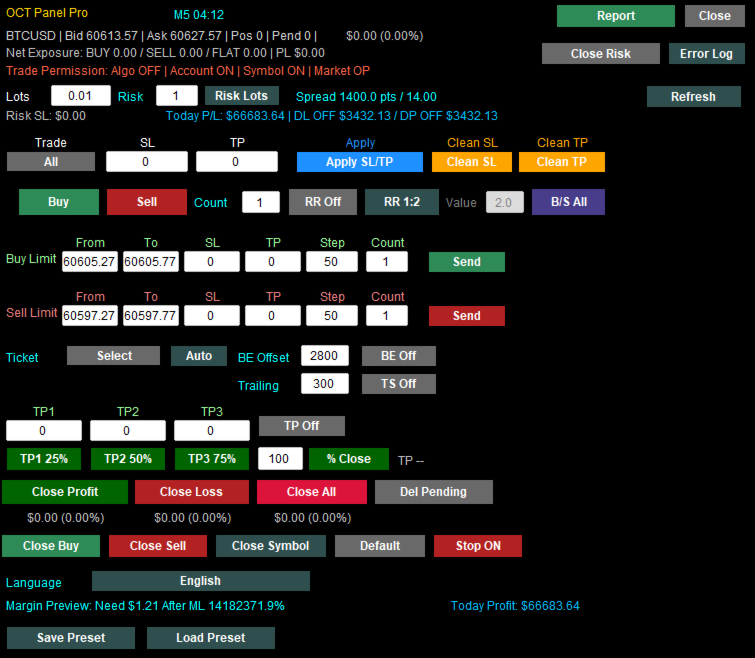
OCT Panel is a professional trading assistant panel designed for MetaTrader 5.
It helps traders manage orders, positions, Stop Loss, Take Profit, pending orders, and trade execution more efficiently during manual trading.
OCT is not a signal system and does not guarantee profit.
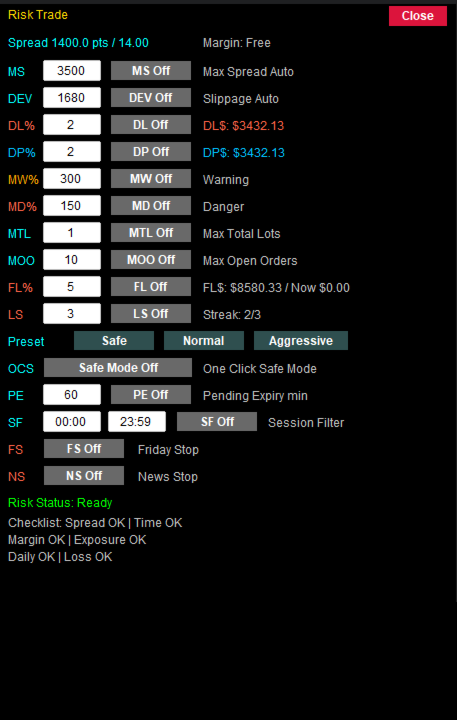
It is a practical trading utility created to improve trading workflow, execution speed, order management, and risk control.
Key Benefits
- Faster trade execution
- Clearer order and position control
- Easier Stop Loss and Take Profit management
- More efficient pending order management
- Reduced repetitive manual operations
- Better trading discipline through structured order control
- Suitable for manual traders, scalpers, and short-term traders
Main Features
- One-click Buy and Sell execution
- Fast order closing functions
- Apply Stop Loss and Take Profit quickly
- Manage Buy Limit and Sell Limit orders
- Delete pending orders efficiently
- Visual trading control panel
- Designed for Gold, Forex, Index, and CFD trading
- Suitable for manual trading and short-term trading strategies
- Helps traders improve workflow and reduce operation errors
Who Is OCT Panel For?
OCT Panel is suitable for traders who:
- Trade manually on MetaTrader 5
- Need faster trade execution
- Manage multiple orders or positions
- Frequently trade Gold, Forex, Indices, or CFDs
- Want better control over Stop Loss and Take Profit
- Need a practical and reliable trading control panel
- Prefer a clear visual interface instead of repeated manual clicks
Important Notice
OCT Panel is a trading utility tool.
It does not predict market direction and does not guarantee trading profits.
All trading involves risk.
Users should apply proper risk management and test the product on a demo account before using it on a real account.
Charges start on January 1, 2027.
Change list
01.Improved multilingual text rendering, with English fallback when localized text cannot be displayed correctly.
02.Added Volume Flow information and improved its placement and size for easier reading.
03.Simplified the GRID selection display to prevent selected trade rows from covering summary information.
04.Improved trailing-stop profit protection by preventing stop adjustments before effective profit protection is available.
05.Added dual-direction stop orders and combined buy-limit and sell-limit controls into one row.
06.Added chart support and resistance levels to help identify relevant price reference areas.
07.Improved multi-timeframe support and resistance zone integration to reduce duplication between nearby zones.
08.Added filled support and resistance zones to make relevant price ranges easier to identify.
09.Improved overlapping zone display and update stability to reduce visual clutter on charts.
10.Improved support and resistance zone colors and subtle fills for clearer chart visibility.
11.Improved valid-touch detection for support and resistance zones to provide more consistent zone information.
12.Added automatic adjustment for break-even and trailing-stop functions to simplify ongoing position management.
13.Restored manual break-even and trailing-stop controls to give users direct control over these functions.
14.Added immediate GRID take-profit previews after position selection for review before applying changes.
15.Simplified support and resistance strength labels to make zone information easier to understand.
16.Removed duplicate long-term position status text to reduce overlapping information on the panel.
17.Improved long-term position protection by excluding selected trades from general management and bulk closure.
18.Kept position selectors open during selection to make choosing multiple trades more convenient.
19.Moved the long-term position control and added a separate selector to improve panel layout.
20.Combined GRID and long-term position selection in Order Manager to simplify trade management.
21.Enlarged the Order Manager window and improved spacing for easier trade selection and reading.
22.Improved selection consistency to prevent the same position entering both long-term and GRID management.
23.Simplified direction indicators into colored lights for a cleaner and more readable display.
24.Arranged multi-timeframe direction lights horizontally to make signals across timeframes easier to compare.
25.Added combined profit management for selected buy and sell positions with target-based closure.
26.Improved compatibility with other EAs to reduce interference between separate trade management functions.
27.Added multiple-position selection for applying stop-loss and take-profit changes to selected trades.
28.Improved take-profit previews and application updates after changes to the profit target.
29.Improved GRID TP feedback to avoid reporting unchanged take-profit levels as failed operations.