Eagle Trade Copier MT5


Eagle

Trade Copier


Local trade copier for MetaTrader 4 and MetaTrader 5: copy from MT4 to MT5, from MT5 to MT4 or between terminals of the same platform on one computer or VPS. Every symbol is checked before the first copy, and every copy is checked like a manual order. A dashboard on the chart shows the accounts, the links and every copy in real time.

Eagle Trade Copier copies trades and pending orders between MetaTrader terminals running on the same computer or VPS. One file covers three roles: Transmitter on the account you copy from, Receiver on every account that copies, Self Copier to multiply trades inside the same account. Before the first copy it tests the connection and every symbol of the source account, and the dashboard on the chart tells you what would go wrong and how to fix it.

WHY IT IS DIFFERENT
- Brokers name the same instrument in different ways (EURUSD, EURUSD.r, EURUSDm, GOLD and XAUUSD). One click on PING lists every symbol that cannot be copied, the matching symbol on your account and the exact Prefix/Suffix setting that fixes them.
- A copy is never sent blind: free margin, volume limits, stop and freeze levels, trading sessions and the price of the instrument are checked first. If something blocks a copy, the reason is written on the dashboard.
- MT4 and MT5 in both directions, hedging and netting MT5 accounts, several Transmitters for one Receiver and several Receivers for one Transmitter.

START IN THREE STEPS
1. Attach the EA to one chart of the account you copy from and set Account Mode = Transmitter.
2. Attach the EA to one chart of each account that copies, set Account Mode = Receiver and type the Transmitter account number.
3. Press PING on the dashboard. In about one second it shows "connection established", the response time and the result of the checks.

CONNECTION AND SYMBOL CHECKS
- The dashboard shows the state of every link: connected, ping in progress, no answer, offline, with the time since the last signal. The PING runs by itself when a Transmitter comes online and whenever you press the button.
- Checked on both sides: EA version, Algo Trading and account permissions, account currency, server time difference (with the value to type in Transmitter Server Offset Hours).
- Checked for every symbol of the Transmitter: a matching symbol on the Receiver, trading mode, contract size (with the multiplier that keeps the same exposure), price scale and minimum lot.
- For each symbol without a match: the most likely symbol on your account (same name, different prefix or suffix, or a known alias such as GOLD and XAUUSD, US500 and SPX500, GER40 and DE40) and a ready solution: the Prefix/Suffix that fixes most symbols plus Special Symbol lines for the others.
- Automatic Symbol Mapping (optional): uses the suggested symbol only when it is the only candidate and its price matches the Transmitter.
- Copies are blocked, with the reason on the dashboard, when the Receiver price differs by more than 3% from the Transmitter price (another instrument or another scale) or when the symbol does not accept that order.
- On the Transmitter chart: every connected Receiver with its copies, response time, errors and warnings. A second chart running with the same Magic Number on the same account is reported.

THE DASHBOARD ON THE CHART
- Your account at a glance: balance, equity, floating profit or loss, free margin, margin level, open positions and pending orders.
- On a Receiver: every Transmitter it follows, with connection state, ping, seconds since its last signal, balance, equity and floating result.
- On a Transmitter: every connected Receiver with its state (active, paused, suspended, halted), equity, floating result of its copies, number of copies, trades waiting, ping and checks.
- The table of the copied trades (published trades on the Transmitter): source ticket, symbol, type, lots, open price, SL, TP and profit or loss, 8 rows per page.
- An attention list with every trade that is not being copied and the reason, the symbols that cannot be synchronized, pauses and limits reached.
- A status bar with the heartbeat of the links, the retry queue, the state of your protections with the measured daily drawdown, and the last action of the EA.
- Buttons: PING and PAUSE / RESUME. Every section (account, links, trades, attention, checks with their solution) folds with a click on its title and keeps a one-line summary; size S, M or L and minimize.

HOW THE COPY WORKS
- The Transmitter publishes its trades every 200 milliseconds and immediately after every trade event; each Receiver reads them every 100 milliseconds. Data travel through the common data folder of MetaTrader: no internet connection between terminals, no web server, no network port to open, no DLL.
- Opening, modification of SL, TP and pending price, partial closure, activation of pending orders and closure are all synchronized.
- The state of every copy is saved: after a restart of the terminal or of the computer the EA continues from where it stopped and does not copy the same trade twice.
- On MT5 netting accounts each copy is followed as its own unit and its SL/TP are managed virtually.
- PAUSE button: stops new copies without removing the EA, while the open copies keep following the Transmitter (closures, SL/TP, protections). RESUME starts again; the choice is remembered after a restart.
- A refused closure or modification is retried after 1, 2, 4 and up to 60 seconds, never in a loop, and a "market closed" answer pauses that symbol for 60 seconds.

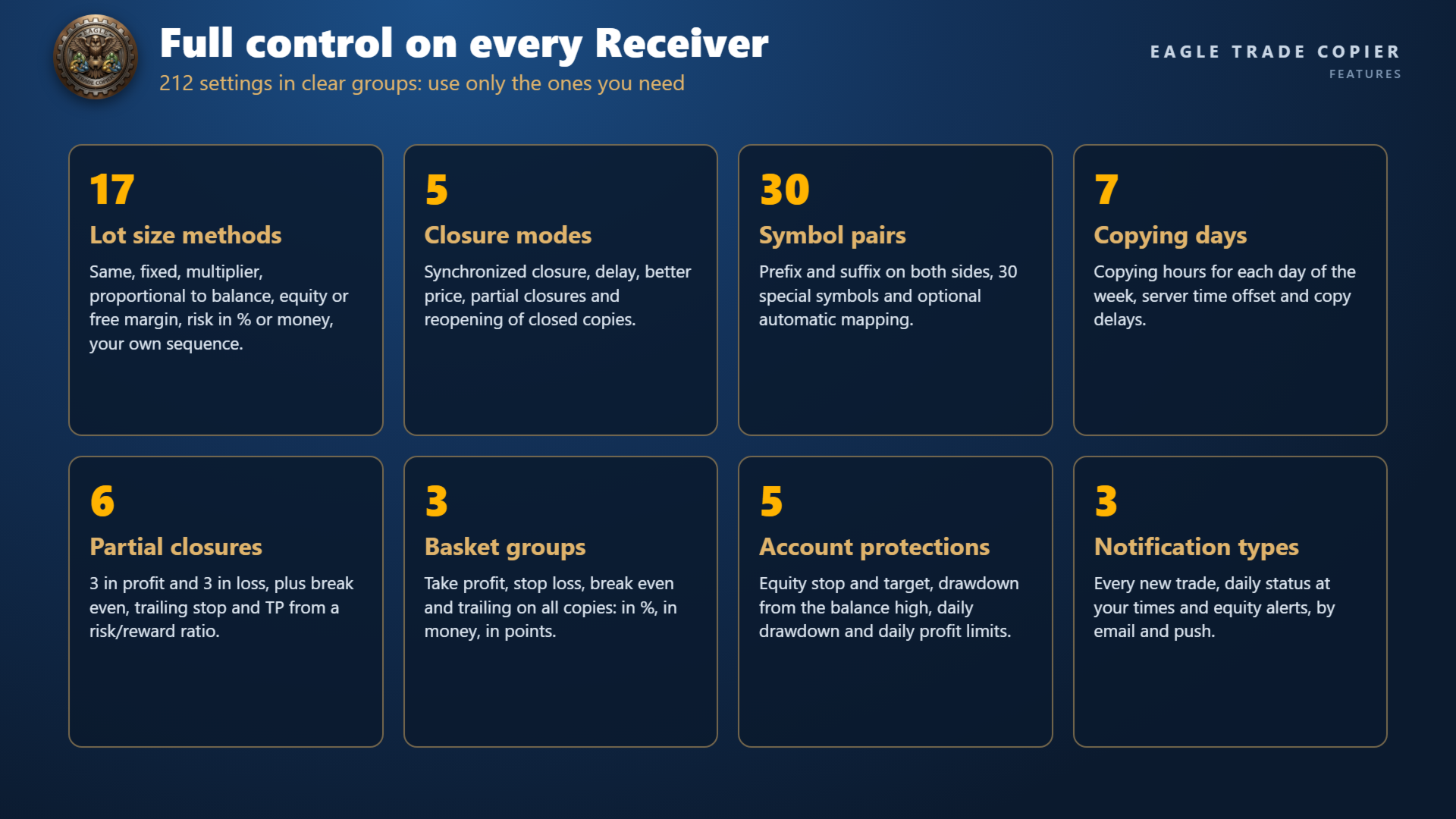
WHAT YOU CONTROL ON EACH RECEIVER
- Filters: magic numbers (exact values, "contains" and ranges), comments, symbols, long or short, market or pending, trades already open or new trades, lot size of the original, copying hours for each day of the week.
- Lot size: 17 methods, from the same lot to fixed lot, multipliers, proportional to balance, equity or free margin, risk per trade in % or in money, lot per 1000 of balance or equity, or your own lot sequence. Custom values per symbol, split into parts, minimum and maximum lot.
- Execution: maximum spread per symbol, slippage, maximum price difference, better price, fixed or random delay, expiration, retry, reverse copying, minimum distance between copies.
- Closure: synchronized closure in 5 modes, closure delay and better price, partial closures, reopening of copies closed on the Receiver, and the option to close the original when its copy is closed.
- Management: own or hidden (virtual) TP and SL in points or money, break even, trailing stop, TP from a risk/reward ratio, 3 partial closures in profit and 3 in loss, scheduled closures, closure after a number of minutes.
- Basket: take profit, stop loss, break even and trailing stop on all copies together, in % of balance, in money or in average points.
- Protection: equity stop loss and take profit, maximum drawdown from the balance high, daily drawdown and daily profit limits, copying only when the Transmitter or Receiver drawdown is inside your limits, limits on symbols, magic numbers, trades, volume and risk.
- Notifications by email and push: every new trade, a daily status at the times you choose, equity alert levels.

TRY IT IN THE STRATEGY TESTER
- The Strategy Tester has no second terminal to copy from, so the EA shows itself at work: every 4 hours it opens a sample trade on the chart symbol (minimum lot, magic number 777777), closes it 2 hours later, and the Self Copier copies it with your settings. This happens only in the Strategy Tester and is written in the journal.
- Change lot method, multiplier, virtual levels or basket rules and watch how the copies follow.

REQUIREMENTS
- All terminals on the same Windows computer or VPS, under the same Windows user.
- Algo Trading enabled in every terminal that copies. One chart per account and role; a different Magic Number for each Receiver running on the same account.
- Install the version that matches each terminal: this one for MetaTrader 5, the MetaTrader 4 version for MetaTrader 4 (both in the Financial Freedom Shop). They work together in any direction.
- MT5: set Account Type as your account (Hedging or Netting).
- The terminals must stay open and connected while you copy.
- MetaQuotes Virtual Hosting (the VPS built into MetaTrader) keeps each terminal separated from the files of the others, so it cannot run a local copier: use a Windows VPS where all your terminals run together.

PARAMETERS: ACCOUNT SETUP
- Account Mode: Transmitter (the account you copy from), Receiver (copies from one or more Transmitters) or Self Copier (copies the trades of this account into the same account).
- Account Type: Hedging or Netting, as the MT5 account.
- Transmitter Account Number: account(s) to copy from, separated by commas.
- Transmitter Comment: comment written on the copies by this Transmitter; # = original comment, @ = original ticket, % = original magic number, & = Transmitter account.
- Receiver Comment: comment of the copies on this Receiver, with the same placeholders; it replaces the Transmitter Comment.

PARAMETERS: GENERAL SETTINGS AND FILTERS
- Magic Number: identifies the copies of this Receiver; use a different one for each Receiver on the same account.
- Magic Numbers to Copy / Not to Copy: e.g. 3245,0 (exact), (14) (contains 14), 100-200 (range).
- Maximum Number of Copied Magic Numbers / Maximum Receiver Account Magic Numbers: how many different magic numbers can be copied / can be open on this account.
- Symbols to Copy / Not to Copy: Receiver symbols to include or exclude.
- Maximum Number of Copied Symbols / Maximum Receiver Account Symbols: how many different symbols can be copied / can be open on this account.
- Comments to Copy / Not to Copy: e.g. Expert 1 (exact) or (Expert) (contains).

PARAMETERS: COPYING OPTIONS
- Copy on Monday ... Copy on Sunday: copying hours for each day, e.g. 00:00:00-14:30:00,16:30:00-23:59:59; empty = no copying that day.
- Transmitter Server Offset Hours: server time difference between Transmitter and Receiver (the PING suggests the value).
- Copy Long Trades / Copy Short Trades.
- Copy Current Trades: copy the trades already open when the EA starts. Copy New Trades: copy the trades opened later.
- Copy Take Profit / Copy Stop Loss, with Take Profit / Stop Loss Multiplier and Add/Subtract Points in TP / SL Level.
- Do Not Copy Trades/Orders Without SL: waits until the original has a stop loss.
- Allow TP/SL Manual Change: keep your manual changes on the copies; false = the EA restores the copied levels.
- Copy Market Trades / Copy Pending Orders: with pending orders off, an order is copied when it becomes a trade.
- Maximum Spread in Points: e.g. 10,XAUUSD30,BTCUSD1500 (default value, then values per symbol).
- Maximum Slippage in Points. Maximum Copying Difference in Points: maximum distance from the original open price.
- Use Copying Expiration in Seconds / Copying Expiration in Seconds: do not copy trades older than this.
- Copying Delay in Seconds: e.g. 5, or 5,20 for a random delay between 5 and 20 seconds. Retry Attempts in Seconds: wait before retrying a refused order.
- Better Price / Better Price Difference in Points: copy only at a price better than the original by this distance.
- Reverse Copying: buy becomes sell, limit orders become stop orders, TP and SL swap.
- Keep Original TP/SL Distances: TP and SL at the same distance from the copy's own open price.
- Min Distance in Points for Same Symbol/Direction Trades/Orders.

PARAMETERS: LOT SIZE
- Lot Size Type: None, Same Lot Size, Fixed Lot, Multiplier, Multiplier by Balance or Equity, Proportional by Balance, Equity or Free Margin, Proportional Multiplier by Balance or Equity, Risk per Trade in % of Balance, Equity or Free Margin, Risk per Trade in Money, Lot Size per 1000 of Balance or Equity, Specific Lot Size Sequence.
- One value for each method: Add/Subtract to Same Lot Size, Fixed Lot Size, Multiplier, Multiplier by Balance, Multiplier by Equity, Proportional Multiplier by Balance, Proportional Multiplier by Equity, Risk per Trade in % of Balance / Equity / Free Margin, Risk per Trade in Money, Lot Size per 1000 of Balance / Equity, Specific Lot Size Sequence (e.g. 0.01,0.03,0.06,0.09).
- Automatic Split of Copied Trades: splits lots above the broker maximum. Split Copied Trades in Parts / in Parts of: split every copy into N parts or into parts of a given lot.
- Custom Symbol Fixed Lot Sizes / Custom Symbol Multipliers: values per symbol, e.g. XAUUSD:0.05,US30:0.1.
- Copying from / Up to Symbol Trade/Order Number: copy only from the Nth trade of a symbol, or up to the Nth.
- Total Symbol / Account Copied Trades, Total Symbol / Account Copied Volume: limits on open copies.
- Maximum Risk % per Symbol / per Currency, Maximum Account Risk %: risk limits based on the stop loss of the copies.
- Minimum / Maximum Receiver Lot Size, Ignore Receiver Lot Size Below / Above, Ignore Transmitter Lot Size Below / Above, Minimum Volume Step.

PARAMETERS: TRADE MANAGEMENT
- Synchronized Trade Closure: False, True, True for Market Trades Only, True for Pending Orders Only, True for Same Trade/Order Type.
- Closure Delay in Seconds. Closure Better Price / Closure Better Price Difference in Points.
- Reopen Closed Copied Trades: False, Instantly, At Open Price or Better, At a Specific Time (Reopen Closed Copied Trades Time), for copies closed on the Receiver while the original is still open.
- Apply Partial Closure: the copies close the same share of volume as the original.
- Close Transmitter if Receiver is Closed (set on the Transmitter): when a copy is closed on the Receiver, the original is closed too.

PARAMETERS: RECEIVER TP/SL AND TRAILING
- Virtual/Hidden TP/SL Levels: levels kept by the EA, not sent to the broker. Show Virtual Levels on Chart.
- Use TP/SL Levels in: Points or Money.
- Take Profit, Stop Loss: the Receiver's own levels, in points or in money, used when Copy Take Profit / Copy Stop Loss is false.
- Break Even Profit, Trailing Start, Trailing Stop, Trailing Step: in points or in money, active when both Copy Take Profit and Copy Stop Loss are false.
- TP Based on Risk/Reward Ratio 1/: take profit at this multiple of the stop loss distance.

PARAMETERS: PARTIAL CLOSURE
- Partial Closure Take Profit % 1-3 with TP Lot Size % 1-3, Partial Closure Stop Loss % 1-3 with SL Lot Size % 1-3: close a share of the initial lot when the trade reaches a share of its TP or SL distance.

PARAMETERS: SCHEDULED CLOSURE
- Close All Copied Market Trades on / Time, Delete All Copied Pending Orders on / Time: a day of the week or every day.
- Close Copied Trades in Minutes: closes each copy after this time.

PARAMETERS: BASKET
- Three groups with the same rules, measured in % of balance, in money (swap and commission included) and in average points: Use Basket Take Profit, Use Basket Stop Loss, Use Basket Break Even, Use Basket Trailing Stop Loss with Trailing Start, Trailing Stop and Trailing Step. When a rule is hit, all copies are closed.

PARAMETERS: ACCOUNT PROTECTION
- Use Emergency Account Protection, Receiver Account Stop Loss Equity / Take Profit Equity: at these equity levels all copies are closed and copying stops.
- Max Drawdown % from Balance High: closes the copies and stops copying until the EA is attached to a new chart.
- Maximum Daily Drawdown / Daily Profit (from Balance or Equity, in % and in money): closes the copies and pauses copying until the next day.
- No Copying if Transmitter / Receiver Drawdown %>, Copy Only if Transmitter Drawdown %> (also per symbol): copy only while the drawdown is inside your limits.

PARAMETERS: NOTIFICATIONS
- Send Email Notification / Send Push Notification: every new trade of the account.
- Send Daily Notification / Time: account status at one or more times, e.g. 08:00 or 00:00,12:00,20:00.
- Send Emergency Notification / Emergency Notification Equity: alert at one or more equity levels, e.g. 6000,8000.

PARAMETERS: SYMBOL MAPPING
- Prefix / Suffix of the Transmitter Account and of the Receiver Account, e.g. suffix .r on the Receiver.
- Automatic Symbol Mapping: use the suggested symbol when it is unique and its price matches.
- Special Symbol 1-30: pairs Transmitter symbol,Receiver symbol, e.g. GOLD,XAUUSD.

RISK NOTICE
Trading and copying trades involve risk. The results of the copies can differ from the original account because of spread, slippage, execution speed, liquidity, broker settings, contract specifications and account settings. The EA does not guarantee execution prices or results. Test every route and setting on demo accounts before using a live account.

Questions and suggestions are welcome in the comments of this product or by private message on MQL5.

Recommended products
Introducing our cutting-edge Trade Copier Expert Advisor for MetaTrader 5 (MT5) – the ultimate solution for seamless trade replication across multiple accounts on the same server or computer. Elevate your trading experience and take control of your investment strategy like never before with our professional-grade Trade Copier. Key Features: Effortless Trade Replication: Our Trade Copier effortlessly duplicates trades from a master account to multiple slave accounts, ensuring that you never miss
FREE
Trade Dispensary Connect is an MT5 EA utility designed to send trades in JSON format to Trade Dispensary trade copier via Webhook. If Trade Dispensary is running on your local machine, simply use http://127.0.0.1 :5000/webhook/mt5/[ACCOUNT_ID] as webhook URL. If Trade Dispensary is running on another pc, obtain the address/domain of the machine. A tunneling service such as Pinggy or Ngrok is recommended for this scenario. This MT5 EA is specifically designed to work with Trade Dispensary trade
FREE
TradeInfos
Dustin Ricardo Pierenz
Track your spread and all position PnLs (Buy & Sell) in real-time – stay in control of your trades at a glance! Features: Real-time spread display (in pips) Total Buy position PnL Total Sell position PnL Clean, non-intrusive display layout Works with all symbols and timeframes Perfect for: Scalpers needing quick spread awareness Day traders monitoring long/short performance Risk managers optimizing exposure No need to switch tabs or rely on external tools — everything you need is visible at
FREE
DS Volume Value Areas
Darkstone Capital LTD
DS Volume Value Areas V1.0 Volume Profile Value Area Indicator for MetaTrader 5 Overview DS Volume Value Areas V1.0 is a MetaTrader 5 indicator designed to display key volume profile levels directly on the trading chart. The indicator calculates and displays important volume-based reference levels including Value Area High (VAH), Value Area Low (VAL), and Point of Control (POC). By presenting volume distribution levels in a clear visual format, traders can analyse areas where price has previousl
FREE
Bar numbers that start where the exchange opens. Drop it on the chart and bar 1 sits on the candle of the cash open: 09:00 Berlin on DAX, 09:30 New York on S&P 500 / Dow / Nasdaq, 08:00 London on FTSE, 09:00 Tokyo on Nikkei, the NYMEX floor open on oil, the COMEX floor open on gold and silver. The indicator reads the symbol name, knows the exchange's time zone and its summer-time rule, and works out which candle that is on your broker's server clock. You don't enter an offset, and it stays right
FREE
# Zikiman CopyTrader — Local MT5 Trade Copier **Zikiman CopyTrader** is a fast, practical MT5-to-MT5 trade copier for multiple MetaTrader 5 terminals running on the **same Windows computer or VPS**. Use one terminal as the **Sender (Master)** and connect one or more terminals as **Receivers**. The copier synchronizes supported trading activity locally, while every Receiver keeps its own lot sizing, filters and safety limits. Communication takes place through MetaTrader's shared-file environm
FREE
Demo copier of deals from MetaTrader 5 to MetaTrader 5 ( MetaTrader 4<->MetaTrader 4 version is available ; with both versions, you can copy MetaTrader 5<->MetaTrader 4, MetaTrader 4<->MetaTrader 5, MetaTrader 5<->MetaTrader 5, MetaTrader 4<->MetaTrader 4). Works only in the mode of hedging. Spread filter. Select the best price (start copying positions with a profit or loss). Configure the lot size, fixed or ratio-based (provider signals can be copied with an increased lot). Configure order copy
FREE
Cos copy trade master
Leatchai Limpapavich
COS COPY TRADE EA: USER MANUAL It must be used in conjunction with the master file.     Cos copy trade client | Buy Trading Utility for MetaTrader 5 1. System Overview & Architecture The COS Copy Trade system is a local, high-speed copying solution designed to replicate trades across accounts running on the   same computer . It fully supports copying between   different brokers   and can mirror trades from an   Investor Password   account. 2. Installation & Setup Guide Step 1: Deploying the Mas
FREE
Sharing-Is-Caring Trade Copier Features Local & Remote copy One tool can act as provider or receiver of trades Co-exist with other positions opened manually or from other expert advisors Can be stopped and restarted at any time without any issues such as deals getting closed mysteriously Copy same lot or adjust according to your balance and leverage Partial close/open Manage max funds to use One provider can copy to unlimited number of receivers One receiver can copy from unlimited number of p
FREE
Global Session Map turns one MetaTrader 5 chart into a clear session workspace. It shows which major trading sessions are active in broker time, when the next transition occurs, and where session overlaps appear. The panel is designed for discretionary traders who need reliable time context without entry signals or profit claims. Session windows and display preferences are configurable and remain available after chart or terminal restarts. Main functions • Sydney, Tokyo, London and New York s
FREE
Copy your MT5 trades to accounts anywhere in the world with the   MetaToolsLab Master EA . Unlike local copiers that only work between terminals on the   same   PC or VPS, MetaToolsLab uses a secure cloud relay — so you can broadcast your trades to followers across   different computers, VPS providers, brokers, and continents , with   sub-second delivery   and   no broker passwords . Whether you're a signal provider, a multi-account trader, or an account manager, the Master EA installs in about
FREE
Copier Provider RAlabs — a signal source for local trade copying. A lightweight trade publishing tool for a copying system consisting of Copier Provider RAlabs (signal source) and Copier Master RAlabs (receiver). Copier Provider RAlabs is installed on the donor account whose trades need to be copied and transmits those trades to the Copier Master RAlabs receiver. The provider publishes: position openings, modifications, and trade closures. Features: instant local transmission, minimal resource u
FREE
Flexible Copy Trade MT5
Yudi Sri Warsito
5 (1)
Flexible Copy Trade EA:  The Premier MetaTrader Multi-Account Synchronizer Streamline your trading operations with the most reliable, high-speed trade copier designed for the modern MetaTrader environment. Whether you are managing multiple accounts, coordinating a trading team, or looking to mirror signals across different terminals with near-zero latency, Flexible Copy Trade EA is your enterprise-grade solution. It offers seamless, lightning-fast synchronization regardless of the broker or acco
FREE
Percent Change Dashboard
Strifor (Mauritius) Ltd
5 (4)
Percent Change Dashboard Percent Change Dashboard is a compact and easy-to-use informational indicator for MetaTrader 5 that displays the percentage price change of a trading instrument across multiple timeframes in real time. It is designed for traders who need a fast and clear overview of market momentum without performing manual calculations or switching between different timeframes. ️ Key Features Hourly Change (%) — shows short-term market dynamics Daily Change (%) — reflects intr
FREE
[FREE UTILITY] EA35 TANIN COPY UTILITY: ZERO LATENCY LOCAL COPIER Are you looking for a lightning-fast trade copier to manage multiple funded accounts on the same VPS? Introducing EA35 Tanin Copy Utility, a commercial-grade Local Trade Copier for MetaTrader 5. Engineered for Prop Firm traders, this utility ensures zero lag and instant execution between your Master and Slave accounts. KEY FEATURES: * Master & Slave Roles: Easily assign roles to your MT5 terminals. One Master can broadcas

FREE
TRADE COPIER - INVESTOR PASSWORD - COPY TRADE - MT4 x MT5 CROSS PLATFORM Note: You need   both   "Mirror Copier Master" on the master account that will be followed by the client account and "Mirror Copier Client" on the client account that will follow the master account Blogs   :  https://www.mql5.com/en/blogs/post/756897 HOW IT WORKS : https://www.youtube.com/watch?v=V7FNpuzrg5M MT4 Version Master :  https://www.mql5.com/en/market/product/114774 Client:  https://www.mql5.com/en/market/product
FREE
Partial Close Trading Bot
Kithsiri Dhammika Rajapakshage Lasitha Nimesh Rajapaksha
This trading bot is designed for MetaTrader 5 (MT5) to manage open positions effectively by automating partial closures based on a predefined risk-reward ratio. It includes Telegram integration to send notifications directly to your group or channel about trading activities, including entry, stop-loss, and take-profit levels. Key Features : Partial Close Management : Automatically closes a percentage of the trade volume when the target level is reached. Risk-Reward Calculation : Sets profit leve
FREE
Run one strategy across every account you trade. Revanche Miroir Local Copier is a free local trade copier that mirrors trades between MetaTrader 5 accounts on the same computer, in real time. One program plays both parts: set it as the Master on the account you trade, and as a Slave on each account that should follow. A complete copier, free. It copies on any symbol, in any account currency, and between different brokers. If the master falls silent, open trades are held rather than closed, and
FREE
* This product was converted using  "BRiCK Convert4To5 MT4 "  based on the MQL4 source file of  "BRiCK Convert4To5 MT4 Free" . "Convert4To5" is a Script that converts MQL4 source files into MQL5 source files. Experts, Indicators, Scripts, and Libraries with extension ".mq4" will be available for MT5. Parameter None. Procedure 1. Open the following folder.     terminal_data_folder\MQL4\Files\ (in the terminal menu select to view "File" - "Open the data directory") 2. Confirm that the BRiCK_Conv
FREE
Gold Rush XAU
Cydell Marc-anthony Kendall Thomas
Gold Rush EA Lite — Advanced XAUUSD Trading System for MT5 This is the Lite version of Gold Rush EA. It has limited features compared to the full version: – Runs only on XAUUSD M15 – Maximum lot size capped at 0.10 Key Features Specialized for Gold (XAUUSD) — Optimized to exploit gold’s volatility and liquidity. Multi-Timeframe Confirmation — Signal timeframe (default H1) with execution on lower timeframe (default M15). ARM → TRIGGER → EXECUTE Workflow ARM : Detect overbought/oversold extreme
FREE
Launcher Gold Indicator
Zenzo Phathisani Mtungwa
4.75 (4)
Launcher Gold Indicator  Unrelenting dedication to building exceptional software. ***If you are happy with the results of the Indicator, kindly leave a review*** Helps with the ranking...  We engineer trading software with a singular focus: precision, unprecidented performance and EXCELLENCE. The Path to Profits Through EAs – Emerge and Minting Developed by Ramulo Software , a team dedicated to building high-performance trading tools and professional algorithmic systems. Launcher Gold Indicat
FREE
Copy your MT5 trades to accounts anywhere in the world with the   MetaToolsLab Slave EA . Unlike local copiers that only work between terminals on the   same   PC or VPS, MetaToolsLab uses a secure cloud relay — so you can broadcast your trades to followers across   different computers, VPS providers, brokers, and continents , with   sub-second delivery   and   no broker passwords . Whether you're a signal provider, a multi-account trader, or an account manager, the Slave EA installs in about a
FREE
BangkacangFX Gold Trading Panel PRO Professional Manual Trading Panel for MT5 BangkacangFX Gold Trading Panel PRO adalah Expert Advisor (EA) khusus MetaTrader 5 yang dirancang untuk trader manual XAUUSD, Forex, dan Indices yang membutuhkan eksekusi cepat, manajemen posisi lengkap, serta kontrol risiko langsung dari chart. Panel ini menggabungkan fungsi entry, pending order, break-even, trailing stop, partial close, dan monitoring akun dalam satu tampilan yang ringkas dan mudah digunakan. Main Fe
FREE
Reverse TradeCopier for Followers can copy trades from an account that is running   Reverse TradeCopier for Source . Features: Copies trades from one source (master) account to multiple following (slave) accounts. Allow investor (read only) password for source (master) account. There are no complicated settings and input parameters, everything is easy. Works with different brokers. Works with different quotes symbols (EURUSD_FX, eurusd_m, etc.). Can copy orders from 4-digit quotes platform to 5-
FREE
Replica Local Trade copier
Dushshantha Rajkumar Jayaraman
White label available. contact us for more info. dushshantharajkumar@gmail.com Replica Local Trade copier    by Chart Walker Replica, a MetaTrader 5 (MT5) local trade copier, is a powerful tool designed to streamline and automate trading processes for users within the MT5 platform. This innovative software allows traders to replicate trades from one account (master) to another (slave) in real-time, enabling efficient and synchronized trading across multiple accounts. With its user-friendly inte
FREE
Fast CopyTrade LAN
Achraf Mouine
5 (6)
Fast CopyTrade LAN — Local Trade Copier for MetaTrader 5 Overview Fast CopyTrade LAN is a fast, DLL-free local trade copier for MetaTrader 5. It instantly copies trades between MT5 accounts on the same PC — copying OPEN, PARTIAL, MOD (SL/TP) and CLOSE from a Provider to one or more Receivers. This copy trader uses the MT5 Files folder for secure local messaging, requires no external files, no DLLs, and is fully Market-compliant. Advantages Fastest local copy trading with very low latency Market
FREE
Exact Time — detailed time on the seconds chart. The utility shows the opening time of the selected candle. This is necessary when working with seconds charts. For example, it can be used on a seconds chart built using the Seconds Chart utility. Inputs Base corner — the chart corner to which an object Is attached. X distance — the horizontal distance from the chart corner. Y distance — the vertical distance from the chart corner. Text font — font name Font size — font size Color — text color
FREE
Clean up Market Watch from unused symbols. If you use multiple advisors and terminals on the same account your Market Watch windows may get filled with unused symbols from orders and positions opened on other terminals. Every symbol in the Market Watch consumes cpu power and bandwidth to get constantly updated and if you are on a vps you want to minimize resources consumption. Market Watch Cleaner helps you with that by periodically cleaning your Market Watch window from unused symbols. Param
FREE
Elite Telegram Trade Copier & Community Manager (v3.94) Welcome to the ultimate solution for professional Telegram signal copying and community management. This Expert Advisor is not just a standard copier – it is a fully automated Trade Management Engine , a Signal Analytics Tool , and a Marketing Funnel for your own Telegram channels. Whether you want to automate trades from your favorite signal providers or manage your own VIP and Follower channels simultaneously, this EA handles everything:
FREE
Trade Receiver Free MT5
Vu Trung Kien
4.08 (13)
Trade Receiver Free is a free tool to copy trades/signals from multiple MT4/MT5 accounts. The provider account must use copier EA to send the signal. This version can be used on MT5 accounts only. For MT4 accounts, you must use Trade Receiver Free . Reference: - For MT4 receiver, please download Trade Receiver Free . - For MT5 receiver, please download Trade Receiver Free MT5 . - For cTrader receiver, please download Trade Receiver Free cTrader . - If you only need copy from MT4 account to u
FREE
Buyers of this product also purchase
Trade Assistant MT5
Evgeniy Kravchenko
4.43 (216)
It helps to calculate the risk per trade, the easy installation of a new order, order management with partial closing functions, trailing stop of 7 types and other useful functions. Additional materials and instructions Installation instructions - Application instructions Line function -   shows on the chart the Opening line, Stop Loss, Take Profit. With this function it is easy to set a new order and see its additional characteristics before opening.   Risk management  - The risk calculation
Forex Trade Manager MT5
InvestSoft
4.98 (688)
Trade Manager MT5 is an advanced position size calculator and trade management tool for MetaTrader 5, designed to help traders plan trades faster, control risk more precisely, and manage open positions directly from the chart. It combines order placement, risk based lot calculation, Stop Loss and Take Profit management, Break Even, Trailing Stop, Partial Close, Equity Protection, and external trade management in one panel. Whether you trade forex, indices, metals, commodities, crypto, or future
Local Trade Copier EA MT5
Juvenille Emperor Limited
4.94 (149)
Local Trade Copier EA MT5 is a fast and flexible trade copier for copying and managing trades between multiple MetaTrader 5 accounts on the same Windows computer or Windows VPS. It combines local trade synchronization with Receiver-side controls for lot sizing, risk management, trade filtering, symbol mapping, trade management and account protection. Set up your Transmitter and Receiver terminals in about 1 minute and copy manual or EA trades between accounts at the same or different brokers. U
Telegram to MT5 MultiChannel Copier
Sergio Marquez Uroz
4.67 (21)
Telegram to MT5 Multi-Channel Copier   automatically copies trading signals from your Telegram and Discord channels straight to MetaTrader 5. No bots, no browser extensions, no manual copying. A signal arrives in Telegram or Discord and the EA opens the trade in your terminal within seconds. And before you copy a channel, the built-in backtester shows you what that channel would have done in your account. The product has two components: a Windows application that listens to your Telegram channel
FarmedHedge Pair Trading Dashboard
Tanapisit Tepawarapruek
5 (7)
Farmed Hedge Yield Farming | All Markets (Manual - Hybrid - Semi/Automated EA) VERIFIED TRADING RESULTS - Farmed Hedge Yield Axi Copy:  https://www.mql5.com/en/signals/2356376 - Farmed Hedge Yield Exn Copy:   https://www.mql5.com/en/signals/2356404 - Farmed Hedge Yield V Copy:  https://www.mql5.com/en/signals/2357156 IMPORTANT NOTICE: FarmedHedge is a MANUAL-FOCUSED TRADING UTILITY ,not a fully automated EA. Results shown on this Signal include manual trades and overall strategic management.
Copy Telegram signals with your own trading rules Telegram to MT5 Signal Trader automatically copies text-based trading signals from public and private Telegram channels and groups into MetaTrader 5. Manage multiple providers and MT5 accounts from one desktop app, with individual risk and trade settings for each provider . No Telegram bot or API setup needed for copying. Simply sign in with your own Telegram account by phone or QR code and select the channels or groups you have already joined. Y
News Trade EA MT5
Konstantin Kulikov
4.55 (11)
Present to you the useful robot that I have been using for several years. It can be used in both semi-automatic mode and fully automatic mode. >>> Chat <<< The program contains flexible settings for trading on the news of the economic calendar. It cannot be checked in the strategy tester. Only real work. In the terminal settings, you need to add the news site to the list of allowed URLs. Click Tools > Options > Expert Advisors. Check the option "Allow WebRequests for listed URL:". Add this (de
================================================================================ POC BREAKOUT - V20.72. Full Professional Grade Toolkit ================================================================================ POC Breakout is a full MetaTrader 5 trading dashboard for discretionary traders who want breakout signals, Point of Control (POC) context, volume profiles, order flow, market structure, news, alerts, and advanced trade planning in one professional workspace. Attached directly to you
TradePanel MT5
Alfiya Fazylova
4.88 (170)
Trade Panel is a multi-functional trading assistant. The app contains over 50 trading functions for manual trading and allows you to automate most trading tasks. Application instructions: https://www.mql5.com/en/blogs/post/756482 Trial version of the application for a demo account: https://www.mql5.com/en/blogs/post/750865 How to install the application: https://www.mql5.com/en/blogs/post/756239 How to test the application in visual mode: https://www.mql5.com/en/blogs/post/770277 How to install
Strategy Ledger Pro
Abdullah Uygar Tuna
5 (12)
Strategy Ledger Pro is a read-only account analysis panel for MetaTrader 5. It separates account results by Expert Advisor, strategy, symbol, and magic number, so you can see what each one really contributes. The panel is available in 11 languages: English, Français, Deutsch, Español, Italiano, Português, Русский, Türkçe, 中文, 日本語 and 한국어. Before you download the demo. The Market runs the demo of any paid product in the Strategy Tester only. This panel analyses the trades on your own account, and
Master Your Trading Discipline   Stop losing your hard-earned gains to overtrading and emotional decisions. The Discipline Tool is your ultimate trading assistant, ensuring strict risk management in real-time. Key Protection Features: Advanced Drawdown Defense : Automatically halts trading if your daily drawdown exceeds a preset threshold (percentage or dollar amount). Real-Time Equity Lock : Safeguard profits by referencing peak equity, ensuring drawdown stays within control. Hard Profit Target
Dealer Panel
Mian Rameez Ali
Dealer's Panel No signal decides anything here — a hand does. One click, and the panel calculates what's underneath: lot size from risk, target from a 30-step balance ladder that remembers exactly how far an account has climbed. Toggle between market and pending without touching an input field. Set a stop, and the take-profit can write itself — a fixed share of the balance, translated into price with no arithmetic left for the trader to get wrong. One trade live at a time; it won't let a seco
Exp COPYLOT CLIENT for MT5
Vladislav Andruschenko
3.97 (35)
Professional Trade Copier for MetaTrader 5 Fast, professional, and reliable trade copier for MetaTrader . COPYLOT allows you to copy Forex trades between MT4 and MT5 terminals with support for Hedge and Netting accounts. COPYLOT MT5 version supports: - MT5 Hedge to MT5 Hedge - MT5 Hedge to MT5 Netting - MT5 Netting to MT5 Hedge - MT5 Netting to MT5 Netting - MT4 to MT5 Hedge - MT4 to MT5 Netting MT4 version Full Description +DEMO +PDF How To Buy How To Install How to get Log Files H
HINN MagicEntry Extra
ALGOFLOW OÜ
4.74 (19)
HINN MAGIC ENTRY – the ultimate tool for entry and position management! SIMPLE. FASTEST. INTUITIVE. MAX AUTOMATED. Place orders by selecting a level directly on the chart! full description   ::  demo-version  :: 60-sec-video-description Key features: - Market, limit, and pending orders - Automatic lot size calculation - Automatic spread and commission accounting - Unlimited partitial take-profits  - Breakeven and trailing stop-loss and take-profit  functions - Invalidation leves - Intuitive, a
The product will copy all telegram signal to MT5 ( which you are member) , also it can work as remote copier.  Easy to set up, copy order instant, can work with almost signal formats, image signal,  s upport to translate other language to English Work with all type of channel or group, even channel have "Restrict Saving Content", work with  multi channel, multi MT5 Work as remote copier: with signal have ticket number, it will copy exactly via ticket number. Support to backtest signal. How to s
RETAILBERG FOOTPRINT CHART PRO — Order-Flow Workspace for MetaTrader 5 Version 7.00  |  Professional System  |  31 tools  |  One chart A full 150-page illustrated User Manual is included. Please read the full manual to understand this feature packed footprint chart elements and ui. https://www.mql5.com/en/blogs/post/777982 DEMO / STRATEGY TESTER — PLEASE READ FIRST
Next Update — Version 2.52 Coming Soon! [NEW] Get Ready for 4 Major New Features Designed to Enhance Your Market Analysis and Trading Workflow We’re taking market analysis to the next level with 4   new features designed to meet your trading needs. Introducing: TRADE OVERVIEW DASHBOARD CONFLUENCE AT ZONE STRONG & WEAK HIGH/LOW OTE 1. TRADE OVERVIEW DASHBOARD  A dashboard that helps you understand the overall market picture more easily, providing guidance to support your trading decisions and
EasyInsight AIO MT5
Alain Verleyen
4.92 (12)
EASY Insight AIO – All-In-One Power for AI-Driven Trading Want to skip the setup and start scanning the entire market – Forex, Gold, Crypto, Indices, and even Stocks – in seconds? EASY Insight AIO is the complete plug-and-play solution for AI-powered trade analysis. It includes all core Stein Investments indicators built-in and automatically exports clean, structured CSV files – perfect for backtesting, AI prompts, and live market decision-making. No need to install or configure indicators manu
Telegram To MT5 Ultra
Mirel Daniel Gheonu
5 (5)
Telegram To MT5 — Signal Copier Turn the trading calls from your Telegram channels into real MT5 orders — automatically, on as many accounts as you like, with risk and rules fully under your control. Telegram To MT5 connects the VIP / signal channels you already follow on Telegram to your MetaTrader 5 terminal. A free companion desktop app reads the messages (even from channels that block bots), and this Expert Advisor executes them on your account — applying your own risk settings, symbol mappi
MT5 to Telegram Signal Provider turns your trading account into a signal provider. Every trade action, whether manual, by EA or from your phone, is instantly sent as a message to Telegram. You can fully customize the format or use a ready-made template for quick setup. [ Demo ] [ Manual ] [ MT4 Version ] [ Discord Version ]     New: [ Telegram To MT5 ] Setup A step by step user guide is available. Key Features Ability to customize order details sent to subscribers You can create a tiered subs
The Patch
Mian Rameez Ali
The Patch It never opens a trade. It walks behind the ones that did. Every open position, every pending order — checked twice a second for the one thing that's easy to forget: a stop, a target. Found bare, it doesn't ask. It writes the missing number in, measured in points from wherever the position began, and moves on to the next. No strategy, no opinion on direction. Just the quiet assumption that nothing should ever sit on the market unprotected — not because someone decided it shouldn't,
Trade copier MT5
Alfiya Fazylova
4.61 (57)
Trade Copier is a professional utility designed to copy and synchronize trades between trading accounts. Copying occurs from the account / terminal of the supplier to the account / terminal of the recipient, which are installed on the same computer or VPS . Before buying, you can test the demo version on a demo account. Demo version here . Full instruction here . Main functionality and benefits: Supports copying MT5> MT5, MT4> MT5, MT5> MT4, including MT5 netting accounts. * Supports copying Dem
Grid Manual MT5
Alfiya Fazylova
4.73 (22)
Grid Manual is a trading panel for working with grid strategies. The utility is universal, has flexible settings and an intuitive interface. It works with a grid of orders not only in the direction of averaging losses, but also in the direction of increasing profits. The trader does not need to create and maintain a grid of orders, the utility will do it. It is enough to open an order and the "Grid manual" will automatically create a grid of orders for it and will accompany it until the close. F
Signal Trading View to MT5 Pro
Mirel Daniel Gheonu
4.5 (2)
Signal TradingView to MT5 Pro  Instant professional execution between TradingView and MetaTrader 5 Automate your trading strategy with the most robust communication bridge between TradingView alerts and real execution in MT5. Designed for traders who demand speed, flexibility, and impeccable risk management, this Expert Advisor transforms any alert message into a precise market or limit order.   Install and TEST the TRIAL version HERE STRENGTHS AND ADVANTAGES Universal Parsing Engine (Propriet
Power Candles Strategy Scanner - Self-Optimizing Multi-Symbol Setup Finder Self-optimizing settings work one chart at a time, and finding where they pay off right now means opening chart after chart. Power Candles Strategy Scanner runs the same self-optimizing engine as the Power Candles indicator on every symbol in your Market Watch, side by side. One panel ranks where it pays off: the winning strategy per symbol, its optimized Stop Loss and Take Profit. An alert fires the moment a fresh signal
Anchor Trade Manager
Kalinskie Gilliam
5 (9)
Your EAs cannot see each other, but Anchor can. Anchor gives you one place to coordinate your EAs, manage risk, and decide when trading is allowed. It works alongside the trading bots you already use without any changes to them. The Problem One EA opens a trade. Then another starts trading. The next thing you know, you wake up to multiple grids built across your account. Each EA may be doing exactly what it was designed to do, but together they can place far more risk on your account than you in
VirtualTradePad PRO SE MT5 — professional trading control center for MetaTrader 5 VirtualTradePad PRO SE is a premium chart-based trading panel and trade-management workspace for MetaTrader 5 . It is designed for traders who want faster execution, clearer position control, structured trade management, visual level planning and a professional workflow directly from the chart. This is not only a BUY / SELL panel. PRO SE combines manual trading, pending orders, position management, partial exits, b
The News Filter MT5
Leolouiski Gan
4.79 (24)
This product filters   all expert advisors and manual charts   during news time.  It is able to remove any of your EA during news and automatically reattach them after news ends. This product also comes with a complete  order management system   that can handle your open positions and pending orders before the release of any news. Once you purchase   The News Filter , you will no longer need to rely on built-in news filters for future expert advisors, as this product can filter them all from her
VirtualTradePad One Click Trading Panel
Vladislav Andruschenko
4.59 (74)
Trading Panel for MetaTrader 5 — professional one-click trading from chart and keyboard A powerful trading panel for active manual trading, designed to open, manage, and close trades far faster and more efficiently than the standard MetaTrader interface. This panel is built for traders who want full control over positions, pending orders, profit management, and trading execution inside one professional workspace. This is not just another utility. It is a complete trading cockpit for MetaTrader
Floor Watch
Syed Tauqeer Hussain Shah
Floor Watch One number, watched every thirty seconds: how far equity has fallen since the day began — or since its highest point, if it's told to trail the peak instead of the open. Cross the line and it doesn't argue. Every open position closes, every pending order vanishes, and anything that slips through afterward gets shut the moment it appears. Not asked. Removed. The floor holds until the clock turns 5 AM Pakistan time — then, and only then, does the day start over. One rule. No except
More from author
Eagle Assistant Trade Manager Compact trade manager panel for MetaTrader 5: risk-based lot, order lines with editable fields, quick Buy/Sell with max spread, partial closes, 7 trailing types, breakeven, OCO, hidden SL/TP, virtual orders and Time Manager. Eagle Assistant - Trade Manager is a compact manual trading panel for MetaTrader 5. It calculates the lot from your risk, lets you draw and type the order directly on the chart, and manages your positions for you: partial closes, trailing st
FREE
Snow Eagle
Gianluca Guarino
SNOW EAGLE is ready to use, you don't have to change any parameters because it is already optimized in the best way. Live Performance Click here . Installation : load on one of the currency pairs supported. Currency pairs :   AUDCAD,NZDCAD,EURGBP,EURCHF. Timeframe:   M15. Minimum account balance: 1000$. Broker:  The system is not affected by spread and slippage but it is preferable to use an ECN account. Type of System: Mean-Reverting. ----------Settings--------- Show Panel : Enable/disable t
Eagle Gold Nexsus
Gianluca Guarino
Eagle Gold Nexsus is a multi-strategy Expert Advisor for gold (XAUUSD). It runs 8 independent breakout strategies. Every trade has its own stop loss and take profit: no grid, no martingale, no averaging down. Live track record Live signal running since 3 May 2026: Eagle Gold Nexsus signal . All our live signals: Financial Freedom Signals . Our shop: Financial Freedom Shop . Key features Stop loss and take profit on every trade (sent to the broker in the default visible SL/TP mode) 8 strategies y
Eagle Gold Strike
Gianluca Guarino
Eagle Gold Strike is a multi-strategy Expert Advisor for gold (XAUUSD). It runs 20 independent breakout strategies. Every trade has its own stop loss: no grid, no martingale, no averaging down. Live track record Live signal running since 30 March 2026: Eagle Gold Strike signal . All our live signals: Financial Freedom Signals . Our shop: Financial Freedom Shop . Why our numbers are real Every backtest we publish runs on real ticks, with real commission, swap and slippage charged trade by trade:
Eagle Gold Echo
Gianluca Guarino
Eagle Gold Echo is a multi-strategy Expert Advisor for gold (XAUUSD). It runs 8 independent breakout strategies. Every trade has its own stop loss: no grid, no martingale, no averaging down. Live track record Live signal running since 27 May 2026: Eagle Gold Echo signal . All our live signals: Financial Freedom Signals . Our shop: Financial Freedom Shop . Key features Stop loss on every trade, placed on the broker's server in the default visible SL/TP mode 8 strategies you can switch on or off o
Golden Eagle Prime
Gianluca Guarino
Golden Eagle Prime is a multi-strategy Expert Advisor for gold (XAUUSD). It runs 8 independent breakout strategies. Every trade has its own stop loss: no grid, no martingale, no averaging down. Live track record Live signal running since 27 April 2026: Golden Eagle Prime signal . All our live signals: Financial Freedom Signals . Our shop: Financial Freedom Shop . Key features Stop loss on every trade (sent to the broker in the default visible SL/TP mode) 8 strategies you can switch on or off one
Eagle MG
Gianluca Guarino
Eagle MG is a grid Expert Advisor for AUDCAD and NZDCAD. When price moves against a series, it can add trades with a growing lot, and every series has a maximum size at which it is closed. This is a grid system with an increasing lot: please read the risk section before using it. Live track record Live signal running since March 2024: Eagle MG signal . All our live signals: Financial Freedom Signals . Our shop: Financial Freedom Shop . Key features Presets: the tested parameters for AUDCAD and N
Snow Eagle X
Gianluca Guarino
Snow Eagle X is a mean-reverting grid Expert Advisor for AUDCAD and NZDCAD. A grid can add trades with a growing lot, and a money stop closes it when its open loss reaches the limit you set. This is a grid system with an increasing lot: please read the risk section before using it. Live track record Live signal running since 27 April 2026: Snow Eagle X signal . All our live signals: Financial Freedom Signals . Our shop: Financial Freedom Shop . Key features Auto Settings: the tested parameters f
Eagle Queen
Gianluca Guarino
Eagle Queen is a multi-strategy Expert Advisor for gold (XAUUSD). It runs 9 independent strategies, each managing its trades as one basket with a take profit and a protective stop. Eagle Queen is a grid system: a basket can add trades against the move at fixed price steps, always with the same lot (no martingale, the lot never grows). Every basket has a protective stop, in money or as a maximum number of levels. Live track record Eagle Queen trades on our real IC Markets account, together with o
Eagle Trade Copier Local trade copier for MetaTrader 4 and MetaTrader 5: copy from MT4 to MT5, from MT5 to MT4 or between terminals of the same platform on one computer or VPS. Every symbol is checked before the first copy, and every copy is checked like a manual order. A dashboard on the chart shows the accounts, the links and every copy in real time. Eagle Trade Copier copies trades and pending orders between MetaTrader terminals running on the same computer or VPS. One file covers three r
FREE
Golden Eagle Prime is a multi-strategy Expert Advisor for gold (XAUUSD). It runs 8 independent breakout strategies. Every trade has its own stop loss: no grid, no martingale, no averaging down. Live track record Live signal running since 27 April 2026: Golden Eagle Prime signal . All our live signals: Financial Freedom Signals . Our shop: Financial Freedom Shop . Key features Stop loss on every trade (sent to the broker in the default visible SL/TP mode) 8 strategies you can switch on or off one
Snow Eagle X MT5
Gianluca Guarino
Snow Eagle X is a mean-reverting grid Expert Advisor for AUDCAD and NZDCAD. A grid can add trades with a growing lot, and a money stop closes it when its open loss reaches the limit you set. This is a grid system with an increasing lot: please read the risk section before using it. Live track record Live signal running since 27 April 2026: Snow Eagle X signal . All our live signals: Financial Freedom Signals . Our shop: Financial Freedom Shop . Key features Auto Settings: the tested parameters f
Eagle Gold Echo is a multi-strategy Expert Advisor for gold (XAUUSD). It runs 8 independent breakout strategies. Every trade has its own stop loss: no grid, no martingale, no averaging down. Live track record Live signal running since 27 May 2026: Eagle Gold Echo signal . All our live signals: Financial Freedom Signals . Our shop: Financial Freedom Shop . Key features Stop loss on every trade, placed on the broker's server in the default visible SL/TP mode 8 strategies you can switch on or off o
Eagle Gold Nexsus is a multi-strategy Expert Advisor for gold (XAUUSD). It runs 8 independent breakout strategies. Every trade has its own stop loss and take profit: no grid, no martingale, no averaging down. Live track record Live signal running since 3 May 2026: Eagle Gold Nexsus signal . All our live signals: Financial Freedom Signals . Our shop: Financial Freedom Shop . Key features Stop loss and take profit on every trade (sent to the broker in the default visible SL/TP mode) 8 strategies y
Eagle Gold Strike is a multi-strategy Expert Advisor for gold (XAUUSD). It runs 20 independent breakout strategies. Every trade has its own stop loss: no grid, no martingale, no averaging down. Live track record Live signal running since 30 March 2026: Eagle Gold Strike signal . All our live signals: Financial Freedom Signals . Our shop: Financial Freedom Shop . Why our numbers are real Every backtest we publish runs on real ticks, with real commission, swap and slippage charged trade by trade:
Eagle MG MT5
Gianluca Guarino
Eagle MG is a grid Expert Advisor for AUDCAD and NZDCAD. When price moves against a series, it can add trades with a growing lot, and every series has a maximum size at which it is closed. This is a grid system with an increasing lot: please read the risk section before using it. Live track record Live signal running since March 2024: Eagle MG signal . All our live signals: Financial Freedom Signals . Our shop: Financial Freedom Shop . Key features Presets: the tested parameters for AUDCAD and N
Eagle Queen MT5
Gianluca Guarino
Eagle Queen is a multi-strategy Expert Advisor for gold (XAUUSD). It runs 9 independent strategies, each managing its trades as one basket with a take profit and a protective stop. Eagle Queen is a grid system: a basket can add trades against the move at fixed price steps, always with the same lot (no martingale, the lot never grows). Every basket has a protective stop, in money or as a maximum number of levels. Live track record Eagle Queen trades on our real IC Markets account, together with o
Filter:
No reviews
Reply to review