Prop Pass Gold
- Experts
-
Mohammed Maher Al-sayed Mohammed Ahmed Saleh
 "I am an independent Trading Bot Developer specialized in creating automated trading solutions using advanced techniques on platforms like MetaTrader 4 and MetaTrader 5. I have experience in designing and developing custom trading strategies, including using technical indicators and data analysis to
 - Version: 1.0
- Activations: 10
What this Expert Advisor does
KEC Prop Pass Gold trades XAUUSD and keeps the account inside the rules of a proprietary trading firm. It is built for an evaluation account and for the funded account that follows it.
The trading logic and the rule guards are one program. The guards are not a separate add-on that can fall out of step with the trades, and they are not a reminder that asks you to act. They close positions and stand the account down on their own.
It runs on one chart. There is no grid, no martingale and no averaging into a losing position. Every position carries a stop from the moment it is sent, and only one position is open at a time.
One setting for the whole account
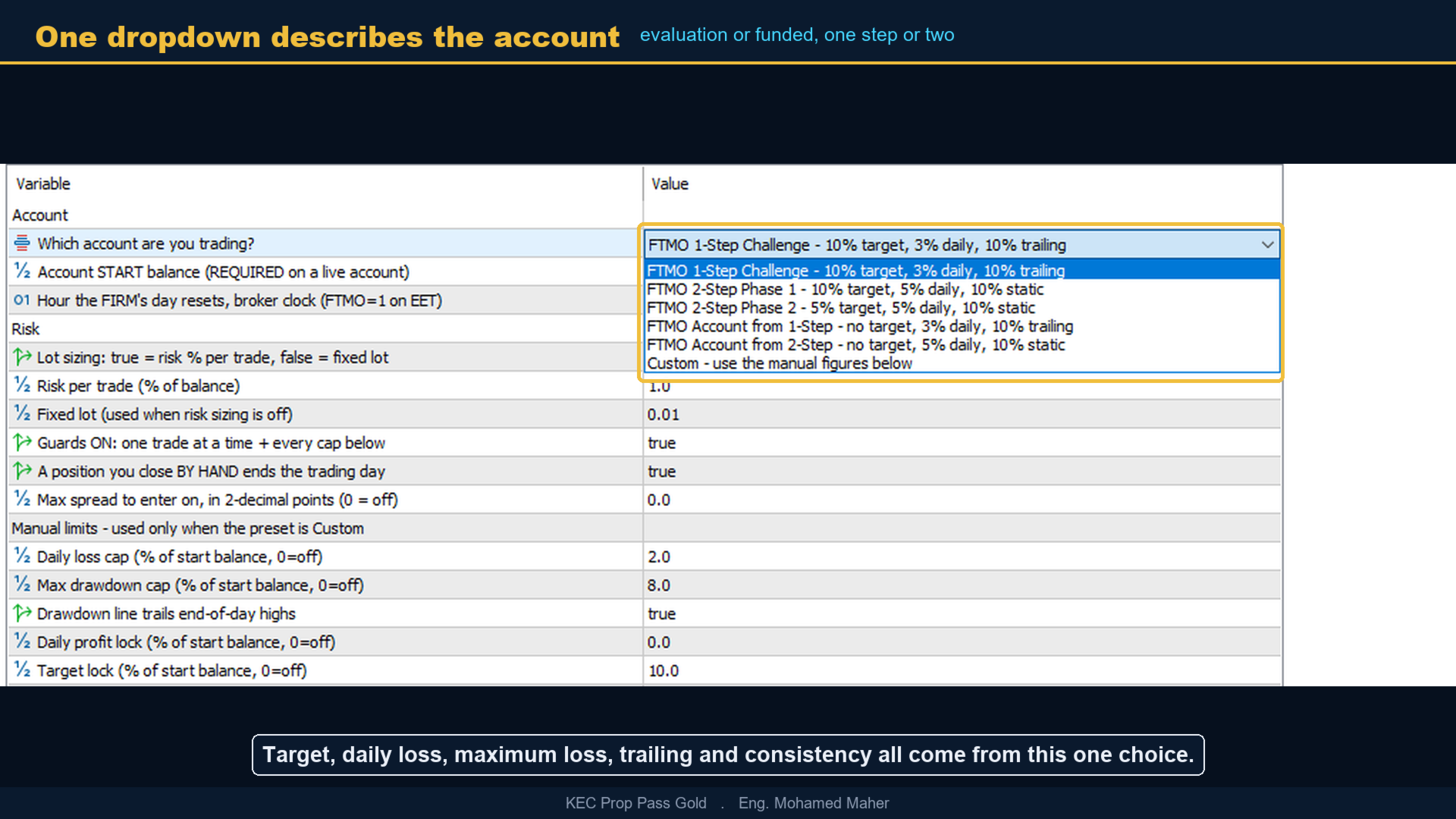
The first input, "Which account are you trading?", is a dropdown that describes the account you actually bought. Choosing it fills in the profit target, the daily loss limit, the maximum loss limit, whether that loss line trails, and the consistency figure. Nothing else has to be typed in, and nothing can be typed in wrongly.
The list covers a one-step evaluation, phase one and phase two of a two-step evaluation, and the funded account that follows either route. A Custom entry is there for a firm that is not listed, and it hands the same guards over to the manual figures in the group below it.
The guards
Equity is measured on every tick, not on closed trades, so a position that is still open counts against the limits while it is running. When the daily limit is reached the day ends and trading resumes on the next firm day. When the maximum loss line is reached the lock is permanent and survives a restart of the terminal. When the target is reached the account stops and holds, so a passed evaluation is not traded away while you wait for the review.
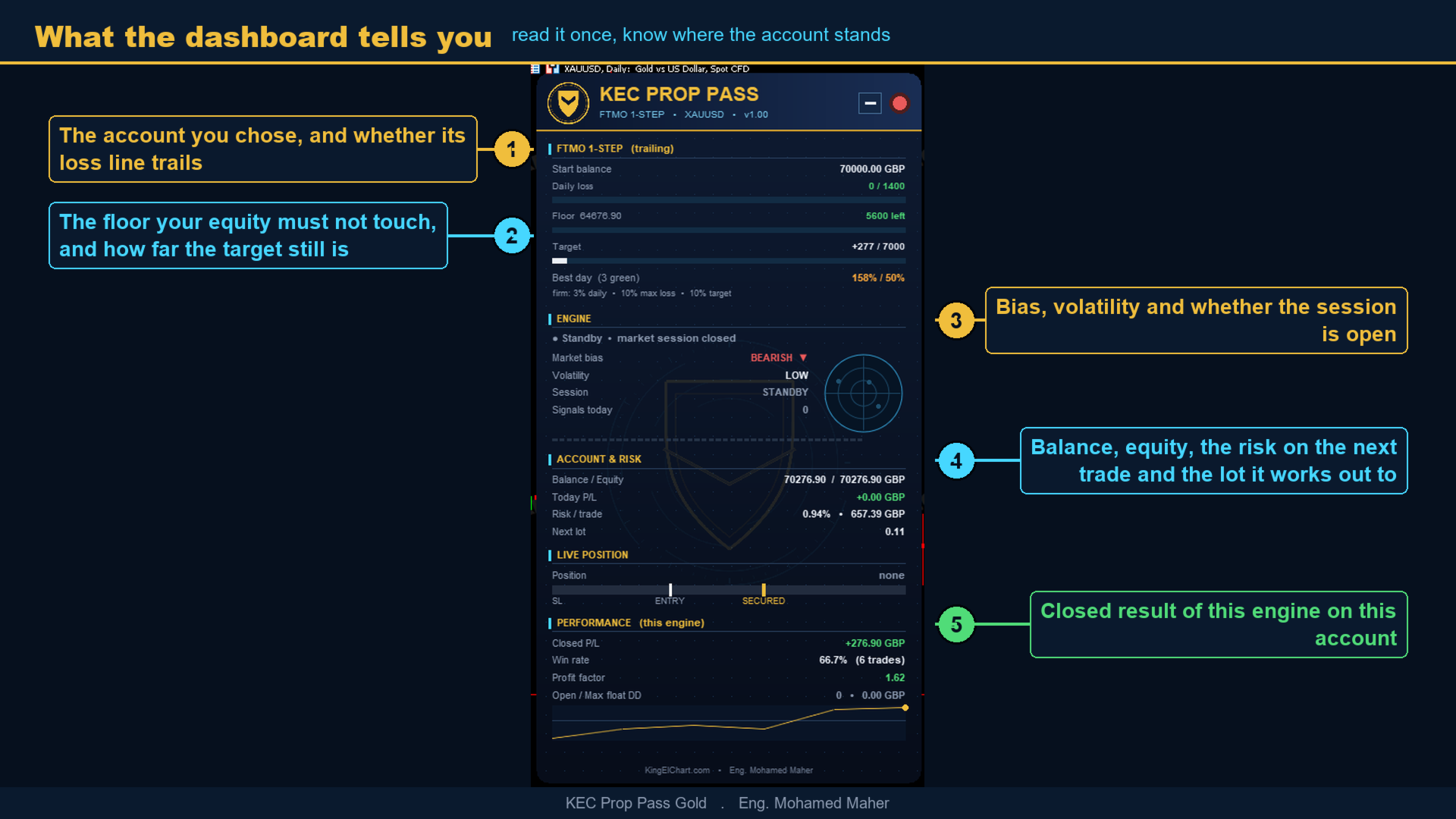
The maximum loss line can trail the end-of-day highs, which is how several firms measure it, and the dashboard shows the line itself and the room left above it. Guard state is stored against the account login rather than the magic number, so changing the magic number does not clear a lock that has already been set.
The firm day, consistency and spread
Firms reset the daily limit on their own hour, which is rarely the broker midnight. The input "Hour the FIRM's day resets, broker clock (FTMO=1 on EET)" sets that hour, so the daily figure on the dashboard matches the figure in the firm dashboard instead of drifting a few hours away from it.
The largest single winning day is rebuilt from the deal history and measured against total net profit, which is the wording firms now use for the consistency rule, and it is shown next to the limit your account carries. A spread input refuses an entry when the spread is wider than you allow, because a wide spread is what turns a planned stop into a larger one.
Setup
- Attach to one XAUUSD chart, any timeframe. One chart is enough.
- Set "Which account are you trading?" to the account in front of you.
- Set "Account START balance" to the figure the firm printed.
- Leave the rest on defaults until you have read the guide.
The start balance matters more than it looks. Every limit is a percentage of it, and an EA that guesses it from the balance it happens to see will stop short of the target or lock itself out early. On the strategy tester it is taken from the tester, so it only has to be stated on a real account.
The dashboard shows market bias, volatility, whether the engine is active, the risk on the next trade and the lot it works out to, the open position, and every guard with the room left on it. Timezone handling is automatic and the EA is broker independent.
Parameters
The inputs are grouped as Account, Risk, Manual limits, Minimum trading days helper, General, and Dashboard and chart. They are named here exactly as the terminal shows them. The ones worth knowing before the first run are these.
Which account are you trading? sets every limit below it.
Account START balance (REQUIRED on a live account) is the starting figure of the account.
Risk per trade (% of balance) sizes each position.
Guards ON: one trade at a time + every cap below is the master switch. Leave it on.
A position you close BY HAND ends the trading day stops the engine from refilling a slot you cleared yourself.
The Minimum trading days helper group covers a firm that asks for a number of trading days, and it is off by default. The General group holds the magic number, phone notifications, a clock shift for an unusual broker, and a daily audit line written to the journal.
Before a funded account, notes and support
Ask the author of any expert advisor how many accounts already run it. A firm caps the capital a single strategy may control across all of its traders, and that cap is shared rather than personal, so one crowded strategy can put every account using it at risk. Allocation for this product is tracked and limited. A new place opens only when an existing one is released, and you will be told where you stand before you buy rather than after.
Check one more figure in your own agreement first. Where your account is denominated in a currency other than the one a position settles in, a firm may apply a conversion adjustment to every realised result, which lowers a profit and deepens a loss. It is small per trade and visible over a year, and no report can show it for you because it depends on the account you hold.
The rulebook of your own firm is the binding source. Preset figures are read from published rules on a stated date and the bundled guide carries that date against every number, so check them against your own account before you start, and use Custom if your firm measures something differently.
Questions, setup help and any firm whose figures you would like added go through MQL5 private messages or the comments on this page.