TravaRisco Trade Manager

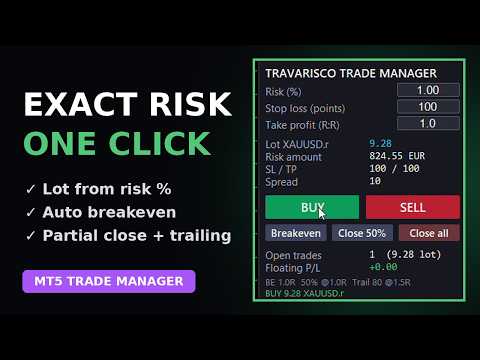
Basta calcolare i lotti a mano o dimenticare di spostare lo stop. Imposta il rischio in %, clicca BUY o SELL: lotto, stop loss e take profit vengono piazzati, poi breakeven, chiusura parziale e trailing lavorano da soli.

Prova gratuita di 14 giorni per conti demo: https://www.mql5.com/en/blogs/post/778026

NOVITÀ nella versione 2.20

  • Avvisi: pop-up con suono, notifica push sul telefono e/o e-mail. Ricevi un avviso quando si apre un trade (anche quando un ordine pendente viene eseguito), a TP1 e TP2, quando lo stop passa a breakeven e quando il trade si chiude (con il risultato).
  • Riquadro rischio/profitto colorato sul grafico: zona rossa dall'ingresso allo stop, zona verde dall'ingresso al target.
  • TP1 / TP2 / TP3: due chiusure parziali (predefinito 50% a 1R e 50% del resto a 2R) più il take profit finale (predefinito 3R). TP1 e TP2 sono segnati nel riquadro.
  • L'etichetta del target mostra il profitto totale incluse le chiusure parziali.
  • Linee di INGRESSO / STOP / TARGET trascinabili sul grafico: lotto e rischio si aggiornano durante il trascinamento, ogni linea mostra il denaro a rischio o il profitto.
  • Ordini pendenti (Buy/Sell Limit e Stop) sulla linea di INGRESSO con un clic.
  • Rischio in % del saldo o in importo fisso (pulsante %/$).
  • 3 tipi di trailing: punti fissi, multiplo ATR, minimo/massimo delle ultime N candele.
  • Scorciatoie con Shift: B buy, S sell, P ordine pendente, L linee, E breakeven, H chiudi 50%, X chiudi tutto.

Guida completa all'uso: https://www.mql5.com/en/blogs/post/778025

Apri operazioni con il rischio esatto che vuoi, con un clic, e lascia che il pannello le gestisca per te.

Cosa fa

  • Lotto calcolato dal tuo rischio in % e dallo stop loss in punti.
  • BUY / SELL con un clic, con stop loss e take profit (rischio:rendimento) già impostati.
  • Breakeven automatico quando il profitto arriva a 1R, più un margine per i costi.
  • Chiusura parziale automatica: chiude il 50% della posizione a 1R.
  • Trailing stop che parte dopo 1,5R.
  • Pulsanti: Breakeven, Chiudi 50%, Chiudi tutto.
  • Mostra lotto, importo a rischio, SL / TP, spread, operazioni aperte e P/L fluttuante.
  • Può gestire anche operazioni manuali o di altri EA sullo stesso simbolo (opzionale).
  • Pannello in inglese o portoghese. Tutti i livelli (in R e in punti) sono modificabili.

Come usarlo

  1. Applicalo al grafico su cui operi e attiva Algo Trading.
  2. Inserisci nel pannello rischio in %, stop loss (punti) e R:R.
  3. Clicca BUY o SELL. Breakeven, chiusura parziale e trailing sono automatici.

Importante

  • Le operazioni si aprono solo con i tuoi clic. Non è una strategia automatica.
  • Lo stop loss è in punti: 300 punti sono 30 pip su EURUSD ma solo 3 USD sull'oro, adattalo al simbolo.
  • Nello Strategy Tester una demo apre operazioni di esempio per vedere la gestione in azione. Quei risultati sono casuali e non sono una promessa di rendimento.
  • Si abbina bene a TravaRisco Daily Loss Lock, che protegge i limiti del conto.

Novità, guide e prove gratuite - segui il canale: https://www.mql5.com/en/channels/travarisco
Prodotti consigliati
HotKeys MT5
Alexey Valeev
This utility provides the ability to use hot keys in manual trading instantly responding to the current market situation. You can assign hot keys to open/close positions by their type, open/close all positions on the current chart and remove all orders on the current chart. You can also assign hot keys for five predefined trade volumes and switch between them if necessary with no need to change the volume manually from time to time. It is also possible to set the auto calculation of a trade volu
One-click manual trading panel. BUY and SELL with stop-loss and take-profit set in account money ($), plus Close Winning, Close Losing, Close All and Break Even. It sends an order only when you click. It never trades by itself on a live chart. Vantora Trade Panel – one-click manual trading panel BUY and SELL buttons with stop-loss and take-profit set in account money ($), plus Close Winning, Close Losing, Close All and Break Even. Lot, SL $ and TP $ can be edited on the panel. A trade is sent on
Daily Loss Equity Guard
Fernando Altair Kuhn
Daily Loss Equity Guard watches the equity of the whole account against the loss limits you set. When a limit is reached it closes every position, deletes the pending orders and keeps the account flat until the next daily reset. It never opens trades on your account. It is meant for traders who follow fixed loss rules, for example on evaluation accounts with a daily loss limit and a maximum loss limit, and for anyone who wants a hard stop for a bad day. Daily loss limit In percent or in account
T Manager for Price action Traders
Haidar Lionel Haj Ali
4.5 (10)
T Manager, the ultimate trade management solution designed by traders for traders. If you are searching for a simple and efficient trade panel, trade manager, or trade assistant, you are at the right place.   The market contains a diverse number of those tools , but this one is designed by traders for traders . I designed this tool, and I am using it daily. Take my advice and stop buying tools blended with un-useful features that you will never use,   T Manager provides you with the essential y
Xiao Dan Kuai Pao is a fast and clean one-click order panel for MetaTrader 5. Open and manage your trades instantly, with Stop Loss and Take Profit placed automatically — no more typing TP distances by hand. Key features: - One-click buttons: BUY, SELL, CLOSE, BREAK EVEN - Custom Stop Loss and Take Profit (in points) — set any distance you want - Flexible risk/reward — combine SL and TP freely to build any ratio, such as 1:1, 1:2, 1:3, 1:4 or 1:5 - Real-time price display (Bid) - Bar countdown t
One click to close all (OCCA) provides you posibility to close all open position with one click. Here is no any settings, just run the script and all your open positions will be closed and it will happen very fast ! Works with all types of accounts, with all currency pairs and any broker. The number of open positions is not limited. The script will be useful for trading strategies, in which you need to manage a large number of positions.
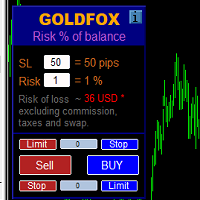
Automatic calculation of a trading lot taking into account Stop Loss (in pips) and the percentage of risk from the account balance. The Expert Advisor panel is located on the chart at the top left. On the panel of the advisor, you can select the size of the stop loss in pips and the percentage of risk from the balance. You can set the deviation from the current price in pips for pending orders. The red color indicates the amount in the deposit currency that you can lose when the stop loss is tr
Risk Trade Panel
Aleksandr Bernes
Risk Trade Panel è un Expert utility MetaTrader 5 con pannello sul grafico per il trading manuale. Non genera segnali di ingresso e non usa griglia né martingala. Decidi tu quando comprare o vendere; il pannello aiuta con sizing, stop e gestione della posizione. Cosa fa - lotto fisso o per rischio % del balance (o equity) rispetto alla distanza dello SL; - BUY / SELL a mercato con SL e TP predefiniti (punti o prezzo assoluto); - pending: Buy Limit, Sell Limit, Buy Stop, Sell Stop; - break-even:
Multiple Order Manager
Ameerul Afiq Bin Abd Halim
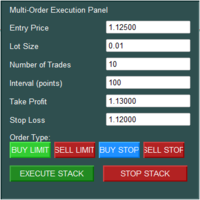
The Multi-Order Execution is an Expert Advisor for MetaTrader 5, designed to simplify the placement of multiple pending orders through a convenient on-chart control panel. The EA supports four pending order types: Buy Limit, Sell Limit, Buy Stop, and Sell Stop. Traders can configure the entry price, lot size, number of orders, price interval, take-profit (TP), and stop-loss (SL) directly from the chart. The EA automatically calculates each order's entry price based on the selected order type and
Questo strumento può aiutarti a chiudere tutti gli ordini aperti con un clic, basta fare clic su "Chiudi tutto". Se desideri chiudere solo gli ordini redditizi, fai clic sul pulsante "Chiudi redditizi" Dopo aver cliccato, tutti gli ordini fluttuanti verranno chiusi; Se desideri chiudere solo gli ordini con perdite fluttuanti, fai clic sul pulsante "Chiudi perdibili" Dopo aver cliccato, tutti gli ordini con perdite fluttuanti verranno chiusi. Questo strumento è stato testato per un anno. La funzi
Visual Trade Manager for MT5 is an interactive trade execution and position management tool designed for traders who want fast chart-based control over risk and execution. The panel provides a visual trade box with entry, stop and target lines directly on the chart. Position size is calculated from the selected risk percentage, and the tool supports both market execution and pending order placement. Main features - BUY and SELL switching directly from chart buttons - Draggable Entry, Stop and
Salve commercianti! Sono il tuo assistente commerciale. Permettetemi di dirvi la mia competenza: 1. Sono bravo nella gestione delle tue posizioni, indipendentemente da quale estremità hai posto un ordine, posso aiutarti per la prima volta ad aggiungere una linea di stop loss ragionevole e lo stop loss mobile. 2. Posso aiutarti a evitare l’ascesa e la caduta e a sradicare le debolezze umane dalle radici dei principi. 3. Ti invierò un messaggio di notifica al tuo client MT5 mobile al miglior punt
All In One Trade Manager is a trade manager and one-click trading panel for manual traders on MetaTrader 5. It works as a trading assistant, risk manager and position size calculator in one dashboard. It brings together everything below in one panel: order entry with risk sizing automatic trade management advanced order types account protection statistics Its entry checks run in the background and tell you, before you click BUY or SELL, when something speaks against the trade. Also available
Trade Guardian Manager
Cedric Tallefourtane
Trade Guardian Risk Manager is a MT5 utility Expert Advisor dedicated to risk control and equity protection. Many know how to trade. Few know when to stop. Trade Guardian formalizes discipline and mechanically enforces your limits when emotions or over-exposure take over. Risk management utility No trading logic — Does NOT open trades : does not open positions, does not provide signals, contains no strategy, and does not guarantee results. Operating principle — Equity Monitoring + rule enf
Risk Panel - Click to Trade Risk Panel - Click to Trade is a manual trade execution utility for MetaTrader 5. It provides a chart-based interface for preparing and placing buy and sell orders with risk-based position sizing. Features Adjustable risk percentage based on account equity. ATR-based stop-loss calculation. Take-profit calculation using a configurable risk-to-reward ratio. Buy and Sell trade controls. Order placement through a dedicated trade button. Spread limit and trade deviation se
Overview The Expert Advisor sends notifications to a mobile phone, via e-mail or plays a sound in case any changes are detected on the trading account: opening/closing positions, changing order or position parameters, balance or leverage. Also, the Expert Advisor can inform that Equity on the trading account has dropped below a specified value or Free Margin is small compared to Margin. The Expert Advisor does not trade, it only monitors your account. Launching the Expert Advisor You should all
Trade Panel HotKey – MT5 Scalping Utility Fast Trade Panel HotKey is a lightweight MT5 trading utility designed for traders who need to open, manage, and close positions as quickly as possible . The main purpose of this tool is to reduce the time between a trading decision and execution. Instead of moving the mouse, opening order windows, or manually modifying multiple positions, most important actions can be performed instantly through customizable keyboard hotkeys or directly from the compact
StopFirst Account Guard watches your whole account and enforces the loss limits you set: a daily loss limit, a maximum overall loss, and if you want, a profit target and time rules. When a limit is reached it closes every position on the account, deletes every pending order, and keeps the account flat until the limit resets. It is built for prop-firm challenges and funded accounts, where one breach of the daily or overall limit ends the account and the rules are measured to the cent on equity,
TradeHam Manager is a trade panel for manual traders. You decide when and where to trade. The panel takes care of the lot size, the order and the clean-up. It does not open trades on its own. It has no entry logic and does not promise any profit. Main features Risk-based lot size. Set the risk as a percent of balance, a fixed amount of money or a fixed lot. Drag the stop-loss line on the chart and the lot is recalculated. One-click orders. BUY / SELL buttons place the order with stop loss and ta
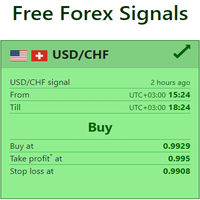
Live Forex Signals è progettato per il trading sui segnali del sito   https://live-forex-signals.com/en e https://foresignal.com/en . Live Forex Signal for MetaTrader 4   https://www.mql5.com/en/market/product/81445 Parametri Username   e   Password   se si dispone di un abbonamento ai siti live-forex-signals.com/foresignal.com. quindi dovresti compilare questi parametri con le tue credenziali; se non c'è abbonamento, lascia i campi vuoti; Comment   Commento sulle offerte sbloccabili Risk   ri
Spread and Swap monitor
Hennadii Stanilevych
5 (1)
The indicator is intended for determining the spread and swap size, the distance for setting stop orders and stop losses from the current price allowed and the risk per 1 point in the deposit currency. The indicator informs a trader about possible additional expenses and profits connected with transferring a position to the next trade session of the financial instrument. It also informs about the spread size and the distance of pending orders, stop loss and trailing from the current price. In ad
RealCost Auditor MT5 is an execution-cost monitor for MetaTrader 5. It does not open, close, or modify trades. It watches the chart symbol, samples live spread, records executed deals, estimates signed slippage when the terminal exposes the requested price, and saves a local CSV audit file. Many backtests use spread, slippage, commission, and swap assumptions that are cleaner than real trading conditions. This utility gives you broker and account data from your own terminal before you trust a s
This Expert Advisor (EA) for MetaTrader 5 (MT5) has been designed to automatically manage Stop Loss (SL) and Take Profit (TP). Main Features Automatic Detection of Manual Positions : Monitors new manual positions without SL/TP and applies the configured rules Multiple Orders : Opening of multiple orders under the same conditions as the original position Hidden SL/TP : The hidden mode allows creating SL/TP invisible to your broker  Equity Protection": Allows defining a threshold for the accou
One Click Trader  is a tool designed for MetaTrader 4 platform, which enables you to take your trading to the next level. It enables you to open, manage and close your trades in simple an efficient way by just one click of your mouse button. "-"   ,  "+"  change OCT window size  Up arrow minimizes the OCT panel Down arrow maximizes the OCT panel Right arrow displays the next panel with additional features Left arrow hides the panel with additional features Red  SELL  button enables you to open s
DeepTrade Basket Manager
Yasir Mohammed Sachit Sachit
DeepTrade Basket Manager treats a whole group of trades as ONE position. Instead of watching each order, you set a target for the entire basket — and the moment combined profit (or loss) hits your number, it closes everything at once. Built for grid traders and multi-pair portfolios.   KEY FEATURES - Close the entire basket at a profit target (money or % of balance) - Close the entire basket at a loss limit (money or % of balance) - Manage ALL symbols together, or filter by chart symbol / mag
Trade Control Panel
Jerry Jilun Anak Liban
Trade Control Panel Function Normal One Click Function Close All Close All Profit Close All Loss Close All Pending Order Close All Sell Close All Buy Advance One Click Function 1.  Close Partial Lot Sell by Percent It will help you partial close for all open position by desire percent you wanted. No longer partial close one by one for every open position Manual input for desire percent 2. Close Partial Lot Buy by Percent It will help you partial close for all open position by desire percent
OneClick Risk Manager
Mateusz Kusmierczak
OneClick Risk Manager — Manual Trading Assistant OneClick Risk Manager is a manual trading panel for MetaTrader 5. It does not trade on its own — you stay in control and open, close and manage every position with one click. Its job is to do the math for you: position size, risk, partial take-profits, break-even and trailing, so you can trade fast and precisely without manual calculations. Works on any symbol — XAUUSD (gold), US100/NAS100, US30/DJ30, FX pairs and more. The panel is fully scalable
Horizontal Line Trade Assistant EA  Semi-Automated Trading Assistant      IMPORTANT :     On the main/purchased program a user can click on the Horizontal line and change it to Buy or Sell, and drag by double clicking on it. Please keep in mind that this option is not available on demo version, due to some restrictions/limitations of Strategy Tester, some Object related operations are not available in the  Strategy Tester. But, it will not prevent you from Testing, please drop an Object to chart
Ultimate MT5 to Telegram Public Channel sends controlled trades (via symbol, magic, comment) to a public telegram channel. It sends open and closed trades, including pending orders and TP/SL modifications, along with chart screenshots, to this public telegram channel. Additionally, you can send trade reports of open trades and summary profit/pip reports for day, week, or month. You can customize the design of the trade actions or reports with variables and emoticons.  A beautiful panel allows
FREE
Gli utenti di questo prodotto hanno anche acquistato
Trade Assistant MT5
Evgeniy Kravchenko
4.43 (216)
It helps to calculate the risk per trade, the easy installation of a new order, order management with partial closing functions, trailing stop of 7 types and other useful functions. Additional materials and instructions Installation instructions - Application instructions Line function -   shows on the chart the Opening line, Stop Loss, Take Profit. With this function it is easy to set a new order and see its additional characteristics before opening.   Risk management  - The risk calculation
Forex Trade Manager MT5
InvestSoft
4.98 (694)
Benvenuto a Trade Manager EA, lo strumento definitivo per la gestione del rischio , progettato per rendere il trading più intuitivo, preciso ed efficiente. Non è solo uno strumento per l'esecuzione degli ordini, ma una soluzione completa per la pianificazione delle operazioni, la gestione delle posizioni e il controllo del rischio. Che tu sia un principiante, un trader avanzato o uno scalper che necessita di esecuzioni rapide, Trade Manager EA si adatta alle tue esigenze, offrendo flessibilità s
Telegram to MT5 MultiChannel Copier
Sergio Marquez Uroz
4.73 (26)
Telegram to MT5 Multi-Channel Copier   copia automaticamente i segnali di trading dai tuoi canali Telegram e Discord direttamente su MetaTrader 5. Niente bot, niente estensioni del browser, niente copia manuale. Il segnale arriva su Telegram o Discord e l'EA apre l'operazione nel tuo terminale in pochi secondi. E prima di copiare un canale, il backtester integrato ti mostra cosa avrebbe fatto quel canale sul tuo conto. Il prodotto include due componenti: un'applicazione Windows che ascolta i tuo
Local Trade Copier EA MT5
Juvenille Emperor Limited
4.94 (150)
Local Trade Copier EA MT5 è un trade copier rapido e flessibile per copiare e gestire operazioni tra più conti MetaTrader 5 sullo stesso computer Windows o Windows VPS. Combina la sincronizzazione locale delle operazioni con controlli lato Receiver per dimensione del lotto, gestione del rischio, filtraggio delle operazioni, mappatura dei simboli, gestione delle operazioni e protezione del conto. Configura i terminali Transmitter e Receiver in circa 1 minuto e copia operazioni manuali o aperte d
FarmedHedge Pair Trading Dashboard
Tanapisit Tepawarapruek
5 (7)
Farmed Hedge Yield Farming | All Markets (Manual - Hybrid - Semi/Automated EA) VERIFIED TRADING RESULTS - Farmed Hedge Yield Axi Copy:  https://www.mql5.com/en/signals/2356376 - Farmed Hedge Yield Exn Copy:   https://www.mql5.com/en/signals/2356404 - Farmed Hedge Yield V Copy:  https://www.mql5.com/en/signals/2357156 IMPORTANT NOTICE: FarmedHedge is a MANUAL-FOCUSED TRADING UTILITY ,not a fully automated EA. Results shown on this Signal include manual trades and overall strategic management.
TradePanel MT5
Alfiya Fazylova
4.89 (176)
Trade Panel è un assistente commerciale multifunzionale. L'applicazione contiene più di 50 funzioni di trading per il trading manuale e permette di automatizzare la maggior parte delle attività commerciali. Istruzioni per l'applicazione: https://www.mql5.com/it/blogs/post/762331 Versione di prova dell'applicazione per un conto demo: https://www.mql5.com/it/blogs/post/762419 Come installare l'applicazione: https://www.mql5.com/it/blogs/post/762362 Come testare l'applicazione in modalità visuale:
Strategy Ledger Pro
Abdullah Uygar Tuna
5 (17)
Ora disponibile in italiano. Strategy Ledger Pro è un pannello di analisi del conto in sola lettura per MetaTrader 5. Separa i risultati del conto per Expert Advisor, strategia, simbolo e numero magic, così puoi vedere quanto contribuisce davvero ciascuno. Il pannello è disponibile in 11 lingue: English, Français, Deutsch, Español, Italiano, Português, Русский, Türkçe, 中文, 日本語 e 한국어. Prova la demo. Avviala in modalità visuale dello Strategy Tester: il pannello si apre su un conto di esempio int
EA Overfitter
Stephen J Martret
5 (5)
That backtest looks great. But will it still be making money tomorrow, next week, next month? EA Overfitter re-runs your EA on 100 price histories it has never seen. One score tells you if the edge is real. A backtest tells you what an EA did on one price history — the one that happened to occur. What you cannot tell from it is how much of that result was the strategy and how much was the particular path. EA Overfitter answers that. It builds up to 100 synthetic price histories your EA has n
Copia i segnali Telegram con le tue regole di trading Telegram to MT5 Signal Trader copia automaticamente i segnali di trading testuali dai canali e gruppi Telegram pubblici e privati in MetaTrader 5. Gestisci più fornitori e conti MT5 da un'unica applicazione desktop, con impostazioni di rischio e di trading specifiche per ogni fornitore . Per copiare i segnali non servono bot Telegram né configurazioni API. Accedi semplicemente con il tuo account Telegram tramite numero di telefono o codice QR
Exp COPYLOT CLIENT for MT5
Vladislav Andruschenko
3.97 (35)
Copiatore professionale di trade per MetaTrader 5 Un copiatore di trade veloce, professionale e affidabile per MetaTrader . COPYLOT consente di copiare operazioni Forex tra terminali MT4 e MT5 con supporto per conti Hedge e Netting . La versione MT5 di COPYLOT supporta: - MT5 Hedge → MT5 Hedge - MT5 Hedge → MT5 Netting - MT5 Netting → MT5 Hedge - MT5 Netting → MT5 Netting - MT4 → MT5 Hedge - MT4 → MT5 Netting Versione MT4 Descrizione completa + DEMO + PDF Come acquistare Come installare Come ot
AI Agents Supervisor
Ho Tuan Thang
5 (1)
AI Agent Supervisor is NOT an Expert Advisor. AI Agent Supervisor   is a   multi-agent AI risk & portfolio supervisor   that watches every EA on your account and intervenes in real time.  WANT AN AI PORTFOLIO MANAGER WATCHING YOUR FLEET 24/7?   Run your fleet on the same brokers I do:   IC MARKETS , IC TRADING   .  Unlike the centralized stock market, Forex has no single, unified price feed.  Every broker sources liquidity from different providers, creating unique data streams. The Supervisor r
HINN MagicEntry Extra
ALGOFLOW OÜ
4.74 (19)
HINN MAGIC ENTRY 4 – click the chart, the trade is done! SIMPLE. FAST. PRECISE. Stop, entry and take right on the chart – the lot is sized to your risk automatically. full description   ::  install & FAQ   ::  support chat What's inside: - LIMIT in 3 clicks, MARKET in 2 – risk in %, $, lots or classic Fixed Lots - DEFAULTS: your TP, partials and BE scheme pre-loaded into every new trade – MARKET in 1 click - Unlimited partial take-profits with a % volume splitter - Breakeven with any trigger an
================================================================================ POC BREAKOUT - V20.72. Full Professional Grade Toolkit ================================================================================ POC Breakout is a full MetaTrader 5 trading dashboard for discretionary traders who want breakout signals, Point of Control (POC) context, volume profiles, order flow, market structure, news, alerts, and advanced trade planning in one professional workspace. Attached directly to you
News Trade EA MT5
Konstantin Kulikov
4.55 (11)
Presento un utile robot che io stesso utilizzo da diversi anni. Questo robot può essere utilizzato sia in modalità semiautomatica che completamente automatica. >>> Chat <<< Il programma contiene le impostazioni flessibili per fare trading sulle notizie del calendario economico. Non può essere verificato nel tester delle strategie. Soltanto il vero lavoro. Scarica l'ultimo archivio di impostazioni: https://www.mql5.com/en/blogs/post/747929 Monitoraggio dei segnali: https://www.mql5.com/en/signa
The product will copy all telegram signal to MT5 ( which you are member) , also it can work as remote copier.  Easy to set up, copy order instant, can work with almost signal formats, image signal,  s upport to translate other language to English Work with all type of channel or group, even channel have "Restrict Saving Content", work with  multi channel, multi MT5 Work as remote copier: with signal have ticket number, it will copy exactly via ticket number. Support to backtest signal. How to s
EA Auditor
Stephen J Martret
5 (7)
EA Auditor is an independent analysis tool for traders evaluating Expert Advisors and trading signals on MetaTrader 5. It audits backtest reports, reviews posted developer signals, and cross-verifies the two against each other to help traders assess strategies before committing capital. The MQL5 market offers a wide range of Expert Advisors from many developers, with varying approaches, quality, and transparency. EA Auditor provides a consistent, data-driven framework for reviewing them, answer
Astro Trade MT5
Indra Maulana
5 (8)
25% discount on the release of the tool: only for the next 3 buyers Send a message to receive a demo version. AstroTrade Trading Assistant AstroTrade is a comprehensive multi-functional trading utility developed for the MetaTrader 5 platform. It integrates essential tools for trade execution, risk management, and technical monitoring into a single unified interface. The application is designed to assist traders in managing their daily operations through a visual and structured environment. Vi
Power Candles Strategy Scanner: ricerca di setup multi-simbolo che si ottimizza da sola Uno scanner che suona a ogni minimo movimento ti abitua a ignorarlo. Una chiusura di candela movimentata, un avviso dopo l'altro, e l'unico setup su cui operi davvero affoga nel rumore. Power Candles Strategy Scanner esegue il motore auto-ottimizzante di Power Candles su ogni simbolo del tuo Market Watch e ti avvisa solo di ciò che supera i tuoi filtri: la forza dell'ultima candela chiusa, il rapporto rendime
Equity Protect Pro: Il tuo esperto di protezione del conto completo per un trading senza preoccupazioni Se stai cercando funzionalità come protezione del conto, protezione del capitale proprio, protezione del portafoglio, protezione multi-strategia, protezione dei profitti, raccolta dei profitti, sicurezza del trading, programmi di controllo del rischio, controllo automatico del rischio, liquidazione automatica, liquidazione condizionale, liquidazione programmata, liquidazione dinamica, trailin
Timeless Charts
Samuel Manoel De Souza
5 (9)
Timeless Charts è un'utilità di trading completa progettata per trader professionisti. Combina tipi di grafici personalizzati come Grafici a Secondi e Renko con analisi avanzata del flusso ordini tramite Footprints , Clusters , Profili di Volume , studi VWAP e strumenti di analisi ancorata per una visione più approfondita del mercato. Il trading e la gestione delle posizioni vengono eseguiti direttamente dal grafico tramite un pannello integrato di gestione delle operazioni , mentre Market Repla
EA Performance Hub
Joao Jara Carvalho
5 (2)
EA Performance Hub — Performance dashboard for MetaTrader 5 See which Expert Advisors are driving your account’s results. EA Performance Hub brings your strategies into one indicator panel, with a portfolio overview and a detailed view for each EA or group. Identify and group your EAs The indicator detects Magic Numbers from trade history and open positions. It uses suitable trade comments as names when available. EAs running across multiple symbols can be grouped into a single row. You can a
Zentral Trading Manager
Ray Zeanrik Parreno Fredeluces
5 (4)
Zentral Manager Your Command Center for Precision Trading — Now Stronger than Ever Take control of your trades like never before. Zentral Trading Manager is your all-in-one manual trading panel for MetaTrader 5 — built for scalpers, day traders, and serious strategy execution. Fully compatible with both Mac and Windows laptops. High-DPI safe. No more layout issues. Key Features (Latest 2025 Update): • One-Click Close – Instantly close Buy/Sell, winning/losing trades, or even half positions with
KT Equity Protector MT5
KEENBASE SOFTWARE SOLUTIONS
3.6 (5)
An equity protection EA for MetaTrader that enforces your loss limits and profit target for you: when your account reaches a rule you set, it closes your trades on every symbol, before one bad day turns into a lost account. It suits prop firm challenges and personal accounts alike. Attach it to one chart, answer a few questions in the on-chart setup wizard, and it watches your whole account in the background while you trade by hand or with other EAs. What it protects Daily loss limit: a percenta
Custom Alerts MT5
Daniel Stein
5 (8)
Custom Alerts: Monitora più mercati e non perdere mai un setup importante Panoramica Custom Alerts è una soluzione dinamica per i trader che desiderano monitorare più strumenti da un unico punto centrale. Integrando i dati dei nostri strumenti principali — come FX Power, FX Volume, FX Dynamic, FX Levels e IX Power — Custom Alerts ti avvisa automaticamente degli sviluppi cruciali del mercato, senza dover passare continuamente da un grafico all'altro o rischiare di perdere opportunità importanti
Trade copier MT5
Alfiya Fazylova
4.62 (58)
Trade Copier è un'utilità professionale progettata per copiare e sincronizzare le transazioni tra conti di trading. La copiatura avviene dal conto/terminale del fornitore al conto/terminale del destinatario, che sono installati sullo stesso computer o vps. Prima di acquistare, puoi testare la versione demo su un account demo. Versione demo qui . Istruzioni complete qui . Funzionalità e vantaggi principali: Supporta la copia degli ordini: MT5> MT5, MT4> MT5, MT5> MT4, inclusi i conti di compensaz
Conosci il tuo rischio prima di cliccare. Gestisci il trade dopo. Trascina le linee, clicca BUY o SELL e la dimensione del lotto viene calcolata per te. Poi gestisci il trade con break even, chiusura parziale, obiettivi multipli e altro ancora. Mercurial Position Sizing PRO è uno strumento MT5 per trader manuali. Calcola il lotto corretto in base al tuo saldo, alla percentuale di rischio e alla distanza dello stop loss, poi apre il trade con SL e TP già impostati. Include tutto ciò che offre la
I segnali dei suoi canali Telegram, copiati su MetaTrader 4 e MetaTrader 5 in pochi secondi. TradingMind Signal Bridge legge i canali e i gruppi che lei sceglie, riconosce ogni segnale con regole rapide integrate, passa quelli più disordinati a un modello di IA, compresi i segnali pubblicati come screenshot, e consegna l'ordine a un expert advisor sul suo terminale. Un filtro notizie, la protezione per i conti delle prop firm e un bot Telegram per il controllo a distanza lasciano a lei la decisi
Seconds Chart MT5
Boris Sedov
4.61 (18)
Seconds Chart - uno strumento unico per creare grafici in secondi su MetaTrader 5 . Con Seconds Chart , puoi generare grafici con timeframe definiti in secondi, ottenendo una flessibilità e una precisione d'analisi ideali, non disponibili nei grafici standard in minuti o ore. Ad esempio, il timeframe S15 indica un grafico con candele di 15 secondi. Puoi utilizzare qualsiasi indicatore e Expert Advisor con supporto per simboli personalizzati. Lavorare con loro è comodo quanto operare sui grafici
Prop Guardian Risk Manager MT5 – Drawdown, Risk & Hedge Protection for Prop Firm and Managed Accounts Prop Guardian Risk Manager is a professional risk-control utility for MetaTrader 5, designed for prop firm traders, money managers and anyone who wants strict account-level risk protection. It does not generate trading signals, strategy entries or trading decisions. Instead, it runs in the background, monitors your account risk and can automatically block new exposure, close managed positions or
Apex AI Advisor
Mohamad Hammoud
Check your trade before you place it Your risk checks out. Does the trade fit your rules? APEX AI Advisor shows your estimated risk and position size, then lets you ask AI to challenge the setup against your playbook and market context—all inside MT5. You decide whether to act. One trade idea, two different checks In the walkthrough, a EURUSD buy limit passes the local checks: 0.10 lots, $10 estimated risk at the stop and a 2:1 reward-to-risk ratio on the sample account. That does not make it a
Altri dall’autore
TravaRisco Lot Calculator MT4
Nuno Miguel Dourado Dos Santos
Smetti di indovinare il lotto. TravaRisco Lot Calculator mostra direttamente sul grafico il lotto esatto per il rischio scelto. Come funziona: Inserisci nel pannello il rischio in % e lo stop loss in punti. L'indicatore calcola subito: Importo a rischio (nella valuta del conto) Perdita per 1 lotto con quello stop loss Lotto esatto, arrotondato allo step di volume del tuo broker Rischio reale dopo l'arrotondamento Funziona su forex, oro, indici e cripto, usando i valori tick del tuo broker. Panne

FREE
TravaRisco Signal Checker
Nuno Miguel Dourado Dos Santos
Il tuo indicatore funziona davvero o sembra buono solo sullo storico? Versione 1.10: nuova curva dei risultati nel pannello Curva dei risultati in R dopo i costi, verde quando l'indicatore guadagna e rossa quando perde, con totale, numero di trade e date. La versione Pro mostra anche la curva prima dei costi, il drawdown peggiore e il test fuori campione. TravaRisco Signal Checker è un test gratuito e onesto per qualsiasi indicatore MT5 che disegna frecce di acquisto/vendita. Mettilo sul grafico
FREE
TravaRisco Signal Checker MT4
Nuno Miguel Dourado Dos Santos
Il tuo indicatore funziona davvero o sembra buono solo sullo storico? Versione 1.10: nuova curva dei risultati nel pannello Curva dei risultati in R dopo i costi, verde quando l'indicatore guadagna e rossa quando perde, con totale, numero di trade e date. La versione Pro mostra anche la curva prima dei costi, il drawdown peggiore e il test fuori campione. TravaRisco Signal Checker è un test gratuito e onesto per qualsiasi indicatore MT4 che disegna frecce di acquisto/vendita. Mettilo sul grafico
FREE
TravaRisco Lot Calculator
Nuno Miguel Dourado Dos Santos
Smetti di indovinare il lotto. TravaRisco Lot Calculator mostra direttamente sul grafico il lotto esatto per il rischio scelto. Come funziona: Inserisci nel pannello il rischio in % e lo stop loss in punti. L'indicatore calcola subito: Importo a rischio (nella valuta del conto) Perdita per 1 lotto con quello stop loss Lotto esatto, arrotondato allo step di volume del tuo broker Rischio reale dopo l'arrotondamento Funziona su forex, oro, indici e cripto, usando i valori tick del tuo broker. Panne
FREE
TravaRisco Real Cost Monitor MT4
Nuno Miguel Dourado Dos Santos
Il tuo conto demo ti sta mentendo. Su un conto demo i tuoi ordini vengono eseguiti esattamente al prezzo richiesto. Su un conto reale no. Lo spread si allarga durante le notizie, le commissioni si sommano e lo slippage erode ogni operazione - e niente di tutto questo appare chiaramente nello storico di MetaTrader. TravaRisco Real Cost Monitor ti mostra sul grafico quanto ti costa davvero fare trading su questo simbolo. COSA MOSTRA 1. Spread Spread attuale, in punti, in prezzo e in denaro per il
FREE
TravaRisco Real Cost Monitor
Nuno Miguel Dourado Dos Santos
Il tuo conto demo ti sta mentendo. Su un conto demo i tuoi ordini vengono eseguiti esattamente al prezzo richiesto. Su un conto reale no. Lo spread si allarga durante le notizie, le commissioni si sommano e lo slippage erode ogni operazione - e niente di tutto questo appare chiaramente nello storico di MetaTrader. TravaRisco Real Cost Monitor ti mostra sul grafico quanto ti costa davvero fare trading su questo simbolo. COSA MOSTRA 1. Spread Spread attuale, in punti, in prezzo e in denaro per il
FREE
TravaRisco Daily Loss Lock MT4
Nuno Miguel Dourado Dos Santos
Una giornata storta può far fallire una challenge di prop firm. TravaRisco controlla il conto quattro volte al secondo e interviene prima che le regole vengano violate. Prova gratuita di 14 giorni per conti demo: https://www.mql5.com/en/blogs/post/778026 Novità della v2.0 Preset per prop firm: FTMO 2-Step, FTMO 1-Step, The5ers High Stakes, FundedNext Stellar 2-Step o Personalizzato. Scegline uno, inserisci la dimensione del conto e le regole di perdita giornaliera e massima sono impostate. Monit
TravaRisco Trade Manager MT4
Nuno Miguel Dourado Dos Santos
Basta calcolare i lotti a mano o dimenticare di spostare lo stop. Imposta il rischio in %, clicca BUY o SELL: lotto, stop loss e take profit vengono piazzati, poi breakeven, chiusura parziale e trailing lavorano da soli. Prova gratuita di 14 giorni per conti demo: https://www.mql5.com/en/blogs/post/778026 NOVITÀ nella versione 2.20 Avvisi: pop-up con suono, notifica push sul telefono e/o e-mail. Ricevi un avviso quando si apre un trade (anche quando un ordine pendente viene eseguito), a TP1 e TP
TravaRisco Daily Loss Lock
Nuno Miguel Dourado Dos Santos
Una giornata storta può far fallire una challenge di prop firm. TravaRisco controlla il conto quattro volte al secondo e interviene prima che le regole vengano violate. Prova gratuita di 14 giorni per conti demo: https://www.mql5.com/en/blogs/post/778026 Novità della v2.0 Preset per prop firm: FTMO 2-Step, FTMO 1-Step, The5ers High Stakes, FundedNext Stellar 2-Step o Personalizzato. Scegline uno, inserisci la dimensione del conto e le regole di perdita giornaliera e massima sono impostate. Monit
TravaRisco Signal Checker Pro
Nuno Miguel Dourado Dos Santos
Il tuo indicatore mostra l'81% di vincenti sullo storico. Avresti potuto davvero prendere quei trade? Versione 1.10: nuova curva dei risultati nel pannello Grande curva dei risultati in R: colorata dopo i costi, grigia prima dei costi, per vedere quanto incidono i costi. Il drawdown peggiore è ombreggiato e una linea gialla segna l'inizio della parte fuori campione. Totali, drawdown massimo, numero di trade e date sul grafico. TravaRisco Signal Checker Pro testa in modo onesto qualsiasi indicato
Filtro:
Nessuna recensione
Rispondi alla recensione