Prop Trade Manager Pro

  • Utilities
  • Amul Ravikumar
    Amul Ravikumar
    • Founder · MT5 / Full-stack Developer at  Brain Grain
    • India
    • 850
    5 (1)
    MT5 / MQL5 developer. I build indicators, Expert Advisors and utility panels from a written spec — every rule an input, 0 errors / 0 warnings, verified in the Strategy Tester before handover.
  • Version: 1.1
  • Updated: 22 September 2026
  • Activations: 5

Prop Trade Manager Pro is not a trading strategy. It never opens a position on its own: every order comes from a button you press, and every rule is an input you set. Attach it to one chart and it sizes your trades, manages what is open, and enforces the limits that funded accounts and prop-firm challenges (FTMO, The5ers, MyFundedFX, E8 and the rest) live or die by.

It is built for the trader who can find the entry but loses the account to one oversized trade or one bad day.

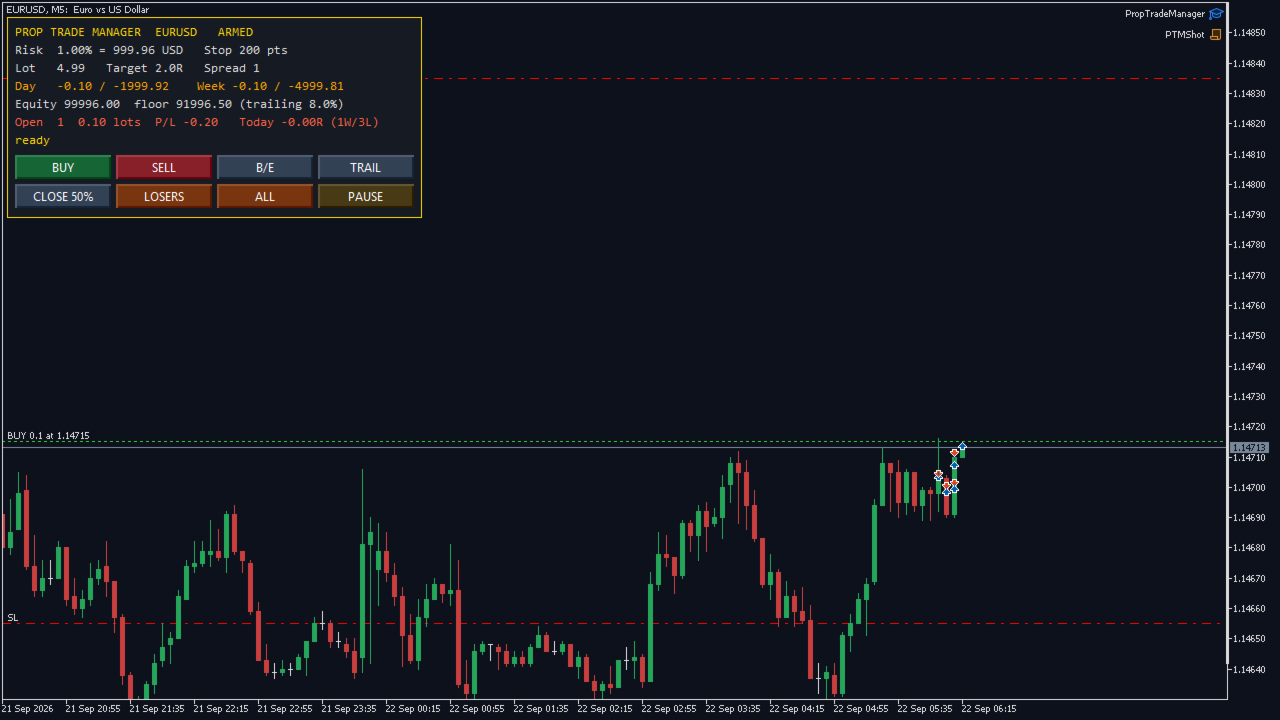
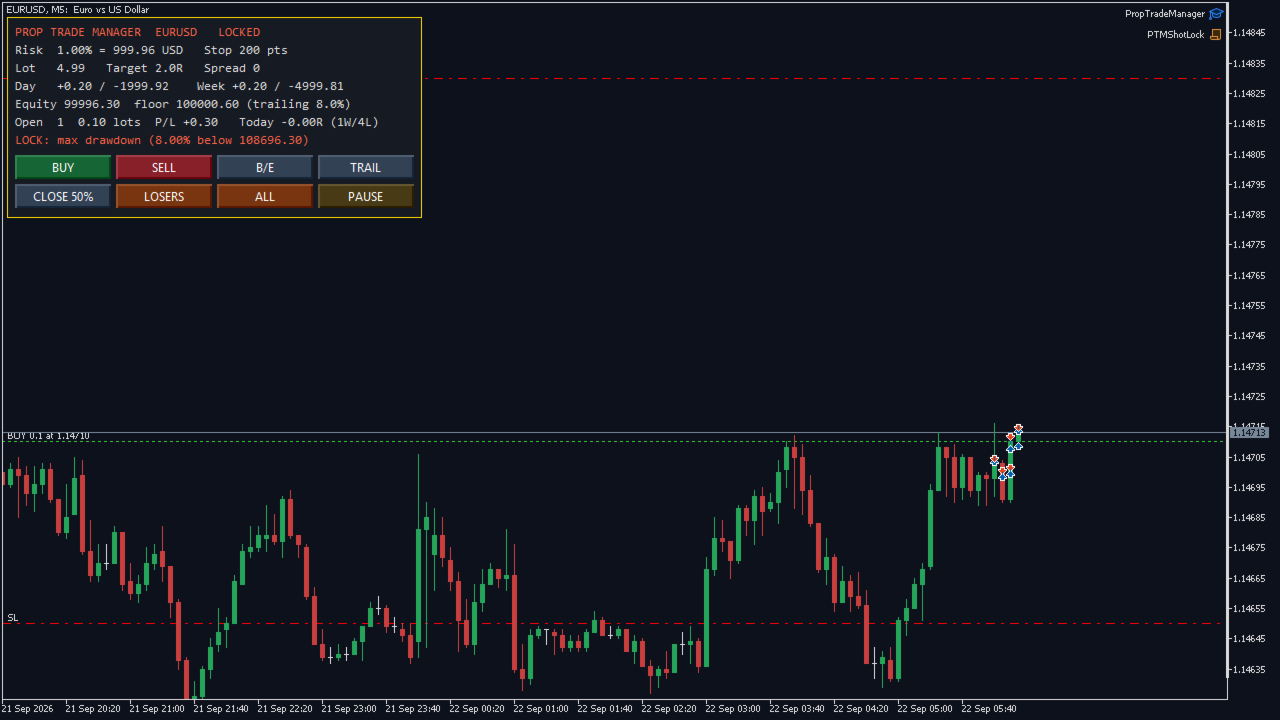
Screenshots are real. Shot on a live MetaQuotes-Demo chart with a real position open, not mocked up. The second screenshot shows the drawdown lock tripped and the panel refusing a new entry.

— Entry, sized to your risk — Set risk as a percent of balance and the stop distance you trade with; the panel shows the exact lot for the chart symbol from its tick value, tick size and volume step — correct on gold, indices and crypto CFDs, not only forex. BUY and SELL open at market with the stop and the target already attached (target is a multiple of the stop, or off). The lot is rounded down to the volume step, clamped by the broker's volume limit and by free margin, and stops respect the broker's minimum stop and freeze level.

— Management, on buttons, never automatic — • Break-even — lock the stop a set number of points into profit. • Trailing stop — start after a set profit, trail a set distance behind price. • Partial close — close a set share of each position. • Close losers / Close all — flatten the losing side, or everything. • Manage only this chart, every symbol, or only positions this panel opened.

— Prop-firm rules, every one an input, every one optional —

  1. Daily loss lock — percent of the day's opening balance. Counts closed plus floating P/L; lasts until the next server day.
  2. Weekly loss lock — percent of the week's opening balance; lasts until Monday.
  3. Maximum drawdown — static from the starting equity, or trailing from the equity high-water mark, which is how most challenges measure it. The high-water mark is stored, so it survives restarts.
  4. Profit-target lock — stop trading once up your target on the day, so a good day stays a good day.
  5. Breach-aware entry — a new trade whose own risk at its stop would break the daily lock is trimmed to what is left, or refused, before it is sent — not caught after.
  6. Flatten on lock (optional) — close everything the instant a lock trips.
  7. Position and lot caps — max open positions, hard lot cap, max total lots, max spread.

— Trading window — Allow entries only inside your hours (server time), with an optional Friday cut-off so you are not holding into the weekend.

— Restart-proof — The day base, week base and equity high-water mark survive a terminal restart, so a lock cannot be dodged by reloading the chart.

— Alerts — Popup, push to the mobile terminal, and e-mail when a lock trips — each optional. Every action is written to the Experts log.

— Verified — Compiled with 0 errors, 0 warnings. No DLLs, no external files, no custom indicators. Self-test: 13 of 13 checks passed in the Strategy Tester (MetaQuotes-Demo, EURUSD M5, agent build 6198): lot sizing, stop and target attached, partial close, break-even and trailing, paused panel refuses entry, drawdown lock refuses entry, close-all leaves nothing open.

— Free version — The lot calculator and one-click entry are free on CodeBase as One-Click Trade Manager (code 77538). This paid version adds all management buttons, the full prop-firm rule set, the trading window, restart-proof locks and alerts. Try the free one first; if the sizing is right for your broker, the paid one uses the same engine.

Recommended products
Barak Mega EA
Jorge Jovanny Hernandez Maldonado
BARAK MEGA EA  is a fully automated trading Expert Advisor designed for traders who demand total control, strategic flexibility, and advanced risk management within a single system. This EA functions as a true strategy builder , allowing you to combine multiple technical indicators and custom rules to adapt to any market, asset, or timeframe. Unlike traditional robots with fixed logic, BARAK MEGA EA features a modular architecture where every component can be independently enabled, disabled, and
FREE
Black Volume By ZeeAM Khan a Multi-Engine EA Professional Multi-Timeframe Volume & Breakout Trading System Black Volume Multi-Engine EA is an advanced automated trading system that combines volume analysis, spread analysis, liquidity sweeps, support/resistance breakouts, and multi-basket trade management into one powerful Expert Advisor. The EA continuously scans higher-timeframe candles to identify significant market activity, automatically draws key support and resistance zones, and executes
FREE
EA Manage Emotion
Hua Nguyen Nguyen Tran
EA Emotion   is not a traditional Expert Advisor that places trades automatically – instead, it’s a psychological checkpoint that helps you manage   trading discipline and emotional control . Designed especially for discretionary traders, prop firm challengers, and anyone serious about improving consistency,   EA Emotion   asks a series of custom questions   right after you open a trade , such as: Did you follow your trading plan? Are you in the right mental state? Is this trade part of your set
Balanced Price Grid EA is a fully automated Expert Advisor for MetaTrader 5, designed to manage trades using a proprietary order-handling and position-balancing system . The Expert Advisor continuously monitors market conditions and autonomously manages orders and positions with the objective of maintaining controlled exposure and systematic profit booking. Click here for Set Files Main Features Fully automated trading Advanced order and position management system Simultaneous handling of BUY a
KS Auto Trade Close Manager Time Base  is a MetaTrader 5 Expert Advisor (EA) that automatically closes open trades at a user-defined local computer time, with a simple on-chart control panel. Main features Scheduled auto-close (optional) Closes trades at a specific local time (HH:MM, e.g. 23:55). Uses the terminal/computer’s local time ( TimeLocal() ), not server time. Three close modes (selectable from inputs or the panel) ALL – close every matching position PROFIT ONLY – close only positions c
Basket Trade Commander is a multi-leg basket planner with leg-level risk and runtime control. Key functions: - Configurable symbols, directions and allocation weights - Per-leg and basket-level volume checks - Margin and symbol-rule validation - Persistent enable and disable toggles for each leg - Guarded basket execution - Scoped unwind controls - Clear basket composition and status display Trade execution is disabled by default. The utility submits and manages basket instructions configured
Adaptive Hedge Lock and Rollover Protection ️ SPECIAL LAUNCH OFFER: 33% OFF! ️ The regular lifetime price for Adaptive Hedge Lock Pro is $149 USD.  To celebrate our official release on MQL5 Market, the first 10 buyers can get a LIFETIME license for ONLY $99 USD!  Current Promo Price: $99 (Price will auto-update to $149 once the 10th copy is sold). Don't miss out on this institutional-grade safety tool! Adaptive Hedge Lock Pro is a premium, server-friendly utility designed for institutional
RR Ratio KS Visual Calculator Amount Based EA Master dollar-based risk management like never before with the RR Ratio KS Visual Calculator Amount Based EA —a game-changing MetaTrader 5 utility that automates precise, fixed-dollar risk/reward setups on your chart. Perfect for traders tired of volatile lot sizing or manual calculations, this EA locks in exact dollar risks (e.g., $50 per trade) and rewards (e.g., $150 for 1:3 RR), dynamically adjusting stops and targets based on position size. No m
SwiftEdge Scalper Professional Tick Scalping EA with Full Manual Control Scalping demands split-second decisions, precise risk management, and seamless order execution. Managing breakeven calculations, trailing stops, and multiple positions while watching price action is overwhelming without the right tools. SwiftEdge Scalper is your professional trading assistant designed for active scalpers and day traders. Execute trades with one click or keyboard shortcut, while the EA handles breakeven, tra
Show Account Information Custom showing your MT5 account information Indicators add account information to chart. Profit, Balance, Equity, Free Margin, Margin and Margin Level % Profit.... Hide account information: Click anywhere on account information text.     The hide/show response is dependent on incoming ticks or chart refresh. In tick scarce or closed markets the indicator hide/show click will appear not to function while waiting for a tick or chart refresh. It is only necessary to attac
Hedge Trade Manager MT5
Biswarup Banerjee
5 (4)
Introducing the EA HedgeTradeManager MT5, a powerful Expert Advisor designed to automate hedging strategies, providing traders with a reliable tool to manage adverse price movements. This EA is perfect for both novice traders exploring hedging techniques and experienced professionals looking to enhance their trading setups. With its sophisticated risk management features, the EA HedgeTradeManager MT5 stands out by significantly reducing potential drawdowns and allowing for flexible lot sizing. T
FREE
Prop Guard AXIOM
Miguel Angel Leon Yanez
AXIOM Prop Guard Essential safety tool for prop firm and funded account traders. Overview AXIOM Prop Guard monitors your daily drawdown and maximum drawdown in real time. It automatically closes all open positions and pending orders when your account approaches the firm's risk limits. It protects your funded account before a single rule can be broken. Whether you trade XAUUSD, Forex pairs, indices, or crypto, AXIOM Prop Guard works silently in the background on any chart and any symbol. No trad
Click Trading
Jawad Tauheed
5 (2)
One Click Trading – Auto TP SL Developer TraderLinkz Version 1.00 Category Utility What it does Adds missing TP and SL to your manual trades and pending orders Sets them once per ticket Lets you move TP and SL afterward Works on hedging and netting accounts Scans on every tick and reacts on trade events Why you want it You place faster entries You get consistent risk and exit targets You reduce fat finger errors You keep full manual control Quick start Attach the EA to any chart Keep TP and SL e
FREE
Stop and Take EA
Luis Enrique Ricales
3.67 (3)
The Expert Advisor is only designed for manual trading. The EA sets stop loss and take profit for positions and pending orders on the current symbol. It also has trailing stop and breakeven functions. Input Parameters Stop loss   - stop loss value; Take profit   - take profit value; Close all if profit reached the x percent of balance or   - close all positions once the total profit reaches x percent of balance; close all if profit reached the x profit amount in currency   - close all positions
FREE
Prop Calculator Assistant Stop blowing Prop Firm accounts due to bad math. Let the Assistant handle the risk. Prop Calculator Assistant   is the ultimate trade management panel designed specifically for traders attempting to pass funding challenges (FTMO, etc.) or managing funded capital. It replaces mental math and manual order dragging with a precision visual interface that keeps you strictly within your rules. This is   not   an auto-trading bot that guesses the market. It is a professional  
Aureus Quant PVI
Muthukrishnan Muthupoilan
IMPORTANT :  XAUUSD only H1 Timeframe  1. The Core Strategy The EA utilizes a Breakout Strategy (likely an Opening Range Breakout or a technical level breakout) on the 1-hour (H1) timeframe. Precision Entry: It looks for specific volatility or price patterns to "break" a certain range before entering. Confirmation Rule: Per your recent updates, the EA requires a new candle formation to confirm a trade, which helps filter out "fakeouts" (temporary price spikes that immediately reverse). Trend Fo
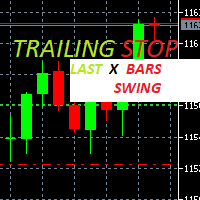
Trailing Stop loss last X candles swing high and low.  X is a value of candles you can set as an input parameter. This Trailing stop loss moves the SL below the last X candles low(if BUY positions) or high(for SELL positions) If we are in a trend and we open a position following the trend, the SL will be automatically placed at the low or high of the last X bars. contact me if you need further assistence
Important: Please test this Dashboard on a demo account first to ensure the settings align with your specific firm's objectives. If your Prop Firm has unique rules not covered here, Let Me Know —I am happy to integrate custom functions to suit your needs. Prop Firm Dashboard: The Ultimate Real-Time Rules Monitor Stop refreshing your browser and start focusing on the charts. The   Prop Firm Dashboard EA   is a professional-grade monitoring tool designed for serious traders. It brings your critic
The Expert Advisor performs closure of several positions. Positions are grouped by type. You can select the position of largest profit(losses). It is possible to form groups at random. Эксперт выполняет торговые операции группового закрытия позиций. Позиции группируются по типу. Можно выбрать один из трех параметров: filter Off. Buy only. Sell only. Можно отбирать позиции по величине прибыли(убыткам). filter Off. Wins only. Losses only. и/или задать порог по достигнутой прибыли(убыткам). Есть в
Easy Trade Executor is a tool for fast position sizing, trade execution, and trade management in MT5. Place Open Price, Stop Loss, and Take Profit levels directly on the chart, get automatic position size calculations, and open trades with controlled risk in just a few clicks. Why Easy Trade Executor? Easy Trade Executor is designed for traders who want more than just risk calculations — they want to manage trades quickly and efficiently directly from the chart. The tool combines position sizi
GridZone Alpha
Gooi Meng Liang
GridZone Alpha: The Ultimate Semi-Automated Grid & Zone Manager GridZone Alpha is an advanced, interactive trading panel designed for the modern manual trader. Stop staring at the charts waiting for the perfect entry, and stop relying on rigid, fully automated bots that cannot read market context. With GridZone Alpha, you provide the human analysis by identifying your support, resistance, or supply/demand zones. Once confirmed, the Limit Order Engine takes over, instantly deploying a precision,
Risk & Trade Manager for Prop Firm Accounts Ask For the Set Fils for better Parametre  work on 15 Min TIMFRAME  A professional management utility that supervises your open positions and enforces strict risk parameters in real time. Built for funded traders and prop-firm challengers (FTMO, FundedNext, and similar) who need their account risk handled with discipline and consistency. This tool does not predict the market — it manages what's already on your chart. It applies protective position hand
Trade Assistant MT5 Pro – One Click Trading Panel | Auto Lot Size | Risk Management Tool Short Description Trade Assistant MT5 Pro is a professional trading utility for MetaTrader 5 that allows traders to execute trades with one click, manage risk automatically, and improve trading accuracy using advanced tools like ATR stop loss, risk reward ratios, breakeven, and trailing stop. Full Description Trade Assistant MT5 Pro is a powerful manual trading panel designed for traders who want speed, prec
Global Equity Manager Pro Global Equity Manager Pro (GEM Pro)   is a professional-grade risk management and account protection suite designed for serious traders, pro-firm applicants, and fund managers. Unlike standard risk managers that simply close everything when a limit is hit, GEM Pro offers elite-level granular controls, selective closing logic, and a high-performance command center dashboard. WHY CHOOSE GEM PRO? GEM Pro was built based on feedback from real traders who found traditiona
RR Ratio KS Visual Calculator Point Based EA Elevate your risk management game with the RR Ratio KS Visual Calculator Point Based EA —the ultimate MetaTrader 5 utility that turns complex risk-reward calculations into a simple, visual powerhouse on your chart. Designed for precision traders, this Expert Advisor (EA) automates point-based RR ratio analysis, helping you size positions, set stops and targets dynamically, and maintain ironclad discipline without manual math or guesswork. Say goodbye
FX Trade Manager PRO HFX Trade Manager PRO is a professional manual trading assistant for MetaTrader 5, designed for traders who want fast execution, better risk control, and a clean trading workflow directly from the chart. This EA is not a signal generator or fully automated trading robot. It is a powerful trade management panel that helps you place, manage, protect, and control trades with speed and precision. Main Features One-Click Trading Panel Open Buy and Sell trades instantly from the c
ScalpX Pro
Eriberto Vanegas Lago
SCALPX PRO - MULTI-ORDER TRADING PANEL                                                Professional Scalping EA with ATR Trailing                                                                  Version 2.2                                         
LT Protect My Trades
Thiago Duarte
5 (3)
Protect My Trades is an EA (expert advisor bot) that automatically put stop loss and take profit on market trades and pending orders. You can specify if want it to do this only on actual symbol trades or in all others. Its configuration is very simple. Functions: Take profit: distance to TP (0 = disabled, no TP will be created). Stop loss: distance to SL (0 = disabled, no SL will be created). Price type: price type in pips or pipets/points (pips is common in Forex). Actual symbol only: manage th
FREE
ZoneStrike
Amir Nejatbakhsh
ZoneStrike Trading Assistant is a manual trading panel for MetaTrader. You decide when and where to trade; ZoneStrike handles the position sizing, the order placement and the trade management, and draws the market structure you are reading straight onto the chart. **** It is not an automated robot. It never opens a trade on its own — every entry is yours. PLAN THE TRADE ON THE CHART Press Buy, Sell, Pending Buy or Pending Sell and the trade appears on the chart before it is live: an entry lin
NAS100 Auto Sl And TP MT5
Moustapha Boulouz
5 (2)
Introducing NAS100 Auto SL and TP Maker for MT5: Never miss setting StopLoss and TakeProfit again with our NAS100 Auto SL and TP Maker, an indispensable assistant for traders navigating the Nasdaq 100 market on MetaTrader 5. This tool is designed for those who seek a seamless solution to automate the management of StopLoss and TakeProfit levels. Key Features: Effortless Automation: Automatically monitors Nasdaq 100 trades without StopLoss and/or TakeProfit. Dynamically adjusts levels based on u
FREE
Buyers of this product also purchase
Trade Assistant MT5
Evgeniy Kravchenko
4.43 (216)
It helps to calculate the risk per trade, the easy installation of a new order, order management with partial closing functions, trailing stop of 7 types and other useful functions. Additional materials and instructions Installation instructions - Application instructions - Trial version of the application for a demo account Line function -   shows on the chart the Opening line, Stop Loss, Take Profit. With this function it is easy to set a new order and see its additional characteristics bef
Forex Trade Manager MT5
InvestSoft
4.98 (679)
Trade Manager MT5 is an advanced position size calculator and trade management tool for MetaTrader 5, designed to help traders plan trades faster, control risk more precisely, and manage open positions directly from the chart. It combines order placement, risk based lot calculation, Stop Loss and Take Profit management, Break Even, Trailing Stop, Partial Close, Equity Protection, and external trade management in one panel. Whether you trade forex, indices, metals, commodities, crypto, or future
Local Trade Copier EA MT5
Juvenille Emperor Limited
4.94 (149)
Local Trade Copier EA MT5 is a fast and flexible trade copier for copying and managing trades between multiple MetaTrader 5 accounts on the same Windows computer or Windows VPS. It combines local trade synchronization with Receiver-side controls for lot sizing, risk management, trade filtering, symbol mapping, trade management and account protection. Set up your Transmitter and Receiver terminals in about 1 minute and copy manual or EA trades between accounts at the same or different brokers. U
Telegram to MT5 MultiChannel Copier
Sergio Marquez Uroz
4.59 (17)
Telegram to MT5 Multi-Channel Copier   automatically copies trading signals from your Telegram channels straight to MetaTrader 5. No bots, no browser extensions, no manual copying. A signal arrives in Telegram and the EA opens the trade in your terminal within seconds. And before you copy a channel, the built-in backtester shows you what that channel would have done in your account. The product has two components: a Windows application that listens to your Telegram channels, and this Expert Advi
================================================================================ POC BREAKOUT - V20.72. Full Professional Grade Toolkit ================================================================================ POC Breakout is a full MetaTrader 5 trading dashboard for discretionary traders who want breakout signals, Point of Control (POC) context, volume profiles, order flow, market structure, news, alerts, and advanced trade planning in one professional workspace. Attached directly to you
TradePanel MT5
Alfiya Fazylova
4.88 (169)
Trade Panel is a multi-functional trading assistant. The app contains over 50 trading functions for manual trading and allows you to automate most trading tasks. Application instructions + video instructions: https://www.mql5.com/en/blogs/post/772292 Trial version of the application for a demo account: https://www.mql5.com/en/blogs/post/750865 How to install the application: https://www.mql5.com/en/blogs/post/756239 How to test the application in visual mode: https://www.mql5.com/en/blogs/post/7
Copy Telegram signals with your own trading rules Telegram to MT5 Signal Trader automatically copies text-based trading signals from public and private Telegram channels and groups into MetaTrader 5. Manage multiple providers and MT5 accounts from one desktop app, with individual risk and trade settings for each provider . No Telegram bot or API setup needed for copying. Simply sign in with your own Telegram account by phone or QR code and select the channels or groups you have already joined. Y
FarmedHedge Pair Trading Dashboard
Tanapisit Tepawarapruek
5 (5)
Farmed Hedge Yield Farming | All Markets (Manual - Hybrid - Semi/Automated EA) VERIFIED TRADING RESULTS - Farmed Hedge Yield Axi Copy:  https://www.mql5.com/en/signals/2356376 - Farmed Hedge Yield Exn Copy:   https://www.mql5.com/en/signals/2356404 - Farmed Hedge Yield V Copy:  https://www.mql5.com/en/signals/2357156 IMPORTANT NOTICE: FarmedHedge is a MANUAL-FOCUSED TRADING UTILITY ,not a fully automated EA. Results shown on this Signal include manual trades and overall strategic management.
Power Candles Strategy Scanner - Self-Optimizing Multi-Symbol Setup Finder Series price: 111 USD until Sunday, 27 September 2026, then 139 USD again. Self-optimizing settings work one chart at a time, and finding where they pay off right now means opening chart after chart. Power Candles Strategy Scanner runs the same self-optimizing engine as the Power Candles indicator on every symbol in your Market Watch, side by side. One panel ranks where it pays off: the winning strategy per symbol, its op
Exp COPYLOT CLIENT for MT5
Vladislav Andruschenko
3.97 (35)
Professional Trade Copier for MetaTrader 5 Fast, professional, and reliable trade copier for MetaTrader . COPYLOT allows you to copy Forex trades between MT4 and MT5 terminals with support for Hedge and Netting accounts. COPYLOT MT5 version supports: - MT5 Hedge to MT5 Hedge - MT5 Hedge to MT5 Netting - MT5 Netting to MT5 Hedge - MT5 Netting to MT5 Netting - MT4 to MT5 Hedge - MT4 to MT5 Netting MT4 version Full Description +DEMO +PDF How To Buy How To Install How to get Log Files H
Signal Trading View to MT5 Pro
Mirel Daniel Gheonu
4.5 (2)
Signal TradingView to MT5 Pro  Instant professional execution between TradingView and MetaTrader 5 Automate your trading strategy with the most robust communication bridge between TradingView alerts and real execution in MT5. Designed for traders who demand speed, flexibility, and impeccable risk management, this Expert Advisor transforms any alert message into a precise market or limit order.   Install and TEST the TRIAL version HERE STRENGTHS AND ADVANTAGES Universal Parsing Engine (Propriet
HINN MagicEntry Extra
ALGOFLOW OÜ
4.74 (19)
HINN MAGIC ENTRY – the ultimate tool for entry and position management! SIMPLE. FASTEST. INTUITIVE. MAX AUTOMATED. Place orders by selecting a level directly on the chart! full description   ::  demo-version  :: 60-sec-video-description Key features: - Market, limit, and pending orders - Automatic lot size calculation - Automatic spread and commission accounting - Unlimited partitial take-profits  - Breakeven and trailing stop-loss and take-profit  functions - Invalidation leves - Intuitive, a
Premium Trade Manager - The Trade Panel With a Coach Built In Premium Trade Manager puts a trading coach inside your chart, with a full execution engine underneath it. Set the trade up the way you always do, then let Max, your AI trading coach, read that exact setup against your live account and give you a straight verdict before you commit: is the stop disciplined, is the risk sane, is a high-impact release minutes away, are you near a prop-firm limit. Below sits the engine that runs everything
Message me after purchase to receive the complete manual kit + 3-day OpenAI API trial to test the AI features + Another bonus gift The current price is a limited discount for August Relaunch Update — secure your edition now before price go up. Next Price: $340 This is completely different from any trading panel you’ve tried or seen on the market. It’s one of the most innovative AI-powered trading panels available in the retail market right now. Imagine connecting   AI directly to your chart   —
MT5 Trading Deck
Manuel Michiels
5 (2)
One button. One trade. MT5 Trading Deck is a hotkey trading panel for MetaTrader 5 that turns the platform into a keyboard-driven execution cockpit. Stop loss, take profit and lot size are pre-calculated for every key; the moment you press, a market order is live on the broker. A complete technical user manual is attached in the product Comments section. It documents every input parameter, the full hotkey map, the recommended Stream Deck XL layout, and the advanced workflows for Pre-Limit orders
Grid Manual MT5
Alfiya Fazylova
4.73 (22)
Grid Manual is a trading panel for working with grid strategies. The utility is universal, has flexible settings and an intuitive interface. It works with a grid of orders not only in the direction of averaging losses, but also in the direction of increasing profits. The trader does not need to create and maintain a grid of orders, the utility will do it. It is enough to open an order and the "Grid manual" will automatically create a grid of orders for it and will accompany it until the close. F
EasyInsight AIO MT5
Alain Verleyen
4.92 (12)
EASY Insight AIO – All-In-One Power for AI-Driven Trading Want to skip the setup and start scanning the entire market – Forex, Gold, Crypto, Indices, and even Stocks – in seconds? EASY Insight AIO is the complete plug-and-play solution for AI-powered trade analysis. It includes all core Stein Investments indicators built-in and automatically exports clean, structured CSV files – perfect for backtesting, AI prompts, and live market decision-making. No need to install or configure indicators manu
Trade Dashboard MT5
Fatemeh Ameri
4.94 (134)
Trade Dashboard simplifies how you open, manage, and control your trades, with built-in lot size calculation. It allows you to execute trades, manage risk, and control positions directly on the chart, with tools such as partial close, breakeven, and trailing stop. Designed to reduce manual work and help you stay focused on your trading decisions. A demo version is available for testing. Detailed explanations of features are provided within the MQL5 platform. Installation instructions are include
EA Overfitter
Stephen J Martret
5 (1)
That backtest looks great. But will it still be making money tomorrow, next week, next month? EA Overfitter re-runs your EA on 100 price histories it has never seen. One score tells you if the edge is real. A backtest tells you what an EA did on one price history — the one that happened to occur. What you cannot tell from it is how much of that result was the strategy and how much was the particular path. EA Overfitter answers that. It builds up to 100 synthetic price histories your EA has n
MT5 to Telegram Signal Provider turns your trading account into a signal provider. Every trade action, whether manual, by EA or from your phone, is instantly sent as a message to Telegram. You can fully customize the format or use a ready-made template for quick setup. [ Demo ] [ Manual ] [ MT4 Version ] [ Discord Version ]     New: [ Telegram To MT5 ] Setup A step by step user guide is available. Key Features Ability to customize order details sent to subscribers You can create a tiered subs
EA Slipstream
Stephen J Martret
5 (1)
Your backtest filled every order at the price it asked for. Your account does not. EA Slipstream measures what execution costs your EA, using your own fills, slippages and spreads to show you the true performance of your EA. A backtest prices every trade at the level the EA named. In live trading a pending order fills at whatever price is available when it triggers, a stop closes wherever the market is when it is hit, and the spread at that moment is whatever the account was quoting. The differ
Dynamic Fibonacci Grid
Tsvetan Tsvetanov
5 (1)
Introducing the latest version of the Dynamic Fibonacci Grid Dashboard for MT5. Now packed with many new features, this new dashboard transforms your trading experience and allows you to see the market and the price action from a completely different perspective. Discover new possibilities with simultaneous analysis of multiple timeframes covering multiple symbols. User-friendly interface for manual trading and management of positions and an expanded ability to apply predefined automated strate
Telegram to MT5 Coppy
Sergey Batudayev
5 (10)
Telegram to MT5: The Ultimate Signal Copying Solution Simplify your trading with Telegram to MT5, the modern tool that copies trading signals directly from Telegram channels and chats to your MetaTrader 5 platform, without the need for DLLs. This powerful solution ensures precise signal execution, extensive customization options, saves time, and boosts your efficiency. [ Instructions and DEMO ] [ FAQ ] [ How atach logs properly ] [ Settings descrition ] Key Features Direct Telegram API Integrati
The News Filter MT5
Leolouiski Gan
4.78 (23)
This product filters   all expert advisors and manual charts   during news time.  It is able to remove any of your EA during news and automatically reattach them after news ends. This product also comes with a complete  order management system   that can handle your open positions and pending orders before the release of any news. Once you purchase   The News Filter , you will no longer need to rely on built-in news filters for future expert advisors, as this product can filter them all from her
The product will copy all telegram signal to MT5 ( which you are member) , also it can work as remote copier.  Easy to set up, copy order instant, can work with almost signal formats, image signal,  s upport to translate other language to English Work with all type of channel or group, even channel have "Restrict Saving Content", work with  multi channel, multi MT5 Work as remote copier: with signal have ticket number, it will copy exactly via ticket number. Support to backtest signal. How to s
Anchor Trade Manager
Kalinskie Gilliam
5 (9)
Your EAs cannot see each other, but Anchor can. Anchor gives you one place to coordinate your EAs, manage risk, and decide when trading is allowed. It works alongside the trading bots you already use without any changes to them. The Problem One EA opens a trade. Then another starts trading. The next thing you know, you wake up to multiple grids built across your account. Each EA may be doing exactly what it was designed to do, but together they can place far more risk on your account than you in
Footprint Chart Pro — Professional OrderFlow EA for MetaTrader 5 Version 6.34 | Professional tool for real traders | Institutional-Grade Visualization DEMO USERS - PLEASE SELECT EVERY TICK / REAL TICK WHEN TESTING AND YOU HAVE DOWNLOADED HISTORICAL DATA. IF YOU SEE A WAITING SCREEN AND IT IS NOT DOWNLOADING, IT MEANS YOU HAVE LOW HISTORICAL DATA. TRY 1 MIN AND 5 MIN FIRST ON 1 DAY DATA. ONE DAY DATA SHOULD BE THE NEWEST AND MOST CURRENT DATE. PLEASE WAIT UNTIL THE MARKET HAS ROLLED OVER PERIOD.
YuClusters
Yury Kulikov
4.93 (43)
Attention: You can view the program operation in the free version  YuClusters DEMO .  YuClusters is a professional market analysis system. The trader has unique opportunities to analyze the flow of orders, trade volumes, price movements using various charts, profiles, indicators, and graphical objects. YuClusters operates on data based on Time&Sales or ticks information, depending on what is available in the quotes of a financial instrument. YuClusters allows you to build graphs by combining da
Multi Account Local Trade Copier is a fast local trade copier for MetaTrader: copy trades between MT4/MT5 terminals running on the same Windows PC or VPS, from one master account to multiple receiver accounts — your own real, demo and prop firm accounts, at the same broker or at different ones. It is event-driven : the master publishes every trade the instant it happens, and the receiver measures and logs the real copy latency of every single trade — typically 50-150 ms . No DLLs, no internet br
Trade Manager DaneTrades
Levi Dane Benjamin
4.23 (30)
DaneTrades Trade Manager is a professional trade panel for MetaTrader 5, designed for fast, accurate execution with built‑in risk control. Place market or pending orders directly from the chart while the panel automatically calculates position size from your chosen risk, helping you stay consistent and avoid emotional decision‑making. The Trade Manager is built for manual traders who want structure: clear risk/reward planning, automation for repeatable management, and safeguards that help reduc
More from author
Risk Guard Prop
Amul Ravikumar
Risk Guard Prop is not a trading strategy. It never opens a position on a live or demo account. Attach it to one chart per account and it watches every position on the account — your manual trades and any other Expert Advisor — and enforces the rules you set. When a rule is hit it closes what is open, blocks new positions (they are closed the moment they appear), tells you why, and keeps the lock through a terminal restart. It is built for prop-firm challenges and funded accounts, where one ba
Smart Loss Exit Prop is not a trading strategy. On a live or demo account it never opens a position and it never touches a position that is in profit. Attach it to one chart and it watches every position on the account — your manual trades and any other Expert Advisor — and cuts the losers that meet your rules, before they reach the hard stop that ends a challenge. It is built for prop-firm challenges and funded accounts, where the daily loss limit is closer than the stop-loss, and for anyone
News Guard Prop
Amul Ravikumar
News Guard Prop is not a trading strategy. On a live or demo account it never opens a position. Attach it to one chart and it reads the MetaTrader 5 economic calendar for the currencies you actually trade, then does, automatically and every time, what a prop-firm rule book asks for around a news release. It is built for prop-firm challenges and funded accounts where trading around high-impact news is restricted or penalised, and for anyone who has watched a spread spike take out a stop two sec
Trade Reporter isn't a trading robot. It watches your account and posts what happens to your Telegram chats or channels and your Discord server. It never opens, closes or modifies a trade. It's for signal providers, prop-firm traders sharing their progress, trading groups, and anyone who wants their trades on their phone as they happen. WHAT IT POSTS - Open: side, symbol, entry, stop and target (with distance in pips), lot size, and the risk at the stop in money and % of balance. - Stop / tar
Filter:
No reviews
Reply to review