Prop Trade Manager Pro

Prop Trade Manager Pro is not a trading strategy. It never opens a position on its own: every order comes from a button you press, and every rule is an input you set. Attach it to one chart and it sizes your trades, manages what is open, and enforces the limits that funded accounts and prop-firm challenges (FTMO, The5ers, MyFundedFX, E8 and the rest) live or die by.


It is built for the trader who can find the entry but loses the account to one oversized trade or one bad day.


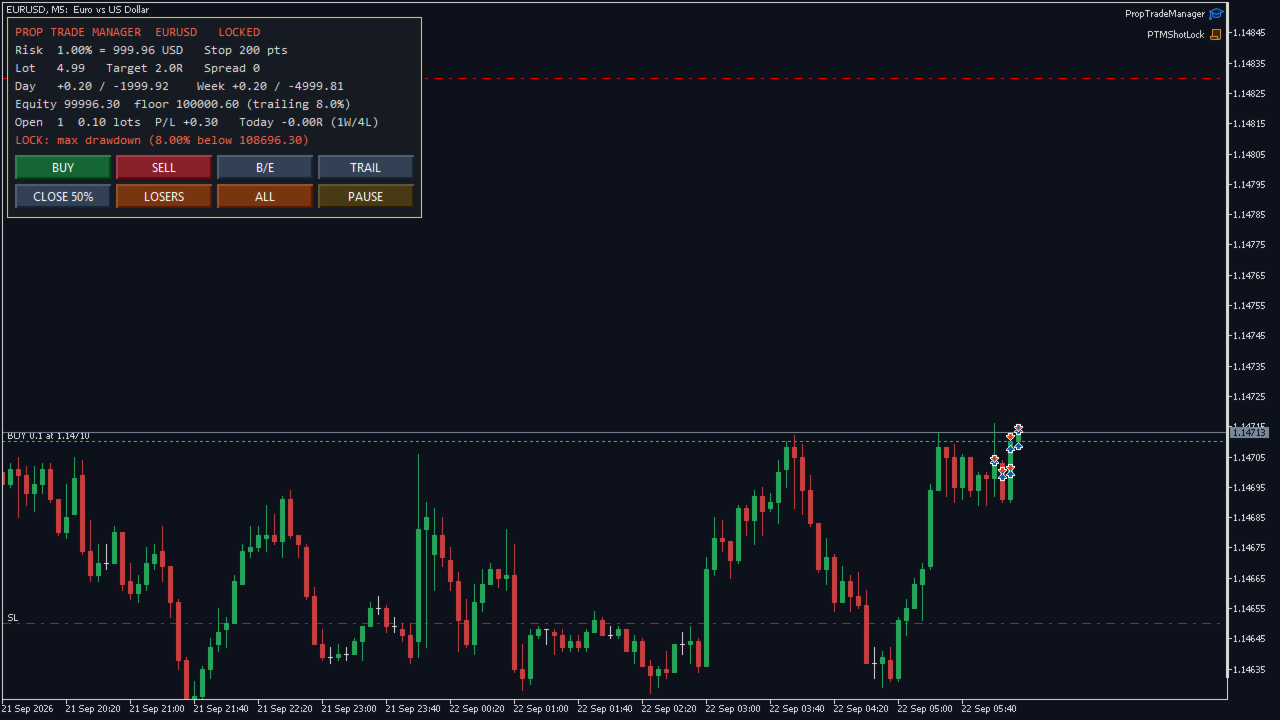
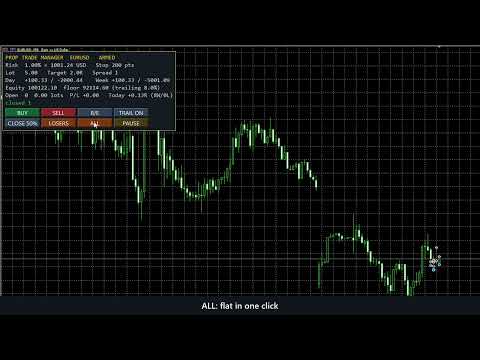
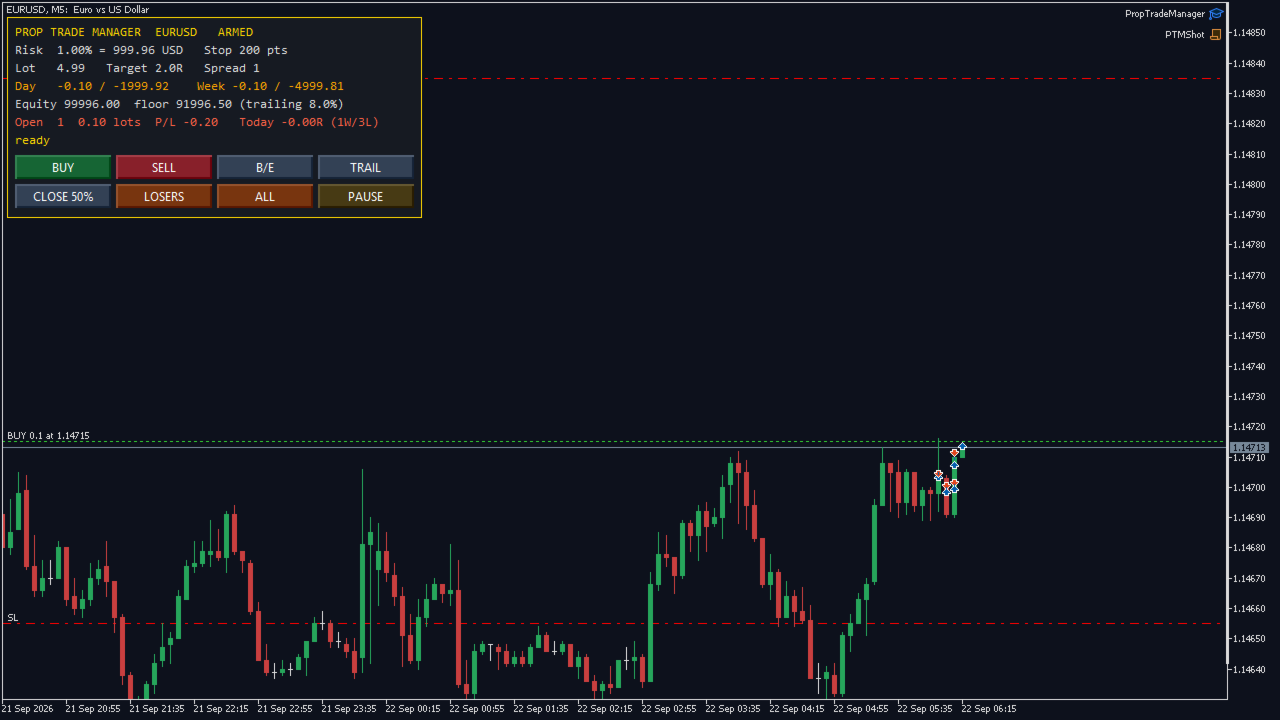
Screenshots are real. Shot on a live MetaQuotes-Demo chart with a real position open, not mocked up. The second screenshot shows the drawdown lock tripped and the panel refusing a new entry.


— NEW in 1.04: Challenge presets, the firm's own numbers —

Pick FTMO 2-Step Phase 1, Phase 2, FTMO 1-Step, or Custom, and the panel runs the challenge the way the firm measures it:

• Every limit is a percent of the initial balance, not of today's balance. At 110,000 on a 100,000 account, a 5% daily limit is 5,000, not 5,500.

• The daily floor is set at the firm's reset (FTMO: midnight Prague time, daylight saving included), from the balance, the equity, or the higher of the two.

• The max loss floor is static, trails the end-of-day balance (FTMO 1-Step), the closed balance, or equity; it can stop trailing at the initial balance.

• The profit target counts only with no open position, after the minimum trading days, and (when the firm has one) within the best-day rule.

• Safety buffer: entries lock, and optionally every position on the account closes, when equity comes within the buffer (default 0.5% of the initial balance) of the higher floor.

• Entry sizing never risks more than the room left above the floor.

• The whole account counts: every symbol, every EA, as the firm sees it. The state survives a restart.

• Two panel rows show the status, the target, the days, the best-day share, both floors and the room left.

The preset is Off by default, so existing settings behave exactly as before. Presets were taken from FTMO's published trading objectives on 3 October 2026. Firms change their rules; check yours. Not affiliated with any prop firm.


— Entry, sized to your risk — Set risk as a percent of balance and the stop distance you trade with; the panel shows the exact lot for the chart symbol from its tick value, tick size and volume step — correct on gold, indices and crypto CFDs, not only forex. BUY and SELL open at market with the stop and the target already attached (target is a multiple of the stop, or off). The lot is rounded down to the volume step, clamped by the broker's volume limit and by free margin, and stops respect the broker's minimum stop and freeze level.


— Management, on buttons, never automatic — • Break-even — lock the stop a set number of points into profit. • Trailing stop — start after a set profit, trail a set distance behind price. • Partial close — close a set share of each position. • Close losers / Close all — flatten the losing side, or everything. • Manage only this chart, every symbol, or only positions this panel opened.


— Prop-firm rules, every one an input, every one optional —


Daily loss lock — percent of the day's opening balance. Counts closed plus floating P/L; lasts until the next server day.

Weekly loss lock — percent of the week's opening balance; lasts until Monday.

Maximum drawdown — static from the starting equity, or trailing from the equity high-water mark, which is how most challenges measure it. The high-water mark is stored, so it survives restarts.

Profit-target lock — stop trading once up your target on the day, so a good day stays a good day.

Breach-aware entry — a new trade whose own risk at its stop would break the daily lock is trimmed to what is left, or refused, before it is sent — not caught after.

Flatten on lock (optional) — close everything the instant a lock trips.

Position and lot caps — max open positions, hard lot cap, max total lots, max spread.

— Trading window — Allow entries only inside your hours (server time), with an optional Friday cut-off so you are not holding into the weekend.


— Restart-proof — The day base, week base, equity high-water mark and challenge state survive a terminal restart, so a lock cannot be dodged by reloading the chart.


— Alerts — Popup, push to the mobile terminal, and e-mail when a lock trips — each optional. Every action is written to the Experts log.


Self-test in the Strategy Tester (MetaQuotes-Demo, EURUSD M15): 21 of 21 checks passed with FTMO 2-Step Phase 1 and with FTMO 1-Step, 15 of 15 with the preset Off — lot sizing, stop and target attached, partial close, break-even and trailing, paused panel refuses entry, drawdown lock refuses entry, buffer lock and close, close-all leaves nothing open. The challenge rule engine matches 20 of 20 hand-worked cases.


— Troubleshooting —

• "in the buffer above the daily floor": equity is within the buffer of the firm's floor. Entries stay locked until the next reset raises the floor, or equity recovers.

• Attached mid-challenge: set the initial balance input to the account size. The panel cannot see days traded before it was attached; the day count starts from there.

• Starting a new challenge on the same login: change the preset or the initial balance and the challenge restarts.

• Panel says LOCKED right after attaching: a stored lock from a previous session still applies, which is the lock doing its job across a restart. To start fresh on a new account, remove the PTM_<login>_* global variables (Tools → Global Variables).


— Free version — The lot calculator and one-click entry are free on CodeBase as One-Click Trade Manager (code 77538). This paid version adds all management buttons, the full prop-firm rule set, challenge presets, the trading window, restart-proof locks and alerts. Try the free one first; if the sizing is right for your broker, the paid one uses the same engine.
Önerilen ürünler
Time-Based Auto-Close Order Management Tool (MT5) — Technical Description Overview This is an automated order management EA based on time-algorithm logic. Its core function is to automatically execute preset closing operations when user-defined holding periods expire, aiming to help traders enforce predetermined rules mechanically and reduce emotional interference. Core Closing Modes Closing Mode Functional Definition Close All Closes all eligible positions when the set time is reached. Close
Quant Panel
Kevin Craig E Gittins
Quant Panel is a strategy analysis utility for MetaTrader 5. It helps traders review several Expert Advisors or trading strategies running on the same account. The panel groups closed positions by Expert Advisor comment or magic number and calculates each strategy's results separately. You can compare strategy performance, review individual drawdowns and export detailed reports from one dashboard. Independent strategy analysis Each strategy has its own virtual starting balance and closed-trade b
All In One Trade Manager is a trade manager and one-click trading panel for manual traders on MetaTrader 5. It works as a trading assistant, risk manager and position size calculator in one dashboard. It brings together everything below in one panel: order entry with risk sizing automatic trade management advanced order types account protection statistics Its entry checks run in the background and tell you, before you click BUY or SELL, when something speaks against the trade. Also available
Ritz Prime TradeCopier – Institutional Cross-Broker Sync Engine Say goodbye to lagging copy trades, mismatched broker symbols, and missed Stop Losses. Ritz Prime TradeCopier is an ultra-fast, high-frequency copy trading engine designed for professional portfolio managers and retail traders. Powered by a custom Bit-Banger JSON architecture and an advanced Global Variable (GV) mapping system, it seamlessly bridges multiple MetaTrader terminals on a single VPS/SERVER with true zero-lag performance.
Trade Manager Panel ## Short description  Manage your manual trades with one click: automatic break-even, trailing stop, two-level partial close and risk-based lot sizing — all from a single on-chart panel. --- ## Full description Trade Manager Panel is an on-chart utility that takes care of your open trades so you can focus on the market instead of the order ticket. Drop it on any chart and it manages every position on that symbol automatically, while an interactive panel lets you size new
Эксперт собирает данные из биржевого стакана, суммируя отложенные ордера на покупку или продажу. Далее, по сумме ордеров определяется общее направление, куда смотрят участники рынка. Если суммарные покупки/продажи превышают определенный коэффициент, то производится сигнал. Настройки: Timer=5 // указывается как часто обновлять данные по рынку в секундах. Чаще чем раз в 10 секунд ставить не рекомендуется. X-size =700 // размер окна по оси Х. Y-size=650// размер окна по оси Y. Only "Market Watch"?=
EA Total Close Trade Manager MT5 Manage existing MetaTrader 5 positions from one dashboard. EA_TOTAL_CLOSE is a position, TP/SL, and trade-management utility designed for MetaTrader 5 hedging accounts. It is intended for traders who open positions manually or through other trading systems and want a structured way to close, protect, and manage existing positions without handling every position one by one. From one dashboard, you can manage position groups, apply Break Even, set or remove TP/SL l
Automated Timeframe cycling with Symbols centered.  Force every timeframe onto one clock window, so the story you see on Daily is the same story you are slicing on H4, H1, and M1.  Traders usually flip timeframes and lose the span. A Daily chart shows a few weeks, then M15 shows a few hours, and the eye treats them as different markets. This indicator locks the window to N bars of the highest enabled timeframe — default 10 Daily — and maps every lower timeframe to that same stretch. You stay ins
FREE
Barak Mega EA
Jorge Jovanny Hernandez Maldonado
BARAK MEGA EA  is a fully automated trading Expert Advisor designed for traders who demand total control, strategic flexibility, and advanced risk management within a single system. This EA functions as a true strategy builder , allowing you to combine multiple technical indicators and custom rules to adapt to any market, asset, or timeframe. Unlike traditional robots with fixed logic, BARAK MEGA EA features a modular architecture where every component can be independently enabled, disabled, and
FREE
EA Emotion   is not a traditional Expert Advisor that places trades automatically – instead, it’s a psychological checkpoint that helps you manage   trading discipline and emotional control . Designed especially for discretionary traders, prop firm challengers, and anyone serious about improving consistency,   EA Emotion   asks a series of custom questions   right after you open a trade , such as: Did you follow your trading plan? Are you in the right mental state? Is this trade part of your set
Decision Guard Risk Panel MT5
Markus Lorenz Lothar Nendse
Decision Guard Risk Panel MT5 MT5 position-size calculator and pre-trade risk panel with draggable Entry, Stop Loss and Take Profit levels, automatic lot sizing and live R:R. PLAN RISK BEFORE EXECUTION Decision Guard Risk Panel MT5 is a chart-based position-size calculator and pre-trade risk planning tool for MetaTrader 5. It helps you define Entry, Stop Loss and Take Profit, calculate the matching lot size and review the complete risk structure before a trade begins. The product does not genera
TradingX Hotkeys
Johannes Stephanus Lombard
Inputs Available Lotsizes Partial Close % You can change lotsizes as you require On an open chart click once to select chart to be able to use hotkeys on specific chart. All Pairs can be used with this expert We created this expert to be able to still trade C300 with a 0.06 Lotsize If you enter a 0.6 lot and close 0.90% you can trade with 0.06 Lot Keys to be used: B -Buy S -Sell C -Close Profitable D -Breakeven (Note if stoploss is set it won't break even) P -Partial close X -Close all
This QuickClose help you to close all orders having profit immediately with only ONE CLICK, its work is very fast. You can choose which symbol you want or close all symbols so it will helpful for you in your trading to manage trading faster. This EA can quick close all Buy and Sell Orders by a selected symbol or total, And delete all pending orders. This SymbolButton is designed for closing orders. There is available Manual and Automatic closing functions. Automatic closing function will close t
Spread Costs refers to the amount of the loss caused by the spread, and Swap Benefits refers to the amount of the income gained by overnight positions. Spread Costs is an important indicator for short-term traders, especially for scalping traders, and Swap Benefits is an important indicator for long-term traders. Since the spreads and swaps on the MetaTrader 5 platform are all expressed in points, we need to convert it into the amount expressed in the account currency. This tool can display the
Ürünü beğendiyseniz lütfen yorum yapmayı ve puanlamayı unutmayın! Advanced PolyLines, MetaTrader 5 grafiği üzerinde doğrudan çoklu çizgiler oluşturmak ve düzenlemek için kullanılan bir araçtır. Birden fazla çizgi parçasını tek bir yapı içinde birleştirerek grafik analizinde kullanılan çizgilerin oluşturulmasını ve yönetilmesini kolaylaştırır. Araç, birden fazla parçadan oluşan yapılarla çalışmayı kolaylaştırmak amacıyla tasarlanmıştır. Bağlantılı noktalar birlikte taşınabilir ve böylece her çiz
FREE
FX Trade Manager PRO HFX Trade Manager PRO is a professional manual trading assistant for MetaTrader 5, designed for traders who want fast execution, better risk control, and a clean trading workflow directly from the chart. This EA is not a signal generator or fully automated trading robot. It is a powerful trade management panel that helps you place, manage, protect, and control trades with speed and precision. Main Features One-Click Trading Panel Open Buy and Sell trades instantly from the c
JYPF Trade Panel is a professional, interactive trading assistant for MT5. It features dynamic 3-line synchronization (Entry/SL/TP) with "Instant Click-and-Drag" technology. Avoid mouse blockages with our cutting-edge translucent trend-zone visualization. Real-time floating profit/loss projections and Risk-to-Reward (R:R) ratios are calculated instantly on your chart. Complete with one-click break-even, 50% partial close, trailing pips, and global equity protection—the ultimate toolkit for scalp
FREE
Atlas Trade Desk MT5 Atlas Trade Desk MT5 is a visual trade panel, risk manager and lot calculator for manual MetaTrader 5 traders. Plan market and pending orders directly on the chart, calculate position size from your selected risk, adjust Entry, Stop Loss and Take Profit visually, and manage open positions from one clean dashboard. The tool is built for discretionary traders who want faster order preparation, clearer risk control and safer position management without switching between multipl
Bneu Performance Mastery System — AI Trading Coach and Behavior Analysis Premium on-chart performance analysis utility with 4 dashboard tabs. AI Coach analyzes your closed trade history and provides personalized coaching with actionable advice in real-time. 5 behavior detectors catch overtrading, revenge trading, and tilt. Pattern analysis finds your best and worst days, sessions, and pairs. Achievement system rewards discipline and consistency milestones. Telegram reports deliver daily and we
**Forex Trade Manager Pro MT5** **Trade Manager MT5** , MetaTrader 5 için kapsamlı bir işlem yönetim yardımcı programıdır ve bir işlemi planladığınız andan kapattığınız ana kadar pozisyonunuzun her yönü üzerinde size tam kontrol sağlar. Riski ciddiye alan yatırımcılar için tasarlanmıştır; disiplin oluşturan acemiden, birden çok pozisyonda anında işlem yapması gereken profesyonel skalpera kadar herkes için uygundur. Araç herhangi bir grafiğe eklenir ve temiz, kompakt bir panel sunar. Grafik üz
Percent Crosshair is a powerful and easy percentage measure tool. Measure the chart percentage very quick! Don't waste your time anymore! Just attach the Percent Crosshair indicator in the chart, select crosshair mode at toolbars or press "Ctrl+F" and start using the crosshair as you always do! The percent measure will be next to the indicative price. Customize your indicator the way you want! There are 4 entry parameters: Positive % color: set the desired color when % is positive. Negative % co
Candle Clock All Timeframes
Isaac Alexander Pinero Garcias
Candle Clock All Timeframes — Real-Time Countdown MT5 Indicator   |   M1 to Monthly   |   Updates every second   What It Does Displays a real-time countdown timer next to the current candle showing exactly how many minutes and seconds remain before the candle closes. The timer updates every second automatically and works on all timeframes from M1 to Monthly without any manual intervention.   Position: the timer always appears next to the active candle on the right side of the chart. Updates: ev
GridZone Alpha: The Ultimate Semi-Automated Grid & Zone Manager GridZone Alpha is an advanced, interactive trading panel designed for the modern manual trader. Stop staring at the charts waiting for the perfect entry, and stop relying on rigid, fully automated bots that cannot read market context. With GridZone Alpha, you provide the human analysis by identifying your support, resistance, or supply/demand zones. Once confirmed, the Limit Order Engine takes over, instantly deploying a precision,
Rehoboth TradeGate Manager — MT5 Execution Validation & Trade Management TradeGate Manager places a validation layer between your trading decision and the market. TradeGate Manager is available for both MetaTrader 5 and MetaTrader 4 versions. Before an order is sent, TradeGate checks the instrument, spread, stop protection and market conditions against limits you define. If a required condition fails, the order is refused and the panel tells you   what failed and why . Once a position is open,
FastPanel Trader EA — Professional Trade Panel, Risk Control, Sessions & Candle Timer for MT5 FastPanel Trader EA is a clean and powerful MetaTrader 5 trade management panel designed for traders who want faster execution, better risk control, and a more organized trading chart. This Expert Advisor does not try to predict the market or promise profits. Instead, it gives you a professional control panel directly on your MT5 chart so you can manage entries, stop loss, take profit, risk, open positi
Telegram Notify MT5 Telegram Notify MT5 is an utility tool to bridge your MetaTrader 5 activities to your Telegram chat/channel. It is useful for monitoring your MetaTrader 5 account by sending a notification to your particular Telegram chat/channel when someone/EA is placing trades, modifying order's TP/SL, closing trades and etc. This EA does not place any trade for your account. This EA also could be a convenient tool for monitoring other's EA trading activities or a tool for publishing your
One Click Trade Manager MT5 Key Features One Click Buy & Sell Close All Orders Close Profit Orders Close Loss Orders Break Even One Click Trailing Stop Live Balance Display Live Equity Display Live Profit Display Spread Display Fast Order Execution Easy-to-Use Trading Panel Supports All MT5 Brokers Optimized for Gold, Forex, Indices, and Crypto Benefits Faster trade execution Better risk management Simple and professional interface Perfect for scalpers, intraday traders, and swing traders Save t
Blade Position Manager Pro – MT5 Trade Management Utility Take Control of Your Trades with One Professional Dashboard Blade Position Manager Pro is a MetaTrader 5 trade management utility designed to help traders manage open positions, control risk, protect floating profits, and simplify everyday trading operations. Whether you trade Gold (XAUUSD), Forex, indices, or other supported instruments, Blade Position Manager Pro provides practical tools for managing your trades from a compact, easy-to-
Tick Volume Chart - MetaTrader 5 için tick hacmine dayalı grafikler oluşturmaya yarayan benzersiz bir araçtır. Tick Volume Chart sayesinde, her bir mumun zamana göre değil, belirli sayıda tick'e göre oluştuğu grafikler inşa edebilirsiniz. Bu, standart zaman tabanlı grafiklerde bulunmayan, piyasa aktivitesini analiz etmede ideal bir hassasiyet sağlar. Özel sembolleri destekleyen tüm indikatörleri ve Expert Advisor'ları kullanabilirsiniz. Oluşturulan grafiklerle çalışmak, standart grafikler kadar
Pulsar Panel MT5, MetaTrader 5 için grafik üzerinde çalışan bir işlem yöneticisidir: sürüklenebilir giriş, Stop Loss (SL) ve Take Profit (TP) çizgileriyle bir emri planlayın, en fazla dört TP seviyesi, başabaş ve trailing stop ile gönderin, pozisyonları yönetin, günlük zararınızı denetleyin ve istatistiklerinizi inceleyin. Pulsar Panel bir Uzman Danışmandır (Expert Advisor, EA) ve panellerini doğrudan grafik üzerine çizer. Kurulması gereken harici bir uygulama ve Dinamik Bağlantı Kütüphanesi (DL
Bu ürünün alıcıları ayrıca şunları da satın alıyor
Trade Assistant MT5
Evgeniy Kravchenko
4.43 (216)
It helps to calculate the risk per trade, the easy installation of a new order, order management with partial closing functions, trailing stop of 7 types and other useful functions. Additional materials and instructions Installation instructions - Application instructions Line function -   shows on the chart the Opening line, Stop Loss, Take Profit. With this function it is easy to set a new order and see its additional characteristics before opening.   Risk management  - The risk calculation
Trade Manager EA’ye hoş geldiniz! Ticaretin daha sezgisel, hassas ve verimli hale gelmesi için tasarlanmış nihai risk yönetim aracı ile tanışın. Bu sadece bir emir verme aracı değil; ticaret planlaması, pozisyon yönetimi ve risk kontrolü için kapsamlı bir çözüm. İster yeni başlayan bir yatırımcı olun, ister deneyimli bir trader ya da hızlı emir gerektiren bir scalper, Trade Manager EA ihtiyaçlarınıza uyum sağlar ve forex, endeksler, emtialar ve kripto paralar dahil tüm piyasalarda esneklik sunar
Farmed Hedge Yield Farming | All Markets (Manual - Hybrid - Semi/Automated EA) VERIFIED TRADING RESULTS - Farmed Hedge Yield Axi Copy:  https://www.mql5.com/en/signals/2356376 - Farmed Hedge Yield Exn Copy:   https://www.mql5.com/en/signals/2356404 - Farmed Hedge Yield V Copy:  https://www.mql5.com/en/signals/2357156 IMPORTANT NOTICE: FarmedHedge is a MANUAL-FOCUSED TRADING UTILITY ,not a fully automated EA. Results shown on this Signal include manual trades and overall strategic management.
Telegram to MT5 Multi-Channel Copier   , Telegram ve Discord kanallarınızdaki alım-satım sinyallerini doğrudan MetaTrader 5'e otomatik kopyalar. Bot yok, tarayıcı uzantısı yok, elle kopyalama yok. Sinyal Telegram'a veya Discord'a düşer ve EA birkaç saniye içinde terminalinizde işlemi açar. Ve bir kanalı kopyalamadan önce, yerleşik backtester o kanalın hesabınızda ne yapmış olacağını gösterir. Ürün iki bileşenden oluşur: Telegram kanallarınızı dinleyen bir Windows uygulaması ve sinyalleri MT5 ter
Local Trade Copier EA MT5
Juvenille Emperor Limited
4.94 (149)
Local Trade Copier EA MT5, aynı Windows bilgisayarı veya Windows VPS üzerinde çalışan birden fazla MetaTrader 5 hesabı arasında işlemleri kopyalamak ve yönetmek için hızlı ve esnek bir işlem kopyalayıcıdır. Yerel işlem senkronizasyonunu, Receiver tarafında lot büyüklüğü, risk yönetimi, işlem filtreleme, sembol eşleştirme, işlem yönetimi ve hesap koruması kontrolleriyle birleştirir. Transmitter ve Receiver terminallerinizi yaklaşık 1 dakika içinde ayarlayın ve aynı veya farklı brokerlardaki hesa
TradePanel MT5
Alfiya Fazylova
4.88 (172)
Trade Panel, çok işlevli bir ticaret asistanıdır. Uygulama, manuel ticaret için 50'den fazla ticaret fonksiyonu içerir ve çoğu ticaret görevini otomatikleştirmeyi mümkün kılar. Uygulama talimatları: https://www.mql5.com/en/blogs/post/756482 Demo hesabı için uygulamanın deneme sürümü: https://www.mql5.com/en/blogs/post/750865 Uygulamayı nasıl kurulur: https://www.mql5.com/en/blogs/post/756239 Uygulamayı görsel modda nasıl test edilir: https://www.mql5.com/en/blogs/post/770277 Uygulamayı VPS MetaT
News Trade EA MT5
Konstantin Kulikov
4.55 (11)
Birkaç yıldır kullandığım çok yararlı bir robotu tanıtıyorum. Hem yarı otomatik hem de tam otomatik modlarda kullanılabilir. >>> Chat <<< Program, ekonomik takvim haberlerinde esnek ticaret ayarlarını içeriyor. Stratejiler test cihazında kontrol edilemez. Sadece gerçek bir iş. Ayarların en son arşivini indirin: https://www.mql5.com/en/blogs/post/747929 Sinyal izleme: https://www.mql5.com/en/signals/author/test-standart Bu bilirkişi için kendi ayarlar setinizi oluştururken, blogdaki tüm paramet
Telegram sinyallerini kendi işlem kurallarınızla kopyalayın Telegram to MT5 Signal Trader , herkese açık ve özel Telegram kanallarındaki ve gruplarındaki metin tabanlı işlem sinyallerini otomatik olarak MetaTrader 5'e kopyalar. Tek bir masaüstü uygulamasından birden fazla sinyal sağlayıcısını ve MT5 hesabını yönetin; her sağlayıcı için ayrı risk ve işlem ayarları belirleyin. Sinyal kopyalamak için Telegram botu veya API kurulumu gerekmez. Kendi Telegram hesabınızla telefon numarası veya QR kod k
================================================================================ POC BREAKOUT - V20.72. Full Professional Grade Toolkit ================================================================================ POC Breakout is a full MetaTrader 5 trading dashboard for discretionary traders who want breakout signals, Point of Control (POC) context, volume profiles, order flow, market structure, news, alerts, and advanced trade planning in one professional workspace. Attached directly to you
Exp COPYLOT CLIENT for MT5
Vladislav Andruschenko
3.97 (35)
MetaTrader 5 için profesyonel işlem kopyalayıcı MetaTrader için hızlı, profesyonel ve güvenilir bir işlem kopyalayıcı . COPYLOT , MT4 ve MT5 terminalleri arasında Forex işlemlerini kopyalamanıza olanak tanır ve Hedge ile Netting hesaplarını destekler. COPYLOT MT5 sürümü şunları destekler: - MT5 Hedge → MT5 Hedge - MT5 Hedge → MT5 Netting - MT5 Netting → MT5 Hedge - MT5 Netting → MT5 Netting - MT4 → MT5 Hedge - MT4 → MT5 Netting MT4 sürümü Tam açıklama + DEMO + PDF Nasıl satın alınır Nasıl kurul

The product will copy all telegram signal to MT5 ( which you are member) , also it can work as remote copier.  Easy to set up, copy order instant, can work with almost signal formats, image signal,  s upport to translate other language to English Work with all type of channel or group, even channel have "Restrict Saving Content", work with  multi channel, multi MT5 Work as remote copier: with signal have ticket number, it will copy exactly via ticket number. Support to backtest signal. How to s
REVDEN AI Desk: Trading'inizi Kendi Yapay Zekanızla Tek Bir Sohbetten Yönetin, REVDEN'in Piyasa Bağlamıyla Trading'inizi tek bir sohbetten yönettiğinizi düşünün. REVDEN AI Desk bunu MetaTrader 5'e getiriyor: kendi yapay zekanıza piyasayı nasıl okuduğunu sorarsınız, o da işlem yaptığınız semboller hakkında REVDEN'in tam bağlamından, yani durumlarından, risk görünümlerinden ve yaklaşan açıklamalardan yanıt verir. Önerileri giriş, stop, hedef ve riskle gelir; uygun olanları siz onaylarsınız. Kurall
EA Overfitter
Stephen J Martret
5 (3)
That backtest looks great. But will it still be making money tomorrow, next week, next month? EA Overfitter re-runs your EA on 100 price histories it has never seen. One score tells you if the edge is real. A backtest tells you what an EA did on one price history — the one that happened to occur. What you cannot tell from it is how much of that result was the strategy and how much was the particular path. EA Overfitter answers that. It builds up to 100 synthetic price histories your EA has n
Power Candles Strateji Tarayıcısı - Kendi Kendini Optimize Eden Çoklu Sembol Kurulum Bulucu Power Candles Strateji Tarayıcısı , Power Candles göstergesini çalıştıran aynı kendinden optimize edici motoru, Piyasa İzleyicinizdeki her sembol üzerinde yan yana çalıştırır. Tek bir panel, şu anda istatistiksel olarak hangi sembollerin işlem yapılabilir olduğunu, her birinde hangi stratejinin kazandığını, en uygun Stop Loss / Take Profit çiftini gösterir ve yeni bir sinyal geldiği anda size bildirim gön
Timeless Charts
Samuel Manoel De Souza
5 (9)
Timeless Charts, profesyonel yatırımcılar için hepsi bir arada bir trading aracıdır. Saniye Grafikleri ve Renko gibi özel grafik türlerini, Footprints , Clusters , Hacim Profilleri , VWAP çalışmaları ve gelişmiş piyasa analizi sağlayan sabitlenmiş analiz araçlarıyla gelişmiş emir akışı analiziyle birleştirir. İşlem ve pozisyon yönetimi, entegre işlem yönetim paneli aracılığıyla doğrudan grafik üzerinden gerçekleştirilirken, Market Replay ve Sanal Hesaplar trading becerileri ve stratejileri üzeri
MetaTrader 5 için Trading Panel — grafik ve klavyeden profesyonel tek tıkla işlem kontrolü Aktif traderlar için geliştirilmiş güçlü bir Trading Panel; işlemleri standart MetaTrader arayüzüne göre çok daha hızlı açmanıza, yönetmenize ve kapatmanıza yardımcı olur. Bu çözüm; pozisyonları, bekleyen emirleri, toplam kârı ve işlem yürütmesini tek bir profesyonel çalışma alanında kontrol etmek isteyen kullanıcılar için tasarlanmıştır. Bu sadece sıradan bir yardımcı araç değildir. MetaTrader 5 için ger
Your EAs cannot see each other, but Anchor can. Anchor gives you one place to coordinate your EAs, manage risk, and decide when trading is allowed. It works alongside the trading bots you already use without any changes to them. The Problem One EA opens a trade. Then another starts trading. The next thing you know, you wake up to multiple grids built across your account. Each EA may be doing exactly what it was designed to do, but together they can place far more risk on your account than you in
VirtualTradePad PRO SE MT5 — MetaTrader 5 için profesyonel işlem kontrol merkezi VirtualTradePad PRO SE , MetaTrader 5 için grafik tabanlı premium bir işlem paneli ve trade yönetim çalışma alanıdır. Daha hızlı emir yürütme, daha net pozisyon kontrolü, yapılandırılmış trade yönetimi, görsel seviye planlama ve doğrudan grafik üzerinden profesyonel bir çalışma akışı isteyen traderlar için tasarlanmıştır. Bu yalnızca basit bir BUY / SELL paneli değildir. PRO SE; manuel işlem, bekleyen emirler, pozis
RETAILBERG FOOTPRINT CHART PRO — Order-Flow Workspace for MetaTrader 5 Version 7.00  |  Professional System  |  31 tools  |  One chart A full 150-page illustrated User Manual is included. Please read the full manual to understand this feature packed footprint chart elements and ui. https://www.mql5.com/en/blogs/post/777982 DEMO / STRATEGY TESTER — PLEASE READ FIRST
Trade Dashboard simplifies how you open, manage, and control your trades, with built-in lot size calculation. It allows you to execute trades, manage risk, and control positions directly on the chart, with tools such as partial close, breakeven, and trailing stop. Designed to reduce manual work and help you stay focused on your trading decisions. A demo version is available for testing. Detailed explanations of features are provided within the MQL5 platform. Installation instructions are include
Trade Indicator Assistant   is a powerful MT5 utility designed to turn indicators into automated trading systems. Its main feature is the ability to automatically detect an indicator’s   BUY and SELL signal buffers , without requiring you to know the buffer numbers, search through indicator settings, or modify the indicator source code. Bonus Indicator:   After purchasing Trade Indicator Assistant, contact me to receive   Trade Signal Pro   completely free as a bonus indicator. [Download Demo V
Seconds Chart - MetaTrader 5 için saniye bazlı grafikler oluşturmanıza olanak sağlayan eşsiz bir araçtır. Seconds Chart sayesinde saniye cinsinden zaman dilimleriyle grafik oluşturabilir, standart dakika veya saatlik grafiklerde mümkün olmayan esneklik ve analiz hassasiyetine ulaşabilirsiniz. Örneğin, S15 zaman dilimi 15 saniyelik mum çubuklarını ifade eder. Desteklenen özel sembollerle herhangi bir gösterge ve danışman kullanabilirsiniz. Onlarla çalışmak, standart grafiklerde işlem yapmak kadar
Riskinizi otomatik olarak hesaplarken işlemlere hızlı bir şekilde girip çıkmanıza yardımcı olacak Ticaret Yöneticisi. Aşırı Ticaret, İntikam Ticareti ve Duygusal Ticaretten korunmanıza yardımcı olacak özellikler içerir. İşlemler otomatik olarak yönetilebilir ve hesap performans ölçümleri bir grafikte görselleştirilebilir. Bu özellikler, bu paneli tüm manuel yatırımcılar için ideal kılar ve MetaTrader 5 platformunun geliştirilmesine yardımcı olur. Çoklu Dil desteği. MT4 Sürümü  |  Kullanım Kılavu
Sonraki Güncelleme — Sürüm 2.52 Çok Yakında! [YENİ] Piyasa Analizinizi ve İşlem Sürecinizi Geliştirmek İçin Tasarlanmış 4 Büyük Yeni Özelliğe Hazır Olun İşlem ihtiyaçlarınızı karşılamak üzere tasarlanmış 4 yeni özellikle piyasa analizini bir üst seviyeye taşıyoruz. İşte yeni özellikler: TRADE OVERVIEW DASHBOARD CONFLUENCE AT ZONE STRONG & WEAK HIGH/LOW OTE 1. TRADE OVERVIEW DASHBOARD Piyasanın genel görünümünü daha kolay anlamanıza yardımcı olan, işlem kararlarınızı desteklemek için rehberlik s
MT5 to Telegram Signal Provider , hesabınızı bir sinyal sağlayıcı haline getirerek belirtilen sinyalleri Telegram'ın sohbetine, kanalına veya grubuna göndermeyi sağlayan kullanımı kolay, tamamen özelleştirilebilir bir araçtır. Rakip ürünlerin çoğunun aksine, DLL içe aktarması yapmaz. [ Demo ] [ Kılavuz ] [ MT4 Versiyonu ] [ Discord Versiyonu ] [ Telegram Kanalı ]  New: [ Telegram To MT5 ] Kurulum Adım adım bir kullanıcı kılavuzu mevcuttur. Telegram API'si hakkında bilgi gerekmemektedir; ihtiyac
DrawDown Limiter
Haidar Lionel Haj Ali
5 (23)
DrawDown Limiter v5.0 — Gelişmiş Hesap Koruma Kontrolcüsü DrawDown Limiter v5.0, trading hesabınızı izlemek ve yapılandırılmış risk, kâr, haber, zamanlama, rollover veya pozisyon sayısı limitlerine ulaşıldığında otomatik olarak tepki vermek üzere tasarlanmış istemci taraflı bir hesap koruma kontrolcüsüdür. Tek bir özel grafik üzerinden manuel işlemleri, otomatik stratejileri, birden fazla Expert Advisor'ı, bekleyen emirleri ve açık pozisyonları izleyebilir. Tüm hesabı koruyabilir veya Magic Numb
Telegram To MT5 — Sinyal Kopyalayıcı Telegram kanallarınızdaki işlem çağrılarını gerçek MT5 emirlerine dönüştürün — otomatik olarak, istediğiniz kadar hesapta ve risk ile kurallar tamamen sizin kontrolünüzde. Telegram To MT5, Telegram'da zaten takip ettiğiniz VIP / sinyal kanallarını MetaTrader 5 terminalinize bağlar. Ücretsiz bir eşlik eden masaüstü uygulaması mesajları okur (botlara izin vermeyen kanallardan bile), ve bu Expert Advisor bunları hesabınızda yürütür — kendi risk ayarlarınızı, sem
RS Trade Copier - gerçek grafik arayüze sahip, ultra hızlı yerel işlem kopyalayıcı. Hesap numaralarını elle girmeyi bırakın. Artık 200'den fazla anlaşılmaz giriş parametresiyle uğraşmak yok. Birden fazla MT5 ve MT4 terminali arasında işlem operasyonlarını kopyalamak için güvenilir ve esnek bir araçtır. Hem profesyonel yatırımcılar, sinyal hizmetleri hem de bireysel yatırımcılar için uygundur. Bir veya birden fazla Sağlayıcıdan bir veya birden fazla Alıcıya ticareti senkronize eder ve bunu yüksek
25% discount on the release of the tool: only for the next 3 buyers Send a message to receive a demo version. AstroTrade Trading Assistant AstroTrade is a comprehensive multi-functional trading utility developed for the MetaTrader 5 platform. It integrates essential tools for trade execution, risk management, and technical monitoring into a single unified interface. The application is designed to assist traders in managing their daily operations through a visual and structured environment. Vi
Telegram'dan MT5'e:   Nihai Sinyal Kopyalama Çözümü Telegram'dan MT5'e işlemlerinizi basitleştirin, DLL'lere ihtiyaç duymadan işlem sinyallerini doğrudan Telegram kanallarından ve sohbetlerinden MetaTrader 5 platformunuza kopyalayan modern araç. Bu güçlü çözüm hassas sinyal yürütme, kapsamlı özelleştirme seçenekleri sağlar, zamandan tasarruf sağlar ve verimliliğinizi artırır. [ Instructions and DEMO ] Temel Özellikler Doğrudan Telegram API Entegrasyonu Telefon numarası ve güvenli kod ile kimlik
Yazarın diğer ürünleri
Risk Guard Prop
BRAINGRAIN TECHNOLOGIES LLP
Risk Guard Prop is not a trading strategy. It never opens a position on a live or demo account. Attach it to one chart per account and it watches every position on the account — your manual trades and any other Expert Advisor — and enforces the rules you set. When a rule is hit it closes what is open, blocks new positions (they are closed the moment they appear), tells you why, and keeps the lock through a terminal restart. It is built for prop-firm challenges and funded accounts, where one ba
Smart Loss Exit Prop
BRAINGRAIN TECHNOLOGIES LLP
Smart Loss Exit Prop is not a trading strategy. On a live or demo account it never opens a position and it never touches a position that is in profit. Attach it to one chart and it watches every position on the account — your manual trades and any other Expert Advisor — and cuts the losers that meet your rules, before they reach the hard stop that ends a challenge. It is built for prop-firm challenges and funded accounts, where the daily loss limit is closer than the stop-loss, and for anyone
News Guard Prop
BRAINGRAIN TECHNOLOGIES LLP
News Guard Prop is not a trading strategy. On a live or demo account it never opens a position. Attach it to one chart and it reads the MetaTrader 5 economic calendar for the currencies you actually trade, then does, automatically and every time, what a prop-firm rule book asks for around a news release. It is built for prop-firm challenges and funded accounts where trading around high-impact news is restricted or penalised, and for anyone who has watched a spread spike take out a stop two sec
Trade Reporter isn't a trading robot. It watches your account and posts what happens to your Telegram chats or channels and your Discord server. It never opens, closes or modifies a trade. It's for signal providers, prop-firm traders sharing their progress, trading groups, and anyone who wants their trades on their phone as they happen. WHAT IT POSTS - Open: side, symbol, entry, stop and target (with distance in pips), lot size, and the risk at the stop in money and % of balance. - Stop / tar
Filtrele:
Değerlendirme yok
Değerlendirmeye yanıt