Backtest Integrity Pro
- Utilities
-
Nauris Zukas
 University of Latvia — Professional Bachelor’s Degree in Finance Management
Steinbeis University — Master of Business Administration (MBA)
Trading Forex since 2001.
Developing EAs since 2005.
Third place winner in Automated Trading Championship 2008. - Version: 1.0
- Activations: 10
BACKTEST INTEGRITY PRO – Professional Backtest Integrity Testing
Professional tick-data utility for testing Expert Advisors against hidden date/time dependencies and potential backtest manipulation.
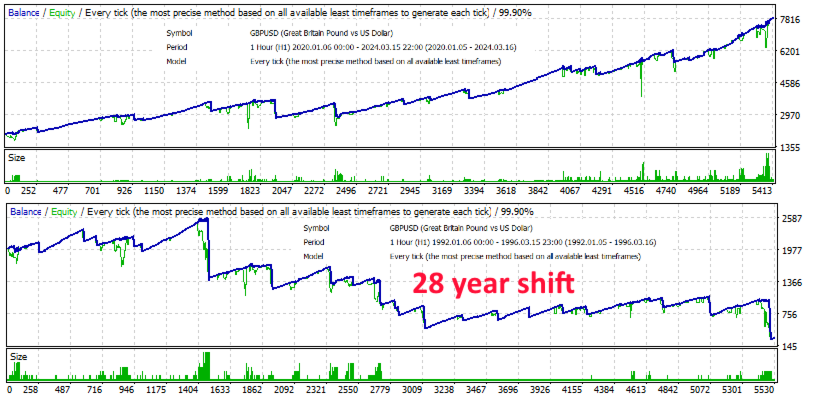
A backtest can look completely convincing while still depending on conditions that are specific to a particular historical period. An Expert Advisor may contain hidden date restrictions, hardcoded time dependencies, or other logic that only becomes visible when the same market data is tested under a different historical date.
The 28-year shift is a powerful way to expose this type of dependency. Instead of changing the original tick prices, the tool shifts the timestamps of the historical data backward while preserving the original market sequence.
However, a single fixed shift is not always enough. An EA can potentially be designed to operate only from a specific calendar date onward, making a standard 28-year shift ineffective.
That is why I created Backtest Integrity Pro—to provide both the traditional 28-year shift and a flexible 24H x N shifting method for additional integrity testing.
Disclaimer: This tool does not determine whether an Expert Advisor is legitimate or manipulated. It provides a practical way to perform additional backtests under shifted historical timestamps and investigate whether an EA behaves differently when the calendar date is changed.
Key Features:-
28-Year Shift: Performs the traditional 28-year backward timestamp shift used for backtest integrity testing while preserving the original tick prices and other data fields.
-
24H x N Shift: Shift historical tick data backward by any selected number of days for additional testing scenarios.
-
Flexible N Parameter: Set the number of days manually. For example, N=1 shifts the data by 24 hours, N=7 by 168 hours, and N=30 by 720 hours.
-
Original Tick Data Preserved: Bid, Ask, volume, and other source data fields remain unchanged. Only the timestamp is shifted.
-
Multiple File Formats: Supports both Tick Data Suite (TDS) and MetaTrader 5 CSV tick-data formats.
-
Large File Support: Designed to process large historical tick-data files with progress information during processing.
-
Automatic Output Naming: Generated files are automatically named according to the selected shift method for easy identification.
-
Backtest Integrity Testing: Run an EA against the same historical market sequence with shifted calendar dates.
-
Hidden Date Dependency Detection: Investigate whether EA behavior depends on specific historical dates or periods.
-
Backtest Manipulation Research: Use alternative timestamp shifts to investigate EAs that may contain date-based restrictions or dependencies.
-
EA Development: Test whether your own Expert Advisor remains consistent when historical timestamps are shifted.
-
28 Years: The traditional fixed 28-year backward shift. This method preserves the weekday structure of the original dates and is intended for standard 28-year integrity testing.
-
24H x N: A flexible backward shift based on a user-defined number of days. Unlike the 28-year method, this allows arbitrary shifts that intentionally do not have to preserve the original weekday.
Original tick:
2024.03.19 03:00:00.558,1.27261,1.27267
28 Years:
1996.03.19 03:00:00.558,1.27261,1.27267
24H x N, N=7:
2024.03.12 03:00:00.558,1.27261,1.27267
Supported File Types:-
TDS: Tick Data Suite CSV format.
-
MT5: MetaTrader 5 tick-data CSV format.
-
Copy the source CSV tick-data file into the terminal MQL5\Files folder.
-
Enter the source file name without the .csv extension.
-
Select the appropriate file type.
-
Select the desired shift method.
-
If using 24H x N, specify the desired number of days in the N parameter.
-
Run the script. The shifted CSV file will be created in the same MQL5\Files folder.
FOR PROFESSIONAL EA DEVELOPERS, TESTERS & BACKTEST ANALYSIS
Useful Resources:"Free Trading Tools Alerts" - Temporary free EA releases. Subscribe so you don't miss the next one.